International Journal of Modern Engineering Research (IJMER)
               www.ijmer.com            Vol.3, Issue.2, March-April. 2013 pp-622-625      ISSN: 2249-6645


           Automatic Detection of Unsafe Dynamic Component Loadings
                     in Multi-Terminals by Using IP Address

                                    Gnanasoundari.A, 1 Dr.S. Tamilarasi2
1
    Final Year Student, M.Tech CSE Department, Dr.M.G.R.Educational and Research Institute University, Tamil Nadu, India
       2
         Professor of CSE and IT Department, Dr.M.G.R.Educational And Research Institute University, Tamil Nadu, India

Abstract: The mechanism widely used for an improved system of modularity and flexibility is Dynamic loading of software
components. Dynamic loading can be hijacked by placing an arbitrary file with the specified name in a directory searched
before resolving the target component, thereby making the system more vulnerable. The vulnerable components are
important to be deducted.
In this paper an automated technique to detect vulnerable and unsafe dynamic component loadings are presented. Analysis
has two phases:
1) Online phase – by applying dynamic binary instrumentation to collect runtime information on component loading.
2) Offline phase – to analyze the collected information to detect vulnerable component loadings.
         This technique is implemented in networked system of Microsoft Windows and UNIX using system IP address and it
can deduct unsafe components and stopped. Our evaluation results show that unsafe component loading is prevalent in
software on both OS platforms, and it is more severe on Microsoft Windows.

Keywords: Full path, Filename, Online Phase, Offline phase

                                                      I. Introduction
           Dynamic loading allows an application the flexibility to dynamically link a component and use its exported
functionalities. Benefits include modularity and generic interfaces for third-party software such as plug-ins. It also helps to
isolate software bugs as bug fixes of a shared library can be incorporated easily. With these advantages, dynamic loading is
widely used in designing and implementing software.
           Important stage in dynamic loading is component resolution by locating the correct component for use at runtime.
Two resolution methods are used in Operating systems by either specifying the full path or the filename of the target
component. Using full path, operating systems simply locate the target from the given full path. With filename, operating
systems resolve the target by searching a sequence of directories, determined by the runtime directory search order, to find
the first occurrence of the component.
           Operating systems might provide mechanisms to protect system resources. For example, Microsoft Windows
supports Windows Resource Protection (WRP) to avoid system files from being replaced. However, these do not prevent
loading of a malicious component located in a directory searched before the directory where the intended component resides.
           In case an attacker sends a victim an archive file containing a document for a vulnerable program (e.g., a Word
document) and a malicious DLL. If the victim opens the document after extracting the archive file, the vulnerable program
will load the malicious DLL, which leads to remote code execution.

                                           II. Unsafe Component Loading
        This section describes dynamic loading of components, types of unsafe loadings and remote attack for vulnerable
dynamic loading.

2.1 Dynamic Loading of Components
         Software components often use functionalities exported by other components such as shared libraries at runtime.
This operation is generally involves in three phases: resolution, loading, and usage. Specifically, an application resolves the
needed target components, loads them, and utilizes the desired functions provided by them.
         Component interoperation can be achieved through dynamic loading provided by operating systems or runtime
environments. For instance, the LoadLibrary and dlopen system calls are used for dynamic loading on Microsoft Windows
and Unix-like operating systems, respectively. Dynamic loading is mostly executed in two steps: component resolution and
chained component loading.

2.1.1 Component Resolution
          To resolve a target component, it is required to specify it correctly. Operating systems provide two types of target
component specifications: full path and filename. For full path specification, operating systems resolve a target component
based on the provided full path. For filename specification, operating systems obtain the full path of the target component
from the provided file name and a dynamically determined sequence of search directories. Specifically, an operating system
iterates through the directories until it finds a file with the specified file name, which is the resolved component. For
example, suppose that a target component is specified as audmigplugin.dll and the directory search order is given as

                                                            www.ijmer.com                                           622 | Page
International Journal of Modern Engineering Research (IJMER)
              www.ijmer.com            Vol.3, Issue.2, March-April. 2013 pp-622-625      ISSN: 2249-6645

C:Program FilesiTunes; C:WindowsSystem32; ...; $PATH on Microsoft Windows. If the first directory containing a file
with the name audmigplugin.dll is C:WindowsSystem32, the resolved full path is determined by this directory.

2.1.2 Chained Component Loading:
        In dynamic loading, the full path of the target component is determined by its specification through the resolution
process and the component is incorporated into the host software if it is not already loaded. During the process of
incorporation the target component, the component’s load-time dependent components are also loaded.


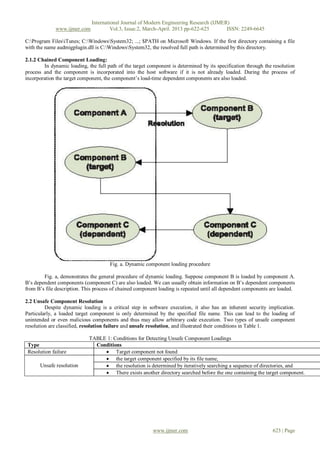
                                      Fig. a. Dynamic component loading procedure

        Fig. a, demonstrates the general procedure of dynamic loading. Suppose component B is loaded by component A.
B’s dependent components (component C) are also loaded. We can usually obtain information on B’s dependent components
from B’s file description. This process of chained component loading is repeated until all dependent components are loaded.

2.2 Unsafe Component Resolution
         Despite dynamic loading is a critical step in software execution, it also has an inherent security implication.
Particularly, a loaded target component is only determined by the specified file name. This can lead to the loading of
unintended or even malicious components and thus may allow arbitrary code execution. Two types of unsafe component
resolution are classified, resolution failure and unsafe resolution, and illustrated their conditions in Table 1.

                             TABLE 1: Conditions for Detecting Unsafe Component Loadings
 Type                          Conditions
 Resolution failure                Target component not found
                                   the target component specified by its file name,
      Unsafe resolution            the resolution is determined by iteratively searching a sequence of directories, and
                                   There exists another directory searched before the one containing the target component.


                                                          www.ijmer.com                                         623 | Page
International Journal of Modern Engineering Research (IJMER)
              www.ijmer.com             Vol.3, Issue.2, March-April. 2013 pp-622-625      ISSN: 2249-6645

                            III. Detection of Unsafe Components in Network System
                                          Fig 2 - ARCHITECTURE DIAGRAM


         Fig. 2 shows the high-level overview of our analysis process, which is composed of two phases: dynamic profile
generation and offline profile analysis.

3.1 Dynamic Profile Generation
          We dynamically applied the binary executable analysis to capture a sequence of system level actions for dynamic
loading of components. During the instrumented program execution, we collect three types of information: system calls
invoked for dynamic loading, image loading, and process and thread identifiers. The collected information is stored as a
profile for the instrumented application and is analyzed in the offline profile analysis phase.
          The dynamic profile generated information extracted from the Client side to monitor the server by using the IP
address. The server can monitor the dynamic loading to detection unsafe components and stop the vulnerable host.

3.2 Offline Profile Analysis
           Firstly, we extract each component loading from the profile. First group a sequence of actions in the profile by
process and thread identifiers as the actions performed by different threads may be interleaved due to context switching. This
grouping separates the sequences of dynamic loadings performed by different threads. Then, we divide the sequence for each
thread into subsequence of actions, one for each distinct dynamic loading. This can be achieved by using the first invoked
system call for dynamic loading as a delimiter. Next, we obtain a list of groups, each of which contains a sequence of actions
for loading a component at runtime. This gives the possible control flows in the dynamic loading procedure. Note that each
group contains loading actions for both the target component and the load-time dependent components
Algorithm 1. OfflineProfileAnalysis
Input: S (a sequence of actions for a dynamic loading) Auxiliary functions:
Target Spec(S): return target specification of S
DirSearchOrder(S): return directory search order used
In S
ImgLoad(S): return the image loadings in S
Resolution Failure(S): return the resolution failures in S
Chained Loading(S): return actions for the chained
Loadings in S IsUnsafeResolution (filename, resolved path, search_dirs): check whether the resolution is unsafe
1: img_loads ImgLoad(S)
2: failed resolutions Resolution Failure(S)
3: if jimg_loadsj¼¼0 then
4: if jfailed_resolutionsj¼¼1 then
5: Report this loading as a resolution failure
6: end if
7: else
8: spec Target Spec(S)
9: dirs DirSearchOrder(S)
10: if spec is the filename specification then
11: resolved path img_loads [0].resolved path // retrieve the first load
12: if IsUnsafeResolution (spec, resolved_path, dirs) then
                                                           www.ijmer.com                                           624 | Page
International Journal of Modern Engineering Research (IJMER)
               www.ijmer.com             Vol.3, Issue.2, March-April. 2013 pp-622-625      ISSN: 2249-6645

13: Report this loading as an unsafe resolution
14: end if
15: end if
16: chained loads Chained Loading(S)
17: for each load in chained loads do
18: OfflineProfileAnalysis (each load)
19: end for
20: end if

                                            IV. Discussion and Conclusion
         In this paper, we have described the analysis technique to detect unsafe dynamic component loadings in networked
systems by using IP address. Our technique works in two phases. It first generates profiles to record a sequence of
component loading behaviours at runtime using dynamic binary instrumentation. It then analyzes the profiles to detect two
types of unsafe component loadings: resolution failures and unsafe resolutions. To assess our technique, we implemented
tools to detect unsafe component loadings on Microsoft Windows and Linux. Our evaluation shows that unsafe component
loadings are prevalent on both platforms and more severe on Windows platforms from a security perspective.

                                                         References
[1]     “About Windows Resource Protection,” http://msdn.microsoft. Com/en- us/library/aa382503 (VS.85).aspx, 2011.
[2]    “Windows        DLL       Exploits       Boom;       Hackers        Post       Attacks     for      40-Plus     Apps,”
       http://www.computerworld.com/s/article/9181918/        Windows_DLL_exploits_boom_hackers_post_attacks_for_40_
       plus_apps, 2011.
[3]    “Hacking            Toolkit          Publishes           DLL              Hijacking            Exploit,”         http://
       www.computerworld.com/s/article/9181513/Hacking_toolkit_ publishes_DLL_hijacking_exploit, 2011.
[4]    T. Kwon and Z. Su, “Automatic Detection of Unsafe Component Loadings,” Proc. 19th Int’l Symp. Software Testing
       and Analysis, pp. 107-118, 2010.
[5]    “Zero-Day       Windows       Bug        Problem      Worse        than       First     Thought,      Says     Expert,”
       http://www.computerworld.com/s/article/9180978/ Zero_day_Windows_bug_pro blem_worse_than_first_thought_
       says_expert, 2011.
[6]    “Update:       40        Windows          Apps       Contain         Critical        Bug,       Says       Researcher,”
       http://www.computerworld.com/s/article/9180901/ Update_40_Windows_apps_contain_critical_bug_says_ researcher,
       2011.
[7]    “Researcher     Told      Microsoft     of      Windows     Apps        Zero-Day       Bugs     6     Months     Ago,”
       http://www.computerworld.com/s/article/ print/9181358/Researcher_told_Mi crosoft_of_Windows_apps_ zero_
       day_bugs_6_months_ago, 2011.
[8]    “Exploiting DLL Hijacking Flaws,” http://blog.metasploit.com/ 2010/08/exploiting-dll-hijacking-flaws.html, 2011.
[9]    “Microsoft        Releases       Tool         to      Block          DLL           Load       Hijacking       Attacks,”
       http://www.computerworld.com/s/article/print/9181518/
       Microsoft_releases_tool_to_block_DLL_load_hijacking_attacks, 2011.
[10]   “About the Security Content of Safari 3.1.2 for Windows,” http:// support.apple.com/kb/HT2092, 2011.
[11]   “IE’s Unsafe DLL Loading,” http://www.milw0rm.com/ exploits/2929, 2011.
[12]   “Microsoft Security Bull. MS09-014,” http://www.microsoft. com/TechNet/security/Bulletin/MS09-014.mspx, 2011.
[13]   “Microsoft Security Bull. MS09-015,” http://www.microsoft. com/TechNet/security/Bulletin/MS09-015.mspx, 2011.
[14]   B. Cornelissen, A. Zaidman, A. van Deursen, L. Moonen, and R. Koschke, “A Systematic Survey of Program
       Comprehension through Dynamic Analysis,” IEEE Trans. Software Eng., vol. 35, no. 5, pp. 684-702, Sept./Oct. 2009.
[15]   C.-K. Luk, R. Cohn, R. Muth, H. Patil, A. Klauser, G. Lowney, S. Wallace, V.J. Reddi, and K. Hazelwood, “Pin:
       Building Customized Program Analysis Tools with Dynamic Instrumentation,”Proc. ACM SIGPLAN Conf.
       Programming Language Design and Implementation, pp. 190-200, 2005.


                                                            www.ijmer.com                                           625 | Page

Ad32622625

  • 1.
    International Journal ofModern Engineering Research (IJMER) www.ijmer.com Vol.3, Issue.2, March-April. 2013 pp-622-625 ISSN: 2249-6645 Automatic Detection of Unsafe Dynamic Component Loadings in Multi-Terminals by Using IP Address Gnanasoundari.A, 1 Dr.S. Tamilarasi2 1 Final Year Student, M.Tech CSE Department, Dr.M.G.R.Educational and Research Institute University, Tamil Nadu, India 2 Professor of CSE and IT Department, Dr.M.G.R.Educational And Research Institute University, Tamil Nadu, India Abstract: The mechanism widely used for an improved system of modularity and flexibility is Dynamic loading of software components. Dynamic loading can be hijacked by placing an arbitrary file with the specified name in a directory searched before resolving the target component, thereby making the system more vulnerable. The vulnerable components are important to be deducted. In this paper an automated technique to detect vulnerable and unsafe dynamic component loadings are presented. Analysis has two phases: 1) Online phase – by applying dynamic binary instrumentation to collect runtime information on component loading. 2) Offline phase – to analyze the collected information to detect vulnerable component loadings. This technique is implemented in networked system of Microsoft Windows and UNIX using system IP address and it can deduct unsafe components and stopped. Our evaluation results show that unsafe component loading is prevalent in software on both OS platforms, and it is more severe on Microsoft Windows. Keywords: Full path, Filename, Online Phase, Offline phase I. Introduction Dynamic loading allows an application the flexibility to dynamically link a component and use its exported functionalities. Benefits include modularity and generic interfaces for third-party software such as plug-ins. It also helps to isolate software bugs as bug fixes of a shared library can be incorporated easily. With these advantages, dynamic loading is widely used in designing and implementing software. Important stage in dynamic loading is component resolution by locating the correct component for use at runtime. Two resolution methods are used in Operating systems by either specifying the full path or the filename of the target component. Using full path, operating systems simply locate the target from the given full path. With filename, operating systems resolve the target by searching a sequence of directories, determined by the runtime directory search order, to find the first occurrence of the component. Operating systems might provide mechanisms to protect system resources. For example, Microsoft Windows supports Windows Resource Protection (WRP) to avoid system files from being replaced. However, these do not prevent loading of a malicious component located in a directory searched before the directory where the intended component resides. In case an attacker sends a victim an archive file containing a document for a vulnerable program (e.g., a Word document) and a malicious DLL. If the victim opens the document after extracting the archive file, the vulnerable program will load the malicious DLL, which leads to remote code execution. II. Unsafe Component Loading This section describes dynamic loading of components, types of unsafe loadings and remote attack for vulnerable dynamic loading. 2.1 Dynamic Loading of Components Software components often use functionalities exported by other components such as shared libraries at runtime. This operation is generally involves in three phases: resolution, loading, and usage. Specifically, an application resolves the needed target components, loads them, and utilizes the desired functions provided by them. Component interoperation can be achieved through dynamic loading provided by operating systems or runtime environments. For instance, the LoadLibrary and dlopen system calls are used for dynamic loading on Microsoft Windows and Unix-like operating systems, respectively. Dynamic loading is mostly executed in two steps: component resolution and chained component loading. 2.1.1 Component Resolution To resolve a target component, it is required to specify it correctly. Operating systems provide two types of target component specifications: full path and filename. For full path specification, operating systems resolve a target component based on the provided full path. For filename specification, operating systems obtain the full path of the target component from the provided file name and a dynamically determined sequence of search directories. Specifically, an operating system iterates through the directories until it finds a file with the specified file name, which is the resolved component. For example, suppose that a target component is specified as audmigplugin.dll and the directory search order is given as www.ijmer.com 622 | Page
  • 2.
    International Journal ofModern Engineering Research (IJMER) www.ijmer.com Vol.3, Issue.2, March-April. 2013 pp-622-625 ISSN: 2249-6645 C:Program FilesiTunes; C:WindowsSystem32; ...; $PATH on Microsoft Windows. If the first directory containing a file with the name audmigplugin.dll is C:WindowsSystem32, the resolved full path is determined by this directory. 2.1.2 Chained Component Loading: In dynamic loading, the full path of the target component is determined by its specification through the resolution process and the component is incorporated into the host software if it is not already loaded. During the process of incorporation the target component, the component’s load-time dependent components are also loaded. Fig. a. Dynamic component loading procedure Fig. a, demonstrates the general procedure of dynamic loading. Suppose component B is loaded by component A. B’s dependent components (component C) are also loaded. We can usually obtain information on B’s dependent components from B’s file description. This process of chained component loading is repeated until all dependent components are loaded. 2.2 Unsafe Component Resolution Despite dynamic loading is a critical step in software execution, it also has an inherent security implication. Particularly, a loaded target component is only determined by the specified file name. This can lead to the loading of unintended or even malicious components and thus may allow arbitrary code execution. Two types of unsafe component resolution are classified, resolution failure and unsafe resolution, and illustrated their conditions in Table 1. TABLE 1: Conditions for Detecting Unsafe Component Loadings Type Conditions Resolution failure  Target component not found  the target component specified by its file name, Unsafe resolution  the resolution is determined by iteratively searching a sequence of directories, and  There exists another directory searched before the one containing the target component. www.ijmer.com 623 | Page
  • 3.
    International Journal ofModern Engineering Research (IJMER) www.ijmer.com Vol.3, Issue.2, March-April. 2013 pp-622-625 ISSN: 2249-6645 III. Detection of Unsafe Components in Network System Fig 2 - ARCHITECTURE DIAGRAM Fig. 2 shows the high-level overview of our analysis process, which is composed of two phases: dynamic profile generation and offline profile analysis. 3.1 Dynamic Profile Generation We dynamically applied the binary executable analysis to capture a sequence of system level actions for dynamic loading of components. During the instrumented program execution, we collect three types of information: system calls invoked for dynamic loading, image loading, and process and thread identifiers. The collected information is stored as a profile for the instrumented application and is analyzed in the offline profile analysis phase. The dynamic profile generated information extracted from the Client side to monitor the server by using the IP address. The server can monitor the dynamic loading to detection unsafe components and stop the vulnerable host. 3.2 Offline Profile Analysis Firstly, we extract each component loading from the profile. First group a sequence of actions in the profile by process and thread identifiers as the actions performed by different threads may be interleaved due to context switching. This grouping separates the sequences of dynamic loadings performed by different threads. Then, we divide the sequence for each thread into subsequence of actions, one for each distinct dynamic loading. This can be achieved by using the first invoked system call for dynamic loading as a delimiter. Next, we obtain a list of groups, each of which contains a sequence of actions for loading a component at runtime. This gives the possible control flows in the dynamic loading procedure. Note that each group contains loading actions for both the target component and the load-time dependent components Algorithm 1. OfflineProfileAnalysis Input: S (a sequence of actions for a dynamic loading) Auxiliary functions: Target Spec(S): return target specification of S DirSearchOrder(S): return directory search order used In S ImgLoad(S): return the image loadings in S Resolution Failure(S): return the resolution failures in S Chained Loading(S): return actions for the chained Loadings in S IsUnsafeResolution (filename, resolved path, search_dirs): check whether the resolution is unsafe 1: img_loads ImgLoad(S) 2: failed resolutions Resolution Failure(S) 3: if jimg_loadsj¼¼0 then 4: if jfailed_resolutionsj¼¼1 then 5: Report this loading as a resolution failure 6: end if 7: else 8: spec Target Spec(S) 9: dirs DirSearchOrder(S) 10: if spec is the filename specification then 11: resolved path img_loads [0].resolved path // retrieve the first load 12: if IsUnsafeResolution (spec, resolved_path, dirs) then www.ijmer.com 624 | Page
  • 4.
    International Journal ofModern Engineering Research (IJMER) www.ijmer.com Vol.3, Issue.2, March-April. 2013 pp-622-625 ISSN: 2249-6645 13: Report this loading as an unsafe resolution 14: end if 15: end if 16: chained loads Chained Loading(S) 17: for each load in chained loads do 18: OfflineProfileAnalysis (each load) 19: end for 20: end if IV. Discussion and Conclusion In this paper, we have described the analysis technique to detect unsafe dynamic component loadings in networked systems by using IP address. Our technique works in two phases. It first generates profiles to record a sequence of component loading behaviours at runtime using dynamic binary instrumentation. It then analyzes the profiles to detect two types of unsafe component loadings: resolution failures and unsafe resolutions. To assess our technique, we implemented tools to detect unsafe component loadings on Microsoft Windows and Linux. Our evaluation shows that unsafe component loadings are prevalent on both platforms and more severe on Windows platforms from a security perspective. References [1] “About Windows Resource Protection,” http://msdn.microsoft. Com/en- us/library/aa382503 (VS.85).aspx, 2011. [2] “Windows DLL Exploits Boom; Hackers Post Attacks for 40-Plus Apps,” http://www.computerworld.com/s/article/9181918/ Windows_DLL_exploits_boom_hackers_post_attacks_for_40_ plus_apps, 2011. [3] “Hacking Toolkit Publishes DLL Hijacking Exploit,” http:// www.computerworld.com/s/article/9181513/Hacking_toolkit_ publishes_DLL_hijacking_exploit, 2011. [4] T. Kwon and Z. Su, “Automatic Detection of Unsafe Component Loadings,” Proc. 19th Int’l Symp. Software Testing and Analysis, pp. 107-118, 2010. [5] “Zero-Day Windows Bug Problem Worse than First Thought, Says Expert,” http://www.computerworld.com/s/article/9180978/ Zero_day_Windows_bug_pro blem_worse_than_first_thought_ says_expert, 2011. [6] “Update: 40 Windows Apps Contain Critical Bug, Says Researcher,” http://www.computerworld.com/s/article/9180901/ Update_40_Windows_apps_contain_critical_bug_says_ researcher, 2011. [7] “Researcher Told Microsoft of Windows Apps Zero-Day Bugs 6 Months Ago,” http://www.computerworld.com/s/article/ print/9181358/Researcher_told_Mi crosoft_of_Windows_apps_ zero_ day_bugs_6_months_ago, 2011. [8] “Exploiting DLL Hijacking Flaws,” http://blog.metasploit.com/ 2010/08/exploiting-dll-hijacking-flaws.html, 2011. [9] “Microsoft Releases Tool to Block DLL Load Hijacking Attacks,” http://www.computerworld.com/s/article/print/9181518/ Microsoft_releases_tool_to_block_DLL_load_hijacking_attacks, 2011. [10] “About the Security Content of Safari 3.1.2 for Windows,” http:// support.apple.com/kb/HT2092, 2011. [11] “IE’s Unsafe DLL Loading,” http://www.milw0rm.com/ exploits/2929, 2011. [12] “Microsoft Security Bull. MS09-014,” http://www.microsoft. com/TechNet/security/Bulletin/MS09-014.mspx, 2011. [13] “Microsoft Security Bull. MS09-015,” http://www.microsoft. com/TechNet/security/Bulletin/MS09-015.mspx, 2011. [14] B. Cornelissen, A. Zaidman, A. van Deursen, L. Moonen, and R. Koschke, “A Systematic Survey of Program Comprehension through Dynamic Analysis,” IEEE Trans. Software Eng., vol. 35, no. 5, pp. 684-702, Sept./Oct. 2009. [15] C.-K. Luk, R. Cohn, R. Muth, H. Patil, A. Klauser, G. Lowney, S. Wallace, V.J. Reddi, and K. Hazelwood, “Pin: Building Customized Program Analysis Tools with Dynamic Instrumentation,”Proc. ACM SIGPLAN Conf. Programming Language Design and Implementation, pp. 190-200, 2005. www.ijmer.com 625 | Page