Accounting Vouchers


                      Account Voucher
                                      Accounting Vouchers
                         according to the Indian Standards
                                            Print Vouchers


                                             Page 1 of 10
Accounting Vouchers


Installing Modules

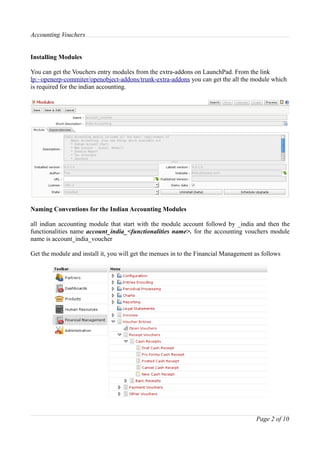
You can get the Vouchers entry modules from the extra-addons on LaunchPad. From the link
lp:~openerp-commiter/openobject-addons/trunk-extra-addons you can get the all the module which
is required for the indian accounting.


Naming Conventions for the Indian Accounting Modules

all indian accounting module that start with the module account followd by _india and then the
functionalities name account_india_<functionalities name>. for the accounting vouchers module
name is account_india_voucher

Get the module and install it, you will get the menues in to the Financial Management as follows


                                                                                      Page 2 of 10
Accounting Vouchers


Basic Work Flow

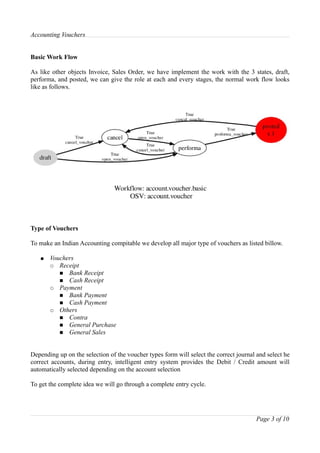
As like other objects Invoice, Sales Order, we have implement the work with the 3 states, draft,
performa, and posted, we can give the role at each and every stages, the normal work flow looks
like as follows.


Type of Vouchers

To make an Indian Accounting compitable we develop all major type of vouchers as listed billow.

   ●   Vouchers
       ○ Receipt
          ■ Bank Receipt
          ■ Cash Receipt
       ○ Payment
          ■ Bank Payment
          ■ Cash Payment
       ○ Others
          ■ Contra
          ■ General Purchase
          ■ General Sales


Depending up on the selection of the voucher types form will select the correct journal and select he
correct accounts, during entry, intelligent entry system provides the Debit / Credit amount will
automatically selected depending on the account selection

To get the complete idea we will go through a complete entry cycle.


                                                                                       Page 3 of 10
Accounting Vouchers


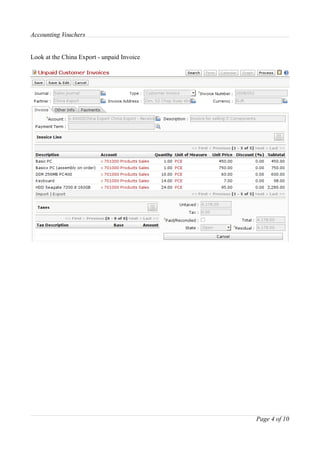
Look at the China Export - unpaid Invoice


                                            Page 4 of 10
Accounting Vouchers


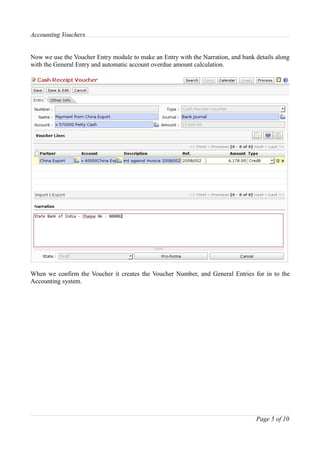
Now we use the Voucher Entry module to make an Entry with the Narration, and bank details along
with the General Entry and automatic account overdue amount calculation.


When we confirm the Voucher it creates the Voucher Number, and General Entries for in to the
Accounting system.


                                                                                  Page 5 of 10
Accounting Vouchers


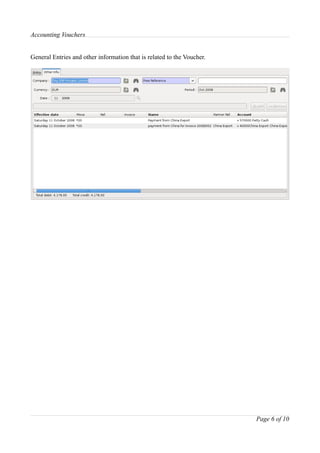
General Entries and other information that is related to the Voucher.


                                                                        Page 6 of 10
Accounting Vouchers


Reports Standards

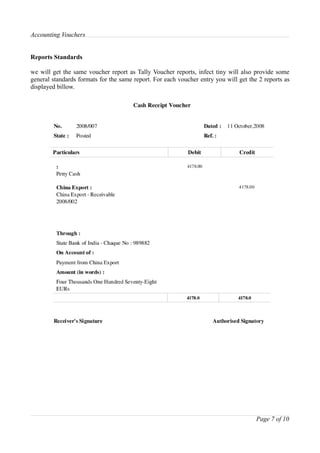
we will get the same voucher report as Tally Voucher reports, infect tiny will also provide some
general standards formats for the same report. For each voucher entry you will get the 2 reports as
displayed billow.


                                                                                      Page 7 of 10
Accounting Vouchers


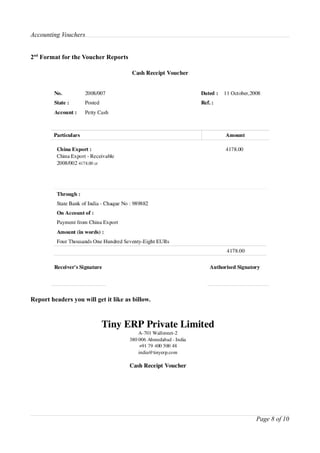
2nd Format for the Voucher Reports


Report headers you will get it like as billow.


                                                 Page 8 of 10
Accounting Vouchers

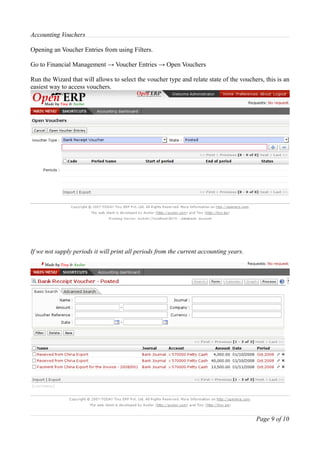
Opening an Voucher Entries from using Filters.

Go to Financial Management → Voucher Entries → Open Vouchers

Run the Wizard that will allows to select the voucher type and relate state of the vouchers, this is an
easiest way to access vouchers.


If we not supply periods it will print all periods from the current accounting years.


                                                                                         Page 9 of 10
Accounting Vouchers

Mantavya Gajjar
mga@tinyerp.com
http://www.tinyerpindia.com


                              Page 10 of 10

Account voucher

  • 1.
    Accounting Vouchers Account Voucher Accounting Vouchers according to the Indian Standards Print Vouchers Page 1 of 10
  • 2.
    Accounting Vouchers Installing Modules Youcan get the Vouchers entry modules from the extra-addons on LaunchPad. From the link lp:~openerp-commiter/openobject-addons/trunk-extra-addons you can get the all the module which is required for the indian accounting. Naming Conventions for the Indian Accounting Modules all indian accounting module that start with the module account followd by _india and then the functionalities name account_india_<functionalities name>. for the accounting vouchers module name is account_india_voucher Get the module and install it, you will get the menues in to the Financial Management as follows Page 2 of 10
  • 3.
    Accounting Vouchers Basic WorkFlow As like other objects Invoice, Sales Order, we have implement the work with the 3 states, draft, performa, and posted, we can give the role at each and every stages, the normal work flow looks like as follows. Type of Vouchers To make an Indian Accounting compitable we develop all major type of vouchers as listed billow. ● Vouchers ○ Receipt ■ Bank Receipt ■ Cash Receipt ○ Payment ■ Bank Payment ■ Cash Payment ○ Others ■ Contra ■ General Purchase ■ General Sales Depending up on the selection of the voucher types form will select the correct journal and select he correct accounts, during entry, intelligent entry system provides the Debit / Credit amount will automatically selected depending on the account selection To get the complete idea we will go through a complete entry cycle. Page 3 of 10
  • 4.
    Accounting Vouchers Look atthe China Export - unpaid Invoice Page 4 of 10
  • 5.
    Accounting Vouchers Now weuse the Voucher Entry module to make an Entry with the Narration, and bank details along with the General Entry and automatic account overdue amount calculation. When we confirm the Voucher it creates the Voucher Number, and General Entries for in to the Accounting system. Page 5 of 10
  • 6.
    Accounting Vouchers General Entriesand other information that is related to the Voucher. Page 6 of 10
  • 7.
    Accounting Vouchers Reports Standards wewill get the same voucher report as Tally Voucher reports, infect tiny will also provide some general standards formats for the same report. For each voucher entry you will get the 2 reports as displayed billow. Page 7 of 10
  • 8.
    Accounting Vouchers 2nd Formatfor the Voucher Reports Report headers you will get it like as billow. Page 8 of 10
  • 9.
    Accounting Vouchers Opening anVoucher Entries from using Filters. Go to Financial Management → Voucher Entries → Open Vouchers Run the Wizard that will allows to select the voucher type and relate state of the vouchers, this is an easiest way to access vouchers. If we not supply periods it will print all periods from the current accounting years. Page 9 of 10
  • 10.