Chapter 12:
Vendors & Purchases
McGraw-Hill/Irwin Copyright © 2013 by The McGraw-Hill Companies, Inc. All rights reserved.
Vendors & Purchases
Chapter 12 begins Part 3 of the book: Peachtree
Complete Accounting 2012 for Merchandising
Businesses.
Merchandising businesses are retail stores that
resell goods and services.
In Chapter 12, you set up two merchandising
businesses: Cynthia’s Service Merchandise, a
partnership owned by Eric Lerette and Cynthia
Barber; and Student Name [use your first and last
name] Sales and Service, a sole proprietorship.
12-2
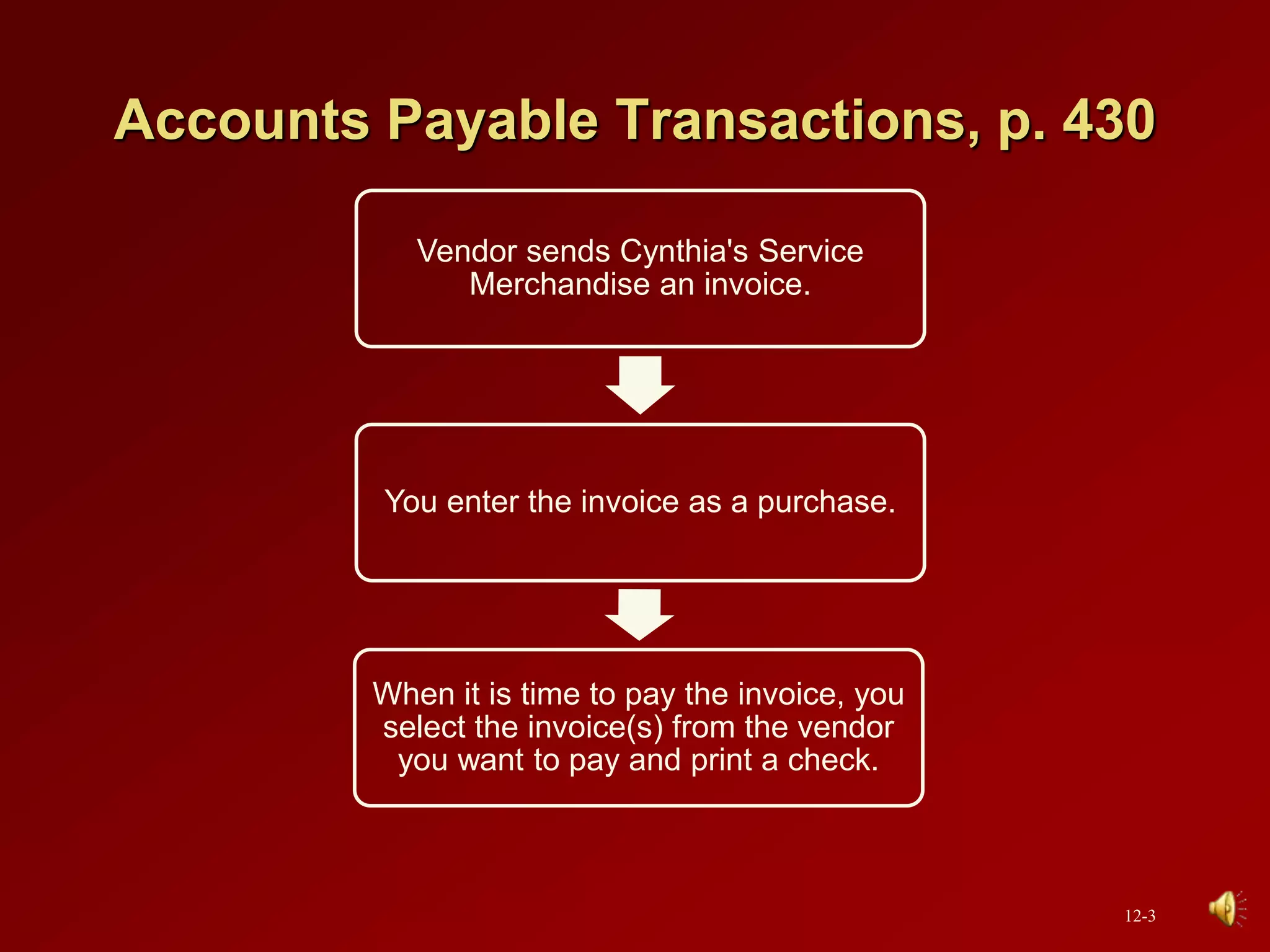
Accounts Payable Transactions, p. 430
Vendor sends Cynthia's Service
Merchandise an invoice.
You enter the invoice as a purchase.
When it is time to pay the invoice, you
select the invoice(s) from the vendor
you want to pay and print a check.
12-3
Peachtree Tips
In Chapter 12, you set up two merchandising
businesses: Cynthia’s Service Merchandise and the
end-of-chapter exercise, Student Name Sales and
Service (Exercises 12-1 and 12-2 on pp. 485-493).
The companies that you set up in Chapter 12, continue
in Chapters 13, 14 and 15.
If the general ledger account (GL account field) is not
displayed on the Purchases/Receive Inventory window
or Payments window, check the global options. In the
Hide General Ledger Accounts section, all boxes must
be unchecked (see pp. xvi-xvii, Setting Global Options.)
12-4
Peachtree Tips (continued)
What if you want to use Cynthia’s Service
Merchandise on a computer that does not have this
company set up in Peachtree?
If you start Peachtree and the appropriate company cannot be
opened, use the Restore Wizard to select A New Company. Using
the appropriate backup file, and the selection for A New Company,
you can start where you left off the last time Peachtree was used.
If Cynthia’s Service Merchandise (or another name Service
Merchandise) is not listed either on the Open an Existing Company
window or when you select <Browse>, click Cancel; then Close.
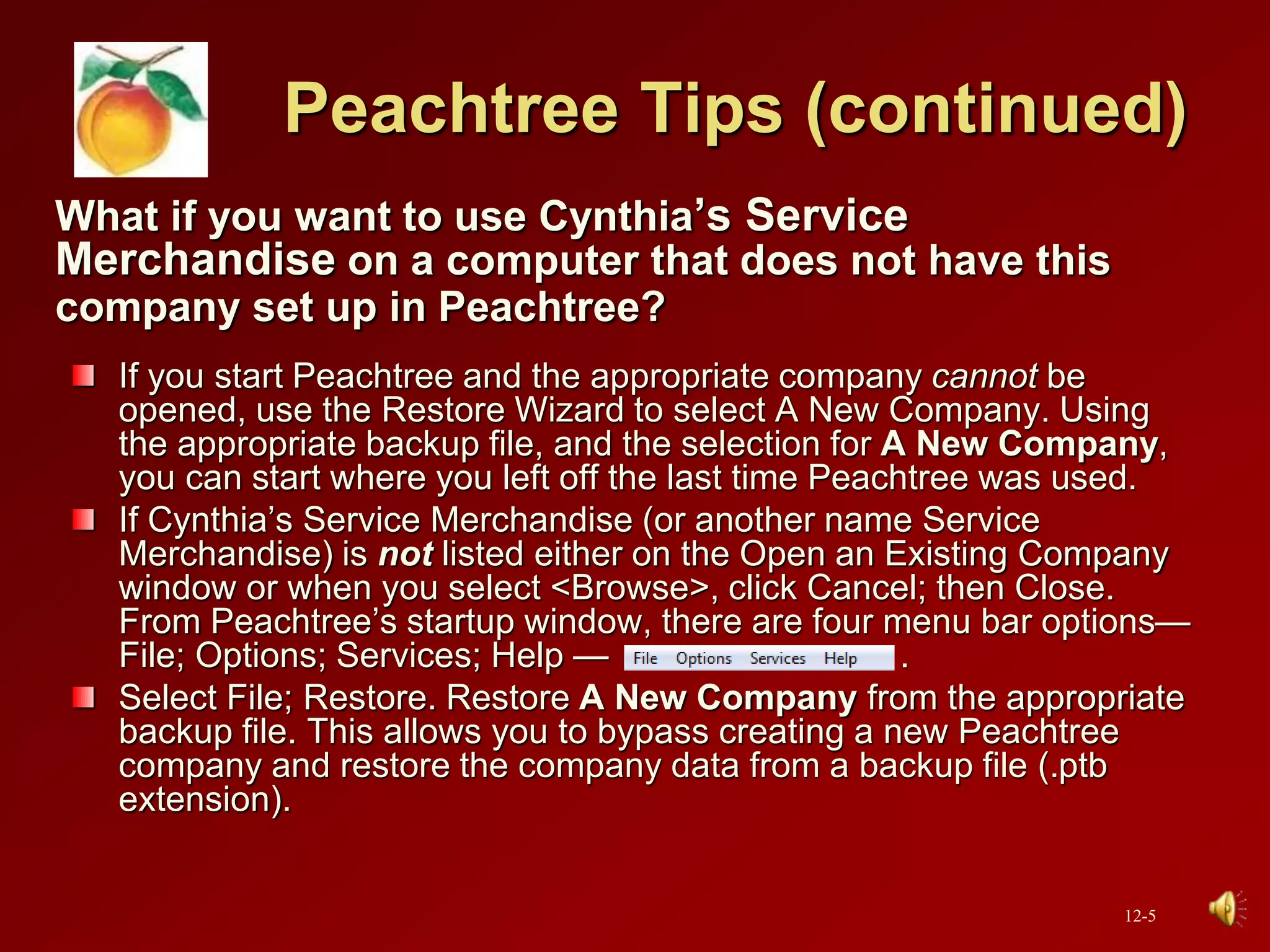
From Peachtree’s startup window, there are four menu bar options—
File; Options; Services; Help — .
Select File; Restore. Restore A New Company from the appropriate
backup file. This allows you to bypass creating a new Peachtree
company and restore the company data from a backup file (.ptb
extension).
12-5
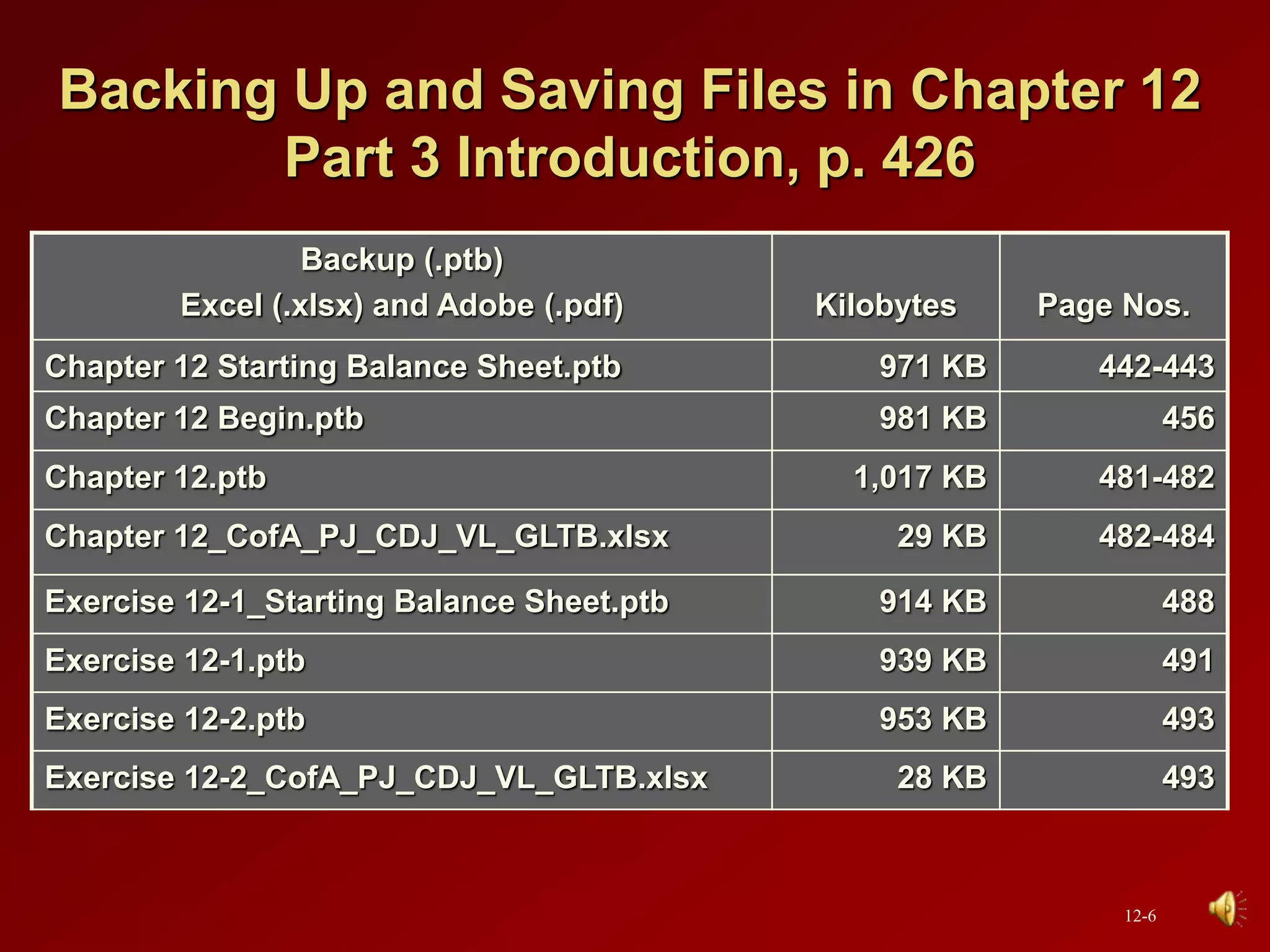
Backing Up and Saving Files in Chapter 12
Part 3 Introduction, p. 426
Backup (.ptb)
Excel (.xlsx) and Adobe (.pdf) Kilobytes Page Nos.
Chapter 12 Starting Balance Sheet.ptb 971 KB 442-443
Chapter 12 Begin.ptb 981 KB 456
Chapter 12.ptb 1,017 KB 481-482
Chapter 12_CofA_PJ_CDJ_VL_GLTB.xlsx 29 KB 482-484
Exercise 12-1_Starting Balance Sheet.ptb 914 KB 488
Exercise 12-1.ptb 939 KB 491
Exercise 12-2.ptb 953 KB 493
Exercise 12-2_CofA_PJ_CDJ_VL_GLTB.xlsx 28 KB 493
12-6
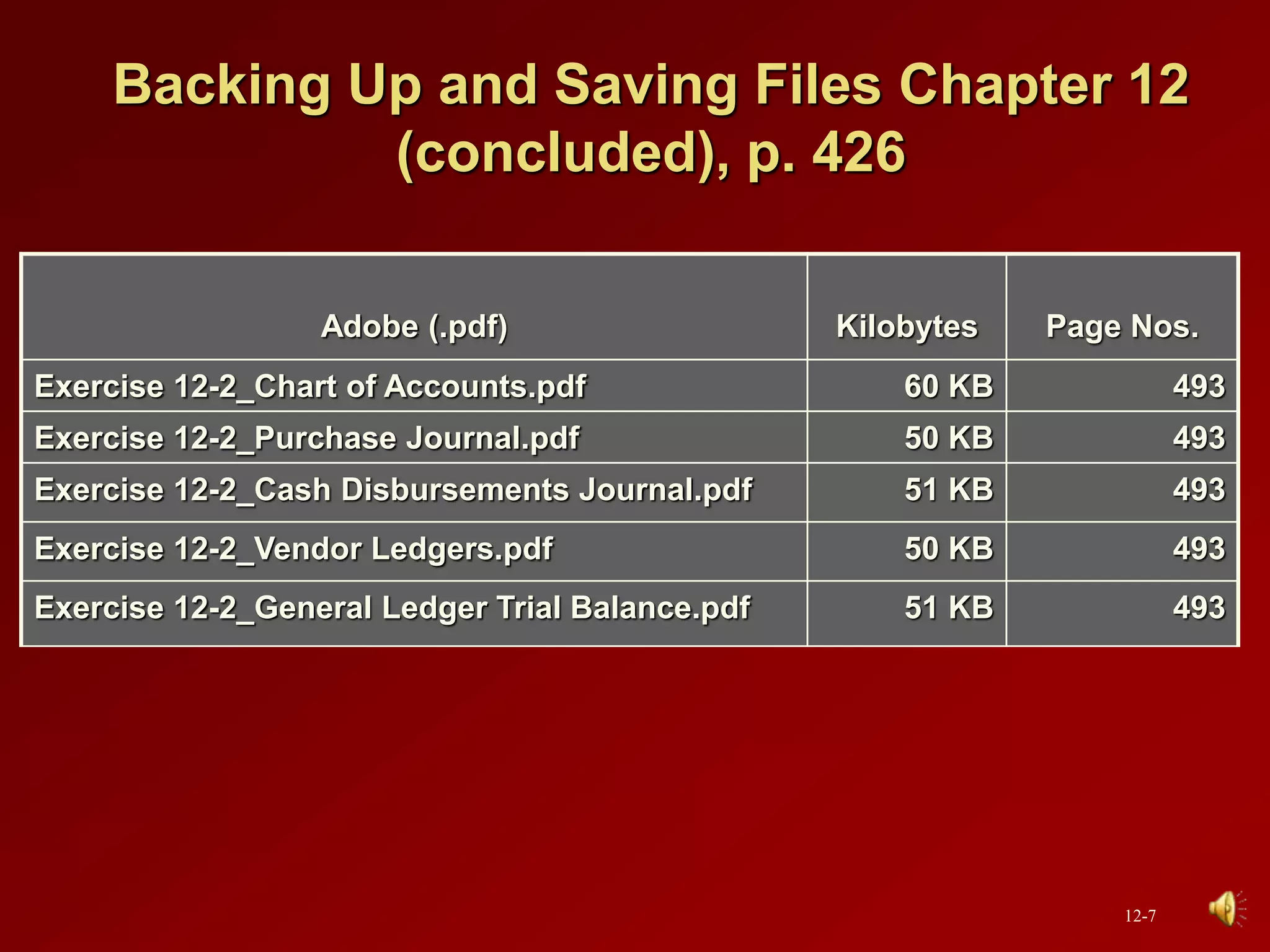
Backing Up and Saving Files Chapter 12
(concluded), p. 426
Adobe (.pdf) Kilobytes Page Nos.
Exercise 12-2_Chart of Accounts.pdf 60 KB 493
Exercise 12-2_Purchase Journal.pdf 50 KB 493
Exercise 12-2_Cash Disbursements Journal.pdf 51 KB 493
Exercise 12-2_Vendor Ledgers.pdf 50 KB 493
Exercise 12-2_General Ledger Trial Balance.pdf 51 KB 493
12-7
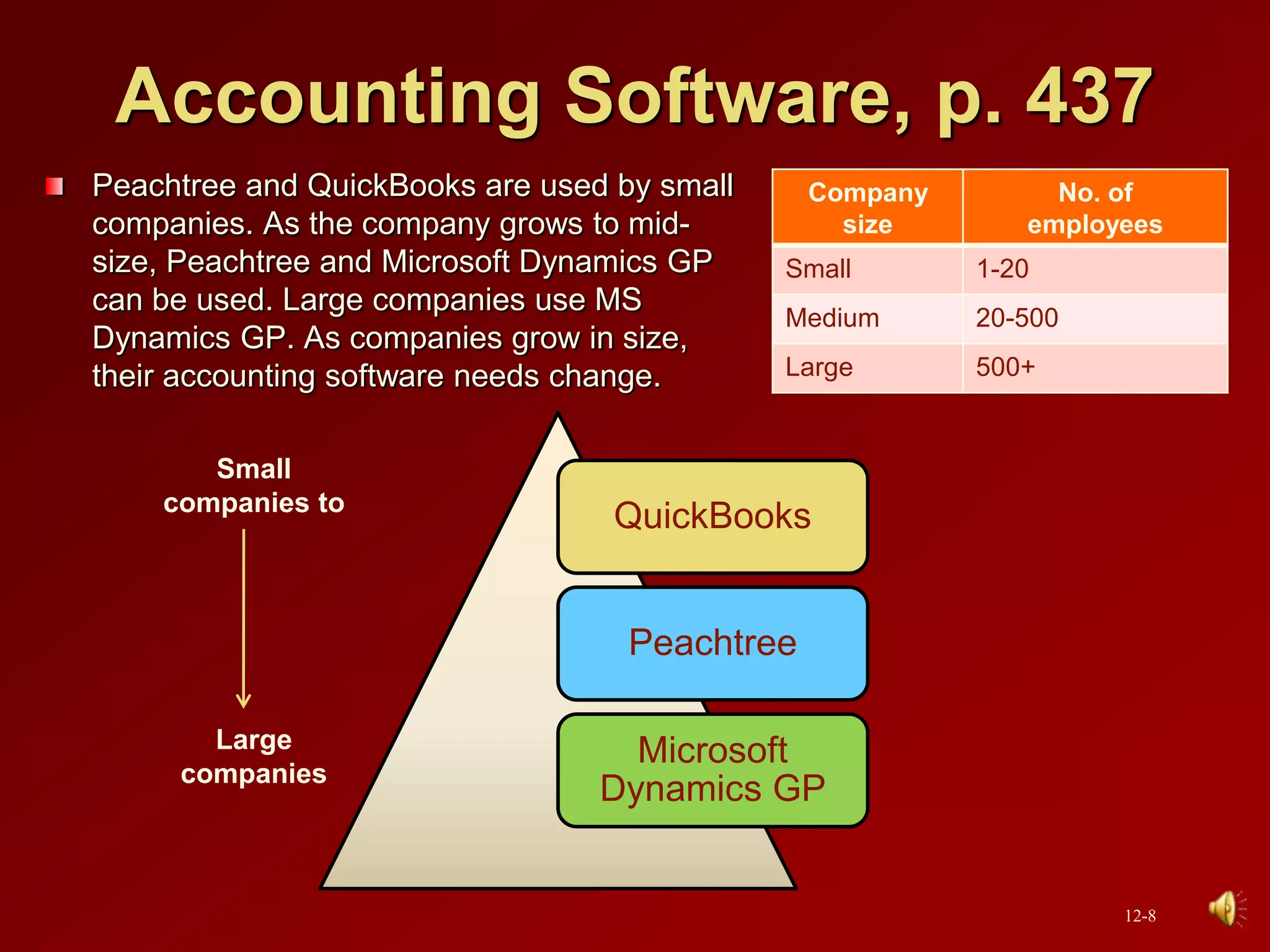
Accounting Software, p. 437
Peachtree and QuickBooks are used by small
companies. As the company grows to mid-
size, Peachtree and Microsoft Dynamics GP
can be used. Large companies use MS
Dynamics GP. As companies grow in size,
their accounting software needs change.
QuickBooks
Peachtree
Microsoft
Dynamics GP
Small
companies to
Large
companies
Company
size
No. of
employees
Small 1-20
Medium 20-500
Large 500+
12-8
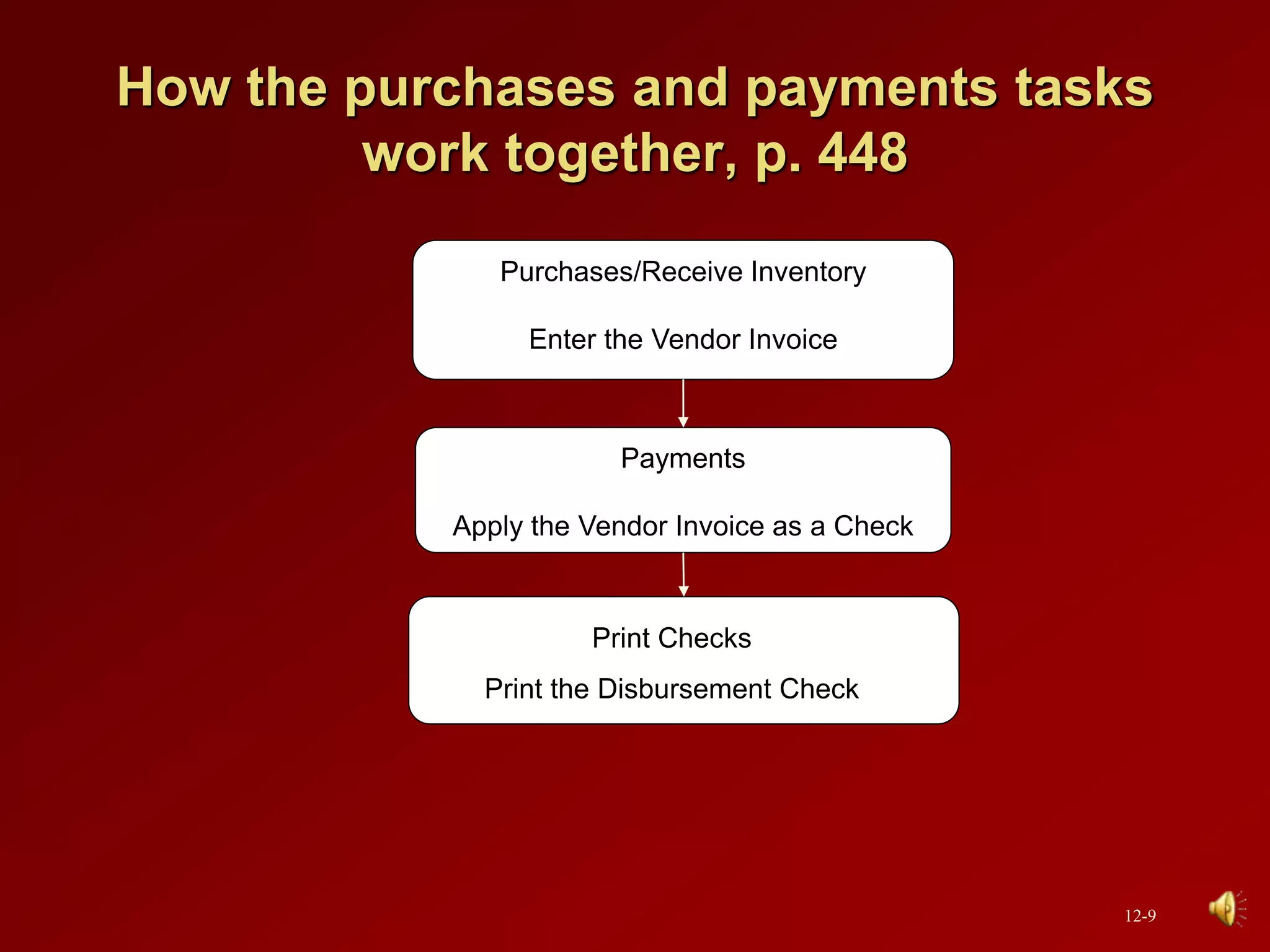
How the purchases and payments tasks
work together, p. 448
Purchases/Receive Inventory
Enter the Vendor Invoice
Payments
Apply the Vendor Invoice as a Check
Print Checks
Print the Disbursement Check
12-9
Glossary of Terms
Chapter 12
12-10
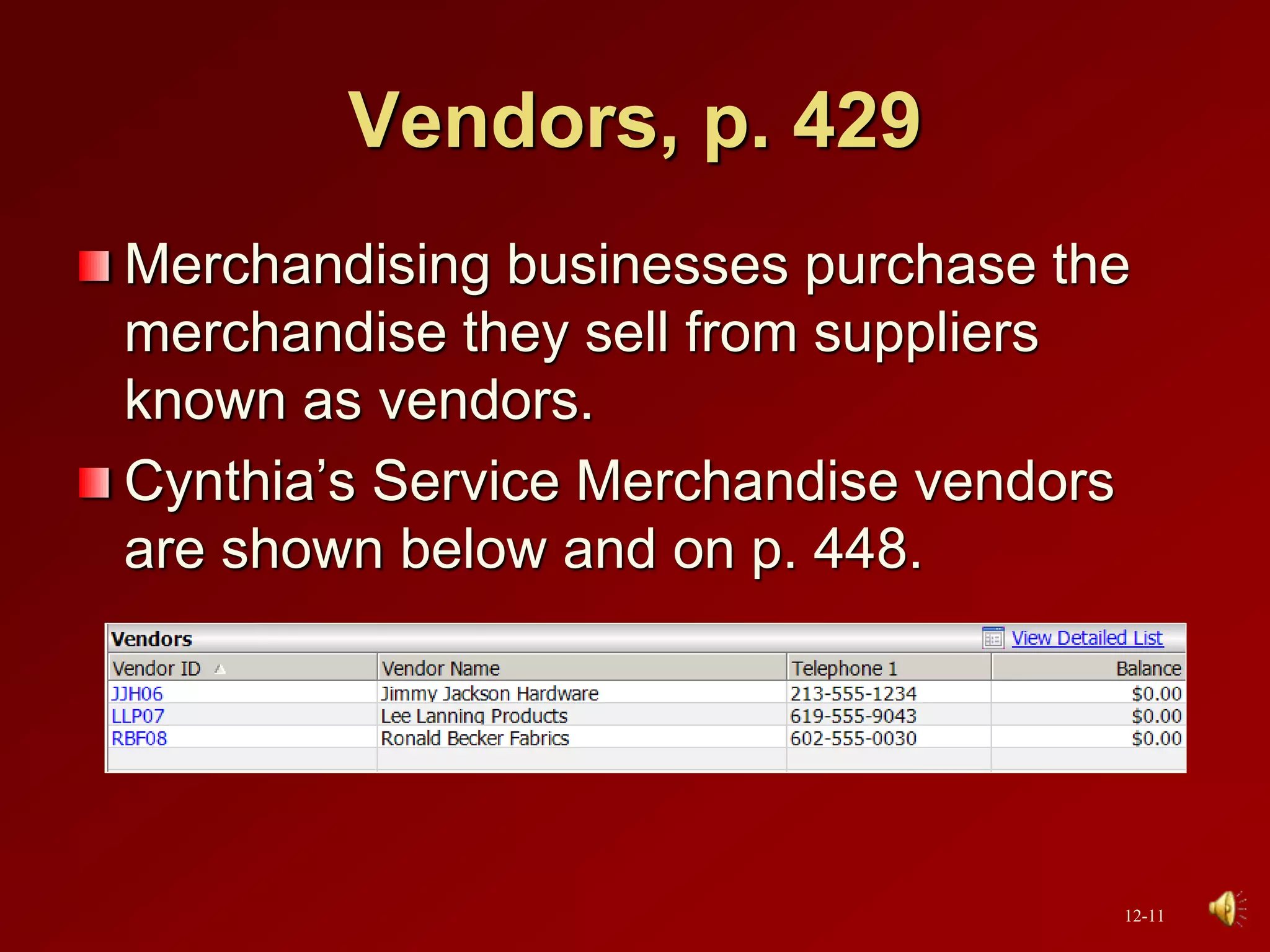
Vendors, p. 429
Merchandising businesses purchase the
merchandise they sell from suppliers
known as vendors.
Cynthia’s Service Merchandise vendors
are shown below and on p. 448.
12-11
Accounts payable transactions, p. 429
Purchases of merchandise for resale,
assets, or expenses incurred on credit
from vendors.
When Cynthia’s Service Merchandise
makes purchases on account from
vendors, the transactions are known as
accounts payable transactions.
12-12
Accounts payable, p. 429
The money a company owes to a supplier
or vendor.
12-13
Database, p. 437
An organized body of related information.
As the database gets larger, the depth of
processing increases and more features
and functions are available.
12-14
Purchase Journal, p. 457
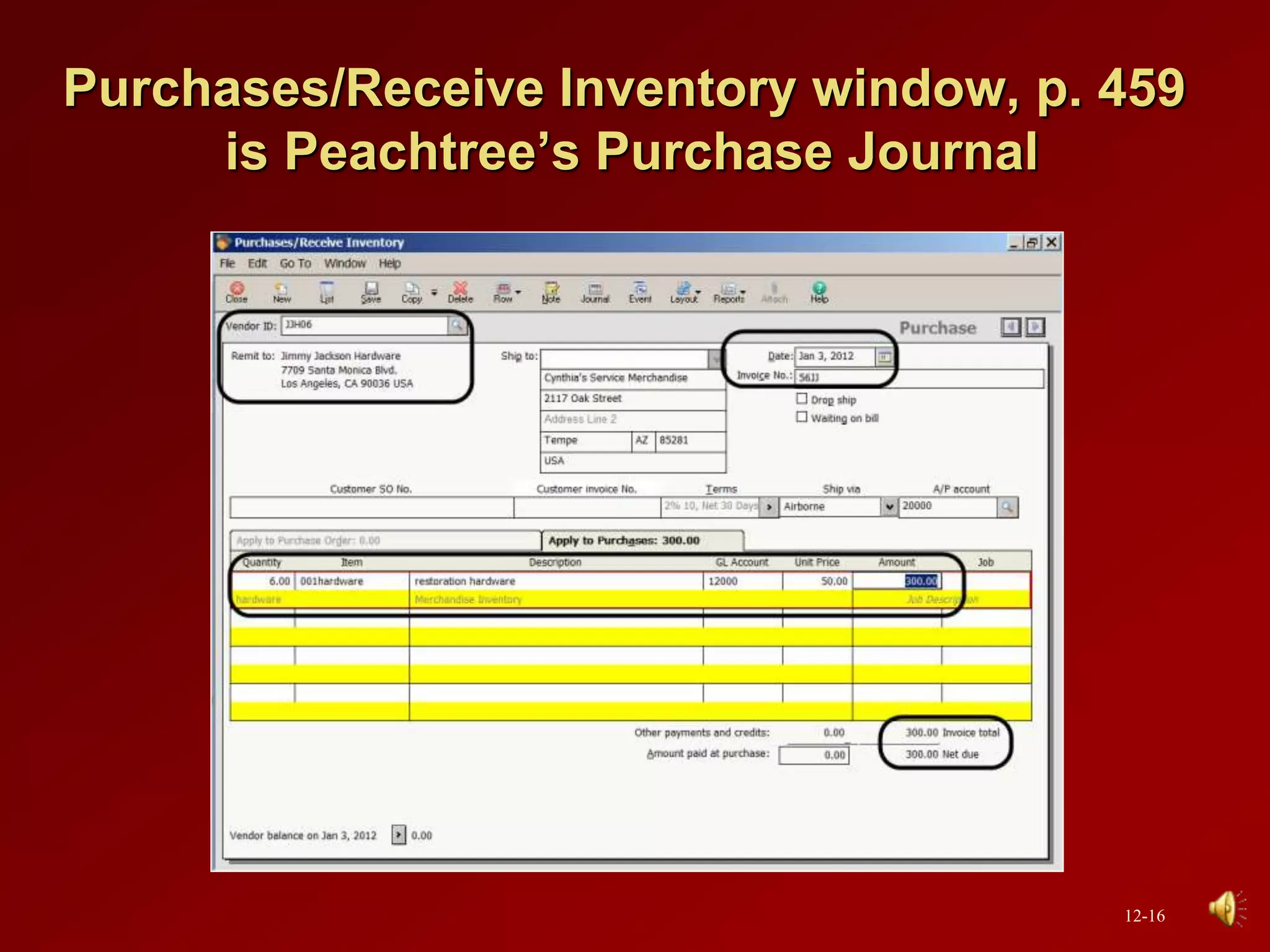
In Peachtree, the Purchases/Receive
Inventory window is the purchase journal.
In the Purchase Journal, or
Purchases/Receive Inventory window, you
can enter invoices from vendors or enter
and print purchase orders.
12-15
Purchases/Receive Inventory window, p. 459
is Peachtree’s Purchase Journal
12-16
Accounts payable ledger, p. 457
Shows the account activity for each
vendor. Same as vendor ledger.
12-17
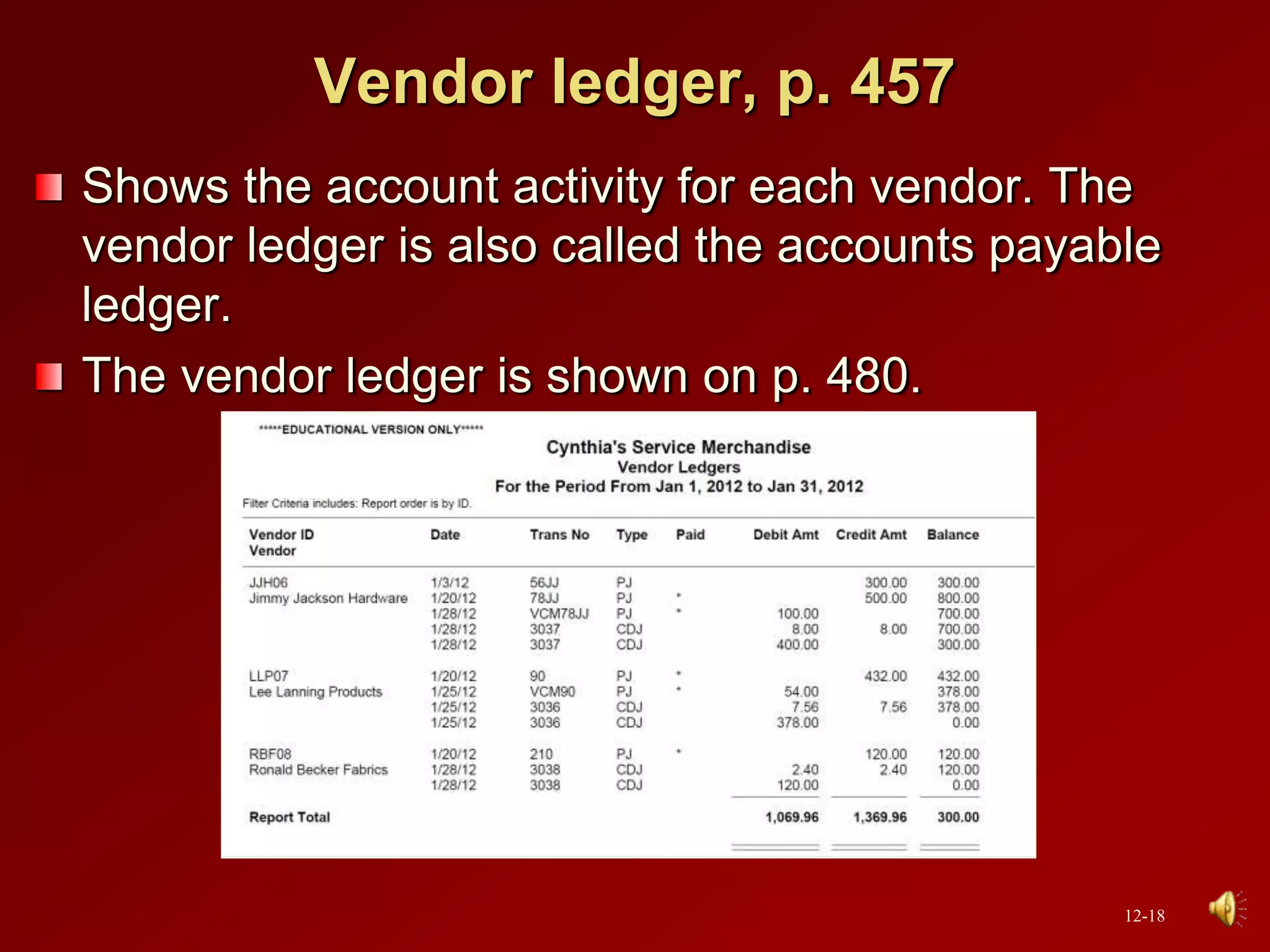
Vendor ledger, p. 457
Shows the account activity for each vendor. The
vendor ledger is also called the accounts payable
ledger.
The vendor ledger is shown on p. 480.
12-18
Average cost, p. 462
A method of computing inventory. See
weighted-average method on the next
slide.
12-19
Weighted-average method, p. 462
This method of inventory pricing divides
the cost of the inventory purchased by the
quantity of merchandise purchased. This
unit cost is multiplied by the ending
inventory.
12-20
Cash disbursements journal, p. 463
All payments of cash are recorded in the
cash disbursements journal.
In Peachtree, the Write Checks and
Payments tasks are recorded in the cash
disbursements journal.
12-21
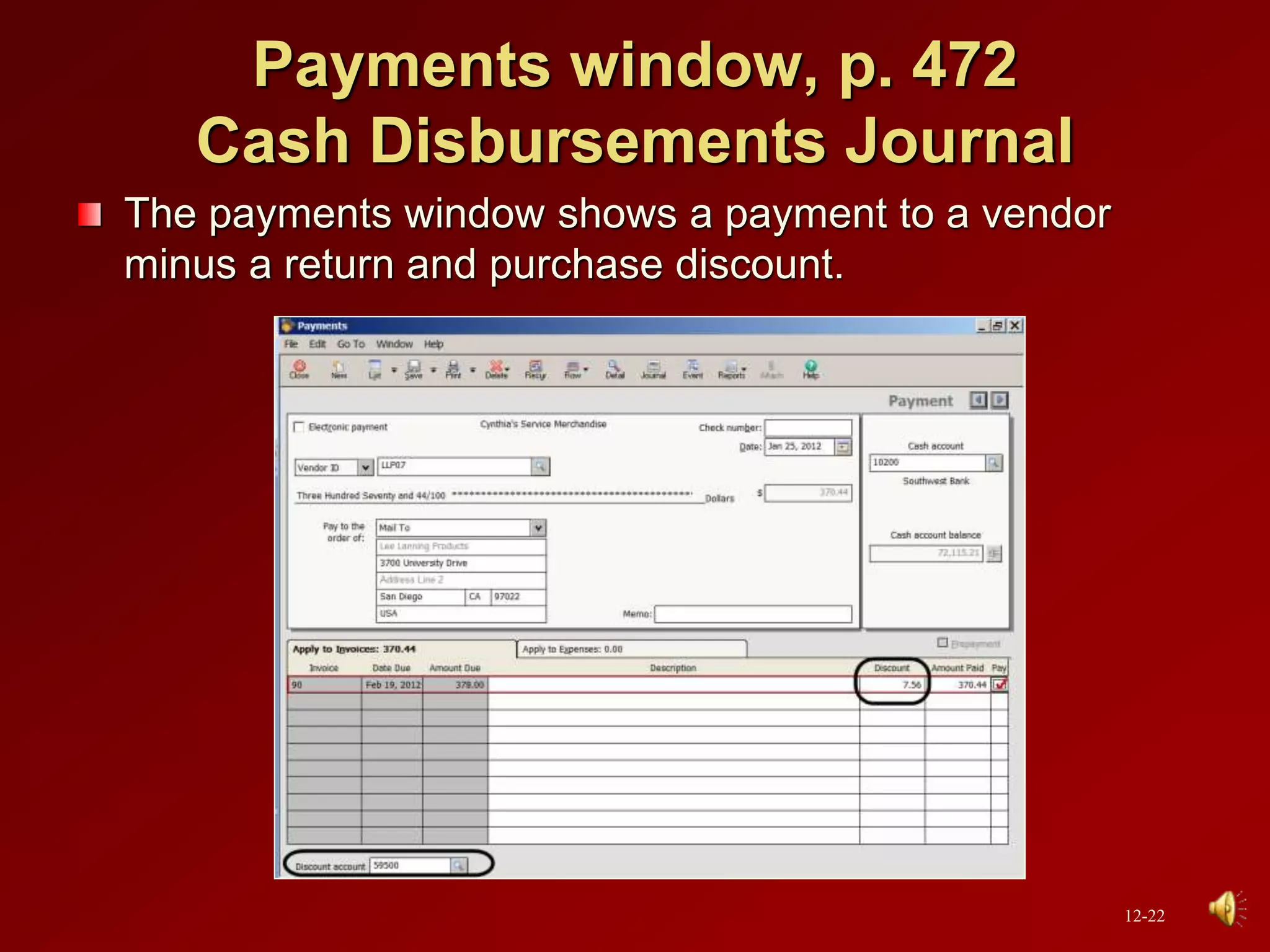
Payments window, p. 472
Cash Disbursements Journal
The payments window shows a payment to a vendor
minus a return and purchase discount.
12-22
Going to the Net, p. 484
Watch the Vendor Management Center video at
www.peachtree.com/productsServices/whatsNew/.
Answer these questions:
1. What Peachtree feature allows the user to simplify vendor
searches?
2. What was the result of being able to negotiate with the
vendor?
Watch additional videos on this website, too.
12-23
Analysis Question, p. 493
What is the balance in the Accounts Payable account,
Cynthia’s Service Merchandise? Why?
The balance in the Accounts Payable account is $300.
This balance reflects the amount owed to the vendor,
Jimmy Jackson Hardware. The Vendors Ledgers
subsidiary account balance is the same as the Accounts
Payable controlling account balance in the general
ledger.
12-24
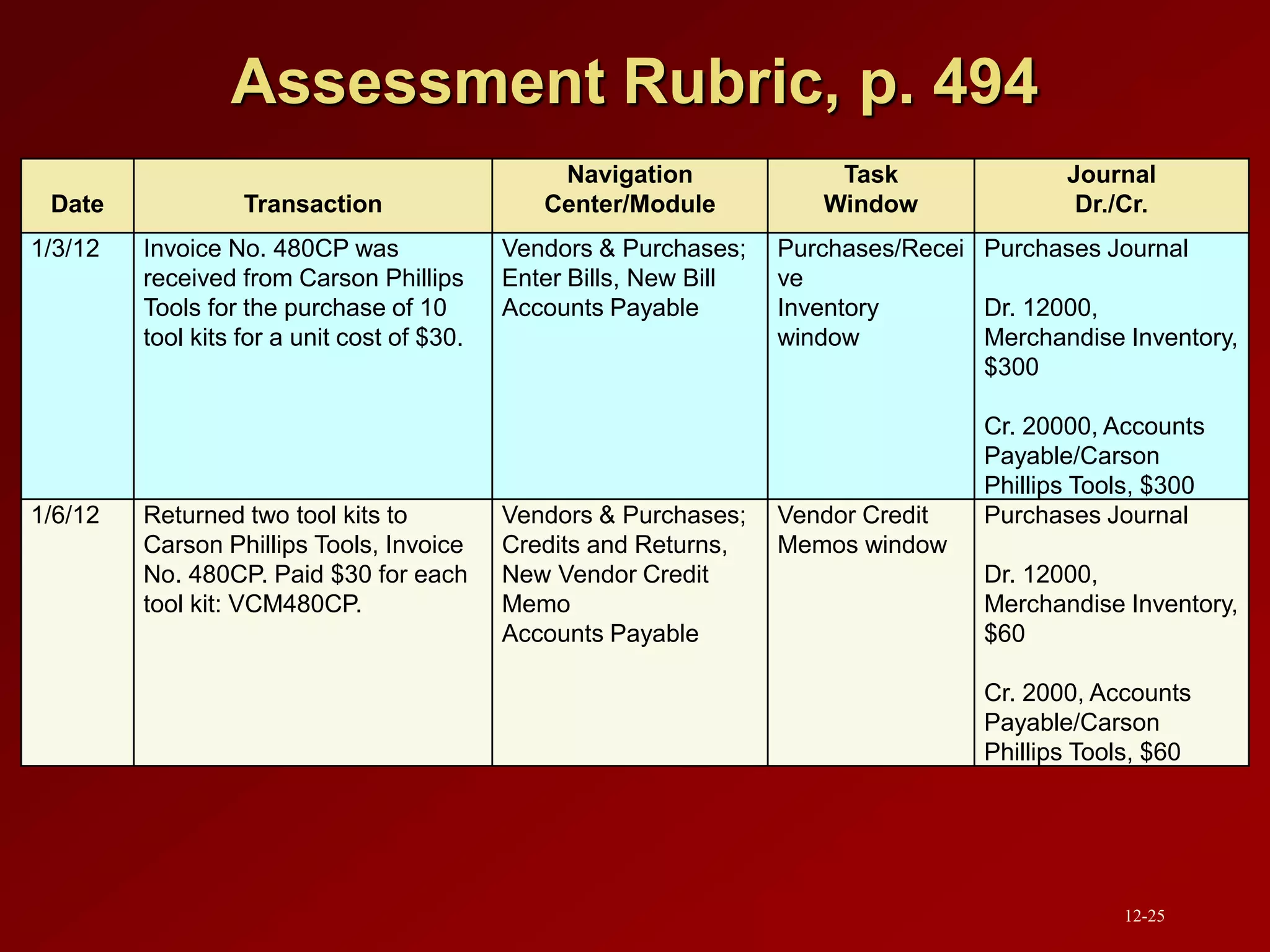
Assessment Rubric, p. 494
Date Transaction
Navigation
Center/Module
Task
Window
Journal
Dr./Cr.
1/3/12 Invoice No. 480CP was
received from Carson Phillips
Tools for the purchase of 10
tool kits for a unit cost of $30.
Vendors & Purchases;
Enter Bills, New Bill
Accounts Payable
Purchases/Recei
ve
Inventory
window
Purchases Journal
Dr. 12000,
Merchandise Inventory,
$300
Cr. 20000, Accounts
Payable/Carson
Phillips Tools, $300
1/6/12 Returned two tool kits to
Carson Phillips Tools, Invoice
No. 480CP. Paid $30 for each
tool kit: VCM480CP.
Vendors & Purchases;
Credits and Returns,
New Vendor Credit
Memo
Accounts Payable
Vendor Credit
Memos window
Purchases Journal
Dr. 12000,
Merchandise Inventory,
$60
Cr. 2000, Accounts
Payable/Carson
Phillips Tools, $60
12-25
Assessment Rubric (concluded), p. 494
Date Transaction
Navigation
Center/Module
Task
Window
Journal
Dr./Cr.
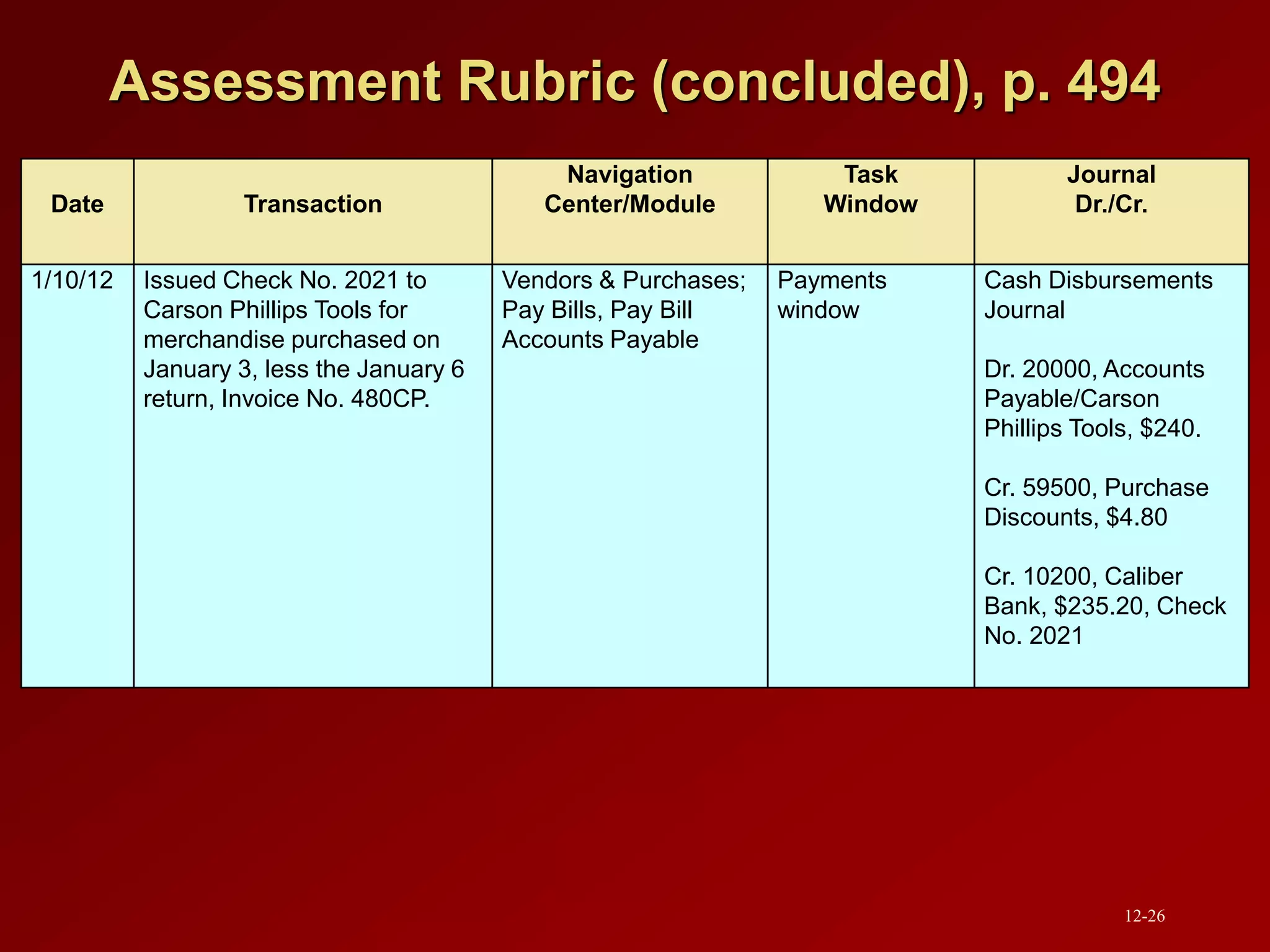
1/10/12 Issued Check No. 2021 to
Carson Phillips Tools for
merchandise purchased on
January 3, less the January 6
return, Invoice No. 480CP.
Vendors & Purchases;
Pay Bills, Pay Bill
Accounts Payable
Payments
window
Cash Disbursements
Journal
Dr. 20000, Accounts
Payable/Carson
Phillips Tools, $240.
Cr. 59500, Purchase
Discounts, $4.80
Cr. 10200, Caliber
Bank, $235.20, Check
No. 2021
12-26
Online Learning Center
 Go online to www.mhhe.com/yacht2012 for additional resources. Link to
Student Edition, select Chapter 12.
o Interactive Testing: Online multiple-choice and true and false
questions. Tests are graded and can be emailed to instructor.
o Glossary of Terms: Boldfaced/italicized words within chapter.
o Feature Quizzes: Includes user interface questions, matching,
and review of chapter concepts with immediate feedback.
o Two Flash Videos: Demonstrations of purchases and payments.
o PowerPoints: Narrated slides.
o Assessment Rubrics: Reviews journal entries, reports,
navigation centers, modules, and task windows.
o Going to the Net: Internet research.
o QA Templates: End-of-chapter summary and review questions
and analysis question.
12-27

Chap012 (1).ppt

  • 1.
    Chapter 12: Vendors &Purchases McGraw-Hill/Irwin Copyright © 2013 by The McGraw-Hill Companies, Inc. All rights reserved.
  • 2.
    Vendors & Purchases Chapter12 begins Part 3 of the book: Peachtree Complete Accounting 2012 for Merchandising Businesses. Merchandising businesses are retail stores that resell goods and services. In Chapter 12, you set up two merchandising businesses: Cynthia’s Service Merchandise, a partnership owned by Eric Lerette and Cynthia Barber; and Student Name [use your first and last name] Sales and Service, a sole proprietorship. 12-2
  • 3.
    Accounts Payable Transactions,p. 430 Vendor sends Cynthia's Service Merchandise an invoice. You enter the invoice as a purchase. When it is time to pay the invoice, you select the invoice(s) from the vendor you want to pay and print a check. 12-3
  • 4.
    Peachtree Tips In Chapter12, you set up two merchandising businesses: Cynthia’s Service Merchandise and the end-of-chapter exercise, Student Name Sales and Service (Exercises 12-1 and 12-2 on pp. 485-493). The companies that you set up in Chapter 12, continue in Chapters 13, 14 and 15. If the general ledger account (GL account field) is not displayed on the Purchases/Receive Inventory window or Payments window, check the global options. In the Hide General Ledger Accounts section, all boxes must be unchecked (see pp. xvi-xvii, Setting Global Options.) 12-4
  • 5.
    Peachtree Tips (continued) Whatif you want to use Cynthia’s Service Merchandise on a computer that does not have this company set up in Peachtree? If you start Peachtree and the appropriate company cannot be opened, use the Restore Wizard to select A New Company. Using the appropriate backup file, and the selection for A New Company, you can start where you left off the last time Peachtree was used. If Cynthia’s Service Merchandise (or another name Service Merchandise) is not listed either on the Open an Existing Company window or when you select <Browse>, click Cancel; then Close. From Peachtree’s startup window, there are four menu bar options— File; Options; Services; Help — . Select File; Restore. Restore A New Company from the appropriate backup file. This allows you to bypass creating a new Peachtree company and restore the company data from a backup file (.ptb extension). 12-5
  • 6.
    Backing Up andSaving Files in Chapter 12 Part 3 Introduction, p. 426 Backup (.ptb) Excel (.xlsx) and Adobe (.pdf) Kilobytes Page Nos. Chapter 12 Starting Balance Sheet.ptb 971 KB 442-443 Chapter 12 Begin.ptb 981 KB 456 Chapter 12.ptb 1,017 KB 481-482 Chapter 12_CofA_PJ_CDJ_VL_GLTB.xlsx 29 KB 482-484 Exercise 12-1_Starting Balance Sheet.ptb 914 KB 488 Exercise 12-1.ptb 939 KB 491 Exercise 12-2.ptb 953 KB 493 Exercise 12-2_CofA_PJ_CDJ_VL_GLTB.xlsx 28 KB 493 12-6
  • 7.
    Backing Up andSaving Files Chapter 12 (concluded), p. 426 Adobe (.pdf) Kilobytes Page Nos. Exercise 12-2_Chart of Accounts.pdf 60 KB 493 Exercise 12-2_Purchase Journal.pdf 50 KB 493 Exercise 12-2_Cash Disbursements Journal.pdf 51 KB 493 Exercise 12-2_Vendor Ledgers.pdf 50 KB 493 Exercise 12-2_General Ledger Trial Balance.pdf 51 KB 493 12-7
  • 8.
    Accounting Software, p.437 Peachtree and QuickBooks are used by small companies. As the company grows to mid- size, Peachtree and Microsoft Dynamics GP can be used. Large companies use MS Dynamics GP. As companies grow in size, their accounting software needs change. QuickBooks Peachtree Microsoft Dynamics GP Small companies to Large companies Company size No. of employees Small 1-20 Medium 20-500 Large 500+ 12-8
  • 9.
    How the purchasesand payments tasks work together, p. 448 Purchases/Receive Inventory Enter the Vendor Invoice Payments Apply the Vendor Invoice as a Check Print Checks Print the Disbursement Check 12-9
  • 10.
  • 11.
    Vendors, p. 429 Merchandisingbusinesses purchase the merchandise they sell from suppliers known as vendors. Cynthia’s Service Merchandise vendors are shown below and on p. 448. 12-11
  • 12.
    Accounts payable transactions,p. 429 Purchases of merchandise for resale, assets, or expenses incurred on credit from vendors. When Cynthia’s Service Merchandise makes purchases on account from vendors, the transactions are known as accounts payable transactions. 12-12
  • 13.
    Accounts payable, p.429 The money a company owes to a supplier or vendor. 12-13
  • 14.
    Database, p. 437 Anorganized body of related information. As the database gets larger, the depth of processing increases and more features and functions are available. 12-14
  • 15.
    Purchase Journal, p.457 In Peachtree, the Purchases/Receive Inventory window is the purchase journal. In the Purchase Journal, or Purchases/Receive Inventory window, you can enter invoices from vendors or enter and print purchase orders. 12-15
  • 16.
    Purchases/Receive Inventory window,p. 459 is Peachtree’s Purchase Journal 12-16
  • 17.
    Accounts payable ledger,p. 457 Shows the account activity for each vendor. Same as vendor ledger. 12-17
  • 18.
    Vendor ledger, p.457 Shows the account activity for each vendor. The vendor ledger is also called the accounts payable ledger. The vendor ledger is shown on p. 480. 12-18
  • 19.
    Average cost, p.462 A method of computing inventory. See weighted-average method on the next slide. 12-19
  • 20.
    Weighted-average method, p.462 This method of inventory pricing divides the cost of the inventory purchased by the quantity of merchandise purchased. This unit cost is multiplied by the ending inventory. 12-20
  • 21.
    Cash disbursements journal,p. 463 All payments of cash are recorded in the cash disbursements journal. In Peachtree, the Write Checks and Payments tasks are recorded in the cash disbursements journal. 12-21
  • 22.
    Payments window, p.472 Cash Disbursements Journal The payments window shows a payment to a vendor minus a return and purchase discount. 12-22
  • 23.
    Going to theNet, p. 484 Watch the Vendor Management Center video at www.peachtree.com/productsServices/whatsNew/. Answer these questions: 1. What Peachtree feature allows the user to simplify vendor searches? 2. What was the result of being able to negotiate with the vendor? Watch additional videos on this website, too. 12-23
  • 24.
    Analysis Question, p.493 What is the balance in the Accounts Payable account, Cynthia’s Service Merchandise? Why? The balance in the Accounts Payable account is $300. This balance reflects the amount owed to the vendor, Jimmy Jackson Hardware. The Vendors Ledgers subsidiary account balance is the same as the Accounts Payable controlling account balance in the general ledger. 12-24
  • 25.
    Assessment Rubric, p.494 Date Transaction Navigation Center/Module Task Window Journal Dr./Cr. 1/3/12 Invoice No. 480CP was received from Carson Phillips Tools for the purchase of 10 tool kits for a unit cost of $30. Vendors & Purchases; Enter Bills, New Bill Accounts Payable Purchases/Recei ve Inventory window Purchases Journal Dr. 12000, Merchandise Inventory, $300 Cr. 20000, Accounts Payable/Carson Phillips Tools, $300 1/6/12 Returned two tool kits to Carson Phillips Tools, Invoice No. 480CP. Paid $30 for each tool kit: VCM480CP. Vendors & Purchases; Credits and Returns, New Vendor Credit Memo Accounts Payable Vendor Credit Memos window Purchases Journal Dr. 12000, Merchandise Inventory, $60 Cr. 2000, Accounts Payable/Carson Phillips Tools, $60 12-25
  • 26.
    Assessment Rubric (concluded),p. 494 Date Transaction Navigation Center/Module Task Window Journal Dr./Cr. 1/10/12 Issued Check No. 2021 to Carson Phillips Tools for merchandise purchased on January 3, less the January 6 return, Invoice No. 480CP. Vendors & Purchases; Pay Bills, Pay Bill Accounts Payable Payments window Cash Disbursements Journal Dr. 20000, Accounts Payable/Carson Phillips Tools, $240. Cr. 59500, Purchase Discounts, $4.80 Cr. 10200, Caliber Bank, $235.20, Check No. 2021 12-26
  • 27.
    Online Learning Center Go online to www.mhhe.com/yacht2012 for additional resources. Link to Student Edition, select Chapter 12. o Interactive Testing: Online multiple-choice and true and false questions. Tests are graded and can be emailed to instructor. o Glossary of Terms: Boldfaced/italicized words within chapter. o Feature Quizzes: Includes user interface questions, matching, and review of chapter concepts with immediate feedback. o Two Flash Videos: Demonstrations of purchases and payments. o PowerPoints: Narrated slides. o Assessment Rubrics: Reviews journal entries, reports, navigation centers, modules, and task windows. o Going to the Net: Internet research. o QA Templates: End-of-chapter summary and review questions and analysis question. 12-27