Accessibility Issues Liddy Nevile
Overview Accessibility definitions Current work to minimise problems IMS accessibility activities Matching content to people’s needs Implementations References
Overview Accessibility definitions Not … Telecommunications …. Or is it? Economic equity … or is it?
Typical problems Can’t see screen Can’t see colours Can’t read text Can’t hear Can’t control cursor Can’t type
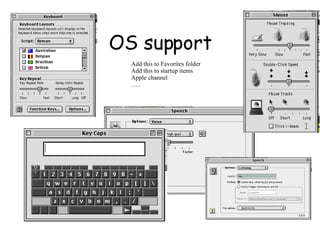
OS support Add this to Favorites folder Add this to startup items Apple channel …..
Browser support (?) Lynx IE Netscape/Mozilla iCab Opera Amaya There are about 35 browsers in common use… (Note W3C UAAG - includes LMS)
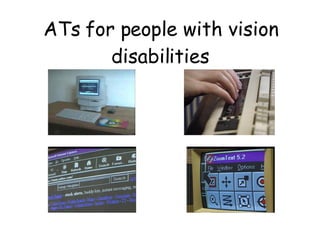
ATs for people with vision disabilities
Jason White
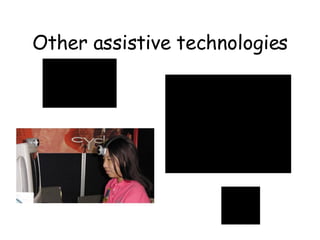
Other assistive technologies
Other accessibility problems
Accessibility definitions W3C - device independence, separation of content from presentation U.S. - s. 508 for Federal Govt. contracts Australia - common law system with regulations UK, European Commission … IMS/MMI-DC Working definition: mismatch between user needs and content
W3C Guidelines Accessibility guidelines Techniques Checkpoints Checkpoint techniques QA and Certification - for authors, authoring tools, user agents
Localisation of W3C guidelines University, system, organisational guidelines Controlling systems and templates EuroAccessibility efforts CEN MMI-DC Workshop IMS Accessibility Guidelines ( -> maths interest)
W3C Technologies that work Cascading style sheets (CSS1) eXtensible Markup Language and CSS2 Scalable Vector Graphics (SVG) Synchronised Multimedia Integration Language (SMIL)  eXtensible Stylesheet Language (XSLT) ChemML, MathML, MusicML, ...
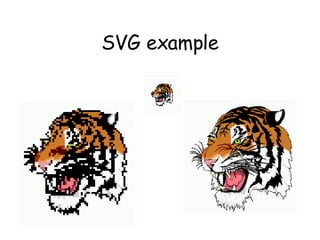
SVG example
SVG example Image is represented as vectors in text Sub-images can be identified Metadata can be added Rights management can be used Behaviours can be controlled Eg an interactive knee dissection linked to external resources
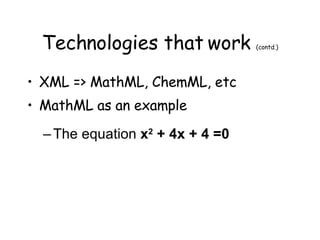
Technologies that work  (contd.) XML => MathML, ChemML, etc MathML as an example The equation  x 2  + 4x + 4 =0
Separate  presentation from content Presentational markup to ensure display can be controlled - with style sheets to define the display characteristics Content markup to provide machine readable version of content so it could be read into content manipulators
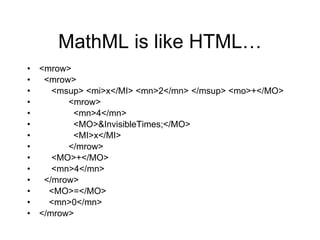
<mrow> <mrow> <msup> <mi>x</MI> <mn>2</mn> </msup> <mo>+</MO> <mrow> <mn>4</mn> <MO>&InvisibleTimes;</MO> <MI>x</MI> </mrow> <MO>+</MO> <mn>4</mn> </mrow> <MO>=</MO> <mn>0</mn> </mrow>  MathML is like HTML…
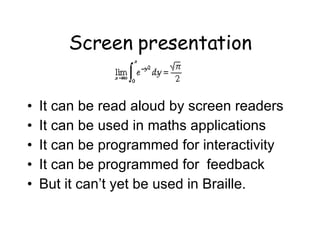
Screen presentation It can be read aloud by screen readers It can be used in maths applications It can be programmed for interactivity It can be programmed for  feedback But it can’t yet be used in Braille.
Technologies that work  (contd.) XML and RDF and EARL …. XML - human readable, schemas etc ….. RDF - this ‘object’ has property ‘this’ EARL - this ’agent’ said this ‘object’ has this ‘property’ on this ‘date’ Eg “The application ‘Lift’ evaluated this page as accessible (didn’t fail) on 3/9/2002”.
Author support W3C described what to do, how to do it, when and why,… Automatic support is required -> W3C Authoring Tools Accessibility Guidelines - note s. 508
Accessibility tools Accessible tools Tools for accessible authoring Validators ie code validators  Evaluators ie compliance with guidelines producing metadata (EARL) Digital repositories for descriptive metadata (re-usable metadata??) On-the-fly repair tools (SWAP, TILE, ..)
New IMS/DC/…approach Think of the user and work towards user needs and preferences Provide a good, easy way to record user needs and preferences Describe content in terms of needs and preferences Avoid all issues to do with disabilities and to do with legal liability
Accessibility issues Direct accessibility Compatible accessibility Alternative modality Equivalent content User choice
User profiles Control Display (presentation) Content A special element to add to the LIP because this info is usually managed by a different person from the teacher (and sometimes the student) Multiple, cascading profiles
AccLIP (User profile) AccessForAll: http://www. imsproject .org/accessibility/
Content profiles Control Display (presentation) Content A separate element as the information is usually an EARL statement Same schema for exact matching and easy maintenance
AccMD (Content profile) An EARL statement … so a URI: http://www. imsproject .org/accessibility
Implementation The Inclusive Learning Exchange at  http://inclusivelearning.ca/
References http://w3.org/ http://w3.org/WAI/ http://www. imsproject .org/accessibility http:// dublincore .org/groups/access/ http:// inclusivelearning .ca http://www. OZeWAI .org/

Accessibility Issues

  • 1.
  • 2.
    Overview Accessibility definitionsCurrent work to minimise problems IMS accessibility activities Matching content to people’s needs Implementations References
  • 3.
    Overview Accessibility definitionsNot … Telecommunications …. Or is it? Economic equity … or is it?
  • 4.
    Typical problems Can’tsee screen Can’t see colours Can’t read text Can’t hear Can’t control cursor Can’t type
  • 5.
    OS support Addthis to Favorites folder Add this to startup items Apple channel …..
  • 6.
    Browser support (?)Lynx IE Netscape/Mozilla iCab Opera Amaya There are about 35 browsers in common use… (Note W3C UAAG - includes LMS)
  • 7.
    ATs for peoplewith vision disabilities
  • 8.
  • 9.
  • 10.
  • 11.
    Accessibility definitions W3C- device independence, separation of content from presentation U.S. - s. 508 for Federal Govt. contracts Australia - common law system with regulations UK, European Commission … IMS/MMI-DC Working definition: mismatch between user needs and content
  • 12.
    W3C Guidelines Accessibilityguidelines Techniques Checkpoints Checkpoint techniques QA and Certification - for authors, authoring tools, user agents
  • 13.
    Localisation of W3Cguidelines University, system, organisational guidelines Controlling systems and templates EuroAccessibility efforts CEN MMI-DC Workshop IMS Accessibility Guidelines ( -> maths interest)
  • 14.
    W3C Technologies thatwork Cascading style sheets (CSS1) eXtensible Markup Language and CSS2 Scalable Vector Graphics (SVG) Synchronised Multimedia Integration Language (SMIL) eXtensible Stylesheet Language (XSLT) ChemML, MathML, MusicML, ...
  • 15.
  • 16.
    SVG example Imageis represented as vectors in text Sub-images can be identified Metadata can be added Rights management can be used Behaviours can be controlled Eg an interactive knee dissection linked to external resources
  • 17.
    Technologies that work (contd.) XML => MathML, ChemML, etc MathML as an example The equation x 2 + 4x + 4 =0
  • 18.
    Separate presentationfrom content Presentational markup to ensure display can be controlled - with style sheets to define the display characteristics Content markup to provide machine readable version of content so it could be read into content manipulators
  • 19.
    <mrow> <mrow> <msup><mi>x</MI> <mn>2</mn> </msup> <mo>+</MO> <mrow> <mn>4</mn> <MO>&InvisibleTimes;</MO> <MI>x</MI> </mrow> <MO>+</MO> <mn>4</mn> </mrow> <MO>=</MO> <mn>0</mn> </mrow> MathML is like HTML…
  • 20.
    Screen presentation Itcan be read aloud by screen readers It can be used in maths applications It can be programmed for interactivity It can be programmed for feedback But it can’t yet be used in Braille.
  • 21.
    Technologies that work (contd.) XML and RDF and EARL …. XML - human readable, schemas etc ….. RDF - this ‘object’ has property ‘this’ EARL - this ’agent’ said this ‘object’ has this ‘property’ on this ‘date’ Eg “The application ‘Lift’ evaluated this page as accessible (didn’t fail) on 3/9/2002”.
  • 22.
    Author support W3Cdescribed what to do, how to do it, when and why,… Automatic support is required -> W3C Authoring Tools Accessibility Guidelines - note s. 508
  • 23.
    Accessibility tools Accessibletools Tools for accessible authoring Validators ie code validators Evaluators ie compliance with guidelines producing metadata (EARL) Digital repositories for descriptive metadata (re-usable metadata??) On-the-fly repair tools (SWAP, TILE, ..)
  • 24.
    New IMS/DC/…approach Thinkof the user and work towards user needs and preferences Provide a good, easy way to record user needs and preferences Describe content in terms of needs and preferences Avoid all issues to do with disabilities and to do with legal liability
  • 25.
    Accessibility issues Directaccessibility Compatible accessibility Alternative modality Equivalent content User choice
  • 26.
    User profiles ControlDisplay (presentation) Content A special element to add to the LIP because this info is usually managed by a different person from the teacher (and sometimes the student) Multiple, cascading profiles
  • 27.
    AccLIP (User profile)AccessForAll: http://www. imsproject .org/accessibility/
  • 28.
    Content profiles ControlDisplay (presentation) Content A separate element as the information is usually an EARL statement Same schema for exact matching and easy maintenance
  • 29.
    AccMD (Content profile)An EARL statement … so a URI: http://www. imsproject .org/accessibility
  • 30.
    Implementation The InclusiveLearning Exchange at http://inclusivelearning.ca/
  • 31.
    References http://w3.org/ http://w3.org/WAI/http://www. imsproject .org/accessibility http:// dublincore .org/groups/access/ http:// inclusivelearning .ca http://www. OZeWAI .org/