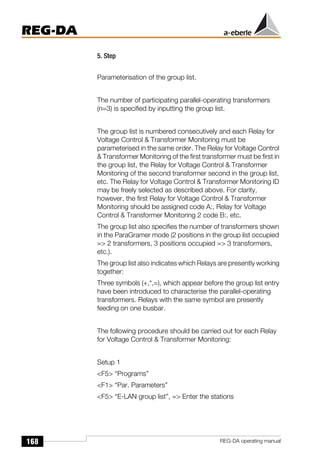
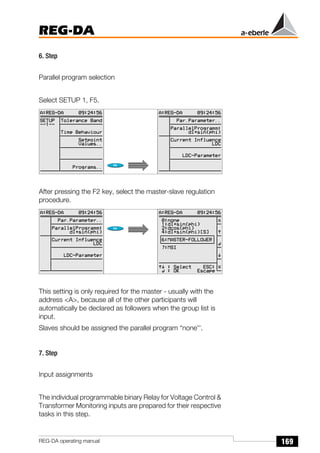
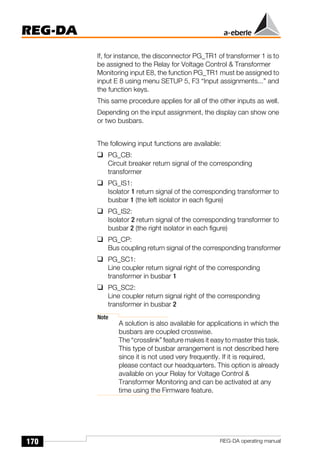
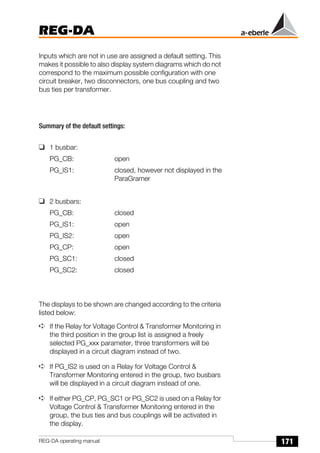
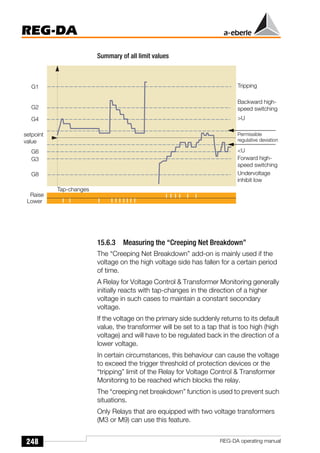
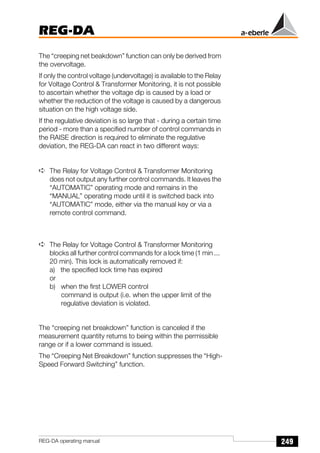
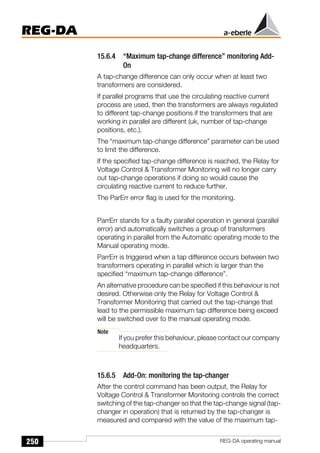
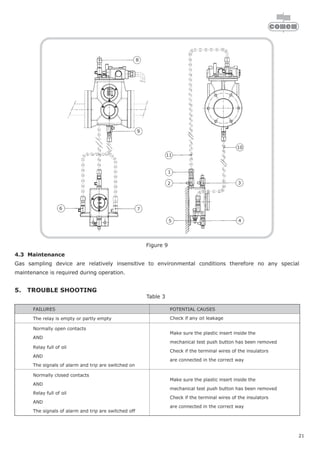
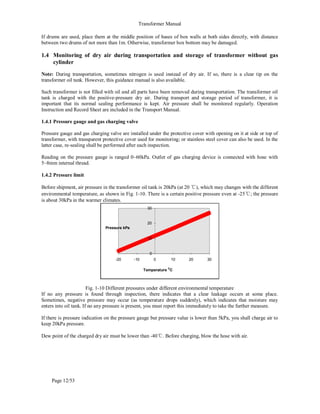
A
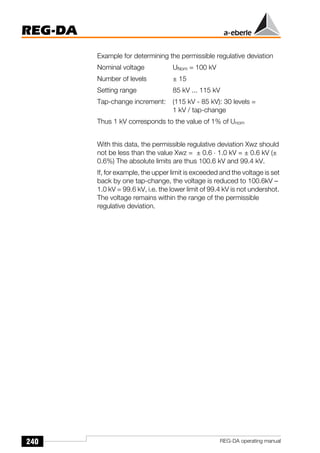
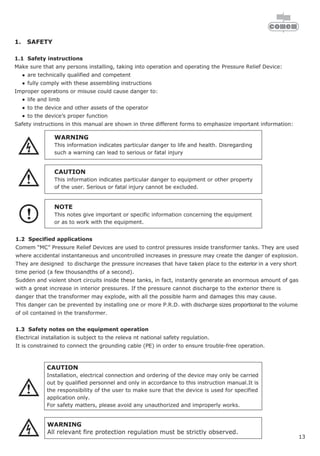
1
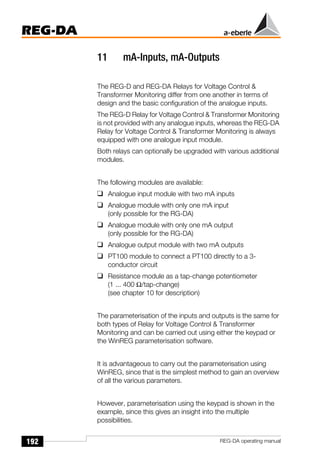
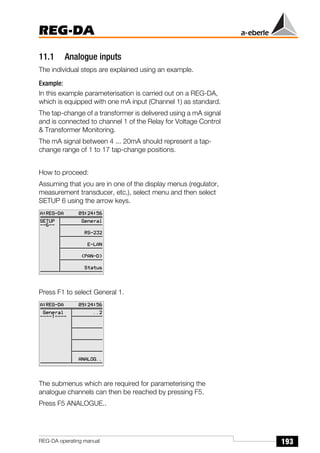
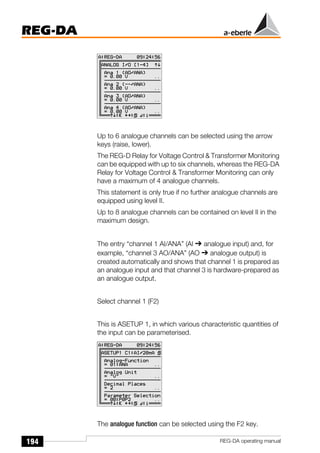
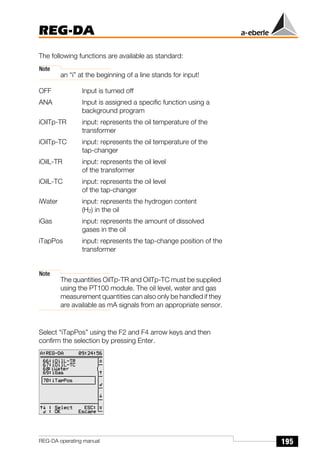
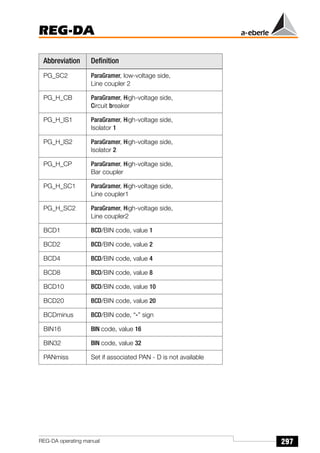
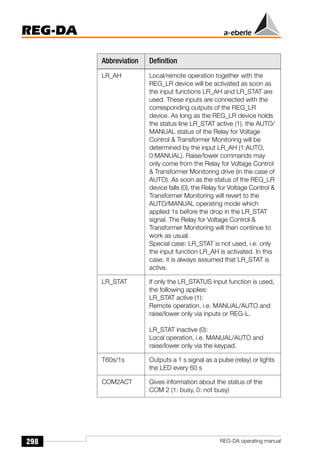
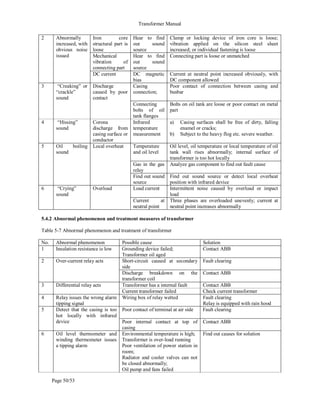
We
reserve
all
rights
in
this
document
and
in
the
information
contained
therein.
Reproduction,
use
or
disclosure
to
third
parties
without
express
authority
is
strictly
forbidden.
@
ABB
2006
INDEX OF CONTENTS
1. Overview of ABB transformer Part 1
2. Transformer Components and Instruction Part 2
3. Elimination of Transformer Faults Part 3
4. Transformer Operation and Maintenace Part 4
5. Maintenace of Transformer oil Part 5
© ABB Group
July 1, 2018 | Slide 1
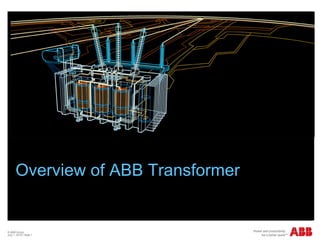
Overview of ABB Transformer
ABB China
July 1, 2018 | Slide 2
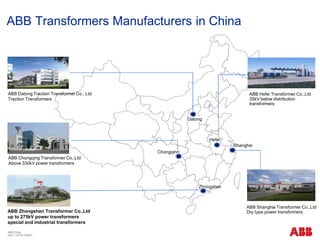
ABB Transformers Manufacturers in China
Datong
Chongqing
Zhongshan
Shanghai
Hefei
ABB Zhongshan Transformer Co.,Ltd
up to 275kV power transformers
special and industrial transformers
ABB Chongqing Transformer Co.,Ltd
Above 330kV power transformers
ABB Shanghai Transformer Co.,Ltd
Dry type power transformers
ABB Hefei Transformer Co.,Ltd
35kV below distribution
transformers
ABB Datong Traction Transformer Co., Ltd
Traction Transformers
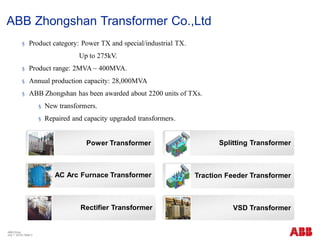
§ Product category: Power TX and special/industrial TX.
Up to 275kV.
§ Product range: 2MVA ~ 400MVA.
§ Annual production capacity: 28,000MVA
§ ABB Zhongshan has been awarded about 2200 units of TXs.
§ New transformers.
§ Repaired and capacity upgraded transformers.
ABB China
July 1, 2018 | Slide 3
Power Transformer
AC Arc Furnace Transformer
Rectifier Transformer VSD Transformer
Traction Feeder Transformer
ABB Zhongshan Transformer Co.,Ltd
Splitting Transformer
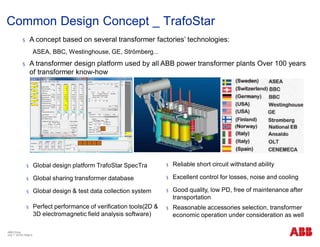
§ A concept based on several transformer factories’ technologies:
ASEA, BBC, Westinghouse, GE, Strömberg...
§ A transformer design platform used by all ABB power transformer plants Over 100 years
of transformer know-how
§ Global design platform TrafoStar SpecTra
§ Global sharing transformer database
§ Global design & test data collection system
§ Perfect performance of verification tools(2D &
3D electromagnetic field analysis software)
§ Reliable short circuit withstand ability
§ Excellent control for losses, noise and cooling
§ Good quality, low PD, free of maintenance after
transportation
§ Reasonable accessories selection, transformer
economic operation under consideration as well
Common Design Concept _ TrafoStar
ABB China
July 1, 2018 | Slide 4
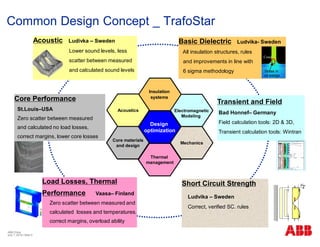
Acoustic Ludivka – Sweden
Lower sound levels, less
scatter between measured
and calculated sound levels
Design
optimization
Insulation
systems
Acoustics Electromagnetic
Modeling
Mechanics
Thermal
management
Core materials
and design
Basic Dielectric Ludvika- Sweden
All insulation structures, rules
and improvements in line with
6 sigma methodology
Core Performance
St.Louis–USA
Zero scatter between measured
and calculated no load losses,
correct margins, lower core losses
Load Losses, Thermal
Performance Vaasa– Finland
Zero scatter between measured and
calculated losses and temperatures.
correct margins, overload ability
Short Circuit Strength
Ludvika – Sweden
Correct, verified SC. rules
Transient and Field
Bad Honnef– Germany
Field calculation tools: 2D & 3D,
Transient calculation tools: Wintran
Cond.
Stress in
oil wedge
Common Design Concept _ TrafoStar
ABB China
July 1, 2018 | Slide 5
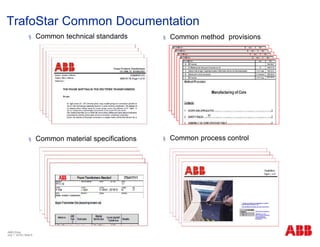
§ Common technical standards
§ Common material specifications
§ Common method provisions
§ Common process control
TrafoStar Common Documentation
ABB China
July 1, 2018 | Slide 6
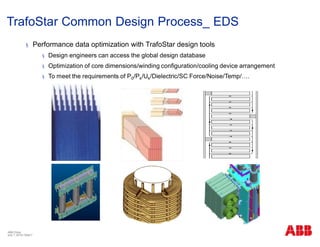
§ Performance data optimization with TrafoStar design tools
§ Design engineers can access the global design database
§ Optimization of core dimensions/winding configuration/cooling device arrangement
§ To meet the requirements of P0/Pk/Uk/Dielectric/SC Force/Noise/Temp/….
TrafoStar Common Design Process_ EDS
ABB China
July 1, 2018 | Slide 7
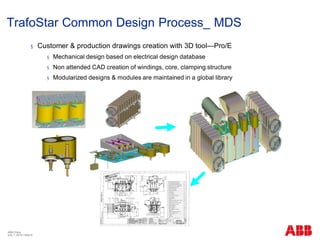
§ Customer & production drawings creation with 3D tool—Pro/E
§ Mechanical design based on electrical design database
§ Non attended CAD creation of windings, core, clamping structure
§ Modularized designs & modules are maintained in a global library
TrafoStar Common Design Process_ MDS
ABB China
July 1, 2018 | Slide 8
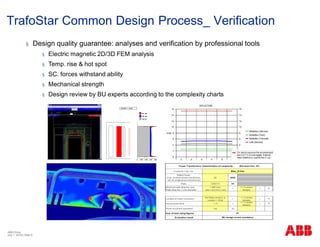
§ Design quality guarantee: analyses and verification by professional tools
§ Electric magnetic 2D/3D FEM analysis
§ Temp. rise & hot spot
§ SC. forces withstand ability
§ Mechanical strength
§ Design review by BU experts according to the complexity charts
TrafoStar Common Design Process_ Verification
ABB China
July 1, 2018 | Slide 9
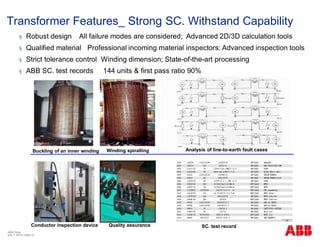
§ Robust design All failure modes are considered; Advanced 2D/3D calculation tools
§ Qualified material Professional incoming material inspectors; Advanced inspection tools
§ Strict tolerance control Winding dimension; State-of-the-art processing
§ ABB SC. test records 144 units & first pass ratio 90%
Analysis of line-to-earth fault cases
SC. test record
Buckling of an inner winding Winding spiralling
Conductor inspection device Quality assurance
Transformer Features_ Strong SC. Withstand Capability
ABB China
July 1, 2018 | Slide 10
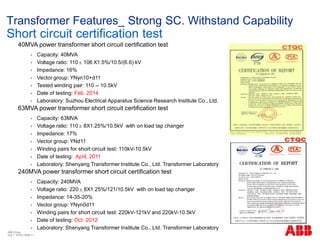
40MVA power transformer short circuit certification test
• Capacity: 40MVA
• Voltage ratio: 110±106 X1.5%/10.5/(6.6) kV
• Impedance: 16%
• Vector group: YNyn10+d11
• Tested winding pair: 110 -- 10.5kV
• Date of testing: Feb. 2014
• Laboratory: Suzhou Electrical Apparatus Science Research Institute Co., Ltd.
63MVA power transformer short circuit certification test
• Capacity: 63MVA
• Voltage ratio: 110±8X1.25%/10.5kV with on load tap changer
• Impedance: 17%
• Vector group: YNd11
• Winding pairs for short circuit test: 110kV-10.5kV
• Date of testing: April, 2011
• Laboratory: Shenyang Transformer Institute Co., Ltd. Transformer Laboratory
240MVA power transformer short circuit certification test
• Capacity: 240MVA
• Voltage ratio: 220±8X1.25%/121/10.5kV with on load tap changer
• Impedance: 14-35-20%
• Vector group: YNyn0d11
• Winding pairs for short circuit test: 220kV-121kV and 220kV-10.5kV
• Date of testing: Oct. 2012
• Laboratory: Shenyang Transformer Institute Co., Ltd. Transformer Laboratory
Transformer Features_ Strong SC. Withstand Capability
Short circuit certification test
ABB China
July 1, 2018 | Slide 11
Transformer Features_ Long Life Expectancy
§ Hot spot analyses and verification by professional tools
§ Temp. rise & hot spot accurate calculation
§ Cable loss density analyses --- hot spot location
§ Design review by BU experts according to the complexity charts
ABB China
July 1, 2018 | Slide 12
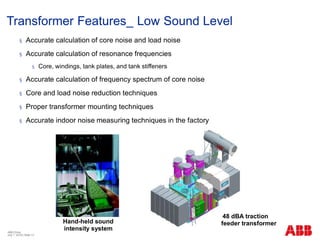
48 dBA traction
feeder transformer
§ Accurate calculation of core noise and load noise
§ Accurate calculation of resonance frequencies
§ Core, windings, tank plates, and tank stiffeners
§ Accurate calculation of frequency spectrum of core noise
§ Core and load noise reduction techniques
§ Proper transformer mounting techniques
§ Accurate indoor noise measuring techniques in the factory
Hand-held sound
intensity system
Transformer Features_ Low Sound Level
ABB China
July 1, 2018 | Slide 13
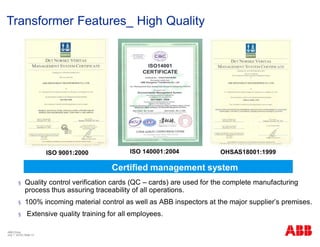
§ Quality control verification cards (QC – cards) are used for the complete manufacturing
process thus assuring traceability of all operations.
§ 100% incoming material control as well as ABB inspectors at the major supplier’s premises.
§ Extensive quality training for all employees.
ISO 9001:2000 ISO 140001:2004 OHSAS18001:1999
Certified management system
Transformer Features_ High Quality
ABB China
July 1, 2018 | Slide 14
§ Optimized design and high quality material
§ Low losses core steel
§ Proper copper conductors
§ Optimization of windings and leads
§ Magnetic shielding on the tank walls
§ Non-magnetic steel plate
§ Professional bus bar design
§ Copper shielding or aluminum shielding
§ Strict manufacturing tolerances
§ Core gap control
§ Winding displacement control (conductor tolerance)
§ Optimized solution for customer based on LCC
concept if required
Transformer Features_ Energy Saving
ABB China
July 1, 2018 | Slide 15
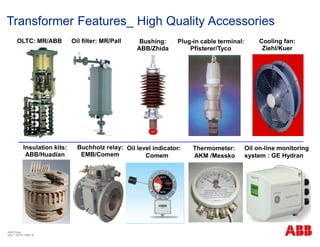
OLTC: MR/ABB Bushing:
ABB/Zhida
Thermometer:
AKM /Messko
Oil level indicator:
Comem
Buchholz relay:
EMB/Comem
Plug-in cable terminal:
Pfisterer/Tyco
Insulation kits:
ABB/Huadian
Cooling fan:
Ziehl/Kuer
Transformer Features_ High Quality Accessories
ABB China
July 1, 2018 | Slide 16
Oil filter: MR/Pall
Oil on-line monitoring
system : GE Hydran
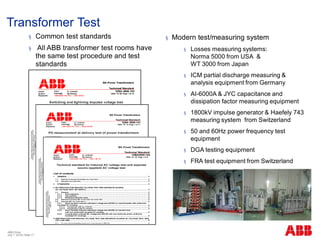
§ Common test standards
§ All ABB transformer test rooms have
the same test procedure and test
standards
§ Modern test/measuring system
§ Losses measuring systems:
Norma 5000 from USA &
WT 3000 from Japan
§ ICM partial discharge measuring &
analysis equipment from Germany
§ AI-6000A & JYC capacitance and
dissipation factor measuring equipment
§ 1800kV impulse generator & Haefely 743
measuring system from Switzerland
§ 50 and 60Hz power frequency test
equipment
§ DGA testing equipment
§ FRA test equipment from Switzerland
Transformer Test
ABB China
July 1, 2018 | Slide 17
Grand Lisboa Macao Hotel
Guangzhou Asia Sport Game project
Sinopec
Hong Kong-Kowloon Railway Metro (Shanghai, Shenyang, Zhengzhou)
Three Gorges
Oilfield in Xinjiang Fujian Oil Refining project Wuhan Steel
Power grid(State Grid/Southern China Grid)
Airport(Guangzhou, Shenzhen, Changsha)
ABB Zhongshan Transformer Co.,Ltd
Major Projects in China
Olympic project
ABB China
July 1, 2018 | Slide 18
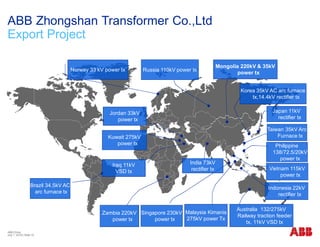
Russia 110kV power tx
Mongolia 220kV & 35kV
power tx
Jordan 33kV
power tx
Kuwait 275kV
power tx
Zambia 220kV
power tx
Brazil 34.5kV AC
arc furnace tx
Singapore 230kV
power tx
Japan 11kV
rectifier tx
Korea 35kV AC arc furnace
tx,14.4kV rectifier tx
ABB Zhongshan Transformer Co.,Ltd
Export Project
Australia 132/275kV
Railway traction feeder
tx, 11kV VSD tx
Taiwan 35kV Arc
Furnace tx
Norway 33 kV power tx
Vietnam 115kV
power tx
India 73kV
rectifier tx
Indonesia 22kV
rectifier tx
Malaysia Kimanis
275kV power Tx
Philippine
138/72.5/20kV
power tx
Iraq 11kV
VSD tx
ABB China
July 1, 2018 | Slide 19
How to purchase a really economical transformer
TOC with loss evaluations
ABB China
July 1, 2018 | Slide 20
What does a customer pay for in transformer life cycle
§ The real cost of a transformer paid by the owner is the sum of the initial
purchase price (first cost) plus the cost of running it for its useful life 20-30
years. The components are describes as following
§ Initial purchase price
§ Running cost
§ Cost of losses
§ No-load losses
§ Load losses
§ Commissioning cost
§ Maintenance cost
§ Emissions cost (depending on regulations)
What does a customer pay for ?
=
Life Cycle Cost ! (LCC)
ABB China
July 1, 2018 | Slide 21
Why to consider Life Cycle Cost
§ The major cost in transformer life circle is the running cost.
§ IEC 60300 recommends LCC methodology for investment.
§ Each government investment project in the United States is required to have LCC report for
approval since 1999.
ABB China
July 1, 2018 | Slide 22
Source: Transformer
Magazine (2006.06, 12th )
Based on 0.43RMB/kWh
Total Ownership Cost is a reduced LCC model
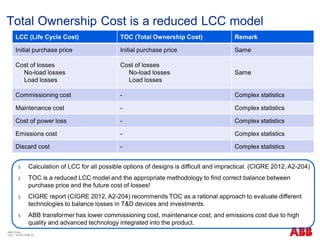
§ Calculation of LCC for all possible options of designs is difficult and impractical. (CIGRE 2012, A2-204)
§ TOC is a reduced LCC model and the appropriate methodology to find correct balance between
purchase price and the future cost of losses!
§ CIGRE report (CIGRE 2012, A2-204) recommends TOC as a rational approach to evaluate different
technologies to balance losses in T&D devices and investments.
§ ABB transformer has lower commissioning cost, maintenance cost, and emissions cost due to high
quality and advanced technology integrated into the product.
LCC (Life Cycle Cost) TOC (Total Ownership Cost) Remark
Initial purchase price Initial purchase price Same
Cost of losses
No-load losses
Load losses
Cost of losses
No-load losses
Load losses
Same
Commissioning cost - Complex statistics
Maintenance cost - Complex statistics
Cost of power loss - Complex statistics
Emissions cost - Complex statistics
Discard cost - Complex statistics
ABB China
July 1, 2018 | Slide 23
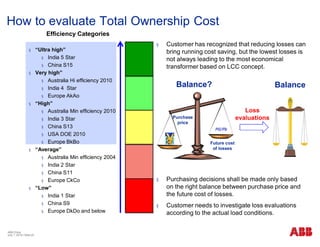
Efficiency Categories
§ “Ultra high”
§ India 5 Star
§ China S15
§ Very high”
§ Australia Hi efficiency 2010
§ India 4 Star
§ Europe AkAo
§ “High”
§ Australia Min efficiency 2010
§ India 3 Star
§ China S13
§ USA DOE 2010
§ Europe BkBo
§ “Average”
§ Australia Min efficiency 2004
§ India 2 Star
§ China S11
§ Europe CkCo
§ “Low”
§ India 1 Star
§ China S9
§ Europe DkDo and below
How to evaluate Total Ownership Cost
ABB China
July 1, 2018 | Slide 24
§ Customer has recognized that reducing losses can
bring running cost saving, but the lowest losses is
not always leading to the most economical
transformer based on LCC concept.
§ Purchasing decisions shall be made only based
on the right balance between purchase price and
the future cost of losses.
§ Customer needs to investigate loss evaluations
according to the actual load conditions.
Loss
evaluations
Balance?
Purchase
price
Future cost
of losses
Balance
Total Ownership Cost formula
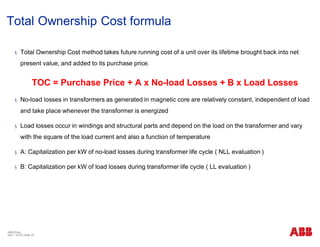
§ Total Ownership Cost method takes future running cost of a unit over its lifetime brought back into net
present value, and added to its purchase price.
TOC = Purchase Price + A x No-load Losses + B x Load Losses
§ No-load losses in transformers as generated in magnetic core are relatively constant, independent of load
and take place whenever the transformer is energized
§ Load losses occur in windings and structural parts and depend on the load on the transformer and vary
with the square of the load current and also a function of temperature
§ A: Capitalization per kW of no-load losses during transformer life cycle ( NLL evaluation )
§ B: Capitalization per kW of load losses during transformer life cycle ( LL evaluation )
ABB China
July 1, 2018 | Slide 25
ABB China
July 1, 2018 | Slide 26
How to purchase a really economical transformer
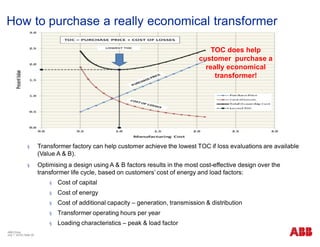
TOC does help
customer purchase a
really economical
transformer!
§ Transformer factory can help customer achieve the lowest TOC if loss evaluations are available
(Value A & B).
§ Optimising a design using A & B factors results in the most cost-effective design over the
transformer life cycle, based on customers’ cost of energy and load factors:
§ Cost of capital
§ Cost of energy
§ Cost of additional capacity – generation, transmission & distribution
§ Transformer operating hours per year
§ Loading characteristics – peak & load factor
Recommendations
ABB China
July 1, 2018 | Slide 27
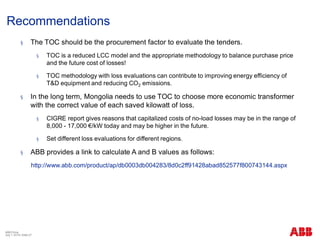
§ The TOC should be the procurement factor to evaluate the tenders.
§ TOC is a reduced LCC model and the appropriate methodology to balance purchase price
and the future cost of losses!
§ TOC methodology with loss evaluations can contribute to improving energy efficiency of
T&D equipment and reducing CO2 emissions.
§ In the long term, Mongolia needs to use TOC to choose more economic transformer
with the correct value of each saved kilowatt of loss.
§ CIGRE report gives reasons that capitalized costs of no-load losses may be in the range of
8,000 - 17,000 €/kW today and may be higher in the future.
§ Set different loss evaluations for different regions.
§ ABB provides a link to calculate A and B values as follows:
http://www.abb.com/product/ap/db0003db004283/8d0c2ff91428abad852577f800743144.aspx
ABB China
July 1, 2018 | Slide 28
Transformer Components and Instruction
Transformer Overview
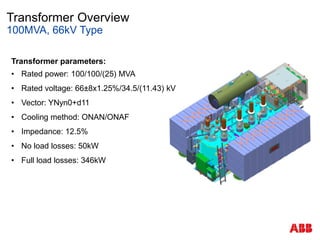
100MVA, 66kV Type
Transformer parameters:
• Rated power: 100/100/(25) MVA
• Rated voltage: 66±8x1.25%/34.5/(11.43) kV
• Vector: YNyn0+d11
• Cooling method: ONAN/ONAF
• Impedance: 12.5%
• No load losses: 50kW
• Full load losses: 346kW
Transformer Overview
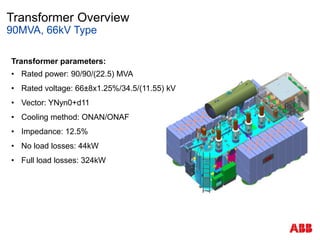
90MVA, 66kV Type
Transformer parameters:
• Rated power: 90/90/(22.5) MVA
• Rated voltage: 66±8x1.25%/34.5/(11.55) kV
• Vector: YNyn0+d11
• Cooling method: ONAN/ONAF
• Impedance: 12.5%
• No load losses: 44kW
• Full load losses: 324kW
Transformer Overview
Main Components
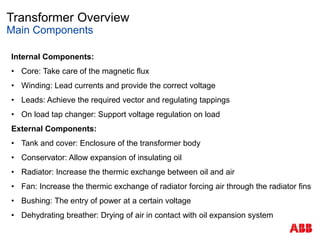
Internal Components:
• Core: Take care of the magnetic flux
• Winding: Lead currents and provide the correct voltage
• Leads: Achieve the required vector and regulating tappings
• On load tap changer: Support voltage regulation on load
External Components:
• Tank and cover: Enclosure of the transformer body
• Conservator: Allow expansion of insulating oil
• Radiator: Increase the thermic exchange between oil and air
• Fan: Increase the thermic exchange of radiator forcing air through the radiator fins
• Bushing: The entry of power at a certain voltage
• Dehydrating breather: Drying of air in contact with oil expansion system
Transformer Overview
Main Components
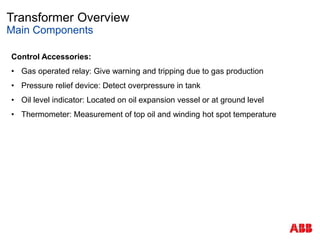
Control Accessories:
• Gas operated relay: Give warning and tripping due to gas production
• Pressure relief device: Detect overpressure in tank
• Oil level indicator: Located on oil expansion vessel or at ground level
• Thermometer: Measurement of top oil and winding hot spot temperature
Bushing
0
INSTRUCTIONS
OF
OIL IMPREGNATED PAPER CONDENSER
TRANSFORMER BUSHINGS
NANJING ZHIDA ELECTRIC CO., LTD, CHINA
1
1. Functions
1.1 The oil-impregnated paper condenser bushings for transformers are
used to lead HV conductors through transformer oiltank, both as a
support to conducting parts and an insulator to oiltank.
1.2 Application:
1.2.1 Ambient Temperature: -40~+40℃
1.2.2 Altitude and Clean Degree: the normal bushings can be applied to average
normal areas with an altitude below 1000m. The pollution-resistant bushings are
applicable to stipulated polluted areas. Pollution-resistant classes include Class ,
Ⅰ
Class , Class , and Class , with corresponding creepage distance 16mm/kV
Ⅱ Ⅲ Ⅳ 、
20mm/kV、25mm/kV、31mm/kV. For those areas with an altitude between 1000m
and 4000m, the insulation distance and test voltage should be in accordance with
IEC60185 and GB311.1 Publications.
1.2.3 Installation: for the vertically installed bushings, an angle of 0~30°between the
axis of bushing and vertical line is permitted; for the horizontally installed bushings,
an angle of 0~15°between the axis of bushing and horizontal line is permitted.
2. Construction
2.1 The oil-impregnated paper condenser transformer bushing consists of
oil conservator, porcelain, condenser body, flange joint and
equi-potential ball, etc. As the main insulation of bushing, the
condenser body is a coaxial cylindrical capacitor composed of
aluminum and oil-impregnated paper, sheet aluminum as electrode
plate, and oil-impregnated paper as medium between electrodes. The
innermost coaxial cylinder is connected with lead conductor, while the
outermost coaxial cylinder is connected with test tap which is jointed
2
with mounting flange. The condenser body is of series-wound structure,
so as to achieve an evenly distributed electric field both along and
perpendicular to the axis of the bushing. In order to achieve aimed
electrical performance and sufficient performance tolerance, the
condenser body is dried under vacuum condition for elimination of
inside air and moisture, and impregnated under vacuum condition by
high-quality transformer oil.
2.2 The bushing is of overall mechanically sealed structure. In order to
achieve good sealing performance, between parts oil-resistant rubber
gaskets are inserted which in turn are reinforced by strong springs. It
is guaranteed that the inner insulation is protected against erosion by
outside atmosphere, so as to ensure reliable and steady electrical
performance for a long time.
2.3 The air side porcelain is of glued structure, so as to achieve high-level
mechanical anti-deformation strength.
2.4 Test tap and oil sampling device are fixed on the mounting flange. The
sampling device is used for taking out oil sample from bushing. The test
tap is insulated from mounting flange and used for measuring dielectric
loss and partial discharge of the bushing. During operation the test tap
can be earthed through connecting with the mounting flange by
tightening a protective cap on the test tap.
2.5 There are two ways of connection between the bushing and HV
conductor in the transformer: draw leadand bottom connection .
3
3. Performance and Dimension
Technical performance and properties conform toIEC60137 and
GB/T 4109 “Insuladed Bushing for Alternating Voltage Above 1000V”.
As for technical indexes and dimensions, please refer to the attached
catalogues.
4. Handling upon Receipt
4.1 Inspection of the Bushing
When the bushing is received, the case should be opened for the
purpose of inspection of bushing as soon as possible. If damage of the
bushing is evident, please notify the details immediately to Nanjing Zhida
Electric Co., Ltd.
4.2 Uncrating
After the top cover is opened, it can be seen that the bushing is so
inclined that the top of the bushing is 3°above horizontal level. If the
bushing is to be put back in the case after test on a transformer, please
position the bushing in the same inclined condition.
Please be extremely careful to avoid any damage on porcelain
and other parts of the bushing.
4
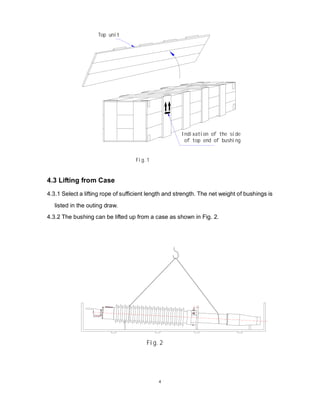
of top end of bushing
Indixation of the side
Top unit
Fig.1
4.3 Lifting from Case
4.3.1 Select a lifting rope of sufficient length and strength. The net weight of bushings is
listed in the outing draw.
4.3.2 The bushing can be lifted up from a case as shown in Fig. 2.
Fig.2
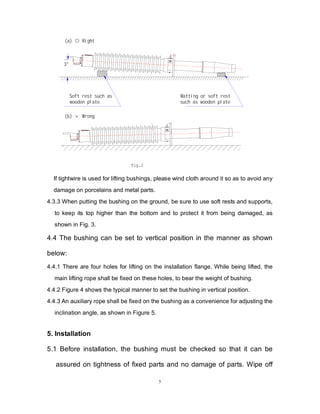
5
3°
Fig.3
(a) ○ Right
(b) × Wrong
Soft rest such as
wooden plate
Matting or soft rest
such as wooden plate
If tightwire is used for lifting bushings, please wind cloth around it so as to avoid any
damage on porcelains and metal parts.
4.3.3 When putting the bushing on the ground, be sure to use soft rests and supports,
to keep its top higher than the bottom and to protect it from being damaged, as
shown in Fig. 3.
4.4 The bushing can be set to vertical position in the manner as shown
below:
4.4.1 There are four holes for lifting on the installation flange. While being lifted, the
main lifting rope shall be fixed on these holes, to bear the weight of bushing.
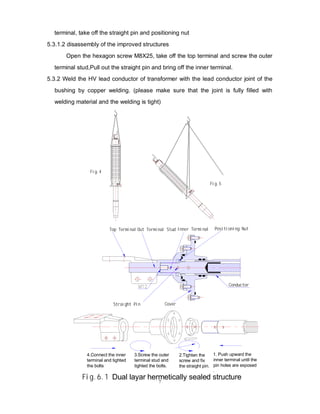
4.4.2 Figure 4 shows the typical manner to set the bushing in vertical position.
4.4.3 An auxiliary rope shall be fixed on the bushing as a convenience for adjusting the
inclination angle, as shown in Figure 5.
5. Installation
5.1 Before installation, the bushing must be checked so that it can be
assured on tightness of fixed parts and no damage of parts. Wipe off
6
dust and dirt accumulated on the surface of the bushing; for bushings
with cable as current-carrying material, the inner cavity of conductor
shall also be cleaned. If possible, the sealing performance of bushing
should also be tested.
5.2 Set the bushing vertically on a support; check and adjust oil level
inside the oil conservator, which shall be at the medium and top level of
oil conservator (viz. between 1/2 and 2/3 of the oil gauge). If oil level is
too high, the pressure inside bushing shall become extraordinarily high,
resulting the possible leakage of oil. On the other hand, if oil level is too
low, it is impossible to detect the change in oil level. When oil level is
too high, the oil can be discharged to appropriate quantity through the
sampling cap on the installation flange; when oil level is too low, the oil
can be filled to appropriate quantity through the injection cap on the oil
conservator.
5.3 Draw Lead Bushing
5.3.1 The shield ball and head part of the 252kV bushing are packed in the cases
individually .For bushing 170kV and below ,thead part need to be
disassembled.There are two different structures of the head part:dual layar
hermetically sealed type and the improved structures.
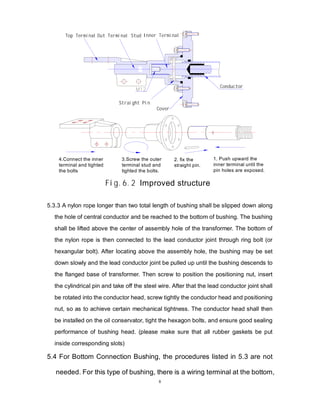
5.3.1.1 disassembly of dual layar hermetically sealed structure
Open the hexagon screw M8X25, take off the top terminal and outer terminal
stud. If the outer terminal stud. is difficult to be taken off, insert two “-” shape
screw-drivers oppositely between the outer terminal stud and cover of the oil
reservoir; then push upward the outer terminal stud with the screw-drivers. The
outer terminal stud can be taken off easily.Screw the outer terminal stud and inner
7
terminal, take off the straight pin and positioning nut
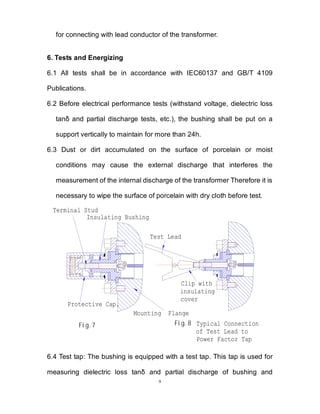
5.3.1.2 disassembly of the improved structures
Open the hexagon screw M8X25, take off the top terminal and screw the outer
terminal stud,Pull out the straight pin and bring off the inner terminal.
5.3.2 Weld the HV lead conductor of transformer with the lead conductor joint of the
bushing by copper welding. (please make sure that the joint is fully filled with
welding material and the welding is tight)
Fig.4
Fig.5
Inner Terminal
Top Terminal Out Terminal Stud Positioning Nut
Straight Pin Cover
1. Push upward the
inner terminal until the
pin holes are exposed
.
2.Tighten the
screw and fix
the straight pin.
3.Screw the outer
terminal stud and
tighted the bolts.
4.Connect the inner
terminal and tighted
the bolts
Fig.6.1 Dual layar hermetically sealed structure
Conductor
8
5.3.3 A nylon rope longer than two total length of bushing shall be slipped down along
the hole of central conductor and be reached to the bottom of bushing. The bushing
shall be lifted above the center of assembly hole of the transformer. The bottom of
the nylon rope is then connected to the lead conductor joint through ring bolt (or
hexangular bolt). After locating above the assembly hole, the bushing may be set
down slowly and the lead conductor joint be pulled up until the bushing descends to
the flanged base of transformer. Then screw to position the positioning nut, insert
the cylindrical pin and take off the steel wire. After that the lead conductor joint shall
be rotated into the conductor head, screw tightly the conductor head and positioning
nut, so as to achieve certain mechanical tightness. The conductor head shall then
be installed on the oil conservator, tight the hexagon bolts, and ensure good sealing
performance of bushing head. (please make sure that all rubber gaskets be put
inside corresponding slots)
5.4 For Bottom Connection Bushing, the procedures listed in 5.3 are not
needed. For this type of bushing, there is a wiring terminal at the bottom,
1. Push upward the
inner terminal until the
pin holes are exposed.
2. fix the
straight pin.
3.Screw the outer
terminal stud and
tighted the bolts.
Cover
4.Connect the inner
terminal and tighted
the bolts
Fig.6.2 Improved structure
Conductor
Inner Terminal
Top Terminal Out Terminal Stud
Straight Pin
9
for connecting with lead conductor of the transformer.
6. Tests and Energizing
6.1 All tests shall be in accordance with IEC60137 and GB/T 4109
Publications.
6.2 Before electrical performance tests (withstand voltage, dielectric loss
tanδ and partial discharge tests, etc.), the bushing shall be put on a
support vertically to maintain for more than 24h.
6.3 Dust or dirt accumulated on the surface of porcelain or moist
conditions may cause the external discharge that interferes the
measurement of the internal discharge of the transformer Therefore it is
necessary to wipe the surface of porcelain with dry cloth before test.
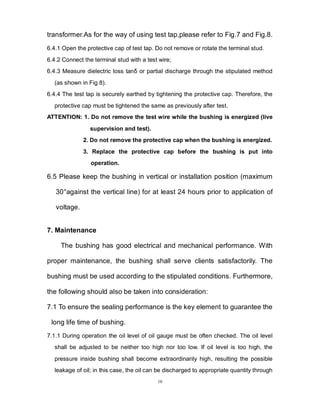
Insulating Bushing
Protective Cap.
Test Lead
Fig.7 Fig.8 Typical Connection
of Test Lead to
Power Factor Tap
Mounting Flange
Clip with
insulating
cover
Terminal Stud
6.4 Test tap: The bushing is equipped with a test tap. This tap is used for
measuring dielectric loss tanδ and partial discharge of bushing and
10
transformer.As for the way of using test tap,please refer to Fig.7 and Fig.8.
6.4.1 Open the protective cap of test tap. Do not remove or rotate the terminal stud.
6.4.2 Connect the terminal stud with a test wire;
6.4.3 Measure dielectric loss tanδ or partial discharge through the stipulated method
(as shown in Fig 8).
6.4.4 The test tap is securely earthed by tightening the protective cap. Therefore, the
protective cap must be tightened the same as previously after test.
ATTENTION: 1. Do not remove the test wire while the bushing is energized (live
supervision and test).
2. Do not remove the protective cap when the bushing is energized.
3. Replace the protective cap before the bushing is put into
operation.

6.5 Please keep the bushing in vertical or installation position (maximum
30°against the vertical line) for at least 24 hours prior to application of
voltage.
7. Maintenance
The bushing has good electrical and mechanical performance. With
proper maintenance, the bushing shall serve clients satisfactorily. The
bushing must be used according to the stipulated conditions. Furthermore,
the following should also be taken into consideration:
7.1 To ensure the sealing performance is the key element to guarantee the
long life time of bushing.
7.1.1 During operation the oil level of oil gauge must be often checked. The oil level
shall be adjusted to be neither too high nor too low. If oil level is too high, the
pressure inside bushing shall become extraordinarily high, resulting the possible
leakage of oil; in this case, the oil can be discharged to appropriate quantity through
11
the sampling cap on the installation flange. On the other hand, if oil level is too low, it
is impossible to guarantee safe operation; in this case, the oil can be filled to
appropriate quantity through the injection cap on the oil conservator.
7.1.2 During operation the transformer oil inside bushings should be sampled and
tested periodically. Usually one year after being put into operation, the oil should be
tested and the test result be compared with leave factory values. If the test result is
within normal range, it can be concluded that the sealing performance is reliable.
Later on the oil should be sampled and tested every 3~5 years or longer. If
performance of oil decreases considerably, some new oil should be sampled and
tested again and the tanδ of bushing should also be measured (positive sequential).
Procedures of sampling of oil are as follows: first, open the injection cap on the oil
conservator, so as to avoid outside air entering into the bushing through the
installation flange in case the air pressure inside is lower than that outside of the
bushing. Second, clean the sampling cap on the installation flange, open the cap with
a wrench, rotate the special sampling mouth into the cap hole, tighten the mouth after
it reaches the inner block, and finally the transformer oil shall flow out. Third, reverse
the above procedure after enough quantity of oil is taken. And last, close the injection
cap on the oil conservator.
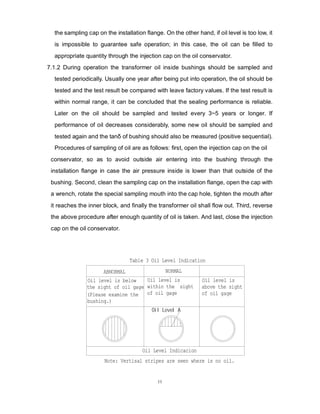
Note: Vertisal stripes are seen where is no oil.
Oil Level Indicacion
Oil Level A
Table 3 Oil Level Indication
Oil level is
within the sight
of oil gage
Oil level is
above the sight
of oil gage
Oil level is below
the sight of oil gage
(Please examine the
bushing.)
ABNORMAL NORMAL
12
7.1.3 The bushing is an overall sealed product. Therefore, after sampling, all the
disturbed sealing parts should be tightened to guarantee its sealing performance.
Otherwise some moisture may enter into the bushing and threaten the insulation of
bushing, resulting lowered performance, or even vicious accidents such as blast of
bushing in serious cases.
7.2 At the factory, all bushings are subjected to dielectric loss test at indoor
temperature. Maximum permissible value of factory-measured dielectric
loss is 0.5% at Ur and actually measured value on each bushing is
recorded on its certificate of conformity. The factory values, however,
may differ from, reading obtained from the same bushing when installed
on the transformer. Thus it is recommended that the first reading taken
after installation to be the reference value for future comparison.
7.3 The test tap should be earthed securely. There is a test tap on the
installation flange. During test the protective cap shall be taken off from
the test tap to achieve insulation from installation flange; at this time,
dielectric loss angle tanδ and partial discharge can be measured.
During operation the protective cap shall be tightened on the test tap, to
guarantee secure earthing together with installation flange. During
operation the test tap is forbidden to be opened.
7.4 The outer insulator of bushing shall be cleaned periodically according
to site operation condition.
7.5 Before electrical performance tests (withstand voltage, partial
discharge and dielectric loss tests, etc.), the bushing shall be put on a
support vertically to maintain for more than 24h..
13
If the bushing is to be returned to factory for repair, please contact the
Company. The bushing is forbidden to be disassembled without the
consent of the Company; if it is necessary to be disassembled, the
Client shall do so after consent from the Company is obtained.
8. Removal and Storage of Bushings
8.1 When the bushing is removed from transformer after tests, please wipe
off the oil on the bottom porcelain surface. If the oil is left unwiped, it
may be misunderstood that there is oil leakage in the bushing.
8.2 The bushing is packed in wooden cases, which shall have sufficient
mechanical strength to protect the bushing against any damage during
transportation. There shall be several locating wooden plates inside the
case to make sure that the pressure is evenly distributed on the bushing.
The head of the bushing shall be inclined about 3○ above horizontal
level. The wooden case is sealed by wooden plates at six sides to
protect the bushing. If the bushing is to be put back in previously used
cases, the latter shall be checked carefully, and when necessary, be
reinforced according to the above-mentioned packing requirements.
Before packing, please cover the bushing with temporary protective
coat.
8.3 The bushing shall be put in a ventilated room and shall be kept away
from the source of heat and fire. It may be put in a wooden case, or on a
support for storage.
14
8.4 When the bushing is to be put into service after long storage, please
clean surfaces of porcelains and metal parts and carry out necessary
checks.
8.4.1 Please inspect whether there is any damage on porcelains, oil leakage, rust on
metal parts or any other irregularity.
8.4.2 Please measure the resistance between the test tap and installation flange, and
between the central conductor and installation flange by means of a 1000V megger.
In this case, measured value of 1000MΩ or more is a proof that the bushing is
suitable for putting into use.
15
Version: SM3001-2009
Add.: No. 3 Maigaoqiao Industrial Park, Qixia District, Nanjing, P.R.China
Tel.: 025-86850068
025-85571988
025-85578655
Fax: 025-85575112
P.O.box: 210028
E-mail: njzhida@vip.sina.c
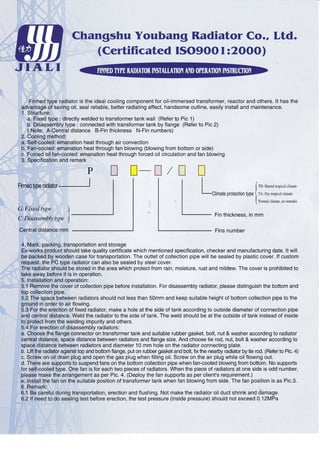
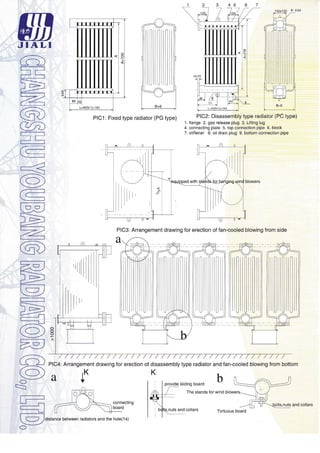
Radiator
Fan
洞
洞
洞
洞 天
天
天
天 牌
牌
牌
牌
DBF
DBF
DBF
DBF2
2
2
2 系列机翼形低噪声变压器用风扇
系列机翼形低噪声变压器用风扇
系列机翼形低噪声变压器用风扇
系列机翼形低噪声变压器用风扇
使用说明书
使用说明书
使用说明书
使用说明书
DBF 2Series of Transformer Cooling Fan
Operation Guide
洞天
洞天
洞天
洞天
通过 ISO9001 质量体系认证企业
ISO9001 QUALITY SYSTEM ENDORSED
西安诺科电气有限责任公司
Xi'an Noko Electric Company Limited
1
1. 产品概述
DBF2 系列机翼形低噪声变压器风扇(以下简称风扇)是根据中华人民共和国行业标准 JB/T9642-2013
《变压器用风扇》制造而成的专供变压器冷却系统用的风扇。DBF 系列变压器风扇有以下多种规格,风扇
连接形式为直联式。
2. 产品规格型号、产品结构简图、产品性能参数
2.1 产品规格型号
2.1.1 型号含义
例: DBF 2 - 8 Q 10 TH
特殊环境代号(湿热带)
电动机级数(10 级)
吹风方向(前吹)
叶轮直径 1/100
设计序号(第一次设计省略)
低噪声变压器风扇
2.1.2 特殊环境代号
W—— 一般户外型,省略不标注;
TH—— 湿热带型;
TA—— 干热带型;
2.1.3 吹风方向
Q—前吹式(气流从电机流向叶轮)
;H—后吹式(气流从叶轮流向电机)订货时请注明
订货时请注明
订货时请注明
订货时请注明。
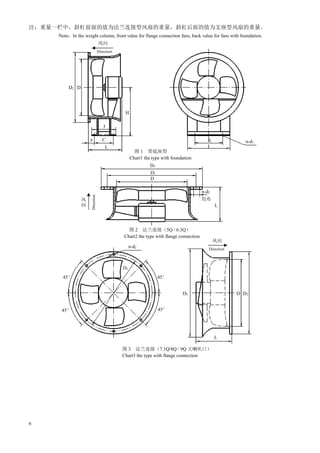
2.2 产品结构简图见图 1、图 2、图 3、图 4
2.3 产品性能参数见表 1
3. 产品设计特点
3.1 该系列风扇按空气动力学原理设计,采用变截面的机翼形叶片和最佳的叶栅参数,因此它具有优良的空
气动力性能,风量大、风压高、噪声低、耗电少。
3.2 该系列风扇叶片采用高强度铝合金精密铸造,具有重量轻、强度高、耐腐蚀、寿命长、耐恶劣环境等特
点。
3.3 风扇叶轮直接联接在电机轴上并保持动态平衡,避免了中间传动的机械损失。
3.4 该系列风扇根据与变压器散热器联接位置的不同,可以水平送风或垂直送风。
3.5 风扇进风端加有防护网罩,同时还可根据用户需要在出风端也加有防护网罩。
3.6 风扇内外表面采用烤漆处理,也可根据用户需要采取热浸镀锌处理。
3.7 风扇电机为全封闭三相异步电动机,具有良好的户外工作性能。风扇电机额定电压可根据用户需要制成
宽电压(220~415)V。
3.8 风扇的流量随着海拔的增高而有所降低;
3.9 电机采用自行设计的短铁心、多散热片结构。性能可靠,使用安全。防护等级达到 IP55,绝缘等级为
B(或 F)级。
4. 风扇使用条件
4.1 周围空气温度:最高 75℃,最低-45℃;
4.2 海拔不超过 1000m,超过 1000m 时,冷却效果将极大的减弱;
2
4.3 空气相对湿度,最湿月月平均最大空气相对湿度为 95%,同时该月的月平均最低温度为 25℃;
4.4 通过风扇的工业气体不允许有强酸,各种溶剂(卤化泾,酮、醛等)及碱;
4.5 允许太阳辐射最大强度 0.98kw/m2;
4.6 允许最大降雨强度 50mm/10min;
4.7 允许有沙尘;
4.8 允许有冰、雪、霜、露。
注:当使用条件与上述不符时,应在订货时提出。
5. 风扇的安装与维护
5.1 安装前应详细检查风扇是否因包装运输而损坏、变形,如有损坏变形应修复后,方可进行安装。
5.2 安装时要注意检查各部分连接有无松动,叶片与风筒间隙是否均匀,是否相碰,若有不均匀或相碰,则
应调整电机位置,直到间隙均匀。
5.3 风扇底座必须与基础面自然结合,不得用螺栓强制连接,以防风扇变形。
5.4 安装过程中,应避免在风扇进、出风端面安装过密的网栅保护罩;墙面等实体距风扇进气端面至少应大
于 1.5D,否则会降低风扇气动参数,同时噪声也会提高。
5.5 风扇安装完毕后,必须进行试运转,待运转正常后方可正式使用。
5.6 风扇在长期置放后,重新使用时,在运转一定时间后或运转中出现异常响声时,应仔细检查各连接部分
是否牢固,螺栓是否松动,叶片磨损是否严重等,如出现上述问题,应及时检修调整或更换有关部分。
5.7 风扇安装完毕后进行接线
风扇安装完毕后进行接线
风扇安装完毕后进行接线
风扇安装完毕后进行接线,
,
,
,接线时应将电源线完全紧固于接线柱上
接线时应将电源线完全紧固于接线柱上
接线时应将电源线完全紧固于接线柱上
接线时应将电源线完全紧固于接线柱上,
,
,
,避免虚接
避免虚接
避免虚接
避免虚接。
。
。
。接线后应完全锁紧接线
接线后应完全锁紧接线
接线后应完全锁紧接线
接线后应完全锁紧接线
盒紧固螺钉
盒紧固螺钉
盒紧固螺钉
盒紧固螺钉,
,
,
,以防止水分从接线盒处渗漏
以防止水分从接线盒处渗漏
以防止水分从接线盒处渗漏
以防止水分从接线盒处渗漏,
,
,
,引起电机短路
引起电机短路
引起电机短路
引起电机短路。
。
。
。
5.8 风机接线盒出口应连接电缆防水接头
风机接线盒出口应连接电缆防水接头
风机接线盒出口应连接电缆防水接头
风机接线盒出口应连接电缆防水接头,
,
,
,以防止雨水进入接线盒导致电机烧毁
以防止雨水进入接线盒导致电机烧毁
以防止雨水进入接线盒导致电机烧毁
以防止雨水进入接线盒导致电机烧毁。
。
。
。
6. 搬运和存放
6.1 在搬运过程中,要注意轻拿轻放,按照包装箱的标志搬运和放置,且勿倒置。
6.2 在搬运过程中应避免冲击性剧烈震动,以防止包装箱和产品破损。
6.3 存放的地点要通风、干燥、清洁,而且没有腐蚀性气体,在贮运过程中,应有防淋雨措施。
6.4 若暂不用时,不宜立即开箱,若包装箱已破损,应开箱检查并妥善处理。
7. 订货须知
7.1 订货时要详细说明规格型号及要求(
(
(
(产品的性能参数及安装方式等
产品的性能参数及安装方式等
产品的性能参数及安装方式等
产品的性能参数及安装方式等)
)
)
)
。
7.2 若有特殊要求
若有特殊要求
若有特殊要求
若有特殊要求,
,
,
,请在订货时详细说明
请在订货时详细说明
请在订货时详细说明
请在订货时详细说明。
。
。
。
8. 其它
由于冷却风扇安装各异,主机厂家需求有别,本公司除提供以上安装形式的风扇外,还可根据厂家要
求提供其它安装形式的风扇(例如侧挂式连接)。
如果您在风机外观及安装方面有其它特殊要求,请在订购时加以说明,本公司将尽全力满足您的要求,
并竭诚为您提供最满意的服务。
3
1.General introduction
The DBF2 series of low---noise wing shape fan used for transformer (thereinafter call it the fan for short) is
produced on the basis of the industry standard of people’s Republic of China: electric Fan for Transformer
(numbered as JB/T 9642-2013),and it is used in the cooling system for transformer specially .The DBF series fan
six specifications and it is mounted directly on the shaft extension of the motor.
2. Production specification and type, sketch of production structure, performance parameter of production
2.1 Production specification and type
2.1.1 Meaning of the symbol
Example:
DBF 2 -8 Q 10 TH
The special environment code name (Denoted humid tropic)
The number of electromotor polar joints (10)
The direction of the air blowing (from the front)
The diameter of the vane (dm)
The design number (omitted in the first design)
The low—noise air blower for transformer
2.1.2 The special environment code name
W-----denoted general outside condition and can be ignored.
TH----TH denoted humid tropic.
TA----TA denoted dry tropic.
2.1.3 Direction of air blowing
Q----Q denoted the front blowing (air from the motor to the impeller)
H----H denoted the back blowing (air form the impeller to the motor)
(Be the same with series of 6.3 and 7.1)
Note: Give indication of the product specification and type while you order it.
2.2 The sketch of the product structure (see sketch 1, sketch 2,sketch3, sketch 4 )
2.3 Performance parameter (see table 1)
3. Design characteristic
3.1 The fan is designed according to the aerodynamics principle, with a variable cross section wind shape vane and
the optimum impeller parameter. So it features the excellent aerodynamics performance with high wind speed,
high wind pressure, low noise and low electrical power consumption.
3.2 The vane of the fan is precisely made of aluminum alloy which has high strength, and it features light weight,
high strength, long service time and adverse circumstances resisting.
3.3 The impeller of fan is mounted directly on the motor axis and keeps dynamic balance so the energy loss of
mechanical driving is avoided.
3.4 This series of fan can send wind flatly or vertically according to the different mount position of the transformer
radiator.
3.5 There is a protecting cover where the air blows in, and a protecting cover also can be mounted at the place the
air blows out according to the consumer’s requirements.
3.6 The surface of the fan is treated with lacquer, and it can also be treated with zincification according to the
consumer’s requirements.
3.7 The electromotor of the fan is an airproof asynchronous three-phase one with fine outside performance. The
rating voltage of the fan electromotor can be turned wide voltage (220~415V) according to the consumer’s
requirements.
3.8 The rate of flow of the fan will be reduced along with the increasing of the elevation.
4
3.9 The short iron core designed ourselves and the radiator are mounted on the motor. The motor has reliable
performance and could be used safely. The protection grade is IP55, insulation grade is B (or F).
4. Operation Conditions
4.1 The ambient air temperature: between -45℃ and 75℃.
4.2 Height above sea level: less than 1000m.
4.3 The relative humidity: the highest average relative humidity in the most moist month is 95%,with the lowest
average temperature (in the same time)of 25℃.
4.4 The industry air without acid, alkali and all kind of solvent could flow through the fan.
4.5 The maximum sun radiation intensity: 0.98kw/m2
.
4.6 The maximum rainfall intensity: 50mm/10min.
4.7 Allow the sand and dust existing.
4.8 Allow the ice, snow, frost and dew existing.
Note: Request should be indicated if the actual operation condition is not answer for the items mentioned
before.
5 Installation and maintenance
5.1 Before installation, check the fan carefully to find out whether it is damaged or distorted.
Repair and then install it if it is damaged or distorted.
5.2 Pay attention to checking every joining part to find out whether it has became loose, to find out whether the
clearance of impeller and casings is well-distributed and to check whether there is a collision between them, if
these occur, adjust the position of motor until the clearance is well-distributed.
5.3 The base of the fan must be joined naturally with the ground, and can not be compulsorily jointed with screw,
otherwise the fan will be out of shape.
5.4 The protection grid mounted on the fan mustn’t be too dense. The distance between blast inlet and the other
structure (such as wall) must be more than 1.5D, otherwise, the aerodynamic properties would be reduced and
the noise level would be increased.
5.5 Before you have installed the fan successfully, try to revolve it to test and then put it in use formally.
5.6 If the fan is left unused for a long time, an when it is used again and these is an abnormal sound in revolution,
carefully check every joining point to find whether it is still fixed firmed and whether the vanes have been
badly abraded and whether the surface of wire is intact. If there is some thing wrong, please repair and adjust it
or replace the damaged part in time.
5.7 Wires should be connected correctly after installing the fan successfully. The connection box should be
airproofed to avoid water leaking into it, which can arouses short circuit of electromotor.
5.8 Export of the fan junction box should install waterproof cable connector, in order to prevent flood water
from entering the junction box and leading to the burning motor.
6. Portage and preservation
6.1 Pay attention to put it up and lay it down gently. Convey and place it according to the mark on the package of
the fan and never upend.
6.2 Protect the package from strong vibration to avoid damaging the package and the product.
6.3 The depositary should be ventilate, dry, clean and far away from corrosive gas. Make sure to protect the
package from rain during conveying and preserving.
6.4 Do not open the package immediately if not use it for period of time. Open the package and check the product
if the package is mangled.
7 Ordering notice
7.1 To order the product, indicate the specification and type and requirements in detail.(Performance parameter
of production and the mode of installation etc.)
7.2 If you have special requirements, please indicate it at length.
8 Once the installation of the cooling fan is different and the requirement of the leader factory is not the same,
beside we provide above, we also supply other type of installation (Such as side hang type).
5
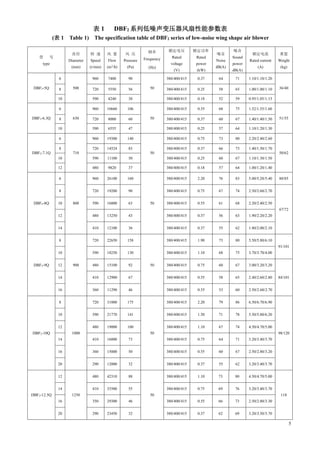
表
表
表
表 1 DBF2 系列低噪声变压器风扇性能参数表
系列低噪声变压器风扇性能参数表
系列低噪声变压器风扇性能参数表
系列低噪声变压器风扇性能参数表
(表
表
表
表 1 Table 1) The specification table of DBF2 series of low-noise wing shape air blower
型 号
type
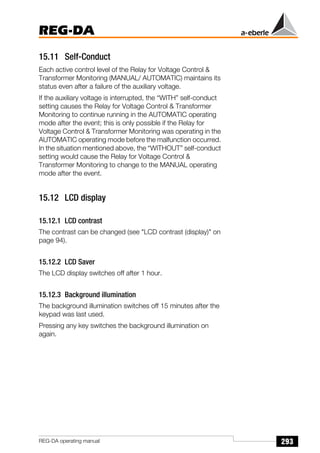
直径
Diameter
(mm)
转 速
Speed
(r/min)
风 量
Flow
(m3/h)
风 压
Pressure
(Pa)
频率
Frequency
(Hz)
额定电压
Rated
voltage
(V)
额定功率
Rated
power
(kW)
噪音
Noise
dB(A)
噪音
Sound
power
dB(A)
额定电流
Rated current
(A)
重量
Weight
(kg)
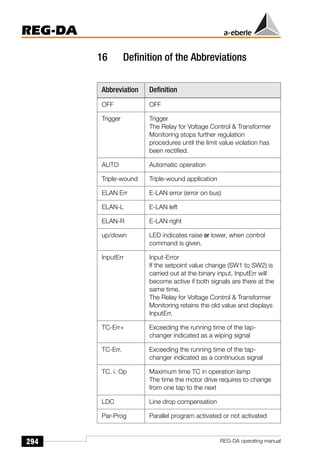
DBF2-5Q
6
500
960 7400 90
50
380/400/415 0.37 64 71 1.10/1.10/1.20
36/40
8 720 5550 56 380/400/415 0.25 58 65 1.00/1.00/1.10
10 590 4240 30 380/400/415 0.18 52 59 0.95/1.05/1.15
DBF2-6.3Q
6
630
960 10660 106
50
380/400/415 0.55 68 75 1.52/1.55/1.60
51/55
8 720 8000 60 380/400/415 0.37 60 67 1.40/1.40/1.50
10 590 6555 47 380/400/415 0.25 57 64 1.10/1.20/1.30
DBF2-7.1Q
6
710
960 19300 140
50
380/400/415 0.75 73 80 2.20/2.40/2.60
50/62
8 720 14524 83 380/400/415 0.37 66 73 1.40/1.50/1.70
10 590 11100 50 380/400/415 0.25 60 67 1.10/1.30/1.50
12 480 9820 37 380/400/415 0.18 57 64 1.00/1.20/1.40
DBF2-8Q
6
800
960 26100 160
50
380/400/415 2.20 76 83 5.00/5.20/5.40 80/85
8 720 19200 90 380/400/415 0.75 67 74 2.50/2.60/2.70
67/72
10 590 16000 63 380/400/415 0.55 61 68 2.20/2.40/2.50
12 480 13250 43 380/400/415 0.37 56 63 1.90/2.20/2.20
14 410 12100 36 380/400/415 0.37 55 62 1.80/2.00/2.10
DBF2-9Q
8
900
720 22650 158
50
380/400/415 1.90 73 80 5.50/5.80/6.10
91/101
10 590 18250 130 380/400/415 1.10 68 75 3.70/3.70/4.00
12 480 15100 92 380/400/415 0.75 60 67 3.00/3.20/3.20
84/101
14 410 12900 67 380/400/415 0.55 58 65 2.40/2.60/2.80
16 360 11290 46 380/400/415 0.55 53 60 2.50/2.60/2.70
DBF2-10Q
8
1000
720 31000 175
50
380/400/415 2.20 79 86 6.50/6.70/6.90
98/120
10 590 21770 141 380/400/415 1.50 71 78 5.50/5.80/6.20
12 480 19000 100 380/400/415 1.10 67 74 4.50/4.70/5.00
14 410 16000 73 380/400/415 0.75 64 71 3.20/3.40/3.70
16 360 15000 50 380/400/415 0.55 60 67 2.50/2.80/3.20
20 290 12000 32 380/400/415 0.37 55 62 3.20/3.40/3.70
DBF2-12.5Q
12
1250
480 42310 88
50
380/400/415 1.10 73 80 4.50/4.70/5.00
118
14 410 33500 55 380/400/415 0.75 69 76 3.20/3.40/3.70
16 350 29300 46 380/400/415 0.55 66 73 2.50/2.80/3.30
20 290 23450 32 380/400/415 0.37 62 69 3.20/3.50/3.70
6
注:重量一栏中,斜杠前面的值为法兰连接型风扇的重量,斜杠后面的值为支座型风扇的重量。
Note:In the weight column, front value for flange connection fans, back value for fans with foundation.
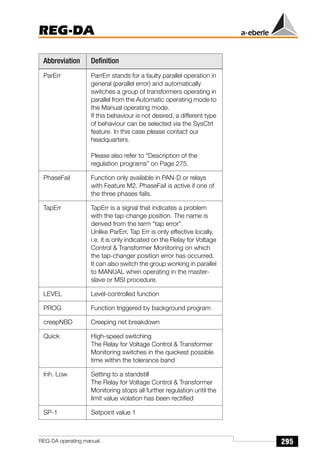
风向
Direction
风向
Direction
图 1 带底座型
Chart1 the type with foundation
图 2 法兰连接(5Q / 6.3Q)
Chart2 the type with flange connection
D2 D
n-d2
45°
D1
D
K
I
n-d1
J
a C
L
H
L
D1
45°
D3 D D2
图 3 法兰连接(7.1Q/8Q / 9Q 大喇叭口)
Chart3 the type with flange connection
Direction
D2
L
风
向
均布
n-d2
45° 45°
7
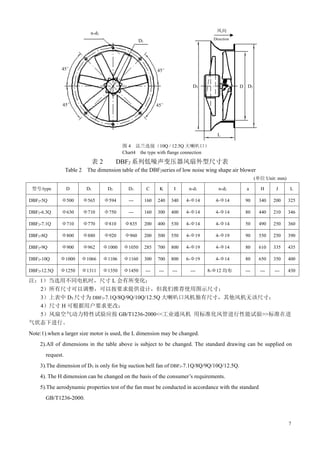
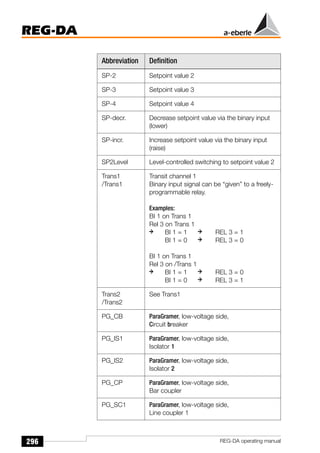
表 2 DBF2 系列低噪声变压器风扇外型尺寸表
Table 2 The dimension table of the DBF2series of low noise wing shape air blower
(单位 Unit: mm)
型号/type D D1 D2 D3 C K I n-d1 n-d2 a H J L
DBF2-5Q Φ500 Φ565 Φ594 --- 160 240 340 4-Φ14 4-Φ14 90 340 200 325
DBF2-6.3Q Φ630 Φ710 Φ750 --- 160 300 400 4-Φ14 4-Φ14 80 440 210 346
DBF2-7.1Q Φ710 Φ770 Φ810 Φ835 200 400 530 4-Φ14 4-Φ14 50 490 250 360
DBF2-8Q Φ800 Φ880 Φ920 Φ960 200 500 550 4-Φ19 4-Φ19 90 550 250 390
DBF2-9Q Φ900 Φ962 Φ1000 Φ1050 285 700 800 4-Φ19 4-Φ14 80 610 335 435
DBF2-10Q Φ1000 Φ1066 Φ1106 Φ1160 300 700 800 6-Φ19 4-Φ14 80 650 350 400
DBF2-12.5Q Φ1250 Φ1311 Φ1350 Φ1450 --- --- --- --- 8-Φ12 均布 --- --- --- 430
注:1)当选用不同电机时,尺寸 L 会有所变化;
2)所有尺寸可以调整,可以按要求提供设计,但我们推荐使用图示尺寸;
3)上表中 D3 尺寸为 DBF2-7.1Q/8Q/9Q/10Q/12.5Q 大喇叭口风机独有尺寸,其他风机无该尺寸;
4)尺寸 H 可根据用户要求更改;
5)风扇空气动力特性试验应按 GB/T1236-2000<<工业通风机 用标准化风管进行性能试验>>标准在进
气状态下进行。
Note:1).when a larger size motor is used, the L dimension may be changed.
2).All of dimensions in the table above is subject to be changed. The standard drawing can be supplied on
request.
3).The dimension of D3 is only for big suction bell fan of DBF2-7.1Q/8Q/9Q/10Q/12.5Q.
4). The H dimension can be changed on the basis of the consumer’s requirements.
5).The aerodynamic properties test of the fan must be conducted in accordance with the standard
GB/T1236-2000.
图 4 法兰连接(10Q / 12.5Q 大喇叭口)
Chart4 the type with flange connection
风向
Direction
45°
D1
n-d2
D2
D3
L
45°
45°
45°
D
8
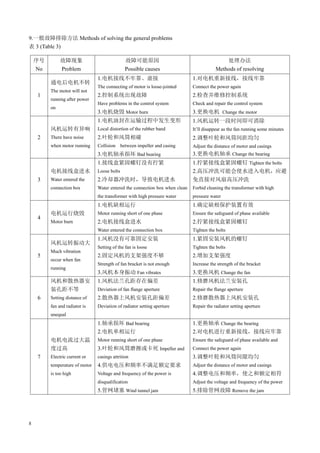
9.一般故障排除方法 Methods of solving the general problems
表 3 (Table 3)
序号
No
故障现象
Problem
故障可能原因
Possible causes
处理办法
Methods of resolving
1
通电后电机不转
The motor will not
running after power
on
1.电机接线不牢靠、虚接
The connecting of motor is loose-jointed
2.控制系统出现故障
Have problems in the control system
3.电机烧毁 Motor burn
1.对电机重新接线,接线牢靠
Connect the power again
2.检查并维修控制系统
Check and repair the control system
3.更换电机 Change the motor
2
风机运转有异响
There have noise
when motor running
1.电机油封在运输过程中发生变形
Local distortion of the rubber band
2.叶轮和风筒相碰
Collision between impeller and casing
3.电机轴承损坏 Bad bearing
1.风机运转一段时间即可消除
It’ll disappear as the fan running some minutes
2.调整叶轮和风筒间距均匀
Adjust the distance of motor and casings
3.更换电机轴承 Change the bearing
3
电机接线盒进水
Water entered the
connection box
1.接线盒紧固螺钉没有拧紧
Loose bolts
2.冷却器冲洗时,导致电机进水
Water entered the connection box when clean
the transformer with high pressure water
1.拧紧接线盒紧固螺钉 Tighten the bolts
2.高压冲洗可能会使水进入电机,应避
免直接对风扇高压冲洗
Forbid cleaning the transformer with high
pressure water
4
电机运行烧毁
Motor burn
1.电机缺相运行
Motor running short of one phase
2.电机接线盒进水
Water entered the connection box
1.确定缺相保护装置有效
Ensure the safeguard of phase available
2.拧紧接线盒紧固螺钉
Tighten the bolts
5
风机运转振动大
Much vibration
occur when fan
running
1.风机没有可靠固定安装
Setting of the fan is loose
2.固定风机的支架强度不够
Strength of fan bracket is not enough
3.风机本身振动 Fan vibrates
1.紧固安装风机的螺钉
Tighten the bolts
2.增加支架强度
Increase the strength of the bracket
3.更换风机 Change the fan
6
风机和散热器安
装孔距不等
Setting distance of
fan and radiator is
unequal
1.风机法兰孔距存在偏差
Deviation of fan flange aperture
2.散热器上风机安装孔距偏差
Deviation of radiator setting aperture
1.修磨风机法兰安装孔
Repair the flange aperture
2.修磨散热器上风机安装孔
Repair the radiator setting aperture
7
电机电流过大温
度过高
Electric current or
temperature of motor
is too high
1.轴承损坏 Bad bearing
2.电机单相运行
Motor running short of one phase
3.叶轮和风筒磨擦或卡死 Impeller and
casings attrition
4.供电电压和频率不满足额定要求
Voltage and frequency of the power is
disqualification
5.管网堵塞 Wind tunnel jam
1.更换轴承 Change the bearing
2.对电机进行重新接线,接线应牢靠
Ensure the safeguard of phase available and
Connect the power again
3.调整叶轮和风筒间隙均匀
Adjust the distance of motor and casings
4.调整电压和频率,使之和额定相符
Adjust the voltage and frequency of the power
5.排除管网故障 Remove the jam
9
2016- 12-ZY
地址:中国 西安市灞桥区田王街特字 1 号
通讯:西安市 175 信箱 邮编:710025
电话:
(8629) 83607810
传真:
(8629) 83603734
Add:No.1 Tianwang Road,Xi’an,China
Post Box:P.O.175,Xi’an Post Code:710025
Tel:(8629) 83607810
Fax:
(8629)83603734
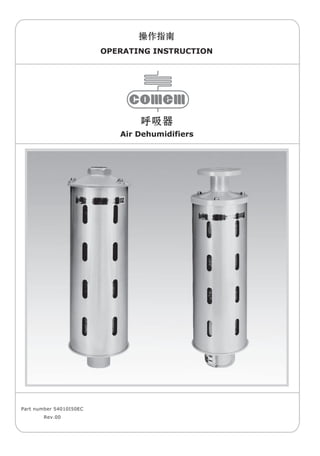
Dehydrating Breather
OLTC
Shanghai Huaming Power Equipment Co.,Ltd.
MOTOR DRIVE UNIT TYPE CMA7
Operating Instruction
HM 0.460.302
HM0.460.302
1
Contents
1. General⋯⋯⋯⋯⋯⋯⋯⋯⋯⋯⋯⋯⋯⋯⋯⋯⋯⋯⋯⋯⋯⋯⋯⋯⋯⋯⋯⋯⋯⋯⋯⋯⋯⋯2
1.1 Scope of application⋯⋯⋯⋯⋯⋯⋯⋯⋯⋯⋯⋯⋯⋯⋯⋯⋯⋯⋯⋯⋯⋯⋯⋯⋯⋯⋯⋯⋯2
1.2 Service condition⋯⋯⋯⋯⋯⋯⋯⋯⋯⋯⋯⋯⋯⋯⋯⋯⋯⋯⋯⋯⋯⋯⋯⋯⋯⋯⋯⋯⋯⋯2
2. Technical data⋯⋯⋯⋯⋯⋯⋯⋯⋯⋯⋯⋯⋯⋯⋯⋯⋯⋯⋯⋯⋯⋯⋯⋯⋯⋯⋯⋯⋯⋯⋯3
3. Structure⋯⋯⋯⋯⋯⋯⋯⋯⋯⋯⋯⋯⋯⋯⋯⋯⋯⋯⋯⋯⋯⋯⋯⋯⋯⋯⋯⋯⋯⋯⋯⋯⋯3
3.1 Housing⋯⋯⋯⋯⋯⋯⋯⋯⋯⋯⋯⋯⋯⋯⋯⋯⋯⋯⋯⋯⋯⋯⋯⋯⋯⋯⋯⋯⋯⋯⋯⋯⋯3
3.2 Gearing system⋯⋯⋯⋯⋯⋯⋯⋯⋯⋯⋯⋯⋯⋯⋯⋯⋯⋯⋯⋯⋯⋯⋯⋯⋯⋯⋯⋯⋯⋯4
3.3 Position indication mechanism⋯⋯⋯⋯⋯⋯⋯⋯⋯⋯⋯⋯⋯⋯⋯⋯⋯⋯⋯⋯⋯⋯⋯⋯⋯4
3.4 Electrical components⋯⋯⋯⋯⋯⋯⋯⋯⋯⋯⋯⋯⋯⋯⋯⋯⋯⋯⋯⋯⋯⋯⋯⋯⋯⋯⋯⋯5
4. Operating principle⋯⋯⋯⋯⋯⋯⋯⋯⋯⋯⋯⋯⋯⋯⋯⋯⋯⋯⋯⋯⋯⋯⋯⋯⋯⋯⋯⋯⋯⋯⋯6
4.1 Mechanical operation principle⋯⋯⋯⋯⋯⋯⋯⋯⋯⋯⋯⋯⋯⋯⋯⋯⋯⋯⋯⋯⋯⋯⋯⋯⋯6
4.2 Electrical operation principles⋯⋯⋯⋯⋯⋯⋯⋯⋯⋯⋯⋯⋯⋯⋯⋯⋯⋯⋯⋯⋯⋯⋯⋯⋯6
4.2.1 Motor circuit⋯⋯⋯⋯⋯⋯⋯⋯⋯⋯⋯⋯⋯⋯⋯⋯⋯⋯⋯⋯⋯⋯⋯⋯⋯⋯⋯⋯⋯6
4.2.2 Control circuit⋯⋯⋯⋯⋯⋯⋯⋯⋯⋯⋯⋯⋯⋯⋯⋯⋯⋯⋯⋯⋯⋯⋯⋯⋯⋯⋯⋯⋯8
4.2.3 Trip and indication circuit of motor protective switch Q1⋯⋯⋯⋯⋯⋯⋯⋯⋯⋯⋯⋯⋯⋯8
4.2.4 Indication circuit of motor running⋯⋯⋯⋯⋯⋯⋯⋯⋯⋯⋯⋯⋯⋯⋯⋯⋯⋯⋯⋯⋯8
4.2.5 Indication circuit of remote position⋯⋯⋯⋯⋯⋯⋯⋯⋯⋯⋯⋯⋯⋯⋯⋯⋯⋯⋯⋯⋯9
4.2.6 Heating circuit⋯⋯⋯⋯⋯⋯⋯⋯⋯⋯⋯⋯⋯⋯⋯⋯⋯⋯⋯⋯⋯⋯⋯⋯⋯⋯⋯⋯9
4.3 Operation⋯⋯⋯⋯⋯⋯⋯⋯⋯⋯⋯⋯⋯⋯⋯⋯⋯⋯⋯⋯⋯⋯⋯⋯⋯⋯⋯⋯⋯⋯⋯⋯9
4.3.1 Control⋯⋯⋯⋯⋯⋯⋯⋯⋯⋯⋯⋯⋯⋯⋯⋯⋯⋯⋯⋯⋯⋯⋯⋯⋯⋯⋯⋯⋯⋯⋯9
4.3.2 Passage of positions for middle positions⋯⋯⋯⋯⋯⋯⋯⋯⋯⋯⋯⋯⋯⋯⋯⋯⋯⋯⋯12
4.3.3 Safety protection⋯⋯⋯⋯⋯⋯⋯⋯⋯⋯⋯⋯⋯⋯⋯⋯⋯⋯⋯⋯⋯⋯⋯⋯⋯⋯⋯12
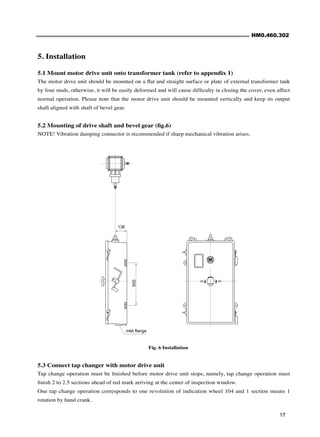
4.4 External connection circuit⋯⋯⋯⋯⋯⋯⋯⋯⋯⋯⋯⋯⋯⋯⋯⋯⋯⋯⋯⋯⋯⋯⋯⋯⋯⋯15
4.5 Passive contacts for position signal⋯⋯⋯⋯⋯⋯⋯⋯⋯⋯⋯⋯⋯⋯⋯⋯⋯⋯⋯⋯⋯⋯⋯15
5. Installation⋯⋯⋯⋯⋯⋯⋯⋯⋯⋯⋯⋯⋯⋯⋯⋯⋯⋯⋯⋯⋯⋯⋯⋯⋯⋯⋯⋯⋯⋯⋯⋯17
5.1 Mount motor drive unit onto transformer tank⋯⋯⋯⋯⋯⋯⋯⋯⋯⋯⋯⋯⋯⋯⋯⋯⋯⋯⋯17
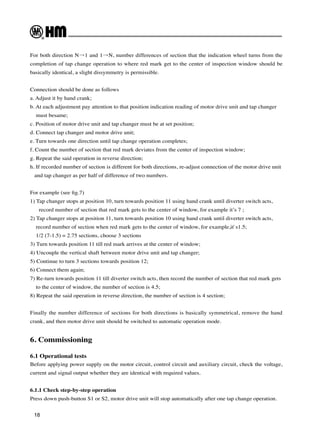
5.2 Mounting of drive shaft and bevel gear⋯⋯⋯⋯⋯⋯⋯⋯⋯⋯⋯⋯⋯⋯⋯⋯⋯⋯⋯⋯⋯⋯17
5.3 Connect tap changer with motor drive unit⋯⋯⋯⋯⋯⋯⋯⋯⋯⋯⋯⋯⋯⋯⋯⋯⋯⋯⋯⋯17
6. Commissioning⋯⋯⋯⋯⋯⋯⋯⋯⋯⋯⋯⋯⋯⋯⋯⋯⋯⋯⋯⋯⋯⋯⋯⋯⋯⋯⋯⋯⋯⋯18
6.1 Operational tests⋯⋯⋯⋯⋯⋯⋯⋯⋯⋯⋯⋯⋯⋯⋯⋯⋯⋯⋯⋯⋯⋯⋯⋯⋯⋯⋯⋯⋯18
6.2 Transportation of transformer⋯⋯⋯⋯⋯⋯⋯⋯⋯⋯⋯⋯⋯⋯⋯⋯⋯⋯⋯⋯⋯⋯⋯⋯⋯20
6.3 Put into operation at site⋯⋯⋯⋯⋯⋯⋯⋯⋯⋯⋯⋯⋯⋯⋯⋯⋯⋯⋯⋯⋯⋯⋯⋯⋯⋯⋯20
7. Maintenance⋯⋯⋯⋯⋯⋯⋯⋯⋯⋯⋯⋯⋯⋯⋯⋯⋯⋯⋯⋯⋯⋯⋯⋯⋯⋯⋯⋯⋯⋯⋯20
Appendix 1 Overall dimension diagram⋯⋯⋯⋯⋯⋯⋯⋯⋯⋯⋯⋯⋯⋯⋯⋯⋯⋯⋯⋯⋯⋯⋯21
Appendix 2 Description of all functions of CMA7 Motor Drive Unit⋯⋯⋯⋯⋯⋯⋯⋯⋯⋯⋯⋯22
Appendix 3 Designation of terminals⋯⋯⋯⋯⋯⋯⋯⋯⋯⋯⋯⋯⋯⋯⋯⋯⋯⋯⋯⋯⋯⋯⋯⋯23
Appendix 4 CX output decimal position signal⋯⋯⋯⋯⋯⋯⋯⋯⋯⋯⋯⋯⋯⋯⋯⋯⋯⋯⋯⋯23
Appendix 5 Electrical principle circuit⋯⋯⋯⋯⋯⋯⋯⋯⋯⋯⋯⋯⋯⋯⋯⋯⋯⋯⋯⋯⋯⋯⋯24
2
1. General
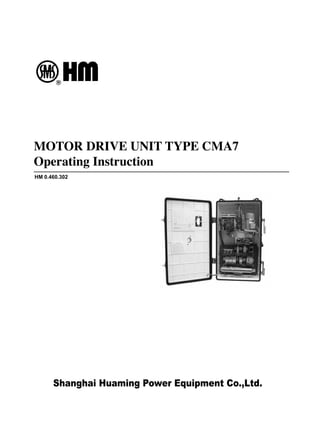
Motor drive unit CMA7 is used for driving tap changer to realize tap change operation.
All necessary electrical and mechanical equipments are contained in housing of motor drive unit CMA7 which adopts
step-by-step principle, namely, operate tap changer from its service position to the adjacent one. The motor drive unit
is initiated by a single control signal and it will stop automatically as one tap change operation accomplishes.
End positions are prevented to be overrun by electrical and mechanical limits devices. The motor drive unit is designed
to have different ratings of power and current for driving various tap changers.
The whole motor drive unit is fixed outside of transformer wall and is connected to tap changer by vertical and
horizontal shaft, intermediate bevel gear box.
1.1 Scope of application
CMA7 can be used to drive all type of on-load tap changers as well as off-circuit tap changers.
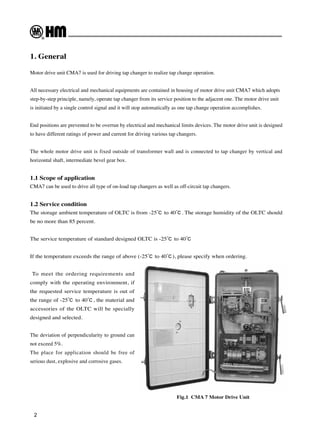
1.2 Service condition
The storage ambient temperature of OLTC is from -25℃ to 40℃. The storage humidity of the OLTC should
be no more than 85 percent.
The service temperature of standard designed OLTC is -25℃ to 40℃
If the temperature exceeds the range of above (-25℃ to 40℃), please specify when ordering.
To meet the ordering requirements and
comply with the operating environment, if
the requested service temperature is out of
the range of -25℃ to 40℃, the material and
accessories of the OLTC will be specially
designed and selected.
The deviation of perpendicularity to ground can
not exceed 5%.
The place for application should be free of
serious dust, explosive and corrosive gases.
Fig.1 CMA 7 Motor Drive Unit
HM0.460.302
3
* special design
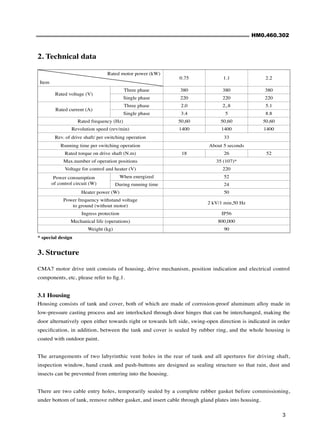
Rated motor power (kW)
Item
0.75 1.1 2.2
Rated voltage (V)
Three phase 380 380 380
Single phase 220 220 220
Rated current (A)
Three phase 2.0 2,.8 5.1
Single phase 3.4 5 8.8
Rated frequency (Hz) 50,60 50,60 50,60
Revolution speed (rev/min) 1400 1400 1400
Rev. of drive shaft/ per switching operation 33
Running time per switching operation About 5 seconds
Rated torque on drive shaft (N.m) 18 26 52
Max.number of operation positions 35 (107)*
Voltage for control and heater (V) 220
Power consumption
of control circuit (W)
When energized 52
During running time 24
Heater power (W) 50
Power frequency withstand voltage
to ground (without motor)
2 kV/1 min,50 Hz
Ingress protection IP56
Mechanical life (operations) 800,000
Weight (kg) 90
2. Technical data
3. Structure
CMA7 motor drive unit consists of housing, drive mechanism, position indication and electrical control
components, etc, please refer to fig.1.
3.1 Housing
Housing consists of tank and cover, both of which are made of corrosion-proof aluminum alloy made in
low-pressure casting process and are interlocked through door hinges that can be interchanged, making the
door alternatively open either towards right or towards left side, swing-open direction is indicated in order
specification, in addition, between the tank and cover is sealed by rubber ring, and the whole housing is
coated with outdoor paint.
The arrangements of two labyrinthic vent holes in the rear of tank and all apertures for driving shaft,
inspection window, hand crank and push-buttons are designed as sealing structure so that rain, dust and
insects can be prevented from entering into the housing.
There are two cable entry holes, temporarily sealed by a complete rubber gasket before commissioning,
under bottom of tank, remove rubber gasket, and insert cable through gland plates into housing.
4
Fig.2 Driving mechanism
3.2 Gearing system
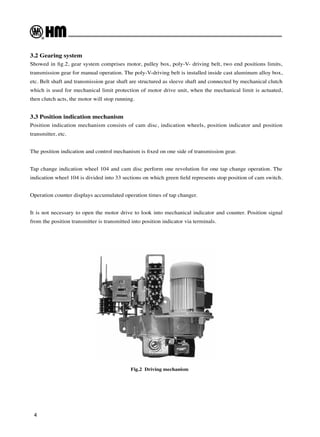
Showed in fig.2, gear system comprises motor, pulley box, poly-V- driving belt, two end positions limits,
transmission gear for manual operation. The poly-V-driving belt is installed inside cast aluminum alloy box,
etc. Belt shaft and transmission gear shaft are structured as sleeve shaft and connected by mechanical clutch
which is used for mechanical limit protection of motor drive unit, when the mechanical limit is actuated,
then clutch acts, the motor will stop running.
3.3 Position indication mechanism
Position indication mechanism consists of cam disc, indication wheels, position indicator and position
transmitter, etc.
The position indication and control mechanism is fixed on one side of transmission gear.
Tap change indication wheel 104 and cam disc perform one revolution for one tap change operation. The
indication wheel 104 is divided into 33 sections on which green field represents stop position of cam switch.
Operation counter displays accumulated operation times of tap changer.
It is not necessary to open the motor drive to look into mechanical indicator and counter. Position signal
from the position transmitter is transmitted into position indicator via terminals.
HM0.460.302
5
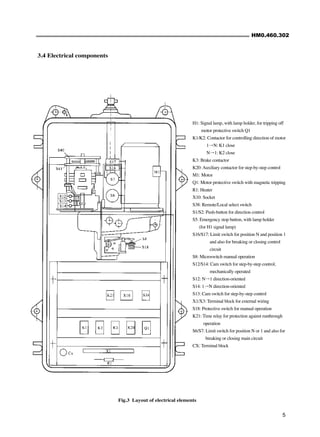
H1: Signal lamp, with lamp holder, for tripping off
motor protective switch Q1
K1/K2: Contactor for controlling direction of motor
1→N: K1 close
N→1: K2 close
K3: Brake contactor
K20:Auxiliary contactor for step-by-step control
M1: Motor
Q1: Motor protective switch with magnetic tripping
R1: Heater
X10: Socket
S38: Remote/Local select switch
S1/S2: Push-button for direction control
S5: Emergency stop button, with lamp holder
(for H1 signal lamp)
S16/S17: Limit switch for position N and position 1
and also for breaking or closing control
circuit
S8: Microswitch manual operation
S12/S14: Cam switch for step-by-step control,
mechanically operated
S12: N→1 direction-oriented
S14: 1→N direction-oriented
S13: Cam switch for step-by-step control
X1/X3: Terminal block for external wiring
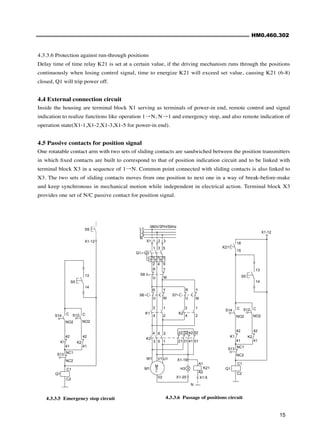
S18: Protective switch for manual operation
K21: Time relay for protection against runthrough
operation
S6/S7: Limit switch for position N or 1 and also for
breaking or closing main circuit
CX: Terminal block
Fig.3 Layout of electrical elements
3.4 Electrical components
6
4. Operating principle
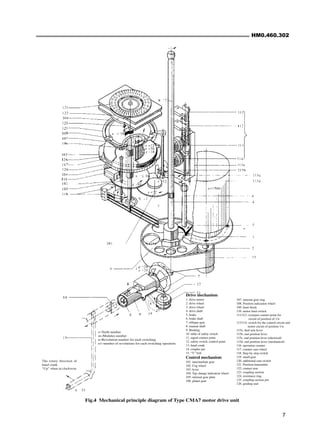
4.1 Mechanical operation principle (fig.4)
Normally the motor drive unit is operated electrically, but it might be operated manually during inspection
or maintenance.
Motor drives big drive wheel 3 via small drive wheel 2, then force will be transmitted to drive shaft 4
through which the tap changer is operated.
Through cog wheel, turning force will be transmitted to gear 101 via cogs on drive shaft 4, which revolves
tap change indication wheel 104 and planet gear 106, then position indication wheel 108 turns and displays
present position. The position transmitter 121 will produce position signal at the different positions.
Operation counter is controlled by indication wheel 104 and acts once after every tap change operation,
operation times will be accumulated and displayed. 4 sections of green field appearing in the inspection
window symbolizes that mechanical-operated cam switch is released. The contactor K3 is short-circuited to
brake motor and finally one tap change operation finishes.
As the motor drive unit runs to limits of end position 1 or N, the position indication wheel 108 continues
to rotate and makes limit block in wheel trough to push end position lever 115, then disconnect electrical
limit switch corresponding to position 1 or N, finally preventing motor drive unit from overrunning position
1 or N, however, in the event of failure of electrical limit switches, the motor will continue to run towards
mechanical limits, in this case, end position lever mechanism will push lock
latch of mechanical clutch of gear mechanism to buckle the clutch, as a
result, manual shaft 8 stops running, realizing a double protection for motor
drive unit by electrical limit switch and mechanical limits.
Operation sequence of limits protection should be followed by
A. Electrical limit switches (S16/S17) of control circuit acts
B. Electrical limit switches (S6/S7) of motor circuit acts
C. Lock latch of mechanical clutch
4.2 Electrical operation principles
This circuit is composed of motor circuit (main circuit), control circuit,
protection circuit, indication circuit and heating circuit, for details please
refers to appendix 5.
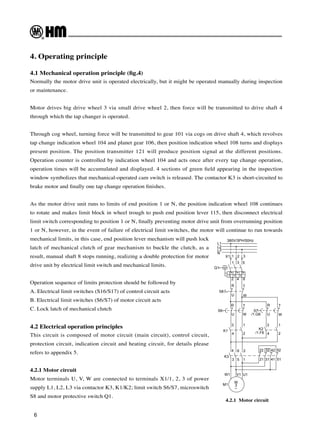
4.2.1 Motor circuit
Motor terminals U, V, W are connected to terminals X1/1, 2, 3 of power
supply L1, L2, L3 via contactor K3, K1/K2; limit switch S6/S7, microswitch
S8 and motor protective switch Q1.
L1
L2
L3
N
I> I> I>
X1 1 2 3
1 3 5
2 4 6
Q1
S8
R T
U W
R
U
T
W
S6
U
R
S7
3 1
4 2
3
4
1
2
W
T
K1
K2
K3
4 6 2
3 5 1
22 32 42 52
21 31 41 51
M
3
~
M1
W1 V1 U1
/1.F6
380V/3PH/50Hz
/1.G6
4.2.1 Motor circuit
HM0.460.302
7
Fig.4 Mechanical principle diagram of Type CMA7 motor drive unit
Drive mechanism
1. drive motor
2. drive wheel
3. drive wheel
4. drive shaft
5. brake
6. brake shaft
7. oblique gear
8. manual shaft
9. Bushing
10. table of safety switch
11. signal contact point
12. safety switch, control point
13. hand crank
14. coupler pin
15. “V” belt
Control mechanism
101. intermediate gear
102. Cog wheel
103. lever
104. Tap change indication wheel
105. internal gear plate
106. planet gear
z=Teeth number
m=Modules number
n=Revolution number for each switching
n1=number of revolutions for each switching operation
The rotary direction of
hand crank
“Up” when in clockwise
107. internal gear ring
108. Position indication wheel
109. limit block
110. motor limit switch
111/112. overpass contact point for
circuit of position of 1/n
113/114. switch for the control circuit and
motor circuit of position 1/n
115a. dual arm lever
115b. end position lever
115c. end position lever (electrical)
115d. end position lever (mechanical)
116. operation counter
117. counter cam wheel
118. Step-by-step switch
119. small gear
120. additional cam switch
121. Position transmitter
122. contact arm
123. coupling section
124. resistance ring
125. coupling section pin
126. guiding unit
8
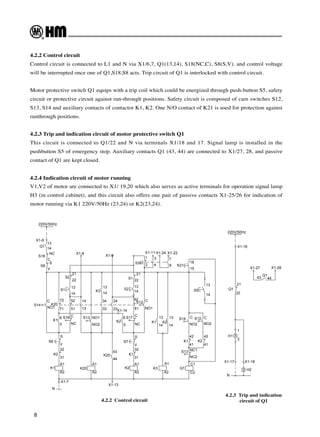
4.2.2 Control circuit
4.2.3 Trip and indication
circuit of Q1
4.2.2 Control circuit
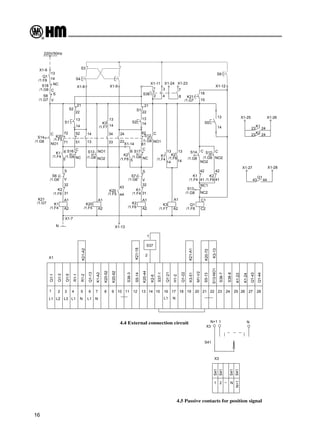
Control circuit is connected to L1 and N via X1/6,7, Q1(13,14), S18(NC,C), S8(S,V), and control voltage
will be interrupted once one of Q1,S18,S8 acts. Trip circuit of Q1 is interlocked with control circuit.
Motor protective switch Q1 equips with a trip coil which could be energized through push-button S5, safety
circuit or protective circuit against run-through positions. Safety circuit is composed of cam switches S12,
S13, S14 and auxiliary contacts of contactor K1, K2. One N/O contact of K21 is used for protection against
runthrough positions.
4.2.3 Trip and indication circuit of motor protective switch Q1
This circuit is connected to Q1/22 and N via terminals X1/18 and 17. Signal lamp is installed in the
pushbutton S5 of emergency stop. Auxiliary contacts Q1 (43, 44) are connected to X1/27, 28, and passive
contact of Q1 are kept closed.
4.2.4 Indication circuit of motor running
V1,V2 of motor are connected to X1/ 19,20 which also serves as active terminals for operation signal lamp
H3 (in control cabinet), and this circuit also offers one pair of passive contacts X1-25/26 for indication of
motor running via K1 220V/50Hz (23,24) or K2(23,24).
NC
C
S18
41
42
14
13
18
15
K21
X1-14
X1-7
X1-13
N
X1-23
X1-24
X1-11
X1-9
X1-8
7
8
3
4
2
1
S38
C2
C1
NC2
NC1
41
42
NO2
C
NO2
C
14
13
S5
Q1
K2
S13
S12
S14
K1
A2
A1
14
13
K3
K2
K1
61
62
5
6
S12
S17
K2
S2
S1
K2
S7
K1
A2
A1
31
32
S
V
NO1
C
NC
C
13
14
21
22
14
13
NO2
NO1
14
13
22
21
NC
C
43
44
23
24
33
34
13
14
51
52
71
72
6
5
K20
K20
K3
S13
A2
A1
A2
A1
31
32
V
S
K1
K2
S6
K1
S16
S1
S2
K20
S8
S14
NO1
C
V
S
14
13
Q1
X1-6
220V/50Hz
X1-28
X1-27
Q1
44
43
N
1
2
X1-16
22
21
H1
Q1
X1-18
X1-17
H2
220V/50Hz
HM0.460.302
9
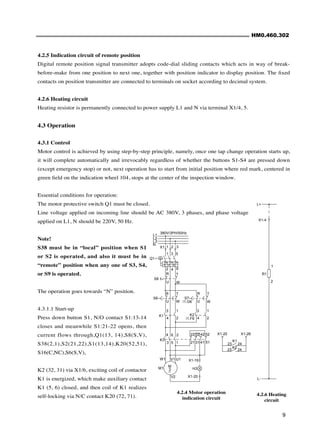
4.2.5 Indication circuit of remote position
Digital remote position signal transmitter adopts code-dial sliding contacts which acts in way of break-
before-make from one position to next one, together with position indicator to display position. The fixed
contacts on position transmitter are connected to terminals on socket according to decimal system.
4.2.6 Heating circuit
Heating resistor is permanently connected to power supply L1 and N via terminal X1/4, 5.
4.3 Operation
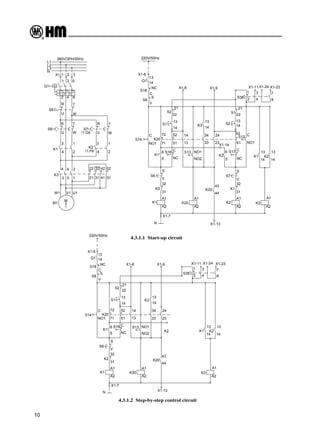
4.3.1 Control
Motor control is achieved by using step-by-step principle, namely, once one tap change operation starts up,
it will complete automatically and irrevocably regardless of whether the buttons S1-S4 are pressed down
(except emergency stop) or not, next operation has to start from initial position where red mark, centered in
green field on the indication wheel 104, stops at the center of the inspection window.
Essential conditions for operation:
The motor protective switch Q1 must be closed.
Line voltage applied on incoming line should be AC 380V, 3 phases, and phase voltage
applied on L1, N should be 220V, 50 Hz.
Note!
S38 must be in “local” position when S1
or S2 is operated, and also it must be in
“remote” position when any one of S3, S4,
or S9 is operated.
The operation goes towards “N” position.
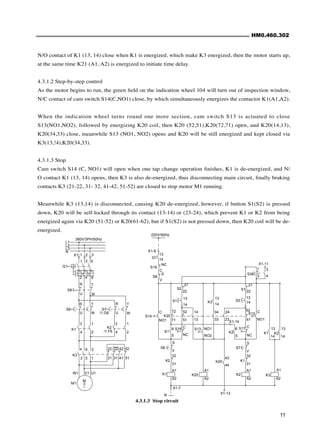
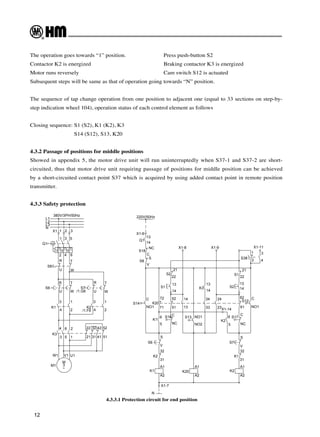
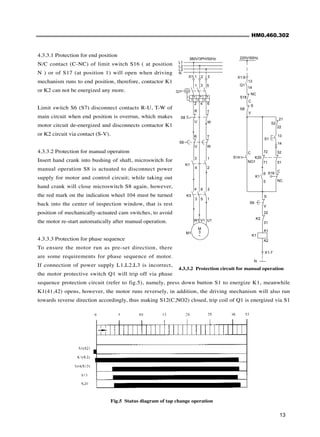
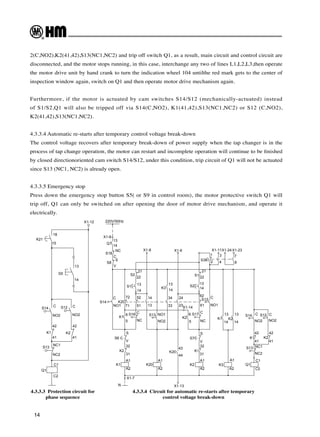
4.3.1.1 Start-up
Press down button S1, N/O contact S1:13-14
closes and meanwhile S1:21-22 opens, then
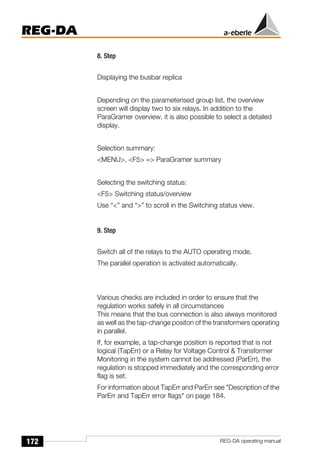
current flows through,Q1(13, 14),S8(S,V),
S38(2,1),S2(21,22),S1(13,14),K20(52,51),
S16(C,NC),S6(S,V),
K2 (32, 31) via X1/6, exciting coil of contactor
K1 is energized, which make auxiliary contact
K1 (5, 6) closed, and then coil of K1 realizes
self-locking via N/C contact K20 (72, 71).
4.2.4 Motor operation
indication circuit
24
23
X1-26
X1-25
K2
24
23
K1
X1-20
/1.G6
380V/3PH/50Hz
/1.F6
X1-19
H3
V2
U1
V1
W1
M1
~
3
M
51
41
31
21
52
42
32
22
1
5
3
2
6
4
K3
K2
K1
T
W
2
1
4
3
2
4
1
3
S7
R
U
S6
W
T
U
R
W
U
T
R
S8
Q1
6
4
2
5
3
1
3
2
1
X1
I>
I>
I>
N
L3
L2
L1
4.2.6 Heating
circuit
L-
X1-4
2
1
R1
L+
10
4.3.1.1 Start-up circuit
4.3.1.2 Step-by-step control circuit
L1
L2
L3
N
I> I> I>
X1 1 2 3
1 3 5
2 4 6
Q1
S8
R T
U W
R
U
T
W
S6
U
R
S7
3 1
4 2
3
4
1
2
W
T
K1
K2
K3
4 6 2
3 5 1
22 32 42 52
21 31 41 51
M
3
~
M1
W1 V1 U1
/1.F6
380V/3PH/50Hz
/1.G6
220V/50Hz
X1-6
Q1
13
14
S
V
C
NO1
S14
S8
K20
S2
S1
S16
K1
S6
K2
K1
S
V
32
31
A1
A2
A1
A2
S13
K3
K20
K20
5
6
72
71
52
51
14
13
34
33
24
23
44
43
C
NC
21
22
13
14
NO1
NO2
13
14
22
21
14
13
C
NC
C
NO1
V
S
32
31
A1
A2
K1
S7
K2
S1
S2
K2
S17
S12
6
5
62
61
K1 K2
K3
13
14
A1
A2
S38
1
2 4
3
8
7
X1-8 X1-9 X1-11X1-24 X1-23
N X1-13
X1-7
X1-14
13
14
S18
C
NC
NC
C
S18
14
13
X1-7
X1-13
N
X1-23
X1-24
X1-11
X1-9
X1-8
7
8
3
4
2
1
S38
A2
A1
14
13
K3
K2
K2 K1
14
13
NO2
NO1
14
13
22
21
NC
C
43
44
23
24
33
34
13
14
51
52
71
72
6
5
K20
K20
K3
S13
A2
A1
A2
A1
31
32
V
S
K1
K2
S6
K1
S16
S1
S2
K20
S8
S14
NO1
C
V
S
14
13
Q1
X1-6
220V/50Hz
HM0.460.302
11
4.3.1.3 Stop circuit
N/O contact of K1 (13, 14) close when K1 is energized, which make K3 energized, then the motor starts up,
at the same time K21 (A1, A2) is energized to initiate time delay.
4.3.1.2 Step-by-step control
As the motor begins to run, the green field on the indication wheel 104 will turn out of inspection window,
N/C contact of cam switch S14(C,NO1) close, by which simultaneously energizes the contactor K1(A1,A2).
When the indication wheel turns round one more section, cam switch S13 is actuated to close
S13(NO1,NO2), followed by energizing K20 coil, then K20 (52,51),K20(72,71) open, and K20(14,13),
K20(34,33) close, meanwhile S13 (NO1, NO2) opens and K20 will be still energized and kept closed via
K3(13,!4),K20(34,33).
4.3.1.3 Stop
Cam switch S14 (C, NO1) will open when one tap change operation finishes, K1 is de-energized, and N/
O contact K1 (13, 14) opens, then K3 is also de-energized, thus disconnecting main circuit, finally braking
contacts K3 (21-22, 31- 32, 41-42, 51-52) are closed to stop motor M1 running.
Meanwhile K3 (13,14) is disconnected, causing K20 de-energized, however, if button S1(S2) is pressed
down, K20 will be self-locked through its contact (13-14) or (23-24), which prevent K1 or K2 from being
energized again via K20 (51-52) or K20(61-62), but if S1(S2) is not pressed down, then K20 coil will be de-
energized.
L1
L2
L3
N
I> I> I>
X1 1 2 3
1 3 5
2 4 6
Q1
S8
R T
U W
R
U
T
W
S6
U
R
S7
3 1
4 2
3
4
1
2
W
T
K1
K2
K3
4 6 2
3 5 1
22 32 42 52
21 31 41 51
M
3
~
M1
W1 V1 U1
/1.F6
380V/3PH/50Hz
/1.G6
220V/50Hz
X1-6
Q1
13
14
S
V
C
NO1
S14
S8
K20
S2
S1
S16
K1
S6
K2
K1
S
V
32
31
A1
A2
A1
A2
S13
K3
K20
K20
5
6
72
71
52
51
14
13
34
33
24
23
44
43
C
NC
21
22
13
14
NO1
NO2
13
14
22
21
14
13
C
NC
C
NO1
V
S
32
31
A1
A2
K1
S7
K2
S1
S2
K2
S17
S12
6
5
62
61
K1 K2
K3
13
14
A1
A2
S38
1
2 4
3
X1-11
N X1-13
X1-7
X1-14
13
14
S18
C
NC
12
4.3.3.1 Protection circuit for end position
The operation goes towards “1” position. 		 Press push-button S2
Contactor K2 is energized 				 Braking contactor K3 is energized
Motor runs reversely 					 Cam switch S12 is actuated
Subsequent steps will be same as that of operation going towards “N” position.
The sequence of tap change operation from one position to adjacent one (equal to 33 sections on step-by-
step indication wheel 104), operation status of each control element as follows
Closing sequence: S1 (S2), K1 (K2), K3
		 S14 (S12), S13, K20
4.3.2 Passage of positions for middle positions
Showed in appendix 5, the motor drive unit will run uninterruptedly when S37-1 and S37-2 are short-
circuited, thus that motor drive unit requiring passage of positions for middle position can be achieved
by a short-circuited contact point S37 which is acquired by using added contact point in remote position
transmitter.
4.3.3 Safety protection
/1.G6
380V/3PH/50Hz
/1.F6
U1
V1
W1
M1
~
3
M
51
41
31
21
52
42
32
22
1
5
3
2
6
4
K3
K2
K1
T
W
2
1
4
3
2
4
1
3
S7
R
U
S6
W
T
U
R
W
U
T
R
S8
Q1
6
4
2
5
3
1
3
2
1
X1
I>
I>
I>
N
L3
L2
L1
NC
C
S18
X1-14
X1-7
N
X1-11
X1-9
X1-8
3
4
2
1
S38
61
62
5
6
S12
S17
K2
S2
S1
K2
S7
K1
A2
A1
31
32
S
V
NO1
C
NC
C
13
14
21
22
14
13
NO2
NO1
14
13
22
21
NC
C
23
24
33
34
13
14
51
52
71
72
6
5
K20
K3
S13
A2
A1
A2
A1
31
32
V
S
K1
K2
S6
K1
S16
S1
S2
K20
S8
S14
NO1
C
V
S
14
13
Q1
X1-6
220V/50Hz
HM0.460.302
13
4.3.3.1 Protection for end position
N/C contact (C-NC) of limit switch S16 ( at position
N ) or of S17 (at position 1) will open when driving
mechanism runs to end position, therefore, contactor K1
or K2 can not be energized any more.
Limit switch S6 (S7) disconnect contacts R-U, T-W of
main circuit when end position is overrun, which makes
motor circuit de-energized and disconnects contactor K1
or K2 circuit via contact (S-V).
4.3.3.2 Protection for manual operation
Insert hand crank into bushing of shaft, microswitch for
manual operation S8 is actuated to disconnect power
supply for motor and control circuit; while taking out
hand crank will close microswitch S8 again, however,
the red mark on the indication wheel 104 must be turned
back into the center of inspection window, that is rest
position of mechanically-actuated cam switches, to avoid
the motor re-start automatically after manual operation.
4.3.3.3 Protection for phase sequence
To ensure the motor run as pre-set direction, there
are some requirements for phase sequence of motor.
If connection of power supply L1,L2,L3 is incorrect,
the motor protective switch Q1 will trip off via phase
sequence protection circuit (refer to fig.5), namely, press down button S1 to energize K1, meanwhile
K1(41,42) opens, however, the motor runs reversely, in addition, the driving mechanism will also run
towards reverse direction accordingly, thus making S12(C,NO2) closed, trip coil of Q1 is energized via S1
Fig.5 Status diagram of tap change operation
4.3.3.2 Protection circuit for manual operation
220V/50Hz
X1-6
Q1
13
14
S
V
C
NO1
S14
S8
K20
S2
S1
S16
K1
S6
K2
K1
S
V
32
31
A1
A2
5
6
72
71
52
51
C
NC
21
22
13
14
N
X1-7
S18
C
NC
L1
L2
L3
N
I> I> I>
X1 1 2 3
1 3 5
2 4 6
Q1
S8
R T
U W
R
U
T
W
S6
3 1
4 2
K1
K3
4 6 2
3 5 1
M
3
~
M1
W1 V1 U1
380V/3PH/50Hz
14
4.3.3.3 Protection circuit for
phase sequence
4.3.3.4 Circuit for automatic re-starts after temporary
control voltage break-down
2(C,NO2),K2(41,42),S13(NC1,NC2) and trip off switch Q1, as a result, main circuit and control circuit are
disconnected, and the motor stops running, in this case, interchange any two of lines L1,L2,L3,then operate
the motor drive unit by hand crank to turn the indication wheel 104 untilthe red mark gets to the center of
inspection window again, switch on Q1 and then operate motor drive mechanism again.
Furthermore, if the motor is actuated by cam switches S14/S12 (mechanically-actuated) instead
of S1/S2,Q1 will also be tripped off via S14(C,NO2), K1(41,42),S13(NC1,NC2) or S12 (C,NO2),
K2(41,42),S13(NC1,NC2).
4.3.3.4 Automatic re-starts after temporary control voltage break-down
The control voltage recovers after temporary break-down of power supply when the tap changer is in the
process of tap change operation, the motor can restart and incomplete operation will continue to be finished
by closed directionoriented cam switch S14/S12, under this condition, trip circuit of Q1 will not be actuated
since S13 (NC1, NC2) is already open.
4.3.3.5 Emergency stop
Press down the emergency stop button S5( or S9 in control room), the motor protective switch Q1 will
trip off, Q1 can only be switched on after opening the door of motor drive mechanism, and operate it
electrically.
K1
S14 S12
S13
K2
Q1
S5
13
14
C
NO2
C
NO2
42
41
NC1
NC2
C1
C2
X1-12
K21
15
18
42
41
220V/50Hz
X1-6
Q1
13
14
S
V
C
NO1
S14
S8
K20
S2
S1
S16
K1
S6
K2
K1
S
V
32
31
A1
A2
A1
A2
S13
K3
K20
K20
5
6
72
71
52
51
14
13
34
33
24
23
44
43
C
NC
21
22
13
14
NO1
NO2
13
14
22
21
14
13
C
NC
C
NO1
V
S
32
31
A1
A2
K1
S7
K2
S1
S2
K2
S17
S12
6
5
62
61
K1 K2
K3
13
14
A1
A2
K1
S14 S12
S13
K2
Q1
C
NO2
C
NO2
42
41
NC1
NC2
C1
C2
S38
1
2 4
3
8
7
X1-8 X1-9 X1-11X1-24X1-23
N X1-13
X1-7
X1-14
13
14
42
41
S18
C
NC
HM0.460.302
15
4.3.3.5 Emergency stop circuit 4.3.3.6 Passage of positions circuit
4.3.3.6 Protection against run-through positions
Delay time of time relay K21 is set at a certain value, if the driving mechanism runs through the positions
continuously when losing control signal, time to energize K21 will exceed set value, causing K21 (6-8)
closed, Q1 will trip power off.
4.4 External connection circuit
Inside the housing are terminal block X1 serving as terminals of power-in end, remote control and signal
indication to realize functions like operation 1→N, N→1 and emergency stop, and also remote indication of
operation state(X1-1,X1-2,X1-3,X1-5 for power-in end).
4.5 Passive contacts for position signal
One rotatable contact arm with two sets of sliding contacts are sandwiched between the position transmitters
in which fixed contacts are built to correspond to that of position indication circuit and to be linked with
terminal block X3 in a sequence of 1→N. Common point connected with sliding contacts is also linked to
X3. The two sets of sliding contacts moves from one position to next one in a way of break-before-make
and keep synchronous in mechanical motion while independent in electrical action. Terminal block X3
provides one set of N/C passive contact for position signal.
S9
41
42
X1-12
C2
C1
NC2
NC1
41
42
NO2
C
NO2
C
14
13
S5
Q1
K2
S13
S12
S14
K1
L1
L2
L3
N
I> I> I>
X1 1 2 3
1 3 5
2 4 6
Q1
S8
R T
U W
R
U
T
W
S6
U
R
S7
3 1
4 2
3
4
1
2
W
T
K1 K2
K3
4 6 2
3 5 1
22 32 42 52
21 31 41 51
M
3
~
M1
W1 V1 U1
V2
H3
X1-19
380V/3PH/50Hz
K21
A2
A1
N
X1-5
X1-20
41
42
18
15
K21
X1-12
C2
C1
NC2
NC1
41
42
NO2
C
NO2
C
14
13
S5
Q1
K2
S13
S12
S14
K1
16
4.4 External connection circuit
4.5 Passive contacts for position signal
X1
1 2 3 4 5 6 7 8 9 10 11 12 13 14 15 16 17 18 19 20 21 22 23 24
Q1-1
Q1-3
Q1-5
R1-1
R1-2
Q1-13
K20-52
K20-62
S38-3
S5-14
K20-44
K2-6
Q1-21
H1-2
Q1-22
K3-51
M1-V2
K20-72
S13-NO1
S38-7
S38-8
L1 L2 L3 L1 N L1 N L1 N
S5-13
K3-13
K21-A2
K21-18
K1-A2
S37-1
S37
1
2
25 26 27 28
K1-23
K1-24
Q1-43
Q1-44
K21-A1
24
23
X1-26
X1-25
K2
24
23
K1
43 44
Q1
X1-27 X1-28
220V/50Hz
X1-6
Q1
13
14
S
V
C
NO1
S14
S8
K20
S2
S1
S16
K1
S6
K2
K1
S
V
32
31
A1
A2
A1
A2
S13
K3
K20
K20
5
6
72
71
52
51
14
13
34
33
24
23
44
43
C
NC
21
22
13
14
NO1
NO2
13
14
22
21
14
13
C
NC
C
NO1
V
S
32
31
A1
A2
K1
S7
K2
S1
S2
K2
S17
S12
6
5
62
61
K1 K2
K3
13
14
A1
A2
K1
S14 S12
S13
K2
Q1
S5
13
14
C
NO2
C
NO2
42
41
NC1
NC2
C1
C2
S38
1
2 4
3
8
7
X1-8 X1-9 X1-12
X1-11 X1-24 X1-23
S3
S4
S9
N X1-13
X1-7
/1.F8
/1.F5
/1.F7
/1.F4
/1.F6 /1.F4 /1.F6
/1.F6
/1.F4 /1.F5
/1.F5 /1.F4
/1.F6 /1.F7 /1.F8
/1.F4 /1.F6
/1.G7
/1.G8
/1.G6
/1.G6 /1.G8
/1.G6
/1.G8
/1.G6
/1.G8
/1.G8 /1.G8
X1-14
K21
15
18
/1.G7
K21
/1.G7
13
14
42
41
/1.G6
S18
C
NC
1 2 N
N+1
S41
S41
S41
S41
X3
S41
X3
N+1 1 N
HM0.460.302
17
Fig. 6 Installation
5. Installation
5.1 Mount motor drive unit onto transformer tank (refer to appendix 1)
The motor drive unit should be mounted on a flat and straight surface or plate of external transformer tank
by four studs, otherwise, it will be easily deformed and will cause difficulty in closing the cover, even affect
normal operation. Please note that the motor drive unit should be mounted vertically and keep its output
shaft aligned with shaft of bevel gear.
5.2 Mounting of drive shaft and bevel gear (fig.6)
NOTE! Vibration damping connector is recommended if sharp mechanical vibration arises.
5.3 Connect tap changer with motor drive unit
Tap change operation must be finished before motor drive unit stops, namely, tap change operation must
finish 2 to 2.5 sections ahead of red mark arriving at the center of inspection window.
One tap change operation corresponds to one revolution of indication wheel 104 and 1 section means 1
rotation by hand crank.
N-1
1-N
500
136
inlet flange
18
For both direction N→1 and 1→N, number differences of section that the indication wheel turns from the
completion of tap change operation to where red mark get to the center of inspection window should be
basically identical, a slight dissymmetry is permissible.
Connection should be done as follows
a. Adjust it by hand crank;
b. At each adjustment pay attention to that position indication reading of motor drive unit and tap changer
must besame;
c. Position of motor drive unit and tap changer must be at set position;
d. Connect tap changer and motor drive unit;
e. Turn towards one direction until tap change operation completes;
f. Count the number of section that red mark deviates from the center of inspection window;
g. Repeat the said operation in reverse direction;
h. If recorded number of section is different for both directions, re-adjust connection of the motor drive unit
and tap changer as per half of difference of two numbers.
For example (see fig.7)
1) Tap changer stops at position 10, turn towards position 11 using hand crank until diverter switch acts,
record number of section that red mark gets to the center of window, for example it’s 7 ;
2) Tap changer stops at position 11, turn towards position 10 using hand crank until diverter switch acts,
record number of section when red mark gets to the center of window, for example,it`s1.5;
1/2 (7-1.5) = 2.75 sections, choose 3 sections
3) Turn towards position 11 till red mark arrives at the center of window;
4) Uncouple the vertical shaft between motor drive unit and tap changer;
5) Continue to turn 3 sections towards position 12;
6) Connect them again;
7) Re-turn towards position 11 till diverter switch acts, then record the number of section that red mark gets
to the center of window, the number of section is 4.5;
8) Repeat the said operation in reverse direction, the number of section is 4 section;
Finally the number difference of sections for both directions is basically symmetrical, remove the hand
crank, and then motor drive unit should be switched to automatic operation mode.
6. Commissioning
6.1 Operational tests
Before applying power supply on the motor circuit, control circuit and auxiliary circuit, check the voltage,
current and signal output whether they are identical with required values.
6.1.1 Check step-by-step operation
Press down push-button S1 or S2, motor drive unit will stop automatically after one tap change operation.
HM0.460.302
19
a, b: Count the number of section to the end for both direction separately, 7 sections for 1→N, 1.5 sections for N→1;
c: Turn hand crank towards direction with more sections to end;
d: Unfasten the coupling;
e: Turn hand crank as per calculated sections;
f: Connect the coupling again;
g: Continue to turn to the end and check number of section;
h: Check the reverse direction.
Fig.7 Coupling between motor drive unit and tap changer
20
6.1.2 Test for mechanical end stop device
Tap changer can move to last position within its tap change range, but can’t approach its limit position,
while motor drive unit can turn to its limit position by manual operation, about 2-3 revolutions before
mechanical end stop is actuated. Turn hand crank reversely to release mechanical end stop device till red
mark gets to the center of window, namely, it’s the last position.
Repeat the said process in another limit position of motor drive unit.
6.1.3 Tests for electrical limit switch
As motor drive unit comes to one end position, further electrical operation can not make motor run towards
same direction, while reverse operation can be done. Repeat the said process to check another electrical
limit switch.
6.2 Transportation of transformer
If the motor drive unit is needed to dismount off transformer due to size when transformer is transported to
commissioning site, tap changer and motor drive unit must be set at adjustment position.
For its re-installation, please refer to item 5
6.3 Put into operation at site
Before putting transformer into operation, operation tests for tap changer should be carried out according to
item 6.
7. Maintenance
Because the transmission gear is a maintenance-free poly-V belt drive and ball bearings of motor are
sufficiently supplied with grease, a regular maintenance is not necessary. It is recommended to inspect
following items regularly:
——Waterproof property of housing
——Performance of resistance heater (heater and thermostat)
When tap changer is maintained, besides inspections for motor drive unit, others inspections regulated in 6.1
also should be carried out.
NOTE!
1) The number of operation position should correspond to that of on-load tap changer.
2) The auxiliary contacts of motor drive unit, motor protective switch are excluded from power
frequency withstand voltage test.
HM0.460.302
21
Appendix 1 Overall dimension diagram
Unit: mm
A A
N-1
1-N
5:1
A-A
1:2
inlet flange
136
295
295
4ר20
Ø25
2-Ø25
972
473
450
557
2-Ø13
30
M16
625
Ø40
327
170
62
500
229
6
1
3
mounting hole
22
Appendix 2 Description of all functions of CMA 7 Motor Drive Unit
No. Description Remark
1 Manual operation
Standard
2 Electrical operation
3 Remote operation
4 Protection of limit position
5 Protection of phase sequence
6 Protection of manual operation
7 Automatic re-start after temporary control voltage break-down
8 Emergency stop
9 Position indication
10 Raise 1→N or Lower N→1
11 One plug coded with decimal, specially connected with HMC-3C Position Indicator
12 Step-by-step control
13 Heater
14 Operation counter
15 One set of one-to-one corresponding passive contacts connected terminal block
16 One set of terminals for remote control
17 One pair of contacts for motor running connected terminal block
18 Remote indication contacts of “Local/Remote” connected terminal block
19 BCD code position signal outputted from Position Indicator
20 N/O contact for Q1 tripping
21 Add one pair of contacts for “Local/Remote” switch
22 Add one set of one-to-one corresponding passive contacts connected terminal block
23 Add one set of decimal position signal passive contacts connected terminal block
Optional
24 Position indication signal directly to be connected terminal block without plug
25 Add fuse protection for heater
26 Add hygrostat and thermostat
HM0.460.302
23
Appendix 3 Designation of terminals
Appendix 4 CX output decimal position signal
NOTE!
X3 terminal block is furnished with one set of one-to-one corresponding passive contacts, among them there is a
“N+1” on X3 for common terminal and terminals 1→N on X3 correspond to position 1 to N of on-load tap
changer.
CX terminals output decimal position signal and is generally connected with HMC-3C Position Indicator.
X1 terminal number Description
1,2,3,5 Power-in end, line voltage L1,L2,L3: 380V/50Hz;
8 Phase voltage L1 to N: 220V/50Hz
9 Input terminal for remote control “1→N”
10,11 Input terminal for remote control “N→1”
12 Common terminal for remote control
18 Input terminal for remote control “stop”
19,20 Output terminal for emergency stop (output 220/50Hz power signal)
23,24 Output terminal for motor running (output 220/50Hz power signal)
25,26 Output terminal for “remote” of “Local/Remote” switch (passive contact)
27,28 Output terminal for motor running (passive contact)
Output terminal for “close” signal of Q1(passive contact)
CX Socket Number Description
CX-1 Units digit of position signal “1”
CX-2 Units digit of position signal “2”
CX-3 Units digit of position signal “3”
CX-4 Units digit of position signal “4”
CX-5 Units digit of position signal “5”
CX-6 Units digit of position signal “6”
CX-7 Units digit of position signal “7”
CX-8 Units digit of position signal “8”
CX-9 Units digit of position signal “9”
CX-10 Units digit of position signal “0”
CX-11 Tens digit of position signal “0”
CX-12 Tens digit of position signal “1”
CX-13 Tens digit of position signal “2”
CX-14 Tens digit of position signal “3”
CX-15 “com” point of position signal
CX-16 Common terminal for indication lamp
CX-17 “1→N” indication
CX-18 “N→1” indication
CX-19 “stop” indication
24
Appendix
5
Electrical
principle
circuit
NC
C
S18
/1.G6
1
2
N
N+1
S41
S41
S41
S41
X4
1
2
Terminal
socket
for
HMC-3
"Q1"off
signal
Tap
changer
in
progress
Signal
output
Remote
control
signal
(input)
Power
Supply
380V/3PH/50Hz
TERMINAL
SOCKET
FOR
HMC-3
LIMIT
SWITCH
(CONTROL)
S16,S17
CX
Contact
closed
13
34
24
52
72
62
44
33
23
51
71
61
43
14
81
82
CMA7
Circuit
Diagram
H2
H1
Q1
S1,
S2
S3,
S4
H3
S8,S18
S6,
S7
S38
S13
S12,
S14
S9
S5
PUSH
BUTTON
FOR
K1,K2
(CONTROL
ROOM)
EMERGENCY
PUSH
BUTTON
"OFF"
FOR
"Q1"
PUSH
BUTTON
"Q1
OFF"
(CONTROL
ROOM)
CAM
SWITCHES
FOR
CONTROL
DIRECTION
"REMOTE"/"LOCAL"
SELECTOR
MOTOR
PROTECTIVE
SWITCH
SIGNALLING
LAMP
"Q1
OFF"
PUSH
BUTTON
FOR
K1,K2
SAFETY
SWITCH
LIMIT
SWITCH
(MOTOR)
SIGNALLING
LAMP
"Q1
OFF"
(CONTROL
ROOM)
TAP
CHANGE
IN
PROGRESS
LAMP
(CONTROL
ROOM)
CAM
SWITCHES
FOR
STEP-BY-STEP
OPERATION
HEATER
SOCKET
TIME
RELAY
BRAKE
CONTACTOR
K3
R1
X10
K21
MOTOR
K1,
K2
M1
X1,
X3
K20
TERMINAL
BARS
MOTOR
CONTACTOR
STEP
BY
STEP
RELAY
S40,
S41
N/O
CONTACT
RANGE(POSITION
INDICATION)
WHEEL
OF
INDICATION
GREEN
ZONE
RED
CENTER
MARK
X1-20
X1-5
N
54
53
/1.F8
/1.F6
/1.F4
CX
14
18
19
K1
17
15
S40
16
1
K2
Q1
31
32
53
54
CX
24
23
41
42
14
13
14
24
32
42
54
53
41
31
23
13
6
4
22
42
32
14
2
52
1
5
3
21
41
31
13
51
6
4
2
1
3
5
K21-A1
A1
A2
/1.G7
K21
/1.D11
/1.F8
/1.F6
/1.F4
/1.D4
/1.D6
X1-28
X1-27
X1-26
X1-25
K2
Q1
44
43
24
23
K1
Q1-44
Q1-43
K1-24
K1-23
28
27
26
25
2
1
S37
S37-1
K1-A2
K21-18
K21-A2
/1.G7
/1.D11
/1.C11
/1.C11
/1.E8
/1.D8
/1.D8
/1.C8
/1.B8
/1.E3
16
15
18
A2
A1
K21
18
15
K21
X1-14
/1.G8
/1.G8
/1.G8
/1.G6
/1.G8
/1.G6
/1.G8
/1.G6
/1.G6
/1.G8
/1.G7
/1.G6
/1.G6
/1.G7
X1-4
X1-16
2
1
X10
380V/3PH/50Hz
/1.F8
/1.F6
/1.F4
/1.F8
/1.F7
/1.F6
/1.F4
/1.F5
/1.F5
/1.F4
/1.F6
/1.F6
/1.F4
/1.F6
/1.F4
/1.F7
/1.F5
/1.F8
/1.F7
/1.F6
/1.F4
/1.F8
/1.C6
/1.C4
/1.C5
/1.C8
/1.C6
/1.C3
/1.B2
/1.B3
/1.B1
/1.D6
/1.D4
/1.C3
/1.C2
/1.C2
/1.C1
/1.C9
/1.B3
/1.A2
/1.A2
/1.A1
/1.D3
/1.D3
/1.D2
/1.D2
/1.C5
/1.D2
/1.D1
/1.D2
/1.E7
/1.D8
/1.E4
/1.D11
/1.D7
/1.C2
/1.C3
/1.E6
/1.C4
/1.C6
/1.C4
/1.D5
/1.C5
/1.C5
/1.C4
/1.E5
/1.E6
/1.D11
/1.D7
/1.C1
/1.C2
/1.E4
K1
11
10
9
8
7
6
5
4
3
2
1
G
F
E
D
C
B
A
G
F
E
D
C
B
A
11
10
9
8
7
6
5
4
3
2
1
C
NO
NC
S17
S16
C
NO2
NC2
NO1
NC1
S14
S13
S12
S8
R
T
S
U
W
V
T
W
S
V
R
U
S7
S6
X3
S41
S41
S41
S41
N+1
N
2
1
K3-13
S5-13
N
L1
N
L1
N
L1
L3
L2
L1
S38-8
S38-7
S13-NO1
K20-72
M1-V2
K3-51
Q1-22
H1-2
Q1-21
K2-6
K20-44
S5-14
S38-3
K20-62
K20-52
Q1-13
R1-2
R1-1
Q1-5
Q1-3
Q1-1
24
23
22
21
20
19
18
17
16
15
14
13
12
11
10
9
8
7
6
5
4
3
2
1
X1
S14
S13
S12
Q1
C2
C1
32
44
22
14
6
4
2
31
43
21
13
5
3
1
<I
<I
<I
K20
A2
A1
A2
2
4
6
32
24
42
54
14
A1
3
5
1
23
31
41
53
13
K3
K2
A1
A2
A2
A1
X1-7
X1-13
N
N
1
N+1
X3
S41
S9
S4
S3
X1-23
X1-24
X1-11
X1-12
X1-9
X1-8
7
8
3
4
2
1
S38
C2
C1
NC2
NC1
41
42
NO2
C
NO2
C
14
13
22
21
2
1
H1
R1
Q1
S5
Q1
K2
S13
S12
S14
220V/50Hz
X1-18
X1-17
H2
N
220V/50Hz
K1
A2
A1
14
13
K3
K2
K1
61
62
5
6
S12
S17
K2
S2
S1
K2
S7
K1
A2
A1
31
32
S
V
NO1
C
NC
C
13
14
21
22
14
13
NO2
NO1
14
13
22
21
NC
C
43
44
23
24
33
34
13
14
51
52
71
72
6
5
K20
K20
K3
S13
A2
A1
A2
A1
31
32
V
S
K1
K2
S6
K1
S16
S1
S2
K20
S8
S14
NO1
C
V
S
14
13
Q1
X1-6
220V/50Hz
X1-19
H3
V2
U1
V1
W1
M1
~
3
M
51
41
31
21
52
42
32
22
1
5
3
2
6
4
K3
K2
K1
T
W
2
1
4
3
2
4
1
3
S7
R
U
S6
W
T
U
R
W
U
T
R
S8
Q1
6
4
2
5
3
1
3
2
1
X1
I>
I>
I>
N
L3
L2
L1
HM0.460.302
25
Note!
1. Please ensure that this opreation instruction has been understood before operating this
motor drive unit
2. The concerned documents may be revised due to the modification of products
Shanghai Huaming Power Equipment Co., Ltd.
Address: No 977 Tong Pu Road, Shanghai 200333, P.R.China
Tel: +86 21 5270 3965 (direct)
+86 21 5270 8966 Ext. 8688 / 8123 / 8698 / 8158 / 8110 / 8658
Fax: +86 21 5270 2715
Web: www.huaming.com E-mail: export@huaming.com
2012.02
1
REG-DA
REG-DA operating manual
Operating Manual
REG-DA
Relay for Voltage Control & Transformer
Monitoring
Issue 18.10.07/03a
Issue GB
Version 10.2007
Software Version
2
REG-DA
REG-DA operating manual
REG-DA
Relay for Voltage Control & Transformer
Monitoring
Operating Manual
Issue 18.10.07
Copyright 2007 by A. Eberle GmbH & Co. KG..
All rights reserved.
Published by:
A. Eberle GmbH & Co. KG
Frankenstraße 160
D-90461 Nuremberg, Germany
Tel.: +49 (0) 911 / 62 81 08 - 0
Fax No.: +49 (0)-911 / 62 81 08 - 96
e-mail: info@a-eberle.de
Internet: www.a-eberle.de, www.regsys.de
The company A. Eberle GmbH & Co. KG cannot be held liable for
any damages or losses resulting from printing errors or changes
in this operating manual.
Furthermore, A. Eberle GmbH & Co. KG does not assume
responsibility for any damages and losses resulting from
defective devices or from devices altered by the user.
3
REG-DA
REG-DA operating manual
Table of Contents
1 Warnings and Information. . . . . . . . . . . . . . . . . . . . . . . . . . . . . . . . . . . . . . . . . . . 9
2 Scope of Delivery. . . . . . . . . . . . . . . . . . . . . . . . . . . . . . . . . . . . . . . . . . . . . . . . . 11
3 Technical Data. . . . . . . . . . . . . . . . . . . . . . . . . . . . . . . . . . . . . . . . . . . . . . . . . . . 12
3.1 Basic equipment . . . . . . . . . . . . . . . . . . . . . . . . . . . . . . . . . . . . . . . . . . . . . . . . . . . . . . . . . 12
3.2 Connection diagram . . . . . . . . . . . . . . . . . . . . . . . . . . . . . . . . . . . . . . . . . . . . . . . . . . . . . . . 14
3.3 Overview of features. . . . . . . . . . . . . . . . . . . . . . . . . . . . . . . . . . . . . . . . . . . . . . . . . . . . . . . 15
3.4 Block diagrams . . . . . . . . . . . . . . . . . . . . . . . . . . . . . . . . . . . . . . . . . . . . . . . . . . . . . . . . . . 21
3.4.1 Block diagram for features D0/D1/D4 . . . . . . . . . . . . . . . . . . . . . . . . . . . . . . . . . . . . . . . . . . . . . . . . . . . 21
3.4.2 Block diagram for features D2/D3. . . . . . . . . . . . . . . . . . . . . . . . . . . . . . . . . . . . . . . . . . . . . . . . . . . . . . 22
3.5 Pin Assignment . . . . . . . . . . . . . . . . . . . . . . . . . . . . . . . . . . . . . . . . . . . . . . . . . . . . . . . . . . 23
3.5.1 Pin assignment level I . . . . . . . . . . . . . . . . . . . . . . . . . . . . . . . . . . . . . . . . . . . . . . . . . . . . . . . . . . . . . . 29
3.5.2 Pin assignment level II . . . . . . . . . . . . . . . . . . . . . . . . . . . . . . . . . . . . . . . . . . . . . . . . . . . . . . . . . . . . . . 35
3.5.3 Pin assignment level III. . . . . . . . . . . . . . . . . . . . . . . . . . . . . . . . . . . . . . . . . . . . . . . . . . . . . . . . . . . . . . 41
3.6 Types of REG-DA Relay for Voltage Control & Transformer Monitoring . . . . . . . . . . . . . . . . . . . 44
3.6.1 Wall-mounting version . . . . . . . . . . . . . . . . . . . . . . . . . . . . . . . . . . . . . . . . . . . . . . . . . . . . . . . . . . . . . . 44
3.6.2 Panel-mounting version . . . . . . . . . . . . . . . . . . . . . . . . . . . . . . . . . . . . . . . . . . . . . . . . . . . . . . . . . . . . . 45
3.6.3 Mounting on Standard Mounting Rails. . . . . . . . . . . . . . . . . . . . . . . . . . . . . . . . . . . . . . . . . . . . . . . . . . . 46
4 Operation. . . . . . . . . . . . . . . . . . . . . . . . . . . . . . . . . . . . . . . . . . . . . . . . . . . . . . . 47
4.1 Display and control elements . . . . . . . . . . . . . . . . . . . . . . . . . . . . . . . . . . . . . . . . . . . . . . . . 47
4.1.1 Display . . . . . . . . . . . . . . . . . . . . . . . . . . . . . . . . . . . . . . . . . . . . . . . . . . . . . . . . . . . . . . . . . . . . . . . . . 50
4.2 Operating principle. . . . . . . . . . . . . . . . . . . . . . . . . . . . . . . . . . . . . . . . . . . . . . . . . . . . . . . . 51
4.3 Selecting the display mode . . . . . . . . . . . . . . . . . . . . . . . . . . . . . . . . . . . . . . . . . . . . . . . . . . 52
4.4 Lamp check. . . . . . . . . . . . . . . . . . . . . . . . . . . . . . . . . . . . . . . . . . . . . . . . . . . . . . . . . . . . . 58
4.5 Resetting fault signals . . . . . . . . . . . . . . . . . . . . . . . . . . . . . . . . . . . . . . . . . . . . . . . . . . . . . 58
4.6 Operating the recorder . . . . . . . . . . . . . . . . . . . . . . . . . . . . . . . . . . . . . . . . . . . . . . . . . . . . . 58
4
REG-DA
REG-DA operating manual
5 Commissioning. . . . . . . . . . . . . . . . . . . . . . . . . . . . . . . . . . . .63
5.1 Regulator mode . . . . . . . . . . . . . . . . . . . . . . . . . . . . . . . . . . . . . . . . . . . . . . . . . . . . . . . . . . 65
5.2 Measurement transducer mode. . . . . . . . . . . . . . . . . . . . . . . . . . . . . . . . . . . . . . . . . . . . . . . 66
5.3 Recorder mode. . . . . . . . . . . . . . . . . . . . . . . . . . . . . . . . . . . . . . . . . . . . . . . . . . . . . . . . . . . 67
5.4 Statistics mode. . . . . . . . . . . . . . . . . . . . . . . . . . . . . . . . . . . . . . . . . . . . . . . . . . . . . . . . . . . 68
5.5 ParaGramer mode . . . . . . . . . . . . . . . . . . . . . . . . . . . . . . . . . . . . . . . . . . . . . . . . . . . . . . . . 69
5.6 Choosing the language . . . . . . . . . . . . . . . . . . . . . . . . . . . . . . . . . . . . . . . . . . . . . . . . . . . . . 70
5.7 Setpoint value . . . . . . . . . . . . . . . . . . . . . . . . . . . . . . . . . . . . . . . . . . . . . . . . . . . . . . . . . . . 70
5.8 Permissible regulative deviation Xwz . . . . . . . . . . . . . . . . . . . . . . . . . . . . . . . . . . . . . . . . . . . 71
5.9 Time behaviour. . . . . . . . . . . . . . . . . . . . . . . . . . . . . . . . . . . . . . . . . . . . . . . . . . . . . . . . . . . 72
5.10 Backward high-speed switching . . . . . . . . . . . . . . . . . . . . . . . . . . . . . . . . . . . . . . . . . . . . . . 75
5.11 Tap-changer running time. . . . . . . . . . . . . . . . . . . . . . . . . . . . . . . . . . . . . . . . . . . . . . . . . . . 77
5.12 Knx transformer mounting ratios and transformer connection . . . . . . . . . . . . . . . . . . . . . . . . . 79
5.13 Setting the nominal current . . . . . . . . . . . . . . . . . . . . . . . . . . . . . . . . . . . . . . . . . . . . . . . . . . 80
5.14 Inhibit low limit . . . . . . . . . . . . . . . . . . . . . . . . . . . . . . . . . . . . . . . . . . . . . . . . . . . . . . . . . . . 82
5.15 Trigger. . . . . . . . . . . . . . . . . . . . . . . . . . . . . . . . . . . . . . . . . . . . . . . . . . . . . . . . . . . . . . . . . 84
5.16 Short description of individual limit values, setpoint values and permissible regulative deviation. 85
5.16.1 Description of the individual settings. . . . . . . . . . . . . . . . . . . . . . . . . . . . . . . . . . . . . . . . . . . . . . . . . . . . .85
6 Basic Settings. . . . . . . . . . . . . . . . . . . . . . . . . . . . . . . . . . . . . . . . . . . . . . . . . . . 91
6.1 General . . . . . . . . . . . . . . . . . . . . . . . . . . . . . . . . . . . . . . . . . . . . . . . . . . . . . . . . . . . . . . . . 91
6.1.1 Station ID . . . . . . . . . . . . . . . . . . . . . . . . . . . . . . . . . . . . . . . . . . . . . . . . . . . . . . . . . . . . . . . . . . . . . . . .91
6.1.2 Station name. . . . . . . . . . . . . . . . . . . . . . . . . . . . . . . . . . . . . . . . . . . . . . . . . . . . . . . . . . . . . . . . . . . . . .92
6.1.3 Setting the time/date . . . . . . . . . . . . . . . . . . . . . . . . . . . . . . . . . . . . . . . . . . . . . . . . . . . . . . . . . . . . . . . .93
6.1.4 LCD contrast (display) . . . . . . . . . . . . . . . . . . . . . . . . . . . . . . . . . . . . . . . . . . . . . . . . . . . . . . . . . . . . . . .94
6.1.5 Password . . . . . . . . . . . . . . . . . . . . . . . . . . . . . . . . . . . . . . . . . . . . . . . . . . . . . . . . . . . . . . . . . . . . . . . .94
6.1.6 Deleting recorder data (resetting the measured value memory). . . . . . . . . . . . . . . . . . . . . . . . . . . . . . . . . .95
6.1.7 Deleting tap-change sums (resetting the tap-counter to zero). . . . . . . . . . . . . . . . . . . . . . . . . . . . . . . . . . .96
6.1.8 Actual value correction of the measuring voltage UE. . . . . . . . . . . . . . . . . . . . . . . . . . . . . . . . . . . . . . . . . .96
6.1.9 Actual value correction of the measuring current IE . . . . . . . . . . . . . . . . . . . . . . . . . . . . . . . . . . . . . . . . . .96
6.2 RS-232 interfaces . . . . . . . . . . . . . . . . . . . . . . . . . . . . . . . . . . . . . . . . . . . . . . . . . . . . . . . . 97
6.2.1 COM 1 . . . . . . . . . . . . . . . . . . . . . . . . . . . . . . . . . . . . . . . . . . . . . . . . . . . . . . . . . . . . . . . . . . . . . . . . . .97
6.2.2 COM 2 . . . . . . . . . . . . . . . . . . . . . . . . . . . . . . . . . . . . . . . . . . . . . . . . . . . . . . . . . . . . . . . . . . . . . . . . . .99
6.3 E-LAN (Energy-Local Area Network). . . . . . . . . . . . . . . . . . . . . . . . . . . . . . . . . . . . . . . . . . . 101
6.4 PAN-D voltage monitoring unit. . . . . . . . . . . . . . . . . . . . . . . . . . . . . . . . . . . . . . . . . . . . . . . 104
6.5 Status (current ID data of the REG-DA Relay for Voltage Control & Transformer Monitoring). . . 104
5
REG-DA
REG-DA operating manual
7 Parameterisation of the REG-DA Relay for Voltage Control & Transformer
Monitoring . . . . . . . . . . . . . . . . . . . . . . . . . . . . . . . . . . . . . . . . . . . . . . . . . . . . . 108
7.1 Permissible regulative deviation . . . . . . . . . . . . . . . . . . . . . . . . . . . . . . . . . . . . . . . . . . . . . 109
7.2 Time behaviour (regulation behaviour) . . . . . . . . . . . . . . . . . . . . . . . . . . . . . . . . . . . . . . . . . 109
7.2.1 Time factor . . . . . . . . . . . . . . . . . . . . . . . . . . . . . . . . . . . . . . . . . . . . . . . . . . . . . . . . . . . . . . . . . . . . . 109
7.2.2 Time program . . . . . . . . . . . . . . . . . . . . . . . . . . . . . . . . . . . . . . . . . . . . . . . . . . . . . . . . . . . . . . . . . . . 110
7.2.3 Trend memory. . . . . . . . . . . . . . . . . . . . . . . . . . . . . . . . . . . . . . . . . . . . . . . . . . . . . . . . . . . . . . . . . . . 110
7.3 Setpoints. . . . . . . . . . . . . . . . . . . . . . . . . . . . . . . . . . . . . . . . . . . . . . . . . . . . . . . . . . . . . . 111
7.3.1 1st setpoint value . . . . . . . . . . . . . . . . . . . . . . . . . . . . . . . . . . . . . . . . . . . . . . . . . . . . . . . . . . . . . . . . 111
7.3.2 Further setpoint values. . . . . . . . . . . . . . . . . . . . . . . . . . . . . . . . . . . . . . . . . . . . . . . . . . . . . . . . . . . . . 112
7.4 Programs (parameters for parallel regulation of transformers and for the compensation of the
voltage drop on the line) . . . . . . . . . . . . . . . . . . . . . . . . . . . . . . . . . . . . . . . . . . . . . . . . . . . 113
7.4.1 Selection of the parallel programs (regulation programs) . . . . . . . . . . . . . . . . . . . . . . . . . . . . . . . . . . . . 113
7.4.2 Parameters for the parallel program . . . . . . . . . . . . . . . . . . . . . . . . . . . . . . . . . . . . . . . . . . . . . . . . . . . 114
7.4.3 Current influence (line-drop compensation) . . . . . . . . . . . . . . . . . . . . . . . . . . . . . . . . . . . . . . . . . . . . . . 116
7.4.4 LDC parameter (line drop compensation). . . . . . . . . . . . . . . . . . . . . . . . . . . . . . . . . . . . . . . . . . . . . . . . 116
7.5 Gradient (U/I characteristic). . . . . . . . . . . . . . . . . . . . . . . . . . . . . . . . . . . . . . . . . . . . . . . . . 117
7.6 Limitation (U/I characteristic). . . . . . . . . . . . . . . . . . . . . . . . . . . . . . . . . . . . . . . . . . . . . . . . 117
7.7 < U Undervoltage. . . . . . . . . . . . . . . . . . . . . . . . . . . . . . . . . . . . . . . . . . . . . . . . . . . . . . . . 117
7.8 > U Overvoltage. . . . . . . . . . . . . . . . . . . . . . . . . . . . . . . . . . . . . . . . . . . . . . . . . . . . . . . . . 118
7.9 > I, < Limit (upper and lower current limits). . . . . . . . . . . . . . . . . . . . . . . . . . . . . . . . . . . . . 118
7.10 Trigger inhibit high (highest limit value of the voltage). . . . . . . . . . . . . . . . . . . . . . . . . . . . . . 119
7.11 High-speed switching during undervoltage/overvoltage. . . . . . . . . . . . . . . . . . . . . . . . . . . . . 120
7.11.1 High-speed switching when undervoltage occurs (RAISE). . . . . . . . . . . . . . . . . . . . . . . . . . . . . . . . . . . . 120
7.11.2 High-speed switching when overvoltage occurs (LOWER). . . . . . . . . . . . . . . . . . . . . . . . . . . . . . . . . . . . 120
7.12 REG-DA inhibit low when undervoltage occurs . . . . . . . . . . . . . . . . . . . . . . . . . . . . . . . . . . . 121
7.13 Time delays (limit signals). . . . . . . . . . . . . . . . . . . . . . . . . . . . . . . . . . . . . . . . . . . . . . . . . . 121
7.13.1 Time delay > U . . . . . . . . . . . . . . . . . . . . . . . . . . . . . . . . . . . . . . . . . . . . . . . . . . . . . . . . . . . . . . . . . . 121
7.13.2 Time delay < U . . . . . . . . . . . . . . . . . . . . . . . . . . . . . . . . . . . . . . . . . . . . . . . . . . . . . . . . . . . . . . . . . . 122
7.13.3 Time delay > I, < I limit value. . . . . . . . . . . . . . . . . . . . . . . . . . . . . . . . . . . . . . . . . . . . . . . . . . . . . . . . 122
7.13.4 Time delay trigger . . . . . . . . . . . . . . . . . . . . . . . . . . . . . . . . . . . . . . . . . . . . . . . . . . . . . . . . . . . . . . . . 122
7.13.5 Time delay forward high-speed switching . . . . . . . . . . . . . . . . . . . . . . . . . . . . . . . . . . . . . . . . . . . . . . . 123
7.13.6 Time delay backward high-speed switching . . . . . . . . . . . . . . . . . . . . . . . . . . . . . . . . . . . . . . . . . . . . . 123
7.13.7 Time delay inhibit low . . . . . . . . . . . . . . . . . . . . . . . . . . . . . . . . . . . . . . . . . . . . . . . . . . . . . . . . . . . . . 124
6
REG-DA
REG-DA operating manual
7.14 Add-Ons (Relay for Voltage Control & Transformer Monitoring behaviour). . . . . . . . . . . . . . . . 124
7.14.1 Overview of the Add-Ons menus numbers 1 to 6. . . . . . . . . . . . . . . . . . . . . . . . . . . . . . . . . . . . . . . . . . .124
7.14.2 Maximum time TC in operation (motor-drive-in operation-time) . . . . . . . . . . . . . . . . . . . . . . . . . . . . . . . .126
7.14.3 Manual/Automatic. . . . . . . . . . . . . . . . . . . . . . . . . . . . . . . . . . . . . . . . . . . . . . . . . . . . . . . . . . . . . . . . .127
7.14.4 Tap-changing . . . . . . . . . . . . . . . . . . . . . . . . . . . . . . . . . . . . . . . . . . . . . . . . . . . . . . . . . . . . . . . . . . . .128
7.14.5 Self-conduction of the operating mode . . . . . . . . . . . . . . . . . . . . . . . . . . . . . . . . . . . . . . . . . . . . . . . . . .129
7.14.6 Current display (of the transformer) . . . . . . . . . . . . . . . . . . . . . . . . . . . . . . . . . . . . . . . . . . . . . . . . . . . .129
7.14.7 LCD saver (display) . . . . . . . . . . . . . . . . . . . . . . . . . . . . . . . . . . . . . . . . . . . . . . . . . . . . . . . . . . . . . . . .130
7.14.8 Regulator mode: large display . . . . . . . . . . . . . . . . . . . . . . . . . . . . . . . . . . . . . . . . . . . . . . . . . . . . . . . .130
7.14.9 Language selection . . . . . . . . . . . . . . . . . . . . . . . . . . . . . . . . . . . . . . . . . . . . . . . . . . . . . . . . . . . . . . . .131
7.14.10 Parallel Program Activation . . . . . . . . . . . . . . . . . . . . . . . . . . . . . . . . . . . . . . . . . . . . . . . . . . . . . . . . . .132
7.14.11 Up/down relay on time. . . . . . . . . . . . . . . . . . . . . . . . . . . . . . . . . . . . . . . . . . . . . . . . . . . . . . . . . . . . . .132
7.14.12 AUTO(MATIC) LOCK in the event of an E-LAN error . . . . . . . . . . . . . . . . . . . . . . . . . . . . . . . . . . . . . . . . .133
7.14.13 Setpoint adjustment. . . . . . . . . . . . . . . . . . . . . . . . . . . . . . . . . . . . . . . . . . . . . . . . . . . . . . . . . . . . . . . .133
7.14.14 Creeping net breakdown . . . . . . . . . . . . . . . . . . . . . . . . . . . . . . . . . . . . . . . . . . . . . . . . . . . . . . . . . . . .134
7.14.15 Limit base (reference value) . . . . . . . . . . . . . . . . . . . . . . . . . . . . . . . . . . . . . . . . . . . . . . . . . . . . . . . . . .135
7.14.16 Setting the Relay for Voltage Control & Transformer Monitoring to inhibit low if <I or >I. . . . . . . . . . . . . . .136
7.14.17 Maximum tap difference (monitoring) . . . . . . . . . . . . . . . . . . . . . . . . . . . . . . . . . . . . . . . . . . . . . . . . . . .136
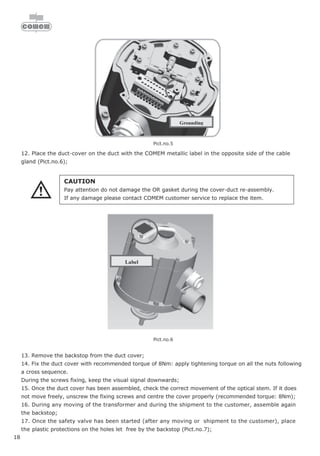
7.14.18 ParaGramer activation . . . . . . . . . . . . . . . . . . . . . . . . . . . . . . . . . . . . . . . . . . . . . . . . . . . . . . . . . . . . . .137
7.15 Transformer configuration. . . . . . . . . . . . . . . . . . . . . . . . . . . . . . . . . . . . . . . . . . . . . . . . . . 138
7.15.1 Transformer mounting voltage (measurement voltage). . . . . . . . . . . . . . . . . . . . . . . . . . . . . . . . . . . . . . .138
7.15.2 Transformer mounting ratio for the voltage . . . . . . . . . . . . . . . . . . . . . . . . . . . . . . . . . . . . . . . . . . . . . . .140
7.15.3 Transformer mounting current (conductor connection) . . . . . . . . . . . . . . . . . . . . . . . . . . . . . . . . . . . . . . .140
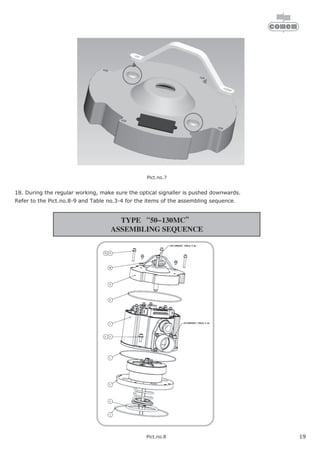
7.15.4 Transformer mounting current (conversion 1 A / 5 A). . . . . . . . . . . . . . . . . . . . . . . . . . . . . . . . . . . . . . . .140
7.15.5 Transformer mounting ratio for the current . . . . . . . . . . . . . . . . . . . . . . . . . . . . . . . . . . . . . . . . . . . . . . .141
7.16 Input assignments (binary inputs). . . . . . . . . . . . . . . . . . . . . . . . . . . . . . . . . . . . . . . . . . . . . 142
7.17 Relay assignments . . . . . . . . . . . . . . . . . . . . . . . . . . . . . . . . . . . . . . . . . . . . . . . . . . . . . . . 143
7.18 LED assignments . . . . . . . . . . . . . . . . . . . . . . . . . . . . . . . . . . . . . . . . . . . . . . . . . . . . . . . . 145
8 Measurement Value Simulation . . . . . . . . . . . . . . . . . . . . . . . . . . . . . . . . . . . . 146
8.1 Setting the simulated voltage. . . . . . . . . . . . . . . . . . . . . . . . . . . . . . . . . . . . . . . . . . . . . . . . 148
8.2 Setting the simulated current. . . . . . . . . . . . . . . . . . . . . . . . . . . . . . . . . . . . . . . . . . . . . . . . 148
8.3 Setting the simulated phase angle . . . . . . . . . . . . . . . . . . . . . . . . . . . . . . . . . . . . . . . . . . . . 148
8.4 Setting the simulated tap-change . . . . . . . . . . . . . . . . . . . . . . . . . . . . . . . . . . . . . . . . . . . . 149
9 Parallel Operation of Transformers with REG-DA . . . . . . . . . . . . . . . . . . . . . . . 150
9.1 Circuit diagram (schematic). . . . . . . . . . . . . . . . . . . . . . . . . . . . . . . . . . . . . . . . . . . . . . . . . 152
9.2 Programs for parallel operation and their prerequisites . . . . . . . . . . . . . . . . . . . . . . . . . . . . . 154
9.2.1 Preparation. . . . . . . . . . . . . . . . . . . . . . . . . . . . . . . . . . . . . . . . . . . . . . . . . . . . . . . . . . . . . . . . . . . . . .154
9.2.2 Preparing manual activation. . . . . . . . . . . . . . . . . . . . . . . . . . . . . . . . . . . . . . . . . . . . . . . . . . . . . . . . . .156
9.2.3 Preparing automatic activation . . . . . . . . . . . . . . . . . . . . . . . . . . . . . . . . . . . . . . . . . . . . . . . . . . . . . . . .163
9.3 Parallel operation using the “Master-Slave-Independent (MSI)” procedure . . . . . . . . . . . . . . . 173
9.3.1 Trouble-shooting. . . . . . . . . . . . . . . . . . . . . . . . . . . . . . . . . . . . . . . . . . . . . . . . . . . . . . . . . . . . . . . . . .184
7
REG-DA
REG-DA operating manual
10 Resistance Measuring Equipment for Tap-Changers with Resistance-Coded Tap-
Change Signalling . . . . . . . . . . . . . . . . . . . . . . . . . . . . . . . . . . . . . . . . . . . . . . . 187
10.1 Error detection. . . . . . . . . . . . . . . . . . . . . . . . . . . . . . . . . . . . . . . . . . . . . . . . . . . . . . . . . . 188
10.2 Level detection. . . . . . . . . . . . . . . . . . . . . . . . . . . . . . . . . . . . . . . . . . . . . . . . . . . . . . . . . . 188
10.3 Pin assignment . . . . . . . . . . . . . . . . . . . . . . . . . . . . . . . . . . . . . . . . . . . . . . . . . . . . . . . . . 189
10.4 Connection options. . . . . . . . . . . . . . . . . . . . . . . . . . . . . . . . . . . . . . . . . . . . . . . . . . . . . . . 190
10.5 Setting of the DIP switch S1 and S2 . . . . . . . . . . . . . . . . . . . . . . . . . . . . . . . . . . . . . . . . . . 191
10.5.1 Location of the switch on the circuit board: level 1. . . . . . . . . . . . . . . . . . . . . . . . . . . . . . . . . . . . . . . . . 191
11 mA-Inputs, mA-Outputs. . . . . . . . . . . . . . . . . . . . . . . . . . . . . . . . . . . . . . . . . . . 192
11.1 Analogue inputs. . . . . . . . . . . . . . . . . . . . . . . . . . . . . . . . . . . . . . . . . . . . . . . . . . . . . . . . . 193
11.2 Analogue outputs. . . . . . . . . . . . . . . . . . . . . . . . . . . . . . . . . . . . . . . . . . . . . . . . . . . . . . . . 203
12 Updating the Operating Software . . . . . . . . . . . . . . . . . . . . . . . . . . . . . . . . . . . 214
12.1 Preparing the PC . . . . . . . . . . . . . . . . . . . . . . . . . . . . . . . . . . . . . . . . . . . . . . . . . . . . . . . . 215
12.1.1 Windows NT/2000/XP operating system . . . . . . . . . . . . . . . . . . . . . . . . . . . . . . . . . . . . . . . . . . . . . . . . 215
12.2 Starting the bootstrap loader. . . . . . . . . . . . . . . . . . . . . . . . . . . . . . . . . . . . . . . . . . . . . . . . 215
13 Maintenance and Current Consumption . . . . . . . . . . . . . . . . . . . . . . . . . . . . . . 220
13.1 Cleaning information . . . . . . . . . . . . . . . . . . . . . . . . . . . . . . . . . . . . . . . . . . . . . . . . . . . . . 220
13.2 Changíng fuses . . . . . . . . . . . . . . . . . . . . . . . . . . . . . . . . . . . . . . . . . . . . . . . . . . . . . . . . . 221
13.3 Changing the battery . . . . . . . . . . . . . . . . . . . . . . . . . . . . . . . . . . . . . . . . . . . . . . . . . . . . . 221
13.4 REG-DA Current Consumption. . . . . . . . . . . . . . . . . . . . . . . . . . . . . . . . . . . . . . . . . . . . . . . 223
13.5 Replacing the device . . . . . . . . . . . . . . . . . . . . . . . . . . . . . . . . . . . . . . . . . . . . . . . . . . . . . 224
14 Storage Information. . . . . . . . . . . . . . . . . . . . . . . . . . . . . . . . . . . . . . . . . . . . . . 225
15 Background Information . . . . . . . . . . . . . . . . . . . . . . . . . . . . . . . . . . . . . . . . . . 226
15.1 Regulator mode . . . . . . . . . . . . . . . . . . . . . . . . . . . . . . . . . . . . . . . . . . . . . . . . . . . . . . . . . 226
15.2 Command variable W . . . . . . . . . . . . . . . . . . . . . . . . . . . . . . . . . . . . . . . . . . . . . . . . . . . . . 227
15.2.1 Fixed command variable . . . . . . . . . . . . . . . . . . . . . . . . . . . . . . . . . . . . . . . . . . . . . . . . . . . . . . . . . . . 227
15.2.2 Variable command variable . . . . . . . . . . . . . . . . . . . . . . . . . . . . . . . . . . . . . . . . . . . . . . . . . . . . . . . . . 228
15.2.3 Current-dependent setpoint value increment. . . . . . . . . . . . . . . . . . . . . . . . . . . . . . . . . . . . . . . . . . . . . 231
15.3 Summary and Examples for Current Influencing . . . . . . . . . . . . . . . . . . . . . . . . . . . . . . . . . . 235
15.4 Regulative deviations . . . . . . . . . . . . . . . . . . . . . . . . . . . . . . . . . . . . . . . . . . . . . . . . . . . . . 238
15.4.1 Regulative deviation Xw . . . . . . . . . . . . . . . . . . . . . . . . . . . . . . . . . . . . . . . . . . . . . . . . . . . . . . . . . . . . 238
15.4.2 Permissible regulative deviation Xwz. . . . . . . . . . . . . . . . . . . . . . . . . . . . . . . . . . . . . . . . . . . . . . . . . . . 238
15.4.3 Displaying the regulative deviation Xw. . . . . . . . . . . . . . . . . . . . . . . . . . . . . . . . . . . . . . . . . . . . . . . . . . 239
15.4.4 Setting the permissible regulative deviation Xwz . . . . . . . . . . . . . . . . . . . . . . . . . . . . . . . . . . . . . . . . . . 239
15.5 Monitoring extreme operating values (faults) . . . . . . . . . . . . . . . . . . . . . . . . . . . . . . . . . . . . 241
15.5.1 Limit signal . . . . . . . . . . . . . . . . . . . . . . . . . . . . . . . . . . . . . . . . . . . . . . . . . . . . . . . . . . . . . . . . . . . . . 241
8
REG-DA
REG-DA operating manual
15.6 Add-Ons . . . . . . . . . . . . . . . . . . . . . . . . . . . . . . . . . . . . . . . . . . . . . . . . . . . . . . . . . . . . . . 246
15.6.1 High-speed switching add-on. . . . . . . . . . . . . . . . . . . . . . . . . . . . . . . . . . . . . . . . . . . . . . . . . . . . . . . . .246
15.6.2 Relay for Voltage Control & Transformer Monitoring inhibit low function . . . . . . . . . . . . . . . . . . . . . . . . . .247
15.6.3 Measuring the “Creeping Net Breakdown” . . . . . . . . . . . . . . . . . . . . . . . . . . . . . . . . . . . . . . . . . . . . . . .248
15.6.4 “Maximum tap-change difference” monitoring Add-On . . . . . . . . . . . . . . . . . . . . . . . . . . . . . . . . . . . . . .250
15.6.5 Add-On: monitoring the tap-changer . . . . . . . . . . . . . . . . . . . . . . . . . . . . . . . . . . . . . . . . . . . . . . . . . . .250
15.7 Time behaviour of the Relay for Voltage Control & Transformer Monitoring when a control command
is output . . . . . . . . . . . . . . . . . . . . . . . . . . . . . . . . . . . . . . . . . . . . . . . . . . . . . . . . . . . . . . 252
15.7.1 Determining the reaction delay tv . . . . . . . . . . . . . . . . . . . . . . . . . . . . . . . . . . . . . . . . . . . . . . . . . . . . . .255
15.7.2 Integrated time program . . . . . . . . . . . . . . . . . . . . . . . . . . . . . . . . . . . . . . . . . . . . . . . . . . . . . . . . . . . .259
15.7.3 Trend memory. . . . . . . . . . . . . . . . . . . . . . . . . . . . . . . . . . . . . . . . . . . . . . . . . . . . . . . . . . . . . . . . . . . .260
15.7.4 “Const” time program . . . . . . . . . . . . . . . . . . . . . . . . . . . . . . . . . . . . . . . . . . . . . . . . . . . . . . . . . . . . . .262
15.7.5 Setting the time factor Ft . . . . . . . . . . . . . . . . . . . . . . . . . . . . . . . . . . . . . . . . . . . . . . . . . . . . . . . . . . . .266
15.8 E-LAN (Energy Local Area Network) . . . . . . . . . . . . . . . . . . . . . . . . . . . . . . . . . . . . . . . . . . . 267
15.9 Voltage regulation with transformers operating in parallel . . . . . . . . . . . . . . . . . . . . . . . . . . . 271
15.9.1 Regulation programs for transformers operating in parallel. . . . . . . . . . . . . . . . . . . . . . . . . . . . . . . . . . . .272
15.9.2 Functional principle . . . . . . . . . . . . . . . . . . . . . . . . . . . . . . . . . . . . . . . . . . . . . . . . . . . . . . . . . . . . . . . .273
15.9.3 Influence of the circulating current regulation . . . . . . . . . . . . . . . . . . . . . . . . . . . . . . . . . . . . . . . . . . . . .273
15.9.4 Activation of the regulation program . . . . . . . . . . . . . . . . . . . . . . . . . . . . . . . . . . . . . . . . . . . . . . . . . . . .274
15.9.5 Description of the regulation programs . . . . . . . . . . . . . . . . . . . . . . . . . . . . . . . . . . . . . . . . . . . . . . . . . .275
15.10 Nominal transformation of the measurement transformers . . . . . . . . . . . . . . . . . . . . . . . . . . 292
15.11 Self-Conduct . . . . . . . . . . . . . . . . . . . . . . . . . . . . . . . . . . . . . . . . . . . . . . . . . . . . . . . . . . . 293
15.12 LCD display . . . . . . . . . . . . . . . . . . . . . . . . . . . . . . . . . . . . . . . . . . . . . . . . . . . . . . . . . . . . 293
15.12.1 LCD contrast. . . . . . . . . . . . . . . . . . . . . . . . . . . . . . . . . . . . . . . . . . . . . . . . . . . . . . . . . . . . . . . . . . . . .293
15.12.2 LCD Saver. . . . . . . . . . . . . . . . . . . . . . . . . . . . . . . . . . . . . . . . . . . . . . . . . . . . . . . . . . . . . . . . . . . . . . .293
15.12.3 Background illumination. . . . . . . . . . . . . . . . . . . . . . . . . . . . . . . . . . . . . . . . . . . . . . . . . . . . . . . . . . . . .293
16 Definition of the Abbreviations . . . . . . . . . . . . . . . . . . . . . . . . . . . . . . . . . . . . . 294
17 Symbols and their Definition. . . . . . . . . . . . . . . . . . . . . . . . . . . . . . . . . . . . . . . 300
18 Factory Settings of the Parameters . . . . . . . . . . . . . . . . . . . . . . . . . . . . . . . . . 303
19 Notes on the Interpreter Language. . . . . . . . . . . . . . . . . . . . . . . . . . . . . . . . . . 305
20 Index . . . . . . . . . . . . . . . . . . . . . . . . . . . . . . . . . . . . . . . . . . . . . . . . . . . . . . . . . 306
Appendix
Labels
Drill hole-pattern
9
REG-DA
REG-DA operating manual
1 Warnings and Information
The REG-DA Relay for Voltage Control & Transformer
Monitoring is exclusively designed for implementation in
systems and equipment for electrical energy technology. Only
trained experts are permitted to carry out all required work.
Experts are persons who are familiar with the installation,
mounting, commissioning and operation of these types of
products. Furthermore, experts have qualifications which
correspond with the requirements of their field of work.
The REG-DA Relay for Voltage Control & Transformer
Monitoring left the factory in a condition that fulfils all relevant
safety regulations. To maintain this condition and to ensure safe
operation, the following instructions and warnings in this
operating manual must be observed.
❑ The REG-DA Relay for Voltage Control & Transformer
Monitoring has been designed to comply with IEC 10110/
EN61010 (DIN VDE 0411), degree of protection I and was
tested according to this standard before delivery.
❑ The REG-DA Relay for Voltage Control & Transformer
Monitoring must be earthed via a protective earth
conductor. This condition is fulfilled when the Relay for
Voltage Control & Transformer Monitoring is connected to
an auxiliary voltage with a protective earth conductor
(European power supply system). If the auxiliary voltage
power supply system does not have a protective earth
conductor, an additional connection must be established
from the protective earth conductor terminal to earth.
❑ The upper limit of the permissible auxiliary voltage UAUX may
not be exceeded, neither permanently nor for a short period
of time.
❑ Before changing the fuse, separate the REG-DA Relay for
Voltage Control & Transformer Monitoring completely from
the auxiliary voltage UAUX.
The use of fuses other than those of the indicated type and
rated current is prohibited.
❑ A REG-DA Relay for Voltage Control & Transformer
Monitoring which displays visible damage or clear
malfunctioning must not be used and has to be secured
against unintentionally being switched on.
10
REG-DA
REG-DA operating manual
❑ Maintenance and repair work on a REG-DA Relay for
Voltage Control & Transformer Monitoring with an open
door may only be carried out by authorised experts.
Warning signs
Please familiarise yourself with the nominal insulation voltage of
the Relay for Voltage Control & Transformer Monitoring before
connecting the device.
Ensure that the voltages are connected via a disconnecting
mechanism, and that the current path can be short circuited if
there is a device fault to enable problem-free device
replacement.
When wiring, please ensure that the conductors are either
bound short or kept sufficiently short so that they cannot reach
level 2 or 3.
If a fault occurs (connection becomes loose), no line that carries
a voltage that is dangerous when touched (> 50 V) or line to
which a nominal isolation voltage larger than 50 V is assigned,
may come into contact with the circuits in levels 2 and 3.
!
11
REG-DA
REG-DA operating manual
2 Scope of Delivery
1 REG-DA Relay for Voltage Control & Transformer Monitoring,
with built-in components
1 terminal diagram in English
1 operating manual in English
1 WinREG programming and parameterisation software
1 cable
1 replacement fuse
2 tools
(7 mm Allen key and special screwdriver for the terminals on
levels 2 and 3)
12
REG-DA
REG-DA operating manual
3 Technical Data
3.1 Basic equipment
Dimensions
Lead sealing Each Relay for Voltage Control & Transformer Monitoring can
be locked with a password so that the parameters cannot be
changed.
The REG-DA can also be lead-sealed to show whether it has
been opened by unauthorized persons.
For this purpose, a lead-sealing wire is pulled diagonally
through the bores in the lower right corner of the housing corner
and is secured with a lead-sealing tool.
This measure ensures that the device can only be opened by
breaking the lead seal.
Dimensions in mm
13
REG-DA
REG-DA operating manual
Connection levels
Side view (section) of opened housing
Note
Reference is made to the connection levels (levels I...III)
in both the block diagram (Page 21) and the pin
assignment (Page 23).
a r e a I
a r e a I I
a r e a I I I
Membrane keypad
area III
area II
area I
14
REG-DA
REG-DA operating manual
3.2 Connection diagram
Contact load R1, R2: AC 250 V, 5 A, cosϕ = 1,
250 V DC, 150 W
* Please observe the contact load at R1 and R2!
(see below)!
** The connections for I and U can be freely assigned
via the menu.
110 V DC 230 V AC
20 A Switch on 5 A @ cosϕ = 1
5 A Hold 3 A @ cosϕ = 0.4
0.4 A Switch off
15
REG-DA
REG-DA operating manual
3.3 Overview of features
REG-DA is a highly variable product.
The operating manual must take this factor into account and
provide different descriptions for the for the various
specifications.
Because the features ... M2, S1... D4 ... are noted on the name
plate of the device, but the relation to the function which it
stands for is not always given, the complete structure of the
device's features is listed here.
Feature: ID
REG-DA Relay for Voltage Control & Transformer
Monitoring
Basic version with E-LAN double interfaces,
COM 2, COM 3 and a mA input channel for e.g.
measuring the oil temperature
or for the measuring of the tap-changer position using
a measurement transducer
with 16 binary inputs and 12 relay outputs plus status
output
inclusive of WinREG parameterisation software for
parameterisation, programming
and displaying of all Relay for Voltage Control &
Transformer Monitoring data incl. connecting cable
Note: COM 2 is only freely accessible
if a log connection is not required.
REG-DA
Design
Panel-mounting or wall-mounting version
(H x W x D) 307 x 250 x 102 mm
with standard mounting rail adapter
B0
B1
Current supply
external
85 V ... 110 V ... 264 V AC / 88 V ... 220 V ... 280 V DC
external 18 V ... 60 V ... 72 V DC
H0
H2
Input currents (can be changed later)
IEN 1A
IEN 5A
F1
F2
16
REG-DA
REG-DA operating manual
Measurement transducer display functions for network
quantities
Three-phase current with balanced load
Three-phase current with unbalanced load
Voltage (HV-side), current and voltage (MV-side)
measurement
Other uses of the three current and two voltage
transformers
M1
M2
M3
M9
Recorder functions
for network quantities with evaluation software
Without
With
S0
S1
Transformer monitoring
Without
With
T0
T1
Parallel operation
Without firmware for parallel operation
With firmware for parallel operation
K0
K1
Feature: ID
17
REG-DA
REG-DA operating manual
Additional analogue inputs and outputs
Without
With one a PT 100 input
With two mA inputs
With two mA outputs
With one PT 100 input and one mA output
With two mA inputs and one mA output
With three mA outputs
Tap-change potentiometer input
Total resistance 200 Ohm ... 2 kOhm
Tap-change potentiometer input
Total resistance >2 kOhm ... 20 kOhm
Other combinations of inputs and outputs
Note about E91 ... E99:
Please specify the scale if known!
Example: 1 -100 ... 0 ... +100 MW
-20 ... 0 ... +20 mA
Example: 2 0 ... 80 ... 120 V
4 ... 16 ... 20 mA
Example: 3 1 ... 19 levels
0 ... 20 mA
Example: 4 50 ... 140°C
4 ... 20 mA
E00
E91
E92
E93
E94
E95
E96
E97
E98
E99
Feature: ID
18
REG-DA
REG-DA operating manual
Binary inputs and tap-changer potentiometer input
16 binary inputs 48 ... 250 V AC/DC
8 binary inputs 10 ... 48 V AC/DC
and 8 binary inputs 48 ... 250 V AC/DC
1 tap-change potentiometer input
(total resistance 200 ... 2 kOhm)
and 8 binary inputs 48 ... 250 V AC/DC
1 tap-change potentiometer input
(total resistance >2 ... 20 kOhm)
and 8 binary inputs 10 ... 48 V AC/DC
16 binary inputs 10 ... 48 V AC/DC
1 tap-change potentiometer input
(total resistance 200 ... 2 kOhm)
and 8 binary inputs 10 ... 48 V AC/DC
1 tap-change potentiometer input
(total resistance >2 ... 20 kOhm)
and 8 binary inputs 48 ... 250 V AC/DC
D0
D1
D2
D3
D4
D5
D6
Level II: additional inputs and outputs
Without
With 6 binary inputs 48 ... 250 V AC/DC
With 12 binary inputs 48 ... 250 V AC/DC
With 6 relay outputs
With 12 relay outputs
With 6 binary inputs and 6 relay outputs
With 2 analogue inputs
With 4 analogue inputs
With 2 analogue outputs
With 4 analogue outputs
Other combinations 6 inputs, 6 outputs, 2 analogue
inputs, 2 analogue outputs
Note about C90: Two terminals are normally available
on level II.
Each terminal can be equipped with either 6 binary
inputs, 6 binary outputs or an analogue module.
Either 2 inputs or 2 outputs are available per analogue
module.
Up to 4 additional modules can be equipped assuming
that a control system connection (XW90, 91 or L1, L9)
is not used.
C00
C01
C02
C03
C04
C05
C06
C07
C08
C09
C90
Feature: ID
19
REG-DA
REG-DA operating manual
Integrated control system connection according to:
IEC61850 or IEC 60870- 5-104
Without
IEC 60850 - 5 - 104 (more in feature group “G”)
Note: Please specify the target system for connections
according to IEC 60850-5-104
IEC 61850 (more in feature group “G”)
XW00
XW90
XW91
Integrated control system connection according to: IEC
60870- 5-101/ ..-103,…DNP…
Without (more in feature group “G”)
for the control system connection of a REG-DA
For the control system connection of multiple systems
(REG-D/DA/DP, etc.)
Note: L9 can only be combined with feature XW90,
Z15 to Z19 and Z91.
L0
L1
L9
Type of connection:
Copper RS 232
RS 485 only for 2-wire operation
Fibre-optic cable with FSMA connection system
Glass fibre
(Wavelength 800...900 nm, range 2000 m)
Plastic fibre
(Wavelength 620...680 nm, range 50 m)
Fibre-optic cable with ST connection system
Glass fibre
(Wavelength 800...900 nm, range 2000 m)
Plastic fibre
(Wavelength 620...680 nm, range 50 m)
V10
V11
V13
V15
V17
V19
Feature: ID
20
REG-DA
REG-DA operating manual
Log:
IEC60870-5-103 for ABB
IEC60870-5-103 for Areva
IEC60870-5-103 for SAT
IEC60870-5-103 for Siemens (LSA/SAS)
IEC60870-5-103 for Sprecher Automation
IEC60870-5-103 for others
IEC60870-5-101 for ABB
IEC60870-5-101 for IDS
IEC60870-5-101 for SAT
IEC60870-5-101 for Siemens (LSA/SAS)
IEC60870-5-101 for others
DNP 3.00
LONMark
SPABUS
MODBUS RTU
Z10
Z11
Z12
Z13
Z14
Z90
Z15
Z17
Z18
Z19
Z91
Z20
Z21
Z22
Z23
Operating Manual
German
English
French
Spanish
Italian
Russian
Other
G1
G2
G3
G4
G5
G6
G9
Display text
German
English
French
Spanish
Italian
Russian
Other
A1
A2
A3
A4
A5
A6
A9
Feature: ID
21
REG-DA
REG-DA operating manual
3.4 Block diagrams
3.4.1 Block diagram for features D0/D1/D4
6
1
2
3
4
5
7
8
9
U
1
2
5
E
1
.
.
.
E
4
T
C
i
n
p
r
o
g
r
e
s
s
p
r
o
g
r
.
p
r
o
g
r
.
p
r
o
g
r
.
A
U
T
O
M
A
N
U
A
L
p
r
o
g
r
.
p
r
o
g
r
.
E
5
.
.
.
E
8
I
n
p
u
t
s
E
1
.
.
.
E
8
1
1
1
2
1
3
1
4
1
5
1
6
1
7
1
8
1
9
2
0
E
9
.
.
.
E
1
2
B
C
D
1
B
C
D
1
0
B
C
D
2
0
B
C
D
s
g
n
.
p
r
o
g
r
.
E
1
3
.
.
.
E
1
6
I
n
p
u
t
s
E
9
.
.
.
E
1
6
2
4
2
5
2
6
2
7
2
8
2
9
3
0
3
1
3
2
B
C
D
2
B
C
D
4
B
C
D
8
A
n
a
l
o
q
u
e
I
n
p
u
t
s
a
n
d
O
u
t
p
u
t
s
6
1
6
2
6
5
6
6
6
7
6
8
A
2
A
3
A
4
6
3
6
4
A
1
m
A
i
n
p
u
t
R
2
p
r
o
g
r
.
R
3
p
r
o
g
r
.
R
4
p
r
o
g
r
.
R
5
3
4
3
5
3
6
3
7
3
8
3
9
4
0
4
1
4
2
4
3
4
4
4
5
R
1
4
6
G
N
D
R
6
.
.
.
R
1
1
R
6
R
7
R
e
m
o
t
e
R
8
L
o
c
a
l
R
9
<
U
R
1
0
>
U
R
1
1
>
I
5
2
5
1
5
0
4
9
4
8
4
7
5
3
5
7
5
8
5
9
5
4
5
5
5
6
A
U
T
O
R
1
3
L
i
f
e
c
o
n
t
a
c
t
(
S
t
a
t
u
s
)
U
U
2
8
1
0
U
I
1
1
3
I
I
2
4
6
I
I
3
7
9
I
R
e
l
a
y
o
u
t
p
u
t
s
A
C
/
D
C
4
8
.
.
.
2
5
0
V
R
e
l
a
y
o
u
t
p
u
t
s
A
C
/
D
C
4
8
.
.
.
2
5
0
V
L
/
(
+
)
2
1
2
2
L
/
(
-
)
C
T
S
R
T
S
C
O
M
2
R
S
2
3
2
C
O
M
3
R
S
4
8
5
8
5
8
4
8
6
8
3
8
2
8
0
7
9
7
8
7
7
G
N
D
R
x
D
T
x
D
R
x
-
R
x
+
T
x
-
T
x
+
E
+
E
A
-
E
A
+
6
9
7
0
7
1
7
2
7
3
7
4
7
5
7
6
8
1
8
2
8
3
8
4
E
-
L
A
N
L
E
-
L
A
N
R
I
E
C
L
O
N
D
N
P
3
.
0
E
-
E
+
E
A
-
E
A
+
E
-
E
+
E
A
-
E
A
+
E
-
F
S
M
A
S
T
G
N
D
C
T
S
T
X
D
R
T
S
R
X
D
R
S
2
3
2
C
O
M
1
I
n
p
u
t
o
r
o
u
t
p
u
t
l
o
w
e
r
h
i
g
h
e
r
I
E
C
D
N
P
3
.
0
L
O
N
C
h
a
r
a
c
t
e
r
i
s
t
c
E
9
1
.
.
.
9
9
C
h
a
r
a
c
t
e
r
i
s
t
i
c
M
2
C
h
a
r
a
c
t
e
r
i
s
t
i
c
M
2
U
H
G
N
D
E
1
E
2
E
3
E
4
E
5
E
6
E
7
E
8
G
N
D
G
N
D
E
9
E
1
3
E
1
4
E
1
5
E
1
6
G
N
D
E
1
0
E
1
1
E
1
2
+
1
2
3
L
C
D
µ
P
L
E
D
R
A
M
/
R
O
M
1
2
8
x
1
2
8
D
O
T
S
d
i
s
p
l
a
y
K
e
y
b
o
a
r
d
C
L
O
C
K
1
1
1
8
1
1
1
1
3
3
1
1
1
1
1
1
1
D
o
p
p
e
l
-
M
o
d
u
l
+
+
+
-
-
-
-
m
A
i
n
p
u
t
I
n
p
u
t
o
r
o
u
t
p
u
t
I
n
p
u
t
o
r
o
u
t
p
u
t
I
n
p
u
t
o
r
o
u
t
p
u
t
I
n
p
u
t
o
r
o
u
t
p
u
t
I
n
p
u
t
o
r
o
u
t
p
u
t
+
+
+
+
-
-
-
-
A
r
e
a
A
r
e
a
A
r
e
a
A
r
e
a
*
F
1
R
1
2
M
a
n
u
a
l
T
e
r
m
i
n
a
l
n
o
.
A
r
e
a
T
e
r
m
i
n
a
l
n
o
.
T
e
r
m
i
n
a
l
n
o
.
T
C
e
r
r
o
r
L
e
g
e
n
d
:
o
p
t
i
o
n
a
l
n
o
t
f
r
e
e
l
y
p
r
o
g
r
a
m
m
a
b
l
e
A
d
d
i
t
i
o
n
a
l
I
n
p
u
t
s
a
n
d
o
u
t
p
u
t
s
C
h
a
r
a
c
t
e
r
i
s
t
i
c
s
C
0
1
.
.
.
C
0
9
(
S
e
e
p
i
n
a
s
s
i
g
n
m
e
n
t
a
r
e
a
I
I
1
0
0
1
1
3
1
1
22
REG-DA
REG-DA operating manual
3.4.2 Block diagram for features D2/D3
6
1
2
3
4
5
7
8
9
U
1
2
5
E
1
.
.
.
E
4
T
C
i
n
p
r
o
g
r
e
s
s
p
r
o
g
r
.
p
r
o
g
r
.
p
r
o
g
r
.
A
U
T
O
M
A
N
U
A
L
p
r
o
g
r
.
p
r
o
g
r
.
E
5
.
.
.
E
8
I
n
p
u
t
s
E
1
.
.
.
E
8
A
C
/
D
C
5
0
.
.
.
2
5
0
V
1
1
1
2
1
3
1
4
1
5
1
6
1
7
1
8
1
9
2
0
A
n
a
l
o
q
u
e
I
n
p
u
t
s
a
n
d
O
u
t
p
u
t
s
6
1
6
2
6
5
6
6
6
7
6
8
A
2
A
3
A
4
6
3
6
4
A
1
m
A
i
n
p
u
t
R
2
p
r
o
g
r
.
R
3
p
r
o
g
r
.
R
4
p
r
o
g
r
.
R
5
3
4
3
5
3
6
3
7
3
8
3
9
4
0
4
1
4
2
4
3
4
4
4
5
R
1
4
6
G
N
D
R
6
.
.
.
R
1
1
R
6
R
7
R
e
m
o
t
e
R
8
L
o
c
a
l
R
9
<
U
R
1
0
>
U
R
1
1
>
I
5
2
5
1
5
0
4
9
4
8
4
7
5
3
5
7
5
8
5
9
5
4
5
5
5
6
A
U
T
O
L
i
f
e
c
o
n
t
a
c
t
(
S
t
a
t
u
s
)
U
U
2
8
1
0
U
I
1
1
3
I
I
2
4
6
I
I
3
7
9
I
R
e
l
a
y
o
u
t
p
u
t
s
A
C
/
D
C
4
8
.
.
.
2
5
0
V
R
e
l
a
y
o
u
t
p
u
t
s
A
C
/
D
C
4
8
.
.
.
2
5
0
V
L
/
(
+
)
2
1
2
2
L
/
(
-
)
C
T
S
R
T
S
C
O
M
2
R
S
2
3
2
C
O
M
3
R
S
4
8
5
8
5
8
4
8
6
8
3
8
2
8
0
7
9
7
8
7
7
G
N
D
R
x
D
T
x
D
R
x
-
R
x
+
T
x
-
T
x
+
E
+
E
A
-
E
A
+
6
9
7
0
7
1
7
2
7
3
7
4
7
5
7
6
8
1
8
2
8
3
8
4
E
-
L
A
N
L
E
-
L
A
N
R
I
E
C
L
O
N
D
N
P
3
.
0
E
-
E
+
E
A
-
E
A
+
E
-
E
+
E
A
-
E
A
+
E
-
F
S
M
A
S
T
G
N
D
C
T
S
T
X
D
R
T
S
R
X
D
R
S
2
3
2
C
O
M
1
I
n
p
u
t
o
r
o
u
t
p
u
t
l
o
w
e
r
h
i
g
h
e
r
I
E
C
D
N
P
3
.
0
L
O
N
C
h
a
r
a
c
t
e
r
i
s
t
c
E
9
1
.
.
.
9
9
C
h
a
r
a
c
t
e
r
i
s
t
i
c
M
2
C
h
a
r
a
c
t
e
r
i
s
t
i
c
M
2
U
H
G
N
D
E
1
E
2
E
3
E
4
E
5
E
6
E
7
E
8
G
N
D
+
1
L
C
D
µ
P
L
E
D
R
A
M
/
R
O
M
1
2
8
x
1
2
8
D
O
T
S
d
i
s
p
l
a
y
K
e
y
b
o
a
r
d
C
L
O
C
K
1
1
1
8
1
1
1
1
3
3
1
1
1
1
1
1
1
D
o
p
p
e
l
-
M
o
d
u
l
+
+
+
-
-
-
-
m
A
i
n
p
u
t
I
n
p
u
t
o
r
o
u
t
p
u
t
I
n
p
u
t
o
r
o
u
t
p
u
t
I
n
p
u
t
o
r
o
u
t
p
u
t
I
n
p
u
t
o
r
o
u
t
p
u
t
I
n
p
u
t
o
r
o
u
t
p
u
t
+
+
+
+
-
-
-
-
A
r
e
a
A
r
e
a
A
r
e
a
A
r
e
a
*
F
1
M
a
n
u
a
l
T
e
r
m
i
n
a
l
n
o
.
T
e
r
m
i
n
a
l
n
o
.
A
r
e
a
A
r
e
a
T
e
r
m
i
n
a
l
n
o
.
T
e
r
m
i
n
a
l
n
o
.
T
C
e
r
r
o
r
R
e
s
.
I
n
p
u
t
2
4
2
5
2
6
2
3
+
-
I
K
-
I
K
+
U
E
-
L
e
g
e
n
d
:
o
p
t
i
o
n
a
l
n
o
t
f
r
e
e
l
y
p
r
o
g
r
a
m
m
a
b
l
e
A
d
d
i
t
i
o
n
a
l
I
n
p
u
t
s
a
n
d
o
u
t
p
u
t
s
C
h
a
r
a
c
t
e
r
i
s
t
i
c
s
C
0
1
.
.
.
C
0
9
(
S
e
e
p
i
n
a
s
s
i
g
n
m
e
n
t
a
r
e
a
I
I
1
0
0
1
1
3
1
1
23
REG-DA
REG-DA operating manual
3.5 Pin Assignment
Signals with non-exposed voltages are connected first of all on
level I.
All of the circuits on level I have a nominal insulation voltage of
> 50 V and are therefore considered to be non-exposed in
accordance with VDE 0110 (exception: resistance input,
feature D2/D3).
Please observe this condition even if small voltages are present
at the relay contacts or the binary inputs.
Terminal area on connection level III
Terminal area on connection level I
Terminal area on connection level II
24
REG-DA
REG-DA operating manual
*) The Relay for Voltage Control & Transformer Monitoring with
feature M1 provides only one voltage input. One voltage
transformer is sufficient for standard regulating functions.
When carrying out measurements in arbitrarily-loaded three-
phase current systems, the three external-conductor voltages
must be connected to terminals 2, 5 and 8 (Feature M2).
Triple-wound applications function with two separate input
voltages U1 and U2.
Level
I
No. M1 * M2 * Triple*-
wound
regulator
2 Voltage input
U1
UL1
U1
5 Voltage input UL2
8 Voltage input
−
UL3
U2
10 Voltage input −
1 k
Current input I1
3 I
4 k
Current input I2
6 I
7 k
Current input I3
9 I
21 L / (+)
Auxiliary voltage
22 L / (-)
25
REG-DA
REG-DA operating manual
Note
All of the inputs and relay outputs are freely
programmable, with the exception of inputs 5 and 6 and
the outputs R1, R2, R12 and R13.
The assignment specified in the terminal diagram
corresponds to the delivery state and can be changed if
necessary.
Level
I
No. D0, D1, D4 D2, D3
11 Input 1 Tap-changer in progress
12 Input 2 Freely programmable
13 Input 3 Freely programmable
14 Input 4 Freely programmable
15 Input 1...4 GND
16 Input 5 AUTO / MANUAL -
AUTO
(see Page 127)
17 Input 6 MANUAL
18 Input 7 Freely programmable
19 Input 8 Freely programmable
20 Input 5...8 GND
23 Input 9 BCD 1
please also
refer to Page
34
24 Input 10 BCD 2
25 Input 11 BCD 4
26 Input 12 BCD 8
27 Input 9...12 GND −
28 Input 13 BCD 10 −
29 Input 14 BCD 20 −
30 Input 15 BCD signal −
31 Input 16 Freely programmable −
32 Input 13...16 GND −
26
REG-DA
REG-DA operating manual
Level
I
No.
33
Freely programmable R5
34
35
Freely programmable R4
36
37
Freely programmable R3
38
39
Lower R2
40
41
42
43
Raise R1
44
45
46
47 > I R11
48 >U R10
49 <U R9
50 Local R8
51 Remote R7
52 TC Error R6
53 GND R6...R11
54
Life contact (status)
55
56
57 MANUAL
58
59 AUTO
27
REG-DA
REG-DA operating manual
Level
II
No.
IEC
LON
DNP 3.0
SPA bus
Modbus
For additional equipping possibilities for level II see "Pin
assignment level II" on page 35.
The connections of the control system can be found in the
information attached to the operating manual.
Level
III
No.
63 mA input +
A1 (standard equipment)
64 mA input -
61 Input or
output
+
A2
62 Input or
output
-
65 Input or
output
+
A3
66 Input or
output
-
67 Input or
output
+
A4
68 Input or
output
-
ϑ
65
66
68
Pt100
28
REG-DA
REG-DA operating manual
Level
III
No.
69 E-
E-LAN (L)
70 E+
71 EA-
72 EA+
73 E-
E-LAN (R)
74 E+
75 EA-
76 EA+
77 Tx +
COM 3 (RS 485)
78 Tx -
79 Rx +
80 Rx -
81 du don’t use
82 TxD
COM 2 (RS 232)
83 RxD
84 RTS
85 CTS
86 GND
29
REG-DA
REG-DA operating manual
3.5.1 Pin assignment level I
3.5.1.1 Auxiliary voltage, current input and voltage input
Terminals 21, 22 and 1 to 10
The REG-DA Relay for Voltage Control & Transformer
Monitoring is equipped for carrying out measurements in
arbitrarily loaded three-phase current networks. Therefore, up
to three current transformers are available.
Voltage regulation generally only requires a single-phase
connection (one delta or phase voltage and one line current),
because it may be assumed that the network conditions at the
transformer are approximately symmetrical (feature M1).
If a more precise measurement of the outputs (P, Q, S) is
required, it is possible to switch over to the Aron circuit. In this
case, two voltages and two currents must be connected
(feature M2).
The third current input is reserved for special cases, which must
be coordinated before the device is delivered.
U
1
2
5
U
U
2
8
1
0
U
I
1
1
3
I
I
2
4
6
I
I
3
7
9
I
L
/
(
+
)
2
1
2
2
L
/
(
-
)
C
h
a
r
a
c
t
e
r
i
s
t
i
c
M
2
C
h
a
r
a
c
t
e
r
i
s
t
i
c
M
2
U
H
1
A r e a
F
1
30
REG-DA
REG-DA operating manual
Auxiliary voltage (terminals 21 and 22)
The protective earth must be connected first, because the
REG-DA is a device with degree of protection I.
A plug-in shoe (6.3 x 0.8 mm) is provided in the lower part of
the housing for connecting the protective earth.
The auxiliary voltage is supplied via the twin connector block
(terminals 21 and 22).
Two types of power supply units are available:
Therefore, please ensure that the intended supply voltage
corresponds to the auxiliary voltage of the device as stated on
the printed nameplate, before connecting.
Feature H0:
Both direct and alternating voltages may be connected.
Ranges: 88 V ... 220 V ... 280 V DC
85 V ... 110 V ... 264 V AC
Power consumption: < 15 VA
Feature H1:
18 V ... 60 V ... 72 V DC
Power consumption: < 10 W
The auxiliary voltage, and thus the power supply of the device,
is protected by a T2L 250 V microfuse.
The fuse holder can be opened with a screwdriver. The device
is supplied with a spare fuse.
Flat-plug
connection
for protective
earth
31
REG-DA
REG-DA operating manual
Note
Please note that the fuse catch should never be
screwed on without having a fuse inserted, because
otherwise it is difficult to open the fuse holder.
3.5.1.2 Control voltage
(Terminals 2, 5 and 8, 10)
The control voltage must be connected to the terminals 2 and
5.
Any voltage from the three-phase current network can be used
as the control voltage. The type of voltage (delta or phase
voltage, UL1L2, UL2L3, UL3L1, U1N, U2N, U3N) must be
communicated to the Relay for Voltage Control & Transformer
Monitoring via the menu (SETUP 5, F2).
The permissible nominal application range of the control voltage
ranges from 60 to 140 V and is expressed in terms of delta
voltage.
If there is a connection between the phase and N, the nominal
application range of 34.6 to 140 V becomes available.
Please note that a single-pole high-resistance earth connection
affects L1 like a voltage dip if only a phase voltage (e.g. L1N) is
available for measuring the actual value of the voltage.
If a phase voltage is used as the control voltage rather than the
recommended delta voltage, you must pay attention to the
behaviour if a single-pole earth fault occurs.
In high-resistance faults, situations may occur where the
voltage appears to be too high or too low.
The Relay for Voltage Control & Transformer Monitoring
generally switches itself into standby mode for low resistance
faults.
Strongly distorted signals may also be connected by means of
a complex filtering of the measurement voltages and the
measurement currents.
If feature M2 is used, voltage UL1 must be connected to terminal
2, voltage UL2 to terminal 5 and voltage UL3 to terminal 8.
i.e.:
UL1 → 2
UL2 → 5
UL3 → 8
32
REG-DA
REG-DA operating manual
Voltage inputs U1 and U2 are both available for triple-wound
applications.
In each case, this is a special version for the triple-wound
application, each of which is described separately.
3.5.1.3 Current inputs
(Terminals 1, 3 and 4, 6 and 7, 9)
A connection to a power supply is not required for normal
regulator operation.
In many cases, however, the voltage must be raised and/or
lowered according to the respective load.
It is necessary to connect the current transformer I1 (1 and 3)
to carry out this additional task.
However, even without current-dependent regulation, we
recommend connecting the current, because this means that
network can be measured and displayed in the measurement
transducer mode.
Ensure that the correct connection (k, l!) is used when
connecting the current transformer.
Two current transformers must be connected for carrying out
measurements in arbitrarily loaded three-phase networks.
The third current can be calculated on the basis of both of the
measured currents. The third current connection (4, 6) is
reserved for special cases, which will be described separately.
The changeover from 1 A to 5 A or vice-versa is accomplished
via the menu. The use of hardware such as a bridge or jumper
is not necessary.
Caution!
Please observe that the line(s) must be short-circuited
before releasing the lines on terminals 1/3, 4/6 and 7/9.
33
REG-DA
REG-DA operating manual
3.5.1.4 Relay outputs
(Terminals 33 ... 59)
The REG-DA Relay for Voltage Control & Transformer
Monitoring has 13 relays.
Relay 13 is used as a life contact and monitors the running of
the processor as well as the supply voltages of the system.
Relays 1 ... 12 are available for regulating and controlling the
transformer.
Relays R1, R2 and R12 are permanently assigned to specific
functions, whereas all of the other relays are freely
programmable. The relays are programmed with frequently
used functions when delivered.
R1 ... R13: Potential-free relay contacts
Load: 250 V AC, 5 A, cosϕ = 1,
250 V DC, 150 W (also refer to
Page 14)
Relays R1 and R2 may be switched as follows in order to lock
a control command:
R
2
p
r
o
g
r
.
R
3
p
r
o
g
r
.
R
4
p
r
o
g
r
.
R
5
3 4 3 5 3 6 3 7 3 8 3 9 4 0 4 1 4 2 4 3 4 4 4 5
R
1
4 6
G
N
D
R
6
.
.
.
R
1
1
R
6
R
e
m
o
t
e
R
7
L
o
c
a
l
R
8
<
U
R
9
>
U
R
1
0
>
I
R
1
1
5 2 5 1 5 0 4 9 4 8 4 7 5 3 5 7 5 8 5 9 5 4 5 5 5 6
A
U
T
O
L
i
f
e
c
o
n
t
a
c
t
(
S
t
a
t
u
s
)
R e l a y - o u t p u t s
A C / D C 4 8 . . . 2 5 0 V
R e l a y - o u t p u t s
A C / D C 4 8 . . . 2 5 0 V
L
o
w
e
r
R
a
i
s
e
3 3
1
A r e a
M
A
N
U
A
L
T
e
r
m
i
n
a
l
n
o
.
T
C
f
a
u
l
t
R1
Raise
R2
Lower
34
REG-DA
REG-DA operating manual
3.5.1.5 Binary inputs, feature D0/D1
(Terminals 11 ... 32)
The REG-DA Relay for Voltage Control & Transformer
Monitoring has 16 binary inputs.
Only inputs 5 and 6 (Manual/Automatic) are permanently
assigned. All of the other inputs can be programmed freely.
Frequently used input functions are already assigned to some
of the inputs when it is delivered (see table on page 24 to page
26).
3.5.1.6 Binary inputs and resistance inputs
for tap-change potentiometer (D2/D3)
(Terminals 11 ... 26)
Only binary inputs 5 and 6 (Manual/Automatic) are permanently
assigned. All of the other binary inputs can be programmed
freely. Frequently used input functions are already assigned to
some of the inputs when it is delivered (see table on Page 24 to
Page 26).
Feedback of the tap-change position is often sent back to the
Relay for Voltage Control & Transformer Monitoring as a BCD
code.
The binary inputs are parameterised to correspond with the
number of steps in this case (see "Binary inputs, feature D0/D1"
on page 34, terminals 23 to 32).
E
1
.
.
.
E
4
T
C
i
n
p
r
o
g
r
e
s
s
p
r
o
g
r
.
p
r
o
g
r
.
p
r
o
g
r
.
A
U
T
O
M
A
N
U
A
L
p
r
o
g
r
.
p
r
o
g
r
.
E
5
.
.
.
E
8
I n p u t s E 1 . . . E 8
1 1 1 2 1 3 1 4 1 5 1 6 1 7 1 8 1 9 2 0
E
9
.
.
.
E
1
2
B
C
D
1
B
C
D
1
0
B
C
D
2
0
B
C
D
s
g
n
.
p
r
o
g
r
.
E
1
3
.
.
.
E
1
6
I n p u t s E 9 . . . E 1 6
2 4 2 5 2 6 2 7 2 8 2 9 3 0 3 1 3 2
B
C
D
2
B
C
D
4
B
C
D
8
G
N
D
E
1
E
2
E
3
E
4
E
5
E
6
E
7
E
8
G
N
D
G
N
D
E
9
E
1
3
E
1
4
E
1
5
E
1
6
G
N
D
E
1
0
E
1
1
E
1
2
1
2 3
T
e
r
m
i
n
a
l
n
o
.
A r e a
35
REG-DA
REG-DA operating manual
If the tap-change position is supplied as a resistance value (e.g.
10 Ohm / tap-change position), the resistance module can be
connected directly to terminals 23 to 26.
For further information see "Resistance Measuring Equipment
for Tap-Changers with Resistance-Coded Tap-Change
Signalling" on page 187:
3.5.2 Pin assignment level II
Level II is not equipped in the standard version of the Relay for
Voltage Control & Transformer Monitoring.
However, a larger number of additional inputs and outputs can
be provided via this connection level if additional binary or
analogue inputs/outputs are required.
The equipment changes according to features C01 to C99.
A total of four different modules are available, that can be used
in any combination if required.
Module 1: 6 binary inputs
Module 2: 6 relay outputs
Module 3: 2 mA inputs
Module 4: 2 mA outputs
The connection assignment of the individual features can be
found in the terminal diagram.
E
1
.
.
.
E
4
T
C
i
n
p
r
o
g
r
e
s
s
p
r
o
g
r
.
p
r
o
g
r
.
p
r
o
g
r
.
A
U
T
O
M
A
N
U
A
L
p
r
o
g
r
.
p
r
o
g
r
.
E
5
.
.
.
E
8
I n p u t s E 1 . . . E 8
A C / D C 5 0 . . . 2 5 0 V
1 1 1 2 1 3 1 4 1 5 1 6 1 7 1 8 1 9 2 0
G
N
D
E
1
E
2
E
3
E
4
E
5
E
6
E
7
E
8
G
N
D
1
T
e
r
m
i
n
a
l
n
o
.
A r e a
R e s . I n p u t
2 4 2 5 2 6
2 3
+ -
I
K
-
I
K
+
U
E
-
36
REG-DA
REG-DA operating manual
Feature C01
6 additional binary inputs 48 ... 250 V AC/DC
Feature C02
12 additional binary inputs 48 ... 250 V AC/DC
No.
Module
1
100 Binary input E17
101 Binary input E18
102 Binary input E19
103 Binary input E20
104 Binary input E21
105 Binary input E22
106 GND E17 ... E22
No.
Module
1
100 Binary input E17
101 Binary input E18
102 Binary input E19
103 Binary input E20
104 Binary input E21
105 Binary input E22
106 GND E17 ... E22
Module
1
107 Binary input E23
108 Binary input E24
109 Binary input E25
110 Binary input E26
111 Binary input E27
112 Binary input E28
113 GND E23 ... E28
37
REG-DA
REG-DA operating manual
Feature C03
6 additional relay outputs (NO contacts)
Feature C04
12 additional relay outputs (NO contacts)
No.
Module
2
100 R14
101 R15
102 R16
103 R17
104 R18
105 R19
106 GND R14 ... R19
No.
Module
2
100 R14
101 R15
102 R16
103 R17
104 R18
105 R19
106 GND R14 ... R19
Module
2
107 R20
108 R21
109 R22
110 R23
111 R24
112 R25
113 GND R20 ... R25
38
REG-DA
REG-DA operating manual
Feature C05
6 additional binary inputs 48 ... 250 V AC/DC and
6 relay outputs (NO contacts)
Feature C06
2 additional analogue inputs
No.
Module
1
100 Binary input E17
101 Binary input E18
102 Binary input E19
103 Binary input E20
104 Binary input E21
105 Binary input E22
106 GND E17 ... E22
Module
2
107 R14
108 R15
109 R16
110 R17
111 R18
112 R19
113 GND R14 ... R19
No.
Module
3
100
Analogue input
+
E10
101 -
102
Analogue input
+
E11
103 -
39
REG-DA
REG-DA operating manual
Feature C07
4 additional analogue inputs
Feature C08
2 additional analogue outputs
Feature C09
4 additional analogue outputs
No.
Module
3
100
Analogue input
+
E10
101 -
102
Analogue input
+
E11
103 -
Module
3
104
Analogue input
+
E12
105 -
106
Analogue input
+
E13
107 -
No.
Module
4
100
Analogue output
+
A10
101 -
102
Analogue output
+
A11
103 -
No.
Module
4
100
Analogue output
+
A10
101 -
102
Analogue output
+
A11
103 -
Module
4
104
Analogue output
+
A12
105 -
106
Analogue output
+
A13
107 -
40
REG-DA
REG-DA operating manual
The hardware for all the control system connections is also
contained on level II.
The corresponding connection elements on level II must be
used for RS232 or RS485 connections.
If the Ethernet connection is used (required for IEC 61850 or
IEC 60870-5-104 connections!), the corresponding connection
is also accessible on level II.
Please refer to the configuration documentation supplied with
this operating manual, since the terminal assignment can be
very different for the individual interfaces.
The connection elements for fibre-optic cables (send and
receive diodes as ST or FSMA connection) are mounted directly
on the flange plate and can be connected there without
opening the device.
Fibre-optic cable connection
(FSMA-connection system)
Fibre-optic cable connection
(ST-connection system)
41
REG-DA
REG-DA operating manual
3.5.3 Pin assignment level III
It is possible to access interfaces COM 1, COM 2 and COM 3
via level III.
The connection elements for the E-LAN transport bus and
certain combinations of analogue inputs and outputs (Features
E91 to E99) are also available via level III.
Interface COM 1
Function Pin
DCD 1
RXD 2
TXD 3
DTR 4
Signal-Ground 5
DSR 6
RTS 7
CTS 8
RI 9
6
1 2 3 4 5
7 8 9
G
N
D
C
T
S
T
X
D
R
T
S
R
X
D
R S 2 3 2
C O M 1
1 1 1
A r e a
42
REG-DA
REG-DA operating manual
Equipping analogue inputs is dependent on the selected
structure of the features.
Both mA inputs and mA outputs may be implemented.
A module can be supplied for measuring the oil temperature
(transformer monitoring), which can be directly attached to a PT
100.
The connection is designed as a three-conductor circuit and
can be used over a distance of approximately 100 m.
The inputs can operate continuously in a short-circuited or
open state. All inputs are electrically isolated from all of the other
C
T
S
R
T
S
C O M 2
R S 2 3 2
C O M 3
R S 4 8 5
8 5 8 4 8 6 8 3 8 2 8 0 7 9 7 8 7 7
G
N
D
R
x
D
T
x
D
R
x
-
R
x
+
T
x
-
T
x
+
E
+
E
A
-
E
A
+
6 9 7 0 7 1 7 2 7 3 7 4 7 5 7 6
E - L A N
L
E - L A N
R
E
-
E
+
E
A
-
E
A
+
E
-
8 1
1 1 1
A r e a
T
e
r
m
i
n
a
l
n
o
.
COM 2, suitable for
connecting:
- Modem
- PC
- DCF 77
- E-LAN-L
- E-LAN-R
COM 3, only suitable
for connecting BIN-D
and ANA-D interface
components!
A n a l o q u e I n p u t s a n d O u t p u t s
6 1 6 2 6 5 6 6 6 7 6 8
A 2 A 3 A 4
6 3 6 4
A 1
m
A
i
n
p
u
t
I
n
p
u
t
o
r
o
u
t
p
u
t
C h a r a c t e r i s t c E 9 1 . . . 9 9
+
1 1 1
D o p p e l - M o d u l
+
+
+
-
-
-
-
m
A
i
n
p
u
t
I
n
p
u
t
o
r
o
u
t
p
u
t
I
n
p
u
t
o
r
o
u
t
p
u
t
I
n
p
u
t
o
r
o
u
t
p
u
t
I
n
p
u
t
o
r
o
u
t
p
u
t
I
n
p
u
t
o
r
o
u
t
p
u
t
+ + + +
- - - -
A r e a
*
T
e
r
m
i
n
a
l
n
o
.
optional
43
REG-DA
REG-DA operating manual
circuits. The Relay for Voltage Control & Transformer
Monitoring is equipped with one analogue input as standard.
The type of use can be specified at the time of ordering, or a
specific measurement quantity can be assigned using WinREG
or the device's keyboard.
The outputs can operate continuously in a short-circuited or
open state. All outputs are electrically isolated from all of the
other circuits.
44
REG-DA
REG-DA operating manual
3.6 Types of REG-DA Relay for Voltage Control &
Transformer Monitoring
3.6.1 Wall-mounting version
The mounting bars provided must be screwed onto the rear of
the device.
The entire unit must be attached with suitable screws to/onto a
stable mounting surface.
If the mounting holes are drilled laterally, both mounting bars
can also be folded inwards (see shaded area).
Note
Please note and use the enclosed hole pattern (last
page).
Mounting bars
Dimensions in mm
45
REG-DA
REG-DA operating manual
3.6.2 Panel-mounting version
After the cutout has been cut in the mounting panel, the four
grub screws (1) must be screwed into the bottom of the
housing. The device is then pushed through the cutout and is
fixed with the two clamping angles (2).
In general, it is advisable to remove the flange plate first, then
push the housing through the cutout.
(1)
(2)
(2)
(1)
46
REG-DA
REG-DA operating manual
3.6.3 Mounting on Standard Mounting Rails
The Relay for Voltage Control & Transformer Monitoring can
also be mounted on 35 mm standard mounting rails.
47
REG-DA
REG-DA operating manual
4 Operation
4.1 Display and control elements
The MPC operation level (people-process communication) of
the REG-D Relay for Voltage Control & Transformer Monitoring
is implemented as a membrane keypad with integrated light-
emitting diodes (LEDs).
Indicators and labels
Seven labels are available. Each label is designed for two
signals (2 LEDs).
The labelling of each individual field may be changed at any time
by pulling the label strip downwards out of the clear vinyl
pocket.
Function keys
Indicators
Field
Label
Parameterisation
Field
Transformer control
LCD display
LED
Field 1
LED
Field 7
.
.
.
.
.
.
.
.
Label strips
48
REG-DA
REG-DA operating manual
Note
Further label strips can be found in Annex 2.
A program for generating label strips called
Beschriftungsprogramm.xls can be found on the program
CD.
If you have a colour printer at your disposal, the
individual fields can even be printed in colour (yellow and
red).
Any standard pen can be used to write on the labels.
Indicator 1 is programmed as default and cannot be changed.
➪ LED 1 in field 1 (green) lights up when the device is
operating fault-free (service).
➪ LED 2 in field 1 (red) lights up when the device has a fault
(blocked).
➪ The LEDs in field 2 to field 5 (yellow) are freely
programmable for general signalling, and are not
programmed when delivered.
➪ The LEDs in field 6 to field 7 (red) are freely programmable.
They are primarily intended for fault signals and are not
programmed when delivered.
Transformer control panel
7 keys are assigned to the transformer control panel.
The “AUTOMATIC” key with an integrated green LED
lights up when the Relay for Voltage Control & Transformer
Monitoring is functioning in the Automatic operating mode.
The “Manual” key with integrated red LED lights up
when the Relay for Voltage Control & Transformer Monitoring is
functioning in the manual mode.
The arrow keys “Raise” and “Lower”
can be used to manually select the taps of the transformer.
Prerequisite: The “LOCAL” key (red)
is activated.
All remote control commands via binary inputs or a serial
connection are suppressed when in the “LOCAL” setting.
Remote control is only possible in the “REMOTE” mode (green).
49
REG-DA
REG-DA operating manual
The REG-DA Relay for Voltage Control & Transformer
Monitoring was designed in such a way that all of the display
elements of the transformer control panel (“Manual/Auto” and
“Local/Remote”) have to be green when the operating
personnel leave the control room.
The “ACK” key is currently still out of operation.
In the future, this key will be able to be used to acknowledge
process signals and/or fault signals which the Relay for Voltage
Control & Transformer Monitoring generates itself and indicates
in the display.
Parameterisation panel
The keys in the parameterisation panel can be used to manually
parameterise the REG-DA Relay for Voltage Control &
Transformer Monitoring.
The “Menu” key is used to switch between the various
operating modes and to select a specific parameterization
menu (SETUP 1 ... SETUP 6)
The “Return” key is used to confirm a specific
parameter in the SETUP menus.
Note
Changes to the parameterisation which are important
for operation can only be carried out in the manual
operating mode.
The “Esc” key is used to exit any menu. The user can
move the cursor within the parameterisation menus using the
and keys.
Function keys
The function keys, “F1” to “F5” , are
implemented as so-called softkeys.
The function of the keys is context-controlled and depends on
the corresponding menu.
50
REG-DA
REG-DA operating manual
4.1.1 Display
LCD display
LCD Display Recorder Mode
Address at bus (station identification) Relay name Time
Setpoint value in
Setpoint value in
regulative deviation
Backwards high-speed switching is indicated by “<--<”
„ACTUAL VALUE” in capital letters
= measurement simulation is running
„ACTUAL VALUE” in small letters
= measurement simulation is off
Actual value in V/
er is transparent when the regulative deviation is lower than the permissible regulative deviation.
pointer is black when the regulative deviation is higher than the permissible regulative deviation.
Identification line
Status line
Progress bar (when active)
Address at bus (station identification) Relay name Time
Forward
Date
Present voltage
Feedrate
Identification line
Set permissible
regulative deviation
Time
Present voltage Tap-change
speed
Scale
Back
Menu recorder
Present feedrate speed
(14s / scale section)
Present voltage
51
REG-DA
REG-DA operating manual
4.2 Operating principle
The operation of the REG-DA Relay for Voltage Control &
Transformer Monitoring is completely menu-guided and the
principle is the same for each item in the “SETUP” menu.
The following operating principle applies for setting or changing
the regulation parameters:
➪ “MANUAL OPERATING MODE”
changes the operating mode to
manual operation
➪ “MENU” displays the list of operating modes
➪ “MENU” selects the “SETUP” menu item
➪ “MENU” can be used to scroll through the pages of
the “SETUP” menu selection until the required parameter
appears on the display.
➪ Select a parameter via the corresponding function key
(“F1” ... “F5”).
➪ Set the value of the parameter via the function keys.
“F1” increases the value in large steps
“F2” increases the value in small steps
“F4” increases the value in small steps
“F5” decreases the value in large steps
➪ “F3” has a special function in some of the “SETUP”
menus.
➪ After entering a value, the changed value is confirmed by
pressing “RETURN” .
➪ If the entry is protected with a password, enter the
password (see "Password request" on page 95).
➪ Return or leave the “SETUP” menus
“ESC (CANCEL)”
➪ The “SETUP” menus will be automatically exited if no key is
pressed for approx. 15 seconds.
52
REG-DA
REG-DA operating manual
➪ The REG-DA Relay for Voltage Control & Transformer
Monitoring can be switched back to the automatic
operating mode using “AUTO” once the required
parameters are entered, checked and individually
confirmed by pressing the “RETURN” key.
4.3 Selecting the display mode
The display modes of the REG-DA Relay for Voltage Control &
Transformer Monitoring can be selected after pressing the
“MENU” key.
The following modes are available:
❑ Regulator Mode
❑ Measurement transducer mode
❑ Recorder mode
❑ Statistics mode (Monitor mode)
❑ ParaGramer mode
Regulator Mode ➪ The “F1” key is used to select the “Regulator
Mode”.
The display indicates the set setpoint
value in V (kV) and as a percentage of
the nominal voltage, the momentary
actual value, the value of the
permissible regulative deviation and the
present tap-changer position of the
tap-changing transformer.
The present deviation of the setpoint is
also indicated on a scale (by an
analogue pointer) with a bandwidth of ± 10%.
➪ The colour of the scale’s pointer changes from transparent
to black if the specified permissible regulative deviation is
overshot or undershot.
53
REG-DA
REG-DA operating manual
If required, the present value of the current may also be
displayed.
Note
If “Actual Value” is displayed in capital letters, i.e.
“ACTUAL VALUE”, then the “MEASUREMENT VALUE
SIMULATION” is active!
(see Page 146).
Measurement
transducer
mode
➪ The “F2” key is used to select the “Measurement
Transducer Mode”.
When the Relay for Voltage Control & Transformer Monitoring
carries out measurements in the Aron circuit (feature M2), a
second measurement transducer screen can be selected to
display the measured values of the three-phase current
networks loaded according to the requirements of the user.
Note
In the measurement transducer mode, only the reactive
current I sinϕ of each transformer will be displayed.
However, it is not possible to determine on the basis of
this display which share of the current pertains to the
load and which pertains to the reactive current.
The second measurement transducer screen can be selected
by pressing either the or key.
54
REG-DA
REG-DA operating manual
The third transducer screen may be selected by pressing either
the or key.
If the device is switched in parallel, it is advantageous to display
the circulating reactive current as well.
The circulating current Icirc provides information about the
share of the current that is “circulating” in the parallel-switched
transformers and not taken up by the load.
The quasi-analogue scale illustrates the relationship between
the circulating reactive current “Icirc” and the permissible
circulating reactive current “perm. Icirc”.
If the permissible Icirc is 50 A, the circulating reactive current
Icirc is actually -100 A and the value -2 is shown on the scale.
If the circulating current becomes zero, the quotient will also
become zero and the pointer will be positioned in the middle of
the scale.
However, generally speaking, this ideal situation can in practice
only then be reached when the parallel-switched transformers
exhibit the same electrical features.
Recorder mode ➪ The “F3” key is used to select the “Recorder
Mode”.
As standard, every Relay for Voltage
Control & Transformer Monitoring is
equipped with a DEMO recorder
(feature: DEMO in the lower left corner
of the grid).
Above the grid, the set permissible
regulative deviation is displayed by
means of two black arrows. In this
manner, the recorder display is capable
55
REG-DA
REG-DA operating manual
of supplying all of the information needed for operating the
Relay for Voltage Control & Transformer Monitoring (see "LCD
Display Recorder Mode" on page 50).
In addition to the value of the present voltage and the tap-
changer position (in the lower left-hand corner), the display also
indicates the permissible regulative deviation (black arrows
above the grid) and the change of the voltage over a period of
time (past values).
Within the grid, the present voltage is the value which intersects
the lower line of the two parallel border lines at the top of the
grid.
Independent of the selected feedrate speed (F4), the memory
stores values at a constant rate of 1 second.
Each 1 second value is composed of 10 100ms values.
Seven scale divisions are available in total on the display. Thus,
a maximum time range of 7 x 10 minutes (70 minutes) may be
shown on the screen.
The shortest time range with the biggest optical resolution is 7
x 14 seconds (98 seconds).
Apart from the voltage, the recorder can also record the current
and the angle ϕ. The tap-changer position and the setpoint
value with tolerance band are always recorded as well.
In the second recorder menu (F3-F3), the desired mode can be
selected via the menu item “Number of channels” (F4). It is
possible to change modes at any time without loss of data.
Displaying the recorder data
In the first recorder menu (F3), the menu item “Dual Display” (F4)
can be used to switch the recorder display between the one-
channel display of U and the two-channel display. The left
channel is always reserved for the control voltage U. The Relay
for Voltage Control & Transformer Monitoring offers a selection
of measurement quantities for the second channel (see 2nd
recorder menu).
The time axis is the same for both curves. Only the resolution of
the left channel can be changed using the “dx” (F5 key); the
scale of the second channel remains the same.
56
REG-DA
REG-DA operating manual
Derived variables from the recorder data
In the first recorder menu (F3,F3), the
menu item “MMU display” (F5) can be
used to switch the display of variables
derived from the present cursor value
(at the very top) on and off.
I and S are displayed as numeric values
if only two recorder channels (U + I)
have been selected (second recorder
menu (F3, F3, F4)).
If all three recorder channels (U + I + ϕ) are activated, then I, ϕ,
P and Q will be displayed as numeric values.
It is also possible to search for an event in the second recorder
menu. If both the date and the time of a certain event are
known, a specific day and time can be selected in the “Time
Search” submenu.
After returning to the recorder main menu (by pressing F3 or
Enter), the recorder lists the selected time and displays all of the
electrical measurement values as well as the corresponding
tap-changes.
Statistics mode ➪ The “F4” key is used to select the “Statistics
Mode”.
The total number of tap-changes made
since the counter was last set to zero is
shown on the display. Thus tap-
changes made under load and tap-
changes made with a load of less than
5% of the nominal current In (1 A or 5 A)
are distinguishable.
Changes made under load are
additionally displayed for each tap-
change.
Note
If the tap-changer is working under load (I > 0.05 ⋅ In), a
double arrow >> indicates the present tap-changer
position.
If the load condition is not fulfilled, the present tap-
changer position will be indicated by a single arrow “>”.
In conjunction with the recorder, the statistics mode provides
valuable information regarding the controlled system.
57
REG-DA
REG-DA operating manual
The parameters “Time factor” and “Permissible regulative
deviation” can be used to reach an optimum between the
voltage stability and the number of tap-changes. However, this
relation cannot be calculated mathematically as it is subject to
the individual conditions at the respective feeding point.
ParaGramer
➪ “F5” selects “ParaGramer mode”.
The ParaGramer is a tool used for
automatically preparing parallel
connections and for the one-line
display of the switching status.
The artificial word ParaGramer is
derived from the terms
parallel and one-line diagram.
The ParaGramer displays the switching
status of the individual transformers in one-line graphics and
can be loaded by pressing the F5 key in the main menu.
The function is activated by feeding a complete busbar replica
(positions of the circuit breakers, disconnectors, bus ties and
bus couplings) into each Relay for Voltage Control &
Transformer Monitoring by means of binary inputs.
On the basis of the switching statuses, the system can
independently recognise which transformer should work in
parallel operation with which other transformer(s) on a busbar.
The system treats busbars connected via bus couplings as one
single busbar.
As shown in the graphic, both transformers T1 and T3 are
working on busbar “a”, whereas transformer T2 is feeding on
busbar “b”.
If special crosslinks are needed
between the busbars, we recommend
that you contact the headquarters of
our company A. Eberle GmbH & Co.
KG for assistance, since it is not
possible to describe all the options in
this operating manual.
The “crosslinks” feature is depicted in
the graphic. With its assistance, two
busbars may be coupled crosswise.
Crosslink
58
REG-DA
REG-DA operating manual
Setup menus ➪ “MENU” selects the “SETUP” menü 1
4.4 Lamp check
➪ Press the “F5” key to check the functions of the light-
emitting diodes on the front panel. Select “F5” .
Note
This check can only be carried out in the “Regulator
Mode” or “Statistics Mode”.
4.5 Resetting fault signals
To reset fault signals that occur, the operating mode must be
changed from AUTOMATIC to MANUAL and then back to
AUTOMATIC again.
4.6 Operating the recorder
“F1” and “F2” allow access to historical values.
The time and date corresponding to a particular event can be
found by setting the voltage-time diagram back to the time-
reference line (beginning of the grid at the top) using the “F1”
and “F2” keys. The time, date, voltage value and
tap-changer position can then be read below the grid.
If historical data is displayed, the term “HIST” appears in the
lower left-hand corner of the grid. Display of past measurement
values may be aborted at any time by pressing the “ESC
(CANCEL)” key.
Press “F3” to go to the recorder 1 menu. The scroll
displacement for searching using the “F1” and
Time reference line
59
REG-DA
REG-DA operating manual
“F2” keys (in recorder mode) can be set using the “scroll”
menu item. This helps to speed up the search procedure. It is
also possible to switch back and forth between “Dual Display”
and “MMU display” in the Recorder -1 menu.
Pressing the “F3” key in the Recorder -1 menu will take
you to the Recorder -2 menu. In this menu a specific search
date and time can be set under the menu item “Time Search”.
The type of display (U, U+I, U+I+Phi, U+U2, U+OilT, U+WndT)
can be selected under the menu item “Channel Display”.
The time-line diagram for the selected point in time appears
after returning to the recorder mode again by pressing “F3”
.
The Recorder 1 and Recorder 2 menus display the present
memory capacity status in “%” as well as in “days”.
Õ
Õ
Õ
Õ
Õ Õ
60
REG-DA
REG-DA operating manual
The feedrate speed can be selected by pressing the “F4”
key. Four different times can be selected: 14 s, 1 min, 5 min, 10
min.
Õ
Õ
Õ
Õ
Õ
Õ
Õ
Õ
61
REG-DA
REG-DA operating manual
The “dt” values refer to the time which must pass before a scale
section (division) is recorded.
The scale of the 1st channel can be changed using the
“F5” “dx” key.
An extension of WinREG permits the data to be read out.
The data may be archived on the PC from firmware version 1.78
onwards.
The evaluation program can also generate data records that
can be read by MS EXCEL.
Note
If the note “DEMO” appears in the lower left-hand
corner of the grid of the regular recorder display, the
recorder is operating in demo mode. In this operating
mode, the recorder only records the measured values
for a period of 4 - 6 hours. After this period, the older
values are replaced by the new ones.
dT = 14s
dT = 1m
dT = 5m
dT = 10m
1 division
62
REG-DA
REG-DA operating manual
63
REG-DA
REG-DA operating manual
5 Commissioning
The REG-DA Relay for Voltage Control & Transformer
Monitoring is a complex device with many functions.
This variety of functions necessitates a comprehensive
operating manual.
It was considered whether it was better to fill the individual
screenshots with all the theoretical information, or whether it is
better to separate the two parts by summarising the
background information and guiding the reader through the
individual screens.
We finally decided to offer two separate parts with the
corresponding cross-references.
However, in order to make it as easy as possible to start the
parameterisation without constantly having to jump between
two sections, we have inserted a commissioning section which
enables a standard voltage regulation to be carried out step-by-
step.
Thus we based the description on the most important functions
of voltage regulation.
A summary of the limit values with a short explanation and links
to the appropriate chapters can be found on Page 85
Whilst the parameterisation can be implemented using the
WinREG parameterisation program, this chapter only deals with
parameterisation using the device keypad.
The parameters that are particularly important for voltage
regulation will be briefly mentioned in seven steps and the
parameterisation explained.
Further settings that are required in special cases can be found
in chapter 7.
After applying the operating voltage, the
REG-DA will indicate that it is in regulator mode.
Other modes, such as measurement transducer mode,
recorder mode, statistics mode and ParaGramer mode, can be
selected at any time.
64
REG-DA
REG-DA operating manual
Therefore it is important to realise that all modes run parallel to
each other in the background. If one selects the recorder mode
(for example), the regulating tasks and all the other
parameterised task settings will also naturally be processed.
Press MENU and then use the keys
F2 ... F5 to select the desired mode.
The individual operating modes are briefly described below.
In total, six SETUPs are designed for the parameterisation.
You can scroll through the individual SETUPs in the following
manner:
Starting at the main menu (regulator, measurement transducer,
recorder, statistics or ParaGramer), press MENU to enter
SETUP 1.
Repeatedly pressing the MENU key selects SETUP 2 to SETUP
6.
If you are already in one of the SETUPs, you can reach all the
other menus by pressing the ← and → keys.
Caution!
Please observe the “Warnings and Notes” on Page 9
without fail!
65
REG-DA
REG-DA operating manual
5.1 Regulator mode
After the auxiliary voltage is applied, the Relay for Voltage
Control & Transformer Monitoring indicates that it is in regulator
mode.
The important parameters for assessing a regulation situation
are shown in this display mode.
The tap-changer position and the present regulative deviation
are shown in addition to the actual voltage value. The present
regulative deviation is shown in quasi-analogue form.
If the pointer is at “0” the actual value is the same as the
setpoint value. If the regulative deviation is within the tolerance
range the pointer is transparent. If the regulative deviation is
outside the permissible regulative deviation the pointer changes
to black.
In this way one can judge the present condition of the controlled
system at a glance.
An alternative display with additional information − the compact
display − can be selected using the F1 key.
In addition to the actual value and the tap-changer position, the
setpoint value in V (kV) and % as well as the permissible
regulative deviation in % are shown in this display.
If you prefer the large display, simply press the F1 key again.
66
REG-DA
REG-DA operating manual
5.2 Measurement transducer mode
Press MENU and then select the measurement transducer
mode using the F2 key.
Various important measurement quantities are shown in this
mode.
The voltage, current and frequency are independent of the
connection of the measurement quantities, whereas the
outputs can only be displayed correctly when the measurement
sources are correctly entered.
The Relay for Voltage Control & Transformer Monitoring with
feature M1 only gives exact measurement values in equally
loaded 3-phase networks. In this case, the measurement
transducer emanates from a symmetrical loading of all lines,
and measures only one current and one voltage.
For this reason, the Relay for Voltage Control & Transformer
Monitoring must know the source of the voltages (L1L2, L2L3,
L3L1) and currents (L1, L2, L3) in order to be able to take the
angle between the input quantities into consideration.
If measurements are to be taken in a 3-phase network loaded
according to the requirements of the user, the Relay for Voltage
Control & Transformer Monitoring must be equipped with
feature M2.
Note
The I x sin ϕ current is particularly important for parallel-
switching transformers.
67
REG-DA
REG-DA operating manual
5.3 Recorder mode
The measured line voltage and the tap-changing position are
recorded in Recorder mode.
Each second a measurement value that is the arithmetic
average of 10 100ms measurements is stored in the memory
for the voltage.
The memory capacity is more than 18.7 days, although this
time is only valid when each value measured per second differs
from the value recorded the previous second.
In practice the memory usage is such that at least a month of
data can be saved.
The saved values can either be recalled using the keypad, or
transferred to a PC and analysed there using the WinREG
parameterisation program (e.g. with Excel).
68
REG-DA
REG-DA operating manual
5.4 Statistics mode
In statistics mode, tap-changes under load and tap-changes
when idling are differentiated and recorded separately.
The load condition is fulfilled if a current is measured that is 5%
larger than the entered nominal value.
(Example: for In = 1 A → 50 mA; for In = 5 A → 250 mA).
Under load conditions every tap-change is recorded and
displayed.
A double arrow before a particular change indicates that the
transformer is running under load and is on the displayed level.
A single arrow signals that the transformer is idling.
69
REG-DA
REG-DA operating manual
5.5 ParaGramer mode
The ParaGramer is a support tool for the automatic preparation
of parallel connections and the online display of the switching
statuses.
The artificial word ParaGramer is derived from the terms parallel
and one-line diagram.
The ParaGramer displays the switching status of the individual
transformers in one-line graphics and can be loaded by
pressing the F5 key in the main menu.
The function is activated by feeding a complete busbar replica
(positions of the circuit breakers, disconnectors, bus ties and
bus couplings) into each Relay for Voltage Control &
Transformer Monitoring by means of binary inputs.
On the basis of the switching statuses, the system can
independently recognise which transformer should work in
parallel operation with which other transformer(s) on a busbar.
Busbars that are connected via bus coupling(s) are treated as
one single busbar by the system.
As shown in the graphic, both transformers T1 and T3 are
working on busbar “a”, whereas transformer T2 is feeding on
busbar “b”.
70
REG-DA
REG-DA operating manual
5.6 Choosing the language
Please select SETUP 5, F1, F1
Press F5 to view all of the selectable languages.
Select the desired language with F2 or F4 and confirm the
selection using F3.
5.7 Setpoint value
The REG-DA Relay for Voltage Control & Transformer
Monitoring can manage up to four setpoint values.
However, in general only one fixed value is used.
Please select SETUP 1, F3, F2.
The setpoint value can be increased using F1 and F2 and
decreased using F4 and F5.
Press the F3 key if the setpoint value entered should be
interpreted as a 100% value.
Press Enter to store the settings.
Õ
Õ
2 x
71
REG-DA
REG-DA operating manual
Note
If the transformer mounting ratio (Knu) of the voltage
transformer is specified in a procedure carried out later,
then the primary voltage appears in kV in the second
row of the setpoint menu.
5.8 Permissible regulative deviation Xwz
There are two limits for setting the regulative deviation.
One limit is determined from the acceptable voltage tolerance
specified by the consumer, the other is defined by the tap-
change increment of the transformer.
The minimum voltage range can be calculated using the
following equation:
Xwz: Permissible regulative deviation
If a regulative deviation Xwz that is smaller than the tap-change
increment of the transformer is selected, the controlled system
can never reach a stable condition; the Relay for Voltage
Control & Transformer Monitoring will continue to increment in
steps.
Please select SETUP 1, F1.
The permissible regulative deviation can be increased using F1
and F2 and decreased using F4 and F5.
The parameter is confirmed by pressing Enter.
Xwz[%] ≥ 0.6 · tap-change increment[%]
72
REG-DA
REG-DA operating manual
5.9 Time behaviour
The golden rule for multiple feeding points is: a calm network
As a consequence, the Relay for Voltage Control & Transformer
Monitoring should be set up in such a manner that as few
switching operations as possible are carried out.
The Relay for Voltage Control & Transformer Monitoring can be
calmed by increasing either the permissible regulative deviation
(Xwz) or the time factor.
However, this course of action has its limits when the interests
of the recipients are violated in an impermissible manner
(voltage deviations are too large or last too long).
The standard defined reaction time tB must be changed when
using the time factor option to influence the number of
regulation events.
The default algorithm dU · t = const. ensures that small regulative
deviations may be present for a long time, before a tap-change
is triggered, whereas large deviations are rectified more quickly.
The time factor has been included as an option to influence the
reaction time tB of the Relay for Voltage Control & Transformer
Monitoring. The time factor is set to 1 as factory default. The
time tB is multiplied with the time factor and the result is the
reaction time tv of the Relay for Voltage Control & Transformer
Monitoring.
The value of the time factor must be multiplied with the reaction
time taken from the diagram.
tv = tB · time factor
73
REG-DA
REG-DA operating manual
Example:
Present regulative deviation
Xw = 4%;
Permissible regulative deviation Xwz = 2%
tv = tB · time factor
(range of the time factor: 0,1 ... 30
see SETUP 1, F2, F3)
→ with time factor: 1: 15 sec;
→ with time factor: 2: 30 sec;
Note
In practice, a time factor between 2 and 3 is used.
However, a general recommendation cannot be given,
since the correct time factor is dependent on both the
network and the customer configuration.
Please select SETUP 1, F2, F3 and enter the time factor using
F1, F2 and F4, F5.
Reaction
time
t
B
[sec]
for
time
factor:
1
25
20
15
10
5
0
0 1 2 3 4 5 6 7 8 9 10
Present regulative deviation UW [%]
Set permissible
regulative deviation
74
REG-DA
REG-DA operating manual
Confirm your choice by pressing Enter.
The REG-DA Relay for Voltage Control & Transformer
Monitoring offers several time programs.
In addition to the default-selected dU · t = const. integral
method, the Relay for Voltage Control & Transformer
Monitoring offers a fast integral method, a linear method and a
further method working with a fixed times that can be found
under the name CONST.
If CONST is selected, all regulative deviations that lie outside the
tolerance band and that are smaller than the selected
permissible deviation are rectified within time T1. For larger
regulative deviations, however, the time will be T2.
Example:
The selected permissible regulative deviation is ±1%.
Reaction time T1 is valid in the range from 1% to 2%. The Relay
for Voltage Control & Transformer Monitoring carries out tap-
changes according to the time selected for T2 if the regulative
deviation is larger than 2% (calculated from the setpoint value!).
For further information see Page 255.
75
REG-DA
REG-DA operating manual
5.10 Backward high-speed switching
While the Relay for Voltage Control & Transformer Monitoring is
operating according to the algorithm dU · t = const., events will
always be regulated such that the next tap-change will be
triggered after a short time for large deviations and after a long
time for small deviations.
Example:
The curve below gives a time of 42 s, the time within which the
fault will be rectified.
High-speed switching can be used to reduce this time.
If, in the above example, the high-speed switching limit were set
to 6%, the Relay for Voltage Control & Transformer Monitoring
would switch the voltage back to the permissible range of the
voltage tolerance band as soon as this limit is reached and the
selected time delay for high-speed mode has passed.
Permissible regulative deviation Xwz: 1%
Present regulative deviation Xw: +6%
Time factor: 1
Tap-change increment of the transformer: 1,5%
Reaction
time
t
B
[sec]
for
time
factor:
1
25
20
15
10
5
0
0 1 2 3 4 5 6 7 8 9 10
Present regulative deviation UW [%]
Tap-change 1
Tap-change 2
Tap-change 3
Tap-change 4
Set permissible
regulative deviation
76
REG-DA
REG-DA operating manual
Diagram:
Present regulative deviation
Xw = 6%;
Permissible regulative deviation Xwz = 1%
tv = tB · time factor
→ with time factor: 1:
1st tap-change after 5 s
2nd tap-change after 7 s
3rd tap-change after 10 s
4th tap-change after 20 s
________________________
Total time = 42 s
Please select SETUP 3, F4 and select backward high-speed
switching using F3. Then enter the desired limit as a % of the
setpoint value.
Confirm your choice by pressing Enter.
The time delay can be set in SETUP 4, F4 after backward high-
speed switching has been activated.
Confirm your choice by pressing Enter.
77
REG-DA
REG-DA operating manual
5.11 Tap-changer running time
If the high-speed switching limit is reached, then the running
time of the tap-changer determines the time required for the
voltage to return to being within the tolerance band.
If the running time of the tap-changer is specified, other control
signals can be prevented from being output when the tap-
changer is running.
Old tap-changing devices in particular may occasionally
respond with an EMERGENCY STOP signal, if a further control
signal is input at the same moment that the tap-changer is
changing to a new position.
The running time of the tap-changer can be entered in menu
Add-On 1.
Please select SETUP 5, F1
If the Relay for Voltage Control & Transformer Monitoring is
operating in high-speed switching mode, two seconds will be
added to the entered running time. The Relay for Voltage
Control & Transformer Monitoring will not issue a new control
command until this entire running time has elapsed.
Note
This function will be carried out by the (PAN-D) voltage
monitoring unit if the unit is present in the regulating
system.
Extension:
Two further settings in SETUP 5 enable the running time of the
tap-changer to be monitored.
The tap-change in operation lamp (TC) signal can be connected
to one of the freely programmable inputs (E3 in this case).
(SETUP 5, F3).
78
REG-DA
REG-DA operating manual
A freely programmable relay (in this case relay 5) can be used
for fault reporting (TC-Err).
TC-Err+ → transmits a wiping signal in the event of a fault
TC-Err. → transmits a continuous signal in the event of a
fault
This signal can be used to stop the Relay for Voltage Control &
Transformer Monitoring or turn off the motor drive.
79
REG-DA
REG-DA operating manual
5.12 Knx transformer mounting ratios and
transformer connection
This point can be skipped if only the secondary transformer
voltage is required for regulation and the transducer functions
of the Relay for Voltage Control & Transformer Monitoring are
not required.
In all other cases, the transformer mounting ratios and the
“sources” of both the current and the voltage must be named.
If it is specified via the REG-DA menu that the current
transformer is connected to external connector L3 and that the
voltage to be measured is between L1 and L2, the Relay for
Voltage Control & Transformer Monitoring corrects the 90°
angle by itself and delivers the correct values for all the outputs
and for the reactive current I · sin ϕ.
Please select SETUP 5, F2, F1
Select the source of the voltage that is to be regulated using F2
or F4 and confirm the selection by using F3 or Enter.
Knu is the quotient of the input voltage and the output voltage
of the voltage transformer and ensures that the primary voltage
is displayed (e.g. 20 kV and not 100V).
Select the transformer mounting ratio Knu using F2 or F4 and
confirm the selection with the ENTER key.
Õ
Õ
80
REG-DA
REG-DA operating manual
Select SETUP 5, F2 + F2
Example:
Knu = 20 kV / 0.1 kV
Knu = 200
The voltage is measured by the voltage transformer between L2
and L3, and the current transformer is connected to phase L3.
➪ Select SETUP 5, F2
➪ Select the voltage L2L3 using F1 and confirm the selection
using F3
➪ Select the transformer mounting ratio Knu using F2 and
confirm the selection with the ENTER key
➪ Select the current transformer mounting location L3 using
F3 and confirm the selection with F3
5.13 Setting the nominal current
In general it is not necessary to supply the Relay for Voltage
Control & Transformer Monitoring with a current to perform
voltage regulation.
If, however, a current-dependent setpoint adjustment is
required or the output data should be displayed, a power
supply must be provided.
The Relay for Voltage Control & Transformer Monitoring can
operate with 1 A and 5 A input signals.
Primary voltage: 20 kV
Secondary voltage: 100 V
81
REG-DA
REG-DA operating manual
Please select SETUP 5, F2, F4.
Confirm the selection with the ENTER key.
Kni is the quotient of the input current and the output current of
the current transformer.
Example:
Kni = 600 A / 5 A
Kni = 120
Please select SETUP 5, F2, F5
Confirm the selection with the ENTER key.
Primary current: 600 A
Secondary current: 5 A
82
REG-DA
REG-DA operating manual
5.14 Inhibit low limit
Scenario:
The Relay for Voltage Control & Transformer Monitoring
operates with a 110 kV / 20 kV transformer.
Problems on the high voltage side cause the voltage to break
down slowly.
The Relay for Voltage Control & Transformer Monitoring rectifies
this and increases the tap-changes of the transformer, to
stabilise the voltage on the secondary side at 20 kV.
As soon as a fault on the primary side is eliminated, the primary
voltage jumps back to the original voltage value.
However, since tap changes in the direction of a higher voltage
were carried out as a result of the voltage breakdown (amongst
other things), the secondary voltage is so high that problems on
the secondary side can no longer be precluded (protective relay
triggered, etc.).
Requirement:
If the voltage that is to be regulated falls beneath a particular
limit due to a fault on the primary or secondary side, the Relay
for Voltage Control & Transformer Monitoring shouldn’t
undertake further attempts to raise the voltage.
This requirement can only be achieved using the inhibit low
limit.
Please select SETUP 3, F5.
F1, F2 and F4, F5 can be used to enter a percentage value
beneath which the Relay for Voltage Control & Transformer
Monitoring does not try to rectify a voltage breakdown.
As soon as the voltage increases above the entered value
83
REG-DA
REG-DA operating manual
again, the Relay for Voltage Control & Transformer Monitoring
automatically restarts the regulation by itself.
In order to prevent short-term voltage breakdowns triggering
the inhibit low of the Relay for Voltage Control & Transformer
Monitoring, a time delay after which the inhibit low will be
activated can be entered in SETUP 4, F5 using F1, F2, F4 or F5.
Please select SETUP 4, F5.
Example:
Setpoint value 100 V
If a voltage of < 90 V occurs for a period longer than 10
seconds, the Relay for Voltage Control & Transformer
Monitoring should change to inhibit low.
Input of inhibit low limit:
SETUP 3, F5 Input: -10%
Time delay input:
SETUP 4, F5 Input: 10 seconds
84
REG-DA
REG-DA operating manual
5.15 Trigger
The trigger limit describes the entered voltage as an absolute
value, above which the Relay for Voltage Control & Transformer
Monitoring suppresses all control commands.
The Relay for Voltage Control & Transformer Monitoring
automatically starts regulation by itself if the voltage falls
beneath this value (see also Page 242).
Please select SETUP 3, F3
Select the trigger value using the F1, F2 and F4, F5 keys and
confirm the selection using the ENTER key.
Please select SETUP 4, F3
Choose the time delay for the triggering using the F1, F2 and
F4, F5 keys and confirm the selection using the ENTER key.
The limit signals can also be connected to the relay outputs /
binary outputs (“see "Relay assignments" on page 143).
In addition, the “Trigger” signal can also be indicated by the
programmable LEDs (see "LED assignments" on page 145).
85
REG-DA
REG-DA operating manual
5.16 Short description of individual limit values,
setpoint values and permissible regulative
deviation.
5.16.1 Description of the individual settings
Setpoint value:
The value that the Relay for Voltage Control & Transformer
Monitoring should regulate the voltage to.
The setpoint value can be displayed in primary or secondary
values.
Secondary values: e.g. 100V or 110V
Primary values: e.g. 11 kV, 20 kV, 33 kV, 110 kV
The primary values can be displayed by parameterising the
transformer mounting ratio Knu (0.01 ... 4000)
Setting range of the voltage setpoint values: 60 ... 140 V
Further information: see "Setpoints" on page 111
Tripping
Backward high-
speed switching
>U
Permissible
regulative deviation
<U
Forward high-
speed switching
Undervoltage
inhibit low
Tap-changes
G1
G2
G4
G3
G8
setpoint
value
G6
Raise
Lower
86
REG-DA
REG-DA operating manual
Permissible regulative deviation Xwz:
Since the transformer mounting ratio of a tap-change
transformer cannot be continuously changed, there must be a
voltage range surrounding the setpoint that the Relay for
Voltage Control & Transformer Monitoring cannot affect.
This range is designated as the permissible tolerance band or
the permissible regulative deviation.
The lower limit of the tolerance band depends on the tap-
changing increments of the transformer.
If the tolerance band is set so that it is smaller than the tap-
changing increment, the Relay for Voltage Control &
Transformer Monitoring “hunts” the setpoint value and
repeatedly steps away from the tolerance band in both positive
and negative directions.
If, on the other hand, the entered tolerance band is too large, it
could lead to complaints from consumers because the voltage
fluctuates over a large range.
Setting range: 0,1 ... 10%
The entered percent value always refers to the selected
setpoint value.
Further information: see "Permissible regulative deviation" on
page 109.
Trigger (G1):
“Triggering” describes an upper absolute voltage limit, which
causes the Relay for Voltage Control & Transformer Monitoring
to stop carrying out tap-changes.
The limit is described on the display in plain text and if required
it can also activate a relay that either triggers a protective device
or simply delivers the information to the control panel.
The Relay for Voltage Control & Transformer Monitoring
operates in the normal manner if the voltage is below the limit.
The setting range of the trigger is 100 ... 150 V (can only be
entered as a secondary value!).
The voltage is to understood as the output voltage of the
voltage transformer on the secondary side of the transformer
and can only be entered as an absolute value.
87
REG-DA
REG-DA operating manual
Reason: If the “trigger” limit were based on the setpoint value
(for example) and several setpoint values were used, the trigger
limit would “wander” with the setpoint.
If, however, there is a fixed limit for the voltage above which the
Relay for Voltage Control & Transformer Monitoring is stopped
and a protective element is triggered, it is an absolute value
rather than a relative value.
Further information: see "Trigger inhibit high (highest limit value
of the voltage)" on page 119.
Backward high-speed switching (G2):
If the voltage leaves the tolerance band, a particular time
program is activated. The time program defines the amount of
time that must elapse before the Relay for Voltage Control &
Transformer Monitoring outputs the first (and possibly further)
control commands.
All time programs are based on the assumption that large
voltage deviations are rectified quickly and small deviations are
rectified slowly.
The backward high-speed switching limit defines the voltage
above which the time program is ignored and the transformer
is regulated back to the voltage band in high-speed time by the
Relay for Voltage Control & Transformer Monitoring. The
voltage band is defined by the “permissible regulative deviation”
parameter.
The high-speed time is defined by the running time of the
transformer per switching process.
If a tap-change in operation lamp is connected, the Relay for
Voltage Control & Transformer Monitoring waits until the lamp
has turned off before the next tap-change occurs. If there is no
tap-change in operation lamp connected, the switching
frequency is determined by the maximum time TC in operation
parameter (SETUP 5, F1, F2).
Setting range: 0 ... +35% *
Further information: see "High-speed switching when
overvoltage occurs (LOWER)" on page 120.
88
REG-DA
REG-DA operating manual
Forward high-speed switching (G3):
If the voltage leaves the tolerance band, a particular time
program is activated. The time program defines the amount of
time that must elapse before the Relay for Voltage Control &
Transformer Monitoring outputs the first (and possibly further)
control commands.
All time programs are based on the assumption that large
voltage deviations are rectified quickly and small deviations are
rectified slowly.
The forward high-speed switching limit defines the voltage
above which the time program is ignored and the transformer
is regulated back to the voltage band in high-speed time by the
Relay for Voltage Control & Transformer Monitoring. The
voltage band is defined by the “permissible regulative deviation”
parameter.
The high-speed time is defined by the running time of the
transformer per switching process.
If a tap-change in operation lamp is connected, the Relay for
Voltage Control & Transformer Monitoring waits until the lamp
has turned off before the next tap-change occurs. If there is no
tap-change in operation lamp connected, the switching
frequency is determined by the maximum time TC in operation
parameter (SETUP 5, F1, F2).
Setting range: -35% ... 0% *
Further information: see "High-speed switching when
undervoltage occurs (RAISE)" on page 120.
Overvoltage >U (G4):
The overvoltage >U is a limit value that only influences the
regulation in special operating circumstances, and that can be
parameterised if required using an LED or an output relay.
If the voltage exceeds the >U limit then all “raise” commands
are surpressed.
The limit value particularly influences the regulation if operating
with several setpoints and using an absolute value (100 V / 110
V) as the limit value for >U.
Setting range: 0 ... +25% *
89
REG-DA
REG-DA operating manual
Further information: see "> U Overvoltage" on page 118.
Undervoltage <U (G6):
The undervoltage <U is a limit value that only influences the
regulation in special operating circumstances, and that can be
parameterised if required using an LED or an output relay.
If the voltage falls below the <U limit, all “lower” commands are
surpressed.
The limit value particularly influences the regulation if operating
with several setpoints and using an absolute value (100 V / 110
V) as the limit value for <U.
Setting range: -25% ... 0% *
Further information: see "< U Undervoltage" on page 117.
Inhibit low (G8):
If the voltage falls below the undervoltage inhibit low limit, the
Relay for Voltage Control & Transformer Monitoring switches to
a standstill.
The Relay for Voltage Control & Transformer Monitoring
operates in the normal manner as long as the voltage is above
the limit.
Setting range: -75% ... 0% *
Further information: see "REG-DA inhibit low when
undervoltage occurs" on page 121.
* The percent values relate to the appropriate setpoint value,
100 V or 110 V.
Select the reference value in SETUP 5, Add-On 5, F2.
90
REG-DA
REG-DA operating manual
91
REG-DA
REG-DA operating manual
6 Basic Settings
The following are considered to be basic settings of the Relay
for Voltage Control & Transformer Monitoring: Time, password,
interfaces (COM1, COM2, E-LAN), LCD contrast, etc.
All of the basic settings can be defined and modified in “SETUP”
menu 6.
6.1 General
6.1.1 Station ID
Note
Relays for Voltage Control & Transformer Monitoring
which are operated on a bus (E-LAN) must have
different addresses (A ... Z4).
A to Z4
92
REG-DA
REG-DA operating manual
6.1.2 Station name
Note
The Relay name is best entered using WinREG.
However, it can also be entered using the Relay keypad
and the following procedure.
Õ
Õ
`
93
REG-DA
REG-DA operating manual
6.1.3 Setting the time/date
Note
The change from summer time to winter time and from
winter time to summer time is controlled by a
background program.
Relays for Voltage Control & Transformer Monitoring
that are likely to be used outside Europe do not change
automatically.
The change is controlled by program line H31.
However, if the change is required, Hn=" SOWI, IF,
ZEIT-, +, ZEIT=." must be added to the H program lines.
How to proceed:
Connect the Relay for Voltage Control & Transformer
Monitoring to the PC, start WinREG, open the terminal,
enter <HLIST>and fill any line of the background
program with the line of text listed above.
Press Enter to complete the process.
Õ
Newly entered
station name
94
REG-DA
REG-DA operating manual
6.1.4 LCD contrast (display)
The contrast setting can be used to ensure that the Relay
display can be read easily from various viewing angles.
6.1.5 Password
The password prevents changes to individual settings.
Measurement values and parameters can, however, be “read”
without restrictions.
If the password is used, the locking only comes into effect
approximately 4 minutes after it is applied.
Note
User 1 may change all passwords at will, whereas all of
the other users can only change their own personal
password.
95
REG-DA
REG-DA operating manual
Deleting Passwords
Enter “111111”.
It is only possible to delete a password if user 1 has “opened”
the device with his/her password!
Note
This procedure switches off the entire password
request (including that of other users!).
The passwords of users 2 to 5 (only) are deleted.
Password request
Wrong Password
6.1.6 Deleting recorder data
(resetting the measured value memory)
Correct
Password
Insert
after confirming
with the key
i h “R ”
the memory
of the recorder
will be deleted.
96
REG-DA
REG-DA operating manual
6.1.7 Deleting tap-change sums
(resetting the tap-counter to zero)
6.1.8 Actual value correction of the measuring voltage UE
The actual value correction of the voltage is designed to
compensate for voltage drops on the line and to correct
measurement transformer errors.
6.1.9 Actual value correction of the measuring current IE
The actual value correction of the current primarily corrects
errors in the measurement transformer.
after confirming
with the key
i h “R ”
the total number
of tap-changes
Reset to zero
97
REG-DA
REG-DA operating manual
Note
If the parameters are read out and archived via WinREG,
the values of the actual value corrections will be missing,
because they can only be assigned to a certain device
and are not transferable to other devices!
6.2 RS-232 interfaces
6.2.1 COM 1
The COM 1 interface can be used as a parameterisation /
programming interface via a SUB-D plug on the front of the
device.
The standard setting is “ECL”.
This mode enables WinREG to access the Relay for Voltage
Control & Transformer Monitoring. Furthermore, time
synchronisation can be carried out via DCF77 (with “DCF77”
setting and connection of a suitable antenna).
A profibus module can be addressed in “PROFI” mode and
information from the E-LAN system bus is directed to COM 1
using the LAN-L or LAN-R setting.
98
REG-DA
REG-DA operating manual
For more information, please also refer to COM 2 from Page 99
onwards.
Õ
Õ
99
REG-DA
REG-DA operating manual
6.2.2 COM 2
COM 2 is also suitable for the control system connection of a
REG-DA Relay for Voltage Control & Transformer Monitoring.
If the REG-DA is connected to other devices (RED-D, REG-DP,
REG-DPA, EOR-D, PQI-D, CPR-D, etc.) via E-LAN, it is
possible to communicate with several devices via a single
interface.
This possibility is not available for all profiles, therefore we
advise you to contact our company headquarters.
If the COM 2 interface is used for permanent connections to
higher-level systems, the COM 1 interface remains available for
connecting a PC, printer or modem.
An (integrated) protocol card (see feature list XW90, XW91 or
L1, L9) is also required for communication with a control
system.
The data exchange between the Relay for Voltage Control &
Transformer Monitoring and the protocol interface is carried out
via the COM 2 interface.
The integrated protocol card converts the Relay for Voltage
Control & Transformer Monitoring information to the standard-
compliant language according to IEC 61870-5-101, -103, -
104, IEC 61850, MODBUS, SPABUS, PROFI.BUS, DNP 3.0,
LON. Similarly, it translates the information from the control
system into a “dialect” that the Relay for Voltage Control &
Transformer Monitoring can understand.
Õ
Õ
100
REG-DA
REG-DA operating manual
The standard mode is the “MODE ECL”. The selection of the
DCF77 setting and the connection of a suitable aerial should
only be carried out if the time is to be synchronised via DCF77.
If the information of the E-LANs (LAN-L, LAN-R) is to be routed
to the serial interface, for example to achieve modem
transmissions on the “E-LAN level”, the Relay for Voltage
Control & Transformer Monitoring must be set to LAN-L or
LAN-R. A more detailed description has been omitted here
since these types of connections should always be carried out
with the support of our company.
“PROFI” is always the right setting for the COM, if a PROFIBUS-
DP connection should be implemented.
In this case, an external PROFIBUS-DP module is controlled via
COM 1 or COM 2.
The setting ECL+HP enables output which is generated via a
background program to also be output via COM 2.
Example:
Based on the regulated voltage or the tap-changer position, a
specific text is to be output via COM 2. In this case, ECL+HP is
to be selected, since all output which is generated via a
background program is normally output via COM 1.
101
REG-DA
REG-DA operating manual
6.3 E-LAN (Energy-Local Area Network)
For background information on the “E-LAN”, please see Page
267 and 32.
Every Relay for Voltage Control & Transformer Monitoring has
two complete E-LAN interfaces.
E-LAN LEFT defines the settings for bus left
(Connection level III, Terminals 69, 70, 71 and 72 see Page 42).
E-LAN RIGHT defines the settings for bus right
(Connection level III, Terminals 73, 74, 75 and 76 see Page 42).
Each one of these E-LAN interfaces also functions with either a
2-wire line or 4-wire transmission technology (RS485).
A 2-wire line is normally used, because this is the only system
that allows one bus configuration with several stations on the
same bus line. To do so, the integrated terminating resistor of
the first and the last stations on the bus line must be switched
on. (Selection: „terminated”)
Circuit board - level III
BUS-L
Terminal
BUS-R
Terminal
Function 2-wire 4-wire
72 76 EA+ Input and
output “+”
Output “+”
71 75 EA- Input and
output “-”
Output “-”
70 74 E+ No function Input “+”
69 73 E- No function Input “-”
102
REG-DA
REG-DA operating manual
If the terminating resistances are not installed (terminated)
properly, reflections may occur at the ends of the lines which
make it impossible to transfer the data securely.
4-wire transmission technology must be used for long
transmission distances or if boosters (amplifiers for increasing
the signal level over very long transmission distances must be
used). The required terminating resistances will be
automatically activated (the selection “terminated” is no
longer required).
Õ
Õ
103
REG-DA
REG-DA operating manual
If the terminating resistors are installed properly (only possible
in 2-wire operation), the baud rates are set properly and the
wirings are carried out in the correct way, a cross “ ” should
appear in the square brackets of the two devices that are
connected together.
The cross “ ” indicates that the corresponding neighbouring
station has been detected.
If the connection is not successful, the devices react with a
flashing cross “ ”.
This might be caused by:
1. Wiring fault, open or wrong wiring
2. Identical station codes (each Relay for Voltage Control &
Transformer Monitoring must be assigned a unique
address)
3. The baud rates of the Relays for Voltage Control &
Transformer Monitoring that are connected to each other
are not the same
Example:
The E-LAN right bus terminal of Relay for Voltage Control &
Transformer Monitoring <A> is connected with the E-LAN left
bus terminal of Relay for Voltage Control & Transformer
Monitoring <B>.
The baud rate of the E-LAN right of Relay for Voltage Control &
Transformer Monitoring <A> must have the same baud rate as
the E-LAN left of Relay for Voltage Control & Transformer
Monitoring <B>.
104
REG-DA
REG-DA operating manual
4. Wrong termination
Only the first and the last device of a bus segment may be
terminated (please also refer to Page 267).
Termination is not required for a four-wire connection.
The first and last terminals only have to be terminated in a two-
wire bus connection.
6.4 PAN-D voltage monitoring unit
The PAN-D monitoring unit is not equipped for entering the
parameters via the screen and keypad.
If a PAN-D monitoring unit is used in connection with a REG-DA
Relay for Voltage Control & Transformer Monitoring connected
via E-LAN, the monitoring unit “borrows” the keypad and the
screen from the Relay for Voltage Control & Transformer
Monitoring for parameterising and displaying values.
Use the F4 key to start this process.
6.5 Status
(current ID data of the REG-DA Relay for
Voltage Control & Transformer Monitoring)
The menu item “Status” lists all of the information which is
important for the system identification.
The current input status of both input circuits is displayed as a
hexadecimal number in the REG-DA status (1) in addition to the
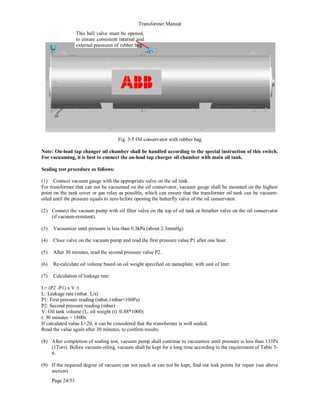
firmware version and the battery status, etc..
This information is particularly useful for commissioning. The
hexadecimal numbers should be interpreted as follows:
Parameterisation of
PAN - D
(refer to
PAN - D operating manual)
105
REG-DA
REG-DA operating manual
The input status shown above would be displayed in the status
as HEX AF7D.
During the initial commissioning of the Relay for Voltage Control
& Transformer Monitoring, this enables clarification as to
whether or not a signal has been sent to the terminals.
Pressing the right arrow key opens a display menu in
which the active additional features are listed.
In this example the ParaGramer and the four setpoint values are
shown.
Inputs Inputs Inputs Inputs
16 15 14 13 12 11 10 9 8 7 6 5 4 3 2 1
Signal Signal Signal Signal
x − x − x x x x − x x x x x − x
Significance Significance Significance Significance
8 4 2 1 8 4 2 1 8 4 2 1 8 4 2 1
= HEX A = HEX F = HEX 7 = HEX D
x = ON
− = OFF
106
REG-DA
REG-DA operating manual
Pressing the right arrow key again shows the COM 1 and
COM 2 settings.
A further press of the right arrow key explains the
settings of the E-LAN R and E-LAN L bus interfaces and
provides information about the total number of stations that are
registered in the network.
Pressing the right arrow key again opens a menu in
which COM 3 and the stations that are detected there (ANA-D,
BIN-D) are listed.
COM 3 is not connected in the example.
107
REG-DA
REG-DA operating manual
Pressing the right arrow key again displays the log book.
All important events are stored in the log together with the
respective time and date. Up to 127 events can be stored in
total. The LOG BOOK memory is a First In First Out (FIFO)
rotating memory, i.e. if the memory is full, the oldest entry (event
1) will be replaced with the newest (127th) event.
Use the keys F2 ... F5 to search for a particular entry.
The following events are saved with a time and date:
Power ON
Manual
Automatic
Local
Remote
<U
<U
> I
Forward high-speed switching
Backward high-speed switching
Trigger
Inhibit Low
108
REG-DA
REG-DA operating manual
7 Parameterisation of the REG-DA Relay
for Voltage Control & Transformer
Monitoring
The most important steps for the parameterising are also
described in „Commissioning” on page 63.
➪ The “LOCAL” and “MANUAL” operating modes must
be set in order to enter parameters.
Note
Changes in the parameters are only accepted in the
“MANUAL OPERATING MODE” .
When the password request is activated, a valid
password must be entered (for information on the
password request refer to “password request” on see
"Password request" on page 95).
Operating principle please refer to Page 51.
109
REG-DA
REG-DA operating manual
7.1 Permissible regulative deviation
For background information on the “permissible regulative
deviation”
please refer to Page 238.
7.2 Time behaviour (regulation behaviour)
7.2.1 Time factor
For background information on the “Time Factor”,
please refer to Page 266.
110
REG-DA
REG-DA operating manual
7.2.2 Time program
For background information on the time program, see Page
255.
7.2.3 Trend memory
For background information, see “Trend memory” see "Trend
memory" on page 260.
Õ
Õ
Õ
Õ
111
REG-DA
REG-DA operating manual
7.3 Setpoints
For background information on the “setpoint value” (command
variable)
please refer to Page 227.
Display of the setpoint value
If the primary value (the single-underlined value (here: 15 kV))
should be displayed rather than the secondary value, the
transformer mounting ratio Knu must be entered in the menu
„Transformer configuration” on page 138.
7.3.1 1st setpoint value
The U-LL voltage always corresponds to the phase-to-phase
voltage (delta voltage).
Example:
The setpoint should be 100.2 V. This value should be
simultaneously declared as the 100% value.
How to proceed: Using the keys F1, F2, F3 and F4
set the double-underlined value to
100.2 V.
Use the F3 key to set the 100.2 V
value
as the 100% value
and confirm the value by pressing
“RETURN” .
112
REG-DA
REG-DA operating manual
7.3.2 Further setpoint values
Proceed in the same way for the 3rd and 4th setpoint values.
When switching from one setpoint value to another via a binary
input, background program or control system, tap-changing
commands will also be output at the same time until the voltage
lies within the tolerance band around the new setpoint value.
The time interval between two successive tap-changes is
determined by the maximum time TC in operation (SETUP 5,
Add-On 1).
If the regulation is carried out using the PAN-D monitoring unit,
the maximum time TC in operation must always be set directly
on the PAN-D when both units (REG-DA, PAN-D) are
connected via E-LAN.
Note
The REG-DA Relay for Voltage Control & Transformer
Monitoring can regulate outputs (P or Q) as well as
voltages. This situation will always occur if a phase-shift
transformer is used.
For this reason the PQCTRL feature must be loaded.
Setpoint 3 will then become a P setpoint, and setpoint
4 will become a Q setpoint.
The individual setpoints can be selected via the binary
inputs, via the COM 1 and COM 2 interfaces or via one
of the available protocols (IEC ...., DNP, MODBUS,
SPABUS, etc).
113
REG-DA
REG-DA operating manual
7.4 Programs
(parameters for parallel regulation of
transformers and for the compensation of
the voltage drop on the line)
7.4.1 Selection of the parallel programs (regulation
programs)
For background information on “Parallel Programs”, please see
Page 271.
Õ
Õ
114
REG-DA
REG-DA operating manual
7.4.2 Parameters for the parallel program
Different parameter menus are available depending on the
selected parallel program.
The following menu appears for the ∆I · sinϕ (circulating current
minimisation) program.
Control influence (Icirc monitoring)
For further information about setting the permissible circulating
reactive current,
please refer to Page 275.
Limitation
The “Limitation” menu item only appears when the ∆cosϕ
program is selected.
115
REG-DA
REG-DA operating manual
Net cos ϕ
The Network cosϕ menu item only appears when the ∆cosϕ
program is selected.
Nominal power of the transformer
The “nominal power of the transformer” menu item only
appears when the ∆Isinϕ(S) program is selected.
Group list (of parallel-switched transformers)
The group list must be entered for all programs, except the
∆cosϕ procedure.
Relays with the same prefixes before the identification (address)
are operating in parallel on one busbar.
In this example, transformers A, B and C are feeding on the
same busbar.
116
REG-DA
REG-DA operating manual
7.4.3 Current influence (line-drop compensation)
For background information, please see "Determining the
voltage levels XR and Uf" on page 231.
The gradient and the limitation for the current influences,
apparent current, active current and reactive current, are
entered in Setup 1 (F1 and F2).
The parameters for the line drop compensation (LDC) are
described in „LDC parameter (line drop compensation)” on
page 116.
7.4.4 LDC parameter (line drop compensation)
For background information, please see "Measuring the voltage
drop as a function of the current strength and cos j" on page
229.
Õ
Õ
117
REG-DA
REG-DA operating manual
7.5 Gradient (U/I characteristic)
For background information on the “Gradient”,
please refer to Page 232.
7.6 Limitation (U/I characteristic)
For background information on the “Limitation”,
please refer to Page 232.
7.7 < U Undervoltage
For background information on “< U Undervoltage”,
please refer to Page 244.
118
REG-DA
REG-DA operating manual
7.8 > U Overvoltage
For background information on “> U Overvoltage”,
please refer to Page 243.
7.9 > I, < Limit (upper and lower current limits)
For background information on “> I, < I limit value”,
please refer to Page 244.
119
REG-DA
REG-DA operating manual
7.10 Trigger
inhibit high (highest limit value of the
voltage)
For background information on “Trigger”,
please refer to Page 242.
Please note that the trigger must be entered as an absolute
value.
Reason: The respective setpoint is normally used as a reference
for setting the limit value.
However, if multiple setpoints are used, the trigger limit
“wanders” between the selected setpoints.
In general there is only one voltage − independent of the
selected setpoint − which triggers a transformer or outputs a
message, thus it is always better to enter the trigger limit in V.
120
REG-DA
REG-DA operating manual
7.11 High-speed switching during undervoltage/
overvoltage
7.11.1 High-speed switching when undervoltage occurs
(RAISE)
For background information about high-speed forward
switching,
please refer to Page 243.
7.11.2 High-speed switching when overvoltage occurs
(LOWER)
For background information about high-speed backwards
switching,
please refer to Page 242.
121
REG-DA
REG-DA operating manual
7.12 REG-DA inhibit low when undervoltage
occurs
For background information on “Inhibit Low”,
please refer to Page 245.
7.13 Time delays (limit signals)
Note
Each parameter or limit value can function with an
individual switching delay!
7.13.1 Time delay > U
For background information on the “switching delay”,
please refer to Page 241.
122
REG-DA
REG-DA operating manual
7.13.2 Time delay < U
For background information on the “switching delay”,
please refer to Page 241.
7.13.3 Time delay > I, < I limit value
For background information on the time delay, please see Page
241.
7.13.4 Time delay trigger
For background information on the “switching delay”,
please refer to Page 241.
123
REG-DA
REG-DA operating manual
7.13.5 Time delay forward high-speed switching
For background information on the time delay, please see Page
241.
7.13.6 Time delay backward high-speed switching
For background information on the time delay, please see Page
241.
124
REG-DA
REG-DA operating manual
7.13.7 Time delay inhibit low
For background information on the “switching delay”,
please refer to Page 241.
7.14 Add-Ons (Relay for Voltage Control &
Transformer Monitoring behaviour)
The various parameterisations are summarised under the “Add-
Ons” menu item.
This menu item contains parameters that cannot be assigned
to other parameter groups. Furthermore, it contains some
parameters that could be assigned to particular parameter
groups, but which were not included where one might expect
to find them out of consideration of the existing SETUP
structure.
Therefore “Add-Ons” is a collection of parameters and special
functions that are often used for special customer
requirements.
In any cases, we recommend having an overview of the
individual screens.
7.14.1 Overview of the Add-Ons menus numbers 1 to 6
“Add-Ons” contains six sub-menus (Add-On 1 to Add-On 6)
that can be selected using the F1 key.
125
REG-DA
REG-DA operating manual
126
REG-DA
REG-DA operating manual
All the menu points are described sequentially below.
The description beings with Add-On 1 and ends with Add-On 6.
7.14.2 Maximum time TC in operation (motor-drive-in
operation-time)
The Relay for Voltage Control & Transformer Monitoring can be
used to monitor the running time of the motor drive (tap-
changer). If the set maximum time has run out, a signal will be
triggered. This signal can be used to switch off the motor drive.
This protects the tap-changer against passing through all
cycles.
If the PAN-D voltage monitoring unit is used, the maximum time
of the tap-changer in operation can only be set via the PAN-D
voltage monitoring unit (refer to the PAN-D operating manual).
To do this, first enter the maximum running time of the tap-
changer per tap in “Add-On 1”. The maximum time TC in
operation signal can then be assigned to an input (refer to input
assignments (binary inputs) on see "Input assignments (binary
inputs)" on page 142). Finally, the message “tap-changer
interrupted” can be output via a relay output (refer to see "Relay
assignments" on page 143).
There are two ways to parameterise the relay:
1. “Maximum Time of Tap-Changer in Operation-F” outputs a
continuous message when the specified maximum time is
exceeded.
2. “Maximum Time of Tap-Changer in Operation-F+” outputs a
temporary message when the specified maximum time is
exceeded.
Note
Measure the running time of the tap-changer and enter
a value for the maximum time of tap-changer in
operation that is two to three seconds bigger.
127
REG-DA
REG-DA operating manual
7.14.3 Manual/Automatic
The Relay for Voltage Control & Transformer Monitoring offers
two different options for switching between the Manual and
AUTOMATIC operating modes.
In addition to the options already described above, the Relay for
Voltage Control & Transformer Monitoring can also naturally be
switched using the serial COM interfaces or the IEC-, DNP-...
protocols.
If you wish to use a serial connection, it is always advisable to
contact our headquarters.
Flip/Flop switching behaviour
In the “E5: PULSE“ setting, a pulse at input E5 causes a
changeover from “MANUAL” to “AUTOMATIC”. A further pulse
at this input causes it to change back from “AUTOMATIC” to
“MANUAL”, i.e. each pulse changes the operating mode.
Bistable Switching Behaviour
In the “E5-A/E6-H” setting, a pulse or continuous signal to
input E5 causes a changeover from “MANUAL” to
“AUTOMATIC”. Further signals to this input do not change the
operating mode, i.e. the Relay for Voltage Control &
Transformer Monitoring remains in the “AUTOMATIC”
operating mode.
The changeover from “AUTOMATIC” to “MANUAL” is carried
out via a pulse or a continuous signal to input E6. Further
signals to this input do not change the operating mode, i.e. the
Relay for Voltage Control & Transformer Monitoring remains in
the “MANUAL” operating mode.
Õ
Õ
128
REG-DA
REG-DA operating manual
7.14.4 Tap-changing
OFF
“OFF” is selected if no signals are available for displaying the
tap-changer position.
Two dashes “--” appear on the display in regulator mode.
ON
If BCD-coded signals are available for displaying the tap-
changer position, please select the “ON” position.
In the regulator mode, the display shows the tap-changer
position.
Note
If an error occurs (BCD signals are present and the tap-
changer parameter is set to “ON”), please check the
connections and the selected “input assignment”.
If the software switch for the tap-changes is set to “ON”, yet
there is no tap-change information available, the Relay for
Voltage Control & Transformer Monitoring displays tap-change
0. Such a display could cause operating personnel to come to
wrong conclusions.
Please also observe that the Relay for Voltage Control &
Transformer Monitoring automatically checks the correctness
of the tap-changer position.
However, the tap-changer must be turned on.
The error message “TapErr” is displayed to indicate incorrect
tap-changer settings.
TapErr is activated if an illogical tap-change is signalled.
TapErr is only intended to be informative, since the correct
display of tap-changes is not essential for the regulation of
individual transformers.
Õ
Õ
129
REG-DA
REG-DA operating manual
If the TapErr signal is assigned to a relay which has set the
Relay for Voltage Control & Transformer Monitoring to the
manual mode, regulation can be interrupted when a tap error is
detected.
Further information can be found on Page 184 and Page 295.
7.14.5 Self-conduction of the operating mode
WITH
WITH” stores the operating mode of the Relay for Voltage
Control & Transformer Monitoring in the event that the auxiliary
voltage fails. This means that after the voltage returns, the Relay
for Voltage Control & Transformer Monitoring will be reset to
“AUTOMATIC” if it was in “AUTOMATIC” operating mode
before the voltage failure and will be reset to “MANUAL” if it was
previously in “MANUAL” operating mode.
WITHOUT
WITHOUT” does not store the operating mode if the auxiliary
voltage fails. This means that the Relay for Voltage Control &
Transformer Monitoring will always be in the “MANUAL”
operating mode after the voltage returns.
7.14.6 Current display (of the transformer)
130
REG-DA
REG-DA operating manual
ON
In the “ON” setting, the current can also be displayed in the
regulator display (compact display).
OFF
In order to prevent 0.000 A from being displayed for a faulty
current connection, the current display can be surpressed.
7.14.7 LCD saver (display)
On
The display turns off one hour after the keypad was last used.
However, the background illumination turns off approximately
15 minutes after the keypad was last used.
OFF
The screen always remains on; only the background
illumination turns off approximately 15 minutes after the keypad
was last used.
7.14.8 Regulator mode: large display
OFF
The option of choosing the detailed view will be offered on the
display.
131
REG-DA
REG-DA operating manual
ON
Compared to the detailed display, the large display only shows
the present voltage and tap-changer position.
Note
The F1 key can be used to switch between the normal
and the large display size when in regulator mode.
7.14.9 Language selection
Õ
Õ
132
REG-DA
REG-DA operating manual
7.14.10 Parallel Program Activation
The parallel program can be activated either by selecting “ON”
from the menu or via a binary signal.
Selecting “LEVEL” ensures that the parallel program remains
activated as long as the signal level is sent to the selected input.
„PULSE” switches the activation ON and OFF.
The type of parallel program activation described in this section
is the simplest type of activation. However, this can often not
meet the requirements of actual use. For this reason, we
request that you primarily refer to the information in Chapter 9.
7.14.11 Up/down relay on time
If the Relay for Voltage Control & Transformer Monitoring
outputs a tap-changing signal, the standard switch-on time of
the tap-changing pulse is 2s.
Older motor drives in particular often need a longer switch-on
time in order to accept the signal.
This menu item can be used to set the switch-on time for higher
and lower pulses from 0.5 s to 6 s in increments of 0.1 s.
Õ
Õ
Õ
Õ
133
REG-DA
REG-DA operating manual
7.14.12 AUTO(MATIC) LOCK in the event of an E-LAN error
If an E-LAN error is detected by the Relay for Voltage Control &
Transformer Monitoring when, for example, running in parallel
with multiple transformers, the respective Relay for Voltage
Control & Transformer Monitoring changes from “AUTOMATIC”
to “MANUAL”. However, the automatic changeover only takes
place when the “AUTO lock when E-LAN fault occurs”
is active.
Furthermore the “AUTO lock if E-LAN fault occurs”
function ensures that it is only possible to change back to
“AUTOMATIC” when the fault has been rectified or when the
“AUTO lock if E-LAN fault occurs” is switched from ON to OFF.
7.14.13 Setpoint adjustment
The setpoint value is normally entered via the menu.
If the setpoint value has to be changed for operational reasons,
it is possible to increase or decrease it using the left
(lower) or right (raise) arrow keys, without having to use
the more lengthy corresponding SETUP method.
The percent values set in menu Add-On 3 determine the size of
the increment/decrement of the setpoint value.
Õ
Õ
134
REG-DA
REG-DA operating manual
Example:
If 0.5% is set, the setpoint value will be increased or decreased
by 0.5% each time one of the arrow keys is pressed.
7.14.14 Creeping net breakdown
For background information on “Creeping Net Breakdown”,
please see Page 248.
Recognition
Lock Time
135
REG-DA
REG-DA operating manual
Time Slice
Number of Changes
7.14.15 Limit base (reference value)
For background information on the “limit base”, please see
Page 245.
Õ
Õ
136
REG-DA
REG-DA operating manual
7.14.16 Setting the Relay for Voltage Control & Transformer
Monitoring to inhibit low if <I or >I
For background information on “setting inhibit low when <I or
>I”, please refer to overcurrent on Page 245.
7.14.17 Maximum tap difference (monitoring)
A maximum tap-change difference may be set for the ∆Isinϕ
and ∆Isinϕ(S) parallel programs.
An alarm can be output during parallel switching if the
difference between the transformer tap-change levels exceeds
the entered maximum value. The parallel-operating group will
change to MANUAL.
Please connect the Relay for Voltage Control & Transformer
Monitoring so that an optical display of the situation is possible
if too large a tap difference occurs.
For this purpose you can either assign the “ParErr” function to
one of the freely-programmable LEDs or activate a plain text
message on the Relay screen.
A background program is required for the plain text solution
which can be found in our Toolbox or which can be ordered
from our headquarters at any time.
The LED can be set up via SETUP 5, F5.
Please select the parameter 30: ParErr.
Õ
Õ
137
REG-DA
REG-DA operating manual
7.14.18 ParaGramer activation
The ParaGramer activation is described in detail in chapter 9.
If a system consisting of multiple transformers/Relays should be
able to identify by itself which transformers are operating in
parallel with which others, the ParaGramer must be switched
on and the maximum number of transformers operating in
parallel must be entered (ON-1 to ON-6).
138
REG-DA
REG-DA operating manual
7.15 Transformer configuration
The external-conductor voltage and the current to be used for
the measurement can be specified in this menu.
Furthermore, the transformer mounting ratio of the external
voltage transformer and current transformer and the nominal
value of the current can also be chosen.
Since the connection point of a Relay for Voltage Control &
Transformer Monitoring can generally be considered to be
equally loaded, all power values of the network can be
calculated using just one voltage and one current value.
Prerequisite: information specifying the external conductors
between which the voltage is measured and in which conductor
the current is measured is provided to the Relay for Voltage
Control & Transformer Monitoring.
7.15.1 Transformer mounting voltage (measurement voltage)
It is not necessary to assign the voltage and current
connections to a certain position in the network (for example,
U12 and L3, etc.) in order to be able to use the REG-DA Relay
for Voltage Control & Transformer Monitoring. The Relay for
Voltage Control & Transformer Monitoring will always measure
the correct angle relationship regardless of between which
external conductors the voltage is measured, and regardless of
the line in which the current is measured, so long as the actual
connection is transmitted to SETUP 5, transformer mounting.
If the Relay for Voltage Control & Transformer Monitoring is
connected to an asymmetrically loaded network and correct
measurement values are still needed for both the active and the
reactive power, the Relay for Voltage Control & Transformer
Monitoring may also be operated in the Aron circuit (feature
M2).
139
REG-DA
REG-DA operating manual
In order to do so, both the parameterisation (transformer
mounting, voltage and current set to “ARON”) and the
connection must be carried out in the correct manner.
Please observe the following connection diagram.
The following is valid for the Aron circuit:
or:
Note
Even in the Aron circuit, the Relay for Voltage Control &
Transformer Monitoring only regulates the voltage
connected between the terminals 2 and 5.
2 5 8 1 3 7 9
REG-DA
(A), (R), L1
(B), (S), L2
(C), (T), L3
Level I
U V W
u v w
2 5 8 1 3 7 9
REG-DA
(A), (R), L1
(B), (S), L2
(C), (T), L3
Level I
U V W
u v w
Õ
Õ
140
REG-DA
REG-DA operating manual
7.15.2 Transformer mounting ratio for the voltage
The transformer mounting ratio (Knu) of the voltage transformer
must be entered if the primary voltage value is to be displayed.
Example: 20 KV/100 V ➔ Knu = 200
Please note that the scale for the input of the transformer
mounting ratio can be changed, and therefore adapted to the
requirements, by using the F3 key.
7.15.3 Transformer mounting current (conductor connection)
7.15.4 Transformer mounting current (conversion 1 A / 5 A)
Õ
Õ
141
REG-DA
REG-DA operating manual
7.15.5 Transformer mounting ratio for the current
The transformer mounting ratio (Kni) of the current transformer
must be entered if the primary current value is to be displayed.
Example: 1000 A/100 A ➔ Kni = 1000
Please note that the scale for the input of the transformer
mounting ratio can be changed, and therefore adapted to the
requirements, by using the F3 key.
142
REG-DA
REG-DA operating manual
7.16 Input assignments (binary inputs)
Note
A detailed description of the individual functions can be
found in Chapter 16 on Page 294.
A specific function can be assigned to each input channel from
the list of selection options.
Example:
If the running time of the tap-changer is to be monitored, the
“tap-change in operation lamp” must be connected to an input
(e.g. to input E1, as is the case on delivery).
Select “TC in operation” using the arrow keys and confirm by
pressing Return. The Relay for Voltage Control & Transformer
Monitoring interprets the signal at E1 as a “tap-change in
operation” signal and compares it to the “maximum time TC in
operation” setting in Add-On 1. Also see chapter 7.17.
If the required function is missing, the input must be set to
“Prog”. The input value can then be connected according to
the respective requirements via the background program.
In this case it is worth looking through the Toolbox on our
website (www.a-eberle.de) for similar applications or simply
contact our headquarters.
Õ
Õ
143
REG-DA
REG-DA operating manual
7.17 Relay assignments
Note
A detailed description of the individual functions can be
found in Chapter 16 on Page 294.
Relays R3 ... R11 are freely programmable.
A specific function can be assigned to each output from the list
of selection options.
Õ
Õ
144
REG-DA
REG-DA operating manual
Example:
If a message is to be sent when the running time of the tap-
changer is exceeded, assign the function “TC-F” or “TC-F+” to
a freely programmable relay.
If the tap-changer in operation voltage at input E1 is applied
longer than was specified in “Add-on 1”, the relay R3 will be
activated and can function as an indicator or actuator (motor
circuit breaker off).
However, if the TC in operation lamp should be linked to one or
more events, the standard functions cannot be used. A special
program is required that can normally be implemented using a
background program.
In order to do this the output must be set to “Prog”. The relay
can then be connected and activated according to the
respective requirements via the background program.
In this case it is worth looking through the Toolbox on our
website (www.a-eberle.de) for similar applications or simply
contact our headquarters.
145
REG-DA
REG-DA operating manual
7.18 LED assignments
Note
A detailed description of the individual functions can be
found in Chapter 16 on Page 294.
LEDs 1 ... 12 are available to be freely programmed.
A specific display function may be assigned to each LED from
the list of selection options.
If the exceeded of the running time of the tap-changer is to be
signalled on LED 1, assign the function “TC-F” to the freely
programmable LED 1.
LED 1 will be activated if the actual running time exceeds the
specified running time.
If other application-specific functions are required, the LED
must be set to “prog” and the function must be programmed
using a background program.
To create an application-specific program, use either an
example program (toolbox) from our website (www.a-eberle.de)
or contact our company headquarters.
Õ
Õ
146
REG-DA
REG-DA operating manual
8 Measurement Value Simulation
In order to avoid the simulator being switched on accidentally,
some operating steps are required to guarantee that the
simulated voltage is only applied when it is specifically desired.
The required operating steps are:
1 Start WinREG
2 Load the terminal.
3 After pressing Enter, the device will respond by giving the
respective address, e.g. <A>.
4 In step 4 you can choose between the following options:
a) Feature simmode=1
(enter it like this using the terminal!)
starts up the simulator, which must additionally be selected
via SETUP 6, F5.
In this mode, the simulator can only operate in the
MANUAL operating mode.
Switching from MANUAL to AUTOMATIC switches off the
simulator.
b) Feature simmode=2
(enter it like this using the terminal!)
starts up the simulator, which must additionally be selected
via SETUP 6, F5.
In this mode, the simulator can also operate in the
AUTOMATIC operating mode.
Switching from MANUAL to AUTOMATIC does not switch
off the simulator, but it does automatically change back 15
minutes after the keyboard was last used.
c) Feature simmode=0
(enter it like this using the terminal!)
switches off the simulator.
The simulator can no longer be switched on in SETUP 6,
F5.
The simulator mode (simmode=1) is activated as factory
default, which only permits simulator operation in the MANUAL
operating mode (simmode=1).
147
REG-DA
REG-DA operating manual
Note
If the term “Actual Value” is displayed in capital
letters as “ACTUAL VALUE”, the „MEASUREMENT
VALUE SIMULATION” is active!
The simulator for the quantities U, I, and ϕ can be activated in
the SETUP 6/STATUS menu.
Caution!
The Relay for Voltage Control & Transformer Monitoring
automatically switches back from the „MEASUREMENT
VALUE SIMULATION” to normal regulation if no key has
been pressed within a period of approx. 15 minutes!
Note
If the REG-DA Relay for Voltage Control & Transformer
Monitoring is operated together with the PAN-D voltage
monitoring unit (connected via E-LAN), it should be
observed that in simulation mode the simulated voltage
will also be fed to the PAN-D. During simulation, the
PAN-D only sees the simulated input voltage and not
the real voltage of the system.
Õ
Õ
148
REG-DA
REG-DA operating manual
8.1 Setting the simulated voltage
When the simulator is turned on (simmode=1 or simmode = 2)
, the voltage can be simulated in regulator mode, measurement
transducer mode and recorder mode using the two arrow keys
and .
The phase angle and the current can only be simulated in
transducer mode.
➪ Select “F2” in “MEASUREMENT TRANSDUCER
MODE”
➪ The right arrow key raises the simulated voltage in
0.5 V increments (when Knu=1).
➪ The left arrow key lowers the simulated voltage in
0.5 V increments (when Knu=1).
8.2 Setting the simulated current
➪ Select “F2” in “MEASUREMENT TRANSDUCER
MODE”
➪ ”F2” increases the simulated current incrementally.
➪ “F3” decreases the simulated current incrementally.
8.3 Setting the simulated phase angle
➪ Select “F2” in “MEASUREMENT TRANSDUCER
MODE”
➪ ”F4” increases the simulated current
in increments of 1.0 °.
➪ ”F5” increases the simulated current
in increments of 1.0 °.
149
REG-DA
REG-DA operating manual
8.4 Setting the simulated tap-change
The tap-change position can be simulated when the simulator
is switched on (simmode=1 or simmode = 2).
Start the simulated tap-change by pressing “F4” .
The simulated tap-change is indicated by
“++” after the word “measurement value simulation”.
++ ➔ Tap-change simulation is turned on
Note
The tap-changer position can only be changed if the
Relay for Voltage Control & Transformer Monitoring is
set to the “MANUAL OPERATING MODE” .
➪ “Raise arrow key” increases the simulated tap-
changer position by 1 increment.
➪ “Arrow key lower” reduces the simulated
tap-changer position by 1.
150
REG-DA
REG-DA operating manual
9 Parallel Operation of Transformers
with REG-DA
Parallel switching of several transformers must be prepared in
advance. In general, the taps of the transformers regulated in
parallel must first be adjusted to each other and the circuit
breakers and disconnectors have to be put in the
corresponding position. Then, all of the Relays switched in
parallel must be informed of these switching statuses.
The REG-DA Relay for Voltage Control & Transformer
Monitoring is provided with a program section which is capable
of independently recognizing the switching statuses of the
individual transformers and can automatically group the
transformers according to these switching statuses so that only
those Relays feeding on one joint busbar work in parallel.
It is, of course, also possible to work in the standard way in
which the parallel-switching operation is manually activated.
Both procedures require specific preparations to be carried out
on the device in advance. The preparations to be carried out are
described in the following sections:
➪ Preparing manual activation
➪ Preparing automatic activation
Before selecting the regulation procedure, please check the
boundary conditions of the regulation.
Are the transformers the same or differing models? Is it
possible to connect the individual Relays with each other via
E-LAN, or is the distance between each feeding point too
large making connection impossible?
Should the transformers be regulated so that they all have
the same tap-changer position or should the circulating
reactive current be minimised?
One of the regulation procedures listed below can be chosen
depending on the answer:
151
REG-DA
REG-DA operating manual
All the procedures are available in the Relay for Voltage Control
& Transformer Monitoring as standard.
Master-slave
Master-Slave-Independent (MSI)
∆I sinϕ (minimisation of the circulating reactive current)
∆I sinϕ (S) (minimisation of the circulating reactive current,
taking into consideration the nominal powers of the
transformers)
∆cosϕ
The ∆ cosϕ operation is an available regulation procedure
which is always used if the Relays which are switched in parallel
cannot be connected to each other via the bus (E-LAN).
If a bus error occurs during parallel operation according to the
circulating reactive current minimisation procedure (∆I sin ϕ or
∆I sin ϕ (S)), the complete combination switches to an
emergency regulation which also works according to the ∆cos
ϕ procedure.
If a malfunction occurs, each Relay for Voltage Control &
Transformer Monitoring uses the last measured cos ϕ and
attempts to both maintain the voltage within the specified
voltage band and to approach the last measured cosϕ as
closely as possible.
Operating
mode
Transformer boundary conditions Prerequisites
on the Relay
REG-DTM-
REG-DA-
Programs
Voltage
change per
tap-change
Nominal
power
Deviation
of the relative
short circuit
voltages
Maximum tap-
change
difference when
in operation
Current
measurem
ent
available
Tap-
changing
possible
Bus
connection
available
Parallel
operation
on the
busbar
no change
no change
or various
≤ 10 % None possible required required
Master
Slave/MSI
no change or
various
no change ≤ 10 % parametisable required possible required ∆Isinϕ
no change or
various
various ≤ 10 % parametisable required possible required ∆Isinϕ (S)
Parallel
operation on
a network
no change or
various
no change
or various
no change or
various
parametisable required possible possible ∆cosϕ
152
REG-DA
REG-DA operating manual
9.1 Circuit diagram (schematic)
*
see
next
page
153
REG-DA
REG-DA operating manual
The circuit diagram shows the parallel switching of two
transformers with the most important connections. The
principle is the same for three transformers and more.
Please observe that the voltage and current transformers do
not have to be connected in the shown manner. Every possible
type of connection of the individual conductors is possible.
However, it is important to ensure that the transformer
configuration or switching status for carrying out
measurements has been entered in SETUP 5, F2.
* Please observe the contact load at R1 and R2!
110 V DC 230 V AC
20 A Switch on 5 A @ cosϕ = 1
5 A Hold 3 A @ cosϕ = 0.4
0.4 A Switch off
154
REG-DA
REG-DA operating manual
9.2 Programs for parallel operation and their
prerequisites
Caution!
It is particularly important to note that only REG-DA
Relays for Voltage Control & Transformer Monitorings
with the same firmware version can be operated in
parallel.
Otherwise errors can occur during operation.
The current firmware version can be displayed using the
Relays keypad.
Please press the menu key until you have
reached SETUP 6. The Relay for Voltage Control &
Transformer Monitoring status page can be selected
using F5.
The firmware version is displayed in the first two lines,
e.g. V2.01 on 01.02.04.
If different versions are installed, please download the
current firmware version from our website (www.a-
eberle.de or www.regsys.de) or telephone us.
9.2.1 Preparation
The following description defines both the preparations to be
carried out for manual activation as well as those necessary for
automatic activation of parallel switching.
For demonstrating each individual operating step, a system has
been selected which consists of three transformers feeding on
one busbar.
The master-slave procedure has been chosen as the parallel
program.
If another program with a different number of transformers is
selected, please adapt each operating step correspondingly.
In order to permit the master to check at any time whether the
slaves are working correctly, it is necessary that each Relay for
Voltage Control & Transformer Monitoring is supplied with the
tap-change position of “its” transformer and that the bus
connection (E-LAN) is activated between all the Relays.
155
REG-DA
REG-DA operating manual
9.2.1.1 Explanation of terminology
Preparing manual activation
“Preparing manual activation” refers to the sequence of
consecutive switching operations which prepare for the parallel
operation of several transformers (adjusting the tap-change
position, adding circuit breakers, disconnectors and couplings)
as well as the actual manual activation of the parallel regulation.
In this case parallel regulation can be activated via the menu
(SETUP 5, Add-On 6) or via a binary input signal.
Preparing for automatic activation
“Preparing automatic activation” refers to the simultaneous and
automatic activation of the parallel operation of several
transformers as a function of the logical position (off/on) of all of
the circuit breakers, disconnectors and couplings.
This type of preparation can be carried out by feeding a busbar
replica (positions of the circuit breakers, disconnectors, bus ties
and bus couplings) to each one of the Relays involved in the
regulation.
On the basis of the switching statuses, the regulation system
can automatically recognise which transformer is supposed to
work with which other transformer(s) on one busbar in parallel
operation.
The transformers are then regulated according to the selected
regulating procedure.
156
REG-DA
REG-DA operating manual
9.2.2 Preparing manual activation
The following steps are required to set up the parallel-switching
of 3 transformers according to the master-slave procedure.
If two transformers or even four transformers are required,
please adapt the procedure correspondingly.
Note
In this chapter parameterisation will be carried out using
the membrane keypad of the Relay for Voltage Control
& Transformer Monitoring.
Of course, the individual operation steps may also be
performed using the WinREG parameterisation
software.
1. Step
Switch all Relays to the MANUAL mode.
2. Step
Assign station identification.
The Relay for Voltage Control & Transformer Monitoring
assigned to transformer 1 is given the station code (address)
<A>, the Relay for Voltage Control & Transformer Monitoring
assigned to transformer 2 is given the station code (address)
<B>, and the Relay for Voltage Control & Transformer
Monitoring assigned to transformer 3 is given the station code
<C>.
Code input:
Select SETUP 6, F1, F2.
A to Z4
157
REG-DA
REG-DA operating manual
This address may be incremented using the F1 and F2 keys or
decremented using the F4 and F5 keys.
Confirm your selection using <Enter>.
Each address in the range A ... Z4 is permitted, however each
station code may only be assigned once.
If the PAN-D voltage monitoring unit is assigned to a REG-DA
Relay for Voltage Control & Transformer Monitoring, the Relay
for Voltage Control & Transformer Monitoring will automatically
assign a code to its corresponding PAN-D.
To assign this address, the REG-DA Relay for Voltage Control
& Transformer Monitoring increments its own address (by one!)
and assigns it to the PAN-D.
Example:
If the Relay for Voltage Control & Transformer Monitoring has
the code <A>, it will assign the code <A1> to the PAN-D. If the
Relay for Voltage Control & Transformer Monitoring has the
code <B9>, it will assign the code <C> to the PAN-D.
3. Step
Establish the connection to the bus.
To start the parallel operation, all participating Relays must be
able to communicate with each other via E-LAN.
This requires that the bus link (2-conductor or 4-conductor bus)
is connected in the line-to-line or standard bus structure.
Once the hardware prerequisites are fulfilled, the bus link must
be parameterised [see "E-LAN (Energy-Local Area Network)"
on page 101].
158
REG-DA
REG-DA operating manual
4. Step
Parallel program selection
Select SETUP 1, F5.
After pressing the F2 key, select the master-slave regulation
procedure.
This setting is only required for the master − which usually has
the address <A> − because all of the other stations will
automatically be declared as slaves when the group list is input
(see Step 5).
Slaves are to be assigned the parallel program “none''.
Õ
Õ
159
REG-DA
REG-DA operating manual
5. Step
Input the group list
The codes of all of the Relays participating in the parallel
operation are listed in the group list.
Select SETUP 1, F5, F1, F5
Please press F1, F2 and F3 to parameterise the Relays in the
first, second and third positions with the codes <A>, <B> and
<C> respectively.
If the group list can be entered in the manner described, then
as a rule it can generally be guaranteed that the bus link will
work properly.
It is not necessary to input a regulative influence for the selected
procedure.
6. Step
Parallel switching activation
There are several different ways to activate the parallel-
switching operation:
➪ Activation via the keypad
➪ Activation via the binary input (level-controlled)
➪ Activation via binary input (pulse-controlled)
➪ Activation via IEC ..., RS 232, ...
160
REG-DA
REG-DA operating manual
Activation via the keypad
Please select SETUP 5, F1, Add-On 6
Pressing down the F2 function key activates the parallel-
switching operation.
Select “ON”.
Parallel operation is active in the automatic mode as long as the
“Parallel Progr. Activation” is “ON”.
If you prefer to activate the parallel-switching operation via a
binary input instead of via the menu, the Relay for Voltage
Control & Transformer Monitoring offers two options:
The parallel operation can be activated by via a level-controlled
or a pulse-controlled input.
“Level-controlled activation” means that the parallel-switching
operation is activated as long as the potential is at the selected
input. It will be switched off as soon as the potential at the
selected input drops off.
In “pulse-controlled” activation, the parallel operation is
switched on by the first pulse. The next pulse switches it off and
so on.
If the parallel-switching operation is to be deactivated using a
binary input, please carry out the following procedure:
Select the trigger input.
All freely programmable inputs with the exception of E5 and E6
may be used as the trigger or release input.
Õ
Õ
161
REG-DA
REG-DA operating manual
The following example demonstrates how to activate the
parallel-switching operation via input E7.
Select SETUP 5, F3, F1
Press the F4 key and select the “Par Prog” function in the
framed field in the middle of the display.
Accept the setting by pressing <Enter>.
The parallel-switching operation can now be activated via
binary input E7.
For an optical signal that the parallel-switching operation has
been activated, please select SETUP5, F5.
In the following example, the status “operating in parallel
activated” is to be indicated using the freely programmable LED
4.
Õ
Õ
162
REG-DA
REG-DA operating manual
Press the F5 key and select the “Par Prog” function in the
framed field in the middle of the display.
Accept the setting for LED 4 by pressing <Enter>.
If the present status of the parallel switching operation (ON/
OFF) is to be fed back to the potential-free contact, please
select a free relay (R3 to R11) using the F4 key in the SETUP 5
menu and also assign the Par Prog parameter to this relay.
If the parallel operation is to be activated or deactivated in a
level-controlled or pulse-controlled manner, please select the
preferred activation method (level or pulse) in SETUP 5, F1,
Add-On 6 using the F2 key.
7. Step
Switch the circuit breakers, bus ties, bus couplings and
disconnectors according to the planned parallel-switching
operation.
8. Step
Switch all of the Relays to the AUTO mode.
The master first sets all of the slaves to its actual tap-changer
position in order to start the voltage regulation.
In normal operation, the voltage is held within the permissible
regulative deviation (bandwidth) and all transformers involved
are regulated to the same tap-changer position.
Õ
Õ
163
REG-DA
REG-DA operating manual
9.2.3 Preparing automatic activation
The ParaGramer can be loaded from the start menu as a tool
for preparing the automatic activation and for displaying the
switching status in real time.
The artificial word ParaGramer is derived from the terms parallel
and one-line diagram.
The ParaGramer displays the switching status of the individual
transformers in a one-line diagram and can be loaded from the
start menu using the F5 key, provided that the ParaGramer
feature has been activated.
Normally up to six transformers can be operated using the
ParaGramer.
In a special version, however, up to 10 transformers can be
connected.
The function is activated by feeding a complete busbar replica
(circuit breakers, disconnectors, bus ties and bus couplings) of
“its” transformer into each Relay for Voltage Control &
Transformer Monitoring.
The regulation system can automatically recognise which
transformer is to work with which other transformer(s) on a
busbar in parallel operation on the basis of the switching
statuses.
Busbars that are connected via bus coupling(s) are treated as
one single busbar by the system.
The standard ParaGramer version can display the following
configurations:
➪ 2 transformers with one busbar
(1 circuit breaker (LS) per transformer)
Note
= Switching element
= Switching element
open
closed
LS
164
REG-DA
REG-DA operating manual
➪ 3 transformers with one busbar
(1 circuit breaker (CB) per transformer)
➪ 2 transformers with two busbars
(1 circuit breaker (CB) and 2 isolators (IS per transformer)
➪ 3 transformers with two busbars
(1 circuit breaker and 2 isolators per transformer)
CB
CB
IS
165
REG-DA
REG-DA operating manual
Busbars “1” and “2” can additionally be disconnected or
coupled by means of line coupler (SC) or bar coupler (CP).
The logical status of the couplings may also be fed to the Relay
for Voltage Control & Transformer Monitoring and is included in
the assignment algorithm (who with whom?).
The following abbreviations have been selected to clearly
characterise each individual switch, disconnector, etc.:
The prefix PG stands for ParaGramer. All of the other abbreviated
terms are listed below:
❑ PG_CB:
Circuit breaker return signal of the corresponding
transformer
❑ PG_IS1:
Isolator 1 return signal of the corresponding transformer to
busbar 1 (the left isolator in each figure)
❑ PG_IS2:
Isolator 2 return signal of the corresponding transformer to
busbar 2 (the right isolator in each figure)
❑ PG_CP:
Bus coupling return signal of the corresponding transformer
❑ PG_SC1:
Line coupler return signal right of the corresponding
transformer in busbar 1
❑ PG_SC2:
Line coupler return signal right of the corresponding
transformer in busbar 2
CP SC
166
REG-DA
REG-DA operating manual
1. Step
Switch all Relays to the MANUAL mode.
2. Step
Assign station identification.
The Relay for Voltage Control & Transformer Monitoring
assigned to transformer 1 is given the station code (address)
<A>, the Relay for Voltage Control & Transformer Monitoring
assigned to transformer 2 is given the station code (address)
<B>, and the Relay for Voltage Control & Transformer
Monitoring assigned to transformer 3 is given the station code
<C>.
Code input:
Select SETUP 6, F1, F2.
This address may be incremented using the F1 and F2 keys or
decremented using the F4 and F5 keys.
Confirm your selection using <Enter>.
Each address in the range A ... Z4 is permitted, however each
station code may only be assigned once.
If the PAN-D voltage monitoring unit is assigned to a REG-DA
Relay for Voltage Control & Transformer Monitoring, the Relay
for Voltage Control & Transformer Monitoring will automatically
assign a code to its corresponding PAN-D.
To assign this address, the REG-DA Relay for Voltage Control
& Transformer Monitoring increments its own address (by one!)
and assigns it to the PAN-D.
A to Z4
167
REG-DA
REG-DA operating manual
Example:
If the Relay for Voltage Control & Transformer Monitoring has
the code <A>, it will assign the code <A1> to the PAN-D. If the
Relay for Voltage Control & Transformer Monitoring has the
code <B5>, it will assign the code <B6> to the PAN-D.
3. Step
Establish the connection to the bus.
To start the parallel operation, all parallel-operating Relays must
be able to communicate with each other via E-LAN.
This requires that the bus link (2-conductor or 4-conductor bus)
is connected in the line-to-line or standard bus structure.
The bus link must be parameterised [see "E-LAN (Energy-Local
Area Network)" on page 101] once the hardware prerequisites
are fulfilled.
4. Step
Activate the ParaGramer.
Please select SETUP 5, F1, Add-On 6, F5 and activate the
ParaGramer by selecting the number of transformers operating
in parallel.
For three parallel-operating transformers select: ON-3
168
REG-DA
REG-DA operating manual
5. Step
Parameterisation of the group list.
The number of participating parallel-operating transformers
(n=3) is specified by inputting the group list.
The group list is numbered consecutively and each Relay for
Voltage Control & Transformer Monitoring must be
parameterised in the same order. The Relay for Voltage Control
& Transformer Monitoring of the first transformer must be first in
the group list, the Relay for Voltage Control & Transformer
Monitoring of the second transformer second in the group list,
etc. The Relay for Voltage Control & Transformer Monitoring ID
may be freely selected as described above. For clarity,
however, the first Relay for Voltage Control & Transformer
Monitoring should be assigned code A:, Relay for Voltage
Control & Transformer Monitoring 2 code B:, etc.
The group list also specifies the number of transformers shown
in the ParaGramer mode (2 positions in the group list occupied
=> 2 transformers, 3 positions occupied => 3 transformers,
etc.).
The group list also indicates which Relays are presently working
together:
Three symbols (+,*,=), which appear before the group list entry
have been introduced to characterise the parallel-operating
transformers. Relays with the same symbol are presently
feeding on one busbar.
The following procedure should be carried out for each Relay
for Voltage Control & Transformer Monitoring:
Setup 1
<F5> “Programs”
<F1> “Par. Parameters”
<F5> “E-LAN group list”, => Enter the stations
169
REG-DA
REG-DA operating manual
6. Step
Parallel program selection
Select SETUP 1, F5.
After pressing the F2 key, select the master-slave regulation
procedure.
This setting is only required for the master - usually with the
address <A>, because all of the other participants will
automatically be declared as followers when the group list is
input.
Slaves should be assigned the parallel program “none''.
7. Step
Input assignments
The individual programmable binary Relay for Voltage Control &
Transformer Monitoring inputs are prepared for their respective
tasks in this step.
Õ
Õ
170
REG-DA
REG-DA operating manual
If, for instance, the disconnector PG_TR1 of transformer 1 is to
be assigned to the Relay for Voltage Control & Transformer
Monitoring input E8, the function PG_TR1 must be assigned to
input E 8 using menu SETUP 5, F3 “Input assignments...” and
the function keys.
This same procedure applies for all of the other inputs as well.
Depending on the input assignment, the display can show one
or two busbars.
The following input functions are available:
❑ PG_CB:
Circuit breaker return signal of the corresponding
transformer
❑ PG_IS1:
Isolator 1 return signal of the corresponding transformer to
busbar 1 (the left isolator in each figure)
❑ PG_IS2:
Isolator 2 return signal of the corresponding transformer to
busbar 2 (the right isolator in each figure)
❑ PG_CP:
Bus coupling return signal of the corresponding transformer
❑ PG_SC1:
Line coupler return signal right of the corresponding
transformer in busbar 1
❑ PG_SC2:
Line coupler return signal right of the corresponding
transformer in busbar 2
Note
A solution is also available for applications in which the
busbars are coupled crosswise.
The “crosslink” feature makes it easy to master this task.
This type of busbar arrangement is not described here
since it is not used very frequently. If it is required,
please contact our headquarters. This option is already
available on your Relay for Voltage Control &
Transformer Monitoring and can be activated at any
time using the Firmware feature.
171
REG-DA
REG-DA operating manual
Inputs which are not in use are assigned a default setting. This
makes it possible to also display system diagrams which do not
correspond to the maximum possible configuration with one
circuit breaker, two disconnectors, one bus coupling and two
bus ties per transformer.
Summary of the default settings:
❑ 1 busbar:
PG_CB: open
PG_IS1: closed, however not displayed in the
ParaGramer
❑ 2 busbars:
PG_CB: closed
PG_IS1: open
PG_IS2: open
PG_CP: open
PG_SC1: closed
PG_SC2: closed
The displays to be shown are changed according to the criteria
listed below:
➪ If the Relay for Voltage Control & Transformer Monitoring in
the third position in the group list is assigned a freely
selected PG_xxx parameter, three transformers will be
displayed in a circuit diagram instead of two.
➪ If PG_IS2 is used on a Relay for Voltage Control &
Transformer Monitoring entered in the group, two busbars
will be displayed in a circuit diagram instead of one.
➪ If either PG_CP, PG_SC1 or PG_SC2 is used on a Relay for
Voltage Control & Transformer Monitoring entered in the
group, the bus ties and bus couplings will be activated in
the display.
172
REG-DA
REG-DA operating manual
8. Step
Displaying the busbar replica
Depending on the parameterised group list, the overview
screen will display two to six relays. In addition to the
ParaGramer overview, it is also possible to select a detailed
display.
Selection summary:
<MENU>, <F5> => ParaGramer summary
Selecting the switching status:
<F5> Switching status/overview
Use “<” and “>” to scroll in the Switching status view.
9. Step
Switch all of the relays to the AUTO operating mode.
The parallel operation is activated automatically.
Various checks are included in order to ensure that the
regulation works safely in all circumstances
This means that the bus connection is also always monitored
as well as the tap-change positon of the transformers operating
in parallel.
If, for example, a tap-change position is reported that is not
logical (TapErr) or a Relay for Voltage Control & Transformer
Monitoring in the system cannot be addressed (ParErr), the
regulation is stopped immediately and the corresponding error
flag is set.
For information about TapErr and ParErr see "Description of the
ParErr and TapErr error flags" on page 184.
173
REG-DA
REG-DA operating manual
9.3 Parallel operation using the “Master-Slave-
Independent (MSI)” procedure
(available as of Version 2.03 from the 16th July 2004)
Note
All of the control technology information about TapErr
and ParErr also applies to the master-slave operation
carried out according to any activation procedure.
MSI stands for Master (M), Slave (S) and Independent (I)
operation of individual transformers.
In this operating mode, all of the participating parallel-switching
transformers are placed by the operator in one of the states
described above. Transformers then always work according to
the principle of equalising the tap-changer positions, which is
also called the master-slave procedure.
Note
The terms master-follower and master-slave are used
synonymously is everyday language and that is also the
case in the following text.
Please note:
➪ In the MSI mode, it is only possible to change the operating
mode (MSI) of the Relay for Voltage Control & Transformer
Monitoring when in the manual mode.
➪ When the transformers are already operating in parallel, it is
possible to switch from the AUTO mode to the MANUAL
mode by switching any Relay for Voltage Control &
Transformer Monitoring to the MANUAL mode.
This therefore ensures that the entire group can quickly be
switched to the manual mode in the event of a fault.
➪ In the Auto mode, the group can only then be switched if the
master is switched to the AUTO mode; the slaves will not
accept being switched from MANUAL to AUTO.
➪ In the independent mode, on the other hand, each Relay for
Voltage Control & Transformer Monitoring can be switched
back and forth from MANUAL to AUTO at any time.
➪ The status line of the ParaGramer display indicates which
Relay for Voltage Control & Transformer Monitoring is
currently functioning as the master.
174
REG-DA
REG-DA operating manual
It is also possible to indicate the operating status using an LED.
If the parameter MSI-Ma is assigned to a particular LED, it lights
up when the Relay for Voltage Control & Transformer
Monitoring is operating in master mode. The same procedure
can also be carried out for slave operation (parameter = MSI_Sl)
or independent operation (parameter = MSI_Ind).
The parameterisation is also displayed in the ParaGramer and
the individual transformers are designated by the letters M, S
and I.
All of the transformers/relays working as either a master or a
slave are displayed with a closed coupling. On the other hand,
relays working in the independent mode (currently feeding on a
different busbar or in the stand-by mode) are displayed with an
open coupling.
If more than one Relay for Voltage Control & Transformer
Monitoring has been mistakenly assigned to the master mode,
the MSI algorithm will treat the Relay for Voltage Control &
Transformer Monitoring with the lowest address (A is lower than
B or C!) as the “master” and will treat all of the other relays
mistakenly defined as being masters as slaves.
The ParaGramer display will also show the present status of the
parallel operation in the status line in the form of the measured
voltage, the calculated regulative deviation and the tap-changer
position in addition to the “Who with whom?” information.
This makes it possible to obtain all of the information needed to
evaluate the parallel operation.
175
REG-DA
REG-DA operating manual
Prerequisite for using the MSI operation
The MSI operating mode can only be applied when the
ParaGramer feature is activated and turned on.
Relays which are delivered with the K1 feature (with parallel
operation) are already parameterised in this way by default.
The ParaGramer is switched on by selecting SETUP 5, Add-On
6.
Press F5 to specify the number of transformers to be switched
in parallel.
Note
At this point it is important to state explicitly that the
ParaGramer has a different function in MSI mode.
It does not generate the group lists itself, but is only
activated in order to make it possible to display the
switching status on the regulator display.
Example:
The ParaGramer must be set to ON-3 for a group of three
transformers.
The MSI operating mode can be selected by choosing the MSI
operating mode in SETUP 1, Programs..., Parallel Program.
Caution!
The MSI operating mode must be selected for each
Relay for Voltage Control & Transformer Monitoring
involved in the parallel-switching operation.
We advise contacting our company headquarters if the K1
feature and, therefore, also the Paragramer, are to be enabled
at a later date.
176
REG-DA
REG-DA operating manual
To verify the present settings, please select
SETUP 6, F5 (Status), --> Page 2 of the device status.
Note
Several features, e.g. RECORDER, TMM, etc. can, of
course, be loaded at the same time.
Further prerequisites for using the MSI procedure:
Only transformers which are electrically (power, short circuit
voltage, voltage between the tap-changer positions, switching
groups, etc.) and mechanically identical (number of tap-
changer positions, position of the deadband) are suitable for
MSI operation.
A different procedure should be used if one or more of the
parameters differ.
In addition, it must be ensured that each Relay for Voltage
Control & Transformer Monitoring receives the information
regarding the tap-change position of “its” transformer.
The recording and transmission of the correct tap-change
position is one of the mandatory prerequisites of the tap-
change equalisation procedure.
Every potential “candidate” must be listed in the group list with
its address in order to notify the system of the number of relays/
transformers that should take part in parallel operation.
177
REG-DA
REG-DA operating manual
Please select the sub-menu “Parallel Parameters” in
SETUP 1.
Method:
SETUP 1 / Programs... (F5) / “Par. Parameters” (F1)
The group list must be set up in the “Par. Parameters“ menu.
Please select the Relay for Voltage Control & Transformer
Monitoring with the lowest address by pressing the F1 key in
the first group position of the list. Then place the Relay for
Voltage Control & Transformer Monitoring with the next highest
address in the second position in the list.
Continue in the same manner for all of the relays currently
involved in the parallel-switching operation as well as for those
that will be later in the parallel switching operation later.
Selecting the operating modes
Three different methods can be used to select operating
modes.
1. via the binary input
2. via the membrane keypad (F3 … F5)
3. via the (serial) control system
Method 1:
Select three free inputs per Relay for Voltage Control &
Transformer Monitoring and assign the Master (MSI_Ma), Slave
(MSI_Sl) or Independent (MSI_Ind) functions to them using
SETUP 5, F3 or by using WinREG.
178
REG-DA
REG-DA operating manual
Example:
IT should be possible to select the operating mode using inputs
E9 to E11.
The following is displayed in SETUP 5, F3:
A signal transmitted to input E-9 will cause the Relay for Voltage
Control & Transformer Monitoring to work as the master.
The present status is indicated by an X in the square brackets.
The results of this parameterisation:
This status is indicated on both the regulator display as well as
on the ParaGramer.
179
REG-DA
REG-DA operating manual
Method 2:
Selection via the membrane keypad is only possible in the
ParaGramer.
For this reason it is necessary to first return to the main menu.
Then press the F5 key to select the ParaGramer display mode.
The symbol in the status line has been assigned to the F1 key.
Press F1 and select the desired operating mode using F3, F4
and F5.
Information regarding effective manoeuvring on the screen can
be found under “i” by pressing the F2 key.
180
REG-DA
REG-DA operating manual
Note
The mode cannot be overwrittten via the keypad if a
specific mode is pre-selected via the binary input and a
signal is present at the input.
The mode that was most recently assigned an input is
always pre-selected. Since the inputs are triggered via
the edge of the input signal, one short pulse is sufficient
to select the operating mode.
Method 3:
Selection of the individual relays is carried out via a serial
interface (IEC…, DNP 3.0, MODBUS, SPA-Bus; via LWL or
copper).
A further prerequisite for fault-free operation is that all of the
relays have the same parameterisation.
For this reason, different parameters must be set in SETUPs 1
and 5.
Since the slaves in the master-slaves procedure are only
allowed a limited freedom of action, changes in the parameters
can only be carried out in the independent mode or the master
mode.
For this reason, the parameterisation should already have been
completed in SETUP 5 before commencing work in SETUP 1.
Please note:
First SETUP 5, then SETUP 1
Select SETUP 5, F1…, (Add-On 6).
The following parameters can be entered:
181
REG-DA
REG-DA operating manual
Explanations of the individual menu items:
“Parallel Prog. activation” must be set to ON to activate parallel
operation.
The indication “1st ParErr after n·tap-changer in operation time”
can be interpreted as follows.
If the system is already operating in parallel with n stations, it
assumes that the equalisation of the tap-change positions of all
operating transformers is achieved after a maximum of
1.5 · n · the tap-changer in operation time.
If there is an error in the transmission of the BCD code or if there
are problems regarding the equalisation of the tap-changer
positions, a tap-changer position error (TapErr) will be detected
which causes the system to stop.
However, if a transformer, which (for example) has been feeding
another busbar or has been working in the stand-by mode, is
selected to participate in the parallel-switching operation, this
parameter can be used to specify the number of tap-changes
it may deviate from the parallel transformers that are already
running.
This transformer is then brought to the same tap-changer
position as the transformers which are already operating in
parallel, one step at a time and without interrupting regulation.
If equalisation doesn’t occur within the pre-selected time, the
parallel-switching is stopped and all participating relays switch
to MANUAL mode.
Example:
The transformer/relay <D> to be added to the parallel-switching
operation is currently set to the resting position in tap-changer
position 4.
The group switched in parallel is currently working in tap-
changer position 8 and the motor running time between two
tap-changer positions is 7 seconds.
If you want to add transformer <D> to the parallel-switched
group − without considering the resulting circulating reactive
currents − the “1st ParErr after n·tap-changer in operation time”
parameter must be set to 4.
The monitoring algorithm of the parallel program will wait an
interval of 4 times the tap-changer in operation time of the
added transformer (4 x 7 seconds = 28 seconds) before a
parallel error (ParErr) is triggered.
182
REG-DA
REG-DA operating manual
Under normal conditions, the new station can be “brought” to
the tap-changer position of the group within this specified
interval.
If this is not possible, the error flag ParErr will be set and the
entire group will be switched to the MANUAL mode.
The MANUAL operating mode is the fail-safe position for all of
the master-slave procedures.
The group can only be switched back to the AUTO mode via
the master after the error which triggered the ParErr has been
rectified.
The number of transformers/relays involved in the parallel-
switching operation can be selected with the help of the
“ParaGramer Activity” parameter.
Example:
If three transformers/relays are to be switched in parallel,
“ParaGramer Activity” 3
must be selected by pressing F5.
Settings in SETUP 1
Several settings must be carried out in Setup 1.
Under normal conditions − all of the transformers are the same
− the settings for the “permissible regulative deviation” (F1), the
“time factor” (F2) and the “setpoint value” (F3) should all be the
same.
However, if you prefer to have different setpoint values
activated when changing masters, different setpoint values can
also be specified.
However, during the parallel-switching operation, only the
setpoint value parameterised in the currently active master is
taken into consideration.
Different setpoint values can naturally also be selected even if
the setpoint values originally had the same parameterisation. To
183
REG-DA
REG-DA operating manual
do this, the setpoint value of the active master is changed via
the binary input, the program or the serial interface.
Select SETUP 1, F5 (Programs).
Select the parallel program “MSI” using the F2 key.
All of the preparations necessary for the parallel-switching
operation have now been carried out. Proceed in the MANUAL
mode by changing the transformers until the voltage is outside
of the tolerance band. Then switch to AUTO mode to verify
whether the parallel-switching operation is functioning properly.
It is only functioning properly if the voltage returns to the
tolerance band within a short period of time and all of the
transformers are set to the same tap-changer position.
We recommend carrying out this test for both positive and
negative regulative deviations.
184
REG-DA
REG-DA operating manual
9.3.1 Trouble-shooting
Parallel-switching operations carried out according to the MSI
procedure can only function properly, if − in addition to the
correct functioning of the participating Relays − the
infrastructure (recording and signalling of the tap-changer
position, bus connection) are also functioning fault-free.
To ensure that errors that could occur outside of the relays do
not cause problems for maintaining the voltage, the two error
flags ParErr and TapErr have been introduced to monitor the
recording of the tap-changer position and the bus connection
respectively.
9.3.1.1 Description of the ParErr and TapErr error flags
A fault in the parallel-switching operation is signalled through
the ParErr and TapErr error bits.
ParErr
ParrErr stands for a faulty parallel operation in general (parallel
error) and automatically switches a group of transformers
operating in parallel from the Automatic operating mode to the
Manual operating mode. If a different behaviour is desired, this
can be specified through an alteration to the SYSCTR feature.
In this case please contact our headquarters.
ParErr is triggered, for example, when the Relay for Voltage
Control & Transformer Monitoring is bypassed when a tap-
changer regulation is carried out (the tap-changer position is set
directly at the motor drive or via the “remote control bypass”)
and the transformers are not all set back to the same tap-
changer position within an interval that is 1.5 times the tap-
change in operation time.
Exception: If a transformer with a specific tap difference is added
to the parallel-switching operation (independent becomes
slave), ParErr is not triggered until the interval specified in
SETUP 5, Add-On 6, “1st ParErr after n·tap-changer in
operation time” has been exceeded.
185
REG-DA
REG-DA operating manual
TapErr
TapErr is a signal that indicates a problem with the tap-change
position. The name is derived from the term “tap error”.
Like ParErr, TapErr affects the entire group when in MSI
operating mode.
If a transformer is being switched in parallel, regulation will stop
after 1.5 x the tap-changer in operation time if the tap-changer
positions have not reached the same level within this time.
We recommend individually assigning the TapErr and ParErr
error bits to an LED and/or a relay to inform the operating
personnel about the status of the parallel regulation and to thus
make it easier to rectify the error.
The following are considered to be tap errors:
1. Tap-changes in the wrong direction
Example:
The Relay for Voltage Control & Transformer Monitoring outputs
a “raise” command and the transformer “answers” with a lower
tap-change or the Relay for Voltage Control & Transformer
Monitoring outputs a “lower” command and the transformer
“answers” with a higher tap-change.
Possible causes of the error: The raise and lower signals have
been swapped or the motor drive is behaving inversely.
Inverse behaviour implies that the Relay for Voltage Control &
Transformer Monitoring increases the transformer ratio in the
event of a higher tap-change, thus lowering the voltage.
In most cases, it is expected that an increase in the tap-changer
position results in a higher voltage, and a decrease in the tap-
changer position results in a lower voltage.
Remedy: Exchange the raise and lower signals
186
REG-DA
REG-DA operating manual
2. No tap-change
Example:
The Relay for Voltage Control & Transformer Monitoring outputs
a command, but the tap-changer position does not change.
In this case, it must be assumed that either the position
confirmation signal or the motor drive is defective.
3. Illogical tap-changes
If no signal is received from the next higher or next lower tap
position after a raise or lower command is issued, the Relay for
Voltage Control & Transformer Monitoring interprets this as a
fault in the tap-change operation and the TapErr flag is set.
As mentioned above, we recommend assigning the TapErr
error bit to an LED and/or a relay to inform the operating
personnel about the status of the parallel regulation and to thus
make it easier to rectify any error.
Tap limitation
If the tap is to be limited from either above or below, please
enter the following background program lines via the WinREG
terminal program:
H 7=‘RegStufe-,Lower tap limitation,<=,if,RegSperreT =3,
else,RegSperreT =0’
H 8=‘RegStufe-,Upper tap limitation,>=,if,RegSperreH =3,
else,RegSperreH =0’
In place of the “Upper tap limitation“, enter the required upper tap
limitation for your requirements and in place of the “Lower tap
limitation” enter the required lower tap limitation.
Note
The assignment of program lines H7 and H8 is arbitrary,
and you can use any two program lines of your choice.
187
REG-DA
REG-DA operating manual
10 Resistance Measuring Equipment for
Tap-Changers with Resistance-Coded
Tap-Change Signalling
Resistance input
If the REG-DA Relay for Voltage Control & Transformer
Monitoring is equipped with a “tap-change potentiomenter”
resistance input (Feature D2 or D3), the tap-changer resistance
network can be connected directly and interpreted as a tap-
change by the Relay for Voltage Control & Transformer
Monitoring.
This eliminates the complication of using an external resistance
measurement transducer.
The resistance chain receives a direct current from the Relay for
Voltage Control & Transformer Monitoring via two terminals.
The voltage drop that occurs with the tap-change level is
measured using further terminals.
The Relay for Voltage Control & Transformer Monitoring is
normally connected in a 3-conductor circuit. Please contact
our company headquarters if a 4-conductor circuit is required.
The resistance measurement equipment consists of a
programmable current source to feed the measurement
resistor, and a voltage measurement device to measure the
voltage at the resistor. Tap-change resistances between 1 Ω
and 400 Ω can be measured. However, the total resistance
must remain ≤ 20 kΩ
The measurement result is output with a 12 bit resolution at a
refresh rate of approx 10 Hz (0.1 s).
The measurement device has a broken-wire detection system.
The parameters are input in an application menu using the
keypad.
Loading the application menu
The application menu appears when the enter key is pressed 1
to 6 times in one of the main menus (regulator measurement
transducer, recorder etc.).
188
REG-DA
REG-DA operating manual
Meaning of the lines in the menu
1. Line: dR is the nominal resistance between two levels
2. Line: is the highest measurable level
3. Line: is the lowest measurable level
10.1 Error detection
The error detection recognises the following errors:
➪ Interruption in the current loop
➪ Overloading of the current source
➪ Interruption of one or both of the feeder cables for the
voltage measurement input
➪ Measurement input overloaded
➪ Measurement range overshot
The resistance measurement value will be > RMAX for all
detectable faults.
Therefore RMAX should be measured so that the value is never
exceeded under normal conditions.
If an error occurs, an Infobox will be shown, which indicates the
error and the present measured resistance value.
10.2 Level detection
The level resistance value RS is a required input value.
The internal level N is calculated from the measured resistance
value RM using
and displayed.
)
5
.
0
( +
=
S
M
R
R
component
Integer
N
189
REG-DA
REG-DA operating manual
The present measurement resistance value and the deviation,
∆Rn, of the present measurement resistance value from the
present level N as a percent of RS
(-50% ... 0 ... +50%) is shown in line 5 of the application menu.
10.3 Pin assignment
3-conductor circuit
Switch S1 is in the ON position of the positive pole of the
current source (IK+) and is connected to the non-inverted
voltage measurement input (UE+) for the 3-conductor circuit.
the current/measurement input to connection a of the
measurement resistance can therefore be connected to
terminal 23 or 24.
To prevent confusion, terminal 23 is always labelled in the
terminal and circuit diagrams.
Connection
/ switch
Description 3-conductor circuit
(please also see "Connection
options" on page 190)
23 IK+:
Positive pole
current
source
Current cable to connection a
of the measurement resistance
25 UE-:
inv.
measurement
input
Measurement cable to connection b
of the measurement resistance
26 IK-:
Negative pole
current
source
Current cable to connection b
of the measurement resistance
S:1.2 DIP switch Both switches in ON position
∆Rn 100%
RM
RS
-------
⎝
⎛ 1-N)
+
⋅
=
190
REG-DA
REG-DA operating manual
4-conductor circuit
10.4 Connection options
Connection
/ switch
Description 4-conductor circuit
23 IK+:
Positive pole
current
source
Current cable to connection a
of the measurement resistance
24 UE+:
non-inv.
Measurement
input
Measurement cable to connection a
of the measurement resistance
25 UE-:
inv.
measurement
input
Measurement cable to connection b
of the measurement resistance
26 IK-:
Negative pole
current
source
Current cable to connection b
of the measurement resistance
S:1.2 DIP switch Both switches in OFF position
2 3 2 4 2 5 2 6
S 1 S 2
R s
a b
N x R s
R L a » R L b
R L a
I K + U E +
R L b
U E - I K -
2 3 2 4 2 5 2 6
3 - L e i t e r s c h a l t u n g 4 - L e i t e r s c h a l t u n g
R L a , R L b £ 2 0 W
S 1 S 2
R s
a b
N x R s
R L a
I K + U E +
R L b
U E - I K -
R L a ¹ R L b
3-conductor circuit 4-conductor circuit
3-conductor circuit
191
REG-DA
REG-DA operating manual
10.5 Setting of the DIP switch S1 and S2
10.5.1 Location of the switch on the circuit board: level 1
3 conductor circuit 4 conductor circuit
S1 S2 S1 S2
on on off off
ON
OFF
192
REG-DA
REG-DA operating manual
11 mA-Inputs, mA-Outputs
The REG-D and REG-DA Relays for Voltage Control &
Transformer Monitoring differ from one another in terms of
design and the basic configuration of the analogue inputs.
The REG-D Relay for Voltage Control & Transformer Monitoring
is not provided with any analogue inputs, whereas the REG-DA
Relay for Voltage Control & Transformer Monitoring is always
equipped with one analogue input module.
Both relays can optionally be upgraded with various additional
modules.
The following modules are available:
❑ Analogue input module with two mA inputs
❑ Analogue module with only one mA input
(only possible for the RG-DA)
❑ Analogue module with only one mA output
(only possible for the RG-DA)
❑ Analogue output module with two mA outputs
❑ PT100 module to connect a PT100 directly to a 3-
conductor circuit
❑ Resistance module as a tap-change potentiometer
(1 ... 400 Ω/tap-change)
(see chapter 10 for description)
The parameterisation of the inputs and outputs is the same for
both types of Relay for Voltage Control & Transformer
Monitoring and can be carried out using either the keypad or
the WinREG parameterisation software.
It is advantageous to carry out the parameterisation using
WinREG, since that is the simplest method to gain an overview
of all the various parameters.
However, parameterisation using the keypad is shown in the
example, since this gives an insight into the multiple
possibilities.
193
REG-DA
REG-DA operating manual
11.1 Analogue inputs
The individual steps are explained using an example.
Example:
In this example parameterisation is carried out on a REG-DA,
which is equipped with one mA input (Channel 1) as standard.
The tap-change of a transformer is delivered using a mA signal
and is connected to channel 1 of the Relay for Voltage Control
& Transformer Monitoring.
The mA signal between 4 ... 20mA should represent a tap-
change range of 1 to 17 tap-change positions.
How to proceed:
Assuming that you are in one of the display menus (regulator,
measurement transducer, etc.), select menu and then select
SETUP 6 using the arrow keys.
Press F1 to select General 1.
The submenus which are required for parameterising the
analogue channels can then be reached by pressing F5.
Press F5 ANALOGUE..
194
REG-DA
REG-DA operating manual
Up to 6 analogue channels can be selected using the arrow
keys (raise, lower).
The REG-D Relay for Voltage Control & Transformer Monitoring
can be equipped with up to six channels, whereas the REG-DA
Relay for Voltage Control & Transformer Monitoring can only
have a maximum of 4 analogue channels.
This statement is only true if no further analogue channels are
equipped using level II.
Up to 8 analogue channels can be contained on level II in the
maximum design.
The entry “channel 1 AI/ANA” (AI ➔ analogue input) and, for
example, “channel 3 AO/ANA” (AO ➔ analogue output) is
created automatically and shows that channel 1 is prepared as
an analogue input and that channel 3 is hardware-prepared as
an analogue output.
Select channel 1 (F2)
This is ASETUP 1, in which various characteristic quantities of
the input can be parameterised.
The analogue function can be selected using the F2 key.
Õ
Õ
195
REG-DA
REG-DA operating manual
The following functions are available as standard:
Note
an “i” at the beginning of a line stands for input!
OFF Input is turned off
ANA Input is assigned a specific function using a
background program
iOilTp-TR input: represents the oil temperature of the
transformer
iOilTp-TC input: represents the oil temperature of the
tap-changer
iOilL-TR input: represents the oil level
of the transformer
iOilL-TC input: represents the oil level
of the tap-changer
iWater input: represents the hydrogen content
(H2) in the oil
iGas input: represents the amount of dissolved
gases in the oil
iTapPos input: represents the tap-change position of the
transformer
Note
The quantities OilTp-TR and OilTp-TC must be supplied
using the PT100 module. The oil level, water and gas
measurement quantities can also only be handled if they
are available as mA signals from an appropriate sensor.
Select “iTapPos” using the F2 and F4 arrow keys and then
confirm the selection by pressing Enter.
Õ
Õ
196
REG-DA
REG-DA operating manual
Choose “Pos.” for position as the analogue unit
Press F3
The available character sets can be shown by pressing “abc”
(F1 key).
Select the appropriate letters using the arrow keys (up, down,
left, right) and confirm the selection by pressing Enter.
You can switch between upper and lower case by pressing F2.
F4 and F5 insert and delete a character respectively.
Decimal places are not required in this case since the tap-change
position is a whole-number quantity.
Press F4 and then reduce the number of decimal places to zero
by pressing F4 again.
Õ
Õ
197
REG-DA
REG-DA operating manual
Confirm your selection by pressing Enter.
The type of characteristic line can be selected under the
“parameter selection” menu item.
The following settings are possible:
ALL Only for special applications
related to old software versions.
Fac+Off Only for special applications
related to old software versions.
P0P2 Linear characteristic line
P0P1P2 Bent characteristic line
P0P2 (linear characteristic line)
A linear characteristic line has two coordinates (beginning and
end) which can be described using the points P0 and P2.
Each point is specified using an x coordinate and a y
coordinate.
The characteristic lines are so constructed that mA values
(input or output) are always placed on the y axis in normalised
form.
The upper limit of the mA input or output is always determined
by the specific hardware configuration. Therefore a normalised
representation is sensible.
Example:
0 ... 20 mA is displayed as Y0 = 0 and Y2 = 1
4 ... 20 mA is displayed as Y0 = 0.2 and Y2 = 1
0 ... 5 mA is displayed as Y0 = 0 and Y2 = 1
0 ... 10 V is displayed as Y0 = 0 and Y2 = 1
198
REG-DA
REG-DA operating manual
P0P1P2 (bent characteristic line)
Bent characteristic lines can also be displayed.
In this case, the point P1 must be entered, which is defined as
lying between points P0 and P2.
y
x
P0
P2
P0-y
P2-y
P0-x P2-x
y
x
P0
P2
P0-y
P2-y
P0-x P2-x
P1
P1-y
P1-x
199
REG-DA
REG-DA operating manual
A bent characteristic line is selected for the following tasks.
Select “P0P2” using F2 or F4 and confirm the selection by
pressing Enter.
Proceed to the next menu, ASETUP2, by pressing the right
arrow key.
The coordinates for the characteristic line are input in this menu.
The characteristic line points P0 and P2 are defined via
coordinate pairs P0-X (output quantity at start of the line), P0-Y
(input quantities at the start of the line)
P2-X (output quantity at the start of the line) and P2-Y (input
quantity at the end of the line).
Õ
Õ
Õ
200
REG-DA
REG-DA operating manual
Proceed to the next menu, ASETUP3, by pressing the right
arrow key.
This SETUP defines how the analogue input should behave if
the region boundaries are exceeded.
The following choices are available under “Limit Handling”
None
High
Low
High+Low
y
x/tap-ch
P0
P2
P0-y (0.2)
P2-y (1)
1 17
P0-x P2-x
Õ
201
REG-DA
REG-DA operating manual
Explanations:
None: no limiting,
neither up nor down
High: Limiting, upwards only
Practical meaning:
In the selected example, the Relay for Voltage
Control & Transformer Monitoring
would display tap-change position 17, if the
upstream measurement transducer over-
controls and outputs,
for example, 24mA instead of 20mA.
Low: Limiting, downwards only
Practical meaning:
In the selected example, the Relay for Voltage
Control & Transformer Monitoring
would display tap-change position 1, if the
upstream measurement transducer
outputs only 0mA instead of 4mA.
Recommendation:
In the case of inputs 4 ... 20mA, the lower limit
should not be activated, otherwise
important information may be lost.
If the input signal
value falls below 4 mA, the display remains at
tap-change position 1.
If the limiting is not
active, the Relay for Voltage Control &
Transformer Monitoring displays tap-change
position 99, which could easily be
mis-interpreted as an error signal.
High + Low: Limits both upwards and downwards
Practical meaning:
see above
One can decide individually in each case if the
limiting function is helpful or not.
A general recommendation can
therefore not be given for this reason.
202
REG-DA
REG-DA operating manual
The menu item “Input resolution” is only for information
purposes. It displays the resolution with which the input signal
is further internally processed.
In this case 0.05%.
You can return to the ANALOGUE I/O menu by pressing the
Esc key.
If the left arrow key is pressed in this menu, the actual input and
output values of the analogue values are displayed.
AnaR 1 then displays the actual value 20 mA if 20 mA is flowing
in the input.
(AnaR 1= 20 mA).
Pressing the left arrow key again displays the normalised value
of the input quantity.
If 20 mA hardware is being used, then the normalised value
AnaN 1 = 1 if 20 mA is flowing, and AnaN 1 = 0.2 if only 4 mA
is flowing.
203
REG-DA
REG-DA operating manual
11.2 Analogue outputs
For general information about the analogue channels, see Page
192.
The individual steps are explained using an example.
Task: The tap-change position of the Relay for Voltage Control
& Transformer Monitoring should be output as a mA signal.
i.e. Tap-change positions 0 to 17 ➔ 4 ... 20 mA
How to proceed:
The Relay for Voltage Control & Transformer Monitoring must
be equipped with an analogue output module (in the example
with a double module for channels 3 and 4).
Assuming that you are in one of the display menus (regulator,
transducer, etc.), select menu and then select SETUP 6 using
the arrow keys.
Press F1 to select General 1.
204
REG-DA
REG-DA operating manual
The submenus which are required for parameterising the
analogue channels can then be reached by pressing F5.
Up to 6 analogue channels can be selected using the arrow
keys (raise, lower).
The REG-D Relay for Voltage Control & Transformer Monitoring
can be equipped with up to six channels, whereas the REG-DA
Relay for Voltage Control & Transformer Monitoring can only
have a maximum of 4 analogue channels.
This statement is only true if no further analogue channels are
equipped using level II.
Up to 8 analogue channels can be contained on level II in the
maximum design.
The entry “channel 1 AI/ANA” (AI ➔ analogue input) and
“channel X AO/ANA” (AO ➔ analogue output) is created
automatically and shows that channel 1 has an analogue input
(AI) and that channel 3 and 4, for example, is hardware-
prepared as an analogue output (AO).
Select channel 3 (F4)
This is ASETUP1 in which the analogue function, analogue
units, decimal places and the parameter selection can be
entered.
Õ
Õ
205
REG-DA
REG-DA operating manual
The analogue function can be selected using the F2 key.
The following functions are available as standard:
Note
„o” at the beginning of the line stands for output !
OFF Output is turned off
ANA Output is assigned a specific function using a
background program
oZero “0” is output
o+FullRng The upper limit is output (e.g. 20 mA)
o-FullRng The starting value is output
(e.g. -20 mA)
Note
The three functions can be used to check the output
type (e.g. 20 mA output or 10 mA output) and its
function.
oU The measured voltage
is displayed as an output
oP The measured active power
is displayed as an output
oQ The measured reactive power
is displayed as an output
oS The measured apparent power
is displayed as an output
oU1 The measured voltage U1
is displayed as an output
oU2 The measured voltage U2
is displayed as an output
206
REG-DA
REG-DA operating manual
Note
The following applies for the REG-DA Relay for Voltage
Control & Transformer Monitoring:
U1: Voltage between terminals 2 and 5
U2: Voltage between terminals 8 and 10
Whereas for the REG-D Relay for Voltage Control &
Transformer Monitoring the following applies:
The connection points for U1 and U2 can be found in the
planning documents (see appendix).
ol1 The measured current in conductor 1
is displayed as an output
ol2 The measured current in conductor 2
is displayed as an output
ol3 The measured current in conductor 3
is displayed as an output
oPHIDEG The measured phase angle phi
is displayed as an output
oOCOSPHI The measured cos phi
is displayed as an output
oFREQ The measured frequency
is displayed as an output
oOilTemp The measured oil temperature
is displayed as an output
oWindTemp the calculated hotpoint temperature
is displayed as an output
oTapPos The present tap-change position of the
transformer is displayed as an output
Please select oTapPos as an analogue function.
Confirm your selection by pressing Enter.
Õ
Õ
207
REG-DA
REG-DA operating manual
Analogue unit:
In this case and in most other cases, the analogue unit is fixed,
i.e. the system automatically applies the correct unit (“V” for
voltage, “A” for current and “Hz” for frequency).
However, the unit can be freely selected if ANA is selected.
In such cases, please proceed as described below:
Press F3
The available character sets can be shown by pressing “abc”
(F1 key).
Select the appropriate letters using the arrow keys (up, down,
left, right) and confirm the selection by pressing Enter.
You can switch between upper and lower case by pressing F2.
F4 and F5 insert and delete a character respectively.
Õ
208
REG-DA
REG-DA operating manual
The measurement can be additionally influenced through the
choice of decimal places (F4). For a 20 mA output the second
decimal place represents a value of 0.01%.
If only one decimal place is selected all output values of the
order of 0.01% are surpressed and there is a certain “calming”
of the output.
Select the number of decimal places appropriate to the task.
Confirm your selection by pressing Enter.
The type of characteristic line can be selected under the
“parameter selection” menu item.
The following settings are possible:
ALL Only for special applications
related to old software versions.
Fac+Off Only for special applications
related to old software versions.
P0P2 Linear characteristic line
P0P1P2 Bent characteristic line
Õ
209
REG-DA
REG-DA operating manual
P0P2
A linear characteristic line has two points (beginning and end)
which can be described using the points P0 and P2.
Each point is specified using an x coordinate and a y
coordinate.
The characteristic lines are constructed in such a way that mA
values (input or output) are always placed on the y axis in
normalised form.
The upper limit of the mA input or output is always determined
by the specific hardware configuration.
Therefore a normalised representation is sensible.
Example:
0 ... 20 mA is displayed as Y0 = 0 and Y2 = 1
4 ... 20 mA is displayed as Y0 = 0.2 and Y2 = 1
0 ... 5 mA is displayed as Y0 = 0 and Y2 = 1
0 ... 10 V is displayed as Y0 = 0 and Y2 = 1
y
x
P0
P2
P0-y
P2-y
P0-x P2-x
210
REG-DA
REG-DA operating manual
P0P1P2
Bent characteristic lines can also be displayed.
In this case, the point P1 must be entered, which is defined as
lying between points P0 and P2.
A bent characteristic line is selected for the following tasks.
Select “P0P2” using F2 or F4 and confirm the selection by
pressing Enter.
Proceed to the next menu, ASETUP2, by pressing the right
arrow key.
y
x
P0
P2
P0-y
P2-y
P0-x P2-x
P1
P1-y
P1-x
Õ
Õ
Õ
211
REG-DA
REG-DA operating manual
The coordinates for the characteristic line are input in this menu.
The characteristic line points P0 and P2 are defined via
coordinate pairs P0-X (input quantity at start of the line), P0-Y
(output quantity at the start of the line)
P2-X (input quantity at the end of the line) and P2-Y (output
quantity at the end of the line).
Select the following characteristic line parameters using F2 to
F5:
P0-X 1 (for tap-change position 1)
P0-Y 0.2 (0.2 x 20 mA = 4 mA)
as a normalised value of the 20 mA output
value.
P2-X 17 (for tap-change position 17)
P2-Y 1 (1 x 20 mA = 20 mA)
as a normalised value of the 20 mA output
value.
Confirm all input information by pressing Enter!
y
x/tap-ch
P0
P2
P0-y (0.2)
P2-y (1)
1 17
P0-x P2-x
212
REG-DA
REG-DA operating manual
Proceed to the next menu, ASETUP3, by pressing the right
arrow key.
This SETUP primarily defines how the analogue input should
behave if the range limits are exceeded.
The following options are available under “Limit Handling”:
None
High
Low
High+Low
Explanations:
None: no limiting, neither up nor down
High: Limiting, upwards only
Practical meaning:
In the selected example, the Relay for Voltage
Control & Transformer Monitoring
would output 20 mA if the
transformer is in tap-change position 20.
Low: Limiting, downwards only
Practical meaning:
In the selected example, the Relay for Voltage
Control & Transformer Monitoring
will output 4 mA if the level has a
value smaller than 1
High + Low Limits upwards and downwards
Practical meaning:
see above
Õ
213
REG-DA
REG-DA operating manual
The built-in simulator can be used to check the settings (see
chapter 8).
Simulate a tap-change (see chapter 8.4 on Page 149).
Select SETUP 6, F1, F5 again. The ANALOGUE I/O [1-4] menu
will appear in the display.
If the left arrow key is pressed in this menu, the actual output
value of the analogue value will be displayed.
Assuming that tap-change position 17 has been simulated,
AnaR 3 delivers an output of 20 mA that can be checked using
a mA meter.
Pressing the left arrow key again displays the normalised value
of the output quantity.
If 20 mA hardware is being used, the normalised value
AnaN 1 = 1 if 20 mA is flowing, and AnaN 1 = 0.2 if only 4 mA
is flowing (level 1).
The parameterisation has now been completed.
Press the ESC key twice to return to the regulator, transducer,
recorder, etc. in the main menu.
214
REG-DA
REG-DA operating manual
12 Updating the Operating Software
A zero modem cable is required to update the operating
software. A hardware handshake is required due to the high
baud rate (link the RTS/CTS lines crosswise).
9-pole Sub-D socket 9-pole Sub-D socket
1 ---------- ----------- ---------- 4
2 ---------- ----------- ---------- 3
3 ---------- ----------- ---------- 2
4 ---------- ----------- ---------- 1
5 ---------- ----------- ---------- 5
6 ---------- ----------- ---------- 6
7 ---------- ----------- ---------- 8
8 ---------- ----------- ---------- 7
9 ---------- ----------- ---------- 9
Shield ----------- Shield
215
REG-DA
REG-DA operating manual
12.1 Preparing the PC
12.1.1 Windows NT/2000/XP operating system
➪ Connect the cable to the selected PC COM interface.
➪ Connect the cable to the REG-DA Relay for Voltage Control
& Transformer Monitoring at the COM 1 interface.
12.2 Starting the bootstrap loader
The bootstrap loader must be started in the REG-DA Relay for
Voltage Control & Transformer Monitoring in order to update
the operating software. It is only possible to do this in the REG-
DA Status menu (“SETUP 6” / Status Menu).
➪ Use the “F3” key to set the baud rate to exactly the
same value as that of your PC (115200 Baud).
➪ Downloading is carried out using the “update32.exe”
program on the PC.
➪ After starting “update32.exe”, select the interface and press
“OK” to confirm.
➪ Specify the PC interface in the “Configure / Baudrate” menu
to be 11520 baud.
press down for
approx. 3 s
216
REG-DA
REG-DA operating manual
Caution!
If a version of the bootstrap loader older than 1.07 (e.g.
1.06) is installed on your REG-DA, it must first be
updated to version 1.07. The current bootstrap loader is
available to be downloaded from our website (www.a-
eberle.de). Select the menu item “Update / new
bootstrap loader” to begin the bootstrap loader update.
The firmware can be updated after successfully
updating the bootstrap loader.
➪ The firmware update can be started by selecting the
“Update / update all” menu item.
Ensure that no old bootstrap loader version is located in the
firmware directory, or carry out the update of the firmware
and help texts individually.
Other items in the update menu:
217
REG-DA
REG-DA operating manual
Firmware: Update the firmware without the
help text.
Help text: Update the help text.
REG-L Download: Transfer
Background programs
from the PC to the REG-D/DA.
REG-L Upload: Transfer and saving
of the background programs from
the PC to the REG-D.
Serves to protect the background
programs, since they during the
reading of the parameters with
WinREG not protected
Communication Card
Update: Data transfer from the PC to the
instrumentation and control card
➪ In newer devices, the program automatically recognises
whether a REG-D/DA or a PAN-D is connected.
If recognition is not possible (this could be the case with
older devices), selection is carried out via a dialogue.
218
REG-DA
REG-DA operating manual
➪ Select the new firmware file.
➪ Select the new help file.
219
REG-DA
REG-DA operating manual
➪ Information about starting the download is then dispayed.
The further process runs automatically. A reset occurs after
completion of the download. A message appears to
indicate that the device is ready for use.
❑ If other messages appear, an error has occured and the
download must be repeated.
Note
If you have further questions, please send us an e-mail:
“info@a-eberle.de”
➪ Press “F4” to exit the bootstrap loader.
➪ Press “F5” to abort the data transfer
220
REG-DA
REG-DA operating manual
13 Maintenance and Current
Consumption
13.1 Cleaning information
The surface of the device can be cleaned witha dry cloth at any
time.
If the inside becomes dirty due to improper use, it is
recommended that you send the device back to the
manufacturer.
If a large amount of dust has accumulated on the terminal
blocks, the insulator coordination could fail.
Dust particles are generally hygroscopic and can bridge
creepage distances.
For this reason we recommend operating the device with the
doors closed. Furthermore, in dusty environments it is
particularly important to ensure that the cable connections are
correctly mounted.
221
REG-DA
REG-DA operating manual
13.2 Changíng fuses
Caution!
It is essential that the REG-DA Relay for Voltage Control
& Transformer Monitoring is disconnected from the
power supply before changing fuses!
Required fuse: T2L 250 V, 2 A microfuse
A replacement fuse can be found in the plastic container at the
bottom of the housing.
13.3 Changing the battery
Caution!
Before changing the battery it is essential that the
REG-DA Relay for Voltage Control & Transformer
Monitoring
is disconnected from the power supply!
Required battery: Lithium 3 V with soldering tags
Type SANYO CR 14250 SE (3 V)
Service life: in storage > 6 years
when in operation with a switch-on
duration > 50 %
> 10 years
We recommend having the battery changed in the factory.
Fuse
Replacement
fuse
222
REG-DA
REG-DA operating manual
If for certain reasons this is not possible, the following
precautionary measures should be carried out: all the
parameters should be saved using WinREG, the recorder
should be read out and the log book and the statistics unit
should be backed up.
Firstly the four fixing screws of the membrane keypad should be
undone using a cross-head screwdriver. Then carefully fold the
membrane keypad to the left.
The battery holder should then be removed and the connection
plug should be unplugged.
The new battery can now be inserted and the device can be
closed again. The steps listed above should then be carried out
in the reverse order.
Battery
223
REG-DA
REG-DA operating manual
13.4 REG-DA Current Consumption
Measuring circuit (100 V DC)
Measurement results
The measured values provide information regarding the fuse
selection.
REG-DA
30
28
1 Ω / 1%
Sensor head
10:1
220µF
100 V
0 ... 150 V
300 mA
7 ms
3 V
= 3 A
Power-up spike of 100 V DC
6
5
4
3
2
1
Measured at Peak
60 V DC approx. 2 A
110 V DC approx. 3 A
110 V AC approx. 3 A
220 V DC approx. 5 A
230 V AC approx. 5 A
224
REG-DA
REG-DA operating manual
13.5 Replacing the device
If a REG-DA Relay for Voltage Control & Transformer Monitoring
must be replaced, the device must first be disassembled.
If the device is defective, we recommend sending it to the
company headquarters together with a short description of the
fault.
An Allen key is provided so that the disassembly can be carried
out easily. It can be used to loosen the flange plate on the
bottom of the device.
After undoing the four screws, the flange plate can be shifted
approximately 5 mm to the left, so that the entire wiring
including the connector blocks can be removed through the
bottom of the device.
A replacement device can then replace the defective one and
can be put into operation within a few minutes.
225
REG-DA
REG-DA operating manual
14 Storage Information
The devices should be stored in clean, dry rooms. The devices
and their respective replacement modules can be stored
between -25 °C and +65 °C.
The relative humidity must not cause the formation of either
condensation or ice.
We recommend that the storage temperature remains within
the temperature range -10 °C to +55 °C to ensure that the built-
in electrolytic capacitor does not age prematurely.
We also recommend that the device be connected to an
auxiliary voltage every two years to reform the electrolytic
capacitors. This procedure should also be carried out before
the device is put into operation. Under extreme climatic
conditions (tropics), this also simultaneously ensures “pre-
heating” and helps to avoid the formation of condensation.
The device should be stored in the service room for at least two
hours prior to being connected to the voltage for the first time
so that it can become accustomed to the ambient temperature
there and to avoid the formation of moisture and condensation.
226
REG-DA
REG-DA operating manual
15 Background Information
15.1 Regulator mode
The command variable W and the actual value X of the network
voltage are continuously compared in the Relay for Voltage
Control & Transformer Monitoring in order to maintain a
constant network voltage. The command variable W is either a
fixed value or a variable value which is the sum of fixed setpoint
values and the changeable voltage drop on the lines to the
consumers.
The difference between the actual value X and the control
variable W (the regulative deviation Xw) is calculated according
to a selected function in the Relay for Voltage Control &
Transformer Monitoring and summed until a specified integral
value is reached. As soon as this integral value is reached, the
integrator is set to zero and a signal (correcting variable) is
simultaneously output which triggers the tap-changer (actuator)
of the transformer and thus changes its ratio. The integration
begins anew after each tap-change procedure.
The REG-DA Relay for Voltage Control & Transformer
Monitoring functions as a three-tap change regulator with a
deadband.
No control commands are output if the actual value lies within
the deadband.
The parameters for the time behaviour of the Relay for Voltage
Control & Transformer Monitoring can be optimally adapted to
the time behaviour of the network voltage (controlled system)
so that a high degree of control quality (high voltage constancy)
can be achieved with a low number of switching operations.
This results in a low load on the tap-changer.
All of the Relays can control several transformers operating in
parallel on one busbar without requiring further devices. The
transformers are regulated according to a specific algorithm,
e.g. so that the reactive part of the circulating current is
minimised. Thus transformers with different outputs and
different tap-change voltages can also be operated in parallel.
227
REG-DA
REG-DA operating manual
15.2 Command variable W
The command variable W for the voltage of the tap-changing
transformer may either be a fixed value (setpoint value) or a
variable value (setpoint value + a variable). A variable command
variable W can consist of, for example, the sum of a fixed
setpoint value and the share of the voltage drop on a line up to
a certain point in the circuit. This makes it possible to maintain
the voltage at a constant level even if the load and the primary
voltage are changing.
15.2.1 Fixed command variable
The command variable W is input into the Relay for Voltage
Control & Transformer Monitoring as a voltage setpoint value
and remains constant. The Relay for Voltage Control &
Transformer Monitoring maintains the voltage at the
transformer within the tolerance band, independent of the
primary voltage and the corresponding load current (the voltage
drop on the line).
Adjusting the setpoint / Switching to a different setpoint value
Normally up to 4 setpoint values can be pre-selected. If the
present setpoint value is to be changed, this change can be
carried out on the Relay for Voltage Control & Transformer
Monitoring either manually or by switching to another setpoint
value which has already been pre-selected. At the same time
the previous setpoint value becomes ineffective.
Uset
Iactua
l
e.g. Ib
Voltage
regulation
Current
influence
Xu=
f (Uactual, Uset)
Xi = f (I)
Xp = f (...)
Uactual
Parallel
programs
Gradient
Perm. Icr
Limitation
Integrator
Raise
Lower
=
=
(W)
(X)
(XW)
228
REG-DA
REG-DA operating manual
The change to another setpoint value can be activated either via
an external signal or by using a background program.
15.2.2 Variable command variable
The command variable W for regulating the voltage at a given
position on a line is the sum of a fixed setpoint value XR and the
variable value of a correction value XK.
W [V] = XR [V] + XK [V]
The correction value XK takes the data of the assigned line and
load into consideration (voltage drop Uf), so that the voltage at
the given position − the load point of the line − can be held
approximately constant.
It is assumed that the network is generally loaded
symmetrically, i.e. that the current in each line is approximately
the same. The REG-DA Relay for Voltage Control &
Transformer Monitoring can therefore be connected to the
current transformer of any line (L1, L2, L3).
Measuring the voltage drop Uf on the line
The voltage drop Uf on the line between the transformer and
the consumer is the difference between the r.m.s. values of
both voltages on the busbar and at the load point. The voltage
drop depends on the impedance of the line, the current
strength and the cos ϕ at the consumer.
The following formula defines the impedance of a line:
Z = RL + j ω LL + 1 / j ω CL
Measuring the voltage drop Uf as a function of the rated current
When the reactances of the line can be neglected and the cos
ϕ at the consumer remains constant, the voltage drop Uf can
be measured as a function of the nominal current.
Uf = f (I, R)
The gradient of the Uf/IL characteristic line required for the
correct measurement of Uf must be determined according to
229
REG-DA
REG-DA operating manual
the operating conditions. see "Nominal value of the gradient" on
page 232.
Control variables for Uf
If the cos ϕ at the consumer varies, it is possible to select the
active I cos ϕ or the reactive I sin ϕ component of the current
as the control variable for Uf rather than current intensity I itself.
The reactive component has either a positive or negative sign
to differentiate between an inductive or a capacitive load
respectively.
Measuring the voltage drop as a function of the current strength and
cos ϕ
(LDC = line drop compensation)
If the reactance of the line when measuring the voltage drop
cannot be neglected and the cos ϕ at the consumer is not
constant, the following formula applies to measuring Uf:
Uf = (R + j XL) ⋅ (I cos ϕ2 - j I sin ϕ2) = R I (cos ϕ2 - j sin ϕ2) + XL
I (sin ϕ2 + j cos ϕ2)
By inputting the values for R and XL, a replica of the line can be
created in the Relay for Voltage Control & Transformer
Monitoring. This enables the voltage difference (of the r.m.s.
values) between the beginning of the line (transformer) and the
selected load point to be measured in relation to the current
intensity and the cos ϕ2. The value can then be used as the
correction value Xk. see "Variable command variable" on page
228.
Uf = U1 - U2
The angle at the load point is defined as ϕ2. However, in most
cases the difference between ϕ at the transformer and ϕ at the
load point may be neglected (see example).
The current and voltage paths (L1, L2, L3 as well as S1/k and
S2/l) must be correctly connected in order to be able to
measure the correct angle.
230
REG-DA
REG-DA operating manual
Example:
Given: R = 30 Ω; XL = 82 Ω; I = 100 A; cos ϕ2 = 0.7;
U2 = 110 kV at the end of the line.
When calculating using voltage pointers (for complex quantities
use the E-2.5.2 EXCEL program which can be downloaded
from our website, www.a-eberle.de), the result is the following
exact value Uf = U1 - U2 = 7.96 kV. (The angle difference of the
voltage pointer between the feeding point and the load point is
approximately 2°).
The voltage at the transformer must thus be regulated to the
r.m.s. value U1 = 110 kV + 7.96 kV = 117.96 kV (command
variable W).
Setting R and XL
The differences between the entered values and the actual
values of R and XL as well as the difference between the cos ϕ
at the transformer and at the consumer (the indicators of U1 and
U2 have different angles) can also be eliminated by readjusting
R and XL.
If values exist for the inductive and resistive voltage drop
between the feeding point and the load point, they can be
converted to resistances (R and X) using a simple mathematical
equation.
Divide the voltages by 10 and enter the resulting values as the
resistances R and X.
Example: Ux = 12 V
Ur = 25 V
Thus:
X = 1.2 Ohms
R = 2.5 Ohms
231
REG-DA
REG-DA operating manual
15.2.3 Current-dependent setpoint value increment
Determining the voltage levels XR and Uf
The voltage level XR (setpoint value) should correspond to the
required voltage at a minimum current.
The voltage level Uf is a function of the gradient of the linear Uf/
IL-characteristic line. Adding this voltage to the entered setpoint
value XR (increasing the setpoint value) cancels out the voltage
drop on the line.
Various programs are available for incrementing the setpoint
value:
❑ setpoint value increment dependent on apparent current
❑ setpoint value increment dependent on active current
❑ setpoint value increment dependent on reactive current.
The line-drop compensation using the LDC process was
described in the previous chapter.
Apart from the LDC process, the most commonly used method
is compensation based on the apparent current and this is
described in more detail below.
Please observe that the positive or negative sign of the active
power is taken into consideration when the current-dependent
setpoint value is increased.
The current-dependent setpoint value increment is active if
power is being consumed and is inactive when power is being
supplied.
This procedure - which works in the interest of network
operation - can only be carried out properly and reliably when
the direction of the active power is input correctly.
Uf [V]
0
0
IL
107.5 V 21.5 kV
100 V 20 kV
100 A 700 A 800 A
5 A
0.625 A 4.375 A
4.688 V
6.563 V
7.5 V
232
REG-DA
REG-DA operating manual
In this case a positive sign for active power indicates incoming
power (setpoint value increment permissible), whereas a
negative sign indicates power supply, and the setpoint
increment function is disabled.
The connections for both the voltage and the current must be
correctly assigned in order to detect the direction of the active
power.
Therefore, please check the connections for current and
voltage, as well as the assignments (SETUP 5, F2) and lastly
check the sign for active power in the measurement transducer
mode.
Nominal value of the gradient
The nominal value of the gradient Gnom indicates the % change
in the nominal voltage when the current strength changes from
0 to 100% of the I1n nominal current of the current transformer
that is mounted in the network.
GNom = 100 V
(∆U in relation to ∆IL [A])
Thus for the voltage Uf = f (I)
Limitation of the voltage level Uf
To prevent the command variable from exceeding a certain limit
value in the event of overcurrent, the gradient of the linear Uf/IL
characteristic line must be set to zero from a specified value of
the current onwards. The characteristic line is horizontal after
this point.
GNom %
[ ]
∆U V
[ ]
UNom V
[ ]
---------------------- 100%
⋅
=
Uf V
[ ] ∆U V
[ ]
=
GNom %
[ ]
100%
-----------------------
- UNom V
[ ]
Ipresent A
[ ]
I1N A
[ ]
--------------------------
-
⎝ ⎠
⎛ ⎞
⋅ ⋅
=
233
REG-DA
REG-DA operating manual
Measuring the required gradient
The two value pairs, voltage and current strength, must be
known at a light load as well as at full load to measure the
required nominal value Gnom [%].
Please note that the gradient and the setpoint value cannot be
set independently from each other for this type of characteristic
line, because when Gnom [%] > 0%, the command variable W,
which is already at the minimum current value Imin > 0, would be
unintentionally increased.
Example:
The voltage at a particular point in the network is to be held
constant at 20 kV under a variable load.
Nominal values of the voltage transformer:
U1n = 20 kV; U2n = 100 V; Knu = 200
Nominal values of the current transformer:
I1n = 800 A; I2n = 5 A; Kni = 160
Measured value pairs:
Primary side:
The difference between the currents
∆I [A] = Imax - Imin = 700 A - 100 A = 600 A
Secondary side (primary values/Kni):
The difference between the currents
∆I [A] = Imax - Imin = 4.375 A - 0.625 A = 3.750 A
Absolute voltage change
∆U [V] = 21.5 kV - 20.5 kV = 1.0 kV
Voltage change in percent
∆U [%] = (1.0 kV / 20.0 kV) 100 % = 5 %
Values at
light load Pmin
Values at
full load Pmax
Current intensity I Imin = 100 A Imax = 700 A
Control variable w wmin = 20.5 kV wmax = 21.5 kV
234
REG-DA
REG-DA operating manual
To raise the voltage of the transformer at full load (Imax) to
21.5 kV, the command variable must be ∆U = 1.0 kV, or 5% of
the nominal voltage U1n higher than the set setpoint value XR.
Calculating the nominal value of the gradient Gnom [%]
Setpoint value reduction
With a light load and this gradient, the command variable W
would be increased to
This corresponds to (100 A / 800 A) 6.67% = 0.83% of the
nominal voltage.
Thus, the setpoint value XR would have to be set lower by
0.83% in order to maintain the voltage level at 20.5 kV during a
light load.
Adjusting the setpoint values
At full load, the reduction of the setpoint value, however, causes
the command variable W to be lowered so that a compromise
must be found between the increase in Gnom [%] and the
decrease in the reduction of the setpoint value.
GNom %
[ ]
∆U V
[ ]
UNom V
[ ]
---------------------- 100 %
I1N
∆I
-------
-
⋅
⋅
=
GNom %
[ ]
1.0 kV
20 kV
---------------
- 100 %
800 A
600 A
--------------
- 6.67 %
=
⋅
⋅
=
W 1
Imin
I1n
---------
⎝
⎛
+
GNom
100%
-------------
-
⎠
⎞ UNom
⋅ ⋅
=
W 1
100 A
800 A
--------------
-
⎝
⎛
+
6.67%
100%
---------------
⎠
⎞ 20.5 kV 20.67 kV
=
⋅ ⋅
=
235
REG-DA
REG-DA operating manual
Set the setpoint value and the gradient as follows
15.3 Summary and Examples
for Current Influencing
Parameters
Gradient:
Specifies the setpoint value increment compared to 100 V with
nominal current.
e.g. Gradient, Grad., = 5 %:
When the nominal current is reached, the voltage is
increased by 5 % of 100 V. The nominal current can be
1/5 A. In this case, when the nominal current is reached the
setpoint value increases by 5 V.
Limitation:
Max. setpoint value increment in % compared to 100 V.
e.g. Limitation, Lim., = 4%:
Max. voltage increment of 4 % compared to 100 V is 4 V.
Voltage
at full load
Voltage
at light load
Action
Too high Correct Setpoint no change,
lower the gradient
Too low Correct Setpoint no change,
increase the gradient
Setpoint value
setting
at full load
Setpoint value
setting
at light load
Action
Correct Too high reduce setpoint
value
increase the gradient
Correct Too low increase the setpoint
value
lower the gradient
236
REG-DA
REG-DA operating manual
No further increase takes place once the 4 V limit is
reached.
The tolerance band remains unchanged. The permissible
regulative deviation is not affect by the voltage increase.
The setpoint value, corrected to include the voltage increase, is
not shown. However, it is indicated by the black colour of the
arrow in the bar graph display.
Current-dependent voltage increase
The currently-active setpoint value Uset,corr. is calculated as
follows:
If ∆U > ∆B, then ∆U is limited to the size of ∆B.
Current-influencing programs
Apparent current: Ixd = I
The apparent current is used to determine the voltage increase.
Increases only take place when the active power is positive.
Uset corr
, Uset ∆U
+
= ∆U
Grad
100 %
--------------
- 100 V
×
Ixd
In
------
×
=
Setpoint value [V]
Upper
tolerance band
Setpoint
Lower
tolerance band
106
107
105
104
103
102
101
100
99
98
0 0.2 0.4 0.6 0.8 1
Current normalised to 1/5 A.
Gradient = 5 %
Limitation = 4 %
Setpoint value = 100 V = 100 %
Permissible regulative deviation = 1 %
237
REG-DA
REG-DA operating manual
This method can be used to compensate the voltage drop if
cosϕ is relatively constant.
Active current: Isd = Iw = I x cosϕ (with +/- sign)
The active current is used to determine the change in the
setpoint value. If a negative active current flows (energy fed
back), the setpoint value is decreased. The limitation is
symmetrical and applies to both increases and decreases.
Reactive current: Ixd = Ib = I x sinϕ (with +/- sign)
The reactive current is used to determine the voltage increase.
The increase/decrease is independent of the sign of the active
power. It is increased if the reactive current is inductive, and
decreased if it is capacitive.
This program is primarily used if the cosϕ of the network varies
by a large amount.
LDC (Line Drop Compensation):
Used to compensate the voltage drop on a line when the active
and reactive resistances are known. This process can also be
used if the cosϕ of the consumer is not constant. The gradient
is not required for this process. The limitation, however,
continues to apply.
Abbreviations
Ixd: Current used to determine the voltage increase [A]
I: Apparent current, measurement quantity [A]
Iw: Active current [A]
Ib: Reactive current [A]
In: Nominal current of the current transformer 1/5 A [A]
Grad.: Gradient [%]
Lim.: Limitation [L]
∆B: Limitation of the voltage increase [V]
∆U: Increase in setpoint value [V]
Uset: Specified setpoint value [V]
Uset,corr the setpoint value corrected to include the voltage
increase [V]
238
REG-DA
REG-DA operating manual
15.4 Regulative deviations
15.4.1 Regulative deviation Xw
The regulative deviation Xw is the difference between the actual
value X of the regulating variable and the command variable W.
The sign of the regulative deviation can be plus or minus.
Note
The regulative deviation Xw corresponds to the negative
regulation difference Xd.
15.4.2 Permissible regulative deviation Xwz
To minimise the number of switches of the tap-changer, a
deviation in the network voltage from the command variable W
is tolerated within certain limits, i.e. a specific regulative
deviation is permissible.
This permissible regulative deviation Xwz is entered as a ± n%
of the control variable W (independent of all the other limit values
expressed in %) and sets the limits for the maximum
permissible relative fluctuation of the network voltage above
and below the control value W. For this reason the absolute limit
values of the tolerance band are dependent on the set
command variable W.
When the network voltage dips into this tolerance band, the
regulation procedure is interrupted and the integrator is set to
zero so that the regulation/integration process only begins
again when the network voltage overshoots or undershoots the
limits of the tolerance band.
Fluctuations in the network voltage within the permissible
regulative deviation have no effect on the regulation procedure.
Xw V
[ ] X V
[ ] W V
[ ]
Xw %
[ ] W V
[ ]
⋅
100 %
-----------------------------------
-
=
–
=
Xw %
[ ]
Xw V
[ ]
W V
[ ]
---------------- 100 %
⋅
=
239
REG-DA
REG-DA operating manual
15.4.3 Displaying the regulative deviation Xw
The deviation of the network voltage X from the command
variable W is indicated analogously on the scale of the
regulator. The colour of the pointer changes from light to dark
when the voltage exceeds the permissible regulative deviation
Xwz.
When indicating the permissible regulative deviation Xwz, the
setpoint value correction Xk for compensating the voltage drop
in the line is not taken into consideration.
15.4.4 Setting the permissible regulative deviation Xwz
The tolerance band determined by the permissible regulative
deviation Xwz (± n% of the control variable W) must be higher than
the tap-change of the transformer in percent, because
otherwise the changed output voltage of the transformer would
violate the opposite limit of the permissible regulative deviation
after a control command has been executed. Furthermore,
after having reached the integral value, a control command
would be output to reset the previous transformer tap-changer
position. This procedure would be constantly repeated, i.e. this
would lead to frequent tap-changes of the transformer and thus
to unwanted fluctuations in the network voltage.
In order to have sufficient distance from the upper and lower
limits of the permissible regulative deviation, the following
formula applies
2 ⋅ |± Xwz [%]| > ∆UTap [%]
or
|± Xwz [%]| > 0.5 ∆UTap [%]
Guide value for Xwz
The following guide value is generally recommended for the
permissible regulative deviation Xwz:
|± Xwz [%]| ≥ 0.6 ∆UTap [%]
240
REG-DA
REG-DA operating manual
Example for determining the permissible regulative deviation
Nominal voltage UNom = 100 kV
Number of levels ± 15
Setting range 85 kV ... 115 kV
Tap-change increment: (115 kV - 85 kV): 30 levels =
1 kV / tap-change
Thus 1 kV corresponds to the value of 1% of Unom
With this data, the permissible regulative deviation Xwz should
not be less than the value Xwz = ± 0.6 ⋅ 1.0 kV = ± 0.6 kV (±
0.6%) The absolute limits are thus 100.6 kV and 99.4 kV.
If, for example, the upper limit is exceeded and the voltage is set
back by one tap-change, the voltage is reduced to 100.6kV –
1.0 kV = 99.6 kV, i.e. the lower limit of 99.4 kV is not undershot.
The voltage remains within the range of the permissible
regulative deviation.
241
REG-DA
REG-DA operating manual
15.5 Monitoring extreme operating values
(faults)
If a fault occurs in the network, e.g. inadmissibly or extremely
high/low voltages or currents, the Relay for Voltage Control &
Transformer Monitoring must not switch the transformer tap-
changer to the highest or lowest tap-changer position. This
occurs to prevent the network voltage having an impermissible
value after the cause of the fault has been eliminated. These
monitoring tasks are carried out by additional limit signals.
15.5.1 Limit signal
Switching time delay
The difference in time between when the limit value is reached
and when the signal is transmitted is defined as the time delay.
A specific time delay can be selected (parameterised) for each
limit signal.
Note
Please note that the actual switching time delay can
exceed the parameterised switching time delay by up to
2 seconds. This difference is due to the procedure
selected for determining the measurement values.
Switching hysteresis, switching difference Xsd
The difference in the input values between the switching on and
off of the limit signal after the limit value violation has
disappeared is defined as the switching difference. The
hysteresis Xsd has a standard value of 1% of 100 V
(corresponds to 1 V).
Assignment of the limit signal
Each of the following limit values is monitored by one limit
signal. A special additional function is activated for certain types
of limit signals.
In the menu you have the option of selecting whether a binary
output or LED should be activated if a limit value violation
occurs.
242
REG-DA
REG-DA operating manual
Note
Any number of additional limit signals can be generated
via the REG-L programming language (as a background
program).
Setting the limit values/plausibility check
The limit signal can be set freely for each limit signal within a
given range. Therefore the user must check the logical relations
of the values with each other.
Limit signal trigger (G1)
When U > G1: Activation of the INHIBIT LOW regulator function
(no control commands are output) in the event of undervoltage.
Setting range: 100 V ≤ G1 ≤ 150 V
Note
The tripping can only be entered as an absolute value,
because there is also only one voltage that may not be
exceeded under any circumstances, regardless of the
selected setpoint value.
The limit signal can be allocated to a binary output (R3 ... R11)
if required. Furthermore, the limit value violation can be
signalled by a freely programmable LED (LED1 ... LED12).
Backwards high-speed switching limit signal (G2)
When U > G2: Activation of the BACKWARDS HIGH-SPEED
SWITCHING function (for more information on the fastest series
of control commands, see "High-speed switching add-on" on
page 246).
Setting range: 1.00 X0 ≤ G2 ≤ 1.35 X0 (0% ... +35%)
The limit value is normally given as a %.
X0 represents the reference value (setpoint).
No more control commands will be output after the dip into the
tolerance band ± Xwz.
The limit signal can be allocated to a binary output (R3 ... R11)
if required. Furthermore, the limit value violation can be
signalled by a freely programmable LED (LED1 ... LED12).
243
REG-DA
REG-DA operating manual
Forward high-speed switching limit signal (G3)
When U < G3: Activation of the FORWARDS HIGH-SPEED
SWITCHING function (for more information on the fastest series
of control commands, see "High-speed switching add-on" on
page 246).
This function is not available if the Relay for Voltage Control &
Transformer Monitoring is operated in the “Creeping Net
Breakdown” mode.
Reason: If the Relay for Voltage Control & Transformer
Monitoring changes to high-speed switching when the
“creeping net breakdown” function is switched on, the
conditions may be fulfilled (depending on parameterisation)
under which the Relay for Voltage Control & Transformer
Monitoring detects a creeping net breakdown and changes to
blocking without the voltage having reached the permissible
tolerance band.
Setting range: 0.65 X0 ≤ G3 ≤ 1.00 X0 (-35% ... 0%)
The limit value is normally given as a %.
X0 represents the reference value (setpoint).
The limit signal can be allocated to a binary output (R3 ... R11)
if required. Furthermore, the limit value violation can be
signalled by a freely programmable LED (LED1 ... LED12).
Limit value transmitter > U (G4)
The overvoltage >U is a limit value which only influences the
regulation in special operating circumstances.
If the voltage exceeds the >U limit then all “raise” commands
are surpressed.
The limit value particularly influences the regulation if operating
with several setpoints and using an absolute value (100 V / 110
V) as the limit value for >U.
Setting range: 0 ... +25% *
Further information: see "> U Overvoltage" on page 118
The limit signal can be allocated to a binary output (R3 ... R11)
if required. Furthermore, the limit value violation can be
signalled by a freely programmable LED (LED1 ... LED12).
244
REG-DA
REG-DA operating manual
Limit-value transmitter >I (G5)
I > G5: Activation of the STANDSTILL regulator function if
undercurrent occurs (no issuing of control commands).
However, the STANDSTILL function will only be activated if it
has been previously activated in the menu “Add-On 5”.
The selected rated value (1 A or 5 A) always applies as the limit
value reference X0.
Setting range: 1.00 X0 ≤ G5 ≤ 2.10 X0 (0% ... 210%)
The limit signal can be allocated to a binary output (R3 ... R11)
if required. Furthermore, the limit value violation can be
signalled by a freely programmable LED (LED1 ... LED12).
Limit value transmitter < U (G6)
The undervoltage <U is a limit value which only influences the
regulation in special operating circumstances.
If the voltage falls below the <U limit, all “lower” commands are
surpressed.
The limit value particularly influences the regulation if operating
with several setpoints and using an absolute value (100 V / 110
V) as the limit value for <U.
Setting range: -25% ... 0% *
Further information: see "< U Undervoltage" on page 117
The limit signal can be allocated to a binary output (R3 ... R11)
if required. Furthermore, the limit value violation can be
signalled by a freely programmable LED (LED1 ... LED12).
Note
The <U message is suppressed for voltages < 20 V for
firmware version 2.00 onwards.
Limit-value transmitter <I (G7)
I < G7: Activation of the STANDSTILL regulator function in the
event of undercurrent (no issuing of control commands).
However, the STANDSTILL function will only be activated if it
has been previously activated in the menu “Add-On 5”.
Setting range: 0.0 X0 ≤ G7 ≤ 1.00 X0
The selected rated value (1 A or 5 A) always applies as the limit
value reference X0 (also refer to Add-On 5, F2).
245
REG-DA
REG-DA operating manual
The limit signal can be allocated to a binary output (R3 ... R11)
if required. Furthermore, the limit value violation can be
signalled by a freely programmable LED (LED1 ... LED12).
Note
The <I message is suppressed for voltages < 20 V for
firmware version 2.00 onwards.
Inhibit low limit value transmitter (G8)
When U < G8: Activation of the limit signal and of the
STANDSTILL regulator function (no issuing of control
commands see "Relay for Voltage Control & Transformer
Monitoring inhibit low function" on page 247).
Setting range: 0.25 X0 ≤ G8 ≤ 1.00 X0 (-75% ... +0%)
The limit value is normally given as a %.
X0 represents the reference value.
You can chose 100 V or 110 V as the reference value for the
setpoint (also refer to Add-On 5, F2).
The limit signal can be allocated to a binary output (R3 ... R11)
if required. Furthermore, the limit value violation can be
signalled by a freely programmable LED (LED1 ... LED12).
Reference value X0 and reference value for the limit values
The upper and lower limit value may be set as a relative value in
% of the current setpoint value or as an absolute value in
relation to the nominal value of the voltage Unom see "Factory
Settings of the Parameters" on page 303.
Example for relative limits:
If the “Setpoint value X” is selected as the reference value, all of
the limit values change in relation to the respective entered
setpoint value.
Setpoint value: X = 102.0 V; limit values: ± 10%;
thus the upper limit is 112.2 V and the lower limit is 91.8 V.
Example for absolute limits:
If “Unom= 100 V” is selected as the reference value, all of the limit
values refer to the nominal voltage of 100 V and are
independent of the current setpoint value.
246
REG-DA
REG-DA operating manual
Reference value: Unom = 100 V, Setpoint: 105 V, limit values: ±
10% of Unom; thus the lower limit is 90 V and the upper limit is
110 V.
15.6 Add-Ons
15.6.1 High-speed switching add-on
Using the high-speed switching add-on switches off the
reaction delay (regulation behaviour, see Page 252), i.e. the
control commands for the tap-changer are output in the
shortest possible time sequence.
The Relay for Voltage Control & Transformer Monitoring quickly
regulates the tap-changer via successive control commands in
the same direction (RAISE or LOWER) back to a tap-changer
position with which the voltage of the transformer is within the
permissible regulative deviation.
The high-speed switching then becomes inactive again.
This ensures that transformer output voltages that are too high
or too low are quickly rectified.
The user can set the shortest time between control commands
(the tap-changer in operation time) according to the time
requirement of a tap-change operation
(SETUP 5, F1, F2) so that only command change operations
that can be carried out are given.
There are two different types of control to avoid the tap-
changer drives being triggered by a sequence of control
commands that is too fast.
➪ If a Relay for Voltage Control & Transformer Monitoring
input E1 ... E16 is configured as the tap-changer in
operation input (with the exception of E5 and E6), the Relay
for Voltage Control & Transformer Monitoring will not output
the control commands until 2 s after the tap-changer in
operation “drops”.
➪ If the tap-changer in operation is not output to the Relay for
Voltage Control & Transformer Monitoring, the relay will
output the control commands with a time separation
corresponding to the set “maximum time tap-changer in
operation” (SETUP 5 - Add-On 1).
247
REG-DA
REG-DA operating manual
Activation
The high-speed switching of the Relay for Voltage Control &
Transformer Monitoring is activated either internally or externally
via a binary signal. A binary input signal can also be used to
activate the high-speed switching operation even if the actual
voltage value is not sufficient to require it.
15.6.2 Relay for Voltage Control & Transformer Monitoring
inhibit low function
The output of control commands to the tap-changer is blocked
in inhibit low (standstill) mode (the output is “set to a standstill”).
The standstill is active until the network voltage no longer
violates the limit value for the standstill. The Relay for Voltage
Control & Transformer Monitoring will continue to function again
normally approximately 5 s after the network voltage violation
has ended.
Activation
The Relay for Voltage Control & Transformer Monitoring is
switched to inhibit low either internally (standard program) or
externally via a binary signal.
248
REG-DA
REG-DA operating manual
Summary of all limit values
15.6.3 Measuring the “Creeping Net Breakdown”
The “Creeping Net Breakdown” add-on is mainly used if the
voltage on the high voltage side has fallen for a certain period
of time.
A Relay for Voltage Control & Transformer Monitoring generally
initially reacts with tap-changes in the direction of a higher
voltage in such cases to maintain a constant secondary
voltage.
If the voltage on the primary side suddenly returns to its default
value, the transformer will be set to a tap that is too high (high
voltage) and will have to be regulated back in the direction of a
lower voltage.
In certain circumstances, this behaviour can cause the voltage
to exceed the trigger threshold of protection devices or the
“tripping” limit of the Relay for Voltage Control & Transformer
Monitoring to be reached which blocks the relay.
The “creeping net breakdown” function is used to prevent such
situations.
Only Relays that are equipped with two voltage transformers
(M3 or M9) can use this feature.
Tripping
Backward high-
speed switching
>U
Permissible
regulative deviation
<U
Forward high-
speed switching
Undervoltage
inhibit low
Tap-changes
G1
G2
G4
G3
G8
setpoint
value
G6
Raise
Lower
249
REG-DA
REG-DA operating manual
The “creeping net beakdown” function can only be derived from
the overvoltage.
If only the control voltage (undervoltage) is available to the Relay
for Voltage Control & Transformer Monitoring, it is not possible
to ascertain whether the voltage dip is caused by a load or
whether the reduction of the voltage is caused by a dangerous
situation on the high voltage side.
If the regulative deviation is so large that - during a certain time
period - more than a specified number of control commands in
the RAISE direction is required to eliminate the regulative
deviation, the REG-DA can react in two different ways:
➪ The Relay for Voltage Control & Transformer Monitoring
does not output any further control commands. It leaves the
“AUTOMATIC” operating mode and remains in the
“MANUAL” operating mode until it is switched back into
“AUTOMATIC” mode, either via the manual key or via a
remote control command.
➪ The Relay for Voltage Control & Transformer Monitoring
blocks all further control commands for a lock time (1 min ...
20 min). This lock is automatically removed if:
a) the specified lock time has expired
or
b) when the first LOWER control
command is output (i.e. when the upper limit of the
regulative deviation is violated.
The “creeping net breakdown” function is canceled if the
measurement quantity returns to being within the permissible
range or if a lower command is issued.
The “Creeping Net Breakdown” function suppresses the “High-
Speed Forward Switching” function.
250
REG-DA
REG-DA operating manual
15.6.4 “Maximum tap-change difference” monitoring Add-
On
A tap-change difference can only occur when at least two
transformers are considered.
If parallel programs that use the circulating reactive current
process are used, then the transformers are always regulated
to different tap-change positions if the transformers that are
working in parallel are different (uk, number of tap-change
positions, etc.).
The “maximum tap-change difference” parameter can be used
to limit the difference.
If the specified tap-change difference is reached, the Relay for
Voltage Control & Transformer Monitoring will no longer carry
out tap-change operations if doing so would cause the
circulating reactive current to reduce further.
The ParErr error flag is used for the monitoring.
ParrErr stands for a faulty parallel operation in general (parallel
error) and automatically switches a group of transformers
operating in parallel from the Automatic operating mode to the
Manual operating mode.
ParrErr is triggered when a tap difference occurs between two
transformers operating in parallel which is larger than the
specified “maximum tap-change difference”.
An alternative procedure can be specified if this behaviour is not
desired. Otherwise only the Relay for Voltage Control &
Transformer Monitoring that carried out the tap-change that
lead to the permissible maximum tap difference being exceed
will be switched over to the manual operating mode.
Note
If you prefer this behaviour, please contact our company
headquarters.
15.6.5 Add-On: monitoring the tap-changer
After the control command has been output, the Relay for
Voltage Control & Transformer Monitoring controls the correct
switching of the tap-changer so that the tap-change signal (tap-
changer in operation) that is returned by the tap-changer is
measured and compared with the value of the maximum tap-
251
REG-DA
REG-DA operating manual
change in operation time which was previously set via the menu
(Setup 5, add-on 1).
If the tap-change signal continues to be output for a longer
period of time, it is possible that the tap-changer has an error.
The operation of the tap-changer can be interrupted using one
of the freely programmable outputs R3 ... R11.
In this case the Laufl-F. or the Laufl-F+ function must be
selected.
Laufl-F. causes a continuous signal at the selected output relay.
Laufl-F+ only causes a wiping signal.
This output signal can be used to switch off the motor drive of
the tap-changer (for example).
252
REG-DA
REG-DA operating manual
15.7 Time behaviour of the Relay for Voltage
Control & Transformer Monitoring when a
control command is output
Requirements
Optimal regulation behaviour is achieved when the operating
requirements with regard to the voltage constancy need as few
tap-changer operations as possible.
However, optimal regulation behaviour also requires that larger
regulative deviations are regulated quicker than smaller
regulative deviations.
Note
For more information about understanding the
regulation behaviour see "Integrated time program" on
page 259!
Moreover, large regulative deviations should be rectified faster
than small regulative deviations.
There are two measures for complying with the requirements
specified above:
➪ The regulative deviations are summed up to a specified
integral value before the Relay for Voltage Control &
Transformer Monitoring outputs a control command.
If the network voltage dips into the tolerance band (± Xwz)
before this integral value is reached, the integrator will be
set to zero.
➪ The regulative deviations are continuously evaluated before
the integration according to the selected time relationship
(∆U · t = const, REG-5A). Depending on the time interval,
the evaluation factor increases either linearly or non-linearly
with the value of the regulative deviation. Therefore, large
regulative deviations (voltage deviations) are rectified faster
than small ones. Large deviations in the voltage from the
command variable trigger a control command after a short
period of time (the integral value is reached quickly),
whereas small voltage deviations take longer to trigger a
control command.
253
REG-DA
REG-DA operating manual
Basic time and time factor
The evaluation factor variable of the regulative deviation Xw is
not indicated directly, rather it is indicated as the time tg in
seconds which passes from the beginning of the integration to
the triggering of a control command provided that the regulative
deviation is constant. Thus, the relationship between the
regulative deviation and the reaction time can be recognised
immediately.
If, for operational reasons, a slower reaction of the Relay for
Voltage Control & Transformer Monitoring is desired, the time tg
may be increased by multiplying it with the time factor FZ
(0,1 ... 30).
The time interval that elapses between the signalling of a control
command and the actual triggering of a control command is in
part determined by the switching time delay.
Time behaviour of the Relay for Voltage Control & Transformer
Monitoring
The switching delay tv for a set permissible regulative deviation
Xwz is thus dependent on the value of the present regulative
deviation Xw, the selected characteristic line Xw/tg and the
value of the set time factor Ft.
tv = tb · Ft
254
REG-DA
REG-DA operating manual
Since the permissible regulative deviation applies for both
positive as well as for negative regulative deviations, only the
positive side of the regulative deviation is usually depicted.
1%
1%
Dead-
Reaction time tv
Permissible
regulative
deviation
setpoint
value
Permissible
regulative
deviation
Present positive
regulative deviation
2%
3%
2%
3%
Present negative
regulative deviation
band
255
REG-DA
REG-DA operating manual
15.7.1 Determining the reaction delay tv
Hyperbolic characteristic curve Xw/tg (setting the time behaviour:
∆U*t=const)
Time factor = 1
Set regulative deviation = 1%
Constant present regulative deviation = 2%
➪ Time until tap-change: 15 s
Note
Please note that the actual switching time delay can
exceed the parameterised switching time delay by up to
2 seconds. This difference is due to the procedure
selected for determining the measurement values.
Reaction time tg [sec]
30
25
20
15
10
5
0
0 1 2 3 4 5 6 7 8 9 10
Present regulative deviation ∆UW [%]
Set permissible
regulative deviation
256
REG-DA
REG-DA operating manual
A black bar increases from left to right at the bottom of the
quasi-analogue display in regulator mode. This bar shows how
long it will take until the next control command is issued.
The command is issued when the bar reaches the right hand
edge of the display.
Exception: if the bar reaches the edge after 5 seconds whilst a
tap-change is being carried out, the Relay for Voltage Control &
Transformer Monitoring waits for this process to be completed
before a new tap-change operation is started.
Hyperbolic characteristic curve Xw/tg (setting the time behaviour: REG-
5A/E)
Time factor = 1
Set regulative deviation = 1%
Constant present regulative deviation = 2%
➪ Time until tap-change: 10 s
Note
Please note that the actual switching time delay can
exceed the parameterised switching time delay by up to
2 seconds. This difference is due to the procedure
selected for determining the measurement values.
Progress bar
Reaction time tg [sec]
30
25
20
15
10
5
0
0 1 2 3 4 5 6 7 8 9 10
Present regulative deviation ∆UW [%]
Set permissible
regulative deviation
257
REG-DA
REG-DA operating manual
Further examples:
The permissible regulative deviation is set to Xwz = ± 2%, the
time factor is set to 5. From the set of curves, the curve for Xwz
= ± 2% has been selected. Using the curve, one obtains the
following values:
How to proceed:
Determine the point of intersection of the Y-coordinate at Xw
with the curve of the permissible regulative deviation set on the
Relay for Voltage Control & Transformer Monitoring. The value
of the Y-coordinate corresponds to the basic time (see
graphic).
A black bar increases from left to right at the bottom of the
quasi-analogue display in regulator mode. This bar shows how
long it will take until the next control command is issued..
The command is issued when the bar reaches the right hand
edge of the display.
Exception: if the bar reaches the edge after 5 seconds whilst a
tap-change is being carried out, the Relay for Voltage Control &
Transformer Monitoring waits for this process to be completed
before a new tap-change operation is started.
Xw [%] = [(X - W)/W] 100% 2% 3% 4% 5% 10%
Basic time tg (s) from the curve 30 s 16 s 10 s 7 s 2 s
Switching delay
= basic time ⋅ time factor
5 ⋅ 30 s
= 150 s
5 ⋅ 16 s
= 80 s
5 ⋅ 10 s
= 50 s
5 ⋅ 7 s
= 35 s
5 ⋅ 2 s
= 10 s
Progress bar
258
REG-DA
REG-DA operating manual
Linear characteristic line Xw/tg (setting the time behaviour: linear)
Set regulative deviation = 2%
Constant present regulative deviation = 4%
➪ Time until tap-change: 24 s
Note
Please note that the actual switching time delay can
exceed the parameterised switching time delay by up to
2 seconds. This difference is due to the procedure
selected for determining the measurement values.
A black bar increases from left to right at the bottom of the
quasi-analogue display in regulator mode. This bar shows how
long it will take until the next control command is issued..
The command is issued when the bar reaches the right hand
edge of the display.
Exception: if the bar reaches the edge after 5 seconds whilst a
tap-change is being carried out, the Relay for Voltage Control &
Transformer Monitoring waits for this process to be completed
before a new tap-change operation is started.
Reaction time tg [sec]
30
25
20
15
10
5
0
0 1 2 3 4 5 6 7 8 9 10
Present regulative deviation ∆UW [%]
Set permissible
regulative deviation
Progress bar
259
REG-DA
REG-DA operating manual
15.7.2 Integrated time program
Both the “∆U · t = const” and “REG- 5A/E” integrating time
programs function in the following manner: after the integral of
the voltage deviation ∆U and the time “t” has reached a
specified value, the Relay for Voltage Control & Transformer
Monitoring carries out a tap-change operation. The integrator is
reset to zero after each tap-change operation.
If the voltage leaves the voltage band directly after a regulation
procedure, the Relay for Voltage Control & Transformer
Monitoring waits for the time specified in the algorithm (time
from the characteristic curve multiplied with the time factor)
before it initiates another control procedure.
Considering a bucket that is asymmetrically hung is helpful for
understanding the two integrating procedures.
Picture 1 Picture 2
Memory is filled with a Memory is filled with a
small regulative deviation large regulative deviation
The bucket tips when it is filled and this is analogous to a step-
change operation carried out by the Relay for Voltage Control &
Transformer Monitoring.
The analogy can be interpreted as follows:
The greater the amount of water that flows into the bucket per
unit time (the larger the voltage deviation), the quicker the
bucket will fill up and tip over (the Relay for Voltage Control &
Transformer Monitoring carries out a tap-change).
The smaller the amount of water that flows into the pail per unit
of time (the smaller the voltage deviation), the longer it takes for
the bucket to fill up and tip over (the Relay for Voltage Control
& Transformer Monitoring carries out a tap-change).
260
REG-DA
REG-DA operating manual
The volume of water flowing (e.g. m3
/unit time) corresponds to
the voltage deviation.
This algorithm is based on the operating experience that small
regulative deviations do not need to be rectified immediately,
since in general they do not lead to a fault in the operation and
also they can often “heal” themselves due to changes to the
load (voltage returns to being within the bandwidth again).
The setpoint value and bandwidth boundaries are generally
parameterised such that the voltage lies in the middle of the
tolerance band.
In situations in which the voltage has changed such that it still
lies within the band but close to the limit due to a particular load
situation or a change to the primary voltage, small changes in
the voltage or the load will always lead to a band violation.
However, since small regulative deviations are accompanied by
a long integration or reaction time (it takes a long time for the
bucket to fill), the voltage spends a large part of a particular
amount of time outside the permissible band.
In such cases, specific intervention of the Relay for Voltage
Control & Transformer Monitoring is desired.
15.7.3 Trend memory
The “Trend memory” parameter can be used to accelerate all
the algorithms.
It functions as follows:
If the voltage leaves the tolerance band, the integration process
is initiated − the bucket is filled. The Relay for Voltage Control &
Transformer Monitoring performs a tap-change operation after
a certain time has elapsed, which is determined by various
parameters (the entered permissible regulative deviation, the
actual regulative deviation, time factor).
If the voltage returns to the bandwidth without the Relay for
Voltage Control & Transformer Monitoring having issued a tap-
change command, the integrator is only reset to zero after the
time that is parameterised for the trend memory has elapsed
and not immediately.
However, if the voltage leaves the tolerance band again a short
time later, the tap-change command will tend to be issued
earlier because the integrator was not “emptied” and so will
become full quicker.
261
REG-DA
REG-DA operating manual
However, once a tap-changing command is issued, the
memory is set back to zero.
Therefore by using the “trend memory” parameter it can be
achieved that the integrator is not immediately reset to zero if
the voltage returns to being within the permissible tolerance
band. If the voltage leaves the bandwidth at a point in time at
which the memory has not been completely emptied, the Relay
for Voltage Control & Transformer Monitoring can react earlier,
since the integration procedure or “filling” procedure doesn’t
start from zero, but rather at a higher level.
Note
The function of the trend memory is explained using an
example at the end of this section.
In general: The time, which is derived from the selected time
program, is crucial to the memory loading process which
triggers a tap-change operation when the memory is 100% full.
However, the emptying of the memory is dependent on the time
that is specified as the trend memory time.
Note
For the delta U * t = const and
REG 5A/E time programs, the time to be entered for
loading of the memory can be derived from the
appropriate curves. For the “Const” time program use
time T1 (see Page 262).
A progress bar is incorporated in the regulator screen so that
the present trend memory level can be judged by the user.
The progress bar is displayed as a black bar at the bottom of
the screen. The bar is black when the memory is filling (i.e. the
voltage lies outside of the tolerance band), and when it is
emptying it changes colour and is light.
A tap-change operation is carried out when the bar reaches the
right hand side of the screen. If the bar is invisible, this means
that the trend memory has been completely emptied.
Rrogress bar
262
REG-DA
REG-DA operating manual
15.7.4 “Const” time program
“Const” stands for constant reaction times, which cannot be
adjusted in a sensitive manner to the respective regulative
deviations, as is the case for the “∆U · t = const” or the “REG-
5A/E” procedures.
Two differing times are specified in the “Const” program, which
cause the Relay for Voltage Control & Transformer Monitoring
to perform a tap-change operation dependent on the extent of
the regulative deviation.
Time T1 is effective if the voltage has a value that lies outside of
the voltage band, but which can be brought back within the
band with a single tap-change operation. T2 is valid when larger
deviations have to be rectified.
The limit above which T2 is valid is therefore the same as the
specified permissible regulative deviation.
Example:
Permissible regulative deviation is 2%
Actual regulative deviation is 3%
➪ The Relay for Voltage Control & Transformer Monitoring
uses the time T1
Permissible regulative deviation is 2%
Actual regulative deviation is 5%
➪ The Relay for Voltage Control & Transformer Monitoring
uses the time T2
One advantage of this procedure is that in the case of regulative
deviations which are larger than one tap-change, the operator
U
5%
4%
3%
2%
setpoint value
T2
T2
T1
263
REG-DA
REG-DA operating manual
can easily see when the next tap-change command will be
issued.
A disadvantage compared to the other procedures is that over
a long period of time the number of tap-changes will probably
be larger than would be the case for the “∆U · t = const.” and
“REG 5A/E” regulation algortihms.
As a general settings recommendation, the time T2 should be
shorter than time T1 since large regulative deviations should be
rectified more quickly than small ones.
Of course, the absolute values of the times in this case also
depend on the specific conditions at the respective feeding
point (load structure and behaviour etc.).
Sensible values for the trend memory can also only be derived
from practical experience.
264
REG-DA
REG-DA operating manual
The “Const” time program and the way the trend memory
operates should be explained using an example.
Parameters:
Time program: Const
T1: 40 seconds
Trend memory: 40 seconds
Permissible regulative deviation:± 1%
Diagrams 1 to 5
The entire situation is illustrated in five diagrams.
Diagram 1 shows the progression of the voltage with time.
The voltage leaves the tolerance band at time T0 and returns
again 20 seconds later.
T 1 = 4 0 s
t
s
+ 1 %
S e t p o i n t v a l u e
- 1 %
0 , 2
0 , 4
0 , 6
0 , 8
1 , 0
1 0 2 0 3 0 4 0
i i i i i i
t
s
T 0
1 0 2 0 3 0 4 0
t
s
T a p c h a n g e
0 5 0 6 0
0 , 2
0 , 4
0 , 6
0 , 8
1 , 0
1 0 2 0 3 0 4 0
t
s
T 0
5 0 6 0 7 0
1 0 2 0 3 0 4 0
T a p c h a n g e
0 5 0
t
s
6 0

!

#
I n t e g r a t o r T 1
( w i t h o u t
t r e n d
m e m o r y )
p e r m i s s i b l e r e g u l a t i v e
d e v i a t i o n
R a i s e
L o w e r
R a i s e
L o w e r
t a p c h a n g e
t a p c h a n g e
7 0
I n t e g r a t o r T 1
( w i t h
t r e n d
m e m o r y )
265
REG-DA
REG-DA operating manual
After a further 10 seconds, the voltage leaves the permissible
tolerance band again, and after 30 seconds a “lower” tap-
change is issued by the Relay for Voltage Control  Transformer
Monitoring which returns the value to within the band.
Diagram 2 shows how full the trend memory is (fill level). The
Relay for Voltage Control  Transformer Monitoring performs a
tap-change if the fill level reaches the normalised value “1”. If,
on the other hand, the graph reaches the x-axis (0 value), the
memory is completely emptied.
Diagram 3 shows when the Relay for Voltage Control 
Transformer Monitoring issues a control command due to
voltage deviations.
Diagrams 4 and 5 show the behaviour that occurs without the
trend memory.
After 20 seconds the integrator for T1 is reset to zero, and after
30 seconds it begins to fill again − starting from zero.
A further 40 seconds (T1) are required to fill the memory to a
level where a tap-change command is issued.
The way the trend memory operates can be best illustrated
using diagram 2.
In order to explain the individual steps more clearly, the diagram
has been divided into three sections, i, ii and iii.
Section i: The voltage is outside the voltage band, the integrator
for time T1 is running.
If the voltage were to remain outside the tolerance band for 40
seconds, the Relay for Voltage Control  Transformer
Monitoring would issue a control command. However, since
the voltage returns to being within the tolerance band after 20
seconds, the regulation procedure is surpressed.
Section ii: The integrator for time T1 is half full (50% or 20
seconds in total). Emptying now begins according to the time
that has been entered for the trend memory (100% =  40
seconds).
266
REG-DA
REG-DA operating manual
Section iii: The voltage only remains inside the permissible
tolerance band for 10 seconds and then exceeds the allowed
voltage range again.
During this time the integrator could only be reduced from 50%
to 25% full (20 seconds to 10 seconds). If the voltage now
remains outside the band for a further 30 seconds the Relay for
Voltage Control  Transformer Monitoring will issue a tap-
change command.
For the voltage progression described in the example the time
before the Relay for Voltage Control  Transformer Monitoring
intervenes is reduced from 70 seconds to 60 seconds by
employing the trend memory (refer also to diagrams 4 and 5).
15.7.5 Setting the time factor Ft
The time factor Ft can only be set by the ∆U · t = const, REG
5A/E and LINEAR time behaviours.
For a normal 24 hour load curve, an empirical value between 2
and 3 is suitable for the time factor. 3. If the 24-hour load curve
is more constant, the rectification process can be accelerated
by choosing a smaller time factor.
267
REG-DA
REG-DA operating manual
15.8 E-LAN (Energy Local Area Network)
Each bus station (REG-DA) has two E-LAN interfaces. So-
called line-to-line operation is enabled through these interfaces.
In this operating mode, each Relay for Voltage Control 
Transformer Monitoring works as a bus station and, at the
same time, as a bus repeater which regenerates distorted
rectangular forms and which increases the output level to the
setpoint value. Up to 255 bus stations can be connected to the
E-LAN.
All bus stations can thus communicate with each other or be
centrally controlled (see WinREG operating manual for selection
and details).
Features
❑ 255 bus stations can be addressed
❑ Multimaster structure
❑ Integrated repeater function
❑ Open ring, bus or combination of bus and ring
❑ Record based on SDLC/HDLC frames
❑ Transmission rate 15.6 ... 325 kbits/s
❑ Telegram length 10 ... 30 Byte
❑ Average throughput: approx. 100 telegrams / s
For technical data and the pin assignment, please refer to Page
41.
For information on the Configuration, see E-LAN (Energy Local
Area Network) on page see E-LAN (Energy-Local Area
Network) on page 101.
COM1
AUTO MENU
ESC
F1
F2
F3
F4
F5
Status
 U
 U
 I
REG - D a.eberle gmbh
COM1
Status
a. eberle gmbh
PAN - D
AUTO
 U1
 U2
 I
 U3
 U4
Auslösung
Störung
Störung
Regler
Stufenschalter
Leitungsschalter
Rückführung
Lauflampe
läuft
Test
a. eberle
gmbh
ANA-D
a. eberle
gmbh
ANA-D
a. eberle
gmbh
ANA-D
a. eberle
gmbh
ANA-D
a. eberle
gmbh
ANA-D
2
3
2
S
R
5
8
4
S
R
L
W
L
IEC 61850
IEC 60850-5-101/103/104
MODBUS, SPABUS,
LONMark, DNP 3.00
E-LAN
E-LAN
REG-BO
EOR-D
E-LAN

m
k
5
REG-PC
REG-BO
Fernwirkeinrichtung
BCD-CODE
REG-DP
PAN-D REG-ST
REG-F(X)
REG-S
BCD-CODE (Stufenstellung)
COM3
RS485
BIN-D ANA-D
WinREG
Windows 95
Windows 98
Windows NT
Windows 2000
Windows XP
REGSys™ - Übersicht
MMU-D
E-LAN
RS485
COM1
RS232
PQI-D
RS232
REG-D
REG-DA
REG - DE
C OM1
a. eberle gm bh
AU TO MENU
ESC
F1
F2
F3
F4
F5
Status
M
A: REG-DE 12:34:00
Re geln
Ipos = 98.0 A +4.5 A
V =
Uo = 0.85 % 2.0 A
d =
0.1
1
10
20A I m in I max 200A
U o
ABGE STIMMT
a. eberle gmbh
PQI-D
COM1
Status
Reset
1
2
3
4
a. eberle gmbh
EOR-D
C OM1
Status
Reset
1
2
3
4
a. ebe rle gmbh
EOR-D
COM1
Status
Reset
1
2
3
4
a. ebe rle gmbh
EOR-D
COM1
Status
Reset
1
2
3
4
a. ebe rle gmbh
EOR-D
COM1
Status
Reset
1
2
3
4
a. eberle gmbh
MMU-D
C OM1
Status
Reset
1
2
3
4
e
h
t
E
t
e
n
r
A
L
-
E
N
268
REG-DA
REG-DA operating manual
E-LAN networking example
Note
All of the devices of the
REGSys™ family can be
connected to the bus.
REGSys™ components can be
identified by the D after the
hyphen.
Example: REG-D, PQI-D, EOR-D,
REG-DP, REG-DM, CPR-D,
REG-DPA, ...
75 73
EA+ EA- E+ E-
74
76
71 69
EA+ EA- E+ E-
70
72
REG-DA
Bus left Bus right
2-wire bus
75 73
EA+ EA- E+ E-
74
76
71 69
EA+ EA- E+ E-
70
72
REG-DA
Bus left Bus right
75 73
EA+ EA- E+ E-
74
76
71 69
EA+ EA- E+ E-
70
72
REG-DA
Bus left Bus right
75 73
EA+ EA- E+ E-
74
76
71 69
EA+ EA- E+ E-
70
72
REG-DA
Bus left Bus right
75 73
EA+ EA- E+ E-
74
76
71 69
EA+ EA- E+ E-
70
72
REG-DA
Bus left Bus right
75 73
EA+ EA- E+ E-
74
76
71 69
EA+ EA- E+ E-
70
72
REG-DA
Bus left Bus right
2-wire bus
4-wire bus
Bus terminated
Bus terminated
Bus terminated
Bus terminated
Bus open
269
REG-DA
REG-DA operating manual
Types of lines
Each of the E-LAN interfaces of a bus station can operate on a
2-wire line or on a 4-wire line. A 2-wire line is usually selected
because this is the only option which permits a bus
configuration with several bus stations on the same bus line.
The transmission line must be connected with a 100 Ω resistor
at its beginning and end. Reflections can occur if the
terminating resistance is not present. These distort the signal,
increase the line damping, reduce the maximum transmission
distance of the line and cause error functions.
The terminating resistances are already integrated into the
REG-DA and can be switched on and off via the operating
panel (termination).
Topology
The topology of the network, i.e. the connection of each bus
station to the bus, may be freely selected and combined.
The maximum permissible transfer rate depends on the
selected operating mode (2-wire or 4-wire connection) and on
the bus length.
The permissible separations are summarised in the table below:
Baud rate
(KBaud)
4-wire 2-wire
15,6 1.2 km ≤ 0.1 km
31,2 1.2 km ≤ 0.1 km
62,5 1.2 km ≤ 0.1 km
125 1.0 km ≤ 0.1 km
375 0.8 km Not
recommended
270
REG-DA
REG-DA operating manual
Bus segment
Up to 8 bus stations can be connected to one bus segment
(line between two stations without boosters).
Up to 16 bus stations can be connected to one bus segment if
all of the spur-line connections are as short as possible and the
total loop resistance of the transmission line is  100 Ohms.
Multimaster structure
The E-LAN has a multimaster structure, i.e. any bus station can
operate as the bus master.
Each Relay for Voltage Control  Transformer Monitoring in the
E-LAN can access all the data from all the other bus stations.
Unique addressing
Each bus station on the E-LAN must be assigned a unique
address. 255 freely selectable addresses are possible.
An address has the form: A, A1 ... A9, B, B1 ... B9, Z, Z1 ... Z4
Bus station index
Each bus station automatically generates an internal index of all
bus stations with valid addresses in the E-LAN.
Every three seconds, each bus station in the E-LAN sends a so-
called broadcast message to all of the other bus stations so
that each bus station can adapt their internal index accordingly.
If the broadcast message of a bus station is interrupted for
more than 20 seconds, the other bus stations will delete the
corresponding bus station from their internal index. A list of all
bus stations can be loaded via the operating panel.
The background program can be used to specify that the
omission of a bus station is indicated via a signal (relay, LED) or
a text message on the display.
271
REG-DA
REG-DA operating manual
15.9 Voltage regulation with transformers
operating in parallel
If transformers operating in parallel do not have same data
(EMK, uk, switching group, number of tap-change positions),
an additional circulating reactive current will permanently flow
within this parallel-switching circuit. This circulating reactive
current generates losses and is independent of the load current
and must therefore be avoided.
Regulation criteria
In the case of parallel-switching on a busbar, the terminal
voltage of all of the transformers - even with different tap-
change positions - is compulsorily set to the same amount.
Therefore the voltage alone cannot be a regulation criteria for
transformers with different characteristic quantities. The voltage
regulation must be supplemented by a circulating current
regulation to be able to control transformers operating in
parallel on a busbar to the appropriate voltage that is required
and to the same tap-change position.
If all the transformers are the same, stable parallel-switching
can be achieved using the voltage and tap-changes (master-
slave, MSI).
Command variable
The REG-DA Relay for Voltage Control  Transformer
Monitoring regulate the voltage on the undervoltage side (on the
measurement transformer) of each transformer to a common
command variable which depends on the sum current of the
transformers operating in parallel.
Sum current (only relevant in the event of current influence)
The currents of all of the transformers can be summed in one
Relay for Voltage Control  Transformer Monitoring by
networking the REG-DA Relay for Voltage Control 
Transformer Monitoring of all of the transformers operating in
parallel via one bus. This sum current and the selected gradient
of the Uf/IL characteristic line is the uniform base for the
current-dependent influence of the command variable W for all
Relays.
272
REG-DA
REG-DA operating manual
Due to the use of a normalised sum current, the gradient of the
Uf/IL characteristic can be set independently of the number and
different types of characteristic data of the transformers
operating in parallel (nominal power, short circuit voltage), so
that changes in these parameters do not require resetting the
gradient Gnom.
15.9.1 Regulation programs
for transformers operating in parallel
The following procedures are available:
➪ ∆I sin ϕ − procedure
(minimisation of the circulating reactive current Icirc sin ϕ)
➪ ∆I sin ϕ (S) − procedure
(minimisation of the circulating reactive current Icirc sin ϕ
when operating transformers in parallel with various
apparent powers)
➪ Master-slave procedure (forced parallel operation, same
tap-change position) for all the transformers in parallel.
➪ ∆cos ϕ − procedure
(minimisation of the circulating reactive current Icirc sin ϕ for
transformers that cannot communicate using E-LAN)
➪ MSI - Master Slave Independent − procedure
Parameters
Parameters determine the extent to which the parallel
regulation programs may affect regulation.
Different parameter menus are available depending on the type
of regulation program selected for operating the transformers in
parallel.
➪ Influence of the circulating current regulation
➪ Limitation of the influence of the circulating current
regulation
➪ Setpoint value of the cos ϕ of the network (cos ϕset)
➪ Nominal power of the transformer
273
REG-DA
REG-DA operating manual
➪ Transformer group list (addresses of relays activated by the
menu or a binary signal (e.g. ParaGramer) that regulate
transformers operating in parallel on a busbar)
15.9.2 Functional principle
Minimisation of the circulating reactive current
The reactive component (Icirc sin ϕ) of the circulating current
Icirc should ideally be zero or at least be minimised.
Since the voltage cannot be changed continuously (tap-
changes occur in increments), it is generally not possible to
achieve the condition Icirc sin ϕ = 0.
To minimise the reactive component of the circulating current,
each Relay for Voltage Control  Transformer Monitoring
measures the reactive component I sin ϕ of the load currents
for each transformer of the group list, calculates the circulating
reactive current Icirc sin ϕ of the assigned transformer and sets
the tap-changer position in such a way that this circulating
reactive current is minimised.
15.9.3 Influence of the circulating current regulation
The size of the voltage change depends on the “influence of the
circulating current regulation” parameters as well as on their
degree of limitation. Larger permissible circulating currents (i.e.
influence of circulating current regulation is lower) cause the
precision of the circulating current regulation to be lowered
which could result in tap-change differences of more than one
tap-change.
Limitation of the influence of the circulating current regulation
Under normal operating conditions, the voltage regulation and
the circulating current regulation are independent of each other
(the limitation value of the influence of the circulating current
regulation lies far above the normal operation value).
Only under extreme conditions, including:
➪ Operating transformers in parallel with previously different
tap-change positions
➪ Manual change of the tap-change position
➪ ∆cos ϕ-regulation for cos ϕnet ≠ cos ϕset
274
REG-DA
REG-DA operating manual
can the system be regulated to achieve either optimal voltage
stability or optimal minimisation of the circulating reactive
current. The user chooses his/her priority by setting the
respective parameters.
This means that if voltage regulation is to be given priority over
circulating current regulation, the influence of the circulating
current regulation can be limited to a minimum value which
must nevertheless be higher than zero.
15.9.4 Activation of the regulation program
Both the regulation program selected via the menu, and the
addresses of the transformers/relays specified for operating in
parallel are stored in a “group list” (SETUP 1, programs..., Par.
parameters...). The operation in parallel and its reset are
activated via a freely selectable binary input (SETUP 5, Add-On
6).
The corresponding activation may be carried out via a pulse or
a high-level continuous signal.
A “self-learning” regulation program (ParaGramer) is also
available through which the relays on the E-LAN permanently
check which transformers are feeding on which busbar. The
transformer group list is constantly updated in accordance with
these results.
The ParProg parameter can be used to determine if a parallel
program is active or not and can be assigned to a freely
programmable LED or relay. An error function is indicated with
(ParErr) or TapErr.
Further information can be found in chapter 9.
275
REG-DA
REG-DA operating manual
15.9.5 Description of the regulation programs
15.9.5.1 The ∆I sin ϕ procedure
Functional principle:
The value of the reactive current should be the same value, IbA
= IbB = IbC = ... , for each of the transformers operating in
parallel A, B, C,... .
If this condition is fulfilled, the circulating reactive current is zero.
Area of application:
Parallel operation on a busbar with a maximum of 10
transformers with nearly equal nominal power, nearly equal
short circuit voltage and the same switching group.
The tap-change increments may differ and the cos ϕ in the
network can take any values requested.
Prerequisites:
The short circuit voltages, Uk of the transformers operating in
parallel should only differ by a small amount:
(0.90 ukn-1  ukn  1.10 ukn-1) and the nominal powers should be
approximately the same.
The ∆I sin ϕ [S] program is available when transformers with
different nominal powers are used.
Parameters to be entered:
➪ Permissible circulating current (depends on the change in
the circulating reactive current ∆Icirc sin ϕ = Ib** - Ib* per
tap-change of the assigned transformer)
➪ Group list of the relays/transformers (addresses of relays
which can be activated via the menu, ParaGramer or a
binary signal, that control transformers that are operating in
parallel on a busbar)
➪ Maximum tap difference between the transformers
(SETUP 5, Add-On 6)
276
REG-DA
REG-DA operating manual
Permissible Icirc:
The correct value is derived as follows:
➪ Operate all Relays in MANUAL mode and set all the
transformers that are in the group list to the tap-change
position that causes approximately the same terminal
voltage. Note the value of the reactive current (Ib = Isin ϕ =
reactive component of the load current)(measurement
transducer mode). The value of the reactive current must be
approximately the same in all of the other transformers.
➪ Change each transformer successively by one tap-change
position.
➪ The reactive current changes. The difference between the
new value (Ib** = 2nd measurement value) and the old value
(Ib* = 1st measurement value) is considered to be the 1st
approximation to the “perm. Icirc”.
Since the Relay for Voltage Control  Transformer Monitoring is
supposed to reset the transformer that was changed by one
level back to the previous tap-changer position, the permissible
circulating current (perm. Icirc) can be set to a lower value than
the value found in the 1st approximation.
i.e.: permissible Icirc  0.6 (Ib** - Ib*).
Low values can produce oscillations in the regulation, in
particular when the transformers have different tap-changer
increments or different short circuit voltages.
Note
Please note that the Relay for Voltage Control 
Transformer Monitoring may under certain
circumstances also issue a tap-change command when
the permissible circulating reactive current is not
exceeded.
This is because a tap-change command is always
issued if either the permissible voltage limit or the
maximum permissible circulating reactive current is
exceeded.
277
REG-DA
REG-DA operating manual
ParErr
ParrErr stands for a faulty parallel operation in general (parallel
error) and automatically switches a group of transformers
operating in parallel from the Automatic operating mode to the
Manual operating mode.
To avoid having the transformers “diverge”, a max. tap
difference (SETUP 5, Add-on 6) can be entered that is also
monitored by the error flag “ParErr”.
If the set max. tap difference is exceeded, the ParErr error flag
is set and the operation in parallel is switched to the manual
operating mode − providing that Sysctrl Bit 6 has been set.
Note
Bit 6 has been set on delivery!
Although the tap-change positions are not required for
operation in parallel the ∆I sinϕ, ∆I sinϕ (S) and ∆cosϕ current-
dependent procedures, the functioning of the tap-change can
nevertheless be monitored if required.
Information on the tap-changer is not mandatory for operating
in parallel (as mentioned above), because the regulation only
derives the regulation commands from the current and the
voltage (value and angle) and not from the tap-change position
of the transformer.
TapErr
The TapErr error flag signals errors in the transmission of the
tap-change position or errors in the coding/decoding of the
tap-changer. In the∆sinϕ procedure, TapErr is only locally
effective, i.e. it only affects the Relay for Voltage Control 
Transformer Monitoring where the tap error has occurred.
We recommend assigning the error bit TapErr to a LED and/or
a relay to inform the operating personnel about the status of the
position return signal, making it easier to rectify the error.
If a transformer is operating in parallel, the TapErr error flag is
set when - after a tap-change - the logically expected tap-
change position is not established within 1.5 x running time of
the tap-change.
278
REG-DA
REG-DA operating manual
In general, every Relay for Voltage Control  Transformer
Monitoring expects the logically next step that follows a tap-
change increment. If the reaction of the system is illogical,
TapErr will be activated.
The following are considered to be tap errors:
1. Tap-changes in the wrong direction
Example: The Relay for Voltage Control  Transformer
Monitoring outputs a “raise” command and the tap-changer
reacts with a lower tap-change or the Relay for Voltage Control
 Transformer Monitoring outputs a “lower” command and the
tap-changer reacts with a higher tap-change.
Possible causes of the error: The raise and lower signals have
been confused or the motor drive is behaving inversely.
Inverse behaviour implies that the Relay for Voltage Control 
Transformer Monitoring increases the ratio in the event of a
higher tap-change, thus lowering the voltage.
In most cases, it is to be expected that an increase in the tap-
change position results in a higher voltage, whereas a decrease
in the tap-change position results in a lower voltage.
Remedy: Exchange the raise and lower signals
2. No tap-change
Example:
The Relay for Voltage Control  Transformer Monitoring outputs
a command, but the tap-change position does not change.
In this case, it must be assumed that either the position
confirmation signal or the motor drive is defective.
279
REG-DA
REG-DA operating manual
3. Illogical tap-changes
If no signal is received from the next higher or next lower tap-
change position after a raise or lower command is issued, the
Relay for Voltage Control  Transformer Monitoring interprets
this as a fault in the tap-change signal and the TapErr flag is set.
Tap limitation
If the tap is to be limited from either above or below, please
enter the following background program lines via the WinREG
terminal program:
H 7=‘RegStufe-,Lower tap limitation,=,if,RegSperreT =3,
else,RegSperreT =0’
H 8=‘RegStufe-,Upper tap limitation,=,if,RegSperreH =3,
else,RegSperreH =0’
In place of the “Upper tap limitation“, enter the desired upper tap
limitation for your requirements and in place of the “Lower tap
limitation” enter the lower tap limitation.
Note
The assignment of program lines H7 and H8 is arbitrary,
and you can use any two program lines of your choice.
280
REG-DA
REG-DA operating manual
15.9.5.2 The ∆I sin ϕ (S) procedure
Functional principle:
The relationship between the value of the reactive current and
the nominal power should be the same value IbA/SnA = IbB/SnB
= IbC/SnC = ... for each of the transformers A, B, C,... operated
in parallel!
If this condition is fulfilled, the circulating reactive current is zero.
Area of application:
Transformers with different nominal powers which feed via one
busbar in the network. Both the switching group as well as the
short circuit voltages of the transformers should be as equal as
possible because deviations may cause a different load
utilisation of the transformers.
Prerequisites:
The permissible limits for different short circuit voltages are as
follows: 0.90 ukn-1  ukn  1.10 ukn-1
Parameters to be entered:
➪ Permissible circulating current (depends on the change in
the circulating reactive current ∆Icirc sin ϕ = Ib** - Ib* per
tap-change of the assigned transformer; lb* = 1st
measurement value, lb** = 2nd measurement value). In the
case of transformers switched in parallel that have different
nominal powers, it is necessary to measure the permissible
circulating current for each transformer separately and to
enter it in the Relay for Voltage Control  Transformer
Monitoring.
➪ Nominal power of the connected transformer.
➪ Group list of the relays/transformers (addresses of relays
which can be activated via the menu, ParaGramer or a
binary signal, that control transformers that are operating in
parallel on a busbar)
➪ Maximum tap difference between the transformers
(SETUP 5, Add-On 6)
281
REG-DA
REG-DA operating manual
Permissible Icirc:
The correct value is derived as follows:
➪ Operate all Relays in MANUAL mode and set all the
address/transformers that are in the group list to the tap-
change position, that causes approximately the same
terminal voltage. Note the value of the reactive current Ib (to
view in measurement transducer mode).
➪ Change each transformer successively by one tap-change
position.
➪ The change to the reactive current ∆Ib, the difference
between the new value (Ib** = 2nd measurement value) and
the old value (Ib* = 1st measurement value), is considered
to be the 1st approximation for the permissible “Icirc”.
Since the Relay for Voltage Control  Transformer Monitoring is
supposed to then reset the transformer to the previous tap-
change position, the permissible circulating current (permissible
Icirc) must be set to the following value.
i.e.: permissible Icirc  0.6 (lb** - lb*).
Oscillations in the regulation may occur for smaller values.
ParErr
ParrErr stands for a faulty parallel operation in general (parallel
error) and automatically switches a group of transformers
operating in parallel from the Automatic operating mode to the
Manual operating mode.
To avoid having the transformers “diverge”, a max. tap
difference (SETUP 5, Add-on 6) can be entered that is also
monitored by the error flag “ParErr”.
If the set max. tap difference is exceeded, the ParErr error flag
is set and the operation in parallel is switched to the manual
operating mode − providing that Sysctrl Bit 6 has been set.
Note
Bit 6 has been set on delivery!
Although the tap-change positions are not required for
operation in parallel the ∆I sinϕ, ∆I sinϕ (S) and ∆cosϕ current-
282
REG-DA
REG-DA operating manual
dependent procedures, the functioning of the tap-change can
nevertheless be monitored if required.
Information on the tap-changer is not mandatory for operating
in parallel (as mentioned above), because the regulation only
derives the regulation commands from the current and the
voltage (value and angle) and not from the tap-change position
of the transformer.
TapErr
The error flag TapErr signals errors in the transmission of the
tap-change position or errors in the coding/decoding of the
tap-changer. In the∆sinϕ procedure, TapErr is only locally
effective, i.e. it only affects the Relay for Voltage Control 
Transformer Monitoring where the tap error has occurred.
We recommend assigning the error bit TapErr to a LED and/or
a relay to inform the operating personnel about the status of the
position return signal, making it easier to rectify the error.
If a transformer is operating in parallel, the TapErr error flag is
set when - after a tap-change - the logically expected tap-
change position is not established within 1.5 x running time of
the tap-change.
In general, every Relay for Voltage Control  Transformer
Monitoring expects the logically next step that follows a tap-
change increment. If the reaction of the system is illogical,
TapErr will be activated.
283
REG-DA
REG-DA operating manual
The following are considered to be tap errors:
1. Tap-changes in the wrong direction
Example: The Relay for Voltage Control  Transformer
Monitoring outputs a “raise” command and the tap-changer
reacts with a lower tap-change or the Relay for Voltage Control
 Transformer Monitoring outputs a “lower” command and the
tap-changer reacts with a higher tap-change.
Possible causes of the error: The raise and lower signals have
been confused or the motor drive is behaving inversely.
Inverse behaviour implies that the Relay for Voltage Control 
Transformer Monitoring increases the ratio in the event of a
higher tap-change, thus lowering the voltage.
In most cases, it is to be expected that an increase in the tap-
change position results in a higher voltage, whereas a decrease
in the tap-change position results in a lower voltage.
Remedy: Exchange the raise and lower signals
2. No tap-change
Example:
The Relay for Voltage Control  Transformer Monitoring outputs
a command, but the tap-change position does not change.
In this case, it must be assumed that either the position
confirmation signal or the motor drive is defective.
3. Illogical tap-changes
If no signal is received from the next higher or next lower tap-
change position after a raise or lower command is issued, the
Relay for Voltage Control  Transformer Monitoring interprets
this as a fault in the tap-change signal and the TapErr flag is set.
284
REG-DA
REG-DA operating manual
Tap limitation
If the tap is to be limited from either above or below, please
enter the following background program lines via the WinREG
terminal program:
H 7=‘RegStufe-,Lower tap limitation,=,if,RegSperreT =3,
else,RegSperreT =0’
H 8=‘RegStufe-,Upper tap limitation,=,if,RegSperreH =3,
else,RegSperreH =0’
In place of the “Upper tap limitation“, enter the desired upper tap
limitation for your requirements and in place of the “Lower tap
limitation” enter the lower tap limitation.
Note
The assignment of program lines H7 and H8 is arbitrary,
and you can use any two program lines of your choice.
15.9.5.3 Master-Slave procedure / MSI procedure
Only transformer types with identical electrical (output, short
circuit voltage, voltage between the tap-changer positions,
switching groups, etc.) and mechanical features (number of
tap-change positions, position of the deadband) are suitable for
MSI operation.
A different procedure should be used if one or more of the
parameters differ.
In addition, it must be ensured that each Relay for Voltage
Control  Transformer Monitoring receives the information
regarding the tap-change position of “its” transformer.
The recording and transmission of the correct tap-change
position is one of the mandatory prerequisites of the master-
slave tap-change equalisation procedure.
Every potential “candidate” must be listed in the group list with
its address in order to notify the system of the number of relays/
transformers that should take part in parallel operation.
Moreover, the tap-change of each Relay for Voltage Control 
Transformer Monitoring involved in the parallel-switching
operation must be switched on (menu SETUP 5, Add-On 1, F4)
before the parallel-switching operation is activated.
285
REG-DA
REG-DA operating manual
The MSI (master-slave-independent procedure) is a special
version of the master-slave program (see Parallel operation
using the “Master-Slave-Independent (MSI)” procedure on
page 173).
After the parallel-switching operation has been activated, the
master will regulate the slave, or - in the master-slave cycle - the
slaves, to the tap-change position which it itself is in. It then
switches to master-slave mode which causes all of the
transformers involved in the parallel-switching operation to
change taps simultaneously.
In the master-slave program, the slaves do not become slaves
until they have reached the tap-change position that was
specified by the master.
As long as they are not in the same tap-change position, they
remain in the slave mode.
This differentiation and/or change can also be followed in the
status line of the regulator.
The precondition for the master-slave operation is that each
Relay for Voltage Control  Transformer Monitoring must be fed
the present tap-change position of “its” transformer by means
of a BCD, binary signal, mA signal or resistance value.
Parameters to be entered:
➪ Transformer group list
➪ Selection of activation, see chapter 9.
For operating the master-slave procedure it is mandatory that
the tap-change position is signalled correctly. For this reason,
error flags have been developed which immediately recognise
errors and then set the regulation to the MANUAL operating
mode if necessary.
TapErr
In the master-slave procedure, TapErr affects the entire group.
We recommend assigning the error bit TapErr to a LED and/or
a relay to inform the operating personnel about the status of the
position confirmation signal making it easier to rectify the error.
If a transformer is operating in parallel, the error flag TapErr is
set when - after a tap-change - the logically expected tap-
286
REG-DA
REG-DA operating manual
changer position is not established within 1.5 x tap-changer
runtime. In this case the entire group will be switched from
AUTOMATIC to MANUAL.
In general, every Relay for Voltage Control  Transformer
Monitoring expects the logically next step that follows a tap-
change increment. If the reaction of the system is illogical,
TapErr will be activated.
The following are considered to be tap errors:
1. Tap-changes in the wrong direction
Example: The Relay for Voltage Control  Transformer
Monitoring outputs a “raise” command and the tap-changer
reacts with a lower tap-change or the Relay for Voltage Control
 Transformer Monitoring outputs a “lower” command and the
tap-changer reacts with a higher tap-change.
Possible causes of the error: The raise and lower signals have
been confused or the motor drive is behaving inversely.
Inverse behaviour implies that the Relay for Voltage Control 
Transformer Monitoring increases the transformer ratio in the
event of a higher tap-change, thus lowering the voltage.
In most cases, it is to be expected that an increase in the tap-
change position results in a higher voltage, whereas a decrease
in the tap-change position results in a lower voltage.
Remedy: Exchange the raise and lower signals
2. No tap-change
Example:
The Relay for Voltage Control  Transformer Monitoring outputs
a command, but the tap-change position does not change.
In this case, it must be assumed that either the position
confirmation signal or the motor drive is defective.
287
REG-DA
REG-DA operating manual
3. Illogical tap-changes
If no signal is received from the next higher or next lower tap-
change position after a raise or lower command is issued, the
Relay for Voltage Control  Transformer Monitoring interprets
this as a fault in the tap-change signal and the TapErr flag is set.
We recommend assigning the error bit TapErr to a LED and/or
a relay to inform the operating personnel about the status of the
position confirmation signal making it easier to rectify the error.
ParErr
ParrErr stands for a faulty parallel operation in general (parallel
error) and automatically switches a group of transformers
operating in parallel from the Automatic operating mode to the
Manual operating mode.
ParrErr is triggered when a tap difference occurs between two
transformers operating in parallel which is larger than the
specified permissible difference.
Note
The ParErr error flag is also triggered when the permis.
Icirc is exceeded.
An alternative procedure can be specified if this behaviour is not
desired. Otherwise only the Relay for Voltage Control 
Transformer Monitoring that carried out the tap-change that
lead to the permissible maximum tap difference being exceed
will be switched over to the manual operating mode.
Note
If you prefer this behaviour, please contact our company
headquarters.
288
REG-DA
REG-DA operating manual
15.9.5.4 The ∆cos ϕ procedure
Functional principle:
By means of the set cos ϕset, the ratio between the active
current I cos ϕ and the reactive current I sin ϕ of the transformer
(load currents) is set to the required value. Regulation is
executed in such a way that the cos ϕ of the transformer is
regulated to the set value cos ϕset.
The cos ϕ of the network is set on the Relay for Voltage Control
 Transformer Monitoring. The Relay for Voltage Control 
Transformer Monitoring should ideally keep this value constant.
The constancy of the cos ϕnet value is the guage of quality of the
regulation. Deviations from the set value negatively affect the
regulation results because there is a small voltage change when
cos ϕnet ≠ cos ϕset (inequality between the present value of the
cos ϕ of the network and the set cos ϕset).
A self-adapting solution to the program can be implemented if
the net cos ϕ changes by a large amount (depending on the
time of day/year).
In this case the program continuously measures the cos ϕ at
the connection point. The setpoint value of the net cos ϕ is
adjusted after an integration over a selectable period of time.
This means that a network with multiple feeding transformers
that cannot communicate with each other can remain
approximately free of circulating reactive currents.
Area of application:
Transformers which are feeding on one network independently
of each other and where it is not possible to implement a bus
link between the assigned relays.
Parameters to be entered:
➪ Permissible reactive current difference  0.6 x (lb** - lb*)
➪ Limitation of the influence of the circulating current
regulation
➪ Setpoint value of the cos ϕ of the network (cos ϕset)
289
REG-DA
REG-DA operating manual
Although the tap-change positions are not required for
operation in parallel the ∆I sinϕ, ∆I sinϕ (S) and ∆cosϕ current-
dependent procedures, the functioning of the tap-change can
nevertheless be monitored if required.
Information on the tap-changer is not mandatory for operating
a parallel-switching operation (as mentioned above), because
the regulation only derives the regulation commands from the
current and the voltage (value and angle) and not from the tap-
change position of the transformer.
TapErr
TapErr is only effective locally, that is it only affects the Relay for
Voltage Control  Transformer Monitoring where the tap error
has occurred.
We recommend assigning the error bit TapErr to a LED and/or
a relay to inform the operating personnel about the status of the
position confirmation signal making it easier to rectify the error.
In general, every Relay for Voltage Control  Transformer
Monitoring expects the logically next step that follows a tap-
change increment. If the reaction of the system is illogical,
TapErr will be activated.
The following are considered to be tap errors:
1. Tap-changes in the wrong direction
Example: The Relay for Voltage Control  Transformer
Monitoring outputs a “raise” command and the tap-changer
reacts with a lower tap-change or the Relay for Voltage Control
 Transformer Monitoring outputs a “lower” command and the
tap-changer reacts with a higher tap-change.
Possible causes of the error: The raise and lower signals have
been confused or the motor drive is behaving inversely.
Inverse behaviour implies that the Relay for Voltage Control 
Transformer Monitoring increases the transformer ratio in the
event of a higher tap-change, thus lowering the voltage.
290
REG-DA
REG-DA operating manual
In most cases, it is to be expected that an increase in the tap-
change position results in a higher voltage, whereas a decrease
in the tap-change position results in a lower voltage.
Remedy: Exchange the raise and lower signals
2. No tap-change
Example:
The Relay for Voltage Control  Transformer Monitoring outputs
a command, but the tap-change position does not change.
In this case, it must be assumed that either the position
confirmation signal or the motor drive is defective.
3. Illogical tap-changes
If the next higher or lower tap-change position is not signalled
back after the tap-change position has been raised or lowered,
the Relay for Voltage Control  Transformer Monitoring
interprets the position check-back signal as being defective
and sets the error flag TapErr.
We recommend assigning the error bit TapErr to a LED and/or
a relay to inform the operating personnel about the status of the
position confirmation signal making it easier to rectify the error.
291
REG-DA
REG-DA operating manual
15.9.5.5 The ∆cos ϕ emergency program
Functional principle:
In order to keep the circulating current regulation stable, even
during bus faults (E-LAN), an emergency program is
incorporated in the ∆I sin ϕ and
∆I sin ϕ (S) programs. This program is activated as soon as the
Relay for Voltage Control  Transformer Monitoring recognises
a bus error
(E-LAN - Error). All relays connected to the E-LAN will return to
their previous program 10 seconds after the bus error has been
eliminated.
The ∆cos ϕ program is used as an emergency program,
whereby the regulation is not carried out to the entered cos ϕset
but to the last present
cos ϕSum of the network that was measured by the Relay for
Voltage Control  Transformer Monitoring (ϕSum = angle
between the sum current and the network voltage). Thus the
voltage regulation is not affected and the parallel operation of
the transformers also remains stable.
If the cos ϕSum of the network changes (an event that usually
occurs only slowly, not suddenly), the network voltage changes
only slightly, because the Relay for Voltage Control 
Transformer Monitoring tries to find a compromise between the
minimum difference of the measured cos ϕSum of the network
and the present cosϕSum of the network as well as the minimum
difference between the command variable W and the actual
value X of the voltage.
292
REG-DA
REG-DA operating manual
15.10 Nominal transformation of the measurement
transformers
The decisive factors for the nominal transformation ratio Kn of
a measurement transformer are the nominal value X1N of the
primary factor and the nominal value X2N of the secondary
factor.
Knu = nominal transformation ratio of the voltage transformers
Kni = nominal transformation ratio of the current transformers
Nominal transformation of current transformers
Example:
X 1N = 1000 A
X 2N = 5 A
Nominal transformation ratio of the voltage transformers
Example:
X1N = 110 kV
X 2N = 100 V
Kn X 1N
X 2N
------------
=
Kni 1000 A
5 A
-----------------
- 200
= =
Knu 110 kV
3
-----------------
- 100 V
3
--------------
- 110 kV
100 V
-----------------
- 1100
= =
÷
=
293
REG-DA
REG-DA operating manual
15.11 Self-Conduct
Each active control level of the Relay for Voltage Control 
Transformer Monitoring (MANUAL/ AUTOMATIC) maintains its
status even after a failure of the auxiliary voltage.
If the auxiliary voltage is interrupted, the “WITH” self-conduct
setting causes the Relay for Voltage Control  Transformer
Monitoring to continue running in the AUTOMATIC operating
mode after the event; this is only possible if the Relay for
Voltage Control  Transformer Monitoring was operating in the
AUTOMATIC operating mode before the malfunction occurred.
In the situation mentioned above, the “WITHOUT” self-conduct
setting would cause the Relay for Voltage Control 
Transformer Monitoring to change to the MANUAL operating
mode after the event.
15.12 LCD display
15.12.1 LCD contrast
The contrast can be changed (see LCD contrast (display) on
page 94).
15.12.2 LCD Saver
The LCD display switches off after 1 hour.
15.12.3 Background illumination
The background illumination switches off 15 minutes after the
keypad was last used.
Pressing any key switches the background illumination on
again.
294
REG-DA
REG-DA operating manual
16 Definition of the Abbreviations
Abbreviation Definition
OFF OFF
Trigger Trigger
The Relay for Voltage Control  Transformer
Monitoring stops further regulation
procedures until the limit value violation has
been rectified.
AUTO Automatic operation
Triple-wound Triple-wound application
ELAN Err E-LAN error (error on bus)
ELAN-L E-LAN left
ELAN-R E-LAN right
up/down LED indicates raise or lower, when control
command is given.
InputErr Input-Error
If the setpoint value change (SW1 to SW2) is
carried out at the binary input, InputErr will
become active if both signals are there at the
same time.
The Relay for Voltage Control  Transformer
Monitoring retains the old value and displays
InputErr.
TC-Err+ Exceeding the running time of the tap-
changer indicated as a wiping signal
TC-Err. Exceeding the running time of the tap-
changer indicated as a continuous signal
TC. i. Op Maximum time TC in operation lamp
The time the motor drive requires to change
from one tap to the next
LDC Line drop compensation
Par-Prog Parallel program activated or not activated
295
REG-DA
REG-DA operating manual
ParErr ParrErr stands for a faulty parallel operation in
general (parallel error) and automatically
switches a group of transformers operating in
parallel from the Automatic operating mode to
the Manual operating mode.
If this behaviour is not desired, a different type
of behaviour can be selected via the SysCtrl
feature. In this case please contact our
headquarters.
Please also refer to “Description of the
regulation programs” on Page 275.
PhaseFail Function only available in PAN-D or relays
with Feature M2. PhaseFail is active if one of
the three phases fails.
TapErr TapErr is a signal that indicates a problem
with the tap-change position. The name is
derived from the term “tap error”.
Unlike ParErr, Tap Err is only effective locally,
i.e. it is only indicated on the Relay for Voltage
Control  Transformer Monitoring on which
the tap-changer position error has occurred.
It can also switch the group working in parallel
to MANUAL when operating in the master-
slave or MSI procedure.
LEVEL Level-controlled function
PROG Function triggered by background program
creepNBD Creeping net breakdown
Quick High-speed switching
The Relay for Voltage Control  Transformer
Monitoring switches in the quickest possible
time within the tolerance band
Inh. Low Setting to a standstill
The Relay for Voltage Control  Transformer
Monitoring stops all further regulation until the
limit value violation has been rectified
SP-1 Setpoint value 1
Abbreviation Definition
296
REG-DA
REG-DA operating manual
SP-2 Setpoint value 2
SP-3 Setpoint value 3
SP-4 Setpoint value 4
SP-decr. Decrease setpoint value via the binary input
(lower)
SP-incr. Increase setpoint value via the binary input
(raise)
SP2Level Level-controlled switching to setpoint value 2
Trans1
/Trans1
Transit channel 1
Binary input signal can be “given” to a freely-
programmable relay.
Examples:
BI 1 on Trans 1
Rel 3 on Trans 1
ã BI 1 = 1 ã REL 3 = 1
BI 1 = 0 ã REL 3 = 0
BI 1 on Trans 1
Rel 3 on /Trans 1
ã BI 1 = 1 ã REL 3 = 0
BI 1 = 0 ã REL 3 = 1
Trans2
/Trans2
See Trans1
PG_CB ParaGramer, low-voltage side,
Circuit breaker
PG_IS1 ParaGramer, low-voltage side,
Isolator 1
PG_IS2 ParaGramer, low-voltage side,
Isolator 2
PG_CP ParaGramer, low-voltage side,
Bar coupler
PG_SC1 ParaGramer, low-voltage side,
Line coupler 1
Abbreviation Definition
297
REG-DA
REG-DA operating manual
PG_SC2 ParaGramer, low-voltage side,
Line coupler 2
PG_H_CB ParaGramer, High-voltage side,
Circuit breaker
PG_H_IS1 ParaGramer, High-voltage side,
Isolator 1
PG_H_IS2 ParaGramer, High-voltage side,
Isolator 2
PG_H_CP ParaGramer, High-voltage side,
Bar coupler
PG_H_SC1 ParaGramer, High-voltage side,
Line coupler1
PG_H_SC2 ParaGramer, High-voltage side,
Line coupler2
BCD1 BCD/BIN code, value 1
BCD2 BCD/BIN code, value 2
BCD4 BCD/BIN code, value 4
BCD8 BCD/BIN code, value 8
BCD10 BCD/BIN code, value 10
BCD20 BCD/BIN code, value 20
BCDminus BCD/BIN code, “-” sign
BIN16 BIN code, value 16
BIN32 BIN code, value 32
PANmiss Set if associated PAN - D is not available
Abbreviation Definition
298
REG-DA
REG-DA operating manual
LR_AH Local/remote operation together with the
REG_LR device will be activated as soon as
the input functions LR_AH and LR_STAT are
used. These inputs are connected with the
corresponding outputs of the REG_LR
device. As long as the REG_LR device holds
the status line LR_STAT active (1), the AUTO/
MANUAL status of the Relay for Voltage
Control  Transformer Monitoring will be
determined by the input LR_AH (1:AUTO,
0:MANUAL). Raise/lower commands may
only come from the Relay for Voltage Control
 Transformer Monitoring drive (in the case of
AUTO). As soon as the status of the REG_LR
device falls (0), the Relay for Voltage Control 
Transformer Monitoring will revert to the
AUTO/MANUAL operating mode which
applied 1s before the drop in the LR_STAT
signal. The Relay for Voltage Control 
Transformer Monitoring will then continue to
work as usual.
Special case: LR_STAT is not used, i.e. only
the input function LR_AH is activated. In this
case, it is always assumed that LR_STAT is
active.
LR_STAT If only the LR_STATUS input function is used,
the following applies:
LR_STAT active (1):
Remote operation, i.e. MANUAL/AUTO and
raise/lower only via inputs or REG-L.
LR_STAT inactive (0):
Local operation, i.e. MANUAL/AUTO and
raise/lower only via the keypad.
T60s/1s Outputs a 1 s signal as a pulse (relay) or lights
the LED every 60 s
COM2ACT Gives information about the status of the
COM 2 (1: busy, 0: not busy)
Abbreviation Definition
299
REG-DA
REG-DA operating manual
Note
Further parameters and hence abbreviations are
required in certain circumstances depending on the
additionally selected features (e.g. TMM).
The descriptions of the statuses will be delivered with
the appropriate operating manual update.
300
REG-DA
REG-DA operating manual
17 Symbols and their Definition
Symbol Definition
 I [%] Upper limit value of the current
(of the transformer)
 I [%] Lower limit value of the current
(of the transformer)
 U [%] Upper limit value of the voltage
(of the transformer)
 U [%] Lower limit value of the voltage
(of the transformer)
∆I [A] Difference between 2 current values
∆U [V] Difference between 2 voltage levels
AA1 ... AAn Analogue output (mA)
AI1 ... AIn Analogue input (mA)
BO1 ... BO Binary output
(USt. : 10 V ... 50 V)
E1 ... En Binary input
(USt. : 48 V ... 230 V)
Ft [1] Time factor for time behaviour
of the Relay for Voltage Control 
Transformer Monitoring
I1n [A] Nominal value of the primary
current transformer
(of the transformer)
I2n [A] Nominal value of the secondary
current transformer
(of the transformer)
Icirc [A] Circulating current in parallel-
switched transformers
Icirc sin ϕ [A] Reactive component of the
circulating current Icirc
I [A] Delivered load current
of the transformer
301
REG-DA
REG-DA operating manual
I sin ϕ = Ib [A] Reactive component of the load
current
(short reactive current Ib)
Kni [1] Transformer mounting ratio of the
current transformer
Knu [1] Transformer mounting ratio voltage
transformer
R1 ... Rn Relay outputs
S [VA] Apparent power
Sn [VA] Nominal power of the transformer
St [%] Gradient of the Uf/I characteristic
line
Gnom [%] Nominal value of the gradient
of the Uf/I characteristic line
tb [s] Basic time; standard value for
tb = 30 s for Xwb = 1 %
tV [s] Reaction delay of a control
command
U1N [kV] Nominal value of the voltage
transformer
primary
U2N [V] Nominal value of the voltage
transformer
secondary
Uf [V] Voltage drop (amount) on the
line
Uf [V] Voltage drop (pointer) on the
line
Uact Actual value of the voltage
uk [%] Short-circuit voltage of the
transformer; component of the
nominal voltage, which operates in
the nominal current in the short-
circuited secondary winding
Uset Setpoint value of the voltage
UT [V] Voltage at the transformer
(r.m.s value)
Symbol Definition
302
REG-DA
REG-DA operating manual
UV [V] Voltage at the consumer
(r.m.s value)
W [V] Command variable (XR + XK)
X [V] Actual value of the command
variable
(of the voltage)
X0 Reference value for limit values
(setpoint value or 100/110 V)
Xd [V, %] Regulation difference (negative
regulative deviation: Xd = - Xw)
XK [V] Correction quantity (Uf)
XR [V] Setpoint value, set on the Relay for
Voltage Control  Transformer
Monitoring
XR100 [ V ]: Setpoint that is defined as the
100% value.
Xw [%] (relative) Regulative deviation
[(X - W) / W] 100 %
Xw [V] (absolute) Regulative deviation (X - W)
Xwb [%] Rated relative regulative deviation;
control commands are activated
when Xwb = 1%
Xwz [%] Permissible regulative deviation, set
on the Relay for Voltage Control 
Transformer Monitoring; indication
in ± n% in relation to W
Y [1] Correcting variable 1 tap
Yh [1] Setting range
number of tap-changes
Z [V] Influencing variable
Symbol Definition
303
REG-DA
REG-DA operating manual
18 Factory Settings of the Parameters
Parameters Factory
setting
Setting
Range
Reference
Trigger 125.0 V 6.0 V ... 160.0 V −
Limitation(I) 0.0% ... 40.0% −
Actual value
correction voltage
0.0 -20% ... +20% Unom
Actual value
correction current
0.0 -20% ... +20% Inom
Kni 1.00 0.01 ... 10000 −
Knu 1.00 0.01 ... 4000 −
LDC
(Line drop
compensation)
R: 0.0 ... 30.0 Ω
X: 0.0 ... 30.0 Ω
−
Regulative deviation,
permissible
2% ±0.1% ... 10% setpoint
value
Backward high-
speed switching
10.0% 0.0% ... +35.0% setpoint
value
Forward high-speed
switching
-10.0% -35.0% ... 0.0% setpoint
value
Setpoint value 1 ... 4 100 V 60.0 V ... 140.0 V −
Gradient (I) 0.0% 0.0% ... 40.0% −
Inhibit Low -25% -75.0% ... 0.0% Setpoint
value or
100/110 V
Undervoltage  U -10.0% -25% ... +10% Setpoint
value or
100/110 V
Overvoltage  U 10% 0.0% ... + 25.0% Setpoint
value or
100/110 V
 I 100.0% 0% ... 210% Inom
1 A / 5 A
 I 0.0% 0% ... 100% Inom
1 A / 5 A
304
REG-DA
REG-DA operating manual
Time factor 1.0 0.1 ... 30 −
Trigger time 0 s 0 ... 999 s −
Backward high-
speed switching time
0 s 0 ... 999 s −
Forward high-speed
switching time
2 s 2 ... 999 s −
Inhibit low time 0 s 0 ... 999 s −
Undervoltage time 0 s 0 ... 999 s −
Overvoltage time 0 s 0 ... 999 s −
Time  I,  I 0 s 0 ... 999 s −
Parameters Factory
setting
Setting
Range
Reference
305
REG-DA
REG-DA operating manual
19 Notes on the Interpreter Language
Notes on the Interpreter Language REG-L (REG-Language) can
be ordered separately or can be downloaded from our website
www.a-eberle.de or
www.regsys.de
Furthermore, all help texts may be displayed directly on the
Relay for Voltage Control  Transformer Monitoring using a
terminal program (? ).
REG-DA
306 REG-DA Operating Manual
20 Index
Symbols
“++” symbols 149
Numbers
1. setpoint value 111
100% value 111
2. setpoint value 112
24 hour load curve 266
2-wire line 101, 269
3 conductor circuit 187
3-phase current systems 24
4-wire line 269
4-wire transmission technology (RS485)
101
A
Abbreviations 294
Absolute limits 245
Active component 229
Active current 288
Activity lamp 294
Actual value 52
Actual value correction current 303
Actual value correction voltage 303
Actual value X 226
Actuator 226
Add-Ons 124
Addresses (A ... Z4) 91
Addressing 270
Adjusting the setpoint 227
Allen key 224
Analogue channels 203
Analogue input 300
Analogue output 300
Angle 229
Angle difference 230
Angular relationship 138
Apparent power 301
Application menu 187
ARON circuit 53
Aron circuit 29, 138
AUTO 294
AUTO lock when E-LAN error occurs 133
Automatic 294
Auxiliary voltage 9, 29
Auxiliary voltage failure 129, 293
B
Background illumination 293
Background information 226
Background program 100, 142, 144, 228,
242, 270, 295
Backward high-speed switching time 304
Band boundaries 260
Band violation 260
Basic settings 91
Basic time 253, 301
Battery 221
Battery status 104
Baud rate 214, 215
BCD-coded signals 128
Binary inputs 34
Binary output 241
Block diagram 21
Booster 102
Bridge 32
Broadcast Message 270
Bus 267
Bus configuration 101
Bus device index 270
Bus error 151
Bus errors 291
Bus left 101
Bus line 101
Bus link 288
Bus repeater 267
Bus right 101
Bus segment 270
Bus station 267, 270
Busbar 154, 226, 271, 273, 274, 275,
280
Busbar replica 57, 163
REG-DA
307
REG-DA Operating Manual
C
Cause of fault 241
Changeover from 1 A to 5 A 32
Changing the Fuse 221
Channel display 59
Characteristic curve 231, 232, 253
Circuit breakers 155
Circuits 23
Circulating current 271, 273, 275, 300
Circulating current regulation 271, 272,
273, 288, 291
Circulating reactive current 271, 272, 273,
275
Clamping angle 45
COM 1 97
COM 2 99
Command variable 226, 227, 230, 252,
271, 291, 302
Compromise 291
Condensation 225
Connection diagram 14, 153
Connection levels 13
Connector blocks 224
Consumer 228
Contact assignment 21
Continuous message 126
Continuous signal 274, 294
Contrast 293
Control 226
Control command 246
Control elements 47
Control Influence 114
Control level 293
Control performance 226
Control procedure 259
Control room 49
Control voltage 31
Controlled system 226
Correction quantity 228, 302
Coupling 174
Couplings 155
Creep NBD 295
Creeping net breakdown 134, 248, 295
Lock Time 134
Number of Changes 135
Recognition 134
Time slice 135
Crosslink 57
CTS 41
Current Display 129
Current influence 116, 271
Current input and voltage input 29
Current inputs 32
Current loop 188
Current source 188
Current transformer 29, 32, 228, 232,
300
Current-dependent influencing 271
D
Data transfer. 219
Date 58
DCD 41
DCF77 100
∆cos ϕ - Emergency Program 291
∆cos ϕ procedure 272, 288
Deadband 226
Definition of abbreviations 294
Delete total number of tap-changes 96
Deleting Passwords 95
Delivery state 25, 33, 34
Demo mode 61
Designs 44
Device fault 224
∆I sin ϕ (S) procedure 272, 280
∆I sin ϕ procedure 272, 275
Difference 291, 300
Dimensions 12
DIP switch 191
Direction of the active power 231
Disassembly 224
Disconnector 155
Display 47
Display elements 49
REG-DA
308 REG-DA Operating Manual
Display modes 52
Monitor mode 52
Recorder mode 52
Regulator mode 52
Statistics mode 52
Transducer mode 52
Displaying the regulative deviation 239
DSR 41
DTR 41
Dual display 55, 59
E
Editing of the signal 241
E-LAN 101, 267, 274, 291
ELAN Err 294
E-LAN error 133
E-LAN error (error on bus) 294
E-LAN interfaces 101
E-LAN left 294
E-LAN right 294
ELAN-L 294
ELAN-R 294
E-mail 219
Emergency program 291
Equalisation of the tap-change positions
181
Equipment 42
Error detection 188
Error flags 184, 277, 281
Exceeding the measurement range 188
External-conductor voltages 24
F
Fault description 224
Fault signals 49, 58
Faults 241
Feature K1 175
Feature M1 24, 29
Feature M2 31, 53, 138
Feeding point 57
Feedrate speed 55, 60
Firmware-Version 104, 154
Flange plate 224
Fluctuation range 238
Forward high-speed switching time 304
Full load 234
Fuse 9
Fuse holder 30
Fuse selection 223
G
General 91
Gradient 117, 228, 233, 234, 272, 301,
303
Gradient and limitation 116
Group 173
Group list 115, 176, 273, 275, 284
Group position 177
Guide value for Xwz 239
H
Hardware handshake 214
Hexadecimal number 104
Higher-level systems 99
High-resistance earth contact 31
High-speed backward switching 303
High-speed backwards switching when
overvoltage occurs 120
High-speed forward switching 303
High-speed forward switching when un-
dervoltage occurs 120
High-speed switching 246, 247, 295
High-speed switching HIGHER limit signal
transmitter 243
High-speed switching LOWER limit signal
transmitter 242
High-speed switching when undervoltage/
overvoltage occurs 120
Hole pattern 44
How to change the simulated current 148
How to change the simulated phase angle
148
How to change the simulated voltage 148
Humidity 225
Hyperbolic characteristic curve 255, 256
I
I Current limit 118
REG-DA
309
REG-DA Operating Manual
ID data of the REG-DA Relay for Voltage
Control  Transformer Monitoring 104
Illogical tap-changes 186, 279, 283, 287,
290
Independent (I) 173
Indication 174
Inh. Low 295
Inhibit low limit signal transmitter 245
Inhibit low time 304
Input assignments 142
Input channel 142
Input functions 34
Input quantity 241
InputErr 294
Inputs 25
Integrating time programs 259
Integrator 226, 238
J
Jumper 32
K
Kni 303
Knu 303
L
Label strips 47
Lamp check 58
Language selection 131
LCD contrast 94, 293
LCD display 293
LCD saver 130, 293
LDC 294, 303
LDC-Parameter R 116
Lead sealing 12
Lead-sealing wire 12
LED 294
LED assignments 145
LEDs 47
LEVEL 295
Level detection 188
Level-controlled activation 160
Level-controlled switching 296
Life contact 33
Limit base 135
Limit signal 241
limit signal 241
Limit signal I 244
Limit signal I 244
Limit signal trigger 242
Limit value 300
Limit value violation 241
Limitation 114, 117, 232, 303
Limitation of the current-dependent set-
point influencing 117
Limit-value transmitter U 244
Limit-value transmitter U 243
Line drop compensation 229, 294, 303
Linear characteristic line 258
Load 228
Load changes 260
Load current 227, 271, 300
Load point 229, 230
Load situation 260
Loading procedure 261
Lock control command 33
Lock duration 249
LOGBOOK memory 107
Loop resistance 270
Lower part of the housing 30
M
mA inputs 42
mA outputs 42
Maintenance 220
Maintenance and repair works 10
Manual/Automatic 127
Bistable switching behaviour 127
Flip/Flop switching behaviour 127
Master (M) 173
Master-Slave Independent 173
Master-Slave procedure 173, 272, 284
Maximum tap difference 136
Maximum tap-change difference 250
Maximum time TC in operation 126, 246
Measurement input 189
Measurement quantity 249
Measurement transformers 292
Measurement value simulation 146
REG-DA
310 REG-DA Operating Manual
Measuring circuit 223
Membrane keypad 47
Memory 55
Menu selection 51
Minimisation of the circulating reactive cur-
rent 273, 274
MMU display 59
Monitoring algorithm 181
Monitoring of extreme operating values
241
Monitoring tasks 241
Monitoring the tap-changer 250
Motor circuit breaker 144
Mounting bars 44
Mounting holes 44
Mounting on standard mounting rails 46
Mounting panel 45
Mounting surface 44
MSI 173
MSI_Ind 177
MSI_Ma 177
MSI_Sl 177
Multimaster 267
Multimaster structure 270
N
Net-cosϕ 115
Network 271
Network conditions 29
Network voltage 226, 291
No tap-change 186, 278, 283, 286, 290
No. of switching operations 226, 238
Nominal isolation voltage 23
Nominal power 272, 275, 280
Nominal power of the transformer 115,
272
Nominal transformation 292
Nominal transformation of measurement
transformers 292
Nominal transformation ratio of the voltage
transformers 292
Nominal translation of current transformers
292
Nominal value of the gradient 232
Nominal voltage 232, 234
Non-fused earthed conductor 9
Number of tap-change positions 176
O
OFF 294
Oil temperature 42
Open ring 267
Operating in parallel 150, 153, 173, 271,
274
Operating panel 269
Operating personnel 49
Operating Principle 51
Operating principle 51
Operating the transformers in parallel 272
Oscillations 276, 281
Output 226
Output level 267
Outputs 25
Overvoltage 118, 303
Overvoltage time 304
P
PAN-D 104, 217
PAN-D Voltage Monitoring Unit 104
PAN-D voltage monitoring unit 104
Panel-mounting version 45
ParaGramer 57
Parallel operation 291
Parallel program 113, 136, 294
Parallel program activation 132
Parallel regulation program 272
Parallel transformer regulation 113
Parameter for parallel program 114
Parameter menus 114
Parameterisation of the REG-DA Relay for
Voltage Control  Transformer Monitoring
108
Parameterisation panel 49
Parameters 303
ParErr 184, 295
Par-Prog 294
PASSWORD 94
Password 12, 95
Password request 95
REG-DA
311
REG-DA Operating Manual
Past values 55
People-process communication (MPK) 47
Permissible circulating currents 273
Permissible Icirc 276
Permissible regulative deviation 52, 109,
238, 239
Phase voltage 31
PhaseFail 295
Plausibility 242
Plug-in module 12
Plug-in shoe 30
Position of the deadband 284
Potential-free relay 33
Prerequisites for MSI operation 175
Primary side 233
Primary value 111
Primary voltage 227, 260
Printed nameplate 30
Procedure for determining measurement
values 255
PROG 295
Programming and parameterisation soft-
ware 11
Programs 113
Progress bar 261
Protective earth 30
PT 100 42
Pulse-controlled activation 160
Q
Quasi-analogue scale 54
Quick 295
R
r.m.s. value 229, 301
Rating factor 252, 253
Reactance 229
Reaction delay 246, 255
Reaction time 253
Reactive component 273
Reactive component of the load current
276
Reactive current 275, 276, 281, 288, 301
Reactive current difference 288
Record 267
Recorder display 55
Recorder mode 54
Reference value 302
Reference value for the limit values 245
Reflections 269
REG-5A/E 256
REG-D current consumption 223
REG-L 242
Regulating quantity 238, 302
Regulation behaviour 109
Regulation behaviour time factor 109
Regulation criteria 271
Regulation difference 238, 302
Regulation program 272, 274, 275
Regulation result 288
regulative deviation 52, 238, 249, 252,
302, 303
Regulative deviation Xw 226
Regulator inhibit low when undervoltage
occurs 121
Regulator mode large display 130
Relative humidity 225
Relative Limits 245
Relay assignments 143
Relay outputs 33
relay outputs 301
Remote control command 48
Repeater 267
Replacement device 224
Replacement fuse 30
Resetting Fault Signals 58
Resetting the measured value memory 95
Resetting the tap-counter 96
Resistance input 187
Resistance measurement equipment 187
RI 41
Rotating memory 107
RTS 41
Running time exceeded 294
Running time of the motor drive 126
RXD 41
S
Safety class 30
REG-DA
312 REG-DA Operating Manual
Safety regulations 9
Scale section 61
Scope of delivery 11
Secondary factor 292
Secondary side 233
Secondary value 111
Secondary winding 301
Selecting the regulation procedure 150
Selection of the operating mode 180
Self-conduction of the operation mode
129
WITH 129
WITHOUT 129
Set of curves 257
Setpoint adjustment 133
Setpoint deviation 52
Setpoint value 52, 227
setpoint value 111, 133, 226, 233, 234,
296, 303
Setpoint value 1 295
Setpoint value 2 296
Setpoint value 3 296
Setpoint value 4 296
Setpoint value correction 239
Setpoint value reduction 234
Setting inhibit low if I 136
Setting values 234
Settings recommendation 263
Setup menu 58
Short circuit voltage 272, 275, 276, 280,
301
Signal level 102
Signal-Ground 41
Simulated current 148
Simulated phase angle 148
Simulated tap-change 149
Simulated voltage 148
Simulation mode 147
Simulation time 147
Simulator for the quantities U, I, and j 147
Single-phase connection 29
Slave (S) 173
Small voltage 23
Small voltage deviations 252
Socket connectors
Socket connector 1 (binary outputs
BO) 33
SP-1 295
SP-2 296
SP2Level 296
SP-3 296
SP-4 296
SP-decr. 296
Special version 32
SP-incr. 296
Spur line lengths 270
Standard regulating functions 24
Standard value 301
Standby mode 174
Standstill 247, 295, 303
Start bootstrap loader 215
Station ID 91
Station name 92
Statistics mode 56
Status 104
Storage 221, 225
Sum current 271, 291
Supply voltage 33
Switching delay 241, 253
U 122
 I,  I limit value 122
U 121
High-speed backward switching 123
High-speed forward switching 123
Standstill 124
Tripping 122
Switching difference 241
Switching hysteresis 241
Switching operations 155
Switching problems 181
Switching status 163
Switching statuses 57, 155
Switching to a setpoint value 227, 294
Symbols 300
Synchronising the time 100
System identification 104
REG-DA
313
REG-DA Operating Manual
T
Tap-change 52, 128, 239, 271, 273
OFF 128
Tap-change adjustment 155
Tap-change command 260
Tap-change difference 273
Tap-change equalisation procedure 173
Tap-change operation 259
Tap-change procedure 226
Tap-change signal 279, 283, 287, 290
Tap-change voltage 226
Tap-changer 226, 241, 246, 247, 250
Tap-changer drives 246
Tap-changer in operation time 246
Tap-changer running time 294
Tap-changes in the wrong direction 185,
278, 283, 286, 289
Tap-changes under load 56
Tap-changing transformer 52, 227
TapErr 184, 295
TC. i. Op 294
TC-Err+ 294
TC-Err. 294
Technical data 12
Telegram length 267
Temperature range 225
Temporary message 126
Temporary signal 294
Terminal diagram 25
Terminal voltage 271
Terminate 102
Terminating resistance 269
Terminating resistor 101
Three-tap-change regulator 226
Time 58, 93
Time  I 304
Time axis 55
Time behaviour 109, 110, 226
Time factor 109, 253, 266, 304
Time program 110
Time range 55
Time reference line 58
Time search 59
Time sequence 246
Tolerance band 55, 238, 252
Topology 269
Trans 296
Transducer mode 53
Transformer 226, 234, 239
Transformer configuration 153
Transformer group list 273, 274
Transformer monitoring 42
Transformer mounting 138
Current 140
Current (conversion 1 A / 5 A) 140
Current transformer mounting ratio
141
Voltage 138
Voltage transformer ratio 140
Transformer mounting ratio 301
Transformer tap-change position 239
Transit channel 296
Transmission lengths 102
Transmission line 269, 270
Transmission rate 267
Trend memory 110, 261
Trigger time 304
Triple-wound application 32, 294
Triple-wound applications 24
Tripping 119, 294, 303
Trouble-shooting 184
Twin connector block 30
TXD 41
Type of characteristic line 233
Type of voltage 31
Types of lines 269
Types of power supply units 30
U
Uf/I characteristic line 301
Undervoltage 117, 303
Undervoltage side 271
Undervoltage time 304
Unit time 259
Up/down 294
Update of the operating software 214
User 94
REG-DA
314 REG-DA Operating Manual
V
Variable command variable 227, 228
Voltage band 259
Voltage deviation 259
Voltage difference 229
Voltage dip 31
Voltage drop 226, 227, 228, 229, 230,
301
Voltage measurement input 188
Voltage pointer 230
Voltage regulation 271, 273
Voltage return 129
Voltage stability 274
Voltage value 58
Voltage-time diagram 58
W
Wall-mounting version 44
Warnings and Notes 9
Weak load 234
WinREG 11, 61, 92, 146, 177, 267
Z
Zero modem cable 214
Gas operated relay
Pressure relief device
Themometer
Oil Level Indicator
Elimination of
Transformer Faults
Abnormal phenomenon and treatment measures of transformer
No. Abnormal phenomenon Possible cause Solution
1 Insulation resistance is
low
Grounding device failed;
Transformer oil aged
Contact ABB
2 Over-current relay acts Short-circuit caused at
secondary side
Fault clearing
Discharge breakdown on the
transformer coil
Contact ABB
3 Differential relay acts Transformer has a internal
fault
Contact ABB
Current transformer failed Check current transformer
4 Relay issues the wrong
alarm tipping signal
Wiring box of relay wetted Fault clearing
Relay is equipped with rain
hood
5 Detect that the bushing
is too hot locally with
infrared device
Poor contact of terminal at air
side
Fault clearing
Poor internal contact at top of
bushing
Contact ABB
6 Oil level thermometer
and winding
thermometer issues a
tipping alarm
Environmental temperature is
high;
Transformer is over-load
running
Poor ventilation of power
station in room;
Radiator and cooler valves can
not be closed abnormally;
Oil pump and fans failed
Find out causes for solution
7 Gas relay issues a light
gas alarm
Gas accumulation caused by
local overheat in the
transformer
If accumulated gas is
combustible, oil sample is
taken form the transformer for
gas chromatographic analysis.
Contact ABB
Insufficient gas exhaust in
transformer
Exhaust gas from transformer
8 Gas relay tips due to
heavy gas
Transformer discharged Oil sample is taken form the
transformer for gas
chromatographic analysis.
Contact ABB
Transformer oil leaks serious
and no any oil in the gas relay
Repair oil leaking point
9 Oil level gauge issues an
alarm
Oil leaks from the transformer Repair oil leaking point
10 Fake oil level The rubber bags in oil
conservator can not be fully
expanded; oil level gauge
floating rod is wound with
rubber bags
Charge air into rubber bag to
expand the rubber bag only
when the pressure is less than
0.02MPa;
Check oil level gauge
11 On-load switch
protective relay tips
Pressure in the switch oil
chamber rises rapidly
Contact the switch
manufacturer or ABB
12 Pressure relief valve tips
Quick-acting oil
pressure relay tips
Breather blocked Check breather;
Take oil sample from
transformer for gas
chromatographic analysis;
contact ABB
13 Iron-core multi-point
grounding on-line
detecting device issues
an alarm
Iron core failed Contact ABB
Transformer Operation
and Maintenace
Transformer Manual
Page 3/53
Safety Signs
Safety signs are used to give some possible personnel injury or property damage.
Danger
(1) This sign means that direct serious personnel injury or property damage may be caused if
nonobservance.
Warning
(2) This sign means that the serious personnel injury or property damage may be caused if nonobservance.
Note
(3) This sign means that slight serious personnel injury or property damage may be caused if
nonobservance.
Packaging and storage marks and their significances
Standards: GB191 ISO780
Handle with
care
Center of
gravity
Upward Do not wet Do not tilt Lifting point
Transformer Manual
Page 4/53
1 DELIVERY AT SITE
1.1 Transformer transportation and delivery confirmation at power station
1.1.1 Transformer transport
Transportation of transformer is that the transformer is transported to the user site from the manufacturer,
including unloading the transformer at user site. In general, crane or manual unloading way with hydraulic system
are used for this.
Only qualified transport company and stevedoring company can be employed for transportation and handling of
the transformer, to ensure safe transport and on-time delivery.
Impact recorder (crash recorder / acceleration recorder, as shown in Fig. 1-1) is an instrument used to monitor and
record vibration applied on the transformer in transport and handling process. Thus, transport quality of the
transformer can be assessed by the recorded impact data.
Fig. 1-1 Impact recorder
Impact recorder must be mounted on the transformer tank cover or on the top of the oil tank, which shall work
before shipment of the transformer. Even when the transport way of the transformer changes, impact recorder
must also work to monitor and record the data until the transformer reaches the client’s mounting site. That is, in
the entire process from shipment to the completion of positioning on the base, impact recorder must work
normally.
Transformer must be placed vertically, with its longitudinal direction (Y axis) consistent with the forward
direction of transport vehicle; when mounting the impact recorder, its longitudinal direction (Y axis) must be
consistent with the longitudinal direction (Y axis) of the transformer, to facilitate to record and analyze the impact.
Placement of the transformer on the transport vehicle is shown in Fig. 1-2.
Fig. 1-2 Placement of transformer on the transport vehicle
Transport forward direction
Transformer Transport vehicle
Transformer Manual
Page 5/53
Please note that the impact recorder must work before shipment of the transformer. Transport company shall
record the accurate shipment time, transport way change time, and base positioning time artificially, to investigate
the transport vibration time, place, and degree of shock.
Unless otherwise specified in the Contract or Technical Agreement, vibration applied on the transformer in the
transport process shall be within the safe range specified in the relevant standard.
1.1.2 Inspection and confirmation for delivery of the transformer at power station
1.1.2.1 Visual inspection
When the transformer reaches the delivery place, the transport company and receiving party shall visually check
that the delivered / received goods are free of damage. If necessary, all goods packages shall be photographed for
record. If the good packing box is damaged, abnormal or lacks of part, the transport company and receiving party
shall make the common witness and photograph them for record if necessary. The shipping mark and the packing
list examples are as shown in Fig. 1-3 (only for China domestic projects) and Fig. 1-4.
Fig. 1-3 Sample of shipping mark
Fig. 1-4 Sample of packing list
Transformer Manual
Page 6/53
To ensure safe and on-time delivery of the transformer, the transport company shall carry out the visual inspection
daily in the transport process, including package appearance, main machine charge pressure, binding fixation, and
running indication on the impact recorder.
Note: If found that transformer is damaged on appearance or suspected that the transformer is damaged, you must
inform the transport company, Zhongshan ABB and user immediately for this.
1.1.2.2 Report inspection for impact recorder
When the transformer reaches the delivery place, it shall be unpacked under common witness of receiving party
and transport company at site. At this time, the impact record shall be printed, and then signed by the transport
company and receiving party for confirmation. If there is an import record value out of the safe range, the
transport company shall inform Zhongshan ABB immediately for this.
1.1.2.3 Other checks
If transport weight and dimensions meet the requirement, transformer can be transported with all or most of oil. In
general, oil level in the oil tank shall be distanced 100mm from the tank cover, and dry air or nitrogen shall be
charged in the space between the oil level and tank cover during transportation. Before shipment of the
transformer, air pressure must be kept at positive pressure.
To reduce the transport weight, for large transformer, all transformer oil shall be drained out to charge with dry
gas (air or nitrogen), to keep the transformer and insulation layer dry. However, such large transformer must be
charged with gas by the manufacturer, with gas source equipped to charge gas additionally in the transport process.
For other non-large transformer required to be changed with gas for transportation, it shall be only charged with
gas once before shipment and shall not be equipped with gas source. In general, transformer must be kept under
positive pressure before shipment. For transformer charged with gas and air pressure gauge, please see Fig. 1-5.
Fig. 1-5 Transformer and air pressure gauge appearances
For transformer charged with oil for transportation, valves, flanges, casing and welding joints shall be checked for
leakage. If necessary, oil sample must be made for test analysis of water content and electrical strength, to
compare the test results with the factory test results before shipment.
For transportation with oil and there is a gas layer above oil level, if oil leakage is found, leakage position shall be
marked. In addition, those transformers shall be equipped with vacuum gauge / pressure gauge as possible, to
monitor gas layer pressure. Those gauges must be calibrated regularly according to the requirement, and shall be
marked according to the oil layer temperature reading. Although the transformer is under positive pressure
(20~30KPa) before shipment, the gauge will give negative pressure or over-pressure reading indication when the
transformer is under low-temperature or high-temperature environment. In worst case, the reading value may zero,
which indicates a leakage. If zero reading is shown on the gauge, oil sample shall be made for water content and
electrical test analysis (at this time, it is meaningless to find out the leaking point).
1.2 Packing list and transport manual
1.2.1 Overview
Transformer Manual
Page 7/53
To prevent transport damage, some accessories, such as casing, shall be removed from the oil tank for separate
package. Packing list describes how to pack and mark the parts removed from large transformer.
Shipped products contain “main body” – sealed transformer oil tank including iron core and windings, “parts
removed” from crate, and trolley etc. For the transformer with overall transport required without any
dismantlement, some description files can be omitted.
1.2.2 Packing list
Packing list includes several documents. This complete set of documents is placed in a separate box together with
other technical documents.
Each box or truck bed has its own packing list that includes a form involving many terms and a drawing to
indicate the mounting positions of all objects on the transformer. This form lists the name, quantity, literature No.,
and other similar items.
1.2.3 Total packing box
Parts are packed into the total packing box. Some parts that shall be assembled together continuously in assembly
process shall be packed into the total packing box, such as “casing” and “oil protection system”. Each object
required to be packed into a total packing box shall be placed into a group of boxes. In addition, a clear mark shall
be made on the packing list to indicate which assembly box available for those boxes.
The advantage of this packing system is to open the necessary box at the same time. The other boxes can be
opened when necessary. Therefore, parts can be well protected and arranged in order.
Packing boxes available for assembly shall be numbered generally according to the experience from company’s
Service Department in a recommended installation order at site. Of course, the different number order can be used
according to the different site condition.
In the end of packing list, you can find some relevant information about the new spare sealing gaskets used for
assembly, surface paint and documents locations.
1.2.4 Transport manual
Transport manual is a set of documents having drawing No. for different order, including transport inspection and
handling, which is available for overseas transport.
These files will be sent together with the shipping list. The other same files shall be packed into a protective bag
and then placed them into the oil tank on the transformer tank wall or into other marked place.
Some forms require to be filled in and signed by forwarder, transport manager and other transport representative
in transport process, and shall be submitted to Zhongshan ABB.
Instruction involves the hoisting and supporting of main body of transformer, various inspections and visual
acceptance, with two monitoring items as follows:
Transformer charged with slight positive-pressure dry air or dry nitrogen in the oil tank must be monitored in
transport process.
The other important monitoring task is to monitor the impact recorder that is generally mounted on the oil tank of
main body of transformer.
The final inspection is when the transformer is accepted at site.
1.3 Transformer unloading and movement
1.3.1 Check before unloading
Transformer Manual
Page 8/53
Before removal from the transport tool, check that the transformer is not missed or damaged in transport process.
During check process, the relevant transport list, packing list, transport map and other documents must be used for
this.
If no any transport damage is found, you can remove the transformer from the transport tool. If found, please
contact the representative of Zhongshan ABB for further guidance.
The missing or damaged part shall be recorded on the delivery list provided by the transport company. If hidden
damage is found, the transport company must be required to carry out inspection immediately.
1.3.2 Transformer unloading
Form many large transformers, the transport tools with lower center of gravity shall be used for road or rail
transport. Transformer must have transport supporting points or pulleys for removal from the transport tool, to lift
or slide it to the correct mounting position at site from the transport tool.
Note: Equipment damage or personnel injury may be caused if non-compliance with this guidance.
1.3.2.1 Lift transformer with crane
It is a most convenient method that the transformer is lifted from the transport tool with crane having the
sufficient lifting capacity. The enough long lifting rope is used to meet the lifting angle requirement specified on
the transport map or outline drawing, with lifting angel of less than 60º as possible, as shown in Fig. 1-6. Tie the
lifting rope on the lifting lugs (their position are generally located at four corners of transformer oil tank, as shown
on the outline drawing) of the transformer. Any place rather than specified lifting position is forbidden to lift the
transformer.
Warning
Lifting rope against any accessory (such as display instrument or casing) is forbidden
Transformer Manual
Page 9/53
Fig. 1-6 Lifting angle
1.3.2.2 Unload the transformer without crane
If the appropriate crane is not used, the transformer shall be lifted with jack and then moved to the specified
position in a rolling or sliding method. Place the jack under the jack bracket of the transformer, as shown in Fig.
1-7. Furthermore, four jacks shall be placed simultaneously, to keep the transformer level in the jacking process
(jack directly placing on the base plate of the transport vehicle is forbidden).
Fig. 1-7 Jack supporting points
In the unloading and sliding process, vehicles must be well padded, to ensure that the transformer keeps stable in
the jacking process.
Warning
In the transformer jacking process, jack must be directly located under the reinforcing plate of jack
bracket on the transformer to prevent sliding out. Otherwise, major equipment damage or personnel injury
may be caused.
Lift the transformer about 20~25cm and then place the timber. For safety reason, space height error under the
transformer can not exceed 5cm. When the transformer is placed on the movable tool, timber must be located on
the its symmetrical point. Timber or rail size must exceed width of box bottom of the transformer, to prevent
damage to the transformer base in the movement process.
Place the transformer on the timber and then move the jack away. Built the pads near the transport tool, with
height consistent with that of timber under the transformer box, and then slide the transformer on the stacked
wood. For traction of transformer, only specified hole on the transformer can be used.
Warning
Traction rope contacting with the pipes on the transformer or cooling equipment is forbidden
Transformer Manual
Page 10/53
If timber requires to be removed, transformer must be lifted with jack at jacking position. Max. thickness of
moved timber is 5cm / layer. Lower the transformer on the next layer of timber, and then lift the transformer to
remove a layer of timber until the transformer lowers on the roller wheel or slide rail to move it on the foundation.
For timber, see Fig. 1-8; for roller wheel, see Fig. 1-9.
Transformer Manual
Page 11/53
Fig. 1-8 Transformer lifted to pad the timber under it
Note
Keep the foundation at level state at any time
Fig. 1-9 Transformer lifted, with pad and roller under it
Be sure to place the transformer on the foundation shown in Outline drawing or Foundation plan.
Roll or slide the transformer on the transformer foundation with a specified traction hole, and keep the transformer
base at level state, to ensure the further installation and oil filling.
Transformer Manual
Page 12/53
If drums are used, place them at the middle position of bases of box walls at both sides directly, with distance
between two drums of not more than 1m. Otherwise, transformer box bottom may be damaged.
1.4 Monitoring of dry air during transportation and storage of transformer without gas
cylinder
Note: During transportation, sometimes nitrogen is used instead of dry air. If so, there is a clear tip on the
transformer oil tank. However, this guidance manual is also available.
Such transformer is not filled with oil and all parts have been removed during transportation. The transformer oil
tank is charged with the positive-pressure dry air. During transport and storage period of transformer, it is
important that its normal sealing performance is kept. Air pressure shall be monitored regularly. Operation
Instruction and Record Sheet are included in the Transport Manual.
1.4.1 Pressure gauge and gas charging valve
Pressure gauge and gas charging valve are installed under the protective cover with opening on it at side or top of
transformer, with transparent protective cover used for monitoring; or stainless steel cover can also be used. In the
latter case, re-sealing shall be performed after each inspection.
Reading on the pressure gauge is ranged 0~60kPa. Outlet of gas charging device is connected with hose with
5~8mm internal thread.
1.4.2 Pressure limit
Before shipment, air pressure in the transformer oil tank is 20kPa (at 20 ℃), which may changes with the different
environmental temperature, as shown in Fig. 1-10. There is a certain positive pressure even at -25℃; the pressure
is about 30kPa in the warmer climates.
0
10
20
30
-20 -10 0 10 20 30
Temperature O
C
Pressure kPa
Fig. 1-10 Different pressures under different environmental temperature
If no any pressure is found through inspection, there indicates that a clear leakage occurs at some place.
Sometimes, negative pressure may occur (as temperature drops suddenly), which indicates that moisture may
enters into oil tank. If no any pressure is present, you must report this immediately to take the further measure.
If there is pressure indication on the pressure gauge but pressure value is lower than 5kPa, you shall charge air to
keep 20kPa pressure.
Dew point of the charged dry air must be lower than -40℃. Before charging, blow the hose with air.
Transformer Manual
Page 13/53
2 STORAGE BEFORE INSTALLATION
During transportation, all accessories are removed form large transformer, with oil filled or air charged into such
transformer according to the actual situation.
If the transformer arrives at the site but can not be mounted timely, accessories shall be stored correctly.
Transport part includes “transformer body” – closed oil tank and its internal iron core and coils, wooden crate and
wooden box. Those shall be recorded on the Packing List. Transformer body must be placed on the level
foundation.
Place the transformer on the foundation shown on the Outline Drawing or Foundation Plan, to prevent
deformation or damage to box bottom.
Most of wooden crates and wooden boxes must be stored indoor, to prevent rain. They can be stored outdoors but
must be separated from the ground, and shall be covered with waterproof paulin.
2.1 Separate storage of accessories
Some accessories will not be mounted immediately after arrival. They must be protected during storage, to
prevent damage or missing. The general requirements for storage of some accessories at site are as follows.
2.1.1 Radiator and Cooler
Wooden block shall be padded under radiator, to prevent radiator from directly placing on the floor. Check the
exhaust and drain plugs visually. If loose, re-tighten them before storage.
2.1.2 Casing storage
The casing that has been removed for transport purpose shall be stored in the crate box, and only taken out just
before installation. The box shall be arranged at direction with casing top slightly higher than the other side.
Furthermore, casing leaflet shall be complied with for temporary storage.
2.1.3 On-load tap changer
Generally, on-load tap changer is connected with transformer body, and sometimes may be removed for transport
purpose. In eight case, on-load tap changer shall be filled with oil before storage, to prevent negative pressure.
Heater in the on-load pressure regulation electrical control box shall be powered on, to keep the control box dry.
2.1.4 Cooling fan
Cooling fan shall be placed at clean and dry place.
2.1.5 Other packing box
Packing box marked with damp-proof and fragile marks shall be stored at clean and dry place.
Transformer Manual
Page 14/53
2.1.6 Paint repair
Paint repair shall be made for all damaged surface. For treatment method, see 3.5.
2.2 Storage of main body filling with transformer oil (transportation with oil)
If filled with oil, the transformer can be stored for a long term thanks to its correct maintenance method. When the
transformer arrives, it shall be placed on the permanent foundation or solid temporary foundation as soon as
possible, and shall be checked and tested regularly. Before storage, if damaged or missing part is found, please
inform Zhongshan ABB timely. Furthermore, all possible mountable accessories shall be installed and the
remaining accessories shall be stored at the appropriate position.
Transformer oil tank or some main components such as casing lifting seat have been removed for transport
purpose. Those components must be covered permanently. If casings have been installed before storage, a
temporary grounding shall be performed between those casings and oil tank.
Take oil sample from the sampling valve at bottom of oil tank for test. If an air cushion requires above the oil
level for storage, negative pressure can not occur in the oil tank during storage. There must be a sheet to record
temperature and pressure values, with those values recorded daily before two weeks and weekly for the following
one month and then monthly.
If some parts of transformer are filled with transformer oil and equipped with breather, desiccant must be checked
for its dry state according to the Product Operation Manual.
After storage for six months, oil sample shall be taken from the body and other oil filling parts for test according
to the normal maintenance plan specified by User.
2.3 Storage of main body filling with dry gas (transportation with charged gas)
If transformer requires to be stored for several months before installation, we strongly recommend that the
transformer shall be filled with oil for storage. If it is infeasible to fill oil, air can be charged for this according to
the following requirements.
In any case, no any negative pressure is forbidden in the transformer filling with air during storage.
There must be a sheet to record temperature and pressure values, with those values recorded daily before two
weeks and weekly for the following one month and then monthly.
Transformer Manual
Page 15/53
3 INSTALLATION AT SITE
3.1 Accessories installation
3.1.1 Precaution
Internal parts of transformer must be free of contamination and drying, so as not to affect the installation and
operation of the transformer.
Internal surface of transformer may be condensed in cold climates; do not open the transformer if the external
environmental conditions can not be met.
In the normal installation of transformer, it is best to avoid person or tool into the transformer oil tank. If not
avoided, you shall wear clean cloth shoes or nitrile rubber shoes and do not wear dirty or wet clothes. When the
transformer sealing plate opens, all objects shall be removed from the pocket, and the wrist and necklace etc.
jewelries shall be taken down before entering into the transformer.
All tools, equipments and materials that require to be taken into the transformer shall be listed to prevent leaving
in the transformer through inspection.
Tools must have hard surfaces to prevent fragmentation in use and their surfaces shall be free of oil paint or
electroplated layer. It is the most appropriate to polish the tool surfaces or blacken it. In order to prevent the
dismountable parts of all tools from accidentally falling off, they shall be riveted on both sides, and the movable
parts must be piled to block it or its thread ends are welded firmly. White cloth tape or string can be used, with
one end to tie on the tools and with the other end to tie with human arm or external fasteners.
For hammers or screwdrivers etc. tools, the handle preferably adopts plastic or fiberglass cast. If wooden handle is
used, wood or plastic wedge must be used to clamp it. The nameplate or label on the tool must be removed. If the
nameplate is used for distinction, nameplate shall be wrapped with non-metallic or insulating tape.
Warning
When opening the transformer oil tank to enter, dry air must be used for ventilation. Furthermore, the
nitrogen in the oil tank shall be exhausted with dry air. All dry air dew points must be lower than -40℃ and
there shall be sufficient ventilation in the oil tank for normal operation. Otherwise, there is suffocation
danger when entering into the transformer oil tank. Nitrogen or other gas is forbidden to replace the dry
air for ventilation.
Transformer Manual
Page 16/53
If found that elasticity of nitrile gaskets is severely aged or gaskets are cracked during installation, those gaskets
shall be replaced. New gaskets are included into the spare parts. Dumbbell gaskets of the tap changer observation
window can be reusable, which can be compressed to 5/16 (8mm) when re-sealing the window.
Transformer shell must be grounded reliably before installation.
3.1.2 External assembly
Parts require to be transported separately have been listed on the Outline Drawing, or listed on the external
assembly drawing or packing list. In generally, those parts are casings, lifting seat, cooling equipments, cable box,
oil tank and its bracket, and pressure relief valve etc. The number of those accessories is different according to the
different transformer.
All gas pipes, oil pipes, and pipe joints that pre-installed in factory must be checked for leakage. Re-tighten seals
if necessary.
Before assembly of radiator, cooler, and pipes etc. accessories that are transported separately, those parts shall be
checked thoroughly for moisture or impurities into the oil channel. If the equipment temperature is lower than
environmental temperature, do not open those equipments, to prevent condensation in these equipments.
Radiator or cooler shall be installed completely on the day when they are dismantled. Cooling equipments can not
be exposed after packing inspection. For detailed installation of pipes, please refer to the external assembly or
outline drawing.
When installing the radiator or cooler, if found that elasticity of nitrile gaskets is severely aged or gaskets are
cracked, those gaskets shall be replaced by new ones.
For tightening torques of sealing bolts, refer to Table 3-1.
Table 3-1 Tightening torques of bolts used for seals (Unit: N.m)
Thread specification Tightening torque
M8 15
M10 25
M12 40
M16 85
M20 155
For bolt connection between conductive parts, please refer to bolts tightening torque table unless otherwise
specified.
Table 3-2 Tightening torques of bolts between conductive parts
1 Terminals
2 Terminals
3 Flat gaskets
4 Conical spring gaskets
(DIN6796)
5 Galvanized or blackened bolts
Bolts Tightening torque(Nm)
M6 9
M8 22
M10 44
M12 75
M16 180
Transformer Manual
Page 17/53
3.1.3 Internal assembly
3.1.3.1 Overview
When lifting transformer, moisture or dirties shall be prevented to enter into transformer or to make condensation
in the transformer.
Transformer must be installed according to the local and site safety regulation.
Warning
If transformer is transported with nitrogen filled, dry air must be used instead of nitrogen before entering
transformer. Before entering the transformer, ensure that the oxygen content in transformer shall be at
least 19.5%.
For nitrogen exhaust, it is recommended that all nitrogen shall be pumped out with vacuum pump, with dry air
used instead of vacuum.
Note
Before opening the man hole cover, check that the internal air pressure in transformer equals to zero.
Move the observation hole cover and then open the transformer, with only one cover opened once; it is required
that the opening place shall be covered with clean plastic cloth or waterproof canvas.
Before use, clean hose with dry air, to prevent moisture or dirties into it. Under the working interface in
transformer oil tank, connect dry air input device.
Warning
Unless oxygen content in the air in the transformer exceeds 19.5%, do not enter into the transformer oil
tank or inhale air in the transformer oil tank. If oxygen content is lower than 19.5%, coma, injury or death
may be caused. It is unsafe to transport transformer charging with air, so oxygen content shall be often
detected.
Transformer Manual
Page 18/53
Note
To prevent transformer from contamination, only man hole or part mounting hole can be opened. All other
openings must be covered with clean cloth or plastic film. This also minimize the loss of dry air.
When charging dry air into the transformer, sufficient air flow must be kept, to make air flow from the opening of
transformer oil tank continuously.
3.1.3.2 Casing installation
For transportation of large transformer, casing must be removed for this, to prevent damage to casing. Casing
leading wires shall be supported by temporary transport bracket on the flange sealing plate. If this method is used,
flange plate shall be marked. For removal of flange plate sealing board or transport cover plate, connection
between casing leading wire and temporary bracket must be removed.
The other method is to tie the casing leading wire with higher part of machine.
Note
If connection between temporary transport bracket and leading wire is not disconnected for removal of
cover plate, this may cause damage to leading wire and relevant parts. those shall be returned to factory for
repair and re-test.
For transportation, the removed casings shall be placed into the transport box and then taken out just before
installation. The requirements for temporary storage of casing shall be met. Before installation, casings shall be
cleaned thoroughly. Before installation, power factor and electric capacity shall be tested according to the Casing
Instruction.
Assemble the casing into the transformer. For rod-through or cable-through method, those methods shall be
marked on Outline Drawing. For casing installation procedure and leading-wire connection, please refer to the
Casing Installation Guidance. For connection of casing bottom, please refer to Outline Drawing or Internal
Installation Drawing. After installation, the external small casing terminal shall be grounded reliably.
When installing low-pressure casing, any impurity shall be prevented to fall into the oil tank.
3.1.3.3 Off-circuit tap changer
Check that contact of the off-circuit tap changer is located at correct position; check that external controller is
located at correct position.
Turn on the off-circuit tap changer respectively at all positions at positive and negative tapping direction limits, to
check the switch contact for correct ordering and then to measure and record turns ratio. If turns ratio test result
can not meet the requirement, correct the contact ordering according to the tapping switch instruction.
3.1.3.4 Bushing current transformer
Check the current ratio and polarity of current transformer and check whether the leading wire is broken; check
the polarity of terminal connecting with the control box.
Warning
Transformer Manual
Page 19/53
If the current transformer secondary side open-circuit excitation is danger, the injury or even death may be
caused if touching with terminal. If the current transformer is not connected with load, the appropriate
terminal in the control box must be shorted
3.1.4 Sealing transformer
This process can be performed only when the internal operation requires to be performed in the transformer or
when the oil shall be drained from all transformers. After completion of installation of transformer, all tools and
working materials shall be removed, and transformer shall be sealed, with dry air or nitrogen charged to pressurize
to 20kPa or 3 PSI (0.2bar).
If transformer exposure duration expires or other problem occurs, the transformer may inhale moisture. At this
time, dew point shall be measured.
3.1.5 Iron core and clamp grounding instruction
Generally, two methods are used for iron core and clamp grounding: 1) by the box cover grounding casing; 2) by
special iron core and clamp grounding device provided by ABB, or by grounded under the oil tank directly.
Meanings of terminals of ABB special iron core and clamp grounding device:
CC: Core Clamp clamp grounding
CL: Core Lamination iron core grounding.
1) For grounding by the box cover grounding casing, please refer to Fig. 3-1.
Fig. 3-1 Grounded by the box cover grounding casing
2) For connection of ABB iron core and clamp grounding device, please see Fig. 3-2 and Fig. 3-3.
Grounding casing
Grounding wire
Transformer Manual
Page 20/53
Fig. 3-2-1 Standard connection (multi-point fault detector without iron core)
Fig. 3-2-2 Substation grounding network
Fig. 3-3 Connection of multi-point grounding fault detector with iron core
3.2 Handling and quality control of transformer oil at site
3.2.1 Dispose the transformer oil at site
Transformer oil required by the equipment shall be generally supplied by the transformer manufacturer. Some oil
will be transported to the equipment use unit directly by the oil refinery or oil supplier. Oil may not meet the
quality requirement of original transformer oil after arrival at destination. Therefore, transformer oil may be
handled at site.
If necessary, drummed oil shall be filled into the clean oil tank. Before use of the tank, carefully check the oil tank
for cleanliness. Any remaining liquid shall be removed completely, and a small amount of fresh oil shall be used
for this, and the used cleaning oil shall be discarded. The oil tank internal wall shall be wiped with clean white
cloth. Add the oil into the oil tank through the vacuum oil filtering equipment from oil tank. However, not all oil
CC-Clamp grounding CL-Iron core grounding
Iron core
multi-point
grounding
fault monitor
CC-Clamp grounding CL-Iron core grounding
grounding network
Transformer Manual
Page 21/53
shall be pumped form the oil tank, with oil level of about one inch (about 2.5cm) kept, to prevent impurities or
moisture retained at bottom from pumping into the oil tank.
The key to handle oil at site is that impurities in the oil shall be filtered away, to remove moisture and gas from
the oil; power-frequency breakdown voltage of oil and moisture content and gas content in the oil shall meet the
requirements of the corresponding voltage grade oil of transformer.
3.2.2 Quality control of oil before filling
Quality of transformer oil before filling must meet or excel the requirement of GB standard or IEC60422, as
shown in Table 3-4 and Table 3-5 for details.
Table 3-4 GB/T 14542-2005 Requirements of purified new oil
Item
Equipment voltage grade
330-220 ≤110
Breakdown voltage /
kV
≥55 ≥45
Moisture (mg/kg) ≤15 ≤20
Dielectric dissipation
factor 90℃
≤0.005 ≤0.005
Dissolved gas content
ul/L
Hydrogen 10
Ethyne = 0
Total hydrocarbon 20
Table 3-5 IEC60422 Quality requirement for oil
3.3 Add oil at site
Based on experience, add oil as soon as possible after completion of installation of transformer.
3.3.1 Add oil under normal pressure
Adding oil under normal pressure is that oil is added into the installed transformer that is filled with oil for
transport purpose (oil level close to box cover). The qualified transformer oil is added to the rated oil level
through the oil filter, with oil volume of not generally more than 16% of total volume of transformer oil. For oil
adding, the oil filter can be used according to the procedure shown on Fig. 3-4.
Transformer Manual
Page 22/53
Fig. 3-4 Oiling connection diagram
Qualified transformer oil is filled into transformer through oil filter form oil tank, with nearest distance between
oil filter and transformer kept as possible.
Add oil into the oil tank through the oil filter valve at top. Open the connection valve on the oil tank to exhaust air
from the breathing tube on the main body. Open all butterfly valves on the radiator. When oil reaches the standard
oil level, exhaust air from the radiator, lifting seat, casing, and gas relay and at last correct the oil level according
to the oil temperature – oil level curve.
After filling oil, pressurize flange port of the breather on main body for 24h leakage test. Before relief of gas
pressure, drain air from the oil tank, lifting seat, gas relay, casing, and radiator again.
3.3.2 Vacuum oil filling
In general, transformer charged with air for transport purpose shall be filled with oil under vacuum condition.
Such transformer oil tank is generally designed to support full vacuum. That is called “anti-vacuum”. For specific
degree of vacuum, please refer to main nameplate on the transformer.
Note: Although the transformer oil tank is resistant to vacuum, there are still some special parts to prevent being
damaged (such as insulation bucket between on-load tap changer oil chamber and main oil tank, some parts of
cooling device, and rubber bags of oil tank). Please read the part instruction and refer the main nameplate of the
transformer before vacuum treatment.
Vacuum equipment required to add oil shall be used to improve the degree of drying of the transformer insulation.
If the transformer is wetted accidentally in transport or on-site installation process, thermal oil cycle treatment
shall be performed on transformer after completion of oil filling.
3.3.2.1 Required equipments
For vacuum oil filling, high vacuum oil filter having oil constant temperature control shall be used, which shall
met the following requirements:
1. To reduce water in the oil, making water content of not more than 10ppm (50 to 80 °C); and degassed gas
content can not exceed 0.5% (add oil from box top) or not exceed 0.2% (add oil from box bottom).
2. Oil filter can remove particles with size of more than 5μm.
3. Oil filter oil filling speed can not be less than 2000 liters / hour.
4. Oil outlet flow temperature can reach 50-80 ℃.
Oil tank
Oil filter
Air relief plug
Transformer Manual
Page 23/53
5. Electrical strength of oil after treatment can meet the following requirements:
60 kV/2.5mm IEC 156
50kV/2.5mm GB/T 14542-2005
6. Vacuum pump shall have sufficient capacity (for large and medium transformer, 250m3 / h or 150 cubic feet
/ hour), to pump oil from the oil tank until the residual pressure is less than 0.1kPa (about 0.75Torr), or reach
0.03kPa (about 0.2Torr) as possible.
7. For vacuum measuring gauge, its measurement range shall be 0.02−1kPa (0.15−7.5Torr). If mercury vacuum
gauge is used, a mercury capture device must be used to prevent mercury into the transformer.
8. Anti-vacuum oil resistance hose, valve and fittings shall be connected with transformer oil tank, oil filter and
oil tank; oil filter valve shall be used on the oil tank (refer to Outline Drawing of transformer).
9. A transparent and anti-vacuum plastic pipe shall be used for oil level indicator for connection of instrument
and adding oil.
10. Oil tank (with desiccant breather)
3.3.2.2 Preparation before adding oil
After completion of installation of transformer, add oil as soon as possible. If not completed, adding the qualified
oil or charging dry air is also possible.
Oil pipes and accessories shall be first installed, which is in favor of adding oil as soon as possible. And then oil
immersion protection is performed on the iron core and windings in the instrument.
Although oil shall be added as quickly as possible, if measures are taken to prevent moisture from entering into
the transformer, the transformer can be stored for a long term. In the first week of long-term storage, most of
transformer oil has been drained out of the insulation material, not increasing vacuum treatment time.
3.3.2.3 Seals inspection during installation
In the on-site installation process, each process must be controlled. Furthermore, after each work is over,
transformer must be sealed, and charged with dry air with pressure slightly higher than atmospheric pressure
(when overnight or in bad weather). When work starts, air pressure under the relevant temperature must be
checked. For inspection of seals of transformer, leakage detector, soapy water or valve binding with plastic bag
(expanded due to leaked air) shall be used for this. The leak point can be successfully detected with those methods.
3.3.2.4 Vacuum treatment with final sealing test
Before oiling, final detection and vacuum treatment shall be performed for seals of the whole transformer
including cooling equipments. Before vacuuming and oiling, first check that the pressure relief device has been
mounted.
Oil conservator is not necessarily vacuum resistant. If not, valve located between oil conservator and main oil tank
shall be closed and oil drain valve of oil conservator shall be opened.
If oil conserver is vacuum resistant, when vacuuming, be sure to note that the same pressure is kept between both
sides of rubber bag or diaphragm, and ensure that ball valve on the oil conserver is at open state and that interior
and exterior of rubber bag are connected and keep the same pressure, as shown in Fig. 3-5.
Transformer Manual
Page 24/53
Fig. 3-5 Oil conservator with rubber bag
Note: On-load tap changer oil chamber shall be handled according to the special instruction of this switch.
For vacuuming, it is best to connect the on-load tap charger oil chamber with main oil tank.
Sealing test procedure as follows:
(1) Connect vacuum gauge with the appropriate valve on the oil tank.
For transformer that can not be vacuumed on the oil conservator, vacuum gauge shall be mounted on the highest
point on the tank cover or gas relay as possible, which can ensure that the transformer oil tank can be vacuum-
oiled until the pressure equals to zero before opening the butterfly valve of the oil conservator.
(2) Connect the vacuum pump with oil filter valve on the top of oil tank or breather valve on the oil conservator
(if vacuum-resistant).
(3) Vacuumize until pressure is less than 0.3kPa (about 2.3mmHg)
(4) Close valve on the vacuum pump and read the first pressure value P1 after one hour.
(5) After 30 minutes, read the second pressure value P2.
(6) Re-calculate oil volume based on oil weight specified on nameplate, with unit of liter.
(7) Calculation of leakage rate:
L= (P2 -P1) x V /t
L: Leakage rate (mbar. L/s)
P1: First pressure reading (mbar,1mbar=100Pa)
P2: Second pressure reading (mbar)
V: Oil tank volume (L, oil weight (t) /0.88*1000)
t: 30 minutes = 1800s
If calculated value L20, it can be considered that the transformer is well sealed.
Read the value again after 30 minutes, to confirm results.
(8) After completion of sealing test, vacuum pump shall continue to vacuumize until pressure is less than 133Pa
(1Torr). Before vacuum-oiling, vacuum shall be kept for a long time according to the requirement of Table 3-
6.
(9) If the required degree of vacuum can not reach or can not be kept, find out leak points for repair (see above
section)
This ball valve must be opened,
to ensure consistent internal and
external pressures of rubber bag
Transformer Manual
Page 25/53
Table 3-6 Vacuum holding time
Rated system voltage, kV
Vacuum handling time ( 0.133
kPa) Hour
≤69 12
 69,  325 24
≥325 36
Under low temperature (machine temperature is less than 10℃), heat the machine and / or extend vacuum
holding time.
3.3.2.5 Add oil into the oil filling valve from lower part of oil tank
Before oiling, a piece of vacuum-resistant plastic hose shall be used to connect with valves at top and bottom as
oil level indicator, as shown in Fig. 3-6. Air in the oil hose between main oil tank and oil filter shall be drained as
possible. For oiling, vacuum pumping shall be performed continuously, and oil shall be added from valve located
at lower part of transformer. Oiling speed must be controlled to ensure that vacuum pressure is less than 133Pa
(1Torr).
For oil conservator that is vacuum-resistant and can be vacuumized together with main oil tank, when oil is added
to the specified oil level, correction must be performed according to the oil temperature – oil level curve (also
refer to the Instruction of oil conservator equipped with rubber bag).
For transformer that can not be vacuumized in the oil conservator, as oil conservator is closed when vacuumizing,
when the oil is added to the position near the tank box, close the valve of vacuum pump (to prevent transformer
oil into vacuum pump) to continue to add oil slowly. Observe vacuum gauge and stop oiling when the pressure is
close to zero. Open the butterfly valve of the oil conservator and close its oil drain valve. If rubber bag-type oil
conservator is used, when pressurized to 7kPa (1psi), open plug on the oil conservator to add oil until oil flows
from air relief plugs at both ends. Close air relief plug and relieve gas pressure in rubber bag. And then add oil to
reach the specified oil level.
Lift the seat and exhaust air from casing.
Fig. 3-6 Add oil into the oil filling valve from bottom
3.3.2.6 Add oil into on-load tap changer
Pipe observing oil level
Vacuum gauge
Vacuum gauge
Gas relay
Vacuum pump
Oil tank
Transformer Manual
Page 26/53
Connect the oil drain valve on the main conservator body with that on the on-load tap changer with hose, to make
oil slowly flow into the oil conservator of on-load tap changer automatically.
3.3.2.7 Add oil into the independent radiator
The independent and vacuum-resistant radiator unit (suspended or supported on the oil tank) can not be mounted
or its connection with oil tank can be disconnected when adding oil into the main oil tank. Same with main oil
tank, after passed the appropriate vacuum sealing test, add the qualified transformer oil into radiator through the
vacuum oil filter separately.
3.3.2.8 Re-add oil after abnormal interruption
If oiling stops due to equipment failure or other cause, or oil level is lower after oiling, the following correction
measures can be taken.
If oil level is higher than coil and the insulation material is still immersed into oil, oil can continue to add from
bottom.
If oil level is lower than coil and insulation material is exposed outside, be sure to re-add oil. First oil is pumped
out to re-check seals under vacuum state, and then re-add oil according to the above steps.
Note
If oil inhales with air, vacuumizing above oil level is very dangerous. Air will form bubbles in the oil and
those bubbles may be absorbed on the insulation system. Thus, those bubbles may be present for a long
time and then enter into the oil, to cause failure of insulation medium. Therefore, this situation shall be
prevented.
3.3.2.9 Hot oil circulation in transformer oil tank
If transformer oil tank together with iron core and coils are filled with oil under vacuum condition, there will no
any bubble in the insulation system to cause breakdown of voltage strength. In order to ensure that insulation is
completely immersed with transformer oil, the transformer oil in the oil tank can be circulated through oil filter.
Oil circulation of transformer main oil tank is shown in Fig. 3-7:
Fig. 3-7 Main oil tank oil circulation diagram
Transformer Manual
Page 27/53
Transformer can form a closed ring through connection of upper and lower oil filter valve and oil filter, with oil
circulation direction from oil filter to top of oil tank of transformer and then enter the oil filter through bottom of
transformer.
Temperature of oil flowing from oil filter shall reach 50-80℃.
Oil circulation shall be carried out continuously until oil volume in the oil tank is more than two times of total
volume (oil circulation time may increase under environmental temperature of less than 0℃: If environmental
temperature is ranged 0℃ to -20℃, three times of circulation time is required; if lower than -20℃, four times is
required).
3.3.3 Quality requirements for oil after filling
After transformer is filled with oil or oil circulation is over, oil sample shall be taken for test. For test
requirements, please refer to GB/7595 or values recommended in IEC60422.
Table 3-7 Main quality requirements from GB/T7595
Item
Equipment voltage grade
330-220kV ≤110kV
Breakdown voltage / kV ≥50 ≥40
Moisture (mg/kg) ≤15 ≤20
Dielectric loss factor 90 ℃ ≤0.005 ≤0.005
Dissolved gas content ul /
L
Hydrogen 10
Acetylene = 0
Total hydrocarbon 20
Table 3-8 IEC60422 recommended values
3.4 Paint repair
Transformer shall be re-coated with paint if surface paint coating is damaged in the transport and on-site
installation process. The basic principle of paint repair is that the damaged paint coating is repaired, making it
same with the surrounding paint. It is optimal that paint repair range is as small as possible, allowing make-up
paint looks natural.
Manual spray is recommended for galvanized and stainless steel surfaces.
Transformer Manual
Page 28/53
3.4.1 Materials
Generally, the following tools and materials may be used in paint repair process: paint brush, sandpaper, paint
mixing container, stirring machine (rod), paint, curing agents, diluent, and degreasing agent (detergent) etc.
3.4.2 Cleaning
Remove the oil dirty from damaged parts and their nearby paint surfaces with diluted degreaser (detergent also
available), and rinse them with water. Oil removal range can be determined according to the actual site situation,
which shall not be less than three times of paint damaged range. Areas to be paint repaired and their surrounding
surfaces shall be cleaned.
3.4.3 Surface grinding
In order to improve adhesion of paint film, it is very necessary and important to grind the surfaces before paint
repair. Grinded damage parts shall be smooth and level, without any obvious concave-convex feeling through
visual inspection or hands. Grinding range shall be determined according to the actual site situation, and at least
50mm distancing from the damaged paint area must be grinded. After grinding, floating ash shall be removed.
3.4.4 Paint mixing
Before mixing paint, stir the paint with stirring machine (rod) or invert the container filling with paint and
forcedly shake it, making the deposited paint re-mix again.
3.4.5 Mix
Paint has two components (paint base and curing agent), so paint shall be fully mixed strictly in accordance with
mix ratio marked on the paint bucket before use. First, add the appropriate amount of paint into the paint mixing
container according to the required amount and then mix it evenly. And then, add the curing agent into the paint
for mixing strictly according to the specified mix ratio, with stirring operation applied when adding curing agent
to make them mix fully. If paint viscosity is too large, diluent shall be used, with max. amount of not exceeding
25%. The mixture shall be stirred fully when adding the diluent. Stand for 10 minutes after stirring, to make full
curing reaction between paint and curing agent, and to conductive to exhaust bubbles from paint. After mixing
paint, it shall be used within its service life. Life after mixing is as follows:
15ºC 25ºC 40ºC
4 hours 2 hours 45 minutes
3.4.6 Paint coating steps
Paint coating is divided into vertical coating, horizontal coating, tilt coating, and clear coating.
(1) Vertical coating. The paintbrush is dipped with paint and then brush it on the surface to be repaired. For
coating on the vertical surface, runs shall be prevented, as shown in Fig. 3-8.
Fig. 3-8 Vertical coating
(2) Horizontal oil. After coated with paint, the paintbrush will not be dripped with paint but coated the vertical
paint strip horizontally, as shown in Fig. 3-9.
Transformer Manual
Page 29/53
Fig. 3-9 Horizontal coating
(3) Tilt coating. Coat paint layer obliquely evenly, as shown in Fig. 3-10.
Fig. 3-10 Tilt coating
(4) Clear coating. When paint is coated evenly, remove all remaining paint from the paintbrush, and comb the
paint coating with brush tip to make the whole paint coating even and consistent shiny. Furthermore, the
transition area with old paint coating shall be smooth and level, and there shall be no any obvious brush trace
on the entire paint surface, as shown in Fig. 3-11.
Fig. 3-11 Clear coating
Transformer Manual
Page 30/53
4 HANDOVER TESTING AND COMMISSIONING
4.1 Standing before electrical handover test
Insulation test of oil-dipped transformer and reactor shall be performed when they are filled with qualified oil and
stood for some time and after bubbles disappear. Standing time of transformer after filling with oil and before
applying test voltage shall not be less than the value specified in Table 4-1.
Table 4-1 Standing time of transformer after filling with oil and before applying voltage (h)
Voltage grade Standing time
110kV and below 24
220kV and 330kV 48
500kV and 750kV 72
After standing for some time, release air from transformer, electric reactor casing, lifting seat, cooling device, gas
relay and pressure relief device etc. parts, and adjust oil level to the specified position available for the
corresponding environmental temperature.
4.2 Contents of electrical handover test
1. Insulation oil test;
2. Measurement of DC resistance of windings and casing;
3. Measurement of voltage ratios of all taps;
4. Inspection of three-phase wiring group of transformer and polarity of leading-out wire of single-phase
transformer;
5. Measurement of insulation resistances of iron cores and clamps;
6. Test of non-pure ceramic casing;
7. Inspection and test of on-load pressure regulation change-over device;
8. Measurement of insulation resistance, absorption ratio and polarization index of windings and casing;
9. AC voltage withstand test of windings and casing;
10. Impact switch-on test under rated voltage;
11. Inspection of phase;
Transformer Manual
Page 31/53
4.2.1 Engineering handover acceptance
1 For insulation oil test items and standards, refer to Table 4-2.
Table 4-2 Test items and standard of insulation oil
No. Item Standard Description
1 Appearance
Transparent, no impurities or suspended
matters
Visual inspection
2
Water-soluble acid
(pH value)
>5.4
Carry out test according to the GB/T
7598 “Determination of water-soluble
acid in transformer oil and turbine oil
during operation (colorimetric
method)”.
3
Acid value,
mgKOH/g
≤0.03
Carry out test according to the GB/T
7599 “Determination of water-soluble
acid in transformer oil and turbine oil
during operation (BTB method)”.
4
Flash point (closed)
(℃)
Not less
than
DB-10 DB-25 DB-45
Carry out test according to the
relevant requirements of GB261
140 140 135
5 Moisture (ml/L)
330~500kV: ≤10
220kV: ≤15
Voltage grade for 110kV and below:
≤20
Carry out test according to the
GB/T7601 “Determination of water
content in transformer oil during
operation”
6
Interfacial tension
(25 ℃), mN / m
≥35
Carry out test according to the GB/T
6541 “Determination of oil-to-water
interfacial tension in petroleum
products (ring method)”.
7
Dielectric loss factor
tanδ (%)
At 90 ℃:
Before filling into the electrical
equipment: ≤0.5
After filling into the electrical
equipment: ≤0.7
Carry out the test according to the
GB/T 5654 “Determination of power-
frequency relative dielectric constant,
medium loss factor and volume
resistivity”
8 Breakdown voltage
500kV:≥60kV
330kV:≥50kV
66~220kV:≥40kV
Voltage grade for 35kV and below:
≥35kV
1 Carry out the test according to
the GB/T 507 “Insulation oil
Determination of breakdown
voltage” or DL/T429 “Test
method of quality of oil in the
electrical system Determination
of dielectric strength of
insulation oil”;
2 Oil shall be sampled from the
equipment to be tested;
3 This index shall be measured
value of flat plate electrode;
other electrode shall be tested
according to the GB/T 7595
“Quality standard for
transformer oil during
operation” and GB/T 507
“Determination of breakdown
voltage of insulation oil”;
4 New oil filled into the
equipment shall comply with or
superior to this standard.
Transformer Manual
Page 32/53
9
Volume resistivity
(90 ℃) (Ω • m)
≥6×10¹⁰
Carry out the test according to the
GB/T 5654 “Determination of power-
frequency relative dielectric constant,
medium loss factor and volume
resistivity” and DL/T421
“Determination of volume resistivity
of insulation oil”.
2 Chromatographic analysis of dissolved gas in oil shall comply with the following requirements: For
transformer with voltage grade of 66kV and above, chromatographic analysis of dissolved gas in the
insulation oil in transformer shall be carried out after oil standing, after 24h of voltage withstand and partial
discharge test, and after running for 24h under condition of impact switching-on and rated voltage
respectively. Test shall be carried out according to the GB/T 7252 “Analysis and judgment guideline of
dissolved gas in transformer oil”. All measured hydrogen, acetylene, total hydrocarbon content shall be no
significant difference. For this, please refer to Table 4-3.
Table 4-3 Quality requirements for oil before and after test
Item
Equipment voltage grade
330-220 ≤110
Breakdown voltage / kV ≥50 ≥40
Moisture / (mg / kg) ≤15 ≤20
Dielectric loss factor ≤0.005 ≤0.005
Dissolved gas content uL / L
Hydrogen 10
Ethyne = 0
Total hydrocarbon 20
4.2.2 Measurement of AC resistances of windings and casing
1. All positions of all taps shall be measured;
2. For three-phase transformer with voltage grade of 1600kVA and below, the difference between all measured
values of all phases shall be less than 4% of average value and of all lines shall be less than 2% of average
value; for above 1600kVA, less than 2% of average value for all phases and less than 1% for lines;
3. The difference between DC resistance of transformer and actual value measured in factory under the same
temperature shall not exceed 2%; resistance values at different temperatures shall be converted in accordance
with the formula 7.0.3:
R2=R1(T+t2)/( T+t1) (4.1)
Where, R1 and R2 refers to resistance values under t1 and t2 temperatures;
T – Constant used for calculation, with 235 taken for copper wire and 225 taken for aluminum wire.
Note: DC resistance of coil is closely related with its temperature. Therefore, for measurement of resistance, coil
temperature must be known. The mean temperature of transformer oil shall be consistent with coil temperature,
which is an average value of the oil temperature at top of transformer and that at bottom.
4 For different transformer structure, if the difference value exceeds the value specified in Clause 2, Clause 3
will be available, with reason given.
Warning
Transformer Manual
Page 33/53
Milliohm meter can not be used to measure coil resistance. At the moment of milliohmmeter disconnecting
from the coil, the induced voltage may cause injury to the operator.
4.2.3 Measurement of voltage ratios of all taps:
Measured voltage ratios of all taps shall be no significant difference with data specified on the nameplate provided
by manufacturer, and comply with the rules on voltage ratio; for power transformer with voltage grade of 220kV
and above, allowable error of its voltage ratio shall be ± 0.5% at rated tap position.
Note: The no significant difference can be considered as follows:
1. For transformer with voltage grade of less than 35kV and voltage ratio of less than 3, allowable tolerance
shall not exceed ± 1%;
2. For all other transformers, allowable tolerance of voltage ratio at rated tap shall not exceed ±0.5%;
3. When tap switch is located at rated and two limit tapping positions, the current of each phase shall be
measured while measuring the voltage.
If error calculation value caused by low measurement accuracy is within ± 10% and three-phase values are equal,
these measured values are considered acceptable. Measurement of current in powered coil is to find out interturn
short-circuit in coil. Current value of more than 500mA is invalid (typical 1-20mA). It must be noted that as the
magnetic circuits of side phase and intermediate phase are different, to cause that current of side phase is more 40-
50% than that of intermediate phase.
4.2.4Inspection of three-phase wiring group of transformer and polarity of leading-wire of single-phase
transformer
Check that three-phase wiring group of transformer and polarity of leaking-out wires of single-phase transformer
shall comply with the design requirements and marks on the nameplate and signs on the shell.
4.2.5 Measurement of insulation resistances of iron cores and clamp:
After installation, measure the insulation resistances of iron core and clamp (with external grounding wire);
Iron core must be grounded at one point; insulation resistance of shell shall be measured before oiling;
2500V megger shall be used to measure for 1min, without any flashover and breakdown.
4.2.6 Non-pure porcelain casing test;
1. Measure the insulation resistance of main insulation layer of casing; for capacitor casing with voltage of
66kV and above, insulation resistance of “pumping small casing” to flange or “measuring small casing” to
flange shall be measured. 2500V megger is used to measure insulation resistance, with measured value of
lower than 1000MΩ. Under condition that room temperature of not lower than 10℃, dielectric loss tangent
tanδ of casing shall not be more than value specified in Table 4-2-6.
2. The difference value between the measured capacitance value of capacitor casing and value specified on
product nameplate or factory test value shall be within ±5%.
Table 4-4 Standard of main insulation dielectric loss tangent tanδ(%) of casing
Type of main insulation of casing Max. value of tanδ ( %)
Capacitive type
Oiled paper 0.7(500k V casing 0.5)
Glue dipped paper 0.7②
Adhesive paper 1.0 (casing 1.5 with voltage grade of 66kV
Transformer Manual
Page 34/53
and below)
Casting resin 1.5
Gas 1.5
Organic composite insulation ③ 0.7
Non-capacitive
type
Casting resin 2.0
Composite insulation Determined by both parties
Other casings Determined by both parties
4.2.7 Inspection and test of on-load pressure regulation change-over device;
1. Before powering on the transformer, perform the change-over test of the on-load pressure regulation change-
over device. Check the sequence of all actions of change-over contact of change-over switch, and measure
the transition resistance and switching time. The tolerances of the measured transition resistance value, three-
phase synchronous deviation, switching time, and switching time between forward and reverse directions
shall meet the technical requirements of manufacturer. If measurement can not be performed due to
transformer structure and its wiring, do not carry out this test.
2. If no any voltage applied on the transformer, at least two cycles are performed for manual operation and at
least five cycles for electric operation. Power voltage shall be 85% of rated voltage and above for electric
operation. No any blocking or interlock procedure occurs during operation, and electrical and mechanical
limits are normal;
3. After completion of cycle operation, DC resistances and voltages of windings and casing at all taps shall be
measured, with test results in accordance with 4.2.2 and 4.2.3.
4. Under condition that the transformer is powered on, on-load tap changer shall work electrically, with normal
action applied. During operation process, all side voltages shall be within allowable range of system voltage.
5. Before filling the insulation oil into the oil tank of change-over switch, its breakdown voltage shall be in
accordance with Table 4-2.
4.2.8 Measurement of insulation resistance, absorption ratio or polarization index of windings and casings;
Measure the insulation resistances between coils and between coil and ground, to ensure no any dirty on porcelain
casing, because the insulation resistance may be deteriorated by dirty. If calculated by system voltage, insulation
resistance of coil is more than 1Mohm/kV, which can be considered acceptable.
If measured temperature inconsistent with factory test temperature, the measured values can be converted to those
at the same temperature, as shown in Table 4-5;
Table 4-5 Temperature conversion factor of insulation resistance of oil immersible power transformer
Temperature
difference K
5 10 15 20 25 30 35 40 45 50 55 60
Conversion
factor A
1.2 1.5 1.8 2.3 2.8 3.4 4.1 5.1 6.2 7.5 9.2 11.2
Note:
1 K in table is a value that the measured temperature is subtracted by absolute value at 20℃.
2 Upper layer oil temperature shall be prevail for measurement.
If the temperature difference to be measured of insulation resistance is not listed in the table, conversion factor A
can be determined using a linear interpolation method:
A=1.5K/10
(4-2)
Transformer Manual
Page 35/53
Insulation resistance converted at 20℃ can be calculated by the following formula:
When measured temperature is above 20℃:
R20=ARt (4-3)
When measured temperature is below 20℃:
R20=Rt/A (4-4)
Where, R20 – Insulation resistance value converted to 20℃ (MΩ);
Rt - Insulation resistance value at measured temperature (MΩ);
1 If voltage grade of transformer is 35kV or above and the capacity is 4000kVA or above, absorption ratio
shall be measured. Absorption ratio shall not be obviously different with factory default, which shall not be
less than 1.3 under room temperature; if R60s more than 3000MΩ, absorption ratio can not be used for
reference.
2 If voltage grade is 220kV or above and the capacity is 120MVA or above, 500V megger shall be used to
measure polarization index for transformer. The measured value shall not be obviously different with factory
default, which can not be less than 1.3 under room temperature; if R60s more than 10000MΩ, polarization
index can not be used for reference.
Warning: In the test process, oil tank of transformer shall be grounded reliably.
4.2.9 AC voltage withstand test of windings and casings;
1. For transformer with capacity of less than 8000kVA and with rated voltage of winding of less than 110kV,
AC voltage withstand test shall be performed for terminal according to the Table 4-6;
2. For transformer with capacity of 8000kVA and above and with rated voltage of winding 110kV and above,
AC voltage withstand test shall be performed for terminal according to the Table 4-6 if there is an
appropriate test equipment;
3. For transformer with rated voltage of winding of 110kV and above, AC voltage withstand test shall be
performed at neutral point. Standard withstand voltage shall be 80% of factory test voltage value, as shown
in Table 4-7.
Table 4-6 Standard values for AC voltage withstand test of power transformer and electric reactor kV
Nominal voltage of
system
Max. voltage of equipment Oil immersible power transformer
and electric reactor
1 ≤1.1 —
3 3.6 14
6 7.2 20
10 12 28
15 17.5 36
20 24 44
35 40.5 68
66 72.5 112
110 126 160
220 252 316(288)
330 363 408(368)
500 550 544(504)
Transformer Manual
Page 36/53
Note: Transformer test voltage in above table is a value that factory test voltage specified in IEC60076-3 “Power
Transformer Part 3: Insulation Level, Insulation Test, and External Insulation Air Gap” is multiplied by 0.8.
Table 4-7 Standard values of AC voltage withstand test voltage at neutral point of power transformer with
rated voltage of 110kV and above kV (not required for below 110kV)
Nominal
voltage of
system
Max. voltage of
equipment
Grounding way at neutral
point
Factory
default of AC
withstand
voltage
AC withstand
voltage
110 126 Not directly grounded 95 76
220 252
Directly grounded 85 68
Not directly grounded 200 160
330 363
Directly grounded 85 68
Not directly grounded 230 184
500 550
Directly grounded 85 68
Grounded through small
impedance
140 112
4. For AC voltage withstand test, external construction frequency voltage test method or induced voltage test
method can be used.
Test voltage waveform shall be as close to sinusoidal waveform as possible, with test voltage determined by the
measured voltage divided by √ 2. Test shall be monitored at high-voltage end.
Frequency of external applied AC test voltage shall be 45 ~ 65HZ, and withstand time under full voltage shall be
60s.
In the induced voltage test, in order to prevent iron core saturation and too large excitation current, frequency of
test voltage shall be more than rated frequency appropriately. Unless otherwise specified, when the test voltage
frequency equals to or is less than two times of rated frequency, test time under full voltage shall be 60s; when
more than two times rated frequency, test time under full voltage is as follows:
120 x rated frequency / test frequency (s), with at least 15s applied (4-5)
4.2.10 Impact switch-on test under rated voltage:
Impact switch-on tests shall be performed five times on transformer at rated voltage, with each internal of 5min
appropriately, without any abnormal phenomenon; impact switch-on test shall be performed at high-voltage side
of transformer; for transformers without operation interrupting point on the intermediate connection between
generator transformer groups, impact switch-on test can not be performed.
Warning: For power system grounded at neutral points, those points must be grounded during test.
4.2.11 Check phase;
Check that transformer phase must be consistent with power grid phase.
4.3 Engineering handover acceptance
Before commissioning, transformer shall be checked completely, which can be put into operation only when all
running conditions are met. Inspection items shall include the following contents and requirements:
Body, cooling device and all accessories shall be free of defect or oil leakage;
No any debris left on the equipment;
Accidental oil drain facilities shall be at good condition and fire facilities shall be complete;
Transformer Manual
Page 37/53
Installation is complete and all accessories have been tightened firmly;
Oil tank had been grounded reliably;
Connection valves from oil tank to oil conservator and from oil tank to cooling device have been opened.
All valves on the body and accessories are located correctly;
Main transformer body and each individual component shall include radiator, with all gases exhausted completely.
Oil level in oil conservator shall be consistent with ambient temperature;
Silica gel in moisture absorber has normal color and oil level in oil cup is within specified range;
Positions of taps of pressure regulator switch shall meet the running requirements, with correct indicating position
applied;
Casing oil level is normal;
Casing has been cleaned;
Overhead lines or cables at end terminal have been connected correctly; external wires of casings at neutral points
shall be connected correctly; casing test terminals (if any) have been grounded reliably and external cap has been
tightened.
Air has been exhausted from the gas relay body and alarm and tripping circuit passed the test;
Thermometer indication is correct and setting values meet the requirements; tipping and alarm contacts are normal;
temperature measuring seats have been filled with oil;
Pressure relief valves passed test;
Current transformer has been connected with measurement circuit (or short circuit) at secondary side and
grounded reliably;
Terminal box and control box passed the functional test and heating components are running normally;
All protection and alarm circuits must be put into operation and setting values of protection device meet the
requirements;
Voltage system to be connected is correct, with voltage same with that on nameplate;
Transformer phases and winding wiring groups shall meet the paralleling operation requirements;
Transform passed all electrical commissioning tests;
For installation of transformer, all temporary protection grounding facilities have been removed;
Warning: Open circuit is not allowed on secondary circuit of current transformer and the transformer has been
grounded reliably;
4.4 Put transformer into operation
In the effective grounding system at neutral point with voltage of 110KV and above (not required for below
110kV), if transformer requires to start or stop, its neutral points must be grounded. During operation, whether the
neutral point is disconnected is determined by the system demand.
Transformer can be switched on directly under non-load state.
Transformer Manual
Page 38/53
After transformer is powered on, continuous monitoring must be applied within first 12 hours, to check and record
the running situations of oil level thermometer, winding thermometer, gas relays and other protective devices, and
pay attention to sudden changes.
After transformer charged, observe the transformer for 12 hours continuously, with special attention to the
running statuses of thermometer and gas relay.
Transformer Manual
Page 39/53
5 OPERATION AND MAINTENANCE
To avoid accident during operation, it is very important to carefully and regularly check and maintain the
transformer and its components. Transformer maintenance includes periodic inspection (patrolling inspection) and
preventive tests, to guarantee that the transformer can run safely and reliably at any time, with operation and
maintenance records made.
If transformer running unit does not have its own operation and maintenance procedures, we recommend that the
following operation and maintenance plan shall be used.
5.1 Periodic inspection during operation of transformer
Warning
During transformer maintenance process, if you want to close to the electrical terminal of transformer,
transformer must be powered off and terminal shall be grounded, otherwise it will cause serious loss of life
and property. Even if it is not required to close the electrical terminal, safety distance with electricity shall
be strictly kept.
Warning
Fan can be cleaned only when it stops.
Warning
As internal voltage of control box can cause personnel injury or death, control box must be switched off
before any internal operation.
Warning
When the oil pump is running, do not open or close any valve, otherwise it may cause equipment damage or
personnel injury.
Table 5-1 Inspection and maintenance for the running transformer
No. Recommended
inspection
period
Content of inspection
and maintenance
Inspection and
maintenance
method
Measures Remarks
Transformer Manual
Page 40/53
1 Monthly Environmental
temperature
Thermometer Records
2 Top layer oil temperature
Max. top layer oil
temperature within
period
Oil level
thermometer
Records
Dial back max.
value pointer of
thermometer
Refer to 5.1.1 and
Thermometer
Instruction
3 Winding temperature
Max. winding
temperature within
period
Winding
thermometer
Records
Dial back max.
value pointer of
thermometer
Refer to 5.1.1 and
Thermometer
Instruction
4 Load current
Max. load current within
period
Records
5 Difference between line
voltage and rated voltage
Records
6 Check whether the cooler
and radiator are blocked
by dirty or other
impurities
Check whether the
substation in the room is
well ventilated
Visual
appearance
Keep clean and
air duct
unblocked
7 Quarterly Transformer oil level Oil level gauge of
transformer oil
conservator
Records Refer to 5.1.2 and
Oil Level Gauge
Instruction
8 On-load switch oil level Oil level gauge of
switch oil
conservator
Records Refer to 5.1.2 and
Oil Level Gauge
Instruction
9 Casing oil level Observe Records Refer to the
Casing Instruction
10 Check oil tank and pipes
for oil leakage
Observe If found, tighten
bolts, and replace
seals if necessary
11 Tapping position of on-
load tapping switch and
power indication shall be
normal;
Working position of on-
load switch on the line
oil filter device and
power indication shall be
normal;
Record actions times of
on-load switch
Records
12 Check terminal box of
body and cooling control
box;
Check control circuit
voltage;
Check whether seals
work well;
Check over-heat
phenomenon;
Check whether fastenings
are loose;
Check whether
metal parts are
discolored and
whether
insulation layer is
born or tastes
odors; check
whether there is
an abnormal
electromagnetic
noise.
Maintenance is
performed if
necessary; or
contact ABB.
Transformer Manual
Page 41/53
Check whether metal
parts are rusted;
Check whether there is
damp phenomenon;
Check whether there is a
condensation;
Check whether indicator
work normally;
Check whether heater
works normally;
Check the working
status.
13 Check whether there is
an oil injection trace on
the pressure relief valve
Observe Please contact
ABB if any
14 Check whether
transformer noise is
normal
Hear or use noise
detector for this
Refer to 5.1.3 and
5.4.1
15 Check that the grounding
is in good state, including
oil tank grounding, iron
core clamp grounding,
and control box
grounding
Observe
16 Measure the grounding
currents of oil tank and
iron core
Clamp ammeter If grounding
current changes
largely, find out
the cause.
17 Every six
months
Check breather:
Whether oil cup is lack
of oil;
Whether silica gel is
discolored (including
maintenance-free
breather)
Silica gel shall be
replaced if
discolor when oil
level is lower 2/3
of scale line on
the oil cup
Add oil
Replace silica gel
Refer to the
Breather
Instruction
18 Yearly Infrared temperature
measurement
In the following cases, special patrolling inspection shall be carried out on transformer and inspection times shall
be increased:
a) Within first 72 hours of operation for new equipment or repaired and modified transformer;
b) Whether sudden changes, such as large wind, fog, snow, hail and cold wave etc.
In case of large wind, check whether leading wires are not swung violently and that there is no any impurity on
the top cover of transformer and leading wire of casing;
In heavy snow weather, all contacts shall not be melted or discharged immediately when covered with snow; in
heavy foggy das, all parts shall not be discharged or sparked.
c) In thunderstorm seasons, especially after thunderstorm
d) In hot season and during peak load period
e) During transformer emergency load running period.
Transformer Manual
Page 42/53
5.1.1 Transformer load size and ambient temperature are main factors to affect the top layer oil temperature of
transformer. The inching switches are set on the oil level thermometer and winding thermometer, to control
the starting and stopping of ventilation devices (such as fan) and to issue an alarm and tipping signal.
If you found that thermometer pointer is not moved for a long time, this means that the thermometer has been
damaged and shall be replaced or repaired. If found that temperature rises abnormally, check whether the valves
of cooling device can be opened normally, whether there is foreign object to obstruct the cooling and that the
cooling fan works normally.
Example for thermometer: Messko thermometer
Red pointer is used to indicate max. temperature
that have been reached, which can be dialed to
close to black pointer. This black pointer
indicates the current temperature.
5.1.2 Oil conservator of the transformer generally adopts rubber bag sealed structure and bellows expansion type
structure. For former, oil level gauge is used to indicate oil level, which is equipped with microswitch that
can issue a high or low oil level alarm. For latter, the view window can be used to directly observe oil level.
Oil temperature and oil level relation curves are set on the transformer. Displayed value on the oil level gauge
shall be close to curve, with 10% error allowed.
Transformer Manual
Page 43/53
Fig. 5-1 Example of conservator oil temperature and oil level relation – for rubber bag sealed oil conservator
Oil level gauge of oil conservator has high oil level alarm, low oil level alarm or tipping functions. If an alarm
issues, turn of the power for repair.
5.1.3 Generally, an even buzzing electromagnetic sound is issued during normal operation of transformer. If
sound changes, check the transformer carefully and report this situation to dispatcher on duty quickly and
contact relevant units, to determine and judge causes of abnormal sound. The common causes include loose
parts and DC magnetic bias. If from cooling fan or oil pump, check whether foreign objects enter and
replace the bearing or the whole unit if necessary.
5.2 Periodic shutdown inspection and maintenance of transformer
Table 5-2 Power off transformer for inspection and maintenance
No. Recommended
inspection
period
Content of inspection and maintenance Inspection and
maintenance
method
Measures
1 Yearly Check transformer
casing and arresters
Remove dirty to
prevent pollution
flashover
Wash with water
and with alcohol
etc. organic
solvents if
necessary
Refer to the
Casing Instruction
Check for damage or
crack
Check for discharge
trace
Repair or replace
2 For transformer
with forced oil
circulation for
cooling, check oil
pump
Check for abnormal
noise. Check whether
air is exhausted from
pipeline; check
whether the valves are
fully opened; check the
phase sequence of
motor
Noise may be
caused by worn
bearings or entered
impurities or loose
installation.
Therefore, the
corresponding
measures can be
taken according to
the actual situation.
Refer to the Oil
Pump Instruction
Transformer Manual
Page 44/53
Three-phase current is
unbalance and surfaces
are too hot
Replace oil pump
3 For transformer
with cooling fan
equipped, check
fan.
Check and clean fan
air inlet and outlet and
check whether there is
impurity between
vanes
Remove Refer to the Fan
Instruction
Check that the fan can
work normally and that
speed is correct.
If fan is set to start by
group, check it can
start correctly
4 All valves Check them for
leakage;
Check that valves can
open and close
normally.
Replace seals;
Repair and replace
valves.
5 Gas relay No accumulated gas;
Rain cover is installed
firmly;
6 Pressure relief
valve
Check seals;
Check whether oil tube
is blocked;
7 Check thermometer No moisture
condensation on
surfaces;
Indication shown on
the oil level
thermometer is
basically constant with
that shown on the
winding thermometer
8 Quick-acting oil
pressure relay
Clean and
complete; no rust
or leakage
9 Check and clean
the terminal at air
side of the casing
Leading wire
connectors, cables and
busbar shall be free of
oxidation or overhead
phenomenon.
To prevent poor
contact
10 Inspection and
maintenance of
load switch
Inspection and oiling
of mechanical drive
parts and drive gear
box;
Inspection of seals of
all parts;
Inspection of relays,
such as oil flow relay,
pressure relay, and
pressure relief valve
11 Check the external metal parts of transformer
are rusted
Cleaning and paint
pair of surfaces
Refer to 3.4
12 Every three
years
Functional simulation test of gas relay
13 Functional simulation test of pressure relief
valve
14 Functional simulation test of thermometer
Transformer Manual
Page 45/53
15 Functional simulation test of quick-acting oil
pressure relay
Refer to the
quick-acting oil
pressure relay
instruction
16 Functional simulation test of load switch
protective relay
17 Check the rubber bag of oil conservator for
leakage and replace leaked rubber bag if
necessary
Rod with one end
wrapped with
cotton cloth enters
into the rubber bag
to check; note that
rubber bag can not
be damaged; check
whether the air
pressure changes
Check whether
there is
transformer oil in
the rubber bag and
whether air
pressure can be
kept
5.3 Transformer preventive test
In order to find out hinder danger in the running equipment and to prevent accident or equipment damage, the
equipment shall be checked, tested or monitored, including oil sampling or gas sample testing.
5.3.1 Preventive test of transformer oil
Table 5-3 Test items of transformer oil
No. Item Period
1 Chromatographic
analysis of gas
dissolved in oil
1) For new equipment: if =220kV, test after 4, 10, 30 days after operation;
no requirement for below 220kV transformers.
2) Under operation: =330kV, every 3 months; 220kV, every 6
months; =120kV GSU, every 6 months; others 8MVA, every 1 year.
3) After repair
4) If necessary
2 Moisture in oil
mg/L
1) To add new oil into transformer with voltage of 110kV and above
2) In running operation for 110kV and above: One year
3) If necessary
3 Furfural content in
oil
mg/L
If you suspect that transformer insulation is aged
4 Insulation oil test Period and requirements
Appearance Check that it is transparent, free of impurities or suspended matters every three
years
Water-soluble acid
(PH value)
Every three years, before operation: 5.4
During operation: ≥4.2
Acid value mgKOH
/g
Every three years, before operation: ≤0.03
During operation: ≤0.1
Flash point
(closed) ℃
Every three years, before operation: ≥140 (10# and 25# oil)
During operation: the difference with original measured value of
new oil can not be less than 10℃
Interfacial tension
(25℃)
mN/m
Every three years, before operation: ≥35
During operation: ≥19
tan(90℃)
%
Every three years, for 220KV and below transformer, before operation: ≤1.0
for 220KV and below transformer, during operation: ≤4
Transformer Manual
Page 46/53
Breakdown voltage
kV
Every three years, for 110KV and 220KV transformer, before operation: ≥40
For 35KV and below transformer, before operation: ≥35
For 110KV and 220KV transformer, during operation: ≥35
For 35KV and below transformer, during operation: ≥30
(available for flat plate electrode)
5.3.2 Specification about oil adding and mixing
5.3.2.1 Specification about oil adding
a) The action process that the oiled electrical equipment has been filled some oil (run oil) but still requires to
add a certain amount of oil to comply with the oil specification of electrical equipment is named as “refilling
oil”. The oil present in the electrical equipment is named as “filled oil”; oil to be added is named as
“additional oil”. Portion that additional oil volume accounts the total oil volume of the equipment is named
as “additional portion”. Adding oil into the original oil is named as “refilled oil”.
b) The same oil source, same grade and same additives of original oil shall be applied for additional oil, with all
feature indexes of additional oil of not lower than those of added oil.
c) If the portion of additional oil is more than 5%, and especially when the feature index of added oil is close to
the running oil quality index limit specified in Table 34 or Table 35, oil sludge may be separated out from the
refilled oil quickly. Therefore, before adding oil, oil sample mixing test shall be performed according to the
rated additional portion in advance (DL/T 429.7—1991); only after confirmed that no deposition occurs
and that dielectric loss factor is not more than that of filled oil, oil refilling process can be performed.
d) If oil source or grade and type of additive of the additional oil are different from those of filled oil, in
addition to b) and c), aging test of mixed oil sample shall be performed according to the specified additional
portion in advance (DL / T 429.6-1991). Only when the quality of mixed oil sample passed the aging test
shall not be lower than that of the added oil, oil refilling process can be performed. If grade of additional oil
is different from that of originally added oil, mixed oil sample shall be tested to confirm whether the mixed
oil can meet the environmental requirement.
5.3.2.2 Specification on oil mixture
a) Mixing two or above types of oil that has not been added into the electrical equipment is named as “oil
mixing”.
b) For oil mixing requirement, refer to 12.1.2.1 “Specification on oil supplement”.
c) Mixing ratio of oil sample shall be consistent with the actual ratio. If not specified, 1:1 mixing ratio can be
used.
5.3.3 Electrical preventive test of transformer
Table 5-4 Period of electrical preventive test for transformer
No. Item Period
1 DC resistance of
winding
1) After three years
2) After overhaul
3) Conversion and tapping positions of non-load tapping switch
4) After overhaul of on-load tapping switch
5) If necessary
Transformer Manual
Page 47/53
2 Insulation resistance absorption ratio or
polarization index of windings and casing
1) After three years
2) After overhaul
3) If necessary
3 tanδof windings and casing 1) After three years
2) After overhaul
3) If necessary
4
Insulation resistances of iron core and
clamp
1) After three years
2) After overhaul
3) If necessary
5 Testing of winding deformation For 110KV and above:
1) After 6 years
2) After replacement of windings
3) If necessary
5.3.4 Preventive test, period and requirements for (20KV) and above casing
Table 5-5 Preventive test of casing
No. Item Period Requirements Description
1 Insulation
resistance of end
screen to ground
for main
insulation and
capacitive casing
1) After
three
years
2) After
over
haul
3) If
nece
ssary
1) Generally, insulation resistance of
main insulation shall be lower than the
following values:
For 110KV and above: 10000MΩ
Below 110kV:5000MΩ
2) Insulation resistance of screen to
ground shall not be lower than 1000MΩ.
1) 2500V megameter shall be
used;
2) Test period of casing is same
with that of the transformer
3) If necessary, such as:
Casing is too hot through infrared
temperature detection;
Casing oil level is abnormal or gas
pressure is abnormal
2 Tan δ and
capacitance of
end screen to
ground for main
insulation and
capacitive casing
1) After
three
years
2) After
over
haul
3) If
nece
ssary
1) Tanδ (%) value at 20℃ shall not be
more than value specified in the following
table:
Voltage
grade
KV
20,
35,
66
110 220
Capacitive
type
Oil paper
Adhesive
tape
Gas
Dry type
1.0
3.0
—
—
1.0
1.5
1.0
1.0
0.8
1.0
1.0
1.0
1) Generally, temperature
conversion is not performed
for tanδ of capacitive casing
of oil paper. Compared with
factory default or the last test
value, if tanδ is obviously
increased or close to the
value specified in the left
table, the relation between
tan δ , temperature and
voltage shall be analyzed
comprehensively. When tan
δ largely rises with
increased temperature or test
voltage increases to
3
/
Um from 10KV and
tanδ incrementation exceeds
±0.3%, operation can not be
performed continuously.
Transformer Manual
Page 48/53
2) If the difference between the
capacitance of capacitive casing and
factory default or the last test value
exceeds ±5%, please find out cause.
3) When the insulation resistance of end
screen to ground is less than 1000MΩ
for capacitive casing, the measured
value of tanδ of end screen to ground
shall not be more than 2%.
2) For measurement of tanδ of
transformer casing, all
winding terminals connecting
with casing to be tested shall
be connected together and
then pressurized, and all
other winding terminals shall
be grounded, and end screen
is connected with electrical
bridge for positive wiring
measurement.
3) For capacitive casing that
meets the test conditions,
power-on test capacitance
and tanδ can be used instead
of this.
4) If necessary, such as
Casing is too abnormal through
infrared temperature detection;
Casing oil level is abnormal
3 Chromatographic
analysis of gas
dissolved in oil
If
necessary
Constituent content of gas dissolved in oil
(μL/L) Attention shall be paid if any of
the following values exceeds: H2:500,
CH4:100;
In case of C2H2 found, operation shall stop
immediately for inspection.
1) This can not be down if the
casing manufacturer requires
that oil sample shall not be
taken.
2) If necessary, such as
Casing is too hot through infrared
temperature detection;
Casing oil level is abnormal
4 Measurement of
partial discharge
For
110KV
and above
casing: if
necessary
1) Test voltages of transformer and
electric reactor casing are
1.5 3
/
Um , and partial discharge
shall not be more than 20pC for oiled
paper and glue impregnated paper. For
adhesive paper, this can be determined
by both parties.
2) Test voltages of other casings are
1.5 3
/
Um , and partial discharge
shall not be more than 20pC for oiled
paper and glue impregnated paper. For
adhesive paper, this can be determined
by both parties.
1) If the vertically installed
casing is stored for more than
one year, this test shall be
performed before operation.
2) If necessary, such as: If
suspected that there is
insulation defect in casing.
5 Infrared
temperature
detection
For
220KV
and
below:
One year
Thermal infrared imager is used
for measurement
5.3.5 Operation and maintenance of off-circuit tap changer
• Inspection items of off-circuit tap changer include:
• Operating mechanism shall work freely; tapping position indication shall be clear with correct conversion;
the internal actual tapping position shall be consistent with the indication of external tapping position, and
three phases shall be consistent; if remote tapping position indicator is equipped, check that the remote
tapping position indicator is consistent with the actual situation;
• Locking bolts of the mechanical operation positioning devices shall be fixed for each tap;
• Mechanical operating mechanism shall be free of rust and coated with grease, without any leakage from the
connection with the transformer connecting parts and switch head seals.
Only when the transformer is powered off for maintenance, off-circuit tap changer can be allowed to
change the tapping position.
Transformer Manual
Page 49/53
If the off-circuit tap changer is running for a long time at fixed speed, tapping conversion shall be preformed
several times during the whole process, to remove oxidation film on contact and the new gear can be shifted.
Three-phase gears must be consistent. When gears lock after conversion, test the DC resistance for operation.
5.3.6 Operation and maintenance of on-load tap change
For each on-load tap changing transformer, factory documents shall include the operation and maintenance
manual of on-load tap changer.
The maintenance period of on-load tapping changer may be different with the different model of the tapping
changer. For details, please refer to its operation and maintenance manual. Tapping changes is mounted in the on-
line oil filter, to effectively extend its maintenance period.
Common on-line oil filter manufactures include MR, ABB and PALL etc. Therefore, operation and maintenance
shall be performed according to the selected model.
5.4 Abnormal operation and handling of transformer
During running process of transformer, if any protective device issues an alarm or a tipping signal, find out cause
immediately. The transformer itself may be damaged or system fails for this.
The following data shall be provided to help to find out fault cause:
• Fault occurrence date and time;
• Data of over-voltage protective equipment
• Transformer loading status; non-load switching in case of failure; other relays in power grid do not act;
• Check whether oil in the gas relay is normal, whether there is gas and whether the gas is flammable;
• Reading on the thermometer
• Check whether cooler and oil tank are damaged
• Casing, tank cover and oil conservator are free of clearly visual discharge trace;
• In case of failure, oil sample shall be taken from the transformer for gas chromatography.
• Other abnormal situations
5.4.1 Inspection and treatment for common abnormal sound from body
Table 5-6 Inspection and treatment for abnormal noise
No. Abnormal
phenomenon
Possible cause Check method
or part
Judgment and treatment measures
1 Continue high-
frequency
sharp sound
Over excitation Running
voltage
Running voltage is higher than tapping voltage at
tapping position
Harmonic
current
Harmonic
analysis
Harmonic current of exceeding standard value is
allowed
DC current DC magnetic
bias
Current at neutral point increased obviously, with
DC component allowed
Abnormal
system
Current at
neutral point
Single-phase grounding or electrical magnetic
resonance is caused in power grid and current at
neutral point increases obviously
Transformer Manual
Page 50/53
2 Abnormally
increased, with
obvious noise
issued
Iron core
structural part is
loose
Hear to find
out sound
source
Clamp or locking device of iron core is loose;
vibration applied on the silicon steel sheet
increased; or individual fastening is loose
Mechanical
vibration of
connecting part
Hear to find
out sound
source
Connecting part is loose or unmatched
DC current DC magnetic
bias
Current at neutral point increased obviously, with
DC component allowed
3 “Creaking” or
“crackle”
sound
Discharge
caused by poor
contact
Casing
connection;
Poor contact of connection between casing and
busbar
Connecting
bolts of oil
tank flanges
Bolts on oil tank are loose or poor contact on metal
part
4 “Hissing”
sound
Corona
discharge from
casing surface or
conductor
Infrared
temperature
measurement
a) Casing surfaces shall be free of dirty, falling
enamel or cracks;
b) Subject to the heavy flog etc. severe weather.
5 Oil boiling
sound
Local overheat Temperature
and oil level
Oil level, oil temperature or local temperature of oil
tank wall rises abnormally; internal surface of
transformer is too hot locally
Gas in the gas
relay
Analyze gas component to find out fault cause
Find out sound
source
Find out sound source or detect local overheat
position with infrared device
6 “Crying”
sound
Overload Load current Intermittent noise caused by overload or impact
load
Current at
neutral point
Three phases are overloaded unevenly; current at
neutral point increases abnormally
5.4.2 Abnormal phenomenon and treatment measures of transformer
Table 5-7 Abnormal phenomenon and treatment of transformer
No. Abnormal phenomenon Possible cause Solution
1 Insulation resistance is low Grounding device failed;
Transformer oil aged
Contact ABB
2 Over-current relay acts Short-circuit caused at secondary
side
Fault clearing
Discharge breakdown on the
transformer coil
Contact ABB
3 Differential relay acts Transformer has a internal fault Contact ABB
Current transformer failed Check current transformer
4 Relay issues the wrong alarm
tipping signal
Wiring box of relay wetted Fault clearing
Relay is equipped with rain hood
5 Detect that the casing is too
hot locally with infrared
device
Poor contact of terminal at air side Fault clearing
Poor internal contact at top of
casing
Contact ABB
6 Oil level thermometer and
winding thermometer issues
a tipping alarm
Environmental temperature is high;
Transformer is over-load running
Poor ventilation of power station in
room;
Radiator and cooler valves can not
be closed abnormally;
Oil pump and fans failed
Find out causes for solution
Transformer Manual
Page 51/53
7 Gas relay issues a light gas
alarm
Gas accumulation caused by local
overheat in the transformer
If accumulated gas is combustible,
oil sample is taken form the
transformer for gas
chromatographic analysis. Contact
ABB
Insufficient gas exhaust in
transformer
Exhaust gas from transformer
8 Gas relay tips due to heavy
gas
Transformer discharged Oil sample is taken form the
transformer for gas
chromatographic analysis. Contact
ABB
Transformer oil leaks serious and
no any oil in the gas relay
Repair oil leaking point
9 Oil level gauge issues an
alarm
Oil leaks from the transformer Repair oil leaking point
10 Fake oil level The rubber bags in oil conservator
can not be fully expanded; oil level
gauge floating rod is wound with
rubber bags
Charge air into rubber bag to
expand the rubber bag only when
the pressure is less than 0.02MPa;
Check oil level gauge
11 On-load switch protective
relay tips
Pressure in the switch oil chamber
rises rapidly
Contact the switch manufacturer or
ABB
12 Pressure relief valve tips
Quick-acting oil pressure
relay tips
Breather blocked Check breather;
Take oil sample from transformer
for gas chromatographic analysis;
contact ABB
13 Iron-core multi-point
grounding on-line detecting
device issues an alarm
Iron core failed Contact ABB
5.5 Transformer internal inspection
For installation of low-voltage casing of transformer, generally drain the transformer oil under the manhole at top
of oil tank. The operator body shall enter into the oil tank for this. For internal inspection of transformer, this
method can be available.
In case of some special situation, internal inspection of transformer may be required, such as oil sludge
sedimentation in the transformer, low insulation resistance; serious system failure;
If observation through manhole can not be for this, operator can enter the tank for inspection.
5.5.1 Oil discharge treatment for transformer
For replacement of accessories and seals or entering into the tank for inspection, part of all of transformer oil shall
be drained from the oil tank. As our company uses a rubber bag sealed oil conservator, when the transformer is
running normally, valve at top of oil conservator will close, so air only enters into the rubber bag through moisture
absorber.
For discharge of transformer oil, open the valve at top of oil conservator and air relief plugs at both ends, to allow
air into transformer for effective discharge.
Transformer Manual
Page 52/53
Fig. 5.1 Structure diagram of rubber bag sealed oil conservator,
Note
If valve at top of oil conservator and air relief plugs for oil discharge, negative pressure may occur in the
transformer, which may cause damage to rubber bag if serious.
If too much oil is discharged, the insulating part shall be exposed in the air. Therefore, we recommended that dry
air shall be charged into the transformer to replace the transformer oil, to prevent insulation from wetting. If
someone enters into the tank for inspection, dry air must flow in the oil tank in a circulation way.
5.5.2 Internal inspection of transformer
Warning
Only when the oxygen content in the air in the transformer exceeds 19.5%, someone can enter into the
transformer oil tank or can inhale air inside. If lower than 19.5%, coma, injury or death may be caused.
Air relief plug
Oil level gauge
Oil level gauge
Rubber bag
Connect to
the moisture
absorber Air relief plug
Connect to the oil
drain valve
Connect to the moisture
absorber
Transformer Manual
Page 53/53
Internal inspection of transformer shall be carried out by special person. Special work clothes and shoes without
any button or metal pendant shall be used; wear clean gloves; lamps for flashlight having safety voltage shall be
used for lighting; all inspection tools shall be stored by a special person and shall be numbered and registered, to
prevent them left in the oil tank or machine.
Inspection may include the following content:
• Check whether phase partition and folding screen are damaged, free of discharge trace;
• Check that the leading wire is loose or moved, without broken strand or damaged insulation or whether there
is overheat phenomenon. Check whether leading wire bracket is free of deformation or displacement, or born
phenomenon.
• Iron core oil passage shall be unblocked. Silicon steel sheet shall be free of folded-edge or curled corner;
check whether the iron cores are grounded at multiple points.
• Check the magnetic shielding
• Oil tank shall be kept clean, free of rust.
In order to prevent the body from moisture, the inspection time of interior of transformer shall be within two hours.
Maintenance of Transformer Oil
1.Transformer drying and treatment of oil
If the transformers insulation is found to be moist it must be dried. In case of the humidity
balance between oil and insulation most of the humidity will gather in the paper insulation.
Therefore it is not enough for the oil to be dried but also the paper insulation must be
dried.
Dried oil soon becomes moist, if the insulating paper is not dry.
There are several different drying methods. Oil can be circulated through a filtering and
cleaning apparatus when the transformer is in operation or the transformer can be
disconnected from the network, drained of oil, and the cleaning and drying can be carried
out separately both for the oil and transformer. The transformer can also be dried by
vacuum treatment with the help of heat. Oil handling is best done by vacuum treatment
apparatus which also includes a filter.
The difficulty in all of these cases is the fact that humidity is diffusing very slowly from oily
insulations. Therefore the drying of moist, from an oily transformer takes generally several
weeks. Shorter drying time will be achieved if vacuum, necessary for steaming of oil, can
be applied.
1.1 Vacuum drying
Vacuum drying can be carried out in the transformers own tank, providing the tank can
withstand vacuum. The tanks of large transformers are generally vacuum-proof. The
suction pipe of the vacuum pump will generally be fastened to the connection flange of
the oil conservator located on the transformer cover. If the tank do not withstand vacuum,
the transformer is dried in a vacuum treatment tank specially built for this purpose.
Vacuum drying ensures that the transformer is heated up to a temperature of 60...90 °C.
During vacuum drying, the temperature of the insulation should be maintained at the
above temperature by supplying power at DC directly to the windings under vacuum. The
temperature of the transformer can be controlled by means of winding resistance
measurements. At the end of the drying operation the pressure of transformer must be
less than 150 Pa (approx. 1 torr ≅ 1.5 mbar). During the vacuum process while
simultaneously being heated, water is effectively evaporated from the transformer.
1.2 Drying control
The progress of transformer drying can be followed by controlling the pressure ingress of
water and temperature. Drying is complete when the pressure does not fall any more and
the ingress of water is slow.
It is very difficult to achieve a totally dry unit as a result of drying a moist oil-insulated
transformer. The deepest parts of the insulation tend to contain notable amounts of
humidity, which will later diffuse into the surface layers and oil.
The result of the drying can be checked by means of insulation resistance measurement.
The insulation resistance of the transformer depends both on moisture and temperature.
The insulation resistance is measured by means of teraohmmeter or DC-megger from
each winding to earth, while other windings are connected to earth. The insulation
resistance is read 15 and 60 seconds after the measuring voltage has been connected
and the meter has been in continuous operation. The ratio R R 60 15 : of the values
obtained in this measurement usually ranges from approx. 1.3 to 3 in dry transformers.
During vacuum drying the maximum test voltage for insulation resistance measurements
is 500 V as the voltage withstand level under vacuum is strongly reduced.
In case a final moisture value is required to be measured, it can be done with chemical
methods from special paper samples inserted into the transformer.
1.3 Filling the transformer with oil after vacuum treatment
When the transformer is proved to be dry after vacuum treatment, oil filling can begin. Oil
is slowly directed to the upper part of the tank and the highest possible vacuum is
maintained all the time. The filling speed is correct if the vacuum does not considerably
decrease during filling. When the windings and insulation parts are below the oil level, the
oil filling is interrupted. When deaerated oil is used, the vacuum must be maintained for
several hours so that all the residual gas is removed from the oil. The rest of the oil can
be filled normally according to item 6.2. For vacuum filling, it is advisable, whenever
possible, to use pre-treated oil from which air has been removed. Finally, it is
recommended to take a sample of the oil in the transformer to check the dielectric
strength.
For a high voltage transformer (rated voltage 45 kV or higher), which has been
transported filled with air or gas, the oil filling is carried out as mentioned above.
After filling with oil, the trapped air must be released after filling with oil in the following order:
- covers
- bushings
- gas relay
Releasing air can be carried out using the air release screws fitted in suitable places.
1.4 Transformer oil
The task of the oil in a transformer is to act as an electrical insulation on and
to transfer heat from the transformer's active parts into the coolers. Oil acts as a good
electrical insulation only as long as it is satisfactorily dry and clean. Oil gets dirty in use
and ages gradually. Therefore its properties deteriorate until it is no longer usable.
Therefore part of the operational reliability depends on the oil being tested regularly. By
testing the oil, faults which can possibly generate gas can be detected before they lead to
more severe damage. Oil handling, treatment and requirements of the oil have been dealt
with in a separate manual.

ABB Training Manual.pdf

  • 1.
  • 2.
    1 We reserve all rights in this document and in the information contained therein. Reproduction, use or disclosure to third parties without express authority is strictly forbidden. @ ABB 2006 INDEX OF CONTENTS 1.Overview of ABB transformer Part 1 2. Transformer Components and Instruction Part 2 3. Elimination of Transformer Faults Part 3 4. Transformer Operation and Maintenace Part 4 5. Maintenace of Transformer oil Part 5
  • 3.
    © ABB Group July1, 2018 | Slide 1 Overview of ABB Transformer
  • 4.
    ABB China July 1,2018 | Slide 2 ABB Transformers Manufacturers in China Datong Chongqing Zhongshan Shanghai Hefei ABB Zhongshan Transformer Co.,Ltd up to 275kV power transformers special and industrial transformers ABB Chongqing Transformer Co.,Ltd Above 330kV power transformers ABB Shanghai Transformer Co.,Ltd Dry type power transformers ABB Hefei Transformer Co.,Ltd 35kV below distribution transformers ABB Datong Traction Transformer Co., Ltd Traction Transformers
  • 5.
    § Product category:Power TX and special/industrial TX. Up to 275kV. § Product range: 2MVA ~ 400MVA. § Annual production capacity: 28,000MVA § ABB Zhongshan has been awarded about 2200 units of TXs. § New transformers. § Repaired and capacity upgraded transformers. ABB China July 1, 2018 | Slide 3 Power Transformer AC Arc Furnace Transformer Rectifier Transformer VSD Transformer Traction Feeder Transformer ABB Zhongshan Transformer Co.,Ltd Splitting Transformer
  • 6.
    § A conceptbased on several transformer factories’ technologies: ASEA, BBC, Westinghouse, GE, Strömberg... § A transformer design platform used by all ABB power transformer plants Over 100 years of transformer know-how § Global design platform TrafoStar SpecTra § Global sharing transformer database § Global design & test data collection system § Perfect performance of verification tools(2D & 3D electromagnetic field analysis software) § Reliable short circuit withstand ability § Excellent control for losses, noise and cooling § Good quality, low PD, free of maintenance after transportation § Reasonable accessories selection, transformer economic operation under consideration as well Common Design Concept _ TrafoStar ABB China July 1, 2018 | Slide 4
  • 7.
    Acoustic Ludivka –Sweden Lower sound levels, less scatter between measured and calculated sound levels Design optimization Insulation systems Acoustics Electromagnetic Modeling Mechanics Thermal management Core materials and design Basic Dielectric Ludvika- Sweden All insulation structures, rules and improvements in line with 6 sigma methodology Core Performance St.Louis–USA Zero scatter between measured and calculated no load losses, correct margins, lower core losses Load Losses, Thermal Performance Vaasa– Finland Zero scatter between measured and calculated losses and temperatures. correct margins, overload ability Short Circuit Strength Ludvika – Sweden Correct, verified SC. rules Transient and Field Bad Honnef– Germany Field calculation tools: 2D & 3D, Transient calculation tools: Wintran Cond. Stress in oil wedge Common Design Concept _ TrafoStar ABB China July 1, 2018 | Slide 5
  • 8.
    § Common technicalstandards § Common material specifications § Common method provisions § Common process control TrafoStar Common Documentation ABB China July 1, 2018 | Slide 6
  • 9.
    § Performance dataoptimization with TrafoStar design tools § Design engineers can access the global design database § Optimization of core dimensions/winding configuration/cooling device arrangement § To meet the requirements of P0/Pk/Uk/Dielectric/SC Force/Noise/Temp/…. TrafoStar Common Design Process_ EDS ABB China July 1, 2018 | Slide 7
  • 10.
    § Customer &production drawings creation with 3D tool—Pro/E § Mechanical design based on electrical design database § Non attended CAD creation of windings, core, clamping structure § Modularized designs & modules are maintained in a global library TrafoStar Common Design Process_ MDS ABB China July 1, 2018 | Slide 8
  • 11.
    § Design qualityguarantee: analyses and verification by professional tools § Electric magnetic 2D/3D FEM analysis § Temp. rise & hot spot § SC. forces withstand ability § Mechanical strength § Design review by BU experts according to the complexity charts TrafoStar Common Design Process_ Verification ABB China July 1, 2018 | Slide 9
  • 12.
    § Robust designAll failure modes are considered; Advanced 2D/3D calculation tools § Qualified material Professional incoming material inspectors; Advanced inspection tools § Strict tolerance control Winding dimension; State-of-the-art processing § ABB SC. test records 144 units & first pass ratio 90% Analysis of line-to-earth fault cases SC. test record Buckling of an inner winding Winding spiralling Conductor inspection device Quality assurance Transformer Features_ Strong SC. Withstand Capability ABB China July 1, 2018 | Slide 10
  • 13.
    40MVA power transformershort circuit certification test • Capacity: 40MVA • Voltage ratio: 110±106 X1.5%/10.5/(6.6) kV • Impedance: 16% • Vector group: YNyn10+d11 • Tested winding pair: 110 -- 10.5kV • Date of testing: Feb. 2014 • Laboratory: Suzhou Electrical Apparatus Science Research Institute Co., Ltd. 63MVA power transformer short circuit certification test • Capacity: 63MVA • Voltage ratio: 110±8X1.25%/10.5kV with on load tap changer • Impedance: 17% • Vector group: YNd11 • Winding pairs for short circuit test: 110kV-10.5kV • Date of testing: April, 2011 • Laboratory: Shenyang Transformer Institute Co., Ltd. Transformer Laboratory 240MVA power transformer short circuit certification test • Capacity: 240MVA • Voltage ratio: 220±8X1.25%/121/10.5kV with on load tap changer • Impedance: 14-35-20% • Vector group: YNyn0d11 • Winding pairs for short circuit test: 220kV-121kV and 220kV-10.5kV • Date of testing: Oct. 2012 • Laboratory: Shenyang Transformer Institute Co., Ltd. Transformer Laboratory Transformer Features_ Strong SC. Withstand Capability Short circuit certification test ABB China July 1, 2018 | Slide 11
  • 14.
    Transformer Features_ LongLife Expectancy § Hot spot analyses and verification by professional tools § Temp. rise & hot spot accurate calculation § Cable loss density analyses --- hot spot location § Design review by BU experts according to the complexity charts ABB China July 1, 2018 | Slide 12
  • 15.
    48 dBA traction feedertransformer § Accurate calculation of core noise and load noise § Accurate calculation of resonance frequencies § Core, windings, tank plates, and tank stiffeners § Accurate calculation of frequency spectrum of core noise § Core and load noise reduction techniques § Proper transformer mounting techniques § Accurate indoor noise measuring techniques in the factory Hand-held sound intensity system Transformer Features_ Low Sound Level ABB China July 1, 2018 | Slide 13
  • 16.
    § Quality controlverification cards (QC – cards) are used for the complete manufacturing process thus assuring traceability of all operations. § 100% incoming material control as well as ABB inspectors at the major supplier’s premises. § Extensive quality training for all employees. ISO 9001:2000 ISO 140001:2004 OHSAS18001:1999 Certified management system Transformer Features_ High Quality ABB China July 1, 2018 | Slide 14
  • 17.
    § Optimized designand high quality material § Low losses core steel § Proper copper conductors § Optimization of windings and leads § Magnetic shielding on the tank walls § Non-magnetic steel plate § Professional bus bar design § Copper shielding or aluminum shielding § Strict manufacturing tolerances § Core gap control § Winding displacement control (conductor tolerance) § Optimized solution for customer based on LCC concept if required Transformer Features_ Energy Saving ABB China July 1, 2018 | Slide 15
  • 18.
    OLTC: MR/ABB Bushing: ABB/Zhida Thermometer: AKM/Messko Oil level indicator: Comem Buchholz relay: EMB/Comem Plug-in cable terminal: Pfisterer/Tyco Insulation kits: ABB/Huadian Cooling fan: Ziehl/Kuer Transformer Features_ High Quality Accessories ABB China July 1, 2018 | Slide 16 Oil filter: MR/Pall Oil on-line monitoring system : GE Hydran
  • 19.
    § Common teststandards § All ABB transformer test rooms have the same test procedure and test standards § Modern test/measuring system § Losses measuring systems: Norma 5000 from USA & WT 3000 from Japan § ICM partial discharge measuring & analysis equipment from Germany § AI-6000A & JYC capacitance and dissipation factor measuring equipment § 1800kV impulse generator & Haefely 743 measuring system from Switzerland § 50 and 60Hz power frequency test equipment § DGA testing equipment § FRA test equipment from Switzerland Transformer Test ABB China July 1, 2018 | Slide 17
  • 20.
    Grand Lisboa MacaoHotel Guangzhou Asia Sport Game project Sinopec Hong Kong-Kowloon Railway Metro (Shanghai, Shenyang, Zhengzhou) Three Gorges Oilfield in Xinjiang Fujian Oil Refining project Wuhan Steel Power grid(State Grid/Southern China Grid) Airport(Guangzhou, Shenzhen, Changsha) ABB Zhongshan Transformer Co.,Ltd Major Projects in China Olympic project ABB China July 1, 2018 | Slide 18
  • 21.
    Russia 110kV powertx Mongolia 220kV & 35kV power tx Jordan 33kV power tx Kuwait 275kV power tx Zambia 220kV power tx Brazil 34.5kV AC arc furnace tx Singapore 230kV power tx Japan 11kV rectifier tx Korea 35kV AC arc furnace tx,14.4kV rectifier tx ABB Zhongshan Transformer Co.,Ltd Export Project Australia 132/275kV Railway traction feeder tx, 11kV VSD tx Taiwan 35kV Arc Furnace tx Norway 33 kV power tx Vietnam 115kV power tx India 73kV rectifier tx Indonesia 22kV rectifier tx Malaysia Kimanis 275kV power Tx Philippine 138/72.5/20kV power tx Iraq 11kV VSD tx ABB China July 1, 2018 | Slide 19
  • 22.
    How to purchasea really economical transformer TOC with loss evaluations ABB China July 1, 2018 | Slide 20
  • 23.
    What does acustomer pay for in transformer life cycle § The real cost of a transformer paid by the owner is the sum of the initial purchase price (first cost) plus the cost of running it for its useful life 20-30 years. The components are describes as following § Initial purchase price § Running cost § Cost of losses § No-load losses § Load losses § Commissioning cost § Maintenance cost § Emissions cost (depending on regulations) What does a customer pay for ? = Life Cycle Cost ! (LCC) ABB China July 1, 2018 | Slide 21
  • 24.
    Why to considerLife Cycle Cost § The major cost in transformer life circle is the running cost. § IEC 60300 recommends LCC methodology for investment. § Each government investment project in the United States is required to have LCC report for approval since 1999. ABB China July 1, 2018 | Slide 22 Source: Transformer Magazine (2006.06, 12th ) Based on 0.43RMB/kWh
  • 25.
    Total Ownership Costis a reduced LCC model § Calculation of LCC for all possible options of designs is difficult and impractical. (CIGRE 2012, A2-204) § TOC is a reduced LCC model and the appropriate methodology to find correct balance between purchase price and the future cost of losses! § CIGRE report (CIGRE 2012, A2-204) recommends TOC as a rational approach to evaluate different technologies to balance losses in T&D devices and investments. § ABB transformer has lower commissioning cost, maintenance cost, and emissions cost due to high quality and advanced technology integrated into the product. LCC (Life Cycle Cost) TOC (Total Ownership Cost) Remark Initial purchase price Initial purchase price Same Cost of losses No-load losses Load losses Cost of losses No-load losses Load losses Same Commissioning cost - Complex statistics Maintenance cost - Complex statistics Cost of power loss - Complex statistics Emissions cost - Complex statistics Discard cost - Complex statistics ABB China July 1, 2018 | Slide 23
  • 26.
    Efficiency Categories § “Ultrahigh” § India 5 Star § China S15 § Very high” § Australia Hi efficiency 2010 § India 4 Star § Europe AkAo § “High” § Australia Min efficiency 2010 § India 3 Star § China S13 § USA DOE 2010 § Europe BkBo § “Average” § Australia Min efficiency 2004 § India 2 Star § China S11 § Europe CkCo § “Low” § India 1 Star § China S9 § Europe DkDo and below How to evaluate Total Ownership Cost ABB China July 1, 2018 | Slide 24 § Customer has recognized that reducing losses can bring running cost saving, but the lowest losses is not always leading to the most economical transformer based on LCC concept. § Purchasing decisions shall be made only based on the right balance between purchase price and the future cost of losses. § Customer needs to investigate loss evaluations according to the actual load conditions. Loss evaluations Balance? Purchase price Future cost of losses Balance
  • 27.
    Total Ownership Costformula § Total Ownership Cost method takes future running cost of a unit over its lifetime brought back into net present value, and added to its purchase price. TOC = Purchase Price + A x No-load Losses + B x Load Losses § No-load losses in transformers as generated in magnetic core are relatively constant, independent of load and take place whenever the transformer is energized § Load losses occur in windings and structural parts and depend on the load on the transformer and vary with the square of the load current and also a function of temperature § A: Capitalization per kW of no-load losses during transformer life cycle ( NLL evaluation ) § B: Capitalization per kW of load losses during transformer life cycle ( LL evaluation ) ABB China July 1, 2018 | Slide 25
  • 28.
    ABB China July 1,2018 | Slide 26 How to purchase a really economical transformer TOC does help customer purchase a really economical transformer! § Transformer factory can help customer achieve the lowest TOC if loss evaluations are available (Value A & B). § Optimising a design using A & B factors results in the most cost-effective design over the transformer life cycle, based on customers’ cost of energy and load factors: § Cost of capital § Cost of energy § Cost of additional capacity – generation, transmission & distribution § Transformer operating hours per year § Loading characteristics – peak & load factor
  • 29.
    Recommendations ABB China July 1,2018 | Slide 27 § The TOC should be the procurement factor to evaluate the tenders. § TOC is a reduced LCC model and the appropriate methodology to balance purchase price and the future cost of losses! § TOC methodology with loss evaluations can contribute to improving energy efficiency of T&D equipment and reducing CO2 emissions. § In the long term, Mongolia needs to use TOC to choose more economic transformer with the correct value of each saved kilowatt of loss. § CIGRE report gives reasons that capitalized costs of no-load losses may be in the range of 8,000 - 17,000 €/kW today and may be higher in the future. § Set different loss evaluations for different regions. § ABB provides a link to calculate A and B values as follows: http://www.abb.com/product/ap/db0003db004283/8d0c2ff91428abad852577f800743144.aspx
  • 30.
    ABB China July 1,2018 | Slide 28
  • 31.
  • 32.
    Transformer Overview 100MVA, 66kVType Transformer parameters: • Rated power: 100/100/(25) MVA • Rated voltage: 66±8x1.25%/34.5/(11.43) kV • Vector: YNyn0+d11 • Cooling method: ONAN/ONAF • Impedance: 12.5% • No load losses: 50kW • Full load losses: 346kW
  • 33.
    Transformer Overview 90MVA, 66kVType Transformer parameters: • Rated power: 90/90/(22.5) MVA • Rated voltage: 66±8x1.25%/34.5/(11.55) kV • Vector: YNyn0+d11 • Cooling method: ONAN/ONAF • Impedance: 12.5% • No load losses: 44kW • Full load losses: 324kW
  • 34.
    Transformer Overview Main Components InternalComponents: • Core: Take care of the magnetic flux • Winding: Lead currents and provide the correct voltage • Leads: Achieve the required vector and regulating tappings • On load tap changer: Support voltage regulation on load External Components: • Tank and cover: Enclosure of the transformer body • Conservator: Allow expansion of insulating oil • Radiator: Increase the thermic exchange between oil and air • Fan: Increase the thermic exchange of radiator forcing air through the radiator fins • Bushing: The entry of power at a certain voltage • Dehydrating breather: Drying of air in contact with oil expansion system
  • 35.
    Transformer Overview Main Components ControlAccessories: • Gas operated relay: Give warning and tripping due to gas production • Pressure relief device: Detect overpressure in tank • Oil level indicator: Located on oil expansion vessel or at ground level • Thermometer: Measurement of top oil and winding hot spot temperature
  • 36.
  • 37.
    0 INSTRUCTIONS OF OIL IMPREGNATED PAPERCONDENSER TRANSFORMER BUSHINGS NANJING ZHIDA ELECTRIC CO., LTD, CHINA
  • 38.
    1 1. Functions 1.1 Theoil-impregnated paper condenser bushings for transformers are used to lead HV conductors through transformer oiltank, both as a support to conducting parts and an insulator to oiltank. 1.2 Application: 1.2.1 Ambient Temperature: -40~+40℃ 1.2.2 Altitude and Clean Degree: the normal bushings can be applied to average normal areas with an altitude below 1000m. The pollution-resistant bushings are applicable to stipulated polluted areas. Pollution-resistant classes include Class , Ⅰ Class , Class , and Class , with corresponding creepage distance 16mm/kV Ⅱ Ⅲ Ⅳ 、 20mm/kV、25mm/kV、31mm/kV. For those areas with an altitude between 1000m and 4000m, the insulation distance and test voltage should be in accordance with IEC60185 and GB311.1 Publications. 1.2.3 Installation: for the vertically installed bushings, an angle of 0~30°between the axis of bushing and vertical line is permitted; for the horizontally installed bushings, an angle of 0~15°between the axis of bushing and horizontal line is permitted. 2. Construction 2.1 The oil-impregnated paper condenser transformer bushing consists of oil conservator, porcelain, condenser body, flange joint and equi-potential ball, etc. As the main insulation of bushing, the condenser body is a coaxial cylindrical capacitor composed of aluminum and oil-impregnated paper, sheet aluminum as electrode plate, and oil-impregnated paper as medium between electrodes. The innermost coaxial cylinder is connected with lead conductor, while the outermost coaxial cylinder is connected with test tap which is jointed
  • 39.
    2 with mounting flange.The condenser body is of series-wound structure, so as to achieve an evenly distributed electric field both along and perpendicular to the axis of the bushing. In order to achieve aimed electrical performance and sufficient performance tolerance, the condenser body is dried under vacuum condition for elimination of inside air and moisture, and impregnated under vacuum condition by high-quality transformer oil. 2.2 The bushing is of overall mechanically sealed structure. In order to achieve good sealing performance, between parts oil-resistant rubber gaskets are inserted which in turn are reinforced by strong springs. It is guaranteed that the inner insulation is protected against erosion by outside atmosphere, so as to ensure reliable and steady electrical performance for a long time. 2.3 The air side porcelain is of glued structure, so as to achieve high-level mechanical anti-deformation strength. 2.4 Test tap and oil sampling device are fixed on the mounting flange. The sampling device is used for taking out oil sample from bushing. The test tap is insulated from mounting flange and used for measuring dielectric loss and partial discharge of the bushing. During operation the test tap can be earthed through connecting with the mounting flange by tightening a protective cap on the test tap. 2.5 There are two ways of connection between the bushing and HV conductor in the transformer: draw leadand bottom connection .
  • 40.
    3 3. Performance andDimension Technical performance and properties conform toIEC60137 and GB/T 4109 “Insuladed Bushing for Alternating Voltage Above 1000V”. As for technical indexes and dimensions, please refer to the attached catalogues. 4. Handling upon Receipt 4.1 Inspection of the Bushing When the bushing is received, the case should be opened for the purpose of inspection of bushing as soon as possible. If damage of the bushing is evident, please notify the details immediately to Nanjing Zhida Electric Co., Ltd. 4.2 Uncrating After the top cover is opened, it can be seen that the bushing is so inclined that the top of the bushing is 3°above horizontal level. If the bushing is to be put back in the case after test on a transformer, please position the bushing in the same inclined condition. Please be extremely careful to avoid any damage on porcelain and other parts of the bushing.
  • 41.
    4 of top endof bushing Indixation of the side Top unit Fig.1 4.3 Lifting from Case 4.3.1 Select a lifting rope of sufficient length and strength. The net weight of bushings is listed in the outing draw. 4.3.2 The bushing can be lifted up from a case as shown in Fig. 2. Fig.2
  • 42.
    5 3° Fig.3 (a) ○ Right (b)× Wrong Soft rest such as wooden plate Matting or soft rest such as wooden plate If tightwire is used for lifting bushings, please wind cloth around it so as to avoid any damage on porcelains and metal parts. 4.3.3 When putting the bushing on the ground, be sure to use soft rests and supports, to keep its top higher than the bottom and to protect it from being damaged, as shown in Fig. 3. 4.4 The bushing can be set to vertical position in the manner as shown below: 4.4.1 There are four holes for lifting on the installation flange. While being lifted, the main lifting rope shall be fixed on these holes, to bear the weight of bushing. 4.4.2 Figure 4 shows the typical manner to set the bushing in vertical position. 4.4.3 An auxiliary rope shall be fixed on the bushing as a convenience for adjusting the inclination angle, as shown in Figure 5. 5. Installation 5.1 Before installation, the bushing must be checked so that it can be assured on tightness of fixed parts and no damage of parts. Wipe off
  • 43.
    6 dust and dirtaccumulated on the surface of the bushing; for bushings with cable as current-carrying material, the inner cavity of conductor shall also be cleaned. If possible, the sealing performance of bushing should also be tested. 5.2 Set the bushing vertically on a support; check and adjust oil level inside the oil conservator, which shall be at the medium and top level of oil conservator (viz. between 1/2 and 2/3 of the oil gauge). If oil level is too high, the pressure inside bushing shall become extraordinarily high, resulting the possible leakage of oil. On the other hand, if oil level is too low, it is impossible to detect the change in oil level. When oil level is too high, the oil can be discharged to appropriate quantity through the sampling cap on the installation flange; when oil level is too low, the oil can be filled to appropriate quantity through the injection cap on the oil conservator. 5.3 Draw Lead Bushing 5.3.1 The shield ball and head part of the 252kV bushing are packed in the cases individually .For bushing 170kV and below ,thead part need to be disassembled.There are two different structures of the head part:dual layar hermetically sealed type and the improved structures. 5.3.1.1 disassembly of dual layar hermetically sealed structure Open the hexagon screw M8X25, take off the top terminal and outer terminal stud. If the outer terminal stud. is difficult to be taken off, insert two “-” shape screw-drivers oppositely between the outer terminal stud and cover of the oil reservoir; then push upward the outer terminal stud with the screw-drivers. The outer terminal stud can be taken off easily.Screw the outer terminal stud and inner
  • 44.
    7 terminal, take offthe straight pin and positioning nut 5.3.1.2 disassembly of the improved structures Open the hexagon screw M8X25, take off the top terminal and screw the outer terminal stud,Pull out the straight pin and bring off the inner terminal. 5.3.2 Weld the HV lead conductor of transformer with the lead conductor joint of the bushing by copper welding. (please make sure that the joint is fully filled with welding material and the welding is tight) Fig.4 Fig.5 Inner Terminal Top Terminal Out Terminal Stud Positioning Nut Straight Pin Cover 1. Push upward the inner terminal until the pin holes are exposed . 2.Tighten the screw and fix the straight pin. 3.Screw the outer terminal stud and tighted the bolts. 4.Connect the inner terminal and tighted the bolts Fig.6.1 Dual layar hermetically sealed structure Conductor
  • 45.
    8 5.3.3 A nylonrope longer than two total length of bushing shall be slipped down along the hole of central conductor and be reached to the bottom of bushing. The bushing shall be lifted above the center of assembly hole of the transformer. The bottom of the nylon rope is then connected to the lead conductor joint through ring bolt (or hexangular bolt). After locating above the assembly hole, the bushing may be set down slowly and the lead conductor joint be pulled up until the bushing descends to the flanged base of transformer. Then screw to position the positioning nut, insert the cylindrical pin and take off the steel wire. After that the lead conductor joint shall be rotated into the conductor head, screw tightly the conductor head and positioning nut, so as to achieve certain mechanical tightness. The conductor head shall then be installed on the oil conservator, tight the hexagon bolts, and ensure good sealing performance of bushing head. (please make sure that all rubber gaskets be put inside corresponding slots) 5.4 For Bottom Connection Bushing, the procedures listed in 5.3 are not needed. For this type of bushing, there is a wiring terminal at the bottom, 1. Push upward the inner terminal until the pin holes are exposed. 2. fix the straight pin. 3.Screw the outer terminal stud and tighted the bolts. Cover 4.Connect the inner terminal and tighted the bolts Fig.6.2 Improved structure Conductor Inner Terminal Top Terminal Out Terminal Stud Straight Pin
  • 46.
    9 for connecting withlead conductor of the transformer. 6. Tests and Energizing 6.1 All tests shall be in accordance with IEC60137 and GB/T 4109 Publications. 6.2 Before electrical performance tests (withstand voltage, dielectric loss tanδ and partial discharge tests, etc.), the bushing shall be put on a support vertically to maintain for more than 24h. 6.3 Dust or dirt accumulated on the surface of porcelain or moist conditions may cause the external discharge that interferes the measurement of the internal discharge of the transformer Therefore it is necessary to wipe the surface of porcelain with dry cloth before test. Insulating Bushing Protective Cap. Test Lead Fig.7 Fig.8 Typical Connection of Test Lead to Power Factor Tap Mounting Flange Clip with insulating cover Terminal Stud 6.4 Test tap: The bushing is equipped with a test tap. This tap is used for measuring dielectric loss tanδ and partial discharge of bushing and
  • 47.
    10 transformer.As for theway of using test tap,please refer to Fig.7 and Fig.8. 6.4.1 Open the protective cap of test tap. Do not remove or rotate the terminal stud. 6.4.2 Connect the terminal stud with a test wire; 6.4.3 Measure dielectric loss tanδ or partial discharge through the stipulated method (as shown in Fig 8). 6.4.4 The test tap is securely earthed by tightening the protective cap. Therefore, the protective cap must be tightened the same as previously after test. ATTENTION: 1. Do not remove the test wire while the bushing is energized (live supervision and test). 2. Do not remove the protective cap when the bushing is energized. 3. Replace the protective cap before the bushing is put into operation. 6.5 Please keep the bushing in vertical or installation position (maximum 30°against the vertical line) for at least 24 hours prior to application of voltage. 7. Maintenance The bushing has good electrical and mechanical performance. With proper maintenance, the bushing shall serve clients satisfactorily. The bushing must be used according to the stipulated conditions. Furthermore, the following should also be taken into consideration: 7.1 To ensure the sealing performance is the key element to guarantee the long life time of bushing. 7.1.1 During operation the oil level of oil gauge must be often checked. The oil level shall be adjusted to be neither too high nor too low. If oil level is too high, the pressure inside bushing shall become extraordinarily high, resulting the possible leakage of oil; in this case, the oil can be discharged to appropriate quantity through
  • 48.
    11 the sampling capon the installation flange. On the other hand, if oil level is too low, it is impossible to guarantee safe operation; in this case, the oil can be filled to appropriate quantity through the injection cap on the oil conservator. 7.1.2 During operation the transformer oil inside bushings should be sampled and tested periodically. Usually one year after being put into operation, the oil should be tested and the test result be compared with leave factory values. If the test result is within normal range, it can be concluded that the sealing performance is reliable. Later on the oil should be sampled and tested every 3~5 years or longer. If performance of oil decreases considerably, some new oil should be sampled and tested again and the tanδ of bushing should also be measured (positive sequential). Procedures of sampling of oil are as follows: first, open the injection cap on the oil conservator, so as to avoid outside air entering into the bushing through the installation flange in case the air pressure inside is lower than that outside of the bushing. Second, clean the sampling cap on the installation flange, open the cap with a wrench, rotate the special sampling mouth into the cap hole, tighten the mouth after it reaches the inner block, and finally the transformer oil shall flow out. Third, reverse the above procedure after enough quantity of oil is taken. And last, close the injection cap on the oil conservator. Note: Vertisal stripes are seen where is no oil. Oil Level Indicacion Oil Level A Table 3 Oil Level Indication Oil level is within the sight of oil gage Oil level is above the sight of oil gage Oil level is below the sight of oil gage (Please examine the bushing.) ABNORMAL NORMAL
  • 49.
    12 7.1.3 The bushingis an overall sealed product. Therefore, after sampling, all the disturbed sealing parts should be tightened to guarantee its sealing performance. Otherwise some moisture may enter into the bushing and threaten the insulation of bushing, resulting lowered performance, or even vicious accidents such as blast of bushing in serious cases. 7.2 At the factory, all bushings are subjected to dielectric loss test at indoor temperature. Maximum permissible value of factory-measured dielectric loss is 0.5% at Ur and actually measured value on each bushing is recorded on its certificate of conformity. The factory values, however, may differ from, reading obtained from the same bushing when installed on the transformer. Thus it is recommended that the first reading taken after installation to be the reference value for future comparison. 7.3 The test tap should be earthed securely. There is a test tap on the installation flange. During test the protective cap shall be taken off from the test tap to achieve insulation from installation flange; at this time, dielectric loss angle tanδ and partial discharge can be measured. During operation the protective cap shall be tightened on the test tap, to guarantee secure earthing together with installation flange. During operation the test tap is forbidden to be opened. 7.4 The outer insulator of bushing shall be cleaned periodically according to site operation condition. 7.5 Before electrical performance tests (withstand voltage, partial discharge and dielectric loss tests, etc.), the bushing shall be put on a support vertically to maintain for more than 24h..
  • 50.
    13 If the bushingis to be returned to factory for repair, please contact the Company. The bushing is forbidden to be disassembled without the consent of the Company; if it is necessary to be disassembled, the Client shall do so after consent from the Company is obtained. 8. Removal and Storage of Bushings 8.1 When the bushing is removed from transformer after tests, please wipe off the oil on the bottom porcelain surface. If the oil is left unwiped, it may be misunderstood that there is oil leakage in the bushing. 8.2 The bushing is packed in wooden cases, which shall have sufficient mechanical strength to protect the bushing against any damage during transportation. There shall be several locating wooden plates inside the case to make sure that the pressure is evenly distributed on the bushing. The head of the bushing shall be inclined about 3○ above horizontal level. The wooden case is sealed by wooden plates at six sides to protect the bushing. If the bushing is to be put back in previously used cases, the latter shall be checked carefully, and when necessary, be reinforced according to the above-mentioned packing requirements. Before packing, please cover the bushing with temporary protective coat. 8.3 The bushing shall be put in a ventilated room and shall be kept away from the source of heat and fire. It may be put in a wooden case, or on a support for storage.
  • 51.
    14 8.4 When thebushing is to be put into service after long storage, please clean surfaces of porcelains and metal parts and carry out necessary checks. 8.4.1 Please inspect whether there is any damage on porcelains, oil leakage, rust on metal parts or any other irregularity. 8.4.2 Please measure the resistance between the test tap and installation flange, and between the central conductor and installation flange by means of a 1000V megger. In this case, measured value of 1000MΩ or more is a proof that the bushing is suitable for putting into use.
  • 52.
    15 Version: SM3001-2009 Add.: No.3 Maigaoqiao Industrial Park, Qixia District, Nanjing, P.R.China Tel.: 025-86850068 025-85571988 025-85578655 Fax: 025-85575112 P.O.box: 210028 E-mail: njzhida@vip.sina.c
  • 61.
  • 64.
  • 65.
    洞 洞 洞 洞 天 天 天 天 牌 牌 牌 牌 DBF DBF DBF DBF2 2 2 2系列机翼形低噪声变压器用风扇 系列机翼形低噪声变压器用风扇 系列机翼形低噪声变压器用风扇 系列机翼形低噪声变压器用风扇 使用说明书 使用说明书 使用说明书 使用说明书 DBF 2Series of Transformer Cooling Fan Operation Guide 洞天 洞天 洞天 洞天 通过 ISO9001 质量体系认证企业 ISO9001 QUALITY SYSTEM ENDORSED 西安诺科电气有限责任公司 Xi'an Noko Electric Company Limited
  • 66.
    1 1. 产品概述 DBF2 系列机翼形低噪声变压器风扇(以下简称风扇)是根据中华人民共和国行业标准JB/T9642-2013 《变压器用风扇》制造而成的专供变压器冷却系统用的风扇。DBF 系列变压器风扇有以下多种规格,风扇 连接形式为直联式。 2. 产品规格型号、产品结构简图、产品性能参数 2.1 产品规格型号 2.1.1 型号含义 例: DBF 2 - 8 Q 10 TH 特殊环境代号(湿热带) 电动机级数(10 级) 吹风方向(前吹) 叶轮直径 1/100 设计序号(第一次设计省略) 低噪声变压器风扇 2.1.2 特殊环境代号 W—— 一般户外型,省略不标注; TH—— 湿热带型; TA—— 干热带型; 2.1.3 吹风方向 Q—前吹式(气流从电机流向叶轮) ;H—后吹式(气流从叶轮流向电机)订货时请注明 订货时请注明 订货时请注明 订货时请注明。 2.2 产品结构简图见图 1、图 2、图 3、图 4 2.3 产品性能参数见表 1 3. 产品设计特点 3.1 该系列风扇按空气动力学原理设计,采用变截面的机翼形叶片和最佳的叶栅参数,因此它具有优良的空 气动力性能,风量大、风压高、噪声低、耗电少。 3.2 该系列风扇叶片采用高强度铝合金精密铸造,具有重量轻、强度高、耐腐蚀、寿命长、耐恶劣环境等特 点。 3.3 风扇叶轮直接联接在电机轴上并保持动态平衡,避免了中间传动的机械损失。 3.4 该系列风扇根据与变压器散热器联接位置的不同,可以水平送风或垂直送风。 3.5 风扇进风端加有防护网罩,同时还可根据用户需要在出风端也加有防护网罩。 3.6 风扇内外表面采用烤漆处理,也可根据用户需要采取热浸镀锌处理。 3.7 风扇电机为全封闭三相异步电动机,具有良好的户外工作性能。风扇电机额定电压可根据用户需要制成 宽电压(220~415)V。 3.8 风扇的流量随着海拔的增高而有所降低; 3.9 电机采用自行设计的短铁心、多散热片结构。性能可靠,使用安全。防护等级达到 IP55,绝缘等级为 B(或 F)级。 4. 风扇使用条件 4.1 周围空气温度:最高 75℃,最低-45℃; 4.2 海拔不超过 1000m,超过 1000m 时,冷却效果将极大的减弱;
  • 67.
    2 4.3 空气相对湿度,最湿月月平均最大空气相对湿度为 95%,同时该月的月平均最低温度为25℃; 4.4 通过风扇的工业气体不允许有强酸,各种溶剂(卤化泾,酮、醛等)及碱; 4.5 允许太阳辐射最大强度 0.98kw/m2; 4.6 允许最大降雨强度 50mm/10min; 4.7 允许有沙尘; 4.8 允许有冰、雪、霜、露。 注:当使用条件与上述不符时,应在订货时提出。 5. 风扇的安装与维护 5.1 安装前应详细检查风扇是否因包装运输而损坏、变形,如有损坏变形应修复后,方可进行安装。 5.2 安装时要注意检查各部分连接有无松动,叶片与风筒间隙是否均匀,是否相碰,若有不均匀或相碰,则 应调整电机位置,直到间隙均匀。 5.3 风扇底座必须与基础面自然结合,不得用螺栓强制连接,以防风扇变形。 5.4 安装过程中,应避免在风扇进、出风端面安装过密的网栅保护罩;墙面等实体距风扇进气端面至少应大 于 1.5D,否则会降低风扇气动参数,同时噪声也会提高。 5.5 风扇安装完毕后,必须进行试运转,待运转正常后方可正式使用。 5.6 风扇在长期置放后,重新使用时,在运转一定时间后或运转中出现异常响声时,应仔细检查各连接部分 是否牢固,螺栓是否松动,叶片磨损是否严重等,如出现上述问题,应及时检修调整或更换有关部分。 5.7 风扇安装完毕后进行接线 风扇安装完毕后进行接线 风扇安装完毕后进行接线 风扇安装完毕后进行接线, , , ,接线时应将电源线完全紧固于接线柱上 接线时应将电源线完全紧固于接线柱上 接线时应将电源线完全紧固于接线柱上 接线时应将电源线完全紧固于接线柱上, , , ,避免虚接 避免虚接 避免虚接 避免虚接。 。 。 。接线后应完全锁紧接线 接线后应完全锁紧接线 接线后应完全锁紧接线 接线后应完全锁紧接线 盒紧固螺钉 盒紧固螺钉 盒紧固螺钉 盒紧固螺钉, , , ,以防止水分从接线盒处渗漏 以防止水分从接线盒处渗漏 以防止水分从接线盒处渗漏 以防止水分从接线盒处渗漏, , , ,引起电机短路 引起电机短路 引起电机短路 引起电机短路。 。 。 。 5.8 风机接线盒出口应连接电缆防水接头 风机接线盒出口应连接电缆防水接头 风机接线盒出口应连接电缆防水接头 风机接线盒出口应连接电缆防水接头, , , ,以防止雨水进入接线盒导致电机烧毁 以防止雨水进入接线盒导致电机烧毁 以防止雨水进入接线盒导致电机烧毁 以防止雨水进入接线盒导致电机烧毁。 。 。 。 6. 搬运和存放 6.1 在搬运过程中,要注意轻拿轻放,按照包装箱的标志搬运和放置,且勿倒置。 6.2 在搬运过程中应避免冲击性剧烈震动,以防止包装箱和产品破损。 6.3 存放的地点要通风、干燥、清洁,而且没有腐蚀性气体,在贮运过程中,应有防淋雨措施。 6.4 若暂不用时,不宜立即开箱,若包装箱已破损,应开箱检查并妥善处理。 7. 订货须知 7.1 订货时要详细说明规格型号及要求( ( ( (产品的性能参数及安装方式等 产品的性能参数及安装方式等 产品的性能参数及安装方式等 产品的性能参数及安装方式等) ) ) ) 。 7.2 若有特殊要求 若有特殊要求 若有特殊要求 若有特殊要求, , , ,请在订货时详细说明 请在订货时详细说明 请在订货时详细说明 请在订货时详细说明。 。 。 。 8. 其它 由于冷却风扇安装各异,主机厂家需求有别,本公司除提供以上安装形式的风扇外,还可根据厂家要 求提供其它安装形式的风扇(例如侧挂式连接)。 如果您在风机外观及安装方面有其它特殊要求,请在订购时加以说明,本公司将尽全力满足您的要求, 并竭诚为您提供最满意的服务。
  • 68.
    3 1.General introduction The DBF2series of low---noise wing shape fan used for transformer (thereinafter call it the fan for short) is produced on the basis of the industry standard of people’s Republic of China: electric Fan for Transformer (numbered as JB/T 9642-2013),and it is used in the cooling system for transformer specially .The DBF series fan six specifications and it is mounted directly on the shaft extension of the motor. 2. Production specification and type, sketch of production structure, performance parameter of production 2.1 Production specification and type 2.1.1 Meaning of the symbol Example: DBF 2 -8 Q 10 TH The special environment code name (Denoted humid tropic) The number of electromotor polar joints (10) The direction of the air blowing (from the front) The diameter of the vane (dm) The design number (omitted in the first design) The low—noise air blower for transformer 2.1.2 The special environment code name W-----denoted general outside condition and can be ignored. TH----TH denoted humid tropic. TA----TA denoted dry tropic. 2.1.3 Direction of air blowing Q----Q denoted the front blowing (air from the motor to the impeller) H----H denoted the back blowing (air form the impeller to the motor) (Be the same with series of 6.3 and 7.1) Note: Give indication of the product specification and type while you order it. 2.2 The sketch of the product structure (see sketch 1, sketch 2,sketch3, sketch 4 ) 2.3 Performance parameter (see table 1) 3. Design characteristic 3.1 The fan is designed according to the aerodynamics principle, with a variable cross section wind shape vane and the optimum impeller parameter. So it features the excellent aerodynamics performance with high wind speed, high wind pressure, low noise and low electrical power consumption. 3.2 The vane of the fan is precisely made of aluminum alloy which has high strength, and it features light weight, high strength, long service time and adverse circumstances resisting. 3.3 The impeller of fan is mounted directly on the motor axis and keeps dynamic balance so the energy loss of mechanical driving is avoided. 3.4 This series of fan can send wind flatly or vertically according to the different mount position of the transformer radiator. 3.5 There is a protecting cover where the air blows in, and a protecting cover also can be mounted at the place the air blows out according to the consumer’s requirements. 3.6 The surface of the fan is treated with lacquer, and it can also be treated with zincification according to the consumer’s requirements. 3.7 The electromotor of the fan is an airproof asynchronous three-phase one with fine outside performance. The rating voltage of the fan electromotor can be turned wide voltage (220~415V) according to the consumer’s requirements. 3.8 The rate of flow of the fan will be reduced along with the increasing of the elevation.
  • 69.
    4 3.9 The shortiron core designed ourselves and the radiator are mounted on the motor. The motor has reliable performance and could be used safely. The protection grade is IP55, insulation grade is B (or F). 4. Operation Conditions 4.1 The ambient air temperature: between -45℃ and 75℃. 4.2 Height above sea level: less than 1000m. 4.3 The relative humidity: the highest average relative humidity in the most moist month is 95%,with the lowest average temperature (in the same time)of 25℃. 4.4 The industry air without acid, alkali and all kind of solvent could flow through the fan. 4.5 The maximum sun radiation intensity: 0.98kw/m2 . 4.6 The maximum rainfall intensity: 50mm/10min. 4.7 Allow the sand and dust existing. 4.8 Allow the ice, snow, frost and dew existing. Note: Request should be indicated if the actual operation condition is not answer for the items mentioned before. 5 Installation and maintenance 5.1 Before installation, check the fan carefully to find out whether it is damaged or distorted. Repair and then install it if it is damaged or distorted. 5.2 Pay attention to checking every joining part to find out whether it has became loose, to find out whether the clearance of impeller and casings is well-distributed and to check whether there is a collision between them, if these occur, adjust the position of motor until the clearance is well-distributed. 5.3 The base of the fan must be joined naturally with the ground, and can not be compulsorily jointed with screw, otherwise the fan will be out of shape. 5.4 The protection grid mounted on the fan mustn’t be too dense. The distance between blast inlet and the other structure (such as wall) must be more than 1.5D, otherwise, the aerodynamic properties would be reduced and the noise level would be increased. 5.5 Before you have installed the fan successfully, try to revolve it to test and then put it in use formally. 5.6 If the fan is left unused for a long time, an when it is used again and these is an abnormal sound in revolution, carefully check every joining point to find whether it is still fixed firmed and whether the vanes have been badly abraded and whether the surface of wire is intact. If there is some thing wrong, please repair and adjust it or replace the damaged part in time. 5.7 Wires should be connected correctly after installing the fan successfully. The connection box should be airproofed to avoid water leaking into it, which can arouses short circuit of electromotor. 5.8 Export of the fan junction box should install waterproof cable connector, in order to prevent flood water from entering the junction box and leading to the burning motor. 6. Portage and preservation 6.1 Pay attention to put it up and lay it down gently. Convey and place it according to the mark on the package of the fan and never upend. 6.2 Protect the package from strong vibration to avoid damaging the package and the product. 6.3 The depositary should be ventilate, dry, clean and far away from corrosive gas. Make sure to protect the package from rain during conveying and preserving. 6.4 Do not open the package immediately if not use it for period of time. Open the package and check the product if the package is mangled. 7 Ordering notice 7.1 To order the product, indicate the specification and type and requirements in detail.(Performance parameter of production and the mode of installation etc.) 7.2 If you have special requirements, please indicate it at length. 8 Once the installation of the cooling fan is different and the requirement of the leader factory is not the same, beside we provide above, we also supply other type of installation (Such as side hang type).
  • 70.
    5 表 表 表 表 1 DBF2系列低噪声变压器风扇性能参数表 系列低噪声变压器风扇性能参数表 系列低噪声变压器风扇性能参数表 系列低噪声变压器风扇性能参数表 (表 表 表 表 1 Table 1) The specification table of DBF2 series of low-noise wing shape air blower 型 号 type 直径 Diameter (mm) 转 速 Speed (r/min) 风 量 Flow (m3/h) 风 压 Pressure (Pa) 频率 Frequency (Hz) 额定电压 Rated voltage (V) 额定功率 Rated power (kW) 噪音 Noise dB(A) 噪音 Sound power dB(A) 额定电流 Rated current (A) 重量 Weight (kg) DBF2-5Q 6 500 960 7400 90 50 380/400/415 0.37 64 71 1.10/1.10/1.20 36/40 8 720 5550 56 380/400/415 0.25 58 65 1.00/1.00/1.10 10 590 4240 30 380/400/415 0.18 52 59 0.95/1.05/1.15 DBF2-6.3Q 6 630 960 10660 106 50 380/400/415 0.55 68 75 1.52/1.55/1.60 51/55 8 720 8000 60 380/400/415 0.37 60 67 1.40/1.40/1.50 10 590 6555 47 380/400/415 0.25 57 64 1.10/1.20/1.30 DBF2-7.1Q 6 710 960 19300 140 50 380/400/415 0.75 73 80 2.20/2.40/2.60 50/62 8 720 14524 83 380/400/415 0.37 66 73 1.40/1.50/1.70 10 590 11100 50 380/400/415 0.25 60 67 1.10/1.30/1.50 12 480 9820 37 380/400/415 0.18 57 64 1.00/1.20/1.40 DBF2-8Q 6 800 960 26100 160 50 380/400/415 2.20 76 83 5.00/5.20/5.40 80/85 8 720 19200 90 380/400/415 0.75 67 74 2.50/2.60/2.70 67/72 10 590 16000 63 380/400/415 0.55 61 68 2.20/2.40/2.50 12 480 13250 43 380/400/415 0.37 56 63 1.90/2.20/2.20 14 410 12100 36 380/400/415 0.37 55 62 1.80/2.00/2.10 DBF2-9Q 8 900 720 22650 158 50 380/400/415 1.90 73 80 5.50/5.80/6.10 91/101 10 590 18250 130 380/400/415 1.10 68 75 3.70/3.70/4.00 12 480 15100 92 380/400/415 0.75 60 67 3.00/3.20/3.20 84/101 14 410 12900 67 380/400/415 0.55 58 65 2.40/2.60/2.80 16 360 11290 46 380/400/415 0.55 53 60 2.50/2.60/2.70 DBF2-10Q 8 1000 720 31000 175 50 380/400/415 2.20 79 86 6.50/6.70/6.90 98/120 10 590 21770 141 380/400/415 1.50 71 78 5.50/5.80/6.20 12 480 19000 100 380/400/415 1.10 67 74 4.50/4.70/5.00 14 410 16000 73 380/400/415 0.75 64 71 3.20/3.40/3.70 16 360 15000 50 380/400/415 0.55 60 67 2.50/2.80/3.20 20 290 12000 32 380/400/415 0.37 55 62 3.20/3.40/3.70 DBF2-12.5Q 12 1250 480 42310 88 50 380/400/415 1.10 73 80 4.50/4.70/5.00 118 14 410 33500 55 380/400/415 0.75 69 76 3.20/3.40/3.70 16 350 29300 46 380/400/415 0.55 66 73 2.50/2.80/3.30 20 290 23450 32 380/400/415 0.37 62 69 3.20/3.50/3.70
  • 71.
    6 注:重量一栏中,斜杠前面的值为法兰连接型风扇的重量,斜杠后面的值为支座型风扇的重量。 Note:In the weightcolumn, front value for flange connection fans, back value for fans with foundation. 风向 Direction 风向 Direction 图 1 带底座型 Chart1 the type with foundation 图 2 法兰连接(5Q / 6.3Q) Chart2 the type with flange connection D2 D n-d2 45° D1 D K I n-d1 J a C L H L D1 45° D3 D D2 图 3 法兰连接(7.1Q/8Q / 9Q 大喇叭口) Chart3 the type with flange connection Direction D2 L 风 向 均布 n-d2 45° 45°
  • 72.
    7 表 2 DBF2系列低噪声变压器风扇外型尺寸表 Table 2 The dimension table of the DBF2series of low noise wing shape air blower (单位 Unit: mm) 型号/type D D1 D2 D3 C K I n-d1 n-d2 a H J L DBF2-5Q Φ500 Φ565 Φ594 --- 160 240 340 4-Φ14 4-Φ14 90 340 200 325 DBF2-6.3Q Φ630 Φ710 Φ750 --- 160 300 400 4-Φ14 4-Φ14 80 440 210 346 DBF2-7.1Q Φ710 Φ770 Φ810 Φ835 200 400 530 4-Φ14 4-Φ14 50 490 250 360 DBF2-8Q Φ800 Φ880 Φ920 Φ960 200 500 550 4-Φ19 4-Φ19 90 550 250 390 DBF2-9Q Φ900 Φ962 Φ1000 Φ1050 285 700 800 4-Φ19 4-Φ14 80 610 335 435 DBF2-10Q Φ1000 Φ1066 Φ1106 Φ1160 300 700 800 6-Φ19 4-Φ14 80 650 350 400 DBF2-12.5Q Φ1250 Φ1311 Φ1350 Φ1450 --- --- --- --- 8-Φ12 均布 --- --- --- 430 注:1)当选用不同电机时,尺寸 L 会有所变化; 2)所有尺寸可以调整,可以按要求提供设计,但我们推荐使用图示尺寸; 3)上表中 D3 尺寸为 DBF2-7.1Q/8Q/9Q/10Q/12.5Q 大喇叭口风机独有尺寸,其他风机无该尺寸; 4)尺寸 H 可根据用户要求更改; 5)风扇空气动力特性试验应按 GB/T1236-2000<<工业通风机 用标准化风管进行性能试验>>标准在进 气状态下进行。 Note:1).when a larger size motor is used, the L dimension may be changed. 2).All of dimensions in the table above is subject to be changed. The standard drawing can be supplied on request. 3).The dimension of D3 is only for big suction bell fan of DBF2-7.1Q/8Q/9Q/10Q/12.5Q. 4). The H dimension can be changed on the basis of the consumer’s requirements. 5).The aerodynamic properties test of the fan must be conducted in accordance with the standard GB/T1236-2000. 图 4 法兰连接(10Q / 12.5Q 大喇叭口) Chart4 the type with flange connection 风向 Direction 45° D1 n-d2 D2 D3 L 45° 45° 45° D
  • 73.
    8 9.一般故障排除方法 Methods ofsolving the general problems 表 3 (Table 3) 序号 No 故障现象 Problem 故障可能原因 Possible causes 处理办法 Methods of resolving 1 通电后电机不转 The motor will not running after power on 1.电机接线不牢靠、虚接 The connecting of motor is loose-jointed 2.控制系统出现故障 Have problems in the control system 3.电机烧毁 Motor burn 1.对电机重新接线,接线牢靠 Connect the power again 2.检查并维修控制系统 Check and repair the control system 3.更换电机 Change the motor 2 风机运转有异响 There have noise when motor running 1.电机油封在运输过程中发生变形 Local distortion of the rubber band 2.叶轮和风筒相碰 Collision between impeller and casing 3.电机轴承损坏 Bad bearing 1.风机运转一段时间即可消除 It’ll disappear as the fan running some minutes 2.调整叶轮和风筒间距均匀 Adjust the distance of motor and casings 3.更换电机轴承 Change the bearing 3 电机接线盒进水 Water entered the connection box 1.接线盒紧固螺钉没有拧紧 Loose bolts 2.冷却器冲洗时,导致电机进水 Water entered the connection box when clean the transformer with high pressure water 1.拧紧接线盒紧固螺钉 Tighten the bolts 2.高压冲洗可能会使水进入电机,应避 免直接对风扇高压冲洗 Forbid cleaning the transformer with high pressure water 4 电机运行烧毁 Motor burn 1.电机缺相运行 Motor running short of one phase 2.电机接线盒进水 Water entered the connection box 1.确定缺相保护装置有效 Ensure the safeguard of phase available 2.拧紧接线盒紧固螺钉 Tighten the bolts 5 风机运转振动大 Much vibration occur when fan running 1.风机没有可靠固定安装 Setting of the fan is loose 2.固定风机的支架强度不够 Strength of fan bracket is not enough 3.风机本身振动 Fan vibrates 1.紧固安装风机的螺钉 Tighten the bolts 2.增加支架强度 Increase the strength of the bracket 3.更换风机 Change the fan 6 风机和散热器安 装孔距不等 Setting distance of fan and radiator is unequal 1.风机法兰孔距存在偏差 Deviation of fan flange aperture 2.散热器上风机安装孔距偏差 Deviation of radiator setting aperture 1.修磨风机法兰安装孔 Repair the flange aperture 2.修磨散热器上风机安装孔 Repair the radiator setting aperture 7 电机电流过大温 度过高 Electric current or temperature of motor is too high 1.轴承损坏 Bad bearing 2.电机单相运行 Motor running short of one phase 3.叶轮和风筒磨擦或卡死 Impeller and casings attrition 4.供电电压和频率不满足额定要求 Voltage and frequency of the power is disqualification 5.管网堵塞 Wind tunnel jam 1.更换轴承 Change the bearing 2.对电机进行重新接线,接线应牢靠 Ensure the safeguard of phase available and Connect the power again 3.调整叶轮和风筒间隙均匀 Adjust the distance of motor and casings 4.调整电压和频率,使之和额定相符 Adjust the voltage and frequency of the power 5.排除管网故障 Remove the jam
  • 74.
    9 2016- 12-ZY 地址:中国 西安市灞桥区田王街特字1 号 通讯:西安市 175 信箱 邮编:710025 电话: (8629) 83607810 传真: (8629) 83603734 Add:No.1 Tianwang Road,Xi’an,China Post Box:P.O.175,Xi’an Post Code:710025 Tel:(8629) 83607810 Fax: (8629)83603734
  • 75.
  • 87.
  • 95.
    Shanghai Huaming PowerEquipment Co.,Ltd. MOTOR DRIVE UNIT TYPE CMA7 Operating Instruction HM 0.460.302
  • 96.
    HM0.460.302 1 Contents 1. General⋯⋯⋯⋯⋯⋯⋯⋯⋯⋯⋯⋯⋯⋯⋯⋯⋯⋯⋯⋯⋯⋯⋯⋯⋯⋯⋯⋯⋯⋯⋯⋯⋯⋯2 1.1 Scopeof application⋯⋯⋯⋯⋯⋯⋯⋯⋯⋯⋯⋯⋯⋯⋯⋯⋯⋯⋯⋯⋯⋯⋯⋯⋯⋯⋯⋯⋯2 1.2 Service condition⋯⋯⋯⋯⋯⋯⋯⋯⋯⋯⋯⋯⋯⋯⋯⋯⋯⋯⋯⋯⋯⋯⋯⋯⋯⋯⋯⋯⋯⋯2 2. Technical data⋯⋯⋯⋯⋯⋯⋯⋯⋯⋯⋯⋯⋯⋯⋯⋯⋯⋯⋯⋯⋯⋯⋯⋯⋯⋯⋯⋯⋯⋯⋯3 3. Structure⋯⋯⋯⋯⋯⋯⋯⋯⋯⋯⋯⋯⋯⋯⋯⋯⋯⋯⋯⋯⋯⋯⋯⋯⋯⋯⋯⋯⋯⋯⋯⋯⋯3 3.1 Housing⋯⋯⋯⋯⋯⋯⋯⋯⋯⋯⋯⋯⋯⋯⋯⋯⋯⋯⋯⋯⋯⋯⋯⋯⋯⋯⋯⋯⋯⋯⋯⋯⋯3 3.2 Gearing system⋯⋯⋯⋯⋯⋯⋯⋯⋯⋯⋯⋯⋯⋯⋯⋯⋯⋯⋯⋯⋯⋯⋯⋯⋯⋯⋯⋯⋯⋯4 3.3 Position indication mechanism⋯⋯⋯⋯⋯⋯⋯⋯⋯⋯⋯⋯⋯⋯⋯⋯⋯⋯⋯⋯⋯⋯⋯⋯⋯4 3.4 Electrical components⋯⋯⋯⋯⋯⋯⋯⋯⋯⋯⋯⋯⋯⋯⋯⋯⋯⋯⋯⋯⋯⋯⋯⋯⋯⋯⋯⋯5 4. Operating principle⋯⋯⋯⋯⋯⋯⋯⋯⋯⋯⋯⋯⋯⋯⋯⋯⋯⋯⋯⋯⋯⋯⋯⋯⋯⋯⋯⋯⋯⋯⋯6 4.1 Mechanical operation principle⋯⋯⋯⋯⋯⋯⋯⋯⋯⋯⋯⋯⋯⋯⋯⋯⋯⋯⋯⋯⋯⋯⋯⋯⋯6 4.2 Electrical operation principles⋯⋯⋯⋯⋯⋯⋯⋯⋯⋯⋯⋯⋯⋯⋯⋯⋯⋯⋯⋯⋯⋯⋯⋯⋯6 4.2.1 Motor circuit⋯⋯⋯⋯⋯⋯⋯⋯⋯⋯⋯⋯⋯⋯⋯⋯⋯⋯⋯⋯⋯⋯⋯⋯⋯⋯⋯⋯⋯6 4.2.2 Control circuit⋯⋯⋯⋯⋯⋯⋯⋯⋯⋯⋯⋯⋯⋯⋯⋯⋯⋯⋯⋯⋯⋯⋯⋯⋯⋯⋯⋯⋯8 4.2.3 Trip and indication circuit of motor protective switch Q1⋯⋯⋯⋯⋯⋯⋯⋯⋯⋯⋯⋯⋯⋯8 4.2.4 Indication circuit of motor running⋯⋯⋯⋯⋯⋯⋯⋯⋯⋯⋯⋯⋯⋯⋯⋯⋯⋯⋯⋯⋯8 4.2.5 Indication circuit of remote position⋯⋯⋯⋯⋯⋯⋯⋯⋯⋯⋯⋯⋯⋯⋯⋯⋯⋯⋯⋯⋯9 4.2.6 Heating circuit⋯⋯⋯⋯⋯⋯⋯⋯⋯⋯⋯⋯⋯⋯⋯⋯⋯⋯⋯⋯⋯⋯⋯⋯⋯⋯⋯⋯9 4.3 Operation⋯⋯⋯⋯⋯⋯⋯⋯⋯⋯⋯⋯⋯⋯⋯⋯⋯⋯⋯⋯⋯⋯⋯⋯⋯⋯⋯⋯⋯⋯⋯⋯9 4.3.1 Control⋯⋯⋯⋯⋯⋯⋯⋯⋯⋯⋯⋯⋯⋯⋯⋯⋯⋯⋯⋯⋯⋯⋯⋯⋯⋯⋯⋯⋯⋯⋯9 4.3.2 Passage of positions for middle positions⋯⋯⋯⋯⋯⋯⋯⋯⋯⋯⋯⋯⋯⋯⋯⋯⋯⋯⋯12 4.3.3 Safety protection⋯⋯⋯⋯⋯⋯⋯⋯⋯⋯⋯⋯⋯⋯⋯⋯⋯⋯⋯⋯⋯⋯⋯⋯⋯⋯⋯12 4.4 External connection circuit⋯⋯⋯⋯⋯⋯⋯⋯⋯⋯⋯⋯⋯⋯⋯⋯⋯⋯⋯⋯⋯⋯⋯⋯⋯⋯15 4.5 Passive contacts for position signal⋯⋯⋯⋯⋯⋯⋯⋯⋯⋯⋯⋯⋯⋯⋯⋯⋯⋯⋯⋯⋯⋯⋯15 5. Installation⋯⋯⋯⋯⋯⋯⋯⋯⋯⋯⋯⋯⋯⋯⋯⋯⋯⋯⋯⋯⋯⋯⋯⋯⋯⋯⋯⋯⋯⋯⋯⋯17 5.1 Mount motor drive unit onto transformer tank⋯⋯⋯⋯⋯⋯⋯⋯⋯⋯⋯⋯⋯⋯⋯⋯⋯⋯⋯17 5.2 Mounting of drive shaft and bevel gear⋯⋯⋯⋯⋯⋯⋯⋯⋯⋯⋯⋯⋯⋯⋯⋯⋯⋯⋯⋯⋯⋯17 5.3 Connect tap changer with motor drive unit⋯⋯⋯⋯⋯⋯⋯⋯⋯⋯⋯⋯⋯⋯⋯⋯⋯⋯⋯⋯17 6. Commissioning⋯⋯⋯⋯⋯⋯⋯⋯⋯⋯⋯⋯⋯⋯⋯⋯⋯⋯⋯⋯⋯⋯⋯⋯⋯⋯⋯⋯⋯⋯18 6.1 Operational tests⋯⋯⋯⋯⋯⋯⋯⋯⋯⋯⋯⋯⋯⋯⋯⋯⋯⋯⋯⋯⋯⋯⋯⋯⋯⋯⋯⋯⋯18 6.2 Transportation of transformer⋯⋯⋯⋯⋯⋯⋯⋯⋯⋯⋯⋯⋯⋯⋯⋯⋯⋯⋯⋯⋯⋯⋯⋯⋯20 6.3 Put into operation at site⋯⋯⋯⋯⋯⋯⋯⋯⋯⋯⋯⋯⋯⋯⋯⋯⋯⋯⋯⋯⋯⋯⋯⋯⋯⋯⋯20 7. Maintenance⋯⋯⋯⋯⋯⋯⋯⋯⋯⋯⋯⋯⋯⋯⋯⋯⋯⋯⋯⋯⋯⋯⋯⋯⋯⋯⋯⋯⋯⋯⋯20 Appendix 1 Overall dimension diagram⋯⋯⋯⋯⋯⋯⋯⋯⋯⋯⋯⋯⋯⋯⋯⋯⋯⋯⋯⋯⋯⋯⋯21 Appendix 2 Description of all functions of CMA7 Motor Drive Unit⋯⋯⋯⋯⋯⋯⋯⋯⋯⋯⋯⋯22 Appendix 3 Designation of terminals⋯⋯⋯⋯⋯⋯⋯⋯⋯⋯⋯⋯⋯⋯⋯⋯⋯⋯⋯⋯⋯⋯⋯⋯23 Appendix 4 CX output decimal position signal⋯⋯⋯⋯⋯⋯⋯⋯⋯⋯⋯⋯⋯⋯⋯⋯⋯⋯⋯⋯23 Appendix 5 Electrical principle circuit⋯⋯⋯⋯⋯⋯⋯⋯⋯⋯⋯⋯⋯⋯⋯⋯⋯⋯⋯⋯⋯⋯⋯24
  • 97.
    2 1. General Motor driveunit CMA7 is used for driving tap changer to realize tap change operation. All necessary electrical and mechanical equipments are contained in housing of motor drive unit CMA7 which adopts step-by-step principle, namely, operate tap changer from its service position to the adjacent one. The motor drive unit is initiated by a single control signal and it will stop automatically as one tap change operation accomplishes. End positions are prevented to be overrun by electrical and mechanical limits devices. The motor drive unit is designed to have different ratings of power and current for driving various tap changers. The whole motor drive unit is fixed outside of transformer wall and is connected to tap changer by vertical and horizontal shaft, intermediate bevel gear box. 1.1 Scope of application CMA7 can be used to drive all type of on-load tap changers as well as off-circuit tap changers. 1.2 Service condition The storage ambient temperature of OLTC is from -25℃ to 40℃. The storage humidity of the OLTC should be no more than 85 percent. The service temperature of standard designed OLTC is -25℃ to 40℃ If the temperature exceeds the range of above (-25℃ to 40℃), please specify when ordering. To meet the ordering requirements and comply with the operating environment, if the requested service temperature is out of the range of -25℃ to 40℃, the material and accessories of the OLTC will be specially designed and selected. The deviation of perpendicularity to ground can not exceed 5%. The place for application should be free of serious dust, explosive and corrosive gases. Fig.1 CMA 7 Motor Drive Unit
  • 98.
    HM0.460.302 3 * special design Ratedmotor power (kW) Item 0.75 1.1 2.2 Rated voltage (V) Three phase 380 380 380 Single phase 220 220 220 Rated current (A) Three phase 2.0 2,.8 5.1 Single phase 3.4 5 8.8 Rated frequency (Hz) 50,60 50,60 50,60 Revolution speed (rev/min) 1400 1400 1400 Rev. of drive shaft/ per switching operation 33 Running time per switching operation About 5 seconds Rated torque on drive shaft (N.m) 18 26 52 Max.number of operation positions 35 (107)* Voltage for control and heater (V) 220 Power consumption of control circuit (W) When energized 52 During running time 24 Heater power (W) 50 Power frequency withstand voltage to ground (without motor) 2 kV/1 min,50 Hz Ingress protection IP56 Mechanical life (operations) 800,000 Weight (kg) 90 2. Technical data 3. Structure CMA7 motor drive unit consists of housing, drive mechanism, position indication and electrical control components, etc, please refer to fig.1. 3.1 Housing Housing consists of tank and cover, both of which are made of corrosion-proof aluminum alloy made in low-pressure casting process and are interlocked through door hinges that can be interchanged, making the door alternatively open either towards right or towards left side, swing-open direction is indicated in order specification, in addition, between the tank and cover is sealed by rubber ring, and the whole housing is coated with outdoor paint. The arrangements of two labyrinthic vent holes in the rear of tank and all apertures for driving shaft, inspection window, hand crank and push-buttons are designed as sealing structure so that rain, dust and insects can be prevented from entering into the housing. There are two cable entry holes, temporarily sealed by a complete rubber gasket before commissioning, under bottom of tank, remove rubber gasket, and insert cable through gland plates into housing.
  • 99.
    4 Fig.2 Driving mechanism 3.2Gearing system Showed in fig.2, gear system comprises motor, pulley box, poly-V- driving belt, two end positions limits, transmission gear for manual operation. The poly-V-driving belt is installed inside cast aluminum alloy box, etc. Belt shaft and transmission gear shaft are structured as sleeve shaft and connected by mechanical clutch which is used for mechanical limit protection of motor drive unit, when the mechanical limit is actuated, then clutch acts, the motor will stop running. 3.3 Position indication mechanism Position indication mechanism consists of cam disc, indication wheels, position indicator and position transmitter, etc. The position indication and control mechanism is fixed on one side of transmission gear. Tap change indication wheel 104 and cam disc perform one revolution for one tap change operation. The indication wheel 104 is divided into 33 sections on which green field represents stop position of cam switch. Operation counter displays accumulated operation times of tap changer. It is not necessary to open the motor drive to look into mechanical indicator and counter. Position signal from the position transmitter is transmitted into position indicator via terminals.
  • 100.
    HM0.460.302 5 H1: Signal lamp,with lamp holder, for tripping off motor protective switch Q1 K1/K2: Contactor for controlling direction of motor 1→N: K1 close N→1: K2 close K3: Brake contactor K20:Auxiliary contactor for step-by-step control M1: Motor Q1: Motor protective switch with magnetic tripping R1: Heater X10: Socket S38: Remote/Local select switch S1/S2: Push-button for direction control S5: Emergency stop button, with lamp holder (for H1 signal lamp) S16/S17: Limit switch for position N and position 1 and also for breaking or closing control circuit S8: Microswitch manual operation S12/S14: Cam switch for step-by-step control, mechanically operated S12: N→1 direction-oriented S14: 1→N direction-oriented S13: Cam switch for step-by-step control X1/X3: Terminal block for external wiring S18: Protective switch for manual operation K21: Time relay for protection against runthrough operation S6/S7: Limit switch for position N or 1 and also for breaking or closing main circuit CX: Terminal block Fig.3 Layout of electrical elements 3.4 Electrical components
  • 101.
    6 4. Operating principle 4.1Mechanical operation principle (fig.4) Normally the motor drive unit is operated electrically, but it might be operated manually during inspection or maintenance. Motor drives big drive wheel 3 via small drive wheel 2, then force will be transmitted to drive shaft 4 through which the tap changer is operated. Through cog wheel, turning force will be transmitted to gear 101 via cogs on drive shaft 4, which revolves tap change indication wheel 104 and planet gear 106, then position indication wheel 108 turns and displays present position. The position transmitter 121 will produce position signal at the different positions. Operation counter is controlled by indication wheel 104 and acts once after every tap change operation, operation times will be accumulated and displayed. 4 sections of green field appearing in the inspection window symbolizes that mechanical-operated cam switch is released. The contactor K3 is short-circuited to brake motor and finally one tap change operation finishes. As the motor drive unit runs to limits of end position 1 or N, the position indication wheel 108 continues to rotate and makes limit block in wheel trough to push end position lever 115, then disconnect electrical limit switch corresponding to position 1 or N, finally preventing motor drive unit from overrunning position 1 or N, however, in the event of failure of electrical limit switches, the motor will continue to run towards mechanical limits, in this case, end position lever mechanism will push lock latch of mechanical clutch of gear mechanism to buckle the clutch, as a result, manual shaft 8 stops running, realizing a double protection for motor drive unit by electrical limit switch and mechanical limits. Operation sequence of limits protection should be followed by A. Electrical limit switches (S16/S17) of control circuit acts B. Electrical limit switches (S6/S7) of motor circuit acts C. Lock latch of mechanical clutch 4.2 Electrical operation principles This circuit is composed of motor circuit (main circuit), control circuit, protection circuit, indication circuit and heating circuit, for details please refers to appendix 5. 4.2.1 Motor circuit Motor terminals U, V, W are connected to terminals X1/1, 2, 3 of power supply L1, L2, L3 via contactor K3, K1/K2; limit switch S6/S7, microswitch S8 and motor protective switch Q1. L1 L2 L3 N I> I> I> X1 1 2 3 1 3 5 2 4 6 Q1 S8 R T U W R U T W S6 U R S7 3 1 4 2 3 4 1 2 W T K1 K2 K3 4 6 2 3 5 1 22 32 42 52 21 31 41 51 M 3 ~ M1 W1 V1 U1 /1.F6 380V/3PH/50Hz /1.G6 4.2.1 Motor circuit
  • 102.
    HM0.460.302 7 Fig.4 Mechanical principlediagram of Type CMA7 motor drive unit Drive mechanism 1. drive motor 2. drive wheel 3. drive wheel 4. drive shaft 5. brake 6. brake shaft 7. oblique gear 8. manual shaft 9. Bushing 10. table of safety switch 11. signal contact point 12. safety switch, control point 13. hand crank 14. coupler pin 15. “V” belt Control mechanism 101. intermediate gear 102. Cog wheel 103. lever 104. Tap change indication wheel 105. internal gear plate 106. planet gear z=Teeth number m=Modules number n=Revolution number for each switching n1=number of revolutions for each switching operation The rotary direction of hand crank “Up” when in clockwise 107. internal gear ring 108. Position indication wheel 109. limit block 110. motor limit switch 111/112. overpass contact point for circuit of position of 1/n 113/114. switch for the control circuit and motor circuit of position 1/n 115a. dual arm lever 115b. end position lever 115c. end position lever (electrical) 115d. end position lever (mechanical) 116. operation counter 117. counter cam wheel 118. Step-by-step switch 119. small gear 120. additional cam switch 121. Position transmitter 122. contact arm 123. coupling section 124. resistance ring 125. coupling section pin 126. guiding unit
  • 103.
    8 4.2.2 Control circuit 4.2.3Trip and indication circuit of Q1 4.2.2 Control circuit Control circuit is connected to L1 and N via X1/6,7, Q1(13,14), S18(NC,C), S8(S,V), and control voltage will be interrupted once one of Q1,S18,S8 acts. Trip circuit of Q1 is interlocked with control circuit. Motor protective switch Q1 equips with a trip coil which could be energized through push-button S5, safety circuit or protective circuit against run-through positions. Safety circuit is composed of cam switches S12, S13, S14 and auxiliary contacts of contactor K1, K2. One N/O contact of K21 is used for protection against runthrough positions. 4.2.3 Trip and indication circuit of motor protective switch Q1 This circuit is connected to Q1/22 and N via terminals X1/18 and 17. Signal lamp is installed in the pushbutton S5 of emergency stop. Auxiliary contacts Q1 (43, 44) are connected to X1/27, 28, and passive contact of Q1 are kept closed. 4.2.4 Indication circuit of motor running V1,V2 of motor are connected to X1/ 19,20 which also serves as active terminals for operation signal lamp H3 (in control cabinet), and this circuit also offers one pair of passive contacts X1-25/26 for indication of motor running via K1 220V/50Hz (23,24) or K2(23,24). NC C S18 41 42 14 13 18 15 K21 X1-14 X1-7 X1-13 N X1-23 X1-24 X1-11 X1-9 X1-8 7 8 3 4 2 1 S38 C2 C1 NC2 NC1 41 42 NO2 C NO2 C 14 13 S5 Q1 K2 S13 S12 S14 K1 A2 A1 14 13 K3 K2 K1 61 62 5 6 S12 S17 K2 S2 S1 K2 S7 K1 A2 A1 31 32 S V NO1 C NC C 13 14 21 22 14 13 NO2 NO1 14 13 22 21 NC C 43 44 23 24 33 34 13 14 51 52 71 72 6 5 K20 K20 K3 S13 A2 A1 A2 A1 31 32 V S K1 K2 S6 K1 S16 S1 S2 K20 S8 S14 NO1 C V S 14 13 Q1 X1-6 220V/50Hz X1-28 X1-27 Q1 44 43 N 1 2 X1-16 22 21 H1 Q1 X1-18 X1-17 H2 220V/50Hz
  • 104.
    HM0.460.302 9 4.2.5 Indication circuitof remote position Digital remote position signal transmitter adopts code-dial sliding contacts which acts in way of break- before-make from one position to next one, together with position indicator to display position. The fixed contacts on position transmitter are connected to terminals on socket according to decimal system. 4.2.6 Heating circuit Heating resistor is permanently connected to power supply L1 and N via terminal X1/4, 5. 4.3 Operation 4.3.1 Control Motor control is achieved by using step-by-step principle, namely, once one tap change operation starts up, it will complete automatically and irrevocably regardless of whether the buttons S1-S4 are pressed down (except emergency stop) or not, next operation has to start from initial position where red mark, centered in green field on the indication wheel 104, stops at the center of the inspection window. Essential conditions for operation: The motor protective switch Q1 must be closed. Line voltage applied on incoming line should be AC 380V, 3 phases, and phase voltage applied on L1, N should be 220V, 50 Hz. Note! S38 must be in “local” position when S1 or S2 is operated, and also it must be in “remote” position when any one of S3, S4, or S9 is operated. The operation goes towards “N” position. 4.3.1.1 Start-up Press down button S1, N/O contact S1:13-14 closes and meanwhile S1:21-22 opens, then current flows through,Q1(13, 14),S8(S,V), S38(2,1),S2(21,22),S1(13,14),K20(52,51), S16(C,NC),S6(S,V), K2 (32, 31) via X1/6, exciting coil of contactor K1 is energized, which make auxiliary contact K1 (5, 6) closed, and then coil of K1 realizes self-locking via N/C contact K20 (72, 71). 4.2.4 Motor operation indication circuit 24 23 X1-26 X1-25 K2 24 23 K1 X1-20 /1.G6 380V/3PH/50Hz /1.F6 X1-19 H3 V2 U1 V1 W1 M1 ~ 3 M 51 41 31 21 52 42 32 22 1 5 3 2 6 4 K3 K2 K1 T W 2 1 4 3 2 4 1 3 S7 R U S6 W T U R W U T R S8 Q1 6 4 2 5 3 1 3 2 1 X1 I> I> I> N L3 L2 L1 4.2.6 Heating circuit L- X1-4 2 1 R1 L+
  • 105.
    10 4.3.1.1 Start-up circuit 4.3.1.2Step-by-step control circuit L1 L2 L3 N I> I> I> X1 1 2 3 1 3 5 2 4 6 Q1 S8 R T U W R U T W S6 U R S7 3 1 4 2 3 4 1 2 W T K1 K2 K3 4 6 2 3 5 1 22 32 42 52 21 31 41 51 M 3 ~ M1 W1 V1 U1 /1.F6 380V/3PH/50Hz /1.G6 220V/50Hz X1-6 Q1 13 14 S V C NO1 S14 S8 K20 S2 S1 S16 K1 S6 K2 K1 S V 32 31 A1 A2 A1 A2 S13 K3 K20 K20 5 6 72 71 52 51 14 13 34 33 24 23 44 43 C NC 21 22 13 14 NO1 NO2 13 14 22 21 14 13 C NC C NO1 V S 32 31 A1 A2 K1 S7 K2 S1 S2 K2 S17 S12 6 5 62 61 K1 K2 K3 13 14 A1 A2 S38 1 2 4 3 8 7 X1-8 X1-9 X1-11X1-24 X1-23 N X1-13 X1-7 X1-14 13 14 S18 C NC NC C S18 14 13 X1-7 X1-13 N X1-23 X1-24 X1-11 X1-9 X1-8 7 8 3 4 2 1 S38 A2 A1 14 13 K3 K2 K2 K1 14 13 NO2 NO1 14 13 22 21 NC C 43 44 23 24 33 34 13 14 51 52 71 72 6 5 K20 K20 K3 S13 A2 A1 A2 A1 31 32 V S K1 K2 S6 K1 S16 S1 S2 K20 S8 S14 NO1 C V S 14 13 Q1 X1-6 220V/50Hz
  • 106.
    HM0.460.302 11 4.3.1.3 Stop circuit N/Ocontact of K1 (13, 14) close when K1 is energized, which make K3 energized, then the motor starts up, at the same time K21 (A1, A2) is energized to initiate time delay. 4.3.1.2 Step-by-step control As the motor begins to run, the green field on the indication wheel 104 will turn out of inspection window, N/C contact of cam switch S14(C,NO1) close, by which simultaneously energizes the contactor K1(A1,A2). When the indication wheel turns round one more section, cam switch S13 is actuated to close S13(NO1,NO2), followed by energizing K20 coil, then K20 (52,51),K20(72,71) open, and K20(14,13), K20(34,33) close, meanwhile S13 (NO1, NO2) opens and K20 will be still energized and kept closed via K3(13,!4),K20(34,33). 4.3.1.3 Stop Cam switch S14 (C, NO1) will open when one tap change operation finishes, K1 is de-energized, and N/ O contact K1 (13, 14) opens, then K3 is also de-energized, thus disconnecting main circuit, finally braking contacts K3 (21-22, 31- 32, 41-42, 51-52) are closed to stop motor M1 running. Meanwhile K3 (13,14) is disconnected, causing K20 de-energized, however, if button S1(S2) is pressed down, K20 will be self-locked through its contact (13-14) or (23-24), which prevent K1 or K2 from being energized again via K20 (51-52) or K20(61-62), but if S1(S2) is not pressed down, then K20 coil will be de- energized. L1 L2 L3 N I> I> I> X1 1 2 3 1 3 5 2 4 6 Q1 S8 R T U W R U T W S6 U R S7 3 1 4 2 3 4 1 2 W T K1 K2 K3 4 6 2 3 5 1 22 32 42 52 21 31 41 51 M 3 ~ M1 W1 V1 U1 /1.F6 380V/3PH/50Hz /1.G6 220V/50Hz X1-6 Q1 13 14 S V C NO1 S14 S8 K20 S2 S1 S16 K1 S6 K2 K1 S V 32 31 A1 A2 A1 A2 S13 K3 K20 K20 5 6 72 71 52 51 14 13 34 33 24 23 44 43 C NC 21 22 13 14 NO1 NO2 13 14 22 21 14 13 C NC C NO1 V S 32 31 A1 A2 K1 S7 K2 S1 S2 K2 S17 S12 6 5 62 61 K1 K2 K3 13 14 A1 A2 S38 1 2 4 3 X1-11 N X1-13 X1-7 X1-14 13 14 S18 C NC
  • 107.
    12 4.3.3.1 Protection circuitfor end position The operation goes towards “1” position. Press push-button S2 Contactor K2 is energized Braking contactor K3 is energized Motor runs reversely Cam switch S12 is actuated Subsequent steps will be same as that of operation going towards “N” position. The sequence of tap change operation from one position to adjacent one (equal to 33 sections on step-by- step indication wheel 104), operation status of each control element as follows Closing sequence: S1 (S2), K1 (K2), K3 S14 (S12), S13, K20 4.3.2 Passage of positions for middle positions Showed in appendix 5, the motor drive unit will run uninterruptedly when S37-1 and S37-2 are short- circuited, thus that motor drive unit requiring passage of positions for middle position can be achieved by a short-circuited contact point S37 which is acquired by using added contact point in remote position transmitter. 4.3.3 Safety protection /1.G6 380V/3PH/50Hz /1.F6 U1 V1 W1 M1 ~ 3 M 51 41 31 21 52 42 32 22 1 5 3 2 6 4 K3 K2 K1 T W 2 1 4 3 2 4 1 3 S7 R U S6 W T U R W U T R S8 Q1 6 4 2 5 3 1 3 2 1 X1 I> I> I> N L3 L2 L1 NC C S18 X1-14 X1-7 N X1-11 X1-9 X1-8 3 4 2 1 S38 61 62 5 6 S12 S17 K2 S2 S1 K2 S7 K1 A2 A1 31 32 S V NO1 C NC C 13 14 21 22 14 13 NO2 NO1 14 13 22 21 NC C 23 24 33 34 13 14 51 52 71 72 6 5 K20 K3 S13 A2 A1 A2 A1 31 32 V S K1 K2 S6 K1 S16 S1 S2 K20 S8 S14 NO1 C V S 14 13 Q1 X1-6 220V/50Hz
  • 108.
    HM0.460.302 13 4.3.3.1 Protection forend position N/C contact (C-NC) of limit switch S16 ( at position N ) or of S17 (at position 1) will open when driving mechanism runs to end position, therefore, contactor K1 or K2 can not be energized any more. Limit switch S6 (S7) disconnect contacts R-U, T-W of main circuit when end position is overrun, which makes motor circuit de-energized and disconnects contactor K1 or K2 circuit via contact (S-V). 4.3.3.2 Protection for manual operation Insert hand crank into bushing of shaft, microswitch for manual operation S8 is actuated to disconnect power supply for motor and control circuit; while taking out hand crank will close microswitch S8 again, however, the red mark on the indication wheel 104 must be turned back into the center of inspection window, that is rest position of mechanically-actuated cam switches, to avoid the motor re-start automatically after manual operation. 4.3.3.3 Protection for phase sequence To ensure the motor run as pre-set direction, there are some requirements for phase sequence of motor. If connection of power supply L1,L2,L3 is incorrect, the motor protective switch Q1 will trip off via phase sequence protection circuit (refer to fig.5), namely, press down button S1 to energize K1, meanwhile K1(41,42) opens, however, the motor runs reversely, in addition, the driving mechanism will also run towards reverse direction accordingly, thus making S12(C,NO2) closed, trip coil of Q1 is energized via S1 Fig.5 Status diagram of tap change operation 4.3.3.2 Protection circuit for manual operation 220V/50Hz X1-6 Q1 13 14 S V C NO1 S14 S8 K20 S2 S1 S16 K1 S6 K2 K1 S V 32 31 A1 A2 5 6 72 71 52 51 C NC 21 22 13 14 N X1-7 S18 C NC L1 L2 L3 N I> I> I> X1 1 2 3 1 3 5 2 4 6 Q1 S8 R T U W R U T W S6 3 1 4 2 K1 K3 4 6 2 3 5 1 M 3 ~ M1 W1 V1 U1 380V/3PH/50Hz
  • 109.
    14 4.3.3.3 Protection circuitfor phase sequence 4.3.3.4 Circuit for automatic re-starts after temporary control voltage break-down 2(C,NO2),K2(41,42),S13(NC1,NC2) and trip off switch Q1, as a result, main circuit and control circuit are disconnected, and the motor stops running, in this case, interchange any two of lines L1,L2,L3,then operate the motor drive unit by hand crank to turn the indication wheel 104 untilthe red mark gets to the center of inspection window again, switch on Q1 and then operate motor drive mechanism again. Furthermore, if the motor is actuated by cam switches S14/S12 (mechanically-actuated) instead of S1/S2,Q1 will also be tripped off via S14(C,NO2), K1(41,42),S13(NC1,NC2) or S12 (C,NO2), K2(41,42),S13(NC1,NC2). 4.3.3.4 Automatic re-starts after temporary control voltage break-down The control voltage recovers after temporary break-down of power supply when the tap changer is in the process of tap change operation, the motor can restart and incomplete operation will continue to be finished by closed directionoriented cam switch S14/S12, under this condition, trip circuit of Q1 will not be actuated since S13 (NC1, NC2) is already open. 4.3.3.5 Emergency stop Press down the emergency stop button S5( or S9 in control room), the motor protective switch Q1 will trip off, Q1 can only be switched on after opening the door of motor drive mechanism, and operate it electrically. K1 S14 S12 S13 K2 Q1 S5 13 14 C NO2 C NO2 42 41 NC1 NC2 C1 C2 X1-12 K21 15 18 42 41 220V/50Hz X1-6 Q1 13 14 S V C NO1 S14 S8 K20 S2 S1 S16 K1 S6 K2 K1 S V 32 31 A1 A2 A1 A2 S13 K3 K20 K20 5 6 72 71 52 51 14 13 34 33 24 23 44 43 C NC 21 22 13 14 NO1 NO2 13 14 22 21 14 13 C NC C NO1 V S 32 31 A1 A2 K1 S7 K2 S1 S2 K2 S17 S12 6 5 62 61 K1 K2 K3 13 14 A1 A2 K1 S14 S12 S13 K2 Q1 C NO2 C NO2 42 41 NC1 NC2 C1 C2 S38 1 2 4 3 8 7 X1-8 X1-9 X1-11X1-24X1-23 N X1-13 X1-7 X1-14 13 14 42 41 S18 C NC
  • 110.
    HM0.460.302 15 4.3.3.5 Emergency stopcircuit 4.3.3.6 Passage of positions circuit 4.3.3.6 Protection against run-through positions Delay time of time relay K21 is set at a certain value, if the driving mechanism runs through the positions continuously when losing control signal, time to energize K21 will exceed set value, causing K21 (6-8) closed, Q1 will trip power off. 4.4 External connection circuit Inside the housing are terminal block X1 serving as terminals of power-in end, remote control and signal indication to realize functions like operation 1→N, N→1 and emergency stop, and also remote indication of operation state(X1-1,X1-2,X1-3,X1-5 for power-in end). 4.5 Passive contacts for position signal One rotatable contact arm with two sets of sliding contacts are sandwiched between the position transmitters in which fixed contacts are built to correspond to that of position indication circuit and to be linked with terminal block X3 in a sequence of 1→N. Common point connected with sliding contacts is also linked to X3. The two sets of sliding contacts moves from one position to next one in a way of break-before-make and keep synchronous in mechanical motion while independent in electrical action. Terminal block X3 provides one set of N/C passive contact for position signal. S9 41 42 X1-12 C2 C1 NC2 NC1 41 42 NO2 C NO2 C 14 13 S5 Q1 K2 S13 S12 S14 K1 L1 L2 L3 N I> I> I> X1 1 2 3 1 3 5 2 4 6 Q1 S8 R T U W R U T W S6 U R S7 3 1 4 2 3 4 1 2 W T K1 K2 K3 4 6 2 3 5 1 22 32 42 52 21 31 41 51 M 3 ~ M1 W1 V1 U1 V2 H3 X1-19 380V/3PH/50Hz K21 A2 A1 N X1-5 X1-20 41 42 18 15 K21 X1-12 C2 C1 NC2 NC1 41 42 NO2 C NO2 C 14 13 S5 Q1 K2 S13 S12 S14 K1
  • 111.
    16 4.4 External connectioncircuit 4.5 Passive contacts for position signal X1 1 2 3 4 5 6 7 8 9 10 11 12 13 14 15 16 17 18 19 20 21 22 23 24 Q1-1 Q1-3 Q1-5 R1-1 R1-2 Q1-13 K20-52 K20-62 S38-3 S5-14 K20-44 K2-6 Q1-21 H1-2 Q1-22 K3-51 M1-V2 K20-72 S13-NO1 S38-7 S38-8 L1 L2 L3 L1 N L1 N L1 N S5-13 K3-13 K21-A2 K21-18 K1-A2 S37-1 S37 1 2 25 26 27 28 K1-23 K1-24 Q1-43 Q1-44 K21-A1 24 23 X1-26 X1-25 K2 24 23 K1 43 44 Q1 X1-27 X1-28 220V/50Hz X1-6 Q1 13 14 S V C NO1 S14 S8 K20 S2 S1 S16 K1 S6 K2 K1 S V 32 31 A1 A2 A1 A2 S13 K3 K20 K20 5 6 72 71 52 51 14 13 34 33 24 23 44 43 C NC 21 22 13 14 NO1 NO2 13 14 22 21 14 13 C NC C NO1 V S 32 31 A1 A2 K1 S7 K2 S1 S2 K2 S17 S12 6 5 62 61 K1 K2 K3 13 14 A1 A2 K1 S14 S12 S13 K2 Q1 S5 13 14 C NO2 C NO2 42 41 NC1 NC2 C1 C2 S38 1 2 4 3 8 7 X1-8 X1-9 X1-12 X1-11 X1-24 X1-23 S3 S4 S9 N X1-13 X1-7 /1.F8 /1.F5 /1.F7 /1.F4 /1.F6 /1.F4 /1.F6 /1.F6 /1.F4 /1.F5 /1.F5 /1.F4 /1.F6 /1.F7 /1.F8 /1.F4 /1.F6 /1.G7 /1.G8 /1.G6 /1.G6 /1.G8 /1.G6 /1.G8 /1.G6 /1.G8 /1.G8 /1.G8 X1-14 K21 15 18 /1.G7 K21 /1.G7 13 14 42 41 /1.G6 S18 C NC 1 2 N N+1 S41 S41 S41 S41 X3 S41 X3 N+1 1 N
  • 112.
    HM0.460.302 17 Fig. 6 Installation 5.Installation 5.1 Mount motor drive unit onto transformer tank (refer to appendix 1) The motor drive unit should be mounted on a flat and straight surface or plate of external transformer tank by four studs, otherwise, it will be easily deformed and will cause difficulty in closing the cover, even affect normal operation. Please note that the motor drive unit should be mounted vertically and keep its output shaft aligned with shaft of bevel gear. 5.2 Mounting of drive shaft and bevel gear (fig.6) NOTE! Vibration damping connector is recommended if sharp mechanical vibration arises. 5.3 Connect tap changer with motor drive unit Tap change operation must be finished before motor drive unit stops, namely, tap change operation must finish 2 to 2.5 sections ahead of red mark arriving at the center of inspection window. One tap change operation corresponds to one revolution of indication wheel 104 and 1 section means 1 rotation by hand crank. N-1 1-N 500 136 inlet flange
  • 113.
    18 For both directionN→1 and 1→N, number differences of section that the indication wheel turns from the completion of tap change operation to where red mark get to the center of inspection window should be basically identical, a slight dissymmetry is permissible. Connection should be done as follows a. Adjust it by hand crank; b. At each adjustment pay attention to that position indication reading of motor drive unit and tap changer must besame; c. Position of motor drive unit and tap changer must be at set position; d. Connect tap changer and motor drive unit; e. Turn towards one direction until tap change operation completes; f. Count the number of section that red mark deviates from the center of inspection window; g. Repeat the said operation in reverse direction; h. If recorded number of section is different for both directions, re-adjust connection of the motor drive unit and tap changer as per half of difference of two numbers. For example (see fig.7) 1) Tap changer stops at position 10, turn towards position 11 using hand crank until diverter switch acts, record number of section that red mark gets to the center of window, for example it’s 7 ; 2) Tap changer stops at position 11, turn towards position 10 using hand crank until diverter switch acts, record number of section when red mark gets to the center of window, for example,it`s1.5; 1/2 (7-1.5) = 2.75 sections, choose 3 sections 3) Turn towards position 11 till red mark arrives at the center of window; 4) Uncouple the vertical shaft between motor drive unit and tap changer; 5) Continue to turn 3 sections towards position 12; 6) Connect them again; 7) Re-turn towards position 11 till diverter switch acts, then record the number of section that red mark gets to the center of window, the number of section is 4.5; 8) Repeat the said operation in reverse direction, the number of section is 4 section; Finally the number difference of sections for both directions is basically symmetrical, remove the hand crank, and then motor drive unit should be switched to automatic operation mode. 6. Commissioning 6.1 Operational tests Before applying power supply on the motor circuit, control circuit and auxiliary circuit, check the voltage, current and signal output whether they are identical with required values. 6.1.1 Check step-by-step operation Press down push-button S1 or S2, motor drive unit will stop automatically after one tap change operation.
  • 114.
    HM0.460.302 19 a, b: Countthe number of section to the end for both direction separately, 7 sections for 1→N, 1.5 sections for N→1; c: Turn hand crank towards direction with more sections to end; d: Unfasten the coupling; e: Turn hand crank as per calculated sections; f: Connect the coupling again; g: Continue to turn to the end and check number of section; h: Check the reverse direction. Fig.7 Coupling between motor drive unit and tap changer
  • 115.
    20 6.1.2 Test formechanical end stop device Tap changer can move to last position within its tap change range, but can’t approach its limit position, while motor drive unit can turn to its limit position by manual operation, about 2-3 revolutions before mechanical end stop is actuated. Turn hand crank reversely to release mechanical end stop device till red mark gets to the center of window, namely, it’s the last position. Repeat the said process in another limit position of motor drive unit. 6.1.3 Tests for electrical limit switch As motor drive unit comes to one end position, further electrical operation can not make motor run towards same direction, while reverse operation can be done. Repeat the said process to check another electrical limit switch. 6.2 Transportation of transformer If the motor drive unit is needed to dismount off transformer due to size when transformer is transported to commissioning site, tap changer and motor drive unit must be set at adjustment position. For its re-installation, please refer to item 5 6.3 Put into operation at site Before putting transformer into operation, operation tests for tap changer should be carried out according to item 6. 7. Maintenance Because the transmission gear is a maintenance-free poly-V belt drive and ball bearings of motor are sufficiently supplied with grease, a regular maintenance is not necessary. It is recommended to inspect following items regularly: ——Waterproof property of housing ——Performance of resistance heater (heater and thermostat) When tap changer is maintained, besides inspections for motor drive unit, others inspections regulated in 6.1 also should be carried out. NOTE! 1) The number of operation position should correspond to that of on-load tap changer. 2) The auxiliary contacts of motor drive unit, motor protective switch are excluded from power frequency withstand voltage test.
  • 116.
    HM0.460.302 21 Appendix 1 Overalldimension diagram Unit: mm A A N-1 1-N 5:1 A-A 1:2 inlet flange 136 295 295 4ר20 Ø25 2-Ø25 972 473 450 557 2-Ø13 30 M16 625 Ø40 327 170 62 500 229 6 1 3 mounting hole
  • 117.
    22 Appendix 2 Descriptionof all functions of CMA 7 Motor Drive Unit No. Description Remark 1 Manual operation Standard 2 Electrical operation 3 Remote operation 4 Protection of limit position 5 Protection of phase sequence 6 Protection of manual operation 7 Automatic re-start after temporary control voltage break-down 8 Emergency stop 9 Position indication 10 Raise 1→N or Lower N→1 11 One plug coded with decimal, specially connected with HMC-3C Position Indicator 12 Step-by-step control 13 Heater 14 Operation counter 15 One set of one-to-one corresponding passive contacts connected terminal block 16 One set of terminals for remote control 17 One pair of contacts for motor running connected terminal block 18 Remote indication contacts of “Local/Remote” connected terminal block 19 BCD code position signal outputted from Position Indicator 20 N/O contact for Q1 tripping 21 Add one pair of contacts for “Local/Remote” switch 22 Add one set of one-to-one corresponding passive contacts connected terminal block 23 Add one set of decimal position signal passive contacts connected terminal block Optional 24 Position indication signal directly to be connected terminal block without plug 25 Add fuse protection for heater 26 Add hygrostat and thermostat
  • 118.
    HM0.460.302 23 Appendix 3 Designationof terminals Appendix 4 CX output decimal position signal NOTE! X3 terminal block is furnished with one set of one-to-one corresponding passive contacts, among them there is a “N+1” on X3 for common terminal and terminals 1→N on X3 correspond to position 1 to N of on-load tap changer. CX terminals output decimal position signal and is generally connected with HMC-3C Position Indicator. X1 terminal number Description 1,2,3,5 Power-in end, line voltage L1,L2,L3: 380V/50Hz; 8 Phase voltage L1 to N: 220V/50Hz 9 Input terminal for remote control “1→N” 10,11 Input terminal for remote control “N→1” 12 Common terminal for remote control 18 Input terminal for remote control “stop” 19,20 Output terminal for emergency stop (output 220/50Hz power signal) 23,24 Output terminal for motor running (output 220/50Hz power signal) 25,26 Output terminal for “remote” of “Local/Remote” switch (passive contact) 27,28 Output terminal for motor running (passive contact) Output terminal for “close” signal of Q1(passive contact) CX Socket Number Description CX-1 Units digit of position signal “1” CX-2 Units digit of position signal “2” CX-3 Units digit of position signal “3” CX-4 Units digit of position signal “4” CX-5 Units digit of position signal “5” CX-6 Units digit of position signal “6” CX-7 Units digit of position signal “7” CX-8 Units digit of position signal “8” CX-9 Units digit of position signal “9” CX-10 Units digit of position signal “0” CX-11 Tens digit of position signal “0” CX-12 Tens digit of position signal “1” CX-13 Tens digit of position signal “2” CX-14 Tens digit of position signal “3” CX-15 “com” point of position signal CX-16 Common terminal for indication lamp CX-17 “1→N” indication CX-18 “N→1” indication CX-19 “stop” indication
  • 119.
    24 Appendix 5 Electrical principle circuit NC C S18 /1.G6 1 2 N N+1 S41 S41 S41 S41 X4 1 2 Terminal socket for HMC-3 "Q1"off signal Tap changer in progress Signal output Remote control signal (input) Power Supply 380V/3PH/50Hz TERMINAL SOCKET FOR HMC-3 LIMIT SWITCH (CONTROL) S16,S17 CX Contact closed 13 34 24 52 72 62 44 33 23 51 71 61 43 14 81 82 CMA7 Circuit Diagram H2 H1 Q1 S1, S2 S3, S4 H3 S8,S18 S6, S7 S38 S13 S12, S14 S9 S5 PUSH BUTTON FOR K1,K2 (CONTROL ROOM) EMERGENCY PUSH BUTTON "OFF" FOR "Q1" PUSH BUTTON "Q1 OFF" (CONTROL ROOM) CAM SWITCHES FOR CONTROL DIRECTION "REMOTE"/"LOCAL" SELECTOR MOTOR PROTECTIVE SWITCH SIGNALLING LAMP "Q1 OFF" PUSH BUTTON FOR K1,K2 SAFETY SWITCH LIMIT SWITCH (MOTOR) SIGNALLING LAMP "Q1 OFF" (CONTROL ROOM) TAP CHANGE IN PROGRESS LAMP (CONTROL ROOM) CAM SWITCHES FOR STEP-BY-STEP OPERATION HEATER SOCKET TIME RELAY BRAKE CONTACTOR K3 R1 X10 K21 MOTOR K1, K2 M1 X1, X3 K20 TERMINAL BARS MOTOR CONTACTOR STEP BY STEP RELAY S40, S41 N/O CONTACT RANGE(POSITION INDICATION) WHEEL OF INDICATION GREEN ZONE RED CENTER MARK X1-20 X1-5 N 54 53 /1.F8 /1.F6 /1.F4 CX 14 18 19 K1 17 15 S40 16 1 K2 Q1 31 32 53 54 CX 24 23 41 42 14 13 14 24 32 42 54 53 41 31 23 13 6 4 22 42 32 14 2 52 1 5 3 21 41 31 13 51 6 4 2 1 3 5 K21-A1 A1 A2 /1.G7 K21 /1.D11 /1.F8 /1.F6 /1.F4 /1.D4 /1.D6 X1-28 X1-27 X1-26 X1-25 K2 Q1 44 43 24 23 K1 Q1-44 Q1-43 K1-24 K1-23 28 27 26 25 2 1 S37 S37-1 K1-A2 K21-18 K21-A2 /1.G7 /1.D11 /1.C11 /1.C11 /1.E8 /1.D8 /1.D8 /1.C8 /1.B8 /1.E3 16 15 18 A2 A1 K21 18 15 K21 X1-14 /1.G8 /1.G8 /1.G8 /1.G6 /1.G8 /1.G6 /1.G8 /1.G6 /1.G6 /1.G8 /1.G7 /1.G6 /1.G6 /1.G7 X1-4 X1-16 2 1 X10 380V/3PH/50Hz /1.F8 /1.F6 /1.F4 /1.F8 /1.F7 /1.F6 /1.F4 /1.F5 /1.F5 /1.F4 /1.F6 /1.F6 /1.F4 /1.F6 /1.F4 /1.F7 /1.F5 /1.F8 /1.F7 /1.F6 /1.F4 /1.F8 /1.C6 /1.C4 /1.C5 /1.C8 /1.C6 /1.C3 /1.B2 /1.B3 /1.B1 /1.D6 /1.D4 /1.C3 /1.C2 /1.C2 /1.C1 /1.C9 /1.B3 /1.A2 /1.A2 /1.A1 /1.D3 /1.D3 /1.D2 /1.D2 /1.C5 /1.D2 /1.D1 /1.D2 /1.E7 /1.D8 /1.E4 /1.D11 /1.D7 /1.C2 /1.C3 /1.E6 /1.C4 /1.C6 /1.C4 /1.D5 /1.C5 /1.C5 /1.C4 /1.E5 /1.E6 /1.D11 /1.D7 /1.C1 /1.C2 /1.E4 K1 11 10 9 8 7 6 5 4 3 2 1 G F E D C B A G F E D C B A 11 10 9 8 7 6 5 4 3 2 1 C NO NC S17 S16 C NO2 NC2 NO1 NC1 S14 S13 S12 S8 R T S U W V T W S V R U S7 S6 X3 S41 S41 S41 S41 N+1 N 2 1 K3-13 S5-13 N L1 N L1 N L1 L3 L2 L1 S38-8 S38-7 S13-NO1 K20-72 M1-V2 K3-51 Q1-22 H1-2 Q1-21 K2-6 K20-44 S5-14 S38-3 K20-62 K20-52 Q1-13 R1-2 R1-1 Q1-5 Q1-3 Q1-1 24 23 22 21 20 19 18 17 16 15 14 13 12 11 10 9 8 7 6 5 4 3 2 1 X1 S14 S13 S12 Q1 C2 C1 32 44 22 14 6 4 2 31 43 21 13 5 3 1 <I <I <I K20 A2 A1 A2 2 4 6 32 24 42 54 14 A1 3 5 1 23 31 41 53 13 K3 K2 A1 A2 A2 A1 X1-7 X1-13 N N 1 N+1 X3 S41 S9 S4 S3 X1-23 X1-24 X1-11 X1-12 X1-9 X1-8 7 8 3 4 2 1 S38 C2 C1 NC2 NC1 41 42 NO2 C NO2 C 14 13 22 21 2 1 H1 R1 Q1 S5 Q1 K2 S13 S12 S14 220V/50Hz X1-18 X1-17 H2 N 220V/50Hz K1 A2 A1 14 13 K3 K2 K1 61 62 5 6 S12 S17 K2 S2 S1 K2 S7 K1 A2 A1 31 32 S V NO1 C NC C 13 14 21 22 14 13 NO2 NO1 14 13 22 21 NC C 43 44 23 24 33 34 13 14 51 52 71 72 6 5 K20 K20 K3 S13 A2 A1 A2 A1 31 32 V S K1 K2 S6 K1 S16 S1 S2 K20 S8 S14 NO1 C V S 14 13 Q1 X1-6 220V/50Hz X1-19 H3 V2 U1 V1 W1 M1 ~ 3 M 51 41 31 21 52 42 32 22 1 5 3 2 6 4 K3 K2 K1 T W 2 1 4 3 2 4 1 3 S7 R U S6 W T U R W U T R S8 Q1 6 4 2 5 3 1 3 2 1 X1 I> I> I> N L3 L2 L1
  • 120.
    HM0.460.302 25 Note! 1. Please ensurethat this opreation instruction has been understood before operating this motor drive unit 2. The concerned documents may be revised due to the modification of products
  • 121.
    Shanghai Huaming PowerEquipment Co., Ltd. Address: No 977 Tong Pu Road, Shanghai 200333, P.R.China Tel: +86 21 5270 3965 (direct) +86 21 5270 8966 Ext. 8688 / 8123 / 8698 / 8158 / 8110 / 8658 Fax: +86 21 5270 2715 Web: www.huaming.com E-mail: export@huaming.com 2012.02
  • 122.
    1 REG-DA REG-DA operating manual OperatingManual REG-DA Relay for Voltage Control & Transformer Monitoring Issue 18.10.07/03a Issue GB Version 10.2007 Software Version
  • 123.
    2 REG-DA REG-DA operating manual REG-DA Relayfor Voltage Control & Transformer Monitoring Operating Manual Issue 18.10.07 Copyright 2007 by A. Eberle GmbH & Co. KG.. All rights reserved. Published by: A. Eberle GmbH & Co. KG Frankenstraße 160 D-90461 Nuremberg, Germany Tel.: +49 (0) 911 / 62 81 08 - 0 Fax No.: +49 (0)-911 / 62 81 08 - 96 e-mail: info@a-eberle.de Internet: www.a-eberle.de, www.regsys.de The company A. Eberle GmbH & Co. KG cannot be held liable for any damages or losses resulting from printing errors or changes in this operating manual. Furthermore, A. Eberle GmbH & Co. KG does not assume responsibility for any damages and losses resulting from defective devices or from devices altered by the user.
  • 124.
    3 REG-DA REG-DA operating manual Tableof Contents 1 Warnings and Information. . . . . . . . . . . . . . . . . . . . . . . . . . . . . . . . . . . . . . . . . . . 9 2 Scope of Delivery. . . . . . . . . . . . . . . . . . . . . . . . . . . . . . . . . . . . . . . . . . . . . . . . . 11 3 Technical Data. . . . . . . . . . . . . . . . . . . . . . . . . . . . . . . . . . . . . . . . . . . . . . . . . . . 12 3.1 Basic equipment . . . . . . . . . . . . . . . . . . . . . . . . . . . . . . . . . . . . . . . . . . . . . . . . . . . . . . . . . 12 3.2 Connection diagram . . . . . . . . . . . . . . . . . . . . . . . . . . . . . . . . . . . . . . . . . . . . . . . . . . . . . . . 14 3.3 Overview of features. . . . . . . . . . . . . . . . . . . . . . . . . . . . . . . . . . . . . . . . . . . . . . . . . . . . . . . 15 3.4 Block diagrams . . . . . . . . . . . . . . . . . . . . . . . . . . . . . . . . . . . . . . . . . . . . . . . . . . . . . . . . . . 21 3.4.1 Block diagram for features D0/D1/D4 . . . . . . . . . . . . . . . . . . . . . . . . . . . . . . . . . . . . . . . . . . . . . . . . . . . 21 3.4.2 Block diagram for features D2/D3. . . . . . . . . . . . . . . . . . . . . . . . . . . . . . . . . . . . . . . . . . . . . . . . . . . . . . 22 3.5 Pin Assignment . . . . . . . . . . . . . . . . . . . . . . . . . . . . . . . . . . . . . . . . . . . . . . . . . . . . . . . . . . 23 3.5.1 Pin assignment level I . . . . . . . . . . . . . . . . . . . . . . . . . . . . . . . . . . . . . . . . . . . . . . . . . . . . . . . . . . . . . . 29 3.5.2 Pin assignment level II . . . . . . . . . . . . . . . . . . . . . . . . . . . . . . . . . . . . . . . . . . . . . . . . . . . . . . . . . . . . . . 35 3.5.3 Pin assignment level III. . . . . . . . . . . . . . . . . . . . . . . . . . . . . . . . . . . . . . . . . . . . . . . . . . . . . . . . . . . . . . 41 3.6 Types of REG-DA Relay for Voltage Control & Transformer Monitoring . . . . . . . . . . . . . . . . . . . 44 3.6.1 Wall-mounting version . . . . . . . . . . . . . . . . . . . . . . . . . . . . . . . . . . . . . . . . . . . . . . . . . . . . . . . . . . . . . . 44 3.6.2 Panel-mounting version . . . . . . . . . . . . . . . . . . . . . . . . . . . . . . . . . . . . . . . . . . . . . . . . . . . . . . . . . . . . . 45 3.6.3 Mounting on Standard Mounting Rails. . . . . . . . . . . . . . . . . . . . . . . . . . . . . . . . . . . . . . . . . . . . . . . . . . . 46 4 Operation. . . . . . . . . . . . . . . . . . . . . . . . . . . . . . . . . . . . . . . . . . . . . . . . . . . . . . . 47 4.1 Display and control elements . . . . . . . . . . . . . . . . . . . . . . . . . . . . . . . . . . . . . . . . . . . . . . . . 47 4.1.1 Display . . . . . . . . . . . . . . . . . . . . . . . . . . . . . . . . . . . . . . . . . . . . . . . . . . . . . . . . . . . . . . . . . . . . . . . . . 50 4.2 Operating principle. . . . . . . . . . . . . . . . . . . . . . . . . . . . . . . . . . . . . . . . . . . . . . . . . . . . . . . . 51 4.3 Selecting the display mode . . . . . . . . . . . . . . . . . . . . . . . . . . . . . . . . . . . . . . . . . . . . . . . . . . 52 4.4 Lamp check. . . . . . . . . . . . . . . . . . . . . . . . . . . . . . . . . . . . . . . . . . . . . . . . . . . . . . . . . . . . . 58 4.5 Resetting fault signals . . . . . . . . . . . . . . . . . . . . . . . . . . . . . . . . . . . . . . . . . . . . . . . . . . . . . 58 4.6 Operating the recorder . . . . . . . . . . . . . . . . . . . . . . . . . . . . . . . . . . . . . . . . . . . . . . . . . . . . . 58
  • 125.
    4 REG-DA REG-DA operating manual 5Commissioning. . . . . . . . . . . . . . . . . . . . . . . . . . . . . . . . . . . .63 5.1 Regulator mode . . . . . . . . . . . . . . . . . . . . . . . . . . . . . . . . . . . . . . . . . . . . . . . . . . . . . . . . . . 65 5.2 Measurement transducer mode. . . . . . . . . . . . . . . . . . . . . . . . . . . . . . . . . . . . . . . . . . . . . . . 66 5.3 Recorder mode. . . . . . . . . . . . . . . . . . . . . . . . . . . . . . . . . . . . . . . . . . . . . . . . . . . . . . . . . . . 67 5.4 Statistics mode. . . . . . . . . . . . . . . . . . . . . . . . . . . . . . . . . . . . . . . . . . . . . . . . . . . . . . . . . . . 68 5.5 ParaGramer mode . . . . . . . . . . . . . . . . . . . . . . . . . . . . . . . . . . . . . . . . . . . . . . . . . . . . . . . . 69 5.6 Choosing the language . . . . . . . . . . . . . . . . . . . . . . . . . . . . . . . . . . . . . . . . . . . . . . . . . . . . . 70 5.7 Setpoint value . . . . . . . . . . . . . . . . . . . . . . . . . . . . . . . . . . . . . . . . . . . . . . . . . . . . . . . . . . . 70 5.8 Permissible regulative deviation Xwz . . . . . . . . . . . . . . . . . . . . . . . . . . . . . . . . . . . . . . . . . . . 71 5.9 Time behaviour. . . . . . . . . . . . . . . . . . . . . . . . . . . . . . . . . . . . . . . . . . . . . . . . . . . . . . . . . . . 72 5.10 Backward high-speed switching . . . . . . . . . . . . . . . . . . . . . . . . . . . . . . . . . . . . . . . . . . . . . . 75 5.11 Tap-changer running time. . . . . . . . . . . . . . . . . . . . . . . . . . . . . . . . . . . . . . . . . . . . . . . . . . . 77 5.12 Knx transformer mounting ratios and transformer connection . . . . . . . . . . . . . . . . . . . . . . . . . 79 5.13 Setting the nominal current . . . . . . . . . . . . . . . . . . . . . . . . . . . . . . . . . . . . . . . . . . . . . . . . . . 80 5.14 Inhibit low limit . . . . . . . . . . . . . . . . . . . . . . . . . . . . . . . . . . . . . . . . . . . . . . . . . . . . . . . . . . . 82 5.15 Trigger. . . . . . . . . . . . . . . . . . . . . . . . . . . . . . . . . . . . . . . . . . . . . . . . . . . . . . . . . . . . . . . . . 84 5.16 Short description of individual limit values, setpoint values and permissible regulative deviation. 85 5.16.1 Description of the individual settings. . . . . . . . . . . . . . . . . . . . . . . . . . . . . . . . . . . . . . . . . . . . . . . . . . . . .85 6 Basic Settings. . . . . . . . . . . . . . . . . . . . . . . . . . . . . . . . . . . . . . . . . . . . . . . . . . . 91 6.1 General . . . . . . . . . . . . . . . . . . . . . . . . . . . . . . . . . . . . . . . . . . . . . . . . . . . . . . . . . . . . . . . . 91 6.1.1 Station ID . . . . . . . . . . . . . . . . . . . . . . . . . . . . . . . . . . . . . . . . . . . . . . . . . . . . . . . . . . . . . . . . . . . . . . . .91 6.1.2 Station name. . . . . . . . . . . . . . . . . . . . . . . . . . . . . . . . . . . . . . . . . . . . . . . . . . . . . . . . . . . . . . . . . . . . . .92 6.1.3 Setting the time/date . . . . . . . . . . . . . . . . . . . . . . . . . . . . . . . . . . . . . . . . . . . . . . . . . . . . . . . . . . . . . . . .93 6.1.4 LCD contrast (display) . . . . . . . . . . . . . . . . . . . . . . . . . . . . . . . . . . . . . . . . . . . . . . . . . . . . . . . . . . . . . . .94 6.1.5 Password . . . . . . . . . . . . . . . . . . . . . . . . . . . . . . . . . . . . . . . . . . . . . . . . . . . . . . . . . . . . . . . . . . . . . . . .94 6.1.6 Deleting recorder data (resetting the measured value memory). . . . . . . . . . . . . . . . . . . . . . . . . . . . . . . . . .95 6.1.7 Deleting tap-change sums (resetting the tap-counter to zero). . . . . . . . . . . . . . . . . . . . . . . . . . . . . . . . . . .96 6.1.8 Actual value correction of the measuring voltage UE. . . . . . . . . . . . . . . . . . . . . . . . . . . . . . . . . . . . . . . . . .96 6.1.9 Actual value correction of the measuring current IE . . . . . . . . . . . . . . . . . . . . . . . . . . . . . . . . . . . . . . . . . .96 6.2 RS-232 interfaces . . . . . . . . . . . . . . . . . . . . . . . . . . . . . . . . . . . . . . . . . . . . . . . . . . . . . . . . 97 6.2.1 COM 1 . . . . . . . . . . . . . . . . . . . . . . . . . . . . . . . . . . . . . . . . . . . . . . . . . . . . . . . . . . . . . . . . . . . . . . . . . .97 6.2.2 COM 2 . . . . . . . . . . . . . . . . . . . . . . . . . . . . . . . . . . . . . . . . . . . . . . . . . . . . . . . . . . . . . . . . . . . . . . . . . .99 6.3 E-LAN (Energy-Local Area Network). . . . . . . . . . . . . . . . . . . . . . . . . . . . . . . . . . . . . . . . . . . 101 6.4 PAN-D voltage monitoring unit. . . . . . . . . . . . . . . . . . . . . . . . . . . . . . . . . . . . . . . . . . . . . . . 104 6.5 Status (current ID data of the REG-DA Relay for Voltage Control & Transformer Monitoring). . . 104
  • 126.
    5 REG-DA REG-DA operating manual 7Parameterisation of the REG-DA Relay for Voltage Control & Transformer Monitoring . . . . . . . . . . . . . . . . . . . . . . . . . . . . . . . . . . . . . . . . . . . . . . . . . . . . . 108 7.1 Permissible regulative deviation . . . . . . . . . . . . . . . . . . . . . . . . . . . . . . . . . . . . . . . . . . . . . 109 7.2 Time behaviour (regulation behaviour) . . . . . . . . . . . . . . . . . . . . . . . . . . . . . . . . . . . . . . . . . 109 7.2.1 Time factor . . . . . . . . . . . . . . . . . . . . . . . . . . . . . . . . . . . . . . . . . . . . . . . . . . . . . . . . . . . . . . . . . . . . . 109 7.2.2 Time program . . . . . . . . . . . . . . . . . . . . . . . . . . . . . . . . . . . . . . . . . . . . . . . . . . . . . . . . . . . . . . . . . . . 110 7.2.3 Trend memory. . . . . . . . . . . . . . . . . . . . . . . . . . . . . . . . . . . . . . . . . . . . . . . . . . . . . . . . . . . . . . . . . . . 110 7.3 Setpoints. . . . . . . . . . . . . . . . . . . . . . . . . . . . . . . . . . . . . . . . . . . . . . . . . . . . . . . . . . . . . . 111 7.3.1 1st setpoint value . . . . . . . . . . . . . . . . . . . . . . . . . . . . . . . . . . . . . . . . . . . . . . . . . . . . . . . . . . . . . . . . 111 7.3.2 Further setpoint values. . . . . . . . . . . . . . . . . . . . . . . . . . . . . . . . . . . . . . . . . . . . . . . . . . . . . . . . . . . . . 112 7.4 Programs (parameters for parallel regulation of transformers and for the compensation of the voltage drop on the line) . . . . . . . . . . . . . . . . . . . . . . . . . . . . . . . . . . . . . . . . . . . . . . . . . . . 113 7.4.1 Selection of the parallel programs (regulation programs) . . . . . . . . . . . . . . . . . . . . . . . . . . . . . . . . . . . . 113 7.4.2 Parameters for the parallel program . . . . . . . . . . . . . . . . . . . . . . . . . . . . . . . . . . . . . . . . . . . . . . . . . . . 114 7.4.3 Current influence (line-drop compensation) . . . . . . . . . . . . . . . . . . . . . . . . . . . . . . . . . . . . . . . . . . . . . . 116 7.4.4 LDC parameter (line drop compensation). . . . . . . . . . . . . . . . . . . . . . . . . . . . . . . . . . . . . . . . . . . . . . . . 116 7.5 Gradient (U/I characteristic). . . . . . . . . . . . . . . . . . . . . . . . . . . . . . . . . . . . . . . . . . . . . . . . . 117 7.6 Limitation (U/I characteristic). . . . . . . . . . . . . . . . . . . . . . . . . . . . . . . . . . . . . . . . . . . . . . . . 117 7.7 < U Undervoltage. . . . . . . . . . . . . . . . . . . . . . . . . . . . . . . . . . . . . . . . . . . . . . . . . . . . . . . . 117 7.8 > U Overvoltage. . . . . . . . . . . . . . . . . . . . . . . . . . . . . . . . . . . . . . . . . . . . . . . . . . . . . . . . . 118 7.9 > I, < Limit (upper and lower current limits). . . . . . . . . . . . . . . . . . . . . . . . . . . . . . . . . . . . . 118 7.10 Trigger inhibit high (highest limit value of the voltage). . . . . . . . . . . . . . . . . . . . . . . . . . . . . . 119 7.11 High-speed switching during undervoltage/overvoltage. . . . . . . . . . . . . . . . . . . . . . . . . . . . . 120 7.11.1 High-speed switching when undervoltage occurs (RAISE). . . . . . . . . . . . . . . . . . . . . . . . . . . . . . . . . . . . 120 7.11.2 High-speed switching when overvoltage occurs (LOWER). . . . . . . . . . . . . . . . . . . . . . . . . . . . . . . . . . . . 120 7.12 REG-DA inhibit low when undervoltage occurs . . . . . . . . . . . . . . . . . . . . . . . . . . . . . . . . . . . 121 7.13 Time delays (limit signals). . . . . . . . . . . . . . . . . . . . . . . . . . . . . . . . . . . . . . . . . . . . . . . . . . 121 7.13.1 Time delay > U . . . . . . . . . . . . . . . . . . . . . . . . . . . . . . . . . . . . . . . . . . . . . . . . . . . . . . . . . . . . . . . . . . 121 7.13.2 Time delay < U . . . . . . . . . . . . . . . . . . . . . . . . . . . . . . . . . . . . . . . . . . . . . . . . . . . . . . . . . . . . . . . . . . 122 7.13.3 Time delay > I, < I limit value. . . . . . . . . . . . . . . . . . . . . . . . . . . . . . . . . . . . . . . . . . . . . . . . . . . . . . . . 122 7.13.4 Time delay trigger . . . . . . . . . . . . . . . . . . . . . . . . . . . . . . . . . . . . . . . . . . . . . . . . . . . . . . . . . . . . . . . . 122 7.13.5 Time delay forward high-speed switching . . . . . . . . . . . . . . . . . . . . . . . . . . . . . . . . . . . . . . . . . . . . . . . 123 7.13.6 Time delay backward high-speed switching . . . . . . . . . . . . . . . . . . . . . . . . . . . . . . . . . . . . . . . . . . . . . 123 7.13.7 Time delay inhibit low . . . . . . . . . . . . . . . . . . . . . . . . . . . . . . . . . . . . . . . . . . . . . . . . . . . . . . . . . . . . . 124
  • 127.
    6 REG-DA REG-DA operating manual 7.14Add-Ons (Relay for Voltage Control & Transformer Monitoring behaviour). . . . . . . . . . . . . . . . 124 7.14.1 Overview of the Add-Ons menus numbers 1 to 6. . . . . . . . . . . . . . . . . . . . . . . . . . . . . . . . . . . . . . . . . . .124 7.14.2 Maximum time TC in operation (motor-drive-in operation-time) . . . . . . . . . . . . . . . . . . . . . . . . . . . . . . . .126 7.14.3 Manual/Automatic. . . . . . . . . . . . . . . . . . . . . . . . . . . . . . . . . . . . . . . . . . . . . . . . . . . . . . . . . . . . . . . . .127 7.14.4 Tap-changing . . . . . . . . . . . . . . . . . . . . . . . . . . . . . . . . . . . . . . . . . . . . . . . . . . . . . . . . . . . . . . . . . . . .128 7.14.5 Self-conduction of the operating mode . . . . . . . . . . . . . . . . . . . . . . . . . . . . . . . . . . . . . . . . . . . . . . . . . .129 7.14.6 Current display (of the transformer) . . . . . . . . . . . . . . . . . . . . . . . . . . . . . . . . . . . . . . . . . . . . . . . . . . . .129 7.14.7 LCD saver (display) . . . . . . . . . . . . . . . . . . . . . . . . . . . . . . . . . . . . . . . . . . . . . . . . . . . . . . . . . . . . . . . .130 7.14.8 Regulator mode: large display . . . . . . . . . . . . . . . . . . . . . . . . . . . . . . . . . . . . . . . . . . . . . . . . . . . . . . . .130 7.14.9 Language selection . . . . . . . . . . . . . . . . . . . . . . . . . . . . . . . . . . . . . . . . . . . . . . . . . . . . . . . . . . . . . . . .131 7.14.10 Parallel Program Activation . . . . . . . . . . . . . . . . . . . . . . . . . . . . . . . . . . . . . . . . . . . . . . . . . . . . . . . . . .132 7.14.11 Up/down relay on time. . . . . . . . . . . . . . . . . . . . . . . . . . . . . . . . . . . . . . . . . . . . . . . . . . . . . . . . . . . . . .132 7.14.12 AUTO(MATIC) LOCK in the event of an E-LAN error . . . . . . . . . . . . . . . . . . . . . . . . . . . . . . . . . . . . . . . . .133 7.14.13 Setpoint adjustment. . . . . . . . . . . . . . . . . . . . . . . . . . . . . . . . . . . . . . . . . . . . . . . . . . . . . . . . . . . . . . . .133 7.14.14 Creeping net breakdown . . . . . . . . . . . . . . . . . . . . . . . . . . . . . . . . . . . . . . . . . . . . . . . . . . . . . . . . . . . .134 7.14.15 Limit base (reference value) . . . . . . . . . . . . . . . . . . . . . . . . . . . . . . . . . . . . . . . . . . . . . . . . . . . . . . . . . .135 7.14.16 Setting the Relay for Voltage Control & Transformer Monitoring to inhibit low if <I or >I. . . . . . . . . . . . . . .136 7.14.17 Maximum tap difference (monitoring) . . . . . . . . . . . . . . . . . . . . . . . . . . . . . . . . . . . . . . . . . . . . . . . . . . .136 7.14.18 ParaGramer activation . . . . . . . . . . . . . . . . . . . . . . . . . . . . . . . . . . . . . . . . . . . . . . . . . . . . . . . . . . . . . .137 7.15 Transformer configuration. . . . . . . . . . . . . . . . . . . . . . . . . . . . . . . . . . . . . . . . . . . . . . . . . . 138 7.15.1 Transformer mounting voltage (measurement voltage). . . . . . . . . . . . . . . . . . . . . . . . . . . . . . . . . . . . . . .138 7.15.2 Transformer mounting ratio for the voltage . . . . . . . . . . . . . . . . . . . . . . . . . . . . . . . . . . . . . . . . . . . . . . .140 7.15.3 Transformer mounting current (conductor connection) . . . . . . . . . . . . . . . . . . . . . . . . . . . . . . . . . . . . . . .140 7.15.4 Transformer mounting current (conversion 1 A / 5 A). . . . . . . . . . . . . . . . . . . . . . . . . . . . . . . . . . . . . . . .140 7.15.5 Transformer mounting ratio for the current . . . . . . . . . . . . . . . . . . . . . . . . . . . . . . . . . . . . . . . . . . . . . . .141 7.16 Input assignments (binary inputs). . . . . . . . . . . . . . . . . . . . . . . . . . . . . . . . . . . . . . . . . . . . . 142 7.17 Relay assignments . . . . . . . . . . . . . . . . . . . . . . . . . . . . . . . . . . . . . . . . . . . . . . . . . . . . . . . 143 7.18 LED assignments . . . . . . . . . . . . . . . . . . . . . . . . . . . . . . . . . . . . . . . . . . . . . . . . . . . . . . . . 145 8 Measurement Value Simulation . . . . . . . . . . . . . . . . . . . . . . . . . . . . . . . . . . . . 146 8.1 Setting the simulated voltage. . . . . . . . . . . . . . . . . . . . . . . . . . . . . . . . . . . . . . . . . . . . . . . . 148 8.2 Setting the simulated current. . . . . . . . . . . . . . . . . . . . . . . . . . . . . . . . . . . . . . . . . . . . . . . . 148 8.3 Setting the simulated phase angle . . . . . . . . . . . . . . . . . . . . . . . . . . . . . . . . . . . . . . . . . . . . 148 8.4 Setting the simulated tap-change . . . . . . . . . . . . . . . . . . . . . . . . . . . . . . . . . . . . . . . . . . . . 149 9 Parallel Operation of Transformers with REG-DA . . . . . . . . . . . . . . . . . . . . . . . 150 9.1 Circuit diagram (schematic). . . . . . . . . . . . . . . . . . . . . . . . . . . . . . . . . . . . . . . . . . . . . . . . . 152 9.2 Programs for parallel operation and their prerequisites . . . . . . . . . . . . . . . . . . . . . . . . . . . . . 154 9.2.1 Preparation. . . . . . . . . . . . . . . . . . . . . . . . . . . . . . . . . . . . . . . . . . . . . . . . . . . . . . . . . . . . . . . . . . . . . .154 9.2.2 Preparing manual activation. . . . . . . . . . . . . . . . . . . . . . . . . . . . . . . . . . . . . . . . . . . . . . . . . . . . . . . . . .156 9.2.3 Preparing automatic activation . . . . . . . . . . . . . . . . . . . . . . . . . . . . . . . . . . . . . . . . . . . . . . . . . . . . . . . .163 9.3 Parallel operation using the “Master-Slave-Independent (MSI)” procedure . . . . . . . . . . . . . . . 173 9.3.1 Trouble-shooting. . . . . . . . . . . . . . . . . . . . . . . . . . . . . . . . . . . . . . . . . . . . . . . . . . . . . . . . . . . . . . . . . .184
  • 128.
    7 REG-DA REG-DA operating manual 10Resistance Measuring Equipment for Tap-Changers with Resistance-Coded Tap- Change Signalling . . . . . . . . . . . . . . . . . . . . . . . . . . . . . . . . . . . . . . . . . . . . . . . 187 10.1 Error detection. . . . . . . . . . . . . . . . . . . . . . . . . . . . . . . . . . . . . . . . . . . . . . . . . . . . . . . . . . 188 10.2 Level detection. . . . . . . . . . . . . . . . . . . . . . . . . . . . . . . . . . . . . . . . . . . . . . . . . . . . . . . . . . 188 10.3 Pin assignment . . . . . . . . . . . . . . . . . . . . . . . . . . . . . . . . . . . . . . . . . . . . . . . . . . . . . . . . . 189 10.4 Connection options. . . . . . . . . . . . . . . . . . . . . . . . . . . . . . . . . . . . . . . . . . . . . . . . . . . . . . . 190 10.5 Setting of the DIP switch S1 and S2 . . . . . . . . . . . . . . . . . . . . . . . . . . . . . . . . . . . . . . . . . . 191 10.5.1 Location of the switch on the circuit board: level 1. . . . . . . . . . . . . . . . . . . . . . . . . . . . . . . . . . . . . . . . . 191 11 mA-Inputs, mA-Outputs. . . . . . . . . . . . . . . . . . . . . . . . . . . . . . . . . . . . . . . . . . . 192 11.1 Analogue inputs. . . . . . . . . . . . . . . . . . . . . . . . . . . . . . . . . . . . . . . . . . . . . . . . . . . . . . . . . 193 11.2 Analogue outputs. . . . . . . . . . . . . . . . . . . . . . . . . . . . . . . . . . . . . . . . . . . . . . . . . . . . . . . . 203 12 Updating the Operating Software . . . . . . . . . . . . . . . . . . . . . . . . . . . . . . . . . . . 214 12.1 Preparing the PC . . . . . . . . . . . . . . . . . . . . . . . . . . . . . . . . . . . . . . . . . . . . . . . . . . . . . . . . 215 12.1.1 Windows NT/2000/XP operating system . . . . . . . . . . . . . . . . . . . . . . . . . . . . . . . . . . . . . . . . . . . . . . . . 215 12.2 Starting the bootstrap loader. . . . . . . . . . . . . . . . . . . . . . . . . . . . . . . . . . . . . . . . . . . . . . . . 215 13 Maintenance and Current Consumption . . . . . . . . . . . . . . . . . . . . . . . . . . . . . . 220 13.1 Cleaning information . . . . . . . . . . . . . . . . . . . . . . . . . . . . . . . . . . . . . . . . . . . . . . . . . . . . . 220 13.2 Changíng fuses . . . . . . . . . . . . . . . . . . . . . . . . . . . . . . . . . . . . . . . . . . . . . . . . . . . . . . . . . 221 13.3 Changing the battery . . . . . . . . . . . . . . . . . . . . . . . . . . . . . . . . . . . . . . . . . . . . . . . . . . . . . 221 13.4 REG-DA Current Consumption. . . . . . . . . . . . . . . . . . . . . . . . . . . . . . . . . . . . . . . . . . . . . . . 223 13.5 Replacing the device . . . . . . . . . . . . . . . . . . . . . . . . . . . . . . . . . . . . . . . . . . . . . . . . . . . . . 224 14 Storage Information. . . . . . . . . . . . . . . . . . . . . . . . . . . . . . . . . . . . . . . . . . . . . . 225 15 Background Information . . . . . . . . . . . . . . . . . . . . . . . . . . . . . . . . . . . . . . . . . . 226 15.1 Regulator mode . . . . . . . . . . . . . . . . . . . . . . . . . . . . . . . . . . . . . . . . . . . . . . . . . . . . . . . . . 226 15.2 Command variable W . . . . . . . . . . . . . . . . . . . . . . . . . . . . . . . . . . . . . . . . . . . . . . . . . . . . . 227 15.2.1 Fixed command variable . . . . . . . . . . . . . . . . . . . . . . . . . . . . . . . . . . . . . . . . . . . . . . . . . . . . . . . . . . . 227 15.2.2 Variable command variable . . . . . . . . . . . . . . . . . . . . . . . . . . . . . . . . . . . . . . . . . . . . . . . . . . . . . . . . . 228 15.2.3 Current-dependent setpoint value increment. . . . . . . . . . . . . . . . . . . . . . . . . . . . . . . . . . . . . . . . . . . . . 231 15.3 Summary and Examples for Current Influencing . . . . . . . . . . . . . . . . . . . . . . . . . . . . . . . . . . 235 15.4 Regulative deviations . . . . . . . . . . . . . . . . . . . . . . . . . . . . . . . . . . . . . . . . . . . . . . . . . . . . . 238 15.4.1 Regulative deviation Xw . . . . . . . . . . . . . . . . . . . . . . . . . . . . . . . . . . . . . . . . . . . . . . . . . . . . . . . . . . . . 238 15.4.2 Permissible regulative deviation Xwz. . . . . . . . . . . . . . . . . . . . . . . . . . . . . . . . . . . . . . . . . . . . . . . . . . . 238 15.4.3 Displaying the regulative deviation Xw. . . . . . . . . . . . . . . . . . . . . . . . . . . . . . . . . . . . . . . . . . . . . . . . . . 239 15.4.4 Setting the permissible regulative deviation Xwz . . . . . . . . . . . . . . . . . . . . . . . . . . . . . . . . . . . . . . . . . . 239 15.5 Monitoring extreme operating values (faults) . . . . . . . . . . . . . . . . . . . . . . . . . . . . . . . . . . . . 241 15.5.1 Limit signal . . . . . . . . . . . . . . . . . . . . . . . . . . . . . . . . . . . . . . . . . . . . . . . . . . . . . . . . . . . . . . . . . . . . . 241
  • 129.
    8 REG-DA REG-DA operating manual 15.6Add-Ons . . . . . . . . . . . . . . . . . . . . . . . . . . . . . . . . . . . . . . . . . . . . . . . . . . . . . . . . . . . . . . 246 15.6.1 High-speed switching add-on. . . . . . . . . . . . . . . . . . . . . . . . . . . . . . . . . . . . . . . . . . . . . . . . . . . . . . . . .246 15.6.2 Relay for Voltage Control & Transformer Monitoring inhibit low function . . . . . . . . . . . . . . . . . . . . . . . . . .247 15.6.3 Measuring the “Creeping Net Breakdown” . . . . . . . . . . . . . . . . . . . . . . . . . . . . . . . . . . . . . . . . . . . . . . .248 15.6.4 “Maximum tap-change difference” monitoring Add-On . . . . . . . . . . . . . . . . . . . . . . . . . . . . . . . . . . . . . .250 15.6.5 Add-On: monitoring the tap-changer . . . . . . . . . . . . . . . . . . . . . . . . . . . . . . . . . . . . . . . . . . . . . . . . . . .250 15.7 Time behaviour of the Relay for Voltage Control & Transformer Monitoring when a control command is output . . . . . . . . . . . . . . . . . . . . . . . . . . . . . . . . . . . . . . . . . . . . . . . . . . . . . . . . . . . . . . 252 15.7.1 Determining the reaction delay tv . . . . . . . . . . . . . . . . . . . . . . . . . . . . . . . . . . . . . . . . . . . . . . . . . . . . . .255 15.7.2 Integrated time program . . . . . . . . . . . . . . . . . . . . . . . . . . . . . . . . . . . . . . . . . . . . . . . . . . . . . . . . . . . .259 15.7.3 Trend memory. . . . . . . . . . . . . . . . . . . . . . . . . . . . . . . . . . . . . . . . . . . . . . . . . . . . . . . . . . . . . . . . . . . .260 15.7.4 “Const” time program . . . . . . . . . . . . . . . . . . . . . . . . . . . . . . . . . . . . . . . . . . . . . . . . . . . . . . . . . . . . . .262 15.7.5 Setting the time factor Ft . . . . . . . . . . . . . . . . . . . . . . . . . . . . . . . . . . . . . . . . . . . . . . . . . . . . . . . . . . . .266 15.8 E-LAN (Energy Local Area Network) . . . . . . . . . . . . . . . . . . . . . . . . . . . . . . . . . . . . . . . . . . . 267 15.9 Voltage regulation with transformers operating in parallel . . . . . . . . . . . . . . . . . . . . . . . . . . . 271 15.9.1 Regulation programs for transformers operating in parallel. . . . . . . . . . . . . . . . . . . . . . . . . . . . . . . . . . . .272 15.9.2 Functional principle . . . . . . . . . . . . . . . . . . . . . . . . . . . . . . . . . . . . . . . . . . . . . . . . . . . . . . . . . . . . . . . .273 15.9.3 Influence of the circulating current regulation . . . . . . . . . . . . . . . . . . . . . . . . . . . . . . . . . . . . . . . . . . . . .273 15.9.4 Activation of the regulation program . . . . . . . . . . . . . . . . . . . . . . . . . . . . . . . . . . . . . . . . . . . . . . . . . . . .274 15.9.5 Description of the regulation programs . . . . . . . . . . . . . . . . . . . . . . . . . . . . . . . . . . . . . . . . . . . . . . . . . .275 15.10 Nominal transformation of the measurement transformers . . . . . . . . . . . . . . . . . . . . . . . . . . 292 15.11 Self-Conduct . . . . . . . . . . . . . . . . . . . . . . . . . . . . . . . . . . . . . . . . . . . . . . . . . . . . . . . . . . . 293 15.12 LCD display . . . . . . . . . . . . . . . . . . . . . . . . . . . . . . . . . . . . . . . . . . . . . . . . . . . . . . . . . . . . 293 15.12.1 LCD contrast. . . . . . . . . . . . . . . . . . . . . . . . . . . . . . . . . . . . . . . . . . . . . . . . . . . . . . . . . . . . . . . . . . . . .293 15.12.2 LCD Saver. . . . . . . . . . . . . . . . . . . . . . . . . . . . . . . . . . . . . . . . . . . . . . . . . . . . . . . . . . . . . . . . . . . . . . .293 15.12.3 Background illumination. . . . . . . . . . . . . . . . . . . . . . . . . . . . . . . . . . . . . . . . . . . . . . . . . . . . . . . . . . . . .293 16 Definition of the Abbreviations . . . . . . . . . . . . . . . . . . . . . . . . . . . . . . . . . . . . . 294 17 Symbols and their Definition. . . . . . . . . . . . . . . . . . . . . . . . . . . . . . . . . . . . . . . 300 18 Factory Settings of the Parameters . . . . . . . . . . . . . . . . . . . . . . . . . . . . . . . . . 303 19 Notes on the Interpreter Language. . . . . . . . . . . . . . . . . . . . . . . . . . . . . . . . . . 305 20 Index . . . . . . . . . . . . . . . . . . . . . . . . . . . . . . . . . . . . . . . . . . . . . . . . . . . . . . . . . 306 Appendix Labels Drill hole-pattern
  • 130.
    9 REG-DA REG-DA operating manual 1Warnings and Information The REG-DA Relay for Voltage Control & Transformer Monitoring is exclusively designed for implementation in systems and equipment for electrical energy technology. Only trained experts are permitted to carry out all required work. Experts are persons who are familiar with the installation, mounting, commissioning and operation of these types of products. Furthermore, experts have qualifications which correspond with the requirements of their field of work. The REG-DA Relay for Voltage Control & Transformer Monitoring left the factory in a condition that fulfils all relevant safety regulations. To maintain this condition and to ensure safe operation, the following instructions and warnings in this operating manual must be observed. ❑ The REG-DA Relay for Voltage Control & Transformer Monitoring has been designed to comply with IEC 10110/ EN61010 (DIN VDE 0411), degree of protection I and was tested according to this standard before delivery. ❑ The REG-DA Relay for Voltage Control & Transformer Monitoring must be earthed via a protective earth conductor. This condition is fulfilled when the Relay for Voltage Control & Transformer Monitoring is connected to an auxiliary voltage with a protective earth conductor (European power supply system). If the auxiliary voltage power supply system does not have a protective earth conductor, an additional connection must be established from the protective earth conductor terminal to earth. ❑ The upper limit of the permissible auxiliary voltage UAUX may not be exceeded, neither permanently nor for a short period of time. ❑ Before changing the fuse, separate the REG-DA Relay for Voltage Control & Transformer Monitoring completely from the auxiliary voltage UAUX. The use of fuses other than those of the indicated type and rated current is prohibited. ❑ A REG-DA Relay for Voltage Control & Transformer Monitoring which displays visible damage or clear malfunctioning must not be used and has to be secured against unintentionally being switched on.
  • 131.
    10 REG-DA REG-DA operating manual ❑Maintenance and repair work on a REG-DA Relay for Voltage Control & Transformer Monitoring with an open door may only be carried out by authorised experts. Warning signs Please familiarise yourself with the nominal insulation voltage of the Relay for Voltage Control & Transformer Monitoring before connecting the device. Ensure that the voltages are connected via a disconnecting mechanism, and that the current path can be short circuited if there is a device fault to enable problem-free device replacement. When wiring, please ensure that the conductors are either bound short or kept sufficiently short so that they cannot reach level 2 or 3. If a fault occurs (connection becomes loose), no line that carries a voltage that is dangerous when touched (> 50 V) or line to which a nominal isolation voltage larger than 50 V is assigned, may come into contact with the circuits in levels 2 and 3. !
  • 132.
    11 REG-DA REG-DA operating manual 2Scope of Delivery 1 REG-DA Relay for Voltage Control & Transformer Monitoring, with built-in components 1 terminal diagram in English 1 operating manual in English 1 WinREG programming and parameterisation software 1 cable 1 replacement fuse 2 tools (7 mm Allen key and special screwdriver for the terminals on levels 2 and 3)
  • 133.
    12 REG-DA REG-DA operating manual 3Technical Data 3.1 Basic equipment Dimensions Lead sealing Each Relay for Voltage Control & Transformer Monitoring can be locked with a password so that the parameters cannot be changed. The REG-DA can also be lead-sealed to show whether it has been opened by unauthorized persons. For this purpose, a lead-sealing wire is pulled diagonally through the bores in the lower right corner of the housing corner and is secured with a lead-sealing tool. This measure ensures that the device can only be opened by breaking the lead seal. Dimensions in mm
  • 134.
    13 REG-DA REG-DA operating manual Connectionlevels Side view (section) of opened housing Note Reference is made to the connection levels (levels I...III) in both the block diagram (Page 21) and the pin assignment (Page 23). a r e a I a r e a I I a r e a I I I Membrane keypad area III area II area I
  • 135.
    14 REG-DA REG-DA operating manual 3.2Connection diagram Contact load R1, R2: AC 250 V, 5 A, cosϕ = 1, 250 V DC, 150 W * Please observe the contact load at R1 and R2! (see below)! ** The connections for I and U can be freely assigned via the menu. 110 V DC 230 V AC 20 A Switch on 5 A @ cosϕ = 1 5 A Hold 3 A @ cosϕ = 0.4 0.4 A Switch off
  • 136.
    15 REG-DA REG-DA operating manual 3.3Overview of features REG-DA is a highly variable product. The operating manual must take this factor into account and provide different descriptions for the for the various specifications. Because the features ... M2, S1... D4 ... are noted on the name plate of the device, but the relation to the function which it stands for is not always given, the complete structure of the device's features is listed here. Feature: ID REG-DA Relay for Voltage Control & Transformer Monitoring Basic version with E-LAN double interfaces, COM 2, COM 3 and a mA input channel for e.g. measuring the oil temperature or for the measuring of the tap-changer position using a measurement transducer with 16 binary inputs and 12 relay outputs plus status output inclusive of WinREG parameterisation software for parameterisation, programming and displaying of all Relay for Voltage Control & Transformer Monitoring data incl. connecting cable Note: COM 2 is only freely accessible if a log connection is not required. REG-DA Design Panel-mounting or wall-mounting version (H x W x D) 307 x 250 x 102 mm with standard mounting rail adapter B0 B1 Current supply external 85 V ... 110 V ... 264 V AC / 88 V ... 220 V ... 280 V DC external 18 V ... 60 V ... 72 V DC H0 H2 Input currents (can be changed later) IEN 1A IEN 5A F1 F2
  • 137.
    16 REG-DA REG-DA operating manual Measurementtransducer display functions for network quantities Three-phase current with balanced load Three-phase current with unbalanced load Voltage (HV-side), current and voltage (MV-side) measurement Other uses of the three current and two voltage transformers M1 M2 M3 M9 Recorder functions for network quantities with evaluation software Without With S0 S1 Transformer monitoring Without With T0 T1 Parallel operation Without firmware for parallel operation With firmware for parallel operation K0 K1 Feature: ID
  • 138.
    17 REG-DA REG-DA operating manual Additionalanalogue inputs and outputs Without With one a PT 100 input With two mA inputs With two mA outputs With one PT 100 input and one mA output With two mA inputs and one mA output With three mA outputs Tap-change potentiometer input Total resistance 200 Ohm ... 2 kOhm Tap-change potentiometer input Total resistance >2 kOhm ... 20 kOhm Other combinations of inputs and outputs Note about E91 ... E99: Please specify the scale if known! Example: 1 -100 ... 0 ... +100 MW -20 ... 0 ... +20 mA Example: 2 0 ... 80 ... 120 V 4 ... 16 ... 20 mA Example: 3 1 ... 19 levels 0 ... 20 mA Example: 4 50 ... 140°C 4 ... 20 mA E00 E91 E92 E93 E94 E95 E96 E97 E98 E99 Feature: ID
  • 139.
    18 REG-DA REG-DA operating manual Binaryinputs and tap-changer potentiometer input 16 binary inputs 48 ... 250 V AC/DC 8 binary inputs 10 ... 48 V AC/DC and 8 binary inputs 48 ... 250 V AC/DC 1 tap-change potentiometer input (total resistance 200 ... 2 kOhm) and 8 binary inputs 48 ... 250 V AC/DC 1 tap-change potentiometer input (total resistance >2 ... 20 kOhm) and 8 binary inputs 10 ... 48 V AC/DC 16 binary inputs 10 ... 48 V AC/DC 1 tap-change potentiometer input (total resistance 200 ... 2 kOhm) and 8 binary inputs 10 ... 48 V AC/DC 1 tap-change potentiometer input (total resistance >2 ... 20 kOhm) and 8 binary inputs 48 ... 250 V AC/DC D0 D1 D2 D3 D4 D5 D6 Level II: additional inputs and outputs Without With 6 binary inputs 48 ... 250 V AC/DC With 12 binary inputs 48 ... 250 V AC/DC With 6 relay outputs With 12 relay outputs With 6 binary inputs and 6 relay outputs With 2 analogue inputs With 4 analogue inputs With 2 analogue outputs With 4 analogue outputs Other combinations 6 inputs, 6 outputs, 2 analogue inputs, 2 analogue outputs Note about C90: Two terminals are normally available on level II. Each terminal can be equipped with either 6 binary inputs, 6 binary outputs or an analogue module. Either 2 inputs or 2 outputs are available per analogue module. Up to 4 additional modules can be equipped assuming that a control system connection (XW90, 91 or L1, L9) is not used. C00 C01 C02 C03 C04 C05 C06 C07 C08 C09 C90 Feature: ID
  • 140.
    19 REG-DA REG-DA operating manual Integratedcontrol system connection according to: IEC61850 or IEC 60870- 5-104 Without IEC 60850 - 5 - 104 (more in feature group “G”) Note: Please specify the target system for connections according to IEC 60850-5-104 IEC 61850 (more in feature group “G”) XW00 XW90 XW91 Integrated control system connection according to: IEC 60870- 5-101/ ..-103,…DNP… Without (more in feature group “G”) for the control system connection of a REG-DA For the control system connection of multiple systems (REG-D/DA/DP, etc.) Note: L9 can only be combined with feature XW90, Z15 to Z19 and Z91. L0 L1 L9 Type of connection: Copper RS 232 RS 485 only for 2-wire operation Fibre-optic cable with FSMA connection system Glass fibre (Wavelength 800...900 nm, range 2000 m) Plastic fibre (Wavelength 620...680 nm, range 50 m) Fibre-optic cable with ST connection system Glass fibre (Wavelength 800...900 nm, range 2000 m) Plastic fibre (Wavelength 620...680 nm, range 50 m) V10 V11 V13 V15 V17 V19 Feature: ID
  • 141.
    20 REG-DA REG-DA operating manual Log: IEC60870-5-103for ABB IEC60870-5-103 for Areva IEC60870-5-103 for SAT IEC60870-5-103 for Siemens (LSA/SAS) IEC60870-5-103 for Sprecher Automation IEC60870-5-103 for others IEC60870-5-101 for ABB IEC60870-5-101 for IDS IEC60870-5-101 for SAT IEC60870-5-101 for Siemens (LSA/SAS) IEC60870-5-101 for others DNP 3.00 LONMark SPABUS MODBUS RTU Z10 Z11 Z12 Z13 Z14 Z90 Z15 Z17 Z18 Z19 Z91 Z20 Z21 Z22 Z23 Operating Manual German English French Spanish Italian Russian Other G1 G2 G3 G4 G5 G6 G9 Display text German English French Spanish Italian Russian Other A1 A2 A3 A4 A5 A6 A9 Feature: ID
  • 142.
    21 REG-DA REG-DA operating manual 3.4Block diagrams 3.4.1 Block diagram for features D0/D1/D4 6 1 2 3 4 5 7 8 9 U 1 2 5 E 1 . . . E 4 T C i n p r o g r e s s p r o g r . p r o g r . p r o g r . A U T O M A N U A L p r o g r . p r o g r . E 5 . . . E 8 I n p u t s E 1 . . . E 8 1 1 1 2 1 3 1 4 1 5 1 6 1 7 1 8 1 9 2 0 E 9 . . . E 1 2 B C D 1 B C D 1 0 B C D 2 0 B C D s g n . p r o g r . E 1 3 . . . E 1 6 I n p u t s E 9 . . . E 1 6 2 4 2 5 2 6 2 7 2 8 2 9 3 0 3 1 3 2 B C D 2 B C D 4 B C D 8 A n a l o q u e I n p u t s a n d O u t p u t s 6 1 6 2 6 5 6 6 6 7 6 8 A 2 A 3 A 4 6 3 6 4 A 1 m A i n p u t R 2 p r o g r . R 3 p r o g r . R 4 p r o g r . R 5 3 4 3 5 3 6 3 7 3 8 3 9 4 0 4 1 4 2 4 3 4 4 4 5 R 1 4 6 G N D R 6 . . . R 1 1 R 6 R 7 R e m o t e R 8 L o c a l R 9 < U R 1 0 > U R 1 1 > I 5 2 5 1 5 0 4 9 4 8 4 7 5 3 5 7 5 8 5 9 5 4 5 5 5 6 A U T O R 1 3 L i f e c o n t a c t ( S t a t u s ) U U 2 8 1 0 U I 1 1 3 I I 2 4 6 I I 3 7 9 I R e l a y o u t p u t s A C / D C 4 8 . . . 2 5 0 V R e l a y o u t p u t s A C / D C 4 8 . . . 2 5 0 V L / ( + ) 2 1 2 2 L / ( - ) C T S R T S C O M 2 R S 2 3 2 C O M 3 R S 4 8 5 8 5 8 4 8 6 8 3 8 2 8 0 7 9 7 8 7 7 G N D R x D T x D R x - R x + T x - T x + E + E A - E A + 6 9 7 0 7 1 7 2 7 3 7 4 7 5 7 6 8 1 8 2 8 3 8 4 E - L A N L E - L A N R I E C L O N D N P 3 . 0 E - E + E A - E A + E - E + E A - E A + E - F S M A S T G N D C T S T X D R T S R X D R S 2 3 2 C O M 1 I n p u t o r o u t p u t l o w e r h i g h e r I E C D N P 3 . 0 L O N C h a r a c t e r i s t c E 9 1 . . . 9 9 C h a r a c t e r i s t i c M 2 C h a r a c t e r i s t i c M 2 U H G N D E 1 E 2 E 3 E 4 E 5 E 6 E 7 E 8 G N D G N D E 9 E 1 3 E 1 4 E 1 5 E 1 6 G N D E 1 0 E 1 1 E 1 2 + 1 2 3 L C D µ P L E D R A M / R O M 1 2 8 x 1 2 8 D O T S d i s p l a y K e y b o a r d C L O C K 1 1 1 8 1 1 1 1 3 3 1 1 1 1 1 1 1 D o p p e l - M o d u l + + + - - - - m A i n p u t I n p u t o r o u t p u t I n p u t o r o u t p u t I n p u t o r o u t p u t I n p u t o r o u t p u t I n p u t o r o u t p u t + + + + - - - - A r e a A r e a A r e a A r e a * F 1 R 1 2 M a n u a l T e r m i n a l n o . A r e a T e r m i n a l n o . T e r m i n a l n o . T C e r r o r L e g e n d : o p t i o n a l n o t f r e e l y p r o g r a m m a b l e A d d i t i o n a l I n p u t s a n d o u t p u t s C h a r a c t e r i s t i c s C 0 1 . . . C 0 9 ( S e e p i n a s s i g n m e n t a r e a I I 1 0 0 1 1 3 1 1
  • 143.
    22 REG-DA REG-DA operating manual 3.4.2Block diagram for features D2/D3 6 1 2 3 4 5 7 8 9 U 1 2 5 E 1 . . . E 4 T C i n p r o g r e s s p r o g r . p r o g r . p r o g r . A U T O M A N U A L p r o g r . p r o g r . E 5 . . . E 8 I n p u t s E 1 . . . E 8 A C / D C 5 0 . . . 2 5 0 V 1 1 1 2 1 3 1 4 1 5 1 6 1 7 1 8 1 9 2 0 A n a l o q u e I n p u t s a n d O u t p u t s 6 1 6 2 6 5 6 6 6 7 6 8 A 2 A 3 A 4 6 3 6 4 A 1 m A i n p u t R 2 p r o g r . R 3 p r o g r . R 4 p r o g r . R 5 3 4 3 5 3 6 3 7 3 8 3 9 4 0 4 1 4 2 4 3 4 4 4 5 R 1 4 6 G N D R 6 . . . R 1 1 R 6 R 7 R e m o t e R 8 L o c a l R 9 < U R 1 0 > U R 1 1 > I 5 2 5 1 5 0 4 9 4 8 4 7 5 3 5 7 5 8 5 9 5 4 5 5 5 6 A U T O L i f e c o n t a c t ( S t a t u s ) U U 2 8 1 0 U I 1 1 3 I I 2 4 6 I I 3 7 9 I R e l a y o u t p u t s A C / D C 4 8 . . . 2 5 0 V R e l a y o u t p u t s A C / D C 4 8 . . . 2 5 0 V L / ( + ) 2 1 2 2 L / ( - ) C T S R T S C O M 2 R S 2 3 2 C O M 3 R S 4 8 5 8 5 8 4 8 6 8 3 8 2 8 0 7 9 7 8 7 7 G N D R x D T x D R x - R x + T x - T x + E + E A - E A + 6 9 7 0 7 1 7 2 7 3 7 4 7 5 7 6 8 1 8 2 8 3 8 4 E - L A N L E - L A N R I E C L O N D N P 3 . 0 E - E + E A - E A + E - E + E A - E A + E - F S M A S T G N D C T S T X D R T S R X D R S 2 3 2 C O M 1 I n p u t o r o u t p u t l o w e r h i g h e r I E C D N P 3 . 0 L O N C h a r a c t e r i s t c E 9 1 . . . 9 9 C h a r a c t e r i s t i c M 2 C h a r a c t e r i s t i c M 2 U H G N D E 1 E 2 E 3 E 4 E 5 E 6 E 7 E 8 G N D + 1 L C D µ P L E D R A M / R O M 1 2 8 x 1 2 8 D O T S d i s p l a y K e y b o a r d C L O C K 1 1 1 8 1 1 1 1 3 3 1 1 1 1 1 1 1 D o p p e l - M o d u l + + + - - - - m A i n p u t I n p u t o r o u t p u t I n p u t o r o u t p u t I n p u t o r o u t p u t I n p u t o r o u t p u t I n p u t o r o u t p u t + + + + - - - - A r e a A r e a A r e a A r e a * F 1 M a n u a l T e r m i n a l n o . T e r m i n a l n o . A r e a A r e a T e r m i n a l n o . T e r m i n a l n o . T C e r r o r R e s . I n p u t 2 4 2 5 2 6 2 3 + - I K - I K + U E - L e g e n d : o p t i o n a l n o t f r e e l y p r o g r a m m a b l e A d d i t i o n a l I n p u t s a n d o u t p u t s C h a r a c t e r i s t i c s C 0 1 . . . C 0 9 ( S e e p i n a s s i g n m e n t a r e a I I 1 0 0 1 1 3 1 1
  • 144.
    23 REG-DA REG-DA operating manual 3.5Pin Assignment Signals with non-exposed voltages are connected first of all on level I. All of the circuits on level I have a nominal insulation voltage of > 50 V and are therefore considered to be non-exposed in accordance with VDE 0110 (exception: resistance input, feature D2/D3). Please observe this condition even if small voltages are present at the relay contacts or the binary inputs. Terminal area on connection level III Terminal area on connection level I Terminal area on connection level II
  • 145.
    24 REG-DA REG-DA operating manual *)The Relay for Voltage Control & Transformer Monitoring with feature M1 provides only one voltage input. One voltage transformer is sufficient for standard regulating functions. When carrying out measurements in arbitrarily-loaded three- phase current systems, the three external-conductor voltages must be connected to terminals 2, 5 and 8 (Feature M2). Triple-wound applications function with two separate input voltages U1 and U2. Level I No. M1 * M2 * Triple*- wound regulator 2 Voltage input U1 UL1 U1 5 Voltage input UL2 8 Voltage input − UL3 U2 10 Voltage input − 1 k Current input I1 3 I 4 k Current input I2 6 I 7 k Current input I3 9 I 21 L / (+) Auxiliary voltage 22 L / (-)
  • 146.
    25 REG-DA REG-DA operating manual Note Allof the inputs and relay outputs are freely programmable, with the exception of inputs 5 and 6 and the outputs R1, R2, R12 and R13. The assignment specified in the terminal diagram corresponds to the delivery state and can be changed if necessary. Level I No. D0, D1, D4 D2, D3 11 Input 1 Tap-changer in progress 12 Input 2 Freely programmable 13 Input 3 Freely programmable 14 Input 4 Freely programmable 15 Input 1...4 GND 16 Input 5 AUTO / MANUAL - AUTO (see Page 127) 17 Input 6 MANUAL 18 Input 7 Freely programmable 19 Input 8 Freely programmable 20 Input 5...8 GND 23 Input 9 BCD 1 please also refer to Page 34 24 Input 10 BCD 2 25 Input 11 BCD 4 26 Input 12 BCD 8 27 Input 9...12 GND − 28 Input 13 BCD 10 − 29 Input 14 BCD 20 − 30 Input 15 BCD signal − 31 Input 16 Freely programmable − 32 Input 13...16 GND −
  • 147.
    26 REG-DA REG-DA operating manual Level I No. 33 Freelyprogrammable R5 34 35 Freely programmable R4 36 37 Freely programmable R3 38 39 Lower R2 40 41 42 43 Raise R1 44 45 46 47 > I R11 48 >U R10 49 <U R9 50 Local R8 51 Remote R7 52 TC Error R6 53 GND R6...R11 54 Life contact (status) 55 56 57 MANUAL 58 59 AUTO
  • 148.
    27 REG-DA REG-DA operating manual Level II No. IEC LON DNP3.0 SPA bus Modbus For additional equipping possibilities for level II see "Pin assignment level II" on page 35. The connections of the control system can be found in the information attached to the operating manual. Level III No. 63 mA input + A1 (standard equipment) 64 mA input - 61 Input or output + A2 62 Input or output - 65 Input or output + A3 66 Input or output - 67 Input or output + A4 68 Input or output - ϑ 65 66 68 Pt100
  • 149.
    28 REG-DA REG-DA operating manual Level III No. 69E- E-LAN (L) 70 E+ 71 EA- 72 EA+ 73 E- E-LAN (R) 74 E+ 75 EA- 76 EA+ 77 Tx + COM 3 (RS 485) 78 Tx - 79 Rx + 80 Rx - 81 du don’t use 82 TxD COM 2 (RS 232) 83 RxD 84 RTS 85 CTS 86 GND
  • 150.
    29 REG-DA REG-DA operating manual 3.5.1Pin assignment level I 3.5.1.1 Auxiliary voltage, current input and voltage input Terminals 21, 22 and 1 to 10 The REG-DA Relay for Voltage Control & Transformer Monitoring is equipped for carrying out measurements in arbitrarily loaded three-phase current networks. Therefore, up to three current transformers are available. Voltage regulation generally only requires a single-phase connection (one delta or phase voltage and one line current), because it may be assumed that the network conditions at the transformer are approximately symmetrical (feature M1). If a more precise measurement of the outputs (P, Q, S) is required, it is possible to switch over to the Aron circuit. In this case, two voltages and two currents must be connected (feature M2). The third current input is reserved for special cases, which must be coordinated before the device is delivered. U 1 2 5 U U 2 8 1 0 U I 1 1 3 I I 2 4 6 I I 3 7 9 I L / ( + ) 2 1 2 2 L / ( - ) C h a r a c t e r i s t i c M 2 C h a r a c t e r i s t i c M 2 U H 1 A r e a F 1
  • 151.
    30 REG-DA REG-DA operating manual Auxiliaryvoltage (terminals 21 and 22) The protective earth must be connected first, because the REG-DA is a device with degree of protection I. A plug-in shoe (6.3 x 0.8 mm) is provided in the lower part of the housing for connecting the protective earth. The auxiliary voltage is supplied via the twin connector block (terminals 21 and 22). Two types of power supply units are available: Therefore, please ensure that the intended supply voltage corresponds to the auxiliary voltage of the device as stated on the printed nameplate, before connecting. Feature H0: Both direct and alternating voltages may be connected. Ranges: 88 V ... 220 V ... 280 V DC 85 V ... 110 V ... 264 V AC Power consumption: < 15 VA Feature H1: 18 V ... 60 V ... 72 V DC Power consumption: < 10 W The auxiliary voltage, and thus the power supply of the device, is protected by a T2L 250 V microfuse. The fuse holder can be opened with a screwdriver. The device is supplied with a spare fuse. Flat-plug connection for protective earth
  • 152.
    31 REG-DA REG-DA operating manual Note Pleasenote that the fuse catch should never be screwed on without having a fuse inserted, because otherwise it is difficult to open the fuse holder. 3.5.1.2 Control voltage (Terminals 2, 5 and 8, 10) The control voltage must be connected to the terminals 2 and 5. Any voltage from the three-phase current network can be used as the control voltage. The type of voltage (delta or phase voltage, UL1L2, UL2L3, UL3L1, U1N, U2N, U3N) must be communicated to the Relay for Voltage Control & Transformer Monitoring via the menu (SETUP 5, F2). The permissible nominal application range of the control voltage ranges from 60 to 140 V and is expressed in terms of delta voltage. If there is a connection between the phase and N, the nominal application range of 34.6 to 140 V becomes available. Please note that a single-pole high-resistance earth connection affects L1 like a voltage dip if only a phase voltage (e.g. L1N) is available for measuring the actual value of the voltage. If a phase voltage is used as the control voltage rather than the recommended delta voltage, you must pay attention to the behaviour if a single-pole earth fault occurs. In high-resistance faults, situations may occur where the voltage appears to be too high or too low. The Relay for Voltage Control & Transformer Monitoring generally switches itself into standby mode for low resistance faults. Strongly distorted signals may also be connected by means of a complex filtering of the measurement voltages and the measurement currents. If feature M2 is used, voltage UL1 must be connected to terminal 2, voltage UL2 to terminal 5 and voltage UL3 to terminal 8. i.e.: UL1 → 2 UL2 → 5 UL3 → 8
  • 153.
    32 REG-DA REG-DA operating manual Voltageinputs U1 and U2 are both available for triple-wound applications. In each case, this is a special version for the triple-wound application, each of which is described separately. 3.5.1.3 Current inputs (Terminals 1, 3 and 4, 6 and 7, 9) A connection to a power supply is not required for normal regulator operation. In many cases, however, the voltage must be raised and/or lowered according to the respective load. It is necessary to connect the current transformer I1 (1 and 3) to carry out this additional task. However, even without current-dependent regulation, we recommend connecting the current, because this means that network can be measured and displayed in the measurement transducer mode. Ensure that the correct connection (k, l!) is used when connecting the current transformer. Two current transformers must be connected for carrying out measurements in arbitrarily loaded three-phase networks. The third current can be calculated on the basis of both of the measured currents. The third current connection (4, 6) is reserved for special cases, which will be described separately. The changeover from 1 A to 5 A or vice-versa is accomplished via the menu. The use of hardware such as a bridge or jumper is not necessary. Caution! Please observe that the line(s) must be short-circuited before releasing the lines on terminals 1/3, 4/6 and 7/9.
  • 154.
    33 REG-DA REG-DA operating manual 3.5.1.4Relay outputs (Terminals 33 ... 59) The REG-DA Relay for Voltage Control & Transformer Monitoring has 13 relays. Relay 13 is used as a life contact and monitors the running of the processor as well as the supply voltages of the system. Relays 1 ... 12 are available for regulating and controlling the transformer. Relays R1, R2 and R12 are permanently assigned to specific functions, whereas all of the other relays are freely programmable. The relays are programmed with frequently used functions when delivered. R1 ... R13: Potential-free relay contacts Load: 250 V AC, 5 A, cosϕ = 1, 250 V DC, 150 W (also refer to Page 14) Relays R1 and R2 may be switched as follows in order to lock a control command: R 2 p r o g r . R 3 p r o g r . R 4 p r o g r . R 5 3 4 3 5 3 6 3 7 3 8 3 9 4 0 4 1 4 2 4 3 4 4 4 5 R 1 4 6 G N D R 6 . . . R 1 1 R 6 R e m o t e R 7 L o c a l R 8 < U R 9 > U R 1 0 > I R 1 1 5 2 5 1 5 0 4 9 4 8 4 7 5 3 5 7 5 8 5 9 5 4 5 5 5 6 A U T O L i f e c o n t a c t ( S t a t u s ) R e l a y - o u t p u t s A C / D C 4 8 . . . 2 5 0 V R e l a y - o u t p u t s A C / D C 4 8 . . . 2 5 0 V L o w e r R a i s e 3 3 1 A r e a M A N U A L T e r m i n a l n o . T C f a u l t R1 Raise R2 Lower
  • 155.
    34 REG-DA REG-DA operating manual 3.5.1.5Binary inputs, feature D0/D1 (Terminals 11 ... 32) The REG-DA Relay for Voltage Control & Transformer Monitoring has 16 binary inputs. Only inputs 5 and 6 (Manual/Automatic) are permanently assigned. All of the other inputs can be programmed freely. Frequently used input functions are already assigned to some of the inputs when it is delivered (see table on page 24 to page 26). 3.5.1.6 Binary inputs and resistance inputs for tap-change potentiometer (D2/D3) (Terminals 11 ... 26) Only binary inputs 5 and 6 (Manual/Automatic) are permanently assigned. All of the other binary inputs can be programmed freely. Frequently used input functions are already assigned to some of the inputs when it is delivered (see table on Page 24 to Page 26). Feedback of the tap-change position is often sent back to the Relay for Voltage Control & Transformer Monitoring as a BCD code. The binary inputs are parameterised to correspond with the number of steps in this case (see "Binary inputs, feature D0/D1" on page 34, terminals 23 to 32). E 1 . . . E 4 T C i n p r o g r e s s p r o g r . p r o g r . p r o g r . A U T O M A N U A L p r o g r . p r o g r . E 5 . . . E 8 I n p u t s E 1 . . . E 8 1 1 1 2 1 3 1 4 1 5 1 6 1 7 1 8 1 9 2 0 E 9 . . . E 1 2 B C D 1 B C D 1 0 B C D 2 0 B C D s g n . p r o g r . E 1 3 . . . E 1 6 I n p u t s E 9 . . . E 1 6 2 4 2 5 2 6 2 7 2 8 2 9 3 0 3 1 3 2 B C D 2 B C D 4 B C D 8 G N D E 1 E 2 E 3 E 4 E 5 E 6 E 7 E 8 G N D G N D E 9 E 1 3 E 1 4 E 1 5 E 1 6 G N D E 1 0 E 1 1 E 1 2 1 2 3 T e r m i n a l n o . A r e a
  • 156.
    35 REG-DA REG-DA operating manual Ifthe tap-change position is supplied as a resistance value (e.g. 10 Ohm / tap-change position), the resistance module can be connected directly to terminals 23 to 26. For further information see "Resistance Measuring Equipment for Tap-Changers with Resistance-Coded Tap-Change Signalling" on page 187: 3.5.2 Pin assignment level II Level II is not equipped in the standard version of the Relay for Voltage Control & Transformer Monitoring. However, a larger number of additional inputs and outputs can be provided via this connection level if additional binary or analogue inputs/outputs are required. The equipment changes according to features C01 to C99. A total of four different modules are available, that can be used in any combination if required. Module 1: 6 binary inputs Module 2: 6 relay outputs Module 3: 2 mA inputs Module 4: 2 mA outputs The connection assignment of the individual features can be found in the terminal diagram. E 1 . . . E 4 T C i n p r o g r e s s p r o g r . p r o g r . p r o g r . A U T O M A N U A L p r o g r . p r o g r . E 5 . . . E 8 I n p u t s E 1 . . . E 8 A C / D C 5 0 . . . 2 5 0 V 1 1 1 2 1 3 1 4 1 5 1 6 1 7 1 8 1 9 2 0 G N D E 1 E 2 E 3 E 4 E 5 E 6 E 7 E 8 G N D 1 T e r m i n a l n o . A r e a R e s . I n p u t 2 4 2 5 2 6 2 3 + - I K - I K + U E -
  • 157.
    36 REG-DA REG-DA operating manual FeatureC01 6 additional binary inputs 48 ... 250 V AC/DC Feature C02 12 additional binary inputs 48 ... 250 V AC/DC No. Module 1 100 Binary input E17 101 Binary input E18 102 Binary input E19 103 Binary input E20 104 Binary input E21 105 Binary input E22 106 GND E17 ... E22 No. Module 1 100 Binary input E17 101 Binary input E18 102 Binary input E19 103 Binary input E20 104 Binary input E21 105 Binary input E22 106 GND E17 ... E22 Module 1 107 Binary input E23 108 Binary input E24 109 Binary input E25 110 Binary input E26 111 Binary input E27 112 Binary input E28 113 GND E23 ... E28
  • 158.
    37 REG-DA REG-DA operating manual FeatureC03 6 additional relay outputs (NO contacts) Feature C04 12 additional relay outputs (NO contacts) No. Module 2 100 R14 101 R15 102 R16 103 R17 104 R18 105 R19 106 GND R14 ... R19 No. Module 2 100 R14 101 R15 102 R16 103 R17 104 R18 105 R19 106 GND R14 ... R19 Module 2 107 R20 108 R21 109 R22 110 R23 111 R24 112 R25 113 GND R20 ... R25
  • 159.
    38 REG-DA REG-DA operating manual FeatureC05 6 additional binary inputs 48 ... 250 V AC/DC and 6 relay outputs (NO contacts) Feature C06 2 additional analogue inputs No. Module 1 100 Binary input E17 101 Binary input E18 102 Binary input E19 103 Binary input E20 104 Binary input E21 105 Binary input E22 106 GND E17 ... E22 Module 2 107 R14 108 R15 109 R16 110 R17 111 R18 112 R19 113 GND R14 ... R19 No. Module 3 100 Analogue input + E10 101 - 102 Analogue input + E11 103 -
  • 160.
    39 REG-DA REG-DA operating manual FeatureC07 4 additional analogue inputs Feature C08 2 additional analogue outputs Feature C09 4 additional analogue outputs No. Module 3 100 Analogue input + E10 101 - 102 Analogue input + E11 103 - Module 3 104 Analogue input + E12 105 - 106 Analogue input + E13 107 - No. Module 4 100 Analogue output + A10 101 - 102 Analogue output + A11 103 - No. Module 4 100 Analogue output + A10 101 - 102 Analogue output + A11 103 - Module 4 104 Analogue output + A12 105 - 106 Analogue output + A13 107 -
  • 161.
    40 REG-DA REG-DA operating manual Thehardware for all the control system connections is also contained on level II. The corresponding connection elements on level II must be used for RS232 or RS485 connections. If the Ethernet connection is used (required for IEC 61850 or IEC 60870-5-104 connections!), the corresponding connection is also accessible on level II. Please refer to the configuration documentation supplied with this operating manual, since the terminal assignment can be very different for the individual interfaces. The connection elements for fibre-optic cables (send and receive diodes as ST or FSMA connection) are mounted directly on the flange plate and can be connected there without opening the device. Fibre-optic cable connection (FSMA-connection system) Fibre-optic cable connection (ST-connection system)
  • 162.
    41 REG-DA REG-DA operating manual 3.5.3Pin assignment level III It is possible to access interfaces COM 1, COM 2 and COM 3 via level III. The connection elements for the E-LAN transport bus and certain combinations of analogue inputs and outputs (Features E91 to E99) are also available via level III. Interface COM 1 Function Pin DCD 1 RXD 2 TXD 3 DTR 4 Signal-Ground 5 DSR 6 RTS 7 CTS 8 RI 9 6 1 2 3 4 5 7 8 9 G N D C T S T X D R T S R X D R S 2 3 2 C O M 1 1 1 1 A r e a
  • 163.
    42 REG-DA REG-DA operating manual Equippinganalogue inputs is dependent on the selected structure of the features. Both mA inputs and mA outputs may be implemented. A module can be supplied for measuring the oil temperature (transformer monitoring), which can be directly attached to a PT 100. The connection is designed as a three-conductor circuit and can be used over a distance of approximately 100 m. The inputs can operate continuously in a short-circuited or open state. All inputs are electrically isolated from all of the other C T S R T S C O M 2 R S 2 3 2 C O M 3 R S 4 8 5 8 5 8 4 8 6 8 3 8 2 8 0 7 9 7 8 7 7 G N D R x D T x D R x - R x + T x - T x + E + E A - E A + 6 9 7 0 7 1 7 2 7 3 7 4 7 5 7 6 E - L A N L E - L A N R E - E + E A - E A + E - 8 1 1 1 1 A r e a T e r m i n a l n o . COM 2, suitable for connecting: - Modem - PC - DCF 77 - E-LAN-L - E-LAN-R COM 3, only suitable for connecting BIN-D and ANA-D interface components! A n a l o q u e I n p u t s a n d O u t p u t s 6 1 6 2 6 5 6 6 6 7 6 8 A 2 A 3 A 4 6 3 6 4 A 1 m A i n p u t I n p u t o r o u t p u t C h a r a c t e r i s t c E 9 1 . . . 9 9 + 1 1 1 D o p p e l - M o d u l + + + - - - - m A i n p u t I n p u t o r o u t p u t I n p u t o r o u t p u t I n p u t o r o u t p u t I n p u t o r o u t p u t I n p u t o r o u t p u t + + + + - - - - A r e a * T e r m i n a l n o . optional
  • 164.
    43 REG-DA REG-DA operating manual circuits.The Relay for Voltage Control & Transformer Monitoring is equipped with one analogue input as standard. The type of use can be specified at the time of ordering, or a specific measurement quantity can be assigned using WinREG or the device's keyboard. The outputs can operate continuously in a short-circuited or open state. All outputs are electrically isolated from all of the other circuits.
  • 165.
    44 REG-DA REG-DA operating manual 3.6Types of REG-DA Relay for Voltage Control & Transformer Monitoring 3.6.1 Wall-mounting version The mounting bars provided must be screwed onto the rear of the device. The entire unit must be attached with suitable screws to/onto a stable mounting surface. If the mounting holes are drilled laterally, both mounting bars can also be folded inwards (see shaded area). Note Please note and use the enclosed hole pattern (last page). Mounting bars Dimensions in mm
  • 166.
    45 REG-DA REG-DA operating manual 3.6.2Panel-mounting version After the cutout has been cut in the mounting panel, the four grub screws (1) must be screwed into the bottom of the housing. The device is then pushed through the cutout and is fixed with the two clamping angles (2). In general, it is advisable to remove the flange plate first, then push the housing through the cutout. (1) (2) (2) (1)
  • 167.
    46 REG-DA REG-DA operating manual 3.6.3Mounting on Standard Mounting Rails The Relay for Voltage Control & Transformer Monitoring can also be mounted on 35 mm standard mounting rails.
  • 168.
    47 REG-DA REG-DA operating manual 4Operation 4.1 Display and control elements The MPC operation level (people-process communication) of the REG-D Relay for Voltage Control & Transformer Monitoring is implemented as a membrane keypad with integrated light- emitting diodes (LEDs). Indicators and labels Seven labels are available. Each label is designed for two signals (2 LEDs). The labelling of each individual field may be changed at any time by pulling the label strip downwards out of the clear vinyl pocket. Function keys Indicators Field Label Parameterisation Field Transformer control LCD display LED Field 1 LED Field 7 . . . . . . . . Label strips
  • 169.
    48 REG-DA REG-DA operating manual Note Furtherlabel strips can be found in Annex 2. A program for generating label strips called Beschriftungsprogramm.xls can be found on the program CD. If you have a colour printer at your disposal, the individual fields can even be printed in colour (yellow and red). Any standard pen can be used to write on the labels. Indicator 1 is programmed as default and cannot be changed. ➪ LED 1 in field 1 (green) lights up when the device is operating fault-free (service). ➪ LED 2 in field 1 (red) lights up when the device has a fault (blocked). ➪ The LEDs in field 2 to field 5 (yellow) are freely programmable for general signalling, and are not programmed when delivered. ➪ The LEDs in field 6 to field 7 (red) are freely programmable. They are primarily intended for fault signals and are not programmed when delivered. Transformer control panel 7 keys are assigned to the transformer control panel. The “AUTOMATIC” key with an integrated green LED lights up when the Relay for Voltage Control & Transformer Monitoring is functioning in the Automatic operating mode. The “Manual” key with integrated red LED lights up when the Relay for Voltage Control & Transformer Monitoring is functioning in the manual mode. The arrow keys “Raise” and “Lower” can be used to manually select the taps of the transformer. Prerequisite: The “LOCAL” key (red) is activated. All remote control commands via binary inputs or a serial connection are suppressed when in the “LOCAL” setting. Remote control is only possible in the “REMOTE” mode (green).
  • 170.
    49 REG-DA REG-DA operating manual TheREG-DA Relay for Voltage Control & Transformer Monitoring was designed in such a way that all of the display elements of the transformer control panel (“Manual/Auto” and “Local/Remote”) have to be green when the operating personnel leave the control room. The “ACK” key is currently still out of operation. In the future, this key will be able to be used to acknowledge process signals and/or fault signals which the Relay for Voltage Control & Transformer Monitoring generates itself and indicates in the display. Parameterisation panel The keys in the parameterisation panel can be used to manually parameterise the REG-DA Relay for Voltage Control & Transformer Monitoring. The “Menu” key is used to switch between the various operating modes and to select a specific parameterization menu (SETUP 1 ... SETUP 6) The “Return” key is used to confirm a specific parameter in the SETUP menus. Note Changes to the parameterisation which are important for operation can only be carried out in the manual operating mode. The “Esc” key is used to exit any menu. The user can move the cursor within the parameterisation menus using the and keys. Function keys The function keys, “F1” to “F5” , are implemented as so-called softkeys. The function of the keys is context-controlled and depends on the corresponding menu.
  • 171.
    50 REG-DA REG-DA operating manual 4.1.1Display LCD display LCD Display Recorder Mode Address at bus (station identification) Relay name Time Setpoint value in Setpoint value in regulative deviation Backwards high-speed switching is indicated by “<--<” „ACTUAL VALUE” in capital letters = measurement simulation is running „ACTUAL VALUE” in small letters = measurement simulation is off Actual value in V/ er is transparent when the regulative deviation is lower than the permissible regulative deviation. pointer is black when the regulative deviation is higher than the permissible regulative deviation. Identification line Status line Progress bar (when active) Address at bus (station identification) Relay name Time Forward Date Present voltage Feedrate Identification line Set permissible regulative deviation Time Present voltage Tap-change speed Scale Back Menu recorder Present feedrate speed (14s / scale section) Present voltage
  • 172.
    51 REG-DA REG-DA operating manual 4.2Operating principle The operation of the REG-DA Relay for Voltage Control & Transformer Monitoring is completely menu-guided and the principle is the same for each item in the “SETUP” menu. The following operating principle applies for setting or changing the regulation parameters: ➪ “MANUAL OPERATING MODE” changes the operating mode to manual operation ➪ “MENU” displays the list of operating modes ➪ “MENU” selects the “SETUP” menu item ➪ “MENU” can be used to scroll through the pages of the “SETUP” menu selection until the required parameter appears on the display. ➪ Select a parameter via the corresponding function key (“F1” ... “F5”). ➪ Set the value of the parameter via the function keys. “F1” increases the value in large steps “F2” increases the value in small steps “F4” increases the value in small steps “F5” decreases the value in large steps ➪ “F3” has a special function in some of the “SETUP” menus. ➪ After entering a value, the changed value is confirmed by pressing “RETURN” . ➪ If the entry is protected with a password, enter the password (see "Password request" on page 95). ➪ Return or leave the “SETUP” menus “ESC (CANCEL)” ➪ The “SETUP” menus will be automatically exited if no key is pressed for approx. 15 seconds.
  • 173.
    52 REG-DA REG-DA operating manual ➪The REG-DA Relay for Voltage Control & Transformer Monitoring can be switched back to the automatic operating mode using “AUTO” once the required parameters are entered, checked and individually confirmed by pressing the “RETURN” key. 4.3 Selecting the display mode The display modes of the REG-DA Relay for Voltage Control & Transformer Monitoring can be selected after pressing the “MENU” key. The following modes are available: ❑ Regulator Mode ❑ Measurement transducer mode ❑ Recorder mode ❑ Statistics mode (Monitor mode) ❑ ParaGramer mode Regulator Mode ➪ The “F1” key is used to select the “Regulator Mode”. The display indicates the set setpoint value in V (kV) and as a percentage of the nominal voltage, the momentary actual value, the value of the permissible regulative deviation and the present tap-changer position of the tap-changing transformer. The present deviation of the setpoint is also indicated on a scale (by an analogue pointer) with a bandwidth of ± 10%. ➪ The colour of the scale’s pointer changes from transparent to black if the specified permissible regulative deviation is overshot or undershot.
  • 174.
    53 REG-DA REG-DA operating manual Ifrequired, the present value of the current may also be displayed. Note If “Actual Value” is displayed in capital letters, i.e. “ACTUAL VALUE”, then the “MEASUREMENT VALUE SIMULATION” is active! (see Page 146). Measurement transducer mode ➪ The “F2” key is used to select the “Measurement Transducer Mode”. When the Relay for Voltage Control & Transformer Monitoring carries out measurements in the Aron circuit (feature M2), a second measurement transducer screen can be selected to display the measured values of the three-phase current networks loaded according to the requirements of the user. Note In the measurement transducer mode, only the reactive current I sinϕ of each transformer will be displayed. However, it is not possible to determine on the basis of this display which share of the current pertains to the load and which pertains to the reactive current. The second measurement transducer screen can be selected by pressing either the or key.
  • 175.
    54 REG-DA REG-DA operating manual Thethird transducer screen may be selected by pressing either the or key. If the device is switched in parallel, it is advantageous to display the circulating reactive current as well. The circulating current Icirc provides information about the share of the current that is “circulating” in the parallel-switched transformers and not taken up by the load. The quasi-analogue scale illustrates the relationship between the circulating reactive current “Icirc” and the permissible circulating reactive current “perm. Icirc”. If the permissible Icirc is 50 A, the circulating reactive current Icirc is actually -100 A and the value -2 is shown on the scale. If the circulating current becomes zero, the quotient will also become zero and the pointer will be positioned in the middle of the scale. However, generally speaking, this ideal situation can in practice only then be reached when the parallel-switched transformers exhibit the same electrical features. Recorder mode ➪ The “F3” key is used to select the “Recorder Mode”. As standard, every Relay for Voltage Control & Transformer Monitoring is equipped with a DEMO recorder (feature: DEMO in the lower left corner of the grid). Above the grid, the set permissible regulative deviation is displayed by means of two black arrows. In this manner, the recorder display is capable
  • 176.
    55 REG-DA REG-DA operating manual ofsupplying all of the information needed for operating the Relay for Voltage Control & Transformer Monitoring (see "LCD Display Recorder Mode" on page 50). In addition to the value of the present voltage and the tap- changer position (in the lower left-hand corner), the display also indicates the permissible regulative deviation (black arrows above the grid) and the change of the voltage over a period of time (past values). Within the grid, the present voltage is the value which intersects the lower line of the two parallel border lines at the top of the grid. Independent of the selected feedrate speed (F4), the memory stores values at a constant rate of 1 second. Each 1 second value is composed of 10 100ms values. Seven scale divisions are available in total on the display. Thus, a maximum time range of 7 x 10 minutes (70 minutes) may be shown on the screen. The shortest time range with the biggest optical resolution is 7 x 14 seconds (98 seconds). Apart from the voltage, the recorder can also record the current and the angle ϕ. The tap-changer position and the setpoint value with tolerance band are always recorded as well. In the second recorder menu (F3-F3), the desired mode can be selected via the menu item “Number of channels” (F4). It is possible to change modes at any time without loss of data. Displaying the recorder data In the first recorder menu (F3), the menu item “Dual Display” (F4) can be used to switch the recorder display between the one- channel display of U and the two-channel display. The left channel is always reserved for the control voltage U. The Relay for Voltage Control & Transformer Monitoring offers a selection of measurement quantities for the second channel (see 2nd recorder menu). The time axis is the same for both curves. Only the resolution of the left channel can be changed using the “dx” (F5 key); the scale of the second channel remains the same.
  • 177.
    56 REG-DA REG-DA operating manual Derivedvariables from the recorder data In the first recorder menu (F3,F3), the menu item “MMU display” (F5) can be used to switch the display of variables derived from the present cursor value (at the very top) on and off. I and S are displayed as numeric values if only two recorder channels (U + I) have been selected (second recorder menu (F3, F3, F4)). If all three recorder channels (U + I + ϕ) are activated, then I, ϕ, P and Q will be displayed as numeric values. It is also possible to search for an event in the second recorder menu. If both the date and the time of a certain event are known, a specific day and time can be selected in the “Time Search” submenu. After returning to the recorder main menu (by pressing F3 or Enter), the recorder lists the selected time and displays all of the electrical measurement values as well as the corresponding tap-changes. Statistics mode ➪ The “F4” key is used to select the “Statistics Mode”. The total number of tap-changes made since the counter was last set to zero is shown on the display. Thus tap- changes made under load and tap- changes made with a load of less than 5% of the nominal current In (1 A or 5 A) are distinguishable. Changes made under load are additionally displayed for each tap- change. Note If the tap-changer is working under load (I > 0.05 ⋅ In), a double arrow >> indicates the present tap-changer position. If the load condition is not fulfilled, the present tap- changer position will be indicated by a single arrow “>”. In conjunction with the recorder, the statistics mode provides valuable information regarding the controlled system.
  • 178.
    57 REG-DA REG-DA operating manual Theparameters “Time factor” and “Permissible regulative deviation” can be used to reach an optimum between the voltage stability and the number of tap-changes. However, this relation cannot be calculated mathematically as it is subject to the individual conditions at the respective feeding point. ParaGramer ➪ “F5” selects “ParaGramer mode”. The ParaGramer is a tool used for automatically preparing parallel connections and for the one-line display of the switching status. The artificial word ParaGramer is derived from the terms parallel and one-line diagram. The ParaGramer displays the switching status of the individual transformers in one-line graphics and can be loaded by pressing the F5 key in the main menu. The function is activated by feeding a complete busbar replica (positions of the circuit breakers, disconnectors, bus ties and bus couplings) into each Relay for Voltage Control & Transformer Monitoring by means of binary inputs. On the basis of the switching statuses, the system can independently recognise which transformer should work in parallel operation with which other transformer(s) on a busbar. The system treats busbars connected via bus couplings as one single busbar. As shown in the graphic, both transformers T1 and T3 are working on busbar “a”, whereas transformer T2 is feeding on busbar “b”. If special crosslinks are needed between the busbars, we recommend that you contact the headquarters of our company A. Eberle GmbH & Co. KG for assistance, since it is not possible to describe all the options in this operating manual. The “crosslinks” feature is depicted in the graphic. With its assistance, two busbars may be coupled crosswise. Crosslink
  • 179.
    58 REG-DA REG-DA operating manual Setupmenus ➪ “MENU” selects the “SETUP” menü 1 4.4 Lamp check ➪ Press the “F5” key to check the functions of the light- emitting diodes on the front panel. Select “F5” . Note This check can only be carried out in the “Regulator Mode” or “Statistics Mode”. 4.5 Resetting fault signals To reset fault signals that occur, the operating mode must be changed from AUTOMATIC to MANUAL and then back to AUTOMATIC again. 4.6 Operating the recorder “F1” and “F2” allow access to historical values. The time and date corresponding to a particular event can be found by setting the voltage-time diagram back to the time- reference line (beginning of the grid at the top) using the “F1” and “F2” keys. The time, date, voltage value and tap-changer position can then be read below the grid. If historical data is displayed, the term “HIST” appears in the lower left-hand corner of the grid. Display of past measurement values may be aborted at any time by pressing the “ESC (CANCEL)” key. Press “F3” to go to the recorder 1 menu. The scroll displacement for searching using the “F1” and Time reference line
  • 180.
    59 REG-DA REG-DA operating manual “F2”keys (in recorder mode) can be set using the “scroll” menu item. This helps to speed up the search procedure. It is also possible to switch back and forth between “Dual Display” and “MMU display” in the Recorder -1 menu. Pressing the “F3” key in the Recorder -1 menu will take you to the Recorder -2 menu. In this menu a specific search date and time can be set under the menu item “Time Search”. The type of display (U, U+I, U+I+Phi, U+U2, U+OilT, U+WndT) can be selected under the menu item “Channel Display”. The time-line diagram for the selected point in time appears after returning to the recorder mode again by pressing “F3” . The Recorder 1 and Recorder 2 menus display the present memory capacity status in “%” as well as in “days”. Õ Õ Õ Õ Õ Õ
  • 181.
    60 REG-DA REG-DA operating manual Thefeedrate speed can be selected by pressing the “F4” key. Four different times can be selected: 14 s, 1 min, 5 min, 10 min. Õ Õ Õ Õ Õ Õ Õ Õ
  • 182.
    61 REG-DA REG-DA operating manual The“dt” values refer to the time which must pass before a scale section (division) is recorded. The scale of the 1st channel can be changed using the “F5” “dx” key. An extension of WinREG permits the data to be read out. The data may be archived on the PC from firmware version 1.78 onwards. The evaluation program can also generate data records that can be read by MS EXCEL. Note If the note “DEMO” appears in the lower left-hand corner of the grid of the regular recorder display, the recorder is operating in demo mode. In this operating mode, the recorder only records the measured values for a period of 4 - 6 hours. After this period, the older values are replaced by the new ones. dT = 14s dT = 1m dT = 5m dT = 10m 1 division
  • 183.
  • 184.
    63 REG-DA REG-DA operating manual 5Commissioning The REG-DA Relay for Voltage Control & Transformer Monitoring is a complex device with many functions. This variety of functions necessitates a comprehensive operating manual. It was considered whether it was better to fill the individual screenshots with all the theoretical information, or whether it is better to separate the two parts by summarising the background information and guiding the reader through the individual screens. We finally decided to offer two separate parts with the corresponding cross-references. However, in order to make it as easy as possible to start the parameterisation without constantly having to jump between two sections, we have inserted a commissioning section which enables a standard voltage regulation to be carried out step-by- step. Thus we based the description on the most important functions of voltage regulation. A summary of the limit values with a short explanation and links to the appropriate chapters can be found on Page 85 Whilst the parameterisation can be implemented using the WinREG parameterisation program, this chapter only deals with parameterisation using the device keypad. The parameters that are particularly important for voltage regulation will be briefly mentioned in seven steps and the parameterisation explained. Further settings that are required in special cases can be found in chapter 7. After applying the operating voltage, the REG-DA will indicate that it is in regulator mode. Other modes, such as measurement transducer mode, recorder mode, statistics mode and ParaGramer mode, can be selected at any time.
  • 185.
    64 REG-DA REG-DA operating manual Thereforeit is important to realise that all modes run parallel to each other in the background. If one selects the recorder mode (for example), the regulating tasks and all the other parameterised task settings will also naturally be processed. Press MENU and then use the keys F2 ... F5 to select the desired mode. The individual operating modes are briefly described below. In total, six SETUPs are designed for the parameterisation. You can scroll through the individual SETUPs in the following manner: Starting at the main menu (regulator, measurement transducer, recorder, statistics or ParaGramer), press MENU to enter SETUP 1. Repeatedly pressing the MENU key selects SETUP 2 to SETUP 6. If you are already in one of the SETUPs, you can reach all the other menus by pressing the ← and → keys. Caution! Please observe the “Warnings and Notes” on Page 9 without fail!
  • 186.
    65 REG-DA REG-DA operating manual 5.1Regulator mode After the auxiliary voltage is applied, the Relay for Voltage Control & Transformer Monitoring indicates that it is in regulator mode. The important parameters for assessing a regulation situation are shown in this display mode. The tap-changer position and the present regulative deviation are shown in addition to the actual voltage value. The present regulative deviation is shown in quasi-analogue form. If the pointer is at “0” the actual value is the same as the setpoint value. If the regulative deviation is within the tolerance range the pointer is transparent. If the regulative deviation is outside the permissible regulative deviation the pointer changes to black. In this way one can judge the present condition of the controlled system at a glance. An alternative display with additional information − the compact display − can be selected using the F1 key. In addition to the actual value and the tap-changer position, the setpoint value in V (kV) and % as well as the permissible regulative deviation in % are shown in this display. If you prefer the large display, simply press the F1 key again.
  • 187.
    66 REG-DA REG-DA operating manual 5.2Measurement transducer mode Press MENU and then select the measurement transducer mode using the F2 key. Various important measurement quantities are shown in this mode. The voltage, current and frequency are independent of the connection of the measurement quantities, whereas the outputs can only be displayed correctly when the measurement sources are correctly entered. The Relay for Voltage Control & Transformer Monitoring with feature M1 only gives exact measurement values in equally loaded 3-phase networks. In this case, the measurement transducer emanates from a symmetrical loading of all lines, and measures only one current and one voltage. For this reason, the Relay for Voltage Control & Transformer Monitoring must know the source of the voltages (L1L2, L2L3, L3L1) and currents (L1, L2, L3) in order to be able to take the angle between the input quantities into consideration. If measurements are to be taken in a 3-phase network loaded according to the requirements of the user, the Relay for Voltage Control & Transformer Monitoring must be equipped with feature M2. Note The I x sin ϕ current is particularly important for parallel- switching transformers.
  • 188.
    67 REG-DA REG-DA operating manual 5.3Recorder mode The measured line voltage and the tap-changing position are recorded in Recorder mode. Each second a measurement value that is the arithmetic average of 10 100ms measurements is stored in the memory for the voltage. The memory capacity is more than 18.7 days, although this time is only valid when each value measured per second differs from the value recorded the previous second. In practice the memory usage is such that at least a month of data can be saved. The saved values can either be recalled using the keypad, or transferred to a PC and analysed there using the WinREG parameterisation program (e.g. with Excel).
  • 189.
    68 REG-DA REG-DA operating manual 5.4Statistics mode In statistics mode, tap-changes under load and tap-changes when idling are differentiated and recorded separately. The load condition is fulfilled if a current is measured that is 5% larger than the entered nominal value. (Example: for In = 1 A → 50 mA; for In = 5 A → 250 mA). Under load conditions every tap-change is recorded and displayed. A double arrow before a particular change indicates that the transformer is running under load and is on the displayed level. A single arrow signals that the transformer is idling.
  • 190.
    69 REG-DA REG-DA operating manual 5.5ParaGramer mode The ParaGramer is a support tool for the automatic preparation of parallel connections and the online display of the switching statuses. The artificial word ParaGramer is derived from the terms parallel and one-line diagram. The ParaGramer displays the switching status of the individual transformers in one-line graphics and can be loaded by pressing the F5 key in the main menu. The function is activated by feeding a complete busbar replica (positions of the circuit breakers, disconnectors, bus ties and bus couplings) into each Relay for Voltage Control & Transformer Monitoring by means of binary inputs. On the basis of the switching statuses, the system can independently recognise which transformer should work in parallel operation with which other transformer(s) on a busbar. Busbars that are connected via bus coupling(s) are treated as one single busbar by the system. As shown in the graphic, both transformers T1 and T3 are working on busbar “a”, whereas transformer T2 is feeding on busbar “b”.
  • 191.
    70 REG-DA REG-DA operating manual 5.6Choosing the language Please select SETUP 5, F1, F1 Press F5 to view all of the selectable languages. Select the desired language with F2 or F4 and confirm the selection using F3. 5.7 Setpoint value The REG-DA Relay for Voltage Control & Transformer Monitoring can manage up to four setpoint values. However, in general only one fixed value is used. Please select SETUP 1, F3, F2. The setpoint value can be increased using F1 and F2 and decreased using F4 and F5. Press the F3 key if the setpoint value entered should be interpreted as a 100% value. Press Enter to store the settings. Õ Õ 2 x
  • 192.
    71 REG-DA REG-DA operating manual Note Ifthe transformer mounting ratio (Knu) of the voltage transformer is specified in a procedure carried out later, then the primary voltage appears in kV in the second row of the setpoint menu. 5.8 Permissible regulative deviation Xwz There are two limits for setting the regulative deviation. One limit is determined from the acceptable voltage tolerance specified by the consumer, the other is defined by the tap- change increment of the transformer. The minimum voltage range can be calculated using the following equation: Xwz: Permissible regulative deviation If a regulative deviation Xwz that is smaller than the tap-change increment of the transformer is selected, the controlled system can never reach a stable condition; the Relay for Voltage Control & Transformer Monitoring will continue to increment in steps. Please select SETUP 1, F1. The permissible regulative deviation can be increased using F1 and F2 and decreased using F4 and F5. The parameter is confirmed by pressing Enter. Xwz[%] ≥ 0.6 · tap-change increment[%]
  • 193.
    72 REG-DA REG-DA operating manual 5.9Time behaviour The golden rule for multiple feeding points is: a calm network As a consequence, the Relay for Voltage Control & Transformer Monitoring should be set up in such a manner that as few switching operations as possible are carried out. The Relay for Voltage Control & Transformer Monitoring can be calmed by increasing either the permissible regulative deviation (Xwz) or the time factor. However, this course of action has its limits when the interests of the recipients are violated in an impermissible manner (voltage deviations are too large or last too long). The standard defined reaction time tB must be changed when using the time factor option to influence the number of regulation events. The default algorithm dU · t = const. ensures that small regulative deviations may be present for a long time, before a tap-change is triggered, whereas large deviations are rectified more quickly. The time factor has been included as an option to influence the reaction time tB of the Relay for Voltage Control & Transformer Monitoring. The time factor is set to 1 as factory default. The time tB is multiplied with the time factor and the result is the reaction time tv of the Relay for Voltage Control & Transformer Monitoring. The value of the time factor must be multiplied with the reaction time taken from the diagram. tv = tB · time factor
  • 194.
    73 REG-DA REG-DA operating manual Example: Presentregulative deviation Xw = 4%; Permissible regulative deviation Xwz = 2% tv = tB · time factor (range of the time factor: 0,1 ... 30 see SETUP 1, F2, F3) → with time factor: 1: 15 sec; → with time factor: 2: 30 sec; Note In practice, a time factor between 2 and 3 is used. However, a general recommendation cannot be given, since the correct time factor is dependent on both the network and the customer configuration. Please select SETUP 1, F2, F3 and enter the time factor using F1, F2 and F4, F5. Reaction time t B [sec] for time factor: 1 25 20 15 10 5 0 0 1 2 3 4 5 6 7 8 9 10 Present regulative deviation UW [%] Set permissible regulative deviation
  • 195.
    74 REG-DA REG-DA operating manual Confirmyour choice by pressing Enter. The REG-DA Relay for Voltage Control & Transformer Monitoring offers several time programs. In addition to the default-selected dU · t = const. integral method, the Relay for Voltage Control & Transformer Monitoring offers a fast integral method, a linear method and a further method working with a fixed times that can be found under the name CONST. If CONST is selected, all regulative deviations that lie outside the tolerance band and that are smaller than the selected permissible deviation are rectified within time T1. For larger regulative deviations, however, the time will be T2. Example: The selected permissible regulative deviation is ±1%. Reaction time T1 is valid in the range from 1% to 2%. The Relay for Voltage Control & Transformer Monitoring carries out tap- changes according to the time selected for T2 if the regulative deviation is larger than 2% (calculated from the setpoint value!). For further information see Page 255.
  • 196.
    75 REG-DA REG-DA operating manual 5.10Backward high-speed switching While the Relay for Voltage Control & Transformer Monitoring is operating according to the algorithm dU · t = const., events will always be regulated such that the next tap-change will be triggered after a short time for large deviations and after a long time for small deviations. Example: The curve below gives a time of 42 s, the time within which the fault will be rectified. High-speed switching can be used to reduce this time. If, in the above example, the high-speed switching limit were set to 6%, the Relay for Voltage Control & Transformer Monitoring would switch the voltage back to the permissible range of the voltage tolerance band as soon as this limit is reached and the selected time delay for high-speed mode has passed. Permissible regulative deviation Xwz: 1% Present regulative deviation Xw: +6% Time factor: 1 Tap-change increment of the transformer: 1,5% Reaction time t B [sec] for time factor: 1 25 20 15 10 5 0 0 1 2 3 4 5 6 7 8 9 10 Present regulative deviation UW [%] Tap-change 1 Tap-change 2 Tap-change 3 Tap-change 4 Set permissible regulative deviation
  • 197.
    76 REG-DA REG-DA operating manual Diagram: Presentregulative deviation Xw = 6%; Permissible regulative deviation Xwz = 1% tv = tB · time factor → with time factor: 1: 1st tap-change after 5 s 2nd tap-change after 7 s 3rd tap-change after 10 s 4th tap-change after 20 s ________________________ Total time = 42 s Please select SETUP 3, F4 and select backward high-speed switching using F3. Then enter the desired limit as a % of the setpoint value. Confirm your choice by pressing Enter. The time delay can be set in SETUP 4, F4 after backward high- speed switching has been activated. Confirm your choice by pressing Enter.
  • 198.
    77 REG-DA REG-DA operating manual 5.11Tap-changer running time If the high-speed switching limit is reached, then the running time of the tap-changer determines the time required for the voltage to return to being within the tolerance band. If the running time of the tap-changer is specified, other control signals can be prevented from being output when the tap- changer is running. Old tap-changing devices in particular may occasionally respond with an EMERGENCY STOP signal, if a further control signal is input at the same moment that the tap-changer is changing to a new position. The running time of the tap-changer can be entered in menu Add-On 1. Please select SETUP 5, F1 If the Relay for Voltage Control & Transformer Monitoring is operating in high-speed switching mode, two seconds will be added to the entered running time. The Relay for Voltage Control & Transformer Monitoring will not issue a new control command until this entire running time has elapsed. Note This function will be carried out by the (PAN-D) voltage monitoring unit if the unit is present in the regulating system. Extension: Two further settings in SETUP 5 enable the running time of the tap-changer to be monitored. The tap-change in operation lamp (TC) signal can be connected to one of the freely programmable inputs (E3 in this case). (SETUP 5, F3).
  • 199.
    78 REG-DA REG-DA operating manual Afreely programmable relay (in this case relay 5) can be used for fault reporting (TC-Err). TC-Err+ → transmits a wiping signal in the event of a fault TC-Err. → transmits a continuous signal in the event of a fault This signal can be used to stop the Relay for Voltage Control & Transformer Monitoring or turn off the motor drive.
  • 200.
    79 REG-DA REG-DA operating manual 5.12Knx transformer mounting ratios and transformer connection This point can be skipped if only the secondary transformer voltage is required for regulation and the transducer functions of the Relay for Voltage Control & Transformer Monitoring are not required. In all other cases, the transformer mounting ratios and the “sources” of both the current and the voltage must be named. If it is specified via the REG-DA menu that the current transformer is connected to external connector L3 and that the voltage to be measured is between L1 and L2, the Relay for Voltage Control & Transformer Monitoring corrects the 90° angle by itself and delivers the correct values for all the outputs and for the reactive current I · sin ϕ. Please select SETUP 5, F2, F1 Select the source of the voltage that is to be regulated using F2 or F4 and confirm the selection by using F3 or Enter. Knu is the quotient of the input voltage and the output voltage of the voltage transformer and ensures that the primary voltage is displayed (e.g. 20 kV and not 100V). Select the transformer mounting ratio Knu using F2 or F4 and confirm the selection with the ENTER key. Õ Õ
  • 201.
    80 REG-DA REG-DA operating manual SelectSETUP 5, F2 + F2 Example: Knu = 20 kV / 0.1 kV Knu = 200 The voltage is measured by the voltage transformer between L2 and L3, and the current transformer is connected to phase L3. ➪ Select SETUP 5, F2 ➪ Select the voltage L2L3 using F1 and confirm the selection using F3 ➪ Select the transformer mounting ratio Knu using F2 and confirm the selection with the ENTER key ➪ Select the current transformer mounting location L3 using F3 and confirm the selection with F3 5.13 Setting the nominal current In general it is not necessary to supply the Relay for Voltage Control & Transformer Monitoring with a current to perform voltage regulation. If, however, a current-dependent setpoint adjustment is required or the output data should be displayed, a power supply must be provided. The Relay for Voltage Control & Transformer Monitoring can operate with 1 A and 5 A input signals. Primary voltage: 20 kV Secondary voltage: 100 V
  • 202.
    81 REG-DA REG-DA operating manual Pleaseselect SETUP 5, F2, F4. Confirm the selection with the ENTER key. Kni is the quotient of the input current and the output current of the current transformer. Example: Kni = 600 A / 5 A Kni = 120 Please select SETUP 5, F2, F5 Confirm the selection with the ENTER key. Primary current: 600 A Secondary current: 5 A
  • 203.
    82 REG-DA REG-DA operating manual 5.14Inhibit low limit Scenario: The Relay for Voltage Control & Transformer Monitoring operates with a 110 kV / 20 kV transformer. Problems on the high voltage side cause the voltage to break down slowly. The Relay for Voltage Control & Transformer Monitoring rectifies this and increases the tap-changes of the transformer, to stabilise the voltage on the secondary side at 20 kV. As soon as a fault on the primary side is eliminated, the primary voltage jumps back to the original voltage value. However, since tap changes in the direction of a higher voltage were carried out as a result of the voltage breakdown (amongst other things), the secondary voltage is so high that problems on the secondary side can no longer be precluded (protective relay triggered, etc.). Requirement: If the voltage that is to be regulated falls beneath a particular limit due to a fault on the primary or secondary side, the Relay for Voltage Control & Transformer Monitoring shouldn’t undertake further attempts to raise the voltage. This requirement can only be achieved using the inhibit low limit. Please select SETUP 3, F5. F1, F2 and F4, F5 can be used to enter a percentage value beneath which the Relay for Voltage Control & Transformer Monitoring does not try to rectify a voltage breakdown. As soon as the voltage increases above the entered value
  • 204.
    83 REG-DA REG-DA operating manual again,the Relay for Voltage Control & Transformer Monitoring automatically restarts the regulation by itself. In order to prevent short-term voltage breakdowns triggering the inhibit low of the Relay for Voltage Control & Transformer Monitoring, a time delay after which the inhibit low will be activated can be entered in SETUP 4, F5 using F1, F2, F4 or F5. Please select SETUP 4, F5. Example: Setpoint value 100 V If a voltage of < 90 V occurs for a period longer than 10 seconds, the Relay for Voltage Control & Transformer Monitoring should change to inhibit low. Input of inhibit low limit: SETUP 3, F5 Input: -10% Time delay input: SETUP 4, F5 Input: 10 seconds
  • 205.
    84 REG-DA REG-DA operating manual 5.15Trigger The trigger limit describes the entered voltage as an absolute value, above which the Relay for Voltage Control & Transformer Monitoring suppresses all control commands. The Relay for Voltage Control & Transformer Monitoring automatically starts regulation by itself if the voltage falls beneath this value (see also Page 242). Please select SETUP 3, F3 Select the trigger value using the F1, F2 and F4, F5 keys and confirm the selection using the ENTER key. Please select SETUP 4, F3 Choose the time delay for the triggering using the F1, F2 and F4, F5 keys and confirm the selection using the ENTER key. The limit signals can also be connected to the relay outputs / binary outputs (“see "Relay assignments" on page 143). In addition, the “Trigger” signal can also be indicated by the programmable LEDs (see "LED assignments" on page 145).
  • 206.
    85 REG-DA REG-DA operating manual 5.16Short description of individual limit values, setpoint values and permissible regulative deviation. 5.16.1 Description of the individual settings Setpoint value: The value that the Relay for Voltage Control & Transformer Monitoring should regulate the voltage to. The setpoint value can be displayed in primary or secondary values. Secondary values: e.g. 100V or 110V Primary values: e.g. 11 kV, 20 kV, 33 kV, 110 kV The primary values can be displayed by parameterising the transformer mounting ratio Knu (0.01 ... 4000) Setting range of the voltage setpoint values: 60 ... 140 V Further information: see "Setpoints" on page 111 Tripping Backward high- speed switching >U Permissible regulative deviation <U Forward high- speed switching Undervoltage inhibit low Tap-changes G1 G2 G4 G3 G8 setpoint value G6 Raise Lower
  • 207.
    86 REG-DA REG-DA operating manual Permissibleregulative deviation Xwz: Since the transformer mounting ratio of a tap-change transformer cannot be continuously changed, there must be a voltage range surrounding the setpoint that the Relay for Voltage Control & Transformer Monitoring cannot affect. This range is designated as the permissible tolerance band or the permissible regulative deviation. The lower limit of the tolerance band depends on the tap- changing increments of the transformer. If the tolerance band is set so that it is smaller than the tap- changing increment, the Relay for Voltage Control & Transformer Monitoring “hunts” the setpoint value and repeatedly steps away from the tolerance band in both positive and negative directions. If, on the other hand, the entered tolerance band is too large, it could lead to complaints from consumers because the voltage fluctuates over a large range. Setting range: 0,1 ... 10% The entered percent value always refers to the selected setpoint value. Further information: see "Permissible regulative deviation" on page 109. Trigger (G1): “Triggering” describes an upper absolute voltage limit, which causes the Relay for Voltage Control & Transformer Monitoring to stop carrying out tap-changes. The limit is described on the display in plain text and if required it can also activate a relay that either triggers a protective device or simply delivers the information to the control panel. The Relay for Voltage Control & Transformer Monitoring operates in the normal manner if the voltage is below the limit. The setting range of the trigger is 100 ... 150 V (can only be entered as a secondary value!). The voltage is to understood as the output voltage of the voltage transformer on the secondary side of the transformer and can only be entered as an absolute value.
  • 208.
    87 REG-DA REG-DA operating manual Reason:If the “trigger” limit were based on the setpoint value (for example) and several setpoint values were used, the trigger limit would “wander” with the setpoint. If, however, there is a fixed limit for the voltage above which the Relay for Voltage Control & Transformer Monitoring is stopped and a protective element is triggered, it is an absolute value rather than a relative value. Further information: see "Trigger inhibit high (highest limit value of the voltage)" on page 119. Backward high-speed switching (G2): If the voltage leaves the tolerance band, a particular time program is activated. The time program defines the amount of time that must elapse before the Relay for Voltage Control & Transformer Monitoring outputs the first (and possibly further) control commands. All time programs are based on the assumption that large voltage deviations are rectified quickly and small deviations are rectified slowly. The backward high-speed switching limit defines the voltage above which the time program is ignored and the transformer is regulated back to the voltage band in high-speed time by the Relay for Voltage Control & Transformer Monitoring. The voltage band is defined by the “permissible regulative deviation” parameter. The high-speed time is defined by the running time of the transformer per switching process. If a tap-change in operation lamp is connected, the Relay for Voltage Control & Transformer Monitoring waits until the lamp has turned off before the next tap-change occurs. If there is no tap-change in operation lamp connected, the switching frequency is determined by the maximum time TC in operation parameter (SETUP 5, F1, F2). Setting range: 0 ... +35% * Further information: see "High-speed switching when overvoltage occurs (LOWER)" on page 120.
  • 209.
    88 REG-DA REG-DA operating manual Forwardhigh-speed switching (G3): If the voltage leaves the tolerance band, a particular time program is activated. The time program defines the amount of time that must elapse before the Relay for Voltage Control & Transformer Monitoring outputs the first (and possibly further) control commands. All time programs are based on the assumption that large voltage deviations are rectified quickly and small deviations are rectified slowly. The forward high-speed switching limit defines the voltage above which the time program is ignored and the transformer is regulated back to the voltage band in high-speed time by the Relay for Voltage Control & Transformer Monitoring. The voltage band is defined by the “permissible regulative deviation” parameter. The high-speed time is defined by the running time of the transformer per switching process. If a tap-change in operation lamp is connected, the Relay for Voltage Control & Transformer Monitoring waits until the lamp has turned off before the next tap-change occurs. If there is no tap-change in operation lamp connected, the switching frequency is determined by the maximum time TC in operation parameter (SETUP 5, F1, F2). Setting range: -35% ... 0% * Further information: see "High-speed switching when undervoltage occurs (RAISE)" on page 120. Overvoltage >U (G4): The overvoltage >U is a limit value that only influences the regulation in special operating circumstances, and that can be parameterised if required using an LED or an output relay. If the voltage exceeds the >U limit then all “raise” commands are surpressed. The limit value particularly influences the regulation if operating with several setpoints and using an absolute value (100 V / 110 V) as the limit value for >U. Setting range: 0 ... +25% *
  • 210.
    89 REG-DA REG-DA operating manual Furtherinformation: see "> U Overvoltage" on page 118. Undervoltage <U (G6): The undervoltage <U is a limit value that only influences the regulation in special operating circumstances, and that can be parameterised if required using an LED or an output relay. If the voltage falls below the <U limit, all “lower” commands are surpressed. The limit value particularly influences the regulation if operating with several setpoints and using an absolute value (100 V / 110 V) as the limit value for <U. Setting range: -25% ... 0% * Further information: see "< U Undervoltage" on page 117. Inhibit low (G8): If the voltage falls below the undervoltage inhibit low limit, the Relay for Voltage Control & Transformer Monitoring switches to a standstill. The Relay for Voltage Control & Transformer Monitoring operates in the normal manner as long as the voltage is above the limit. Setting range: -75% ... 0% * Further information: see "REG-DA inhibit low when undervoltage occurs" on page 121. * The percent values relate to the appropriate setpoint value, 100 V or 110 V. Select the reference value in SETUP 5, Add-On 5, F2.
  • 211.
  • 212.
    91 REG-DA REG-DA operating manual 6Basic Settings The following are considered to be basic settings of the Relay for Voltage Control & Transformer Monitoring: Time, password, interfaces (COM1, COM2, E-LAN), LCD contrast, etc. All of the basic settings can be defined and modified in “SETUP” menu 6. 6.1 General 6.1.1 Station ID Note Relays for Voltage Control & Transformer Monitoring which are operated on a bus (E-LAN) must have different addresses (A ... Z4). A to Z4
  • 213.
    92 REG-DA REG-DA operating manual 6.1.2Station name Note The Relay name is best entered using WinREG. However, it can also be entered using the Relay keypad and the following procedure. Õ Õ `
  • 214.
    93 REG-DA REG-DA operating manual 6.1.3Setting the time/date Note The change from summer time to winter time and from winter time to summer time is controlled by a background program. Relays for Voltage Control & Transformer Monitoring that are likely to be used outside Europe do not change automatically. The change is controlled by program line H31. However, if the change is required, Hn=" SOWI, IF, ZEIT-, +, ZEIT=." must be added to the H program lines. How to proceed: Connect the Relay for Voltage Control & Transformer Monitoring to the PC, start WinREG, open the terminal, enter <HLIST>and fill any line of the background program with the line of text listed above. Press Enter to complete the process. Õ Newly entered station name
  • 215.
    94 REG-DA REG-DA operating manual 6.1.4LCD contrast (display) The contrast setting can be used to ensure that the Relay display can be read easily from various viewing angles. 6.1.5 Password The password prevents changes to individual settings. Measurement values and parameters can, however, be “read” without restrictions. If the password is used, the locking only comes into effect approximately 4 minutes after it is applied. Note User 1 may change all passwords at will, whereas all of the other users can only change their own personal password.
  • 216.
    95 REG-DA REG-DA operating manual DeletingPasswords Enter “111111”. It is only possible to delete a password if user 1 has “opened” the device with his/her password! Note This procedure switches off the entire password request (including that of other users!). The passwords of users 2 to 5 (only) are deleted. Password request Wrong Password 6.1.6 Deleting recorder data (resetting the measured value memory) Correct Password Insert after confirming with the key i h “R ” the memory of the recorder will be deleted.
  • 217.
    96 REG-DA REG-DA operating manual 6.1.7Deleting tap-change sums (resetting the tap-counter to zero) 6.1.8 Actual value correction of the measuring voltage UE The actual value correction of the voltage is designed to compensate for voltage drops on the line and to correct measurement transformer errors. 6.1.9 Actual value correction of the measuring current IE The actual value correction of the current primarily corrects errors in the measurement transformer. after confirming with the key i h “R ” the total number of tap-changes Reset to zero
  • 218.
    97 REG-DA REG-DA operating manual Note Ifthe parameters are read out and archived via WinREG, the values of the actual value corrections will be missing, because they can only be assigned to a certain device and are not transferable to other devices! 6.2 RS-232 interfaces 6.2.1 COM 1 The COM 1 interface can be used as a parameterisation / programming interface via a SUB-D plug on the front of the device. The standard setting is “ECL”. This mode enables WinREG to access the Relay for Voltage Control & Transformer Monitoring. Furthermore, time synchronisation can be carried out via DCF77 (with “DCF77” setting and connection of a suitable antenna). A profibus module can be addressed in “PROFI” mode and information from the E-LAN system bus is directed to COM 1 using the LAN-L or LAN-R setting.
  • 219.
    98 REG-DA REG-DA operating manual Formore information, please also refer to COM 2 from Page 99 onwards. Õ Õ
  • 220.
    99 REG-DA REG-DA operating manual 6.2.2COM 2 COM 2 is also suitable for the control system connection of a REG-DA Relay for Voltage Control & Transformer Monitoring. If the REG-DA is connected to other devices (RED-D, REG-DP, REG-DPA, EOR-D, PQI-D, CPR-D, etc.) via E-LAN, it is possible to communicate with several devices via a single interface. This possibility is not available for all profiles, therefore we advise you to contact our company headquarters. If the COM 2 interface is used for permanent connections to higher-level systems, the COM 1 interface remains available for connecting a PC, printer or modem. An (integrated) protocol card (see feature list XW90, XW91 or L1, L9) is also required for communication with a control system. The data exchange between the Relay for Voltage Control & Transformer Monitoring and the protocol interface is carried out via the COM 2 interface. The integrated protocol card converts the Relay for Voltage Control & Transformer Monitoring information to the standard- compliant language according to IEC 61870-5-101, -103, - 104, IEC 61850, MODBUS, SPABUS, PROFI.BUS, DNP 3.0, LON. Similarly, it translates the information from the control system into a “dialect” that the Relay for Voltage Control & Transformer Monitoring can understand. Õ Õ
  • 221.
    100 REG-DA REG-DA operating manual Thestandard mode is the “MODE ECL”. The selection of the DCF77 setting and the connection of a suitable aerial should only be carried out if the time is to be synchronised via DCF77. If the information of the E-LANs (LAN-L, LAN-R) is to be routed to the serial interface, for example to achieve modem transmissions on the “E-LAN level”, the Relay for Voltage Control & Transformer Monitoring must be set to LAN-L or LAN-R. A more detailed description has been omitted here since these types of connections should always be carried out with the support of our company. “PROFI” is always the right setting for the COM, if a PROFIBUS- DP connection should be implemented. In this case, an external PROFIBUS-DP module is controlled via COM 1 or COM 2. The setting ECL+HP enables output which is generated via a background program to also be output via COM 2. Example: Based on the regulated voltage or the tap-changer position, a specific text is to be output via COM 2. In this case, ECL+HP is to be selected, since all output which is generated via a background program is normally output via COM 1.
  • 222.
    101 REG-DA REG-DA operating manual 6.3E-LAN (Energy-Local Area Network) For background information on the “E-LAN”, please see Page 267 and 32. Every Relay for Voltage Control & Transformer Monitoring has two complete E-LAN interfaces. E-LAN LEFT defines the settings for bus left (Connection level III, Terminals 69, 70, 71 and 72 see Page 42). E-LAN RIGHT defines the settings for bus right (Connection level III, Terminals 73, 74, 75 and 76 see Page 42). Each one of these E-LAN interfaces also functions with either a 2-wire line or 4-wire transmission technology (RS485). A 2-wire line is normally used, because this is the only system that allows one bus configuration with several stations on the same bus line. To do so, the integrated terminating resistor of the first and the last stations on the bus line must be switched on. (Selection: „terminated”) Circuit board - level III BUS-L Terminal BUS-R Terminal Function 2-wire 4-wire 72 76 EA+ Input and output “+” Output “+” 71 75 EA- Input and output “-” Output “-” 70 74 E+ No function Input “+” 69 73 E- No function Input “-”
  • 223.
    102 REG-DA REG-DA operating manual Ifthe terminating resistances are not installed (terminated) properly, reflections may occur at the ends of the lines which make it impossible to transfer the data securely. 4-wire transmission technology must be used for long transmission distances or if boosters (amplifiers for increasing the signal level over very long transmission distances must be used). The required terminating resistances will be automatically activated (the selection “terminated” is no longer required). Õ Õ
  • 224.
    103 REG-DA REG-DA operating manual Ifthe terminating resistors are installed properly (only possible in 2-wire operation), the baud rates are set properly and the wirings are carried out in the correct way, a cross “ ” should appear in the square brackets of the two devices that are connected together. The cross “ ” indicates that the corresponding neighbouring station has been detected. If the connection is not successful, the devices react with a flashing cross “ ”. This might be caused by: 1. Wiring fault, open or wrong wiring 2. Identical station codes (each Relay for Voltage Control & Transformer Monitoring must be assigned a unique address) 3. The baud rates of the Relays for Voltage Control & Transformer Monitoring that are connected to each other are not the same Example: The E-LAN right bus terminal of Relay for Voltage Control & Transformer Monitoring <A> is connected with the E-LAN left bus terminal of Relay for Voltage Control & Transformer Monitoring <B>. The baud rate of the E-LAN right of Relay for Voltage Control & Transformer Monitoring <A> must have the same baud rate as the E-LAN left of Relay for Voltage Control & Transformer Monitoring <B>.
  • 225.
    104 REG-DA REG-DA operating manual 4.Wrong termination Only the first and the last device of a bus segment may be terminated (please also refer to Page 267). Termination is not required for a four-wire connection. The first and last terminals only have to be terminated in a two- wire bus connection. 6.4 PAN-D voltage monitoring unit The PAN-D monitoring unit is not equipped for entering the parameters via the screen and keypad. If a PAN-D monitoring unit is used in connection with a REG-DA Relay for Voltage Control & Transformer Monitoring connected via E-LAN, the monitoring unit “borrows” the keypad and the screen from the Relay for Voltage Control & Transformer Monitoring for parameterising and displaying values. Use the F4 key to start this process. 6.5 Status (current ID data of the REG-DA Relay for Voltage Control & Transformer Monitoring) The menu item “Status” lists all of the information which is important for the system identification. The current input status of both input circuits is displayed as a hexadecimal number in the REG-DA status (1) in addition to the firmware version and the battery status, etc.. This information is particularly useful for commissioning. The hexadecimal numbers should be interpreted as follows: Parameterisation of PAN - D (refer to PAN - D operating manual)
  • 226.
    105 REG-DA REG-DA operating manual Theinput status shown above would be displayed in the status as HEX AF7D. During the initial commissioning of the Relay for Voltage Control & Transformer Monitoring, this enables clarification as to whether or not a signal has been sent to the terminals. Pressing the right arrow key opens a display menu in which the active additional features are listed. In this example the ParaGramer and the four setpoint values are shown. Inputs Inputs Inputs Inputs 16 15 14 13 12 11 10 9 8 7 6 5 4 3 2 1 Signal Signal Signal Signal x − x − x x x x − x x x x x − x Significance Significance Significance Significance 8 4 2 1 8 4 2 1 8 4 2 1 8 4 2 1 = HEX A = HEX F = HEX 7 = HEX D x = ON − = OFF
  • 227.
    106 REG-DA REG-DA operating manual Pressingthe right arrow key again shows the COM 1 and COM 2 settings. A further press of the right arrow key explains the settings of the E-LAN R and E-LAN L bus interfaces and provides information about the total number of stations that are registered in the network. Pressing the right arrow key again opens a menu in which COM 3 and the stations that are detected there (ANA-D, BIN-D) are listed. COM 3 is not connected in the example.
  • 228.
    107 REG-DA REG-DA operating manual Pressingthe right arrow key again displays the log book. All important events are stored in the log together with the respective time and date. Up to 127 events can be stored in total. The LOG BOOK memory is a First In First Out (FIFO) rotating memory, i.e. if the memory is full, the oldest entry (event 1) will be replaced with the newest (127th) event. Use the keys F2 ... F5 to search for a particular entry. The following events are saved with a time and date: Power ON Manual Automatic Local Remote <U <U > I Forward high-speed switching Backward high-speed switching Trigger Inhibit Low
  • 229.
    108 REG-DA REG-DA operating manual 7Parameterisation of the REG-DA Relay for Voltage Control & Transformer Monitoring The most important steps for the parameterising are also described in „Commissioning” on page 63. ➪ The “LOCAL” and “MANUAL” operating modes must be set in order to enter parameters. Note Changes in the parameters are only accepted in the “MANUAL OPERATING MODE” . When the password request is activated, a valid password must be entered (for information on the password request refer to “password request” on see "Password request" on page 95). Operating principle please refer to Page 51.
  • 230.
    109 REG-DA REG-DA operating manual 7.1Permissible regulative deviation For background information on the “permissible regulative deviation” please refer to Page 238. 7.2 Time behaviour (regulation behaviour) 7.2.1 Time factor For background information on the “Time Factor”, please refer to Page 266.
  • 231.
    110 REG-DA REG-DA operating manual 7.2.2Time program For background information on the time program, see Page 255. 7.2.3 Trend memory For background information, see “Trend memory” see "Trend memory" on page 260. Õ Õ Õ Õ
  • 232.
    111 REG-DA REG-DA operating manual 7.3Setpoints For background information on the “setpoint value” (command variable) please refer to Page 227. Display of the setpoint value If the primary value (the single-underlined value (here: 15 kV)) should be displayed rather than the secondary value, the transformer mounting ratio Knu must be entered in the menu „Transformer configuration” on page 138. 7.3.1 1st setpoint value The U-LL voltage always corresponds to the phase-to-phase voltage (delta voltage). Example: The setpoint should be 100.2 V. This value should be simultaneously declared as the 100% value. How to proceed: Using the keys F1, F2, F3 and F4 set the double-underlined value to 100.2 V. Use the F3 key to set the 100.2 V value as the 100% value and confirm the value by pressing “RETURN” .
  • 233.
    112 REG-DA REG-DA operating manual 7.3.2Further setpoint values Proceed in the same way for the 3rd and 4th setpoint values. When switching from one setpoint value to another via a binary input, background program or control system, tap-changing commands will also be output at the same time until the voltage lies within the tolerance band around the new setpoint value. The time interval between two successive tap-changes is determined by the maximum time TC in operation (SETUP 5, Add-On 1). If the regulation is carried out using the PAN-D monitoring unit, the maximum time TC in operation must always be set directly on the PAN-D when both units (REG-DA, PAN-D) are connected via E-LAN. Note The REG-DA Relay for Voltage Control & Transformer Monitoring can regulate outputs (P or Q) as well as voltages. This situation will always occur if a phase-shift transformer is used. For this reason the PQCTRL feature must be loaded. Setpoint 3 will then become a P setpoint, and setpoint 4 will become a Q setpoint. The individual setpoints can be selected via the binary inputs, via the COM 1 and COM 2 interfaces or via one of the available protocols (IEC ...., DNP, MODBUS, SPABUS, etc).
  • 234.
    113 REG-DA REG-DA operating manual 7.4Programs (parameters for parallel regulation of transformers and for the compensation of the voltage drop on the line) 7.4.1 Selection of the parallel programs (regulation programs) For background information on “Parallel Programs”, please see Page 271. Õ Õ
  • 235.
    114 REG-DA REG-DA operating manual 7.4.2Parameters for the parallel program Different parameter menus are available depending on the selected parallel program. The following menu appears for the ∆I · sinϕ (circulating current minimisation) program. Control influence (Icirc monitoring) For further information about setting the permissible circulating reactive current, please refer to Page 275. Limitation The “Limitation” menu item only appears when the ∆cosϕ program is selected.
  • 236.
    115 REG-DA REG-DA operating manual Netcos ϕ The Network cosϕ menu item only appears when the ∆cosϕ program is selected. Nominal power of the transformer The “nominal power of the transformer” menu item only appears when the ∆Isinϕ(S) program is selected. Group list (of parallel-switched transformers) The group list must be entered for all programs, except the ∆cosϕ procedure. Relays with the same prefixes before the identification (address) are operating in parallel on one busbar. In this example, transformers A, B and C are feeding on the same busbar.
  • 237.
    116 REG-DA REG-DA operating manual 7.4.3Current influence (line-drop compensation) For background information, please see "Determining the voltage levels XR and Uf" on page 231. The gradient and the limitation for the current influences, apparent current, active current and reactive current, are entered in Setup 1 (F1 and F2). The parameters for the line drop compensation (LDC) are described in „LDC parameter (line drop compensation)” on page 116. 7.4.4 LDC parameter (line drop compensation) For background information, please see "Measuring the voltage drop as a function of the current strength and cos j" on page 229. Õ Õ
  • 238.
    117 REG-DA REG-DA operating manual 7.5Gradient (U/I characteristic) For background information on the “Gradient”, please refer to Page 232. 7.6 Limitation (U/I characteristic) For background information on the “Limitation”, please refer to Page 232. 7.7 < U Undervoltage For background information on “< U Undervoltage”, please refer to Page 244.
  • 239.
    118 REG-DA REG-DA operating manual 7.8> U Overvoltage For background information on “> U Overvoltage”, please refer to Page 243. 7.9 > I, < Limit (upper and lower current limits) For background information on “> I, < I limit value”, please refer to Page 244.
  • 240.
    119 REG-DA REG-DA operating manual 7.10Trigger inhibit high (highest limit value of the voltage) For background information on “Trigger”, please refer to Page 242. Please note that the trigger must be entered as an absolute value. Reason: The respective setpoint is normally used as a reference for setting the limit value. However, if multiple setpoints are used, the trigger limit “wanders” between the selected setpoints. In general there is only one voltage − independent of the selected setpoint − which triggers a transformer or outputs a message, thus it is always better to enter the trigger limit in V.
  • 241.
    120 REG-DA REG-DA operating manual 7.11High-speed switching during undervoltage/ overvoltage 7.11.1 High-speed switching when undervoltage occurs (RAISE) For background information about high-speed forward switching, please refer to Page 243. 7.11.2 High-speed switching when overvoltage occurs (LOWER) For background information about high-speed backwards switching, please refer to Page 242.
  • 242.
    121 REG-DA REG-DA operating manual 7.12REG-DA inhibit low when undervoltage occurs For background information on “Inhibit Low”, please refer to Page 245. 7.13 Time delays (limit signals) Note Each parameter or limit value can function with an individual switching delay! 7.13.1 Time delay > U For background information on the “switching delay”, please refer to Page 241.
  • 243.
    122 REG-DA REG-DA operating manual 7.13.2Time delay < U For background information on the “switching delay”, please refer to Page 241. 7.13.3 Time delay > I, < I limit value For background information on the time delay, please see Page 241. 7.13.4 Time delay trigger For background information on the “switching delay”, please refer to Page 241.
  • 244.
    123 REG-DA REG-DA operating manual 7.13.5Time delay forward high-speed switching For background information on the time delay, please see Page 241. 7.13.6 Time delay backward high-speed switching For background information on the time delay, please see Page 241.
  • 245.
    124 REG-DA REG-DA operating manual 7.13.7Time delay inhibit low For background information on the “switching delay”, please refer to Page 241. 7.14 Add-Ons (Relay for Voltage Control & Transformer Monitoring behaviour) The various parameterisations are summarised under the “Add- Ons” menu item. This menu item contains parameters that cannot be assigned to other parameter groups. Furthermore, it contains some parameters that could be assigned to particular parameter groups, but which were not included where one might expect to find them out of consideration of the existing SETUP structure. Therefore “Add-Ons” is a collection of parameters and special functions that are often used for special customer requirements. In any cases, we recommend having an overview of the individual screens. 7.14.1 Overview of the Add-Ons menus numbers 1 to 6 “Add-Ons” contains six sub-menus (Add-On 1 to Add-On 6) that can be selected using the F1 key.
  • 246.
  • 247.
    126 REG-DA REG-DA operating manual Allthe menu points are described sequentially below. The description beings with Add-On 1 and ends with Add-On 6. 7.14.2 Maximum time TC in operation (motor-drive-in operation-time) The Relay for Voltage Control & Transformer Monitoring can be used to monitor the running time of the motor drive (tap- changer). If the set maximum time has run out, a signal will be triggered. This signal can be used to switch off the motor drive. This protects the tap-changer against passing through all cycles. If the PAN-D voltage monitoring unit is used, the maximum time of the tap-changer in operation can only be set via the PAN-D voltage monitoring unit (refer to the PAN-D operating manual). To do this, first enter the maximum running time of the tap- changer per tap in “Add-On 1”. The maximum time TC in operation signal can then be assigned to an input (refer to input assignments (binary inputs) on see "Input assignments (binary inputs)" on page 142). Finally, the message “tap-changer interrupted” can be output via a relay output (refer to see "Relay assignments" on page 143). There are two ways to parameterise the relay: 1. “Maximum Time of Tap-Changer in Operation-F” outputs a continuous message when the specified maximum time is exceeded. 2. “Maximum Time of Tap-Changer in Operation-F+” outputs a temporary message when the specified maximum time is exceeded. Note Measure the running time of the tap-changer and enter a value for the maximum time of tap-changer in operation that is two to three seconds bigger.
  • 248.
    127 REG-DA REG-DA operating manual 7.14.3Manual/Automatic The Relay for Voltage Control & Transformer Monitoring offers two different options for switching between the Manual and AUTOMATIC operating modes. In addition to the options already described above, the Relay for Voltage Control & Transformer Monitoring can also naturally be switched using the serial COM interfaces or the IEC-, DNP-... protocols. If you wish to use a serial connection, it is always advisable to contact our headquarters. Flip/Flop switching behaviour In the “E5: PULSE“ setting, a pulse at input E5 causes a changeover from “MANUAL” to “AUTOMATIC”. A further pulse at this input causes it to change back from “AUTOMATIC” to “MANUAL”, i.e. each pulse changes the operating mode. Bistable Switching Behaviour In the “E5-A/E6-H” setting, a pulse or continuous signal to input E5 causes a changeover from “MANUAL” to “AUTOMATIC”. Further signals to this input do not change the operating mode, i.e. the Relay for Voltage Control & Transformer Monitoring remains in the “AUTOMATIC” operating mode. The changeover from “AUTOMATIC” to “MANUAL” is carried out via a pulse or a continuous signal to input E6. Further signals to this input do not change the operating mode, i.e. the Relay for Voltage Control & Transformer Monitoring remains in the “MANUAL” operating mode. Õ Õ
  • 249.
    128 REG-DA REG-DA operating manual 7.14.4Tap-changing OFF “OFF” is selected if no signals are available for displaying the tap-changer position. Two dashes “--” appear on the display in regulator mode. ON If BCD-coded signals are available for displaying the tap- changer position, please select the “ON” position. In the regulator mode, the display shows the tap-changer position. Note If an error occurs (BCD signals are present and the tap- changer parameter is set to “ON”), please check the connections and the selected “input assignment”. If the software switch for the tap-changes is set to “ON”, yet there is no tap-change information available, the Relay for Voltage Control & Transformer Monitoring displays tap-change 0. Such a display could cause operating personnel to come to wrong conclusions. Please also observe that the Relay for Voltage Control & Transformer Monitoring automatically checks the correctness of the tap-changer position. However, the tap-changer must be turned on. The error message “TapErr” is displayed to indicate incorrect tap-changer settings. TapErr is activated if an illogical tap-change is signalled. TapErr is only intended to be informative, since the correct display of tap-changes is not essential for the regulation of individual transformers. Õ Õ
  • 250.
    129 REG-DA REG-DA operating manual Ifthe TapErr signal is assigned to a relay which has set the Relay for Voltage Control & Transformer Monitoring to the manual mode, regulation can be interrupted when a tap error is detected. Further information can be found on Page 184 and Page 295. 7.14.5 Self-conduction of the operating mode WITH WITH” stores the operating mode of the Relay for Voltage Control & Transformer Monitoring in the event that the auxiliary voltage fails. This means that after the voltage returns, the Relay for Voltage Control & Transformer Monitoring will be reset to “AUTOMATIC” if it was in “AUTOMATIC” operating mode before the voltage failure and will be reset to “MANUAL” if it was previously in “MANUAL” operating mode. WITHOUT WITHOUT” does not store the operating mode if the auxiliary voltage fails. This means that the Relay for Voltage Control & Transformer Monitoring will always be in the “MANUAL” operating mode after the voltage returns. 7.14.6 Current display (of the transformer)
  • 251.
    130 REG-DA REG-DA operating manual ON Inthe “ON” setting, the current can also be displayed in the regulator display (compact display). OFF In order to prevent 0.000 A from being displayed for a faulty current connection, the current display can be surpressed. 7.14.7 LCD saver (display) On The display turns off one hour after the keypad was last used. However, the background illumination turns off approximately 15 minutes after the keypad was last used. OFF The screen always remains on; only the background illumination turns off approximately 15 minutes after the keypad was last used. 7.14.8 Regulator mode: large display OFF The option of choosing the detailed view will be offered on the display.
  • 252.
    131 REG-DA REG-DA operating manual ON Comparedto the detailed display, the large display only shows the present voltage and tap-changer position. Note The F1 key can be used to switch between the normal and the large display size when in regulator mode. 7.14.9 Language selection Õ Õ
  • 253.
    132 REG-DA REG-DA operating manual 7.14.10Parallel Program Activation The parallel program can be activated either by selecting “ON” from the menu or via a binary signal. Selecting “LEVEL” ensures that the parallel program remains activated as long as the signal level is sent to the selected input. „PULSE” switches the activation ON and OFF. The type of parallel program activation described in this section is the simplest type of activation. However, this can often not meet the requirements of actual use. For this reason, we request that you primarily refer to the information in Chapter 9. 7.14.11 Up/down relay on time If the Relay for Voltage Control & Transformer Monitoring outputs a tap-changing signal, the standard switch-on time of the tap-changing pulse is 2s. Older motor drives in particular often need a longer switch-on time in order to accept the signal. This menu item can be used to set the switch-on time for higher and lower pulses from 0.5 s to 6 s in increments of 0.1 s. Õ Õ Õ Õ
  • 254.
    133 REG-DA REG-DA operating manual 7.14.12AUTO(MATIC) LOCK in the event of an E-LAN error If an E-LAN error is detected by the Relay for Voltage Control & Transformer Monitoring when, for example, running in parallel with multiple transformers, the respective Relay for Voltage Control & Transformer Monitoring changes from “AUTOMATIC” to “MANUAL”. However, the automatic changeover only takes place when the “AUTO lock when E-LAN fault occurs” is active. Furthermore the “AUTO lock if E-LAN fault occurs” function ensures that it is only possible to change back to “AUTOMATIC” when the fault has been rectified or when the “AUTO lock if E-LAN fault occurs” is switched from ON to OFF. 7.14.13 Setpoint adjustment The setpoint value is normally entered via the menu. If the setpoint value has to be changed for operational reasons, it is possible to increase or decrease it using the left (lower) or right (raise) arrow keys, without having to use the more lengthy corresponding SETUP method. The percent values set in menu Add-On 3 determine the size of the increment/decrement of the setpoint value. Õ Õ
  • 255.
    134 REG-DA REG-DA operating manual Example: If0.5% is set, the setpoint value will be increased or decreased by 0.5% each time one of the arrow keys is pressed. 7.14.14 Creeping net breakdown For background information on “Creeping Net Breakdown”, please see Page 248. Recognition Lock Time
  • 256.
    135 REG-DA REG-DA operating manual TimeSlice Number of Changes 7.14.15 Limit base (reference value) For background information on the “limit base”, please see Page 245. Õ Õ
  • 257.
    136 REG-DA REG-DA operating manual 7.14.16Setting the Relay for Voltage Control & Transformer Monitoring to inhibit low if <I or >I For background information on “setting inhibit low when <I or >I”, please refer to overcurrent on Page 245. 7.14.17 Maximum tap difference (monitoring) A maximum tap-change difference may be set for the ∆Isinϕ and ∆Isinϕ(S) parallel programs. An alarm can be output during parallel switching if the difference between the transformer tap-change levels exceeds the entered maximum value. The parallel-operating group will change to MANUAL. Please connect the Relay for Voltage Control & Transformer Monitoring so that an optical display of the situation is possible if too large a tap difference occurs. For this purpose you can either assign the “ParErr” function to one of the freely-programmable LEDs or activate a plain text message on the Relay screen. A background program is required for the plain text solution which can be found in our Toolbox or which can be ordered from our headquarters at any time. The LED can be set up via SETUP 5, F5. Please select the parameter 30: ParErr. Õ Õ
  • 258.
    137 REG-DA REG-DA operating manual 7.14.18ParaGramer activation The ParaGramer activation is described in detail in chapter 9. If a system consisting of multiple transformers/Relays should be able to identify by itself which transformers are operating in parallel with which others, the ParaGramer must be switched on and the maximum number of transformers operating in parallel must be entered (ON-1 to ON-6).
  • 259.
    138 REG-DA REG-DA operating manual 7.15Transformer configuration The external-conductor voltage and the current to be used for the measurement can be specified in this menu. Furthermore, the transformer mounting ratio of the external voltage transformer and current transformer and the nominal value of the current can also be chosen. Since the connection point of a Relay for Voltage Control & Transformer Monitoring can generally be considered to be equally loaded, all power values of the network can be calculated using just one voltage and one current value. Prerequisite: information specifying the external conductors between which the voltage is measured and in which conductor the current is measured is provided to the Relay for Voltage Control & Transformer Monitoring. 7.15.1 Transformer mounting voltage (measurement voltage) It is not necessary to assign the voltage and current connections to a certain position in the network (for example, U12 and L3, etc.) in order to be able to use the REG-DA Relay for Voltage Control & Transformer Monitoring. The Relay for Voltage Control & Transformer Monitoring will always measure the correct angle relationship regardless of between which external conductors the voltage is measured, and regardless of the line in which the current is measured, so long as the actual connection is transmitted to SETUP 5, transformer mounting. If the Relay for Voltage Control & Transformer Monitoring is connected to an asymmetrically loaded network and correct measurement values are still needed for both the active and the reactive power, the Relay for Voltage Control & Transformer Monitoring may also be operated in the Aron circuit (feature M2).
  • 260.
    139 REG-DA REG-DA operating manual Inorder to do so, both the parameterisation (transformer mounting, voltage and current set to “ARON”) and the connection must be carried out in the correct manner. Please observe the following connection diagram. The following is valid for the Aron circuit: or: Note Even in the Aron circuit, the Relay for Voltage Control & Transformer Monitoring only regulates the voltage connected between the terminals 2 and 5. 2 5 8 1 3 7 9 REG-DA (A), (R), L1 (B), (S), L2 (C), (T), L3 Level I U V W u v w 2 5 8 1 3 7 9 REG-DA (A), (R), L1 (B), (S), L2 (C), (T), L3 Level I U V W u v w Õ Õ
  • 261.
    140 REG-DA REG-DA operating manual 7.15.2Transformer mounting ratio for the voltage The transformer mounting ratio (Knu) of the voltage transformer must be entered if the primary voltage value is to be displayed. Example: 20 KV/100 V ➔ Knu = 200 Please note that the scale for the input of the transformer mounting ratio can be changed, and therefore adapted to the requirements, by using the F3 key. 7.15.3 Transformer mounting current (conductor connection) 7.15.4 Transformer mounting current (conversion 1 A / 5 A) Õ Õ
  • 262.
    141 REG-DA REG-DA operating manual 7.15.5Transformer mounting ratio for the current The transformer mounting ratio (Kni) of the current transformer must be entered if the primary current value is to be displayed. Example: 1000 A/100 A ➔ Kni = 1000 Please note that the scale for the input of the transformer mounting ratio can be changed, and therefore adapted to the requirements, by using the F3 key.
  • 263.
    142 REG-DA REG-DA operating manual 7.16Input assignments (binary inputs) Note A detailed description of the individual functions can be found in Chapter 16 on Page 294. A specific function can be assigned to each input channel from the list of selection options. Example: If the running time of the tap-changer is to be monitored, the “tap-change in operation lamp” must be connected to an input (e.g. to input E1, as is the case on delivery). Select “TC in operation” using the arrow keys and confirm by pressing Return. The Relay for Voltage Control & Transformer Monitoring interprets the signal at E1 as a “tap-change in operation” signal and compares it to the “maximum time TC in operation” setting in Add-On 1. Also see chapter 7.17. If the required function is missing, the input must be set to “Prog”. The input value can then be connected according to the respective requirements via the background program. In this case it is worth looking through the Toolbox on our website (www.a-eberle.de) for similar applications or simply contact our headquarters. Õ Õ
  • 264.
    143 REG-DA REG-DA operating manual 7.17Relay assignments Note A detailed description of the individual functions can be found in Chapter 16 on Page 294. Relays R3 ... R11 are freely programmable. A specific function can be assigned to each output from the list of selection options. Õ Õ
  • 265.
    144 REG-DA REG-DA operating manual Example: Ifa message is to be sent when the running time of the tap- changer is exceeded, assign the function “TC-F” or “TC-F+” to a freely programmable relay. If the tap-changer in operation voltage at input E1 is applied longer than was specified in “Add-on 1”, the relay R3 will be activated and can function as an indicator or actuator (motor circuit breaker off). However, if the TC in operation lamp should be linked to one or more events, the standard functions cannot be used. A special program is required that can normally be implemented using a background program. In order to do this the output must be set to “Prog”. The relay can then be connected and activated according to the respective requirements via the background program. In this case it is worth looking through the Toolbox on our website (www.a-eberle.de) for similar applications or simply contact our headquarters.
  • 266.
    145 REG-DA REG-DA operating manual 7.18LED assignments Note A detailed description of the individual functions can be found in Chapter 16 on Page 294. LEDs 1 ... 12 are available to be freely programmed. A specific display function may be assigned to each LED from the list of selection options. If the exceeded of the running time of the tap-changer is to be signalled on LED 1, assign the function “TC-F” to the freely programmable LED 1. LED 1 will be activated if the actual running time exceeds the specified running time. If other application-specific functions are required, the LED must be set to “prog” and the function must be programmed using a background program. To create an application-specific program, use either an example program (toolbox) from our website (www.a-eberle.de) or contact our company headquarters. Õ Õ
  • 267.
    146 REG-DA REG-DA operating manual 8Measurement Value Simulation In order to avoid the simulator being switched on accidentally, some operating steps are required to guarantee that the simulated voltage is only applied when it is specifically desired. The required operating steps are: 1 Start WinREG 2 Load the terminal. 3 After pressing Enter, the device will respond by giving the respective address, e.g. <A>. 4 In step 4 you can choose between the following options: a) Feature simmode=1 (enter it like this using the terminal!) starts up the simulator, which must additionally be selected via SETUP 6, F5. In this mode, the simulator can only operate in the MANUAL operating mode. Switching from MANUAL to AUTOMATIC switches off the simulator. b) Feature simmode=2 (enter it like this using the terminal!) starts up the simulator, which must additionally be selected via SETUP 6, F5. In this mode, the simulator can also operate in the AUTOMATIC operating mode. Switching from MANUAL to AUTOMATIC does not switch off the simulator, but it does automatically change back 15 minutes after the keyboard was last used. c) Feature simmode=0 (enter it like this using the terminal!) switches off the simulator. The simulator can no longer be switched on in SETUP 6, F5. The simulator mode (simmode=1) is activated as factory default, which only permits simulator operation in the MANUAL operating mode (simmode=1).
  • 268.
    147 REG-DA REG-DA operating manual Note Ifthe term “Actual Value” is displayed in capital letters as “ACTUAL VALUE”, the „MEASUREMENT VALUE SIMULATION” is active! The simulator for the quantities U, I, and ϕ can be activated in the SETUP 6/STATUS menu. Caution! The Relay for Voltage Control & Transformer Monitoring automatically switches back from the „MEASUREMENT VALUE SIMULATION” to normal regulation if no key has been pressed within a period of approx. 15 minutes! Note If the REG-DA Relay for Voltage Control & Transformer Monitoring is operated together with the PAN-D voltage monitoring unit (connected via E-LAN), it should be observed that in simulation mode the simulated voltage will also be fed to the PAN-D. During simulation, the PAN-D only sees the simulated input voltage and not the real voltage of the system. Õ Õ
  • 269.
    148 REG-DA REG-DA operating manual 8.1Setting the simulated voltage When the simulator is turned on (simmode=1 or simmode = 2) , the voltage can be simulated in regulator mode, measurement transducer mode and recorder mode using the two arrow keys and . The phase angle and the current can only be simulated in transducer mode. ➪ Select “F2” in “MEASUREMENT TRANSDUCER MODE” ➪ The right arrow key raises the simulated voltage in 0.5 V increments (when Knu=1). ➪ The left arrow key lowers the simulated voltage in 0.5 V increments (when Knu=1). 8.2 Setting the simulated current ➪ Select “F2” in “MEASUREMENT TRANSDUCER MODE” ➪ ”F2” increases the simulated current incrementally. ➪ “F3” decreases the simulated current incrementally. 8.3 Setting the simulated phase angle ➪ Select “F2” in “MEASUREMENT TRANSDUCER MODE” ➪ ”F4” increases the simulated current in increments of 1.0 °. ➪ ”F5” increases the simulated current in increments of 1.0 °.
  • 270.
    149 REG-DA REG-DA operating manual 8.4Setting the simulated tap-change The tap-change position can be simulated when the simulator is switched on (simmode=1 or simmode = 2). Start the simulated tap-change by pressing “F4” . The simulated tap-change is indicated by “++” after the word “measurement value simulation”. ++ ➔ Tap-change simulation is turned on Note The tap-changer position can only be changed if the Relay for Voltage Control & Transformer Monitoring is set to the “MANUAL OPERATING MODE” . ➪ “Raise arrow key” increases the simulated tap- changer position by 1 increment. ➪ “Arrow key lower” reduces the simulated tap-changer position by 1.
  • 271.
    150 REG-DA REG-DA operating manual 9Parallel Operation of Transformers with REG-DA Parallel switching of several transformers must be prepared in advance. In general, the taps of the transformers regulated in parallel must first be adjusted to each other and the circuit breakers and disconnectors have to be put in the corresponding position. Then, all of the Relays switched in parallel must be informed of these switching statuses. The REG-DA Relay for Voltage Control & Transformer Monitoring is provided with a program section which is capable of independently recognizing the switching statuses of the individual transformers and can automatically group the transformers according to these switching statuses so that only those Relays feeding on one joint busbar work in parallel. It is, of course, also possible to work in the standard way in which the parallel-switching operation is manually activated. Both procedures require specific preparations to be carried out on the device in advance. The preparations to be carried out are described in the following sections: ➪ Preparing manual activation ➪ Preparing automatic activation Before selecting the regulation procedure, please check the boundary conditions of the regulation. Are the transformers the same or differing models? Is it possible to connect the individual Relays with each other via E-LAN, or is the distance between each feeding point too large making connection impossible? Should the transformers be regulated so that they all have the same tap-changer position or should the circulating reactive current be minimised? One of the regulation procedures listed below can be chosen depending on the answer:
  • 272.
    151 REG-DA REG-DA operating manual Allthe procedures are available in the Relay for Voltage Control & Transformer Monitoring as standard. Master-slave Master-Slave-Independent (MSI) ∆I sinϕ (minimisation of the circulating reactive current) ∆I sinϕ (S) (minimisation of the circulating reactive current, taking into consideration the nominal powers of the transformers) ∆cosϕ The ∆ cosϕ operation is an available regulation procedure which is always used if the Relays which are switched in parallel cannot be connected to each other via the bus (E-LAN). If a bus error occurs during parallel operation according to the circulating reactive current minimisation procedure (∆I sin ϕ or ∆I sin ϕ (S)), the complete combination switches to an emergency regulation which also works according to the ∆cos ϕ procedure. If a malfunction occurs, each Relay for Voltage Control & Transformer Monitoring uses the last measured cos ϕ and attempts to both maintain the voltage within the specified voltage band and to approach the last measured cosϕ as closely as possible. Operating mode Transformer boundary conditions Prerequisites on the Relay REG-DTM- REG-DA- Programs Voltage change per tap-change Nominal power Deviation of the relative short circuit voltages Maximum tap- change difference when in operation Current measurem ent available Tap- changing possible Bus connection available Parallel operation on the busbar no change no change or various ≤ 10 % None possible required required Master Slave/MSI no change or various no change ≤ 10 % parametisable required possible required ∆Isinϕ no change or various various ≤ 10 % parametisable required possible required ∆Isinϕ (S) Parallel operation on a network no change or various no change or various no change or various parametisable required possible possible ∆cosϕ
  • 273.
    152 REG-DA REG-DA operating manual 9.1Circuit diagram (schematic) * see next page
  • 274.
    153 REG-DA REG-DA operating manual Thecircuit diagram shows the parallel switching of two transformers with the most important connections. The principle is the same for three transformers and more. Please observe that the voltage and current transformers do not have to be connected in the shown manner. Every possible type of connection of the individual conductors is possible. However, it is important to ensure that the transformer configuration or switching status for carrying out measurements has been entered in SETUP 5, F2. * Please observe the contact load at R1 and R2! 110 V DC 230 V AC 20 A Switch on 5 A @ cosϕ = 1 5 A Hold 3 A @ cosϕ = 0.4 0.4 A Switch off
  • 275.
    154 REG-DA REG-DA operating manual 9.2Programs for parallel operation and their prerequisites Caution! It is particularly important to note that only REG-DA Relays for Voltage Control & Transformer Monitorings with the same firmware version can be operated in parallel. Otherwise errors can occur during operation. The current firmware version can be displayed using the Relays keypad. Please press the menu key until you have reached SETUP 6. The Relay for Voltage Control & Transformer Monitoring status page can be selected using F5. The firmware version is displayed in the first two lines, e.g. V2.01 on 01.02.04. If different versions are installed, please download the current firmware version from our website (www.a- eberle.de or www.regsys.de) or telephone us. 9.2.1 Preparation The following description defines both the preparations to be carried out for manual activation as well as those necessary for automatic activation of parallel switching. For demonstrating each individual operating step, a system has been selected which consists of three transformers feeding on one busbar. The master-slave procedure has been chosen as the parallel program. If another program with a different number of transformers is selected, please adapt each operating step correspondingly. In order to permit the master to check at any time whether the slaves are working correctly, it is necessary that each Relay for Voltage Control & Transformer Monitoring is supplied with the tap-change position of “its” transformer and that the bus connection (E-LAN) is activated between all the Relays.
  • 276.
    155 REG-DA REG-DA operating manual 9.2.1.1Explanation of terminology Preparing manual activation “Preparing manual activation” refers to the sequence of consecutive switching operations which prepare for the parallel operation of several transformers (adjusting the tap-change position, adding circuit breakers, disconnectors and couplings) as well as the actual manual activation of the parallel regulation. In this case parallel regulation can be activated via the menu (SETUP 5, Add-On 6) or via a binary input signal. Preparing for automatic activation “Preparing automatic activation” refers to the simultaneous and automatic activation of the parallel operation of several transformers as a function of the logical position (off/on) of all of the circuit breakers, disconnectors and couplings. This type of preparation can be carried out by feeding a busbar replica (positions of the circuit breakers, disconnectors, bus ties and bus couplings) to each one of the Relays involved in the regulation. On the basis of the switching statuses, the regulation system can automatically recognise which transformer is supposed to work with which other transformer(s) on one busbar in parallel operation. The transformers are then regulated according to the selected regulating procedure.
  • 277.
    156 REG-DA REG-DA operating manual 9.2.2Preparing manual activation The following steps are required to set up the parallel-switching of 3 transformers according to the master-slave procedure. If two transformers or even four transformers are required, please adapt the procedure correspondingly. Note In this chapter parameterisation will be carried out using the membrane keypad of the Relay for Voltage Control & Transformer Monitoring. Of course, the individual operation steps may also be performed using the WinREG parameterisation software. 1. Step Switch all Relays to the MANUAL mode. 2. Step Assign station identification. The Relay for Voltage Control & Transformer Monitoring assigned to transformer 1 is given the station code (address) <A>, the Relay for Voltage Control & Transformer Monitoring assigned to transformer 2 is given the station code (address) <B>, and the Relay for Voltage Control & Transformer Monitoring assigned to transformer 3 is given the station code <C>. Code input: Select SETUP 6, F1, F2. A to Z4
  • 278.
    157 REG-DA REG-DA operating manual Thisaddress may be incremented using the F1 and F2 keys or decremented using the F4 and F5 keys. Confirm your selection using <Enter>. Each address in the range A ... Z4 is permitted, however each station code may only be assigned once. If the PAN-D voltage monitoring unit is assigned to a REG-DA Relay for Voltage Control & Transformer Monitoring, the Relay for Voltage Control & Transformer Monitoring will automatically assign a code to its corresponding PAN-D. To assign this address, the REG-DA Relay for Voltage Control & Transformer Monitoring increments its own address (by one!) and assigns it to the PAN-D. Example: If the Relay for Voltage Control & Transformer Monitoring has the code <A>, it will assign the code <A1> to the PAN-D. If the Relay for Voltage Control & Transformer Monitoring has the code <B9>, it will assign the code <C> to the PAN-D. 3. Step Establish the connection to the bus. To start the parallel operation, all participating Relays must be able to communicate with each other via E-LAN. This requires that the bus link (2-conductor or 4-conductor bus) is connected in the line-to-line or standard bus structure. Once the hardware prerequisites are fulfilled, the bus link must be parameterised [see "E-LAN (Energy-Local Area Network)" on page 101].
  • 279.
    158 REG-DA REG-DA operating manual 4.Step Parallel program selection Select SETUP 1, F5. After pressing the F2 key, select the master-slave regulation procedure. This setting is only required for the master − which usually has the address <A> − because all of the other stations will automatically be declared as slaves when the group list is input (see Step 5). Slaves are to be assigned the parallel program “none''. Õ Õ
  • 280.
    159 REG-DA REG-DA operating manual 5.Step Input the group list The codes of all of the Relays participating in the parallel operation are listed in the group list. Select SETUP 1, F5, F1, F5 Please press F1, F2 and F3 to parameterise the Relays in the first, second and third positions with the codes <A>, <B> and <C> respectively. If the group list can be entered in the manner described, then as a rule it can generally be guaranteed that the bus link will work properly. It is not necessary to input a regulative influence for the selected procedure. 6. Step Parallel switching activation There are several different ways to activate the parallel- switching operation: ➪ Activation via the keypad ➪ Activation via the binary input (level-controlled) ➪ Activation via binary input (pulse-controlled) ➪ Activation via IEC ..., RS 232, ...
  • 281.
    160 REG-DA REG-DA operating manual Activationvia the keypad Please select SETUP 5, F1, Add-On 6 Pressing down the F2 function key activates the parallel- switching operation. Select “ON”. Parallel operation is active in the automatic mode as long as the “Parallel Progr. Activation” is “ON”. If you prefer to activate the parallel-switching operation via a binary input instead of via the menu, the Relay for Voltage Control & Transformer Monitoring offers two options: The parallel operation can be activated by via a level-controlled or a pulse-controlled input. “Level-controlled activation” means that the parallel-switching operation is activated as long as the potential is at the selected input. It will be switched off as soon as the potential at the selected input drops off. In “pulse-controlled” activation, the parallel operation is switched on by the first pulse. The next pulse switches it off and so on. If the parallel-switching operation is to be deactivated using a binary input, please carry out the following procedure: Select the trigger input. All freely programmable inputs with the exception of E5 and E6 may be used as the trigger or release input. Õ Õ
  • 282.
    161 REG-DA REG-DA operating manual Thefollowing example demonstrates how to activate the parallel-switching operation via input E7. Select SETUP 5, F3, F1 Press the F4 key and select the “Par Prog” function in the framed field in the middle of the display. Accept the setting by pressing <Enter>. The parallel-switching operation can now be activated via binary input E7. For an optical signal that the parallel-switching operation has been activated, please select SETUP5, F5. In the following example, the status “operating in parallel activated” is to be indicated using the freely programmable LED 4. Õ Õ
  • 283.
    162 REG-DA REG-DA operating manual Pressthe F5 key and select the “Par Prog” function in the framed field in the middle of the display. Accept the setting for LED 4 by pressing <Enter>. If the present status of the parallel switching operation (ON/ OFF) is to be fed back to the potential-free contact, please select a free relay (R3 to R11) using the F4 key in the SETUP 5 menu and also assign the Par Prog parameter to this relay. If the parallel operation is to be activated or deactivated in a level-controlled or pulse-controlled manner, please select the preferred activation method (level or pulse) in SETUP 5, F1, Add-On 6 using the F2 key. 7. Step Switch the circuit breakers, bus ties, bus couplings and disconnectors according to the planned parallel-switching operation. 8. Step Switch all of the Relays to the AUTO mode. The master first sets all of the slaves to its actual tap-changer position in order to start the voltage regulation. In normal operation, the voltage is held within the permissible regulative deviation (bandwidth) and all transformers involved are regulated to the same tap-changer position. Õ Õ
  • 284.
    163 REG-DA REG-DA operating manual 9.2.3Preparing automatic activation The ParaGramer can be loaded from the start menu as a tool for preparing the automatic activation and for displaying the switching status in real time. The artificial word ParaGramer is derived from the terms parallel and one-line diagram. The ParaGramer displays the switching status of the individual transformers in a one-line diagram and can be loaded from the start menu using the F5 key, provided that the ParaGramer feature has been activated. Normally up to six transformers can be operated using the ParaGramer. In a special version, however, up to 10 transformers can be connected. The function is activated by feeding a complete busbar replica (circuit breakers, disconnectors, bus ties and bus couplings) of “its” transformer into each Relay for Voltage Control & Transformer Monitoring. The regulation system can automatically recognise which transformer is to work with which other transformer(s) on a busbar in parallel operation on the basis of the switching statuses. Busbars that are connected via bus coupling(s) are treated as one single busbar by the system. The standard ParaGramer version can display the following configurations: ➪ 2 transformers with one busbar (1 circuit breaker (LS) per transformer) Note = Switching element = Switching element open closed LS
  • 285.
    164 REG-DA REG-DA operating manual ➪3 transformers with one busbar (1 circuit breaker (CB) per transformer) ➪ 2 transformers with two busbars (1 circuit breaker (CB) and 2 isolators (IS per transformer) ➪ 3 transformers with two busbars (1 circuit breaker and 2 isolators per transformer) CB CB IS
  • 286.
    165 REG-DA REG-DA operating manual Busbars“1” and “2” can additionally be disconnected or coupled by means of line coupler (SC) or bar coupler (CP). The logical status of the couplings may also be fed to the Relay for Voltage Control & Transformer Monitoring and is included in the assignment algorithm (who with whom?). The following abbreviations have been selected to clearly characterise each individual switch, disconnector, etc.: The prefix PG stands for ParaGramer. All of the other abbreviated terms are listed below: ❑ PG_CB: Circuit breaker return signal of the corresponding transformer ❑ PG_IS1: Isolator 1 return signal of the corresponding transformer to busbar 1 (the left isolator in each figure) ❑ PG_IS2: Isolator 2 return signal of the corresponding transformer to busbar 2 (the right isolator in each figure) ❑ PG_CP: Bus coupling return signal of the corresponding transformer ❑ PG_SC1: Line coupler return signal right of the corresponding transformer in busbar 1 ❑ PG_SC2: Line coupler return signal right of the corresponding transformer in busbar 2 CP SC
  • 287.
    166 REG-DA REG-DA operating manual 1.Step Switch all Relays to the MANUAL mode. 2. Step Assign station identification. The Relay for Voltage Control & Transformer Monitoring assigned to transformer 1 is given the station code (address) <A>, the Relay for Voltage Control & Transformer Monitoring assigned to transformer 2 is given the station code (address) <B>, and the Relay for Voltage Control & Transformer Monitoring assigned to transformer 3 is given the station code <C>. Code input: Select SETUP 6, F1, F2. This address may be incremented using the F1 and F2 keys or decremented using the F4 and F5 keys. Confirm your selection using <Enter>. Each address in the range A ... Z4 is permitted, however each station code may only be assigned once. If the PAN-D voltage monitoring unit is assigned to a REG-DA Relay for Voltage Control & Transformer Monitoring, the Relay for Voltage Control & Transformer Monitoring will automatically assign a code to its corresponding PAN-D. To assign this address, the REG-DA Relay for Voltage Control & Transformer Monitoring increments its own address (by one!) and assigns it to the PAN-D. A to Z4
  • 288.
    167 REG-DA REG-DA operating manual Example: Ifthe Relay for Voltage Control & Transformer Monitoring has the code <A>, it will assign the code <A1> to the PAN-D. If the Relay for Voltage Control & Transformer Monitoring has the code <B5>, it will assign the code <B6> to the PAN-D. 3. Step Establish the connection to the bus. To start the parallel operation, all parallel-operating Relays must be able to communicate with each other via E-LAN. This requires that the bus link (2-conductor or 4-conductor bus) is connected in the line-to-line or standard bus structure. The bus link must be parameterised [see "E-LAN (Energy-Local Area Network)" on page 101] once the hardware prerequisites are fulfilled. 4. Step Activate the ParaGramer. Please select SETUP 5, F1, Add-On 6, F5 and activate the ParaGramer by selecting the number of transformers operating in parallel. For three parallel-operating transformers select: ON-3
  • 289.
    168 REG-DA REG-DA operating manual 5.Step Parameterisation of the group list. The number of participating parallel-operating transformers (n=3) is specified by inputting the group list. The group list is numbered consecutively and each Relay for Voltage Control & Transformer Monitoring must be parameterised in the same order. The Relay for Voltage Control & Transformer Monitoring of the first transformer must be first in the group list, the Relay for Voltage Control & Transformer Monitoring of the second transformer second in the group list, etc. The Relay for Voltage Control & Transformer Monitoring ID may be freely selected as described above. For clarity, however, the first Relay for Voltage Control & Transformer Monitoring should be assigned code A:, Relay for Voltage Control & Transformer Monitoring 2 code B:, etc. The group list also specifies the number of transformers shown in the ParaGramer mode (2 positions in the group list occupied => 2 transformers, 3 positions occupied => 3 transformers, etc.). The group list also indicates which Relays are presently working together: Three symbols (+,*,=), which appear before the group list entry have been introduced to characterise the parallel-operating transformers. Relays with the same symbol are presently feeding on one busbar. The following procedure should be carried out for each Relay for Voltage Control & Transformer Monitoring: Setup 1 <F5> “Programs” <F1> “Par. Parameters” <F5> “E-LAN group list”, => Enter the stations
  • 290.
    169 REG-DA REG-DA operating manual 6.Step Parallel program selection Select SETUP 1, F5. After pressing the F2 key, select the master-slave regulation procedure. This setting is only required for the master - usually with the address <A>, because all of the other participants will automatically be declared as followers when the group list is input. Slaves should be assigned the parallel program “none''. 7. Step Input assignments The individual programmable binary Relay for Voltage Control & Transformer Monitoring inputs are prepared for their respective tasks in this step. Õ Õ
  • 291.
    170 REG-DA REG-DA operating manual If,for instance, the disconnector PG_TR1 of transformer 1 is to be assigned to the Relay for Voltage Control & Transformer Monitoring input E8, the function PG_TR1 must be assigned to input E 8 using menu SETUP 5, F3 “Input assignments...” and the function keys. This same procedure applies for all of the other inputs as well. Depending on the input assignment, the display can show one or two busbars. The following input functions are available: ❑ PG_CB: Circuit breaker return signal of the corresponding transformer ❑ PG_IS1: Isolator 1 return signal of the corresponding transformer to busbar 1 (the left isolator in each figure) ❑ PG_IS2: Isolator 2 return signal of the corresponding transformer to busbar 2 (the right isolator in each figure) ❑ PG_CP: Bus coupling return signal of the corresponding transformer ❑ PG_SC1: Line coupler return signal right of the corresponding transformer in busbar 1 ❑ PG_SC2: Line coupler return signal right of the corresponding transformer in busbar 2 Note A solution is also available for applications in which the busbars are coupled crosswise. The “crosslink” feature makes it easy to master this task. This type of busbar arrangement is not described here since it is not used very frequently. If it is required, please contact our headquarters. This option is already available on your Relay for Voltage Control & Transformer Monitoring and can be activated at any time using the Firmware feature.
  • 292.
    171 REG-DA REG-DA operating manual Inputswhich are not in use are assigned a default setting. This makes it possible to also display system diagrams which do not correspond to the maximum possible configuration with one circuit breaker, two disconnectors, one bus coupling and two bus ties per transformer. Summary of the default settings: ❑ 1 busbar: PG_CB: open PG_IS1: closed, however not displayed in the ParaGramer ❑ 2 busbars: PG_CB: closed PG_IS1: open PG_IS2: open PG_CP: open PG_SC1: closed PG_SC2: closed The displays to be shown are changed according to the criteria listed below: ➪ If the Relay for Voltage Control & Transformer Monitoring in the third position in the group list is assigned a freely selected PG_xxx parameter, three transformers will be displayed in a circuit diagram instead of two. ➪ If PG_IS2 is used on a Relay for Voltage Control & Transformer Monitoring entered in the group, two busbars will be displayed in a circuit diagram instead of one. ➪ If either PG_CP, PG_SC1 or PG_SC2 is used on a Relay for Voltage Control & Transformer Monitoring entered in the group, the bus ties and bus couplings will be activated in the display.
  • 293.
    172 REG-DA REG-DA operating manual 8.Step Displaying the busbar replica Depending on the parameterised group list, the overview screen will display two to six relays. In addition to the ParaGramer overview, it is also possible to select a detailed display. Selection summary: <MENU>, <F5> => ParaGramer summary Selecting the switching status: <F5> Switching status/overview Use “<” and “>” to scroll in the Switching status view. 9. Step Switch all of the relays to the AUTO operating mode. The parallel operation is activated automatically. Various checks are included in order to ensure that the regulation works safely in all circumstances This means that the bus connection is also always monitored as well as the tap-change positon of the transformers operating in parallel. If, for example, a tap-change position is reported that is not logical (TapErr) or a Relay for Voltage Control & Transformer Monitoring in the system cannot be addressed (ParErr), the regulation is stopped immediately and the corresponding error flag is set. For information about TapErr and ParErr see "Description of the ParErr and TapErr error flags" on page 184.
  • 294.
    173 REG-DA REG-DA operating manual 9.3Parallel operation using the “Master-Slave- Independent (MSI)” procedure (available as of Version 2.03 from the 16th July 2004) Note All of the control technology information about TapErr and ParErr also applies to the master-slave operation carried out according to any activation procedure. MSI stands for Master (M), Slave (S) and Independent (I) operation of individual transformers. In this operating mode, all of the participating parallel-switching transformers are placed by the operator in one of the states described above. Transformers then always work according to the principle of equalising the tap-changer positions, which is also called the master-slave procedure. Note The terms master-follower and master-slave are used synonymously is everyday language and that is also the case in the following text. Please note: ➪ In the MSI mode, it is only possible to change the operating mode (MSI) of the Relay for Voltage Control & Transformer Monitoring when in the manual mode. ➪ When the transformers are already operating in parallel, it is possible to switch from the AUTO mode to the MANUAL mode by switching any Relay for Voltage Control & Transformer Monitoring to the MANUAL mode. This therefore ensures that the entire group can quickly be switched to the manual mode in the event of a fault. ➪ In the Auto mode, the group can only then be switched if the master is switched to the AUTO mode; the slaves will not accept being switched from MANUAL to AUTO. ➪ In the independent mode, on the other hand, each Relay for Voltage Control & Transformer Monitoring can be switched back and forth from MANUAL to AUTO at any time. ➪ The status line of the ParaGramer display indicates which Relay for Voltage Control & Transformer Monitoring is currently functioning as the master.
  • 295.
    174 REG-DA REG-DA operating manual Itis also possible to indicate the operating status using an LED. If the parameter MSI-Ma is assigned to a particular LED, it lights up when the Relay for Voltage Control & Transformer Monitoring is operating in master mode. The same procedure can also be carried out for slave operation (parameter = MSI_Sl) or independent operation (parameter = MSI_Ind). The parameterisation is also displayed in the ParaGramer and the individual transformers are designated by the letters M, S and I. All of the transformers/relays working as either a master or a slave are displayed with a closed coupling. On the other hand, relays working in the independent mode (currently feeding on a different busbar or in the stand-by mode) are displayed with an open coupling. If more than one Relay for Voltage Control & Transformer Monitoring has been mistakenly assigned to the master mode, the MSI algorithm will treat the Relay for Voltage Control & Transformer Monitoring with the lowest address (A is lower than B or C!) as the “master” and will treat all of the other relays mistakenly defined as being masters as slaves. The ParaGramer display will also show the present status of the parallel operation in the status line in the form of the measured voltage, the calculated regulative deviation and the tap-changer position in addition to the “Who with whom?” information. This makes it possible to obtain all of the information needed to evaluate the parallel operation.
  • 296.
    175 REG-DA REG-DA operating manual Prerequisitefor using the MSI operation The MSI operating mode can only be applied when the ParaGramer feature is activated and turned on. Relays which are delivered with the K1 feature (with parallel operation) are already parameterised in this way by default. The ParaGramer is switched on by selecting SETUP 5, Add-On 6. Press F5 to specify the number of transformers to be switched in parallel. Note At this point it is important to state explicitly that the ParaGramer has a different function in MSI mode. It does not generate the group lists itself, but is only activated in order to make it possible to display the switching status on the regulator display. Example: The ParaGramer must be set to ON-3 for a group of three transformers. The MSI operating mode can be selected by choosing the MSI operating mode in SETUP 1, Programs..., Parallel Program. Caution! The MSI operating mode must be selected for each Relay for Voltage Control & Transformer Monitoring involved in the parallel-switching operation. We advise contacting our company headquarters if the K1 feature and, therefore, also the Paragramer, are to be enabled at a later date.
  • 297.
    176 REG-DA REG-DA operating manual Toverify the present settings, please select SETUP 6, F5 (Status), --> Page 2 of the device status. Note Several features, e.g. RECORDER, TMM, etc. can, of course, be loaded at the same time. Further prerequisites for using the MSI procedure: Only transformers which are electrically (power, short circuit voltage, voltage between the tap-changer positions, switching groups, etc.) and mechanically identical (number of tap- changer positions, position of the deadband) are suitable for MSI operation. A different procedure should be used if one or more of the parameters differ. In addition, it must be ensured that each Relay for Voltage Control & Transformer Monitoring receives the information regarding the tap-change position of “its” transformer. The recording and transmission of the correct tap-change position is one of the mandatory prerequisites of the tap- change equalisation procedure. Every potential “candidate” must be listed in the group list with its address in order to notify the system of the number of relays/ transformers that should take part in parallel operation.
  • 298.
    177 REG-DA REG-DA operating manual Pleaseselect the sub-menu “Parallel Parameters” in SETUP 1. Method: SETUP 1 / Programs... (F5) / “Par. Parameters” (F1) The group list must be set up in the “Par. Parameters“ menu. Please select the Relay for Voltage Control & Transformer Monitoring with the lowest address by pressing the F1 key in the first group position of the list. Then place the Relay for Voltage Control & Transformer Monitoring with the next highest address in the second position in the list. Continue in the same manner for all of the relays currently involved in the parallel-switching operation as well as for those that will be later in the parallel switching operation later. Selecting the operating modes Three different methods can be used to select operating modes. 1. via the binary input 2. via the membrane keypad (F3 … F5) 3. via the (serial) control system Method 1: Select three free inputs per Relay for Voltage Control & Transformer Monitoring and assign the Master (MSI_Ma), Slave (MSI_Sl) or Independent (MSI_Ind) functions to them using SETUP 5, F3 or by using WinREG.
  • 299.
    178 REG-DA REG-DA operating manual Example: ITshould be possible to select the operating mode using inputs E9 to E11. The following is displayed in SETUP 5, F3: A signal transmitted to input E-9 will cause the Relay for Voltage Control & Transformer Monitoring to work as the master. The present status is indicated by an X in the square brackets. The results of this parameterisation: This status is indicated on both the regulator display as well as on the ParaGramer.
  • 300.
    179 REG-DA REG-DA operating manual Method2: Selection via the membrane keypad is only possible in the ParaGramer. For this reason it is necessary to first return to the main menu. Then press the F5 key to select the ParaGramer display mode. The symbol in the status line has been assigned to the F1 key. Press F1 and select the desired operating mode using F3, F4 and F5. Information regarding effective manoeuvring on the screen can be found under “i” by pressing the F2 key.
  • 301.
    180 REG-DA REG-DA operating manual Note Themode cannot be overwrittten via the keypad if a specific mode is pre-selected via the binary input and a signal is present at the input. The mode that was most recently assigned an input is always pre-selected. Since the inputs are triggered via the edge of the input signal, one short pulse is sufficient to select the operating mode. Method 3: Selection of the individual relays is carried out via a serial interface (IEC…, DNP 3.0, MODBUS, SPA-Bus; via LWL or copper). A further prerequisite for fault-free operation is that all of the relays have the same parameterisation. For this reason, different parameters must be set in SETUPs 1 and 5. Since the slaves in the master-slaves procedure are only allowed a limited freedom of action, changes in the parameters can only be carried out in the independent mode or the master mode. For this reason, the parameterisation should already have been completed in SETUP 5 before commencing work in SETUP 1. Please note: First SETUP 5, then SETUP 1 Select SETUP 5, F1…, (Add-On 6). The following parameters can be entered:
  • 302.
    181 REG-DA REG-DA operating manual Explanationsof the individual menu items: “Parallel Prog. activation” must be set to ON to activate parallel operation. The indication “1st ParErr after n·tap-changer in operation time” can be interpreted as follows. If the system is already operating in parallel with n stations, it assumes that the equalisation of the tap-change positions of all operating transformers is achieved after a maximum of 1.5 · n · the tap-changer in operation time. If there is an error in the transmission of the BCD code or if there are problems regarding the equalisation of the tap-changer positions, a tap-changer position error (TapErr) will be detected which causes the system to stop. However, if a transformer, which (for example) has been feeding another busbar or has been working in the stand-by mode, is selected to participate in the parallel-switching operation, this parameter can be used to specify the number of tap-changes it may deviate from the parallel transformers that are already running. This transformer is then brought to the same tap-changer position as the transformers which are already operating in parallel, one step at a time and without interrupting regulation. If equalisation doesn’t occur within the pre-selected time, the parallel-switching is stopped and all participating relays switch to MANUAL mode. Example: The transformer/relay <D> to be added to the parallel-switching operation is currently set to the resting position in tap-changer position 4. The group switched in parallel is currently working in tap- changer position 8 and the motor running time between two tap-changer positions is 7 seconds. If you want to add transformer <D> to the parallel-switched group − without considering the resulting circulating reactive currents − the “1st ParErr after n·tap-changer in operation time” parameter must be set to 4. The monitoring algorithm of the parallel program will wait an interval of 4 times the tap-changer in operation time of the added transformer (4 x 7 seconds = 28 seconds) before a parallel error (ParErr) is triggered.
  • 303.
    182 REG-DA REG-DA operating manual Undernormal conditions, the new station can be “brought” to the tap-changer position of the group within this specified interval. If this is not possible, the error flag ParErr will be set and the entire group will be switched to the MANUAL mode. The MANUAL operating mode is the fail-safe position for all of the master-slave procedures. The group can only be switched back to the AUTO mode via the master after the error which triggered the ParErr has been rectified. The number of transformers/relays involved in the parallel- switching operation can be selected with the help of the “ParaGramer Activity” parameter. Example: If three transformers/relays are to be switched in parallel, “ParaGramer Activity” 3 must be selected by pressing F5. Settings in SETUP 1 Several settings must be carried out in Setup 1. Under normal conditions − all of the transformers are the same − the settings for the “permissible regulative deviation” (F1), the “time factor” (F2) and the “setpoint value” (F3) should all be the same. However, if you prefer to have different setpoint values activated when changing masters, different setpoint values can also be specified. However, during the parallel-switching operation, only the setpoint value parameterised in the currently active master is taken into consideration. Different setpoint values can naturally also be selected even if the setpoint values originally had the same parameterisation. To
  • 304.
    183 REG-DA REG-DA operating manual dothis, the setpoint value of the active master is changed via the binary input, the program or the serial interface. Select SETUP 1, F5 (Programs). Select the parallel program “MSI” using the F2 key. All of the preparations necessary for the parallel-switching operation have now been carried out. Proceed in the MANUAL mode by changing the transformers until the voltage is outside of the tolerance band. Then switch to AUTO mode to verify whether the parallel-switching operation is functioning properly. It is only functioning properly if the voltage returns to the tolerance band within a short period of time and all of the transformers are set to the same tap-changer position. We recommend carrying out this test for both positive and negative regulative deviations.
  • 305.
    184 REG-DA REG-DA operating manual 9.3.1Trouble-shooting Parallel-switching operations carried out according to the MSI procedure can only function properly, if − in addition to the correct functioning of the participating Relays − the infrastructure (recording and signalling of the tap-changer position, bus connection) are also functioning fault-free. To ensure that errors that could occur outside of the relays do not cause problems for maintaining the voltage, the two error flags ParErr and TapErr have been introduced to monitor the recording of the tap-changer position and the bus connection respectively. 9.3.1.1 Description of the ParErr and TapErr error flags A fault in the parallel-switching operation is signalled through the ParErr and TapErr error bits. ParErr ParrErr stands for a faulty parallel operation in general (parallel error) and automatically switches a group of transformers operating in parallel from the Automatic operating mode to the Manual operating mode. If a different behaviour is desired, this can be specified through an alteration to the SYSCTR feature. In this case please contact our headquarters. ParErr is triggered, for example, when the Relay for Voltage Control & Transformer Monitoring is bypassed when a tap- changer regulation is carried out (the tap-changer position is set directly at the motor drive or via the “remote control bypass”) and the transformers are not all set back to the same tap- changer position within an interval that is 1.5 times the tap- change in operation time. Exception: If a transformer with a specific tap difference is added to the parallel-switching operation (independent becomes slave), ParErr is not triggered until the interval specified in SETUP 5, Add-On 6, “1st ParErr after n·tap-changer in operation time” has been exceeded.
  • 306.
    185 REG-DA REG-DA operating manual TapErr TapErris a signal that indicates a problem with the tap-change position. The name is derived from the term “tap error”. Like ParErr, TapErr affects the entire group when in MSI operating mode. If a transformer is being switched in parallel, regulation will stop after 1.5 x the tap-changer in operation time if the tap-changer positions have not reached the same level within this time. We recommend individually assigning the TapErr and ParErr error bits to an LED and/or a relay to inform the operating personnel about the status of the parallel regulation and to thus make it easier to rectify the error. The following are considered to be tap errors: 1. Tap-changes in the wrong direction Example: The Relay for Voltage Control & Transformer Monitoring outputs a “raise” command and the transformer “answers” with a lower tap-change or the Relay for Voltage Control & Transformer Monitoring outputs a “lower” command and the transformer “answers” with a higher tap-change. Possible causes of the error: The raise and lower signals have been swapped or the motor drive is behaving inversely. Inverse behaviour implies that the Relay for Voltage Control & Transformer Monitoring increases the transformer ratio in the event of a higher tap-change, thus lowering the voltage. In most cases, it is expected that an increase in the tap-changer position results in a higher voltage, and a decrease in the tap- changer position results in a lower voltage. Remedy: Exchange the raise and lower signals
  • 307.
    186 REG-DA REG-DA operating manual 2.No tap-change Example: The Relay for Voltage Control & Transformer Monitoring outputs a command, but the tap-changer position does not change. In this case, it must be assumed that either the position confirmation signal or the motor drive is defective. 3. Illogical tap-changes If no signal is received from the next higher or next lower tap position after a raise or lower command is issued, the Relay for Voltage Control & Transformer Monitoring interprets this as a fault in the tap-change operation and the TapErr flag is set. As mentioned above, we recommend assigning the TapErr error bit to an LED and/or a relay to inform the operating personnel about the status of the parallel regulation and to thus make it easier to rectify any error. Tap limitation If the tap is to be limited from either above or below, please enter the following background program lines via the WinREG terminal program: H 7=‘RegStufe-,Lower tap limitation,<=,if,RegSperreT =3, else,RegSperreT =0’ H 8=‘RegStufe-,Upper tap limitation,>=,if,RegSperreH =3, else,RegSperreH =0’ In place of the “Upper tap limitation“, enter the required upper tap limitation for your requirements and in place of the “Lower tap limitation” enter the required lower tap limitation. Note The assignment of program lines H7 and H8 is arbitrary, and you can use any two program lines of your choice.
  • 308.
    187 REG-DA REG-DA operating manual 10Resistance Measuring Equipment for Tap-Changers with Resistance-Coded Tap-Change Signalling Resistance input If the REG-DA Relay for Voltage Control & Transformer Monitoring is equipped with a “tap-change potentiomenter” resistance input (Feature D2 or D3), the tap-changer resistance network can be connected directly and interpreted as a tap- change by the Relay for Voltage Control & Transformer Monitoring. This eliminates the complication of using an external resistance measurement transducer. The resistance chain receives a direct current from the Relay for Voltage Control & Transformer Monitoring via two terminals. The voltage drop that occurs with the tap-change level is measured using further terminals. The Relay for Voltage Control & Transformer Monitoring is normally connected in a 3-conductor circuit. Please contact our company headquarters if a 4-conductor circuit is required. The resistance measurement equipment consists of a programmable current source to feed the measurement resistor, and a voltage measurement device to measure the voltage at the resistor. Tap-change resistances between 1 Ω and 400 Ω can be measured. However, the total resistance must remain ≤ 20 kΩ The measurement result is output with a 12 bit resolution at a refresh rate of approx 10 Hz (0.1 s). The measurement device has a broken-wire detection system. The parameters are input in an application menu using the keypad. Loading the application menu The application menu appears when the enter key is pressed 1 to 6 times in one of the main menus (regulator measurement transducer, recorder etc.).
  • 309.
    188 REG-DA REG-DA operating manual Meaningof the lines in the menu 1. Line: dR is the nominal resistance between two levels 2. Line: is the highest measurable level 3. Line: is the lowest measurable level 10.1 Error detection The error detection recognises the following errors: ➪ Interruption in the current loop ➪ Overloading of the current source ➪ Interruption of one or both of the feeder cables for the voltage measurement input ➪ Measurement input overloaded ➪ Measurement range overshot The resistance measurement value will be > RMAX for all detectable faults. Therefore RMAX should be measured so that the value is never exceeded under normal conditions. If an error occurs, an Infobox will be shown, which indicates the error and the present measured resistance value. 10.2 Level detection The level resistance value RS is a required input value. The internal level N is calculated from the measured resistance value RM using and displayed. ) 5 . 0 ( + = S M R R component Integer N
  • 310.
    189 REG-DA REG-DA operating manual Thepresent measurement resistance value and the deviation, ∆Rn, of the present measurement resistance value from the present level N as a percent of RS (-50% ... 0 ... +50%) is shown in line 5 of the application menu. 10.3 Pin assignment 3-conductor circuit Switch S1 is in the ON position of the positive pole of the current source (IK+) and is connected to the non-inverted voltage measurement input (UE+) for the 3-conductor circuit. the current/measurement input to connection a of the measurement resistance can therefore be connected to terminal 23 or 24. To prevent confusion, terminal 23 is always labelled in the terminal and circuit diagrams. Connection / switch Description 3-conductor circuit (please also see "Connection options" on page 190) 23 IK+: Positive pole current source Current cable to connection a of the measurement resistance 25 UE-: inv. measurement input Measurement cable to connection b of the measurement resistance 26 IK-: Negative pole current source Current cable to connection b of the measurement resistance S:1.2 DIP switch Both switches in ON position ∆Rn 100% RM RS ------- ⎝ ⎛ 1-N) + ⋅ =
  • 311.
    190 REG-DA REG-DA operating manual 4-conductorcircuit 10.4 Connection options Connection / switch Description 4-conductor circuit 23 IK+: Positive pole current source Current cable to connection a of the measurement resistance 24 UE+: non-inv. Measurement input Measurement cable to connection a of the measurement resistance 25 UE-: inv. measurement input Measurement cable to connection b of the measurement resistance 26 IK-: Negative pole current source Current cable to connection b of the measurement resistance S:1.2 DIP switch Both switches in OFF position 2 3 2 4 2 5 2 6 S 1 S 2 R s a b N x R s R L a » R L b R L a I K + U E + R L b U E - I K - 2 3 2 4 2 5 2 6 3 - L e i t e r s c h a l t u n g 4 - L e i t e r s c h a l t u n g R L a , R L b £ 2 0 W S 1 S 2 R s a b N x R s R L a I K + U E + R L b U E - I K - R L a ¹ R L b 3-conductor circuit 4-conductor circuit 3-conductor circuit
  • 312.
    191 REG-DA REG-DA operating manual 10.5Setting of the DIP switch S1 and S2 10.5.1 Location of the switch on the circuit board: level 1 3 conductor circuit 4 conductor circuit S1 S2 S1 S2 on on off off ON OFF
  • 313.
    192 REG-DA REG-DA operating manual 11mA-Inputs, mA-Outputs The REG-D and REG-DA Relays for Voltage Control & Transformer Monitoring differ from one another in terms of design and the basic configuration of the analogue inputs. The REG-D Relay for Voltage Control & Transformer Monitoring is not provided with any analogue inputs, whereas the REG-DA Relay for Voltage Control & Transformer Monitoring is always equipped with one analogue input module. Both relays can optionally be upgraded with various additional modules. The following modules are available: ❑ Analogue input module with two mA inputs ❑ Analogue module with only one mA input (only possible for the RG-DA) ❑ Analogue module with only one mA output (only possible for the RG-DA) ❑ Analogue output module with two mA outputs ❑ PT100 module to connect a PT100 directly to a 3- conductor circuit ❑ Resistance module as a tap-change potentiometer (1 ... 400 Ω/tap-change) (see chapter 10 for description) The parameterisation of the inputs and outputs is the same for both types of Relay for Voltage Control & Transformer Monitoring and can be carried out using either the keypad or the WinREG parameterisation software. It is advantageous to carry out the parameterisation using WinREG, since that is the simplest method to gain an overview of all the various parameters. However, parameterisation using the keypad is shown in the example, since this gives an insight into the multiple possibilities.
  • 314.
    193 REG-DA REG-DA operating manual 11.1Analogue inputs The individual steps are explained using an example. Example: In this example parameterisation is carried out on a REG-DA, which is equipped with one mA input (Channel 1) as standard. The tap-change of a transformer is delivered using a mA signal and is connected to channel 1 of the Relay for Voltage Control & Transformer Monitoring. The mA signal between 4 ... 20mA should represent a tap- change range of 1 to 17 tap-change positions. How to proceed: Assuming that you are in one of the display menus (regulator, measurement transducer, etc.), select menu and then select SETUP 6 using the arrow keys. Press F1 to select General 1. The submenus which are required for parameterising the analogue channels can then be reached by pressing F5. Press F5 ANALOGUE..
  • 315.
    194 REG-DA REG-DA operating manual Upto 6 analogue channels can be selected using the arrow keys (raise, lower). The REG-D Relay for Voltage Control & Transformer Monitoring can be equipped with up to six channels, whereas the REG-DA Relay for Voltage Control & Transformer Monitoring can only have a maximum of 4 analogue channels. This statement is only true if no further analogue channels are equipped using level II. Up to 8 analogue channels can be contained on level II in the maximum design. The entry “channel 1 AI/ANA” (AI ➔ analogue input) and, for example, “channel 3 AO/ANA” (AO ➔ analogue output) is created automatically and shows that channel 1 is prepared as an analogue input and that channel 3 is hardware-prepared as an analogue output. Select channel 1 (F2) This is ASETUP 1, in which various characteristic quantities of the input can be parameterised. The analogue function can be selected using the F2 key. Õ Õ
  • 316.
    195 REG-DA REG-DA operating manual Thefollowing functions are available as standard: Note an “i” at the beginning of a line stands for input! OFF Input is turned off ANA Input is assigned a specific function using a background program iOilTp-TR input: represents the oil temperature of the transformer iOilTp-TC input: represents the oil temperature of the tap-changer iOilL-TR input: represents the oil level of the transformer iOilL-TC input: represents the oil level of the tap-changer iWater input: represents the hydrogen content (H2) in the oil iGas input: represents the amount of dissolved gases in the oil iTapPos input: represents the tap-change position of the transformer Note The quantities OilTp-TR and OilTp-TC must be supplied using the PT100 module. The oil level, water and gas measurement quantities can also only be handled if they are available as mA signals from an appropriate sensor. Select “iTapPos” using the F2 and F4 arrow keys and then confirm the selection by pressing Enter. Õ Õ
  • 317.
    196 REG-DA REG-DA operating manual Choose“Pos.” for position as the analogue unit Press F3 The available character sets can be shown by pressing “abc” (F1 key). Select the appropriate letters using the arrow keys (up, down, left, right) and confirm the selection by pressing Enter. You can switch between upper and lower case by pressing F2. F4 and F5 insert and delete a character respectively. Decimal places are not required in this case since the tap-change position is a whole-number quantity. Press F4 and then reduce the number of decimal places to zero by pressing F4 again. Õ Õ
  • 318.
    197 REG-DA REG-DA operating manual Confirmyour selection by pressing Enter. The type of characteristic line can be selected under the “parameter selection” menu item. The following settings are possible: ALL Only for special applications related to old software versions. Fac+Off Only for special applications related to old software versions. P0P2 Linear characteristic line P0P1P2 Bent characteristic line P0P2 (linear characteristic line) A linear characteristic line has two coordinates (beginning and end) which can be described using the points P0 and P2. Each point is specified using an x coordinate and a y coordinate. The characteristic lines are so constructed that mA values (input or output) are always placed on the y axis in normalised form. The upper limit of the mA input or output is always determined by the specific hardware configuration. Therefore a normalised representation is sensible. Example: 0 ... 20 mA is displayed as Y0 = 0 and Y2 = 1 4 ... 20 mA is displayed as Y0 = 0.2 and Y2 = 1 0 ... 5 mA is displayed as Y0 = 0 and Y2 = 1 0 ... 10 V is displayed as Y0 = 0 and Y2 = 1
  • 319.
    198 REG-DA REG-DA operating manual P0P1P2(bent characteristic line) Bent characteristic lines can also be displayed. In this case, the point P1 must be entered, which is defined as lying between points P0 and P2. y x P0 P2 P0-y P2-y P0-x P2-x y x P0 P2 P0-y P2-y P0-x P2-x P1 P1-y P1-x
  • 320.
    199 REG-DA REG-DA operating manual Abent characteristic line is selected for the following tasks. Select “P0P2” using F2 or F4 and confirm the selection by pressing Enter. Proceed to the next menu, ASETUP2, by pressing the right arrow key. The coordinates for the characteristic line are input in this menu. The characteristic line points P0 and P2 are defined via coordinate pairs P0-X (output quantity at start of the line), P0-Y (input quantities at the start of the line) P2-X (output quantity at the start of the line) and P2-Y (input quantity at the end of the line). Õ Õ Õ
  • 321.
    200 REG-DA REG-DA operating manual Proceedto the next menu, ASETUP3, by pressing the right arrow key. This SETUP defines how the analogue input should behave if the region boundaries are exceeded. The following choices are available under “Limit Handling” None High Low High+Low y x/tap-ch P0 P2 P0-y (0.2) P2-y (1) 1 17 P0-x P2-x Õ
  • 322.
    201 REG-DA REG-DA operating manual Explanations: None:no limiting, neither up nor down High: Limiting, upwards only Practical meaning: In the selected example, the Relay for Voltage Control & Transformer Monitoring would display tap-change position 17, if the upstream measurement transducer over- controls and outputs, for example, 24mA instead of 20mA. Low: Limiting, downwards only Practical meaning: In the selected example, the Relay for Voltage Control & Transformer Monitoring would display tap-change position 1, if the upstream measurement transducer outputs only 0mA instead of 4mA. Recommendation: In the case of inputs 4 ... 20mA, the lower limit should not be activated, otherwise important information may be lost. If the input signal value falls below 4 mA, the display remains at tap-change position 1. If the limiting is not active, the Relay for Voltage Control & Transformer Monitoring displays tap-change position 99, which could easily be mis-interpreted as an error signal. High + Low: Limits both upwards and downwards Practical meaning: see above One can decide individually in each case if the limiting function is helpful or not. A general recommendation can therefore not be given for this reason.
  • 323.
    202 REG-DA REG-DA operating manual Themenu item “Input resolution” is only for information purposes. It displays the resolution with which the input signal is further internally processed. In this case 0.05%. You can return to the ANALOGUE I/O menu by pressing the Esc key. If the left arrow key is pressed in this menu, the actual input and output values of the analogue values are displayed. AnaR 1 then displays the actual value 20 mA if 20 mA is flowing in the input. (AnaR 1= 20 mA). Pressing the left arrow key again displays the normalised value of the input quantity. If 20 mA hardware is being used, then the normalised value AnaN 1 = 1 if 20 mA is flowing, and AnaN 1 = 0.2 if only 4 mA is flowing.
  • 324.
    203 REG-DA REG-DA operating manual 11.2Analogue outputs For general information about the analogue channels, see Page 192. The individual steps are explained using an example. Task: The tap-change position of the Relay for Voltage Control & Transformer Monitoring should be output as a mA signal. i.e. Tap-change positions 0 to 17 ➔ 4 ... 20 mA How to proceed: The Relay for Voltage Control & Transformer Monitoring must be equipped with an analogue output module (in the example with a double module for channels 3 and 4). Assuming that you are in one of the display menus (regulator, transducer, etc.), select menu and then select SETUP 6 using the arrow keys. Press F1 to select General 1.
  • 325.
    204 REG-DA REG-DA operating manual Thesubmenus which are required for parameterising the analogue channels can then be reached by pressing F5. Up to 6 analogue channels can be selected using the arrow keys (raise, lower). The REG-D Relay for Voltage Control & Transformer Monitoring can be equipped with up to six channels, whereas the REG-DA Relay for Voltage Control & Transformer Monitoring can only have a maximum of 4 analogue channels. This statement is only true if no further analogue channels are equipped using level II. Up to 8 analogue channels can be contained on level II in the maximum design. The entry “channel 1 AI/ANA” (AI ➔ analogue input) and “channel X AO/ANA” (AO ➔ analogue output) is created automatically and shows that channel 1 has an analogue input (AI) and that channel 3 and 4, for example, is hardware- prepared as an analogue output (AO). Select channel 3 (F4) This is ASETUP1 in which the analogue function, analogue units, decimal places and the parameter selection can be entered. Õ Õ
  • 326.
    205 REG-DA REG-DA operating manual Theanalogue function can be selected using the F2 key. The following functions are available as standard: Note „o” at the beginning of the line stands for output ! OFF Output is turned off ANA Output is assigned a specific function using a background program oZero “0” is output o+FullRng The upper limit is output (e.g. 20 mA) o-FullRng The starting value is output (e.g. -20 mA) Note The three functions can be used to check the output type (e.g. 20 mA output or 10 mA output) and its function. oU The measured voltage is displayed as an output oP The measured active power is displayed as an output oQ The measured reactive power is displayed as an output oS The measured apparent power is displayed as an output oU1 The measured voltage U1 is displayed as an output oU2 The measured voltage U2 is displayed as an output
  • 327.
    206 REG-DA REG-DA operating manual Note Thefollowing applies for the REG-DA Relay for Voltage Control & Transformer Monitoring: U1: Voltage between terminals 2 and 5 U2: Voltage between terminals 8 and 10 Whereas for the REG-D Relay for Voltage Control & Transformer Monitoring the following applies: The connection points for U1 and U2 can be found in the planning documents (see appendix). ol1 The measured current in conductor 1 is displayed as an output ol2 The measured current in conductor 2 is displayed as an output ol3 The measured current in conductor 3 is displayed as an output oPHIDEG The measured phase angle phi is displayed as an output oOCOSPHI The measured cos phi is displayed as an output oFREQ The measured frequency is displayed as an output oOilTemp The measured oil temperature is displayed as an output oWindTemp the calculated hotpoint temperature is displayed as an output oTapPos The present tap-change position of the transformer is displayed as an output Please select oTapPos as an analogue function. Confirm your selection by pressing Enter. Õ Õ
  • 328.
    207 REG-DA REG-DA operating manual Analogueunit: In this case and in most other cases, the analogue unit is fixed, i.e. the system automatically applies the correct unit (“V” for voltage, “A” for current and “Hz” for frequency). However, the unit can be freely selected if ANA is selected. In such cases, please proceed as described below: Press F3 The available character sets can be shown by pressing “abc” (F1 key). Select the appropriate letters using the arrow keys (up, down, left, right) and confirm the selection by pressing Enter. You can switch between upper and lower case by pressing F2. F4 and F5 insert and delete a character respectively. Õ
  • 329.
    208 REG-DA REG-DA operating manual Themeasurement can be additionally influenced through the choice of decimal places (F4). For a 20 mA output the second decimal place represents a value of 0.01%. If only one decimal place is selected all output values of the order of 0.01% are surpressed and there is a certain “calming” of the output. Select the number of decimal places appropriate to the task. Confirm your selection by pressing Enter. The type of characteristic line can be selected under the “parameter selection” menu item. The following settings are possible: ALL Only for special applications related to old software versions. Fac+Off Only for special applications related to old software versions. P0P2 Linear characteristic line P0P1P2 Bent characteristic line Õ
  • 330.
    209 REG-DA REG-DA operating manual P0P2 Alinear characteristic line has two points (beginning and end) which can be described using the points P0 and P2. Each point is specified using an x coordinate and a y coordinate. The characteristic lines are constructed in such a way that mA values (input or output) are always placed on the y axis in normalised form. The upper limit of the mA input or output is always determined by the specific hardware configuration. Therefore a normalised representation is sensible. Example: 0 ... 20 mA is displayed as Y0 = 0 and Y2 = 1 4 ... 20 mA is displayed as Y0 = 0.2 and Y2 = 1 0 ... 5 mA is displayed as Y0 = 0 and Y2 = 1 0 ... 10 V is displayed as Y0 = 0 and Y2 = 1 y x P0 P2 P0-y P2-y P0-x P2-x
  • 331.
    210 REG-DA REG-DA operating manual P0P1P2 Bentcharacteristic lines can also be displayed. In this case, the point P1 must be entered, which is defined as lying between points P0 and P2. A bent characteristic line is selected for the following tasks. Select “P0P2” using F2 or F4 and confirm the selection by pressing Enter. Proceed to the next menu, ASETUP2, by pressing the right arrow key. y x P0 P2 P0-y P2-y P0-x P2-x P1 P1-y P1-x Õ Õ Õ
  • 332.
    211 REG-DA REG-DA operating manual Thecoordinates for the characteristic line are input in this menu. The characteristic line points P0 and P2 are defined via coordinate pairs P0-X (input quantity at start of the line), P0-Y (output quantity at the start of the line) P2-X (input quantity at the end of the line) and P2-Y (output quantity at the end of the line). Select the following characteristic line parameters using F2 to F5: P0-X 1 (for tap-change position 1) P0-Y 0.2 (0.2 x 20 mA = 4 mA) as a normalised value of the 20 mA output value. P2-X 17 (for tap-change position 17) P2-Y 1 (1 x 20 mA = 20 mA) as a normalised value of the 20 mA output value. Confirm all input information by pressing Enter! y x/tap-ch P0 P2 P0-y (0.2) P2-y (1) 1 17 P0-x P2-x
  • 333.
    212 REG-DA REG-DA operating manual Proceedto the next menu, ASETUP3, by pressing the right arrow key. This SETUP primarily defines how the analogue input should behave if the range limits are exceeded. The following options are available under “Limit Handling”: None High Low High+Low Explanations: None: no limiting, neither up nor down High: Limiting, upwards only Practical meaning: In the selected example, the Relay for Voltage Control & Transformer Monitoring would output 20 mA if the transformer is in tap-change position 20. Low: Limiting, downwards only Practical meaning: In the selected example, the Relay for Voltage Control & Transformer Monitoring will output 4 mA if the level has a value smaller than 1 High + Low Limits upwards and downwards Practical meaning: see above Õ
  • 334.
    213 REG-DA REG-DA operating manual Thebuilt-in simulator can be used to check the settings (see chapter 8). Simulate a tap-change (see chapter 8.4 on Page 149). Select SETUP 6, F1, F5 again. The ANALOGUE I/O [1-4] menu will appear in the display. If the left arrow key is pressed in this menu, the actual output value of the analogue value will be displayed. Assuming that tap-change position 17 has been simulated, AnaR 3 delivers an output of 20 mA that can be checked using a mA meter. Pressing the left arrow key again displays the normalised value of the output quantity. If 20 mA hardware is being used, the normalised value AnaN 1 = 1 if 20 mA is flowing, and AnaN 1 = 0.2 if only 4 mA is flowing (level 1). The parameterisation has now been completed. Press the ESC key twice to return to the regulator, transducer, recorder, etc. in the main menu.
  • 335.
    214 REG-DA REG-DA operating manual 12Updating the Operating Software A zero modem cable is required to update the operating software. A hardware handshake is required due to the high baud rate (link the RTS/CTS lines crosswise). 9-pole Sub-D socket 9-pole Sub-D socket 1 ---------- ----------- ---------- 4 2 ---------- ----------- ---------- 3 3 ---------- ----------- ---------- 2 4 ---------- ----------- ---------- 1 5 ---------- ----------- ---------- 5 6 ---------- ----------- ---------- 6 7 ---------- ----------- ---------- 8 8 ---------- ----------- ---------- 7 9 ---------- ----------- ---------- 9 Shield ----------- Shield
  • 336.
    215 REG-DA REG-DA operating manual 12.1Preparing the PC 12.1.1 Windows NT/2000/XP operating system ➪ Connect the cable to the selected PC COM interface. ➪ Connect the cable to the REG-DA Relay for Voltage Control & Transformer Monitoring at the COM 1 interface. 12.2 Starting the bootstrap loader The bootstrap loader must be started in the REG-DA Relay for Voltage Control & Transformer Monitoring in order to update the operating software. It is only possible to do this in the REG- DA Status menu (“SETUP 6” / Status Menu). ➪ Use the “F3” key to set the baud rate to exactly the same value as that of your PC (115200 Baud). ➪ Downloading is carried out using the “update32.exe” program on the PC. ➪ After starting “update32.exe”, select the interface and press “OK” to confirm. ➪ Specify the PC interface in the “Configure / Baudrate” menu to be 11520 baud. press down for approx. 3 s
  • 337.
    216 REG-DA REG-DA operating manual Caution! Ifa version of the bootstrap loader older than 1.07 (e.g. 1.06) is installed on your REG-DA, it must first be updated to version 1.07. The current bootstrap loader is available to be downloaded from our website (www.a- eberle.de). Select the menu item “Update / new bootstrap loader” to begin the bootstrap loader update. The firmware can be updated after successfully updating the bootstrap loader. ➪ The firmware update can be started by selecting the “Update / update all” menu item. Ensure that no old bootstrap loader version is located in the firmware directory, or carry out the update of the firmware and help texts individually. Other items in the update menu:
  • 338.
    217 REG-DA REG-DA operating manual Firmware:Update the firmware without the help text. Help text: Update the help text. REG-L Download: Transfer Background programs from the PC to the REG-D/DA. REG-L Upload: Transfer and saving of the background programs from the PC to the REG-D. Serves to protect the background programs, since they during the reading of the parameters with WinREG not protected Communication Card Update: Data transfer from the PC to the instrumentation and control card ➪ In newer devices, the program automatically recognises whether a REG-D/DA or a PAN-D is connected. If recognition is not possible (this could be the case with older devices), selection is carried out via a dialogue.
  • 339.
    218 REG-DA REG-DA operating manual ➪Select the new firmware file. ➪ Select the new help file.
  • 340.
    219 REG-DA REG-DA operating manual ➪Information about starting the download is then dispayed. The further process runs automatically. A reset occurs after completion of the download. A message appears to indicate that the device is ready for use. ❑ If other messages appear, an error has occured and the download must be repeated. Note If you have further questions, please send us an e-mail: “info@a-eberle.de” ➪ Press “F4” to exit the bootstrap loader. ➪ Press “F5” to abort the data transfer
  • 341.
    220 REG-DA REG-DA operating manual 13Maintenance and Current Consumption 13.1 Cleaning information The surface of the device can be cleaned witha dry cloth at any time. If the inside becomes dirty due to improper use, it is recommended that you send the device back to the manufacturer. If a large amount of dust has accumulated on the terminal blocks, the insulator coordination could fail. Dust particles are generally hygroscopic and can bridge creepage distances. For this reason we recommend operating the device with the doors closed. Furthermore, in dusty environments it is particularly important to ensure that the cable connections are correctly mounted.
  • 342.
    221 REG-DA REG-DA operating manual 13.2Changíng fuses Caution! It is essential that the REG-DA Relay for Voltage Control & Transformer Monitoring is disconnected from the power supply before changing fuses! Required fuse: T2L 250 V, 2 A microfuse A replacement fuse can be found in the plastic container at the bottom of the housing. 13.3 Changing the battery Caution! Before changing the battery it is essential that the REG-DA Relay for Voltage Control & Transformer Monitoring is disconnected from the power supply! Required battery: Lithium 3 V with soldering tags Type SANYO CR 14250 SE (3 V) Service life: in storage > 6 years when in operation with a switch-on duration > 50 % > 10 years We recommend having the battery changed in the factory. Fuse Replacement fuse
  • 343.
    222 REG-DA REG-DA operating manual Iffor certain reasons this is not possible, the following precautionary measures should be carried out: all the parameters should be saved using WinREG, the recorder should be read out and the log book and the statistics unit should be backed up. Firstly the four fixing screws of the membrane keypad should be undone using a cross-head screwdriver. Then carefully fold the membrane keypad to the left. The battery holder should then be removed and the connection plug should be unplugged. The new battery can now be inserted and the device can be closed again. The steps listed above should then be carried out in the reverse order. Battery
  • 344.
    223 REG-DA REG-DA operating manual 13.4REG-DA Current Consumption Measuring circuit (100 V DC) Measurement results The measured values provide information regarding the fuse selection. REG-DA 30 28 1 Ω / 1% Sensor head 10:1 220µF 100 V 0 ... 150 V 300 mA 7 ms 3 V = 3 A Power-up spike of 100 V DC 6 5 4 3 2 1 Measured at Peak 60 V DC approx. 2 A 110 V DC approx. 3 A 110 V AC approx. 3 A 220 V DC approx. 5 A 230 V AC approx. 5 A
  • 345.
    224 REG-DA REG-DA operating manual 13.5Replacing the device If a REG-DA Relay for Voltage Control & Transformer Monitoring must be replaced, the device must first be disassembled. If the device is defective, we recommend sending it to the company headquarters together with a short description of the fault. An Allen key is provided so that the disassembly can be carried out easily. It can be used to loosen the flange plate on the bottom of the device. After undoing the four screws, the flange plate can be shifted approximately 5 mm to the left, so that the entire wiring including the connector blocks can be removed through the bottom of the device. A replacement device can then replace the defective one and can be put into operation within a few minutes.
  • 346.
    225 REG-DA REG-DA operating manual 14Storage Information The devices should be stored in clean, dry rooms. The devices and their respective replacement modules can be stored between -25 °C and +65 °C. The relative humidity must not cause the formation of either condensation or ice. We recommend that the storage temperature remains within the temperature range -10 °C to +55 °C to ensure that the built- in electrolytic capacitor does not age prematurely. We also recommend that the device be connected to an auxiliary voltage every two years to reform the electrolytic capacitors. This procedure should also be carried out before the device is put into operation. Under extreme climatic conditions (tropics), this also simultaneously ensures “pre- heating” and helps to avoid the formation of condensation. The device should be stored in the service room for at least two hours prior to being connected to the voltage for the first time so that it can become accustomed to the ambient temperature there and to avoid the formation of moisture and condensation.
  • 347.
    226 REG-DA REG-DA operating manual 15Background Information 15.1 Regulator mode The command variable W and the actual value X of the network voltage are continuously compared in the Relay for Voltage Control & Transformer Monitoring in order to maintain a constant network voltage. The command variable W is either a fixed value or a variable value which is the sum of fixed setpoint values and the changeable voltage drop on the lines to the consumers. The difference between the actual value X and the control variable W (the regulative deviation Xw) is calculated according to a selected function in the Relay for Voltage Control & Transformer Monitoring and summed until a specified integral value is reached. As soon as this integral value is reached, the integrator is set to zero and a signal (correcting variable) is simultaneously output which triggers the tap-changer (actuator) of the transformer and thus changes its ratio. The integration begins anew after each tap-change procedure. The REG-DA Relay for Voltage Control & Transformer Monitoring functions as a three-tap change regulator with a deadband. No control commands are output if the actual value lies within the deadband. The parameters for the time behaviour of the Relay for Voltage Control & Transformer Monitoring can be optimally adapted to the time behaviour of the network voltage (controlled system) so that a high degree of control quality (high voltage constancy) can be achieved with a low number of switching operations. This results in a low load on the tap-changer. All of the Relays can control several transformers operating in parallel on one busbar without requiring further devices. The transformers are regulated according to a specific algorithm, e.g. so that the reactive part of the circulating current is minimised. Thus transformers with different outputs and different tap-change voltages can also be operated in parallel.
  • 348.
    227 REG-DA REG-DA operating manual 15.2Command variable W The command variable W for the voltage of the tap-changing transformer may either be a fixed value (setpoint value) or a variable value (setpoint value + a variable). A variable command variable W can consist of, for example, the sum of a fixed setpoint value and the share of the voltage drop on a line up to a certain point in the circuit. This makes it possible to maintain the voltage at a constant level even if the load and the primary voltage are changing. 15.2.1 Fixed command variable The command variable W is input into the Relay for Voltage Control & Transformer Monitoring as a voltage setpoint value and remains constant. The Relay for Voltage Control & Transformer Monitoring maintains the voltage at the transformer within the tolerance band, independent of the primary voltage and the corresponding load current (the voltage drop on the line). Adjusting the setpoint / Switching to a different setpoint value Normally up to 4 setpoint values can be pre-selected. If the present setpoint value is to be changed, this change can be carried out on the Relay for Voltage Control & Transformer Monitoring either manually or by switching to another setpoint value which has already been pre-selected. At the same time the previous setpoint value becomes ineffective. Uset Iactua l e.g. Ib Voltage regulation Current influence Xu= f (Uactual, Uset) Xi = f (I) Xp = f (...) Uactual Parallel programs Gradient Perm. Icr Limitation Integrator Raise Lower = = (W) (X) (XW)
  • 349.
    228 REG-DA REG-DA operating manual Thechange to another setpoint value can be activated either via an external signal or by using a background program. 15.2.2 Variable command variable The command variable W for regulating the voltage at a given position on a line is the sum of a fixed setpoint value XR and the variable value of a correction value XK. W [V] = XR [V] + XK [V] The correction value XK takes the data of the assigned line and load into consideration (voltage drop Uf), so that the voltage at the given position − the load point of the line − can be held approximately constant. It is assumed that the network is generally loaded symmetrically, i.e. that the current in each line is approximately the same. The REG-DA Relay for Voltage Control & Transformer Monitoring can therefore be connected to the current transformer of any line (L1, L2, L3). Measuring the voltage drop Uf on the line The voltage drop Uf on the line between the transformer and the consumer is the difference between the r.m.s. values of both voltages on the busbar and at the load point. The voltage drop depends on the impedance of the line, the current strength and the cos ϕ at the consumer. The following formula defines the impedance of a line: Z = RL + j ω LL + 1 / j ω CL Measuring the voltage drop Uf as a function of the rated current When the reactances of the line can be neglected and the cos ϕ at the consumer remains constant, the voltage drop Uf can be measured as a function of the nominal current. Uf = f (I, R) The gradient of the Uf/IL characteristic line required for the correct measurement of Uf must be determined according to
  • 350.
    229 REG-DA REG-DA operating manual theoperating conditions. see "Nominal value of the gradient" on page 232. Control variables for Uf If the cos ϕ at the consumer varies, it is possible to select the active I cos ϕ or the reactive I sin ϕ component of the current as the control variable for Uf rather than current intensity I itself. The reactive component has either a positive or negative sign to differentiate between an inductive or a capacitive load respectively. Measuring the voltage drop as a function of the current strength and cos ϕ (LDC = line drop compensation) If the reactance of the line when measuring the voltage drop cannot be neglected and the cos ϕ at the consumer is not constant, the following formula applies to measuring Uf: Uf = (R + j XL) ⋅ (I cos ϕ2 - j I sin ϕ2) = R I (cos ϕ2 - j sin ϕ2) + XL I (sin ϕ2 + j cos ϕ2) By inputting the values for R and XL, a replica of the line can be created in the Relay for Voltage Control & Transformer Monitoring. This enables the voltage difference (of the r.m.s. values) between the beginning of the line (transformer) and the selected load point to be measured in relation to the current intensity and the cos ϕ2. The value can then be used as the correction value Xk. see "Variable command variable" on page 228. Uf = U1 - U2 The angle at the load point is defined as ϕ2. However, in most cases the difference between ϕ at the transformer and ϕ at the load point may be neglected (see example). The current and voltage paths (L1, L2, L3 as well as S1/k and S2/l) must be correctly connected in order to be able to measure the correct angle.
  • 351.
    230 REG-DA REG-DA operating manual Example: Given:R = 30 Ω; XL = 82 Ω; I = 100 A; cos ϕ2 = 0.7; U2 = 110 kV at the end of the line. When calculating using voltage pointers (for complex quantities use the E-2.5.2 EXCEL program which can be downloaded from our website, www.a-eberle.de), the result is the following exact value Uf = U1 - U2 = 7.96 kV. (The angle difference of the voltage pointer between the feeding point and the load point is approximately 2°). The voltage at the transformer must thus be regulated to the r.m.s. value U1 = 110 kV + 7.96 kV = 117.96 kV (command variable W). Setting R and XL The differences between the entered values and the actual values of R and XL as well as the difference between the cos ϕ at the transformer and at the consumer (the indicators of U1 and U2 have different angles) can also be eliminated by readjusting R and XL. If values exist for the inductive and resistive voltage drop between the feeding point and the load point, they can be converted to resistances (R and X) using a simple mathematical equation. Divide the voltages by 10 and enter the resulting values as the resistances R and X. Example: Ux = 12 V Ur = 25 V Thus: X = 1.2 Ohms R = 2.5 Ohms
  • 352.
    231 REG-DA REG-DA operating manual 15.2.3Current-dependent setpoint value increment Determining the voltage levels XR and Uf The voltage level XR (setpoint value) should correspond to the required voltage at a minimum current. The voltage level Uf is a function of the gradient of the linear Uf/ IL-characteristic line. Adding this voltage to the entered setpoint value XR (increasing the setpoint value) cancels out the voltage drop on the line. Various programs are available for incrementing the setpoint value: ❑ setpoint value increment dependent on apparent current ❑ setpoint value increment dependent on active current ❑ setpoint value increment dependent on reactive current. The line-drop compensation using the LDC process was described in the previous chapter. Apart from the LDC process, the most commonly used method is compensation based on the apparent current and this is described in more detail below. Please observe that the positive or negative sign of the active power is taken into consideration when the current-dependent setpoint value is increased. The current-dependent setpoint value increment is active if power is being consumed and is inactive when power is being supplied. This procedure - which works in the interest of network operation - can only be carried out properly and reliably when the direction of the active power is input correctly. Uf [V] 0 0 IL 107.5 V 21.5 kV 100 V 20 kV 100 A 700 A 800 A 5 A 0.625 A 4.375 A 4.688 V 6.563 V 7.5 V
  • 353.
    232 REG-DA REG-DA operating manual Inthis case a positive sign for active power indicates incoming power (setpoint value increment permissible), whereas a negative sign indicates power supply, and the setpoint increment function is disabled. The connections for both the voltage and the current must be correctly assigned in order to detect the direction of the active power. Therefore, please check the connections for current and voltage, as well as the assignments (SETUP 5, F2) and lastly check the sign for active power in the measurement transducer mode. Nominal value of the gradient The nominal value of the gradient Gnom indicates the % change in the nominal voltage when the current strength changes from 0 to 100% of the I1n nominal current of the current transformer that is mounted in the network. GNom = 100 V (∆U in relation to ∆IL [A]) Thus for the voltage Uf = f (I) Limitation of the voltage level Uf To prevent the command variable from exceeding a certain limit value in the event of overcurrent, the gradient of the linear Uf/IL characteristic line must be set to zero from a specified value of the current onwards. The characteristic line is horizontal after this point. GNom % [ ] ∆U V [ ] UNom V [ ] ---------------------- 100% ⋅ = Uf V [ ] ∆U V [ ] = GNom % [ ] 100% ----------------------- - UNom V [ ] Ipresent A [ ] I1N A [ ] -------------------------- - ⎝ ⎠ ⎛ ⎞ ⋅ ⋅ =
  • 354.
    233 REG-DA REG-DA operating manual Measuringthe required gradient The two value pairs, voltage and current strength, must be known at a light load as well as at full load to measure the required nominal value Gnom [%]. Please note that the gradient and the setpoint value cannot be set independently from each other for this type of characteristic line, because when Gnom [%] > 0%, the command variable W, which is already at the minimum current value Imin > 0, would be unintentionally increased. Example: The voltage at a particular point in the network is to be held constant at 20 kV under a variable load. Nominal values of the voltage transformer: U1n = 20 kV; U2n = 100 V; Knu = 200 Nominal values of the current transformer: I1n = 800 A; I2n = 5 A; Kni = 160 Measured value pairs: Primary side: The difference between the currents ∆I [A] = Imax - Imin = 700 A - 100 A = 600 A Secondary side (primary values/Kni): The difference between the currents ∆I [A] = Imax - Imin = 4.375 A - 0.625 A = 3.750 A Absolute voltage change ∆U [V] = 21.5 kV - 20.5 kV = 1.0 kV Voltage change in percent ∆U [%] = (1.0 kV / 20.0 kV) 100 % = 5 % Values at light load Pmin Values at full load Pmax Current intensity I Imin = 100 A Imax = 700 A Control variable w wmin = 20.5 kV wmax = 21.5 kV
  • 355.
    234 REG-DA REG-DA operating manual Toraise the voltage of the transformer at full load (Imax) to 21.5 kV, the command variable must be ∆U = 1.0 kV, or 5% of the nominal voltage U1n higher than the set setpoint value XR. Calculating the nominal value of the gradient Gnom [%] Setpoint value reduction With a light load and this gradient, the command variable W would be increased to This corresponds to (100 A / 800 A) 6.67% = 0.83% of the nominal voltage. Thus, the setpoint value XR would have to be set lower by 0.83% in order to maintain the voltage level at 20.5 kV during a light load. Adjusting the setpoint values At full load, the reduction of the setpoint value, however, causes the command variable W to be lowered so that a compromise must be found between the increase in Gnom [%] and the decrease in the reduction of the setpoint value. GNom % [ ] ∆U V [ ] UNom V [ ] ---------------------- 100 % I1N ∆I ------- - ⋅ ⋅ = GNom % [ ] 1.0 kV 20 kV --------------- - 100 % 800 A 600 A -------------- - 6.67 % = ⋅ ⋅ = W 1 Imin I1n --------- ⎝ ⎛ + GNom 100% ------------- - ⎠ ⎞ UNom ⋅ ⋅ = W 1 100 A 800 A -------------- - ⎝ ⎛ + 6.67% 100% --------------- ⎠ ⎞ 20.5 kV 20.67 kV = ⋅ ⋅ =
  • 356.
    235 REG-DA REG-DA operating manual Setthe setpoint value and the gradient as follows 15.3 Summary and Examples for Current Influencing Parameters Gradient: Specifies the setpoint value increment compared to 100 V with nominal current. e.g. Gradient, Grad., = 5 %: When the nominal current is reached, the voltage is increased by 5 % of 100 V. The nominal current can be 1/5 A. In this case, when the nominal current is reached the setpoint value increases by 5 V. Limitation: Max. setpoint value increment in % compared to 100 V. e.g. Limitation, Lim., = 4%: Max. voltage increment of 4 % compared to 100 V is 4 V. Voltage at full load Voltage at light load Action Too high Correct Setpoint no change, lower the gradient Too low Correct Setpoint no change, increase the gradient Setpoint value setting at full load Setpoint value setting at light load Action Correct Too high reduce setpoint value increase the gradient Correct Too low increase the setpoint value lower the gradient
  • 357.
    236 REG-DA REG-DA operating manual Nofurther increase takes place once the 4 V limit is reached. The tolerance band remains unchanged. The permissible regulative deviation is not affect by the voltage increase. The setpoint value, corrected to include the voltage increase, is not shown. However, it is indicated by the black colour of the arrow in the bar graph display. Current-dependent voltage increase The currently-active setpoint value Uset,corr. is calculated as follows: If ∆U > ∆B, then ∆U is limited to the size of ∆B. Current-influencing programs Apparent current: Ixd = I The apparent current is used to determine the voltage increase. Increases only take place when the active power is positive. Uset corr , Uset ∆U + = ∆U Grad 100 % -------------- - 100 V × Ixd In ------ × = Setpoint value [V] Upper tolerance band Setpoint Lower tolerance band 106 107 105 104 103 102 101 100 99 98 0 0.2 0.4 0.6 0.8 1 Current normalised to 1/5 A. Gradient = 5 % Limitation = 4 % Setpoint value = 100 V = 100 % Permissible regulative deviation = 1 %
  • 358.
    237 REG-DA REG-DA operating manual Thismethod can be used to compensate the voltage drop if cosϕ is relatively constant. Active current: Isd = Iw = I x cosϕ (with +/- sign) The active current is used to determine the change in the setpoint value. If a negative active current flows (energy fed back), the setpoint value is decreased. The limitation is symmetrical and applies to both increases and decreases. Reactive current: Ixd = Ib = I x sinϕ (with +/- sign) The reactive current is used to determine the voltage increase. The increase/decrease is independent of the sign of the active power. It is increased if the reactive current is inductive, and decreased if it is capacitive. This program is primarily used if the cosϕ of the network varies by a large amount. LDC (Line Drop Compensation): Used to compensate the voltage drop on a line when the active and reactive resistances are known. This process can also be used if the cosϕ of the consumer is not constant. The gradient is not required for this process. The limitation, however, continues to apply. Abbreviations Ixd: Current used to determine the voltage increase [A] I: Apparent current, measurement quantity [A] Iw: Active current [A] Ib: Reactive current [A] In: Nominal current of the current transformer 1/5 A [A] Grad.: Gradient [%] Lim.: Limitation [L] ∆B: Limitation of the voltage increase [V] ∆U: Increase in setpoint value [V] Uset: Specified setpoint value [V] Uset,corr the setpoint value corrected to include the voltage increase [V]
  • 359.
    238 REG-DA REG-DA operating manual 15.4Regulative deviations 15.4.1 Regulative deviation Xw The regulative deviation Xw is the difference between the actual value X of the regulating variable and the command variable W. The sign of the regulative deviation can be plus or minus. Note The regulative deviation Xw corresponds to the negative regulation difference Xd. 15.4.2 Permissible regulative deviation Xwz To minimise the number of switches of the tap-changer, a deviation in the network voltage from the command variable W is tolerated within certain limits, i.e. a specific regulative deviation is permissible. This permissible regulative deviation Xwz is entered as a ± n% of the control variable W (independent of all the other limit values expressed in %) and sets the limits for the maximum permissible relative fluctuation of the network voltage above and below the control value W. For this reason the absolute limit values of the tolerance band are dependent on the set command variable W. When the network voltage dips into this tolerance band, the regulation procedure is interrupted and the integrator is set to zero so that the regulation/integration process only begins again when the network voltage overshoots or undershoots the limits of the tolerance band. Fluctuations in the network voltage within the permissible regulative deviation have no effect on the regulation procedure. Xw V [ ] X V [ ] W V [ ] Xw % [ ] W V [ ] ⋅ 100 % ----------------------------------- - = – = Xw % [ ] Xw V [ ] W V [ ] ---------------- 100 % ⋅ =
  • 360.
    239 REG-DA REG-DA operating manual 15.4.3Displaying the regulative deviation Xw The deviation of the network voltage X from the command variable W is indicated analogously on the scale of the regulator. The colour of the pointer changes from light to dark when the voltage exceeds the permissible regulative deviation Xwz. When indicating the permissible regulative deviation Xwz, the setpoint value correction Xk for compensating the voltage drop in the line is not taken into consideration. 15.4.4 Setting the permissible regulative deviation Xwz The tolerance band determined by the permissible regulative deviation Xwz (± n% of the control variable W) must be higher than the tap-change of the transformer in percent, because otherwise the changed output voltage of the transformer would violate the opposite limit of the permissible regulative deviation after a control command has been executed. Furthermore, after having reached the integral value, a control command would be output to reset the previous transformer tap-changer position. This procedure would be constantly repeated, i.e. this would lead to frequent tap-changes of the transformer and thus to unwanted fluctuations in the network voltage. In order to have sufficient distance from the upper and lower limits of the permissible regulative deviation, the following formula applies 2 ⋅ |± Xwz [%]| > ∆UTap [%] or |± Xwz [%]| > 0.5 ∆UTap [%] Guide value for Xwz The following guide value is generally recommended for the permissible regulative deviation Xwz: |± Xwz [%]| ≥ 0.6 ∆UTap [%]
  • 361.
    240 REG-DA REG-DA operating manual Examplefor determining the permissible regulative deviation Nominal voltage UNom = 100 kV Number of levels ± 15 Setting range 85 kV ... 115 kV Tap-change increment: (115 kV - 85 kV): 30 levels = 1 kV / tap-change Thus 1 kV corresponds to the value of 1% of Unom With this data, the permissible regulative deviation Xwz should not be less than the value Xwz = ± 0.6 ⋅ 1.0 kV = ± 0.6 kV (± 0.6%) The absolute limits are thus 100.6 kV and 99.4 kV. If, for example, the upper limit is exceeded and the voltage is set back by one tap-change, the voltage is reduced to 100.6kV – 1.0 kV = 99.6 kV, i.e. the lower limit of 99.4 kV is not undershot. The voltage remains within the range of the permissible regulative deviation.
  • 362.
    241 REG-DA REG-DA operating manual 15.5Monitoring extreme operating values (faults) If a fault occurs in the network, e.g. inadmissibly or extremely high/low voltages or currents, the Relay for Voltage Control & Transformer Monitoring must not switch the transformer tap- changer to the highest or lowest tap-changer position. This occurs to prevent the network voltage having an impermissible value after the cause of the fault has been eliminated. These monitoring tasks are carried out by additional limit signals. 15.5.1 Limit signal Switching time delay The difference in time between when the limit value is reached and when the signal is transmitted is defined as the time delay. A specific time delay can be selected (parameterised) for each limit signal. Note Please note that the actual switching time delay can exceed the parameterised switching time delay by up to 2 seconds. This difference is due to the procedure selected for determining the measurement values. Switching hysteresis, switching difference Xsd The difference in the input values between the switching on and off of the limit signal after the limit value violation has disappeared is defined as the switching difference. The hysteresis Xsd has a standard value of 1% of 100 V (corresponds to 1 V). Assignment of the limit signal Each of the following limit values is monitored by one limit signal. A special additional function is activated for certain types of limit signals. In the menu you have the option of selecting whether a binary output or LED should be activated if a limit value violation occurs.
  • 363.
    242 REG-DA REG-DA operating manual Note Anynumber of additional limit signals can be generated via the REG-L programming language (as a background program). Setting the limit values/plausibility check The limit signal can be set freely for each limit signal within a given range. Therefore the user must check the logical relations of the values with each other. Limit signal trigger (G1) When U > G1: Activation of the INHIBIT LOW regulator function (no control commands are output) in the event of undervoltage. Setting range: 100 V ≤ G1 ≤ 150 V Note The tripping can only be entered as an absolute value, because there is also only one voltage that may not be exceeded under any circumstances, regardless of the selected setpoint value. The limit signal can be allocated to a binary output (R3 ... R11) if required. Furthermore, the limit value violation can be signalled by a freely programmable LED (LED1 ... LED12). Backwards high-speed switching limit signal (G2) When U > G2: Activation of the BACKWARDS HIGH-SPEED SWITCHING function (for more information on the fastest series of control commands, see "High-speed switching add-on" on page 246). Setting range: 1.00 X0 ≤ G2 ≤ 1.35 X0 (0% ... +35%) The limit value is normally given as a %. X0 represents the reference value (setpoint). No more control commands will be output after the dip into the tolerance band ± Xwz. The limit signal can be allocated to a binary output (R3 ... R11) if required. Furthermore, the limit value violation can be signalled by a freely programmable LED (LED1 ... LED12).
  • 364.
    243 REG-DA REG-DA operating manual Forwardhigh-speed switching limit signal (G3) When U < G3: Activation of the FORWARDS HIGH-SPEED SWITCHING function (for more information on the fastest series of control commands, see "High-speed switching add-on" on page 246). This function is not available if the Relay for Voltage Control & Transformer Monitoring is operated in the “Creeping Net Breakdown” mode. Reason: If the Relay for Voltage Control & Transformer Monitoring changes to high-speed switching when the “creeping net breakdown” function is switched on, the conditions may be fulfilled (depending on parameterisation) under which the Relay for Voltage Control & Transformer Monitoring detects a creeping net breakdown and changes to blocking without the voltage having reached the permissible tolerance band. Setting range: 0.65 X0 ≤ G3 ≤ 1.00 X0 (-35% ... 0%) The limit value is normally given as a %. X0 represents the reference value (setpoint). The limit signal can be allocated to a binary output (R3 ... R11) if required. Furthermore, the limit value violation can be signalled by a freely programmable LED (LED1 ... LED12). Limit value transmitter > U (G4) The overvoltage >U is a limit value which only influences the regulation in special operating circumstances. If the voltage exceeds the >U limit then all “raise” commands are surpressed. The limit value particularly influences the regulation if operating with several setpoints and using an absolute value (100 V / 110 V) as the limit value for >U. Setting range: 0 ... +25% * Further information: see "> U Overvoltage" on page 118 The limit signal can be allocated to a binary output (R3 ... R11) if required. Furthermore, the limit value violation can be signalled by a freely programmable LED (LED1 ... LED12).
  • 365.
    244 REG-DA REG-DA operating manual Limit-valuetransmitter >I (G5) I > G5: Activation of the STANDSTILL regulator function if undercurrent occurs (no issuing of control commands). However, the STANDSTILL function will only be activated if it has been previously activated in the menu “Add-On 5”. The selected rated value (1 A or 5 A) always applies as the limit value reference X0. Setting range: 1.00 X0 ≤ G5 ≤ 2.10 X0 (0% ... 210%) The limit signal can be allocated to a binary output (R3 ... R11) if required. Furthermore, the limit value violation can be signalled by a freely programmable LED (LED1 ... LED12). Limit value transmitter < U (G6) The undervoltage <U is a limit value which only influences the regulation in special operating circumstances. If the voltage falls below the <U limit, all “lower” commands are surpressed. The limit value particularly influences the regulation if operating with several setpoints and using an absolute value (100 V / 110 V) as the limit value for <U. Setting range: -25% ... 0% * Further information: see "< U Undervoltage" on page 117 The limit signal can be allocated to a binary output (R3 ... R11) if required. Furthermore, the limit value violation can be signalled by a freely programmable LED (LED1 ... LED12). Note The <U message is suppressed for voltages < 20 V for firmware version 2.00 onwards. Limit-value transmitter <I (G7) I < G7: Activation of the STANDSTILL regulator function in the event of undercurrent (no issuing of control commands). However, the STANDSTILL function will only be activated if it has been previously activated in the menu “Add-On 5”. Setting range: 0.0 X0 ≤ G7 ≤ 1.00 X0 The selected rated value (1 A or 5 A) always applies as the limit value reference X0 (also refer to Add-On 5, F2).
  • 366.
    245 REG-DA REG-DA operating manual Thelimit signal can be allocated to a binary output (R3 ... R11) if required. Furthermore, the limit value violation can be signalled by a freely programmable LED (LED1 ... LED12). Note The <I message is suppressed for voltages < 20 V for firmware version 2.00 onwards. Inhibit low limit value transmitter (G8) When U < G8: Activation of the limit signal and of the STANDSTILL regulator function (no issuing of control commands see "Relay for Voltage Control & Transformer Monitoring inhibit low function" on page 247). Setting range: 0.25 X0 ≤ G8 ≤ 1.00 X0 (-75% ... +0%) The limit value is normally given as a %. X0 represents the reference value. You can chose 100 V or 110 V as the reference value for the setpoint (also refer to Add-On 5, F2). The limit signal can be allocated to a binary output (R3 ... R11) if required. Furthermore, the limit value violation can be signalled by a freely programmable LED (LED1 ... LED12). Reference value X0 and reference value for the limit values The upper and lower limit value may be set as a relative value in % of the current setpoint value or as an absolute value in relation to the nominal value of the voltage Unom see "Factory Settings of the Parameters" on page 303. Example for relative limits: If the “Setpoint value X” is selected as the reference value, all of the limit values change in relation to the respective entered setpoint value. Setpoint value: X = 102.0 V; limit values: ± 10%; thus the upper limit is 112.2 V and the lower limit is 91.8 V. Example for absolute limits: If “Unom= 100 V” is selected as the reference value, all of the limit values refer to the nominal voltage of 100 V and are independent of the current setpoint value.
  • 367.
    246 REG-DA REG-DA operating manual Referencevalue: Unom = 100 V, Setpoint: 105 V, limit values: ± 10% of Unom; thus the lower limit is 90 V and the upper limit is 110 V. 15.6 Add-Ons 15.6.1 High-speed switching add-on Using the high-speed switching add-on switches off the reaction delay (regulation behaviour, see Page 252), i.e. the control commands for the tap-changer are output in the shortest possible time sequence. The Relay for Voltage Control & Transformer Monitoring quickly regulates the tap-changer via successive control commands in the same direction (RAISE or LOWER) back to a tap-changer position with which the voltage of the transformer is within the permissible regulative deviation. The high-speed switching then becomes inactive again. This ensures that transformer output voltages that are too high or too low are quickly rectified. The user can set the shortest time between control commands (the tap-changer in operation time) according to the time requirement of a tap-change operation (SETUP 5, F1, F2) so that only command change operations that can be carried out are given. There are two different types of control to avoid the tap- changer drives being triggered by a sequence of control commands that is too fast. ➪ If a Relay for Voltage Control & Transformer Monitoring input E1 ... E16 is configured as the tap-changer in operation input (with the exception of E5 and E6), the Relay for Voltage Control & Transformer Monitoring will not output the control commands until 2 s after the tap-changer in operation “drops”. ➪ If the tap-changer in operation is not output to the Relay for Voltage Control & Transformer Monitoring, the relay will output the control commands with a time separation corresponding to the set “maximum time tap-changer in operation” (SETUP 5 - Add-On 1).
  • 368.
    247 REG-DA REG-DA operating manual Activation Thehigh-speed switching of the Relay for Voltage Control & Transformer Monitoring is activated either internally or externally via a binary signal. A binary input signal can also be used to activate the high-speed switching operation even if the actual voltage value is not sufficient to require it. 15.6.2 Relay for Voltage Control & Transformer Monitoring inhibit low function The output of control commands to the tap-changer is blocked in inhibit low (standstill) mode (the output is “set to a standstill”). The standstill is active until the network voltage no longer violates the limit value for the standstill. The Relay for Voltage Control & Transformer Monitoring will continue to function again normally approximately 5 s after the network voltage violation has ended. Activation The Relay for Voltage Control & Transformer Monitoring is switched to inhibit low either internally (standard program) or externally via a binary signal.
  • 369.
    248 REG-DA REG-DA operating manual Summaryof all limit values 15.6.3 Measuring the “Creeping Net Breakdown” The “Creeping Net Breakdown” add-on is mainly used if the voltage on the high voltage side has fallen for a certain period of time. A Relay for Voltage Control & Transformer Monitoring generally initially reacts with tap-changes in the direction of a higher voltage in such cases to maintain a constant secondary voltage. If the voltage on the primary side suddenly returns to its default value, the transformer will be set to a tap that is too high (high voltage) and will have to be regulated back in the direction of a lower voltage. In certain circumstances, this behaviour can cause the voltage to exceed the trigger threshold of protection devices or the “tripping” limit of the Relay for Voltage Control & Transformer Monitoring to be reached which blocks the relay. The “creeping net breakdown” function is used to prevent such situations. Only Relays that are equipped with two voltage transformers (M3 or M9) can use this feature. Tripping Backward high- speed switching >U Permissible regulative deviation <U Forward high- speed switching Undervoltage inhibit low Tap-changes G1 G2 G4 G3 G8 setpoint value G6 Raise Lower
  • 370.
    249 REG-DA REG-DA operating manual The“creeping net beakdown” function can only be derived from the overvoltage. If only the control voltage (undervoltage) is available to the Relay for Voltage Control & Transformer Monitoring, it is not possible to ascertain whether the voltage dip is caused by a load or whether the reduction of the voltage is caused by a dangerous situation on the high voltage side. If the regulative deviation is so large that - during a certain time period - more than a specified number of control commands in the RAISE direction is required to eliminate the regulative deviation, the REG-DA can react in two different ways: ➪ The Relay for Voltage Control & Transformer Monitoring does not output any further control commands. It leaves the “AUTOMATIC” operating mode and remains in the “MANUAL” operating mode until it is switched back into “AUTOMATIC” mode, either via the manual key or via a remote control command. ➪ The Relay for Voltage Control & Transformer Monitoring blocks all further control commands for a lock time (1 min ... 20 min). This lock is automatically removed if: a) the specified lock time has expired or b) when the first LOWER control command is output (i.e. when the upper limit of the regulative deviation is violated. The “creeping net breakdown” function is canceled if the measurement quantity returns to being within the permissible range or if a lower command is issued. The “Creeping Net Breakdown” function suppresses the “High- Speed Forward Switching” function.
  • 371.
    250 REG-DA REG-DA operating manual 15.6.4“Maximum tap-change difference” monitoring Add- On A tap-change difference can only occur when at least two transformers are considered. If parallel programs that use the circulating reactive current process are used, then the transformers are always regulated to different tap-change positions if the transformers that are working in parallel are different (uk, number of tap-change positions, etc.). The “maximum tap-change difference” parameter can be used to limit the difference. If the specified tap-change difference is reached, the Relay for Voltage Control & Transformer Monitoring will no longer carry out tap-change operations if doing so would cause the circulating reactive current to reduce further. The ParErr error flag is used for the monitoring. ParrErr stands for a faulty parallel operation in general (parallel error) and automatically switches a group of transformers operating in parallel from the Automatic operating mode to the Manual operating mode. ParrErr is triggered when a tap difference occurs between two transformers operating in parallel which is larger than the specified “maximum tap-change difference”. An alternative procedure can be specified if this behaviour is not desired. Otherwise only the Relay for Voltage Control & Transformer Monitoring that carried out the tap-change that lead to the permissible maximum tap difference being exceed will be switched over to the manual operating mode. Note If you prefer this behaviour, please contact our company headquarters. 15.6.5 Add-On: monitoring the tap-changer After the control command has been output, the Relay for Voltage Control & Transformer Monitoring controls the correct switching of the tap-changer so that the tap-change signal (tap- changer in operation) that is returned by the tap-changer is measured and compared with the value of the maximum tap-
  • 372.
    251 REG-DA REG-DA operating manual changein operation time which was previously set via the menu (Setup 5, add-on 1). If the tap-change signal continues to be output for a longer period of time, it is possible that the tap-changer has an error. The operation of the tap-changer can be interrupted using one of the freely programmable outputs R3 ... R11. In this case the Laufl-F. or the Laufl-F+ function must be selected. Laufl-F. causes a continuous signal at the selected output relay. Laufl-F+ only causes a wiping signal. This output signal can be used to switch off the motor drive of the tap-changer (for example).
  • 373.
    252 REG-DA REG-DA operating manual 15.7Time behaviour of the Relay for Voltage Control & Transformer Monitoring when a control command is output Requirements Optimal regulation behaviour is achieved when the operating requirements with regard to the voltage constancy need as few tap-changer operations as possible. However, optimal regulation behaviour also requires that larger regulative deviations are regulated quicker than smaller regulative deviations. Note For more information about understanding the regulation behaviour see "Integrated time program" on page 259! Moreover, large regulative deviations should be rectified faster than small regulative deviations. There are two measures for complying with the requirements specified above: ➪ The regulative deviations are summed up to a specified integral value before the Relay for Voltage Control & Transformer Monitoring outputs a control command. If the network voltage dips into the tolerance band (± Xwz) before this integral value is reached, the integrator will be set to zero. ➪ The regulative deviations are continuously evaluated before the integration according to the selected time relationship (∆U · t = const, REG-5A). Depending on the time interval, the evaluation factor increases either linearly or non-linearly with the value of the regulative deviation. Therefore, large regulative deviations (voltage deviations) are rectified faster than small ones. Large deviations in the voltage from the command variable trigger a control command after a short period of time (the integral value is reached quickly), whereas small voltage deviations take longer to trigger a control command.
  • 374.
    253 REG-DA REG-DA operating manual Basictime and time factor The evaluation factor variable of the regulative deviation Xw is not indicated directly, rather it is indicated as the time tg in seconds which passes from the beginning of the integration to the triggering of a control command provided that the regulative deviation is constant. Thus, the relationship between the regulative deviation and the reaction time can be recognised immediately. If, for operational reasons, a slower reaction of the Relay for Voltage Control & Transformer Monitoring is desired, the time tg may be increased by multiplying it with the time factor FZ (0,1 ... 30). The time interval that elapses between the signalling of a control command and the actual triggering of a control command is in part determined by the switching time delay. Time behaviour of the Relay for Voltage Control & Transformer Monitoring The switching delay tv for a set permissible regulative deviation Xwz is thus dependent on the value of the present regulative deviation Xw, the selected characteristic line Xw/tg and the value of the set time factor Ft. tv = tb · Ft
  • 375.
    254 REG-DA REG-DA operating manual Sincethe permissible regulative deviation applies for both positive as well as for negative regulative deviations, only the positive side of the regulative deviation is usually depicted. 1% 1% Dead- Reaction time tv Permissible regulative deviation setpoint value Permissible regulative deviation Present positive regulative deviation 2% 3% 2% 3% Present negative regulative deviation band
  • 376.
    255 REG-DA REG-DA operating manual 15.7.1Determining the reaction delay tv Hyperbolic characteristic curve Xw/tg (setting the time behaviour: ∆U*t=const) Time factor = 1 Set regulative deviation = 1% Constant present regulative deviation = 2% ➪ Time until tap-change: 15 s Note Please note that the actual switching time delay can exceed the parameterised switching time delay by up to 2 seconds. This difference is due to the procedure selected for determining the measurement values. Reaction time tg [sec] 30 25 20 15 10 5 0 0 1 2 3 4 5 6 7 8 9 10 Present regulative deviation ∆UW [%] Set permissible regulative deviation
  • 377.
    256 REG-DA REG-DA operating manual Ablack bar increases from left to right at the bottom of the quasi-analogue display in regulator mode. This bar shows how long it will take until the next control command is issued. The command is issued when the bar reaches the right hand edge of the display. Exception: if the bar reaches the edge after 5 seconds whilst a tap-change is being carried out, the Relay for Voltage Control & Transformer Monitoring waits for this process to be completed before a new tap-change operation is started. Hyperbolic characteristic curve Xw/tg (setting the time behaviour: REG- 5A/E) Time factor = 1 Set regulative deviation = 1% Constant present regulative deviation = 2% ➪ Time until tap-change: 10 s Note Please note that the actual switching time delay can exceed the parameterised switching time delay by up to 2 seconds. This difference is due to the procedure selected for determining the measurement values. Progress bar Reaction time tg [sec] 30 25 20 15 10 5 0 0 1 2 3 4 5 6 7 8 9 10 Present regulative deviation ∆UW [%] Set permissible regulative deviation
  • 378.
    257 REG-DA REG-DA operating manual Furtherexamples: The permissible regulative deviation is set to Xwz = ± 2%, the time factor is set to 5. From the set of curves, the curve for Xwz = ± 2% has been selected. Using the curve, one obtains the following values: How to proceed: Determine the point of intersection of the Y-coordinate at Xw with the curve of the permissible regulative deviation set on the Relay for Voltage Control & Transformer Monitoring. The value of the Y-coordinate corresponds to the basic time (see graphic). A black bar increases from left to right at the bottom of the quasi-analogue display in regulator mode. This bar shows how long it will take until the next control command is issued.. The command is issued when the bar reaches the right hand edge of the display. Exception: if the bar reaches the edge after 5 seconds whilst a tap-change is being carried out, the Relay for Voltage Control & Transformer Monitoring waits for this process to be completed before a new tap-change operation is started. Xw [%] = [(X - W)/W] 100% 2% 3% 4% 5% 10% Basic time tg (s) from the curve 30 s 16 s 10 s 7 s 2 s Switching delay = basic time ⋅ time factor 5 ⋅ 30 s = 150 s 5 ⋅ 16 s = 80 s 5 ⋅ 10 s = 50 s 5 ⋅ 7 s = 35 s 5 ⋅ 2 s = 10 s Progress bar
  • 379.
    258 REG-DA REG-DA operating manual Linearcharacteristic line Xw/tg (setting the time behaviour: linear) Set regulative deviation = 2% Constant present regulative deviation = 4% ➪ Time until tap-change: 24 s Note Please note that the actual switching time delay can exceed the parameterised switching time delay by up to 2 seconds. This difference is due to the procedure selected for determining the measurement values. A black bar increases from left to right at the bottom of the quasi-analogue display in regulator mode. This bar shows how long it will take until the next control command is issued.. The command is issued when the bar reaches the right hand edge of the display. Exception: if the bar reaches the edge after 5 seconds whilst a tap-change is being carried out, the Relay for Voltage Control & Transformer Monitoring waits for this process to be completed before a new tap-change operation is started. Reaction time tg [sec] 30 25 20 15 10 5 0 0 1 2 3 4 5 6 7 8 9 10 Present regulative deviation ∆UW [%] Set permissible regulative deviation Progress bar
  • 380.
    259 REG-DA REG-DA operating manual 15.7.2Integrated time program Both the “∆U · t = const” and “REG- 5A/E” integrating time programs function in the following manner: after the integral of the voltage deviation ∆U and the time “t” has reached a specified value, the Relay for Voltage Control & Transformer Monitoring carries out a tap-change operation. The integrator is reset to zero after each tap-change operation. If the voltage leaves the voltage band directly after a regulation procedure, the Relay for Voltage Control & Transformer Monitoring waits for the time specified in the algorithm (time from the characteristic curve multiplied with the time factor) before it initiates another control procedure. Considering a bucket that is asymmetrically hung is helpful for understanding the two integrating procedures. Picture 1 Picture 2 Memory is filled with a Memory is filled with a small regulative deviation large regulative deviation The bucket tips when it is filled and this is analogous to a step- change operation carried out by the Relay for Voltage Control & Transformer Monitoring. The analogy can be interpreted as follows: The greater the amount of water that flows into the bucket per unit time (the larger the voltage deviation), the quicker the bucket will fill up and tip over (the Relay for Voltage Control & Transformer Monitoring carries out a tap-change). The smaller the amount of water that flows into the pail per unit of time (the smaller the voltage deviation), the longer it takes for the bucket to fill up and tip over (the Relay for Voltage Control & Transformer Monitoring carries out a tap-change).
  • 381.
    260 REG-DA REG-DA operating manual Thevolume of water flowing (e.g. m3 /unit time) corresponds to the voltage deviation. This algorithm is based on the operating experience that small regulative deviations do not need to be rectified immediately, since in general they do not lead to a fault in the operation and also they can often “heal” themselves due to changes to the load (voltage returns to being within the bandwidth again). The setpoint value and bandwidth boundaries are generally parameterised such that the voltage lies in the middle of the tolerance band. In situations in which the voltage has changed such that it still lies within the band but close to the limit due to a particular load situation or a change to the primary voltage, small changes in the voltage or the load will always lead to a band violation. However, since small regulative deviations are accompanied by a long integration or reaction time (it takes a long time for the bucket to fill), the voltage spends a large part of a particular amount of time outside the permissible band. In such cases, specific intervention of the Relay for Voltage Control & Transformer Monitoring is desired. 15.7.3 Trend memory The “Trend memory” parameter can be used to accelerate all the algorithms. It functions as follows: If the voltage leaves the tolerance band, the integration process is initiated − the bucket is filled. The Relay for Voltage Control & Transformer Monitoring performs a tap-change operation after a certain time has elapsed, which is determined by various parameters (the entered permissible regulative deviation, the actual regulative deviation, time factor). If the voltage returns to the bandwidth without the Relay for Voltage Control & Transformer Monitoring having issued a tap- change command, the integrator is only reset to zero after the time that is parameterised for the trend memory has elapsed and not immediately. However, if the voltage leaves the tolerance band again a short time later, the tap-change command will tend to be issued earlier because the integrator was not “emptied” and so will become full quicker.
  • 382.
    261 REG-DA REG-DA operating manual However,once a tap-changing command is issued, the memory is set back to zero. Therefore by using the “trend memory” parameter it can be achieved that the integrator is not immediately reset to zero if the voltage returns to being within the permissible tolerance band. If the voltage leaves the bandwidth at a point in time at which the memory has not been completely emptied, the Relay for Voltage Control & Transformer Monitoring can react earlier, since the integration procedure or “filling” procedure doesn’t start from zero, but rather at a higher level. Note The function of the trend memory is explained using an example at the end of this section. In general: The time, which is derived from the selected time program, is crucial to the memory loading process which triggers a tap-change operation when the memory is 100% full. However, the emptying of the memory is dependent on the time that is specified as the trend memory time. Note For the delta U * t = const and REG 5A/E time programs, the time to be entered for loading of the memory can be derived from the appropriate curves. For the “Const” time program use time T1 (see Page 262). A progress bar is incorporated in the regulator screen so that the present trend memory level can be judged by the user. The progress bar is displayed as a black bar at the bottom of the screen. The bar is black when the memory is filling (i.e. the voltage lies outside of the tolerance band), and when it is emptying it changes colour and is light. A tap-change operation is carried out when the bar reaches the right hand side of the screen. If the bar is invisible, this means that the trend memory has been completely emptied. Rrogress bar
  • 383.
    262 REG-DA REG-DA operating manual 15.7.4“Const” time program “Const” stands for constant reaction times, which cannot be adjusted in a sensitive manner to the respective regulative deviations, as is the case for the “∆U · t = const” or the “REG- 5A/E” procedures. Two differing times are specified in the “Const” program, which cause the Relay for Voltage Control & Transformer Monitoring to perform a tap-change operation dependent on the extent of the regulative deviation. Time T1 is effective if the voltage has a value that lies outside of the voltage band, but which can be brought back within the band with a single tap-change operation. T2 is valid when larger deviations have to be rectified. The limit above which T2 is valid is therefore the same as the specified permissible regulative deviation. Example: Permissible regulative deviation is 2% Actual regulative deviation is 3% ➪ The Relay for Voltage Control & Transformer Monitoring uses the time T1 Permissible regulative deviation is 2% Actual regulative deviation is 5% ➪ The Relay for Voltage Control & Transformer Monitoring uses the time T2 One advantage of this procedure is that in the case of regulative deviations which are larger than one tap-change, the operator U 5% 4% 3% 2% setpoint value T2 T2 T1
  • 384.
    263 REG-DA REG-DA operating manual caneasily see when the next tap-change command will be issued. A disadvantage compared to the other procedures is that over a long period of time the number of tap-changes will probably be larger than would be the case for the “∆U · t = const.” and “REG 5A/E” regulation algortihms. As a general settings recommendation, the time T2 should be shorter than time T1 since large regulative deviations should be rectified more quickly than small ones. Of course, the absolute values of the times in this case also depend on the specific conditions at the respective feeding point (load structure and behaviour etc.). Sensible values for the trend memory can also only be derived from practical experience.
  • 385.
    264 REG-DA REG-DA operating manual The“Const” time program and the way the trend memory operates should be explained using an example. Parameters: Time program: Const T1: 40 seconds Trend memory: 40 seconds Permissible regulative deviation:± 1% Diagrams 1 to 5 The entire situation is illustrated in five diagrams. Diagram 1 shows the progression of the voltage with time. The voltage leaves the tolerance band at time T0 and returns again 20 seconds later. T 1 = 4 0 s t s + 1 % S e t p o i n t v a l u e - 1 % 0 , 2 0 , 4 0 , 6 0 , 8 1 , 0 1 0 2 0 3 0 4 0 i i i i i i t s T 0 1 0 2 0 3 0 4 0 t s T a p c h a n g e 0 5 0 6 0 0 , 2 0 , 4 0 , 6 0 , 8 1 , 0 1 0 2 0 3 0 4 0 t s T 0 5 0 6 0 7 0 1 0 2 0 3 0 4 0 T a p c h a n g e 0 5 0 t s 6 0 ! # I n t e g r a t o r T 1 ( w i t h o u t t r e n d m e m o r y ) p e r m i s s i b l e r e g u l a t i v e d e v i a t i o n R a i s e L o w e r R a i s e L o w e r t a p c h a n g e t a p c h a n g e 7 0 I n t e g r a t o r T 1 ( w i t h t r e n d m e m o r y )
  • 386.
    265 REG-DA REG-DA operating manual Aftera further 10 seconds, the voltage leaves the permissible tolerance band again, and after 30 seconds a “lower” tap- change is issued by the Relay for Voltage Control Transformer Monitoring which returns the value to within the band. Diagram 2 shows how full the trend memory is (fill level). The Relay for Voltage Control Transformer Monitoring performs a tap-change if the fill level reaches the normalised value “1”. If, on the other hand, the graph reaches the x-axis (0 value), the memory is completely emptied. Diagram 3 shows when the Relay for Voltage Control Transformer Monitoring issues a control command due to voltage deviations. Diagrams 4 and 5 show the behaviour that occurs without the trend memory. After 20 seconds the integrator for T1 is reset to zero, and after 30 seconds it begins to fill again − starting from zero. A further 40 seconds (T1) are required to fill the memory to a level where a tap-change command is issued. The way the trend memory operates can be best illustrated using diagram 2. In order to explain the individual steps more clearly, the diagram has been divided into three sections, i, ii and iii. Section i: The voltage is outside the voltage band, the integrator for time T1 is running. If the voltage were to remain outside the tolerance band for 40 seconds, the Relay for Voltage Control Transformer Monitoring would issue a control command. However, since the voltage returns to being within the tolerance band after 20 seconds, the regulation procedure is surpressed. Section ii: The integrator for time T1 is half full (50% or 20 seconds in total). Emptying now begins according to the time that has been entered for the trend memory (100% = 40 seconds).
  • 387.
    266 REG-DA REG-DA operating manual Sectioniii: The voltage only remains inside the permissible tolerance band for 10 seconds and then exceeds the allowed voltage range again. During this time the integrator could only be reduced from 50% to 25% full (20 seconds to 10 seconds). If the voltage now remains outside the band for a further 30 seconds the Relay for Voltage Control Transformer Monitoring will issue a tap- change command. For the voltage progression described in the example the time before the Relay for Voltage Control Transformer Monitoring intervenes is reduced from 70 seconds to 60 seconds by employing the trend memory (refer also to diagrams 4 and 5). 15.7.5 Setting the time factor Ft The time factor Ft can only be set by the ∆U · t = const, REG 5A/E and LINEAR time behaviours. For a normal 24 hour load curve, an empirical value between 2 and 3 is suitable for the time factor. 3. If the 24-hour load curve is more constant, the rectification process can be accelerated by choosing a smaller time factor.
  • 388.
    267 REG-DA REG-DA operating manual 15.8E-LAN (Energy Local Area Network) Each bus station (REG-DA) has two E-LAN interfaces. So- called line-to-line operation is enabled through these interfaces. In this operating mode, each Relay for Voltage Control Transformer Monitoring works as a bus station and, at the same time, as a bus repeater which regenerates distorted rectangular forms and which increases the output level to the setpoint value. Up to 255 bus stations can be connected to the E-LAN. All bus stations can thus communicate with each other or be centrally controlled (see WinREG operating manual for selection and details). Features ❑ 255 bus stations can be addressed ❑ Multimaster structure ❑ Integrated repeater function ❑ Open ring, bus or combination of bus and ring ❑ Record based on SDLC/HDLC frames ❑ Transmission rate 15.6 ... 325 kbits/s ❑ Telegram length 10 ... 30 Byte ❑ Average throughput: approx. 100 telegrams / s For technical data and the pin assignment, please refer to Page 41. For information on the Configuration, see E-LAN (Energy Local Area Network) on page see E-LAN (Energy-Local Area Network) on page 101. COM1 AUTO MENU ESC F1 F2 F3 F4 F5 Status U U I REG - D a.eberle gmbh COM1 Status a. eberle gmbh PAN - D AUTO U1 U2 I U3 U4 Auslösung Störung Störung Regler Stufenschalter Leitungsschalter Rückführung Lauflampe läuft Test a. eberle gmbh ANA-D a. eberle gmbh ANA-D a. eberle gmbh ANA-D a. eberle gmbh ANA-D a. eberle gmbh ANA-D 2 3 2 S R 5 8 4 S R L W L IEC 61850 IEC 60850-5-101/103/104 MODBUS, SPABUS, LONMark, DNP 3.00 E-LAN E-LAN REG-BO EOR-D E-LAN m k 5 REG-PC REG-BO Fernwirkeinrichtung BCD-CODE REG-DP PAN-D REG-ST REG-F(X) REG-S BCD-CODE (Stufenstellung) COM3 RS485 BIN-D ANA-D WinREG Windows 95 Windows 98 Windows NT Windows 2000 Windows XP REGSys™ - Übersicht MMU-D E-LAN RS485 COM1 RS232 PQI-D RS232 REG-D REG-DA REG - DE C OM1 a. eberle gm bh AU TO MENU ESC F1 F2 F3 F4 F5 Status M A: REG-DE 12:34:00 Re geln Ipos = 98.0 A +4.5 A V = Uo = 0.85 % 2.0 A d = 0.1 1 10 20A I m in I max 200A U o ABGE STIMMT a. eberle gmbh PQI-D COM1 Status Reset 1 2 3 4 a. eberle gmbh EOR-D C OM1 Status Reset 1 2 3 4 a. ebe rle gmbh EOR-D COM1 Status Reset 1 2 3 4 a. ebe rle gmbh EOR-D COM1 Status Reset 1 2 3 4 a. ebe rle gmbh EOR-D COM1 Status Reset 1 2 3 4 a. eberle gmbh MMU-D C OM1 Status Reset 1 2 3 4 e h t E t e n r A L - E N
  • 389.
    268 REG-DA REG-DA operating manual E-LANnetworking example Note All of the devices of the REGSys™ family can be connected to the bus. REGSys™ components can be identified by the D after the hyphen. Example: REG-D, PQI-D, EOR-D, REG-DP, REG-DM, CPR-D, REG-DPA, ... 75 73 EA+ EA- E+ E- 74 76 71 69 EA+ EA- E+ E- 70 72 REG-DA Bus left Bus right 2-wire bus 75 73 EA+ EA- E+ E- 74 76 71 69 EA+ EA- E+ E- 70 72 REG-DA Bus left Bus right 75 73 EA+ EA- E+ E- 74 76 71 69 EA+ EA- E+ E- 70 72 REG-DA Bus left Bus right 75 73 EA+ EA- E+ E- 74 76 71 69 EA+ EA- E+ E- 70 72 REG-DA Bus left Bus right 75 73 EA+ EA- E+ E- 74 76 71 69 EA+ EA- E+ E- 70 72 REG-DA Bus left Bus right 75 73 EA+ EA- E+ E- 74 76 71 69 EA+ EA- E+ E- 70 72 REG-DA Bus left Bus right 2-wire bus 4-wire bus Bus terminated Bus terminated Bus terminated Bus terminated Bus open
  • 390.
    269 REG-DA REG-DA operating manual Typesof lines Each of the E-LAN interfaces of a bus station can operate on a 2-wire line or on a 4-wire line. A 2-wire line is usually selected because this is the only option which permits a bus configuration with several bus stations on the same bus line. The transmission line must be connected with a 100 Ω resistor at its beginning and end. Reflections can occur if the terminating resistance is not present. These distort the signal, increase the line damping, reduce the maximum transmission distance of the line and cause error functions. The terminating resistances are already integrated into the REG-DA and can be switched on and off via the operating panel (termination). Topology The topology of the network, i.e. the connection of each bus station to the bus, may be freely selected and combined. The maximum permissible transfer rate depends on the selected operating mode (2-wire or 4-wire connection) and on the bus length. The permissible separations are summarised in the table below: Baud rate (KBaud) 4-wire 2-wire 15,6 1.2 km ≤ 0.1 km 31,2 1.2 km ≤ 0.1 km 62,5 1.2 km ≤ 0.1 km 125 1.0 km ≤ 0.1 km 375 0.8 km Not recommended
  • 391.
    270 REG-DA REG-DA operating manual Bussegment Up to 8 bus stations can be connected to one bus segment (line between two stations without boosters). Up to 16 bus stations can be connected to one bus segment if all of the spur-line connections are as short as possible and the total loop resistance of the transmission line is 100 Ohms. Multimaster structure The E-LAN has a multimaster structure, i.e. any bus station can operate as the bus master. Each Relay for Voltage Control Transformer Monitoring in the E-LAN can access all the data from all the other bus stations. Unique addressing Each bus station on the E-LAN must be assigned a unique address. 255 freely selectable addresses are possible. An address has the form: A, A1 ... A9, B, B1 ... B9, Z, Z1 ... Z4 Bus station index Each bus station automatically generates an internal index of all bus stations with valid addresses in the E-LAN. Every three seconds, each bus station in the E-LAN sends a so- called broadcast message to all of the other bus stations so that each bus station can adapt their internal index accordingly. If the broadcast message of a bus station is interrupted for more than 20 seconds, the other bus stations will delete the corresponding bus station from their internal index. A list of all bus stations can be loaded via the operating panel. The background program can be used to specify that the omission of a bus station is indicated via a signal (relay, LED) or a text message on the display.
  • 392.
    271 REG-DA REG-DA operating manual 15.9Voltage regulation with transformers operating in parallel If transformers operating in parallel do not have same data (EMK, uk, switching group, number of tap-change positions), an additional circulating reactive current will permanently flow within this parallel-switching circuit. This circulating reactive current generates losses and is independent of the load current and must therefore be avoided. Regulation criteria In the case of parallel-switching on a busbar, the terminal voltage of all of the transformers - even with different tap- change positions - is compulsorily set to the same amount. Therefore the voltage alone cannot be a regulation criteria for transformers with different characteristic quantities. The voltage regulation must be supplemented by a circulating current regulation to be able to control transformers operating in parallel on a busbar to the appropriate voltage that is required and to the same tap-change position. If all the transformers are the same, stable parallel-switching can be achieved using the voltage and tap-changes (master- slave, MSI). Command variable The REG-DA Relay for Voltage Control Transformer Monitoring regulate the voltage on the undervoltage side (on the measurement transformer) of each transformer to a common command variable which depends on the sum current of the transformers operating in parallel. Sum current (only relevant in the event of current influence) The currents of all of the transformers can be summed in one Relay for Voltage Control Transformer Monitoring by networking the REG-DA Relay for Voltage Control Transformer Monitoring of all of the transformers operating in parallel via one bus. This sum current and the selected gradient of the Uf/IL characteristic line is the uniform base for the current-dependent influence of the command variable W for all Relays.
  • 393.
    272 REG-DA REG-DA operating manual Dueto the use of a normalised sum current, the gradient of the Uf/IL characteristic can be set independently of the number and different types of characteristic data of the transformers operating in parallel (nominal power, short circuit voltage), so that changes in these parameters do not require resetting the gradient Gnom. 15.9.1 Regulation programs for transformers operating in parallel The following procedures are available: ➪ ∆I sin ϕ − procedure (minimisation of the circulating reactive current Icirc sin ϕ) ➪ ∆I sin ϕ (S) − procedure (minimisation of the circulating reactive current Icirc sin ϕ when operating transformers in parallel with various apparent powers) ➪ Master-slave procedure (forced parallel operation, same tap-change position) for all the transformers in parallel. ➪ ∆cos ϕ − procedure (minimisation of the circulating reactive current Icirc sin ϕ for transformers that cannot communicate using E-LAN) ➪ MSI - Master Slave Independent − procedure Parameters Parameters determine the extent to which the parallel regulation programs may affect regulation. Different parameter menus are available depending on the type of regulation program selected for operating the transformers in parallel. ➪ Influence of the circulating current regulation ➪ Limitation of the influence of the circulating current regulation ➪ Setpoint value of the cos ϕ of the network (cos ϕset) ➪ Nominal power of the transformer
  • 394.
    273 REG-DA REG-DA operating manual ➪Transformer group list (addresses of relays activated by the menu or a binary signal (e.g. ParaGramer) that regulate transformers operating in parallel on a busbar) 15.9.2 Functional principle Minimisation of the circulating reactive current The reactive component (Icirc sin ϕ) of the circulating current Icirc should ideally be zero or at least be minimised. Since the voltage cannot be changed continuously (tap- changes occur in increments), it is generally not possible to achieve the condition Icirc sin ϕ = 0. To minimise the reactive component of the circulating current, each Relay for Voltage Control Transformer Monitoring measures the reactive component I sin ϕ of the load currents for each transformer of the group list, calculates the circulating reactive current Icirc sin ϕ of the assigned transformer and sets the tap-changer position in such a way that this circulating reactive current is minimised. 15.9.3 Influence of the circulating current regulation The size of the voltage change depends on the “influence of the circulating current regulation” parameters as well as on their degree of limitation. Larger permissible circulating currents (i.e. influence of circulating current regulation is lower) cause the precision of the circulating current regulation to be lowered which could result in tap-change differences of more than one tap-change. Limitation of the influence of the circulating current regulation Under normal operating conditions, the voltage regulation and the circulating current regulation are independent of each other (the limitation value of the influence of the circulating current regulation lies far above the normal operation value). Only under extreme conditions, including: ➪ Operating transformers in parallel with previously different tap-change positions ➪ Manual change of the tap-change position ➪ ∆cos ϕ-regulation for cos ϕnet ≠ cos ϕset
  • 395.
    274 REG-DA REG-DA operating manual canthe system be regulated to achieve either optimal voltage stability or optimal minimisation of the circulating reactive current. The user chooses his/her priority by setting the respective parameters. This means that if voltage regulation is to be given priority over circulating current regulation, the influence of the circulating current regulation can be limited to a minimum value which must nevertheless be higher than zero. 15.9.4 Activation of the regulation program Both the regulation program selected via the menu, and the addresses of the transformers/relays specified for operating in parallel are stored in a “group list” (SETUP 1, programs..., Par. parameters...). The operation in parallel and its reset are activated via a freely selectable binary input (SETUP 5, Add-On 6). The corresponding activation may be carried out via a pulse or a high-level continuous signal. A “self-learning” regulation program (ParaGramer) is also available through which the relays on the E-LAN permanently check which transformers are feeding on which busbar. The transformer group list is constantly updated in accordance with these results. The ParProg parameter can be used to determine if a parallel program is active or not and can be assigned to a freely programmable LED or relay. An error function is indicated with (ParErr) or TapErr. Further information can be found in chapter 9.
  • 396.
    275 REG-DA REG-DA operating manual 15.9.5Description of the regulation programs 15.9.5.1 The ∆I sin ϕ procedure Functional principle: The value of the reactive current should be the same value, IbA = IbB = IbC = ... , for each of the transformers operating in parallel A, B, C,... . If this condition is fulfilled, the circulating reactive current is zero. Area of application: Parallel operation on a busbar with a maximum of 10 transformers with nearly equal nominal power, nearly equal short circuit voltage and the same switching group. The tap-change increments may differ and the cos ϕ in the network can take any values requested. Prerequisites: The short circuit voltages, Uk of the transformers operating in parallel should only differ by a small amount: (0.90 ukn-1 ukn 1.10 ukn-1) and the nominal powers should be approximately the same. The ∆I sin ϕ [S] program is available when transformers with different nominal powers are used. Parameters to be entered: ➪ Permissible circulating current (depends on the change in the circulating reactive current ∆Icirc sin ϕ = Ib** - Ib* per tap-change of the assigned transformer) ➪ Group list of the relays/transformers (addresses of relays which can be activated via the menu, ParaGramer or a binary signal, that control transformers that are operating in parallel on a busbar) ➪ Maximum tap difference between the transformers (SETUP 5, Add-On 6)
  • 397.
    276 REG-DA REG-DA operating manual PermissibleIcirc: The correct value is derived as follows: ➪ Operate all Relays in MANUAL mode and set all the transformers that are in the group list to the tap-change position that causes approximately the same terminal voltage. Note the value of the reactive current (Ib = Isin ϕ = reactive component of the load current)(measurement transducer mode). The value of the reactive current must be approximately the same in all of the other transformers. ➪ Change each transformer successively by one tap-change position. ➪ The reactive current changes. The difference between the new value (Ib** = 2nd measurement value) and the old value (Ib* = 1st measurement value) is considered to be the 1st approximation to the “perm. Icirc”. Since the Relay for Voltage Control Transformer Monitoring is supposed to reset the transformer that was changed by one level back to the previous tap-changer position, the permissible circulating current (perm. Icirc) can be set to a lower value than the value found in the 1st approximation. i.e.: permissible Icirc 0.6 (Ib** - Ib*). Low values can produce oscillations in the regulation, in particular when the transformers have different tap-changer increments or different short circuit voltages. Note Please note that the Relay for Voltage Control Transformer Monitoring may under certain circumstances also issue a tap-change command when the permissible circulating reactive current is not exceeded. This is because a tap-change command is always issued if either the permissible voltage limit or the maximum permissible circulating reactive current is exceeded.
  • 398.
    277 REG-DA REG-DA operating manual ParErr ParrErrstands for a faulty parallel operation in general (parallel error) and automatically switches a group of transformers operating in parallel from the Automatic operating mode to the Manual operating mode. To avoid having the transformers “diverge”, a max. tap difference (SETUP 5, Add-on 6) can be entered that is also monitored by the error flag “ParErr”. If the set max. tap difference is exceeded, the ParErr error flag is set and the operation in parallel is switched to the manual operating mode − providing that Sysctrl Bit 6 has been set. Note Bit 6 has been set on delivery! Although the tap-change positions are not required for operation in parallel the ∆I sinϕ, ∆I sinϕ (S) and ∆cosϕ current- dependent procedures, the functioning of the tap-change can nevertheless be monitored if required. Information on the tap-changer is not mandatory for operating in parallel (as mentioned above), because the regulation only derives the regulation commands from the current and the voltage (value and angle) and not from the tap-change position of the transformer. TapErr The TapErr error flag signals errors in the transmission of the tap-change position or errors in the coding/decoding of the tap-changer. In the∆sinϕ procedure, TapErr is only locally effective, i.e. it only affects the Relay for Voltage Control Transformer Monitoring where the tap error has occurred. We recommend assigning the error bit TapErr to a LED and/or a relay to inform the operating personnel about the status of the position return signal, making it easier to rectify the error. If a transformer is operating in parallel, the TapErr error flag is set when - after a tap-change - the logically expected tap- change position is not established within 1.5 x running time of the tap-change.
  • 399.
    278 REG-DA REG-DA operating manual Ingeneral, every Relay for Voltage Control Transformer Monitoring expects the logically next step that follows a tap- change increment. If the reaction of the system is illogical, TapErr will be activated. The following are considered to be tap errors: 1. Tap-changes in the wrong direction Example: The Relay for Voltage Control Transformer Monitoring outputs a “raise” command and the tap-changer reacts with a lower tap-change or the Relay for Voltage Control Transformer Monitoring outputs a “lower” command and the tap-changer reacts with a higher tap-change. Possible causes of the error: The raise and lower signals have been confused or the motor drive is behaving inversely. Inverse behaviour implies that the Relay for Voltage Control Transformer Monitoring increases the ratio in the event of a higher tap-change, thus lowering the voltage. In most cases, it is to be expected that an increase in the tap- change position results in a higher voltage, whereas a decrease in the tap-change position results in a lower voltage. Remedy: Exchange the raise and lower signals 2. No tap-change Example: The Relay for Voltage Control Transformer Monitoring outputs a command, but the tap-change position does not change. In this case, it must be assumed that either the position confirmation signal or the motor drive is defective.
  • 400.
    279 REG-DA REG-DA operating manual 3.Illogical tap-changes If no signal is received from the next higher or next lower tap- change position after a raise or lower command is issued, the Relay for Voltage Control Transformer Monitoring interprets this as a fault in the tap-change signal and the TapErr flag is set. Tap limitation If the tap is to be limited from either above or below, please enter the following background program lines via the WinREG terminal program: H 7=‘RegStufe-,Lower tap limitation,=,if,RegSperreT =3, else,RegSperreT =0’ H 8=‘RegStufe-,Upper tap limitation,=,if,RegSperreH =3, else,RegSperreH =0’ In place of the “Upper tap limitation“, enter the desired upper tap limitation for your requirements and in place of the “Lower tap limitation” enter the lower tap limitation. Note The assignment of program lines H7 and H8 is arbitrary, and you can use any two program lines of your choice.
  • 401.
    280 REG-DA REG-DA operating manual 15.9.5.2The ∆I sin ϕ (S) procedure Functional principle: The relationship between the value of the reactive current and the nominal power should be the same value IbA/SnA = IbB/SnB = IbC/SnC = ... for each of the transformers A, B, C,... operated in parallel! If this condition is fulfilled, the circulating reactive current is zero. Area of application: Transformers with different nominal powers which feed via one busbar in the network. Both the switching group as well as the short circuit voltages of the transformers should be as equal as possible because deviations may cause a different load utilisation of the transformers. Prerequisites: The permissible limits for different short circuit voltages are as follows: 0.90 ukn-1 ukn 1.10 ukn-1 Parameters to be entered: ➪ Permissible circulating current (depends on the change in the circulating reactive current ∆Icirc sin ϕ = Ib** - Ib* per tap-change of the assigned transformer; lb* = 1st measurement value, lb** = 2nd measurement value). In the case of transformers switched in parallel that have different nominal powers, it is necessary to measure the permissible circulating current for each transformer separately and to enter it in the Relay for Voltage Control Transformer Monitoring. ➪ Nominal power of the connected transformer. ➪ Group list of the relays/transformers (addresses of relays which can be activated via the menu, ParaGramer or a binary signal, that control transformers that are operating in parallel on a busbar) ➪ Maximum tap difference between the transformers (SETUP 5, Add-On 6)
  • 402.
    281 REG-DA REG-DA operating manual PermissibleIcirc: The correct value is derived as follows: ➪ Operate all Relays in MANUAL mode and set all the address/transformers that are in the group list to the tap- change position, that causes approximately the same terminal voltage. Note the value of the reactive current Ib (to view in measurement transducer mode). ➪ Change each transformer successively by one tap-change position. ➪ The change to the reactive current ∆Ib, the difference between the new value (Ib** = 2nd measurement value) and the old value (Ib* = 1st measurement value), is considered to be the 1st approximation for the permissible “Icirc”. Since the Relay for Voltage Control Transformer Monitoring is supposed to then reset the transformer to the previous tap- change position, the permissible circulating current (permissible Icirc) must be set to the following value. i.e.: permissible Icirc 0.6 (lb** - lb*). Oscillations in the regulation may occur for smaller values. ParErr ParrErr stands for a faulty parallel operation in general (parallel error) and automatically switches a group of transformers operating in parallel from the Automatic operating mode to the Manual operating mode. To avoid having the transformers “diverge”, a max. tap difference (SETUP 5, Add-on 6) can be entered that is also monitored by the error flag “ParErr”. If the set max. tap difference is exceeded, the ParErr error flag is set and the operation in parallel is switched to the manual operating mode − providing that Sysctrl Bit 6 has been set. Note Bit 6 has been set on delivery! Although the tap-change positions are not required for operation in parallel the ∆I sinϕ, ∆I sinϕ (S) and ∆cosϕ current-
  • 403.
    282 REG-DA REG-DA operating manual dependentprocedures, the functioning of the tap-change can nevertheless be monitored if required. Information on the tap-changer is not mandatory for operating in parallel (as mentioned above), because the regulation only derives the regulation commands from the current and the voltage (value and angle) and not from the tap-change position of the transformer. TapErr The error flag TapErr signals errors in the transmission of the tap-change position or errors in the coding/decoding of the tap-changer. In the∆sinϕ procedure, TapErr is only locally effective, i.e. it only affects the Relay for Voltage Control Transformer Monitoring where the tap error has occurred. We recommend assigning the error bit TapErr to a LED and/or a relay to inform the operating personnel about the status of the position return signal, making it easier to rectify the error. If a transformer is operating in parallel, the TapErr error flag is set when - after a tap-change - the logically expected tap- change position is not established within 1.5 x running time of the tap-change. In general, every Relay for Voltage Control Transformer Monitoring expects the logically next step that follows a tap- change increment. If the reaction of the system is illogical, TapErr will be activated.
  • 404.
    283 REG-DA REG-DA operating manual Thefollowing are considered to be tap errors: 1. Tap-changes in the wrong direction Example: The Relay for Voltage Control Transformer Monitoring outputs a “raise” command and the tap-changer reacts with a lower tap-change or the Relay for Voltage Control Transformer Monitoring outputs a “lower” command and the tap-changer reacts with a higher tap-change. Possible causes of the error: The raise and lower signals have been confused or the motor drive is behaving inversely. Inverse behaviour implies that the Relay for Voltage Control Transformer Monitoring increases the ratio in the event of a higher tap-change, thus lowering the voltage. In most cases, it is to be expected that an increase in the tap- change position results in a higher voltage, whereas a decrease in the tap-change position results in a lower voltage. Remedy: Exchange the raise and lower signals 2. No tap-change Example: The Relay for Voltage Control Transformer Monitoring outputs a command, but the tap-change position does not change. In this case, it must be assumed that either the position confirmation signal or the motor drive is defective. 3. Illogical tap-changes If no signal is received from the next higher or next lower tap- change position after a raise or lower command is issued, the Relay for Voltage Control Transformer Monitoring interprets this as a fault in the tap-change signal and the TapErr flag is set.
  • 405.
    284 REG-DA REG-DA operating manual Taplimitation If the tap is to be limited from either above or below, please enter the following background program lines via the WinREG terminal program: H 7=‘RegStufe-,Lower tap limitation,=,if,RegSperreT =3, else,RegSperreT =0’ H 8=‘RegStufe-,Upper tap limitation,=,if,RegSperreH =3, else,RegSperreH =0’ In place of the “Upper tap limitation“, enter the desired upper tap limitation for your requirements and in place of the “Lower tap limitation” enter the lower tap limitation. Note The assignment of program lines H7 and H8 is arbitrary, and you can use any two program lines of your choice. 15.9.5.3 Master-Slave procedure / MSI procedure Only transformer types with identical electrical (output, short circuit voltage, voltage between the tap-changer positions, switching groups, etc.) and mechanical features (number of tap-change positions, position of the deadband) are suitable for MSI operation. A different procedure should be used if one or more of the parameters differ. In addition, it must be ensured that each Relay for Voltage Control Transformer Monitoring receives the information regarding the tap-change position of “its” transformer. The recording and transmission of the correct tap-change position is one of the mandatory prerequisites of the master- slave tap-change equalisation procedure. Every potential “candidate” must be listed in the group list with its address in order to notify the system of the number of relays/ transformers that should take part in parallel operation. Moreover, the tap-change of each Relay for Voltage Control Transformer Monitoring involved in the parallel-switching operation must be switched on (menu SETUP 5, Add-On 1, F4) before the parallel-switching operation is activated.
  • 406.
    285 REG-DA REG-DA operating manual TheMSI (master-slave-independent procedure) is a special version of the master-slave program (see Parallel operation using the “Master-Slave-Independent (MSI)” procedure on page 173). After the parallel-switching operation has been activated, the master will regulate the slave, or - in the master-slave cycle - the slaves, to the tap-change position which it itself is in. It then switches to master-slave mode which causes all of the transformers involved in the parallel-switching operation to change taps simultaneously. In the master-slave program, the slaves do not become slaves until they have reached the tap-change position that was specified by the master. As long as they are not in the same tap-change position, they remain in the slave mode. This differentiation and/or change can also be followed in the status line of the regulator. The precondition for the master-slave operation is that each Relay for Voltage Control Transformer Monitoring must be fed the present tap-change position of “its” transformer by means of a BCD, binary signal, mA signal or resistance value. Parameters to be entered: ➪ Transformer group list ➪ Selection of activation, see chapter 9. For operating the master-slave procedure it is mandatory that the tap-change position is signalled correctly. For this reason, error flags have been developed which immediately recognise errors and then set the regulation to the MANUAL operating mode if necessary. TapErr In the master-slave procedure, TapErr affects the entire group. We recommend assigning the error bit TapErr to a LED and/or a relay to inform the operating personnel about the status of the position confirmation signal making it easier to rectify the error. If a transformer is operating in parallel, the error flag TapErr is set when - after a tap-change - the logically expected tap-
  • 407.
    286 REG-DA REG-DA operating manual changerposition is not established within 1.5 x tap-changer runtime. In this case the entire group will be switched from AUTOMATIC to MANUAL. In general, every Relay for Voltage Control Transformer Monitoring expects the logically next step that follows a tap- change increment. If the reaction of the system is illogical, TapErr will be activated. The following are considered to be tap errors: 1. Tap-changes in the wrong direction Example: The Relay for Voltage Control Transformer Monitoring outputs a “raise” command and the tap-changer reacts with a lower tap-change or the Relay for Voltage Control Transformer Monitoring outputs a “lower” command and the tap-changer reacts with a higher tap-change. Possible causes of the error: The raise and lower signals have been confused or the motor drive is behaving inversely. Inverse behaviour implies that the Relay for Voltage Control Transformer Monitoring increases the transformer ratio in the event of a higher tap-change, thus lowering the voltage. In most cases, it is to be expected that an increase in the tap- change position results in a higher voltage, whereas a decrease in the tap-change position results in a lower voltage. Remedy: Exchange the raise and lower signals 2. No tap-change Example: The Relay for Voltage Control Transformer Monitoring outputs a command, but the tap-change position does not change. In this case, it must be assumed that either the position confirmation signal or the motor drive is defective.
  • 408.
    287 REG-DA REG-DA operating manual 3.Illogical tap-changes If no signal is received from the next higher or next lower tap- change position after a raise or lower command is issued, the Relay for Voltage Control Transformer Monitoring interprets this as a fault in the tap-change signal and the TapErr flag is set. We recommend assigning the error bit TapErr to a LED and/or a relay to inform the operating personnel about the status of the position confirmation signal making it easier to rectify the error. ParErr ParrErr stands for a faulty parallel operation in general (parallel error) and automatically switches a group of transformers operating in parallel from the Automatic operating mode to the Manual operating mode. ParrErr is triggered when a tap difference occurs between two transformers operating in parallel which is larger than the specified permissible difference. Note The ParErr error flag is also triggered when the permis. Icirc is exceeded. An alternative procedure can be specified if this behaviour is not desired. Otherwise only the Relay for Voltage Control Transformer Monitoring that carried out the tap-change that lead to the permissible maximum tap difference being exceed will be switched over to the manual operating mode. Note If you prefer this behaviour, please contact our company headquarters.
  • 409.
    288 REG-DA REG-DA operating manual 15.9.5.4The ∆cos ϕ procedure Functional principle: By means of the set cos ϕset, the ratio between the active current I cos ϕ and the reactive current I sin ϕ of the transformer (load currents) is set to the required value. Regulation is executed in such a way that the cos ϕ of the transformer is regulated to the set value cos ϕset. The cos ϕ of the network is set on the Relay for Voltage Control Transformer Monitoring. The Relay for Voltage Control Transformer Monitoring should ideally keep this value constant. The constancy of the cos ϕnet value is the guage of quality of the regulation. Deviations from the set value negatively affect the regulation results because there is a small voltage change when cos ϕnet ≠ cos ϕset (inequality between the present value of the cos ϕ of the network and the set cos ϕset). A self-adapting solution to the program can be implemented if the net cos ϕ changes by a large amount (depending on the time of day/year). In this case the program continuously measures the cos ϕ at the connection point. The setpoint value of the net cos ϕ is adjusted after an integration over a selectable period of time. This means that a network with multiple feeding transformers that cannot communicate with each other can remain approximately free of circulating reactive currents. Area of application: Transformers which are feeding on one network independently of each other and where it is not possible to implement a bus link between the assigned relays. Parameters to be entered: ➪ Permissible reactive current difference 0.6 x (lb** - lb*) ➪ Limitation of the influence of the circulating current regulation ➪ Setpoint value of the cos ϕ of the network (cos ϕset)
  • 410.
    289 REG-DA REG-DA operating manual Althoughthe tap-change positions are not required for operation in parallel the ∆I sinϕ, ∆I sinϕ (S) and ∆cosϕ current- dependent procedures, the functioning of the tap-change can nevertheless be monitored if required. Information on the tap-changer is not mandatory for operating a parallel-switching operation (as mentioned above), because the regulation only derives the regulation commands from the current and the voltage (value and angle) and not from the tap- change position of the transformer. TapErr TapErr is only effective locally, that is it only affects the Relay for Voltage Control Transformer Monitoring where the tap error has occurred. We recommend assigning the error bit TapErr to a LED and/or a relay to inform the operating personnel about the status of the position confirmation signal making it easier to rectify the error. In general, every Relay for Voltage Control Transformer Monitoring expects the logically next step that follows a tap- change increment. If the reaction of the system is illogical, TapErr will be activated. The following are considered to be tap errors: 1. Tap-changes in the wrong direction Example: The Relay for Voltage Control Transformer Monitoring outputs a “raise” command and the tap-changer reacts with a lower tap-change or the Relay for Voltage Control Transformer Monitoring outputs a “lower” command and the tap-changer reacts with a higher tap-change. Possible causes of the error: The raise and lower signals have been confused or the motor drive is behaving inversely. Inverse behaviour implies that the Relay for Voltage Control Transformer Monitoring increases the transformer ratio in the event of a higher tap-change, thus lowering the voltage.
  • 411.
    290 REG-DA REG-DA operating manual Inmost cases, it is to be expected that an increase in the tap- change position results in a higher voltage, whereas a decrease in the tap-change position results in a lower voltage. Remedy: Exchange the raise and lower signals 2. No tap-change Example: The Relay for Voltage Control Transformer Monitoring outputs a command, but the tap-change position does not change. In this case, it must be assumed that either the position confirmation signal or the motor drive is defective. 3. Illogical tap-changes If the next higher or lower tap-change position is not signalled back after the tap-change position has been raised or lowered, the Relay for Voltage Control Transformer Monitoring interprets the position check-back signal as being defective and sets the error flag TapErr. We recommend assigning the error bit TapErr to a LED and/or a relay to inform the operating personnel about the status of the position confirmation signal making it easier to rectify the error.
  • 412.
    291 REG-DA REG-DA operating manual 15.9.5.5The ∆cos ϕ emergency program Functional principle: In order to keep the circulating current regulation stable, even during bus faults (E-LAN), an emergency program is incorporated in the ∆I sin ϕ and ∆I sin ϕ (S) programs. This program is activated as soon as the Relay for Voltage Control Transformer Monitoring recognises a bus error (E-LAN - Error). All relays connected to the E-LAN will return to their previous program 10 seconds after the bus error has been eliminated. The ∆cos ϕ program is used as an emergency program, whereby the regulation is not carried out to the entered cos ϕset but to the last present cos ϕSum of the network that was measured by the Relay for Voltage Control Transformer Monitoring (ϕSum = angle between the sum current and the network voltage). Thus the voltage regulation is not affected and the parallel operation of the transformers also remains stable. If the cos ϕSum of the network changes (an event that usually occurs only slowly, not suddenly), the network voltage changes only slightly, because the Relay for Voltage Control Transformer Monitoring tries to find a compromise between the minimum difference of the measured cos ϕSum of the network and the present cosϕSum of the network as well as the minimum difference between the command variable W and the actual value X of the voltage.
  • 413.
    292 REG-DA REG-DA operating manual 15.10Nominal transformation of the measurement transformers The decisive factors for the nominal transformation ratio Kn of a measurement transformer are the nominal value X1N of the primary factor and the nominal value X2N of the secondary factor. Knu = nominal transformation ratio of the voltage transformers Kni = nominal transformation ratio of the current transformers Nominal transformation of current transformers Example: X 1N = 1000 A X 2N = 5 A Nominal transformation ratio of the voltage transformers Example: X1N = 110 kV X 2N = 100 V Kn X 1N X 2N ------------ = Kni 1000 A 5 A ----------------- - 200 = = Knu 110 kV 3 ----------------- - 100 V 3 -------------- - 110 kV 100 V ----------------- - 1100 = = ÷ =
  • 414.
    293 REG-DA REG-DA operating manual 15.11Self-Conduct Each active control level of the Relay for Voltage Control Transformer Monitoring (MANUAL/ AUTOMATIC) maintains its status even after a failure of the auxiliary voltage. If the auxiliary voltage is interrupted, the “WITH” self-conduct setting causes the Relay for Voltage Control Transformer Monitoring to continue running in the AUTOMATIC operating mode after the event; this is only possible if the Relay for Voltage Control Transformer Monitoring was operating in the AUTOMATIC operating mode before the malfunction occurred. In the situation mentioned above, the “WITHOUT” self-conduct setting would cause the Relay for Voltage Control Transformer Monitoring to change to the MANUAL operating mode after the event. 15.12 LCD display 15.12.1 LCD contrast The contrast can be changed (see LCD contrast (display) on page 94). 15.12.2 LCD Saver The LCD display switches off after 1 hour. 15.12.3 Background illumination The background illumination switches off 15 minutes after the keypad was last used. Pressing any key switches the background illumination on again.
  • 415.
    294 REG-DA REG-DA operating manual 16Definition of the Abbreviations Abbreviation Definition OFF OFF Trigger Trigger The Relay for Voltage Control Transformer Monitoring stops further regulation procedures until the limit value violation has been rectified. AUTO Automatic operation Triple-wound Triple-wound application ELAN Err E-LAN error (error on bus) ELAN-L E-LAN left ELAN-R E-LAN right up/down LED indicates raise or lower, when control command is given. InputErr Input-Error If the setpoint value change (SW1 to SW2) is carried out at the binary input, InputErr will become active if both signals are there at the same time. The Relay for Voltage Control Transformer Monitoring retains the old value and displays InputErr. TC-Err+ Exceeding the running time of the tap- changer indicated as a wiping signal TC-Err. Exceeding the running time of the tap- changer indicated as a continuous signal TC. i. Op Maximum time TC in operation lamp The time the motor drive requires to change from one tap to the next LDC Line drop compensation Par-Prog Parallel program activated or not activated
  • 416.
    295 REG-DA REG-DA operating manual ParErrParrErr stands for a faulty parallel operation in general (parallel error) and automatically switches a group of transformers operating in parallel from the Automatic operating mode to the Manual operating mode. If this behaviour is not desired, a different type of behaviour can be selected via the SysCtrl feature. In this case please contact our headquarters. Please also refer to “Description of the regulation programs” on Page 275. PhaseFail Function only available in PAN-D or relays with Feature M2. PhaseFail is active if one of the three phases fails. TapErr TapErr is a signal that indicates a problem with the tap-change position. The name is derived from the term “tap error”. Unlike ParErr, Tap Err is only effective locally, i.e. it is only indicated on the Relay for Voltage Control Transformer Monitoring on which the tap-changer position error has occurred. It can also switch the group working in parallel to MANUAL when operating in the master- slave or MSI procedure. LEVEL Level-controlled function PROG Function triggered by background program creepNBD Creeping net breakdown Quick High-speed switching The Relay for Voltage Control Transformer Monitoring switches in the quickest possible time within the tolerance band Inh. Low Setting to a standstill The Relay for Voltage Control Transformer Monitoring stops all further regulation until the limit value violation has been rectified SP-1 Setpoint value 1 Abbreviation Definition
  • 417.
    296 REG-DA REG-DA operating manual SP-2Setpoint value 2 SP-3 Setpoint value 3 SP-4 Setpoint value 4 SP-decr. Decrease setpoint value via the binary input (lower) SP-incr. Increase setpoint value via the binary input (raise) SP2Level Level-controlled switching to setpoint value 2 Trans1 /Trans1 Transit channel 1 Binary input signal can be “given” to a freely- programmable relay. Examples: BI 1 on Trans 1 Rel 3 on Trans 1 ã BI 1 = 1 ã REL 3 = 1 BI 1 = 0 ã REL 3 = 0 BI 1 on Trans 1 Rel 3 on /Trans 1 ã BI 1 = 1 ã REL 3 = 0 BI 1 = 0 ã REL 3 = 1 Trans2 /Trans2 See Trans1 PG_CB ParaGramer, low-voltage side, Circuit breaker PG_IS1 ParaGramer, low-voltage side, Isolator 1 PG_IS2 ParaGramer, low-voltage side, Isolator 2 PG_CP ParaGramer, low-voltage side, Bar coupler PG_SC1 ParaGramer, low-voltage side, Line coupler 1 Abbreviation Definition
  • 418.
    297 REG-DA REG-DA operating manual PG_SC2ParaGramer, low-voltage side, Line coupler 2 PG_H_CB ParaGramer, High-voltage side, Circuit breaker PG_H_IS1 ParaGramer, High-voltage side, Isolator 1 PG_H_IS2 ParaGramer, High-voltage side, Isolator 2 PG_H_CP ParaGramer, High-voltage side, Bar coupler PG_H_SC1 ParaGramer, High-voltage side, Line coupler1 PG_H_SC2 ParaGramer, High-voltage side, Line coupler2 BCD1 BCD/BIN code, value 1 BCD2 BCD/BIN code, value 2 BCD4 BCD/BIN code, value 4 BCD8 BCD/BIN code, value 8 BCD10 BCD/BIN code, value 10 BCD20 BCD/BIN code, value 20 BCDminus BCD/BIN code, “-” sign BIN16 BIN code, value 16 BIN32 BIN code, value 32 PANmiss Set if associated PAN - D is not available Abbreviation Definition
  • 419.
    298 REG-DA REG-DA operating manual LR_AHLocal/remote operation together with the REG_LR device will be activated as soon as the input functions LR_AH and LR_STAT are used. These inputs are connected with the corresponding outputs of the REG_LR device. As long as the REG_LR device holds the status line LR_STAT active (1), the AUTO/ MANUAL status of the Relay for Voltage Control Transformer Monitoring will be determined by the input LR_AH (1:AUTO, 0:MANUAL). Raise/lower commands may only come from the Relay for Voltage Control Transformer Monitoring drive (in the case of AUTO). As soon as the status of the REG_LR device falls (0), the Relay for Voltage Control Transformer Monitoring will revert to the AUTO/MANUAL operating mode which applied 1s before the drop in the LR_STAT signal. The Relay for Voltage Control Transformer Monitoring will then continue to work as usual. Special case: LR_STAT is not used, i.e. only the input function LR_AH is activated. In this case, it is always assumed that LR_STAT is active. LR_STAT If only the LR_STATUS input function is used, the following applies: LR_STAT active (1): Remote operation, i.e. MANUAL/AUTO and raise/lower only via inputs or REG-L. LR_STAT inactive (0): Local operation, i.e. MANUAL/AUTO and raise/lower only via the keypad. T60s/1s Outputs a 1 s signal as a pulse (relay) or lights the LED every 60 s COM2ACT Gives information about the status of the COM 2 (1: busy, 0: not busy) Abbreviation Definition
  • 420.
    299 REG-DA REG-DA operating manual Note Furtherparameters and hence abbreviations are required in certain circumstances depending on the additionally selected features (e.g. TMM). The descriptions of the statuses will be delivered with the appropriate operating manual update.
  • 421.
    300 REG-DA REG-DA operating manual 17Symbols and their Definition Symbol Definition I [%] Upper limit value of the current (of the transformer) I [%] Lower limit value of the current (of the transformer) U [%] Upper limit value of the voltage (of the transformer) U [%] Lower limit value of the voltage (of the transformer) ∆I [A] Difference between 2 current values ∆U [V] Difference between 2 voltage levels AA1 ... AAn Analogue output (mA) AI1 ... AIn Analogue input (mA) BO1 ... BO Binary output (USt. : 10 V ... 50 V) E1 ... En Binary input (USt. : 48 V ... 230 V) Ft [1] Time factor for time behaviour of the Relay for Voltage Control Transformer Monitoring I1n [A] Nominal value of the primary current transformer (of the transformer) I2n [A] Nominal value of the secondary current transformer (of the transformer) Icirc [A] Circulating current in parallel- switched transformers Icirc sin ϕ [A] Reactive component of the circulating current Icirc I [A] Delivered load current of the transformer
  • 422.
    301 REG-DA REG-DA operating manual Isin ϕ = Ib [A] Reactive component of the load current (short reactive current Ib) Kni [1] Transformer mounting ratio of the current transformer Knu [1] Transformer mounting ratio voltage transformer R1 ... Rn Relay outputs S [VA] Apparent power Sn [VA] Nominal power of the transformer St [%] Gradient of the Uf/I characteristic line Gnom [%] Nominal value of the gradient of the Uf/I characteristic line tb [s] Basic time; standard value for tb = 30 s for Xwb = 1 % tV [s] Reaction delay of a control command U1N [kV] Nominal value of the voltage transformer primary U2N [V] Nominal value of the voltage transformer secondary Uf [V] Voltage drop (amount) on the line Uf [V] Voltage drop (pointer) on the line Uact Actual value of the voltage uk [%] Short-circuit voltage of the transformer; component of the nominal voltage, which operates in the nominal current in the short- circuited secondary winding Uset Setpoint value of the voltage UT [V] Voltage at the transformer (r.m.s value) Symbol Definition
  • 423.
    302 REG-DA REG-DA operating manual UV[V] Voltage at the consumer (r.m.s value) W [V] Command variable (XR + XK) X [V] Actual value of the command variable (of the voltage) X0 Reference value for limit values (setpoint value or 100/110 V) Xd [V, %] Regulation difference (negative regulative deviation: Xd = - Xw) XK [V] Correction quantity (Uf) XR [V] Setpoint value, set on the Relay for Voltage Control Transformer Monitoring XR100 [ V ]: Setpoint that is defined as the 100% value. Xw [%] (relative) Regulative deviation [(X - W) / W] 100 % Xw [V] (absolute) Regulative deviation (X - W) Xwb [%] Rated relative regulative deviation; control commands are activated when Xwb = 1% Xwz [%] Permissible regulative deviation, set on the Relay for Voltage Control Transformer Monitoring; indication in ± n% in relation to W Y [1] Correcting variable 1 tap Yh [1] Setting range number of tap-changes Z [V] Influencing variable Symbol Definition
  • 424.
    303 REG-DA REG-DA operating manual 18Factory Settings of the Parameters Parameters Factory setting Setting Range Reference Trigger 125.0 V 6.0 V ... 160.0 V − Limitation(I) 0.0% ... 40.0% − Actual value correction voltage 0.0 -20% ... +20% Unom Actual value correction current 0.0 -20% ... +20% Inom Kni 1.00 0.01 ... 10000 − Knu 1.00 0.01 ... 4000 − LDC (Line drop compensation) R: 0.0 ... 30.0 Ω X: 0.0 ... 30.0 Ω − Regulative deviation, permissible 2% ±0.1% ... 10% setpoint value Backward high- speed switching 10.0% 0.0% ... +35.0% setpoint value Forward high-speed switching -10.0% -35.0% ... 0.0% setpoint value Setpoint value 1 ... 4 100 V 60.0 V ... 140.0 V − Gradient (I) 0.0% 0.0% ... 40.0% − Inhibit Low -25% -75.0% ... 0.0% Setpoint value or 100/110 V Undervoltage U -10.0% -25% ... +10% Setpoint value or 100/110 V Overvoltage U 10% 0.0% ... + 25.0% Setpoint value or 100/110 V I 100.0% 0% ... 210% Inom 1 A / 5 A I 0.0% 0% ... 100% Inom 1 A / 5 A
  • 425.
    304 REG-DA REG-DA operating manual Timefactor 1.0 0.1 ... 30 − Trigger time 0 s 0 ... 999 s − Backward high- speed switching time 0 s 0 ... 999 s − Forward high-speed switching time 2 s 2 ... 999 s − Inhibit low time 0 s 0 ... 999 s − Undervoltage time 0 s 0 ... 999 s − Overvoltage time 0 s 0 ... 999 s − Time I, I 0 s 0 ... 999 s − Parameters Factory setting Setting Range Reference
  • 426.
    305 REG-DA REG-DA operating manual 19Notes on the Interpreter Language Notes on the Interpreter Language REG-L (REG-Language) can be ordered separately or can be downloaded from our website www.a-eberle.de or www.regsys.de Furthermore, all help texts may be displayed directly on the Relay for Voltage Control Transformer Monitoring using a terminal program (? ).
  • 427.
    REG-DA 306 REG-DA OperatingManual 20 Index Symbols “++” symbols 149 Numbers 1. setpoint value 111 100% value 111 2. setpoint value 112 24 hour load curve 266 2-wire line 101, 269 3 conductor circuit 187 3-phase current systems 24 4-wire line 269 4-wire transmission technology (RS485) 101 A Abbreviations 294 Absolute limits 245 Active component 229 Active current 288 Activity lamp 294 Actual value 52 Actual value correction current 303 Actual value correction voltage 303 Actual value X 226 Actuator 226 Add-Ons 124 Addresses (A ... Z4) 91 Addressing 270 Adjusting the setpoint 227 Allen key 224 Analogue channels 203 Analogue input 300 Analogue output 300 Angle 229 Angle difference 230 Angular relationship 138 Apparent power 301 Application menu 187 ARON circuit 53 Aron circuit 29, 138 AUTO 294 AUTO lock when E-LAN error occurs 133 Automatic 294 Auxiliary voltage 9, 29 Auxiliary voltage failure 129, 293 B Background illumination 293 Background information 226 Background program 100, 142, 144, 228, 242, 270, 295 Backward high-speed switching time 304 Band boundaries 260 Band violation 260 Basic settings 91 Basic time 253, 301 Battery 221 Battery status 104 Baud rate 214, 215 BCD-coded signals 128 Binary inputs 34 Binary output 241 Block diagram 21 Booster 102 Bridge 32 Broadcast Message 270 Bus 267 Bus configuration 101 Bus device index 270 Bus error 151 Bus errors 291 Bus left 101 Bus line 101 Bus link 288 Bus repeater 267 Bus right 101 Bus segment 270 Bus station 267, 270 Busbar 154, 226, 271, 273, 274, 275, 280 Busbar replica 57, 163
  • 428.
    REG-DA 307 REG-DA Operating Manual C Causeof fault 241 Changeover from 1 A to 5 A 32 Changing the Fuse 221 Channel display 59 Characteristic curve 231, 232, 253 Circuit breakers 155 Circuits 23 Circulating current 271, 273, 275, 300 Circulating current regulation 271, 272, 273, 288, 291 Circulating reactive current 271, 272, 273, 275 Clamping angle 45 COM 1 97 COM 2 99 Command variable 226, 227, 230, 252, 271, 291, 302 Compromise 291 Condensation 225 Connection diagram 14, 153 Connection levels 13 Connector blocks 224 Consumer 228 Contact assignment 21 Continuous message 126 Continuous signal 274, 294 Contrast 293 Control 226 Control command 246 Control elements 47 Control Influence 114 Control level 293 Control performance 226 Control procedure 259 Control room 49 Control voltage 31 Controlled system 226 Correction quantity 228, 302 Coupling 174 Couplings 155 Creep NBD 295 Creeping net breakdown 134, 248, 295 Lock Time 134 Number of Changes 135 Recognition 134 Time slice 135 Crosslink 57 CTS 41 Current Display 129 Current influence 116, 271 Current input and voltage input 29 Current inputs 32 Current loop 188 Current source 188 Current transformer 29, 32, 228, 232, 300 Current-dependent influencing 271 D Data transfer. 219 Date 58 DCD 41 DCF77 100 ∆cos ϕ - Emergency Program 291 ∆cos ϕ procedure 272, 288 Deadband 226 Definition of abbreviations 294 Delete total number of tap-changes 96 Deleting Passwords 95 Delivery state 25, 33, 34 Demo mode 61 Designs 44 Device fault 224 ∆I sin ϕ (S) procedure 272, 280 ∆I sin ϕ procedure 272, 275 Difference 291, 300 Dimensions 12 DIP switch 191 Direction of the active power 231 Disassembly 224 Disconnector 155 Display 47 Display elements 49
  • 429.
    REG-DA 308 REG-DA OperatingManual Display modes 52 Monitor mode 52 Recorder mode 52 Regulator mode 52 Statistics mode 52 Transducer mode 52 Displaying the regulative deviation 239 DSR 41 DTR 41 Dual display 55, 59 E Editing of the signal 241 E-LAN 101, 267, 274, 291 ELAN Err 294 E-LAN error 133 E-LAN error (error on bus) 294 E-LAN interfaces 101 E-LAN left 294 E-LAN right 294 ELAN-L 294 ELAN-R 294 E-mail 219 Emergency program 291 Equalisation of the tap-change positions 181 Equipment 42 Error detection 188 Error flags 184, 277, 281 Exceeding the measurement range 188 External-conductor voltages 24 F Fault description 224 Fault signals 49, 58 Faults 241 Feature K1 175 Feature M1 24, 29 Feature M2 31, 53, 138 Feeding point 57 Feedrate speed 55, 60 Firmware-Version 104, 154 Flange plate 224 Fluctuation range 238 Forward high-speed switching time 304 Full load 234 Fuse 9 Fuse holder 30 Fuse selection 223 G General 91 Gradient 117, 228, 233, 234, 272, 301, 303 Gradient and limitation 116 Group 173 Group list 115, 176, 273, 275, 284 Group position 177 Guide value for Xwz 239 H Hardware handshake 214 Hexadecimal number 104 Higher-level systems 99 High-resistance earth contact 31 High-speed backward switching 303 High-speed backwards switching when overvoltage occurs 120 High-speed forward switching 303 High-speed forward switching when un- dervoltage occurs 120 High-speed switching 246, 247, 295 High-speed switching HIGHER limit signal transmitter 243 High-speed switching LOWER limit signal transmitter 242 High-speed switching when undervoltage/ overvoltage occurs 120 Hole pattern 44 How to change the simulated current 148 How to change the simulated phase angle 148 How to change the simulated voltage 148 Humidity 225 Hyperbolic characteristic curve 255, 256 I I Current limit 118
  • 430.
    REG-DA 309 REG-DA Operating Manual IDdata of the REG-DA Relay for Voltage Control Transformer Monitoring 104 Illogical tap-changes 186, 279, 283, 287, 290 Independent (I) 173 Indication 174 Inh. Low 295 Inhibit low limit signal transmitter 245 Inhibit low time 304 Input assignments 142 Input channel 142 Input functions 34 Input quantity 241 InputErr 294 Inputs 25 Integrating time programs 259 Integrator 226, 238 J Jumper 32 K Kni 303 Knu 303 L Label strips 47 Lamp check 58 Language selection 131 LCD contrast 94, 293 LCD display 293 LCD saver 130, 293 LDC 294, 303 LDC-Parameter R 116 Lead sealing 12 Lead-sealing wire 12 LED 294 LED assignments 145 LEDs 47 LEVEL 295 Level detection 188 Level-controlled activation 160 Level-controlled switching 296 Life contact 33 Limit base 135 Limit signal 241 limit signal 241 Limit signal I 244 Limit signal I 244 Limit signal trigger 242 Limit value 300 Limit value violation 241 Limitation 114, 117, 232, 303 Limitation of the current-dependent set- point influencing 117 Limit-value transmitter U 244 Limit-value transmitter U 243 Line drop compensation 229, 294, 303 Linear characteristic line 258 Load 228 Load changes 260 Load current 227, 271, 300 Load point 229, 230 Load situation 260 Loading procedure 261 Lock control command 33 Lock duration 249 LOGBOOK memory 107 Loop resistance 270 Lower part of the housing 30 M mA inputs 42 mA outputs 42 Maintenance 220 Maintenance and repair works 10 Manual/Automatic 127 Bistable switching behaviour 127 Flip/Flop switching behaviour 127 Master (M) 173 Master-Slave Independent 173 Master-Slave procedure 173, 272, 284 Maximum tap difference 136 Maximum tap-change difference 250 Maximum time TC in operation 126, 246 Measurement input 189 Measurement quantity 249 Measurement transformers 292 Measurement value simulation 146
  • 431.
    REG-DA 310 REG-DA OperatingManual Measuring circuit 223 Membrane keypad 47 Memory 55 Menu selection 51 Minimisation of the circulating reactive cur- rent 273, 274 MMU display 59 Monitoring algorithm 181 Monitoring of extreme operating values 241 Monitoring tasks 241 Monitoring the tap-changer 250 Motor circuit breaker 144 Mounting bars 44 Mounting holes 44 Mounting on standard mounting rails 46 Mounting panel 45 Mounting surface 44 MSI 173 MSI_Ind 177 MSI_Ma 177 MSI_Sl 177 Multimaster 267 Multimaster structure 270 N Net-cosϕ 115 Network 271 Network conditions 29 Network voltage 226, 291 No tap-change 186, 278, 283, 286, 290 No. of switching operations 226, 238 Nominal isolation voltage 23 Nominal power 272, 275, 280 Nominal power of the transformer 115, 272 Nominal transformation 292 Nominal transformation of measurement transformers 292 Nominal transformation ratio of the voltage transformers 292 Nominal translation of current transformers 292 Nominal value of the gradient 232 Nominal voltage 232, 234 Non-fused earthed conductor 9 Number of tap-change positions 176 O OFF 294 Oil temperature 42 Open ring 267 Operating in parallel 150, 153, 173, 271, 274 Operating panel 269 Operating personnel 49 Operating Principle 51 Operating principle 51 Operating the transformers in parallel 272 Oscillations 276, 281 Output 226 Output level 267 Outputs 25 Overvoltage 118, 303 Overvoltage time 304 P PAN-D 104, 217 PAN-D Voltage Monitoring Unit 104 PAN-D voltage monitoring unit 104 Panel-mounting version 45 ParaGramer 57 Parallel operation 291 Parallel program 113, 136, 294 Parallel program activation 132 Parallel regulation program 272 Parallel transformer regulation 113 Parameter for parallel program 114 Parameter menus 114 Parameterisation of the REG-DA Relay for Voltage Control Transformer Monitoring 108 Parameterisation panel 49 Parameters 303 ParErr 184, 295 Par-Prog 294 PASSWORD 94 Password 12, 95 Password request 95
  • 432.
    REG-DA 311 REG-DA Operating Manual Pastvalues 55 People-process communication (MPK) 47 Permissible circulating currents 273 Permissible Icirc 276 Permissible regulative deviation 52, 109, 238, 239 Phase voltage 31 PhaseFail 295 Plausibility 242 Plug-in module 12 Plug-in shoe 30 Position of the deadband 284 Potential-free relay 33 Prerequisites for MSI operation 175 Primary side 233 Primary value 111 Primary voltage 227, 260 Printed nameplate 30 Procedure for determining measurement values 255 PROG 295 Programming and parameterisation soft- ware 11 Programs 113 Progress bar 261 Protective earth 30 PT 100 42 Pulse-controlled activation 160 Q Quasi-analogue scale 54 Quick 295 R r.m.s. value 229, 301 Rating factor 252, 253 Reactance 229 Reaction delay 246, 255 Reaction time 253 Reactive component 273 Reactive component of the load current 276 Reactive current 275, 276, 281, 288, 301 Reactive current difference 288 Record 267 Recorder display 55 Recorder mode 54 Reference value 302 Reference value for the limit values 245 Reflections 269 REG-5A/E 256 REG-D current consumption 223 REG-L 242 Regulating quantity 238, 302 Regulation behaviour 109 Regulation behaviour time factor 109 Regulation criteria 271 Regulation difference 238, 302 Regulation program 272, 274, 275 Regulation result 288 regulative deviation 52, 238, 249, 252, 302, 303 Regulative deviation Xw 226 Regulator inhibit low when undervoltage occurs 121 Regulator mode large display 130 Relative humidity 225 Relative Limits 245 Relay assignments 143 Relay outputs 33 relay outputs 301 Remote control command 48 Repeater 267 Replacement device 224 Replacement fuse 30 Resetting Fault Signals 58 Resetting the measured value memory 95 Resetting the tap-counter 96 Resistance input 187 Resistance measurement equipment 187 RI 41 Rotating memory 107 RTS 41 Running time exceeded 294 Running time of the motor drive 126 RXD 41 S Safety class 30
  • 433.
    REG-DA 312 REG-DA OperatingManual Safety regulations 9 Scale section 61 Scope of delivery 11 Secondary factor 292 Secondary side 233 Secondary value 111 Secondary winding 301 Selecting the regulation procedure 150 Selection of the operating mode 180 Self-conduction of the operation mode 129 WITH 129 WITHOUT 129 Set of curves 257 Setpoint adjustment 133 Setpoint deviation 52 Setpoint value 52, 227 setpoint value 111, 133, 226, 233, 234, 296, 303 Setpoint value 1 295 Setpoint value 2 296 Setpoint value 3 296 Setpoint value 4 296 Setpoint value correction 239 Setpoint value reduction 234 Setting inhibit low if I 136 Setting values 234 Settings recommendation 263 Setup menu 58 Short circuit voltage 272, 275, 276, 280, 301 Signal level 102 Signal-Ground 41 Simulated current 148 Simulated phase angle 148 Simulated tap-change 149 Simulated voltage 148 Simulation mode 147 Simulation time 147 Simulator for the quantities U, I, and j 147 Single-phase connection 29 Slave (S) 173 Small voltage 23 Small voltage deviations 252 Socket connectors Socket connector 1 (binary outputs BO) 33 SP-1 295 SP-2 296 SP2Level 296 SP-3 296 SP-4 296 SP-decr. 296 Special version 32 SP-incr. 296 Spur line lengths 270 Standard regulating functions 24 Standard value 301 Standby mode 174 Standstill 247, 295, 303 Start bootstrap loader 215 Station ID 91 Station name 92 Statistics mode 56 Status 104 Storage 221, 225 Sum current 271, 291 Supply voltage 33 Switching delay 241, 253 U 122 I, I limit value 122 U 121 High-speed backward switching 123 High-speed forward switching 123 Standstill 124 Tripping 122 Switching difference 241 Switching hysteresis 241 Switching operations 155 Switching problems 181 Switching status 163 Switching statuses 57, 155 Switching to a setpoint value 227, 294 Symbols 300 Synchronising the time 100 System identification 104
  • 434.
    REG-DA 313 REG-DA Operating Manual T Tap-change52, 128, 239, 271, 273 OFF 128 Tap-change adjustment 155 Tap-change command 260 Tap-change difference 273 Tap-change equalisation procedure 173 Tap-change operation 259 Tap-change procedure 226 Tap-change signal 279, 283, 287, 290 Tap-change voltage 226 Tap-changer 226, 241, 246, 247, 250 Tap-changer drives 246 Tap-changer in operation time 246 Tap-changer running time 294 Tap-changes in the wrong direction 185, 278, 283, 286, 289 Tap-changes under load 56 Tap-changing transformer 52, 227 TapErr 184, 295 TC. i. Op 294 TC-Err+ 294 TC-Err. 294 Technical data 12 Telegram length 267 Temperature range 225 Temporary message 126 Temporary signal 294 Terminal diagram 25 Terminal voltage 271 Terminate 102 Terminating resistance 269 Terminating resistor 101 Three-tap-change regulator 226 Time 58, 93 Time I 304 Time axis 55 Time behaviour 109, 110, 226 Time factor 109, 253, 266, 304 Time program 110 Time range 55 Time reference line 58 Time search 59 Time sequence 246 Tolerance band 55, 238, 252 Topology 269 Trans 296 Transducer mode 53 Transformer 226, 234, 239 Transformer configuration 153 Transformer group list 273, 274 Transformer monitoring 42 Transformer mounting 138 Current 140 Current (conversion 1 A / 5 A) 140 Current transformer mounting ratio 141 Voltage 138 Voltage transformer ratio 140 Transformer mounting ratio 301 Transformer tap-change position 239 Transit channel 296 Transmission lengths 102 Transmission line 269, 270 Transmission rate 267 Trend memory 110, 261 Trigger time 304 Triple-wound application 32, 294 Triple-wound applications 24 Tripping 119, 294, 303 Trouble-shooting 184 Twin connector block 30 TXD 41 Type of characteristic line 233 Type of voltage 31 Types of lines 269 Types of power supply units 30 U Uf/I characteristic line 301 Undervoltage 117, 303 Undervoltage side 271 Undervoltage time 304 Unit time 259 Up/down 294 Update of the operating software 214 User 94
  • 435.
    REG-DA 314 REG-DA OperatingManual V Variable command variable 227, 228 Voltage band 259 Voltage deviation 259 Voltage difference 229 Voltage dip 31 Voltage drop 226, 227, 228, 229, 230, 301 Voltage measurement input 188 Voltage pointer 230 Voltage regulation 271, 273 Voltage return 129 Voltage stability 274 Voltage value 58 Voltage-time diagram 58 W Wall-mounting version 44 Warnings and Notes 9 Weak load 234 WinREG 11, 61, 92, 146, 177, 267 Z Zero modem cable 214
  • 438.
  • 453.
  • 467.
  • 484.
  • 497.
  • 498.
    Abnormal phenomenon andtreatment measures of transformer No. Abnormal phenomenon Possible cause Solution 1 Insulation resistance is low Grounding device failed; Transformer oil aged Contact ABB 2 Over-current relay acts Short-circuit caused at secondary side Fault clearing Discharge breakdown on the transformer coil Contact ABB 3 Differential relay acts Transformer has a internal fault Contact ABB Current transformer failed Check current transformer 4 Relay issues the wrong alarm tipping signal Wiring box of relay wetted Fault clearing Relay is equipped with rain hood 5 Detect that the bushing is too hot locally with infrared device Poor contact of terminal at air side Fault clearing Poor internal contact at top of bushing Contact ABB 6 Oil level thermometer and winding thermometer issues a tipping alarm Environmental temperature is high; Transformer is over-load running Poor ventilation of power station in room; Radiator and cooler valves can not be closed abnormally; Oil pump and fans failed Find out causes for solution 7 Gas relay issues a light gas alarm Gas accumulation caused by local overheat in the transformer If accumulated gas is combustible, oil sample is taken form the transformer for gas chromatographic analysis. Contact ABB Insufficient gas exhaust in transformer Exhaust gas from transformer 8 Gas relay tips due to heavy gas Transformer discharged Oil sample is taken form the transformer for gas chromatographic analysis. Contact ABB Transformer oil leaks serious and no any oil in the gas relay Repair oil leaking point 9 Oil level gauge issues an alarm Oil leaks from the transformer Repair oil leaking point
  • 499.
    10 Fake oillevel The rubber bags in oil conservator can not be fully expanded; oil level gauge floating rod is wound with rubber bags Charge air into rubber bag to expand the rubber bag only when the pressure is less than 0.02MPa; Check oil level gauge 11 On-load switch protective relay tips Pressure in the switch oil chamber rises rapidly Contact the switch manufacturer or ABB 12 Pressure relief valve tips Quick-acting oil pressure relay tips Breather blocked Check breather; Take oil sample from transformer for gas chromatographic analysis; contact ABB 13 Iron-core multi-point grounding on-line detecting device issues an alarm Iron core failed Contact ABB
  • 500.
  • 501.
    Transformer Manual Page 3/53 SafetySigns Safety signs are used to give some possible personnel injury or property damage. Danger (1) This sign means that direct serious personnel injury or property damage may be caused if nonobservance. Warning (2) This sign means that the serious personnel injury or property damage may be caused if nonobservance. Note (3) This sign means that slight serious personnel injury or property damage may be caused if nonobservance. Packaging and storage marks and their significances Standards: GB191 ISO780 Handle with care Center of gravity Upward Do not wet Do not tilt Lifting point
  • 502.
    Transformer Manual Page 4/53 1DELIVERY AT SITE 1.1 Transformer transportation and delivery confirmation at power station 1.1.1 Transformer transport Transportation of transformer is that the transformer is transported to the user site from the manufacturer, including unloading the transformer at user site. In general, crane or manual unloading way with hydraulic system are used for this. Only qualified transport company and stevedoring company can be employed for transportation and handling of the transformer, to ensure safe transport and on-time delivery. Impact recorder (crash recorder / acceleration recorder, as shown in Fig. 1-1) is an instrument used to monitor and record vibration applied on the transformer in transport and handling process. Thus, transport quality of the transformer can be assessed by the recorded impact data. Fig. 1-1 Impact recorder Impact recorder must be mounted on the transformer tank cover or on the top of the oil tank, which shall work before shipment of the transformer. Even when the transport way of the transformer changes, impact recorder must also work to monitor and record the data until the transformer reaches the client’s mounting site. That is, in the entire process from shipment to the completion of positioning on the base, impact recorder must work normally. Transformer must be placed vertically, with its longitudinal direction (Y axis) consistent with the forward direction of transport vehicle; when mounting the impact recorder, its longitudinal direction (Y axis) must be consistent with the longitudinal direction (Y axis) of the transformer, to facilitate to record and analyze the impact. Placement of the transformer on the transport vehicle is shown in Fig. 1-2. Fig. 1-2 Placement of transformer on the transport vehicle Transport forward direction Transformer Transport vehicle
  • 503.
    Transformer Manual Page 5/53 Pleasenote that the impact recorder must work before shipment of the transformer. Transport company shall record the accurate shipment time, transport way change time, and base positioning time artificially, to investigate the transport vibration time, place, and degree of shock. Unless otherwise specified in the Contract or Technical Agreement, vibration applied on the transformer in the transport process shall be within the safe range specified in the relevant standard. 1.1.2 Inspection and confirmation for delivery of the transformer at power station 1.1.2.1 Visual inspection When the transformer reaches the delivery place, the transport company and receiving party shall visually check that the delivered / received goods are free of damage. If necessary, all goods packages shall be photographed for record. If the good packing box is damaged, abnormal or lacks of part, the transport company and receiving party shall make the common witness and photograph them for record if necessary. The shipping mark and the packing list examples are as shown in Fig. 1-3 (only for China domestic projects) and Fig. 1-4. Fig. 1-3 Sample of shipping mark Fig. 1-4 Sample of packing list
  • 504.
    Transformer Manual Page 6/53 Toensure safe and on-time delivery of the transformer, the transport company shall carry out the visual inspection daily in the transport process, including package appearance, main machine charge pressure, binding fixation, and running indication on the impact recorder. Note: If found that transformer is damaged on appearance or suspected that the transformer is damaged, you must inform the transport company, Zhongshan ABB and user immediately for this. 1.1.2.2 Report inspection for impact recorder When the transformer reaches the delivery place, it shall be unpacked under common witness of receiving party and transport company at site. At this time, the impact record shall be printed, and then signed by the transport company and receiving party for confirmation. If there is an import record value out of the safe range, the transport company shall inform Zhongshan ABB immediately for this. 1.1.2.3 Other checks If transport weight and dimensions meet the requirement, transformer can be transported with all or most of oil. In general, oil level in the oil tank shall be distanced 100mm from the tank cover, and dry air or nitrogen shall be charged in the space between the oil level and tank cover during transportation. Before shipment of the transformer, air pressure must be kept at positive pressure. To reduce the transport weight, for large transformer, all transformer oil shall be drained out to charge with dry gas (air or nitrogen), to keep the transformer and insulation layer dry. However, such large transformer must be charged with gas by the manufacturer, with gas source equipped to charge gas additionally in the transport process. For other non-large transformer required to be changed with gas for transportation, it shall be only charged with gas once before shipment and shall not be equipped with gas source. In general, transformer must be kept under positive pressure before shipment. For transformer charged with gas and air pressure gauge, please see Fig. 1-5. Fig. 1-5 Transformer and air pressure gauge appearances For transformer charged with oil for transportation, valves, flanges, casing and welding joints shall be checked for leakage. If necessary, oil sample must be made for test analysis of water content and electrical strength, to compare the test results with the factory test results before shipment. For transportation with oil and there is a gas layer above oil level, if oil leakage is found, leakage position shall be marked. In addition, those transformers shall be equipped with vacuum gauge / pressure gauge as possible, to monitor gas layer pressure. Those gauges must be calibrated regularly according to the requirement, and shall be marked according to the oil layer temperature reading. Although the transformer is under positive pressure (20~30KPa) before shipment, the gauge will give negative pressure or over-pressure reading indication when the transformer is under low-temperature or high-temperature environment. In worst case, the reading value may zero, which indicates a leakage. If zero reading is shown on the gauge, oil sample shall be made for water content and electrical test analysis (at this time, it is meaningless to find out the leaking point). 1.2 Packing list and transport manual 1.2.1 Overview
  • 505.
    Transformer Manual Page 7/53 Toprevent transport damage, some accessories, such as casing, shall be removed from the oil tank for separate package. Packing list describes how to pack and mark the parts removed from large transformer. Shipped products contain “main body” – sealed transformer oil tank including iron core and windings, “parts removed” from crate, and trolley etc. For the transformer with overall transport required without any dismantlement, some description files can be omitted. 1.2.2 Packing list Packing list includes several documents. This complete set of documents is placed in a separate box together with other technical documents. Each box or truck bed has its own packing list that includes a form involving many terms and a drawing to indicate the mounting positions of all objects on the transformer. This form lists the name, quantity, literature No., and other similar items. 1.2.3 Total packing box Parts are packed into the total packing box. Some parts that shall be assembled together continuously in assembly process shall be packed into the total packing box, such as “casing” and “oil protection system”. Each object required to be packed into a total packing box shall be placed into a group of boxes. In addition, a clear mark shall be made on the packing list to indicate which assembly box available for those boxes. The advantage of this packing system is to open the necessary box at the same time. The other boxes can be opened when necessary. Therefore, parts can be well protected and arranged in order. Packing boxes available for assembly shall be numbered generally according to the experience from company’s Service Department in a recommended installation order at site. Of course, the different number order can be used according to the different site condition. In the end of packing list, you can find some relevant information about the new spare sealing gaskets used for assembly, surface paint and documents locations. 1.2.4 Transport manual Transport manual is a set of documents having drawing No. for different order, including transport inspection and handling, which is available for overseas transport. These files will be sent together with the shipping list. The other same files shall be packed into a protective bag and then placed them into the oil tank on the transformer tank wall or into other marked place. Some forms require to be filled in and signed by forwarder, transport manager and other transport representative in transport process, and shall be submitted to Zhongshan ABB. Instruction involves the hoisting and supporting of main body of transformer, various inspections and visual acceptance, with two monitoring items as follows: Transformer charged with slight positive-pressure dry air or dry nitrogen in the oil tank must be monitored in transport process. The other important monitoring task is to monitor the impact recorder that is generally mounted on the oil tank of main body of transformer. The final inspection is when the transformer is accepted at site. 1.3 Transformer unloading and movement 1.3.1 Check before unloading
  • 506.
    Transformer Manual Page 8/53 Beforeremoval from the transport tool, check that the transformer is not missed or damaged in transport process. During check process, the relevant transport list, packing list, transport map and other documents must be used for this. If no any transport damage is found, you can remove the transformer from the transport tool. If found, please contact the representative of Zhongshan ABB for further guidance. The missing or damaged part shall be recorded on the delivery list provided by the transport company. If hidden damage is found, the transport company must be required to carry out inspection immediately. 1.3.2 Transformer unloading Form many large transformers, the transport tools with lower center of gravity shall be used for road or rail transport. Transformer must have transport supporting points or pulleys for removal from the transport tool, to lift or slide it to the correct mounting position at site from the transport tool. Note: Equipment damage or personnel injury may be caused if non-compliance with this guidance. 1.3.2.1 Lift transformer with crane It is a most convenient method that the transformer is lifted from the transport tool with crane having the sufficient lifting capacity. The enough long lifting rope is used to meet the lifting angle requirement specified on the transport map or outline drawing, with lifting angel of less than 60º as possible, as shown in Fig. 1-6. Tie the lifting rope on the lifting lugs (their position are generally located at four corners of transformer oil tank, as shown on the outline drawing) of the transformer. Any place rather than specified lifting position is forbidden to lift the transformer. Warning Lifting rope against any accessory (such as display instrument or casing) is forbidden
  • 507.
    Transformer Manual Page 9/53 Fig.1-6 Lifting angle 1.3.2.2 Unload the transformer without crane If the appropriate crane is not used, the transformer shall be lifted with jack and then moved to the specified position in a rolling or sliding method. Place the jack under the jack bracket of the transformer, as shown in Fig. 1-7. Furthermore, four jacks shall be placed simultaneously, to keep the transformer level in the jacking process (jack directly placing on the base plate of the transport vehicle is forbidden). Fig. 1-7 Jack supporting points In the unloading and sliding process, vehicles must be well padded, to ensure that the transformer keeps stable in the jacking process. Warning In the transformer jacking process, jack must be directly located under the reinforcing plate of jack bracket on the transformer to prevent sliding out. Otherwise, major equipment damage or personnel injury may be caused. Lift the transformer about 20~25cm and then place the timber. For safety reason, space height error under the transformer can not exceed 5cm. When the transformer is placed on the movable tool, timber must be located on the its symmetrical point. Timber or rail size must exceed width of box bottom of the transformer, to prevent damage to the transformer base in the movement process. Place the transformer on the timber and then move the jack away. Built the pads near the transport tool, with height consistent with that of timber under the transformer box, and then slide the transformer on the stacked wood. For traction of transformer, only specified hole on the transformer can be used. Warning Traction rope contacting with the pipes on the transformer or cooling equipment is forbidden
  • 508.
    Transformer Manual Page 10/53 Iftimber requires to be removed, transformer must be lifted with jack at jacking position. Max. thickness of moved timber is 5cm / layer. Lower the transformer on the next layer of timber, and then lift the transformer to remove a layer of timber until the transformer lowers on the roller wheel or slide rail to move it on the foundation. For timber, see Fig. 1-8; for roller wheel, see Fig. 1-9.
  • 509.
    Transformer Manual Page 11/53 Fig.1-8 Transformer lifted to pad the timber under it Note Keep the foundation at level state at any time Fig. 1-9 Transformer lifted, with pad and roller under it Be sure to place the transformer on the foundation shown in Outline drawing or Foundation plan. Roll or slide the transformer on the transformer foundation with a specified traction hole, and keep the transformer base at level state, to ensure the further installation and oil filling.
  • 510.
    Transformer Manual Page 12/53 Ifdrums are used, place them at the middle position of bases of box walls at both sides directly, with distance between two drums of not more than 1m. Otherwise, transformer box bottom may be damaged. 1.4 Monitoring of dry air during transportation and storage of transformer without gas cylinder Note: During transportation, sometimes nitrogen is used instead of dry air. If so, there is a clear tip on the transformer oil tank. However, this guidance manual is also available. Such transformer is not filled with oil and all parts have been removed during transportation. The transformer oil tank is charged with the positive-pressure dry air. During transport and storage period of transformer, it is important that its normal sealing performance is kept. Air pressure shall be monitored regularly. Operation Instruction and Record Sheet are included in the Transport Manual. 1.4.1 Pressure gauge and gas charging valve Pressure gauge and gas charging valve are installed under the protective cover with opening on it at side or top of transformer, with transparent protective cover used for monitoring; or stainless steel cover can also be used. In the latter case, re-sealing shall be performed after each inspection. Reading on the pressure gauge is ranged 0~60kPa. Outlet of gas charging device is connected with hose with 5~8mm internal thread. 1.4.2 Pressure limit Before shipment, air pressure in the transformer oil tank is 20kPa (at 20 ℃), which may changes with the different environmental temperature, as shown in Fig. 1-10. There is a certain positive pressure even at -25℃; the pressure is about 30kPa in the warmer climates. 0 10 20 30 -20 -10 0 10 20 30 Temperature O C Pressure kPa Fig. 1-10 Different pressures under different environmental temperature If no any pressure is found through inspection, there indicates that a clear leakage occurs at some place. Sometimes, negative pressure may occur (as temperature drops suddenly), which indicates that moisture may enters into oil tank. If no any pressure is present, you must report this immediately to take the further measure. If there is pressure indication on the pressure gauge but pressure value is lower than 5kPa, you shall charge air to keep 20kPa pressure. Dew point of the charged dry air must be lower than -40℃. Before charging, blow the hose with air.
  • 511.
    Transformer Manual Page 13/53 2STORAGE BEFORE INSTALLATION During transportation, all accessories are removed form large transformer, with oil filled or air charged into such transformer according to the actual situation. If the transformer arrives at the site but can not be mounted timely, accessories shall be stored correctly. Transport part includes “transformer body” – closed oil tank and its internal iron core and coils, wooden crate and wooden box. Those shall be recorded on the Packing List. Transformer body must be placed on the level foundation. Place the transformer on the foundation shown on the Outline Drawing or Foundation Plan, to prevent deformation or damage to box bottom. Most of wooden crates and wooden boxes must be stored indoor, to prevent rain. They can be stored outdoors but must be separated from the ground, and shall be covered with waterproof paulin. 2.1 Separate storage of accessories Some accessories will not be mounted immediately after arrival. They must be protected during storage, to prevent damage or missing. The general requirements for storage of some accessories at site are as follows. 2.1.1 Radiator and Cooler Wooden block shall be padded under radiator, to prevent radiator from directly placing on the floor. Check the exhaust and drain plugs visually. If loose, re-tighten them before storage. 2.1.2 Casing storage The casing that has been removed for transport purpose shall be stored in the crate box, and only taken out just before installation. The box shall be arranged at direction with casing top slightly higher than the other side. Furthermore, casing leaflet shall be complied with for temporary storage. 2.1.3 On-load tap changer Generally, on-load tap changer is connected with transformer body, and sometimes may be removed for transport purpose. In eight case, on-load tap changer shall be filled with oil before storage, to prevent negative pressure. Heater in the on-load pressure regulation electrical control box shall be powered on, to keep the control box dry. 2.1.4 Cooling fan Cooling fan shall be placed at clean and dry place. 2.1.5 Other packing box Packing box marked with damp-proof and fragile marks shall be stored at clean and dry place.
  • 512.
    Transformer Manual Page 14/53 2.1.6Paint repair Paint repair shall be made for all damaged surface. For treatment method, see 3.5. 2.2 Storage of main body filling with transformer oil (transportation with oil) If filled with oil, the transformer can be stored for a long term thanks to its correct maintenance method. When the transformer arrives, it shall be placed on the permanent foundation or solid temporary foundation as soon as possible, and shall be checked and tested regularly. Before storage, if damaged or missing part is found, please inform Zhongshan ABB timely. Furthermore, all possible mountable accessories shall be installed and the remaining accessories shall be stored at the appropriate position. Transformer oil tank or some main components such as casing lifting seat have been removed for transport purpose. Those components must be covered permanently. If casings have been installed before storage, a temporary grounding shall be performed between those casings and oil tank. Take oil sample from the sampling valve at bottom of oil tank for test. If an air cushion requires above the oil level for storage, negative pressure can not occur in the oil tank during storage. There must be a sheet to record temperature and pressure values, with those values recorded daily before two weeks and weekly for the following one month and then monthly. If some parts of transformer are filled with transformer oil and equipped with breather, desiccant must be checked for its dry state according to the Product Operation Manual. After storage for six months, oil sample shall be taken from the body and other oil filling parts for test according to the normal maintenance plan specified by User. 2.3 Storage of main body filling with dry gas (transportation with charged gas) If transformer requires to be stored for several months before installation, we strongly recommend that the transformer shall be filled with oil for storage. If it is infeasible to fill oil, air can be charged for this according to the following requirements. In any case, no any negative pressure is forbidden in the transformer filling with air during storage. There must be a sheet to record temperature and pressure values, with those values recorded daily before two weeks and weekly for the following one month and then monthly.
  • 513.
    Transformer Manual Page 15/53 3INSTALLATION AT SITE 3.1 Accessories installation 3.1.1 Precaution Internal parts of transformer must be free of contamination and drying, so as not to affect the installation and operation of the transformer. Internal surface of transformer may be condensed in cold climates; do not open the transformer if the external environmental conditions can not be met. In the normal installation of transformer, it is best to avoid person or tool into the transformer oil tank. If not avoided, you shall wear clean cloth shoes or nitrile rubber shoes and do not wear dirty or wet clothes. When the transformer sealing plate opens, all objects shall be removed from the pocket, and the wrist and necklace etc. jewelries shall be taken down before entering into the transformer. All tools, equipments and materials that require to be taken into the transformer shall be listed to prevent leaving in the transformer through inspection. Tools must have hard surfaces to prevent fragmentation in use and their surfaces shall be free of oil paint or electroplated layer. It is the most appropriate to polish the tool surfaces or blacken it. In order to prevent the dismountable parts of all tools from accidentally falling off, they shall be riveted on both sides, and the movable parts must be piled to block it or its thread ends are welded firmly. White cloth tape or string can be used, with one end to tie on the tools and with the other end to tie with human arm or external fasteners. For hammers or screwdrivers etc. tools, the handle preferably adopts plastic or fiberglass cast. If wooden handle is used, wood or plastic wedge must be used to clamp it. The nameplate or label on the tool must be removed. If the nameplate is used for distinction, nameplate shall be wrapped with non-metallic or insulating tape. Warning When opening the transformer oil tank to enter, dry air must be used for ventilation. Furthermore, the nitrogen in the oil tank shall be exhausted with dry air. All dry air dew points must be lower than -40℃ and there shall be sufficient ventilation in the oil tank for normal operation. Otherwise, there is suffocation danger when entering into the transformer oil tank. Nitrogen or other gas is forbidden to replace the dry air for ventilation.
  • 514.
    Transformer Manual Page 16/53 Iffound that elasticity of nitrile gaskets is severely aged or gaskets are cracked during installation, those gaskets shall be replaced. New gaskets are included into the spare parts. Dumbbell gaskets of the tap changer observation window can be reusable, which can be compressed to 5/16 (8mm) when re-sealing the window. Transformer shell must be grounded reliably before installation. 3.1.2 External assembly Parts require to be transported separately have been listed on the Outline Drawing, or listed on the external assembly drawing or packing list. In generally, those parts are casings, lifting seat, cooling equipments, cable box, oil tank and its bracket, and pressure relief valve etc. The number of those accessories is different according to the different transformer. All gas pipes, oil pipes, and pipe joints that pre-installed in factory must be checked for leakage. Re-tighten seals if necessary. Before assembly of radiator, cooler, and pipes etc. accessories that are transported separately, those parts shall be checked thoroughly for moisture or impurities into the oil channel. If the equipment temperature is lower than environmental temperature, do not open those equipments, to prevent condensation in these equipments. Radiator or cooler shall be installed completely on the day when they are dismantled. Cooling equipments can not be exposed after packing inspection. For detailed installation of pipes, please refer to the external assembly or outline drawing. When installing the radiator or cooler, if found that elasticity of nitrile gaskets is severely aged or gaskets are cracked, those gaskets shall be replaced by new ones. For tightening torques of sealing bolts, refer to Table 3-1. Table 3-1 Tightening torques of bolts used for seals (Unit: N.m) Thread specification Tightening torque M8 15 M10 25 M12 40 M16 85 M20 155 For bolt connection between conductive parts, please refer to bolts tightening torque table unless otherwise specified. Table 3-2 Tightening torques of bolts between conductive parts 1 Terminals 2 Terminals 3 Flat gaskets 4 Conical spring gaskets (DIN6796) 5 Galvanized or blackened bolts Bolts Tightening torque(Nm) M6 9 M8 22 M10 44 M12 75 M16 180
  • 515.
    Transformer Manual Page 17/53 3.1.3Internal assembly 3.1.3.1 Overview When lifting transformer, moisture or dirties shall be prevented to enter into transformer or to make condensation in the transformer. Transformer must be installed according to the local and site safety regulation. Warning If transformer is transported with nitrogen filled, dry air must be used instead of nitrogen before entering transformer. Before entering the transformer, ensure that the oxygen content in transformer shall be at least 19.5%. For nitrogen exhaust, it is recommended that all nitrogen shall be pumped out with vacuum pump, with dry air used instead of vacuum. Note Before opening the man hole cover, check that the internal air pressure in transformer equals to zero. Move the observation hole cover and then open the transformer, with only one cover opened once; it is required that the opening place shall be covered with clean plastic cloth or waterproof canvas. Before use, clean hose with dry air, to prevent moisture or dirties into it. Under the working interface in transformer oil tank, connect dry air input device. Warning Unless oxygen content in the air in the transformer exceeds 19.5%, do not enter into the transformer oil tank or inhale air in the transformer oil tank. If oxygen content is lower than 19.5%, coma, injury or death may be caused. It is unsafe to transport transformer charging with air, so oxygen content shall be often detected.
  • 516.
    Transformer Manual Page 18/53 Note Toprevent transformer from contamination, only man hole or part mounting hole can be opened. All other openings must be covered with clean cloth or plastic film. This also minimize the loss of dry air. When charging dry air into the transformer, sufficient air flow must be kept, to make air flow from the opening of transformer oil tank continuously. 3.1.3.2 Casing installation For transportation of large transformer, casing must be removed for this, to prevent damage to casing. Casing leading wires shall be supported by temporary transport bracket on the flange sealing plate. If this method is used, flange plate shall be marked. For removal of flange plate sealing board or transport cover plate, connection between casing leading wire and temporary bracket must be removed. The other method is to tie the casing leading wire with higher part of machine. Note If connection between temporary transport bracket and leading wire is not disconnected for removal of cover plate, this may cause damage to leading wire and relevant parts. those shall be returned to factory for repair and re-test. For transportation, the removed casings shall be placed into the transport box and then taken out just before installation. The requirements for temporary storage of casing shall be met. Before installation, casings shall be cleaned thoroughly. Before installation, power factor and electric capacity shall be tested according to the Casing Instruction. Assemble the casing into the transformer. For rod-through or cable-through method, those methods shall be marked on Outline Drawing. For casing installation procedure and leading-wire connection, please refer to the Casing Installation Guidance. For connection of casing bottom, please refer to Outline Drawing or Internal Installation Drawing. After installation, the external small casing terminal shall be grounded reliably. When installing low-pressure casing, any impurity shall be prevented to fall into the oil tank. 3.1.3.3 Off-circuit tap changer Check that contact of the off-circuit tap changer is located at correct position; check that external controller is located at correct position. Turn on the off-circuit tap changer respectively at all positions at positive and negative tapping direction limits, to check the switch contact for correct ordering and then to measure and record turns ratio. If turns ratio test result can not meet the requirement, correct the contact ordering according to the tapping switch instruction. 3.1.3.4 Bushing current transformer Check the current ratio and polarity of current transformer and check whether the leading wire is broken; check the polarity of terminal connecting with the control box. Warning
  • 517.
    Transformer Manual Page 19/53 Ifthe current transformer secondary side open-circuit excitation is danger, the injury or even death may be caused if touching with terminal. If the current transformer is not connected with load, the appropriate terminal in the control box must be shorted 3.1.4 Sealing transformer This process can be performed only when the internal operation requires to be performed in the transformer or when the oil shall be drained from all transformers. After completion of installation of transformer, all tools and working materials shall be removed, and transformer shall be sealed, with dry air or nitrogen charged to pressurize to 20kPa or 3 PSI (0.2bar). If transformer exposure duration expires or other problem occurs, the transformer may inhale moisture. At this time, dew point shall be measured. 3.1.5 Iron core and clamp grounding instruction Generally, two methods are used for iron core and clamp grounding: 1) by the box cover grounding casing; 2) by special iron core and clamp grounding device provided by ABB, or by grounded under the oil tank directly. Meanings of terminals of ABB special iron core and clamp grounding device: CC: Core Clamp clamp grounding CL: Core Lamination iron core grounding. 1) For grounding by the box cover grounding casing, please refer to Fig. 3-1. Fig. 3-1 Grounded by the box cover grounding casing 2) For connection of ABB iron core and clamp grounding device, please see Fig. 3-2 and Fig. 3-3. Grounding casing Grounding wire
  • 518.
    Transformer Manual Page 20/53 Fig.3-2-1 Standard connection (multi-point fault detector without iron core) Fig. 3-2-2 Substation grounding network Fig. 3-3 Connection of multi-point grounding fault detector with iron core 3.2 Handling and quality control of transformer oil at site 3.2.1 Dispose the transformer oil at site Transformer oil required by the equipment shall be generally supplied by the transformer manufacturer. Some oil will be transported to the equipment use unit directly by the oil refinery or oil supplier. Oil may not meet the quality requirement of original transformer oil after arrival at destination. Therefore, transformer oil may be handled at site. If necessary, drummed oil shall be filled into the clean oil tank. Before use of the tank, carefully check the oil tank for cleanliness. Any remaining liquid shall be removed completely, and a small amount of fresh oil shall be used for this, and the used cleaning oil shall be discarded. The oil tank internal wall shall be wiped with clean white cloth. Add the oil into the oil tank through the vacuum oil filtering equipment from oil tank. However, not all oil CC-Clamp grounding CL-Iron core grounding CC-Clamp grounding CL-Iron core grounding Iron core multi-point grounding fault monitor CC-Clamp grounding CL-Iron core grounding grounding network
  • 519.
    Transformer Manual Page 21/53 shallbe pumped form the oil tank, with oil level of about one inch (about 2.5cm) kept, to prevent impurities or moisture retained at bottom from pumping into the oil tank. The key to handle oil at site is that impurities in the oil shall be filtered away, to remove moisture and gas from the oil; power-frequency breakdown voltage of oil and moisture content and gas content in the oil shall meet the requirements of the corresponding voltage grade oil of transformer. 3.2.2 Quality control of oil before filling Quality of transformer oil before filling must meet or excel the requirement of GB standard or IEC60422, as shown in Table 3-4 and Table 3-5 for details. Table 3-4 GB/T 14542-2005 Requirements of purified new oil Item Equipment voltage grade 330-220 ≤110 Breakdown voltage / kV ≥55 ≥45 Moisture (mg/kg) ≤15 ≤20 Dielectric dissipation factor 90℃ ≤0.005 ≤0.005 Dissolved gas content ul/L Hydrogen 10 Ethyne = 0 Total hydrocarbon 20 Table 3-5 IEC60422 Quality requirement for oil 3.3 Add oil at site Based on experience, add oil as soon as possible after completion of installation of transformer. 3.3.1 Add oil under normal pressure Adding oil under normal pressure is that oil is added into the installed transformer that is filled with oil for transport purpose (oil level close to box cover). The qualified transformer oil is added to the rated oil level through the oil filter, with oil volume of not generally more than 16% of total volume of transformer oil. For oil adding, the oil filter can be used according to the procedure shown on Fig. 3-4.
  • 520.
    Transformer Manual Page 22/53 Fig.3-4 Oiling connection diagram Qualified transformer oil is filled into transformer through oil filter form oil tank, with nearest distance between oil filter and transformer kept as possible. Add oil into the oil tank through the oil filter valve at top. Open the connection valve on the oil tank to exhaust air from the breathing tube on the main body. Open all butterfly valves on the radiator. When oil reaches the standard oil level, exhaust air from the radiator, lifting seat, casing, and gas relay and at last correct the oil level according to the oil temperature – oil level curve. After filling oil, pressurize flange port of the breather on main body for 24h leakage test. Before relief of gas pressure, drain air from the oil tank, lifting seat, gas relay, casing, and radiator again. 3.3.2 Vacuum oil filling In general, transformer charged with air for transport purpose shall be filled with oil under vacuum condition. Such transformer oil tank is generally designed to support full vacuum. That is called “anti-vacuum”. For specific degree of vacuum, please refer to main nameplate on the transformer. Note: Although the transformer oil tank is resistant to vacuum, there are still some special parts to prevent being damaged (such as insulation bucket between on-load tap changer oil chamber and main oil tank, some parts of cooling device, and rubber bags of oil tank). Please read the part instruction and refer the main nameplate of the transformer before vacuum treatment. Vacuum equipment required to add oil shall be used to improve the degree of drying of the transformer insulation. If the transformer is wetted accidentally in transport or on-site installation process, thermal oil cycle treatment shall be performed on transformer after completion of oil filling. 3.3.2.1 Required equipments For vacuum oil filling, high vacuum oil filter having oil constant temperature control shall be used, which shall met the following requirements: 1. To reduce water in the oil, making water content of not more than 10ppm (50 to 80 °C); and degassed gas content can not exceed 0.5% (add oil from box top) or not exceed 0.2% (add oil from box bottom). 2. Oil filter can remove particles with size of more than 5μm. 3. Oil filter oil filling speed can not be less than 2000 liters / hour. 4. Oil outlet flow temperature can reach 50-80 ℃. Oil tank Oil filter Air relief plug
  • 521.
    Transformer Manual Page 23/53 5.Electrical strength of oil after treatment can meet the following requirements: 60 kV/2.5mm IEC 156 50kV/2.5mm GB/T 14542-2005 6. Vacuum pump shall have sufficient capacity (for large and medium transformer, 250m3 / h or 150 cubic feet / hour), to pump oil from the oil tank until the residual pressure is less than 0.1kPa (about 0.75Torr), or reach 0.03kPa (about 0.2Torr) as possible. 7. For vacuum measuring gauge, its measurement range shall be 0.02−1kPa (0.15−7.5Torr). If mercury vacuum gauge is used, a mercury capture device must be used to prevent mercury into the transformer. 8. Anti-vacuum oil resistance hose, valve and fittings shall be connected with transformer oil tank, oil filter and oil tank; oil filter valve shall be used on the oil tank (refer to Outline Drawing of transformer). 9. A transparent and anti-vacuum plastic pipe shall be used for oil level indicator for connection of instrument and adding oil. 10. Oil tank (with desiccant breather) 3.3.2.2 Preparation before adding oil After completion of installation of transformer, add oil as soon as possible. If not completed, adding the qualified oil or charging dry air is also possible. Oil pipes and accessories shall be first installed, which is in favor of adding oil as soon as possible. And then oil immersion protection is performed on the iron core and windings in the instrument. Although oil shall be added as quickly as possible, if measures are taken to prevent moisture from entering into the transformer, the transformer can be stored for a long term. In the first week of long-term storage, most of transformer oil has been drained out of the insulation material, not increasing vacuum treatment time. 3.3.2.3 Seals inspection during installation In the on-site installation process, each process must be controlled. Furthermore, after each work is over, transformer must be sealed, and charged with dry air with pressure slightly higher than atmospheric pressure (when overnight or in bad weather). When work starts, air pressure under the relevant temperature must be checked. For inspection of seals of transformer, leakage detector, soapy water or valve binding with plastic bag (expanded due to leaked air) shall be used for this. The leak point can be successfully detected with those methods. 3.3.2.4 Vacuum treatment with final sealing test Before oiling, final detection and vacuum treatment shall be performed for seals of the whole transformer including cooling equipments. Before vacuuming and oiling, first check that the pressure relief device has been mounted. Oil conservator is not necessarily vacuum resistant. If not, valve located between oil conservator and main oil tank shall be closed and oil drain valve of oil conservator shall be opened. If oil conserver is vacuum resistant, when vacuuming, be sure to note that the same pressure is kept between both sides of rubber bag or diaphragm, and ensure that ball valve on the oil conserver is at open state and that interior and exterior of rubber bag are connected and keep the same pressure, as shown in Fig. 3-5.
  • 522.
    Transformer Manual Page 24/53 Fig.3-5 Oil conservator with rubber bag Note: On-load tap changer oil chamber shall be handled according to the special instruction of this switch. For vacuuming, it is best to connect the on-load tap charger oil chamber with main oil tank. Sealing test procedure as follows: (1) Connect vacuum gauge with the appropriate valve on the oil tank. For transformer that can not be vacuumed on the oil conservator, vacuum gauge shall be mounted on the highest point on the tank cover or gas relay as possible, which can ensure that the transformer oil tank can be vacuum- oiled until the pressure equals to zero before opening the butterfly valve of the oil conservator. (2) Connect the vacuum pump with oil filter valve on the top of oil tank or breather valve on the oil conservator (if vacuum-resistant). (3) Vacuumize until pressure is less than 0.3kPa (about 2.3mmHg) (4) Close valve on the vacuum pump and read the first pressure value P1 after one hour. (5) After 30 minutes, read the second pressure value P2. (6) Re-calculate oil volume based on oil weight specified on nameplate, with unit of liter. (7) Calculation of leakage rate: L= (P2 -P1) x V /t L: Leakage rate (mbar. L/s) P1: First pressure reading (mbar,1mbar=100Pa) P2: Second pressure reading (mbar) V: Oil tank volume (L, oil weight (t) /0.88*1000) t: 30 minutes = 1800s If calculated value L20, it can be considered that the transformer is well sealed. Read the value again after 30 minutes, to confirm results. (8) After completion of sealing test, vacuum pump shall continue to vacuumize until pressure is less than 133Pa (1Torr). Before vacuum-oiling, vacuum shall be kept for a long time according to the requirement of Table 3- 6. (9) If the required degree of vacuum can not reach or can not be kept, find out leak points for repair (see above section) This ball valve must be opened, to ensure consistent internal and external pressures of rubber bag
  • 523.
    Transformer Manual Page 25/53 Table3-6 Vacuum holding time Rated system voltage, kV Vacuum handling time ( 0.133 kPa) Hour ≤69 12 69, 325 24 ≥325 36 Under low temperature (machine temperature is less than 10℃), heat the machine and / or extend vacuum holding time. 3.3.2.5 Add oil into the oil filling valve from lower part of oil tank Before oiling, a piece of vacuum-resistant plastic hose shall be used to connect with valves at top and bottom as oil level indicator, as shown in Fig. 3-6. Air in the oil hose between main oil tank and oil filter shall be drained as possible. For oiling, vacuum pumping shall be performed continuously, and oil shall be added from valve located at lower part of transformer. Oiling speed must be controlled to ensure that vacuum pressure is less than 133Pa (1Torr). For oil conservator that is vacuum-resistant and can be vacuumized together with main oil tank, when oil is added to the specified oil level, correction must be performed according to the oil temperature – oil level curve (also refer to the Instruction of oil conservator equipped with rubber bag). For transformer that can not be vacuumized in the oil conservator, as oil conservator is closed when vacuumizing, when the oil is added to the position near the tank box, close the valve of vacuum pump (to prevent transformer oil into vacuum pump) to continue to add oil slowly. Observe vacuum gauge and stop oiling when the pressure is close to zero. Open the butterfly valve of the oil conservator and close its oil drain valve. If rubber bag-type oil conservator is used, when pressurized to 7kPa (1psi), open plug on the oil conservator to add oil until oil flows from air relief plugs at both ends. Close air relief plug and relieve gas pressure in rubber bag. And then add oil to reach the specified oil level. Lift the seat and exhaust air from casing. Fig. 3-6 Add oil into the oil filling valve from bottom 3.3.2.6 Add oil into on-load tap changer Pipe observing oil level Vacuum gauge Vacuum gauge Gas relay Vacuum pump Oil tank
  • 524.
    Transformer Manual Page 26/53 Connectthe oil drain valve on the main conservator body with that on the on-load tap changer with hose, to make oil slowly flow into the oil conservator of on-load tap changer automatically. 3.3.2.7 Add oil into the independent radiator The independent and vacuum-resistant radiator unit (suspended or supported on the oil tank) can not be mounted or its connection with oil tank can be disconnected when adding oil into the main oil tank. Same with main oil tank, after passed the appropriate vacuum sealing test, add the qualified transformer oil into radiator through the vacuum oil filter separately. 3.3.2.8 Re-add oil after abnormal interruption If oiling stops due to equipment failure or other cause, or oil level is lower after oiling, the following correction measures can be taken. If oil level is higher than coil and the insulation material is still immersed into oil, oil can continue to add from bottom. If oil level is lower than coil and insulation material is exposed outside, be sure to re-add oil. First oil is pumped out to re-check seals under vacuum state, and then re-add oil according to the above steps. Note If oil inhales with air, vacuumizing above oil level is very dangerous. Air will form bubbles in the oil and those bubbles may be absorbed on the insulation system. Thus, those bubbles may be present for a long time and then enter into the oil, to cause failure of insulation medium. Therefore, this situation shall be prevented. 3.3.2.9 Hot oil circulation in transformer oil tank If transformer oil tank together with iron core and coils are filled with oil under vacuum condition, there will no any bubble in the insulation system to cause breakdown of voltage strength. In order to ensure that insulation is completely immersed with transformer oil, the transformer oil in the oil tank can be circulated through oil filter. Oil circulation of transformer main oil tank is shown in Fig. 3-7: Fig. 3-7 Main oil tank oil circulation diagram
  • 525.
    Transformer Manual Page 27/53 Transformercan form a closed ring through connection of upper and lower oil filter valve and oil filter, with oil circulation direction from oil filter to top of oil tank of transformer and then enter the oil filter through bottom of transformer. Temperature of oil flowing from oil filter shall reach 50-80℃. Oil circulation shall be carried out continuously until oil volume in the oil tank is more than two times of total volume (oil circulation time may increase under environmental temperature of less than 0℃: If environmental temperature is ranged 0℃ to -20℃, three times of circulation time is required; if lower than -20℃, four times is required). 3.3.3 Quality requirements for oil after filling After transformer is filled with oil or oil circulation is over, oil sample shall be taken for test. For test requirements, please refer to GB/7595 or values recommended in IEC60422. Table 3-7 Main quality requirements from GB/T7595 Item Equipment voltage grade 330-220kV ≤110kV Breakdown voltage / kV ≥50 ≥40 Moisture (mg/kg) ≤15 ≤20 Dielectric loss factor 90 ℃ ≤0.005 ≤0.005 Dissolved gas content ul / L Hydrogen 10 Acetylene = 0 Total hydrocarbon 20 Table 3-8 IEC60422 recommended values 3.4 Paint repair Transformer shall be re-coated with paint if surface paint coating is damaged in the transport and on-site installation process. The basic principle of paint repair is that the damaged paint coating is repaired, making it same with the surrounding paint. It is optimal that paint repair range is as small as possible, allowing make-up paint looks natural. Manual spray is recommended for galvanized and stainless steel surfaces.
  • 526.
    Transformer Manual Page 28/53 3.4.1Materials Generally, the following tools and materials may be used in paint repair process: paint brush, sandpaper, paint mixing container, stirring machine (rod), paint, curing agents, diluent, and degreasing agent (detergent) etc. 3.4.2 Cleaning Remove the oil dirty from damaged parts and their nearby paint surfaces with diluted degreaser (detergent also available), and rinse them with water. Oil removal range can be determined according to the actual site situation, which shall not be less than three times of paint damaged range. Areas to be paint repaired and their surrounding surfaces shall be cleaned. 3.4.3 Surface grinding In order to improve adhesion of paint film, it is very necessary and important to grind the surfaces before paint repair. Grinded damage parts shall be smooth and level, without any obvious concave-convex feeling through visual inspection or hands. Grinding range shall be determined according to the actual site situation, and at least 50mm distancing from the damaged paint area must be grinded. After grinding, floating ash shall be removed. 3.4.4 Paint mixing Before mixing paint, stir the paint with stirring machine (rod) or invert the container filling with paint and forcedly shake it, making the deposited paint re-mix again. 3.4.5 Mix Paint has two components (paint base and curing agent), so paint shall be fully mixed strictly in accordance with mix ratio marked on the paint bucket before use. First, add the appropriate amount of paint into the paint mixing container according to the required amount and then mix it evenly. And then, add the curing agent into the paint for mixing strictly according to the specified mix ratio, with stirring operation applied when adding curing agent to make them mix fully. If paint viscosity is too large, diluent shall be used, with max. amount of not exceeding 25%. The mixture shall be stirred fully when adding the diluent. Stand for 10 minutes after stirring, to make full curing reaction between paint and curing agent, and to conductive to exhaust bubbles from paint. After mixing paint, it shall be used within its service life. Life after mixing is as follows: 15ºC 25ºC 40ºC 4 hours 2 hours 45 minutes 3.4.6 Paint coating steps Paint coating is divided into vertical coating, horizontal coating, tilt coating, and clear coating. (1) Vertical coating. The paintbrush is dipped with paint and then brush it on the surface to be repaired. For coating on the vertical surface, runs shall be prevented, as shown in Fig. 3-8. Fig. 3-8 Vertical coating (2) Horizontal oil. After coated with paint, the paintbrush will not be dripped with paint but coated the vertical paint strip horizontally, as shown in Fig. 3-9.
  • 527.
    Transformer Manual Page 29/53 Fig.3-9 Horizontal coating (3) Tilt coating. Coat paint layer obliquely evenly, as shown in Fig. 3-10. Fig. 3-10 Tilt coating (4) Clear coating. When paint is coated evenly, remove all remaining paint from the paintbrush, and comb the paint coating with brush tip to make the whole paint coating even and consistent shiny. Furthermore, the transition area with old paint coating shall be smooth and level, and there shall be no any obvious brush trace on the entire paint surface, as shown in Fig. 3-11. Fig. 3-11 Clear coating
  • 528.
    Transformer Manual Page 30/53 4HANDOVER TESTING AND COMMISSIONING 4.1 Standing before electrical handover test Insulation test of oil-dipped transformer and reactor shall be performed when they are filled with qualified oil and stood for some time and after bubbles disappear. Standing time of transformer after filling with oil and before applying test voltage shall not be less than the value specified in Table 4-1. Table 4-1 Standing time of transformer after filling with oil and before applying voltage (h) Voltage grade Standing time 110kV and below 24 220kV and 330kV 48 500kV and 750kV 72 After standing for some time, release air from transformer, electric reactor casing, lifting seat, cooling device, gas relay and pressure relief device etc. parts, and adjust oil level to the specified position available for the corresponding environmental temperature. 4.2 Contents of electrical handover test 1. Insulation oil test; 2. Measurement of DC resistance of windings and casing; 3. Measurement of voltage ratios of all taps; 4. Inspection of three-phase wiring group of transformer and polarity of leading-out wire of single-phase transformer; 5. Measurement of insulation resistances of iron cores and clamps; 6. Test of non-pure ceramic casing; 7. Inspection and test of on-load pressure regulation change-over device; 8. Measurement of insulation resistance, absorption ratio and polarization index of windings and casing; 9. AC voltage withstand test of windings and casing; 10. Impact switch-on test under rated voltage; 11. Inspection of phase;
  • 529.
    Transformer Manual Page 31/53 4.2.1Engineering handover acceptance 1 For insulation oil test items and standards, refer to Table 4-2. Table 4-2 Test items and standard of insulation oil No. Item Standard Description 1 Appearance Transparent, no impurities or suspended matters Visual inspection 2 Water-soluble acid (pH value) >5.4 Carry out test according to the GB/T 7598 “Determination of water-soluble acid in transformer oil and turbine oil during operation (colorimetric method)”. 3 Acid value, mgKOH/g ≤0.03 Carry out test according to the GB/T 7599 “Determination of water-soluble acid in transformer oil and turbine oil during operation (BTB method)”. 4 Flash point (closed) (℃) Not less than DB-10 DB-25 DB-45 Carry out test according to the relevant requirements of GB261 140 140 135 5 Moisture (ml/L) 330~500kV: ≤10 220kV: ≤15 Voltage grade for 110kV and below: ≤20 Carry out test according to the GB/T7601 “Determination of water content in transformer oil during operation” 6 Interfacial tension (25 ℃), mN / m ≥35 Carry out test according to the GB/T 6541 “Determination of oil-to-water interfacial tension in petroleum products (ring method)”. 7 Dielectric loss factor tanδ (%) At 90 ℃: Before filling into the electrical equipment: ≤0.5 After filling into the electrical equipment: ≤0.7 Carry out the test according to the GB/T 5654 “Determination of power- frequency relative dielectric constant, medium loss factor and volume resistivity” 8 Breakdown voltage 500kV:≥60kV 330kV:≥50kV 66~220kV:≥40kV Voltage grade for 35kV and below: ≥35kV 1 Carry out the test according to the GB/T 507 “Insulation oil Determination of breakdown voltage” or DL/T429 “Test method of quality of oil in the electrical system Determination of dielectric strength of insulation oil”; 2 Oil shall be sampled from the equipment to be tested; 3 This index shall be measured value of flat plate electrode; other electrode shall be tested according to the GB/T 7595 “Quality standard for transformer oil during operation” and GB/T 507 “Determination of breakdown voltage of insulation oil”; 4 New oil filled into the equipment shall comply with or superior to this standard.
  • 530.
    Transformer Manual Page 32/53 9 Volumeresistivity (90 ℃) (Ω • m) ≥6×10¹⁰ Carry out the test according to the GB/T 5654 “Determination of power- frequency relative dielectric constant, medium loss factor and volume resistivity” and DL/T421 “Determination of volume resistivity of insulation oil”. 2 Chromatographic analysis of dissolved gas in oil shall comply with the following requirements: For transformer with voltage grade of 66kV and above, chromatographic analysis of dissolved gas in the insulation oil in transformer shall be carried out after oil standing, after 24h of voltage withstand and partial discharge test, and after running for 24h under condition of impact switching-on and rated voltage respectively. Test shall be carried out according to the GB/T 7252 “Analysis and judgment guideline of dissolved gas in transformer oil”. All measured hydrogen, acetylene, total hydrocarbon content shall be no significant difference. For this, please refer to Table 4-3. Table 4-3 Quality requirements for oil before and after test Item Equipment voltage grade 330-220 ≤110 Breakdown voltage / kV ≥50 ≥40 Moisture / (mg / kg) ≤15 ≤20 Dielectric loss factor ≤0.005 ≤0.005 Dissolved gas content uL / L Hydrogen 10 Ethyne = 0 Total hydrocarbon 20 4.2.2 Measurement of AC resistances of windings and casing 1. All positions of all taps shall be measured; 2. For three-phase transformer with voltage grade of 1600kVA and below, the difference between all measured values of all phases shall be less than 4% of average value and of all lines shall be less than 2% of average value; for above 1600kVA, less than 2% of average value for all phases and less than 1% for lines; 3. The difference between DC resistance of transformer and actual value measured in factory under the same temperature shall not exceed 2%; resistance values at different temperatures shall be converted in accordance with the formula 7.0.3: R2=R1(T+t2)/( T+t1) (4.1) Where, R1 and R2 refers to resistance values under t1 and t2 temperatures; T – Constant used for calculation, with 235 taken for copper wire and 225 taken for aluminum wire. Note: DC resistance of coil is closely related with its temperature. Therefore, for measurement of resistance, coil temperature must be known. The mean temperature of transformer oil shall be consistent with coil temperature, which is an average value of the oil temperature at top of transformer and that at bottom. 4 For different transformer structure, if the difference value exceeds the value specified in Clause 2, Clause 3 will be available, with reason given. Warning
  • 531.
    Transformer Manual Page 33/53 Milliohmmeter can not be used to measure coil resistance. At the moment of milliohmmeter disconnecting from the coil, the induced voltage may cause injury to the operator. 4.2.3 Measurement of voltage ratios of all taps: Measured voltage ratios of all taps shall be no significant difference with data specified on the nameplate provided by manufacturer, and comply with the rules on voltage ratio; for power transformer with voltage grade of 220kV and above, allowable error of its voltage ratio shall be ± 0.5% at rated tap position. Note: The no significant difference can be considered as follows: 1. For transformer with voltage grade of less than 35kV and voltage ratio of less than 3, allowable tolerance shall not exceed ± 1%; 2. For all other transformers, allowable tolerance of voltage ratio at rated tap shall not exceed ±0.5%; 3. When tap switch is located at rated and two limit tapping positions, the current of each phase shall be measured while measuring the voltage. If error calculation value caused by low measurement accuracy is within ± 10% and three-phase values are equal, these measured values are considered acceptable. Measurement of current in powered coil is to find out interturn short-circuit in coil. Current value of more than 500mA is invalid (typical 1-20mA). It must be noted that as the magnetic circuits of side phase and intermediate phase are different, to cause that current of side phase is more 40- 50% than that of intermediate phase. 4.2.4Inspection of three-phase wiring group of transformer and polarity of leading-wire of single-phase transformer Check that three-phase wiring group of transformer and polarity of leaking-out wires of single-phase transformer shall comply with the design requirements and marks on the nameplate and signs on the shell. 4.2.5 Measurement of insulation resistances of iron cores and clamp: After installation, measure the insulation resistances of iron core and clamp (with external grounding wire); Iron core must be grounded at one point; insulation resistance of shell shall be measured before oiling; 2500V megger shall be used to measure for 1min, without any flashover and breakdown. 4.2.6 Non-pure porcelain casing test; 1. Measure the insulation resistance of main insulation layer of casing; for capacitor casing with voltage of 66kV and above, insulation resistance of “pumping small casing” to flange or “measuring small casing” to flange shall be measured. 2500V megger is used to measure insulation resistance, with measured value of lower than 1000MΩ. Under condition that room temperature of not lower than 10℃, dielectric loss tangent tanδ of casing shall not be more than value specified in Table 4-2-6. 2. The difference value between the measured capacitance value of capacitor casing and value specified on product nameplate or factory test value shall be within ±5%. Table 4-4 Standard of main insulation dielectric loss tangent tanδ(%) of casing Type of main insulation of casing Max. value of tanδ ( %) Capacitive type Oiled paper 0.7(500k V casing 0.5) Glue dipped paper 0.7② Adhesive paper 1.0 (casing 1.5 with voltage grade of 66kV
  • 532.
    Transformer Manual Page 34/53 andbelow) Casting resin 1.5 Gas 1.5 Organic composite insulation ③ 0.7 Non-capacitive type Casting resin 2.0 Composite insulation Determined by both parties Other casings Determined by both parties 4.2.7 Inspection and test of on-load pressure regulation change-over device; 1. Before powering on the transformer, perform the change-over test of the on-load pressure regulation change- over device. Check the sequence of all actions of change-over contact of change-over switch, and measure the transition resistance and switching time. The tolerances of the measured transition resistance value, three- phase synchronous deviation, switching time, and switching time between forward and reverse directions shall meet the technical requirements of manufacturer. If measurement can not be performed due to transformer structure and its wiring, do not carry out this test. 2. If no any voltage applied on the transformer, at least two cycles are performed for manual operation and at least five cycles for electric operation. Power voltage shall be 85% of rated voltage and above for electric operation. No any blocking or interlock procedure occurs during operation, and electrical and mechanical limits are normal; 3. After completion of cycle operation, DC resistances and voltages of windings and casing at all taps shall be measured, with test results in accordance with 4.2.2 and 4.2.3. 4. Under condition that the transformer is powered on, on-load tap changer shall work electrically, with normal action applied. During operation process, all side voltages shall be within allowable range of system voltage. 5. Before filling the insulation oil into the oil tank of change-over switch, its breakdown voltage shall be in accordance with Table 4-2. 4.2.8 Measurement of insulation resistance, absorption ratio or polarization index of windings and casings; Measure the insulation resistances between coils and between coil and ground, to ensure no any dirty on porcelain casing, because the insulation resistance may be deteriorated by dirty. If calculated by system voltage, insulation resistance of coil is more than 1Mohm/kV, which can be considered acceptable. If measured temperature inconsistent with factory test temperature, the measured values can be converted to those at the same temperature, as shown in Table 4-5; Table 4-5 Temperature conversion factor of insulation resistance of oil immersible power transformer Temperature difference K 5 10 15 20 25 30 35 40 45 50 55 60 Conversion factor A 1.2 1.5 1.8 2.3 2.8 3.4 4.1 5.1 6.2 7.5 9.2 11.2 Note: 1 K in table is a value that the measured temperature is subtracted by absolute value at 20℃. 2 Upper layer oil temperature shall be prevail for measurement. If the temperature difference to be measured of insulation resistance is not listed in the table, conversion factor A can be determined using a linear interpolation method: A=1.5K/10 (4-2)
  • 533.
    Transformer Manual Page 35/53 Insulationresistance converted at 20℃ can be calculated by the following formula: When measured temperature is above 20℃: R20=ARt (4-3) When measured temperature is below 20℃: R20=Rt/A (4-4) Where, R20 – Insulation resistance value converted to 20℃ (MΩ); Rt - Insulation resistance value at measured temperature (MΩ); 1 If voltage grade of transformer is 35kV or above and the capacity is 4000kVA or above, absorption ratio shall be measured. Absorption ratio shall not be obviously different with factory default, which shall not be less than 1.3 under room temperature; if R60s more than 3000MΩ, absorption ratio can not be used for reference. 2 If voltage grade is 220kV or above and the capacity is 120MVA or above, 500V megger shall be used to measure polarization index for transformer. The measured value shall not be obviously different with factory default, which can not be less than 1.3 under room temperature; if R60s more than 10000MΩ, polarization index can not be used for reference. Warning: In the test process, oil tank of transformer shall be grounded reliably. 4.2.9 AC voltage withstand test of windings and casings; 1. For transformer with capacity of less than 8000kVA and with rated voltage of winding of less than 110kV, AC voltage withstand test shall be performed for terminal according to the Table 4-6; 2. For transformer with capacity of 8000kVA and above and with rated voltage of winding 110kV and above, AC voltage withstand test shall be performed for terminal according to the Table 4-6 if there is an appropriate test equipment; 3. For transformer with rated voltage of winding of 110kV and above, AC voltage withstand test shall be performed at neutral point. Standard withstand voltage shall be 80% of factory test voltage value, as shown in Table 4-7. Table 4-6 Standard values for AC voltage withstand test of power transformer and electric reactor kV Nominal voltage of system Max. voltage of equipment Oil immersible power transformer and electric reactor 1 ≤1.1 — 3 3.6 14 6 7.2 20 10 12 28 15 17.5 36 20 24 44 35 40.5 68 66 72.5 112 110 126 160 220 252 316(288) 330 363 408(368) 500 550 544(504)
  • 534.
    Transformer Manual Page 36/53 Note:Transformer test voltage in above table is a value that factory test voltage specified in IEC60076-3 “Power Transformer Part 3: Insulation Level, Insulation Test, and External Insulation Air Gap” is multiplied by 0.8. Table 4-7 Standard values of AC voltage withstand test voltage at neutral point of power transformer with rated voltage of 110kV and above kV (not required for below 110kV) Nominal voltage of system Max. voltage of equipment Grounding way at neutral point Factory default of AC withstand voltage AC withstand voltage 110 126 Not directly grounded 95 76 220 252 Directly grounded 85 68 Not directly grounded 200 160 330 363 Directly grounded 85 68 Not directly grounded 230 184 500 550 Directly grounded 85 68 Grounded through small impedance 140 112 4. For AC voltage withstand test, external construction frequency voltage test method or induced voltage test method can be used. Test voltage waveform shall be as close to sinusoidal waveform as possible, with test voltage determined by the measured voltage divided by √ 2. Test shall be monitored at high-voltage end. Frequency of external applied AC test voltage shall be 45 ~ 65HZ, and withstand time under full voltage shall be 60s. In the induced voltage test, in order to prevent iron core saturation and too large excitation current, frequency of test voltage shall be more than rated frequency appropriately. Unless otherwise specified, when the test voltage frequency equals to or is less than two times of rated frequency, test time under full voltage shall be 60s; when more than two times rated frequency, test time under full voltage is as follows: 120 x rated frequency / test frequency (s), with at least 15s applied (4-5) 4.2.10 Impact switch-on test under rated voltage: Impact switch-on tests shall be performed five times on transformer at rated voltage, with each internal of 5min appropriately, without any abnormal phenomenon; impact switch-on test shall be performed at high-voltage side of transformer; for transformers without operation interrupting point on the intermediate connection between generator transformer groups, impact switch-on test can not be performed. Warning: For power system grounded at neutral points, those points must be grounded during test. 4.2.11 Check phase; Check that transformer phase must be consistent with power grid phase. 4.3 Engineering handover acceptance Before commissioning, transformer shall be checked completely, which can be put into operation only when all running conditions are met. Inspection items shall include the following contents and requirements: Body, cooling device and all accessories shall be free of defect or oil leakage; No any debris left on the equipment; Accidental oil drain facilities shall be at good condition and fire facilities shall be complete;
  • 535.
    Transformer Manual Page 37/53 Installationis complete and all accessories have been tightened firmly; Oil tank had been grounded reliably; Connection valves from oil tank to oil conservator and from oil tank to cooling device have been opened. All valves on the body and accessories are located correctly; Main transformer body and each individual component shall include radiator, with all gases exhausted completely. Oil level in oil conservator shall be consistent with ambient temperature; Silica gel in moisture absorber has normal color and oil level in oil cup is within specified range; Positions of taps of pressure regulator switch shall meet the running requirements, with correct indicating position applied; Casing oil level is normal; Casing has been cleaned; Overhead lines or cables at end terminal have been connected correctly; external wires of casings at neutral points shall be connected correctly; casing test terminals (if any) have been grounded reliably and external cap has been tightened. Air has been exhausted from the gas relay body and alarm and tripping circuit passed the test; Thermometer indication is correct and setting values meet the requirements; tipping and alarm contacts are normal; temperature measuring seats have been filled with oil; Pressure relief valves passed test; Current transformer has been connected with measurement circuit (or short circuit) at secondary side and grounded reliably; Terminal box and control box passed the functional test and heating components are running normally; All protection and alarm circuits must be put into operation and setting values of protection device meet the requirements; Voltage system to be connected is correct, with voltage same with that on nameplate; Transformer phases and winding wiring groups shall meet the paralleling operation requirements; Transform passed all electrical commissioning tests; For installation of transformer, all temporary protection grounding facilities have been removed; Warning: Open circuit is not allowed on secondary circuit of current transformer and the transformer has been grounded reliably; 4.4 Put transformer into operation In the effective grounding system at neutral point with voltage of 110KV and above (not required for below 110kV), if transformer requires to start or stop, its neutral points must be grounded. During operation, whether the neutral point is disconnected is determined by the system demand. Transformer can be switched on directly under non-load state.
  • 536.
    Transformer Manual Page 38/53 Aftertransformer is powered on, continuous monitoring must be applied within first 12 hours, to check and record the running situations of oil level thermometer, winding thermometer, gas relays and other protective devices, and pay attention to sudden changes. After transformer charged, observe the transformer for 12 hours continuously, with special attention to the running statuses of thermometer and gas relay.
  • 537.
    Transformer Manual Page 39/53 5OPERATION AND MAINTENANCE To avoid accident during operation, it is very important to carefully and regularly check and maintain the transformer and its components. Transformer maintenance includes periodic inspection (patrolling inspection) and preventive tests, to guarantee that the transformer can run safely and reliably at any time, with operation and maintenance records made. If transformer running unit does not have its own operation and maintenance procedures, we recommend that the following operation and maintenance plan shall be used. 5.1 Periodic inspection during operation of transformer Warning During transformer maintenance process, if you want to close to the electrical terminal of transformer, transformer must be powered off and terminal shall be grounded, otherwise it will cause serious loss of life and property. Even if it is not required to close the electrical terminal, safety distance with electricity shall be strictly kept. Warning Fan can be cleaned only when it stops. Warning As internal voltage of control box can cause personnel injury or death, control box must be switched off before any internal operation. Warning When the oil pump is running, do not open or close any valve, otherwise it may cause equipment damage or personnel injury. Table 5-1 Inspection and maintenance for the running transformer No. Recommended inspection period Content of inspection and maintenance Inspection and maintenance method Measures Remarks
  • 538.
    Transformer Manual Page 40/53 1Monthly Environmental temperature Thermometer Records 2 Top layer oil temperature Max. top layer oil temperature within period Oil level thermometer Records Dial back max. value pointer of thermometer Refer to 5.1.1 and Thermometer Instruction 3 Winding temperature Max. winding temperature within period Winding thermometer Records Dial back max. value pointer of thermometer Refer to 5.1.1 and Thermometer Instruction 4 Load current Max. load current within period Records 5 Difference between line voltage and rated voltage Records 6 Check whether the cooler and radiator are blocked by dirty or other impurities Check whether the substation in the room is well ventilated Visual appearance Keep clean and air duct unblocked 7 Quarterly Transformer oil level Oil level gauge of transformer oil conservator Records Refer to 5.1.2 and Oil Level Gauge Instruction 8 On-load switch oil level Oil level gauge of switch oil conservator Records Refer to 5.1.2 and Oil Level Gauge Instruction 9 Casing oil level Observe Records Refer to the Casing Instruction 10 Check oil tank and pipes for oil leakage Observe If found, tighten bolts, and replace seals if necessary 11 Tapping position of on- load tapping switch and power indication shall be normal; Working position of on- load switch on the line oil filter device and power indication shall be normal; Record actions times of on-load switch Records 12 Check terminal box of body and cooling control box; Check control circuit voltage; Check whether seals work well; Check over-heat phenomenon; Check whether fastenings are loose; Check whether metal parts are discolored and whether insulation layer is born or tastes odors; check whether there is an abnormal electromagnetic noise. Maintenance is performed if necessary; or contact ABB.
  • 539.
    Transformer Manual Page 41/53 Checkwhether metal parts are rusted; Check whether there is damp phenomenon; Check whether there is a condensation; Check whether indicator work normally; Check whether heater works normally; Check the working status. 13 Check whether there is an oil injection trace on the pressure relief valve Observe Please contact ABB if any 14 Check whether transformer noise is normal Hear or use noise detector for this Refer to 5.1.3 and 5.4.1 15 Check that the grounding is in good state, including oil tank grounding, iron core clamp grounding, and control box grounding Observe 16 Measure the grounding currents of oil tank and iron core Clamp ammeter If grounding current changes largely, find out the cause. 17 Every six months Check breather: Whether oil cup is lack of oil; Whether silica gel is discolored (including maintenance-free breather) Silica gel shall be replaced if discolor when oil level is lower 2/3 of scale line on the oil cup Add oil Replace silica gel Refer to the Breather Instruction 18 Yearly Infrared temperature measurement In the following cases, special patrolling inspection shall be carried out on transformer and inspection times shall be increased: a) Within first 72 hours of operation for new equipment or repaired and modified transformer; b) Whether sudden changes, such as large wind, fog, snow, hail and cold wave etc. In case of large wind, check whether leading wires are not swung violently and that there is no any impurity on the top cover of transformer and leading wire of casing; In heavy snow weather, all contacts shall not be melted or discharged immediately when covered with snow; in heavy foggy das, all parts shall not be discharged or sparked. c) In thunderstorm seasons, especially after thunderstorm d) In hot season and during peak load period e) During transformer emergency load running period.
  • 540.
    Transformer Manual Page 42/53 5.1.1Transformer load size and ambient temperature are main factors to affect the top layer oil temperature of transformer. The inching switches are set on the oil level thermometer and winding thermometer, to control the starting and stopping of ventilation devices (such as fan) and to issue an alarm and tipping signal. If you found that thermometer pointer is not moved for a long time, this means that the thermometer has been damaged and shall be replaced or repaired. If found that temperature rises abnormally, check whether the valves of cooling device can be opened normally, whether there is foreign object to obstruct the cooling and that the cooling fan works normally. Example for thermometer: Messko thermometer Red pointer is used to indicate max. temperature that have been reached, which can be dialed to close to black pointer. This black pointer indicates the current temperature. 5.1.2 Oil conservator of the transformer generally adopts rubber bag sealed structure and bellows expansion type structure. For former, oil level gauge is used to indicate oil level, which is equipped with microswitch that can issue a high or low oil level alarm. For latter, the view window can be used to directly observe oil level. Oil temperature and oil level relation curves are set on the transformer. Displayed value on the oil level gauge shall be close to curve, with 10% error allowed.
  • 541.
    Transformer Manual Page 43/53 Fig.5-1 Example of conservator oil temperature and oil level relation – for rubber bag sealed oil conservator Oil level gauge of oil conservator has high oil level alarm, low oil level alarm or tipping functions. If an alarm issues, turn of the power for repair. 5.1.3 Generally, an even buzzing electromagnetic sound is issued during normal operation of transformer. If sound changes, check the transformer carefully and report this situation to dispatcher on duty quickly and contact relevant units, to determine and judge causes of abnormal sound. The common causes include loose parts and DC magnetic bias. If from cooling fan or oil pump, check whether foreign objects enter and replace the bearing or the whole unit if necessary. 5.2 Periodic shutdown inspection and maintenance of transformer Table 5-2 Power off transformer for inspection and maintenance No. Recommended inspection period Content of inspection and maintenance Inspection and maintenance method Measures 1 Yearly Check transformer casing and arresters Remove dirty to prevent pollution flashover Wash with water and with alcohol etc. organic solvents if necessary Refer to the Casing Instruction Check for damage or crack Check for discharge trace Repair or replace 2 For transformer with forced oil circulation for cooling, check oil pump Check for abnormal noise. Check whether air is exhausted from pipeline; check whether the valves are fully opened; check the phase sequence of motor Noise may be caused by worn bearings or entered impurities or loose installation. Therefore, the corresponding measures can be taken according to the actual situation. Refer to the Oil Pump Instruction
  • 542.
    Transformer Manual Page 44/53 Three-phasecurrent is unbalance and surfaces are too hot Replace oil pump 3 For transformer with cooling fan equipped, check fan. Check and clean fan air inlet and outlet and check whether there is impurity between vanes Remove Refer to the Fan Instruction Check that the fan can work normally and that speed is correct. If fan is set to start by group, check it can start correctly 4 All valves Check them for leakage; Check that valves can open and close normally. Replace seals; Repair and replace valves. 5 Gas relay No accumulated gas; Rain cover is installed firmly; 6 Pressure relief valve Check seals; Check whether oil tube is blocked; 7 Check thermometer No moisture condensation on surfaces; Indication shown on the oil level thermometer is basically constant with that shown on the winding thermometer 8 Quick-acting oil pressure relay Clean and complete; no rust or leakage 9 Check and clean the terminal at air side of the casing Leading wire connectors, cables and busbar shall be free of oxidation or overhead phenomenon. To prevent poor contact 10 Inspection and maintenance of load switch Inspection and oiling of mechanical drive parts and drive gear box; Inspection of seals of all parts; Inspection of relays, such as oil flow relay, pressure relay, and pressure relief valve 11 Check the external metal parts of transformer are rusted Cleaning and paint pair of surfaces Refer to 3.4 12 Every three years Functional simulation test of gas relay 13 Functional simulation test of pressure relief valve 14 Functional simulation test of thermometer
  • 543.
    Transformer Manual Page 45/53 15Functional simulation test of quick-acting oil pressure relay Refer to the quick-acting oil pressure relay instruction 16 Functional simulation test of load switch protective relay 17 Check the rubber bag of oil conservator for leakage and replace leaked rubber bag if necessary Rod with one end wrapped with cotton cloth enters into the rubber bag to check; note that rubber bag can not be damaged; check whether the air pressure changes Check whether there is transformer oil in the rubber bag and whether air pressure can be kept 5.3 Transformer preventive test In order to find out hinder danger in the running equipment and to prevent accident or equipment damage, the equipment shall be checked, tested or monitored, including oil sampling or gas sample testing. 5.3.1 Preventive test of transformer oil Table 5-3 Test items of transformer oil No. Item Period 1 Chromatographic analysis of gas dissolved in oil 1) For new equipment: if =220kV, test after 4, 10, 30 days after operation; no requirement for below 220kV transformers. 2) Under operation: =330kV, every 3 months; 220kV, every 6 months; =120kV GSU, every 6 months; others 8MVA, every 1 year. 3) After repair 4) If necessary 2 Moisture in oil mg/L 1) To add new oil into transformer with voltage of 110kV and above 2) In running operation for 110kV and above: One year 3) If necessary 3 Furfural content in oil mg/L If you suspect that transformer insulation is aged 4 Insulation oil test Period and requirements Appearance Check that it is transparent, free of impurities or suspended matters every three years Water-soluble acid (PH value) Every three years, before operation: 5.4 During operation: ≥4.2 Acid value mgKOH /g Every three years, before operation: ≤0.03 During operation: ≤0.1 Flash point (closed) ℃ Every three years, before operation: ≥140 (10# and 25# oil) During operation: the difference with original measured value of new oil can not be less than 10℃ Interfacial tension (25℃) mN/m Every three years, before operation: ≥35 During operation: ≥19 tan(90℃) % Every three years, for 220KV and below transformer, before operation: ≤1.0 for 220KV and below transformer, during operation: ≤4
  • 544.
    Transformer Manual Page 46/53 Breakdownvoltage kV Every three years, for 110KV and 220KV transformer, before operation: ≥40 For 35KV and below transformer, before operation: ≥35 For 110KV and 220KV transformer, during operation: ≥35 For 35KV and below transformer, during operation: ≥30 (available for flat plate electrode) 5.3.2 Specification about oil adding and mixing 5.3.2.1 Specification about oil adding a) The action process that the oiled electrical equipment has been filled some oil (run oil) but still requires to add a certain amount of oil to comply with the oil specification of electrical equipment is named as “refilling oil”. The oil present in the electrical equipment is named as “filled oil”; oil to be added is named as “additional oil”. Portion that additional oil volume accounts the total oil volume of the equipment is named as “additional portion”. Adding oil into the original oil is named as “refilled oil”. b) The same oil source, same grade and same additives of original oil shall be applied for additional oil, with all feature indexes of additional oil of not lower than those of added oil. c) If the portion of additional oil is more than 5%, and especially when the feature index of added oil is close to the running oil quality index limit specified in Table 34 or Table 35, oil sludge may be separated out from the refilled oil quickly. Therefore, before adding oil, oil sample mixing test shall be performed according to the rated additional portion in advance (DL/T 429.7—1991); only after confirmed that no deposition occurs and that dielectric loss factor is not more than that of filled oil, oil refilling process can be performed. d) If oil source or grade and type of additive of the additional oil are different from those of filled oil, in addition to b) and c), aging test of mixed oil sample shall be performed according to the specified additional portion in advance (DL / T 429.6-1991). Only when the quality of mixed oil sample passed the aging test shall not be lower than that of the added oil, oil refilling process can be performed. If grade of additional oil is different from that of originally added oil, mixed oil sample shall be tested to confirm whether the mixed oil can meet the environmental requirement. 5.3.2.2 Specification on oil mixture a) Mixing two or above types of oil that has not been added into the electrical equipment is named as “oil mixing”. b) For oil mixing requirement, refer to 12.1.2.1 “Specification on oil supplement”. c) Mixing ratio of oil sample shall be consistent with the actual ratio. If not specified, 1:1 mixing ratio can be used. 5.3.3 Electrical preventive test of transformer Table 5-4 Period of electrical preventive test for transformer No. Item Period 1 DC resistance of winding 1) After three years 2) After overhaul 3) Conversion and tapping positions of non-load tapping switch 4) After overhaul of on-load tapping switch 5) If necessary
  • 545.
    Transformer Manual Page 47/53 2Insulation resistance absorption ratio or polarization index of windings and casing 1) After three years 2) After overhaul 3) If necessary 3 tanδof windings and casing 1) After three years 2) After overhaul 3) If necessary 4 Insulation resistances of iron core and clamp 1) After three years 2) After overhaul 3) If necessary 5 Testing of winding deformation For 110KV and above: 1) After 6 years 2) After replacement of windings 3) If necessary 5.3.4 Preventive test, period and requirements for (20KV) and above casing Table 5-5 Preventive test of casing No. Item Period Requirements Description 1 Insulation resistance of end screen to ground for main insulation and capacitive casing 1) After three years 2) After over haul 3) If nece ssary 1) Generally, insulation resistance of main insulation shall be lower than the following values: For 110KV and above: 10000MΩ Below 110kV:5000MΩ 2) Insulation resistance of screen to ground shall not be lower than 1000MΩ. 1) 2500V megameter shall be used; 2) Test period of casing is same with that of the transformer 3) If necessary, such as: Casing is too hot through infrared temperature detection; Casing oil level is abnormal or gas pressure is abnormal 2 Tan δ and capacitance of end screen to ground for main insulation and capacitive casing 1) After three years 2) After over haul 3) If nece ssary 1) Tanδ (%) value at 20℃ shall not be more than value specified in the following table: Voltage grade KV 20, 35, 66 110 220 Capacitive type Oil paper Adhesive tape Gas Dry type 1.0 3.0 — — 1.0 1.5 1.0 1.0 0.8 1.0 1.0 1.0 1) Generally, temperature conversion is not performed for tanδ of capacitive casing of oil paper. Compared with factory default or the last test value, if tanδ is obviously increased or close to the value specified in the left table, the relation between tan δ , temperature and voltage shall be analyzed comprehensively. When tan δ largely rises with increased temperature or test voltage increases to 3 / Um from 10KV and tanδ incrementation exceeds ±0.3%, operation can not be performed continuously.
  • 546.
    Transformer Manual Page 48/53 2)If the difference between the capacitance of capacitive casing and factory default or the last test value exceeds ±5%, please find out cause. 3) When the insulation resistance of end screen to ground is less than 1000MΩ for capacitive casing, the measured value of tanδ of end screen to ground shall not be more than 2%. 2) For measurement of tanδ of transformer casing, all winding terminals connecting with casing to be tested shall be connected together and then pressurized, and all other winding terminals shall be grounded, and end screen is connected with electrical bridge for positive wiring measurement. 3) For capacitive casing that meets the test conditions, power-on test capacitance and tanδ can be used instead of this. 4) If necessary, such as Casing is too abnormal through infrared temperature detection; Casing oil level is abnormal 3 Chromatographic analysis of gas dissolved in oil If necessary Constituent content of gas dissolved in oil (μL/L) Attention shall be paid if any of the following values exceeds: H2:500, CH4:100; In case of C2H2 found, operation shall stop immediately for inspection. 1) This can not be down if the casing manufacturer requires that oil sample shall not be taken. 2) If necessary, such as Casing is too hot through infrared temperature detection; Casing oil level is abnormal 4 Measurement of partial discharge For 110KV and above casing: if necessary 1) Test voltages of transformer and electric reactor casing are 1.5 3 / Um , and partial discharge shall not be more than 20pC for oiled paper and glue impregnated paper. For adhesive paper, this can be determined by both parties. 2) Test voltages of other casings are 1.5 3 / Um , and partial discharge shall not be more than 20pC for oiled paper and glue impregnated paper. For adhesive paper, this can be determined by both parties. 1) If the vertically installed casing is stored for more than one year, this test shall be performed before operation. 2) If necessary, such as: If suspected that there is insulation defect in casing. 5 Infrared temperature detection For 220KV and below: One year Thermal infrared imager is used for measurement 5.3.5 Operation and maintenance of off-circuit tap changer • Inspection items of off-circuit tap changer include: • Operating mechanism shall work freely; tapping position indication shall be clear with correct conversion; the internal actual tapping position shall be consistent with the indication of external tapping position, and three phases shall be consistent; if remote tapping position indicator is equipped, check that the remote tapping position indicator is consistent with the actual situation; • Locking bolts of the mechanical operation positioning devices shall be fixed for each tap; • Mechanical operating mechanism shall be free of rust and coated with grease, without any leakage from the connection with the transformer connecting parts and switch head seals. Only when the transformer is powered off for maintenance, off-circuit tap changer can be allowed to change the tapping position.
  • 547.
    Transformer Manual Page 49/53 Ifthe off-circuit tap changer is running for a long time at fixed speed, tapping conversion shall be preformed several times during the whole process, to remove oxidation film on contact and the new gear can be shifted. Three-phase gears must be consistent. When gears lock after conversion, test the DC resistance for operation. 5.3.6 Operation and maintenance of on-load tap change For each on-load tap changing transformer, factory documents shall include the operation and maintenance manual of on-load tap changer. The maintenance period of on-load tapping changer may be different with the different model of the tapping changer. For details, please refer to its operation and maintenance manual. Tapping changes is mounted in the on- line oil filter, to effectively extend its maintenance period. Common on-line oil filter manufactures include MR, ABB and PALL etc. Therefore, operation and maintenance shall be performed according to the selected model. 5.4 Abnormal operation and handling of transformer During running process of transformer, if any protective device issues an alarm or a tipping signal, find out cause immediately. The transformer itself may be damaged or system fails for this. The following data shall be provided to help to find out fault cause: • Fault occurrence date and time; • Data of over-voltage protective equipment • Transformer loading status; non-load switching in case of failure; other relays in power grid do not act; • Check whether oil in the gas relay is normal, whether there is gas and whether the gas is flammable; • Reading on the thermometer • Check whether cooler and oil tank are damaged • Casing, tank cover and oil conservator are free of clearly visual discharge trace; • In case of failure, oil sample shall be taken from the transformer for gas chromatography. • Other abnormal situations 5.4.1 Inspection and treatment for common abnormal sound from body Table 5-6 Inspection and treatment for abnormal noise No. Abnormal phenomenon Possible cause Check method or part Judgment and treatment measures 1 Continue high- frequency sharp sound Over excitation Running voltage Running voltage is higher than tapping voltage at tapping position Harmonic current Harmonic analysis Harmonic current of exceeding standard value is allowed DC current DC magnetic bias Current at neutral point increased obviously, with DC component allowed Abnormal system Current at neutral point Single-phase grounding or electrical magnetic resonance is caused in power grid and current at neutral point increases obviously
  • 548.
    Transformer Manual Page 50/53 2Abnormally increased, with obvious noise issued Iron core structural part is loose Hear to find out sound source Clamp or locking device of iron core is loose; vibration applied on the silicon steel sheet increased; or individual fastening is loose Mechanical vibration of connecting part Hear to find out sound source Connecting part is loose or unmatched DC current DC magnetic bias Current at neutral point increased obviously, with DC component allowed 3 “Creaking” or “crackle” sound Discharge caused by poor contact Casing connection; Poor contact of connection between casing and busbar Connecting bolts of oil tank flanges Bolts on oil tank are loose or poor contact on metal part 4 “Hissing” sound Corona discharge from casing surface or conductor Infrared temperature measurement a) Casing surfaces shall be free of dirty, falling enamel or cracks; b) Subject to the heavy flog etc. severe weather. 5 Oil boiling sound Local overheat Temperature and oil level Oil level, oil temperature or local temperature of oil tank wall rises abnormally; internal surface of transformer is too hot locally Gas in the gas relay Analyze gas component to find out fault cause Find out sound source Find out sound source or detect local overheat position with infrared device 6 “Crying” sound Overload Load current Intermittent noise caused by overload or impact load Current at neutral point Three phases are overloaded unevenly; current at neutral point increases abnormally 5.4.2 Abnormal phenomenon and treatment measures of transformer Table 5-7 Abnormal phenomenon and treatment of transformer No. Abnormal phenomenon Possible cause Solution 1 Insulation resistance is low Grounding device failed; Transformer oil aged Contact ABB 2 Over-current relay acts Short-circuit caused at secondary side Fault clearing Discharge breakdown on the transformer coil Contact ABB 3 Differential relay acts Transformer has a internal fault Contact ABB Current transformer failed Check current transformer 4 Relay issues the wrong alarm tipping signal Wiring box of relay wetted Fault clearing Relay is equipped with rain hood 5 Detect that the casing is too hot locally with infrared device Poor contact of terminal at air side Fault clearing Poor internal contact at top of casing Contact ABB 6 Oil level thermometer and winding thermometer issues a tipping alarm Environmental temperature is high; Transformer is over-load running Poor ventilation of power station in room; Radiator and cooler valves can not be closed abnormally; Oil pump and fans failed Find out causes for solution
  • 549.
    Transformer Manual Page 51/53 7Gas relay issues a light gas alarm Gas accumulation caused by local overheat in the transformer If accumulated gas is combustible, oil sample is taken form the transformer for gas chromatographic analysis. Contact ABB Insufficient gas exhaust in transformer Exhaust gas from transformer 8 Gas relay tips due to heavy gas Transformer discharged Oil sample is taken form the transformer for gas chromatographic analysis. Contact ABB Transformer oil leaks serious and no any oil in the gas relay Repair oil leaking point 9 Oil level gauge issues an alarm Oil leaks from the transformer Repair oil leaking point 10 Fake oil level The rubber bags in oil conservator can not be fully expanded; oil level gauge floating rod is wound with rubber bags Charge air into rubber bag to expand the rubber bag only when the pressure is less than 0.02MPa; Check oil level gauge 11 On-load switch protective relay tips Pressure in the switch oil chamber rises rapidly Contact the switch manufacturer or ABB 12 Pressure relief valve tips Quick-acting oil pressure relay tips Breather blocked Check breather; Take oil sample from transformer for gas chromatographic analysis; contact ABB 13 Iron-core multi-point grounding on-line detecting device issues an alarm Iron core failed Contact ABB 5.5 Transformer internal inspection For installation of low-voltage casing of transformer, generally drain the transformer oil under the manhole at top of oil tank. The operator body shall enter into the oil tank for this. For internal inspection of transformer, this method can be available. In case of some special situation, internal inspection of transformer may be required, such as oil sludge sedimentation in the transformer, low insulation resistance; serious system failure; If observation through manhole can not be for this, operator can enter the tank for inspection. 5.5.1 Oil discharge treatment for transformer For replacement of accessories and seals or entering into the tank for inspection, part of all of transformer oil shall be drained from the oil tank. As our company uses a rubber bag sealed oil conservator, when the transformer is running normally, valve at top of oil conservator will close, so air only enters into the rubber bag through moisture absorber. For discharge of transformer oil, open the valve at top of oil conservator and air relief plugs at both ends, to allow air into transformer for effective discharge.
  • 550.
    Transformer Manual Page 52/53 Fig.5.1 Structure diagram of rubber bag sealed oil conservator, Note If valve at top of oil conservator and air relief plugs for oil discharge, negative pressure may occur in the transformer, which may cause damage to rubber bag if serious. If too much oil is discharged, the insulating part shall be exposed in the air. Therefore, we recommended that dry air shall be charged into the transformer to replace the transformer oil, to prevent insulation from wetting. If someone enters into the tank for inspection, dry air must flow in the oil tank in a circulation way. 5.5.2 Internal inspection of transformer Warning Only when the oxygen content in the air in the transformer exceeds 19.5%, someone can enter into the transformer oil tank or can inhale air inside. If lower than 19.5%, coma, injury or death may be caused. Air relief plug Oil level gauge Oil level gauge Rubber bag Connect to the moisture absorber Air relief plug Connect to the oil drain valve Connect to the moisture absorber
  • 551.
    Transformer Manual Page 53/53 Internalinspection of transformer shall be carried out by special person. Special work clothes and shoes without any button or metal pendant shall be used; wear clean gloves; lamps for flashlight having safety voltage shall be used for lighting; all inspection tools shall be stored by a special person and shall be numbered and registered, to prevent them left in the oil tank or machine. Inspection may include the following content: • Check whether phase partition and folding screen are damaged, free of discharge trace; • Check that the leading wire is loose or moved, without broken strand or damaged insulation or whether there is overheat phenomenon. Check whether leading wire bracket is free of deformation or displacement, or born phenomenon. • Iron core oil passage shall be unblocked. Silicon steel sheet shall be free of folded-edge or curled corner; check whether the iron cores are grounded at multiple points. • Check the magnetic shielding • Oil tank shall be kept clean, free of rust. In order to prevent the body from moisture, the inspection time of interior of transformer shall be within two hours.
  • 552.
  • 553.
    1.Transformer drying andtreatment of oil If the transformers insulation is found to be moist it must be dried. In case of the humidity balance between oil and insulation most of the humidity will gather in the paper insulation. Therefore it is not enough for the oil to be dried but also the paper insulation must be dried. Dried oil soon becomes moist, if the insulating paper is not dry. There are several different drying methods. Oil can be circulated through a filtering and cleaning apparatus when the transformer is in operation or the transformer can be disconnected from the network, drained of oil, and the cleaning and drying can be carried out separately both for the oil and transformer. The transformer can also be dried by vacuum treatment with the help of heat. Oil handling is best done by vacuum treatment apparatus which also includes a filter. The difficulty in all of these cases is the fact that humidity is diffusing very slowly from oily insulations. Therefore the drying of moist, from an oily transformer takes generally several weeks. Shorter drying time will be achieved if vacuum, necessary for steaming of oil, can be applied. 1.1 Vacuum drying Vacuum drying can be carried out in the transformers own tank, providing the tank can withstand vacuum. The tanks of large transformers are generally vacuum-proof. The suction pipe of the vacuum pump will generally be fastened to the connection flange of the oil conservator located on the transformer cover. If the tank do not withstand vacuum, the transformer is dried in a vacuum treatment tank specially built for this purpose. Vacuum drying ensures that the transformer is heated up to a temperature of 60...90 °C. During vacuum drying, the temperature of the insulation should be maintained at the above temperature by supplying power at DC directly to the windings under vacuum. The temperature of the transformer can be controlled by means of winding resistance measurements. At the end of the drying operation the pressure of transformer must be less than 150 Pa (approx. 1 torr ≅ 1.5 mbar). During the vacuum process while simultaneously being heated, water is effectively evaporated from the transformer. 1.2 Drying control The progress of transformer drying can be followed by controlling the pressure ingress of water and temperature. Drying is complete when the pressure does not fall any more and the ingress of water is slow. It is very difficult to achieve a totally dry unit as a result of drying a moist oil-insulated transformer. The deepest parts of the insulation tend to contain notable amounts of humidity, which will later diffuse into the surface layers and oil. The result of the drying can be checked by means of insulation resistance measurement. The insulation resistance of the transformer depends both on moisture and temperature. The insulation resistance is measured by means of teraohmmeter or DC-megger from each winding to earth, while other windings are connected to earth. The insulation resistance is read 15 and 60 seconds after the measuring voltage has been connected and the meter has been in continuous operation. The ratio R R 60 15 : of the values obtained in this measurement usually ranges from approx. 1.3 to 3 in dry transformers. During vacuum drying the maximum test voltage for insulation resistance measurements
  • 554.
    is 500 Vas the voltage withstand level under vacuum is strongly reduced. In case a final moisture value is required to be measured, it can be done with chemical methods from special paper samples inserted into the transformer. 1.3 Filling the transformer with oil after vacuum treatment When the transformer is proved to be dry after vacuum treatment, oil filling can begin. Oil is slowly directed to the upper part of the tank and the highest possible vacuum is maintained all the time. The filling speed is correct if the vacuum does not considerably decrease during filling. When the windings and insulation parts are below the oil level, the oil filling is interrupted. When deaerated oil is used, the vacuum must be maintained for several hours so that all the residual gas is removed from the oil. The rest of the oil can be filled normally according to item 6.2. For vacuum filling, it is advisable, whenever possible, to use pre-treated oil from which air has been removed. Finally, it is recommended to take a sample of the oil in the transformer to check the dielectric strength. For a high voltage transformer (rated voltage 45 kV or higher), which has been transported filled with air or gas, the oil filling is carried out as mentioned above. After filling with oil, the trapped air must be released after filling with oil in the following order: - covers - bushings - gas relay Releasing air can be carried out using the air release screws fitted in suitable places. 1.4 Transformer oil The task of the oil in a transformer is to act as an electrical insulation on and to transfer heat from the transformer's active parts into the coolers. Oil acts as a good electrical insulation only as long as it is satisfactorily dry and clean. Oil gets dirty in use and ages gradually. Therefore its properties deteriorate until it is no longer usable. Therefore part of the operational reliability depends on the oil being tested regularly. By testing the oil, faults which can possibly generate gas can be detected before they lead to more severe damage. Oil handling, treatment and requirements of the oil have been dealt with in a separate manual.