System Sequence Diagrams
Fakultas Ilmu Komputer
Universitas Sriwijaya
2008
UP Artifact Influence
Example:
Main success scenario of a cash-only process sale scenario
What Are System Sequence
Diagrams?
• A system sequence diagram (SSD) is a
  fast and easily created artifact that
  illustrates input and output events
  related to the systems under
  discussion.
• Use cases describe how external
  actors interact with the software
  system we are interested in creating.
• During this interaction an actor
  generates system events to a system,
  usually requesting some system
  operation to handle the event.
• Guideline: Draw an SSD for a main
  success scenario of each use case,
  and frequent or complex alternative
  scenarios.
Why Draw an SSD? (1)
• An interesting and useful
  question in software design
  is this: What events are
  coming in to our system?
  Why? Because we have to
  design the software to
  handle these events (from
  the mouse, keyboard,
  another system, …) and
  execute a response.
Why Draw an SSD? (2)
• Before proceeding to a
  detailed design of how a
  software application will
  work, it is useful to
  investigate and define its
  behavior as a "black box."
• behavior is a description of
  what a system does,
  without explaining how it
  does it
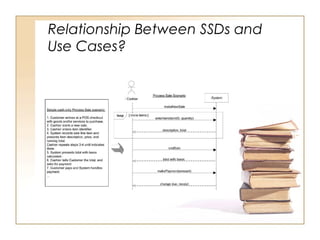
Relationship Between SSDs and
Use Cases?
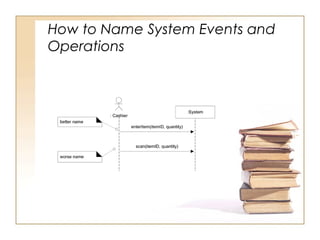
How to Name System Events and
Operations

8. system sequence diagrams

  • 1.
    System Sequence Diagrams FakultasIlmu Komputer Universitas Sriwijaya 2008
  • 2.
  • 3.
    Example: Main success scenarioof a cash-only process sale scenario
  • 4.
    What Are SystemSequence Diagrams? • A system sequence diagram (SSD) is a fast and easily created artifact that illustrates input and output events related to the systems under discussion. • Use cases describe how external actors interact with the software system we are interested in creating. • During this interaction an actor generates system events to a system, usually requesting some system operation to handle the event. • Guideline: Draw an SSD for a main success scenario of each use case, and frequent or complex alternative scenarios.
  • 5.
    Why Draw anSSD? (1) • An interesting and useful question in software design is this: What events are coming in to our system? Why? Because we have to design the software to handle these events (from the mouse, keyboard, another system, …) and execute a response.
  • 6.
    Why Draw anSSD? (2) • Before proceeding to a detailed design of how a software application will work, it is useful to investigate and define its behavior as a "black box." • behavior is a description of what a system does, without explaining how it does it
  • 7.
  • 8.
    How to NameSystem Events and Operations