An Introduction to
Software Architecture
Software Engineering Lab.
Summer 2006
Definition
The software architecture of a
program or computing system is the
structure or structures of the system,
which comprise software elements,
the externally visible properties of
those elements, and the relationships
among them.
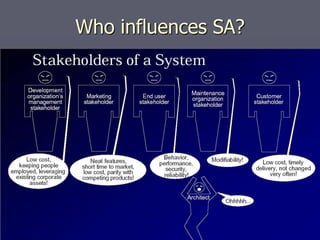
Who influences SA?
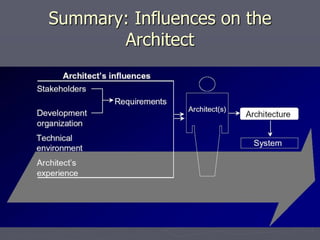
Summary: Influences on the
Architect
Why is architecture important?
►Handling complexity
►Communication among stakeholders
►Early Design Decisions
►SA is a transferable, reusable model
Software Architecture Document
1. Introduction
2. Architectural Representation
3. Architectural Goals and Constraints
4. Use-Case View
5. Logical View
6. Process View
7. Deployment View
8. Implementation View
9. Data View (optional)
10. Size and Performance
11. Quality
Architectural Patterns : Definition
An architectural style or pattern is
 a description of the component and connector
types involved in the style
 the collection of rules that constrain and relate
them
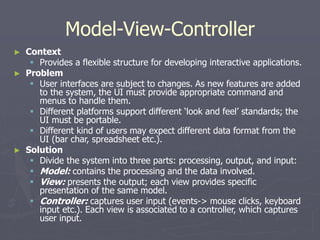
Model-View-Controller
► Context
 Provides a flexible structure for developing interactive applications.
► Problem
 User interfaces are subject to changes. As new features are added
to the system, the UI must provide appropriate command and
menus to handle them.
 Different platforms support different ‘look and feel’ standards; the
UI must be portable.
 Different kind of users may expect different data format from the
UI (bar char, spreadsheet etc.).
► Solution
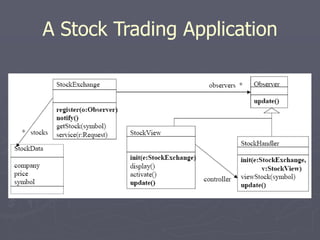
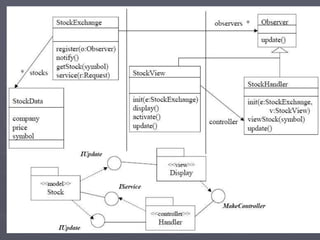
 Divide the system into three parts: processing, output, and input:
 Model: contains the processing and the data involved.
 View: presents the output; each view provides specific
presentation of the same model.
 Controller: captures user input (events-> mouse clicks, keyboard
input etc.). Each view is associated to a controller, which captures
user input.
Model-View-Controller
► Main goal:
 facilitate and optimize the implementation of interactive systems,
particularly those that use multiple synchronized presentations of shared
information.
► Key idea:
 separation between the data and its presentation, which is carried by
different objects.
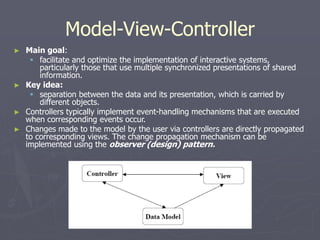
► Controllers typically implement event-handling mechanisms that are executed
when corresponding events occur.
► Changes made to the model by the user via controllers are directly propagated
to corresponding views. The change propagation mechanism can be
implemented using the observer (design) pattern.
A Stock Trading Application
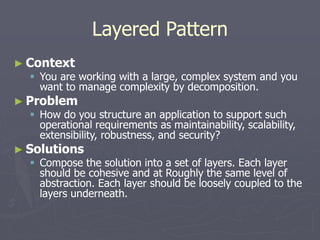
Layered Pattern
► Context
 You are working with a large, complex system and you
want to manage complexity by decomposition.
► Problem
 How do you structure an application to support such
operational requirements as maintainability, scalability,
extensibility, robustness, and security?
► Solutions
 Compose the solution into a set of layers. Each layer
should be cohesive and at Roughly the same level of
abstraction. Each layer should be loosely coupled to the
layers underneath.
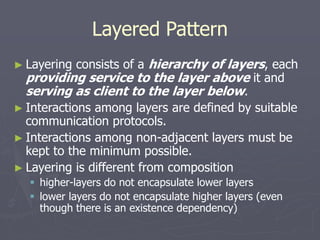
Layered Pattern
► Layering consists of a hierarchy of layers, each
providing service to the layer above it and
serving as client to the layer below.
► Interactions among layers are defined by suitable
communication protocols.
► Interactions among non-adjacent layers must be
kept to the minimum possible.
► Layering is different from composition
 higher-layers do not encapsulate lower layers
 lower layers do not encapsulate higher layers (even
though there is an existence dependency)
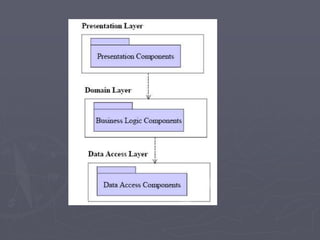
Three-Layered Pattern
► Context
 You are building a business solution using layers to organize your
application.
► Problem
 How do you organize your application to reuse business logic,
provide deployment flexibility and conserve valuable resource
connections?
► Solutions
 Create three layers: presentation, business logic and data
access.
 Locate all database-related code, including database clients access
and utility components, in the data access layer.
 Eliminate dependencies between business layer components and
data access components.
 Either eliminate the dependencies between the business layer and
the presentation layer or manage them using the Observer
pattern.
Software Architecture Document
1. Introduction
2. Architectural Representation
3. Architectural Goals and Constraints
4. Use-Case View
5. Logical View
6. Process View
7. Deployment View
8. Implementation View
9. Data View (optional)
10. Size and Performance
11. Quality
Architectural Goals and Constraints
► The architecture will be formed by considering:
 functional requirements, captured in the Use-Case
Model, and
 non-functional requirements, quality att.
► However these are constraints imposed by the
environment in which the software must operate
that will shape the architecture :
 need to reuse existing assets
 imposition of various standards
 need for compatibility with existing systems
Software Architecture Document
1. Introduction
2. Architectural Representation
3. Architectural Goals and Constraints
4. Use-Case View
5. Logical View
6. Process View
7. Deployment View
8. Implementation View
9. Data View (optional)
10. Size and Performance
11. Quality
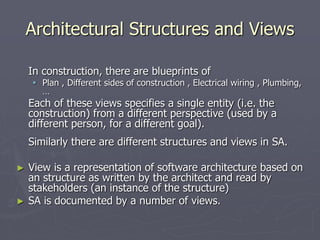
Architectural Structures and Views
In construction, there are blueprints of
 Plan , Different sides of construction , Electrical wiring , Plumbing,
…
Each of these views specifies a single entity (i.e. the
construction) from a different perspective (used by a
different person, for a different goal).
Similarly there are different structures and views in SA.
► View is a representation of software architecture based on
an structure as written by the architect and read by
stakeholders (an instance of the structure)
► SA is documented by a number of views.
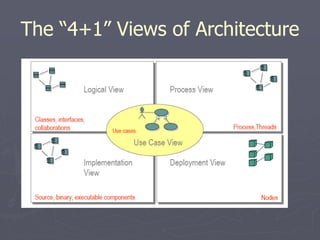
The “4+1” Views of Architecture
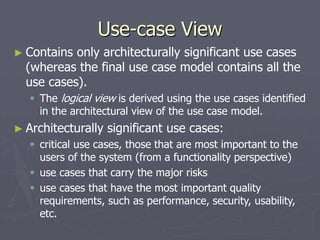
Use-case View
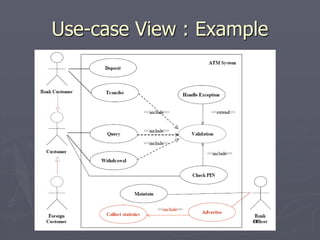
► Contains only architecturally significant use cases
(whereas the final use case model contains all the
use cases).
 The logical view is derived using the use cases identified
in the architectural view of the use case model.
► Architecturally significant use cases:
 critical use cases, those that are most important to the
users of the system (from a functionality perspective)
 use cases that carry the major risks
 use cases that have the most important quality
requirements, such as performance, security, usability,
etc.
Use-case View : Example
Logical View
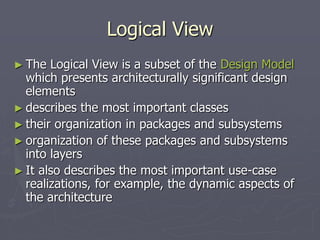
► The Logical View is a subset of the Design Model
which presents architecturally significant design
elements
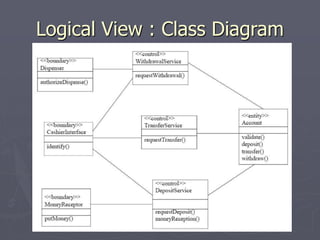
► describes the most important classes
► their organization in packages and subsystems
► organization of these packages and subsystems
into layers
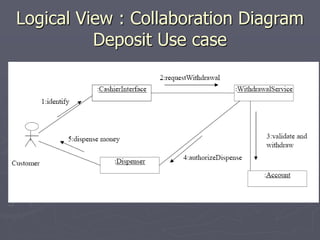
► It also describes the most important use-case
realizations, for example, the dynamic aspects of
the architecture
Logical View : Class Diagram
Logical View : Collaboration Diagram
Deposit Use case
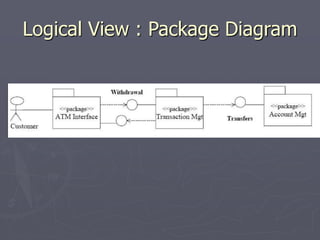
Logical View : Package Diagram
Process View
►Consists of the processes and threads
that form the system’s concurrency and
synchronization mechanisms, as well as
their interactions
Deployment View
►This section describes one or more physical
network (hardware) configurations on which
the software is deployed and run.
Implementation View
► Describes the organization of static software
modules (source code, data files, executables,
documentation etc.) in the development
environment in terms of Packaging and
layering
► Are modeled using UML Component Diagrams.
► UML components are physical and replaceable
parts of a system that conform to and provide the
realization of a set of interfaces
Software Architecture Document
1. Introduction
2. Architectural Representation
3. Architectural Goals and Constraints
4. Use-Case View
5. Logical View
6. Process View
7. Deployment View
8. Implementation View
9. Data View (optional)
10. Size and Performance
11. Quality
Size and Performance
► The number of key elements the system will have to handle
(the number of concurrent online users for an airline
reservation system, …)
► The key performance measures of the system, such as
average response time for key events
Most of these qualities are captured as requirements; they
are presented here because they shape the architecture in
significant ways and warrant special focus. For each
requirement, discuss how the architecture supports this
requirement.
Quality
►Operating performance requirements, such
as mean-time between failure (MTBF).
►Quality targets, such as "no unscheduled
down-time"
►Extensibility targets, such as "the software
will be upgradeable while the system is
running".
►Portability targets, such as hardware
platforms, operating systems, languages

Software architecture

  • 1.
    An Introduction to SoftwareArchitecture Software Engineering Lab. Summer 2006
  • 2.
    Definition The software architectureof a program or computing system is the structure or structures of the system, which comprise software elements, the externally visible properties of those elements, and the relationships among them.
  • 3.
  • 4.
  • 5.
    Why is architectureimportant? ►Handling complexity ►Communication among stakeholders ►Early Design Decisions ►SA is a transferable, reusable model
  • 6.
    Software Architecture Document 1.Introduction 2. Architectural Representation 3. Architectural Goals and Constraints 4. Use-Case View 5. Logical View 6. Process View 7. Deployment View 8. Implementation View 9. Data View (optional) 10. Size and Performance 11. Quality
  • 7.
    Architectural Patterns :Definition An architectural style or pattern is  a description of the component and connector types involved in the style  the collection of rules that constrain and relate them
  • 8.
    Model-View-Controller ► Context  Providesa flexible structure for developing interactive applications. ► Problem  User interfaces are subject to changes. As new features are added to the system, the UI must provide appropriate command and menus to handle them.  Different platforms support different ‘look and feel’ standards; the UI must be portable.  Different kind of users may expect different data format from the UI (bar char, spreadsheet etc.). ► Solution  Divide the system into three parts: processing, output, and input:  Model: contains the processing and the data involved.  View: presents the output; each view provides specific presentation of the same model.  Controller: captures user input (events-> mouse clicks, keyboard input etc.). Each view is associated to a controller, which captures user input.
  • 9.
    Model-View-Controller ► Main goal: facilitate and optimize the implementation of interactive systems, particularly those that use multiple synchronized presentations of shared information. ► Key idea:  separation between the data and its presentation, which is carried by different objects. ► Controllers typically implement event-handling mechanisms that are executed when corresponding events occur. ► Changes made to the model by the user via controllers are directly propagated to corresponding views. The change propagation mechanism can be implemented using the observer (design) pattern.
  • 10.
    A Stock TradingApplication
  • 12.
    Layered Pattern ► Context You are working with a large, complex system and you want to manage complexity by decomposition. ► Problem  How do you structure an application to support such operational requirements as maintainability, scalability, extensibility, robustness, and security? ► Solutions  Compose the solution into a set of layers. Each layer should be cohesive and at Roughly the same level of abstraction. Each layer should be loosely coupled to the layers underneath.
  • 13.
    Layered Pattern ► Layeringconsists of a hierarchy of layers, each providing service to the layer above it and serving as client to the layer below. ► Interactions among layers are defined by suitable communication protocols. ► Interactions among non-adjacent layers must be kept to the minimum possible. ► Layering is different from composition  higher-layers do not encapsulate lower layers  lower layers do not encapsulate higher layers (even though there is an existence dependency)
  • 14.
    Three-Layered Pattern ► Context You are building a business solution using layers to organize your application. ► Problem  How do you organize your application to reuse business logic, provide deployment flexibility and conserve valuable resource connections? ► Solutions  Create three layers: presentation, business logic and data access.  Locate all database-related code, including database clients access and utility components, in the data access layer.  Eliminate dependencies between business layer components and data access components.  Either eliminate the dependencies between the business layer and the presentation layer or manage them using the Observer pattern.
  • 16.
    Software Architecture Document 1.Introduction 2. Architectural Representation 3. Architectural Goals and Constraints 4. Use-Case View 5. Logical View 6. Process View 7. Deployment View 8. Implementation View 9. Data View (optional) 10. Size and Performance 11. Quality
  • 17.
    Architectural Goals andConstraints ► The architecture will be formed by considering:  functional requirements, captured in the Use-Case Model, and  non-functional requirements, quality att. ► However these are constraints imposed by the environment in which the software must operate that will shape the architecture :  need to reuse existing assets  imposition of various standards  need for compatibility with existing systems
  • 18.
    Software Architecture Document 1.Introduction 2. Architectural Representation 3. Architectural Goals and Constraints 4. Use-Case View 5. Logical View 6. Process View 7. Deployment View 8. Implementation View 9. Data View (optional) 10. Size and Performance 11. Quality
  • 19.
    Architectural Structures andViews In construction, there are blueprints of  Plan , Different sides of construction , Electrical wiring , Plumbing, … Each of these views specifies a single entity (i.e. the construction) from a different perspective (used by a different person, for a different goal). Similarly there are different structures and views in SA. ► View is a representation of software architecture based on an structure as written by the architect and read by stakeholders (an instance of the structure) ► SA is documented by a number of views.
  • 20.
    The “4+1” Viewsof Architecture
  • 21.
    Use-case View ► Containsonly architecturally significant use cases (whereas the final use case model contains all the use cases).  The logical view is derived using the use cases identified in the architectural view of the use case model. ► Architecturally significant use cases:  critical use cases, those that are most important to the users of the system (from a functionality perspective)  use cases that carry the major risks  use cases that have the most important quality requirements, such as performance, security, usability, etc.
  • 22.
  • 23.
    Logical View ► TheLogical View is a subset of the Design Model which presents architecturally significant design elements ► describes the most important classes ► their organization in packages and subsystems ► organization of these packages and subsystems into layers ► It also describes the most important use-case realizations, for example, the dynamic aspects of the architecture
  • 24.
    Logical View :Class Diagram
  • 25.
    Logical View :Collaboration Diagram Deposit Use case
  • 26.
    Logical View :Package Diagram
  • 27.
    Process View ►Consists ofthe processes and threads that form the system’s concurrency and synchronization mechanisms, as well as their interactions
  • 28.
    Deployment View ►This sectiondescribes one or more physical network (hardware) configurations on which the software is deployed and run.
  • 29.
    Implementation View ► Describesthe organization of static software modules (source code, data files, executables, documentation etc.) in the development environment in terms of Packaging and layering ► Are modeled using UML Component Diagrams. ► UML components are physical and replaceable parts of a system that conform to and provide the realization of a set of interfaces
  • 30.
    Software Architecture Document 1.Introduction 2. Architectural Representation 3. Architectural Goals and Constraints 4. Use-Case View 5. Logical View 6. Process View 7. Deployment View 8. Implementation View 9. Data View (optional) 10. Size and Performance 11. Quality
  • 31.
    Size and Performance ►The number of key elements the system will have to handle (the number of concurrent online users for an airline reservation system, …) ► The key performance measures of the system, such as average response time for key events Most of these qualities are captured as requirements; they are presented here because they shape the architecture in significant ways and warrant special focus. For each requirement, discuss how the architecture supports this requirement.
  • 32.
    Quality ►Operating performance requirements,such as mean-time between failure (MTBF). ►Quality targets, such as "no unscheduled down-time" ►Extensibility targets, such as "the software will be upgradeable while the system is running". ►Portability targets, such as hardware platforms, operating systems, languages