Dinesh K. Jogdand
B-50
 SCOPE
 Objectives
 Processing Environment
 System Implementation
 UML Diagrams
 Screen Short
 Future Enhancements
 Conclusion
 Thank you
SCOPE
 The project could be implemented in an average sized organization.
 An average company will not be very keen on spending loads of money on
ledgers. Whereas these project will greatly reduce the costs which is using
common and cheap office items like database and desktop application.
 And also there is no requirement to store books or accounts.
 The data is directly stored in the database in the hard disk of the PC.
 The main objective of the project is to help the ongoing user help to attain an easy
way to navigate the customer’s details and solve the Customers problems.
 It is basically a very instant processing System by which customer can get the
mobile in the right condition.
 It’s basically build in the platform of .NET windows application which makes the
application quite flexible and easy to be operated.
 The manager of the Mobile store also finds it sufficient enough to view the details
of the sales, servicing and well organized way to employ the staff that are included
in the mobile store itself.
PROCESSING ENVIRONMENT
Processing environment includes hardware and software requirements.
 
Software Requirement
Operating system: - Windows XP, Windows7
Front-end Tool: - Visual studio 2008
Back-end Tool: - MS SQL2005
Hardware Requirement
Operating system: Windows XP and above.
Minimum 5 GB HDD space
3.00 Megahertz Intel Pentium IV Processor
1 GB RAM
 
Computer will be used to maintain the records of the Mobile, Customer, sales and
purchase, in the computer database.
A Computerized report in a particular format can be generated.
Availability of Mobile can be checked.
Finding employee, customer, Mobile details is easier.
The details of the sales and purchasing of Mobiles will be recorded in the system.
 UML DIAGRAMS
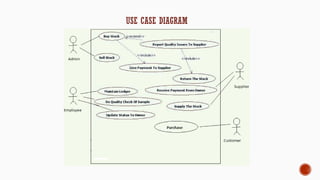
 Use case Diagram
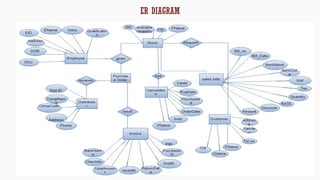
 ER- Diagram
 Activity Diagram
 Sequence Diagram
 DFD
 Class Diagram
USE CASE DIAGRAM
ER DIAGRAM
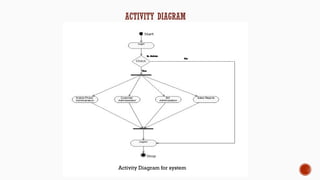
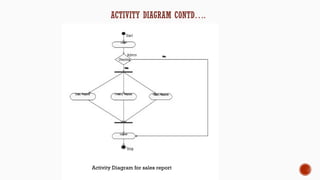
ACTIVITY DIAGRAM
Activity Diagram for system
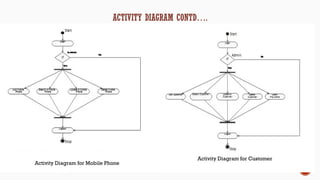
Activity Diagram for Mobile Phone
Activity Diagram for Customer
Activity Diagram for sales report
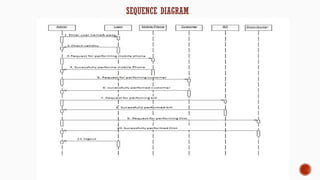
SEQUENCE DIAGRAM
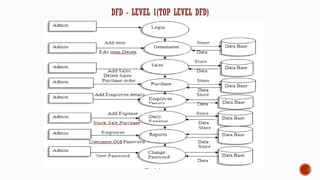
DFD - LEVEL 1(TOP LEVEL DFD)
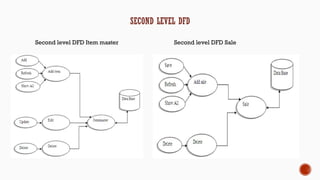
SECOND LEVEL DFD
Second level DFD Item master Second level DFD Sale
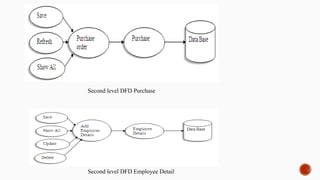
Second level DFD Purchase
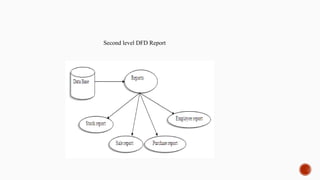
Second level DFD Employee Detail
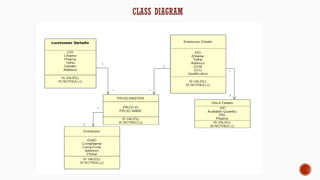
Second level DFD Report
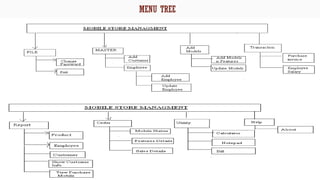
CLASS DIAGRAM
MENU TREE
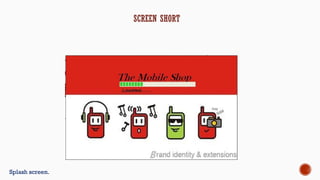
Splash screen.
SCREEN SHORT
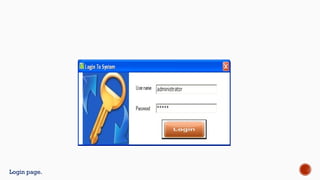
Login page.
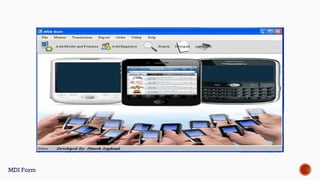
MDI Form
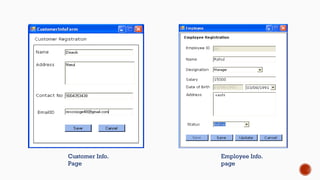
Customer Info.
Page
Employee Info.
page
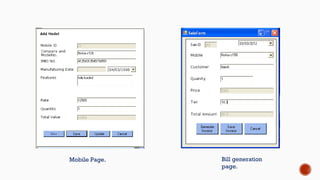
Mobile Page. Bill generation
page.
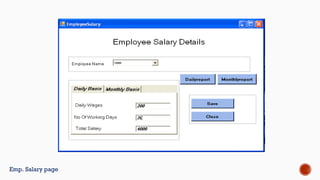
Emp. Salary page
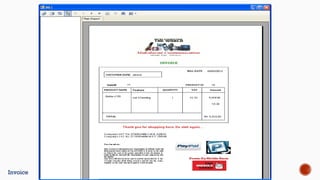
Invoice
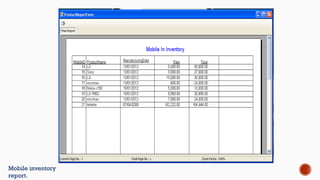
Mobile inventory
report.
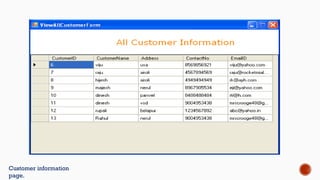
Customer information
page.
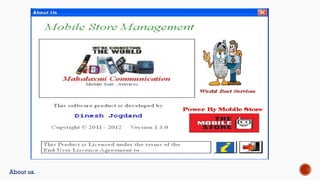
About us.
 The system could be modified suitably to work on a large network. This involves,
among other, resolving used conflicts, protecting database integrity and ensuring
consistency of data if it is distributed across multiple locations.
 Maintain attendance details of employee
 Maintain Mobile details.
CONCLUSION
 An attempt is made in all its earnest towards the successful completion of the
project. This system was verified with valid as well as with invalid data.
 This system is user friendly since it has been developed in visual studio 8 a
successful GUI environment. Since the connection can be extended to any
database. The control will be more powerful.
 Connecting it to any type of database extends the development control. Any
suggestions for future development of the system are welcome
 Upgrading the system if may can be done without affecting the proper functioning
of system.
Thank you……

Project report on mobile shop management

  • 1.
  • 2.
     SCOPE  Objectives Processing Environment  System Implementation  UML Diagrams  Screen Short  Future Enhancements  Conclusion  Thank you
  • 3.
    SCOPE  The projectcould be implemented in an average sized organization.  An average company will not be very keen on spending loads of money on ledgers. Whereas these project will greatly reduce the costs which is using common and cheap office items like database and desktop application.  And also there is no requirement to store books or accounts.  The data is directly stored in the database in the hard disk of the PC.
  • 4.
     The mainobjective of the project is to help the ongoing user help to attain an easy way to navigate the customer’s details and solve the Customers problems.  It is basically a very instant processing System by which customer can get the mobile in the right condition.  It’s basically build in the platform of .NET windows application which makes the application quite flexible and easy to be operated.  The manager of the Mobile store also finds it sufficient enough to view the details of the sales, servicing and well organized way to employ the staff that are included in the mobile store itself.
  • 5.
    PROCESSING ENVIRONMENT Processing environmentincludes hardware and software requirements.   Software Requirement Operating system: - Windows XP, Windows7 Front-end Tool: - Visual studio 2008 Back-end Tool: - MS SQL2005 Hardware Requirement Operating system: Windows XP and above. Minimum 5 GB HDD space 3.00 Megahertz Intel Pentium IV Processor 1 GB RAM
  • 6.
      Computer will beused to maintain the records of the Mobile, Customer, sales and purchase, in the computer database. A Computerized report in a particular format can be generated. Availability of Mobile can be checked. Finding employee, customer, Mobile details is easier. The details of the sales and purchasing of Mobiles will be recorded in the system.
  • 7.
     UML DIAGRAMS Use case Diagram  ER- Diagram  Activity Diagram  Sequence Diagram  DFD  Class Diagram
  • 8.
  • 9.
  • 10.
  • 11.
    Activity Diagram forMobile Phone Activity Diagram for Customer
  • 12.
  • 13.
  • 14.
    DFD - LEVEL1(TOP LEVEL DFD)
  • 15.
    SECOND LEVEL DFD Secondlevel DFD Item master Second level DFD Sale
  • 16.
    Second level DFDPurchase Second level DFD Employee Detail
  • 17.
  • 18.
  • 19.
  • 20.
  • 21.
  • 22.
  • 23.
  • 24.
    Mobile Page. Billgeneration page.
  • 25.
  • 26.
  • 27.
  • 28.
  • 29.
  • 30.
     The systemcould be modified suitably to work on a large network. This involves, among other, resolving used conflicts, protecting database integrity and ensuring consistency of data if it is distributed across multiple locations.  Maintain attendance details of employee  Maintain Mobile details.
  • 31.
    CONCLUSION  An attemptis made in all its earnest towards the successful completion of the project. This system was verified with valid as well as with invalid data.  This system is user friendly since it has been developed in visual studio 8 a successful GUI environment. Since the connection can be extended to any database. The control will be more powerful.  Connecting it to any type of database extends the development control. Any suggestions for future development of the system are welcome  Upgrading the system if may can be done without affecting the proper functioning of system.
  • 32.