Pre-Production
Ellie Warmingham
Style sheet
I chose some simple fonts that could be used as
the title and the text in the magazine. I didn’t want
them to look too fancy or complicated because it
might distract the viewer or look too busy. The
magazine examples I chose are close to what I
want to achieve. They have fairly straightforward
designs which have the characters in the middle
and a simple, bold font for the text. It’s clear and
easy to read which is what I want to aim for. The
colours are bright and go well together, so I can
focus on using this colour palette when I make my
magazine.
Layout 1
Front Cover
Issue 36
barcode
t
e
x
t
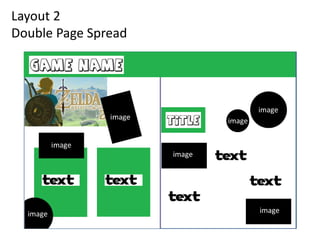
Layout 2
Double Page Spread
image
image
image
image
image
Software & Resources
Software needed Resources needed
Photoshop PC
Google Keyboard
PowerPoint Mouse
Word Internet
Photopea (back-up)
Contingency Planning
Potential Issue Solution
PC stops working Restart or try a different one
Internet stops working Restart router/do work offline if possible
I forget to save my work Double check to see if have it saved to
OneDrive
I can’t get the work at home Make a copy/save to a folder I can access
Photoshop crashes/stops working Save it regularly/use different software
I can’t find my work Save it all in the same place/folder so I
don’t lose anything
Health and Safety
Potential Issue How will the issue be
avoided?
Eye strain Take breaks and go outside
Leg cramp Have a short walk and stretch legs
Back ache Have a stretch and take breaks
Dehydration Have some water regularly
Tripping over bags Tuck them right of the under/under desk
Tangled wires Make sure wires are out of the way and tidy to
avoid tripping or damaging anything
Schedule
Task Plan of Action Resources Required
Task 1  Begin the background for the cover of the poster
and look back on planning and research to help.
 PC, keyboard, mouse,
internet, Google, Photoshop
Task 2  Continue with my cover and start adding different
coloured shapes/images/characters.
 PC, keyboard, mouse,
internet, Google, Photoshop
Task 3  Add in titles/sub titles/text.  PC, keyboard, mouse,
internet, Google, Photoshop
Task 4  Add in any details/finish of the cover.  PC, keyboard, mouse,
internet, Google, Photoshop
Task 5  Start the pages inside the magazine/begin the
background.
 PC, keyboard, mouse,
internet, Google, Photoshop
Task 6  Add in any images/shapes/characters.  PC, keyboard, mouse,
internet, Google, Photoshop
Task 7  Add in text/titles.  PC, keyboard, mouse,
internet, Google, Photoshop
Task 8  Finish off any extra details/finish the magazine.  PC, keyboard, mouse,
internet, Google, Photoshop

Pre production - Visual

  • 1.
  • 2.
    Style sheet I chosesome simple fonts that could be used as the title and the text in the magazine. I didn’t want them to look too fancy or complicated because it might distract the viewer or look too busy. The magazine examples I chose are close to what I want to achieve. They have fairly straightforward designs which have the characters in the middle and a simple, bold font for the text. It’s clear and easy to read which is what I want to aim for. The colours are bright and go well together, so I can focus on using this colour palette when I make my magazine.
  • 3.
    Layout 1 Front Cover Issue36 barcode t e x t
  • 4.
    Layout 2 Double PageSpread image image image image image
  • 5.
    Software & Resources Softwareneeded Resources needed Photoshop PC Google Keyboard PowerPoint Mouse Word Internet Photopea (back-up)
  • 6.
    Contingency Planning Potential IssueSolution PC stops working Restart or try a different one Internet stops working Restart router/do work offline if possible I forget to save my work Double check to see if have it saved to OneDrive I can’t get the work at home Make a copy/save to a folder I can access Photoshop crashes/stops working Save it regularly/use different software I can’t find my work Save it all in the same place/folder so I don’t lose anything
  • 7.
    Health and Safety PotentialIssue How will the issue be avoided? Eye strain Take breaks and go outside Leg cramp Have a short walk and stretch legs Back ache Have a stretch and take breaks Dehydration Have some water regularly Tripping over bags Tuck them right of the under/under desk Tangled wires Make sure wires are out of the way and tidy to avoid tripping or damaging anything
  • 8.
    Schedule Task Plan ofAction Resources Required Task 1  Begin the background for the cover of the poster and look back on planning and research to help.  PC, keyboard, mouse, internet, Google, Photoshop Task 2  Continue with my cover and start adding different coloured shapes/images/characters.  PC, keyboard, mouse, internet, Google, Photoshop Task 3  Add in titles/sub titles/text.  PC, keyboard, mouse, internet, Google, Photoshop Task 4  Add in any details/finish of the cover.  PC, keyboard, mouse, internet, Google, Photoshop Task 5  Start the pages inside the magazine/begin the background.  PC, keyboard, mouse, internet, Google, Photoshop Task 6  Add in any images/shapes/characters.  PC, keyboard, mouse, internet, Google, Photoshop Task 7  Add in text/titles.  PC, keyboard, mouse, internet, Google, Photoshop Task 8  Finish off any extra details/finish the magazine.  PC, keyboard, mouse, internet, Google, Photoshop

Editor's Notes

  • #3 Explore colours, fonts and image styles similar to what you want to produce. Discuss all three elements in relation to why you chose them and where you may use them in your project. Go over as many pages as you need to
  • #4 Mock up of a potential design using the colours and fonts established in your style sheet and sourced images
  • #5 Mock up of a potential design using the colours and fonts established in your style sheet and sourced images