Oliver Frost
Style Sheet
Colour Scheme
Style Sheet
 The pictures of the games are a bunch which I
may put on the front of the magazine. Some of
them I might put as a secondary lead or in the
menu strip. The Perfect Dark font will be for
the main title of the magazine to go with the
logo. The Game Sans Serif font will go with
the main headline and the subtitles. The Game
Font 7 will tell a bit about the the headline and
subtitles underneath the headlines. The game
company logos are what I'm going to base my
magazine logo on. The colours are my colour
scheme of the magazines logo and may
influence the magazine with these colours.
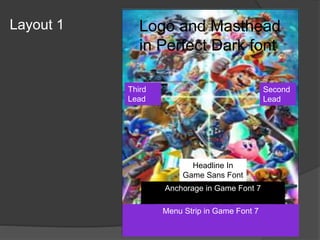
Layout 1 Logo and Masthead
in Perfect Dark font
Headline In
Game Sans Font
Anchorage in Game Font 7
Second
Lead
Menu Strip in Game Font 7
Third
Lead
Layout 2
Logo and Masthead
in Perfect Dark font
Headline in Game
Sans Font
Anchorage in Game Font 7
Menu Strip
Secondary Lead in Game Font 7
Props & Locations
Props/Costume needed Locations needed
Images Google Images
Fonts 1001fonts
Colours Photoshop
Gameplay screenshots Google Images
Logos Google Images
Contingency Planning
Potential Issue Solution
Photoshop starts crashing. Log onto another computer and save
regularly.
Computer may be damaged. Log onto another computer.
Might not be able to find the right photo. Look on other search engines or alter a
similar picture.
Might not know how to use a tool on
Photoshop.
Look for a tutorial on YouTube or ask
someone.
Might not enjoy a certain design. Create a new design.
Health and Safety
Potential Issue How will the issue be
avoided?
Could spill a drink on computer or
keyboard.
Have a drink away from the computer.
The brightness may be too bright Turn the brightness down
Sleep can make you unfocused Make sure you sleep at a good time and
work out your sleep schedule.
Back pain Get up and take a walk so you can stretch
your back.
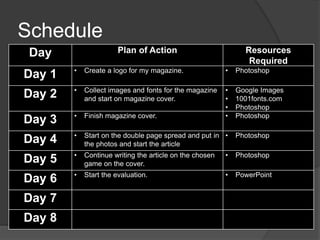
Schedule
Day Plan of Action Resources
Required
Day 1 • Create a logo for my magazine. • Photoshop
Day 2 • Collect images and fonts for the magazine
and start on magazine cover.
• Google Images
• 1001fonts.com
• Photoshop
Day 3 • Finish magazine cover. • Photoshop
Day 4 • Start on the double page spread and put in
the photos and start the article
• Photoshop
Day 5 • Continue writing the article on the chosen
game on the cover.
• Photoshop
Day 6 • Start the evaluation. • PowerPoint
Day 7
Day 8

5. visual pre production 1

  • 1.
  • 2.
  • 3.
    Style Sheet  Thepictures of the games are a bunch which I may put on the front of the magazine. Some of them I might put as a secondary lead or in the menu strip. The Perfect Dark font will be for the main title of the magazine to go with the logo. The Game Sans Serif font will go with the main headline and the subtitles. The Game Font 7 will tell a bit about the the headline and subtitles underneath the headlines. The game company logos are what I'm going to base my magazine logo on. The colours are my colour scheme of the magazines logo and may influence the magazine with these colours.
  • 4.
    Layout 1 Logoand Masthead in Perfect Dark font Headline In Game Sans Font Anchorage in Game Font 7 Second Lead Menu Strip in Game Font 7 Third Lead
  • 5.
    Layout 2 Logo andMasthead in Perfect Dark font Headline in Game Sans Font Anchorage in Game Font 7 Menu Strip Secondary Lead in Game Font 7
  • 6.
    Props & Locations Props/Costumeneeded Locations needed Images Google Images Fonts 1001fonts Colours Photoshop Gameplay screenshots Google Images Logos Google Images
  • 7.
    Contingency Planning Potential IssueSolution Photoshop starts crashing. Log onto another computer and save regularly. Computer may be damaged. Log onto another computer. Might not be able to find the right photo. Look on other search engines or alter a similar picture. Might not know how to use a tool on Photoshop. Look for a tutorial on YouTube or ask someone. Might not enjoy a certain design. Create a new design.
  • 8.
    Health and Safety PotentialIssue How will the issue be avoided? Could spill a drink on computer or keyboard. Have a drink away from the computer. The brightness may be too bright Turn the brightness down Sleep can make you unfocused Make sure you sleep at a good time and work out your sleep schedule. Back pain Get up and take a walk so you can stretch your back.
  • 9.
    Schedule Day Plan ofAction Resources Required Day 1 • Create a logo for my magazine. • Photoshop Day 2 • Collect images and fonts for the magazine and start on magazine cover. • Google Images • 1001fonts.com • Photoshop Day 3 • Finish magazine cover. • Photoshop Day 4 • Start on the double page spread and put in the photos and start the article • Photoshop Day 5 • Continue writing the article on the chosen game on the cover. • Photoshop Day 6 • Start the evaluation. • PowerPoint Day 7 Day 8

Editor's Notes

  • #3 Explore colours, fonts and image styles similar to what you want to produce. Discuss all three elements in relation to why you chose them and where you may use them in your project. Go over as many pages as you need to
  • #5 Mock up of a potential design using the colours and fonts established in your style sheet and sourced images
  • #6 Mock up of a potential design using the colours and fonts established in your style sheet and sourced images