Experiments
Celina Smith
Process
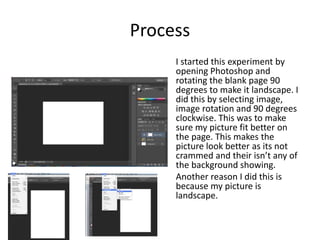
I started this experiment by
opening Photoshop and
rotating the blank page 90
degrees to make it landscape. I
did this by selecting image,
image rotation and 90 degrees
clockwise. This was to make
sure my picture fit better on
the page. This makes the
picture look better as its not
crammed and their isn’t any of
the background showing.
Another reason I did this is
because my picture is
landscape.
Process
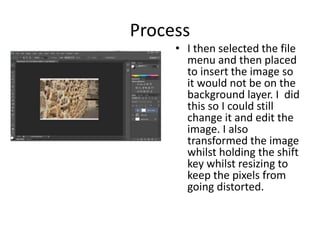
• I then selected the file
menu and then placed
to insert the image so
it would not be on the
background layer. I did
this so I could still
change it and edit the
image. I also
transformed the image
whilst holding the shift
key whilst resizing to
keep the pixels from
going distorted.
Process
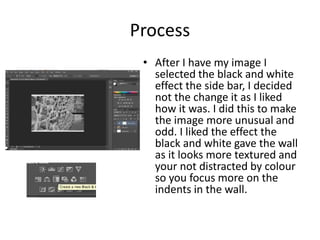
• After I have my image I
selected the black and white
effect the side bar, I decided
not the change it as I liked
how it was. I did this to make
the image more unusual and
odd. I liked the effect the
black and white gave the wall
as it looks more textured and
your not distracted by colour
so you focus more on the
indents in the wall.
Reflection
• What elements of your experiments will you
include in your final product? I will use textures
to make my photos interesting and black and
white to create a sense of their being something
not quite right. Most of my photos will be
landscape with some being portrait I wanted to
use landscape more as there is psychologically
more in the picture making the audience look
longer at my product. This will ensure my
audience understand the meaning behind the
photograph whiles still being able to enjoy
looking at it.

3. fmp production experiments(1)

  • 1.
  • 2.
    Process I started thisexperiment by opening Photoshop and rotating the blank page 90 degrees to make it landscape. I did this by selecting image, image rotation and 90 degrees clockwise. This was to make sure my picture fit better on the page. This makes the picture look better as its not crammed and their isn’t any of the background showing. Another reason I did this is because my picture is landscape.
  • 3.
    Process • I thenselected the file menu and then placed to insert the image so it would not be on the background layer. I did this so I could still change it and edit the image. I also transformed the image whilst holding the shift key whilst resizing to keep the pixels from going distorted.
  • 4.
    Process • After Ihave my image I selected the black and white effect the side bar, I decided not the change it as I liked how it was. I did this to make the image more unusual and odd. I liked the effect the black and white gave the wall as it looks more textured and your not distracted by colour so you focus more on the indents in the wall.
  • 5.
    Reflection • What elementsof your experiments will you include in your final product? I will use textures to make my photos interesting and black and white to create a sense of their being something not quite right. Most of my photos will be landscape with some being portrait I wanted to use landscape more as there is psychologically more in the picture making the audience look longer at my product. This will ensure my audience understand the meaning behind the photograph whiles still being able to enjoy looking at it.

Editor's Notes

  • #3 Discuss the tools and processes used in your experiments