PRESENTED BY :
IRSHAD ANSARI
“3D MODELING”
SEMINAR
PRESENTATION
ON
CONTENT
1.Introduction
2.3D-Modeling In The Industry
3.How Are They Used
4.Modeling At Home
5.Geometric Theory
6 Advantages And Disadvantages
7.Conclusion
INTRODUCTION
3D modeling is the process of developing a mathematical
representation of any surface of an object (either inanimate or
living) in three dimensions via specialized software. The product is
called a 3D model.
3-D modeling is used in many different industries, including virtual
reality, video games, 3D printing, marketing, TV and motion
pictures, scientific and medical imaging and computer-aided
design and manufacturing CAD/CAM
MODELING IN THE
INDUSTRY
It seems that 3D Models are appearing nearly everywherein
the media industry, it can be found in various places;
TV & Film
Animations
Video Games
Product Design
Education
Architecture
Science
Engineering
Print/Image Rendering
HOW ARE THEY
USED?
TV & Film
In TV and Film 3D Models are used to create large effects such
as the robots in Transformers or to create environments and
characters in films like Avatar.
There are minimal limits and the models can have a high poly
count because they're not rendered out at real time, they're
rendered for playback.
Animation
In animation the visual is commonly very cartoon looking,
simply for the reason that the film is entirely animated,
rendering times would be insane if everything were to look 100%
realistic. Wreck It Ralph (2012) is a good example of a recent
animation.
HOW ARE THEY
USED?
Video Games
Just about everything in video game is 3D
modeling, these can be simple things like triggers
or could be more complex entities such as
characters or the environment they live in.
Unfortunately video games render the models in
real time meaning they can't have as many
polys, although some advancements have been
made over the years.
HOW ARE THEY USED
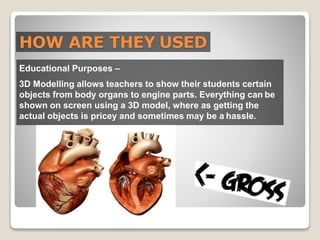
Educational Purposes –
3D Modelling allows teachers to show their students certain
objects from body organs to engine parts. Everything can be
shown on screen using a 3D model, where as getting the
actual objects is pricey and sometimes may be a hassle.
HOW ARE THEY
USED?
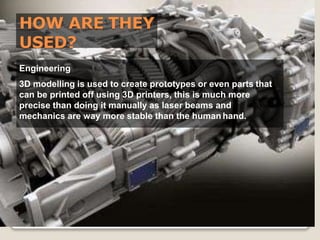
Engineering
3D modelling is used to create prototypes or even parts that
can be printed off using 3D printers, this is much more
precise than doing it manually as laser beams and
mechanics are way more stable than the human hand.
MODELLING AT HOME
The internet allows anyone to purchase
and/or download 3D modeling software so
that they can create their own models.
Here are a few different programs that allow
people to create their own:
Blender
Autodesk Maya
Cinema 4D
3D Studio Max
BLENDER - SOFTWARE
Blender is an open source program which is a good for
amateurs who are wanting to get into animation and
modelling, with easy interfaces and for the simple reason
that it’s free, so anyone can upload a tutorial on how to use it
for anyone to learn.
This image to the right shows
the interfaces within
blender, everything seems to
have it’s place and it looks
somewhat neat. It’s also
customizable, so you can
rearrange tabs to your own
liking.
AUTODESK MAYA
Autodesk Maya is a professional piece of software that is
commonly used for creating video games, It can be used for
3D Modelling and Animation as well, Some people prefer to
build a base model and improve it within some software
called Zbrush.
Autodesk Maya allows the user to create 3D
Modelling, Texturing, Rendering, Dynamics & Effects
(Hair, fur, Particles, nCloth) and 3DAnimation.
CINEMA 4D SOFTWARE
Cinema 4D is a professional software used for various
things, ranging from architecture to engineering. On to the
MAXON website - below is an image of what the programcan
be used for.
Cinema 4D looks to have a less complex UI, so it's probably
suitable for new comers to 3D modelling, however I cannot
include my own opinion as I have not used the program
before. However I do have an image of the UI. There are also
courses dedicated to teaching the software to people who
are interested in it.
GEOMETRIC THEORY
• 3D Polygon Models Made Up
• Mesh Construction
• Common Primitives
• Textures
• Bump Mapping
• Render Time
3D POLYGON MODELS
MADE UP
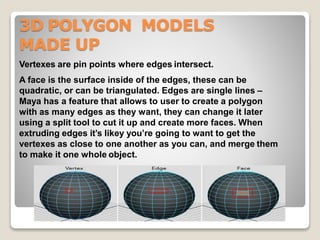
Vertexes are pin points where edges intersect.
A face is the surface inside of the edges, these can be
quadratic, or can be triangulated. Edges are single lines –
Maya has a feature that allows to user to create a polygon
with as many edges as they want, they can change it later
using a split tool to cut it up and create more faces. When
extruding edges it’s likey you’re going to want to get the
vertexes as close to one another as you can, and merge them
to make it one whole object.
MESH CONSTRUCTION
Box modeling is when the user starts out with a single
cube and then manipulates and subdivides the cube to
turn it into the shape they desire. Although this
method is quick and easy to learn it's not easy to add
immense detail.
Sculpting is when the user starts out
with a sphere and manipulates it by
pulling and pushing around vertexes
and creating subdivision layers, a
lot like the sculpting of clay, hence
the name. Z-brush is a great
software for sculpting.
COMMON PRIMITIVES
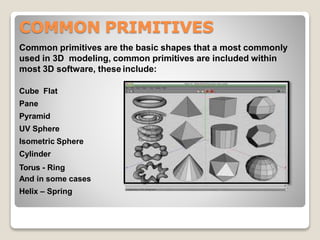
Common primitives are the basic shapes that a most commonly
used in 3D modeling, common primitives are included within
most 3D software, these include:
Cube Flat
Pane
Pyramid
UV Sphere
Isometric Sphere
Cylinder
Torus - Ring
And in some cases
Helix – Spring
TEXTURES
Textures don’t come in all shapes and sizes however they do
come in different… shiny-ness?
There are 4 main textures inAutodesk
Maya, Blinn, Phong, Phong E, Lambert – Autodesk Maya
allows the user to change the glow, transparency and
reflectivity, there are other options that can be changed to
get the desired effect, for instance, glass or water.
BUMP MAPPING
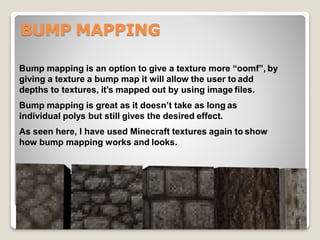
Bump mapping is an option to give a texture more “oomf”, by
giving a texture a bump map it will allow the user to add
depths to textures, it’s mapped out by using image files.
Bump mapping is great as it doesn’t take as long as
individual polys but still gives the desired effect.
As seen here, I have used Minecraft textures again to show
how bump mapping works and looks.
RENDER TIME
Depending on the amount of fine detailing on models will
effect render times, if a animated film is on a deadlineand
their animation takes too long, they could miss their
deadline.
ADVANTAGES
 Work Efficiently and Save Time
 Execute Control and Accuracy
 Avoid Costly Mistakes
 Keep Clients Happy
DISADVANTAGES
The software itself can be expensive so initial costs
are high.
 The equipment, whether laser or photo, is becoming
lighter, more effective, less expensive and easier to
manipulate.
 The software is becoming more automatic and can
be turned to in more and more complex situations. It
can be used today on sites which would have until
recently been thought of as impossible to work with.
However, never-ending progress in the field of
computer science means that this type of complexity
can now be processed.
CONCLUSION
THANK YOU

3 d modelling

  • 1.
    PRESENTED BY : IRSHADANSARI “3D MODELING” SEMINAR PRESENTATION ON
  • 2.
    CONTENT 1.Introduction 2.3D-Modeling In TheIndustry 3.How Are They Used 4.Modeling At Home 5.Geometric Theory 6 Advantages And Disadvantages 7.Conclusion
  • 3.
    INTRODUCTION 3D modeling isthe process of developing a mathematical representation of any surface of an object (either inanimate or living) in three dimensions via specialized software. The product is called a 3D model. 3-D modeling is used in many different industries, including virtual reality, video games, 3D printing, marketing, TV and motion pictures, scientific and medical imaging and computer-aided design and manufacturing CAD/CAM
  • 4.
    MODELING IN THE INDUSTRY Itseems that 3D Models are appearing nearly everywherein the media industry, it can be found in various places; TV & Film Animations Video Games Product Design Education Architecture Science Engineering Print/Image Rendering
  • 5.
    HOW ARE THEY USED? TV& Film In TV and Film 3D Models are used to create large effects such as the robots in Transformers or to create environments and characters in films like Avatar. There are minimal limits and the models can have a high poly count because they're not rendered out at real time, they're rendered for playback. Animation In animation the visual is commonly very cartoon looking, simply for the reason that the film is entirely animated, rendering times would be insane if everything were to look 100% realistic. Wreck It Ralph (2012) is a good example of a recent animation.
  • 6.
    HOW ARE THEY USED? VideoGames Just about everything in video game is 3D modeling, these can be simple things like triggers or could be more complex entities such as characters or the environment they live in. Unfortunately video games render the models in real time meaning they can't have as many polys, although some advancements have been made over the years.
  • 7.
    HOW ARE THEYUSED Educational Purposes – 3D Modelling allows teachers to show their students certain objects from body organs to engine parts. Everything can be shown on screen using a 3D model, where as getting the actual objects is pricey and sometimes may be a hassle.
  • 8.
    HOW ARE THEY USED? Engineering 3Dmodelling is used to create prototypes or even parts that can be printed off using 3D printers, this is much more precise than doing it manually as laser beams and mechanics are way more stable than the human hand.
  • 9.
    MODELLING AT HOME Theinternet allows anyone to purchase and/or download 3D modeling software so that they can create their own models. Here are a few different programs that allow people to create their own: Blender Autodesk Maya Cinema 4D 3D Studio Max
  • 10.
    BLENDER - SOFTWARE Blenderis an open source program which is a good for amateurs who are wanting to get into animation and modelling, with easy interfaces and for the simple reason that it’s free, so anyone can upload a tutorial on how to use it for anyone to learn. This image to the right shows the interfaces within blender, everything seems to have it’s place and it looks somewhat neat. It’s also customizable, so you can rearrange tabs to your own liking.
  • 11.
    AUTODESK MAYA Autodesk Mayais a professional piece of software that is commonly used for creating video games, It can be used for 3D Modelling and Animation as well, Some people prefer to build a base model and improve it within some software called Zbrush. Autodesk Maya allows the user to create 3D Modelling, Texturing, Rendering, Dynamics & Effects (Hair, fur, Particles, nCloth) and 3DAnimation.
  • 12.
    CINEMA 4D SOFTWARE Cinema4D is a professional software used for various things, ranging from architecture to engineering. On to the MAXON website - below is an image of what the programcan be used for. Cinema 4D looks to have a less complex UI, so it's probably suitable for new comers to 3D modelling, however I cannot include my own opinion as I have not used the program before. However I do have an image of the UI. There are also courses dedicated to teaching the software to people who are interested in it.
  • 13.
    GEOMETRIC THEORY • 3DPolygon Models Made Up • Mesh Construction • Common Primitives • Textures • Bump Mapping • Render Time
  • 14.
    3D POLYGON MODELS MADEUP Vertexes are pin points where edges intersect. A face is the surface inside of the edges, these can be quadratic, or can be triangulated. Edges are single lines – Maya has a feature that allows to user to create a polygon with as many edges as they want, they can change it later using a split tool to cut it up and create more faces. When extruding edges it’s likey you’re going to want to get the vertexes as close to one another as you can, and merge them to make it one whole object.
  • 15.
    MESH CONSTRUCTION Box modelingis when the user starts out with a single cube and then manipulates and subdivides the cube to turn it into the shape they desire. Although this method is quick and easy to learn it's not easy to add immense detail. Sculpting is when the user starts out with a sphere and manipulates it by pulling and pushing around vertexes and creating subdivision layers, a lot like the sculpting of clay, hence the name. Z-brush is a great software for sculpting.
  • 16.
    COMMON PRIMITIVES Common primitivesare the basic shapes that a most commonly used in 3D modeling, common primitives are included within most 3D software, these include: Cube Flat Pane Pyramid UV Sphere Isometric Sphere Cylinder Torus - Ring And in some cases Helix – Spring
  • 17.
    TEXTURES Textures don’t comein all shapes and sizes however they do come in different… shiny-ness? There are 4 main textures inAutodesk Maya, Blinn, Phong, Phong E, Lambert – Autodesk Maya allows the user to change the glow, transparency and reflectivity, there are other options that can be changed to get the desired effect, for instance, glass or water.
  • 18.
    BUMP MAPPING Bump mappingis an option to give a texture more “oomf”, by giving a texture a bump map it will allow the user to add depths to textures, it’s mapped out by using image files. Bump mapping is great as it doesn’t take as long as individual polys but still gives the desired effect. As seen here, I have used Minecraft textures again to show how bump mapping works and looks.
  • 19.
    RENDER TIME Depending onthe amount of fine detailing on models will effect render times, if a animated film is on a deadlineand their animation takes too long, they could miss their deadline.
  • 20.
    ADVANTAGES  Work Efficientlyand Save Time  Execute Control and Accuracy  Avoid Costly Mistakes  Keep Clients Happy DISADVANTAGES The software itself can be expensive so initial costs are high.
  • 21.
     The equipment,whether laser or photo, is becoming lighter, more effective, less expensive and easier to manipulate.  The software is becoming more automatic and can be turned to in more and more complex situations. It can be used today on sites which would have until recently been thought of as impossible to work with. However, never-ending progress in the field of computer science means that this type of complexity can now be processed. CONCLUSION
  • 22.