



presented by   ARCHANA K. PATHAK     MAYURI R. KALIKAR     DEPT  –  MCA-I  Year PRIYADARSHINI COLLEGE OF ENGINEERING,   HINGNA ROAD,    NAGPUR. LIQUID COOLED PC'S  & THEIR WORKING
  ABSTRACT This presentation is about the working of liquid cooling system    for a PC.  It uses the principle of  “ THERMODYNAMICS”. KEYWORDS & PHRASES Thermodynamics, Antifreeze, Radiator, Microchip, intuitive, Over clocked, Thermal Conductivity, Specific Heat Capacity.
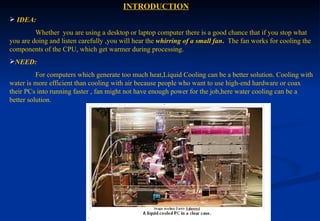
  INTRODUCTION IDEA:     Whether  you are using a desktop or laptop computer there is a good chance that if you stop what you are doing and listen carefully ,you will hear the  whirring of a small   fan .  The fan works for cooling the components of the CPU, which get warmer during processing. NEED:   For computers which generate too much heat,Liquid Cooling can be a better solution. Cooling with water is more efficient than cooling with air because people who want to use high-end hardware or coax their PCs into running faster , fan might not have enough power for the job,here water cooling can be a better solution.
COMPARISION  BETWEEN WORKING OF COOLING SYSTEM OF     CAR AND  PC’s Both use the principle of thermodynamics-   “ Heat moves from warmer objects to cooler objects” .  As the cooler object gets warmer ,the warmer objects gets cooler . Ex:- We can experience this principle firsthand by putting our palm flat on  a  cool  spot. After several seconds when we lift up our palm it will be little cooler and  the spot will be little warmer .   MECHANISM IN CAR:- Car cooling system circulates water mixed with antifreeze, through the engine. Hot surfaces in the engine warm the water cooling themselves off in the process. Water circulates from the engine to the radiator.Heat moves from hot water to the radiator causing the water to cool off. The cool water then heads back to the engine.At the same time fan moves air over the outside of the radiator.Radiator warm the  air,cooling itself off at  the same time.Thus, the engine’s heat moves out of the cooling system and into the surrounding air.
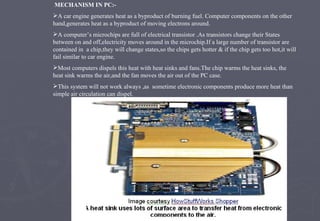
MECHANISM IN PC:- A car engine generates heat as a byproduct of burning fuel. Computer components on the other hand,generates heat as a byproduct of moving electrons around. A computer’s microchips are full of electrical transistor .As transistors change their States between on and off,electricity moves around in the microchip.If a large number of transistor are contained in  a chip,they will change states,so the chips gets hotter & if the chip gets too hot,it will fail similar to car engine. Most computers dispels this heat with heat sinks and fans.The chip warms the heat sinks, the heat sink warms the air,and the fan moves the air out of the PC case. This system will not work always ,as  sometime electronic components produce more heat than simple air circulation can dispel.
That’s where water cooling comes in! REASONS- The reason for using water is that it has  higher conductivity  and  higher specific heat capacity  than  the air. There is a purpose why computers needs higher conductivity and specific heat capacity  :- The electronic components produce more heat than the air around them can absorb. The fans required to move enough air to cool all the components make too much noise or use  too much electricity. The  conclusion   arrived here is that  computer needs more   cooling than air alone can provide   and also the system should be quieter. So water cooling is required.
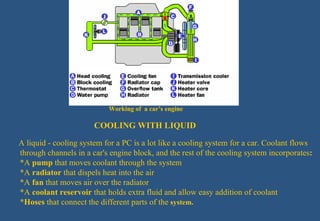
  Working of  a car’s engine   COOLING WITH LIQUID A liquid - cooling system for a PC is a lot like a cooling system for a car. Coolant flows    through channels in a car's engine block, and the rest of the cooling system incorporates :   *A  pump  that moves coolant through the system *A  radiator  that dispels heat into the air *A  fan  that moves air over the radiator  *A  coolant reservoir  that holds extra fluid and allow easy addition of coolant  * Hoses  that connect the different parts of the   system.
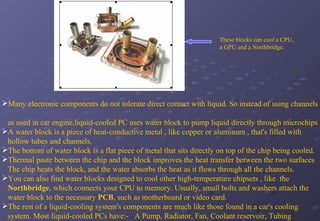
  These blocks can cool a CPU,    a GPU and a Northbridge. Many electronic components do not tolerate direct contact with liquid. So instead of using channels  as used in car engine,liquid-cooled PC uses water block to pump liquid directly through microchips A water block is a piece of heat-conductive metal , like copper or aluminum , that's filled with hollow tubes and channels.  The bottom of water block is a flat piece of metal that sits directly on top of the chip being cooled. Thermal paste between the chip and the block improves the heat transfer between the two surfaces The chip heats the block, and the water absorbs the heat as it flows through all the channels.  You can also find water blocks designed to cool other high-temperature chipsets , like  the Northbridge , which connects your CPU to memory. Usually, small bolts and washers attach the water block to the necessary  PCB , such as motherboard or video card. The rest of a liquid-cooling system's components are much like those found in a car's cooling system. Most liquid-cooled PCs have:-  A Pump, Radiator, Fan, Coolant reservoir, Tubing   .
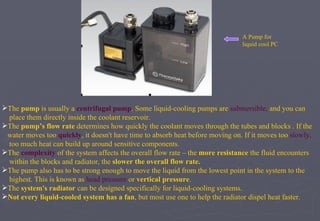
  A Pump for    liquid cool PC The  pump  is usually a  centrifugal pump . Some liquid-cooling pumps are  submersible,  and you can  place them directly inside the coolant reservoir.  The  pump’s flow rate  determines how quickly the coolant moves through the tubes and blocks . If the  water moves too   quickly , it doesn't have time to absorb heat before moving on. If it moves too  slowly,   too much heat can build up around sensitive components.  The  complexity  of the system affects the overall flow rate – the  more resistance  the fluid encounters  within the blocks and radiator, the  slower the overall flow rate.   The pump also has to be strong enough to move the liquid from the lowest point in the system to the  highest. This is known as  head pressure  or  vertical pressure . The  system's radiator  can be designed specifically for liquid-cooling systems. Not every liquid-cooled system has a fan , but most use one to help the radiator dispel heat faster.
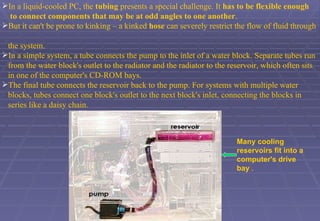
In a liquid-cooled PC, the  tubing  presents a special challenge. It  has to be flexible enough  to   connect components that may be at odd angles to one another .  But it can't be prone to kinking – a kinked  hose  can severely restrict the flow of fluid through  the system.  In a simple system, a tube connects the pump to the inlet of a water block. Separate tubes run  from the water block's outlet to the radiator and the radiator to the reservoir, which often sits  in one of the computer's CD-ROM bays.  The final tube connects the reservoir back to the pump. For systems with multiple water  blocks, tubes connect one block's outlet to the next block's inlet, connecting the blocks in  series like a daisy chain.  Many cooling reservoirs fit into a computer's drive bay  .
Deep-fried PCs Many electrical components can short-circuit when exposed to liquid, but some liquids can both dispel heat and act as electrical insulators. Final component of a liquid-cooling system is the liquid itself . Many people use distilled water, since tap water contains contaminants that can cloud the system  or clog the channels in the water blocks and radiator. Specialized additives can add color to the fluid, making it more visually appealing when used in a  clear case.  They can also  lower the freezing point  or  surface tension  of the water, making it a more  effective  coolant .  Finally , some  additives  have  antimicrobial  or  anti-corrosion  ingredients, which can increase the  life  of the system.
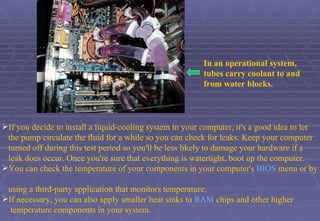
In an operational system,  tubes carry coolant to and from water blocks.   If you decide to install a liquid-cooling system in your computer, it's a good idea to let  the pump circulate the fluid for a while so you can check for leaks. Keep your computer  turned off during this test period so you'll be less likely to damage your hardware if a  leak does occur. Once you're sure that everything is watertight, boot up the computer. You can check the temperature of your components in your computer's  BIOS  menu or by  using a third-party application that monitors temperature. If necessary, you can also apply smaller heat sinks to  RAM  chips and other higher  temperature components in your system.
When Water Just Isn't Cold Enough If you want to cool your PC's parts even more than a liquid-cooling system  will allow, you can use  Peltier devices   in place of standard water blocks. A Peltier device is a thermoelectric device. When you apply electricity to it,  heat moves from one side to the other. In other words, one side of the Peltier  device gets very cold while the other gets very hot. The cold side of the Peltier device can cool a microchip, while water from the  liquid-cooling system draws the heat away from the hot side.  Some people prefer systems that use these devices because they cool a PC's  components well below ambient temperature. However, they do require extra precautions. Since the  cold side  of a Peltier  device is colder than the surrounding air, it's  prone to accumulating   condensation . In such case, a Peltier system can lead to a short circuit .
REFERENCES   Burek, John A. "Water-cool your PC." CNet. 8/24/2005.  Burns, Simon. "Liquid Metal So Cool it May Be on Ice." The Inquirer. 8/4/2005.  Case, Loyd. "Build It: A Liquid-Cooled P4 System." Extreme Tech. 5/20/2004.  Case, Loyd. "ExtremeTech's Best of Computex." 6/3/2005  Case, Loyd. "Notes from the Lab." Extreme Tech. 5/10/2004.  Devhardware. "Water Cooling Basics." 3/15/2005.  Loh, Victor. "CoolIT Systems Presents Peltier and Liquid CPU Cooling." 3/14/2006.  Melchiore, Dave. "How to Water Cool a Computer." Xoxide.  Modthebox.com. "Introduction - Pumps."  PC Powerzone. "Peltier Cooling."  Puget Custom Computers. "Liquid Cooled Computers."  "Rich's Liquid PC Project."
THANK YOU

2paper Presentation

  • 1.
    presentedby ARCHANA K. PATHAK MAYURI R. KALIKAR DEPT – MCA-I Year PRIYADARSHINI COLLEGE OF ENGINEERING, HINGNA ROAD, NAGPUR. LIQUID COOLED PC'S & THEIR WORKING
  • 2.
    ABSTRACTThis presentation is about the working of liquid cooling system for a PC. It uses the principle of “ THERMODYNAMICS”. KEYWORDS & PHRASES Thermodynamics, Antifreeze, Radiator, Microchip, intuitive, Over clocked, Thermal Conductivity, Specific Heat Capacity.
  • 3.
    INTRODUCTIONIDEA: Whether you are using a desktop or laptop computer there is a good chance that if you stop what you are doing and listen carefully ,you will hear the whirring of a small fan . The fan works for cooling the components of the CPU, which get warmer during processing. NEED: For computers which generate too much heat,Liquid Cooling can be a better solution. Cooling with water is more efficient than cooling with air because people who want to use high-end hardware or coax their PCs into running faster , fan might not have enough power for the job,here water cooling can be a better solution.
  • 4.
    COMPARISION BETWEENWORKING OF COOLING SYSTEM OF CAR AND PC’s Both use the principle of thermodynamics- “ Heat moves from warmer objects to cooler objects” . As the cooler object gets warmer ,the warmer objects gets cooler . Ex:- We can experience this principle firsthand by putting our palm flat on a cool spot. After several seconds when we lift up our palm it will be little cooler and the spot will be little warmer . MECHANISM IN CAR:- Car cooling system circulates water mixed with antifreeze, through the engine. Hot surfaces in the engine warm the water cooling themselves off in the process. Water circulates from the engine to the radiator.Heat moves from hot water to the radiator causing the water to cool off. The cool water then heads back to the engine.At the same time fan moves air over the outside of the radiator.Radiator warm the air,cooling itself off at the same time.Thus, the engine’s heat moves out of the cooling system and into the surrounding air.
  • 5.
    MECHANISM IN PC:-A car engine generates heat as a byproduct of burning fuel. Computer components on the other hand,generates heat as a byproduct of moving electrons around. A computer’s microchips are full of electrical transistor .As transistors change their States between on and off,electricity moves around in the microchip.If a large number of transistor are contained in a chip,they will change states,so the chips gets hotter & if the chip gets too hot,it will fail similar to car engine. Most computers dispels this heat with heat sinks and fans.The chip warms the heat sinks, the heat sink warms the air,and the fan moves the air out of the PC case. This system will not work always ,as sometime electronic components produce more heat than simple air circulation can dispel.
  • 6.
    That’s where watercooling comes in! REASONS- The reason for using water is that it has higher conductivity and higher specific heat capacity than the air. There is a purpose why computers needs higher conductivity and specific heat capacity :- The electronic components produce more heat than the air around them can absorb. The fans required to move enough air to cool all the components make too much noise or use too much electricity. The conclusion arrived here is that computer needs more cooling than air alone can provide and also the system should be quieter. So water cooling is required.
  • 7.
    Workingof a car’s engine COOLING WITH LIQUID A liquid - cooling system for a PC is a lot like a cooling system for a car. Coolant flows through channels in a car's engine block, and the rest of the cooling system incorporates : *A pump that moves coolant through the system *A radiator that dispels heat into the air *A fan that moves air over the radiator *A coolant reservoir that holds extra fluid and allow easy addition of coolant * Hoses that connect the different parts of the system.
  • 8.
    Theseblocks can cool a CPU, a GPU and a Northbridge. Many electronic components do not tolerate direct contact with liquid. So instead of using channels as used in car engine,liquid-cooled PC uses water block to pump liquid directly through microchips A water block is a piece of heat-conductive metal , like copper or aluminum , that's filled with hollow tubes and channels. The bottom of water block is a flat piece of metal that sits directly on top of the chip being cooled. Thermal paste between the chip and the block improves the heat transfer between the two surfaces The chip heats the block, and the water absorbs the heat as it flows through all the channels. You can also find water blocks designed to cool other high-temperature chipsets , like the Northbridge , which connects your CPU to memory. Usually, small bolts and washers attach the water block to the necessary PCB , such as motherboard or video card. The rest of a liquid-cooling system's components are much like those found in a car's cooling system. Most liquid-cooled PCs have:- A Pump, Radiator, Fan, Coolant reservoir, Tubing .
  • 9.
    APump for liquid cool PC The pump is usually a centrifugal pump . Some liquid-cooling pumps are submersible, and you can place them directly inside the coolant reservoir. The pump’s flow rate determines how quickly the coolant moves through the tubes and blocks . If the water moves too quickly , it doesn't have time to absorb heat before moving on. If it moves too slowly, too much heat can build up around sensitive components. The complexity of the system affects the overall flow rate – the more resistance the fluid encounters within the blocks and radiator, the slower the overall flow rate. The pump also has to be strong enough to move the liquid from the lowest point in the system to the highest. This is known as head pressure or vertical pressure . The system's radiator can be designed specifically for liquid-cooling systems. Not every liquid-cooled system has a fan , but most use one to help the radiator dispel heat faster.
  • 10.
    In a liquid-cooledPC, the tubing presents a special challenge. It has to be flexible enough to connect components that may be at odd angles to one another . But it can't be prone to kinking – a kinked hose can severely restrict the flow of fluid through the system. In a simple system, a tube connects the pump to the inlet of a water block. Separate tubes run from the water block's outlet to the radiator and the radiator to the reservoir, which often sits in one of the computer's CD-ROM bays. The final tube connects the reservoir back to the pump. For systems with multiple water blocks, tubes connect one block's outlet to the next block's inlet, connecting the blocks in series like a daisy chain. Many cooling reservoirs fit into a computer's drive bay .
  • 11.
    Deep-fried PCs Manyelectrical components can short-circuit when exposed to liquid, but some liquids can both dispel heat and act as electrical insulators. Final component of a liquid-cooling system is the liquid itself . Many people use distilled water, since tap water contains contaminants that can cloud the system or clog the channels in the water blocks and radiator. Specialized additives can add color to the fluid, making it more visually appealing when used in a clear case. They can also lower the freezing point or surface tension of the water, making it a more effective coolant . Finally , some additives have antimicrobial or anti-corrosion ingredients, which can increase the life of the system.
  • 12.
    In an operationalsystem, tubes carry coolant to and from water blocks. If you decide to install a liquid-cooling system in your computer, it's a good idea to let the pump circulate the fluid for a while so you can check for leaks. Keep your computer turned off during this test period so you'll be less likely to damage your hardware if a leak does occur. Once you're sure that everything is watertight, boot up the computer. You can check the temperature of your components in your computer's BIOS menu or by using a third-party application that monitors temperature. If necessary, you can also apply smaller heat sinks to RAM chips and other higher temperature components in your system.
  • 13.
    When Water JustIsn't Cold Enough If you want to cool your PC's parts even more than a liquid-cooling system will allow, you can use Peltier devices in place of standard water blocks. A Peltier device is a thermoelectric device. When you apply electricity to it, heat moves from one side to the other. In other words, one side of the Peltier device gets very cold while the other gets very hot. The cold side of the Peltier device can cool a microchip, while water from the liquid-cooling system draws the heat away from the hot side. Some people prefer systems that use these devices because they cool a PC's components well below ambient temperature. However, they do require extra precautions. Since the cold side of a Peltier device is colder than the surrounding air, it's prone to accumulating condensation . In such case, a Peltier system can lead to a short circuit .
  • 14.
    REFERENCES Burek, John A. "Water-cool your PC." CNet. 8/24/2005. Burns, Simon. "Liquid Metal So Cool it May Be on Ice." The Inquirer. 8/4/2005. Case, Loyd. "Build It: A Liquid-Cooled P4 System." Extreme Tech. 5/20/2004. Case, Loyd. "ExtremeTech's Best of Computex." 6/3/2005 Case, Loyd. "Notes from the Lab." Extreme Tech. 5/10/2004. Devhardware. "Water Cooling Basics." 3/15/2005. Loh, Victor. "CoolIT Systems Presents Peltier and Liquid CPU Cooling." 3/14/2006. Melchiore, Dave. "How to Water Cool a Computer." Xoxide. Modthebox.com. "Introduction - Pumps." PC Powerzone. "Peltier Cooling." Puget Custom Computers. "Liquid Cooled Computers." "Rich's Liquid PC Project."
  • 15.