COOLING

TECHNICAL VIEW

    By : Ibrahem Batta
             & emad shakhsheer
                  To Dr Alaa almasri
Parts
•   LIQUID COOLING.
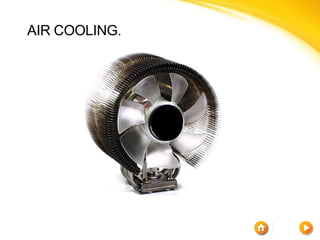
•   AIR COOLING.
AIR COOLING.
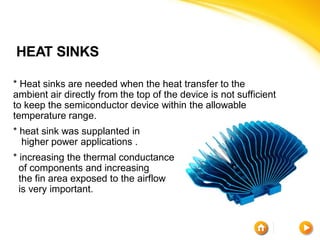
HEAT SINKS

* Heat sinks are needed when the heat transfer to the
ambient air directly from the top of the device is not sufficient
to keep the semiconductor device within the allowable
temperature range.
* heat sink was supplanted in
  higher power applications .
* increasing the thermal conductance
  of components and increasing
  the fin area exposed to the airflow
  is very important.
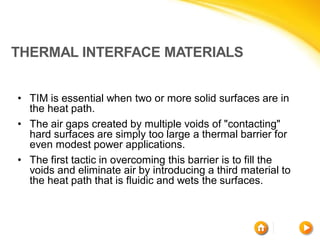
THERMAL INTERFACE MATERIALS


• TIM is essential when two or more solid surfaces are in
  the heat path.
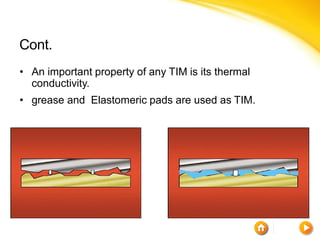
• The air gaps created by multiple voids of "contacting"
  hard surfaces are simply too large a thermal barrier for
  even modest power applications.
• The first tactic in overcoming this barrier is to fill the
  voids and eliminate air by introducing a third material to
  the heat path that is fluidic and wets the surfaces.
Cont.
• An important property of any TIM is its thermal
  conductivity.
• grease and Elastomeric pads are used as TIM.
COOLING FANS AND BLOWERS

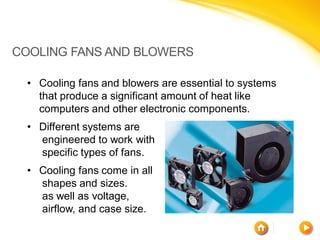
 • Cooling fans and blowers are essential to systems
   that produce a significant amount of heat like
   computers and other electronic components.
 • Different systems are
   engineered to work with
   specific types of fans.
 • Cooling fans come in all
   shapes and sizes.
   as well as voltage,
   airflow, and case size.
Difference Between Fans and Blowers

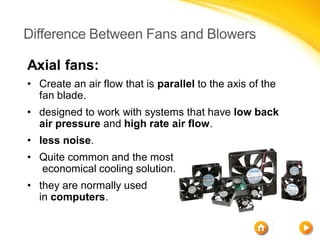
Axial fans:
• Create an air flow that is parallel to the axis of the
  fan blade.
• designed to work with systems that have low back
  air pressure and high rate air flow.
• less noise.
• Quite common and the most
  economical cooling solution.
• they are normally used
  in computers.
CONT.

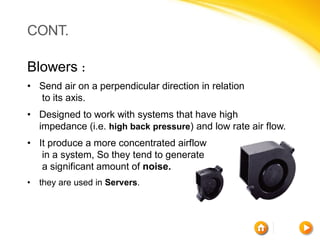
Blowers :
• Send air on a perpendicular direction in relation
  to its axis.
• Designed to work with systems that have high
  impedance (i.e. high back pressure) and low rate air flow.
• It produce a more concentrated airflow
   in a system, So they tend to generate
   a significant amount of noise.
•   they are used in Servers.
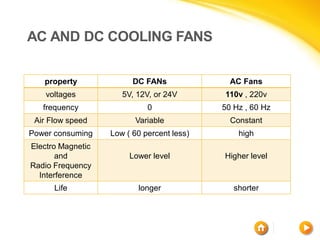
AC AND DC COOLING FANS


   property              DC FANs              AC Fans
    voltages          5V, 12V, or 24V       110v , 220v
   frequency                 0              50 Hz , 60 Hz
 Air Flow speed          Variable             Constant
Power consuming    Low ( 60 percent less)       high
Electro Magnetic
       and              Lower level         Higher level
Radio Frequency
  Interference
      Life                longer               shorter
CONT.

• The difference in the cost between AC fan and DC fan is
  negligible.
• When choosing fan for your applications, it is important
  to look at the cooling requirements of the system and
  applications, the fan type, the air flow, and AC or DC
  power operation.
• AC fans are used when DC voltage is not available.
• All types of computer equipment rely on DC cooling fans.
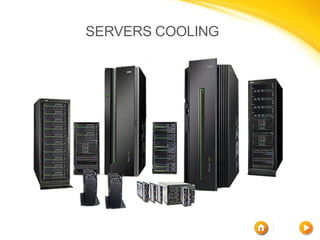
SERVERS COOLING
SERVERS COOLING

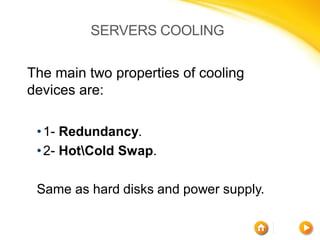
The main two properties of cooling
devices are:

 • 1- Redundancy.
 • 2- HotCold Swap.

 Same as hard disks and power supply.
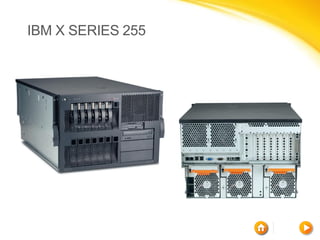
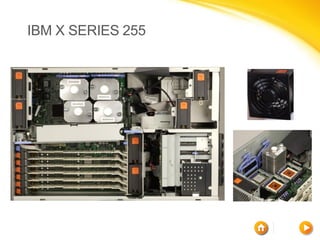
IBM X SERIES 255
IBM X SERIES 255
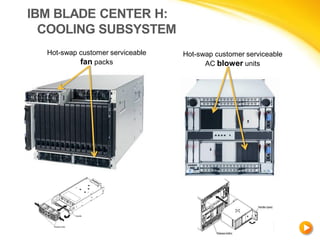
IBM BLADE CENTER H:
  COOLING SUBSYSTEM
  Hot-swap customer serviceable   Hot-swap customer serviceable
           fan packs                    AC blower units


                                         BladeCenter H rear chassis
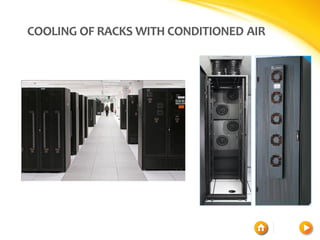
COOLING OF RACKS WITH CONDITIONED AIR
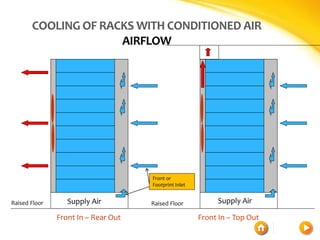
                     AIRFLOW


                                     Front or
                                     Footprint Inlet


Raised Floor      Supply Air         Raised Floor           Supply Air

               Front In – Rear Out                     Front In – Top Out
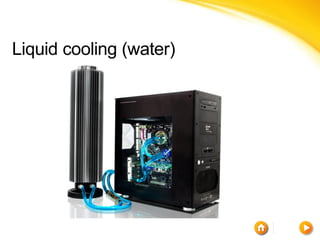
Liquid cooling (water)
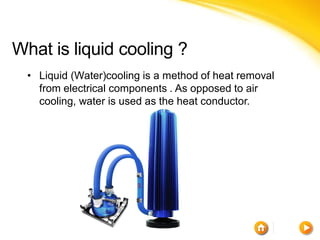
What is liquid cooling ?
  • Liquid (Water)cooling is a method of heat removal
    from electrical components . As opposed to air
    cooling, water is used as the heat conductor.
History
 • Cooling hot computer components with various
   fluids has been in use since at least as far back as
   the development of Cray-2 in 1982.


 •    Through the 1990s, water cooling for home PCs
     slowly gained.


 • it started to become noticeably more prevalent after
   the introduction of AMD's hot-running Athlon
   processor in mid 2000
Cont.
 • As of 2011, there are several manufacturers of
   water cooling components and kits, and some
   custom computer retailers include various setups of
   water cooling for their high performance systems.


 • Apple's Power Mac G5 was the first mainstream
   desktop computer to have water cooling as
   standard.
 •   Dell followed suit by shipping their XPS computers
     with liquid cooling.
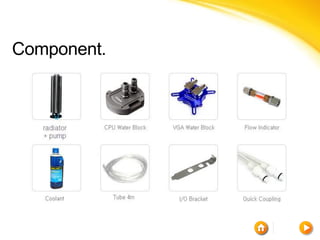
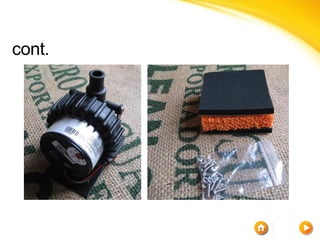
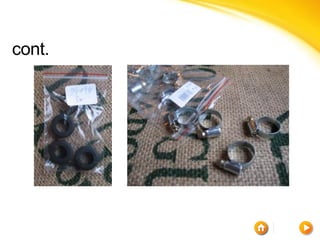
Component.
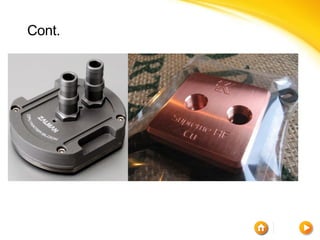
Cont.
cont.
cont.
cont.


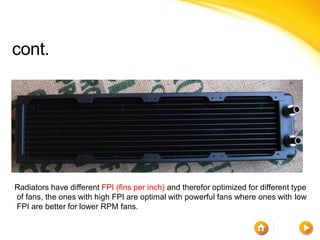
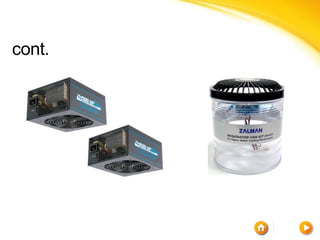
Radiators have different FPI (fins per inch) and therefor optimized for different type
of fans, the ones with high FPI are optimal with powerful fans where ones with low
FPI are better for lower RPM fans.
cont.
cont.
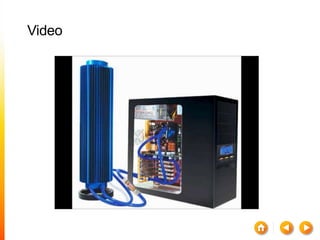
Video
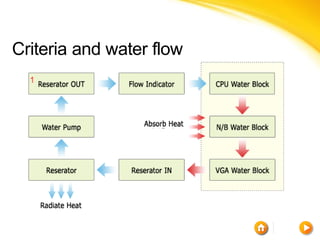
Criteria and water flow
Advantages
of liquid cooling over air cooling
  • water's higher specific heat capacity, density, and
    thermal conductivity. This allows water to transmit
    heat over greater distances with much less
    volumetric flow and reduced temperature difference.


  • Drawing heat away from the processor and outside
    of the system. This allows for higher clock speeds in
    the processor as the ambient temperatures of the
    CPU core are still within the manufacturer's
    specifications.
Advantages
cont.
  • The water jacket around an engine is also very
    effective at deadening mechanical noises, which
    makes the engine quieter, Many high performance
    CPUs require fan speeds in excess of 7000 rpm that
    generate noise of 60+ decibels of noise.


  • No DUST and no need to open computer to clean it.
Disadvantages.
 •    Costs significantly more than an air-cooled engine
     system, approx. 600$.
 •    Size and weight ,need large area inside and out
     side the computer require larger desktop system
     cases to fit all of these parts within the computer
     case itself ,approx.6.5Kg.
 • and technical skills required to install a kit , suitable
   tubes length , leaks could cause severe damage to
   the components inside of the system.
cont.
  •   Leaking .


  •    Condensation, due to the ambient air right around
      the pelt being cold.


  • Water freezes at 0℃.
Usage
 •    Water cooling can be used to cool many computer
     components.
     •   especially the CPU.
     •   GPU.
     •   Northbridge's.
     •   Southbridge's.
     •   Hard disk drives.
     •   Memory.
     •   Voltage regulator modules (VRMs).
     •   Power supplies can be water-cooled.
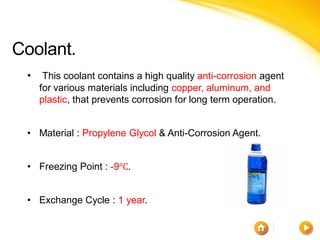
Coolant.
 •    This coolant contains a high quality anti-corrosion agent
     for various materials including copper, aluminum, and
     plastic, that prevents corrosion for long term operation.


 • Material : Propylene Glycol & Anti-Corrosion Agent.


 • Freezing Point : -9℃.


 • Exchange Cycle : 1 year.
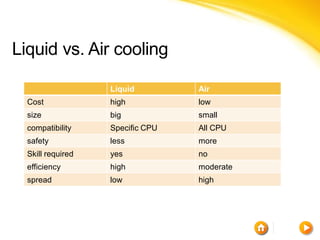
Liquid vs. Air cooling

                   Liquid         Air
  Cost             high           low
  size             big            small
  compatibility    Specific CPU   All CPU
  safety           less           more
  Skill required   yes            no
  efficiency       high           moderate
  spread           low            high
THANK YOU FOR YOUR ATTENTION

cooling system in computer -air / water cooling

  • 1.
    COOLING TECHNICAL VIEW By : Ibrahem Batta & emad shakhsheer To Dr Alaa almasri
  • 2.
    Parts • LIQUID COOLING. • AIR COOLING.
  • 3.
  • 4.
    HEAT SINKS * Heatsinks are needed when the heat transfer to the ambient air directly from the top of the device is not sufficient to keep the semiconductor device within the allowable temperature range. * heat sink was supplanted in higher power applications . * increasing the thermal conductance of components and increasing the fin area exposed to the airflow is very important.
  • 5.
    THERMAL INTERFACE MATERIALS •TIM is essential when two or more solid surfaces are in the heat path. • The air gaps created by multiple voids of "contacting" hard surfaces are simply too large a thermal barrier for even modest power applications. • The first tactic in overcoming this barrier is to fill the voids and eliminate air by introducing a third material to the heat path that is fluidic and wets the surfaces.
  • 6.
    Cont. • An importantproperty of any TIM is its thermal conductivity. • grease and Elastomeric pads are used as TIM.
  • 7.
    COOLING FANS ANDBLOWERS • Cooling fans and blowers are essential to systems that produce a significant amount of heat like computers and other electronic components. • Different systems are engineered to work with specific types of fans. • Cooling fans come in all shapes and sizes. as well as voltage, airflow, and case size.
  • 8.
    Difference Between Fansand Blowers Axial fans: • Create an air flow that is parallel to the axis of the fan blade. • designed to work with systems that have low back air pressure and high rate air flow. • less noise. • Quite common and the most economical cooling solution. • they are normally used in computers.
  • 9.
    CONT. Blowers : • Sendair on a perpendicular direction in relation to its axis. • Designed to work with systems that have high impedance (i.e. high back pressure) and low rate air flow. • It produce a more concentrated airflow in a system, So they tend to generate a significant amount of noise. • they are used in Servers.
  • 10.
    AC AND DCCOOLING FANS property DC FANs AC Fans voltages 5V, 12V, or 24V 110v , 220v frequency 0 50 Hz , 60 Hz Air Flow speed Variable Constant Power consuming Low ( 60 percent less) high Electro Magnetic and Lower level Higher level Radio Frequency Interference Life longer shorter
  • 11.
    CONT. • The differencein the cost between AC fan and DC fan is negligible. • When choosing fan for your applications, it is important to look at the cooling requirements of the system and applications, the fan type, the air flow, and AC or DC power operation. • AC fans are used when DC voltage is not available. • All types of computer equipment rely on DC cooling fans.
  • 12.
  • 13.
    SERVERS COOLING The maintwo properties of cooling devices are: • 1- Redundancy. • 2- HotCold Swap. Same as hard disks and power supply.
  • 14.
  • 15.
  • 16.
    IBM BLADE CENTERH: COOLING SUBSYSTEM Hot-swap customer serviceable Hot-swap customer serviceable fan packs AC blower units BladeCenter H rear chassis
  • 17.
    COOLING OF RACKSWITH CONDITIONED AIR
  • 18.
    COOLING OF RACKSWITH CONDITIONED AIR AIRFLOW Front or Footprint Inlet Raised Floor Supply Air Raised Floor Supply Air Front In – Rear Out Front In – Top Out
  • 19.
  • 20.
    What is liquidcooling ? • Liquid (Water)cooling is a method of heat removal from electrical components . As opposed to air cooling, water is used as the heat conductor.
  • 21.
    History • Coolinghot computer components with various fluids has been in use since at least as far back as the development of Cray-2 in 1982. • Through the 1990s, water cooling for home PCs slowly gained. • it started to become noticeably more prevalent after the introduction of AMD's hot-running Athlon processor in mid 2000
  • 22.
    Cont. • Asof 2011, there are several manufacturers of water cooling components and kits, and some custom computer retailers include various setups of water cooling for their high performance systems. • Apple's Power Mac G5 was the first mainstream desktop computer to have water cooling as standard. • Dell followed suit by shipping their XPS computers with liquid cooling.
  • 23.
  • 24.
  • 25.
  • 26.
  • 27.
    cont. Radiators have differentFPI (fins per inch) and therefor optimized for different type of fans, the ones with high FPI are optimal with powerful fans where ones with low FPI are better for lower RPM fans.
  • 28.
  • 29.
  • 30.
  • 31.
  • 32.
    Advantages of liquid coolingover air cooling • water's higher specific heat capacity, density, and thermal conductivity. This allows water to transmit heat over greater distances with much less volumetric flow and reduced temperature difference. • Drawing heat away from the processor and outside of the system. This allows for higher clock speeds in the processor as the ambient temperatures of the CPU core are still within the manufacturer's specifications.
  • 33.
    Advantages cont. •The water jacket around an engine is also very effective at deadening mechanical noises, which makes the engine quieter, Many high performance CPUs require fan speeds in excess of 7000 rpm that generate noise of 60+ decibels of noise. • No DUST and no need to open computer to clean it.
  • 34.
    Disadvantages. • Costs significantly more than an air-cooled engine system, approx. 600$. • Size and weight ,need large area inside and out side the computer require larger desktop system cases to fit all of these parts within the computer case itself ,approx.6.5Kg. • and technical skills required to install a kit , suitable tubes length , leaks could cause severe damage to the components inside of the system.
  • 35.
    cont. • Leaking . • Condensation, due to the ambient air right around the pelt being cold. • Water freezes at 0℃.
  • 36.
    Usage • Water cooling can be used to cool many computer components. • especially the CPU. • GPU. • Northbridge's. • Southbridge's. • Hard disk drives. • Memory. • Voltage regulator modules (VRMs). • Power supplies can be water-cooled.
  • 37.
    Coolant. • This coolant contains a high quality anti-corrosion agent for various materials including copper, aluminum, and plastic, that prevents corrosion for long term operation. • Material : Propylene Glycol & Anti-Corrosion Agent. • Freezing Point : -9℃. • Exchange Cycle : 1 year.
  • 38.
    Liquid vs. Aircooling Liquid Air Cost high low size big small compatibility Specific CPU All CPU safety less more Skill required yes no efficiency high moderate spread low high
  • 39.
    THANK YOU FORYOUR ATTENTION