1
© 2021 Copyright Super Micro Computer, Inc. All rights reserved June 2021
WHITE PAPER
Introduction
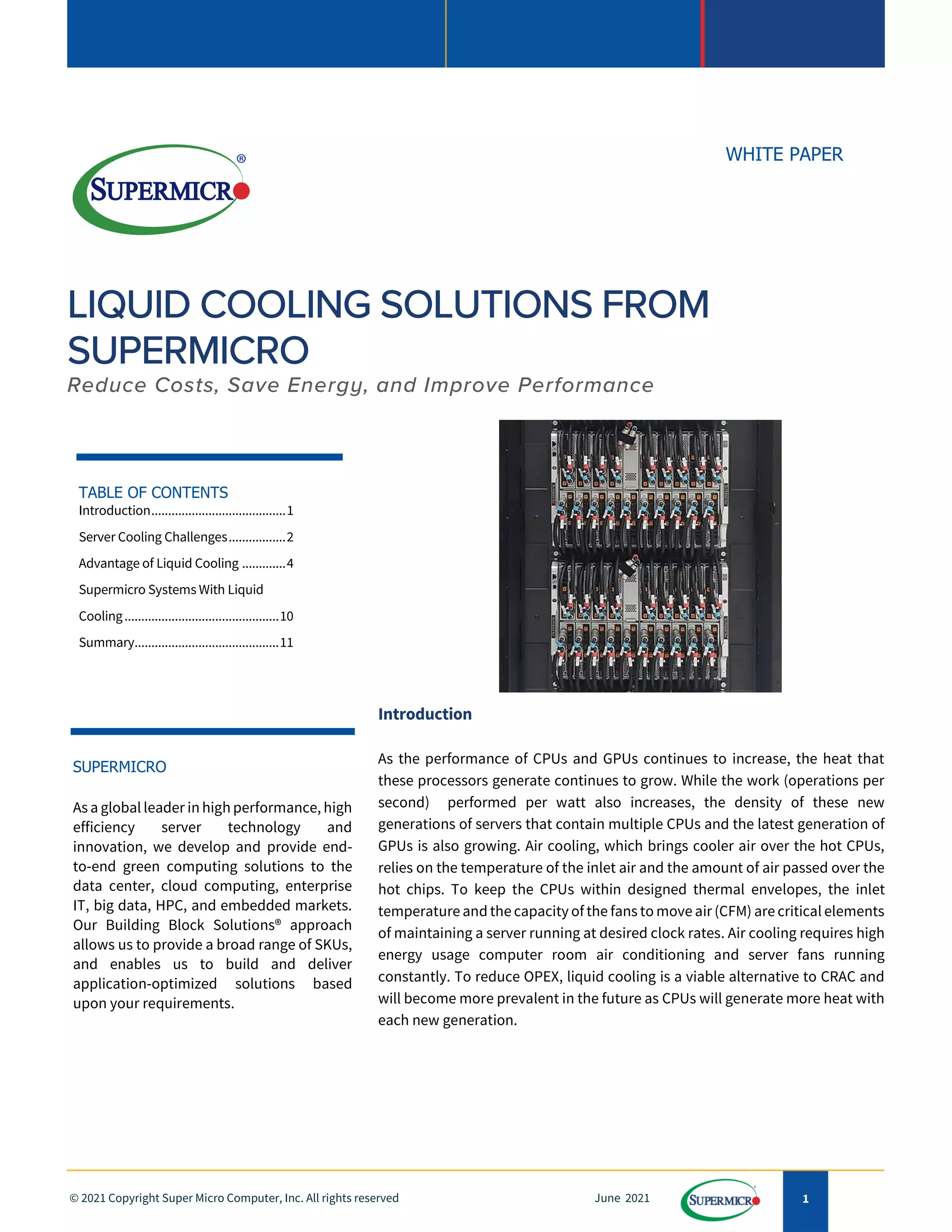
As the performance of CPUs and GPUs continues to increase, the heat that
these processors generate continues to grow. While the work (operations per
second) performed per watt also increases, the density of these new
generations of servers that contain multiple CPUs and the latest generation of
GPUs is also growing. Air cooling, which brings cooler air over the hot CPUs,
relies on the temperature of the inlet air and the amount of air passed over the
hot chips. To keep the CPUs within designed thermal envelopes, the inlet
temperature and the capacity of the fans to move air (CFM) are critical elements
of maintaining a server running at desired clock rates. Air cooling requires high
energy usage computer room air conditioning and server fans running
constantly. To reduce OPEX, liquid cooling is a viable alternative to CRAC and
will become more prevalent in the future as CPUs will generate more heat with
each new generation.
TABLE OF CONTENTS
Introduction........................................1
Server Cooling Challenges.................2
Advantage of Liquid Cooling .............4
Supermicro Systems With Liquid
Cooling..............................................10
Summary...........................................11
SUPERMICRO
As a global leader in high performance, high
efficiency server technology and
innovation, we develop and provide end-
to-end green computing solutions to the
data center, cloud computing, enterprise
IT, big data, HPC, and embedded markets.
Our Building Block Solutions® approach
allows us to provide a broad range of SKUs,
and enables us to build and deliver
application-optimized solutions based
upon your requirements.
2
© 2021 Copyright Super Micro Computer, Inc. All rights reserved June 2021
Server Cooling Challenges
The most powerful CPUs used in servers today (2021) are designed with a maximum thermal design power of 270 to 280 Watts.
Recent GPUs can run at 500 Watts. Thus, a 2 CPU, 8 GPU system requires about 4 to 5 kilowatts of cooling capacity for just the
CPUs and GPUs. CPU manufacturers will specify how much air, measured in cubic feet per minute, is needed to cool a given
wattage CPU (similar for GPUs).
Why Liquid Cooling
Today, many servers consume greater than 1 kW to power the CPUs, GPUs, Memory, and any other hardware installed within a
single chassis. Multiplying this amount of power needed for a full rack makes it easy to estimate how much power a data
center uses and must provide cooling technology. Traditionally, moving a quantity of air over a CPU would be sufficient to
cool the microprocessor. The cooling ability is dependent on the inlet temperature (the lower, the better) and the power of the
fans to move this cool air, which picks up heat from the CPUs, GPUs, memory, etc. There is a limit to how large a fan can be
internal to a chassis, which is measured in the number of "U" s (1.75") that the server is designed to be. Multiple fans can be
installed in a server to increase the airflow over different geometries in the server.
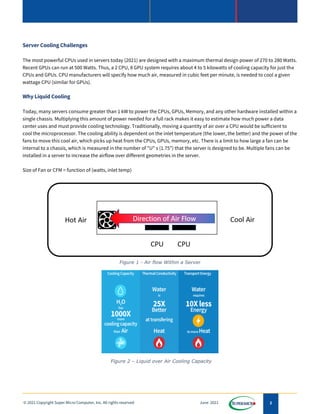
Size of Fan or CFM = function of (watts, inlet temp)
Figure 2 – Liquid over Air Cooling Capacity
Figure 1 - Air flow Within a Server
3
© 2021 Copyright Super Micro Computer, Inc. All rights reserved June 2021
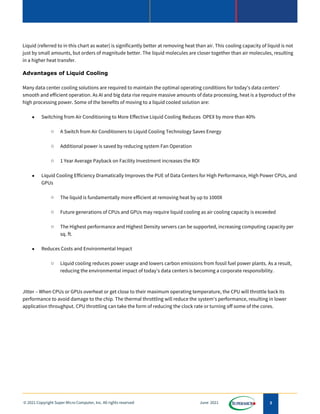
Liquid (referred to in this chart as water) is significantly better at removing heat than air. This cooling capacity of liquid is not
just by small amounts, but orders of magnitude better. The liquid molecules are closer together than air molecules, resulting
in a higher heat transfer.
Advantages of Liquid Cooling
Many data center cooling solutions are required to maintain the optimal operating conditions for today's data centers'
smooth and efficient operation. As AI and big data rise require massive amounts of data processing, heat is a byproduct of the
high processing power. Some of the benefits of moving to a liquid cooled solution are:
• Switching from Air Conditioning to More Effective Liquid Cooling Reduces OPEX by more than 40%
o A Switch from Air Conditioners to Liquid Cooling Technology Saves Energy
o Additional power is saved by reducing system Fan Operation
o 1 Year Average Payback on Facility Investment increases the ROI
• Liquid Cooling Efficiency Dramatically Improves the PUE of Data Centers for High Performance, High Power CPUs, and
GPUs
o The liquid is fundamentally more efficient at removing heat by up to 1000X
o Future generations of CPUs and GPUs may require liquid cooling as air cooling capacity is exceeded
o The Highest performance and Highest Density servers can be supported, increasing computing capacity per
sq. ft.
• Reduces Costs and Environmental Impact
o Liquid cooling reduces power usage and lowers carbon emissions from fossil fuel power plants. As a result,
reducing the environmental impact of today's data centers is becoming a corporate responsibility.
Jitter – When CPUs or GPUs overheat or get close to their maximum operating temperature, the CPU will throttle back its
performance to avoid damage to the chip. The thermal throttling will reduce the system's performance, resulting in lower
application throughput. CPU throttling can take the form of reducing the clock rate or turning off some of the cores.
4
© 2021 Copyright Super Micro Computer, Inc. All rights reserved June 2021
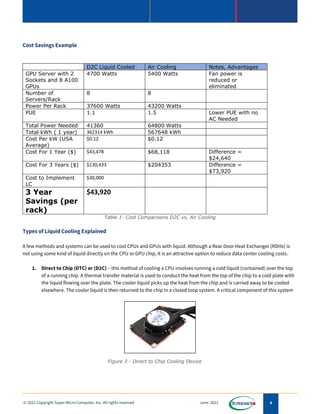
Cost Savings Example
D2C Liquid Cooled Air Cooling Notes, Advantages
GPU Server with 2
Sockets and 8 A100
GPUs
4700 Watts 5400 Watts Fan power is
reduced or
eliminated
Number of
Servers/Rack
8 8
Power Per Rack 37600 Watts 43200 Watts
PUE 1.1 1.5 Lower PUE with no
AC Needed
Total Power Needed 41360 64800 Watts
Total kWh ( 1 year) 362314 kWh 567648 kWh
Cost Per kW (USA
Average)
$0.12 $0.12
Cost For 1 Year ($) $43,478 $68,118 Difference =
$24,640
Cost For 3 Years ($) $130,433 $204353 Difference =
$73,920
Cost to Implement
LC
$30,000
3 Year
Savings (per
rack)
$43,920
Table 1- Cost Comparisons D2C vs. Air Cooling
Types of Liquid Cooling Explained
A few methods and systems can be used to cool CPUs and GPUs with liquid. Although a Rear Door Heat Exchanger (RDHx) is
not using some kind of liquid directly on the CPU or GPU chip, it is an attractive option to reduce data center cooling costs.
1. Direct to Chip (DTC) or (D2C) – this method of cooling a CPU involves running a cold liquid (contained) over the top
of a running chip. A thermal transfer material is used to conduct the heat from the top of the chip to a cold plate with
the liquid flowing over the plate. The cooler liquid picks up the heat from the chip and is carried away to be cooled
elsewhere. The cooler liquid is then returned to the chip in a closed loop system. A critical component of this system
Figure 3 - Direct to Chip Cooling Device
5
© 2021 Copyright Super Micro Computer, Inc. All rights reserved June 2021
is the pump, which circulates the liquid and is placed directly on the chip to improve flow. Figure 3 shows a pump and
cold plate which would be connected directly to a chip.
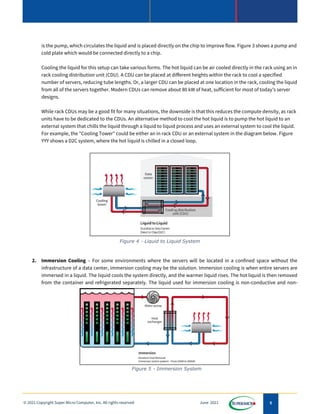
Cooling the liquid for this setup can take various forms. The hot liquid can be air cooled directly in the rack using an in
rack cooling distribution unit (CDU). A CDU can be placed at different heights within the rack to cool a specified
number of servers, reducing tube lengths. Or, a larger CDU can be placed at one location in the rack, cooling the liquid
from all of the servers together. Modern CDUs can remove about 80 kW of heat, sufficient for most of today's server
designs.
While rack CDUs may be a good fit for many situations, the downside is that this reduces the compute density, as rack
units have to be dedicated to the CDUs. An alternative method to cool the hot liquid is to pump the hot liquid to an
external system that chills the liquid through a liquid to liquid process and uses an external system to cool the liquid.
For example, the "Cooling Tower" could be either an in rack CDU or an external system in the diagram below. Figure
YYY shows a D2C system, where the hot liquid is chilled in a closed loop.
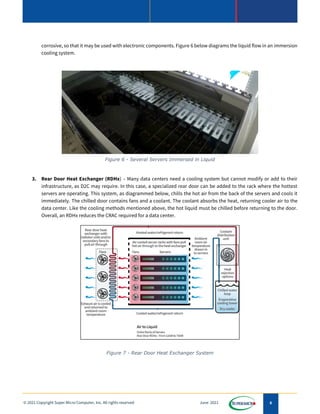
2. Immersion Cooling – For some environments where the servers will be located in a confined space without the
infrastructure of a data center, immersion cooling may be the solution. Immersion cooling is when entire servers are
immersed in a liquid. The liquid cools the system directly, and the warmer liquid rises. The hot liquid is then removed
from the container and refrigerated separately. The liquid used for immersion cooling is non-conductive and non-
Figure 4 - Liquid to Liquid System
Figure 5 - Immersion System
6
© 2021 Copyright Super Micro Computer, Inc. All rights reserved June 2021
corrosive, so that it may be used with electronic components. Figure 6 below diagrams the liquid flow in an immersion
cooling system.
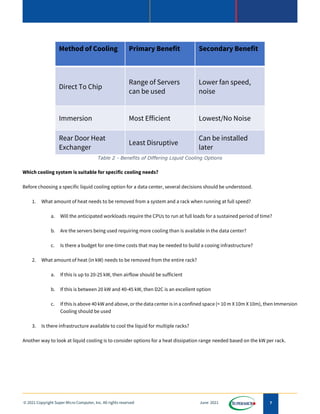
3. Rear Door Heat Exchanger (RDHx) – Many data centers need a cooling system but cannot modify or add to their
infrastructure, as D2C may require. In this case, a specialized rear door can be added to the rack where the hottest
servers are operating. This system, as diagrammed below, chills the hot air from the back of the servers and cools it
immediately. The chilled door contains fans and a coolant. The coolant absorbs the heat, returning cooler air to the
data center. Like the cooling methods mentioned above, the hot liquid must be chilled before returning to the door.
Overall, an RDHx reduces the CRAC required for a data center.
Figure 6 - Several Servers Immersed in Liquid
Figure 7 - Rear Door Heat Exchanger System
7
© 2021 Copyright Super Micro Computer, Inc. All rights reserved June 2021
Method of Cooling Primary Benefit Secondary Benefit
Direct To Chip
Range of Servers
can be used
Lower fan speed,
noise
Immersion Most Efficient Lowest/No Noise
Rear Door Heat
Exchanger
Least Disruptive
Can be installed
later
Table 2 - Benefits of Differing Liquid Cooling Options
Which cooling system is suitable for specific cooling needs?
Before choosing a specific liquid cooling option for a data center, several decisions should be understood.
1. What amount of heat needs to be removed from a system and a rack when running at full speed?
a. Will the anticipated workloads require the CPUs to run at full loads for a sustained period of time?
b. Are the servers being used requiring more cooling than is available in the data center?
c. Is there a budget for one-time costs that may be needed to build a cooing infrastructure?
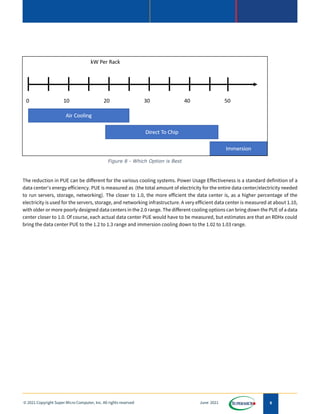
2. What amount of heat (in kW) needs to be removed from the entire rack?
a. If this is up to 20-25 kW, then airflow should be sufficient
b. If this is between 20 kW and 40-45 kW, then D2C is an excellent option
c. If this is above 40 kW and above, or the data center is in a confined space (< 10 m X 10m X 10m), then Immersion
Cooling should be used
3. Is there infrastructure available to cool the liquid for multiple racks?
Another way to look at liquid cooling is to consider options for a heat dissipation range needed based on the kW per rack.
8
© 2021 Copyright Super Micro Computer, Inc. All rights reserved June 2021
The reduction in PUE can be different for the various cooling systems. Power Usage Effectiveness is a standard definition of a
data center's energy efficiency. PUE is measured as (the total amount of electricity for the entire data center/electricity needed
to run servers, storage, networking). The closer to 1.0, the more efficient the data center is, as a higher percentage of the
electricity is used for the servers, storage, and networking infrastructure. A very efficient data center is measured at about 1.10,
with older or more poorly designed data centers in the 2.0 range. The different cooling options can bring down the PUE of a data
center closer to 1.0. Of course, each actual data center PUE would have to be measured, but estimates are that an RDHx could
bring the data center PUE to the 1.2 to 1.3 range and immersion cooling down to the 1.02 to 1.03 range.
Figure 8 - Which Option is Best
9
© 2021 Copyright Super Micro Computer, Inc. All rights reserved June 2021
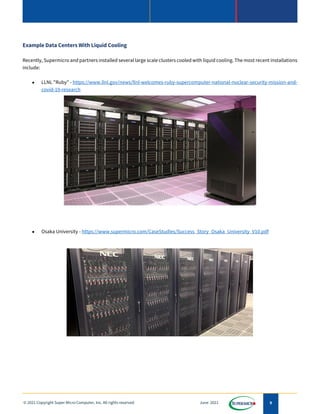
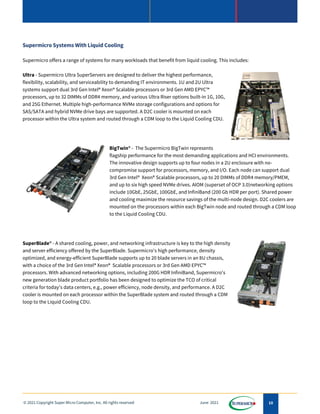
Example Data Centers With Liquid Cooling
Recently, Supermicro and partners installed several large scale clusters cooled with liquid cooling. The most recent installations
include:
• LLNL "Ruby" - https://www.llnl.gov/news/llnl-welcomes-ruby-supercomputer-national-nuclear-security-mission-and-
covid-19-research
• Osaka University - https://www.supermicro.com/CaseStudies/Success_Story_Osaka_University_V10.pdf
10
© 2021 Copyright Super Micro Computer, Inc. All rights reserved June 2021
Supermicro Systems With Liquid Cooling
Supermicro offers a range of systems for many workloads that benefit from liquid cooling. This includes:
Ultra - Supermicro Ultra SuperServers are designed to deliver the highest performance,
flexibility, scalability, and serviceability to demanding IT environments. 1U and 2U Ultra
systems support dual 3rd Gen Intel® Xeon® Scalable processors or 3rd Gen AMD EPYC™
processors, up to 32 DIMMs of DDR4 memory, and various Ultra Riser options built-in 1G, 10G,
and 25G Ethernet. Multiple high-performance NVMe storage configurations and options for
SAS/SATA and hybrid NVMe drive bays are supported. A D2C cooler is mounted on each
processor within the Ultra system and routed through a CDM loop to the Liquid Cooling CDU.
BigTwin® - The Supermicro BigTwin represents
flagship performance for the most demanding applications and HCI environments.
The innovative design supports up to four nodes in a 2U enclosure with no-
compromise support for processors, memory, and I/O. Each node can support dual
3rd Gen Intel® Xeon® Scalable processors, up to 20 DIMMs of DDR4 memory/PMEM,
and up to six high speed NVMe drives. AIOM (superset of OCP 3.0)networking options
include 10GbE, 25GbE, 100GbE, and InfiniBand (200 Gb HDR per port). Shared power
and cooling maximize the resource savings of the multi-node design. D2C coolers are
mounted on the processors within each BigTwin node and routed through a CDM loop
to the Liquid Cooling CDU.
SuperBlade® - A shared cooling, power, and networking infrastructure is key to the high density
and server efficiency offered by the SuperBlade. Supermicro's high performance, density
optimized, and energy-efficient SuperBlade supports up to 20 blade servers in an 8U chassis,
with a choice of the 3rd Gen Intel® Xeon® Scalable processors or 3rd Gen AMD EPYC™
processors. With advanced networking options, including 200G HDR InfiniBand, Supermicro's
new generation blade product portfolio has been designed to optimize the TCO of critical
criteria for today's data centers, e.g., power efficiency, node density, and performance. A D2C
cooler is mounted on each processor within the SuperBlade system and routed through a CDM
loop to the Liquid Cooling CDU.
11
© 2021 Copyright Super Micro Computer, Inc. All rights reserved June 2021
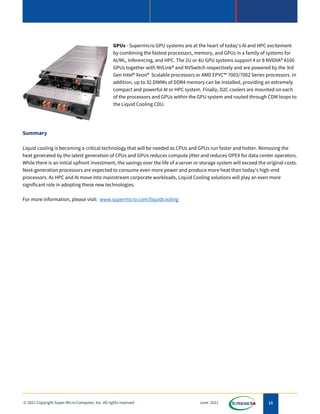
GPUs - Supermicro GPU systems are at the heart of today's AI and HPC excitement
by combining the fastest processors, memory, and GPUs in a family of systems for
AI/ML, Inferencing, and HPC. The 2U or 4U GPU systems support 4 or 8 NVIDIA® A100
GPUs together with NVLink® and NVSwitch respectively and are powered by the 3rd
Gen Intel® Xeon® Scalable processors or AMD EPYC™ 7003/7002 Series processors. In
addition, up to 32 DIMMs of DDR4 memory can be installed, providing an extremely
compact and powerful AI or HPC system. Finally, D2C coolers are mounted on each
of the processors and GPUs within the GPU system and routed through CDM loops to
the Liquid Cooling CDU.
Summary
Liquid cooling is becoming a critical technology that will be needed as CPUs and GPUs run faster and hotter. Removing the
heat generated by the latest generation of CPUs and GPUs reduces compute jitter and reduces OPEX for data center operators.
While there is an initial upfront investment, the savings over the life of a server or storage system will exceed the original costs.
Next-generation processors are expected to consume even more power and produce more heat than today's high-end
processors. As HPC and AI move into mainstream corporate workloads, Liquid Cooling solutions will play an even more
significant role in adopting these new technologies.
For more information, please visit: www.supermicro.com/liquidcooling

white_paper_Liquid-Cooling-Solutions.pdf

  • 1.
    1 © 2021 CopyrightSuper Micro Computer, Inc. All rights reserved June 2021 WHITE PAPER Introduction As the performance of CPUs and GPUs continues to increase, the heat that these processors generate continues to grow. While the work (operations per second) performed per watt also increases, the density of these new generations of servers that contain multiple CPUs and the latest generation of GPUs is also growing. Air cooling, which brings cooler air over the hot CPUs, relies on the temperature of the inlet air and the amount of air passed over the hot chips. To keep the CPUs within designed thermal envelopes, the inlet temperature and the capacity of the fans to move air (CFM) are critical elements of maintaining a server running at desired clock rates. Air cooling requires high energy usage computer room air conditioning and server fans running constantly. To reduce OPEX, liquid cooling is a viable alternative to CRAC and will become more prevalent in the future as CPUs will generate more heat with each new generation. TABLE OF CONTENTS Introduction........................................1 Server Cooling Challenges.................2 Advantage of Liquid Cooling .............4 Supermicro Systems With Liquid Cooling..............................................10 Summary...........................................11 SUPERMICRO As a global leader in high performance, high efficiency server technology and innovation, we develop and provide end- to-end green computing solutions to the data center, cloud computing, enterprise IT, big data, HPC, and embedded markets. Our Building Block Solutions® approach allows us to provide a broad range of SKUs, and enables us to build and deliver application-optimized solutions based upon your requirements.
  • 2.
    2 © 2021 CopyrightSuper Micro Computer, Inc. All rights reserved June 2021 Server Cooling Challenges The most powerful CPUs used in servers today (2021) are designed with a maximum thermal design power of 270 to 280 Watts. Recent GPUs can run at 500 Watts. Thus, a 2 CPU, 8 GPU system requires about 4 to 5 kilowatts of cooling capacity for just the CPUs and GPUs. CPU manufacturers will specify how much air, measured in cubic feet per minute, is needed to cool a given wattage CPU (similar for GPUs). Why Liquid Cooling Today, many servers consume greater than 1 kW to power the CPUs, GPUs, Memory, and any other hardware installed within a single chassis. Multiplying this amount of power needed for a full rack makes it easy to estimate how much power a data center uses and must provide cooling technology. Traditionally, moving a quantity of air over a CPU would be sufficient to cool the microprocessor. The cooling ability is dependent on the inlet temperature (the lower, the better) and the power of the fans to move this cool air, which picks up heat from the CPUs, GPUs, memory, etc. There is a limit to how large a fan can be internal to a chassis, which is measured in the number of "U" s (1.75") that the server is designed to be. Multiple fans can be installed in a server to increase the airflow over different geometries in the server. Size of Fan or CFM = function of (watts, inlet temp) Figure 2 – Liquid over Air Cooling Capacity Figure 1 - Air flow Within a Server
  • 3.
    3 © 2021 CopyrightSuper Micro Computer, Inc. All rights reserved June 2021 Liquid (referred to in this chart as water) is significantly better at removing heat than air. This cooling capacity of liquid is not just by small amounts, but orders of magnitude better. The liquid molecules are closer together than air molecules, resulting in a higher heat transfer. Advantages of Liquid Cooling Many data center cooling solutions are required to maintain the optimal operating conditions for today's data centers' smooth and efficient operation. As AI and big data rise require massive amounts of data processing, heat is a byproduct of the high processing power. Some of the benefits of moving to a liquid cooled solution are: • Switching from Air Conditioning to More Effective Liquid Cooling Reduces OPEX by more than 40% o A Switch from Air Conditioners to Liquid Cooling Technology Saves Energy o Additional power is saved by reducing system Fan Operation o 1 Year Average Payback on Facility Investment increases the ROI • Liquid Cooling Efficiency Dramatically Improves the PUE of Data Centers for High Performance, High Power CPUs, and GPUs o The liquid is fundamentally more efficient at removing heat by up to 1000X o Future generations of CPUs and GPUs may require liquid cooling as air cooling capacity is exceeded o The Highest performance and Highest Density servers can be supported, increasing computing capacity per sq. ft. • Reduces Costs and Environmental Impact o Liquid cooling reduces power usage and lowers carbon emissions from fossil fuel power plants. As a result, reducing the environmental impact of today's data centers is becoming a corporate responsibility. Jitter – When CPUs or GPUs overheat or get close to their maximum operating temperature, the CPU will throttle back its performance to avoid damage to the chip. The thermal throttling will reduce the system's performance, resulting in lower application throughput. CPU throttling can take the form of reducing the clock rate or turning off some of the cores.
  • 4.
    4 © 2021 CopyrightSuper Micro Computer, Inc. All rights reserved June 2021 Cost Savings Example D2C Liquid Cooled Air Cooling Notes, Advantages GPU Server with 2 Sockets and 8 A100 GPUs 4700 Watts 5400 Watts Fan power is reduced or eliminated Number of Servers/Rack 8 8 Power Per Rack 37600 Watts 43200 Watts PUE 1.1 1.5 Lower PUE with no AC Needed Total Power Needed 41360 64800 Watts Total kWh ( 1 year) 362314 kWh 567648 kWh Cost Per kW (USA Average) $0.12 $0.12 Cost For 1 Year ($) $43,478 $68,118 Difference = $24,640 Cost For 3 Years ($) $130,433 $204353 Difference = $73,920 Cost to Implement LC $30,000 3 Year Savings (per rack) $43,920 Table 1- Cost Comparisons D2C vs. Air Cooling Types of Liquid Cooling Explained A few methods and systems can be used to cool CPUs and GPUs with liquid. Although a Rear Door Heat Exchanger (RDHx) is not using some kind of liquid directly on the CPU or GPU chip, it is an attractive option to reduce data center cooling costs. 1. Direct to Chip (DTC) or (D2C) – this method of cooling a CPU involves running a cold liquid (contained) over the top of a running chip. A thermal transfer material is used to conduct the heat from the top of the chip to a cold plate with the liquid flowing over the plate. The cooler liquid picks up the heat from the chip and is carried away to be cooled elsewhere. The cooler liquid is then returned to the chip in a closed loop system. A critical component of this system Figure 3 - Direct to Chip Cooling Device
  • 5.
    5 © 2021 CopyrightSuper Micro Computer, Inc. All rights reserved June 2021 is the pump, which circulates the liquid and is placed directly on the chip to improve flow. Figure 3 shows a pump and cold plate which would be connected directly to a chip. Cooling the liquid for this setup can take various forms. The hot liquid can be air cooled directly in the rack using an in rack cooling distribution unit (CDU). A CDU can be placed at different heights within the rack to cool a specified number of servers, reducing tube lengths. Or, a larger CDU can be placed at one location in the rack, cooling the liquid from all of the servers together. Modern CDUs can remove about 80 kW of heat, sufficient for most of today's server designs. While rack CDUs may be a good fit for many situations, the downside is that this reduces the compute density, as rack units have to be dedicated to the CDUs. An alternative method to cool the hot liquid is to pump the hot liquid to an external system that chills the liquid through a liquid to liquid process and uses an external system to cool the liquid. For example, the "Cooling Tower" could be either an in rack CDU or an external system in the diagram below. Figure YYY shows a D2C system, where the hot liquid is chilled in a closed loop. 2. Immersion Cooling – For some environments where the servers will be located in a confined space without the infrastructure of a data center, immersion cooling may be the solution. Immersion cooling is when entire servers are immersed in a liquid. The liquid cools the system directly, and the warmer liquid rises. The hot liquid is then removed from the container and refrigerated separately. The liquid used for immersion cooling is non-conductive and non- Figure 4 - Liquid to Liquid System Figure 5 - Immersion System
  • 6.
    6 © 2021 CopyrightSuper Micro Computer, Inc. All rights reserved June 2021 corrosive, so that it may be used with electronic components. Figure 6 below diagrams the liquid flow in an immersion cooling system. 3. Rear Door Heat Exchanger (RDHx) – Many data centers need a cooling system but cannot modify or add to their infrastructure, as D2C may require. In this case, a specialized rear door can be added to the rack where the hottest servers are operating. This system, as diagrammed below, chills the hot air from the back of the servers and cools it immediately. The chilled door contains fans and a coolant. The coolant absorbs the heat, returning cooler air to the data center. Like the cooling methods mentioned above, the hot liquid must be chilled before returning to the door. Overall, an RDHx reduces the CRAC required for a data center. Figure 6 - Several Servers Immersed in Liquid Figure 7 - Rear Door Heat Exchanger System
  • 7.
    7 © 2021 CopyrightSuper Micro Computer, Inc. All rights reserved June 2021 Method of Cooling Primary Benefit Secondary Benefit Direct To Chip Range of Servers can be used Lower fan speed, noise Immersion Most Efficient Lowest/No Noise Rear Door Heat Exchanger Least Disruptive Can be installed later Table 2 - Benefits of Differing Liquid Cooling Options Which cooling system is suitable for specific cooling needs? Before choosing a specific liquid cooling option for a data center, several decisions should be understood. 1. What amount of heat needs to be removed from a system and a rack when running at full speed? a. Will the anticipated workloads require the CPUs to run at full loads for a sustained period of time? b. Are the servers being used requiring more cooling than is available in the data center? c. Is there a budget for one-time costs that may be needed to build a cooing infrastructure? 2. What amount of heat (in kW) needs to be removed from the entire rack? a. If this is up to 20-25 kW, then airflow should be sufficient b. If this is between 20 kW and 40-45 kW, then D2C is an excellent option c. If this is above 40 kW and above, or the data center is in a confined space (< 10 m X 10m X 10m), then Immersion Cooling should be used 3. Is there infrastructure available to cool the liquid for multiple racks? Another way to look at liquid cooling is to consider options for a heat dissipation range needed based on the kW per rack.
  • 8.
    8 © 2021 CopyrightSuper Micro Computer, Inc. All rights reserved June 2021 The reduction in PUE can be different for the various cooling systems. Power Usage Effectiveness is a standard definition of a data center's energy efficiency. PUE is measured as (the total amount of electricity for the entire data center/electricity needed to run servers, storage, networking). The closer to 1.0, the more efficient the data center is, as a higher percentage of the electricity is used for the servers, storage, and networking infrastructure. A very efficient data center is measured at about 1.10, with older or more poorly designed data centers in the 2.0 range. The different cooling options can bring down the PUE of a data center closer to 1.0. Of course, each actual data center PUE would have to be measured, but estimates are that an RDHx could bring the data center PUE to the 1.2 to 1.3 range and immersion cooling down to the 1.02 to 1.03 range. Figure 8 - Which Option is Best
  • 9.
    9 © 2021 CopyrightSuper Micro Computer, Inc. All rights reserved June 2021 Example Data Centers With Liquid Cooling Recently, Supermicro and partners installed several large scale clusters cooled with liquid cooling. The most recent installations include: • LLNL "Ruby" - https://www.llnl.gov/news/llnl-welcomes-ruby-supercomputer-national-nuclear-security-mission-and- covid-19-research • Osaka University - https://www.supermicro.com/CaseStudies/Success_Story_Osaka_University_V10.pdf
  • 10.
    10 © 2021 CopyrightSuper Micro Computer, Inc. All rights reserved June 2021 Supermicro Systems With Liquid Cooling Supermicro offers a range of systems for many workloads that benefit from liquid cooling. This includes: Ultra - Supermicro Ultra SuperServers are designed to deliver the highest performance, flexibility, scalability, and serviceability to demanding IT environments. 1U and 2U Ultra systems support dual 3rd Gen Intel® Xeon® Scalable processors or 3rd Gen AMD EPYC™ processors, up to 32 DIMMs of DDR4 memory, and various Ultra Riser options built-in 1G, 10G, and 25G Ethernet. Multiple high-performance NVMe storage configurations and options for SAS/SATA and hybrid NVMe drive bays are supported. A D2C cooler is mounted on each processor within the Ultra system and routed through a CDM loop to the Liquid Cooling CDU. BigTwin® - The Supermicro BigTwin represents flagship performance for the most demanding applications and HCI environments. The innovative design supports up to four nodes in a 2U enclosure with no- compromise support for processors, memory, and I/O. Each node can support dual 3rd Gen Intel® Xeon® Scalable processors, up to 20 DIMMs of DDR4 memory/PMEM, and up to six high speed NVMe drives. AIOM (superset of OCP 3.0)networking options include 10GbE, 25GbE, 100GbE, and InfiniBand (200 Gb HDR per port). Shared power and cooling maximize the resource savings of the multi-node design. D2C coolers are mounted on the processors within each BigTwin node and routed through a CDM loop to the Liquid Cooling CDU. SuperBlade® - A shared cooling, power, and networking infrastructure is key to the high density and server efficiency offered by the SuperBlade. Supermicro's high performance, density optimized, and energy-efficient SuperBlade supports up to 20 blade servers in an 8U chassis, with a choice of the 3rd Gen Intel® Xeon® Scalable processors or 3rd Gen AMD EPYC™ processors. With advanced networking options, including 200G HDR InfiniBand, Supermicro's new generation blade product portfolio has been designed to optimize the TCO of critical criteria for today's data centers, e.g., power efficiency, node density, and performance. A D2C cooler is mounted on each processor within the SuperBlade system and routed through a CDM loop to the Liquid Cooling CDU.
  • 11.
    11 © 2021 CopyrightSuper Micro Computer, Inc. All rights reserved June 2021 GPUs - Supermicro GPU systems are at the heart of today's AI and HPC excitement by combining the fastest processors, memory, and GPUs in a family of systems for AI/ML, Inferencing, and HPC. The 2U or 4U GPU systems support 4 or 8 NVIDIA® A100 GPUs together with NVLink® and NVSwitch respectively and are powered by the 3rd Gen Intel® Xeon® Scalable processors or AMD EPYC™ 7003/7002 Series processors. In addition, up to 32 DIMMs of DDR4 memory can be installed, providing an extremely compact and powerful AI or HPC system. Finally, D2C coolers are mounted on each of the processors and GPUs within the GPU system and routed through CDM loops to the Liquid Cooling CDU. Summary Liquid cooling is becoming a critical technology that will be needed as CPUs and GPUs run faster and hotter. Removing the heat generated by the latest generation of CPUs and GPUs reduces compute jitter and reduces OPEX for data center operators. While there is an initial upfront investment, the savings over the life of a server or storage system will exceed the original costs. Next-generation processors are expected to consume even more power and produce more heat than today's high-end processors. As HPC and AI move into mainstream corporate workloads, Liquid Cooling solutions will play an even more significant role in adopting these new technologies. For more information, please visit: www.supermicro.com/liquidcooling