Joshua S. Clark, CISSP
Security Consultant
• Second Order SQL Injection
Ø (10 minutes)
• Response to Customer Email
Ø (5 minutes)
• Q&A
Ø (5 minutes)
Overview & Prevention
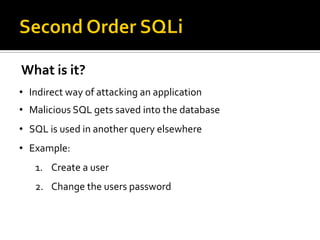
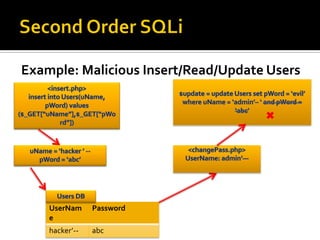
What is it?
• Indirect way of attacking an application
• Malicious SQL gets saved into the database
• SQL is used in another query elsewhere
• Example:
1. Create a user
2. Change the users password
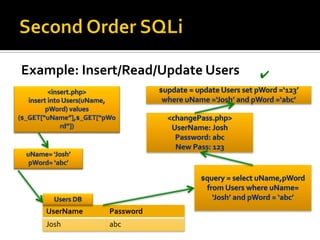
Example: Insert/Read/Update Users
UserName Password
Josh abc
✔
Example: Malicious Insert/Read/Update Users
UserNam
e
Password
hacker’-- abc
✖
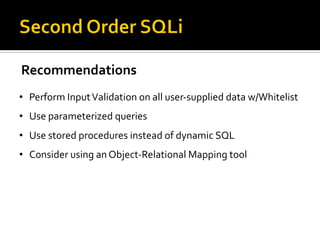
Recommendations
• Perform InputValidation on all user-supplied data w/Whitelist
• Use parameterized queries
• Use stored procedures instead of dynamic SQL
• Consider using an Object-Relational Mapping tool
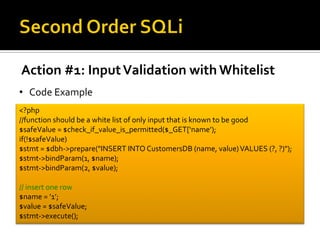
Action #1: InputValidation with Whitelist
• Code Example
<?php
//function should be a white list of only input that is known to be good
$safeValue = $check_if_value_is_permitted($_GET[‘name’);
if(!$safeValue)
$stmt = $dbh->prepare("INSERT INTO CustomersDB (name, value)VALUES (?, ?)");
$stmt->bindParam(1, $name);
$stmt->bindParam(2, $value);
// insert one row
$name = ’1’;
$value = $safeValue;
$stmt->execute();
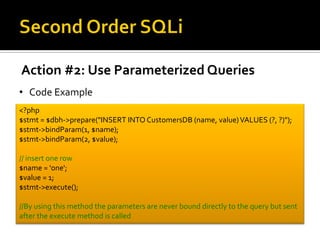
Action #2: Use Parameterized Queries
• Code Example
<?php
$stmt = $dbh->prepare("INSERT INTO CustomersDB (name, value)VALUES (?, ?)");
$stmt->bindParam(1, $name);
$stmt->bindParam(2, $value);
// insert one row
$name = 'one';
$value = 1;
$stmt->execute();
//By using this method the parameters are never bound directly to the query but sent
after the execute method is called
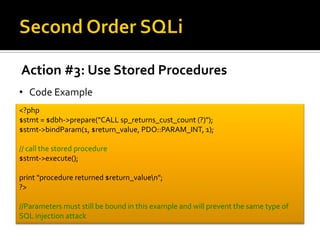
Action #3: Use Stored Procedures
• Code Example
<?php
$stmt = $dbh->prepare("CALL sp_returns_cust_count (?)");
$stmt->bindParam(1, $return_value, PDO::PARAM_INT, 1);
// call the stored procedure
$stmt->execute();
print "procedure returned $return_valuen";
?>
//Parameters must still be bound in this example and will prevent the same type of
SQL injection attack
Overview & Prevention
Exploit
Code Review: SQL InjectionVuln
6 $query = "SELECT * FROM listings WHERE id = ".$_GET['id'];
7 //Vulnerability exists at line 8
8 $result = mysql_query($query);
• SQL injection occurs when:
1. Data enters an application from an untrusted source
2. The data is used to dynamically construct a SQL query
• An attacker could pass: 1’ OR 1=1 -> to id variable would be
the same as returning all the listings
• Even worse, an attacker could pass 1’; DROP table listings
which would delete the listing table
Code Review: Remediation Steps
6 $_GET['id'] = str_replace("/", "", $_SERVER['PATH_INFO']);
7 // Step 1: InputValidation: Check id against allowed whitelist if possible
8 $safeValue = $validateInput($_GET[‘id’];
6 // Step 2: Use positional parameter in query
5 $listing_id = intval($safeValue);
6 $query = "SELECT * FROM listings WHERE id = ?
7 //Step 3: Use mysqli() instead of mysql_query()
8 $stmt = $mysqli - > prepare($query);
9 //Step 4: Bind parameter
10 $stmt -> bind_param(1, $listing_id);
11 $stmt -> execute();
✔
✔
✔
✔
Email (1/2)
Dear Customer XYZ,
My name is Joshua Clark and I will be assisting you with the review of your scan. After reviewing the source code we identified a
SQL injection vulnerability within the code that you provided.The vulnerability exists on line 7 of source_file.php. See below:
7: $result = mysql_query($query);
SQL injection occurs when:
1) Data enters an application from an untrusted source
2)The data is used to dynamically construct a SQL query
In this case data is passed to mysql_query() on line 7 from an untrusted source such as $_GET[‘id’]. An attacker could pass in
value of “1’ OR 1=1 into the id value which would result in the following query being executed:
SELECT * FROM listingsWHERE id = 1’ OR 1=1
This would result in returning all the rows from the database instead of just 1 record as expected.The attacker could also try to
do execute dangerous SQL commands by entering: 1’; DROP table listing;-- which would delete the listings table all together.
Email (2/2)
In order to prevent SQL injection we have the following recommendations for your code:
1) Perform InputValidation on all user-supplied variables
-> In the case above simply adding the ‘intval($_GET[‘id’]);’ will remove the SQL injection vulnerability but there may also be an
access control check needed here as well.
2) Use parameterized queries for dynamic queries
->When using dynamic SQL prepared statements eliminate SQL injection vulnerabilities
3) Use Stored Procedures when possible
4) Use the updated/recommended mysqli() function instead of mysql_query() function because it has many advantage over the
previous function such as:
-> Prepared Statements
-> Object-Oriented Interface
-> Enhanced Debugging Support
Regards,
Joshua S. Clark, CISSP
Application Security Consultant

2nd-Order-SQLi-Josh

  • 1.
    Joshua S. Clark,CISSP Security Consultant
  • 2.
    • Second OrderSQL Injection Ø (10 minutes) • Response to Customer Email Ø (5 minutes) • Q&A Ø (5 minutes)
  • 3.
  • 4.
    What is it? •Indirect way of attacking an application • Malicious SQL gets saved into the database • SQL is used in another query elsewhere • Example: 1. Create a user 2. Change the users password
  • 5.
  • 6.
    Example: Malicious Insert/Read/UpdateUsers UserNam e Password hacker’-- abc ✖
  • 7.
    Recommendations • Perform InputValidationon all user-supplied data w/Whitelist • Use parameterized queries • Use stored procedures instead of dynamic SQL • Consider using an Object-Relational Mapping tool
  • 8.
    Action #1: InputValidationwith Whitelist • Code Example <?php //function should be a white list of only input that is known to be good $safeValue = $check_if_value_is_permitted($_GET[‘name’); if(!$safeValue) $stmt = $dbh->prepare("INSERT INTO CustomersDB (name, value)VALUES (?, ?)"); $stmt->bindParam(1, $name); $stmt->bindParam(2, $value); // insert one row $name = ’1’; $value = $safeValue; $stmt->execute();
  • 9.
    Action #2: UseParameterized Queries • Code Example <?php $stmt = $dbh->prepare("INSERT INTO CustomersDB (name, value)VALUES (?, ?)"); $stmt->bindParam(1, $name); $stmt->bindParam(2, $value); // insert one row $name = 'one'; $value = 1; $stmt->execute(); //By using this method the parameters are never bound directly to the query but sent after the execute method is called
  • 10.
    Action #3: UseStored Procedures • Code Example <?php $stmt = $dbh->prepare("CALL sp_returns_cust_count (?)"); $stmt->bindParam(1, $return_value, PDO::PARAM_INT, 1); // call the stored procedure $stmt->execute(); print "procedure returned $return_valuen"; ?> //Parameters must still be bound in this example and will prevent the same type of SQL injection attack
  • 11.
  • 12.
    Exploit Code Review: SQLInjectionVuln 6 $query = "SELECT * FROM listings WHERE id = ".$_GET['id']; 7 //Vulnerability exists at line 8 8 $result = mysql_query($query); • SQL injection occurs when: 1. Data enters an application from an untrusted source 2. The data is used to dynamically construct a SQL query • An attacker could pass: 1’ OR 1=1 -> to id variable would be the same as returning all the listings • Even worse, an attacker could pass 1’; DROP table listings which would delete the listing table
  • 13.
    Code Review: RemediationSteps 6 $_GET['id'] = str_replace("/", "", $_SERVER['PATH_INFO']); 7 // Step 1: InputValidation: Check id against allowed whitelist if possible 8 $safeValue = $validateInput($_GET[‘id’]; 6 // Step 2: Use positional parameter in query 5 $listing_id = intval($safeValue); 6 $query = "SELECT * FROM listings WHERE id = ? 7 //Step 3: Use mysqli() instead of mysql_query() 8 $stmt = $mysqli - > prepare($query); 9 //Step 4: Bind parameter 10 $stmt -> bind_param(1, $listing_id); 11 $stmt -> execute(); ✔ ✔ ✔ ✔
  • 14.
    Email (1/2) Dear CustomerXYZ, My name is Joshua Clark and I will be assisting you with the review of your scan. After reviewing the source code we identified a SQL injection vulnerability within the code that you provided.The vulnerability exists on line 7 of source_file.php. See below: 7: $result = mysql_query($query); SQL injection occurs when: 1) Data enters an application from an untrusted source 2)The data is used to dynamically construct a SQL query In this case data is passed to mysql_query() on line 7 from an untrusted source such as $_GET[‘id’]. An attacker could pass in value of “1’ OR 1=1 into the id value which would result in the following query being executed: SELECT * FROM listingsWHERE id = 1’ OR 1=1 This would result in returning all the rows from the database instead of just 1 record as expected.The attacker could also try to do execute dangerous SQL commands by entering: 1’; DROP table listing;-- which would delete the listings table all together.
  • 15.
    Email (2/2) In orderto prevent SQL injection we have the following recommendations for your code: 1) Perform InputValidation on all user-supplied variables -> In the case above simply adding the ‘intval($_GET[‘id’]);’ will remove the SQL injection vulnerability but there may also be an access control check needed here as well. 2) Use parameterized queries for dynamic queries ->When using dynamic SQL prepared statements eliminate SQL injection vulnerabilities 3) Use Stored Procedures when possible 4) Use the updated/recommended mysqli() function instead of mysql_query() function because it has many advantage over the previous function such as: -> Prepared Statements -> Object-Oriented Interface -> Enhanced Debugging Support Regards, Joshua S. Clark, CISSP Application Security Consultant