Faculty of Computing and
Information Technology
Computer Science & Management –WCOM
Website Design & Development
DR. Nana K. Annan
Email: nk.annan@wiuc-ghana.edu.gh
Tel: +233 244424578 / 268752196
Week One
Brief Introduction to the internet
• At the end of this lesson you will have some
basic knowledge in the following:
– History of the internet
– Structure of the internet
– Types of internet connections
– How to connect to the internet
– What the internet has to offer
– Some terminologies of the web
16/02/2015
WWIT372 & ITW205 Website Design &
Development Wisconsin International
University Ghana
2
Key terms
• Web browser
• Web site
• Web page
• Home page
• World Wide Web
• Internet
• File
• Online
• Networking
16/02/2015
WWIT372 & ITW205 Website Design &
Development Wisconsin International
University Ghana
3
The internet and The web
16/02/2015
WWIT372 & ITW205 Website Design &
Development Wisconsin International
University Ghana
4
Designing and developing
web sites is a discipline which
requires basic understanding
of the internet and the world
wide web.
The internet and The web
16/02/2015
WWIT372 & ITW205 Website Design &
Development Wisconsin International
University Ghana
5
The internet and The web
• The Internet can be considered as a very large
container, with the Web being a part within
the container.
• The two words: internet and the world wide
web are abbreviated in daily conversation as
the "Net" and the "Web“ respectively.
• The Net can be seen as the restaurant, and
the Web as the dish on the menu.
16/02/2015
WWIT372 & ITW205 Website Design &
Development Wisconsin International
University Ghana
6
The internet and The web
• Internet is the hardware part of the Net and Web
infrastructure - it is a collection of computer
networks connected together through cable or
wireless communication medium.
• The World Wide Web is as the software part – it
is a collection of web pages connected through
hyperlinks and URLs.
• The World Wide Web can be considered as one of
the services provided by the Internet among
other services such as e-mail, chat and file
transfer services.
16/02/2015
WWIT372 & ITW205 Website Design &
Development Wisconsin International
University Ghana
7
The internet and The web
• Technically, the internet and web can be
differentiate by the rules and regulations which
govern their operations.
• Internet is governed by the Internet Protocol
Suite (eg. TCP/IP). This actually deals with data
and their transmission.
• On the hand, World Wide Web is governed by the
Hyper Test Transfer Protocol (HTTP). This deals
with the linking of files, documents and other
resources.
16/02/2015
WWIT372 & ITW205 Website Design &
Development Wisconsin International
University Ghana
8
The internet and The web
• Each computer, server and website on the Internet is
assigned a unique number or address. This number is
called an IP Address (Internet Protocol Address). A
typical example of an IP Address is 192.168.0.1
• To make it easier for our human memory: Domain
Name System (DNS) was created as a second name for
the IP Addresses. This makes it possible for websites
and servers on the internet to be given ‘names’ to
represent the IP Addresses.
Example:
The IP Address for this web site: www.wise-research.com is 203.142.87.2
16/02/2015
WWIT372 & ITW205 Website Design &
Development Wisconsin International
University Ghana
9
The internet and The web
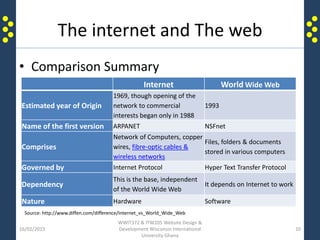
• Comparison Summary
16/02/2015
WWIT372 & ITW205 Website Design &
Development Wisconsin International
University Ghana
10
Internet World Wide Web
Estimated year of Origin
1969, though opening of the
network to commercial
interests began only in 1988
1993
Name of the first version ARPANET NSFnet
Comprises
Network of Computers, copper
wires, fibre-optic cables &
wireless networks
Files, folders & documents
stored in various computers
Governed by Internet Protocol Hyper Text Transfer Protocol
Dependency
This is the base, independent
of the World Wide Web
It depends on Internet to work
Nature Hardware Software
Source: http://www.diffen.com/difference/Internet_vs_World_Wide_Web
Brief History of the Internet
• Late 1960s, the U.S. Defense Department
began the internet as a military research
project. The government created a network
that covered a large geographic area with the
capacity to withstand a nuclear attack.
• It started with the name "ARPAnet". The
research was to experiment how the US
military could maintain communications in
case of a possible nuclear strike.
16/02/2015
WWIT372 & ITW205 Website Design &
Development Wisconsin International
University Ghana
11
Brief History of the Internet
• Later the “ARPAnet” porject became a civilian
experiment, connecting university mainframe
computers for academic purposes.
• In the 1980’s and 1990’s personal computers became
more common and users connected their computers to
internet.
• This made the Internet to grew exponentially as more
users plugged their computers into the massive
network.
• Now, the Internet has become a public spider-web of
millions of personal, government, and commercial
computers, all connected by cables and by wireless.
16/02/2015
WWIT372 & ITW205 Website Design &
Development Wisconsin International
University Ghana
12
Brief History of the Internet
16/02/2015
WWIT372 & ITW205 Website Design &
Development Wisconsin International
University Ghana
13
• 1957 – USSR launches Sputnik into space. In response, the USA creates the Advanced
Research Projects Agency (ARPA) with the mission of becoming the leading force in science
and new technologies.
• 1962 – J.C.R. Licklider of MIT proposes the concept of a “Galactic Network.” For the first time
ideas about a global network of computers are introduced. J.C.R. Licklider is later chosen to
head ARPA's research efforts.
• 1962 - Paul Baran, a member of the RAND Corporation, determines a way for the Air Force to
control bombers and missiles in case of a nuclear event. His results call for a decentralized
network comprised of packet switches.
• 1968 - ARPA contracts out work to BBN. BBN is called upon to build the first switch.
• 1969 – RPANET created - BBN creates the first switched network by linking four different
nodes in California and Utah; one at the University of Utah, one at the University of California
at Santa Barbara, one at Stanford and one at the University of California at Los Angeles.
• 1972 - Ray Tomlinson working for BBN creates the first program devoted to email.
• 1972 - ARPA officially changes its name to DARPA Defense Advanced Research Projects
Agency.
Brief History of the Internet
• 1972 - Network Control Protocol is introduced to allow computers running on the same network to
communicate with each other.
• 1973 - Vinton Cerf working from Stanford and Bob Kahn from DARPA begin work developing TCP/IP to
allow computers on different networks to communicate with each other.
• 1974 - Kahn and Cerf refer to the system as the Internet for the first time.
• 1976 - Ethernet is developed by Dr. Robert M. Metcalfe.
• 1976 – SATNET, a satellite program is developed to link the United States and Europe. Satellites are
owned by a consortium of nations, thereby expanding the reach of the Internet beyond the USA.
• 1976 – Elizabeth II, Queen of the United Kingdom, sends out an email on 26 March from the Royal
Signals and Radar Establishment (RSRE) in Malvern.
• 1976 - AT& T Bell Labs develops UUCP and UNIX.
• 1979 - USENET, the first news group network is developed by Tom Truscott, Jim Ellis and Steve Bellovin.
• 1979 - IBM introduces BITNET to work on emails and listserv systems.
• 1981 - The National Science Foundation releases CSNET 56 to allow computers to network without
being connected to the government networks.
• 1983 - Internet Activities Board released.
• 1983 - TCP/IP becomes the standard for internet protocol.
16/02/2015
WWIT372 & ITW205 Website Design &
Development Wisconsin International
University Ghana
14
Brief History of the Internet
• 1983 - Domain Name System introduced to allow domain names to automatically be
assigned an IP number.
• 1984 - MCI creates T1 lines to allow for faster transportation of information over the
internet.
• 1984- The number of Hosts breaks 1,000
• 1985- 100 years to the day of the last spike being driven on the Canadian Pacific Railway,
the last Canadian university was connected to NetNorth in a one year effort to have coast-
to-coast connectivity
• 1987 - The new network CREN forms.
• 1987- The number of hosts breaks 10,000
• 1988 - Traffic rises and plans are to find a new replacement for the T1 lines.
• 1989- The Number of hosts breaks 100 000
• 1989- Arpanet ceases to exist
• 1990 - Advanced Network & Services (ANS) forms to research new ways to make internet
speeds even faster. The group develops the T3 line and installs in on a number of
networks.
16/02/2015
WWIT372 & ITW205 Website Design &
Development Wisconsin International
University Ghana
15
Brief History of the Internet
• 1990 - A hypertext system is created and implemented by Tim Berners-Lee while
working for CERN.
• 1990- The first search engine is created by McGill University, called the Archie
Search Engine
• 1991- U.S green-light for commercial enterprise to take place on the Internet
• 1991 - The National Science Foundation (NSF) creates the National Research and
Education Network (NREN).
• 1991 - CERN releases the World Wide Web publicly on August 6th, 1991
• 1992 – The Internet Society (ISOC) is chartered
• 1992- Number of hosts breaks 1,000,000
• 1993 - InterNIC released to provide general services, a database and internet
directory.
• 1993- The first web browser, Mosaic (created by NCSA), is released. Mosaic later
becomes the Netscape browser which was the most popular browser in the mid
1990's.
• 1994 - New networks added frequently.
• 1994 - First internet ordering system created by Pizza Hut.
16/02/2015
WWIT372 & ITW205 Website Design &
Development Wisconsin International
University Ghana
16
Brief History of the Internet
• 1994 - First internet ordering system created by Pizza Hut.
• 1994 - First internet bank opened: First Virtual.
• 1995 - NSF contracts out their access to four internet providers.
• 1995 - NSF sells domains for a $50 annual fee.
• 1995 – Netscape goes public with 3rd largest ever NASDAQ IPO share value
• 1995- Registration of domains is no longer free.
• 1996- The WWW browser wars are waged mainly between Microsoft and
Netscape. New versions are released quarterly with the aid of internet users eager
to test new (beta) versions.
• 1996 – Internet2 project is initiated by 34 universities
• 1996 - Internet Service Providers begin appearing such as Sprint and MCI.
• 1996 - Nokia releases first cell phone with internet access.
• 1997- (Arin) is established to handle administration and registration of IP numbers,
now handled by Network Solutions (IinterNic)
• 1998- Netscape releases source code for Navigator.
16/02/2015
WWIT372 & ITW205 Website Design &
Development Wisconsin International
University Ghana
17
Brief History of the Internet
• 1998-Internet Corporation for Assigned Names and Numbers (ICANN) created to
be able to oversee a number of Internet-related tasks
• 1999 - A wireless technology called 802.11b, more commonly referred to as Wi-Fi,
is standardized.
• 2000- The dot com bubble bursts, numerically, on March 10, 2000, when the
technology heavy NASDAQ composite index peaked at 5,048.62
• 2001 - Blackberry releases first internet cell phone in the United States.
• 2001 – The spread of P2P file sharing across the Internet
• 2002 -Internet2 now has 200 university, 60 corporate and 40 affiliate members
• 2003- The French Ministry of Culture bans the use of the word "e-mail" by
government ministries, and adopts the use of the more French sounding "courriel"
• 2004 – The Term Web 2.0 rises in popularity when O'Reilly and MediaLive host the
first Web 2.0 conference.
• 2004- Mydoom, the fastest ever spreading email computer worm is released.
Estimated 1 in 12 emails are infected.
• 2005- Estonia offers Internet Voting nationally for local elections
• 2005-Youtube launches
16/02/2015
WWIT372 & ITW205 Website Design &
Development Wisconsin International
University Ghana
18
Brief History of the Internet
• 2006- There are an estimated 92 million websites online
• 2006 – Zimbabwe's internet access is almost completely cut off after international satellite
communications provider Intelsat cuts service for non-payment
• 2006- Internet2 announced a partnership with Level 3 Communications to launch a brand new
nationwide network, boosting its capacity from 10Gbps to 100Gbps
• 2007- Internet2 officially retires Abilene and now refers to its new, higher capacity network as the
Internet2 Network
• 2008- Google index reaches 1 Trillion URLs
• 2008 – NASA successfully tests the first deep space communications network modeled on the
Internet. Using software called Disruption-Tolerant Networking, or DTN, dozens of space images are
transmitted to and from a NASA science spacecraft located about more than 32 million kilometers
from Earth
• 2009 – ICANN gains autonomy from the U.S government
• 2010- Facebook announces in February that it has 400 million active users.
• 2010 – The U.S House of Representatives passes the Cybersecurity Enhancement Act (H.R. 4061)
• 2012 - A major online protest shook up U.S. Congressional support for two anti-Web piracy bills -
the Stop Online Piracy Act in the House and the Protect IP Act in the Senate. Many in the tech
industry are concerned that the bills will give media companies too much power to shut down
websites
16/02/2015
WWIT372 & ITW205 Website Design &
Development Wisconsin International
University Ghana
19
So What is the internet?
16/02/2015
WWIT372 & ITW205 Website Design &
Development Wisconsin International
University Ghana
20
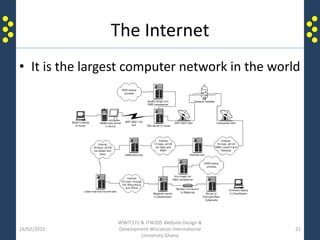
The Internet
• It is the largest computer network in the world
16/02/2015
WWIT372 & ITW205 Website Design &
Development Wisconsin International
University Ghana
21
The Internet
• The internet is simply hardware which is a
network of computers connected together to
share information through a common platform.
• It is basically the physical equipment (popularly
known as Hardware) connected together to form
one big world wide network.
• The hardware consists of components such as
computers, communication cables, radio or
wireless antennas, routers, switches, hubs, RJ45
and more.
16/02/2015
WWIT372 & ITW205 Website Design &
Development Wisconsin International
University Ghana
22
The Internet
• The internet is a super network of networks.
• It is a networking infrastructure that globally
connects or links millions of computers
together.
• It enables any computer connected to internet
to communicate to each other via protocols.
16/02/2015
WWIT372 & ITW205 Website Design &
Development Wisconsin International
University Ghana
23
The Structure of the Internet
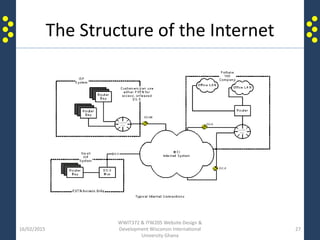
• It is made up of LANs and WANs which consists of
individual computers connected to each other
either by wireless or cable to communicate with
one another.
• The internet consists of thousands of connected
networks around the world. In other words, it is
an inter connectivity of numerous smaller
networks.
• These networks are owned by individuals,
companies, agencies, educational institutions and
government organizations.
16/02/2015
WWIT372 & ITW205 Website Design &
Development Wisconsin International
University Ghana
24
The Structure of the Internet
• At this point it must be clear in your mind that
the Internet is the biggest computer network
in the world.
• It is accessible to everyone at everywhere at
any time across the world.
• Each organization on the internet is
responsible for maintaining its own network
on the internet.
16/02/2015
WWIT372 & ITW205 Website Design &
Development Wisconsin International
University Ghana
25
The Structure of the Internet
• It is made up of sub-networks consisting of a number of
individual computers that are enabled to transmit data in
packets.
• The internet is governed by a set of rules, laws &
regulations, collectively known as the Internet Protocol (IP).
• The sub-networks may range from defense networks to
academic networks to commercial networks to individual
PCs.
• Internet, essentially provides information & services in the
form of E-Mail, chat & file transfers.
• It also provides access to the World Wide Web & other
interlinked web pages.
16/02/2015
WWIT372 & ITW205 Website Design &
Development Wisconsin International
University Ghana
26
The Structure of the Internet
16/02/2015
WWIT372 & ITW205 Website Design &
Development Wisconsin International
University Ghana
27
The World Wide Web
16/02/2015
WWIT372 & ITW205 Website Design &
Development Wisconsin International
University Ghana
28
The WORLD
WIDE WEB is also
called the WEB
The World Wide Web
• The World Wide Web is what makes content
accessible on the internet and consists of a
huge collection of documents stored on
computers around the world.
16/02/2015
WWIT372 & ITW205 Website Design &
Development Wisconsin International
University Ghana
29
The World Wide Web
• The World Wide Web (affectionately known as
‘the Web’) is a software. This software is made up
of many other software.
• It uses hyperlinks to link documents, pages and
software to create a web of information on a
single common platform for global access.
• The access to information on the Web is achieved
by the use of HyperText Transfer Protocol (HTTP)
16/02/2015
WWIT372 & ITW205 Website Design &
Development Wisconsin International
University Ghana
30
The World Wide Web
• The World Wide Web which is also abbreviated
as (WWW) is one set of software services running
on the Internet.
• The Internet itself is a global, interconnected
network of computing devices.
• This network supports a wide variety of
interactions and communications between its
devices.
• The World Wide Web is a subset of these
interactions and supports websites and URIs.
16/02/2015
WWIT372 & ITW205 Website Design &
Development Wisconsin International
University Ghana
31
How does the Web Works?
16/02/2015
WWIT372 & ITW205 Website Design &
Development Wisconsin International
University Ghana
32
How does the Web Works?
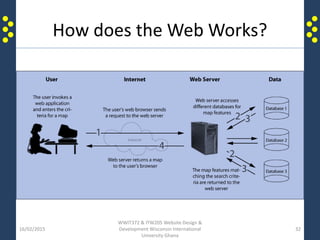
• The World Wide Web is a global platform
which allows several different systems to
communicate and share information.
• The software which runs on the Web are
grouped into two main categories: Client side
software and Sever side software.
• It was invented in February 25, 1991.
• Example: A Java Script is a client side software
and a PHP is a server side software
16/02/2015
WWITP372 & ITW205 Website Design &
Development Wisconsin International
University Ghana
33
How does the Web Works?
• Example of browsers in order of release:
– Mosaic, April 22, 1993.
– Netscape Navigator and Netscape Communicator,
October 13, 1994.
– Internet Explorer, August 16, 1995.
– Opera, 1996, see History of the Opera web browser.
– Mozilla Navigator, June 5, 2002.
– Safari, January 7, 2003.
– Mozilla Firefox, November 9, 2004.
Source: http://en.wikipedia.org/wiki/List_of_web_browsers
16/02/2015
WWIT372 & ITW205 Website Design &
Development Wisconsin International
University Ghana
34
How does the Web Works?
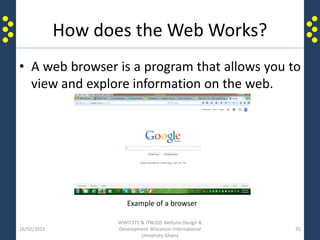
• A web browser is a program that allows you to
view and explore information on the web.
16/02/2015
WWIT372 & ITW205 Website Design &
Development Wisconsin International
University Ghana
35
Example of a browser
How does the Web Works?
• What is a Web browser?
– A Web browser is a software which interprets the codes of a
Web page and displays its contents on the World Wide Web.
– The content of the Web page is displayed within the browser on
the Web. The browser is a program which allows people to view
and explore information on the internet.
– As a client side software, the browser makes a request for
information to the server, and the server responses by giving
the information which was requested or gives an error message
if that information is not available on the server.
– This request and response activities are handled by the HTTP
protocol. In other words the http is the transport client – server
communication on the internet.
16/02/2015
WWIT372 & ITW205 Website Design &
Development Wisconsin International
University Ghana
36
How does the Web Works?
• The two main functions of a Web browser are:
– To read and interpret the Hypertext Markup Language
(HTML) used for creating the Web pages and then convert
it into a graphical pages on the Web.
– To allow users to navigate Web pages and to move from
one Web site to another.
16/02/2015
WWIT372 & ITW205 Website Design &
Development Wisconsin International
University Ghana
37
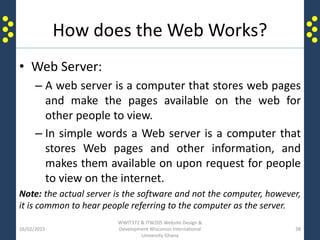
How does the Web Works?
• Web Server:
– A web server is a computer that stores web pages
and make the pages available on the web for
other people to view.
– In simple words a Web server is a computer that
stores Web pages and other information, and
makes them available on upon request for people
to view on the internet.
Note: the actual server is the software and not the computer, however,
it is common to hear people referring to the computer as the server.
16/02/2015
WWIT372 & ITW205 Website Design &
Development Wisconsin International
University Ghana
38
How does the Web Works?
16/02/2015
WWIT372 & ITW205 Website Design &
Development Wisconsin International
University Ghana
39
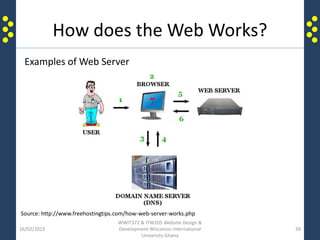
Examples of Web Server
Source: http://www.freehostingtips.com/how-web-server-works.php
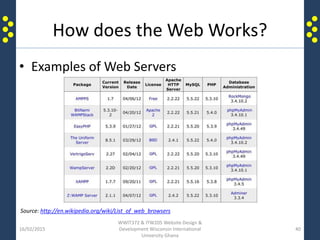
How does the Web Works?
• Examples of Web Servers
16/02/2015
WWIT372 & ITW205 Website Design &
Development Wisconsin International
University Ghana
40
Source: http://en.wikipedia.org/wiki/List_of_web_browsers
How does the Web Works?
• URL?
– Each web page has a unique address, called a
uniform resource locator (URL). You can instantly
display any web page if you know its URL.
– A URL is a unique address name given to each
Web page or Web site for easy identification and
reference. Instead of IP Addresses, URL is used to
make it easy for users.
Note: The actual technical term for URL is URI (Uniform Resource Identifier)
16/02/2015
WWIT372 & ITW205 Website Design &
Development Wisconsin International
University Ghana
41
How does the Web Works?
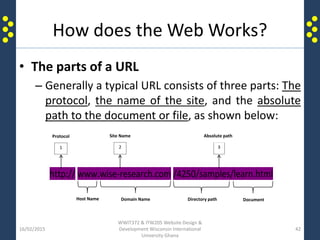
• The parts of a URL
– Generally a typical URL consists of three parts: The
protocol, the name of the site, and the absolute
path to the document or file, as shown below:
16/02/2015
WWIT372 & ITW205 Website Design &
Development Wisconsin International
University Ghana
42
http:// www.wise-research.com /4250/samples/learn.html
Protocol Site Name
1 2 3
Absolute path
Host Name Domain Name Directory path Document
How does the Web Works?
• http://
– The http:// part of the URL defines the type of
protocol which must be used for any particular
transaction on the internet. Most importantly, any
server which receives the HTTP transmission knows
that it has to be in the ‘Web mode’ and use HyperText
Transfer Protocol for communication.
Note: https:// implies that it is a secure server. Secure servers
use special encryption tools to prevent users from seeing
relevant information such as credit card numbers, while making
transactions on the internet.
16/02/2015
WWIT372 & ITW205 Website Design &
Development Wisconsin International
University Ghana
43
How does the Web Works?
• www.wise-research.com
– The second part of the URL which is the middle
section is used to identify the web site by its
domain name. In figure xxx the domain name is
wise-research.com. The ‘www’ which prefix the
domain name is the host name for that particular
domain.
16/02/2015
WWIT372 & ITW205 Website Design &
Development Wisconsin International
University Ghana
44
How does the Web Works?
• /2007/samples/good.html
– This part is the absolute path to the requested HTML
document, which is ‘good.html’ in this case.
‘Good.html’ is the file name, but the
/2007/samples/good.html is the full file path.
– This path implies that from the root directory which is
wise-research.com, the system will go to the 2007
folder and in that folder it will go to the samples
folder.
– Inside the samples folder is the documents called
‘good.html’.
16/02/2015
WWIT372 & ITW205 Website Design &
Development Wisconsin International
University Ghana
45
How does the Web Works?
• The Web Page and Web Site
– A Web page is just one single file within Web site.
Web page may have text, image, graphics,
animation, sound and video. It is a single page
with unique name on a Web site.
– A Web site is a group of related pages or files
designed and organized around a common theme.
It is a collection of Web pages put together under
one domain name or IP Address.
Note: Typically, the main page of any Web site is called the home page. It is technically
called by Web site developers as index page. Usually it contains general information about
the Web site. It is the entry point to any particular website.
16/02/2015
WWIT372 & ITW205 Website Design &
Development Wisconsin International
University Ghana
46
Types of Websites
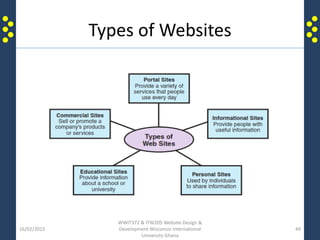
• We have many kinds of web sites, but
depending on their purpose, audience,
content, etc., they may be grouped into
different categories.
• In this lesson, we shall discuss types web sites
based on their main purpose as shown in
figure 1.2
Note: A web page can either be static or dynamic.
16/02/2015
WWIT372 & ITW205 Website Design &
Development Wisconsin International
University Ghana
47
Types of Websites
TYPES OF WEB PAGES:
• Static Website:
– A static website is are types of web pages that stored
on the server in the format that is sent to a client web
browser. It is primarily coded in HyperText Markup
Language (HTML)
• Dynamic Website:
– A dynamic website is one that changes or customizes
itself frequently and automatically. In addition to the
HTML, this may involve the use of some programs like
Java, JavaScript, PHP
16/02/2015
WWIT372 & ITW205 Website Design &
Development Wisconsin International
University Ghana
48
Types of Websites
16/02/2015
WWIT372 & ITW205 Website Design &
Development Wisconsin International
University Ghana
49
Types of Websites
• Commercial Sites
The main purpose of commercial web sites is to sell
or advertise products or services. Basically, there
are two types of commercial web sites:
– E-Commerce Web Sites are created for selling and
buying or advertising goods and services on the
internet. Because the sale is on the internet and the
buyer can only view the product or read about the
service, it is important to provide in depth description
of the product or service with pictures, videos and
other visuals to encourage the consumer to buy.
16/02/2015
WWIT372 & ITW205 Website Design &
Development Wisconsin International
University Ghana
50
Types of Websites
• Commercial sites cont.
– Corporate Presence Web Sites are commercial
sites which do not necessarily sell anything. Most
often the primary purpose of such sites is to:
• Provide the public with information about the
company’s products and services
• Create good image for the company
• Illustrate the company’s background, achievements,
mission and vision
Note: e-commerce is the acronym for electronic commerce, which
means buying and selling goods and services on the internet.
16/02/2015
WWIT372 & ITW205 Website Design &
Development Wisconsin International
University Ghana
51
Types of Websites
• Portal Web Sites
– Web portals are created to provide a variety of
services which are used frequently. A web portal
can provide contents such as campus information,
business information, social information, general
news, etc. With portals it is easy for users to get
access to a variety of information from one single
site.
16/02/2015
WWIT372 & ITW205 Website Design &
Development Wisconsin International
University Ghana
52
Types of Websites
• Informational Web Sites
– Informational web site provides all kinds of
information to the public. The purpose of such
web sites is to provide people with useful
information. The information may include, but not
limited to fashion, medical, educational, real
estate, automobile, travel, etc.
16/02/2015
WWIT372 & ITW205 Website Design &
Development Wisconsin International
University Ghana
53
Types of Websites
• Educational Web Sites
– Educational web sites are created to provide
educative information and other information
about school and educational resources. The
purpose of educational sites is to promote
knowledge dissemination
16/02/2015
WWIT372 & ITW205 Website Design &
Development Wisconsin International
University Ghana
54
Types of Websites
• Personal Web Sites
– Personal web sites enable people to share
information about their selves with others. The
purpose of this type of site is to create platforms
for people to freely and willingly express their
selves to family and friends. Such information may
include entertainment, portfolio, resume, hobbies,
interest, new and more.
16/02/2015
WWIT372 & ITW205 Website Design &
Development Wisconsin International
University Ghana
55
Basic elements of a Web Page
16/02/2015
WWIT372 & ITW205 Website Design &
Development Wisconsin International
University Ghana
56
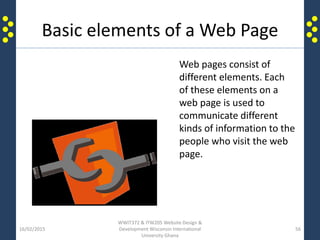
Web pages consist of
different elements. Each
of these elements on a
web page is used to
communicate different
kinds of information to the
people who visit the web
page.
Basic elements of a Web Page
• Common Webpage elements
– The common elements of any web page are text,
graphics, multimedia and hyperlinks. Each of
these elements is created separately to form a
complete web page.
16/02/2015
WWIT372 & ITW205 Website Design &
Development Wisconsin International
University Ghana
57
Basic elements of a Web Page
• Text and Graphics
The foundation of most web site content is text
and graphics.
– Text consists of words, letters, numbers, and other
symbols.
– Graphics include drawings, charts, diagrams,
paintings, photographs, and navigational buttons.
16/02/2015
WWIT372 & ITW205 Website Design &
Development Wisconsin International
University Ghana
58
Basic elements of a Web Page
• Multimedia
Multimedia is a term which refers to the integration
of elements such as graphics, text, audio, video,
animation, and interactivity with the use of
computer technology. Audio, video and animation
are the three main multimedia elements.
– Audio is live or recorded sound
– Video is live or recorded moving images
– Animation refers to the movement of text or graphics
16/02/2015
WWIT372 & ITW205 Website Design &
Development Wisconsin International
University Ghana
59
Basic elements of a Web Page
• HYPER LINKS:
– Web pages contain hyperlinks. Web pages are connected
to each other via hyperlinks. This enables people to
navigate or move from one page on a web site to another.
– A hyperlink can be just a word, phrase, graphic, image or
animation.
– A hyperlink can be selected to display a web page located
on the same web site or on other web sites.
– Hyperlinks make it easier to navigate through a vast
amount of information by moving from one web page to
another with just a click.
– Hyperlinks are affectionately called LINKS.
16/02/2015
WWIT372 & ITW205 Website Design &
Development Wisconsin International
University Ghana
60
Getting connected
• There several options available to connect to
the internet including the following:
– Modem
– Cable
– Fibre
– Wireless
– Fixed broadband
– Mobile broadband
– etc
16/02/2015
WWIT372 & ITW205 Website Design &
Development Wisconsin International
University Ghana
61
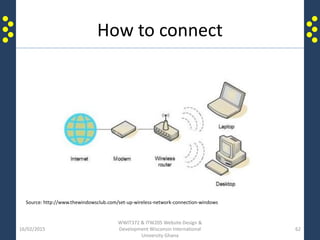
How to connect
16/02/2015
WWIT372 & ITW205 Website Design &
Development Wisconsin International
University Ghana
62
Source: http://www.thewindowsclub.com/set-up-wireless-network-connection-windows
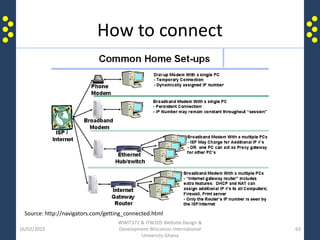
How to connect
16/02/2015
WWIT372 & ITW205 Website Design &
Development Wisconsin International
University Ghana
63
Source: http://navigators.com/getting_connected.html
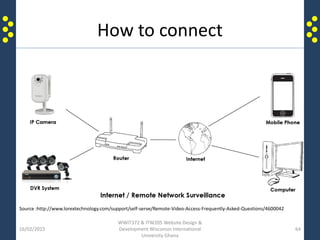
How to connect
16/02/2015
WWIT372 & ITW205 Website Design &
Development Wisconsin International
University Ghana
64
Source :http://www.lorextechnology.com/support/self-serve/Remote-Video-Access-Frequently-Asked-Questions/4600042
16/02/2015
WWIT372 & ITW205 Website Design &
Development Wisconsin International
University Ghana
65
Thank you

Introduction to Website Design and Development

  • 1.
    Faculty of Computingand Information Technology Computer Science & Management –WCOM Website Design & Development DR. Nana K. Annan Email: nk.annan@wiuc-ghana.edu.gh Tel: +233 244424578 / 268752196 Week One
  • 2.
    Brief Introduction tothe internet • At the end of this lesson you will have some basic knowledge in the following: – History of the internet – Structure of the internet – Types of internet connections – How to connect to the internet – What the internet has to offer – Some terminologies of the web 16/02/2015 WWIT372 & ITW205 Website Design & Development Wisconsin International University Ghana 2
  • 3.
    Key terms • Webbrowser • Web site • Web page • Home page • World Wide Web • Internet • File • Online • Networking 16/02/2015 WWIT372 & ITW205 Website Design & Development Wisconsin International University Ghana 3
  • 4.
    The internet andThe web 16/02/2015 WWIT372 & ITW205 Website Design & Development Wisconsin International University Ghana 4 Designing and developing web sites is a discipline which requires basic understanding of the internet and the world wide web.
  • 5.
    The internet andThe web 16/02/2015 WWIT372 & ITW205 Website Design & Development Wisconsin International University Ghana 5
  • 6.
    The internet andThe web • The Internet can be considered as a very large container, with the Web being a part within the container. • The two words: internet and the world wide web are abbreviated in daily conversation as the "Net" and the "Web“ respectively. • The Net can be seen as the restaurant, and the Web as the dish on the menu. 16/02/2015 WWIT372 & ITW205 Website Design & Development Wisconsin International University Ghana 6
  • 7.
    The internet andThe web • Internet is the hardware part of the Net and Web infrastructure - it is a collection of computer networks connected together through cable or wireless communication medium. • The World Wide Web is as the software part – it is a collection of web pages connected through hyperlinks and URLs. • The World Wide Web can be considered as one of the services provided by the Internet among other services such as e-mail, chat and file transfer services. 16/02/2015 WWIT372 & ITW205 Website Design & Development Wisconsin International University Ghana 7
  • 8.
    The internet andThe web • Technically, the internet and web can be differentiate by the rules and regulations which govern their operations. • Internet is governed by the Internet Protocol Suite (eg. TCP/IP). This actually deals with data and their transmission. • On the hand, World Wide Web is governed by the Hyper Test Transfer Protocol (HTTP). This deals with the linking of files, documents and other resources. 16/02/2015 WWIT372 & ITW205 Website Design & Development Wisconsin International University Ghana 8
  • 9.
    The internet andThe web • Each computer, server and website on the Internet is assigned a unique number or address. This number is called an IP Address (Internet Protocol Address). A typical example of an IP Address is 192.168.0.1 • To make it easier for our human memory: Domain Name System (DNS) was created as a second name for the IP Addresses. This makes it possible for websites and servers on the internet to be given ‘names’ to represent the IP Addresses. Example: The IP Address for this web site: www.wise-research.com is 203.142.87.2 16/02/2015 WWIT372 & ITW205 Website Design & Development Wisconsin International University Ghana 9
  • 10.
    The internet andThe web • Comparison Summary 16/02/2015 WWIT372 & ITW205 Website Design & Development Wisconsin International University Ghana 10 Internet World Wide Web Estimated year of Origin 1969, though opening of the network to commercial interests began only in 1988 1993 Name of the first version ARPANET NSFnet Comprises Network of Computers, copper wires, fibre-optic cables & wireless networks Files, folders & documents stored in various computers Governed by Internet Protocol Hyper Text Transfer Protocol Dependency This is the base, independent of the World Wide Web It depends on Internet to work Nature Hardware Software Source: http://www.diffen.com/difference/Internet_vs_World_Wide_Web
  • 11.
    Brief History ofthe Internet • Late 1960s, the U.S. Defense Department began the internet as a military research project. The government created a network that covered a large geographic area with the capacity to withstand a nuclear attack. • It started with the name "ARPAnet". The research was to experiment how the US military could maintain communications in case of a possible nuclear strike. 16/02/2015 WWIT372 & ITW205 Website Design & Development Wisconsin International University Ghana 11
  • 12.
    Brief History ofthe Internet • Later the “ARPAnet” porject became a civilian experiment, connecting university mainframe computers for academic purposes. • In the 1980’s and 1990’s personal computers became more common and users connected their computers to internet. • This made the Internet to grew exponentially as more users plugged their computers into the massive network. • Now, the Internet has become a public spider-web of millions of personal, government, and commercial computers, all connected by cables and by wireless. 16/02/2015 WWIT372 & ITW205 Website Design & Development Wisconsin International University Ghana 12
  • 13.
    Brief History ofthe Internet 16/02/2015 WWIT372 & ITW205 Website Design & Development Wisconsin International University Ghana 13 • 1957 – USSR launches Sputnik into space. In response, the USA creates the Advanced Research Projects Agency (ARPA) with the mission of becoming the leading force in science and new technologies. • 1962 – J.C.R. Licklider of MIT proposes the concept of a “Galactic Network.” For the first time ideas about a global network of computers are introduced. J.C.R. Licklider is later chosen to head ARPA's research efforts. • 1962 - Paul Baran, a member of the RAND Corporation, determines a way for the Air Force to control bombers and missiles in case of a nuclear event. His results call for a decentralized network comprised of packet switches. • 1968 - ARPA contracts out work to BBN. BBN is called upon to build the first switch. • 1969 – RPANET created - BBN creates the first switched network by linking four different nodes in California and Utah; one at the University of Utah, one at the University of California at Santa Barbara, one at Stanford and one at the University of California at Los Angeles. • 1972 - Ray Tomlinson working for BBN creates the first program devoted to email. • 1972 - ARPA officially changes its name to DARPA Defense Advanced Research Projects Agency.
  • 14.
    Brief History ofthe Internet • 1972 - Network Control Protocol is introduced to allow computers running on the same network to communicate with each other. • 1973 - Vinton Cerf working from Stanford and Bob Kahn from DARPA begin work developing TCP/IP to allow computers on different networks to communicate with each other. • 1974 - Kahn and Cerf refer to the system as the Internet for the first time. • 1976 - Ethernet is developed by Dr. Robert M. Metcalfe. • 1976 – SATNET, a satellite program is developed to link the United States and Europe. Satellites are owned by a consortium of nations, thereby expanding the reach of the Internet beyond the USA. • 1976 – Elizabeth II, Queen of the United Kingdom, sends out an email on 26 March from the Royal Signals and Radar Establishment (RSRE) in Malvern. • 1976 - AT& T Bell Labs develops UUCP and UNIX. • 1979 - USENET, the first news group network is developed by Tom Truscott, Jim Ellis and Steve Bellovin. • 1979 - IBM introduces BITNET to work on emails and listserv systems. • 1981 - The National Science Foundation releases CSNET 56 to allow computers to network without being connected to the government networks. • 1983 - Internet Activities Board released. • 1983 - TCP/IP becomes the standard for internet protocol. 16/02/2015 WWIT372 & ITW205 Website Design & Development Wisconsin International University Ghana 14
  • 15.
    Brief History ofthe Internet • 1983 - Domain Name System introduced to allow domain names to automatically be assigned an IP number. • 1984 - MCI creates T1 lines to allow for faster transportation of information over the internet. • 1984- The number of Hosts breaks 1,000 • 1985- 100 years to the day of the last spike being driven on the Canadian Pacific Railway, the last Canadian university was connected to NetNorth in a one year effort to have coast- to-coast connectivity • 1987 - The new network CREN forms. • 1987- The number of hosts breaks 10,000 • 1988 - Traffic rises and plans are to find a new replacement for the T1 lines. • 1989- The Number of hosts breaks 100 000 • 1989- Arpanet ceases to exist • 1990 - Advanced Network & Services (ANS) forms to research new ways to make internet speeds even faster. The group develops the T3 line and installs in on a number of networks. 16/02/2015 WWIT372 & ITW205 Website Design & Development Wisconsin International University Ghana 15
  • 16.
    Brief History ofthe Internet • 1990 - A hypertext system is created and implemented by Tim Berners-Lee while working for CERN. • 1990- The first search engine is created by McGill University, called the Archie Search Engine • 1991- U.S green-light for commercial enterprise to take place on the Internet • 1991 - The National Science Foundation (NSF) creates the National Research and Education Network (NREN). • 1991 - CERN releases the World Wide Web publicly on August 6th, 1991 • 1992 – The Internet Society (ISOC) is chartered • 1992- Number of hosts breaks 1,000,000 • 1993 - InterNIC released to provide general services, a database and internet directory. • 1993- The first web browser, Mosaic (created by NCSA), is released. Mosaic later becomes the Netscape browser which was the most popular browser in the mid 1990's. • 1994 - New networks added frequently. • 1994 - First internet ordering system created by Pizza Hut. 16/02/2015 WWIT372 & ITW205 Website Design & Development Wisconsin International University Ghana 16
  • 17.
    Brief History ofthe Internet • 1994 - First internet ordering system created by Pizza Hut. • 1994 - First internet bank opened: First Virtual. • 1995 - NSF contracts out their access to four internet providers. • 1995 - NSF sells domains for a $50 annual fee. • 1995 – Netscape goes public with 3rd largest ever NASDAQ IPO share value • 1995- Registration of domains is no longer free. • 1996- The WWW browser wars are waged mainly between Microsoft and Netscape. New versions are released quarterly with the aid of internet users eager to test new (beta) versions. • 1996 – Internet2 project is initiated by 34 universities • 1996 - Internet Service Providers begin appearing such as Sprint and MCI. • 1996 - Nokia releases first cell phone with internet access. • 1997- (Arin) is established to handle administration and registration of IP numbers, now handled by Network Solutions (IinterNic) • 1998- Netscape releases source code for Navigator. 16/02/2015 WWIT372 & ITW205 Website Design & Development Wisconsin International University Ghana 17
  • 18.
    Brief History ofthe Internet • 1998-Internet Corporation for Assigned Names and Numbers (ICANN) created to be able to oversee a number of Internet-related tasks • 1999 - A wireless technology called 802.11b, more commonly referred to as Wi-Fi, is standardized. • 2000- The dot com bubble bursts, numerically, on March 10, 2000, when the technology heavy NASDAQ composite index peaked at 5,048.62 • 2001 - Blackberry releases first internet cell phone in the United States. • 2001 – The spread of P2P file sharing across the Internet • 2002 -Internet2 now has 200 university, 60 corporate and 40 affiliate members • 2003- The French Ministry of Culture bans the use of the word "e-mail" by government ministries, and adopts the use of the more French sounding "courriel" • 2004 – The Term Web 2.0 rises in popularity when O'Reilly and MediaLive host the first Web 2.0 conference. • 2004- Mydoom, the fastest ever spreading email computer worm is released. Estimated 1 in 12 emails are infected. • 2005- Estonia offers Internet Voting nationally for local elections • 2005-Youtube launches 16/02/2015 WWIT372 & ITW205 Website Design & Development Wisconsin International University Ghana 18
  • 19.
    Brief History ofthe Internet • 2006- There are an estimated 92 million websites online • 2006 – Zimbabwe's internet access is almost completely cut off after international satellite communications provider Intelsat cuts service for non-payment • 2006- Internet2 announced a partnership with Level 3 Communications to launch a brand new nationwide network, boosting its capacity from 10Gbps to 100Gbps • 2007- Internet2 officially retires Abilene and now refers to its new, higher capacity network as the Internet2 Network • 2008- Google index reaches 1 Trillion URLs • 2008 – NASA successfully tests the first deep space communications network modeled on the Internet. Using software called Disruption-Tolerant Networking, or DTN, dozens of space images are transmitted to and from a NASA science spacecraft located about more than 32 million kilometers from Earth • 2009 – ICANN gains autonomy from the U.S government • 2010- Facebook announces in February that it has 400 million active users. • 2010 – The U.S House of Representatives passes the Cybersecurity Enhancement Act (H.R. 4061) • 2012 - A major online protest shook up U.S. Congressional support for two anti-Web piracy bills - the Stop Online Piracy Act in the House and the Protect IP Act in the Senate. Many in the tech industry are concerned that the bills will give media companies too much power to shut down websites 16/02/2015 WWIT372 & ITW205 Website Design & Development Wisconsin International University Ghana 19
  • 20.
    So What isthe internet? 16/02/2015 WWIT372 & ITW205 Website Design & Development Wisconsin International University Ghana 20
  • 21.
    The Internet • Itis the largest computer network in the world 16/02/2015 WWIT372 & ITW205 Website Design & Development Wisconsin International University Ghana 21
  • 22.
    The Internet • Theinternet is simply hardware which is a network of computers connected together to share information through a common platform. • It is basically the physical equipment (popularly known as Hardware) connected together to form one big world wide network. • The hardware consists of components such as computers, communication cables, radio or wireless antennas, routers, switches, hubs, RJ45 and more. 16/02/2015 WWIT372 & ITW205 Website Design & Development Wisconsin International University Ghana 22
  • 23.
    The Internet • Theinternet is a super network of networks. • It is a networking infrastructure that globally connects or links millions of computers together. • It enables any computer connected to internet to communicate to each other via protocols. 16/02/2015 WWIT372 & ITW205 Website Design & Development Wisconsin International University Ghana 23
  • 24.
    The Structure ofthe Internet • It is made up of LANs and WANs which consists of individual computers connected to each other either by wireless or cable to communicate with one another. • The internet consists of thousands of connected networks around the world. In other words, it is an inter connectivity of numerous smaller networks. • These networks are owned by individuals, companies, agencies, educational institutions and government organizations. 16/02/2015 WWIT372 & ITW205 Website Design & Development Wisconsin International University Ghana 24
  • 25.
    The Structure ofthe Internet • At this point it must be clear in your mind that the Internet is the biggest computer network in the world. • It is accessible to everyone at everywhere at any time across the world. • Each organization on the internet is responsible for maintaining its own network on the internet. 16/02/2015 WWIT372 & ITW205 Website Design & Development Wisconsin International University Ghana 25
  • 26.
    The Structure ofthe Internet • It is made up of sub-networks consisting of a number of individual computers that are enabled to transmit data in packets. • The internet is governed by a set of rules, laws & regulations, collectively known as the Internet Protocol (IP). • The sub-networks may range from defense networks to academic networks to commercial networks to individual PCs. • Internet, essentially provides information & services in the form of E-Mail, chat & file transfers. • It also provides access to the World Wide Web & other interlinked web pages. 16/02/2015 WWIT372 & ITW205 Website Design & Development Wisconsin International University Ghana 26
  • 27.
    The Structure ofthe Internet 16/02/2015 WWIT372 & ITW205 Website Design & Development Wisconsin International University Ghana 27
  • 28.
    The World WideWeb 16/02/2015 WWIT372 & ITW205 Website Design & Development Wisconsin International University Ghana 28 The WORLD WIDE WEB is also called the WEB
  • 29.
    The World WideWeb • The World Wide Web is what makes content accessible on the internet and consists of a huge collection of documents stored on computers around the world. 16/02/2015 WWIT372 & ITW205 Website Design & Development Wisconsin International University Ghana 29
  • 30.
    The World WideWeb • The World Wide Web (affectionately known as ‘the Web’) is a software. This software is made up of many other software. • It uses hyperlinks to link documents, pages and software to create a web of information on a single common platform for global access. • The access to information on the Web is achieved by the use of HyperText Transfer Protocol (HTTP) 16/02/2015 WWIT372 & ITW205 Website Design & Development Wisconsin International University Ghana 30
  • 31.
    The World WideWeb • The World Wide Web which is also abbreviated as (WWW) is one set of software services running on the Internet. • The Internet itself is a global, interconnected network of computing devices. • This network supports a wide variety of interactions and communications between its devices. • The World Wide Web is a subset of these interactions and supports websites and URIs. 16/02/2015 WWIT372 & ITW205 Website Design & Development Wisconsin International University Ghana 31
  • 32.
    How does theWeb Works? 16/02/2015 WWIT372 & ITW205 Website Design & Development Wisconsin International University Ghana 32
  • 33.
    How does theWeb Works? • The World Wide Web is a global platform which allows several different systems to communicate and share information. • The software which runs on the Web are grouped into two main categories: Client side software and Sever side software. • It was invented in February 25, 1991. • Example: A Java Script is a client side software and a PHP is a server side software 16/02/2015 WWITP372 & ITW205 Website Design & Development Wisconsin International University Ghana 33
  • 34.
    How does theWeb Works? • Example of browsers in order of release: – Mosaic, April 22, 1993. – Netscape Navigator and Netscape Communicator, October 13, 1994. – Internet Explorer, August 16, 1995. – Opera, 1996, see History of the Opera web browser. – Mozilla Navigator, June 5, 2002. – Safari, January 7, 2003. – Mozilla Firefox, November 9, 2004. Source: http://en.wikipedia.org/wiki/List_of_web_browsers 16/02/2015 WWIT372 & ITW205 Website Design & Development Wisconsin International University Ghana 34
  • 35.
    How does theWeb Works? • A web browser is a program that allows you to view and explore information on the web. 16/02/2015 WWIT372 & ITW205 Website Design & Development Wisconsin International University Ghana 35 Example of a browser
  • 36.
    How does theWeb Works? • What is a Web browser? – A Web browser is a software which interprets the codes of a Web page and displays its contents on the World Wide Web. – The content of the Web page is displayed within the browser on the Web. The browser is a program which allows people to view and explore information on the internet. – As a client side software, the browser makes a request for information to the server, and the server responses by giving the information which was requested or gives an error message if that information is not available on the server. – This request and response activities are handled by the HTTP protocol. In other words the http is the transport client – server communication on the internet. 16/02/2015 WWIT372 & ITW205 Website Design & Development Wisconsin International University Ghana 36
  • 37.
    How does theWeb Works? • The two main functions of a Web browser are: – To read and interpret the Hypertext Markup Language (HTML) used for creating the Web pages and then convert it into a graphical pages on the Web. – To allow users to navigate Web pages and to move from one Web site to another. 16/02/2015 WWIT372 & ITW205 Website Design & Development Wisconsin International University Ghana 37
  • 38.
    How does theWeb Works? • Web Server: – A web server is a computer that stores web pages and make the pages available on the web for other people to view. – In simple words a Web server is a computer that stores Web pages and other information, and makes them available on upon request for people to view on the internet. Note: the actual server is the software and not the computer, however, it is common to hear people referring to the computer as the server. 16/02/2015 WWIT372 & ITW205 Website Design & Development Wisconsin International University Ghana 38
  • 39.
    How does theWeb Works? 16/02/2015 WWIT372 & ITW205 Website Design & Development Wisconsin International University Ghana 39 Examples of Web Server Source: http://www.freehostingtips.com/how-web-server-works.php
  • 40.
    How does theWeb Works? • Examples of Web Servers 16/02/2015 WWIT372 & ITW205 Website Design & Development Wisconsin International University Ghana 40 Source: http://en.wikipedia.org/wiki/List_of_web_browsers
  • 41.
    How does theWeb Works? • URL? – Each web page has a unique address, called a uniform resource locator (URL). You can instantly display any web page if you know its URL. – A URL is a unique address name given to each Web page or Web site for easy identification and reference. Instead of IP Addresses, URL is used to make it easy for users. Note: The actual technical term for URL is URI (Uniform Resource Identifier) 16/02/2015 WWIT372 & ITW205 Website Design & Development Wisconsin International University Ghana 41
  • 42.
    How does theWeb Works? • The parts of a URL – Generally a typical URL consists of three parts: The protocol, the name of the site, and the absolute path to the document or file, as shown below: 16/02/2015 WWIT372 & ITW205 Website Design & Development Wisconsin International University Ghana 42 http:// www.wise-research.com /4250/samples/learn.html Protocol Site Name 1 2 3 Absolute path Host Name Domain Name Directory path Document
  • 43.
    How does theWeb Works? • http:// – The http:// part of the URL defines the type of protocol which must be used for any particular transaction on the internet. Most importantly, any server which receives the HTTP transmission knows that it has to be in the ‘Web mode’ and use HyperText Transfer Protocol for communication. Note: https:// implies that it is a secure server. Secure servers use special encryption tools to prevent users from seeing relevant information such as credit card numbers, while making transactions on the internet. 16/02/2015 WWIT372 & ITW205 Website Design & Development Wisconsin International University Ghana 43
  • 44.
    How does theWeb Works? • www.wise-research.com – The second part of the URL which is the middle section is used to identify the web site by its domain name. In figure xxx the domain name is wise-research.com. The ‘www’ which prefix the domain name is the host name for that particular domain. 16/02/2015 WWIT372 & ITW205 Website Design & Development Wisconsin International University Ghana 44
  • 45.
    How does theWeb Works? • /2007/samples/good.html – This part is the absolute path to the requested HTML document, which is ‘good.html’ in this case. ‘Good.html’ is the file name, but the /2007/samples/good.html is the full file path. – This path implies that from the root directory which is wise-research.com, the system will go to the 2007 folder and in that folder it will go to the samples folder. – Inside the samples folder is the documents called ‘good.html’. 16/02/2015 WWIT372 & ITW205 Website Design & Development Wisconsin International University Ghana 45
  • 46.
    How does theWeb Works? • The Web Page and Web Site – A Web page is just one single file within Web site. Web page may have text, image, graphics, animation, sound and video. It is a single page with unique name on a Web site. – A Web site is a group of related pages or files designed and organized around a common theme. It is a collection of Web pages put together under one domain name or IP Address. Note: Typically, the main page of any Web site is called the home page. It is technically called by Web site developers as index page. Usually it contains general information about the Web site. It is the entry point to any particular website. 16/02/2015 WWIT372 & ITW205 Website Design & Development Wisconsin International University Ghana 46
  • 47.
    Types of Websites •We have many kinds of web sites, but depending on their purpose, audience, content, etc., they may be grouped into different categories. • In this lesson, we shall discuss types web sites based on their main purpose as shown in figure 1.2 Note: A web page can either be static or dynamic. 16/02/2015 WWIT372 & ITW205 Website Design & Development Wisconsin International University Ghana 47
  • 48.
    Types of Websites TYPESOF WEB PAGES: • Static Website: – A static website is are types of web pages that stored on the server in the format that is sent to a client web browser. It is primarily coded in HyperText Markup Language (HTML) • Dynamic Website: – A dynamic website is one that changes or customizes itself frequently and automatically. In addition to the HTML, this may involve the use of some programs like Java, JavaScript, PHP 16/02/2015 WWIT372 & ITW205 Website Design & Development Wisconsin International University Ghana 48
  • 49.
    Types of Websites 16/02/2015 WWIT372& ITW205 Website Design & Development Wisconsin International University Ghana 49
  • 50.
    Types of Websites •Commercial Sites The main purpose of commercial web sites is to sell or advertise products or services. Basically, there are two types of commercial web sites: – E-Commerce Web Sites are created for selling and buying or advertising goods and services on the internet. Because the sale is on the internet and the buyer can only view the product or read about the service, it is important to provide in depth description of the product or service with pictures, videos and other visuals to encourage the consumer to buy. 16/02/2015 WWIT372 & ITW205 Website Design & Development Wisconsin International University Ghana 50
  • 51.
    Types of Websites •Commercial sites cont. – Corporate Presence Web Sites are commercial sites which do not necessarily sell anything. Most often the primary purpose of such sites is to: • Provide the public with information about the company’s products and services • Create good image for the company • Illustrate the company’s background, achievements, mission and vision Note: e-commerce is the acronym for electronic commerce, which means buying and selling goods and services on the internet. 16/02/2015 WWIT372 & ITW205 Website Design & Development Wisconsin International University Ghana 51
  • 52.
    Types of Websites •Portal Web Sites – Web portals are created to provide a variety of services which are used frequently. A web portal can provide contents such as campus information, business information, social information, general news, etc. With portals it is easy for users to get access to a variety of information from one single site. 16/02/2015 WWIT372 & ITW205 Website Design & Development Wisconsin International University Ghana 52
  • 53.
    Types of Websites •Informational Web Sites – Informational web site provides all kinds of information to the public. The purpose of such web sites is to provide people with useful information. The information may include, but not limited to fashion, medical, educational, real estate, automobile, travel, etc. 16/02/2015 WWIT372 & ITW205 Website Design & Development Wisconsin International University Ghana 53
  • 54.
    Types of Websites •Educational Web Sites – Educational web sites are created to provide educative information and other information about school and educational resources. The purpose of educational sites is to promote knowledge dissemination 16/02/2015 WWIT372 & ITW205 Website Design & Development Wisconsin International University Ghana 54
  • 55.
    Types of Websites •Personal Web Sites – Personal web sites enable people to share information about their selves with others. The purpose of this type of site is to create platforms for people to freely and willingly express their selves to family and friends. Such information may include entertainment, portfolio, resume, hobbies, interest, new and more. 16/02/2015 WWIT372 & ITW205 Website Design & Development Wisconsin International University Ghana 55
  • 56.
    Basic elements ofa Web Page 16/02/2015 WWIT372 & ITW205 Website Design & Development Wisconsin International University Ghana 56 Web pages consist of different elements. Each of these elements on a web page is used to communicate different kinds of information to the people who visit the web page.
  • 57.
    Basic elements ofa Web Page • Common Webpage elements – The common elements of any web page are text, graphics, multimedia and hyperlinks. Each of these elements is created separately to form a complete web page. 16/02/2015 WWIT372 & ITW205 Website Design & Development Wisconsin International University Ghana 57
  • 58.
    Basic elements ofa Web Page • Text and Graphics The foundation of most web site content is text and graphics. – Text consists of words, letters, numbers, and other symbols. – Graphics include drawings, charts, diagrams, paintings, photographs, and navigational buttons. 16/02/2015 WWIT372 & ITW205 Website Design & Development Wisconsin International University Ghana 58
  • 59.
    Basic elements ofa Web Page • Multimedia Multimedia is a term which refers to the integration of elements such as graphics, text, audio, video, animation, and interactivity with the use of computer technology. Audio, video and animation are the three main multimedia elements. – Audio is live or recorded sound – Video is live or recorded moving images – Animation refers to the movement of text or graphics 16/02/2015 WWIT372 & ITW205 Website Design & Development Wisconsin International University Ghana 59
  • 60.
    Basic elements ofa Web Page • HYPER LINKS: – Web pages contain hyperlinks. Web pages are connected to each other via hyperlinks. This enables people to navigate or move from one page on a web site to another. – A hyperlink can be just a word, phrase, graphic, image or animation. – A hyperlink can be selected to display a web page located on the same web site or on other web sites. – Hyperlinks make it easier to navigate through a vast amount of information by moving from one web page to another with just a click. – Hyperlinks are affectionately called LINKS. 16/02/2015 WWIT372 & ITW205 Website Design & Development Wisconsin International University Ghana 60
  • 61.
    Getting connected • Thereseveral options available to connect to the internet including the following: – Modem – Cable – Fibre – Wireless – Fixed broadband – Mobile broadband – etc 16/02/2015 WWIT372 & ITW205 Website Design & Development Wisconsin International University Ghana 61
  • 62.
    How to connect 16/02/2015 WWIT372& ITW205 Website Design & Development Wisconsin International University Ghana 62 Source: http://www.thewindowsclub.com/set-up-wireless-network-connection-windows
  • 63.
    How to connect 16/02/2015 WWIT372& ITW205 Website Design & Development Wisconsin International University Ghana 63 Source: http://navigators.com/getting_connected.html
  • 64.
    How to connect 16/02/2015 WWIT372& ITW205 Website Design & Development Wisconsin International University Ghana 64 Source :http://www.lorextechnology.com/support/self-serve/Remote-Video-Access-Frequently-Asked-Questions/4600042
  • 65.
    16/02/2015 WWIT372 & ITW205Website Design & Development Wisconsin International University Ghana 65 Thank you