Ceph in the Cloud

         Using RBD in the cloud

         Again, use #cephday :-)

Implemented in CloudStack, OpenStack and
                Proxmox
              Wido den Hollander (42on)
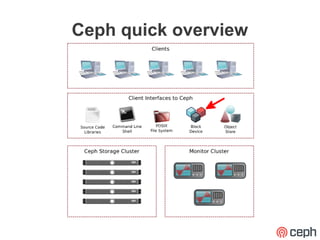
Ceph quick overview
RBD (RADOS Block Device)
●   4MB stripe over RADOS objects
●   Sparse allocation (TRIM/discard support)
    –   Qemu with SCSI the driver support trim
    –   VirtIO lacks necesarry functions
●   Snapshotting
●   Layering
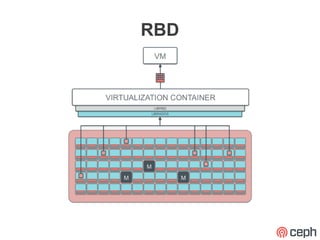
RBD
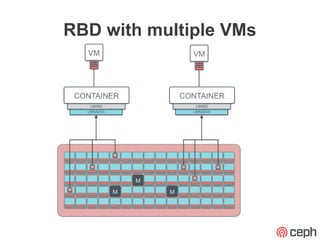
RBD with multiple VMs
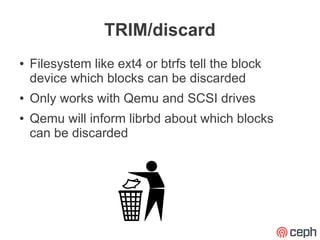
TRIM/discard
●   Filesystem like ext4 or btrfs tell the block
    device which blocks can be discarded
●   Only works with Qemu and SCSI drives
●   Qemu will inform librbd about which blocks
    can be discarded
Using TRIM/discard with Qemu
●   Add 'discard_granularity=N' option where N is
    usually 512 (sector size)
    –   This sets the QUEUE_FLAG_DISCARD flag inside
        the guest indicating that the device supports
        discard
●   Only supported by SCSI with Qemu
    –   Feature set of SCSI is bigger than VirtIO
Snapshotting
●   Normal snapshotting like we are used to
    –   Copy-on-Write (CoW) snapshots
●   Snapshots can be created using either libvirt
    or the rbd tool
●   Only integrated into OpenStack, not in
    CloudStack or Proxmox
Layering
●   One parent / golden image
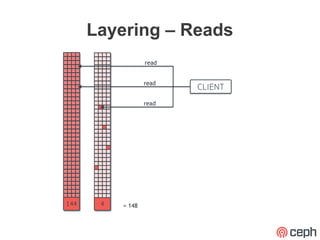
●   Each child records it's own changes, reads for
    unchanged data come from the parent image
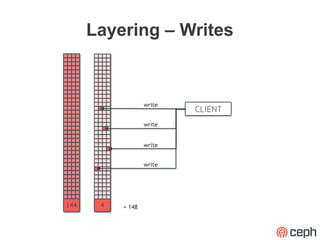
●   Writes go into separate objects
●   Easily deploy hundreds of identical virtual
    machines in a short timeframe without using a
    lot of space
Layering – Writes
Layering – Reads
RBD in the Cloud?
●   High parallel performance due to object
    striping
●   Discard for removing discarded data by virtual
    machines
●   Snapshotting for rollback points in case of
    problem inside a virtual machine
●   Layering for easy and quick deployment
    –   Also saves space!
RBD integrations
●   CloudStack
●   OpenStack
●   Proxmox
RBD in Proxmox
●   Does not use libvirt
●   RBD integrated v2.2, not in the GUI yet
●   Snapshotting
●   No layering at this point
Proxmox demo
●   Show a small demo of proxmox
●   Adding the pool
●   Creating a VM with a RBD disk
RBD in CloudStack
●   Has been integrated in version 4.0
●   Relies on libvirt
●   Basic RBD implementation
    –   No snapshotting
    –   No layering
    –   No TRIM/discard
●   Still need NFS for SystemVMs
CloudStack demo
●   Show a CloudStack demo
●   Show RBD pool in CloudStack
●   Create an instance with RBD storage
RBD in OpenStack
●   Can use RBD for disk images both boot and
    data
●   Glance has RBD support for storing images
●   A lot of new RBD work went into Cinder
Using RBD in the Cloud
●   Virtual Machines have a random I/O pattern
●   70% write, 30% read disk I/O
    –   Reads are cached by the OSD and the virtual
        machine itself, so the disks mostly handle writes
    –   2x replication means you have to divide your write
        I/O by 2.
●   Use Journaling! (Gregory will tell more later)
●   Enable the RBD cache (rbd_cache=1)
Is it production ready?
●   We think it is!
●   Large scale deployments out there
    –   Big OpenStack clusters backed by Ceph
    –   CloudStack deployments known to be running with
        Ceph
●   It is not “1” or “0”, you will have to evaluate for
    yourself
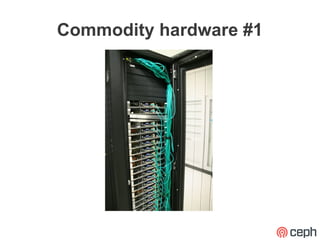
Commodity hardware #1
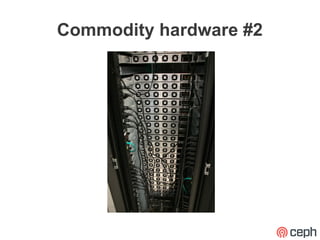
Commodity hardware #2
Thank you!
I hope to see a lot of RBD powered clouds in
                  the future!


                Questions?

20121102 ceph-in-the-cloud

  • 1.
    Ceph in theCloud Using RBD in the cloud Again, use #cephday :-) Implemented in CloudStack, OpenStack and Proxmox Wido den Hollander (42on)
  • 2.
  • 3.
    RBD (RADOS BlockDevice) ● 4MB stripe over RADOS objects ● Sparse allocation (TRIM/discard support) – Qemu with SCSI the driver support trim – VirtIO lacks necesarry functions ● Snapshotting ● Layering
  • 4.
  • 5.
  • 6.
    TRIM/discard ● Filesystem like ext4 or btrfs tell the block device which blocks can be discarded ● Only works with Qemu and SCSI drives ● Qemu will inform librbd about which blocks can be discarded
  • 7.
    Using TRIM/discard withQemu ● Add 'discard_granularity=N' option where N is usually 512 (sector size) – This sets the QUEUE_FLAG_DISCARD flag inside the guest indicating that the device supports discard ● Only supported by SCSI with Qemu – Feature set of SCSI is bigger than VirtIO
  • 8.
    Snapshotting ● Normal snapshotting like we are used to – Copy-on-Write (CoW) snapshots ● Snapshots can be created using either libvirt or the rbd tool ● Only integrated into OpenStack, not in CloudStack or Proxmox
  • 9.
    Layering ● One parent / golden image ● Each child records it's own changes, reads for unchanged data come from the parent image ● Writes go into separate objects ● Easily deploy hundreds of identical virtual machines in a short timeframe without using a lot of space
  • 10.
  • 11.
  • 12.
    RBD in theCloud? ● High parallel performance due to object striping ● Discard for removing discarded data by virtual machines ● Snapshotting for rollback points in case of problem inside a virtual machine ● Layering for easy and quick deployment – Also saves space!
  • 13.
    RBD integrations ● CloudStack ● OpenStack ● Proxmox
  • 14.
    RBD in Proxmox ● Does not use libvirt ● RBD integrated v2.2, not in the GUI yet ● Snapshotting ● No layering at this point
  • 15.
    Proxmox demo ● Show a small demo of proxmox ● Adding the pool ● Creating a VM with a RBD disk
  • 16.
    RBD in CloudStack ● Has been integrated in version 4.0 ● Relies on libvirt ● Basic RBD implementation – No snapshotting – No layering – No TRIM/discard ● Still need NFS for SystemVMs
  • 17.
    CloudStack demo ● Show a CloudStack demo ● Show RBD pool in CloudStack ● Create an instance with RBD storage
  • 18.
    RBD in OpenStack ● Can use RBD for disk images both boot and data ● Glance has RBD support for storing images ● A lot of new RBD work went into Cinder
  • 19.
    Using RBD inthe Cloud ● Virtual Machines have a random I/O pattern ● 70% write, 30% read disk I/O – Reads are cached by the OSD and the virtual machine itself, so the disks mostly handle writes – 2x replication means you have to divide your write I/O by 2. ● Use Journaling! (Gregory will tell more later) ● Enable the RBD cache (rbd_cache=1)
  • 20.
    Is it productionready? ● We think it is! ● Large scale deployments out there – Big OpenStack clusters backed by Ceph – CloudStack deployments known to be running with Ceph ● It is not “1” or “0”, you will have to evaluate for yourself
  • 21.
  • 22.
  • 23.
    Thank you! I hopeto see a lot of RBD powered clouds in the future! Questions?