Deploying Ceph in the wild
Who am I? 
● Wido den Hollander (1986) 
● Co-owner and CTO of a PCextreme B.V., a 
dutch hosting company 
● Ceph trainer and consultant at 42on B.V. 
● Part of the Ceph community since late 2009 
– Wrote the Apache CloudStack integration 
– libvirt RBD storage pool support 
– PHP and Java bindings for librados
What is 42on? 
● Consultancy company focused on Ceph and 
it's eco-system 
● Founded in 2012 
● Based in the Netherlands 
● I'm the only employee 
– My consultancy company
Deploying Ceph 
● As a consultant I see a lot of different organizations 
– From small companies to large governments 
– I see Ceph being used in all kinds of deployments 
● It starts with gathering information about the use-case 
– Deployment application: RBD? Objects? 
– Storage requirements: TBs or PBs? 
– I/O requirements
I/O is EXPENSIVE 
● Everybody talks about storage capacity, 
almost nobody talks about Iops 
● Think about IOps first and then about 
TerraBytes 
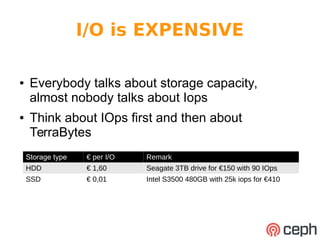
Storage type € per I/O Remark 
HDD € 1,60 Seagate 3TB drive for €150 with 90 IOps 
SSD € 0,01 Intel S3500 480GB with 25k iops for €410
Design for I/O 
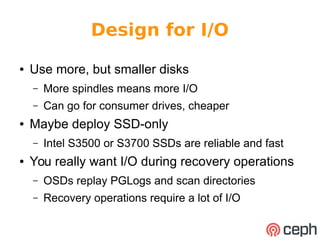
● Use more, but smaller disks 
– More spindles means more I/O 
– Can go for consumer drives, cheaper 
● Maybe deploy SSD-only 
– Intel S3500 or S3700 SSDs are reliable and fast 
● You really want I/O during recovery operations 
– OSDs replay PGLogs and scan directories 
– Recovery operations require a lot of I/O
Deployments 
● I've done numerous Ceph deployments 
– From tiny to large 
● Want to showcase two of the deployments 
– Use cases 
– Design principles
Ceph with CloudStack 
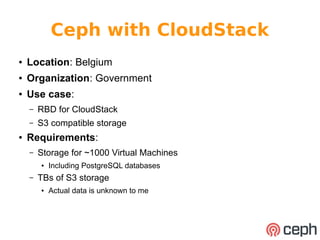
● Location: Belgium 
● Organization: Government 
● Use case: 
– RBD for CloudStack 
– S3 compatible storage 
● Requirements: 
– Storage for ~1000 Virtual Machines 
● Including PostgreSQL databases 
– TBs of S3 storage 
● Actual data is unknown to me
Ceph with CloudStack 
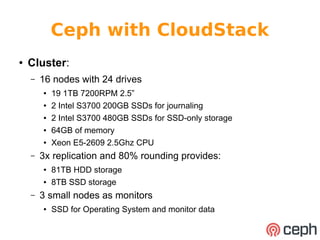
● Cluster: 
– 16 nodes with 24 drives 
● 19 1TB 7200RPM 2.5” 
● 2 Intel S3700 200GB SSDs for journaling 
● 2 Intel S3700 480GB SSDs for SSD-only storage 
● 64GB of memory 
● Xeon E5-2609 2.5Ghz CPU 
– 3x replication and 80% rounding provides: 
● 81TB HDD storage 
● 8TB SSD storage 
– 3 small nodes as monitors 
● SSD for Operating System and monitor data
Ceph with CloudStack
Ceph with CloudStack 
ROTATIONAL=$(cat /sys/block/$DEV/queue/rotational) 
if [ $ROTATIONAL -eq 1 ]; then 
echo "root=hdd rack=${RACK}-hdd host=${HOST}-hdd" 
else 
echo "root=ssd rack=${RACK}-ssd host=${HOST}-ssd" 
fi 
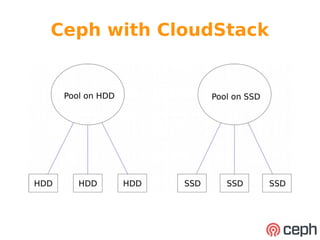
● If we detect the OSD is running on a SSD it goes into 
a different 'host' in the CRUSH Map 
– Rack is encoded in hostname (dc2-rk01) 
-48 2.88 rack rk01-ssd 
-33 0.72 host dc2-rk01-osd01-ssd 
252 0.36 osd.252 up 1 
253 0.36 osd.253 up 1 
-41 69.16 rack rk01-hdd 
-10 17.29 host dc2-rk01-osd01-hdd 
20 0.91 osd.20 up 1 
19 0.91 osd.19 up 1 
17 0.91 osd.17 up 1
Ceph with CloudStack 
● Download the script on my Github page: 
– Url: https://gist.github.com/wido 
– Place it in /usr/local/bin 
● Configure it in your ceph.conf 
– Push the config to your nodes using Puppet, Chef, 
Ansible, ceph-deploy, etc 
[osd] 
osd_crush_location_hook = /usr/local/bin/crush-location-looukp
Ceph with CloudStack 
● Highlights: 
– Automatic assignment of OSDs to right type 
– Designed for IOps. More, smaller drives 
● SSD for the real high I/O applications 
– RADOS Gateway for object storage 
● Trying to push developers towards objects instead of 
shared filesystems. A challenge! 
● Future: 
– Double cluster size within 6 months
RBD with OCFS2 
● Location: Netherlands 
● Organization: ISP 
● Use case: 
– RBD for OCFS2 
● Requirements: 
– Shared filesystem between webservers 
● Until CephFS is stable
RBD with OCFS2 
● Cluster: 
– 9 nodes with 8 drives 
● 1 SSD for Operating System 
● 7 Samsung 840 Pro 512GB SSDs 
● 10Gbit network (20Gbit LACP) 
– At 3x replication and 80% filling it provides 8.6TB 
of storage 
– 3 small nodes as monitors
RBD with OCFS2
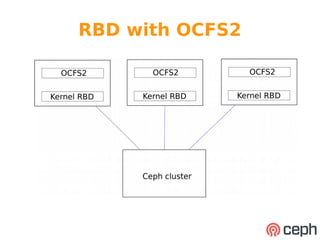
RBD with OCFS2 
● “OCFS2 is a general-purpose shared-disk 
cluster file system for Linux capable of 
providing both high performance and high 
availability.” 
– RBD disks are shared 
– ext4 or XFS can't be mounted on multiple 
locations at the same time
RBD with OCFS2 
● All the challenges were in OCFS2, not in Ceph 
nor RBD 
– Running 3.14.17 kernel due to OCFS2 issues 
– Limited OCFS2 volumes to 200GB to minimize 
impact in case of volume corruption 
– Done multiple hardware upgrades without any 
service interruption 
● Runs smoothly while waiting for CephFS to 
mature
RBD with OCFS2 
● 10Gbit network for lower latency: 
– Lower network latency provides more performance 
– Lower latency means more IOps 
● Design for I/O! 
● 16k packet roundtrip times: 
– 1GbE: 0.8 ~ 1.1ms 
– 10GbE: 0.3 ~ 0.4ms 
● It's not about the bandwidth, it's about latency!
RBD with OCFS2 
● Highlights: 
– Full SSD cluster 
– 10GbE network for lower latency 
– Replaced all hardware since cluster was build 
● From 8 to 16 bays machines 
● Future: 
– Expand when required. No concrete planning
DO and DON'T 
● DO 
– Design for I/O, not raw TerraBytes 
– Think about network latency 
● 1GbE vs 10GbE 
– Use small(er) machines 
– Test recovery situations 
● Pull the plug out of those machines! 
– Reboot your machines regularly to verify it all works 
● So do update those machines! 
– Use dedicated hardware for your monitors 
● With a SSD for storage
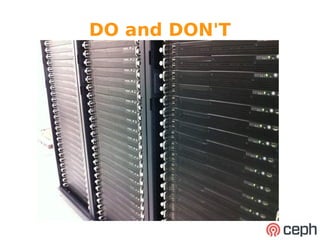
DO and DON'T
DO and DON'T 
● DON'T 
– Create to many Placement Groups 
● It might overload your CPUs during recovery situations 
– Fill your cluster over 80% 
– Try to be smarter then Ceph 
● It's auto-healing. Give it some time. 
– Buy the most expensive machines 
● Better to have two cheap(er) ones 
– Use RAID-1 for journaling SSDs 
● Spread your OSDS over them
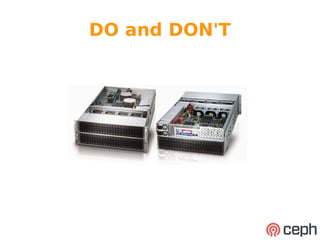
DO and DON'T
REMEMBER 
● Hardware failure is the rule, not the exception! 
● Consistency goes over availability 
● Ceph is designed to run on commodity 
hardware 
● There is no more need for RAID 
– forget it ever existed
Questions? 
● Twitter: @widodh 
● Skype: @widodh 
● E-Mail: wido@42on.com 
● Github: github.com/wido 
● Blog: http://blog.widodh.nl/

Ceph Day London 2014 - Deploying ceph in the wild

  • 1.
  • 2.
    Who am I? ● Wido den Hollander (1986) ● Co-owner and CTO of a PCextreme B.V., a dutch hosting company ● Ceph trainer and consultant at 42on B.V. ● Part of the Ceph community since late 2009 – Wrote the Apache CloudStack integration – libvirt RBD storage pool support – PHP and Java bindings for librados
  • 3.
    What is 42on? ● Consultancy company focused on Ceph and it's eco-system ● Founded in 2012 ● Based in the Netherlands ● I'm the only employee – My consultancy company
  • 4.
    Deploying Ceph ●As a consultant I see a lot of different organizations – From small companies to large governments – I see Ceph being used in all kinds of deployments ● It starts with gathering information about the use-case – Deployment application: RBD? Objects? – Storage requirements: TBs or PBs? – I/O requirements
  • 5.
    I/O is EXPENSIVE ● Everybody talks about storage capacity, almost nobody talks about Iops ● Think about IOps first and then about TerraBytes Storage type € per I/O Remark HDD € 1,60 Seagate 3TB drive for €150 with 90 IOps SSD € 0,01 Intel S3500 480GB with 25k iops for €410
  • 6.
    Design for I/O ● Use more, but smaller disks – More spindles means more I/O – Can go for consumer drives, cheaper ● Maybe deploy SSD-only – Intel S3500 or S3700 SSDs are reliable and fast ● You really want I/O during recovery operations – OSDs replay PGLogs and scan directories – Recovery operations require a lot of I/O
  • 7.
    Deployments ● I'vedone numerous Ceph deployments – From tiny to large ● Want to showcase two of the deployments – Use cases – Design principles
  • 8.
    Ceph with CloudStack ● Location: Belgium ● Organization: Government ● Use case: – RBD for CloudStack – S3 compatible storage ● Requirements: – Storage for ~1000 Virtual Machines ● Including PostgreSQL databases – TBs of S3 storage ● Actual data is unknown to me
  • 9.
    Ceph with CloudStack ● Cluster: – 16 nodes with 24 drives ● 19 1TB 7200RPM 2.5” ● 2 Intel S3700 200GB SSDs for journaling ● 2 Intel S3700 480GB SSDs for SSD-only storage ● 64GB of memory ● Xeon E5-2609 2.5Ghz CPU – 3x replication and 80% rounding provides: ● 81TB HDD storage ● 8TB SSD storage – 3 small nodes as monitors ● SSD for Operating System and monitor data
  • 10.
  • 11.
    Ceph with CloudStack ROTATIONAL=$(cat /sys/block/$DEV/queue/rotational) if [ $ROTATIONAL -eq 1 ]; then echo "root=hdd rack=${RACK}-hdd host=${HOST}-hdd" else echo "root=ssd rack=${RACK}-ssd host=${HOST}-ssd" fi ● If we detect the OSD is running on a SSD it goes into a different 'host' in the CRUSH Map – Rack is encoded in hostname (dc2-rk01) -48 2.88 rack rk01-ssd -33 0.72 host dc2-rk01-osd01-ssd 252 0.36 osd.252 up 1 253 0.36 osd.253 up 1 -41 69.16 rack rk01-hdd -10 17.29 host dc2-rk01-osd01-hdd 20 0.91 osd.20 up 1 19 0.91 osd.19 up 1 17 0.91 osd.17 up 1
  • 12.
    Ceph with CloudStack ● Download the script on my Github page: – Url: https://gist.github.com/wido – Place it in /usr/local/bin ● Configure it in your ceph.conf – Push the config to your nodes using Puppet, Chef, Ansible, ceph-deploy, etc [osd] osd_crush_location_hook = /usr/local/bin/crush-location-looukp
  • 13.
    Ceph with CloudStack ● Highlights: – Automatic assignment of OSDs to right type – Designed for IOps. More, smaller drives ● SSD for the real high I/O applications – RADOS Gateway for object storage ● Trying to push developers towards objects instead of shared filesystems. A challenge! ● Future: – Double cluster size within 6 months
  • 14.
    RBD with OCFS2 ● Location: Netherlands ● Organization: ISP ● Use case: – RBD for OCFS2 ● Requirements: – Shared filesystem between webservers ● Until CephFS is stable
  • 15.
    RBD with OCFS2 ● Cluster: – 9 nodes with 8 drives ● 1 SSD for Operating System ● 7 Samsung 840 Pro 512GB SSDs ● 10Gbit network (20Gbit LACP) – At 3x replication and 80% filling it provides 8.6TB of storage – 3 small nodes as monitors
  • 16.
  • 17.
    RBD with OCFS2 ● “OCFS2 is a general-purpose shared-disk cluster file system for Linux capable of providing both high performance and high availability.” – RBD disks are shared – ext4 or XFS can't be mounted on multiple locations at the same time
  • 18.
    RBD with OCFS2 ● All the challenges were in OCFS2, not in Ceph nor RBD – Running 3.14.17 kernel due to OCFS2 issues – Limited OCFS2 volumes to 200GB to minimize impact in case of volume corruption – Done multiple hardware upgrades without any service interruption ● Runs smoothly while waiting for CephFS to mature
  • 19.
    RBD with OCFS2 ● 10Gbit network for lower latency: – Lower network latency provides more performance – Lower latency means more IOps ● Design for I/O! ● 16k packet roundtrip times: – 1GbE: 0.8 ~ 1.1ms – 10GbE: 0.3 ~ 0.4ms ● It's not about the bandwidth, it's about latency!
  • 20.
    RBD with OCFS2 ● Highlights: – Full SSD cluster – 10GbE network for lower latency – Replaced all hardware since cluster was build ● From 8 to 16 bays machines ● Future: – Expand when required. No concrete planning
  • 21.
    DO and DON'T ● DO – Design for I/O, not raw TerraBytes – Think about network latency ● 1GbE vs 10GbE – Use small(er) machines – Test recovery situations ● Pull the plug out of those machines! – Reboot your machines regularly to verify it all works ● So do update those machines! – Use dedicated hardware for your monitors ● With a SSD for storage
  • 22.
  • 23.
    DO and DON'T ● DON'T – Create to many Placement Groups ● It might overload your CPUs during recovery situations – Fill your cluster over 80% – Try to be smarter then Ceph ● It's auto-healing. Give it some time. – Buy the most expensive machines ● Better to have two cheap(er) ones – Use RAID-1 for journaling SSDs ● Spread your OSDS over them
  • 24.
  • 25.
    REMEMBER ● Hardwarefailure is the rule, not the exception! ● Consistency goes over availability ● Ceph is designed to run on commodity hardware ● There is no more need for RAID – forget it ever existed
  • 26.
    Questions? ● Twitter:@widodh ● Skype: @widodh ● E-Mail: wido@42on.com ● Github: github.com/wido ● Blog: http://blog.widodh.nl/