PHAM TUAN ANH MBA, PMP
Project Management
Fundamental
PROJECT CASH FLOW
 Cost
 Initial Investment
 Implementation Cost
 Revenue
 Sale Revenue
 Financing
 Irregular Receipt
 Fixed Cost
 Variable Cost
 Opportunity Cost
 Sunk Cost
 Marginal Cost
 Marginal Revenue
 Profit Maximization
2
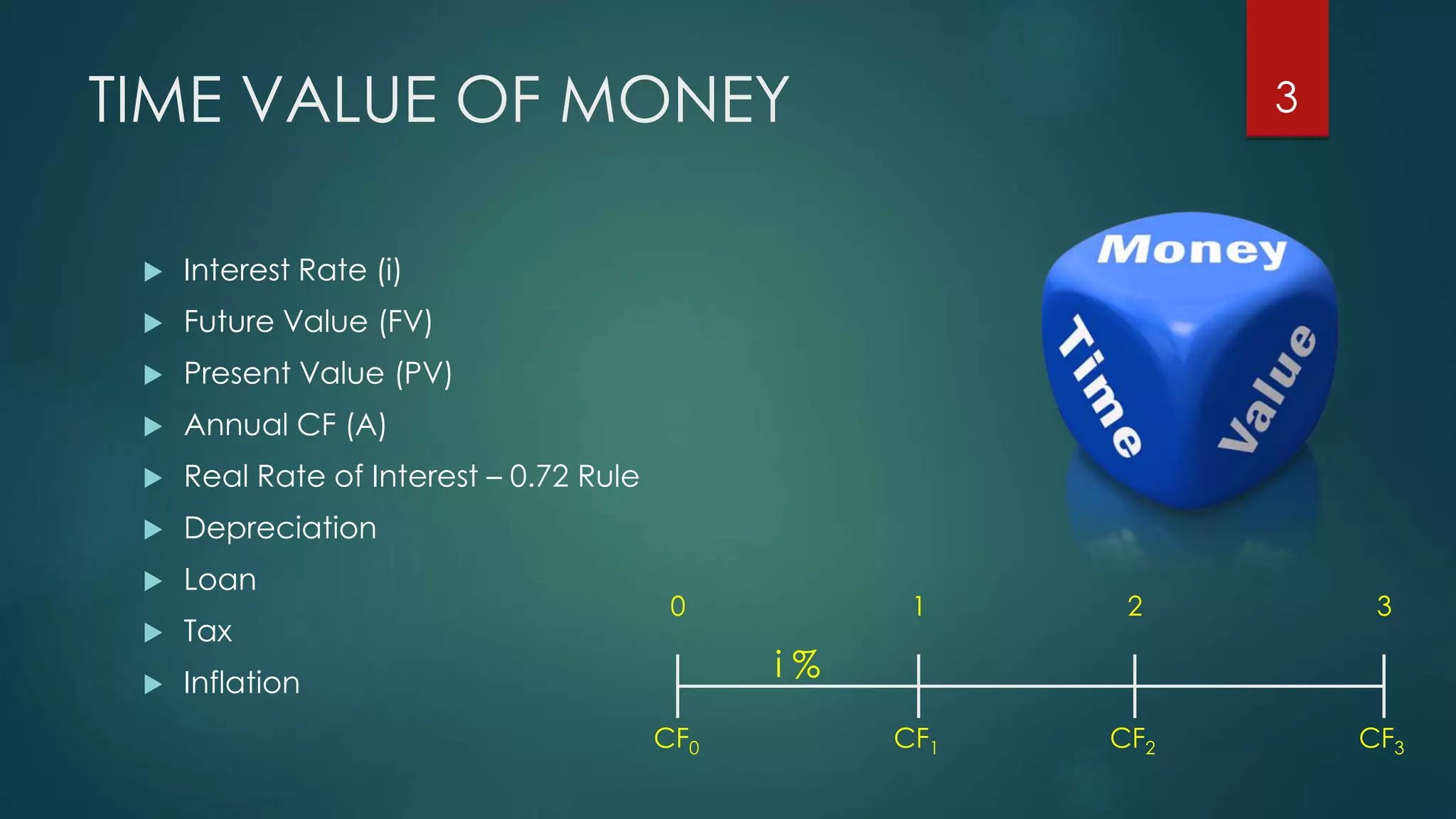
TIME VALUE OF MONEY
 Interest Rate (i)
 Future Value (FV)
 Present Value (PV)
 Annual CF (A)
 Real Rate of Interest – 0.72 Rule
 Depreciation
 Loan
 Tax
 Inflation
CF0 CF1 CF3CF2
0 1 2 3
i %
3
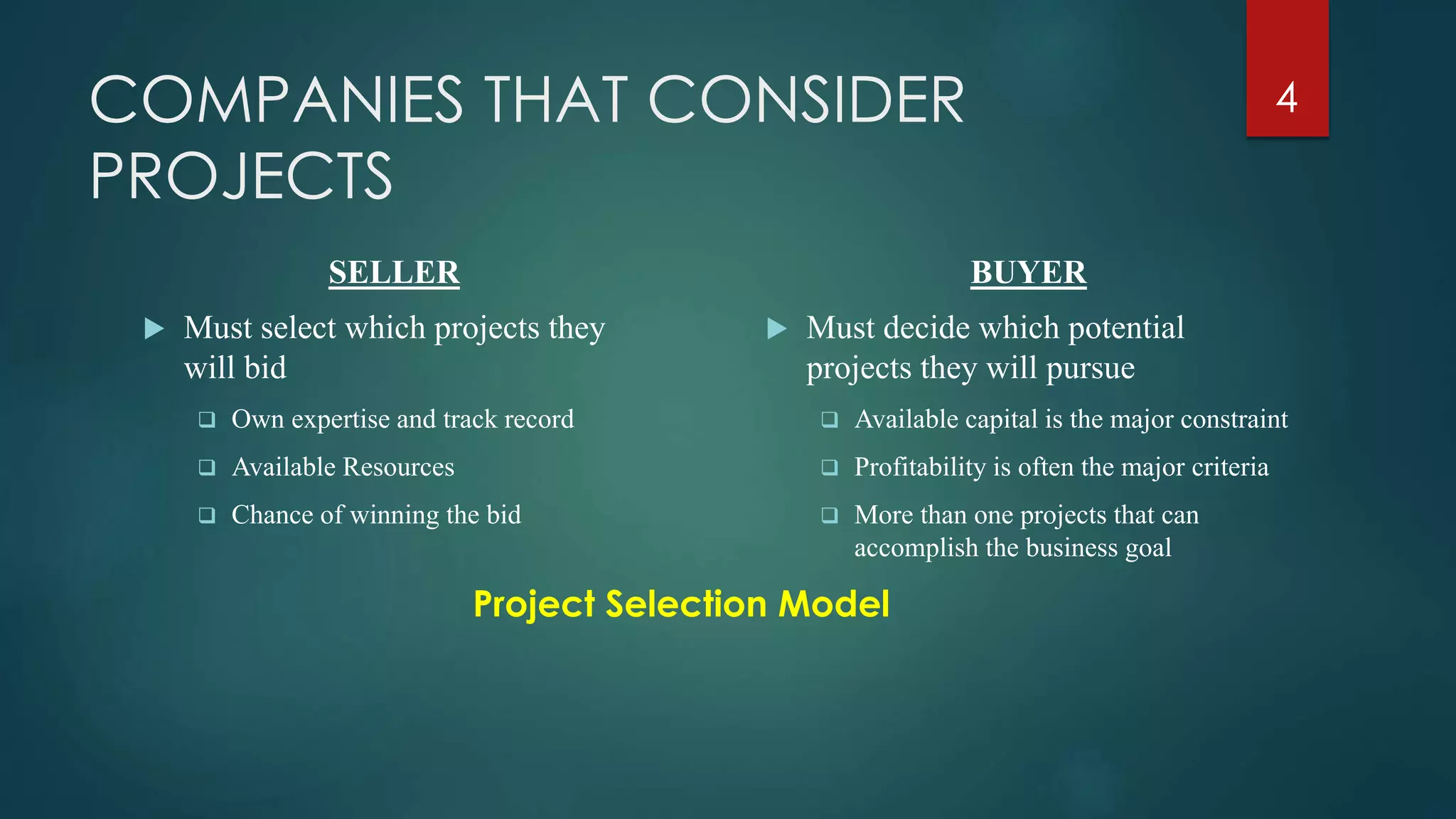
COMPANIES THAT CONSIDER
PROJECTS
SELLER
 Must select which projects they
will bid
 Own expertise and track record
 Available Resources
 Chance of winning the bid
BUYER
 Must decide which potential
projects they will pursue
 Available capital is the major constraint
 Profitability is often the major criteria
 More than one projects that can
accomplish the business goal
Project Selection Model
4
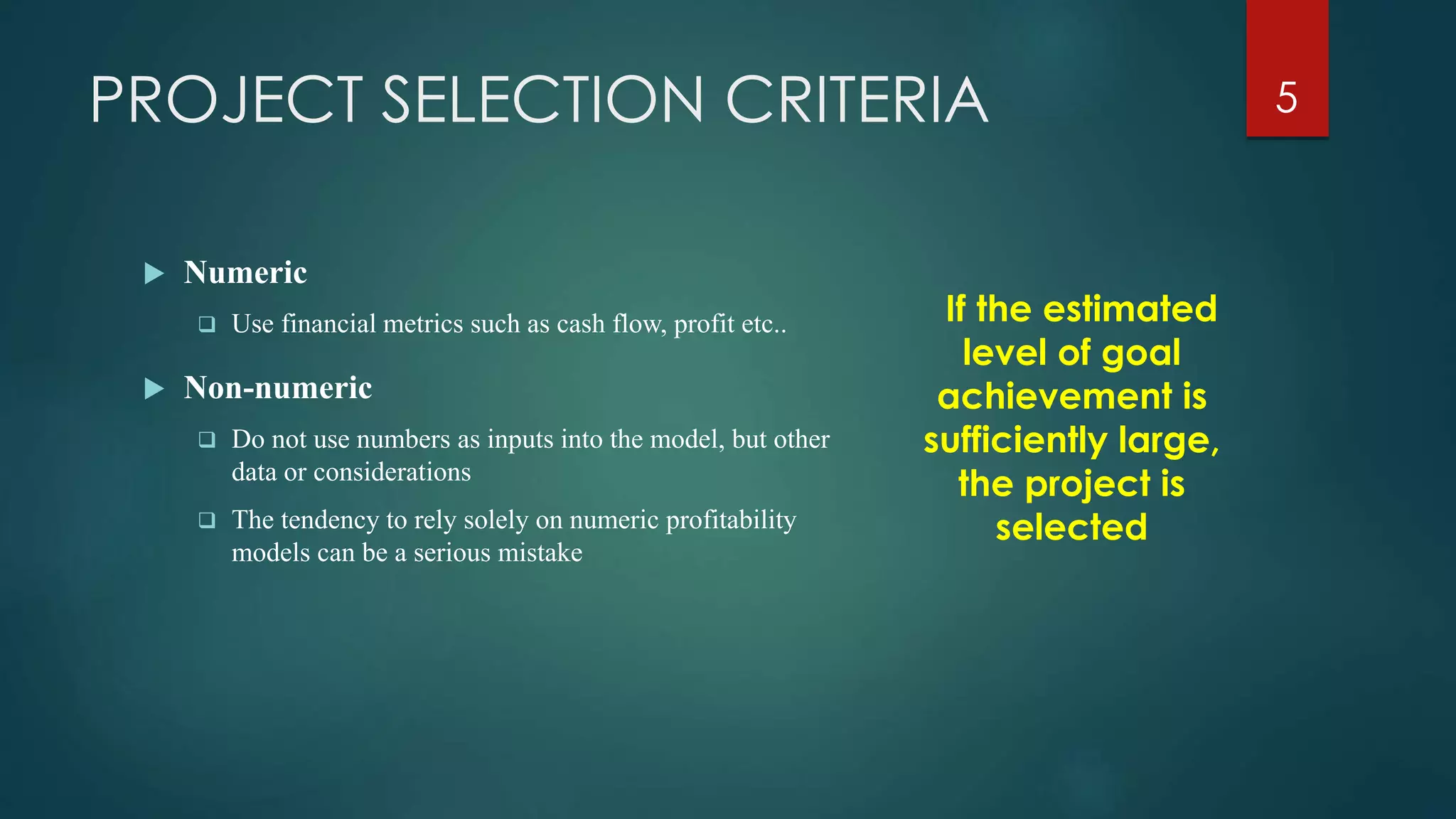
PROJECT SELECTION CRITERIA
 Numeric
 Use financial metrics such as cash flow, profit etc..
 Non-numeric
 Do not use numbers as inputs into the model, but other
data or considerations
 The tendency to rely solely on numeric profitability
models can be a serious mistake
If the estimated
level of goal
achievement is
sufficiently large,
the project is
selected
5
NON-NUMERIC MODELS
 The Sacred Cow (the boss wants to do it)
 The operating necessity (the basement is flooded)
 The competitive necessity (we will lose sales if we don’t change)
 The product line extension (will it fit?)
 Comparative benefit model (how does it look in the context of other projects)
6
NUMERIC MODELS
 Consider a numeric value for a project that can be
easily compared among the others
 Two major categories:
 Profit/profitability
 Scoring
7
PROFIT/PROFITABILITY MODELS
 Models that look at costs and revenues
 Discounted Cash Flow (NPV)
 Internal Rate of Return (IRR)
 Benefit Cost Ratio (BCR)
 Payback Period (PB)
 Computer Aided Calculation
8
PROFIT/PROFITABILITY MODELS
COMPARISON
 Project Scale impact the selection of NPV or IRR
 Sponsor care NPV while Bank care IRR
 BCR, PB should be considered as minor criteria
9
PROJECT PROPOSALS
 Proposal document contains information needed to evaluate
and score a project proposal
 Large organizations put out bids for projects
 RFP (request for proposal)
 RFI (request for information)
 RFQ (request for quotation)
 Vendor /Firms respond to the competitive process with
project proposals
10
PROPOSALS DOCUMENT
 The technical approach
 General description of the problem to be solved or the project to
be undertaken
 The general proposed approach /solution
 The implementation plan
 Estimates of required time, materials and other resources to be
used, include aggregate costing
 Gantt charts, network diagrams etc. to show project timeline and
milestones
11
PROPOSALS DOCUMENT
 The plan for logistic support and administration
 Ability description of the proposer to supply the routine facilities,
equipment and skills needed
 How subcontractors will be dealt with
 Nature and timing of project reports and deliverables
 Past experience of the proposer
 List of key project personnel and their experience & credentials
(usually full CVs)
12
PROJECT SCHEDULING
What is it
 Allocate resources to execute all activities in the project
Why to schedule
 Project is a set of activities or tasks with clear beginning and
ending points
 The amount of available resources (time, personnel and budget)
to carry out the activities is limited
13
PROJECT SCHEDULING
 Objectives
 Establish beginning, ending and duration of each activity in the project
 Calculate overall completion time of the project given the amount of usually
limited resources
 Determine the critical path and its duration
 Determine the slack time for all non-critical activities and the whole project
 Guide the allocation of resources other than time such as staff and budget
14
PROJECT SCHEDULING
 Methodology
 Define activities or tasks according to the project objectives
 A task is an individual unit of work with a clear beginning and a clear end
 Identify precedence relationships or dependencies
 Estimate time required to complete each task
 Draw an activity-on-arrow PERT diagram inserting dummy activities if required
 Apply CPM to calculate earliest and latest starting times, earliest and latest
completion times, slack times, critical path etc..
 Construct a GANTT chart
 Reallocate resources and resolve if necessary
 Continuously monitor/revise the time estimates along the project duration
15
PERT NETWORK DIAGRAM
Program Evaluation and Review Technique
 It is a network model that allows for randomness in activity
completion times
 Tool used to control the length of projects
 PERT was developed in the late 1950’s for the US Navy’s
Polaris Project
 First used as a management tool for military projects
 Adapted as an educational tool for business managers
 It has the potential to reduce both the time and cost required to
complete a project
16
PERT NETWORK DIAGRAM
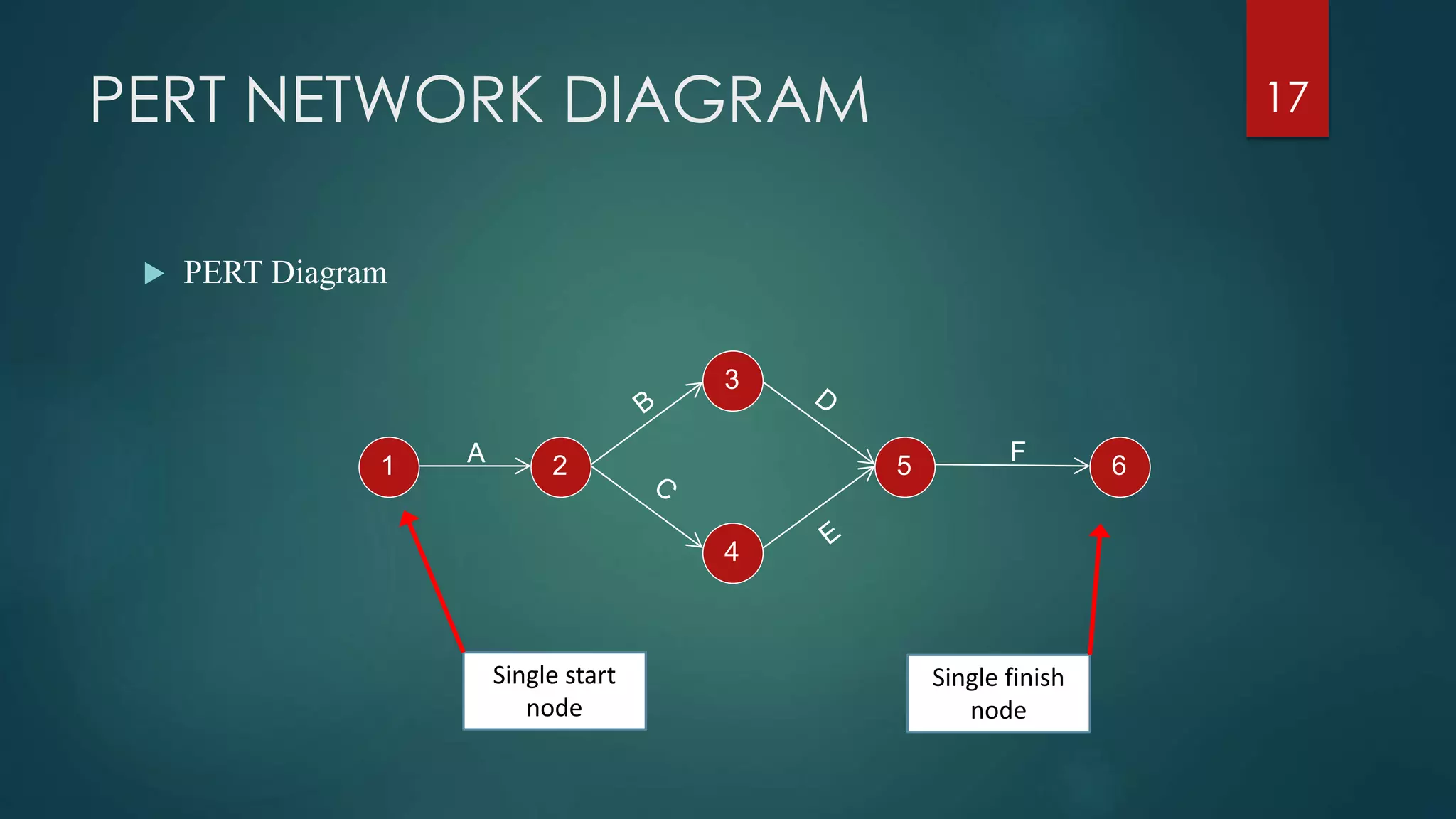
 PERT Diagram
17
1 2
3
5
4
6A F
Single start
node
Single finish
node
PERT NETWORK DIAGRAM
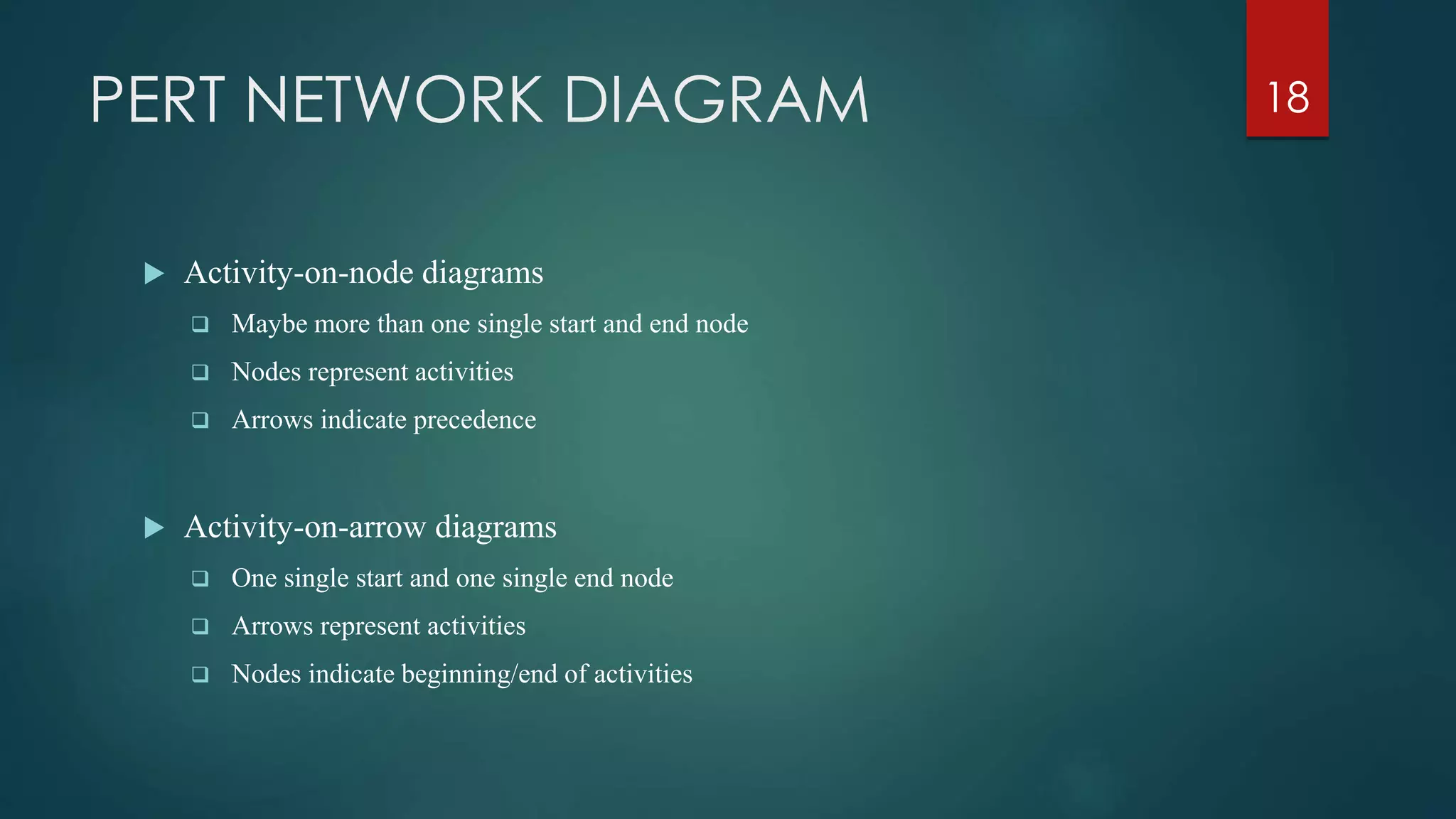
 Activity-on-node diagrams
 Maybe more than one single start and end node
 Nodes represent activities
 Arrows indicate precedence
 Activity-on-arrow diagrams
 One single start and one single end node
 Arrows represent activities
 Nodes indicate beginning/end of activities
18
PERT NETWORK DIAGRAM
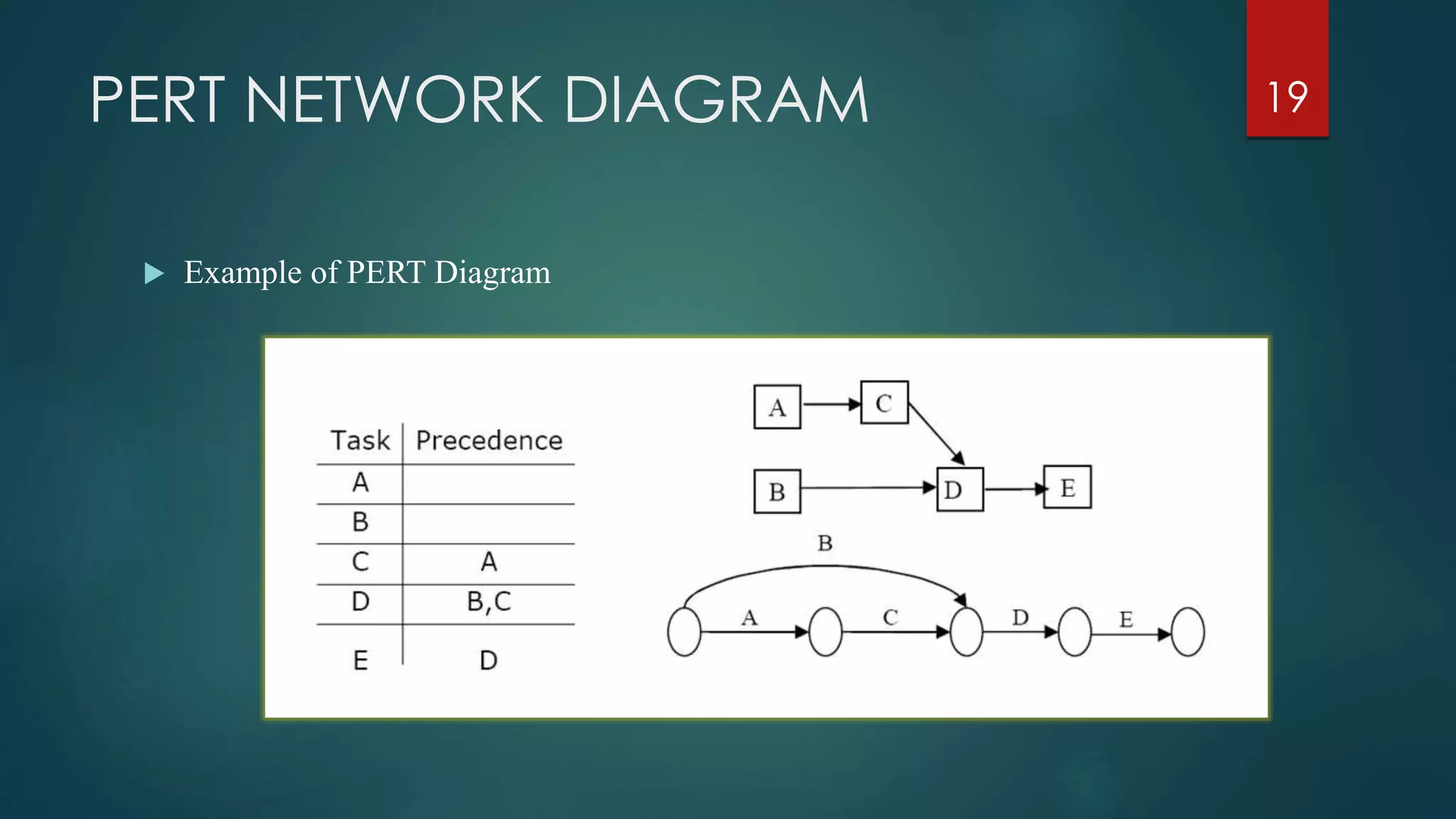
 Example of PERT Diagram
19
PERT NETWORK DIAGRAM
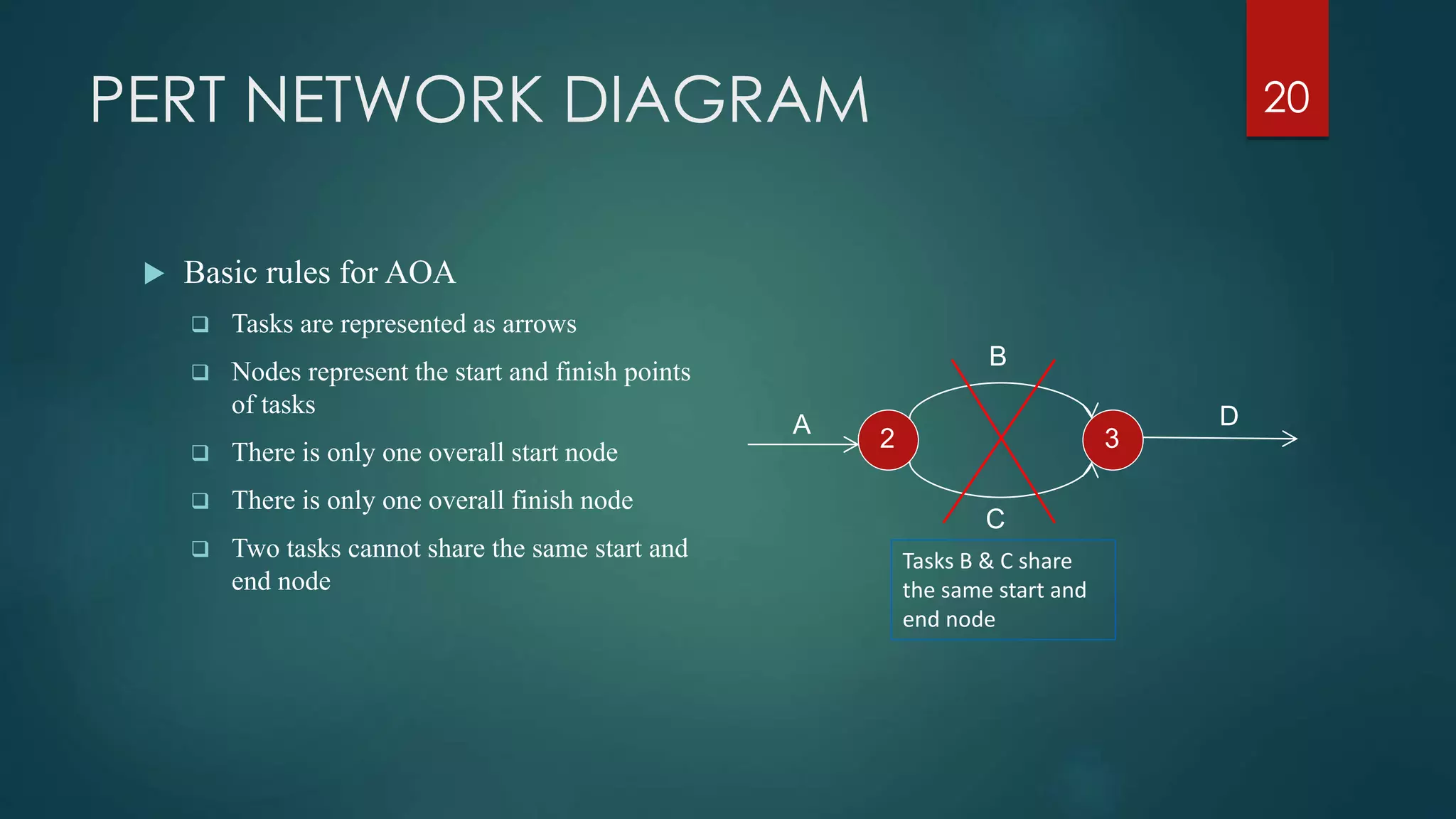
 Basic rules for AOA
 Tasks are represented as arrows
 Nodes represent the start and finish points
of tasks
 There is only one overall start node
 There is only one overall finish node
 Two tasks cannot share the same start and
end node
20
2 3
A D
C
B
Tasks B & C share
the same start and
end node
PERT NETWORK DIAGRAM
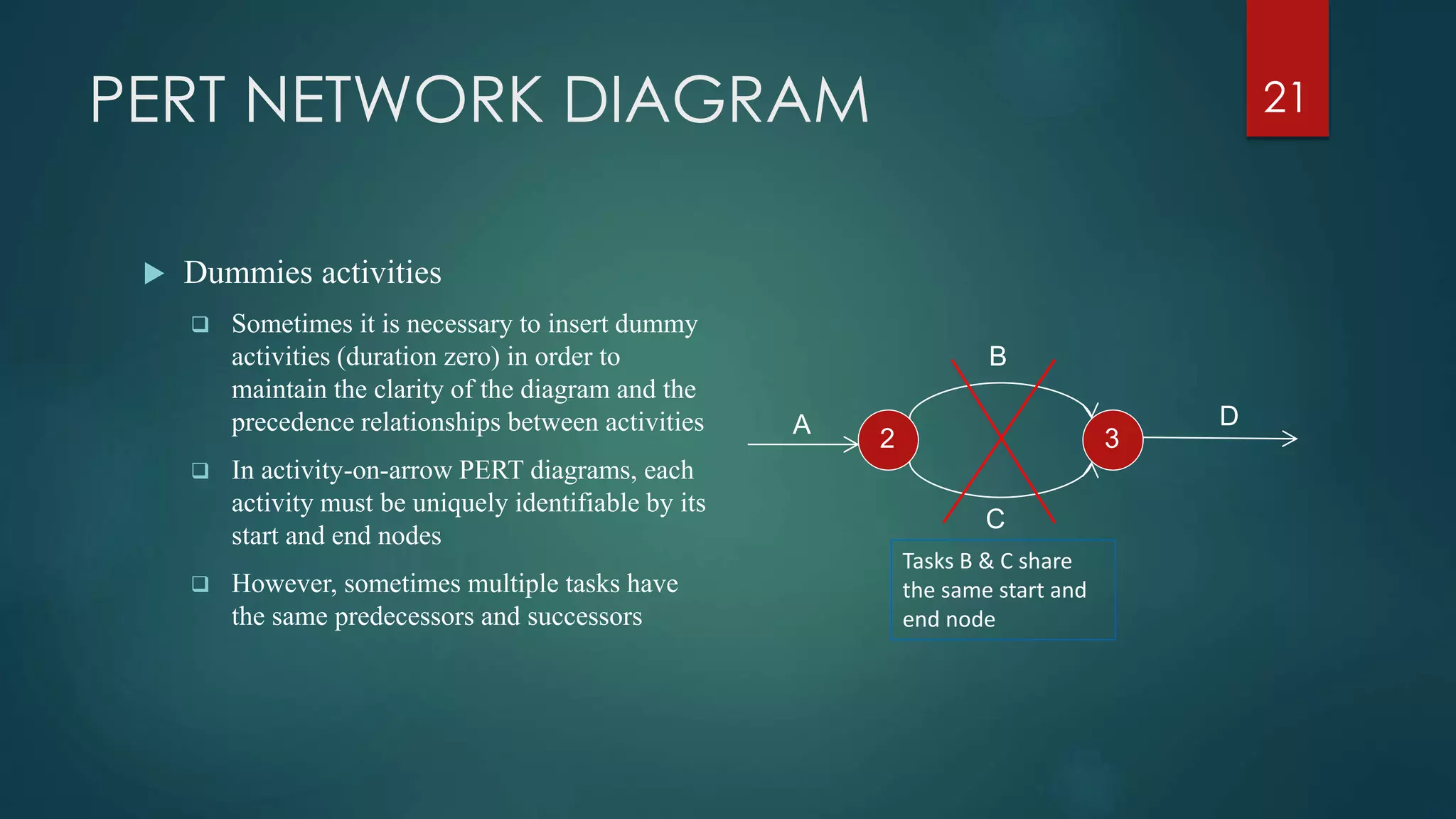
 Dummies activities
 Sometimes it is necessary to insert dummy
activities (duration zero) in order to
maintain the clarity of the diagram and the
precedence relationships between activities
 In activity-on-arrow PERT diagrams, each
activity must be uniquely identifiable by its
start and end nodes
 However, sometimes multiple tasks have
the same predecessors and successors
21
2 3
A D
C
B
Tasks B & C share
the same start and
end node
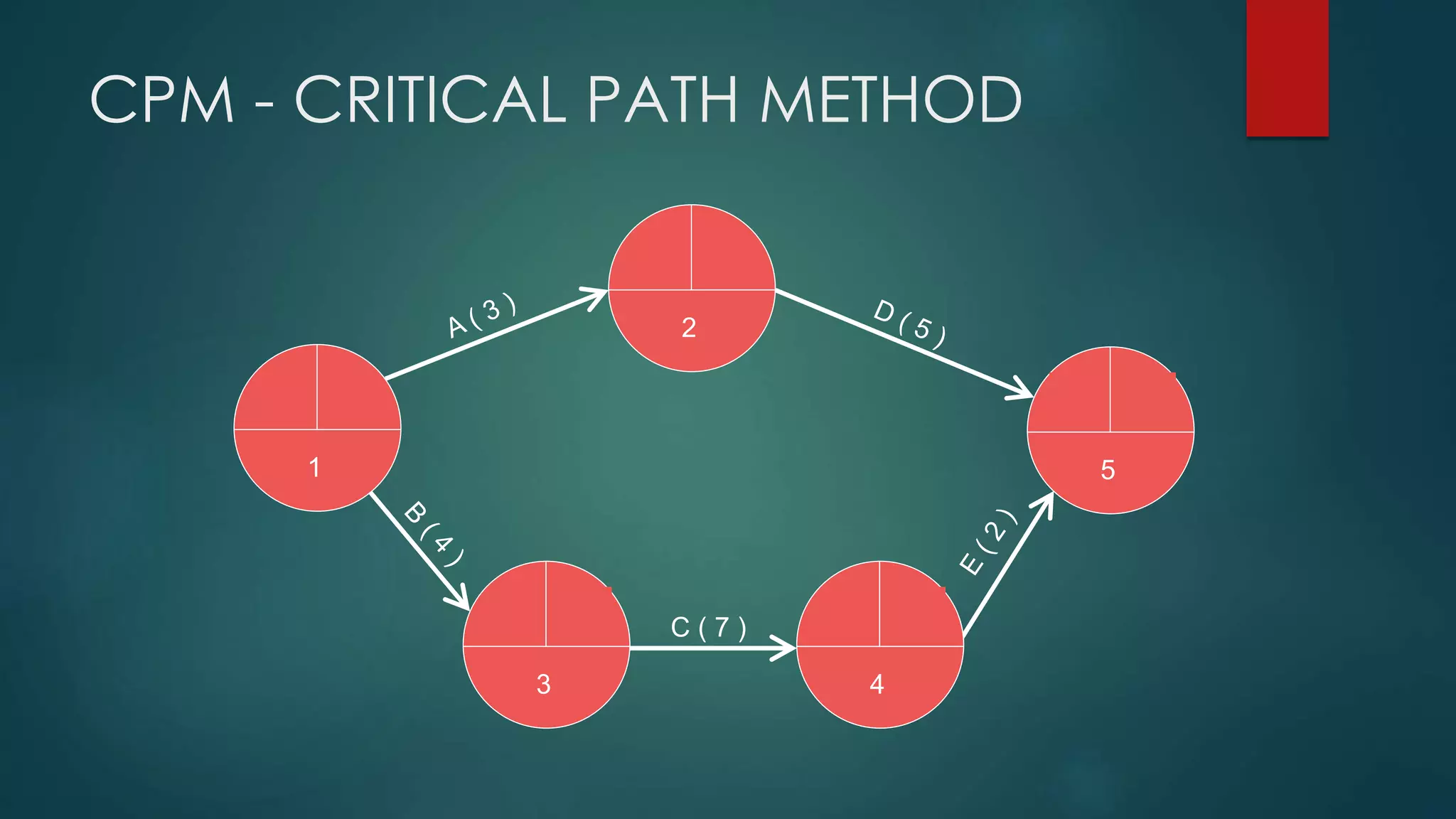
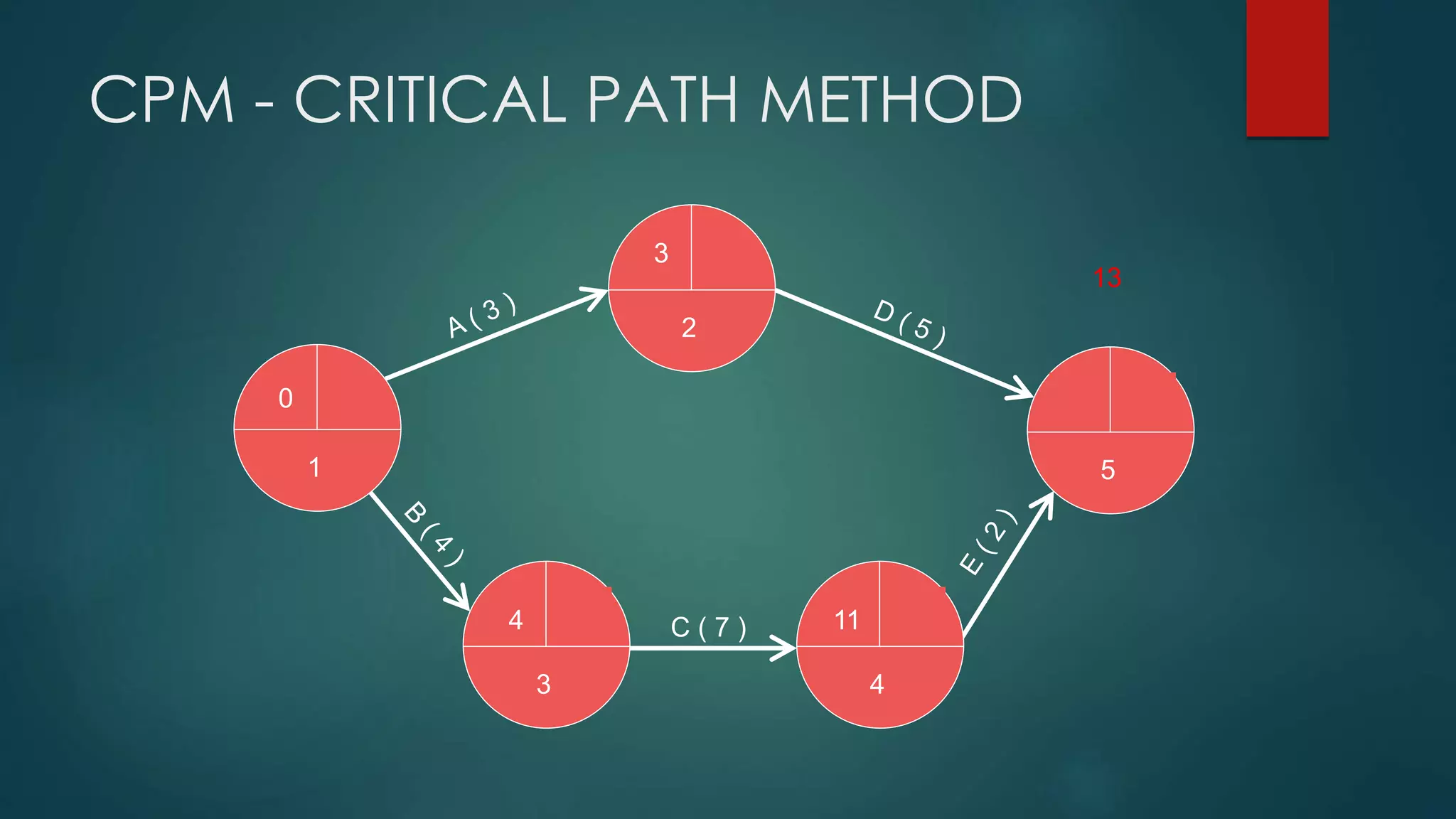
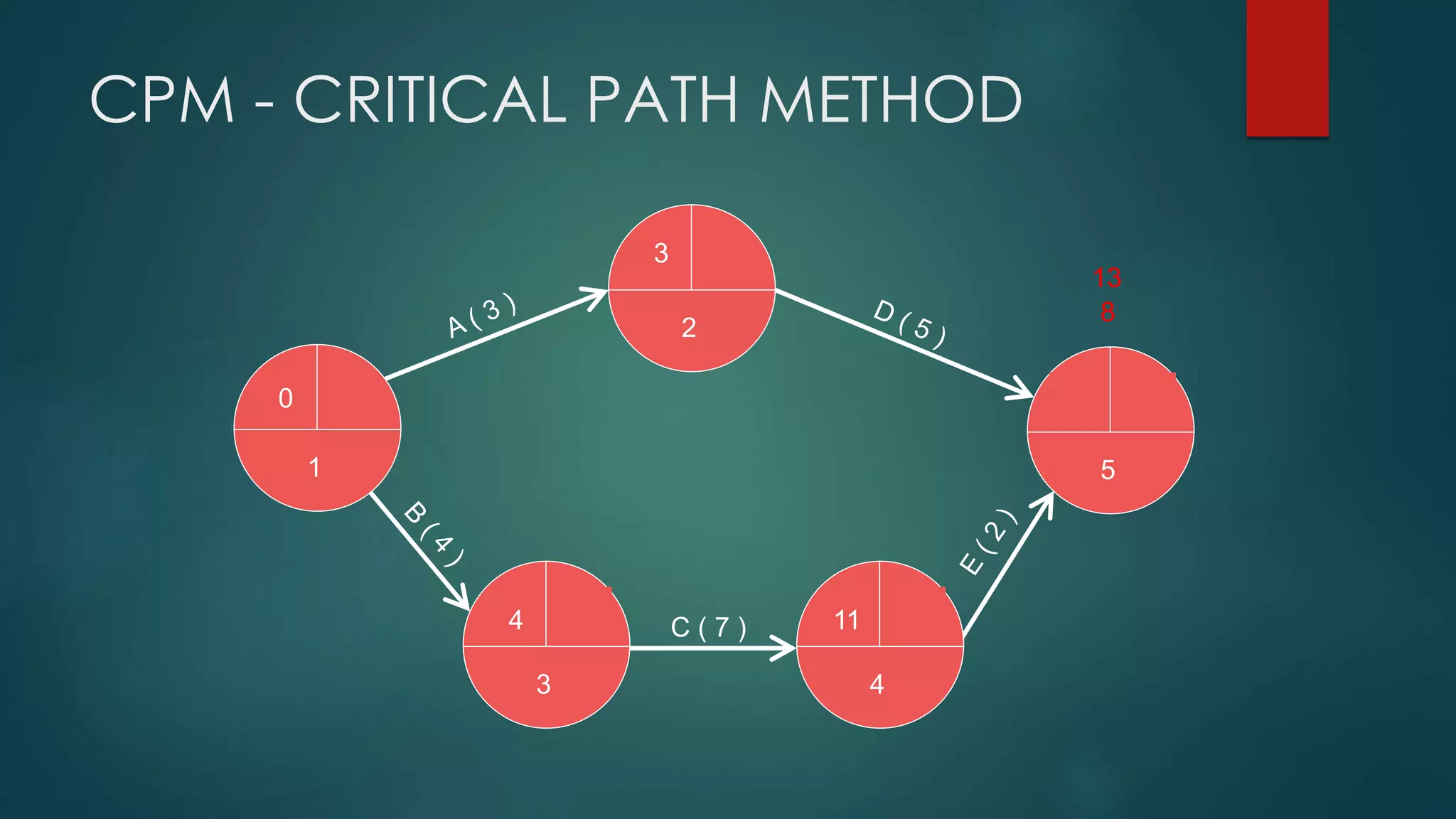
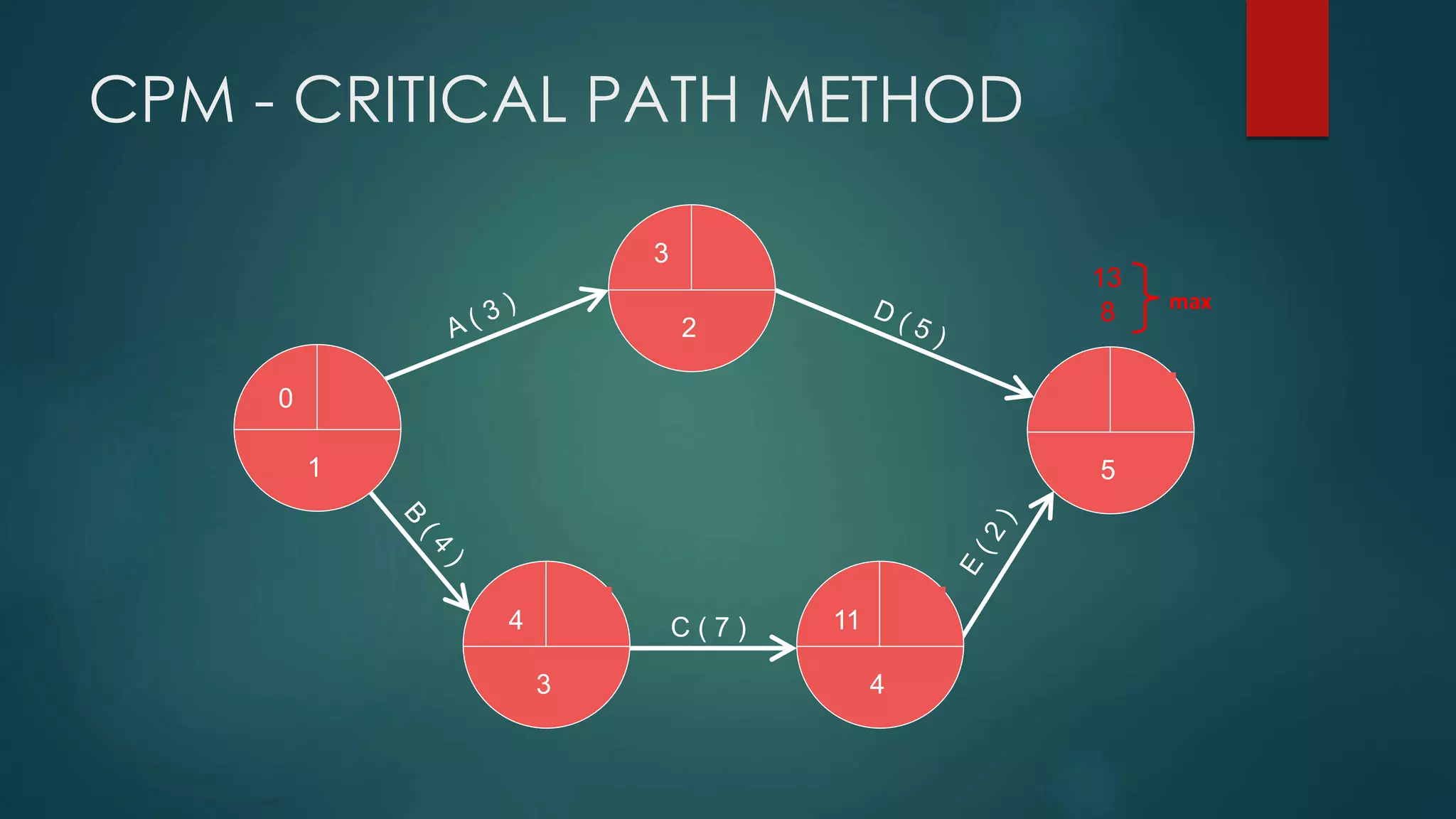
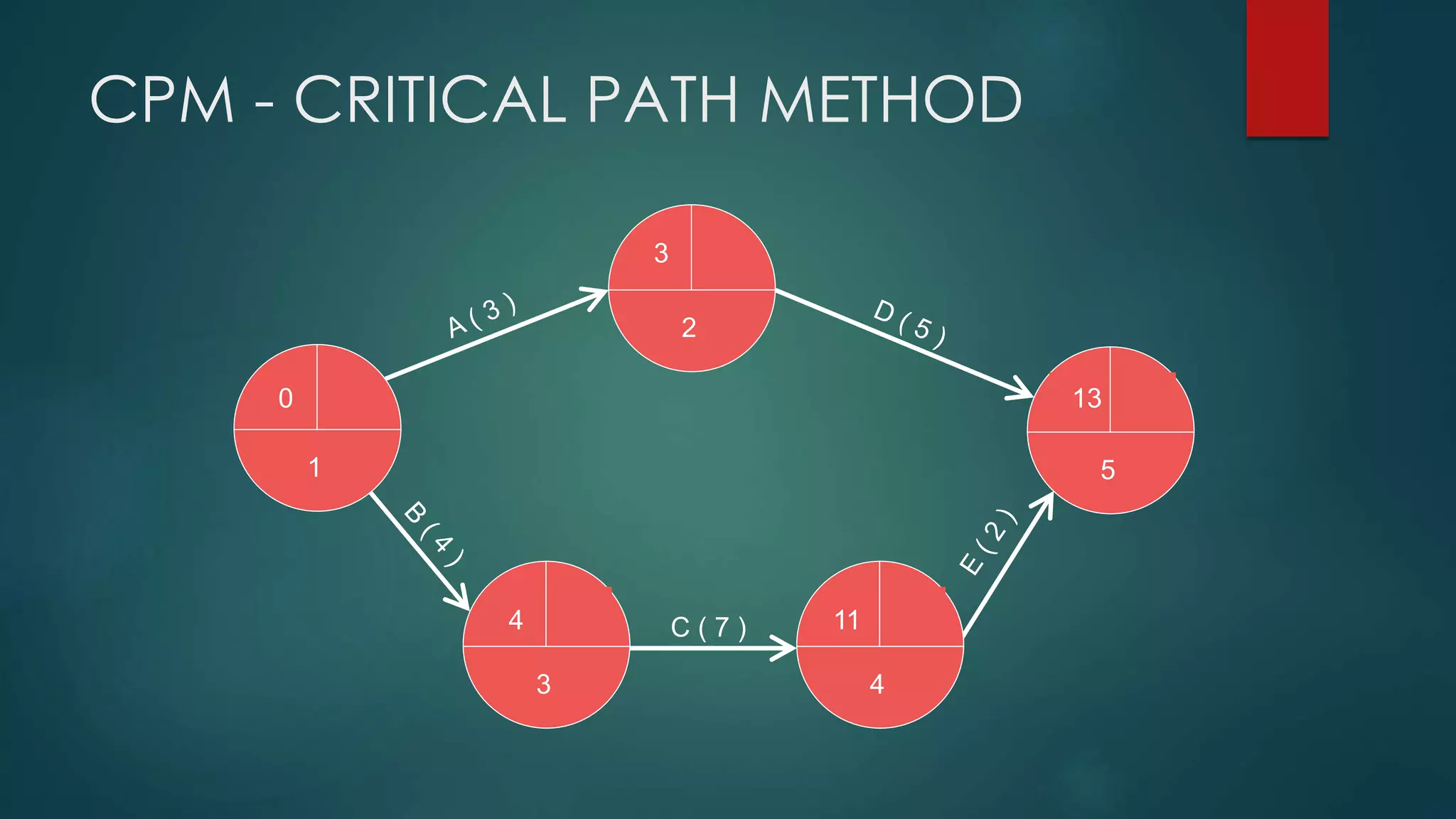
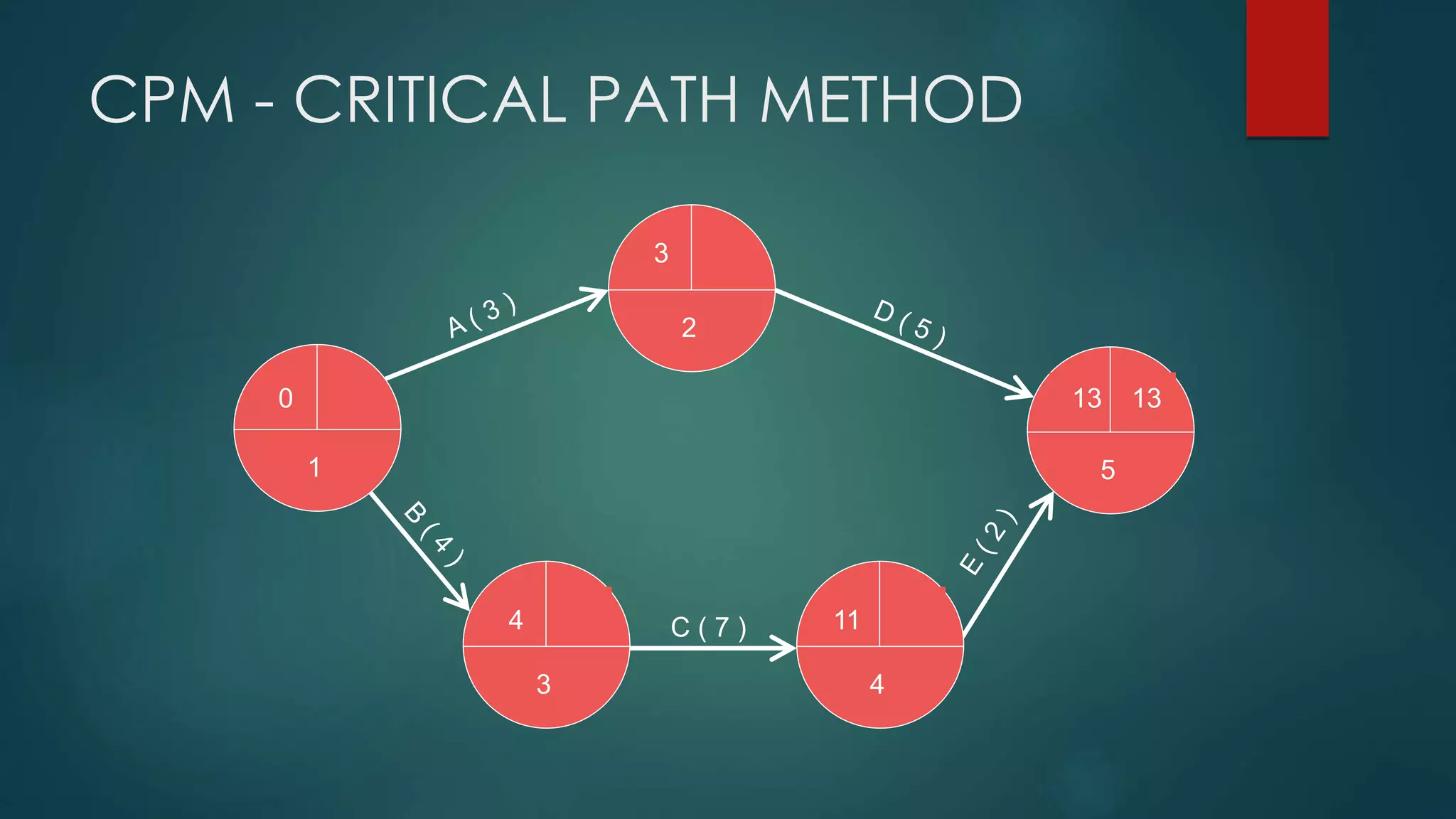
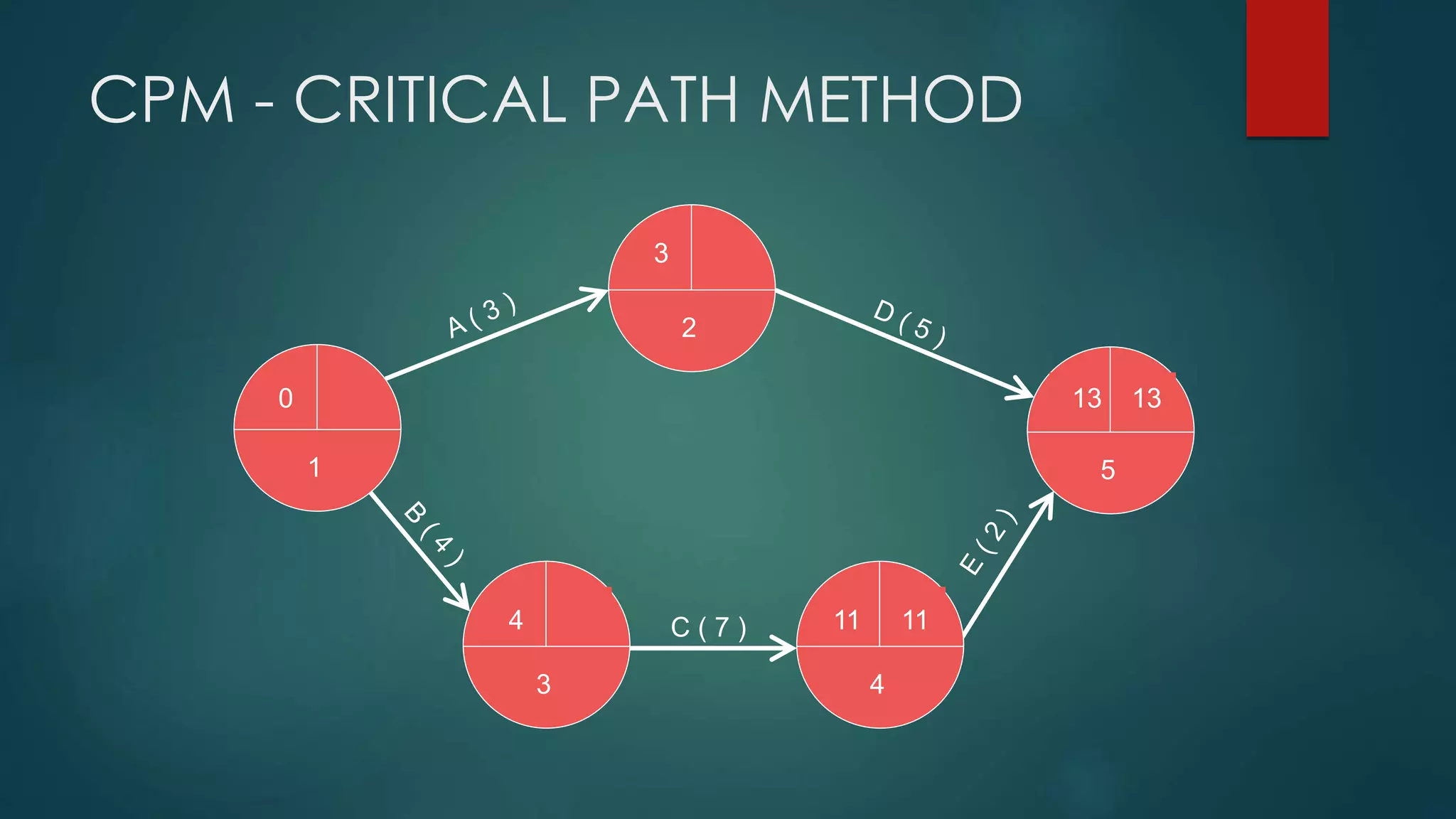
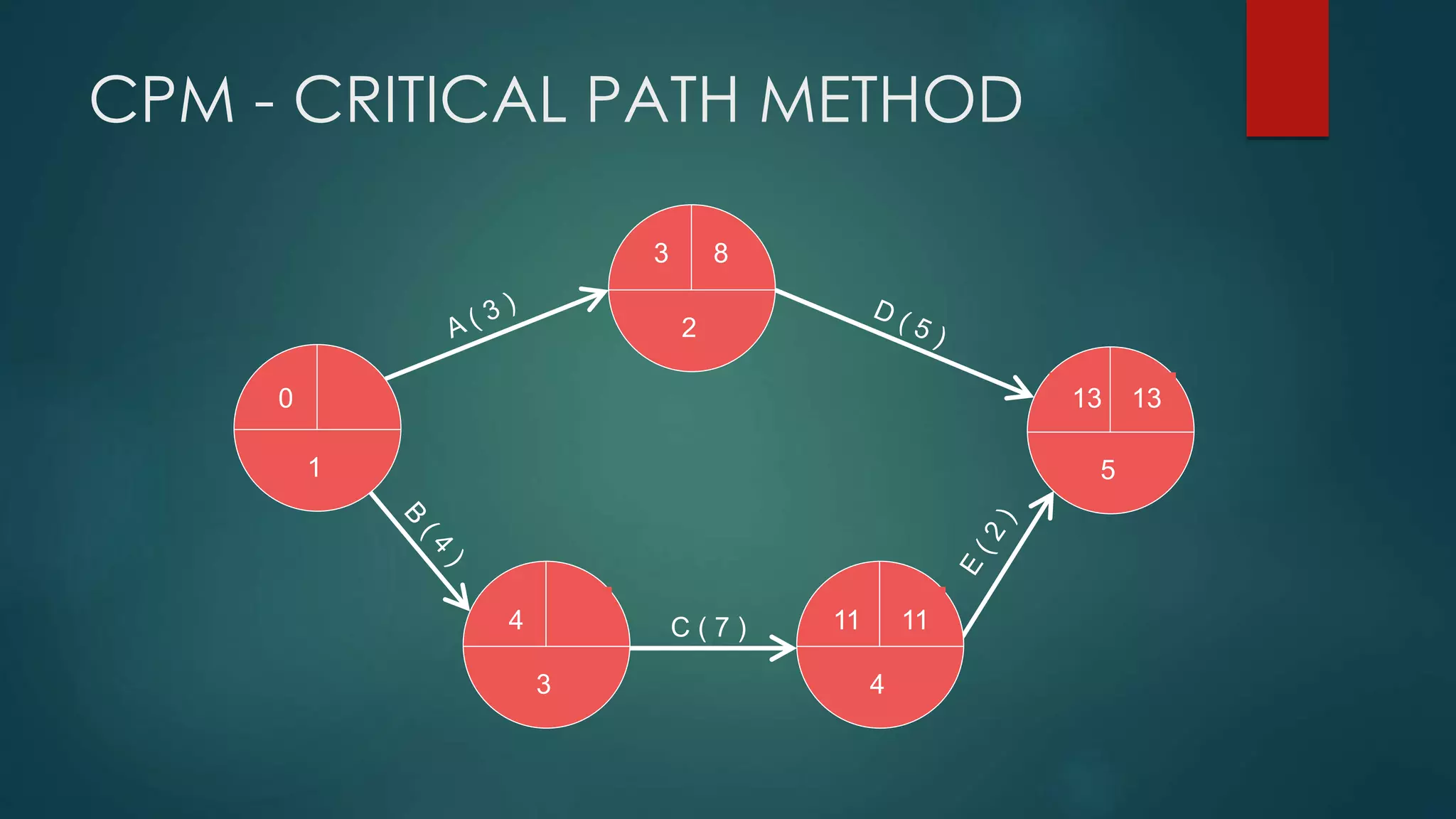
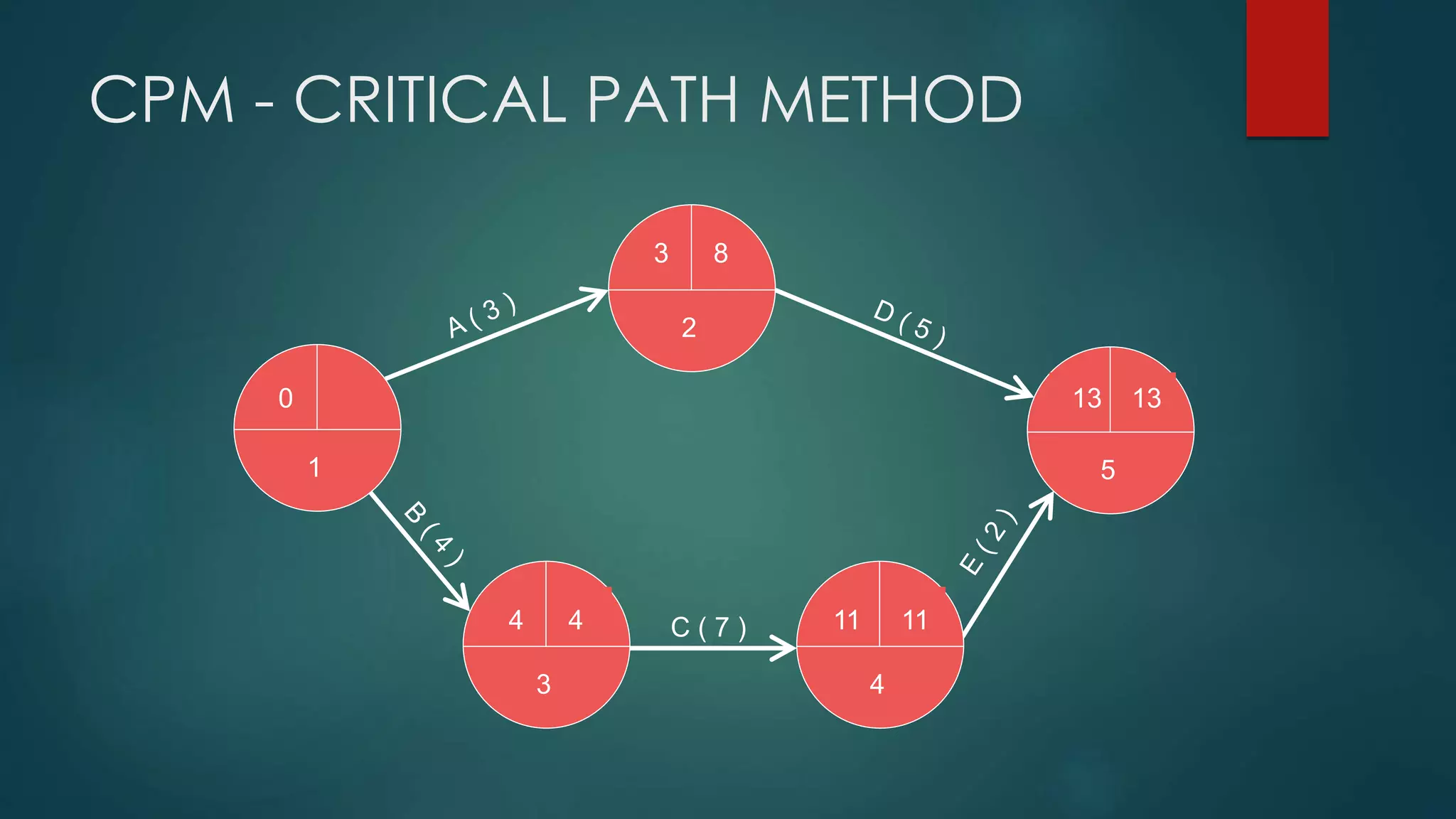
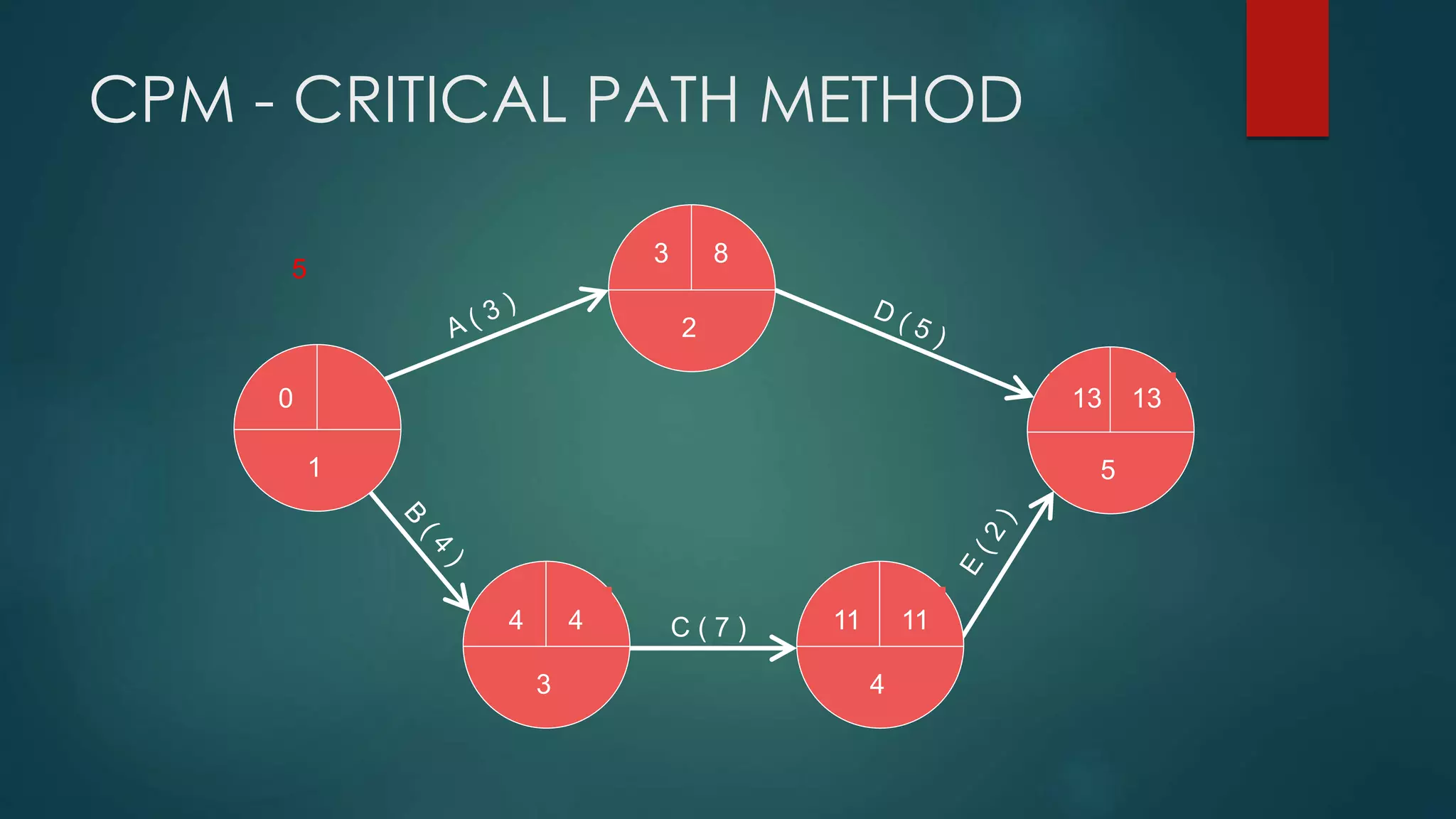
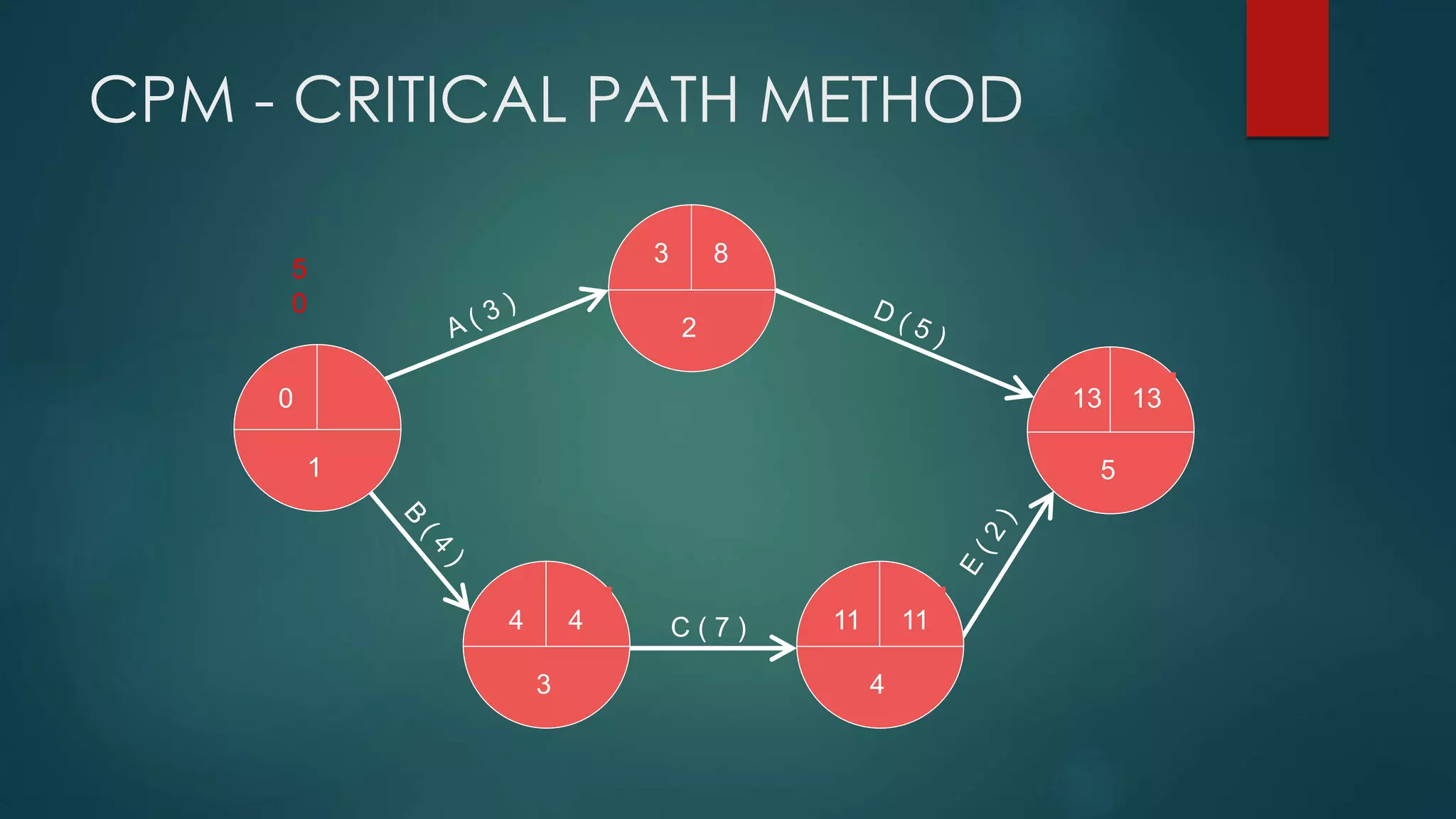
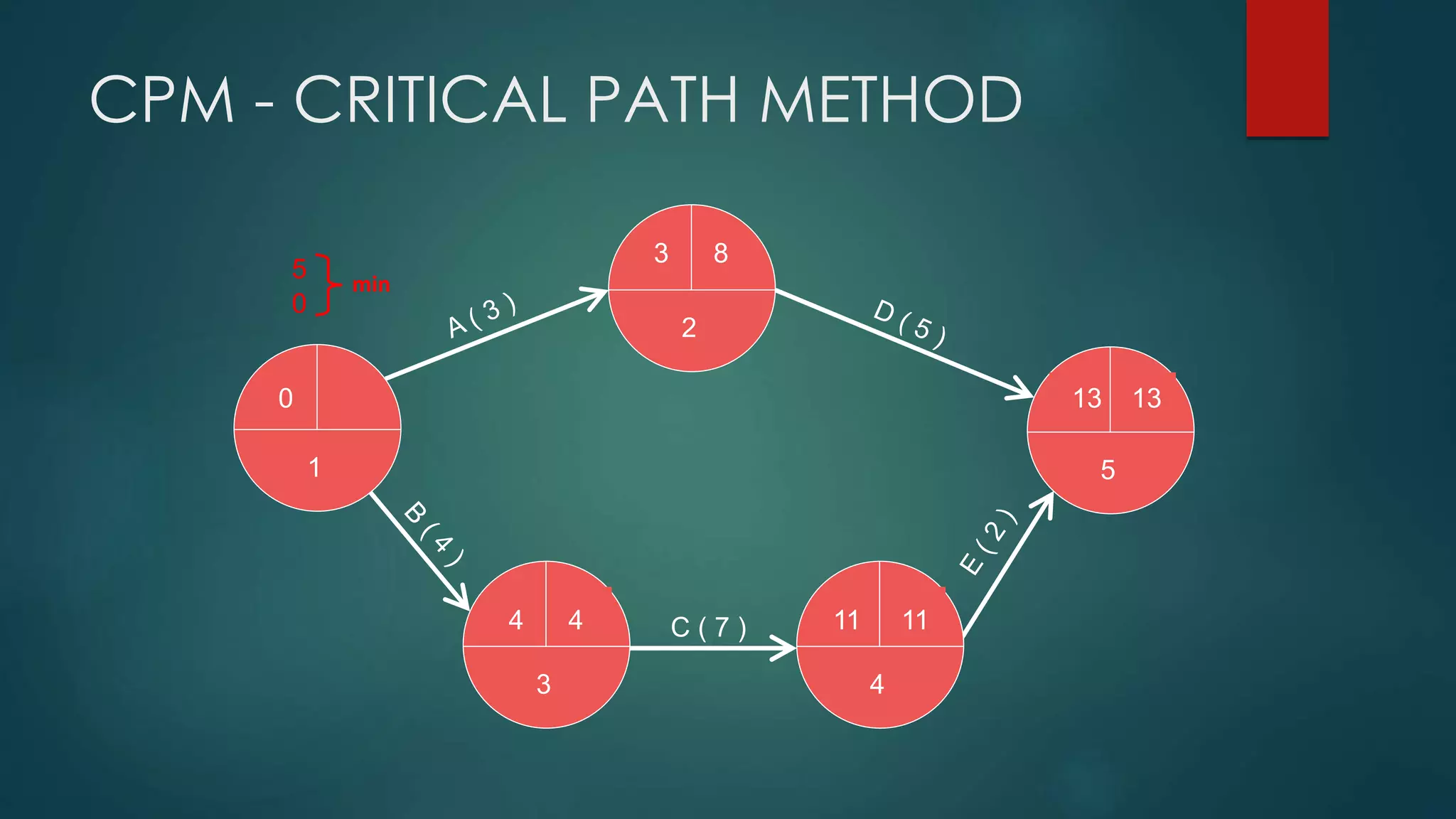
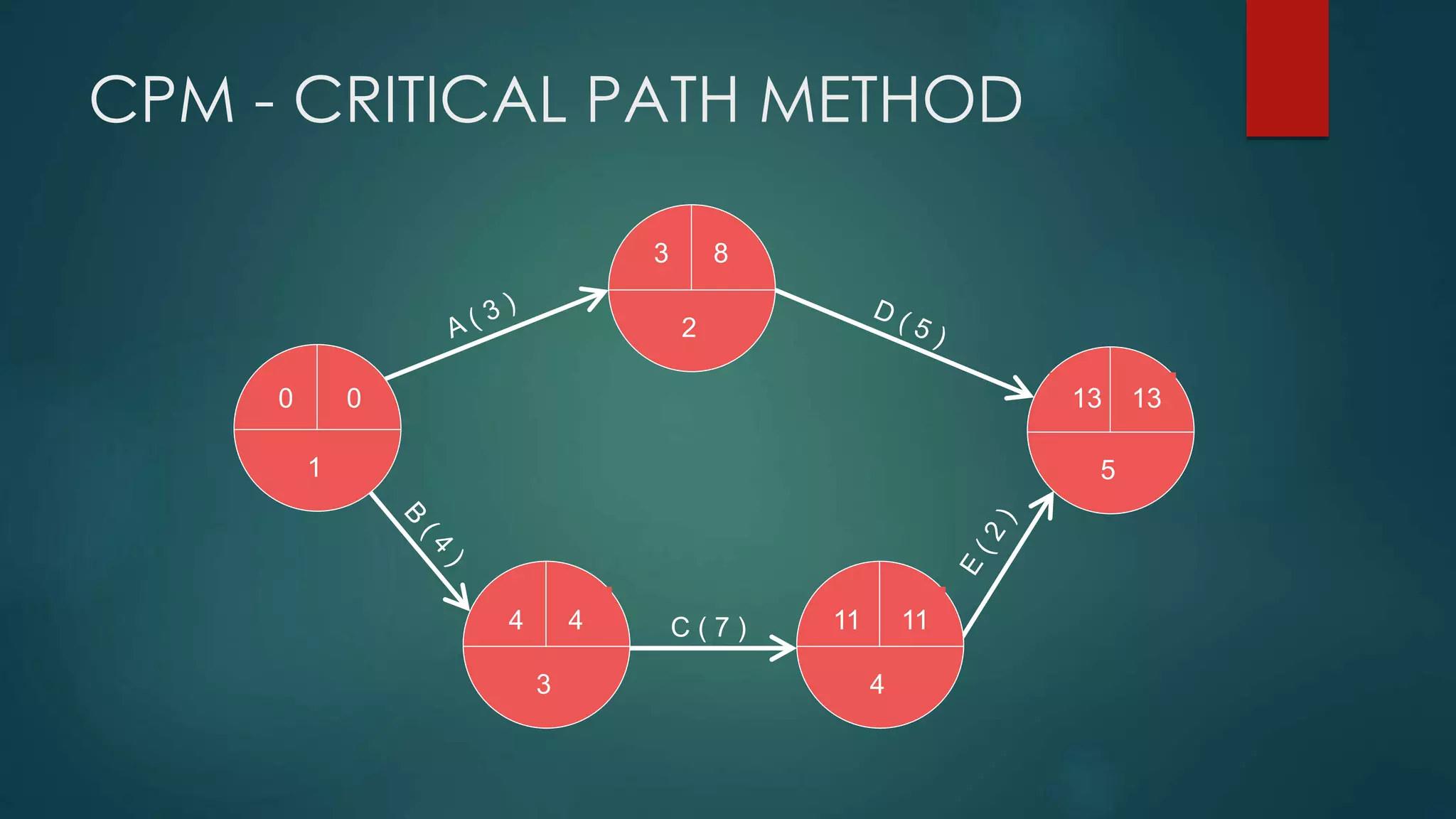
CPM - CRITICAL PATH METHOD
Critical Path Method
 It is determined by adding the times for the activities in each sequence
 CPM determines the total calendar time required for the project
 If activities outside the critical path speed up or slow down (within
limits), the total project time does not change
 The amount of time that a non-critical activity can be delayed without
delaying the project is called slack-time
22
CPM - CRITICAL PATH METHOD
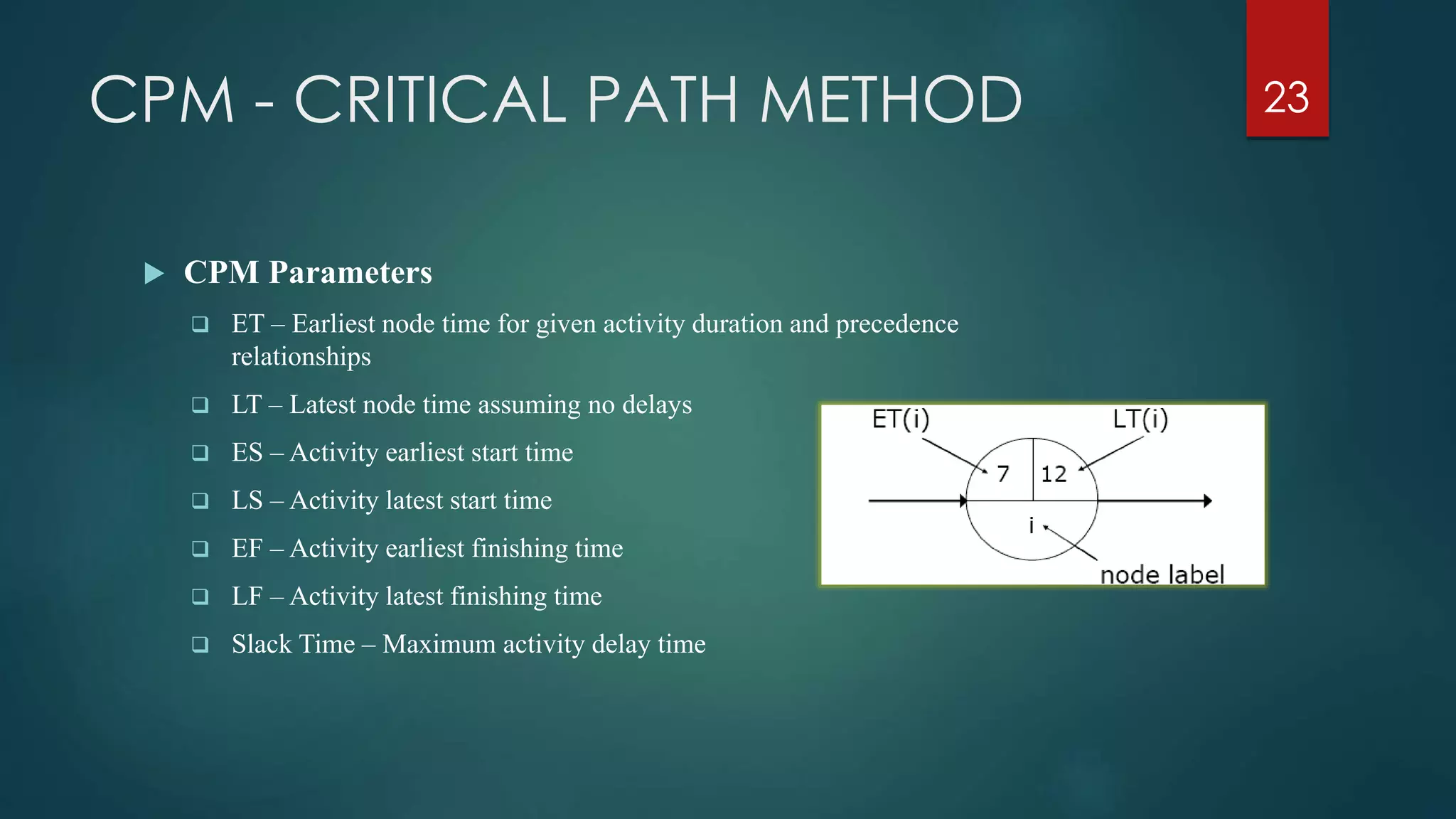
 CPM Parameters
 ET – Earliest node time for given activity duration and precedence
relationships
 LT – Latest node time assuming no delays
 ES – Activity earliest start time
 LS – Activity latest start time
 EF – Activity earliest finishing time
 LF – Activity latest finishing time
 Slack Time – Maximum activity delay time
23
CPM - CRITICAL PATH METHOD
 CPM Parameters
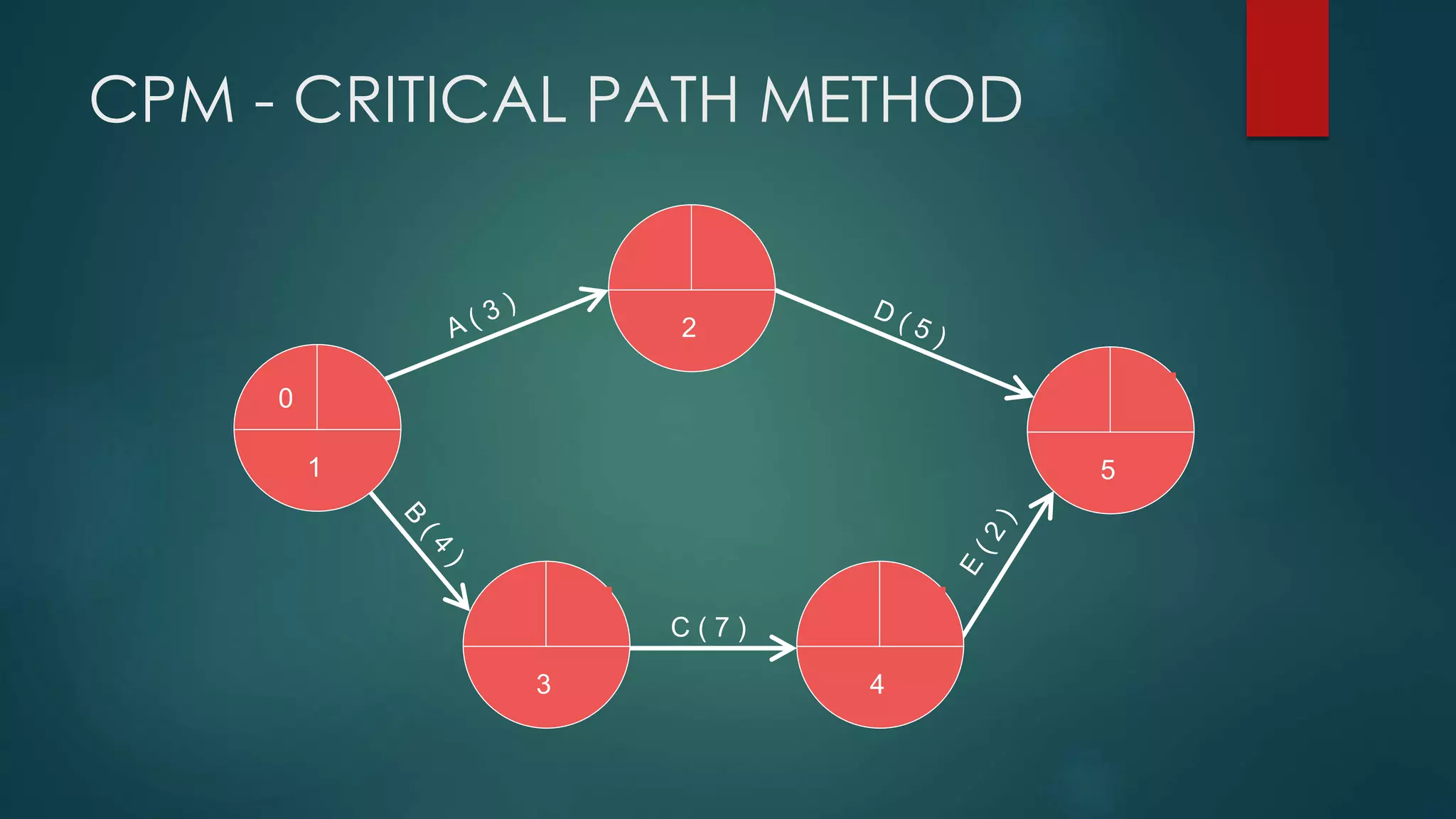
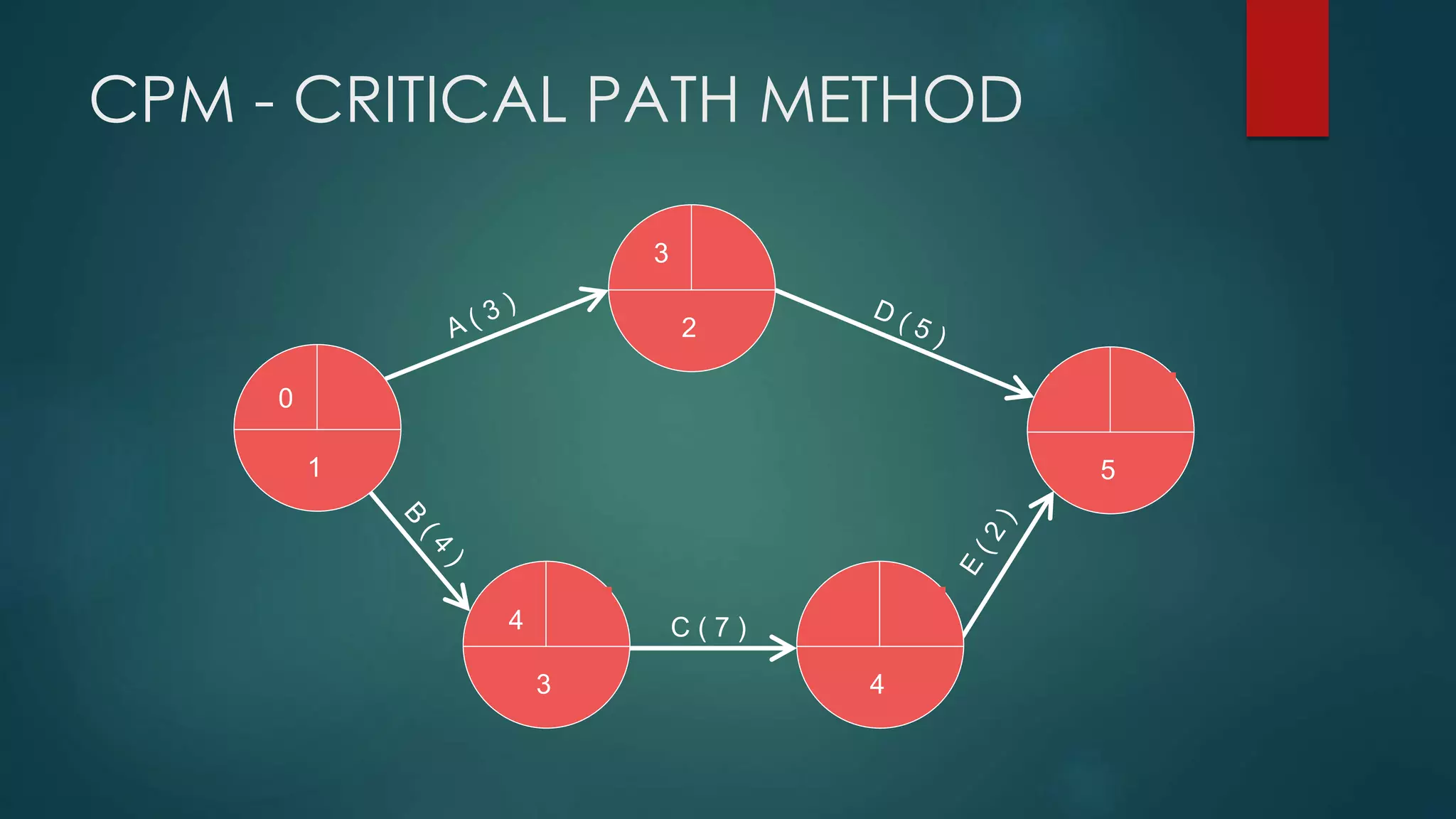
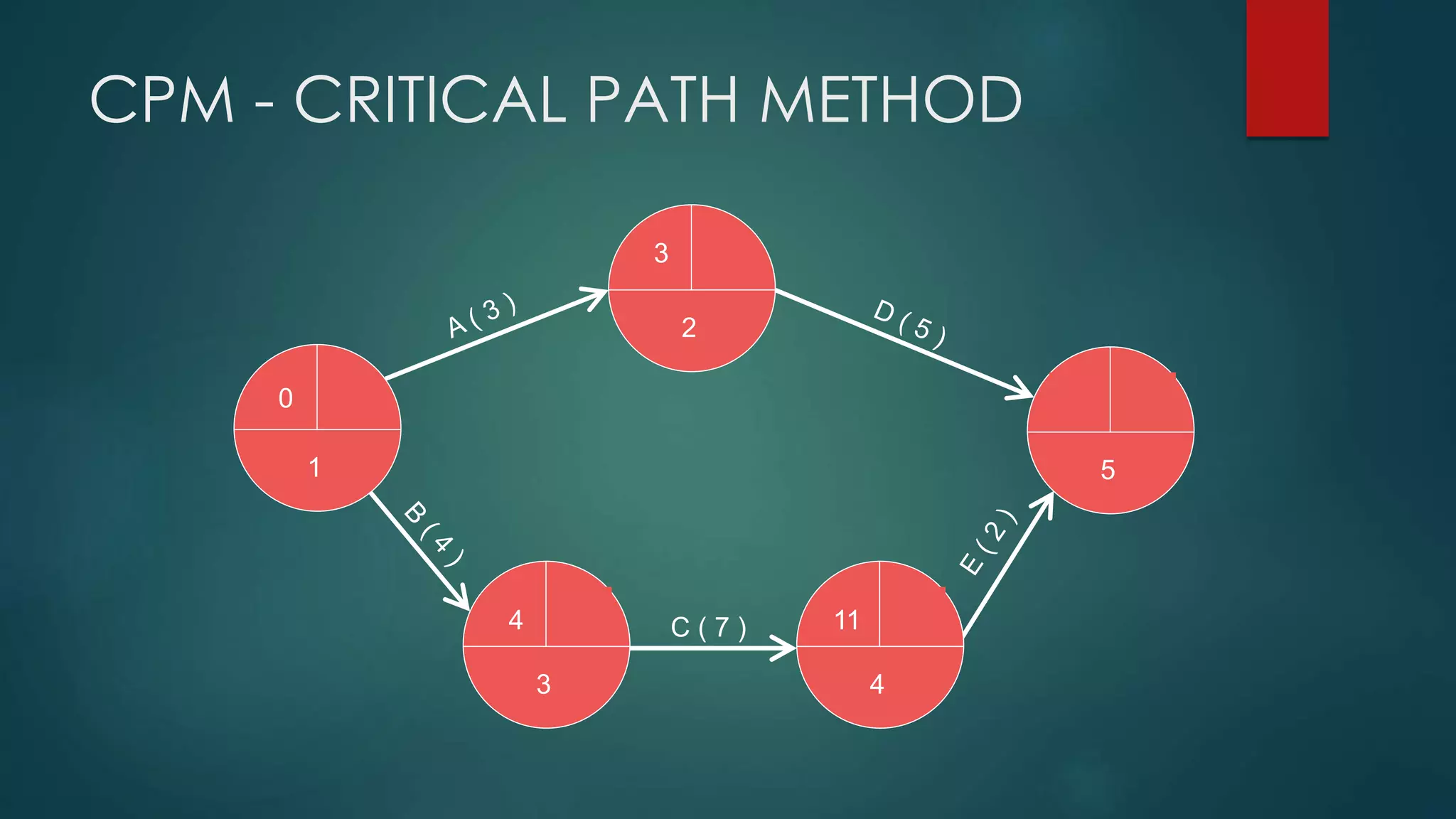
 Step 1: Calculate ET for each node
For each node i for which predecessors j are
labelled with ET(j), ET(i) is given by:
ET(i)= maxj [ET(j)+ t(j,i)]
where t(j,i) is the duration of task between
nodes (j,i)
24
 Step 2: Calculate LT for each node
For each node i for which successors j are
labelled with LT(j), LT(i) is given by:
LT(i)= minj [LT(j) – t(i,j)]
where t(j,i) is the duration of task between
nodes (i,j)
2
51
3 4
C ( 7 )
CPM - CRITICAL PATH METHOD
2
51
3 4
C ( 7 )
0
CPM - CRITICAL PATH METHOD
2
51
3 4
C ( 7 )
0
4
3
CPM - CRITICAL PATH METHOD
2
51
3 4
C ( 7 )
0
4
3
11
CPM - CRITICAL PATH METHOD
2
51
3 4
C ( 7 )
0
4
3
11
13
CPM - CRITICAL PATH METHOD
2
51
3 4
C ( 7 )
0
4
3
11
13
8
CPM - CRITICAL PATH METHOD
2
51
3 4
C ( 7 )
0
4
3
11
13
8 max
CPM - CRITICAL PATH METHOD
2
51
3 4
C ( 7 )
0
4
3
11
13
CPM - CRITICAL PATH METHOD
2
51
3 4
C ( 7 )
0
4
3
11
13 13
CPM - CRITICAL PATH METHOD
2
51
3 4
C ( 7 )
0
4
3
11
13 13
11
CPM - CRITICAL PATH METHOD
2
51
3 4
C ( 7 )
0
4
3
11
13 13
11
8
CPM - CRITICAL PATH METHOD
2
51
3 4
C ( 7 )
0
4
3
11
13 13
11
8
4
CPM - CRITICAL PATH METHOD
2
51
3 4
C ( 7 )
0
4
3
11
13 13
11
8
4
5
CPM - CRITICAL PATH METHOD
2
51
3 4
C ( 7 )
0
4
3
11
13 13
11
8
4
5
0
CPM - CRITICAL PATH METHOD
2
51
3 4
C ( 7 )
0
4
3
11
13 13
11
8
4
5
0
min
CPM - CRITICAL PATH METHOD
2
51
3 4
C ( 7 )
0
4
3
11
13 13
11
8
4
0
CPM - CRITICAL PATH METHOD
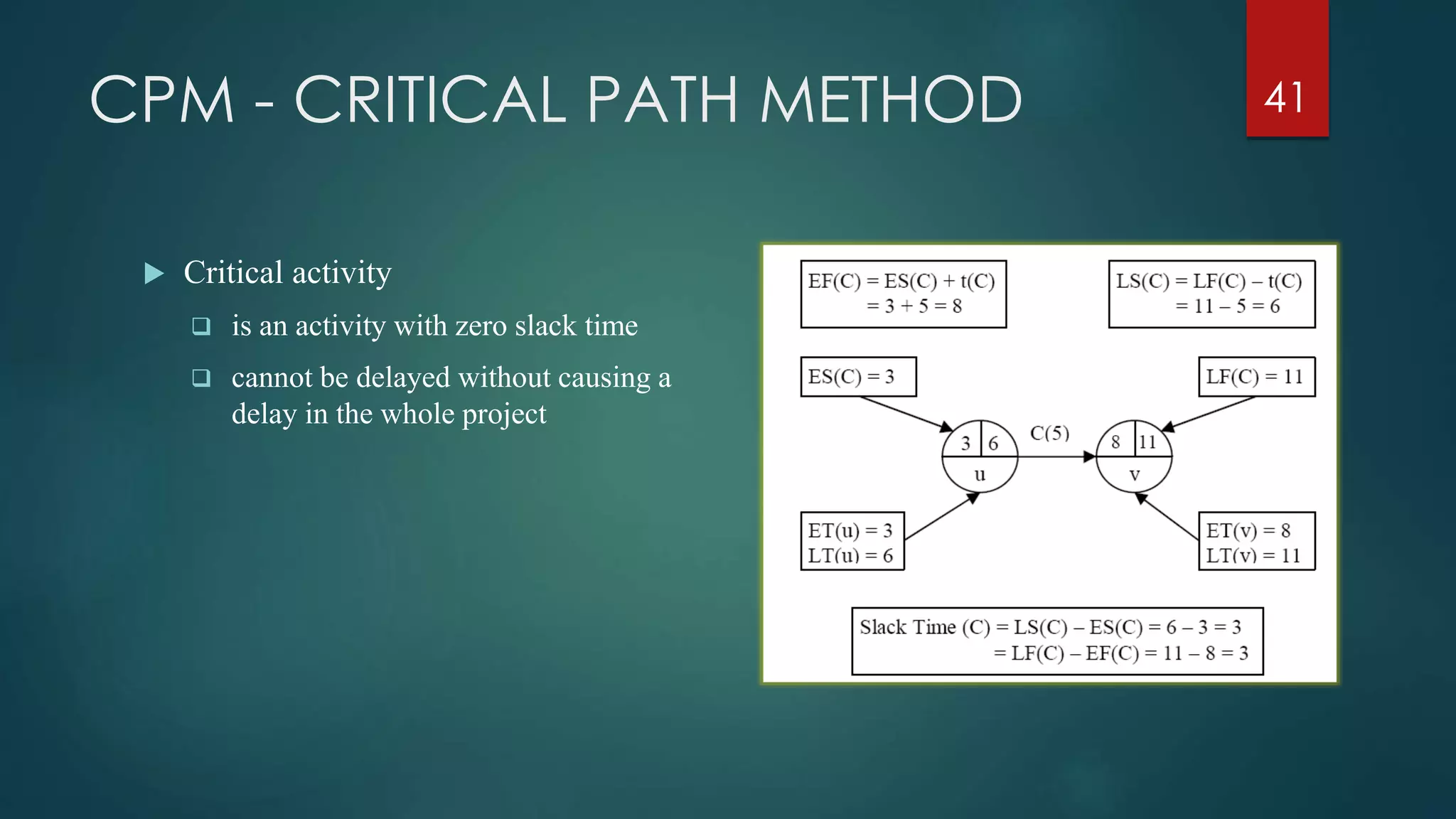
 Critical activity
 is an activity with zero slack time
 cannot be delayed without causing a
delay in the whole project
41
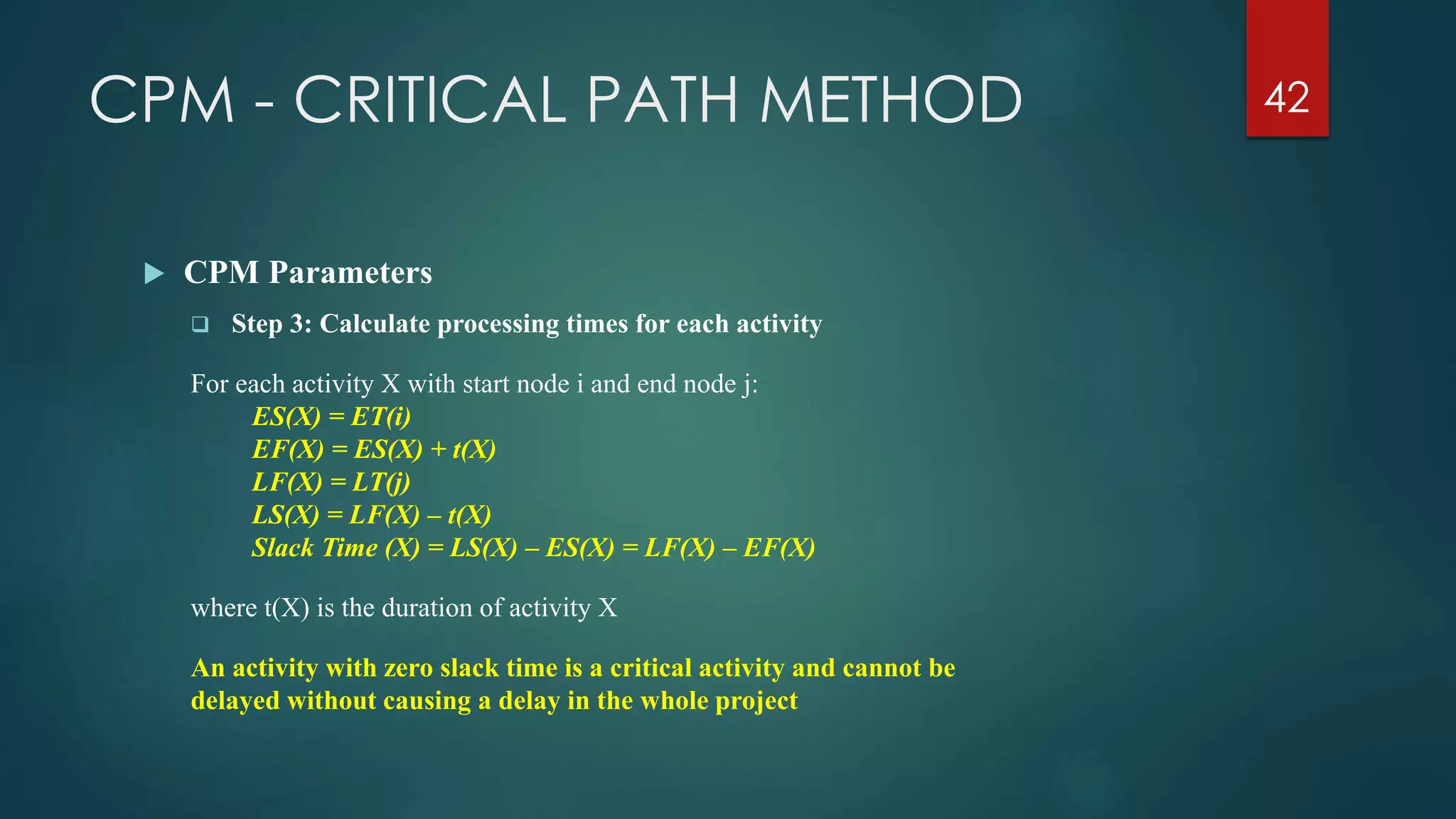
CPM - CRITICAL PATH METHOD 42
 CPM Parameters
 Step 3: Calculate processing times for each activity
For each activity X with start node i and end node j:
ES(X) = ET(i)
EF(X) = ES(X) + t(X)
LF(X) = LT(j)
LS(X) = LF(X) – t(X)
Slack Time (X) = LS(X) – ES(X) = LF(X) – EF(X)
where t(X) is the duration of activity X
An activity with zero slack time is a critical activity and cannot be
delayed without causing a delay in the whole project
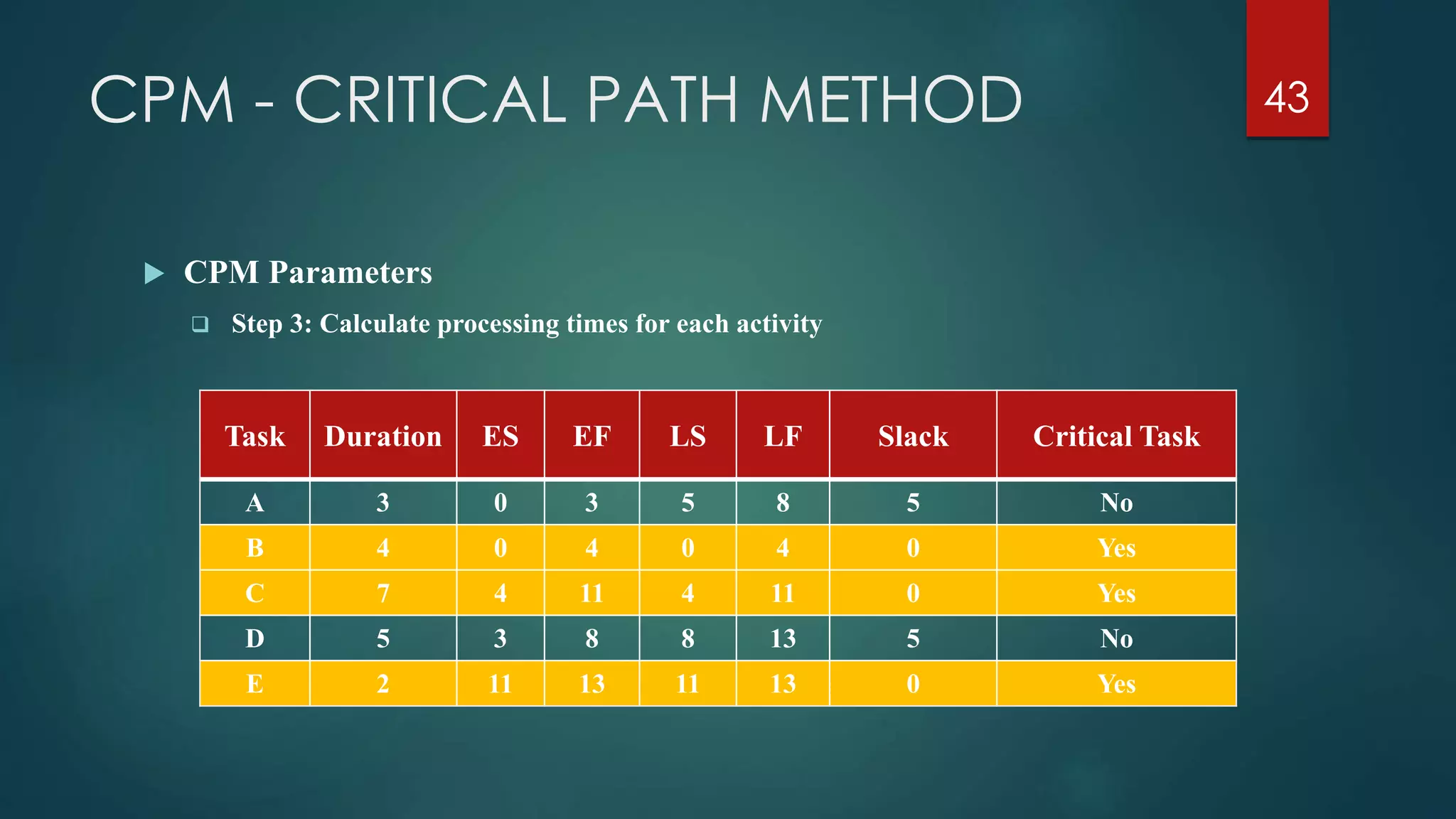
CPM - CRITICAL PATH METHOD 43
 CPM Parameters
 Step 3: Calculate processing times for each activity
Task Duration ES EF LS LF Slack Critical Task
A 3 0 3 5 8 5 No
B 4 0 4 0 4 0 Yes
C 7 4 11 4 11 0 Yes
D 5 3 8 8 13 5 No
E 2 11 13 11 13 0 Yes
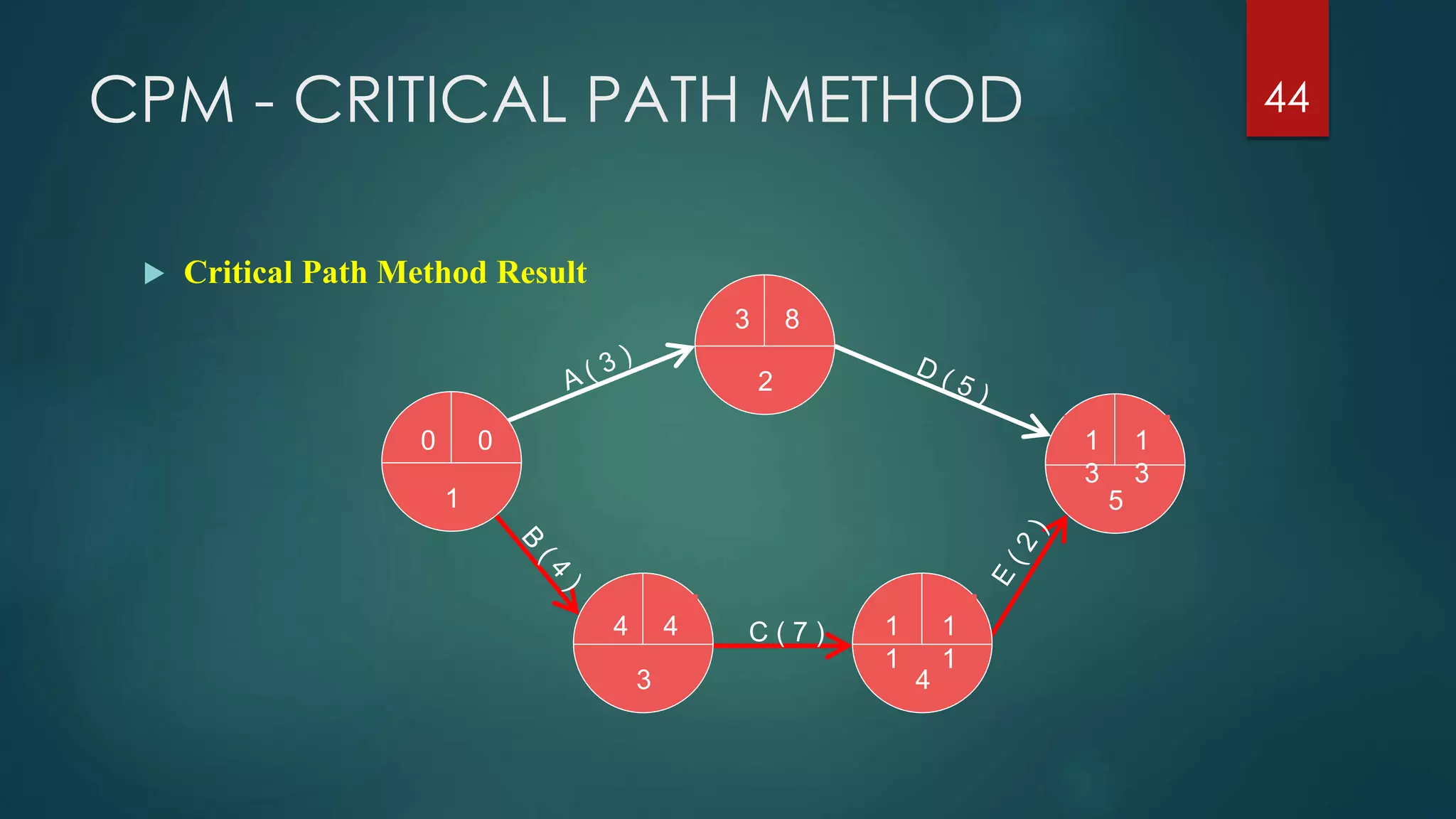
CPM - CRITICAL PATH METHOD 44
 Critical Path Method Result
2
51
3 4
C ( 7 )
0
4
3
1
1
1
3
1
3
1
1
8
4
0
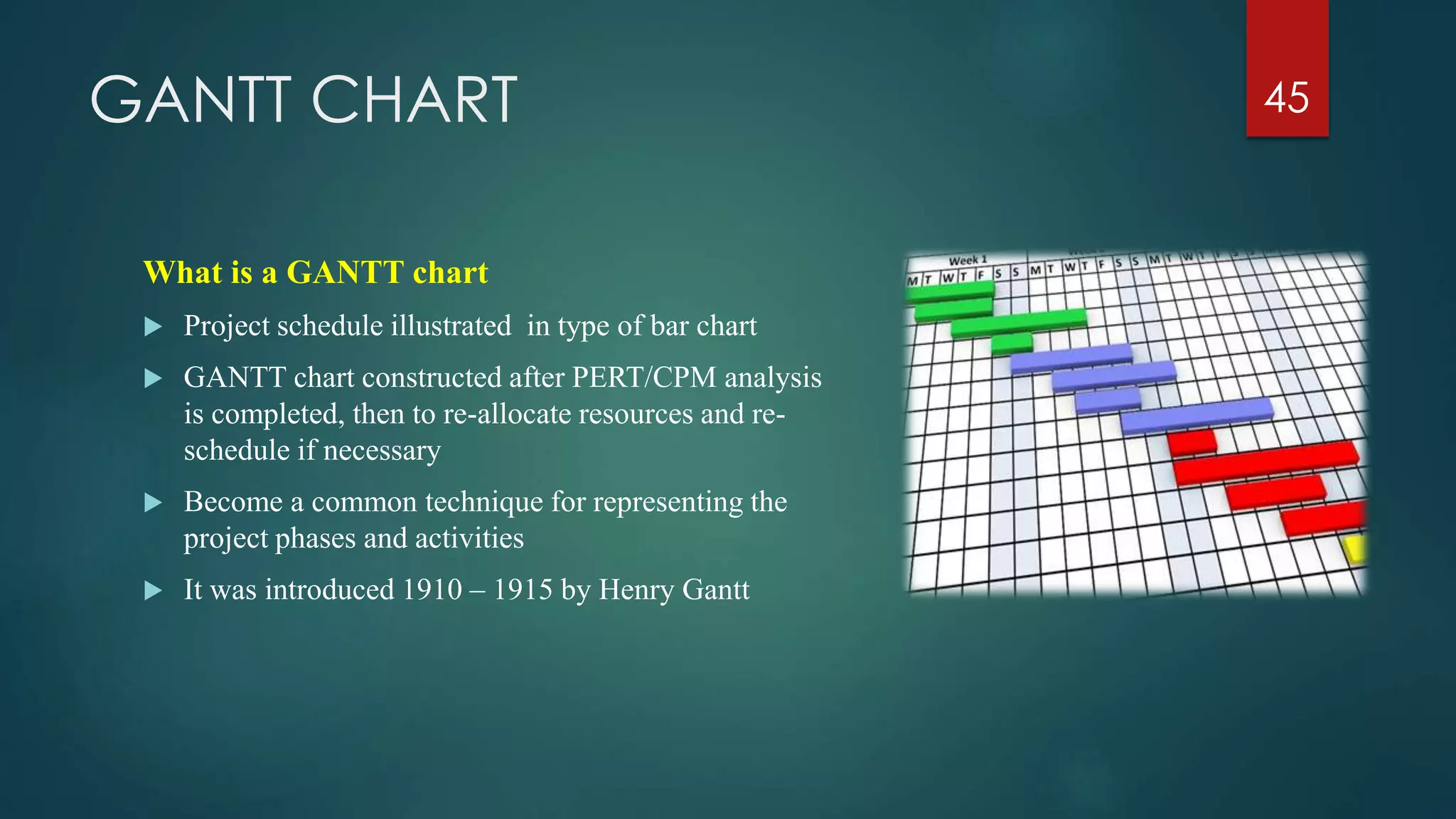
GANTT CHART
What is a GANTT chart
 Project schedule illustrated in type of bar chart
 GANTT chart constructed after PERT/CPM analysis
is completed, then to re-allocate resources and re-
schedule if necessary
 Become a common technique for representing the
project phases and activities
 It was introduced 1910 – 1915 by Henry Gantt
45
GANTT CHART
 Characteristics
 The bar in each row identifies the corresponding task
 The horizontal position of the bar identifies Start and Finish times of the task
 Bar length represents the duration of the task
 Task durations can be compared easily
 Good for allocating resources and re-scheduling
 Precedence relationships can be represented using arrows
 Critical Activities are usually highlighted
 Slack times are represented using bars with doted lines
 The bar of each activity begins at the activity Earliest Start time (ES)
 The bar of each activity ends at the activity Latest Finish time (LF)
46
GANTT CHART
 Advantages (4)
 Simple
 Good visual communication to others
 Task durations can be compared easily
 Good for scheduling resources
 Disadvantages (2)
 Dependencies are more difficult to visualize
 Minor changes in data can cause major changes in the chart
47
GANTT CHART CONSTRUCTION
 Construct a GANTT chart from the information
obtained by PERT/CPM
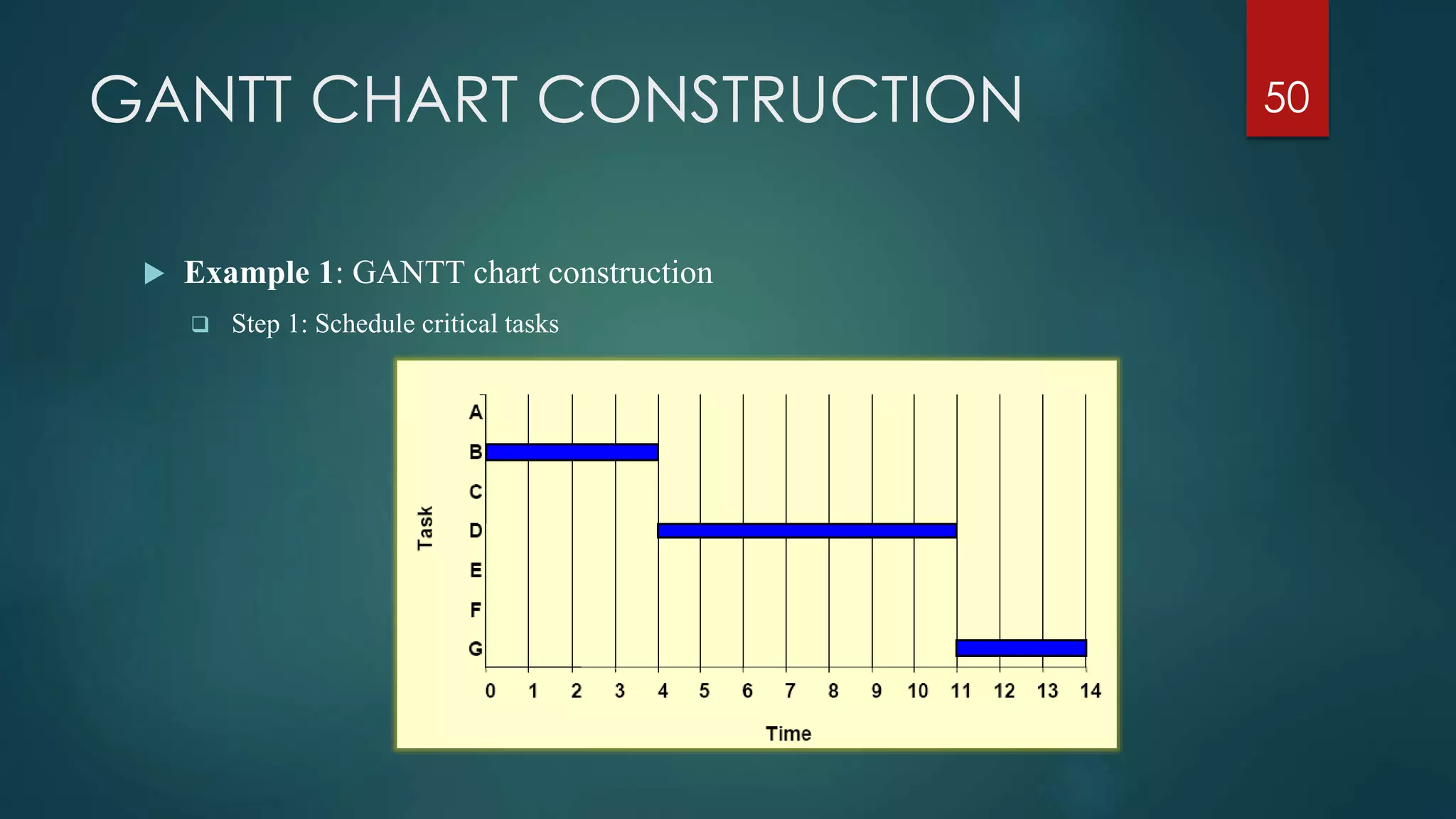
 Step 1: Schedule the critical tasks in the correct position
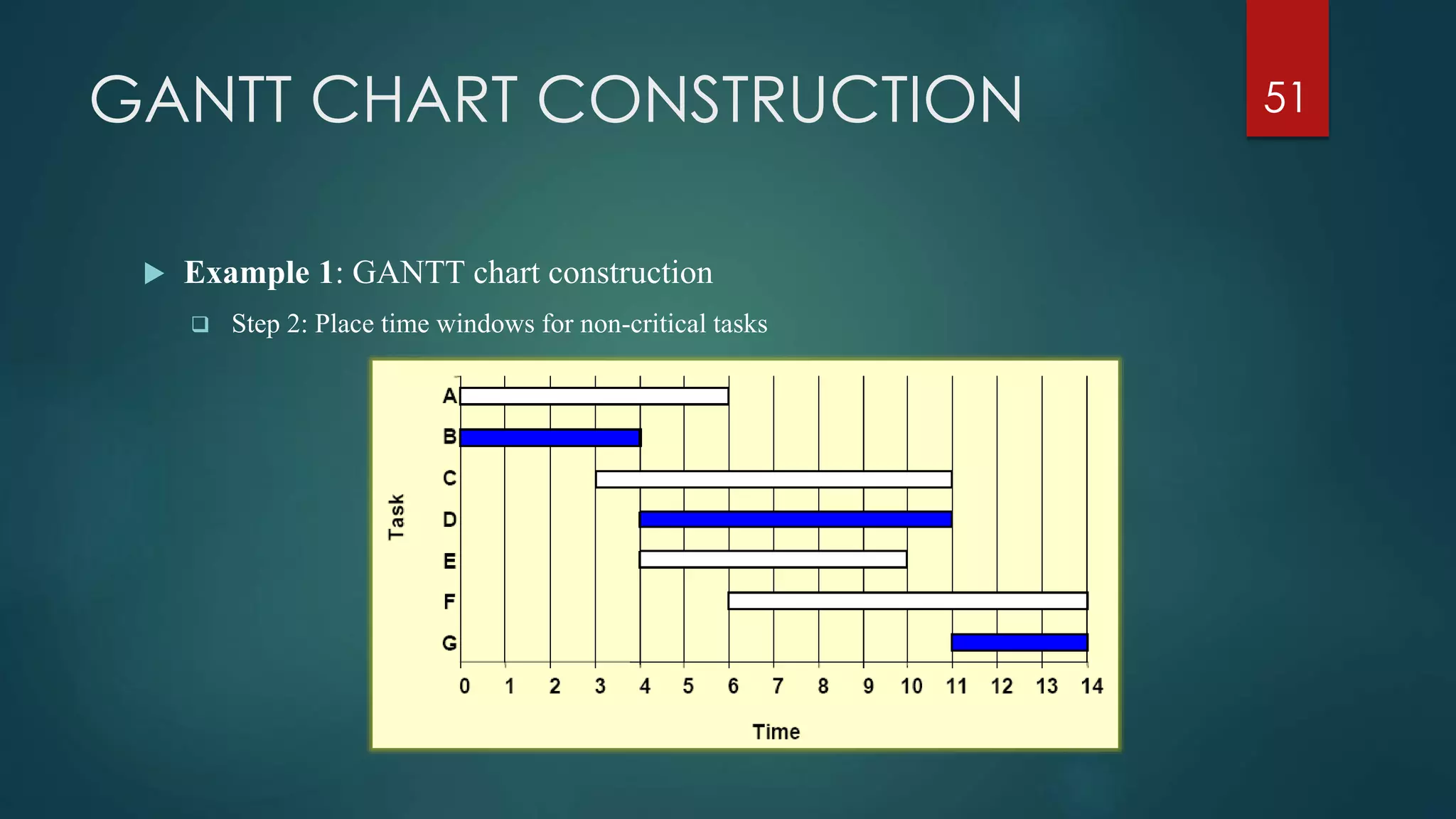
 Step 2: Place the time windows in which the non-critical tasks
can be scheduled
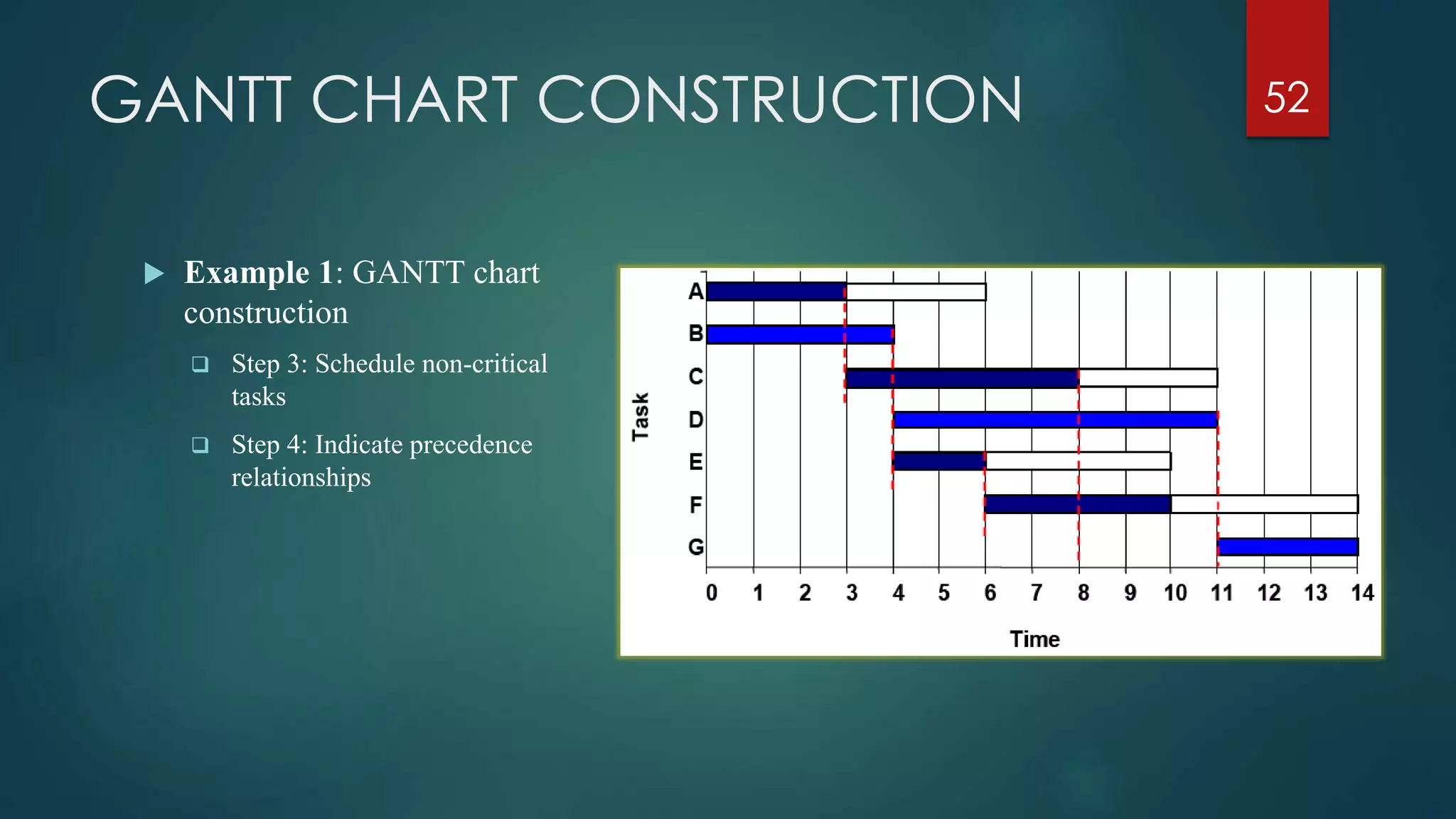
 Step 3: Schedule the non-critical tasks according to their
earliest starting times
 Step 4: Indicate precedence relationships between tasks
48
GANTT CHART CONSTRUCTION
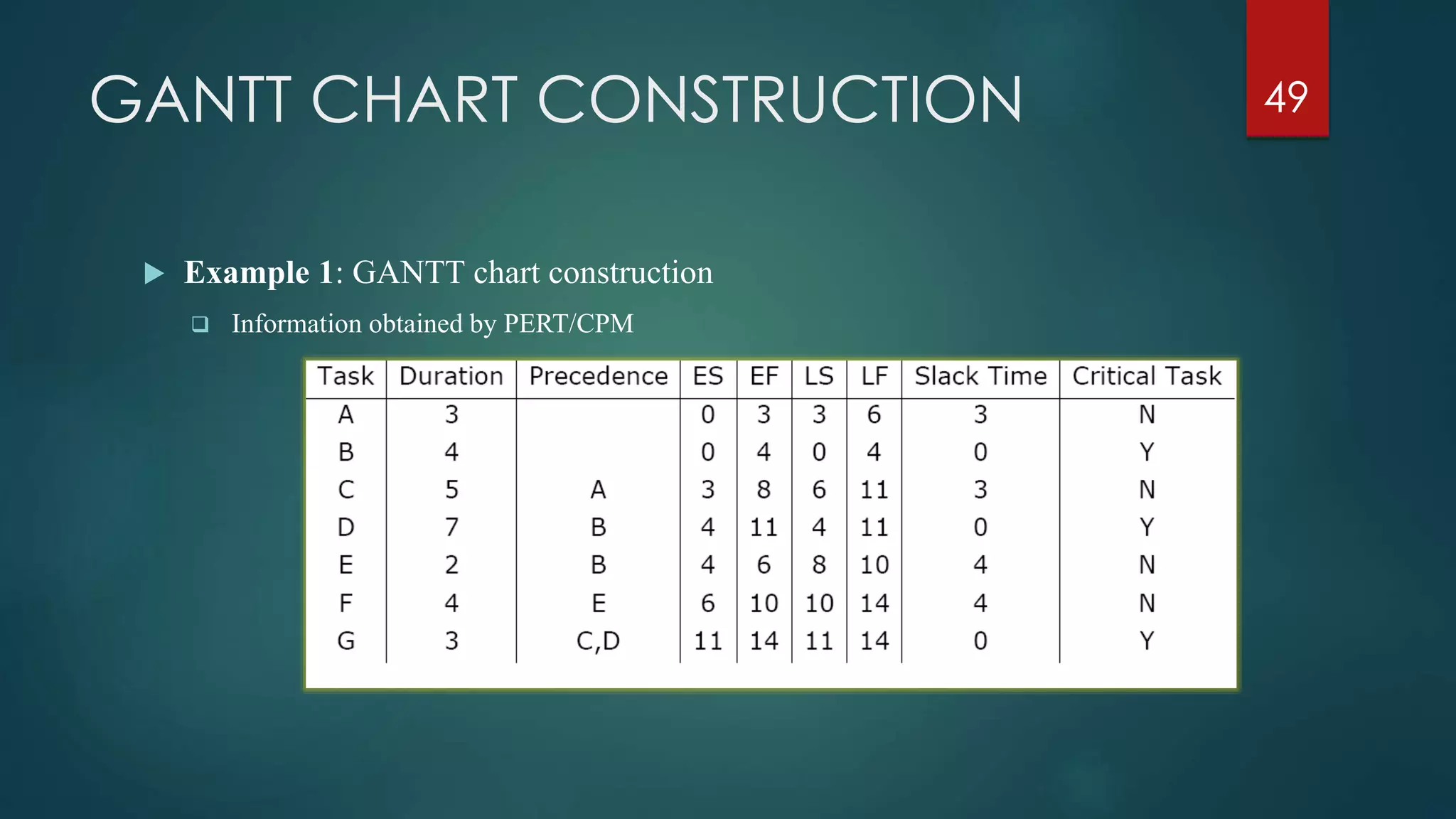
 Example 1: GANTT chart construction
 Information obtained by PERT/CPM
49
GANTT CHART CONSTRUCTION
 Example 1: GANTT chart construction
 Step 1: Schedule critical tasks
50
GANTT CHART CONSTRUCTION
 Example 1: GANTT chart construction
 Step 2: Place time windows for non-critical tasks
51
GANTT CHART CONSTRUCTION
 Example 1: GANTT chart
construction
 Step 3: Schedule non-critical
tasks
 Step 4: Indicate precedence
relationships
52
GANTT CHART OPTIMIZATION
 Once the project schedule has been constructed,
consider
 available staff hours
 slack times and
 the project schedule
53
Assign staff and other
resources to project activities
STAFFING & RE-SCHEDULING
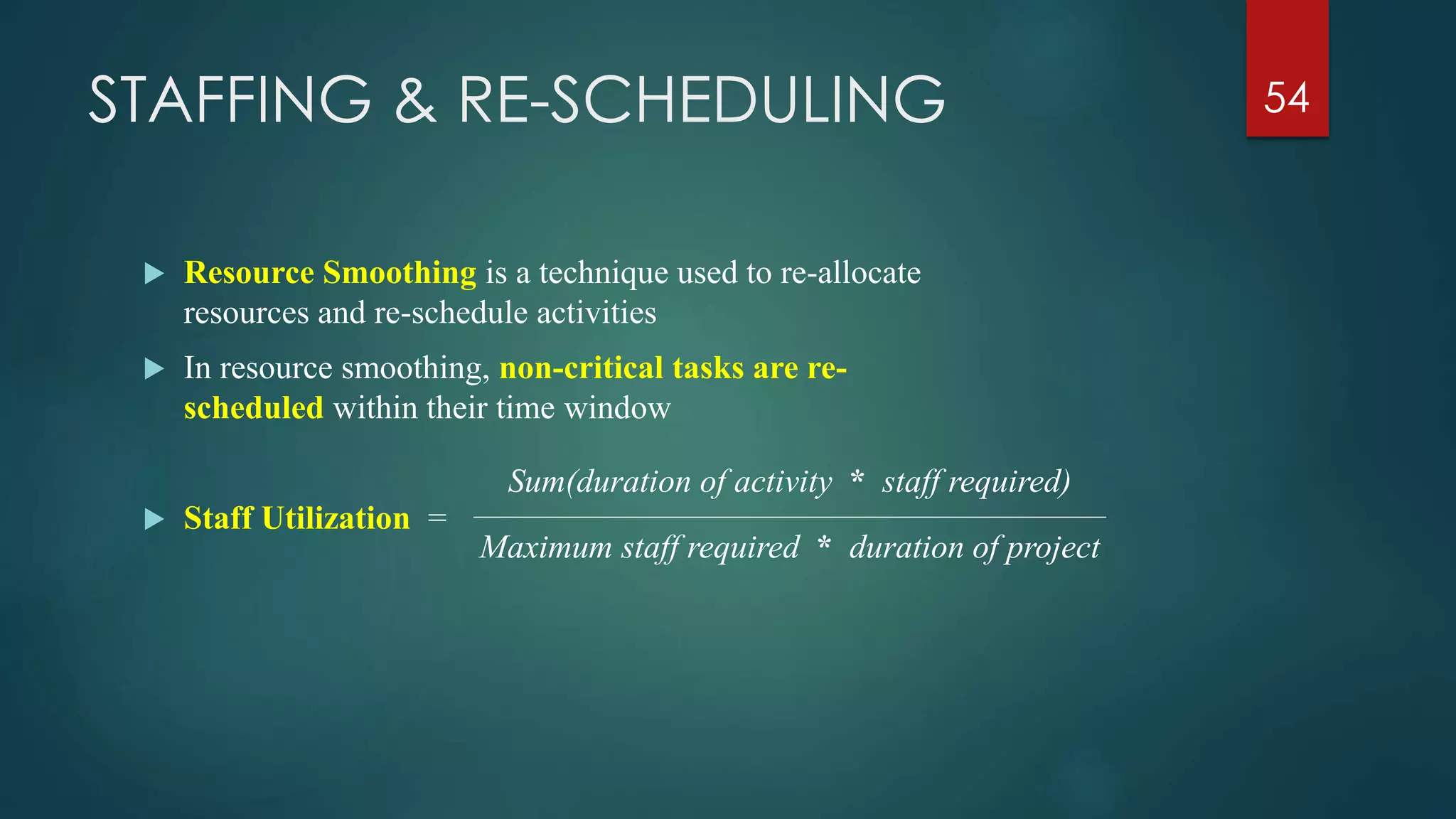
 Resource Smoothing is a technique used to re-allocate
resources and re-schedule activities
 In resource smoothing, non-critical tasks are re-
scheduled within their time window
 Staff Utilization =
54
Sum(duration of activity * staff required)
Maximum staff required * duration of project
STAFFING & RE-SCHEDULING
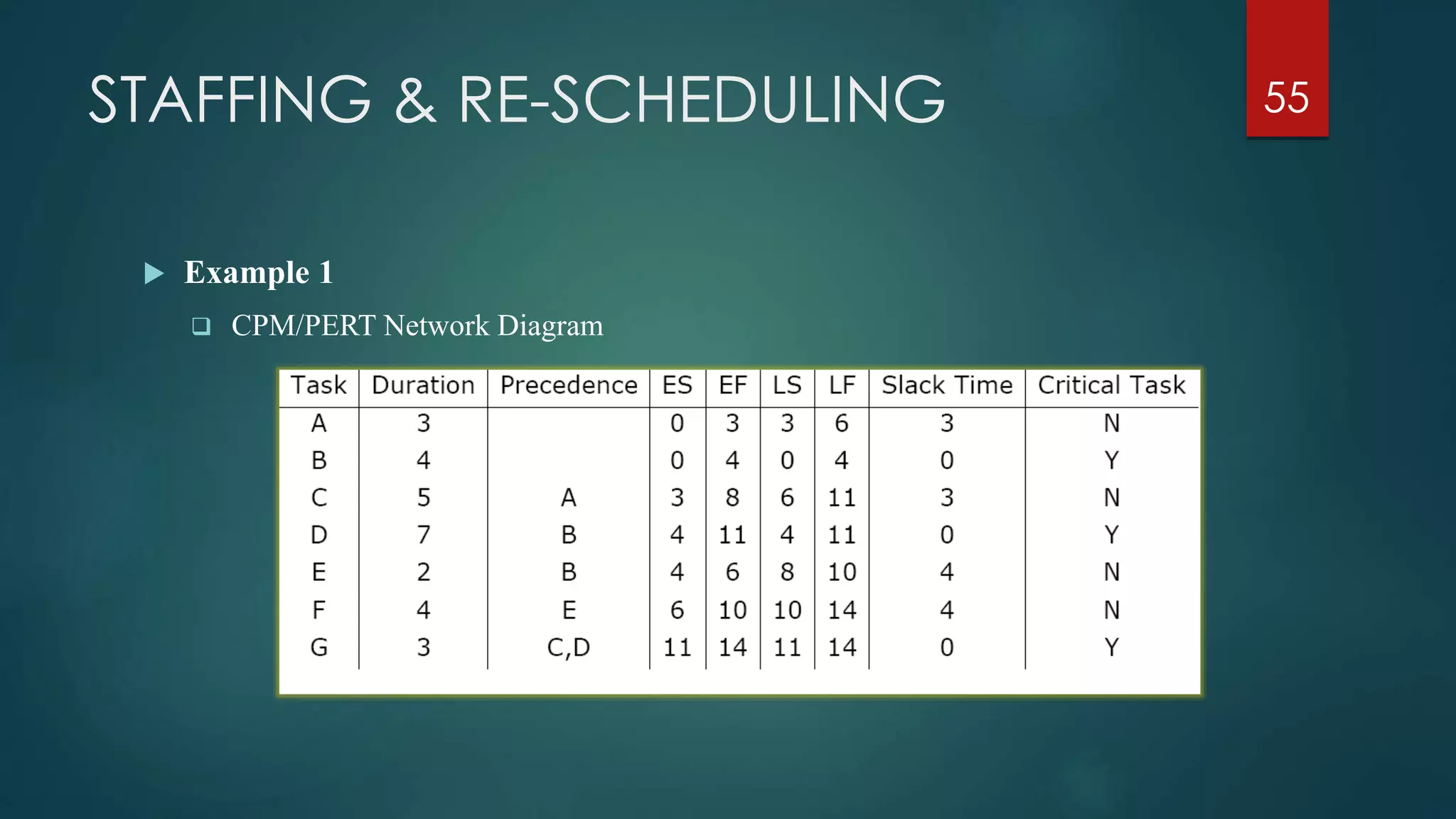
 Example 1
 CPM/PERT Network Diagram
55
STAFFING & RE-SCHEDULING
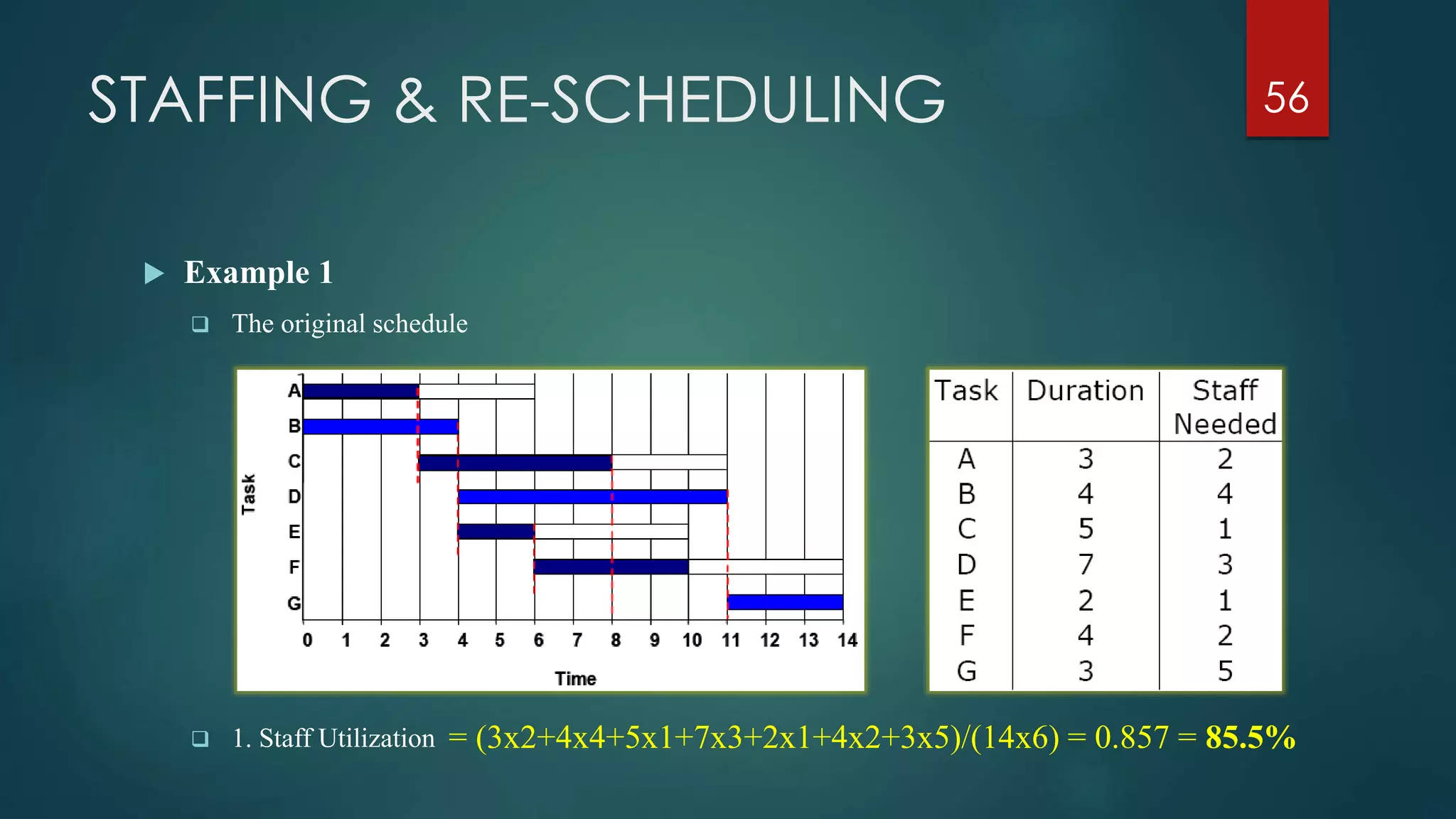
 Example 1
 The original schedule
56
 1. Staff Utilization = (3x2+4x4+5x1+7x3+2x1+4x2+3x5)/(14x6) = 0.857 = 85.5%
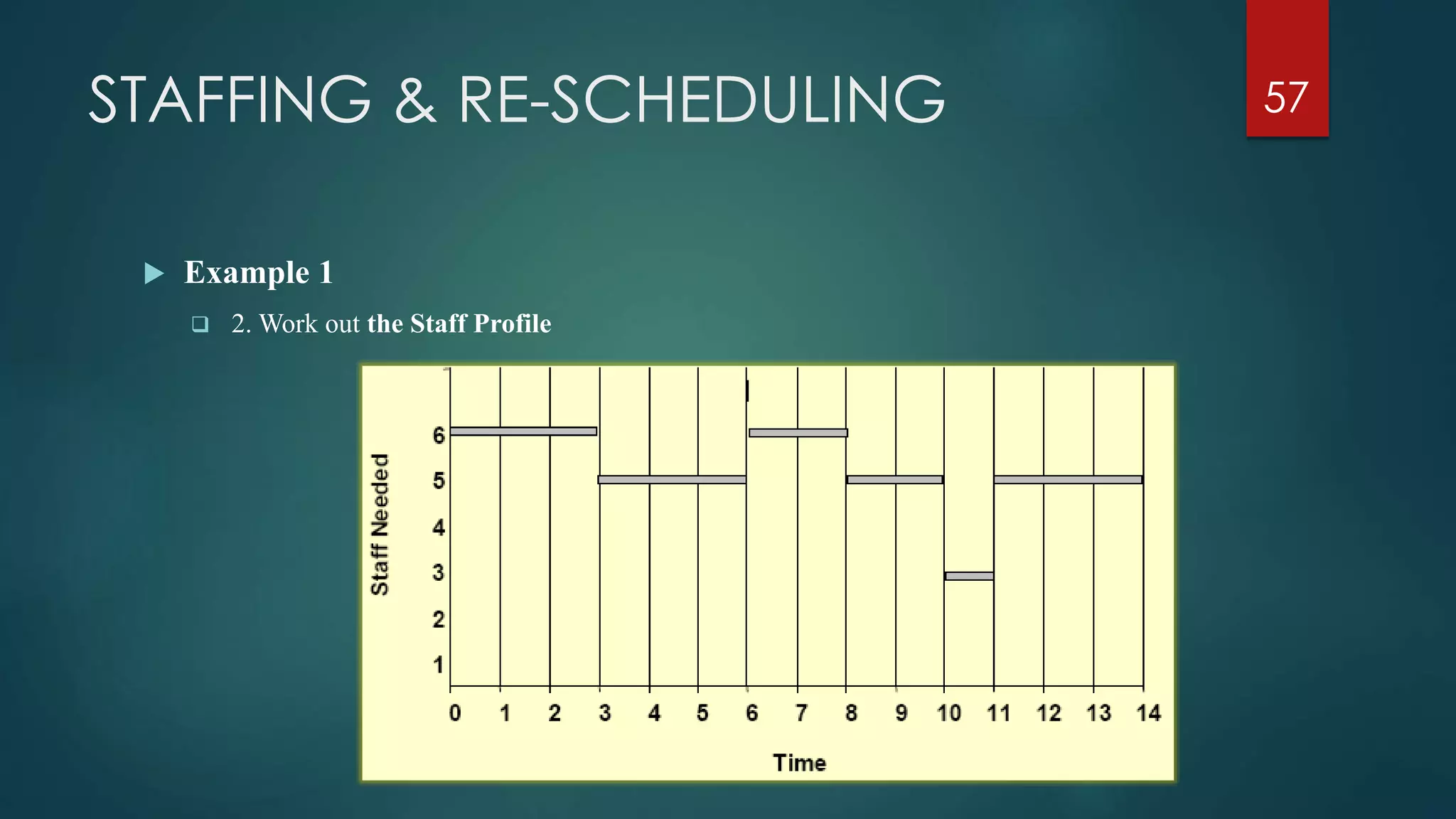
STAFFING & RE-SCHEDULING 57
 Example 1
 2. Work out the Staff Profile
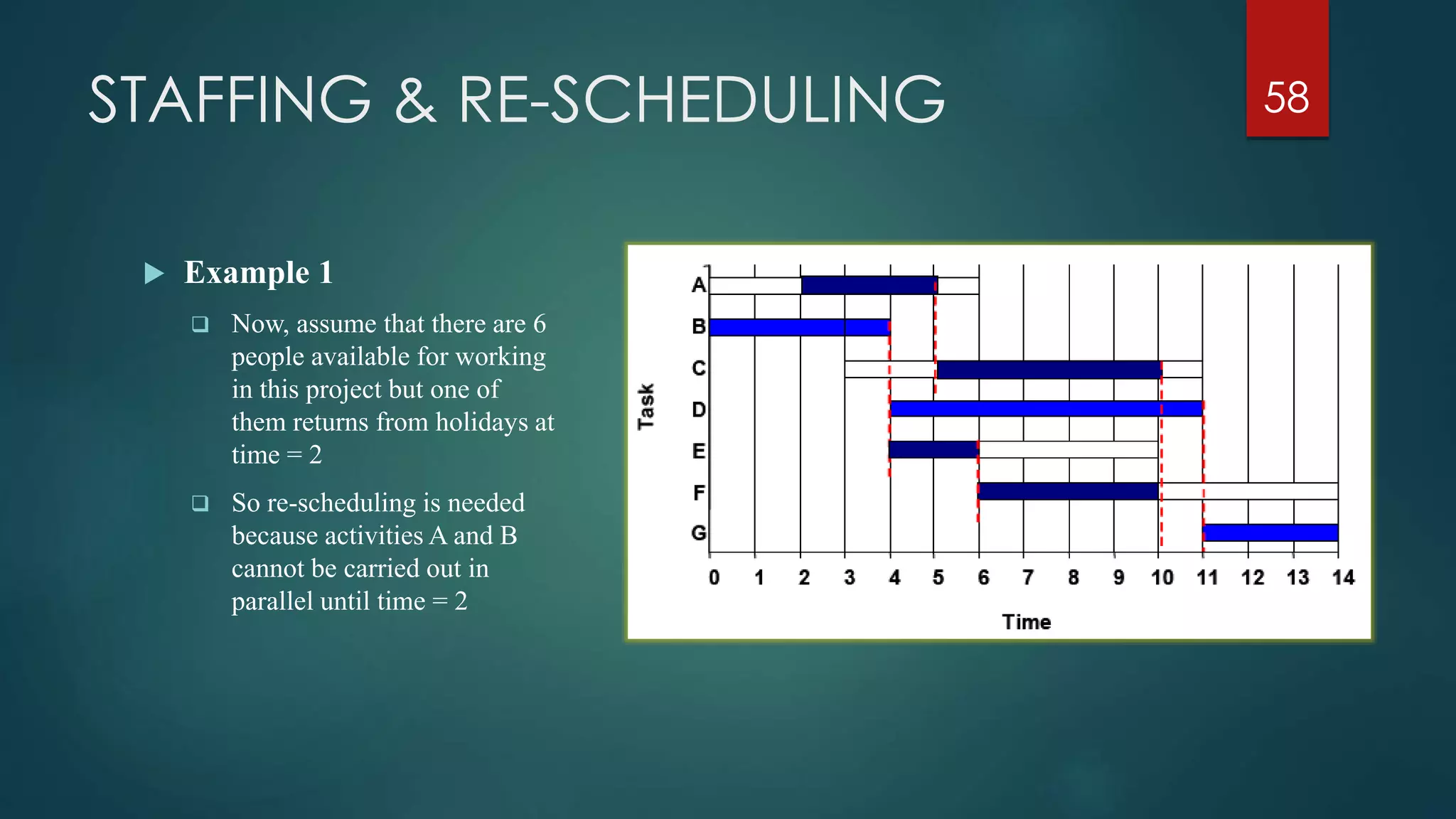
STAFFING & RE-SCHEDULING 58
 Example 1
 Now, assume that there are 6
people available for working
in this project but one of
them returns from holidays at
time = 2
 So re-scheduling is needed
because activities A and B
cannot be carried out in
parallel until time = 2
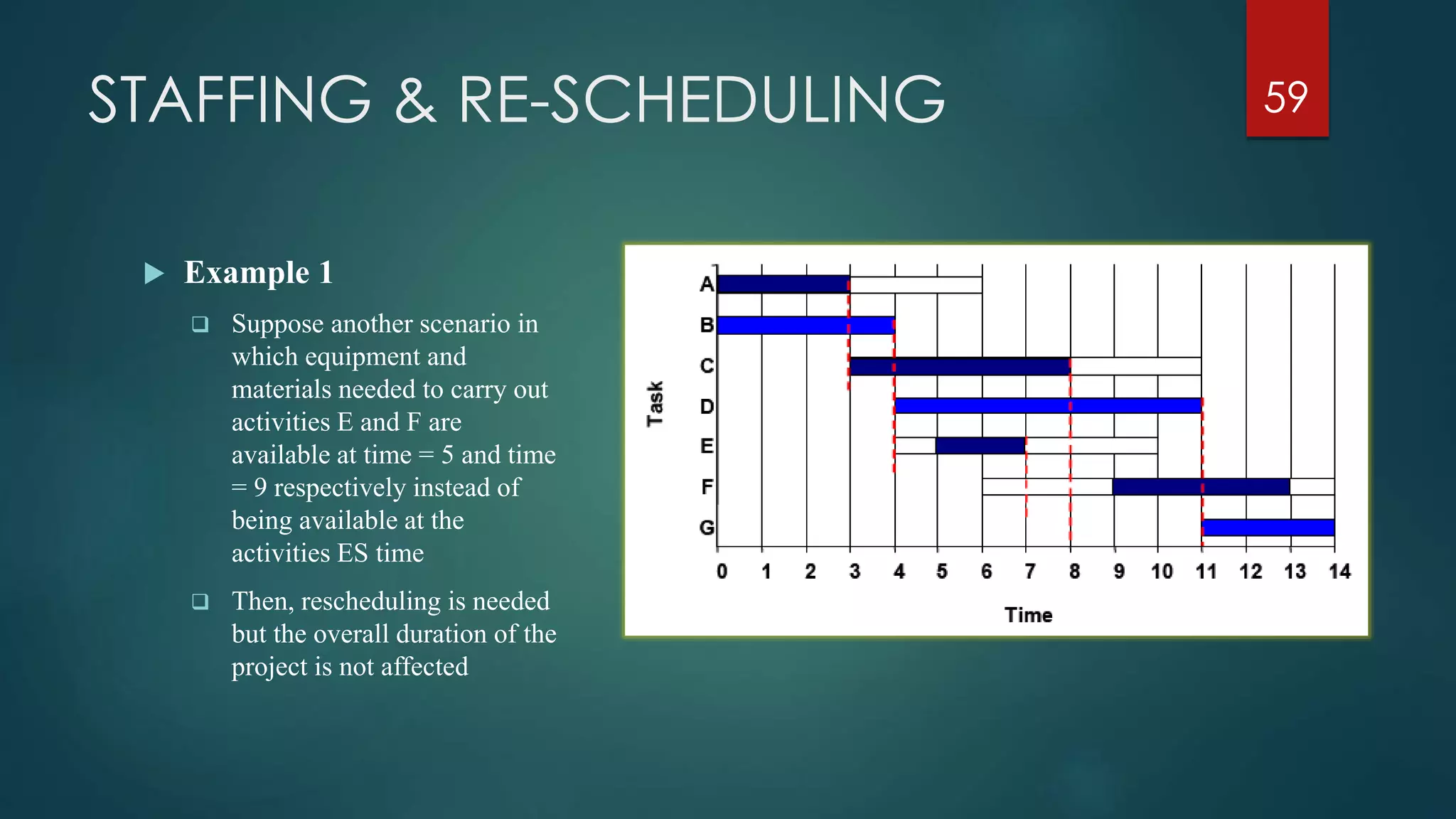
STAFFING & RE-SCHEDULING 59
 Example 1
 Suppose another scenario in
which equipment and
materials needed to carry out
activities E and F are
available at time = 5 and time
= 9 respectively instead of
being available at the
activities ES time
 Then, rescheduling is needed
but the overall duration of the
project is not affected
STAFFING & RE-SCHEDULING 60
Crashing
 The obvious way to reduce the overall project duration, it is by
reducing the duration of the critical activities
 Crashing Critical Activities refers to reducing the duration of a
critical activity by allocating more resources to it
 The risk is that crashing activities may actually reduce productivity
and increase costs
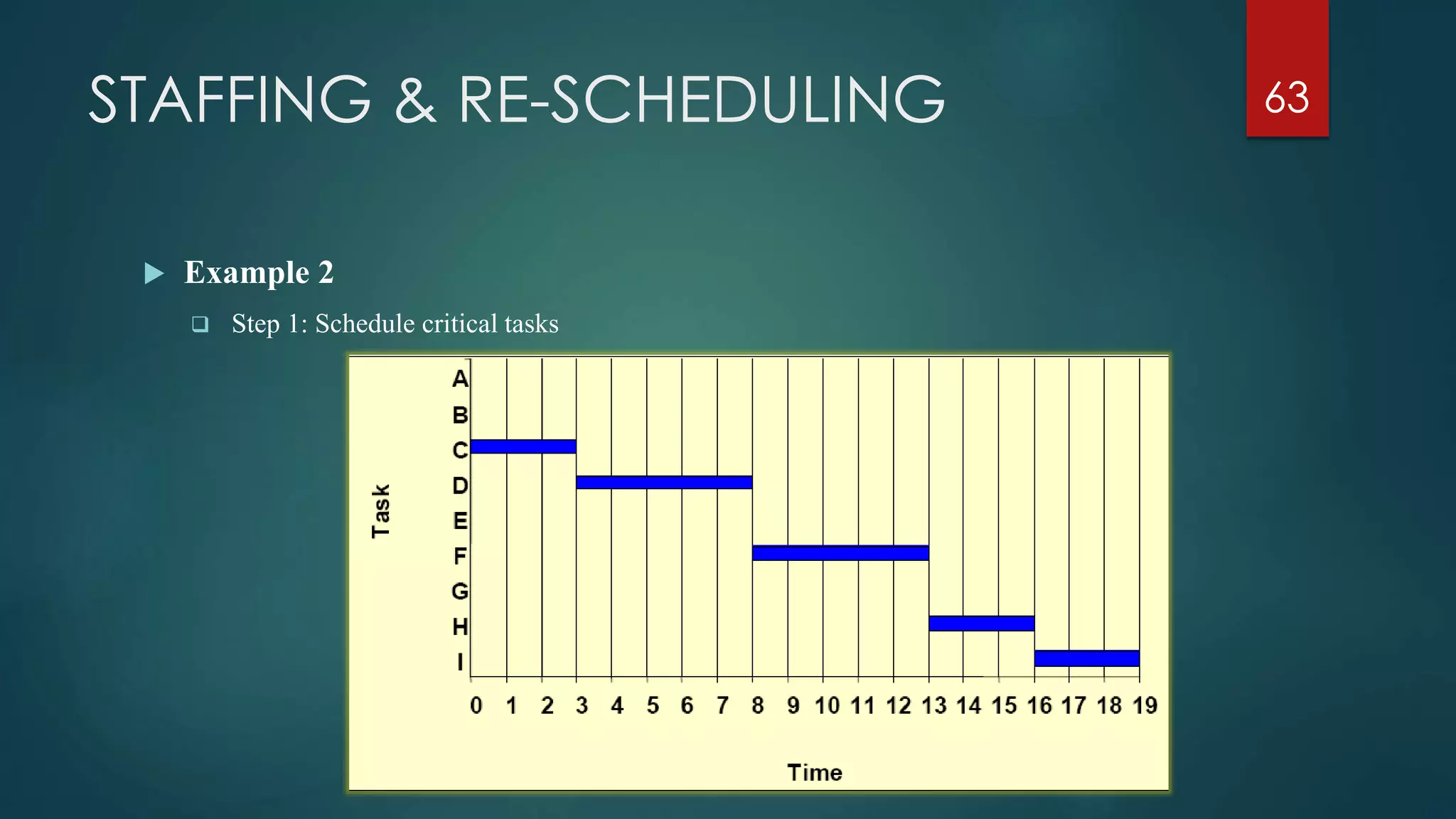
STAFFING & RE-SCHEDULING
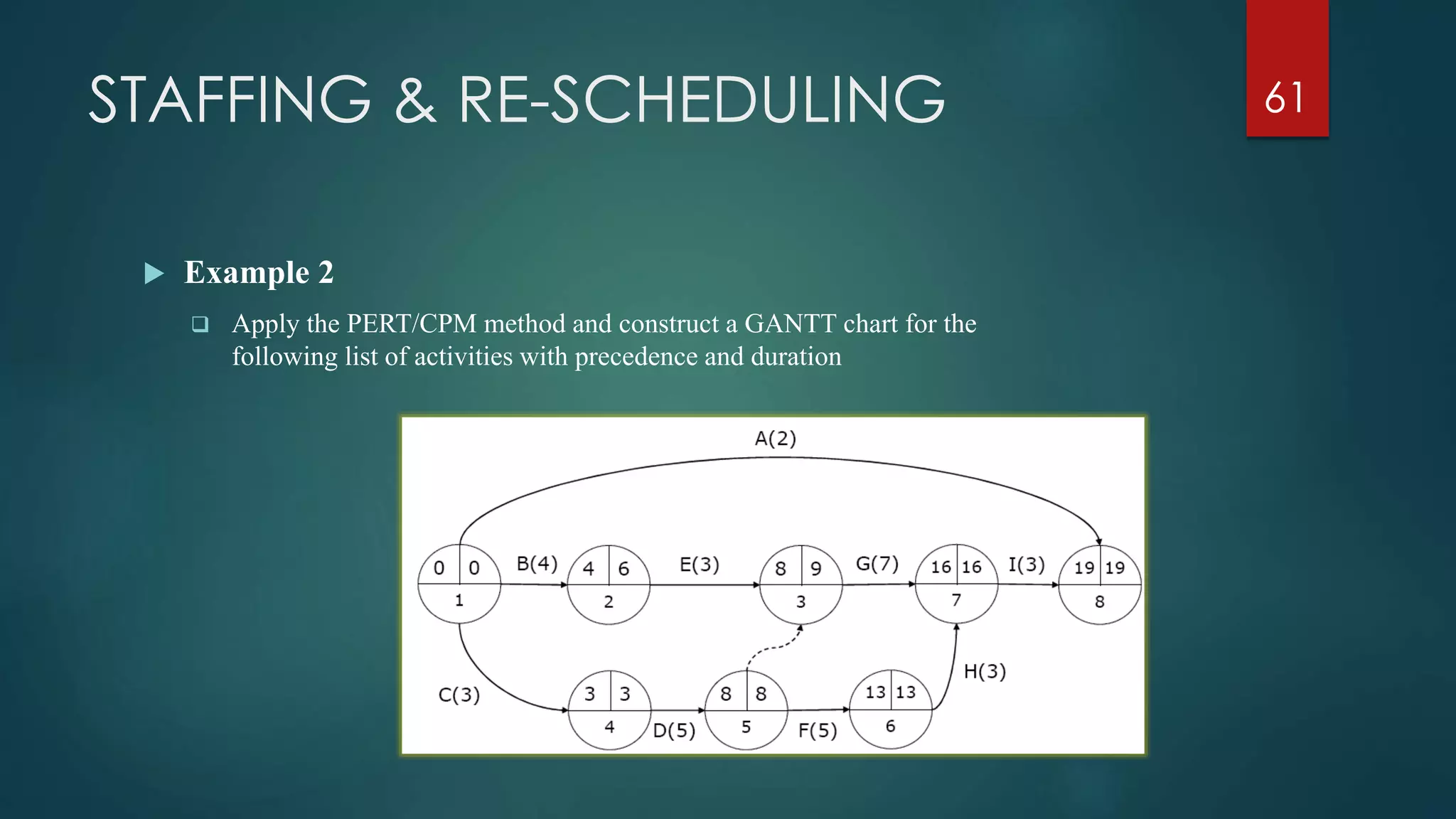
 Example 2
 Apply the PERT/CPM method and construct a GANTT chart for the
following list of activities with precedence and duration
61
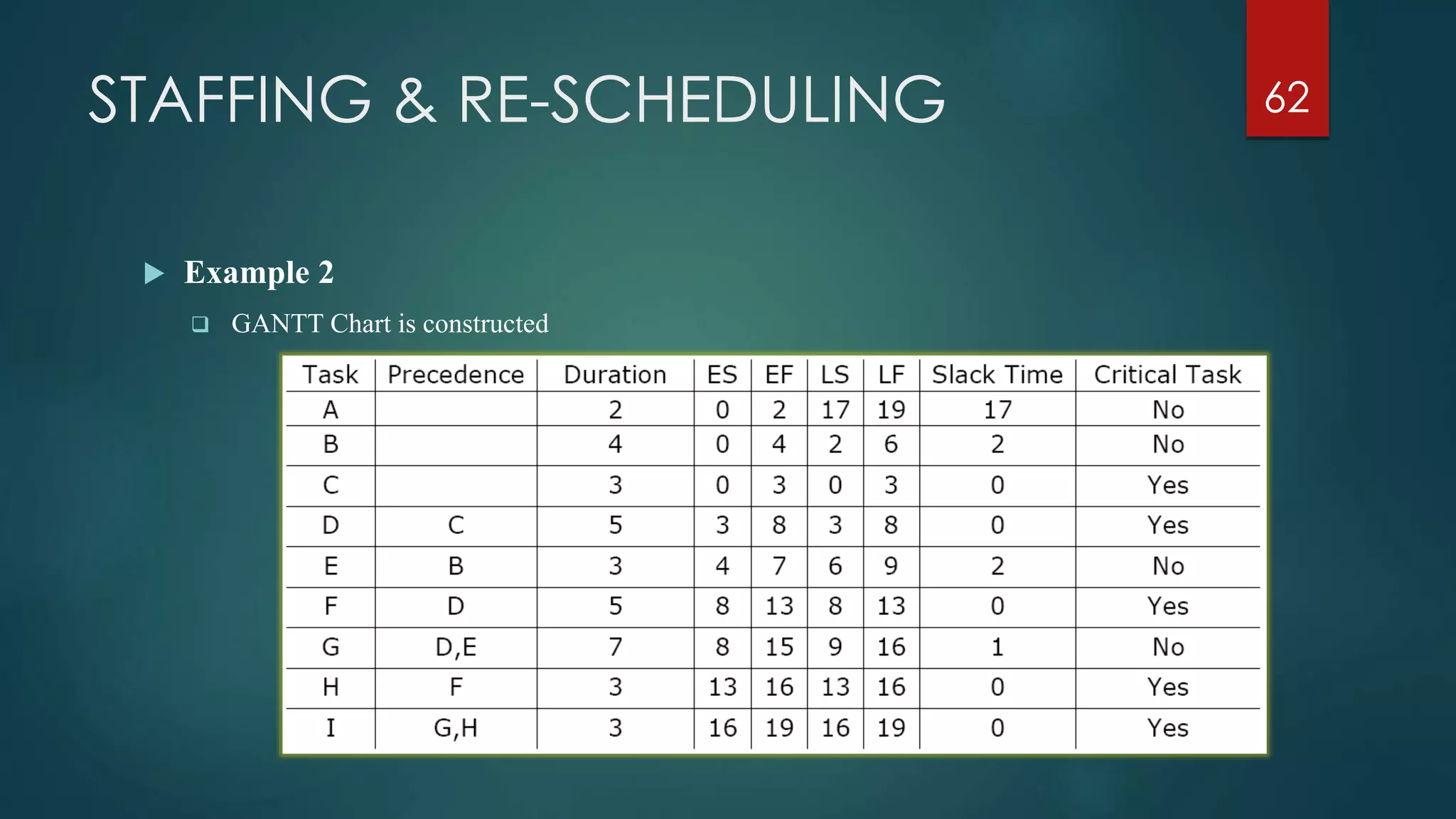
STAFFING & RE-SCHEDULING
 Example 2
 GANTT Chart is constructed
62
STAFFING & RE-SCHEDULING
 Example 2
 Step 1: Schedule critical tasks
63
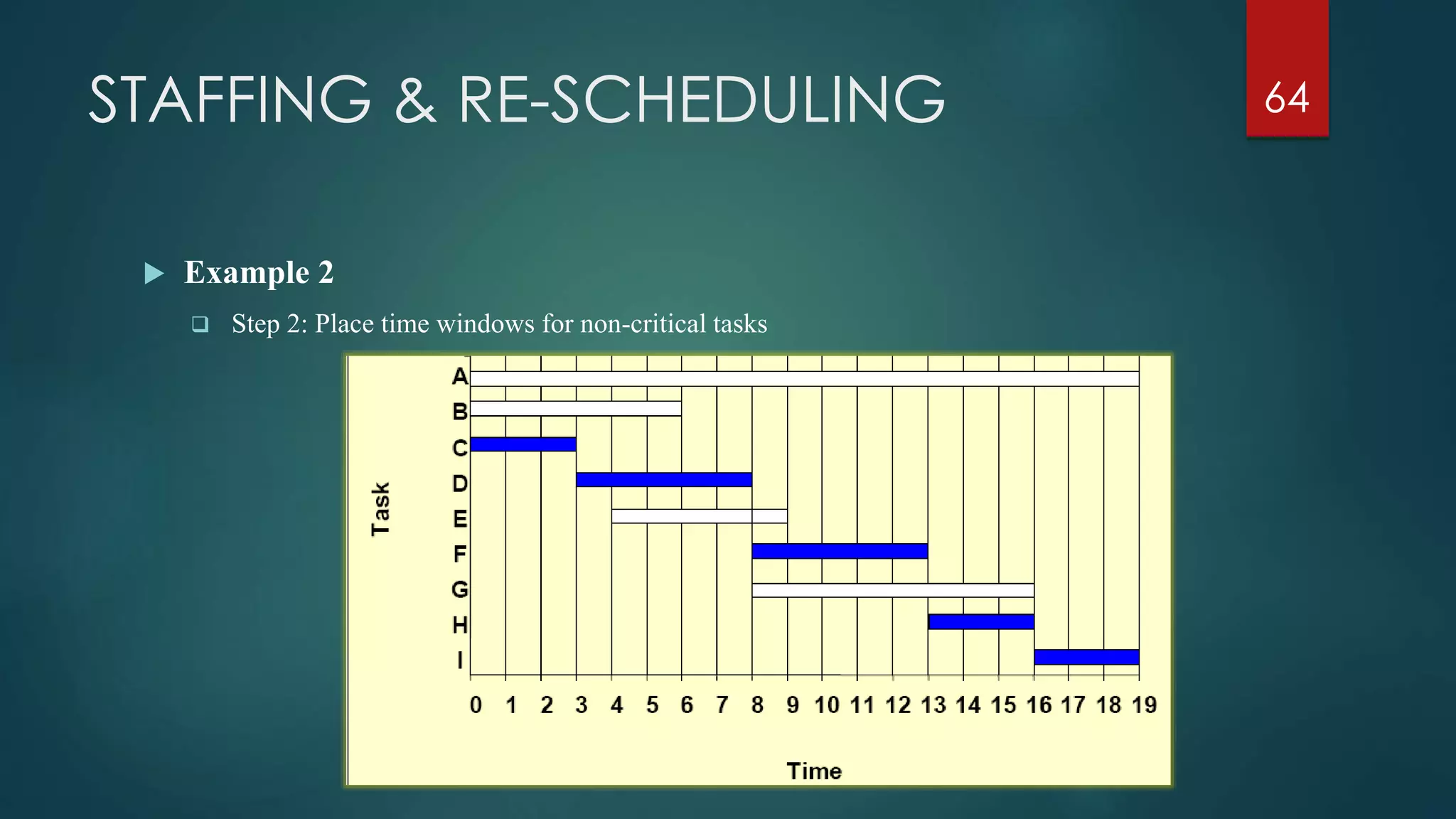
STAFFING & RE-SCHEDULING
 Example 2
 Step 2: Place time windows for non-critical tasks
64
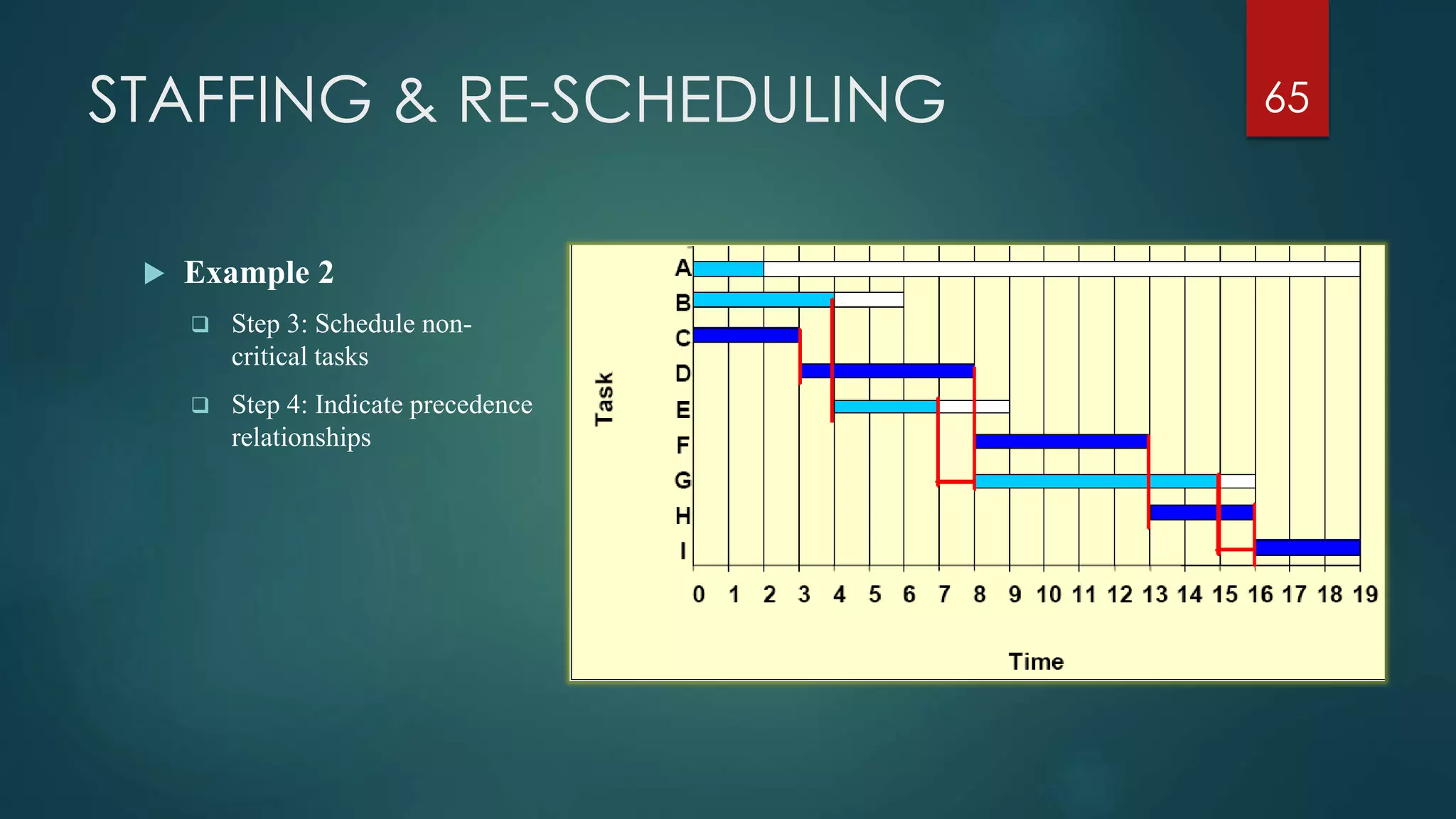
STAFFING & RE-SCHEDULING
 Example 2
 Step 3: Schedule non-
critical tasks
 Step 4: Indicate precedence
relationships
65
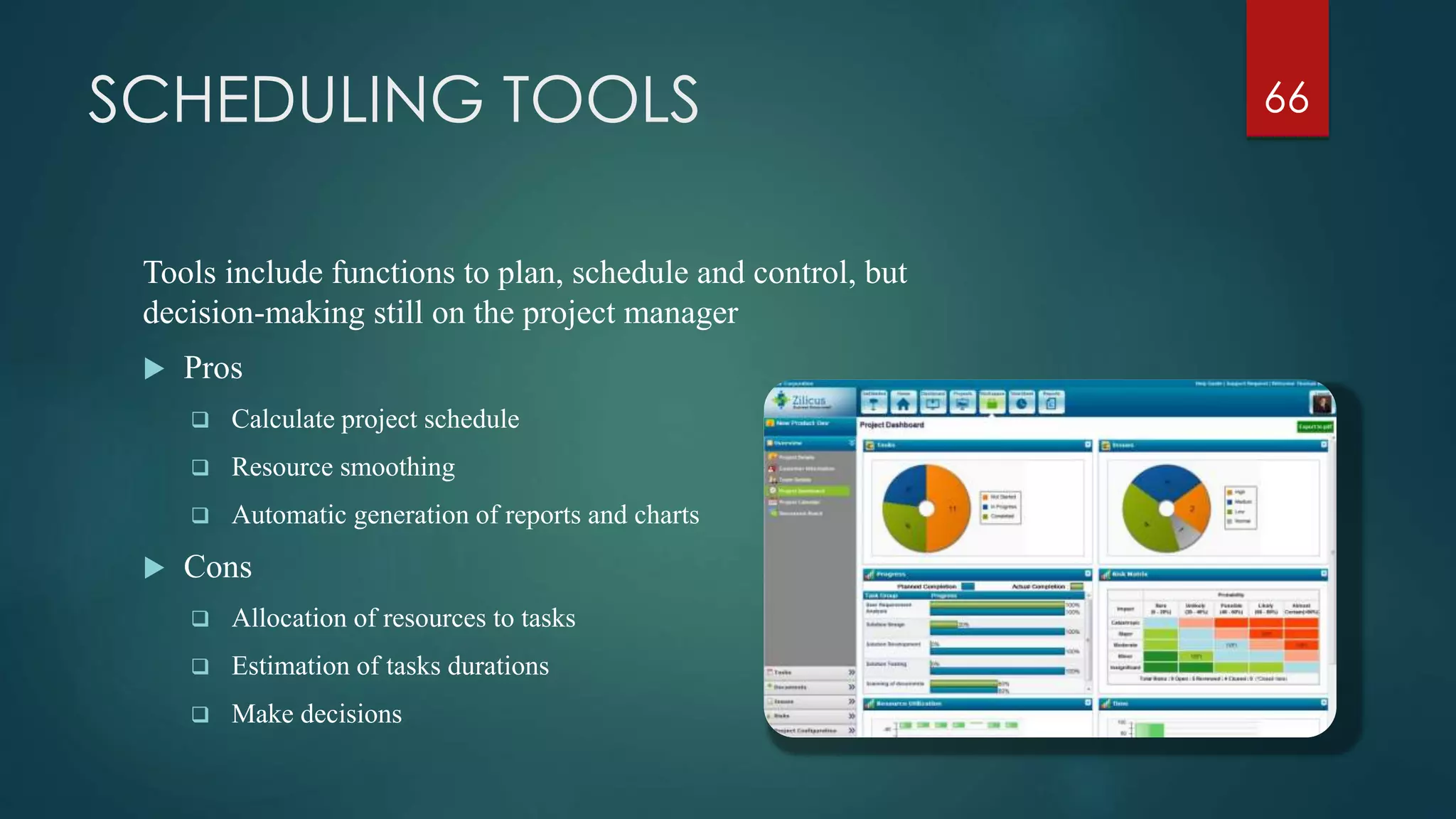
SCHEDULING TOOLS
Tools include functions to plan, schedule and control, but
decision-making still on the project manager
 Pros
 Calculate project schedule
 Resource smoothing
 Automatic generation of reports and charts
 Cons
 Allocation of resources to tasks
 Estimation of tasks durations
 Make decisions
66
Thank you!
PHAM TUAN ANH MBA, PMP
67

Project Management Fundamental

  • 1.
    PHAM TUAN ANHMBA, PMP Project Management Fundamental
  • 2.
    PROJECT CASH FLOW Cost  Initial Investment  Implementation Cost  Revenue  Sale Revenue  Financing  Irregular Receipt  Fixed Cost  Variable Cost  Opportunity Cost  Sunk Cost  Marginal Cost  Marginal Revenue  Profit Maximization 2
  • 3.
    TIME VALUE OFMONEY  Interest Rate (i)  Future Value (FV)  Present Value (PV)  Annual CF (A)  Real Rate of Interest – 0.72 Rule  Depreciation  Loan  Tax  Inflation CF0 CF1 CF3CF2 0 1 2 3 i % 3
  • 4.
    COMPANIES THAT CONSIDER PROJECTS SELLER Must select which projects they will bid  Own expertise and track record  Available Resources  Chance of winning the bid BUYER  Must decide which potential projects they will pursue  Available capital is the major constraint  Profitability is often the major criteria  More than one projects that can accomplish the business goal Project Selection Model 4
  • 5.
    PROJECT SELECTION CRITERIA Numeric  Use financial metrics such as cash flow, profit etc..  Non-numeric  Do not use numbers as inputs into the model, but other data or considerations  The tendency to rely solely on numeric profitability models can be a serious mistake If the estimated level of goal achievement is sufficiently large, the project is selected 5
  • 6.
    NON-NUMERIC MODELS  TheSacred Cow (the boss wants to do it)  The operating necessity (the basement is flooded)  The competitive necessity (we will lose sales if we don’t change)  The product line extension (will it fit?)  Comparative benefit model (how does it look in the context of other projects) 6
  • 7.
    NUMERIC MODELS  Considera numeric value for a project that can be easily compared among the others  Two major categories:  Profit/profitability  Scoring 7
  • 8.
    PROFIT/PROFITABILITY MODELS  Modelsthat look at costs and revenues  Discounted Cash Flow (NPV)  Internal Rate of Return (IRR)  Benefit Cost Ratio (BCR)  Payback Period (PB)  Computer Aided Calculation 8
  • 9.
    PROFIT/PROFITABILITY MODELS COMPARISON  ProjectScale impact the selection of NPV or IRR  Sponsor care NPV while Bank care IRR  BCR, PB should be considered as minor criteria 9
  • 10.
    PROJECT PROPOSALS  Proposaldocument contains information needed to evaluate and score a project proposal  Large organizations put out bids for projects  RFP (request for proposal)  RFI (request for information)  RFQ (request for quotation)  Vendor /Firms respond to the competitive process with project proposals 10
  • 11.
    PROPOSALS DOCUMENT  Thetechnical approach  General description of the problem to be solved or the project to be undertaken  The general proposed approach /solution  The implementation plan  Estimates of required time, materials and other resources to be used, include aggregate costing  Gantt charts, network diagrams etc. to show project timeline and milestones 11
  • 12.
    PROPOSALS DOCUMENT  Theplan for logistic support and administration  Ability description of the proposer to supply the routine facilities, equipment and skills needed  How subcontractors will be dealt with  Nature and timing of project reports and deliverables  Past experience of the proposer  List of key project personnel and their experience & credentials (usually full CVs) 12
  • 13.
    PROJECT SCHEDULING What isit  Allocate resources to execute all activities in the project Why to schedule  Project is a set of activities or tasks with clear beginning and ending points  The amount of available resources (time, personnel and budget) to carry out the activities is limited 13
  • 14.
    PROJECT SCHEDULING  Objectives Establish beginning, ending and duration of each activity in the project  Calculate overall completion time of the project given the amount of usually limited resources  Determine the critical path and its duration  Determine the slack time for all non-critical activities and the whole project  Guide the allocation of resources other than time such as staff and budget 14
  • 15.
    PROJECT SCHEDULING  Methodology Define activities or tasks according to the project objectives  A task is an individual unit of work with a clear beginning and a clear end  Identify precedence relationships or dependencies  Estimate time required to complete each task  Draw an activity-on-arrow PERT diagram inserting dummy activities if required  Apply CPM to calculate earliest and latest starting times, earliest and latest completion times, slack times, critical path etc..  Construct a GANTT chart  Reallocate resources and resolve if necessary  Continuously monitor/revise the time estimates along the project duration 15
  • 16.
    PERT NETWORK DIAGRAM ProgramEvaluation and Review Technique  It is a network model that allows for randomness in activity completion times  Tool used to control the length of projects  PERT was developed in the late 1950’s for the US Navy’s Polaris Project  First used as a management tool for military projects  Adapted as an educational tool for business managers  It has the potential to reduce both the time and cost required to complete a project 16
  • 17.
    PERT NETWORK DIAGRAM PERT Diagram 17 1 2 3 5 4 6A F Single start node Single finish node
  • 18.
    PERT NETWORK DIAGRAM Activity-on-node diagrams  Maybe more than one single start and end node  Nodes represent activities  Arrows indicate precedence  Activity-on-arrow diagrams  One single start and one single end node  Arrows represent activities  Nodes indicate beginning/end of activities 18
  • 19.
    PERT NETWORK DIAGRAM Example of PERT Diagram 19
  • 20.
    PERT NETWORK DIAGRAM Basic rules for AOA  Tasks are represented as arrows  Nodes represent the start and finish points of tasks  There is only one overall start node  There is only one overall finish node  Two tasks cannot share the same start and end node 20 2 3 A D C B Tasks B & C share the same start and end node
  • 21.
    PERT NETWORK DIAGRAM Dummies activities  Sometimes it is necessary to insert dummy activities (duration zero) in order to maintain the clarity of the diagram and the precedence relationships between activities  In activity-on-arrow PERT diagrams, each activity must be uniquely identifiable by its start and end nodes  However, sometimes multiple tasks have the same predecessors and successors 21 2 3 A D C B Tasks B & C share the same start and end node
  • 22.
    CPM - CRITICALPATH METHOD Critical Path Method  It is determined by adding the times for the activities in each sequence  CPM determines the total calendar time required for the project  If activities outside the critical path speed up or slow down (within limits), the total project time does not change  The amount of time that a non-critical activity can be delayed without delaying the project is called slack-time 22
  • 23.
    CPM - CRITICALPATH METHOD  CPM Parameters  ET – Earliest node time for given activity duration and precedence relationships  LT – Latest node time assuming no delays  ES – Activity earliest start time  LS – Activity latest start time  EF – Activity earliest finishing time  LF – Activity latest finishing time  Slack Time – Maximum activity delay time 23
  • 24.
    CPM - CRITICALPATH METHOD  CPM Parameters  Step 1: Calculate ET for each node For each node i for which predecessors j are labelled with ET(j), ET(i) is given by: ET(i)= maxj [ET(j)+ t(j,i)] where t(j,i) is the duration of task between nodes (j,i) 24  Step 2: Calculate LT for each node For each node i for which successors j are labelled with LT(j), LT(i) is given by: LT(i)= minj [LT(j) – t(i,j)] where t(j,i) is the duration of task between nodes (i,j)
  • 25.
    2 51 3 4 C (7 ) CPM - CRITICAL PATH METHOD
  • 26.
    2 51 3 4 C (7 ) 0 CPM - CRITICAL PATH METHOD
  • 27.
    2 51 3 4 C (7 ) 0 4 3 CPM - CRITICAL PATH METHOD
  • 28.
    2 51 3 4 C (7 ) 0 4 3 11 CPM - CRITICAL PATH METHOD
  • 29.
    2 51 3 4 C (7 ) 0 4 3 11 13 CPM - CRITICAL PATH METHOD
  • 30.
    2 51 3 4 C (7 ) 0 4 3 11 13 8 CPM - CRITICAL PATH METHOD
  • 31.
    2 51 3 4 C (7 ) 0 4 3 11 13 8 max CPM - CRITICAL PATH METHOD
  • 32.
    2 51 3 4 C (7 ) 0 4 3 11 13 CPM - CRITICAL PATH METHOD
  • 33.
    2 51 3 4 C (7 ) 0 4 3 11 13 13 CPM - CRITICAL PATH METHOD
  • 34.
    2 51 3 4 C (7 ) 0 4 3 11 13 13 11 CPM - CRITICAL PATH METHOD
  • 35.
    2 51 3 4 C (7 ) 0 4 3 11 13 13 11 8 CPM - CRITICAL PATH METHOD
  • 36.
    2 51 3 4 C (7 ) 0 4 3 11 13 13 11 8 4 CPM - CRITICAL PATH METHOD
  • 37.
    2 51 3 4 C (7 ) 0 4 3 11 13 13 11 8 4 5 CPM - CRITICAL PATH METHOD
  • 38.
    2 51 3 4 C (7 ) 0 4 3 11 13 13 11 8 4 5 0 CPM - CRITICAL PATH METHOD
  • 39.
    2 51 3 4 C (7 ) 0 4 3 11 13 13 11 8 4 5 0 min CPM - CRITICAL PATH METHOD
  • 40.
    2 51 3 4 C (7 ) 0 4 3 11 13 13 11 8 4 0 CPM - CRITICAL PATH METHOD
  • 41.
    CPM - CRITICALPATH METHOD  Critical activity  is an activity with zero slack time  cannot be delayed without causing a delay in the whole project 41
  • 42.
    CPM - CRITICALPATH METHOD 42  CPM Parameters  Step 3: Calculate processing times for each activity For each activity X with start node i and end node j: ES(X) = ET(i) EF(X) = ES(X) + t(X) LF(X) = LT(j) LS(X) = LF(X) – t(X) Slack Time (X) = LS(X) – ES(X) = LF(X) – EF(X) where t(X) is the duration of activity X An activity with zero slack time is a critical activity and cannot be delayed without causing a delay in the whole project
  • 43.
    CPM - CRITICALPATH METHOD 43  CPM Parameters  Step 3: Calculate processing times for each activity Task Duration ES EF LS LF Slack Critical Task A 3 0 3 5 8 5 No B 4 0 4 0 4 0 Yes C 7 4 11 4 11 0 Yes D 5 3 8 8 13 5 No E 2 11 13 11 13 0 Yes
  • 44.
    CPM - CRITICALPATH METHOD 44  Critical Path Method Result 2 51 3 4 C ( 7 ) 0 4 3 1 1 1 3 1 3 1 1 8 4 0
  • 45.
    GANTT CHART What isa GANTT chart  Project schedule illustrated in type of bar chart  GANTT chart constructed after PERT/CPM analysis is completed, then to re-allocate resources and re- schedule if necessary  Become a common technique for representing the project phases and activities  It was introduced 1910 – 1915 by Henry Gantt 45
  • 46.
    GANTT CHART  Characteristics The bar in each row identifies the corresponding task  The horizontal position of the bar identifies Start and Finish times of the task  Bar length represents the duration of the task  Task durations can be compared easily  Good for allocating resources and re-scheduling  Precedence relationships can be represented using arrows  Critical Activities are usually highlighted  Slack times are represented using bars with doted lines  The bar of each activity begins at the activity Earliest Start time (ES)  The bar of each activity ends at the activity Latest Finish time (LF) 46
  • 47.
    GANTT CHART  Advantages(4)  Simple  Good visual communication to others  Task durations can be compared easily  Good for scheduling resources  Disadvantages (2)  Dependencies are more difficult to visualize  Minor changes in data can cause major changes in the chart 47
  • 48.
    GANTT CHART CONSTRUCTION Construct a GANTT chart from the information obtained by PERT/CPM  Step 1: Schedule the critical tasks in the correct position  Step 2: Place the time windows in which the non-critical tasks can be scheduled  Step 3: Schedule the non-critical tasks according to their earliest starting times  Step 4: Indicate precedence relationships between tasks 48
  • 49.
    GANTT CHART CONSTRUCTION Example 1: GANTT chart construction  Information obtained by PERT/CPM 49
  • 50.
    GANTT CHART CONSTRUCTION Example 1: GANTT chart construction  Step 1: Schedule critical tasks 50
  • 51.
    GANTT CHART CONSTRUCTION Example 1: GANTT chart construction  Step 2: Place time windows for non-critical tasks 51
  • 52.
    GANTT CHART CONSTRUCTION Example 1: GANTT chart construction  Step 3: Schedule non-critical tasks  Step 4: Indicate precedence relationships 52
  • 53.
    GANTT CHART OPTIMIZATION Once the project schedule has been constructed, consider  available staff hours  slack times and  the project schedule 53 Assign staff and other resources to project activities
  • 54.
    STAFFING & RE-SCHEDULING Resource Smoothing is a technique used to re-allocate resources and re-schedule activities  In resource smoothing, non-critical tasks are re- scheduled within their time window  Staff Utilization = 54 Sum(duration of activity * staff required) Maximum staff required * duration of project
  • 55.
    STAFFING & RE-SCHEDULING Example 1  CPM/PERT Network Diagram 55
  • 56.
    STAFFING & RE-SCHEDULING Example 1  The original schedule 56  1. Staff Utilization = (3x2+4x4+5x1+7x3+2x1+4x2+3x5)/(14x6) = 0.857 = 85.5%
  • 57.
    STAFFING & RE-SCHEDULING57  Example 1  2. Work out the Staff Profile
  • 58.
    STAFFING & RE-SCHEDULING58  Example 1  Now, assume that there are 6 people available for working in this project but one of them returns from holidays at time = 2  So re-scheduling is needed because activities A and B cannot be carried out in parallel until time = 2
  • 59.
    STAFFING & RE-SCHEDULING59  Example 1  Suppose another scenario in which equipment and materials needed to carry out activities E and F are available at time = 5 and time = 9 respectively instead of being available at the activities ES time  Then, rescheduling is needed but the overall duration of the project is not affected
  • 60.
    STAFFING & RE-SCHEDULING60 Crashing  The obvious way to reduce the overall project duration, it is by reducing the duration of the critical activities  Crashing Critical Activities refers to reducing the duration of a critical activity by allocating more resources to it  The risk is that crashing activities may actually reduce productivity and increase costs
  • 61.
    STAFFING & RE-SCHEDULING Example 2  Apply the PERT/CPM method and construct a GANTT chart for the following list of activities with precedence and duration 61
  • 62.
    STAFFING & RE-SCHEDULING Example 2  GANTT Chart is constructed 62
  • 63.
    STAFFING & RE-SCHEDULING Example 2  Step 1: Schedule critical tasks 63
  • 64.
    STAFFING & RE-SCHEDULING Example 2  Step 2: Place time windows for non-critical tasks 64
  • 65.
    STAFFING & RE-SCHEDULING Example 2  Step 3: Schedule non- critical tasks  Step 4: Indicate precedence relationships 65
  • 66.
    SCHEDULING TOOLS Tools includefunctions to plan, schedule and control, but decision-making still on the project manager  Pros  Calculate project schedule  Resource smoothing  Automatic generation of reports and charts  Cons  Allocation of resources to tasks  Estimation of tasks durations  Make decisions 66
  • 67.
    Thank you! PHAM TUANANH MBA, PMP 67