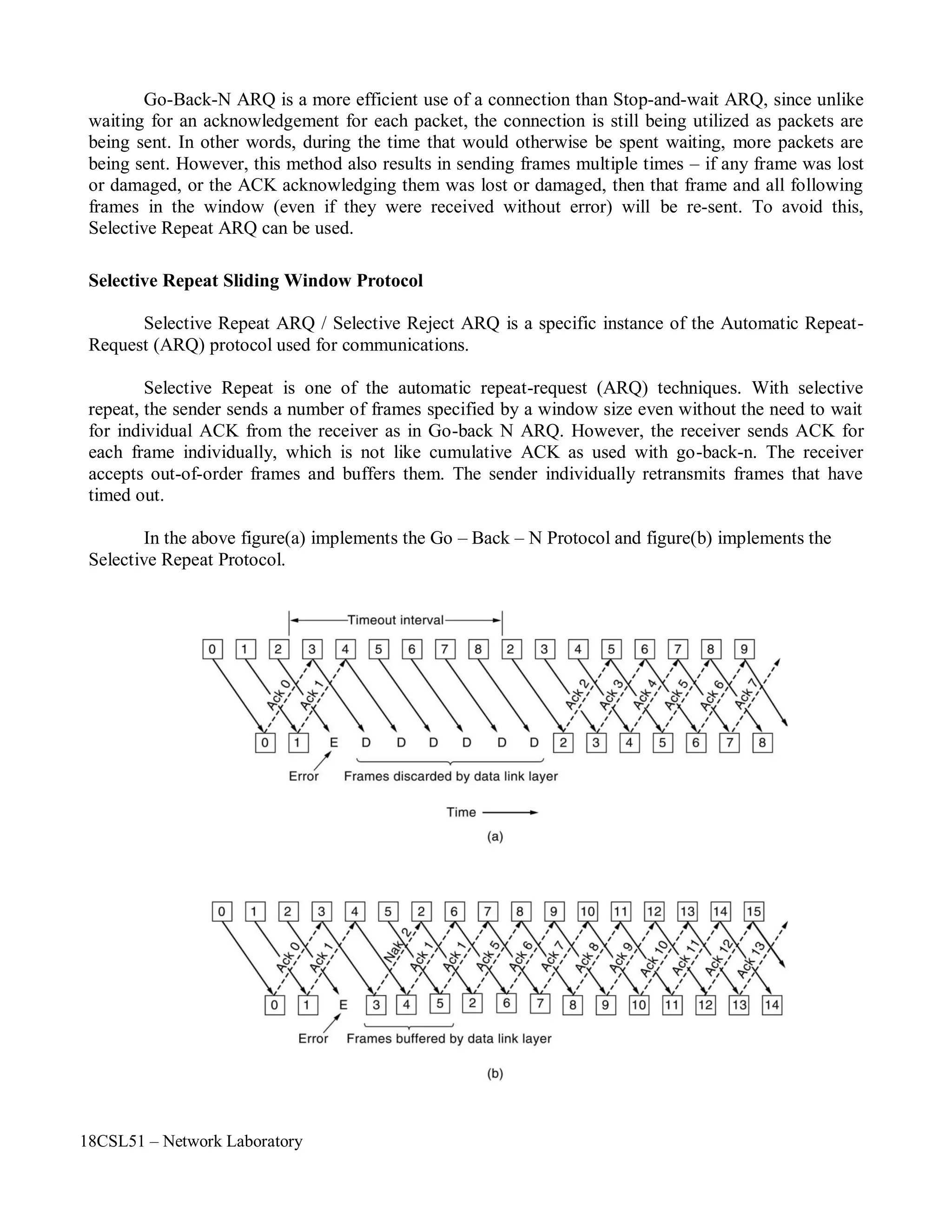
18CSL51 - Network Laboratory Manual
SCHOOL OF COMMUNICATION AND COMPUTER SCIENCES
DEPARTMENT OF COMPUTER SCIENCE AND ENGINEERING
18CSL51 – Network Laboratory
18CSL51 NETWORK LABORATORY
Sem Category L T P Credit
V PC 0 0 2 1
Preamble It provides an exposure to implement the various services offered by network layers and to
measure the network performance. Also provide the knowledge to develop client/server
applications using TCP and UDP.
Prerequisites Nil
List of Exercises / Experiments :
1. Simulation of network topologies (bus, ring, star and mesh) using NS2 Simulator.
2. Write a AWK script to measure the network performance using NS2 Simulator
3. Write a simple program to calculate various delays such as propagation delay, transmission delay,
total delay and end-to-end delay.
4. Write a program to implement bit stuffing and byte stuffing.
5. Write a program to implement error detection techniques (parity check and checksum).
6. Write a program to implement CRC.
7. Write a simple program to find the classes of an IP address.
8. Implementation of ARP and RARP.
9. Demonstration of OSPF routing protocol.
10. Write a socket program to implement chat application using UDP.
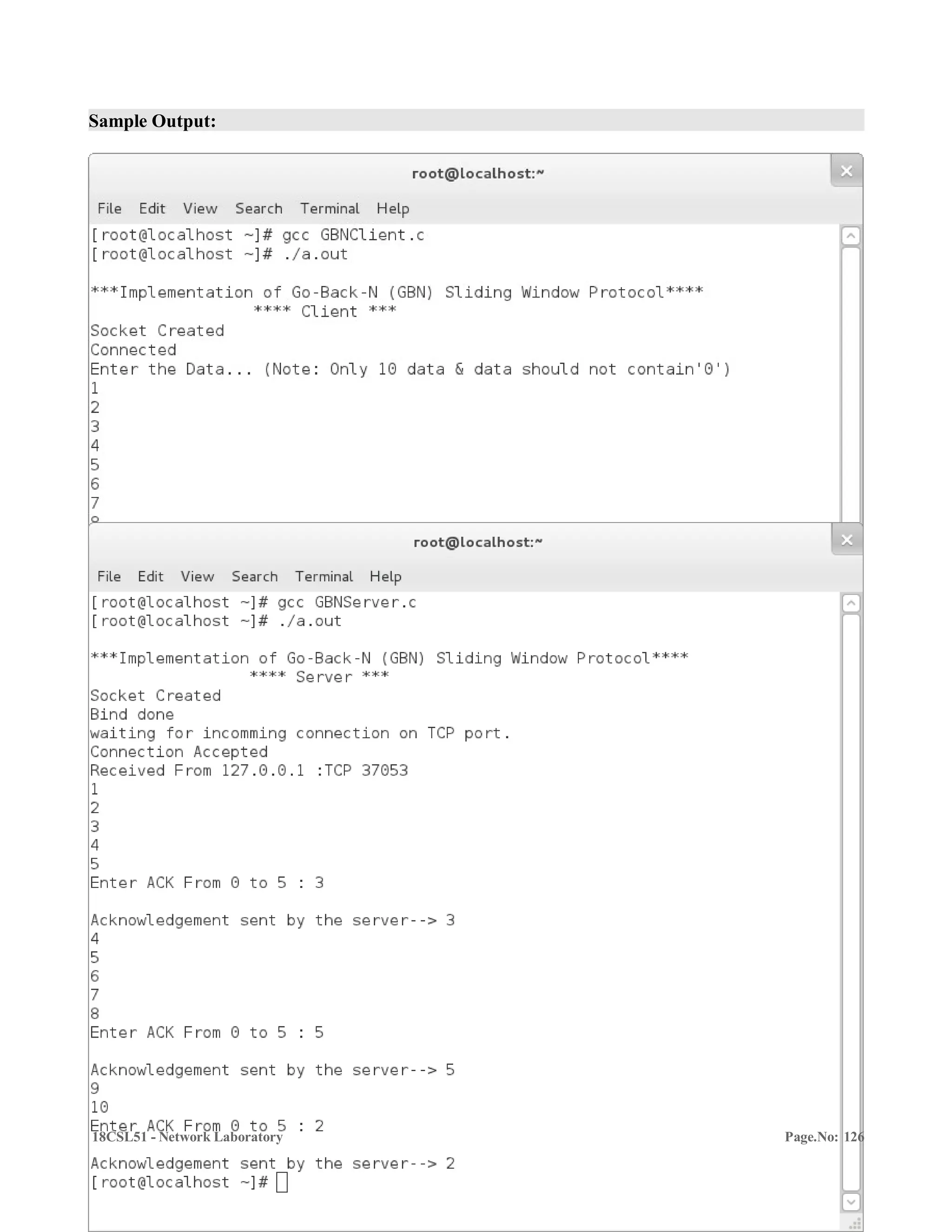
11. Write a socket program to implement Go-Back-N Protocol using TCP.
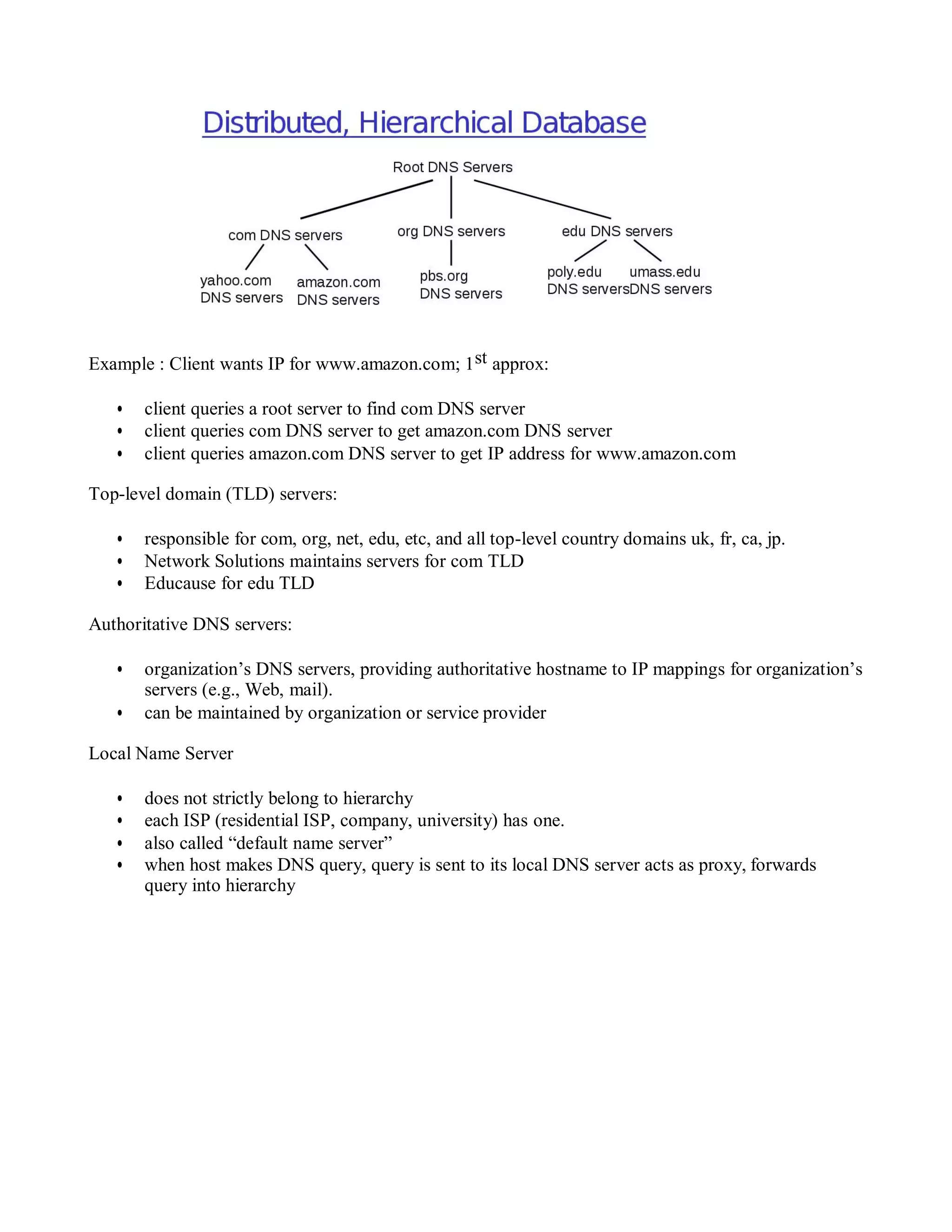
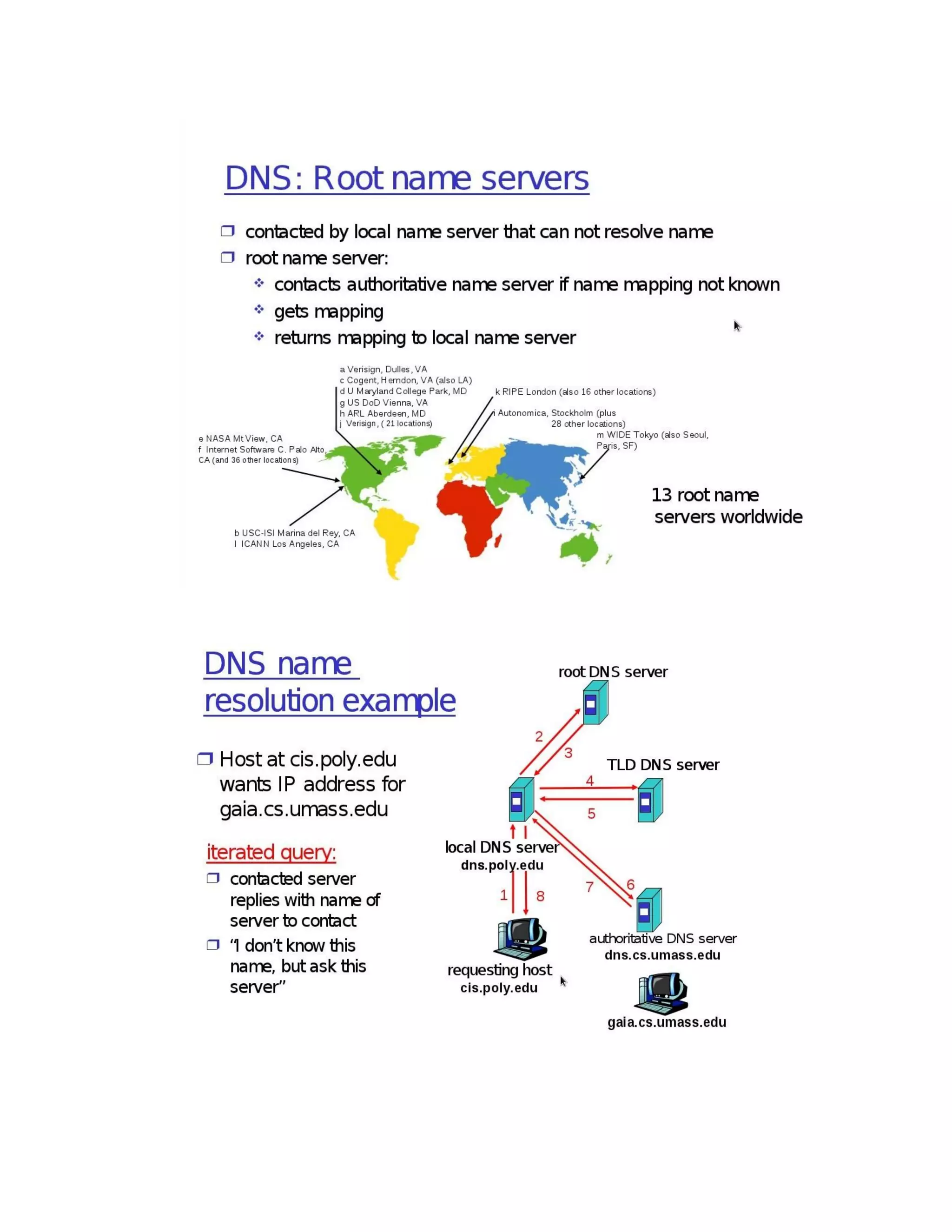
12. Implementation of DNS Protocol using UDP/TCP socket program
Total: 30
REFERENCES / MANUALS / SOFTWARES:
1. Linux / GCC Compiler
2. NS2 Simulator
COURSE OUTCOMES:
On completion of the course, the students will be able to
BT Mapped
(Highest Level)
CO1: make use of the performance parameters to measure the network
performance and implement the services offered by data link layer.
Applying (K3)
CO2: identify the classes of IP address and demonstrate the various routing
protocols.
Applying (K3)
CO3: develop various UDP/TCP client-server applications using socket
programming.
Applying (K3)
Mapping of COs with POs and PSOs
COs/POs PO1 PO2 PO3 PO4 PO5 PO6 PO7 PO8 PO9 PO10 PO11 PO12 PSO1 PSO2
CO1 3 2 2 1 1 3 2
CO2 3 2 2 1 1 3 2
CO3 3 2 2 1 1 3 2
1 – Slight, 2 – Moderate, 3 – Substantial, BT – Bloom’s Taxonomy
18CSL51 – Network Laboratory
Experiment beyond the syllabus
1. Simulation of Nodes with UDP agents using NS2 Simulator.
2. Simulation of BGP routing protocol.
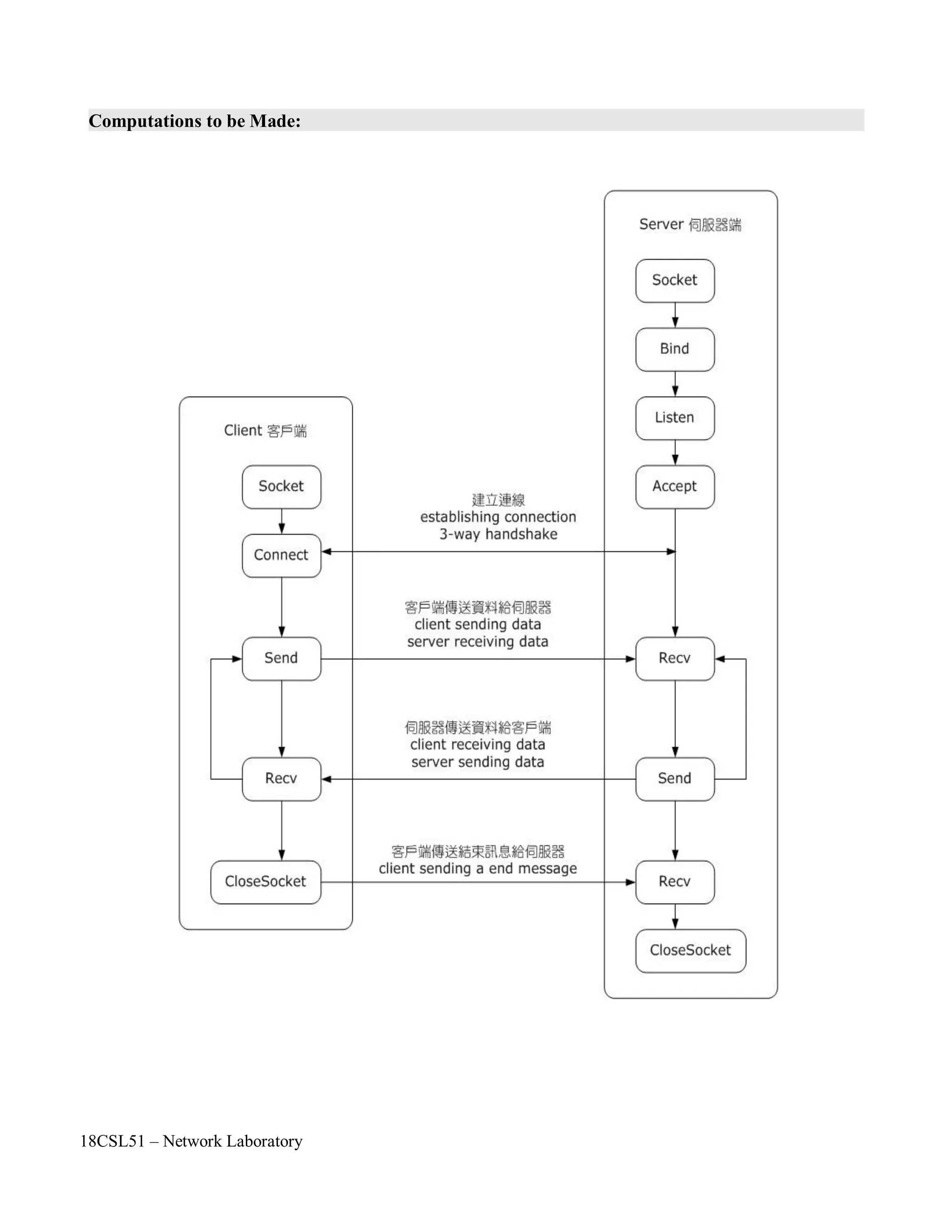
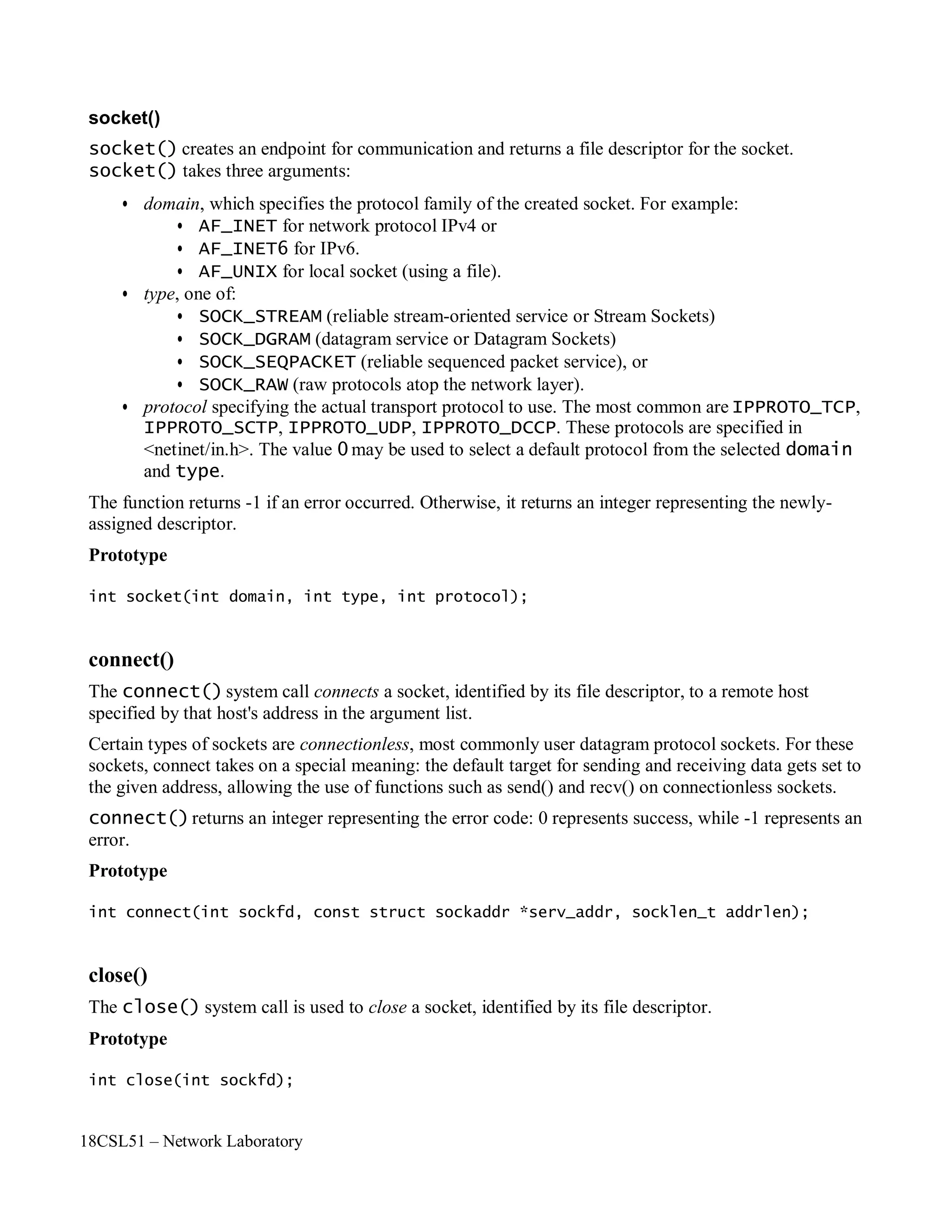
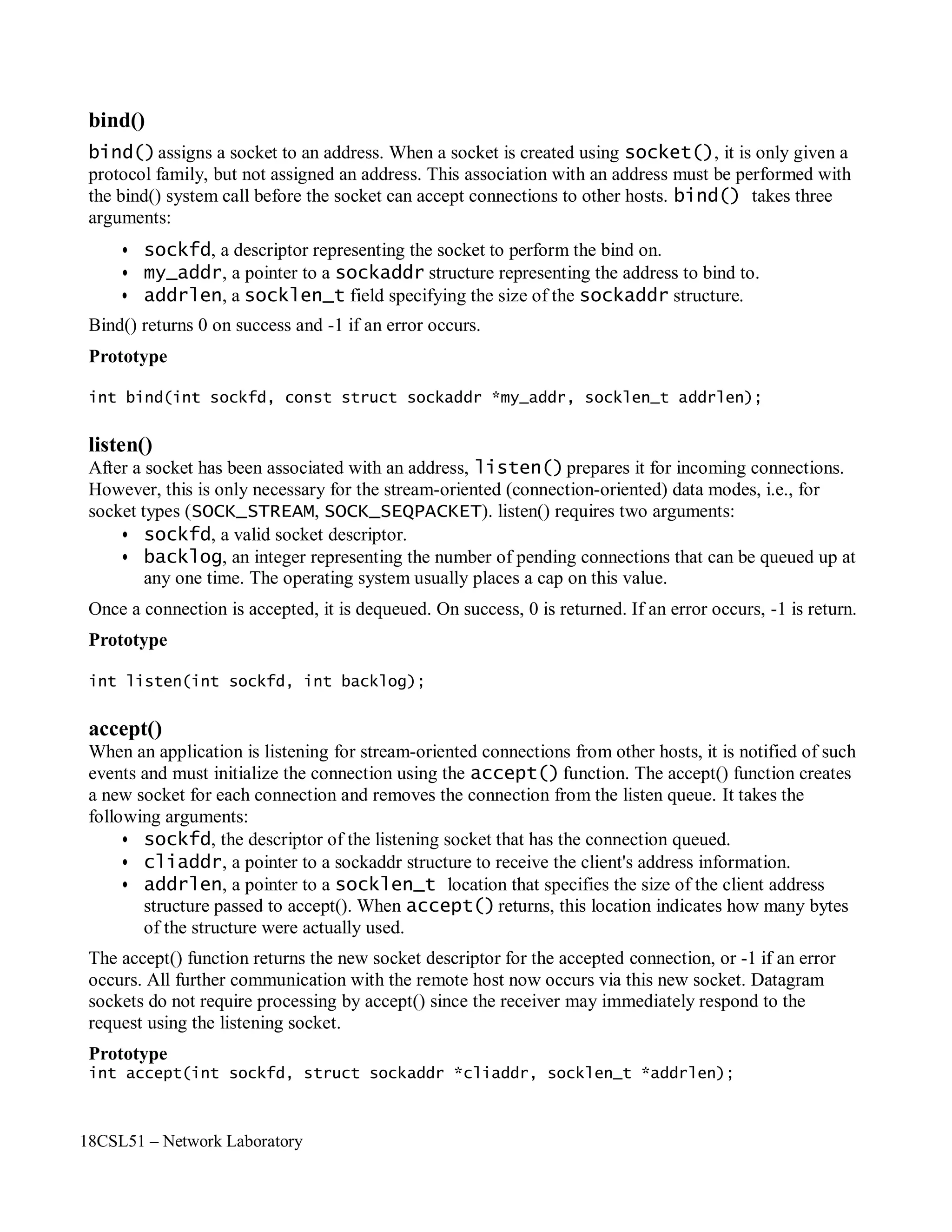
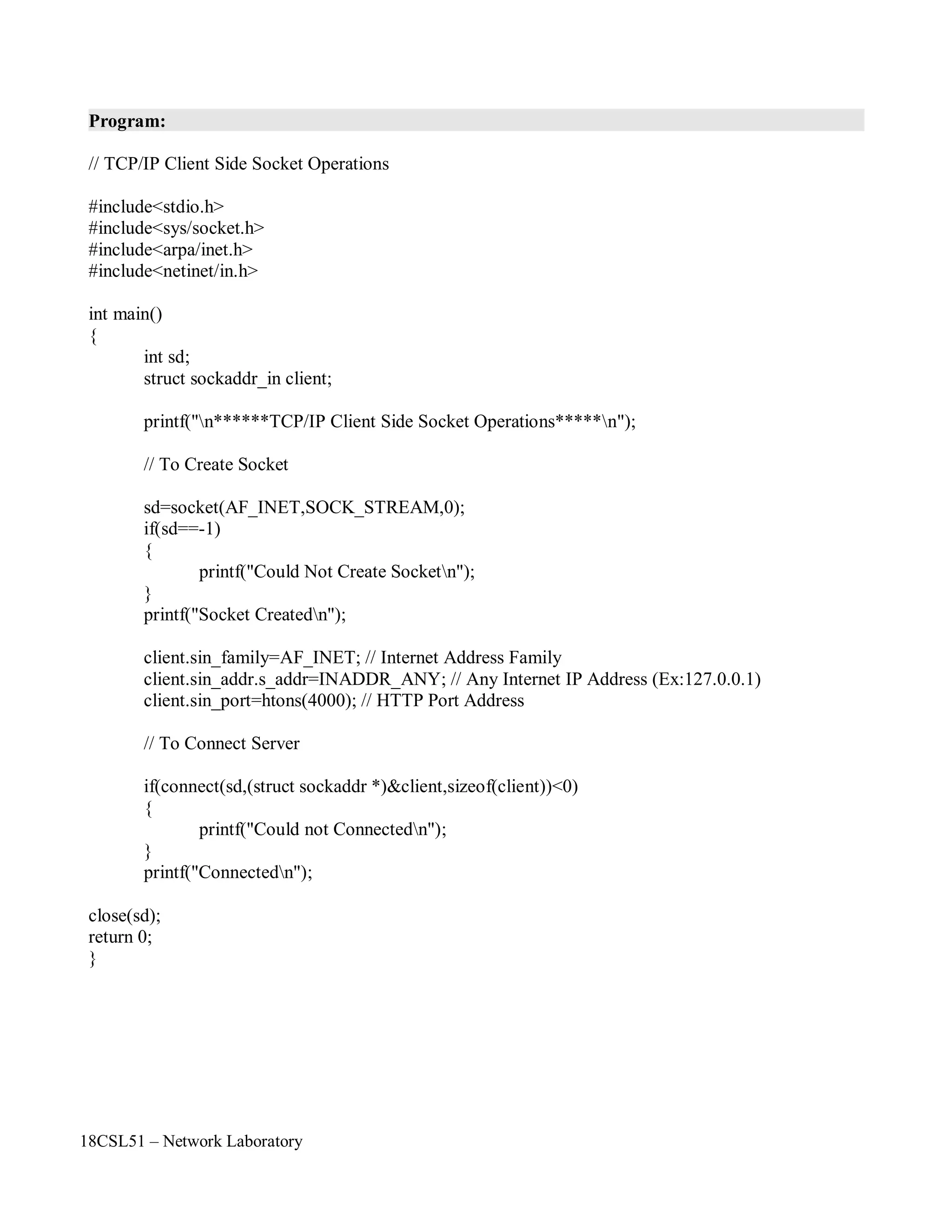
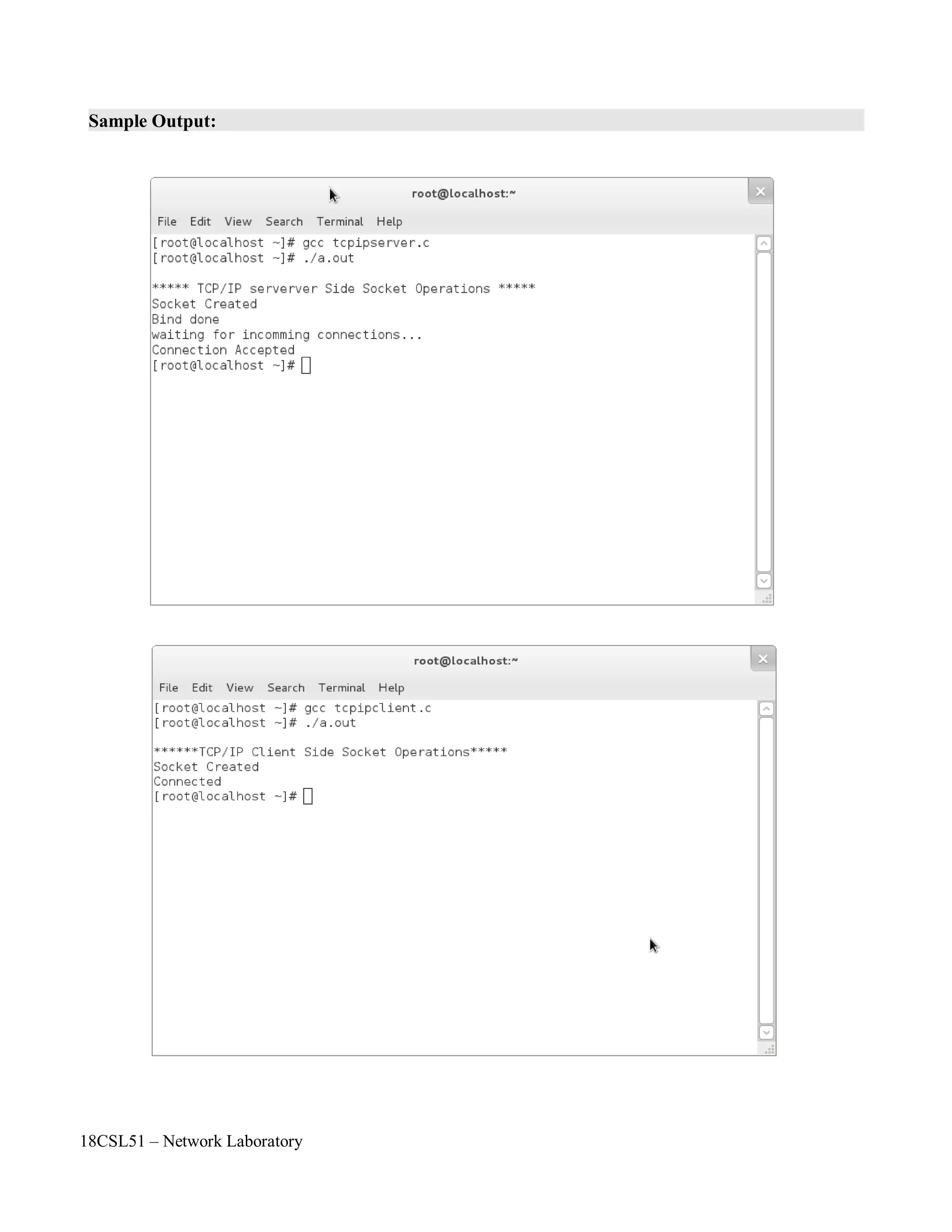
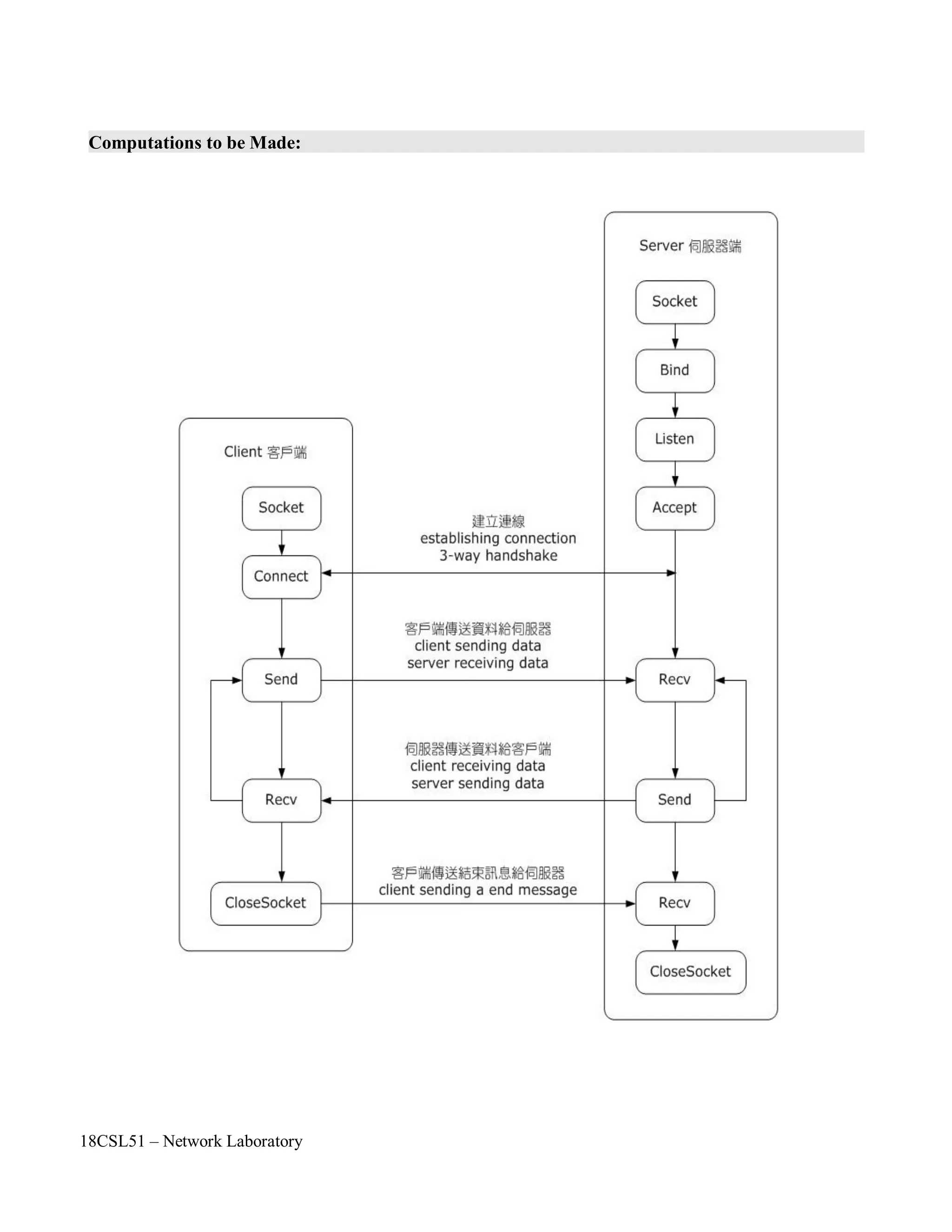
3. TCP Client Side Socket Operations.
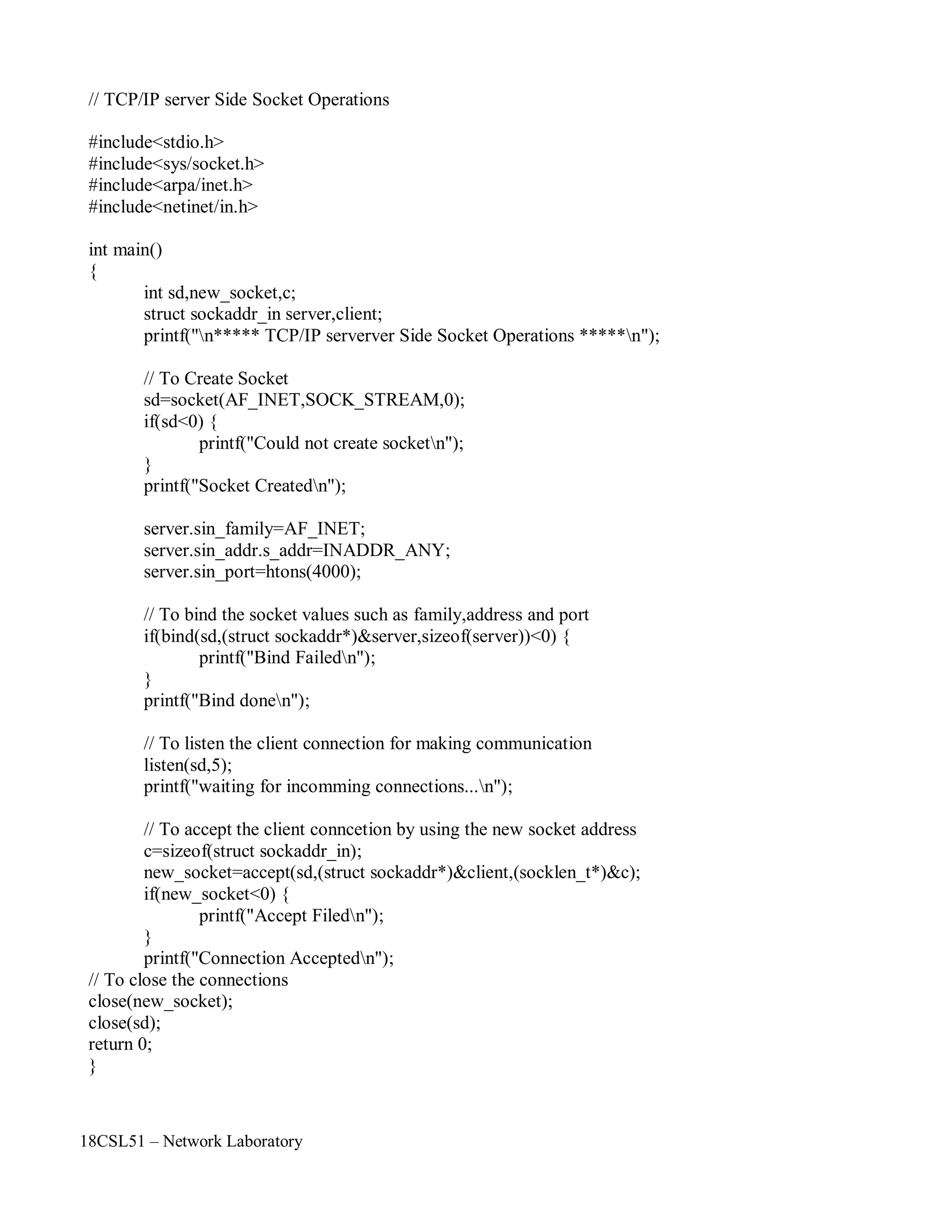
4. TCP Server Side Socket Operations.
5. Write a Client to download a file from a HTTP Server.
18CSL51 – Network Laboratory
Objectives of the Experiment / Practical work:
Resource Required:
Step-wise Experimental Procedure:
On completion of the experiment the students will be able to
• To simulate the nodes with UDP agents using NS2 simulator.
• To understand the various components in NS2 simulator such as NAM, NAM TRACE.
• OS : Linux
• Simulation Tool : Network Simulator 2 (ns2)
• Text Editor : vi or gedit
Step 1: Create a simulator object
Step 2: Open the nam trace file
Step 3: Define a 'finish' procedure
Step 4: Create two nodes n0 and n1.
Step 5: Create a duplex link between the nodes
Step 6: Create a UDP agent and attach it to node n0
Step 7: Create a CBR traffic source and attach it to udp0
Step 8: Create a Null agent (a traffic sink) and attach it to node n1
Step 9: Connect the traffic source with the traffic sink
Step 10: Schedule events for the CBR agent
Step 11: Call the finish procedure after 5 seconds of simulation time
Step 12: Run the simulation .
Course Code : 18CSL51
Course Name : Network Laboratory
Experiment Number :01
Name of the Experiment : Simulation of Nodes With UDP Agents Using NS2
18CSL51 – Network Laboratory
Computations to be Made:
First of all, you need to create a simulator object. This is done with the command
Now open a file for writing that is going to be used for the nam trace data.
The first line opens the file 'out.nam' for writing and gives it the file handle 'nf'. In the second line tell
the simulator object that created above to write all simulation data that is going to be relevant for nam
into this file.
The next step is to add a 'finish' procedure that closes the trace file and starts nam.
The next line tells the simulator object to execute the 'finish' procedure after 5.0 seconds of simulation
time.
You probably understand what this line does just by looking at it. ns provides you with a very simple
way to schedule events with the 'at' command.
The last line finally starts the simulation.
Next to define a very simple topology with two nodes that are connected by a link. The following
two lines define the two nodes. (Note: You have to insert the code in this section before the line
'$ns run', or even better, before the line '$ns at 5.0 "finish"').
set n0 [$ns node]
set n1 [$ns node]
$ns run
$ns at 5.0 "finish"
proc finish {} {
global ns nf
$ns flush-trace
close $nf
exec nam out.nam &
exit 0
}
set nf [open out.nam w]
$ns namtrace-all $nf
set ns [new Simulator]
18CSL51 – Network Laboratory
A new node object is created with the command '$ns node'. The above code creates two nodes and
assigns them to the handles 'n0' and 'n1'.
The next line connects the two nodes.
This line tells the simulator object to connect the nodes n0 and n1 with a duplex link with the
bandwidth 1Megabit, a delay of 10ms and a DropTail queue.
The next step is to send some data from node n0 to node n1. In ns, data is always being sent from one
'agent' to another. So the next step is to create an agent object that sends data from node n0, and another
agent object that receives the data on node n1.
These lines create a UDP agent and attach it to the node n0, then attach a CBR traffic generatot to the
UDP agent. CBR stands for 'constant bit rate'. Line 7 and 8 should be self-explaining. The packetSize is
being set to 500 bytes and a packet will be sent every 0.005 seconds (i.e. 200 packets per second).
The next lines create a Null agent which acts as traffic sink and attach it to node n1.
Now the two agents have to be connected with each other.
And now you have to tell the CBR agent when to send data and when to stop sending. Note: It's
probably best to put the following lines just before the line '$ns at 5.0 "finish"'.
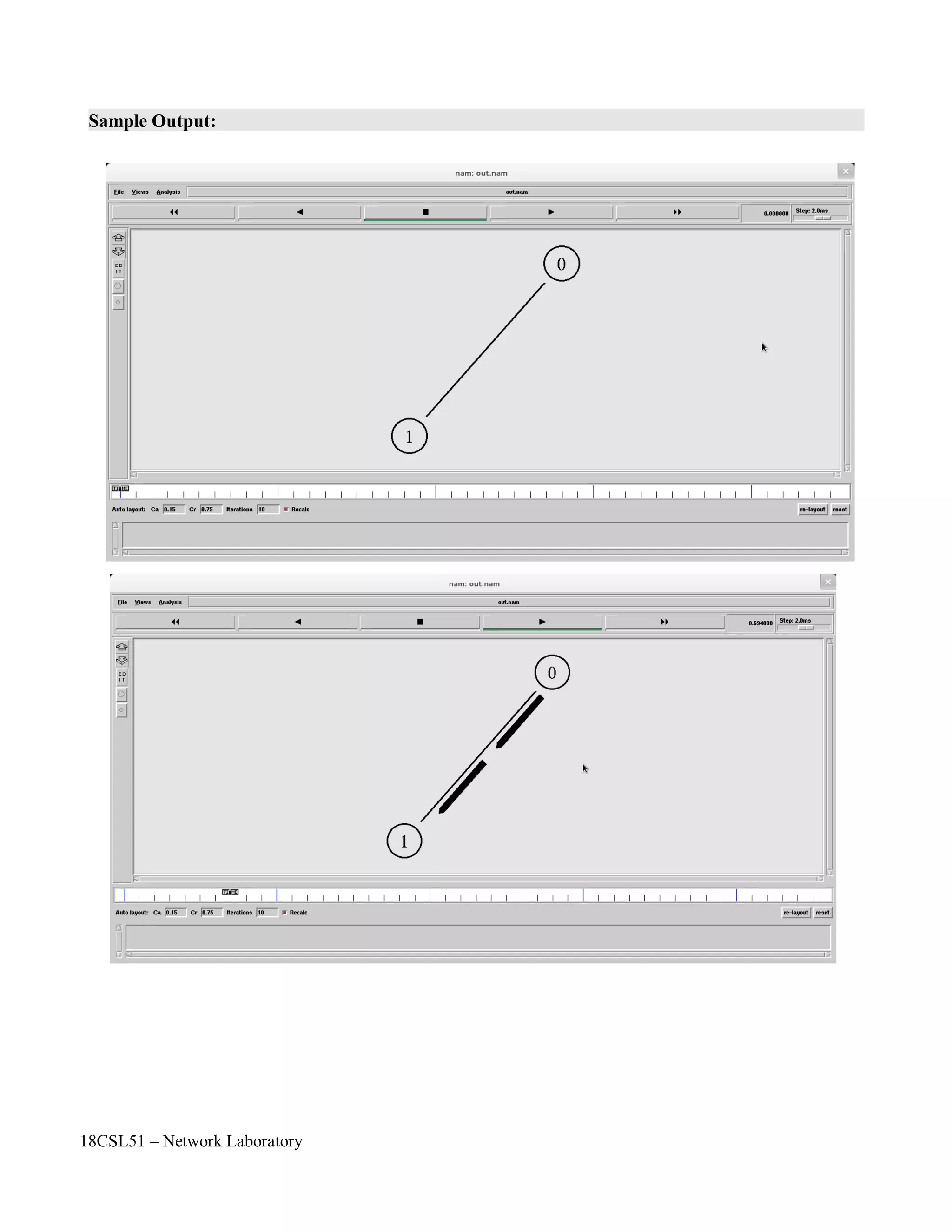
Now you can save the file and start the simulation again. When you click on the 'play' button in the
nam window, you will see that after 0.5 simulation seconds, node 0 starts sending data packets to node
1. You might want to slow nam down then with the 'Step' slider.
$ns at 0.5 "$cbr0 start"
$ns at 4.5 "$cbr0 stop"
$ns connect $udp0 $null0
set null0 [new Agent/Null]
$ns attach-agent $n1 $null0
#Create a UDP agent and attach it to node n0
set udp0 [new Agent/UDP]
$ns attach-agent $n0 $udp0
# Create a CBR traffic source and attach it to udp0
set cbr0 [new Application/Traffic/CBR]
$cbr0 set packetSize_ 500
$cbr0 set interval_ 0.005
$cbr0 attach-agent $udp0
$ns duplex-link $n0 $n1 1Mb 10ms DropTail
18CSL51 – Network Laboratory
Questions and problems for assessing the achievement of objective:
• List out the components in NS 2 Simulator.
• List out the versions of NS.
• Who Developed NS1?
• What is LBNL?
• Expand the terms
◦ TCL
◦ OTCL
◦ NAM
◦ NS
• Which language is used to develop NS2
◦ C
◦ C++
◦ JAVA
◦ PYTHON
• Which Language is used to develop NS3
◦ C++
◦ C++ and C#
◦ C++ and JAVA
◦ C++ and PYTHON
• Write the simulation work - flow
• How to run ns2 scripts in terminal?
• List out the Agents in NS2.
• List out the Traffic Sources in NS2.
Outcome of the Experiment / Practical work:
• On completion of the experiment the students will be able to
◦ To simulate nodes with UDP agents by using NS2 simulator.
◦ To apply this knowledge in their project work to measure the packet delivery ratio, delay,
jitter, throughput, etc.
18CSL51 – Network Laboratory
Program:
#Create a simulator object
set ns [new Simulator]
#Open the nam trace file
set nf [open out.nam w]
$ns namtrace-all $nf
#Define a 'finish' procedure
proc finish {} {
global ns nf
$ns flush-trace
#Close the trace file
close $nf
#Execute nam on the trace file
exec nam out.nam &
exit 0
}
#Create two nodes
set n0 [$ns node]
set n1 [$ns node]
#Create a duplex link between the nodes
$ns duplex-link $n0 $n1 1Mb 10ms DropTail
#Create a UDP agent and attach it to node n0
set udp0 [new Agent/UDP]
$ns attach-agent $n0 $udp0
# Create a CBR traffic source and attach it to udp0
set cbr0 [new Application/Traffic/CBR]
$cbr0 set packetSize_ 500
$cbr0 set interval_ 0.005
$cbr0 attach-agent $udp0
#Create a Null agent (a traffic sink) and attach it to node n1
set null0 [new Agent/Null]
$ns attach-agent $n1 $null0
#Connect the traffic source with the traffic sink
$ns connect $udp0 $null0
#Schedule events for the CBR agent
$ns at 0.5 "$cbr0 start"
$ns at 4.5 "$cbr0 stop"
#Call the finish procedure after 5 seconds of simulation time
$ns at 5.0 "finish"
#Run the simulation
$ns run
18CSL51 – Network Laboratory
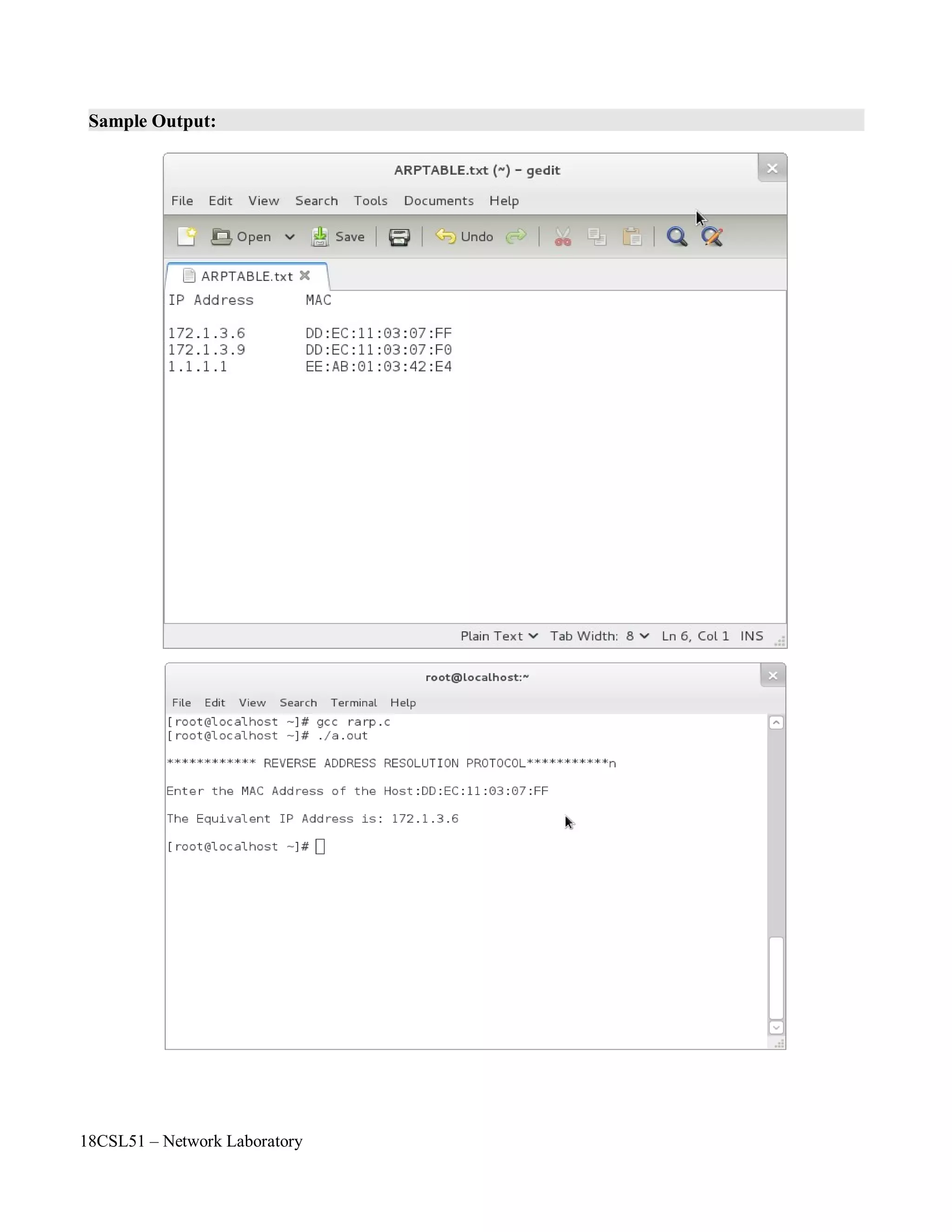
Sample Output:
18CSL51 – Network Laboratory
Objectives of the Experiment / Practical work:
Resource Required:
Step-wise Experimental Procedure:
On completion of the experiment the students will be able to
• To simulate the star topology by using NS2 simulator.
• To understand the queuing and packet dropping concept in router or switch.
• OS : Linux
• Simulation Tool : Network Simulator 2 (ns2)
• Text Editor : vi or gedit
Step 1: Create a simulator object
Step 2: Define different colors for data flows
Step 3: Open the nam trace file
Step 4: Define a 'finish' procedure
Step 5: Create four nodes
Step 6: Create links between the nodes
Step 7: Monitor the queue for the link between node 2 and node 3
Step 8: Create a UDP agent and attach it to node n0
Step 9: Create a CBR traffic source and attach it to udp0
Step 10: Create a UDP agent and attach it to node n1
Step 11: Create a CBR traffic source and attach it to udp1
Step 12: Create a Null agent (a traffic sink) and attach it to node n3
Step 13: Connect the traffic sources with the traffic sink
Step 14: Schedule events for the CBR agents
Step 15: Call the finish procedure after 5 seconds of simulation time
Step 16: Run the simulation
Course Code : 18CSL51
Course Name : Network Laboratory
Experiment Number :02
Name of the Experiment : Simulation of Network Topologies Using NS2
18CSL51 – Network Laboratory
Computations to be Made:
As always, the first step is to define the topology. You should create a file 'star.tcl'. You will
always have to create a simulator object, you will always have to start the simulation with the
same command, and if you want to run nam automatically, you will always have to open a trace
file, initialize it, and define a procedure which closes it and starts nam.
Now insert the following lines into the code to create four nodes.
The following piece of Tcl code creates three duplex links between the nodes.
You can save and start the script now. You might notice that the topology looks a bit awkward in nam.
You can hit the 're-layout' button to make it look better, but it would be nice to have some more control
over the layout. Add the next three lines to your Tcl script and start it again.
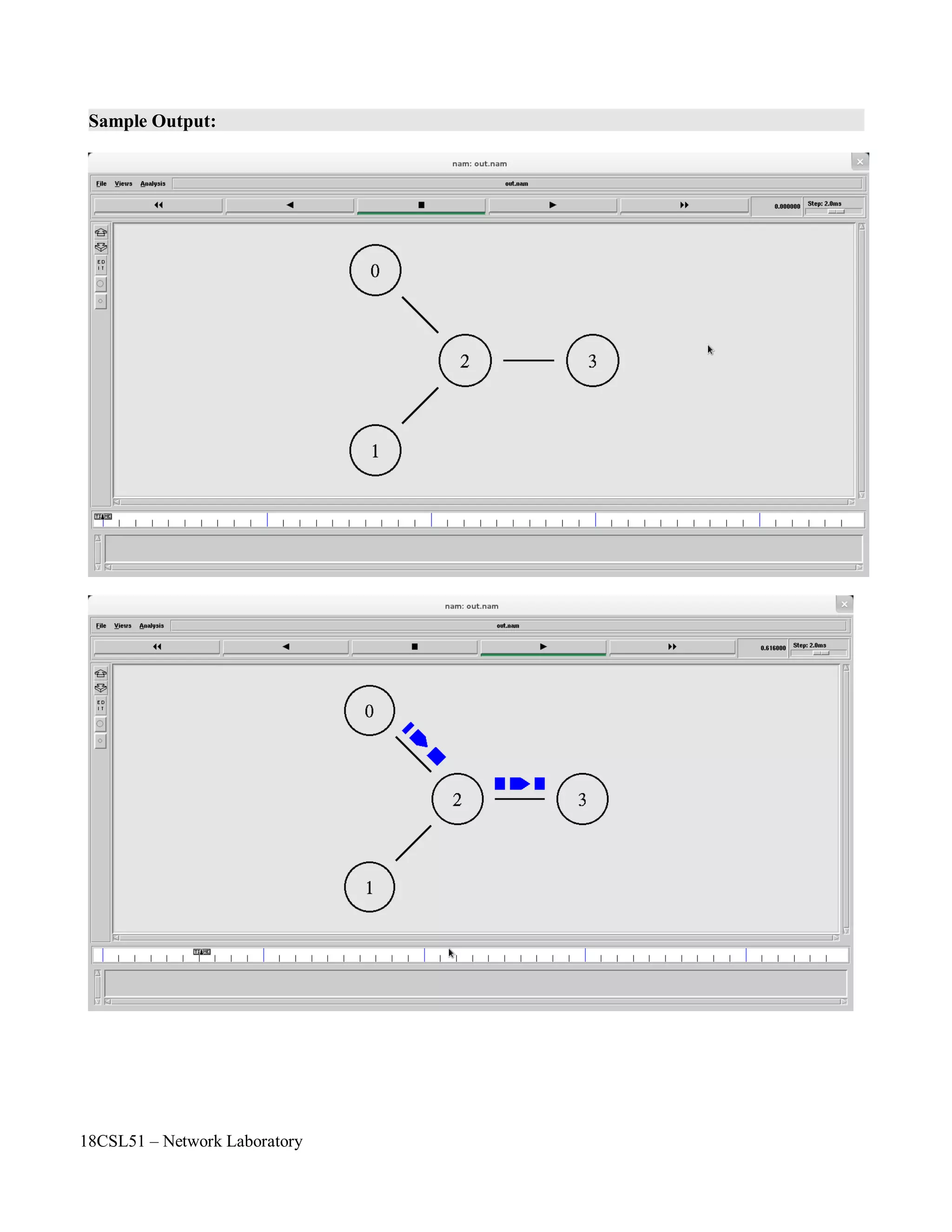
You will probably understand what this code does when you look at the topology in the nam window
now. It should look like the picture below.
Note that the autolayout related parts of nam are gone, since now you have taken the layout into your
own hands. The options for the orientation of a link are right, left, up, down and combinations of these
orientations. You can experiment with these settings later, but for now please leave the topology the
way it is.
$ns duplex-link-op $n0 $n2 orient right-down
$ns duplex-link-op $n1 $n2 orient right-up
$ns duplex-link-op $n2 $n3 orient right
$ns duplex-link $n0 $n2 1Mb 10ms DropTail
$ns duplex-link $n1 $n2 1Mb 10ms DropTail
$ns duplex-link $n3 $n2 1Mb 10ms DropTail
set n0 [$ns node]
set n1 [$ns node]
set n2 [$ns node]
set n3 [$ns node]
18CSL51 – Network Laboratory
Now create two UDP agents with CBR traffic sources and attach them to the nodes n0 and n1.
Then create a Null agent and attach it to node n3.
The two CBR agents have to be connected to the Null agent.
We want the first CBR agent to start sending at 0.5 seconds and to stop at 4.5 seconds while the second
CBR agent starts at 1.0 seconds and stops at 4.0 seconds.
When you start the script now with 'ns star.tcl', you will notice that there is more traffic on the links
from n0 to n2 and n1 to n2 than the link from n2 to n3 can carry. A simple calculation confirms this:
We are sending 200 packets per second on each of the first two links and the packet size is 500 bytes.
This results in a bandwidth of 0.8 megabits per second for the links from n0 to n2 and from n1 to n2.
That's a total bandwidth of 1.6Mb/s, but the link between n2 and n3 only has a capacity of 1Mb/s, so
obviously some packets are being discarded. But which ones? Both flows are black, so the only way to
find out what is happening to the packets is to monitor them in nam by clicking on them. In the next
two sections I'm going to show you how to distinguish between different flows and how to see what is
actually going on in the queue at the link from n2 to n3.
$ns at 0.5 "$cbr0 start"
$ns at 1.0 "$cbr1 start"
$ns at 4.0 "$cbr1 stop"
$ns at 4.5 "$cbr0 stop"
$ns connect $udp0 $null0
$ns connect $udp1 $null0
#Create a UDP agent and attach it to node n0
set udp0 [new Agent/UDP]
$ns attach-agent $n0 $udp0
# Create a CBR traffic source and attach it to udp0
set cbr0 [new Application/Traffic/CBR]
$cbr0 set packetSize_ 500
$cbr0 set interval_ 0.005
$cbr0 attach-agent $udp0
#Create a UDP agent and attach it to node n1
set udp1 [new Agent/UDP]
$ns attach-agent $n1 $udp1
# Create a CBR traffic source and attach it to udp1
set cbr1 [new Application/Traffic/CBR]
$cbr1 set packetSize_ 500
$cbr1 set interval_ 0.005
$cbr1 attach-agent $udp1
set null0 [new Agent/Null]
$ns attach-agent $n3 $null0
18CSL51 – Network Laboratory
Add the following two lines to your CBR agent definitions.
The parameter 'fid_' stands for 'flow id'.
Now add the following piece of code to your Tcl script, preferably at the beginning after the simulator
object has been created, since this is a part of the simulator setup.
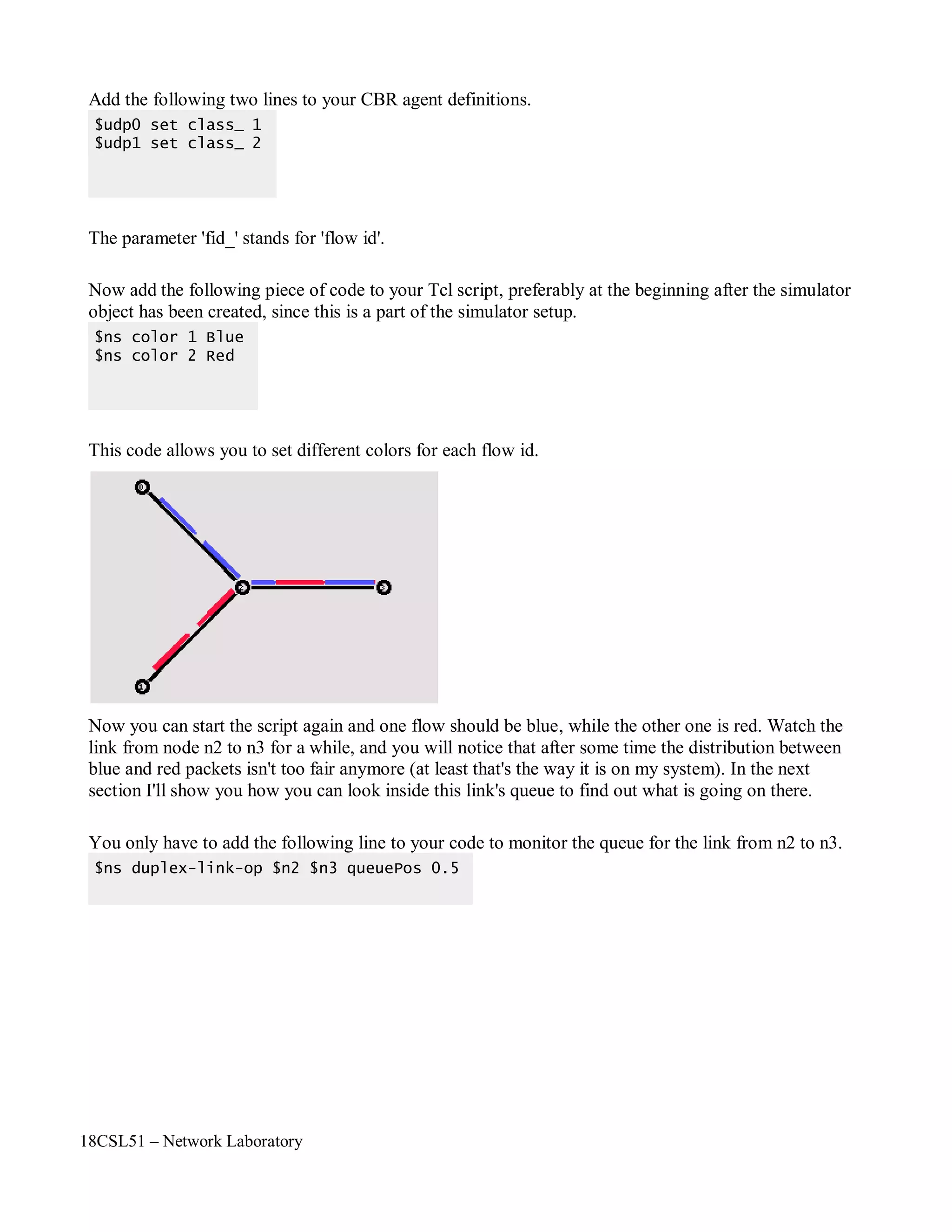
This code allows you to set different colors for each flow id.
Now you can start the script again and one flow should be blue, while the other one is red. Watch the
link from node n2 to n3 for a while, and you will notice that after some time the distribution between
blue and red packets isn't too fair anymore (at least that's the way it is on my system). In the next
section I'll show you how you can look inside this link's queue to find out what is going on there.
You only have to add the following line to your code to monitor the queue for the link from n2 to n3.
$ns duplex-link-op $n2 $n3 queuePos 0.5
$ns color 1 Blue
$ns color 2 Red
$udp0 set class_ 1
$udp1 set class_ 2
18CSL51 – Network Laboratory
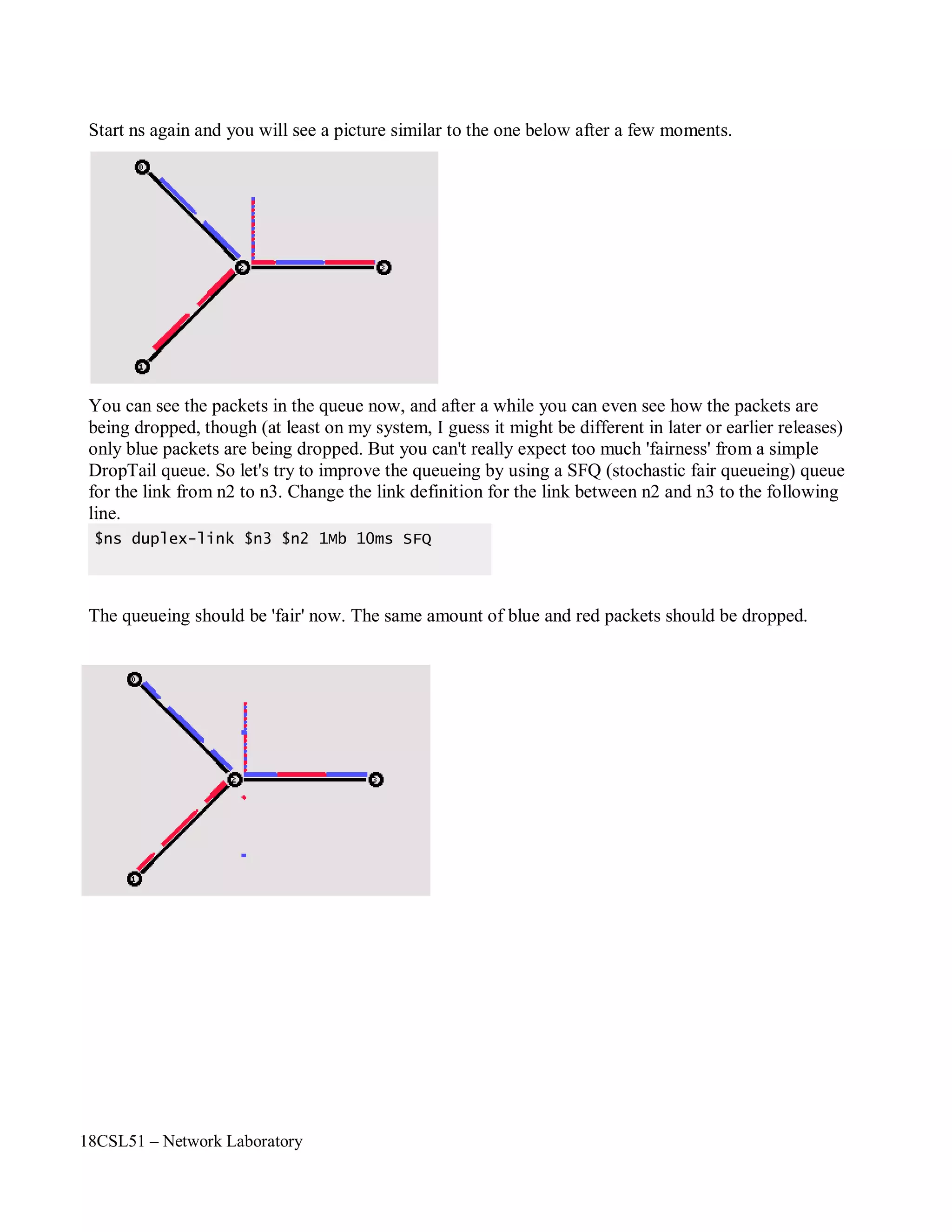
Start ns again and you will see a picture similar to the one below after a few moments.
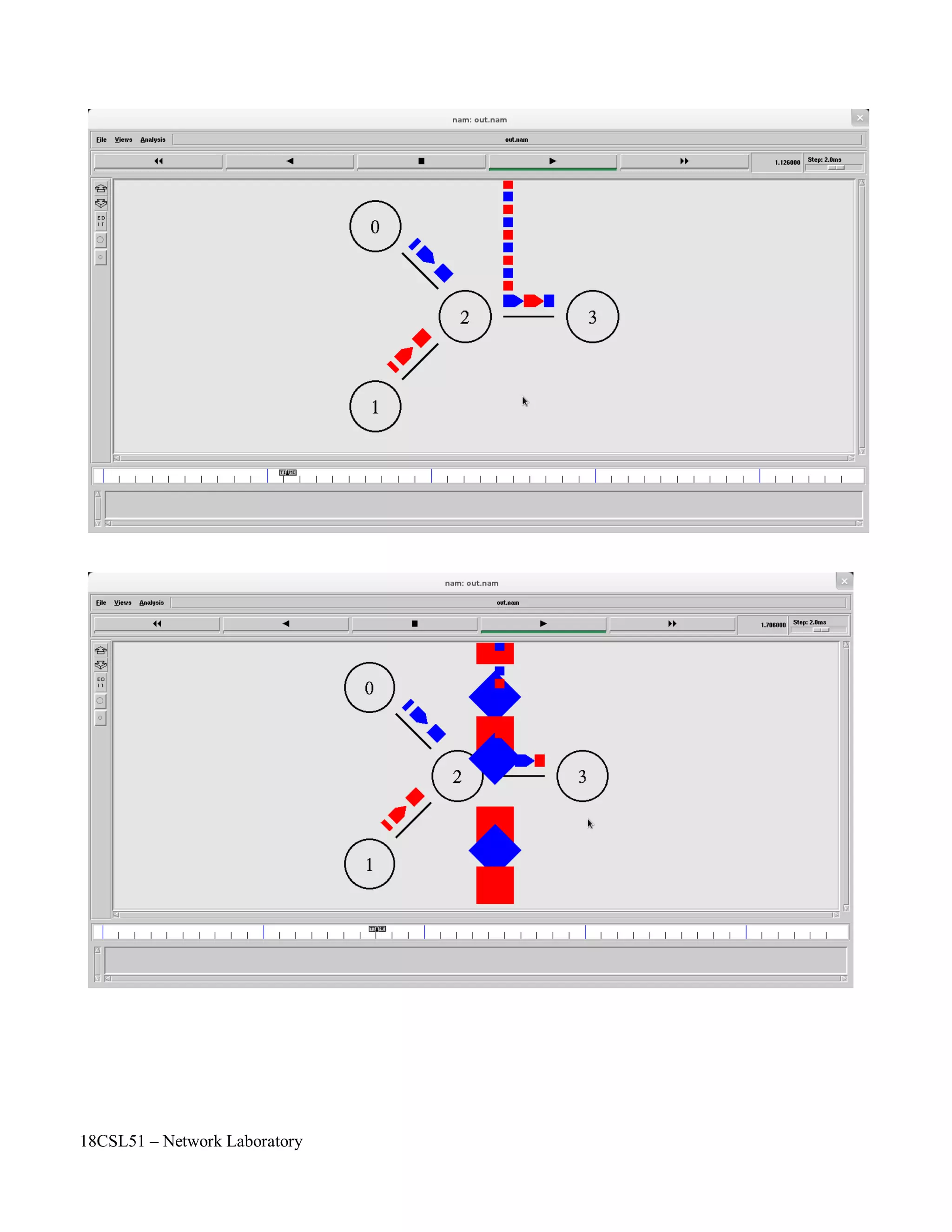
You can see the packets in the queue now, and after a while you can even see how the packets are
being dropped, though (at least on my system, I guess it might be different in later or earlier releases)
only blue packets are being dropped. But you can't really expect too much 'fairness' from a simple
DropTail queue. So let's try to improve the queueing by using a SFQ (stochastic fair queueing) queue
for the link from n2 to n3. Change the link definition for the link between n2 and n3 to the following
line.
The queueing should be 'fair' now. The same amount of blue and red packets should be dropped.
$ns duplex-link $n3 $n2 1Mb 10ms SFQ
18CSL51 – Network Laboratory
Formation of Bus Topology
#Creating five nodes
set node1 [$ns node]
set node2 [$ns node]
set node3 [$ns node]
set node4 [$ns node]
set node5 [$ns node]
#Creating Lan connection between the nodes
set lan0 [$ns newLan “$node1 $node2$node3 $node4 $node5” 0.7Mb 20ms LL Queue/FQ MAC/Csma/C
d Channel]
#Creating a TCP agent and attaching it to node 1
set tcp0 [new Agent/TCP]
$tcp0 set class_ 1
$ns attach-agent $node1 $tcp0
#Creating a TCP Sink agent for TCP and attaching it to node 3
set sink0 [new Agent/TCPSink]
$ns attach-agent $node3 $sink0
#Connecting the traffic sources with the traffic sink
$ns connect $tcp0 $sink0
# Creating a CBR traffic source and attach it to tcp0
set cbr0 [new Application/Traffic/CBR]
$cbr0 set packetSize_ 500
$ cbr0 set interval_ 0.05
$cbr0 attach-agent $tcp0
#Schedule events for the CBR agents
$ns at 0.5 “$cbr0 start time”
$ ns at 5.5 “$cbr0 stop time”
#Here we call the finish procedure after 10 seconds of simulation time
$ns at 10.0 “End”
#Finally run the simulation
$ns run
18CSL51 – Network Laboratory
Formation of Ring Topology
#Creating six nodes
set node1 [$ns node]
set node2 [$ns node]
set node3 [$ns node]
set node4 [$ns node]
set node5 [$ns node]
set node6 [$ns node]
#Creating links between the nodes
$ns duplex-link $node1 $node2 1Mb 15ms FQ
$ns duplex-link $node2 $node3 1Mb 15ms FQ
$ns duplex-link $node3 $node4 1Mb 15ms FQ
$ns duplex-link $node4 $node5 1Mb 15ms FQ
$ns duplex-link $node5 $node6 1Mb 15ms FQ
$ns duplex-link $node6 $node1 1Mb 15ms FQ”Forms Ring Topology”
#Creating a TCP agent and attaching it to node 1
set tcp0 [new Agent/TCP]
$tcp0 set class_ 1
$ns attach-agent $node1 $tcp0
#Creating a TCP Sink agent for TCP and attaching it to node 3
set sink0 [new Agent/TCPSink]
$ns attach-agent $node3 $sink0
#Connecting the traffic sources with the traffic sink
$ns connect $tcp0 $sink0
# Creating a CBR traffic source and attach it to tcp0
set cbr0 [new Application/Traffic/CBR]
$cbr0 set packetSize_ 500
$cbr0 set interval_ 0.05
$cbr0 attach-agent $tcp0
#Schedule events for the CBR agents
$ns at 0.5 “$cbr0 start time”
$ns at 5.5 “$cbr0 stop time”
#Here we call the finish procedure after 10 seconds of simulation time
$ns at 10.0 “End”
#Finally run the simulation
$ns run
18CSL51 – Network Laboratory
Formation of Mesh Topology
#Creating four nodes
set node1 [$ns node]
set node2 [$ns node]
set node3 [$ns node]
set node4 [$ns node]
#Creating links between the nodes
$ns duplex-link $node1 $node2 1Mb 20ms FQ
$ns duplex-link $node1 $node3 1Mb 20ms FQ
$ns duplex-link $node1 $node4 1Mb 20ms FQ
$ns duplex-link $node2 $node3 1Mb 20ms FQ
$ns duplex-link $node2 $node4 1Mb 20ms FQ
$ns duplex-link $node3 $node4 1Mb 20ms FQ“Forms Mesh Topology”
#Creating a TCP agent and attaching it to node 1
set tcp0 [new Agent/TCP]
$tcp0 set class_ 1
$ns attach-agent $node1 $tcp0
#Creating a TCP Sink agent for TCP and attaching it to node 3
set sink0 [new Agent/TCPSink]
$ns attach-agent $node3 $sink0
#Connecting the traffic sources with the traffic sink
$ns connect $tcp0 $sink0
# Creating a CBR traffic source and attach it to tcp0
set cbr0 [new Application/Traffic/CBR]
$cbr0 set packetSize_ 500
$cbr0 set interval_ 0.05
$cbr0 attach-agent $tcp0
#Schedule events for the CBR agents
$ns at 0.5 “$cbr0 start time”
$ns at 5.5 “$cbr0 stop time”
#Here we call the finish procedure after 10 seconds of simulation time
$ns at 10.0 “End”
#Finally run the simulation
$ns run
18CSL51 – Network Laboratory
Questions and problems for assessing the achievement of objective:
• Clarify the terminologies
◦ simplex link
◦ half duplex link
◦ full duplex link
• What is CBR?
• What is SFQ?
• Define DropTail.
• List out the network typologies.
• Which topology is most suitable topology
◦ Bus
◦ Ring
◦ Mesh
◦ Star
◦ Tree
• Which network component is used in star topology
◦ Hub
◦ Switch
◦ Router
◦ Repeater
◦ Gateway
◦ First Two
• When the packets will be loss or dropped by the node?
Outcome of the Experiment / Practical work:
• On completion of the experiment the students will be able to
◦ To simulate the star topology by using NS2 simulator.
◦ To apply this star topology concept in their project work to measure the packet loss.
◦ To develop new protocol to make an efficient network topology.
18CSL51 – Network Laboratory
Program:
#Create a simulator object
set ns [new Simulator]
#Define different colors for data flows
$ns color 1 Blue
$ns color 2 Red
#Open the nam trace file
set nf [open out.nam w]
$ns namtrace-all $nf
#Define a 'finish' procedure
proc finish {} {
global ns nf
$ns flush-trace
#Close the trace file
close $nf
#Execute nam on the trace file
exec nam out.nam &
exit 0
}
#Create four nodes
set n0 [$ns node]
set n1 [$ns node]
set n2 [$ns node]
set n3 [$ns node]
#Create links between the nodes
$ns duplex-link $n0 $n2 1Mb 10ms DropTail
$ns duplex-link $n1 $n2 1Mb 10ms DropTail
$ns duplex-link $n3 $n2 1Mb 10ms SFQ
$ns duplex-link-op $n0 $n2 orient right-down
$ns duplex-link-op $n1 $n2 orient right-up
$ns duplex-link-op $n2 $n3 orient right
#Monitor the queue for the link between node 2 and node 3
$ns duplex-link-op $n2 $n3 queuePos 0.5
#Create a UDP agent and attach it to node n0
set udp0 [new Agent/UDP]
$udp0 set class_ 1
$ns attach-agent $n0 $udp0
18CSL51 – Network Laboratory
# Create a CBR traffic source and attach it to udp0
set cbr0 [new Application/Traffic/CBR]
$cbr0 set packetSize_ 500
$cbr0 set interval_ 0.005
$cbr0 attach-agent $udp0
#Create a UDP agent and attach it to node n1
set udp1 [new Agent/UDP]
$udp1 set class_ 2
$ns attach-agent $n1 $udp1
# Create a CBR traffic source and attach it to udp1
set cbr1 [new Application/Traffic/CBR]
$cbr1 set packetSize_ 500
$cbr1 set interval_ 0.005
$cbr1 attach-agent $udp1
#Create a Null agent (a traffic sink) and attach it to node n3
set null0 [new Agent/Null]
$ns attach-agent $n3 $null0
#Connect the traffic sources with the traffic sink
$ns connect $udp0 $null0
$ns connect $udp1 $null0
#Schedule events for the CBR agents
$ns at 0.5 "$cbr0 start"
$ns at 1.0 "$cbr1 start"
$ns at 4.0 "$cbr1 stop"
$ns at 4.5 "$cbr0 stop"
#Call the finish procedure after 5 seconds of simulation time
$ns at 5.0 "finish"
#Run the simulation
$ns run
18CSL51 – Network Laboratory
Sample Output:
18CSL51 – Network Laboratory
Objectives of the Experiment / Practical work:
Resource Required:
Step-wise Experimental Procedure:
Computations to be Made:
On completion of the experiment the students will be able to
• To understand the various performance measurement parameters PDR, Throughput and Jitter.
• To calculate various network performance measurement parameters such as PDR, Throughput
and Jitter.
• OS : Linux
• Simulation Tool : Network Simulator 2 (ns2)
• Text Editor : vi or gedit
• Package : AWK
Step 1: Create any one type of network topology
Step 2: Run the Simulation and Record the Trace file
Step 3: Write AWK Script to measure the network performance such as PDR, Throughput and
Jitter.
Step 4: Run the AWK Script.
Step 5: Display the results to the user.
TRACE FILES AND DESCRIPTION
 The file written by an application (or by the Coverage Server) to store coverage information or overall
network information and In NS2 , it is called as Trace File.
 In order to generate a trace file. we have to create a trace file in Otcl script.
SYNTAX FOR CREATING A TRACE FILE
# Open the trace file
set nf [open out.tr w]
$ns trace-all $nf
 which means we are opening a newtrace file named as "out" and also telling that data must be stored in .tr
[trace] format.
 "nf" is the file handler that we are used here to handle the trace file.
 "w" means write i.e the file out.tr is opened for writing.
Course Code : 18CSL51
Course Name : Network Laboratory
Experiment Number : 03
Name of the Experiment : AWK script to Measure the Network Performance
18CSL51 – Network Laboratory
 >> "r" means reading and "a" means appending
 The second line tells the simulator to trace each packet on every link in the topology and for that we give
file handler nf for the simulator ns.
# Define finish procedure
proc finish {} {
global ns nf
$ns flush-trace
close nf
exit 0
}
 In here the trace data is flushed into the file by using command $ns flush-trace and then file is closed.
 While running the ns2 program via terminal, trace file is generated in the selected directory (folder or
directory where the program stored).
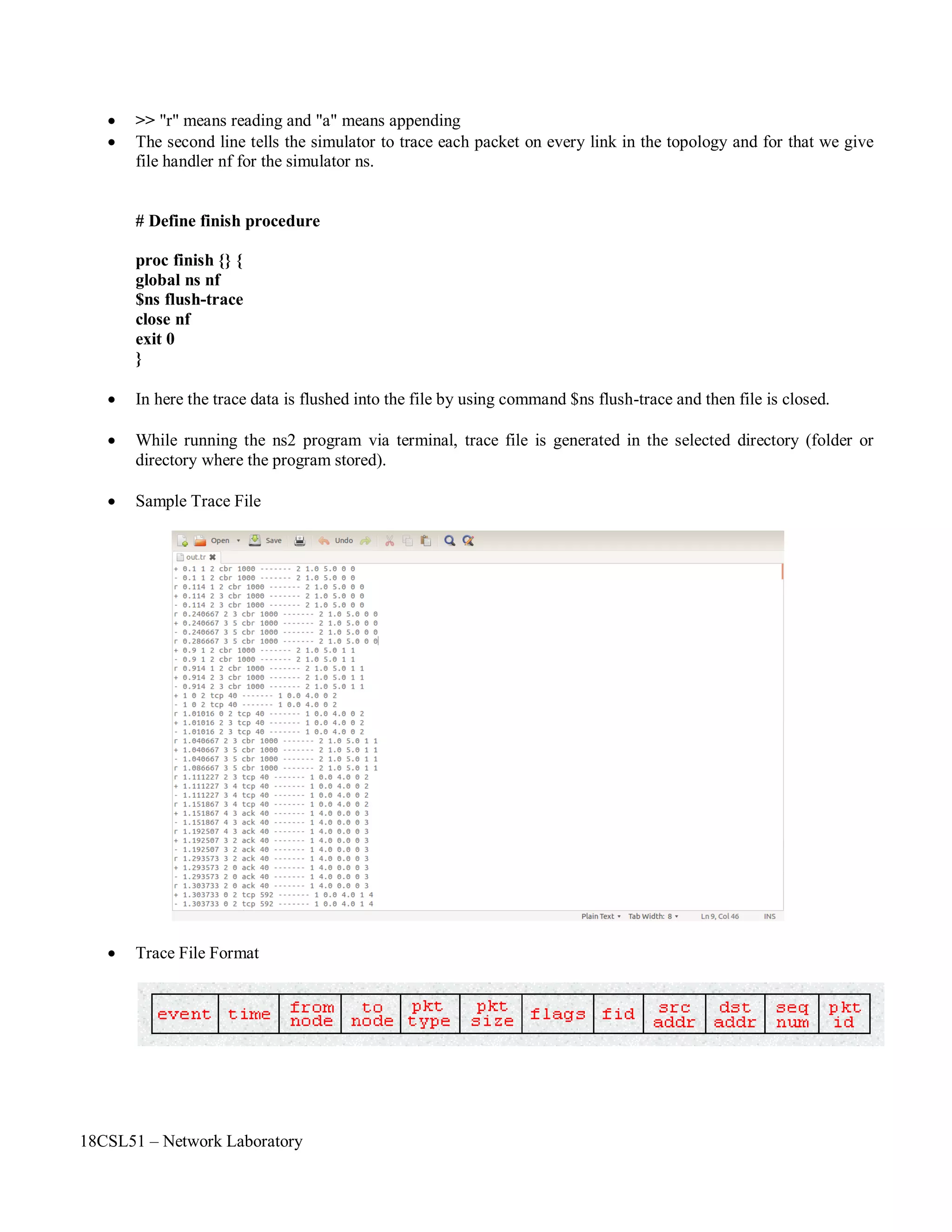
 Sample Trace File
 Trace File Format
18CSL51 – Network Laboratory
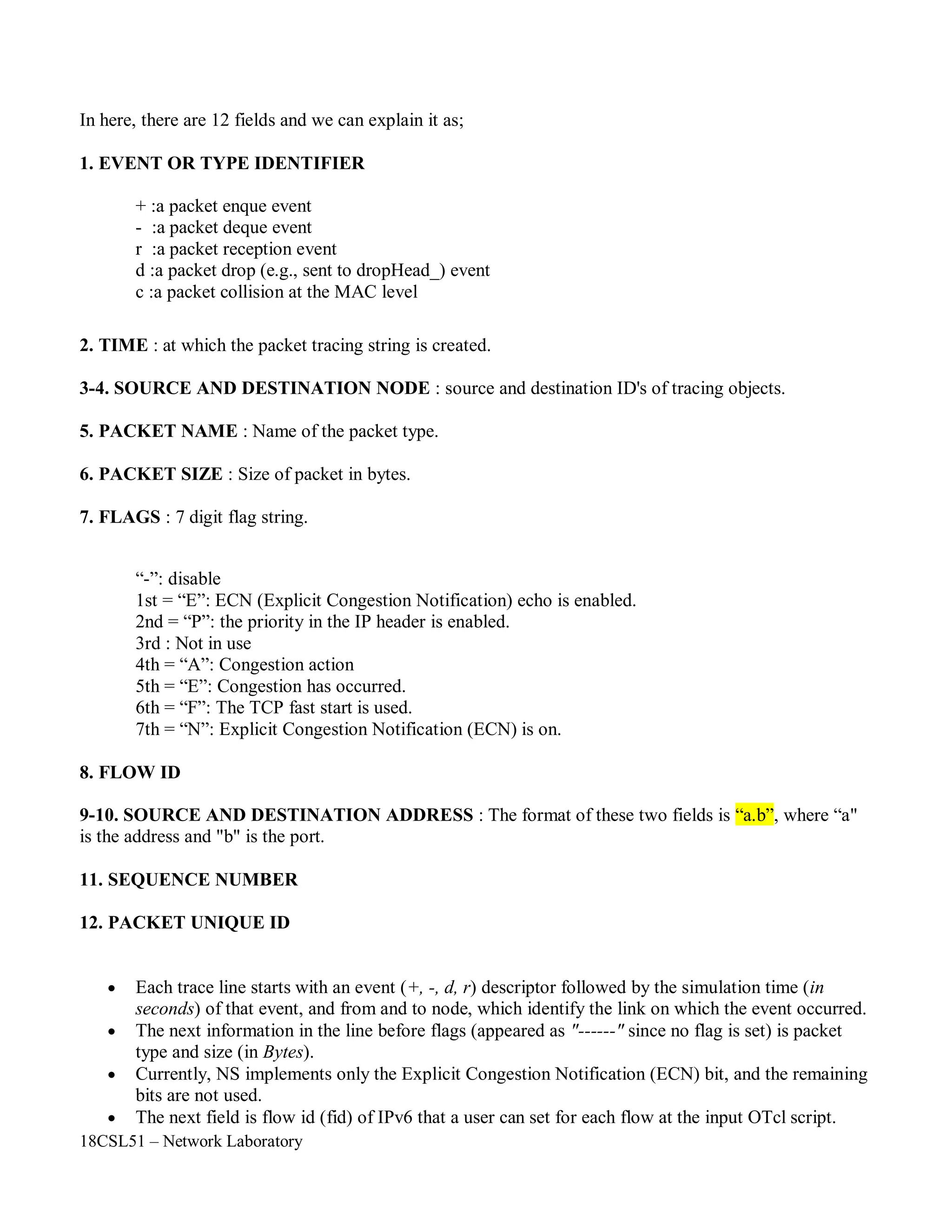
In here, there are 12 fields and we can explain it as;
1. EVENT OR TYPE IDENTIFIER
+ :a packet enque event
- :a packet deque event
r :a packet reception event
d :a packet drop (e.g., sent to dropHead_) event
c :a packet collision at the MAC level
2. TIME : at which the packet tracing string is created.
3-4. SOURCE AND DESTINATION NODE : source and destination ID's of tracing objects.
5. PACKET NAME : Name of the packet type.
6. PACKET SIZE : Size of packet in bytes.
7. FLAGS : 7 digit flag string.
“-”: disable
1st = “E”: ECN (Explicit Congestion Notification) echo is enabled.
2nd = “P”: the priority in the IP header is enabled.
3rd : Not in use
4th = “A”: Congestion action
5th = “E”: Congestion has occurred.
6th = “F”: The TCP fast start is used.
7th = “N”: Explicit Congestion Notification (ECN) is on.
8. FLOW ID
9-10. SOURCE AND DESTINATION ADDRESS : The format of these two fields is “a.b”, where “a"
is the address and "b" is the port.
11. SEQUENCE NUMBER
12. PACKET UNIQUE ID
 Each trace line starts with an event (+, -, d, r) descriptor followed by the simulation time (in
seconds) of that event, and from and to node, which identify the link on which the event occurred.
 The next information in the line before flags (appeared as "------" since no flag is set) is packet
type and size (in Bytes).
 Currently, NS implements only the Explicit Congestion Notification (ECN) bit, and the remaining
bits are not used.
 The next field is flow id (fid) of IPv6 that a user can set for each flow at the input OTcl script.
18CSL51 – Network Laboratory
 Even though fid field may not used in a simulation, users can use this field for analysis purposes.
 The fid field is also used when specifying stream color for the NAM display.
 The next two fields are source and destination address in forms of "node.port".
 The next field shows the network layer protocol's packet sequence number.
 Note that even though UDP implementations do not use sequence number, NS keeps track of UDP
packet sequence number for analysis purposes.
 The last field shows the unique id of the packet.
AWK Script:
 AWK was created at Bell Labs in the 1970s, and its name is derived from the surnames of its authors:
Alfred Aho, Peter Weinberger, and Brian Kernighan.
 The acronym is pronounced the same as the bird auk, which is on the cover of The AWK Programming
Language.
 When written in all lowercase letters, as awk, it refers to the Unix or Plan 9 program that runs scripts
written in the AWK programming language.
 Functional Blocks of AWK Script.
Packet Delivery Ratio (PDR):
• Packet delivery ratio is the ratio of packets that are successfully delivered to a destination
compared to the number of packets that have been sent by sender.
• In order to calculate packet delivery ratio we need total number of packets sent and number of
received packets.
18CSL51 – Network Laboratory
Questions and problems for assessing the achievement of objective:
• Expand AWK.
• What are the functional blocks of AWK script?
• Define PDR.
• List the types of events in Trace File.
• +,- strands for in trace File.
• Define throughput.
• Define jitter.
• What is the difference between bandwidth and throughput?
• Suppose a source node is sending 200 packets to the destination node. In destination node only
100 packets are received. What is the Packet Delivery Ration Value?
• A network with bandwidth of 10 Mbps can pass only an average of 12, 000 frames per minute
where each frame carries an average of 10, 000 bits. What will be the throughput for this
network?
Outcome of the Experiment / Practical work:
• On completion of the experiment the students will be able to
◦ To compute the performance measures using formulas.
◦ To solve problems that is related to computer network.
◦ To apply this computation knowledge in their project work.
18CSL51 – Network Laboratory
Program:
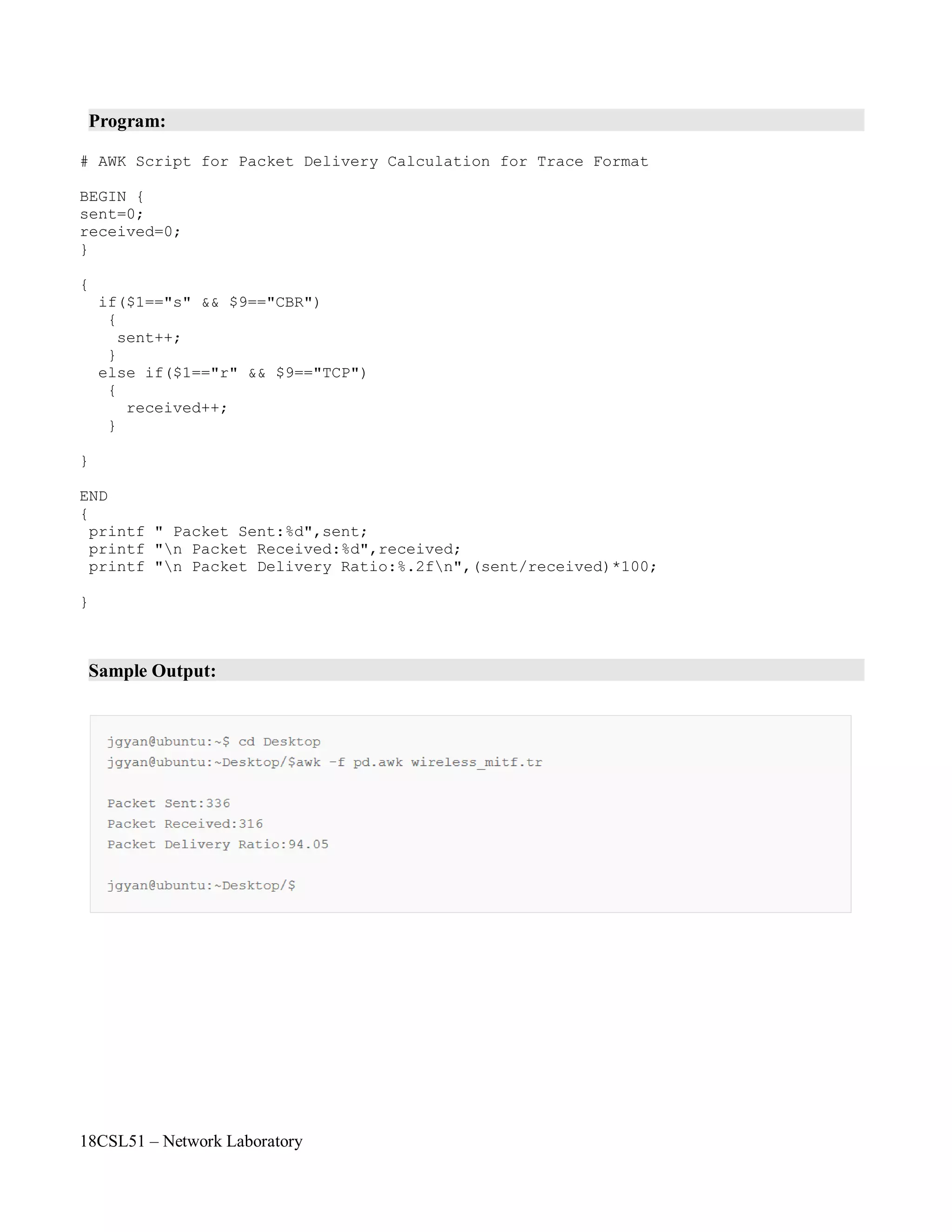
# AWK Script for Packet Delivery Calculation for Trace Format
BEGIN {
sent=0;
received=0;
}
{
if($1=="s" && $9=="CBR")
{
sent++;
}
else if($1=="r" && $9=="TCP")
{
received++;
}
}
END
{
printf " Packet Sent:%d",sent;
printf "n Packet Received:%d",received;
printf "n Packet Delivery Ratio:%.2fn",(sent/received)*100;
}
Sample Output:
18CSL51 – Network Laboratory
Objectives of the Experiment / Practical work:
Resource Required:
Step-wise Experimental Procedure:
Computations to be Made:
On completion of the experiment the students will be able to
• To understand the various performance measurement parameters such as delay, end – to – end
delay, bandwidth, throughput and jitter.
• To calculate various delays such as propagation delay, transmission delay, processing delay,
queuing delay, nodal delay and end – to – end delay.
• OS : Linux / Windows
• C Compiler : cc or gcc / Turbo C
• Text Editor : vi or gedit / notepad
Step 1: Read the inputs from the user such as distance between source and destination, message
size, bandwidth, number of routers, queuing delay and processing delay.
Step 2: Calculate propagation delay.
Step 3: Calculate transmission delay.
Step 4: Calculate nodal delay.
Step 5: Calculate end – to – end delay.
Step 6: Display the results to the user.
Delay:
Network delay is an important design and performance characteristic of a computer network or
telecommunications network. The delay of a network specifies how long it takes for a bit of data to
travel across the network from one node or endpoint to another. It is typically measured in multiples or
fractions of seconds. Delay may differ slightly, depending on the location of the specific pair of
communicating nodes. Although users only care about the total delay of a network, engineers need to
perform precise measurements. Thus, engineers usually report both the maximum and average delay,
and they divide the delay into several parts:
• Processing delay - time routers take to process the packet header
• Queuing delay - time the packet spends in routing queues
• Transmission delay - time it takes to push the packet's bits onto the link
• Propagation delay - time for a signal to reach its destination
Course Code : 18CSL51
Course Name : Network Laboratory
Experiment Number : 04
Name of the Experiment : Network Performance Measurement
18CSL51 – Network Laboratory
dnodal = dtrans+ dprop+ dproc + dqueu
There is a certain minimum level of delay that will be experienced due to the time it takes to
transmit a packet serially through a link. Onto this is added a more variable level of delay due to
network congestion. IP network delays can range from just a few milliseconds to several hundred
milliseconds.
Propagation delay :
Propagation time measures the time required for a bit to travel from the source to the
destination. The propagation delay is calculated by dividing the distance by the propagation speed.
Propagation delay = Distance / Propagation speed
Transmission delay:
In data communications we don't send just 1 bit, we send a message. The first bit may take a
delay equal to the propagation delay to reach its destination; the last bit also may take the same amount
of time. However, there is a delay between the first bit leaving the sender and the last bit arriving at the
receiver. The first bit leaves earlier and arrives earlier; the last bit leaves later and arrives later. The
time required for transmission of a message depends on the size of the message and the bandwidth of
the channel.
Transmission delay = Message size / Bandwidth
End-to-End Delay:
End-to-End delay refers to the time taken for a packet to be transmitted across a network from
source to destination.
where
dend-end= N[ dtrans+ dprop+ dproc]
dend-end= end-to-end delay
dtrans= transmission delay
dprop= propagation delay
dproc= processing delay
N= number of links (Number of routers + 1)
Note: we have neglected queuing delays.
Each router will have its own dtrans, dprop, dproc hence this formula gives a rough estimate.
18CSL51 – Network Laboratory
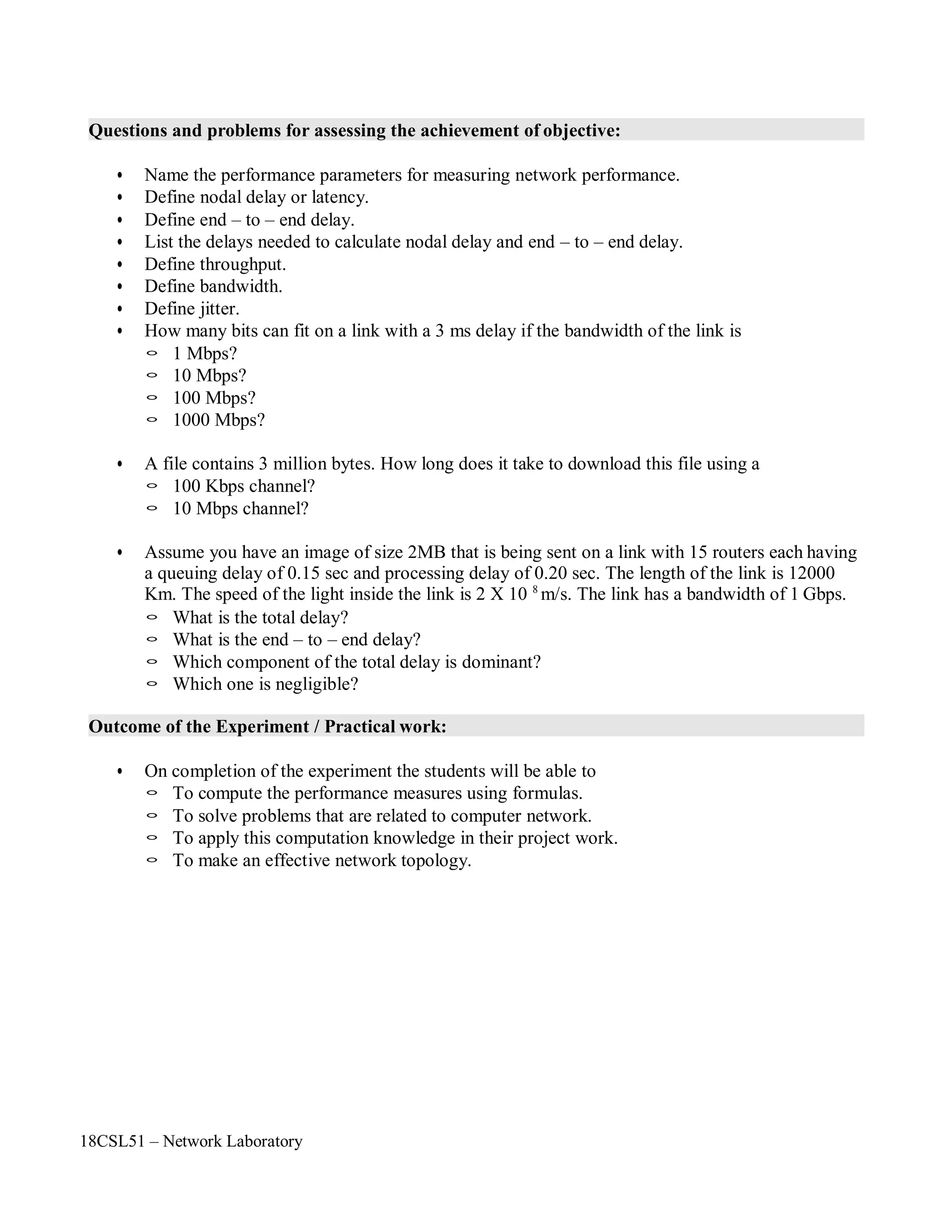
Questions and problems for assessing the achievement of objective:
• Name the performance parameters for measuring network performance.
• Define nodal delay or latency.
• Define end – to – end delay.
• List the delays needed to calculate nodal delay and end – to – end delay.
• Define throughput.
• Define bandwidth.
• Define jitter.
• How many bits can fit on a link with a 3 ms delay if the bandwidth of the link is
◦ 1 Mbps?
◦ 10 Mbps?
◦ 100 Mbps?
◦ 1000 Mbps?
• A file contains 3 million bytes. How long does it take to download this file using a
◦ 100 Kbps channel?
◦ 10 Mbps channel?
• Assume you have an image of size 2MB that is being sent on a link with 15 routers each having
a queuing delay of 0.15 sec and processing delay of 0.20 sec. The length of the link is 12000
Km. The speed of the light inside the link is 2 X 10 8
m/s. The link has a bandwidth of 1 Gbps.
◦ What is the total delay?
◦ What is the end – to – end delay?
◦ Which component of the total delay is dominant?
◦ Which one is negligible?
Outcome of the Experiment / Practical work:
• On completion of the experiment the students will be able to
◦ To compute the performance measures using formulas.
◦ To solve problems that are related to computer network.
◦ To apply this computation knowledge in their project work.
◦ To make an effective network topology.
18CSL51 – Network Laboratory
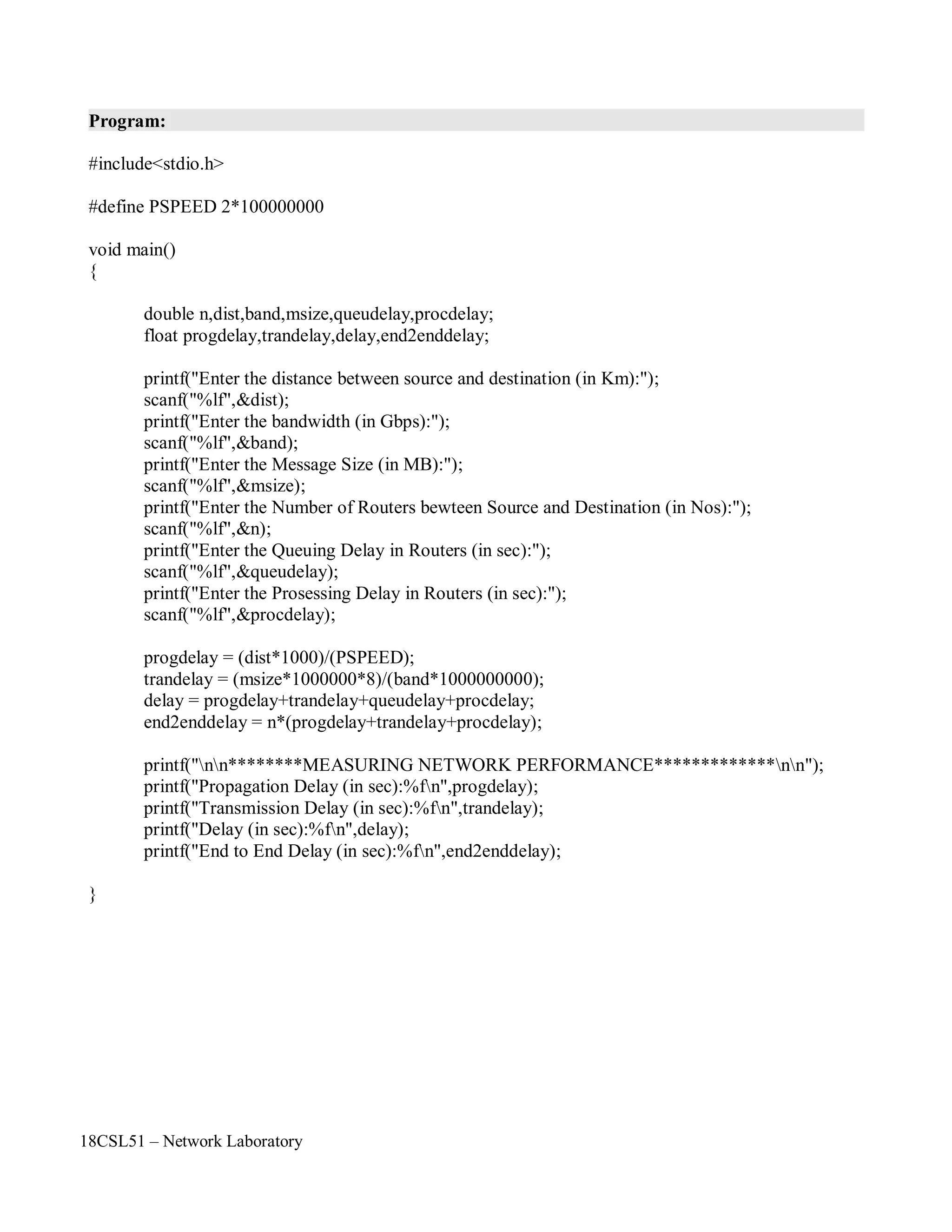
Program:
#include<stdio.h>
#define PSPEED 2*100000000
void main()
{
double n,dist,band,msize,queudelay,procdelay;
float progdelay,trandelay,delay,end2enddelay;
printf("Enter the distance between source and destination (in Km):");
scanf("%lf",&dist);
printf("Enter the bandwidth (in Gbps):");
scanf("%lf",&band);
printf("Enter the Message Size (in MB):");
scanf("%lf",&msize);
printf("Enter the Number of Routers bewteen Source and Destination (in Nos):");
scanf("%lf",&n);
printf("Enter the Queuing Delay in Routers (in sec):");
scanf("%lf",&queudelay);
printf("Enter the Prosessing Delay in Routers (in sec):");
scanf("%lf",&procdelay);
progdelay = (dist*1000)/(PSPEED);
trandelay = (msize*1000000*8)/(band*1000000000);
delay = progdelay+trandelay+queudelay+procdelay;
end2enddelay = n*(progdelay+trandelay+procdelay);
printf("nn********MEASURING NETWORK PERFORMANCE*************nn");
printf("Propagation Delay (in sec):%fn",progdelay);
printf("Transmission Delay (in sec):%fn",trandelay);
printf("Delay (in sec):%fn",delay);
printf("End to End Delay (in sec):%fn",end2enddelay);
}
18CSL51 – Network Laboratory
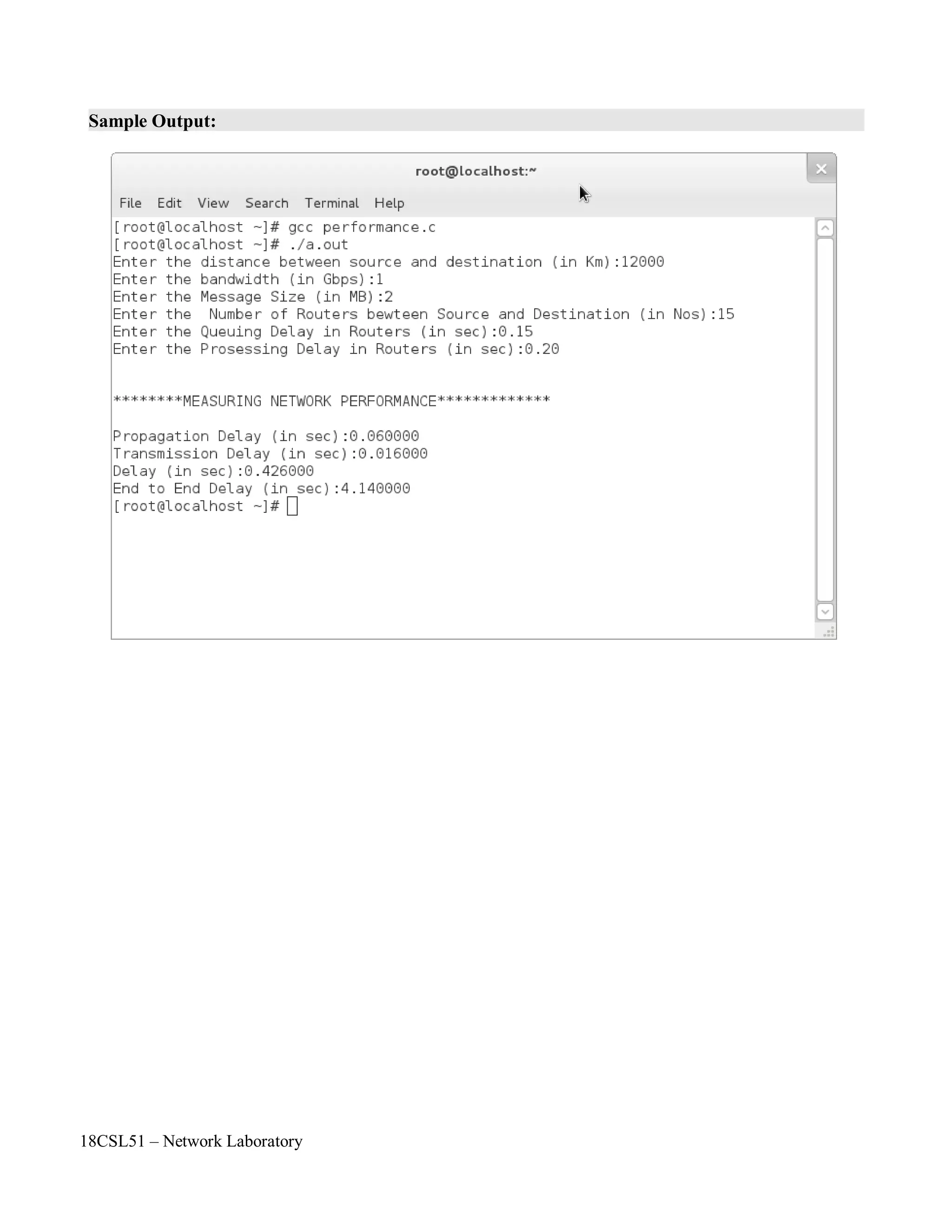
Sample Output:
18CSL51 – Network Laboratory
Objectives of the Experiment / Practical work:
Resource Required:
Step-wise Experimental Procedure:
Computations to be Made:
On completion of the experiment the students will be able to
• To know framing of bits in data link layer.
• To implement bit stuffing concept in data link layer protocols such as SDLC (HDLC), PPP.
• OS : Linux / Windows
• C Compiler : cc or gcc / Turbo C
• Text Editor : vi or gedit / notepad
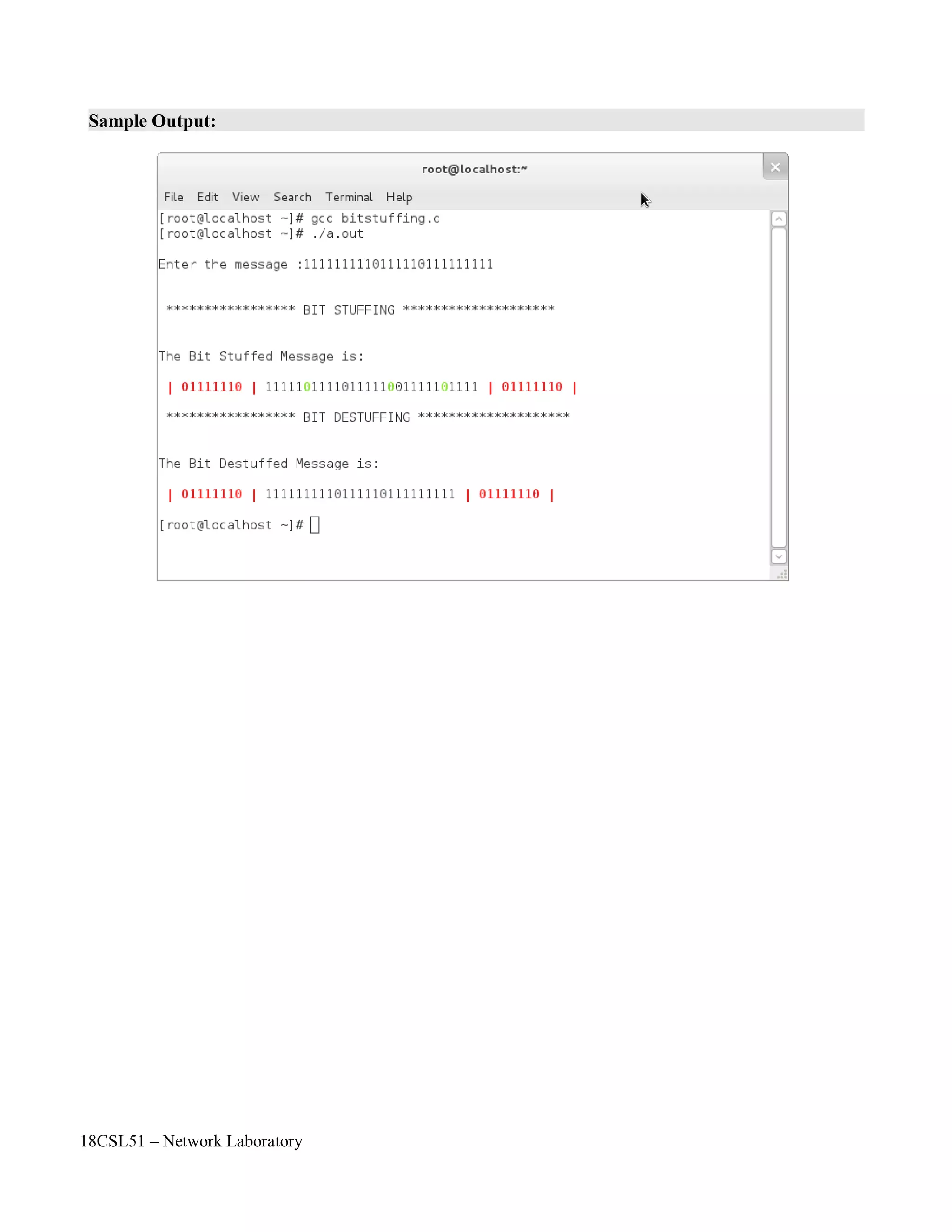
Step 1: Read the input data from the user by using array.
Step 2: In sender side, check if five consecutive 1's present in data then add (stuff) a zero (0).
Step 3: Display the stuffed data.
Step 4: In receiver side, check if a zero (0) occurs after five consecutive 1's in data then remove
(destuff) zero (0) in the data.
Step 5: Display the destuffed data.
In data transmission and telecommunication, bit stuffing (also known—uncommonly—as
positive justification) is the insertion of non information bits into data. Stuffed bits should not be
confused with overhead bits.
Bit stuffing is used for various purposes, such as for bringing bit streams that do not necessarily
have the same or rationally related bit rates up to a common rate, or to fill buffers or frames. The
location of the stuffing bits is communicated to the receiving end of the data link, where these extra bits
are removed to return the bit streams to their original bit rates or form. Bit stuffing may be used to
synchronize several channels before multiplexing or to rate-match two single channels to each other.
Another use of bit stuffing is for run length limited coding: to limit the number of consecutive
bits of the same value in the data to be transmitted. A bit of the opposite value is inserted after the
maximum allowed number of consecutive bits. Since this is a general rule the receiver doesn't need
extra information about the location of the stuffing bits in order to do the destuffing.
This is done to create additional signal transitions to ensure reliable reception or to escape
special reserved code words such as frame sync sequences when the data happens to contain them.
Applications include Controller Area Network, HDLC, and Universal Serial Bus.
Course Code : 18CSL51
Course Name : Network Laboratory
Experiment Number :05
Name of the Experiment : Implementation of Bit Stuffing
18CSL51 – Network Laboratory
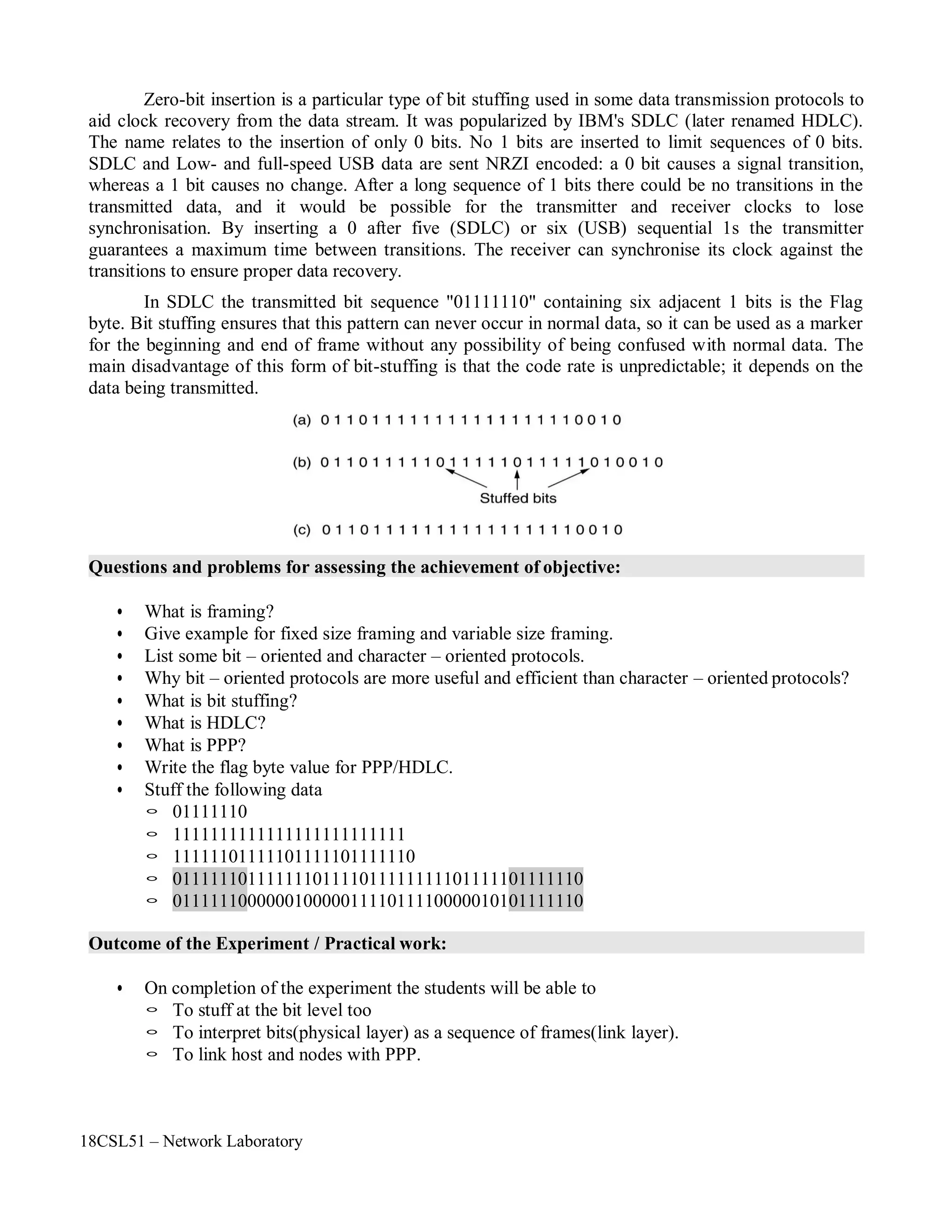
Zero-bit insertion is a particular type of bit stuffing used in some data transmission protocols to
aid clock recovery from the data stream. It was popularized by IBM's SDLC (later renamed HDLC).
The name relates to the insertion of only 0 bits. No 1 bits are inserted to limit sequences of 0 bits.
SDLC and Low- and full-speed USB data are sent NRZI encoded: a 0 bit causes a signal transition,
whereas a 1 bit causes no change. After a long sequence of 1 bits there could be no transitions in the
transmitted data, and it would be possible for the transmitter and receiver clocks to lose
synchronisation. By inserting a 0 after five (SDLC) or six (USB) sequential 1s the transmitter
guarantees a maximum time between transitions. The receiver can synchronise its clock against the
transitions to ensure proper data recovery.
In SDLC the transmitted bit sequence "01111110" containing six adjacent 1 bits is the Flag
byte. Bit stuffing ensures that this pattern can never occur in normal data, so it can be used as a marker
for the beginning and end of frame without any possibility of being confused with normal data. The
main disadvantage of this form of bit-stuffing is that the code rate is unpredictable; it depends on the
data being transmitted.
Questions and problems for assessing the achievement of objective:
• What is framing?
• Give example for fixed size framing and variable size framing.
• List some bit – oriented and character – oriented protocols.
• Why bit – oriented protocols are more useful and efficient than character – oriented protocols?
• What is bit stuffing?
• What is HDLC?
• What is PPP?
• Write the flag byte value for PPP/HDLC.
• Stuff the following data
◦ 01111110
◦ 1111111111111111111111111
◦ 11111101111101111101111110
◦ 01111110111111101111011111111101111101111110
◦ 01111110000001000001111011110000010101111110
Outcome of the Experiment / Practical work:
• On completion of the experiment the students will be able to
◦ To stuff at the bit level too
◦ To interpret bits(physical layer) as a sequence of frames(link layer).
◦ To link host and nodes with PPP.
18CSL51 – Network Laboratory
Program:
#include<stdio.h>
#include<stdlib.h>
#define BLACK "033[22;30m"
#define RED "033[01;31m"
#define G "033[01;32m"
main()
{
char str[100],dest[100],str1[100];
int l,i,j,k,c,m,bit[100];
printf("nEnter the message :");
scanf("%s",str);
printf("nn ***************** BIT STUFFING ********************nn");
for(j=0,k=0,c=0,i=0;str[i]!='0';i++)
{
if(str[i]=='1')
{
c++;
if(c==5)
{
}
else
dest[j++]=str[i];
dest[j++]='0';
c=0;
}
else
{
}
}
dest[j++]=str[i];
c=0;
dest[j++]=str[i];
dest[j]='0';
printf("nThe Bit Stuffed Message is:nn");
printf(RED " | 01111110 | " );
for(i=0,c=0;dest[i]!='0';i++)
{
if(dest[i]=='1')
{
c++;
18CSL51 – Network Laboratory
printf(BLACK "%c",dest[i]);
if(c==5)
{
}
else
{
}
c=0;
printf(G "%c",dest[++i]);
c=0;
printf(BLACK "%c",dest[i]);
}
}
printf(RED " | 01111110 | "BLACK );
printf("nn ***************** BIT DESTUFFING ********************nn");
for(i=0,k=0,c=0;dest[i]!='0';i++)
{
if(dest[i]=='1')
{
c++;
if(c==5)
{
str1[k++]=dest[i++];
str1[k++]=dest[++i];
if(dest[i]=='1')
c=1;
}
else
else
c=0;
}
else
{
}
}
str1[k++]=dest[i];
str1[k++]=dest[i];
c=0;
str1[k]='0';
printf("nThe Bit Destuffed Message is:nn");
printf(RED " | 01111110 | " BLACK "%s" RED " | 01111110 |nn" BLACK, str1);
}
18CSL51 – Network Laboratory
Sample Output:
18CSL51 – Network Laboratory
Objectives of the Experiment / Practical work:
Resource Required:
Step-wise Experimental Procedure:
Computations to be Made:
On completion of the experiment the students will be able to
• To know framing of characters (bytes) in data link layer.
• To implement byte stuffing concept in data link layer protocols such as SDLC(HDLC), PPP.
• OS : Linux / Windows
• C Compiler : cc or gcc / Turbo C
• Text Editor : vi or gedit / notepad
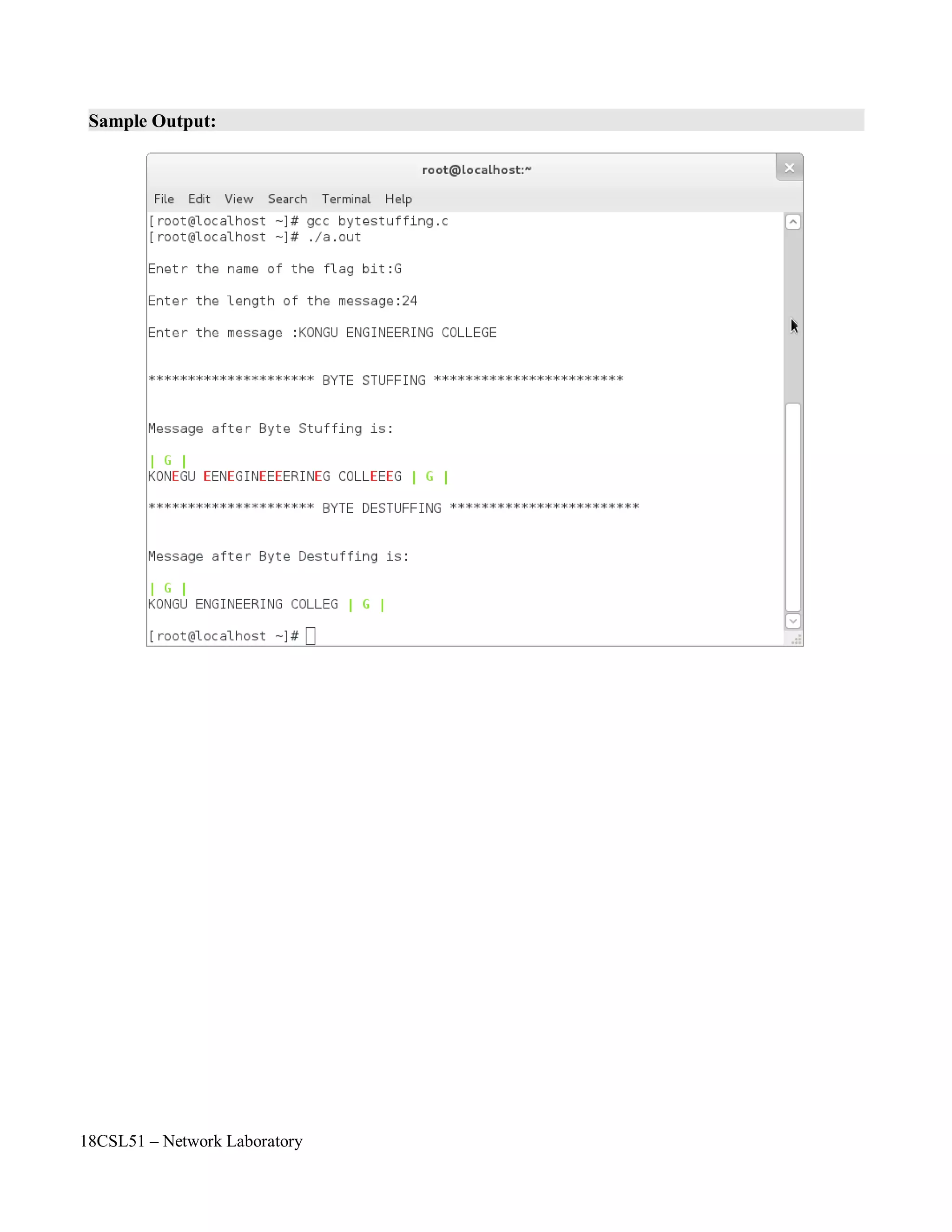
Step 1: Read the flag byte (character) from the user. For example 'G'.
Step 2: Read the length of the data.
Step 3: Read the data using array.
Step 4: In sender side, check the data contains the flag byte (G) then add (stuff) a escape
sequence character 'E' in the data.
Step 5: Also verify, if the escape sequence character 'E' present in the data then add (stuff) one
more escape sequence character 'E' in the data.
Step 6: Display the byte stuffed data.
Step 7: In receiver side, check if the escape sequence character 'E' present in the data followed
by flag byte 'G' and escape sequence character present in data then remove (destuff) that
escape sequence character 'E'.
Step 8: Display the destuffed data.
In a character-oriented protocol, data to be carried are 8-bit characters from a coding system
such as ASCII . The header, which normally carries the source and destination addresses and other
control information, and the trailer, which carries error detection or error correction redundant bits, are
also multiples of 8 bits. To separate one frame from the next, an 8-bit (1-byte) flag is added at the
beginning and the end of a frame. The flag, composed of protocol-dependent special characters, signals
the start or end of a frame.
Character-oriented framing was popular when only text was exchanged by the data link layers.
The flag could be selected to be any character not used for text communication. Now, however, we
send other types of information such as graphs, audio, and video. Any pattern used for the flag could
also be part of the information. If this happens, the receiver, when it encounters this pattern in the
Course Code : 18CSL51
Course Name : Network Laboratory
Experiment Number :06
Name of the Experiment : Implementation of Byte Stuffing
18CSL51 – Network Laboratory
middle of the data, thinks it has reached the end of the frame. To fix this problem, a byte-stuffing
strategy was added to character-oriented framing.
In byte stuffing (or character stuffing), a special byte is added to the data section of the frame
when there is a character with the same pattern as the flag. The data section is stuffed with an extra
byte. This byte is usually called the escape character (ESC), which has a predefined bit pattern.
Whenever the receiver encounters the ESC character, it removes it from the data section and treats the
next character as data, not a delimiting flag.
Byte stuffing by the escape character allows the presence of the flag in the data section of the
frame, but it creates another problem. What happens if the text contains one or more escape characters
followed by a flag? The receiver removes the escape character, but keeps the flag, which is incorrectly
interpreted as the end of the frame. To solve this problem, the escape characters that are part of the text
must also be marked by another escape character. In other words, if the escape character is part of the
text, an extra one is added to show that the second one is part of the text.
Note: Character-oriented protocols present another problem in data communications. The universal
coding systems in use today, such as Unicode, have 16-bit and 32-bit characters that conflict
with 8-bit characters. We can say that in general, the tendency is moving toward the bit-oriented
protocols
18CSL51 – Network Laboratory
Questions and problems for assessing the achievement of objective:
• Define byte stuffing.
• Compare and contrast byte-oriented and bit-oriented protocols. Which category has been
popular in the past (explain the reason)? Which category is popular now (explain the reason)?
• Compare and contrast byte-stuffing and bit-stuffing. Which technique is used in byte-oriented
protocols? Which technique is used in bit-oriented protocols?
• Stuff the following data using byte stuffing: assume the flag byte as 'G' and escape byte as 'E'
◦ KONGU
◦ ENGINEERING
◦ COLLEGE
◦ KONGU ENGINEERING COLLEGE
• Stuff the following data using byte stuffing: assume the flag bit as 'A' and escape byte as 'E'
◦ DESIGN AND ANALYSIS OF ALGORITHM
◦ COMPUTER SCIENCE ENGINEEER
Outcome of the Experiment / Practical work:
• On completion of the experiment the students will be able to
◦ To stuff at the character (byte) level too
◦ To interpret bytes as a sequence of frames(link layer).
◦ To link host and nodes with HDLC.
18CSL51 – Network Laboratory
Program:
#include<stdio.h>
#include<stdlib.h>
#define BLACK "033[22;30m"
#define RED "033[01;31m"
#define GREEN "033[01;32m"
main()
{
char str[100],dest[100],str1[100],f;
int l,i,j,k;
printf("nEnetr the name of the flag bit:");
scanf("%c",&f);
printf("nEnter the length of the message:");
scanf("%d",&l);
printf("nEnter the message :");
for(i=0;i<=l;i++)
{
str[i]=getchar();
}
str[i]='0';
printf("nn********************* BYTE STUFFING ************************nn");
printf("nMessage after Byte Stuffing is:nn" GREEN "| %c | " BLACK,f);
for(i=0,j=0;i<=l;i++)
{
if(str[i]=='E')
dest[j++]='E';
if(str[i]==f)
dest[j++]='E';
dest[j++]=str[i];
}
dest[j]='0';
for(i=0;dest[i]!='0';i++)
{
if(dest[i]=='E')
{
}
else
printf(RED "%c" BLACK,dest[i]);
if(dest[i+1]=='E')
printf("%c",dest[++i]);
printf("%c",dest[i]);
}
printf(GREEN " | %c | " BLACK,f);
18CSL51 – Network Laboratory
printf("nn********************* BYTE DESTUFFING ***********************nn");
printf("nMessage after Byte Destuffing is:nn" GREEN "| %c | " BLACK,f);
for(i=0,k=0;i<j;i++)
{
if(dest[i]=='E')
{
if(dest[i+1]=='E')
str1[k++]=dest[++i];
}
else
else
str1[k++]=dest[++i];
str1[k++]=dest[i];
}
str1[k]='0';
printf("%s",str1);
printf(GREEN " | %c |nn" BLACK,f);
}
18CSL51 – Network Laboratory
Sample Output:
18CSL51 – Network Laboratory
Objectives of the Experiment / Practical work:
Resource Required:
Step-wise Experimental Procedure:
On completion of the experiment the students will be able to
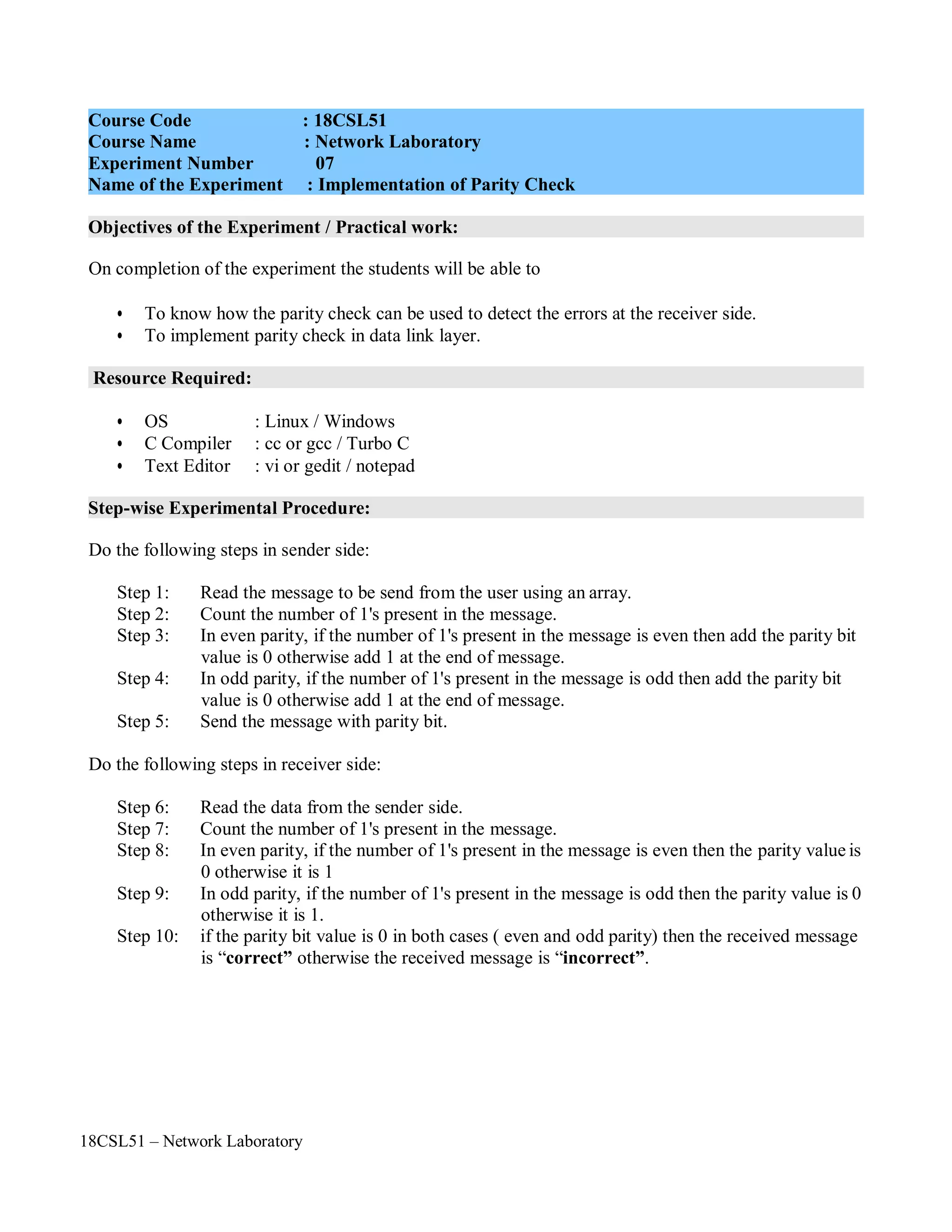
• To know how the parity check can be used to detect the errors at the receiver side.
• To implement parity check in data link layer.
• OS : Linux / Windows
• C Compiler : cc or gcc / Turbo C
• Text Editor : vi or gedit / notepad
Do the following steps in sender side:
Step 1: Read the message to be send from the user using an array.
Step 2: Count the number of 1's present in the message.
Step 3: In even parity, if the number of 1's present in the message is even then add the parity bit
value is 0 otherwise add 1 at the end of message.
Step 4: In odd parity, if the number of 1's present in the message is odd then add the parity bit
value is 0 otherwise add 1 at the end of message.
Step 5: Send the message with parity bit.
Do the following steps in receiver side:
Step 6: Read the data from the sender side.
Step 7: Count the number of 1's present in the message.
Step 8: In even parity, if the number of 1's present in the message is even then the parity value is
0 otherwise it is 1
Step 9: In odd parity, if the number of 1's present in the message is odd then the parity value is 0
otherwise it is 1.
Step 10: if the parity bit value is 0 in both cases ( even and odd parity) then the received message
is “correct” otherwise the received message is “incorrect”.
Course Code : 18CSL51
Course Name : Network Laboratory
Experiment Number 07
Name of the Experiment : Implementation of Parity Check
18CSL51 – Network Laboratory
Computations to be Made:
Parity Check:
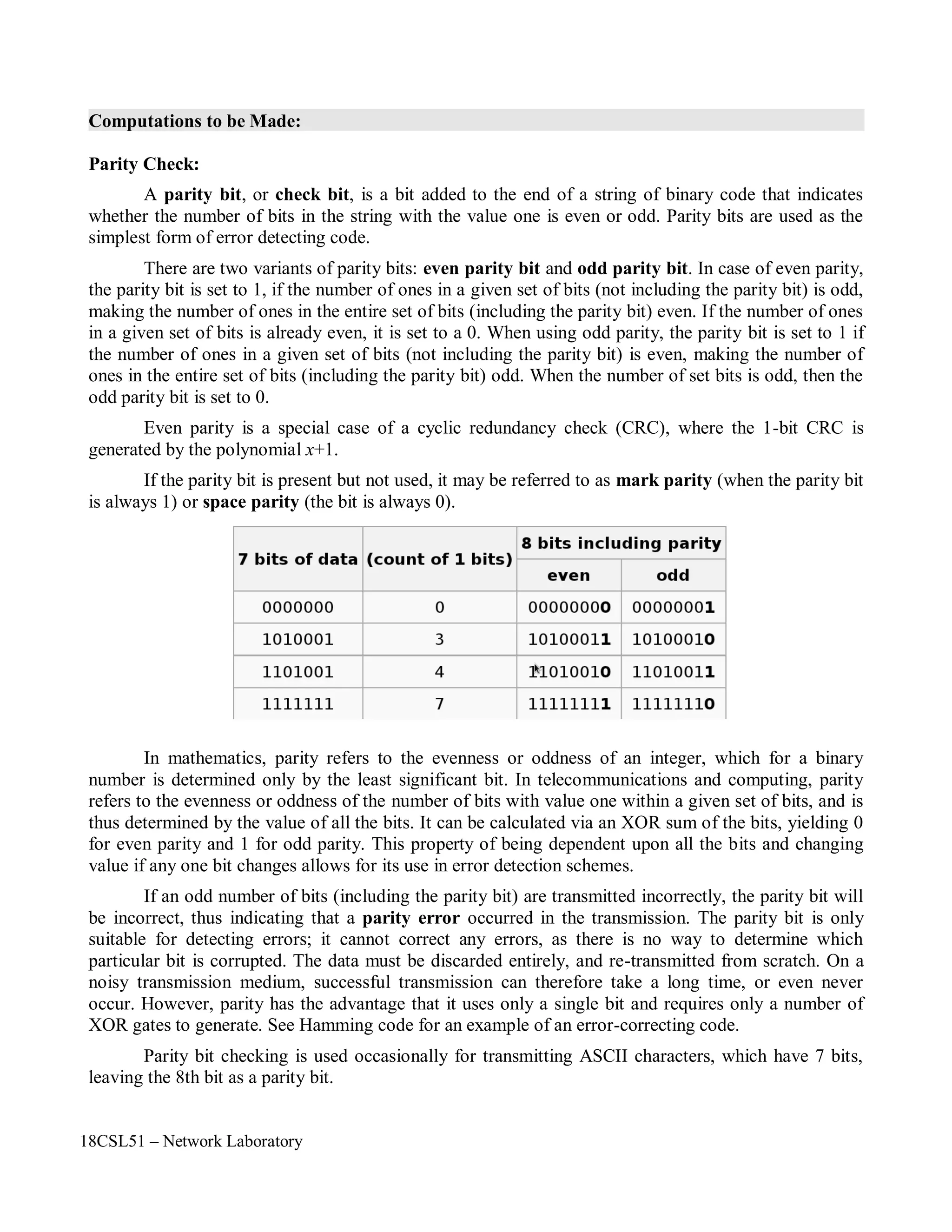
A parity bit, or check bit, is a bit added to the end of a string of binary code that indicates
whether the number of bits in the string with the value one is even or odd. Parity bits are used as the
simplest form of error detecting code.
There are two variants of parity bits: even parity bit and odd parity bit. In case of even parity,
the parity bit is set to 1, if the number of ones in a given set of bits (not including the parity bit) is odd,
making the number of ones in the entire set of bits (including the parity bit) even. If the number of ones
in a given set of bits is already even, it is set to a 0. When using odd parity, the parity bit is set to 1 if
the number of ones in a given set of bits (not including the parity bit) is even, making the number of
ones in the entire set of bits (including the parity bit) odd. When the number of set bits is odd, then the
odd parity bit is set to 0.
Even parity is a special case of a cyclic redundancy check (CRC), where the 1-bit CRC is
generated by the polynomial x+1.
If the parity bit is present but not used, it may be referred to as mark parity (when the parity bit
is always 1) or space parity (the bit is always 0).
In mathematics, parity refers to the evenness or oddness of an integer, which for a binary
number is determined only by the least significant bit. In telecommunications and computing, parity
refers to the evenness or oddness of the number of bits with value one within a given set of bits, and is
thus determined by the value of all the bits. It can be calculated via an XOR sum of the bits, yielding 0
for even parity and 1 for odd parity. This property of being dependent upon all the bits and changing
value if any one bit changes allows for its use in error detection schemes.
If an odd number of bits (including the parity bit) are transmitted incorrectly, the parity bit will
be incorrect, thus indicating that a parity error occurred in the transmission. The parity bit is only
suitable for detecting errors; it cannot correct any errors, as there is no way to determine which
particular bit is corrupted. The data must be discarded entirely, and re-transmitted from scratch. On a
noisy transmission medium, successful transmission can therefore take a long time, or even never
occur. However, parity has the advantage that it uses only a single bit and requires only a number of
XOR gates to generate. See Hamming code for an example of an error-correcting code.
Parity bit checking is used occasionally for transmitting ASCII characters, which have 7 bits,
leaving the 8th bit as a parity bit.
18CSL51 – Network Laboratory
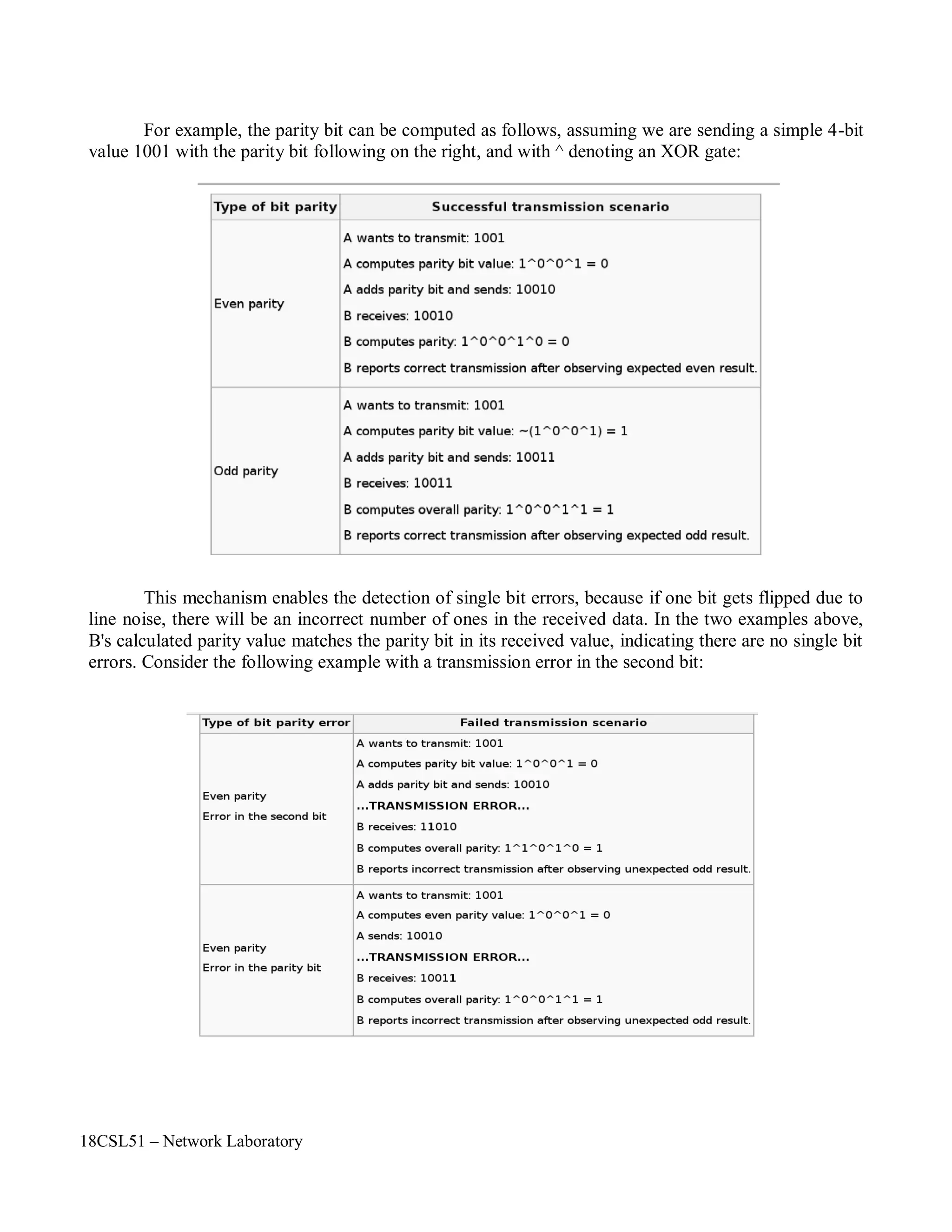
For example, the parity bit can be computed as follows, assuming we are sending a simple 4-bit
value 1001 with the parity bit following on the right, and with ^ denoting an XOR gate:
This mechanism enables the detection of single bit errors, because if one bit gets flipped due to
line noise, there will be an incorrect number of ones in the received data. In the two examples above,
B's calculated parity value matches the parity bit in its received value, indicating there are no single bit
errors. Consider the following example with a transmission error in the second bit:
18CSL51 – Network Laboratory
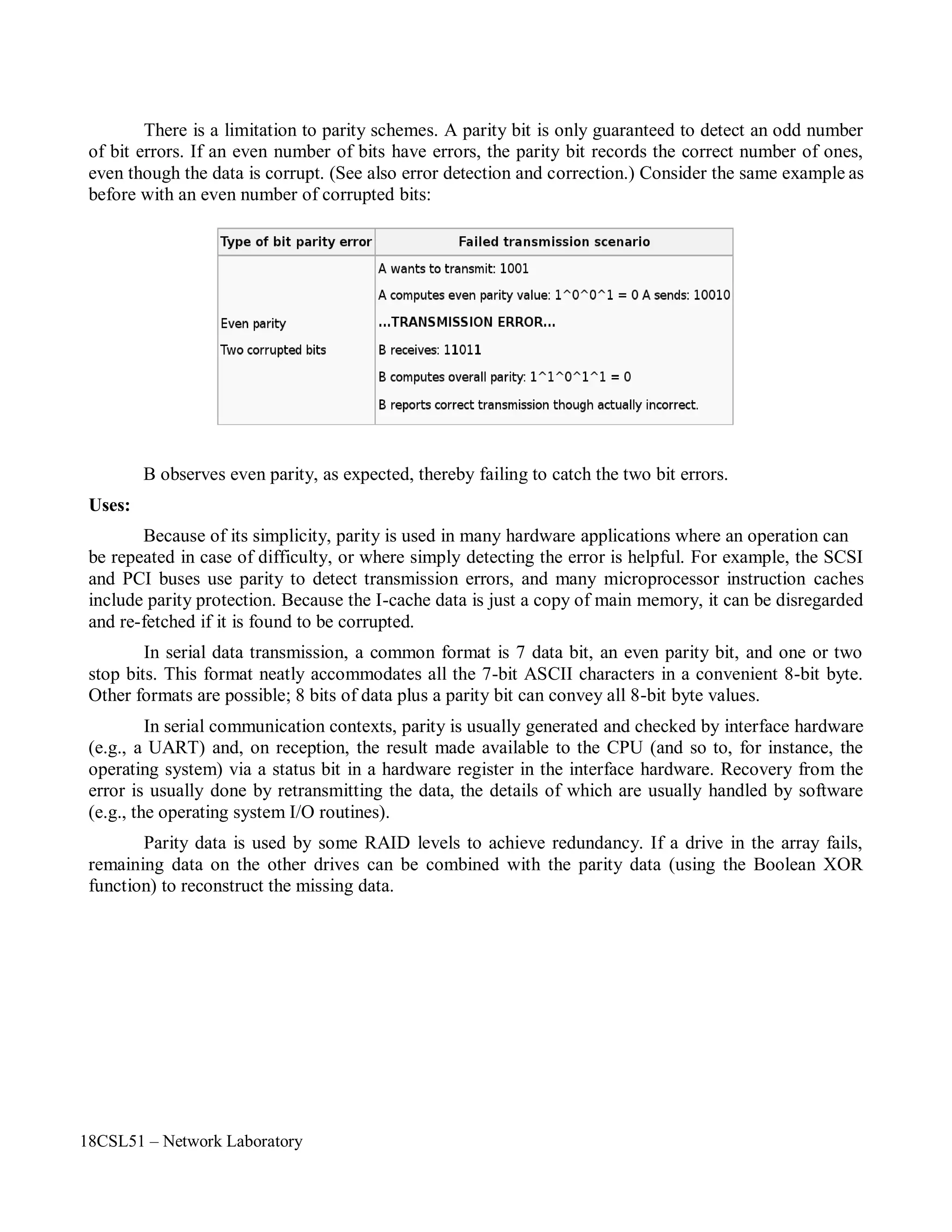
There is a limitation to parity schemes. A parity bit is only guaranteed to detect an odd number
of bit errors. If an even number of bits have errors, the parity bit records the correct number of ones,
even though the data is corrupt. (See also error detection and correction.) Consider the same example as
before with an even number of corrupted bits:
Uses:
B observes even parity, as expected, thereby failing to catch the two bit errors.
Because of its simplicity, parity is used in many hardware applications where an operation can
be repeated in case of difficulty, or where simply detecting the error is helpful. For example, the SCSI
and PCI buses use parity to detect transmission errors, and many microprocessor instruction caches
include parity protection. Because the I-cache data is just a copy of main memory, it can be disregarded
and re-fetched if it is found to be corrupted.
In serial data transmission, a common format is 7 data bit, an even parity bit, and one or two
stop bits. This format neatly accommodates all the 7-bit ASCII characters in a convenient 8-bit byte.
Other formats are possible; 8 bits of data plus a parity bit can convey all 8-bit byte values.
In serial communication contexts, parity is usually generated and checked by interface hardware
(e.g., a UART) and, on reception, the result made available to the CPU (and so to, for instance, the
operating system) via a status bit in a hardware register in the interface hardware. Recovery from the
error is usually done by retransmitting the data, the details of which are usually handled by software
(e.g., the operating system I/O routines).
Parity data is used by some RAID levels to achieve redundancy. If a drive in the array fails,
remaining data on the other drives can be combined with the parity data (using the Boolean XOR
function) to reconstruct the missing data.
18CSL51 – Network Laboratory
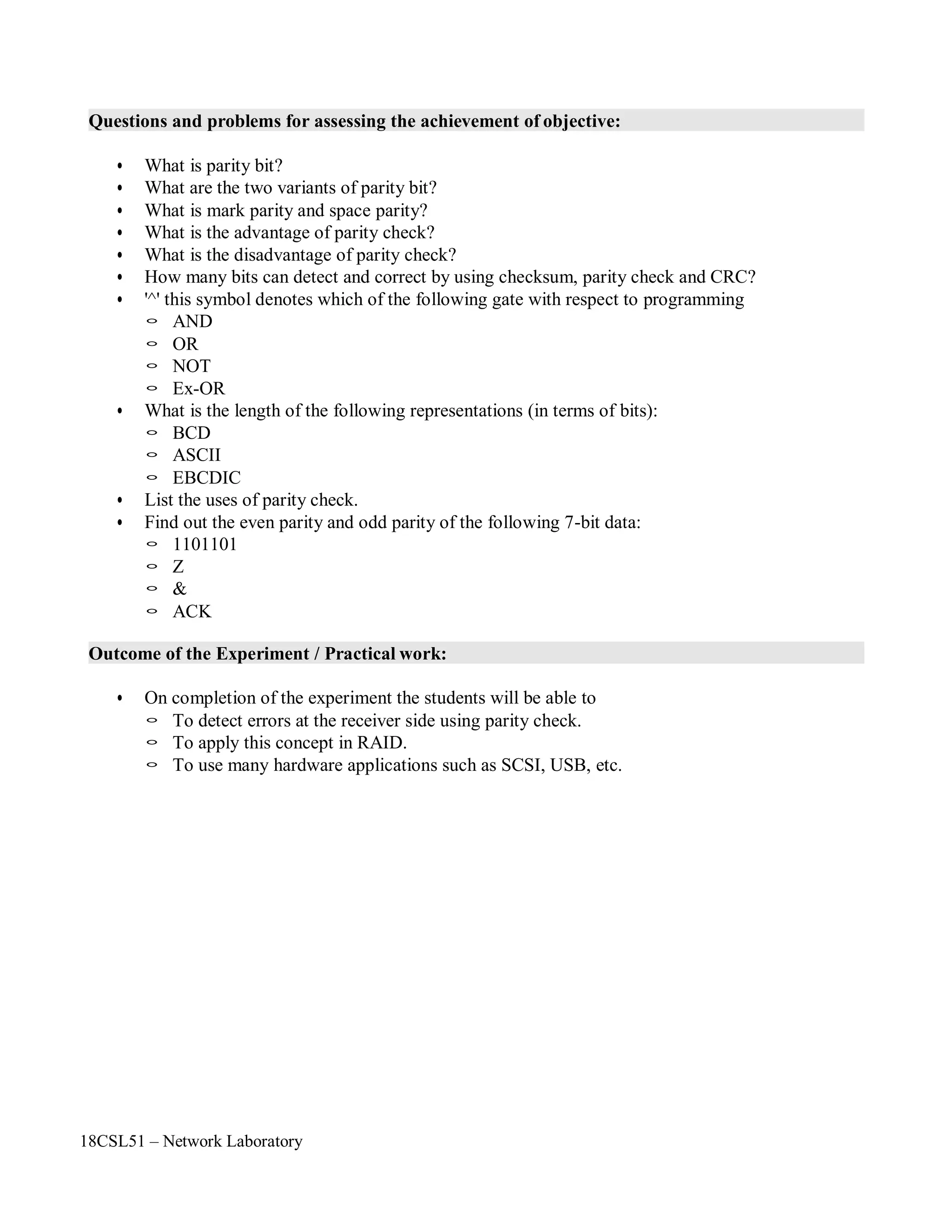
Questions and problems for assessing the achievement of objective:
• What is parity bit?
• What are the two variants of parity bit?
• What is mark parity and space parity?
• What is the advantage of parity check?
• What is the disadvantage of parity check?
• How many bits can detect and correct by using checksum, parity check and CRC?
• '^' this symbol denotes which of the following gate with respect to programming
◦ AND
◦ OR
◦ NOT
◦ Ex-OR
• What is the length of the following representations (in terms of bits):
◦ BCD
◦ ASCII
◦ EBCDIC
• List the uses of parity check.
• Find out the even parity and odd parity of the following 7-bit data:
◦ 1101101
◦ Z
◦ &
◦ ACK
Outcome of the Experiment / Practical work:
• On completion of the experiment the students will be able to
◦ To detect errors at the receiver side using parity check.
◦ To apply this concept in RAID.
◦ To use many hardware applications such as SCSI, USB, etc.
18CSL51 – Network Laboratory
Program:
#include<stdio.h>
#include<string.h>
main()
{
char mes[100],parval,sent[100],recieve[100];
int par,i,count=0;
printf("nEnter the message:");
scanf("%s",mes);
printf("n***************** EVEN PARITY *******************n");
for(i=0;mes[i]!='0';i++)
{
if(mes[i]=='1')
count++;
sent[i]=mes[i];
}
if(count%2==0)
parval='0';
else
parval='1';
sent[i]=parval;
sent[++i]='0';
printf("n***************** SENDER SIDE *******************n");
printf("nEven pairty value is :%cn",parval);
printf("nFinal Sending messgae is with parity %sn",sent);
strcpy(recieve,sent);
//recieve[3]='1'; // -> This is for checking errored frame
printf("n***************** RECEIVER SIDE *******************n");
printf("nFinal Recieved messgae is %s",recieve);
for(i=0,count=0;recieve[i]!='0';i++)
{
if(recieve[i]=='1')
count++;
}
if(count%2==0)
{
}
else
{
}
parval='0';
printf("nEven pairty value is :%cnNo Error in framenn",parval);
parval='1';
printf("nEven pairty value is :%cnError in framenn",parval);
18CSL51 – Network Laboratory
printf("n***************** ODD PARITY *******************n");
for(i=0;mes[i]!='0';i++)
{
if(mes[i]=='1')
count++;
sent[i]=mes[i];
}
if(count%2==0)
parval='1';
else
parval='0';
sent[i]=parval;
sent[++i]='0';
printf("n***************** SENDER SIDE *******************n");
printf("nOdd pairty value is :%cn",parval);
printf("nFinal Sending messgae is with parity %sn",sent);
strcpy(recieve,sent);
//recieve[3]='1'; //-> This is for checking errored frame
printf("n***************** RECEIVER SIDE *******************n");
printf("nFinal Recieved messgae is %s",recieve);
for(i=0,count=0;recieve[i]!='0';i++)
{
if(recieve[i]=='1')
count++;
}
if(count%2==0)
{
}
else
{
}
}
parval='1';
printf("nOdd pairty value is :%cnError in framenn",parval);
parval='0';
printf("nOdd pairty value is :%cnNo Error in framenn",parval);
18CSL51 – Network Laboratory
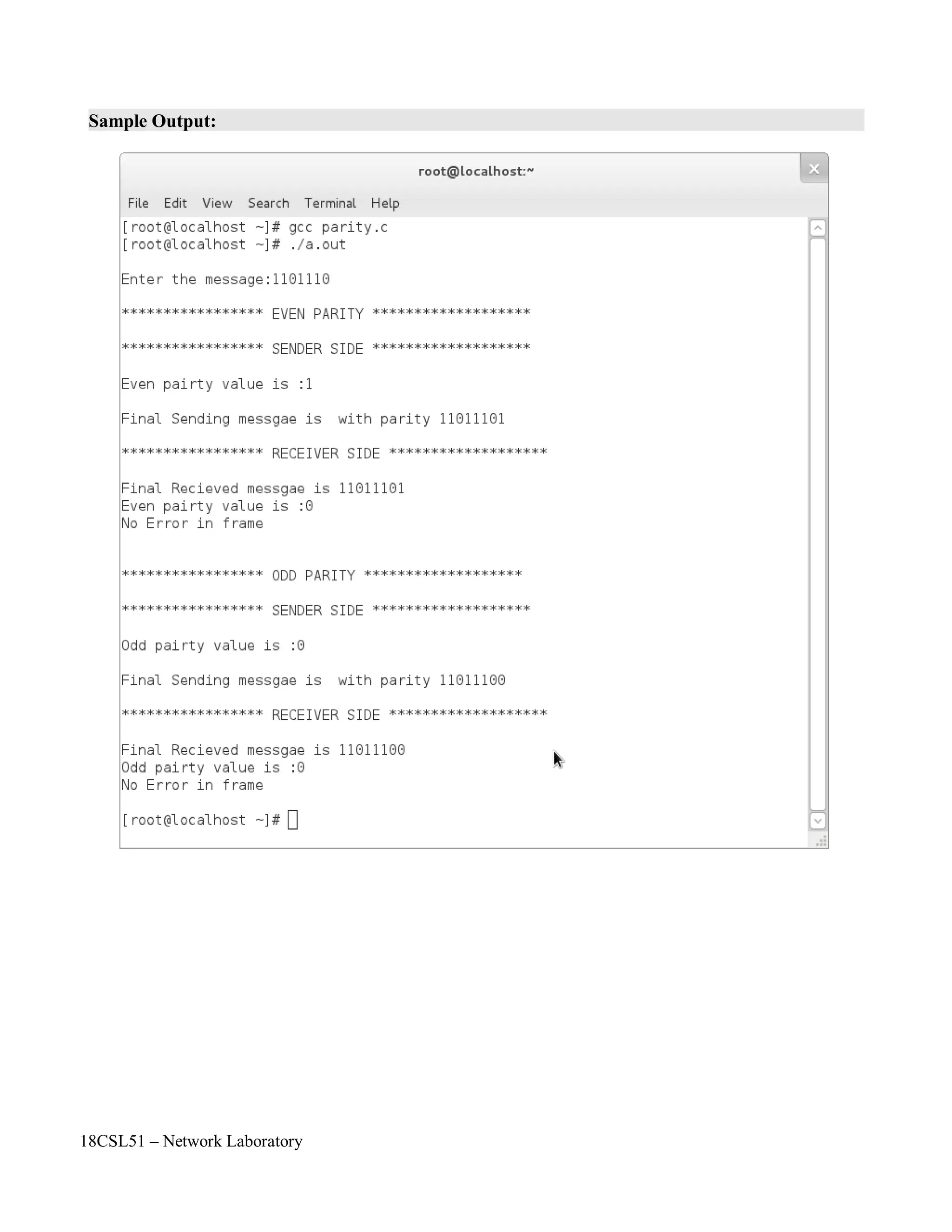
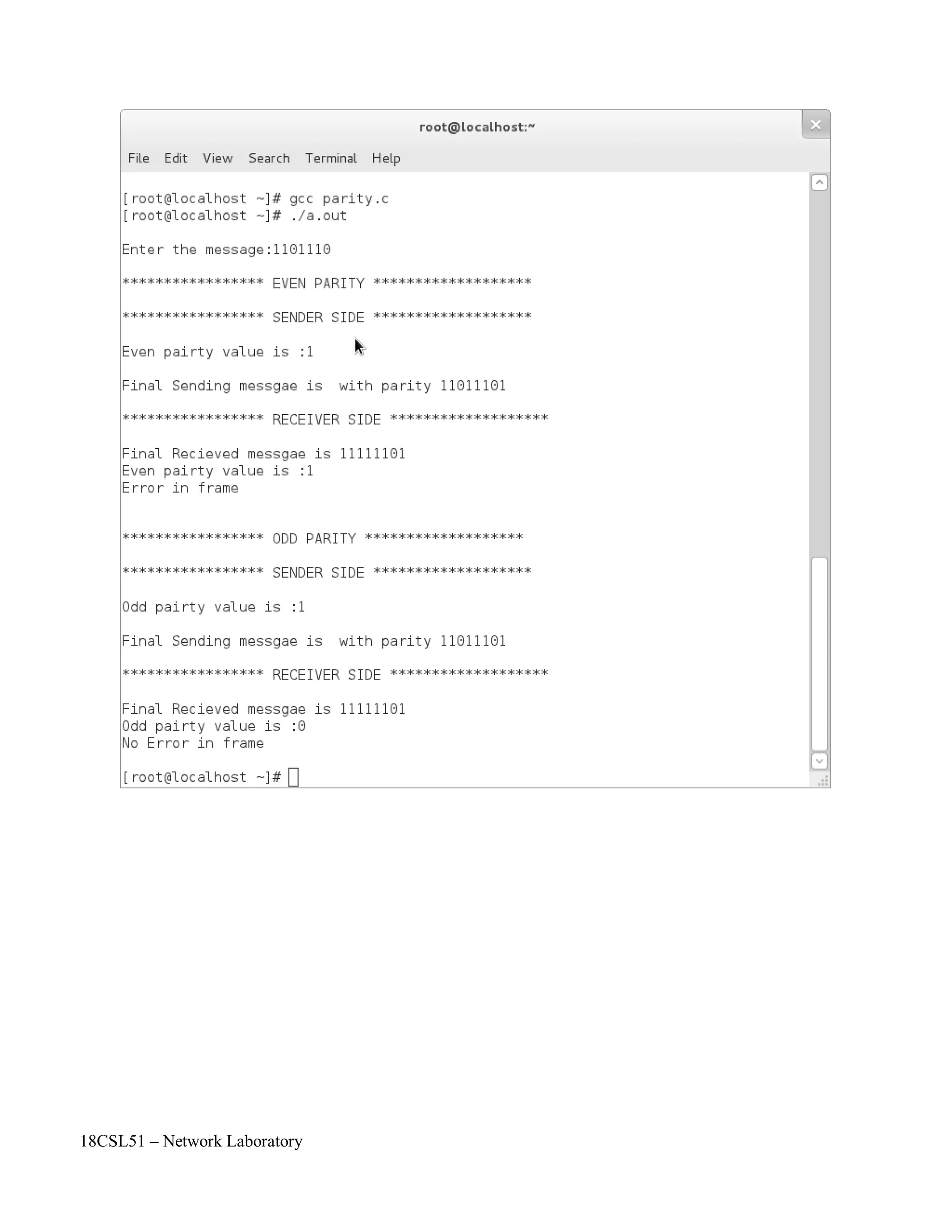
Sample Output:
18CSL51 – Network Laboratory
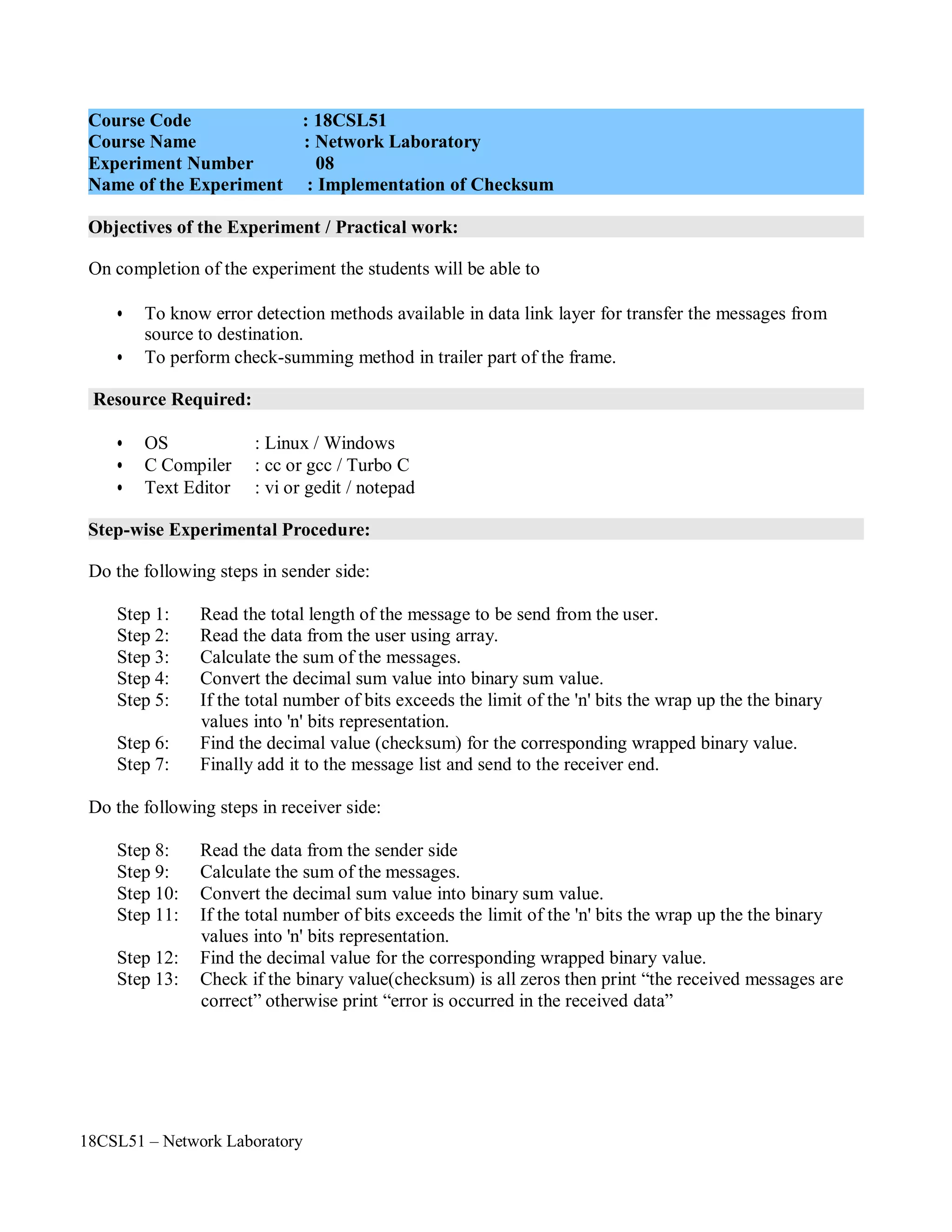
Objectives of the Experiment / Practical work:
Resource Required:
Step-wise Experimental Procedure:
On completion of the experiment the students will be able to
• To know error detection methods available in data link layer for transfer the messages from
source to destination.
• To perform check-summing method in trailer part of the frame.
• OS : Linux / Windows
• C Compiler : cc or gcc / Turbo C
• Text Editor : vi or gedit / notepad
Do the following steps in sender side:
Step 1: Read the total length of the message to be send from the user.
Step 2: Read the data from the user using array.
Step 3: Calculate the sum of the messages.
Step 4: Convert the decimal sum value into binary sum value.
Step 5: If the total number of bits exceeds the limit of the 'n' bits the wrap up the the binary
values into 'n' bits representation.
Step 6: Find the decimal value (checksum) for the corresponding wrapped binary value.
Step 7: Finally add it to the message list and send to the receiver end.
Do the following steps in receiver side:
Step 8: Read the data from the sender side
Step 9: Calculate the sum of the messages.
Step 10: Convert the decimal sum value into binary sum value.
Step 11: If the total number of bits exceeds the limit of the 'n' bits the wrap up the the binary
values into 'n' bits representation.
Step 12: Find the decimal value for the corresponding wrapped binary value.
Step 13: Check if the binary value(checksum) is all zeros then print “the received messages are
correct” otherwise print “error is occurred in the received data”
Course Code : 18CSL51
Course Name : Network Laboratory
Experiment Number 08
Name of the Experiment : Implementation of Checksum
18CSL51 – Network Laboratory
Computations to be Made:
Checksum
A checksum or hash sum is a small-size datum computed from an arbitrary block of digital data
for the purpose of detecting errors that may have been introduced during its transmission or storage.
The integrity of the data can be checked at any later time by recomputing the checksum and comparing
it with the stored one. If the checksums match, the data was likely not accidentally altered.
The procedure that yields the checksum from the data is called a checksum function or
checksum algorithm. A good checksum algorithm will yield a different result with high probability
when the data is accidentally corrupted; if the checksums match, the data has the same high probability
of being free of accidental errors. Checksum functions are related to hash functions, fingerprints,
randomization functions, and cryptographic hash functions. However, each of those concepts has
different applications and therefore different design goals. It is important to not use a checksum in a
security related application, as a checksum does not have the properties required to protect data from
intentional tampering.
Example:
Suppose our data is a list of five 4-bit numbers that we want to send to a destination. In addition
to sending these numbers, we send the sum of the numbers. For example, if the set of numbers is (7, 11,
12, 0, 6), we send (7, 11, 12,0,6,36), where 36 is the sum of the original numbers. The receiver adds the
five numbers and compares the result with the sum. If the two are the same, the receiver assumes no
error, accepts the five numbers, and discards the sum. Otherwise, there is an error somewhere and the
data are not accepted.
We can make the job of the receiver easier if we send the negative (complement) of the sum,
called the checksum. In this case, we send (7, 11, 12,0,6, -36). The receiver can add all the numbers
received (including the checksum). If the result is 0, it assumes no error; otherwise, there is an error .
One's Complement
The previous example has one major drawback. All of our data can be written as a 4-bit word
(they are less than 15) except for the checksum. One solution is to use one's complement arithmetic. In
this arithmetic, we can represent unsigned numbers between 0 and 2n
- 1 using only n bits. t If the
number has more than n bits, the extra leftmost bits need to be added to the n rightmost bits (wrapping).
In one's complement arithmetic, a negative number can be represented by inverting all bits (changing a
0 to a 1 and a 1 to a 0). This is the same as subtracting the number from 2n
– 1.
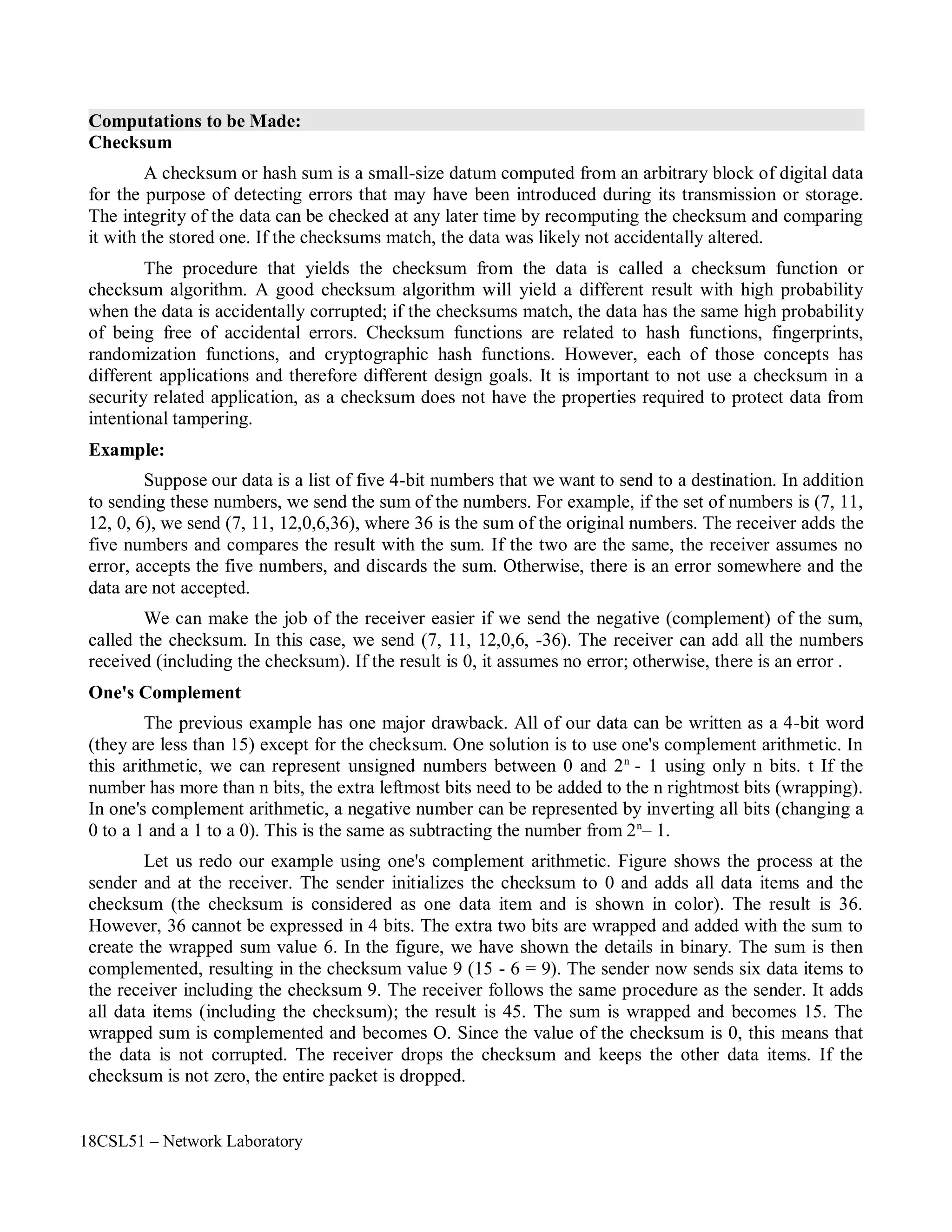
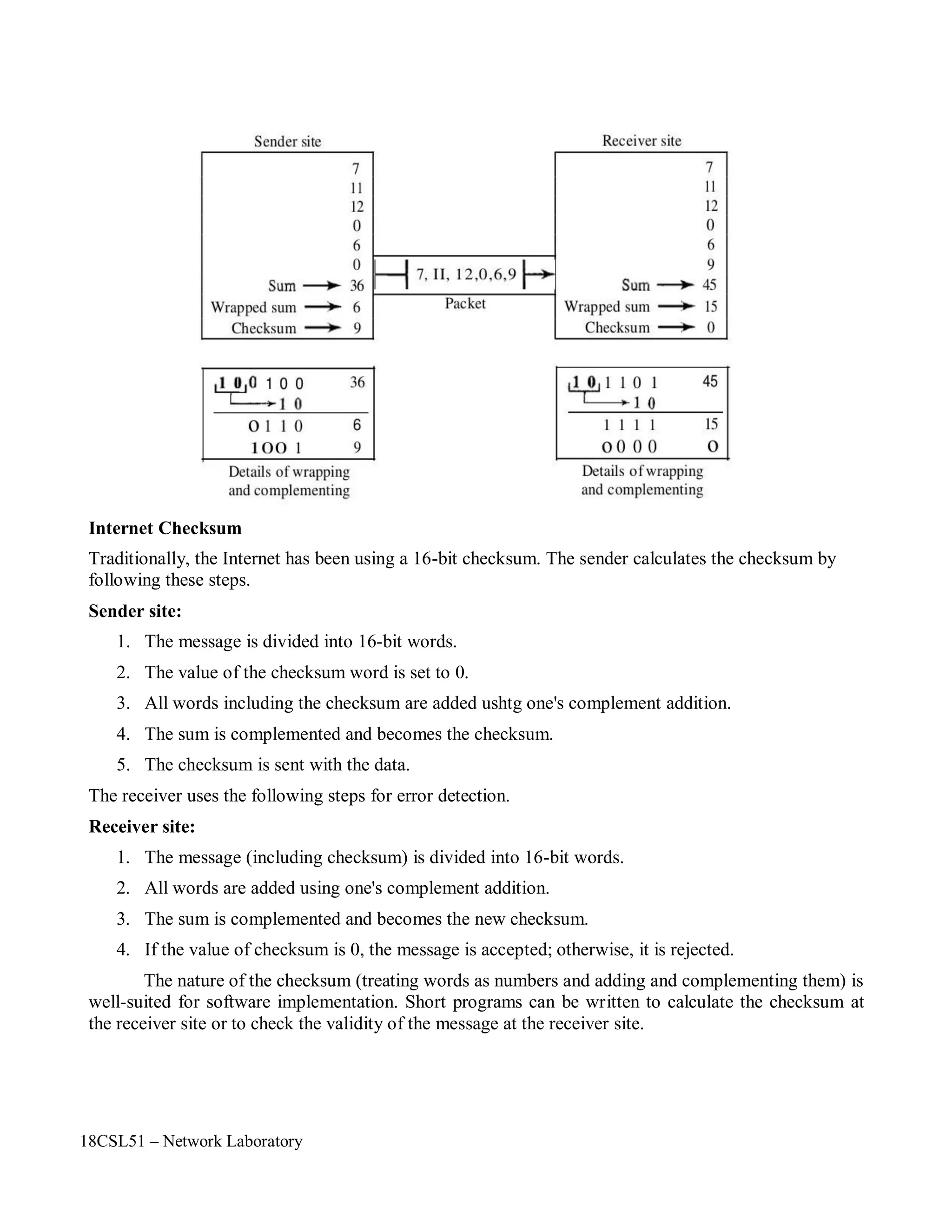
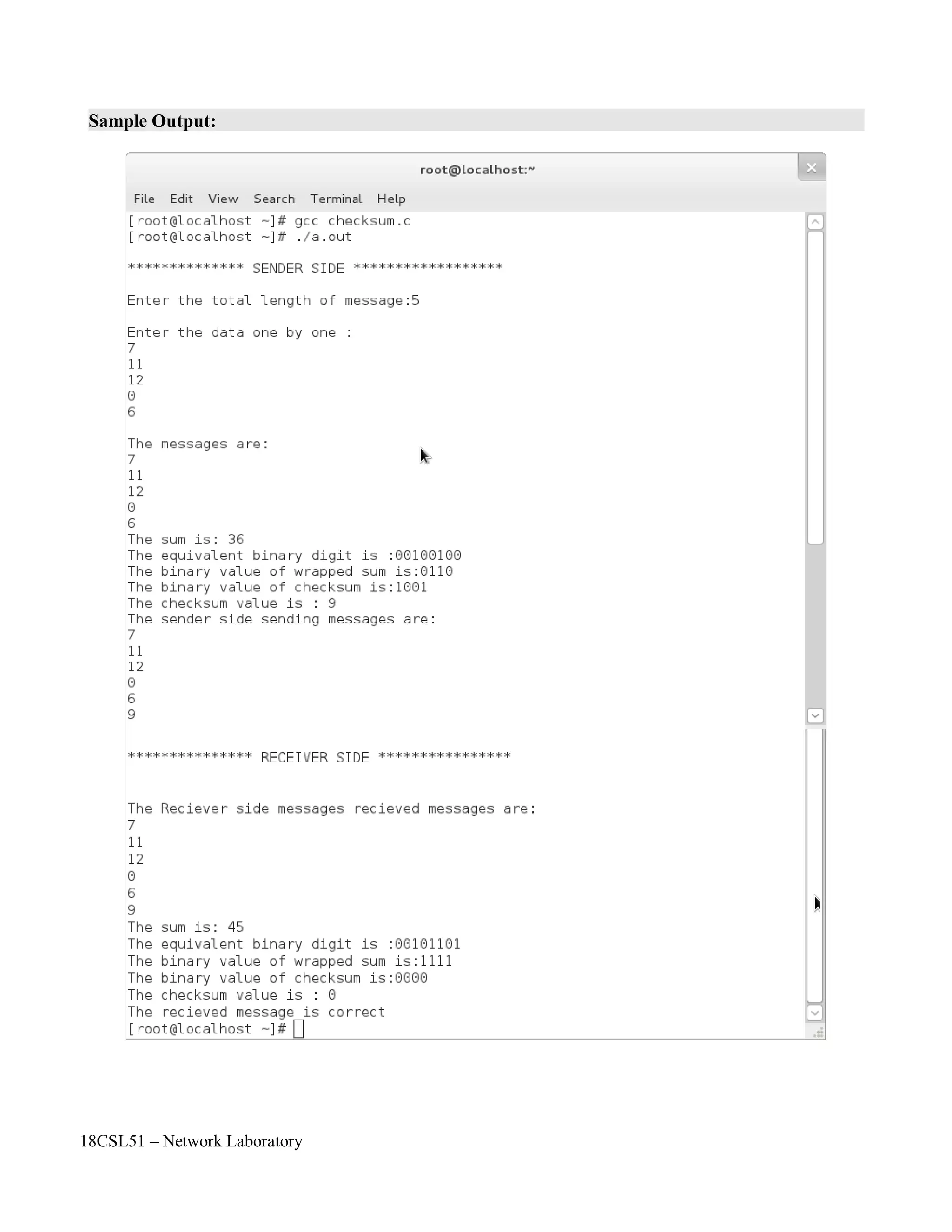
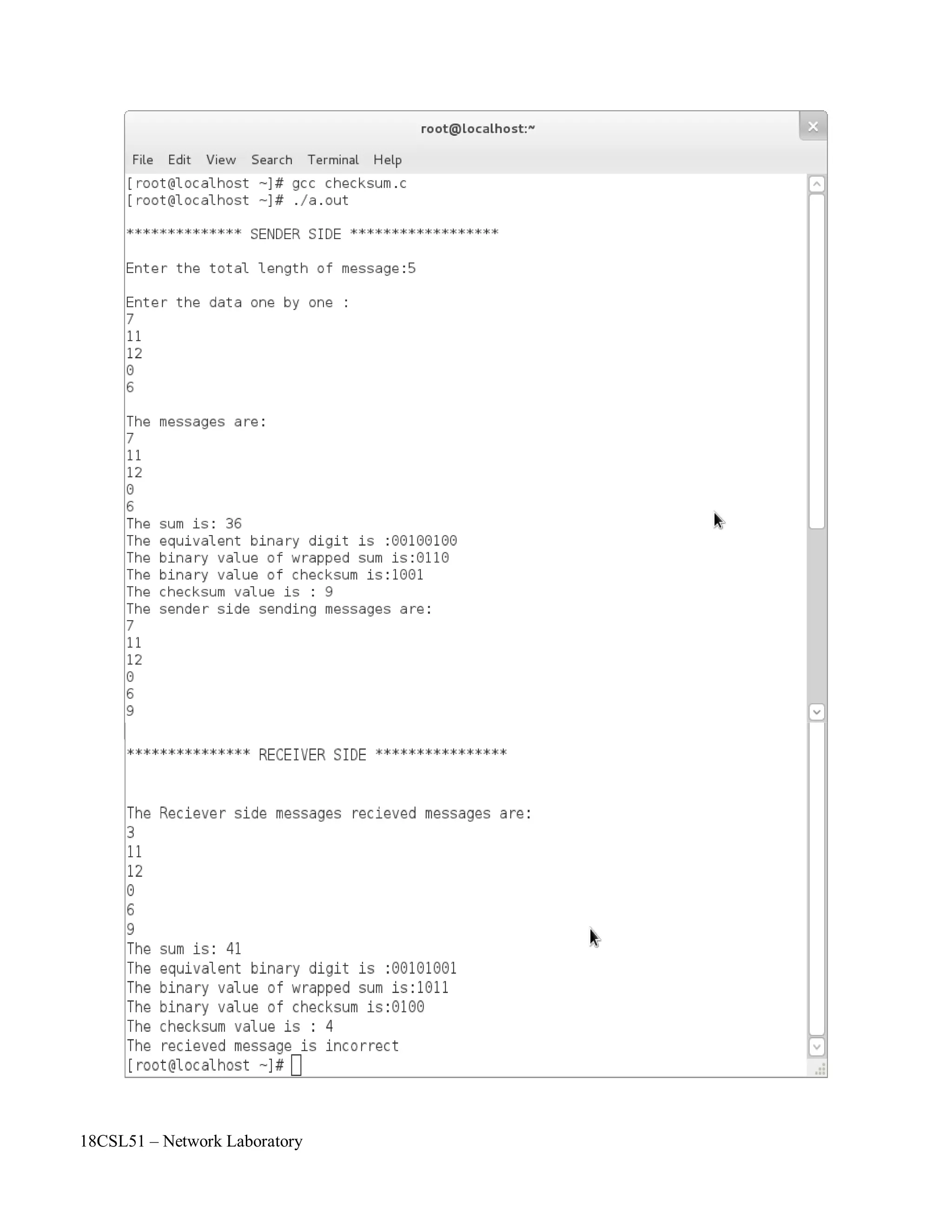
Let us redo our example using one's complement arithmetic. Figure shows the process at the
sender and at the receiver. The sender initializes the checksum to 0 and adds all data items and the
checksum (the checksum is considered as one data item and is shown in color). The result is 36.
However, 36 cannot be expressed in 4 bits. The extra two bits are wrapped and added with the sum to
create the wrapped sum value 6. In the figure, we have shown the details in binary. The sum is then
complemented, resulting in the checksum value 9 (15 - 6 = 9). The sender now sends six data items to
the receiver including the checksum 9. The receiver follows the same procedure as the sender. It adds
all data items (including the checksum); the result is 45. The sum is wrapped and becomes 15. The
wrapped sum is complemented and becomes O. Since the value of the checksum is 0, this means that
the data is not corrupted. The receiver drops the checksum and keeps the other data items. If the
checksum is not zero, the entire packet is dropped.
18CSL51 – Network Laboratory
Internet Checksum
Traditionally, the Internet has been using a 16-bit checksum. The sender calculates the checksum by
following these steps.
Sender site:
1. The message is divided into 16-bit words.
2. The value of the checksum word is set to 0.
3. All words including the checksum are added ushtg one's complement addition.
4. The sum is complemented and becomes the checksum.
5. The checksum is sent with the data.
The receiver uses the following steps for error detection.
Receiver site:
1. The message (including checksum) is divided into 16-bit words.
2. All words are added using one's complement addition.
3. The sum is complemented and becomes the new checksum.
4. If the value of checksum is 0, the message is accepted; otherwise, it is rejected.
The nature of the checksum (treating words as numbers and adding and complementing them) is
well-suited for software implementation. Short programs can be written to calculate the checksum at
the receiver site or to check the validity of the message at the receiver site.
18CSL51 – Network Laboratory
Example:
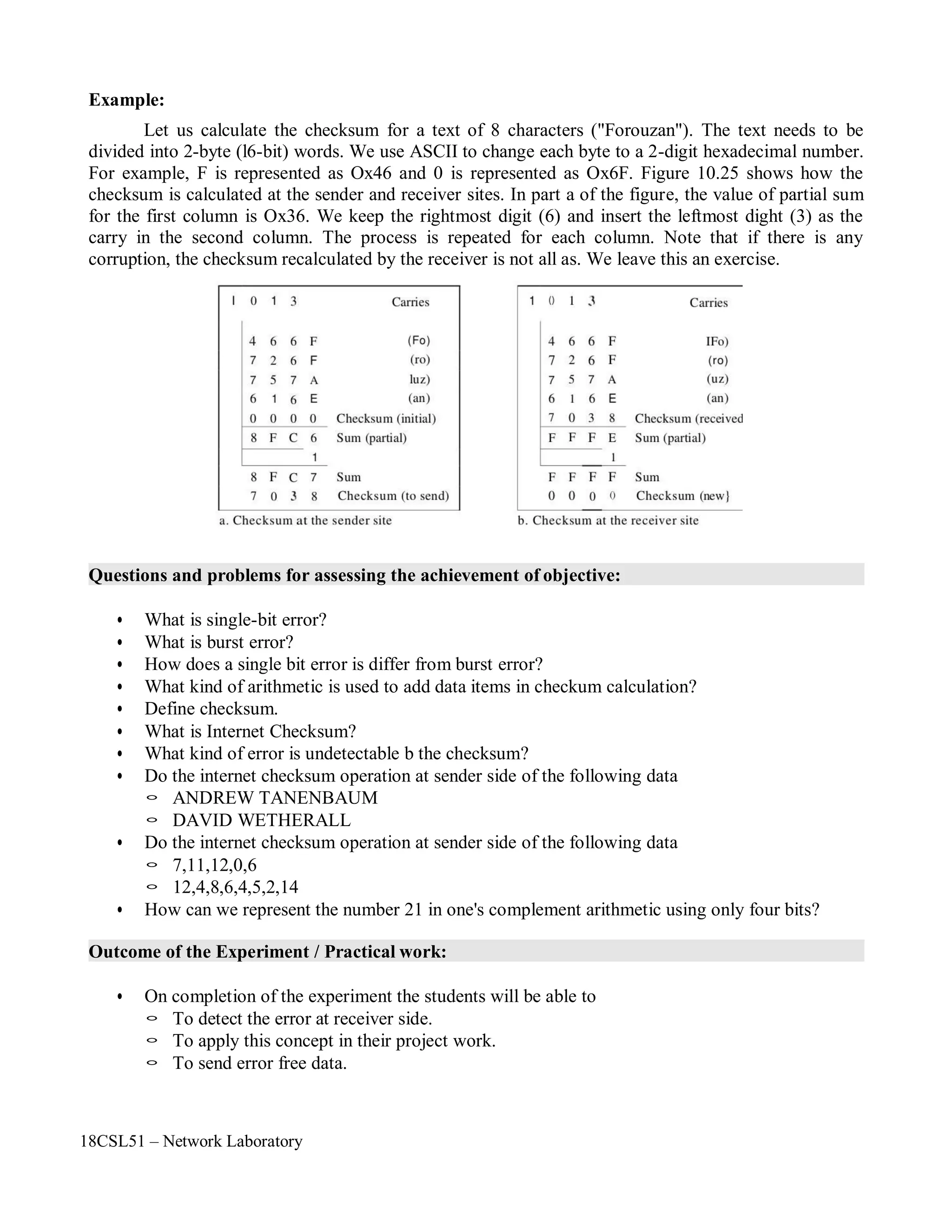
Let us calculate the checksum for a text of 8 characters ("Forouzan"). The text needs to be
divided into 2-byte (l6-bit) words. We use ASCII to change each byte to a 2-digit hexadecimal number.
For example, F is represented as Ox46 and 0 is represented as Ox6F. Figure 10.25 shows how the
checksum is calculated at the sender and receiver sites. In part a of the figure, the value of partial sum
for the first column is Ox36. We keep the rightmost digit (6) and insert the leftmost dight (3) as the
carry in the second column. The process is repeated for each column. Note that if there is any
corruption, the checksum recalculated by the receiver is not all as. We leave this an exercise.
Questions and problems for assessing the achievement of objective:
• What is single-bit error?
• What is burst error?
• How does a single bit error is differ from burst error?
• What kind of arithmetic is used to add data items in checkum calculation?
• Define checksum.
• What is Internet Checksum?
• What kind of error is undetectable b the checksum?
• Do the internet checksum operation at sender side of the following data
◦ ANDREW TANENBAUM
◦ DAVID WETHERALL
• Do the internet checksum operation at sender side of the following data
◦ 7,11,12,0,6
◦ 12,4,8,6,4,5,2,14
• How can we represent the number 21 in one's complement arithmetic using only four bits?
Outcome of the Experiment / Practical work:
• On completion of the experiment the students will be able to
◦ To detect the error at receiver side.
◦ To apply this concept in their project work.
◦ To send error free data.
18CSL51 – Network Laboratory
Program:
#include<stdio.h>
#include<math.h>
#include<string.h>
int main()
{
int a[10],n,sum=0,i,binary[100]={0};
int j,binary1[100],l,result[10],c=0,k;
int sum1;
printf("n************** SENDER SIDE ******************n");
printf("nEnter the total length of message:");
scanf("%d",&n);
printf("nEnter the data one by one :");
for(i=0;i<n;i++)
{
scanf("%d",&a[i]);
sum+=a[i];
}
printf("nThe messages are:");
for(i=0;i<n;i++)
printf("n%d",a[i]);
printf("nThe sum is: %d",sum);
for(i=0;sum>0;i++)
{
binary1[i]=sum%2;
sum=sum/2;
}
for(;i<8;i++)
binary1[i]=0;
l=i;
for(i=l-1,j=0;i>=0;i--,j++)
binary[j]=binary1[i];
printf("nThe equivalent binary digit is :");
for(i=0;i<l;i++)
printf("%d",binary[i]);
for(c=0,i=l-1;i>=4;i--) {
if(c==0) {
if(binary[i]==1&&binary[i-4]==1) {
result[i-4]=0;
c=1;
}
else if(binary[i]==1&&binary[i-4]==0) {
result[i-4]=1;
c=0;
}
else if(binary[i]==0&&binary[i-4]==0) {
18CSL51 – Network Laboratory
}
else {
}
else {
}
result[i-4]=0;
c=0;
result[i-4]=1;
c=0;
if(binary[i]==1&&binary[i-4]==1) {
result[i-4]=1;
c=1;
}
else if(binary[i]==1&&binary[i-4]==0) {
result[i-4]=0;
c=1;
}
else if(binary[i]==0&&binary[i-4]==0) {
result[i-4]=1;
c=0;
}
else {
}
}
}
result[i-4]=0;
c=1;
printf("nThe binary value of wrapped sum is:");
for(i=0;i<4;i++)
printf("%d",result[i]);
printf("nThe binary value of checksum is:");
for(i=0,sum=0,j=3;i<4;i++,j--)
{
sum1=1;
if(result[i]==1)
result[i]=0;
else
result[i]=1;
for(k=1;k<=j;k++,sum1=sum1*2);
sum=sum+(result[i]*sum1);
printf("%d",result[i]);
}
printf("nThe checksum value is : %d",sum);
printf("nThe sender side sending messages are:");
a[n++]=sum;
for(i=0;i<n;i++)
printf("n%d",a[i]);
18CSL51 – Network Laboratory
printf("nn*************** RECEIVER SIDE ****************nn");
printf("nThe Reciever side messages recieved messages are:");
sum=0;
//a[0]=3; //to check incorrect message
for(i=0;i<n;i++)
{
printf("n%d",a[i]);
sum=sum+a[i];
}
printf("nThe sum is: %d",sum);
for(i=0;sum>0;i++)
{
binary1[i]=sum%2;
sum=sum/2;
}
for(;i<8;i++)
binary1[i]=0;
l=i;
for(i=l-1,j=0;i>=0;i--,j++)
binary[j]=binary1[i];
printf("nThe equivalent binary digit is :");
for(i=0;i<l;i++)
printf("%d",binary[i]);
for(c=0,i=l-1;i>=4;i--) {
if(c==0) {
if(binary[i]==1&&binary[i-4]==1) {
result[i-4]=0;
c=1;
}
else if(binary[i]==1&&binary[i-4]==0) {
result[i-4]=1;
c=0;
}
else if(binary[i]==0&&binary[i-4]==0) {
result[i-4]=0;
c=0;
}
else {
result[i-4]=1;
c=0;
}
else {
}
if(binary[i]==1&&binary[i-4]==1) {
result[i-4]=1;
c=1;
}
18CSL51 – Network Laboratory
else if(binary[i]==1&&binary[i-4]==0) {
result[i-4]=0;
c=1;
}
else if(binary[i]==0&&binary[i-4]==0) {
result[i-4]=1;
c=0;
}
else {
}
}
}
result[i-4]=0;
c=1;
printf("nThe binary value of wrapped sum is:");
for(i=0;i<4;i++)
printf("%d",result[i]);
printf("nThe binary value of checksum is:");
for(i=0,sum=0,j=3;i<4;i++,j--)
{
sum1=1;
if(result[i]==1)
result[i]=0;
else
result[i]=1;
for(k=1;k<=j;k++,sum1=sum1*2);
sum=sum+(result[i]*sum1);
printf("%d",result[i]);
}
printf("nThe checksum value is : %d",sum);
if(sum==0)
printf("nThe recieved message is correctn");
else
printf("nThe recieved message is incorrectn");
}
18CSL51 – Network Laboratory
Sample Output:
18CSL51 – Network Laboratory
Objectives of the Experiment / Practical work:
Resource Required:
Step-wise Experimental Procedure:
On completion of the experiment the students will be able to
• To know detect the errors at the receiver side.
• To implement CRC method for error detection in data link layer.
• OS : Linux / Windows
• C Compiler : cc or gcc / Turbo C
• Text Editor : vi or gedit / notepad
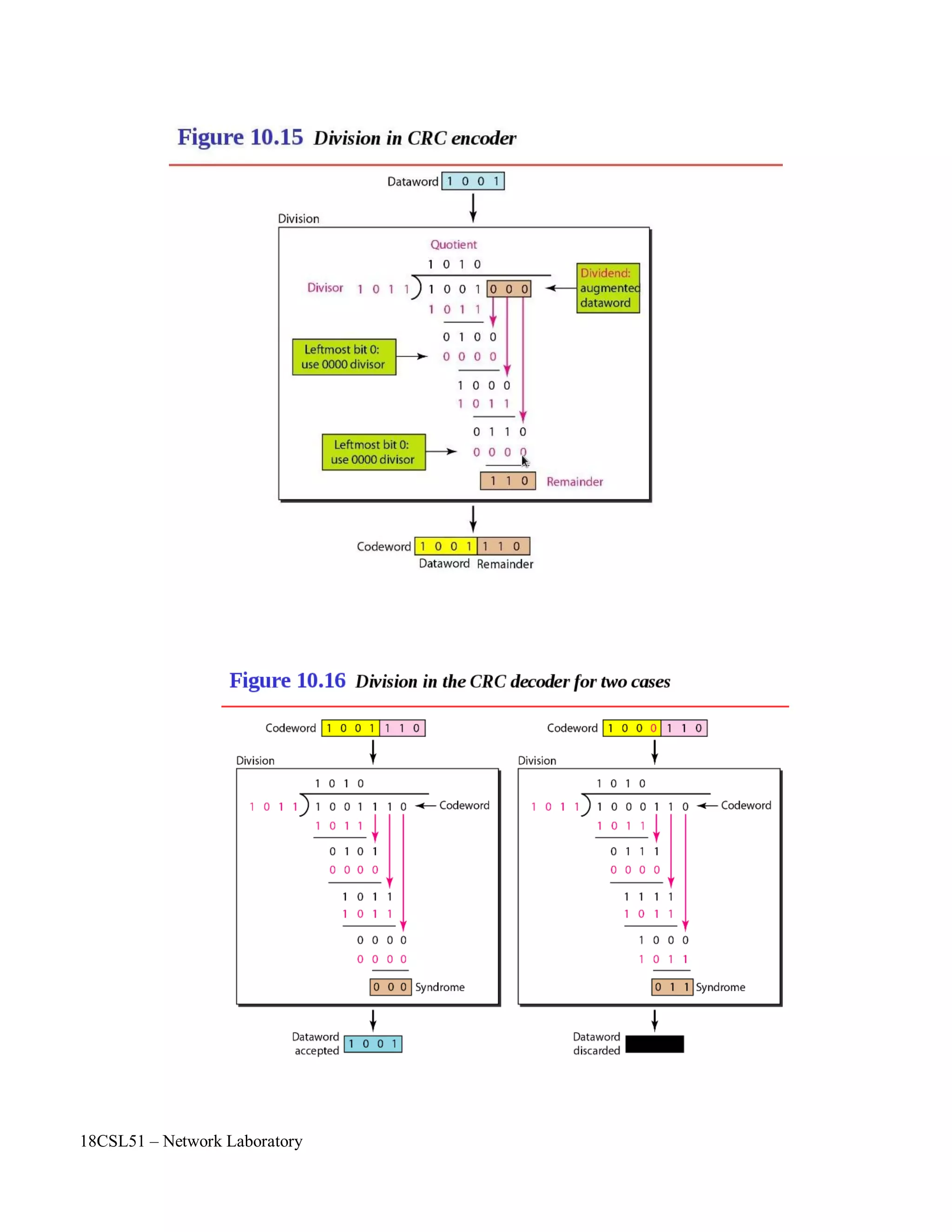
Do the following steps in sender side:
Step 1: Read the dataword (message) to be send from the user using an array.
Step 2: Read the 'n' bit common divisor from the user using an array.
Step 3: At sender side append n-1 zeros in dataword
Step 4: check if the MSB bit position of the divisor and dataword is same then do the Ex-OR
operation as stated below
crc[j]=itoc((ctoi(crc[j]))^(ctoi(div[j])));
Step 5: Repeat step 4 until the LSB bit of the dataword comes to end. Finally the n-1 bit
remainder value (CRC value) is replaced with appended zeros
position of the dataword. This message is called codeword.
Step 6: At last, the codeword (dataword+remainder) is send to the receiver.
Do the following steps in receiver side:
Step 7: Read the codeword rom the sender side
Step 8: check if the MSB bit position of the divisor and dataword is same then do the Ex-OR
operation as stated below
crc[j]=itoc((ctoi(crc[j]))^(ctoi(div[j])));
Step 9: Repeat step 4 until the LSB bit of the dataword comes to end.
Step 10: Display the receiver side remainder value.
Step 11: Check if the remainder value is all zeros then print “the received messages are
correct” otherwise print “error is occurred in the received data”
Course Code : 18CSL51
Course Name : Network Laboratory
Experiment Number 09
Name of the Experiment : Implementation of CRC
18CSL51 – Network Laboratory
Computations to be Made:
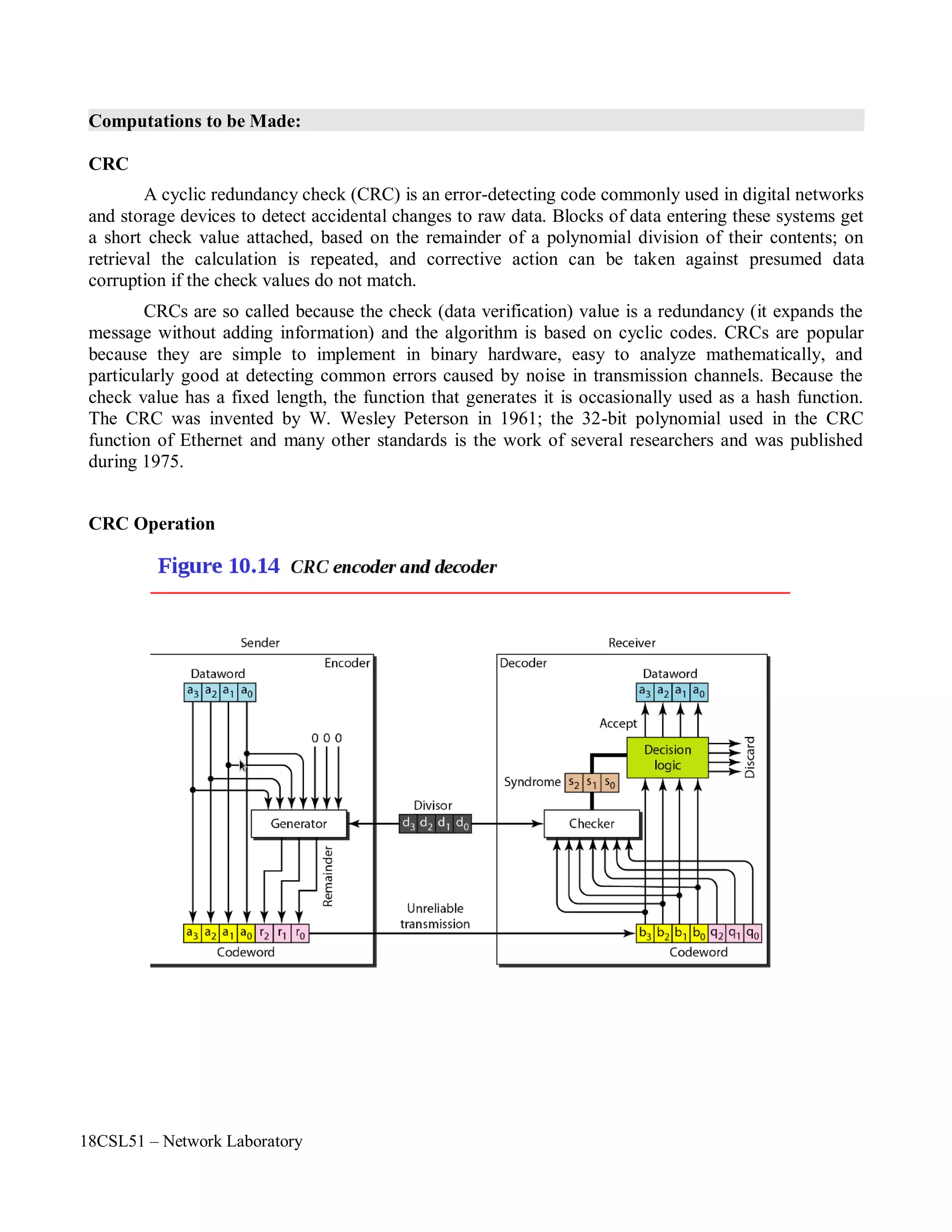
CRC
A cyclic redundancy check (CRC) is an error-detecting code commonly used in digital networks
and storage devices to detect accidental changes to raw data. Blocks of data entering these systems get
a short check value attached, based on the remainder of a polynomial division of their contents; on
retrieval the calculation is repeated, and corrective action can be taken against presumed data
corruption if the check values do not match.
CRCs are so called because the check (data verification) value is a redundancy (it expands the
message without adding information) and the algorithm is based on cyclic codes. CRCs are popular
because they are simple to implement in binary hardware, easy to analyze mathematically, and
particularly good at detecting common errors caused by noise in transmission channels. Because the
check value has a fixed length, the function that generates it is occasionally used as a hash function.
The CRC was invented by W. Wesley Peterson in 1961; the 32-bit polynomial used in the CRC
function of Ethernet and many other standards is the work of several researchers and was published
during 1975.
CRC Operation
18CSL51 – Network Laboratory
Questions and problems for assessing the achievement of objective:
• Name the coding categories.
• What is modular arithmetic?
• What is cyclic codes?
• Write the Ex-OR operation.
• In CRC, show the relationship between the following entities ( size means the number of bits)
◦ The size of the dataword and the size of the codeword
◦ The size of the divisor and the remainder
◦ The degree of the polynomial generator and the size of the divisor
◦ The degree of the polynomial generator and the size of the remainder
• Given the dataword 1010011010 and the divisor 10111
◦ show the generation of codeword at the sender side ( using binary division)
◦ show the checking of the code word at he receiver side (assume no error)
◦ show the checking of the code word at he receiver side (assume 5th
bit is error from left to
right)
• Which of the following CRC generators guarantee the detection of a single bit error?
◦ X4
+ X2
◦ X3
+ X+1
◦ X2
+ 1
◦ 1
Outcome of the Experiment / Practical work:
• On completion of the experiment the students will be able to
◦ To detect errors at the receiver side.
◦ To perform CRC error detection method in data link layer.
◦ To apply this concept in their project work.
18CSL51 – Network Laboratory
Program:
#include<stdio.h>
#include<string.h>
int ctoi(char a) {
return (a-48);
}
char itoc(int a) {
return (a+48);
}
void main()
{
char ip[100],ipm[100],div[20],crc[10],sent[100],rec[100];
int i,lm,ld,j;
printf("n************ SENDER SIDE(CRC ENCODING)***********n");
printf("nEnter Data Word ( Message):");
scanf("%s",ip);
printf("nEnter Divisor :");
scanf("%s",div);
strcpy(ipm,ip);
lm=strlen(ipm);
ld=strlen(div);
if(lm>=ld)
{
for(i=lm,j=0;j<ld-1;j++)
ipm[i++]='0';
ipm[i]='0';
printf("nThe Data Word After Appending Zeros: %s",ipm);
for(i=0;i<ld;i++)
crc[i]=ipm[i];
crc[i]='0';
for(;i<strlen(ipm);i++)
{
if(crc[0]=='1')
{
for(j=0;j<ld;j++)
{
crc[j]=itoc((ctoi(crc[j]))^(ctoi(div[j])));
}
}
crc[ld]=ipm[i];
crc[ld+1]='0';
for(j=0;crc[j]!='0';j++)
crc[j]=crc[j+1];
crc[j]='0';
}
18CSL51 – Network Laboratory
for(j=0;crc[j]!='0';j++)
crc[j]=crc[j+1];
crc[j]='0';
printf("nThe CRC Remainder is : %s",crc);
strcat(sent,ip);
strcat(sent,crc);
printf("nThe Code Word in sender side is: %s",sent);
printf("nn************ RECEIVER SIDE(CRC DECODING)*************");
strcpy(rec,sent);
//rec[2]='1'; // to check error data
printf("nnThe recieved message in reciever side is: %s",rec);
for(i=0;i<ld;i++)
crc[i]=rec[i];
crc[i]='0';
for(;i<strlen(rec);i++)
{
if(crc[0]=='1')
{
for(j=0;j<ld;j++)
{
crc[j]=itoc((ctoi(crc[j]))^(ctoi(div[j])));
}
}
crc[ld]=rec[i];
crc[ld+1]='0';
for(j=0;crc[j]!='0';j++)
crc[j]=crc[j+1];
crc[j]='0';
}
for(j=0;crc[j+1]!='0';j++)
crc[j]=crc[j+1];
crc[j]='0';
for(j=0;crc[j]!='0';j++)
{
if(crc[j]!='0')
break;
}
}
else
printf("nnThe CRC Remainder is: %s",crc);
if(j==strlen(crc))
printf("nnThe received message is error free!nn");
else
printf("nError in recieved message!!!nn");
printf("nEnter proper divisor");
}
18CSL51 – Network Laboratory
Sample Output:
18CSL51 – Network Laboratory
Objectives of the Experiment / Practical work:
Resource Required:
Step-wise Experimental Procedure:
On completion of the experiment the students will be able to
• To understand the uses of IP address.
• To know the various classes of IP Address and range of each classes IP Address.
• To identify the classes of IP Address.
• OS : Linux / Windows
• C Compiler : cc or gcc / Turbo C
• Text Editor : vi or gedit / notepad
Step 1: Read the IP Address as input from the user (ex. 10.1.1.1) using character array ip[100].
Step 2: Find out the string length using strlen() function.
Step 3: Check out the IP address format using isdigit() function (ex. 12.3a.1.1, 10/1.1.1.12 are
incorrect IP Address format)
Step 4: Check the loopback IP address (127.0.0.0) by using strcmp() function .
Step 5: Convert the IP address as decimal number from string by using the following line of
coding
for(i=0,s1=0;ip[i]!='.';i++)
s1=(s1*10)+ip[i]-48;
Step 6: Check the IP address range from 0 to 255 for each part (totally 4: namely s1,s2,s3, s4)
Step 7: Check and print the classes of IP address according to the first portion of the IP address
range.
Step 8: If s1 range of IP address is between 0 to 127 then print the IP address is Class A.
Step 9: If s1 range of IP address is between 128 to 191 then print the IP address is Class B.
Step 10: If s1 range of IP address is between 192 to 223 then print the IP address is Class C.
Step 11: If s1 range of IP address is between 224 to 239 then print the IP address is Class D.
Step 12: If s1 range of IP address is between 240 to 255 then print the IP address is Class E.
Course Code : 18CSL51
Course Name : Network Laboratory
Experiment Number 10
Name of the Experiment : Finding the Classes of IP Address
18CSL51 – Network Laboratory
Computations to be Made:
An Internet Protocol address (IP address) is a numerical label assigned to each device (e.g.,
computer, printer) participating in a computer network that uses the Internet Protocol for
communication. An IP address serves two principal functions: host or network interface identification
and location addressing. Its role has been characterized as follows: "A name indicates what we seek.
An address indicates where it is. A route indicates how to get there."
The designers of the Internet Protocol defined an IP address as a 32-bit number and this system,
known as Internet Protocol Version 4 (IPv4), is still in use today. However, due to the enormous
growth of the Internet and the predicted depletion of available addresses, a new version of IP (IPv6),
using 128 bits for the address, was developed in 1995. IPv6 was standardized as RFC 2460 in 1998,
and its deployment has been ongoing since the mid-2000s.
IP addresses are binary numbers, but they are usually stored in text files and displayed in
human-readable notations, such as 172.16.254.1 (for IPv4), and 2001:db8:0:1234:0:567:8:1 (for IPv6).
The Internet Assigned Numbers Authority (IANA) manages the IP address space allocations
globally and delegates five regional Internet registries (RIRs) to allocate IP address blocks to local
Internet registries (Internet service providers) and other entities.
Note : The following test cases should be done
• IP address format
• Check IP Address range is 0 – 255 in each part.
• Check Loopback IP Address
• Check Multicast IP addresses
18CSL51 – Network Laboratory
Questions and problems for assessing the achievement of objective:
• List the range for each classes of IP address.
• Define Unicast, Multicast, Broadcast.
• What is Loopback Ip Address? Mention the Use of it.
• What is the Length of Ipv4 and Ipv6?
• What is ICANN?
• What is IANA?
• List the IANA reserved private Ipv4 network ranges.
• What is CIDR?
• What is Subnetting and Supernetting?
• Give an example for Ipv6.
• What is NAT?
• Find the error, if any, in the following Ipv4 address.
◦ 111.56.045.78
◦ 221.34.7.8.20
◦ 75.45.301.14
◦ 11100010.23.14.67
• Find the classes of each IP address
◦ 00000001 00001011 00001011 11101111
◦ 11000001 10000011 00011011 11111111
◦ 14.23.120.8
◦ 252.5.15.111
• Write the uses of the following IP addresses
◦ 0.0.0.0
◦ 10.0.0.0
◦ 127.0.0.0.
◦ 172.16.0.0
◦ 192.168.0.0
◦ 224.0.0.0
◦ 240.0.0.0
◦ 255.255.255.255
Outcome of the Experiment / Practical work:
• On completion of the experiment the students will be able to
◦ To assign IP address for computer.
◦ To find the classe of IP Address.
◦ To differentiate unicast, multicast, broadcast IP addresses.
◦ To use the various private IP addresses.
18CSL51 – Network Laboratory
Program:
#include<stdio.h>
#include<string.h>
#include<ctype.h>
main()
{
char ip[100],part1[100],part2[100],part3[100],part4[100];
int i,j,s1,s2,s3,s4,c,sp,d,l;
printf("nn ***************** IP ADDRESS CLASSES ********************nn");
printf("nEnter IP Address : ");
scanf("%s",ip);
l=strlen(ip);
// Testt Case 1: To Check IP Address Format
for(i=0,d=0;ip[i]!='0';i++)
{
if(isdigit(ip[i]))
d++;
else if((ip[i]=='.')&&(d>0))
d=0;
else
break;
}
if(d==0||(i<l))
{
printf("n The IP Address is in Wrong Format !!! n ");
printf("So please enter correct IP Address:n");
main();
}
// Test Case 2: To Check Loopback IP Address
else if(strcmp(ip,"127.0.0.0")==0)
printf("n%s is a Loopback addressnn");
18CSL51 – Network Laboratory
else
{
// To Convert the the IP Address as Decimal Number from String
for(i=0,s1=0;ip[i]!='.';i++)
s1=(s1*10)+ip[i]-48;
for(i=i+1,s2=0;ip[i]!='.';i++)
s2=(s2*10)+ip[i]-48;
for(i=i+1,s3=0;ip[i]!='.';i++)
s3=(s3*10)+ip[i]-48;
for(i=i+1,s4=0;ip[i]!='0';i++)
s4=(s4*10)+ip[i]-48;
// Test Case 3: To Check IP Addess Range 0 - 255 for each part
if((s1>255)||(s2>255)||(s3>255)||(s4>255))
{
}
else
{
printf("n The IP Address is in Wrong Format !!! n");
printf("So please enter correct IP Address:n");
main();
// To Find the Classess of IP Address
if((s1>=0)&&(s1<128))
printf("n %s is Class A IP Addressnn",ip);
else if((s1>127)&&(s1<192))
printf("n %s is Class B IP Addressnn",ip);
else if((s1>191)&&(s1<224))
printf("n %s is Class C IP Addressnn",ip);
else if((s1>223)&&(s1<240))
printf("n %s is Class D IP Addressnn",ip);
else
printf("n %s is Class E IP Addressnn",ip);
}
}
}
18CSL51 – Network Laboratory
Sample Output:
18CSL51 – Network Laboratory
Objectives of the Experiment / Practical work:
Resource Required:
Step-wise Experimental Procedure:
On completion of the experiment the students will be able to
• To know the use of ARP protocol
• To mapping logical (IP) to physical address (MAC).
• OS : Linux / Windows
• C Compiler : cc or gcc / Turbo C
• Text Editor : vi or gedit / notepad
Step 1: Create an ARP table which contains the IP Address and their corresponding MAC
address. And store it as “ARPTABLE.txt” in home directory.
Step 2: Create an file descriptor or file pointer to access the file (ARPTABLE.txt) using FILE.
FILE *f1;
Step 3: First read the file contents using fopen() funtion.
f1=fopen("/student/ARPTABLE.txt","r");
Step 4: Check if the file pointer value is null the display the error message. Otherwise read the
IP address from the user.
Step 5: Check the IP address is in correct format by using the test case.
Step 6: Read the IP address and MAC address from ARP table by using fscanf() function.
fscanf(f1,"%s%s",ip,mac)
Step 7: Compare the user IP address with ARP table IP address by using strcmp() function.
strcmp(inip,ip)
Step 8: If the IP address matches with APR table then print the corresponding MAC address of
the IP address.
Step 9: Otherwise check file thoroughly by using feof() funtion.
Course Code : 18CSL51
Course Name : Network Laboratory
Experiment Number 11
Name of the Experiment : Implementation of ARP
18CSL51 – Network Laboratory
Computations to be Made:
ARP:
Address Resolution Protocol (ARP) is a telecommunications protocol used for resolution of
network layer addresses into link layer addresses, a critical function in multiple-access networks. ARP
was defined by RFC 826 in 1982. It is Internet Standard STD 37. It is also the name of the program for
manipulating these addresses in most operating systems.
ARP is used to convert an IP address to a physical address such as an Ethernet address. ARP
has been implemented with many combinations of network and data link layer technologies, such as
IPv4, Chaosnet, DECnet and Xerox PARC Universal Packet (PUP) using IEEE 802 standards, FDDI,
X.25, Frame Relay and Asynchronous Transfer Mode (ATM). IPv4 over IEEE 802.3 and IEEE 802.11
is the most common case.
In Internet Protocol Version 6 (IPv6) networks, the functionality of ARP is provided by the
Neighbor Discovery Protocol (NDP).
The Address Resolution Protocol is a request and reply protocol that runs encapsulated by the
line protocol. It is communicated within the boundaries of a single network, never routed across
internetwork nodes. This property places ARP into the Link Layer of the Internet Protocol Suite, while
in the Open Systems Interconnection (OSI) model, it is often described as residing between Layers 2
and 3, being encapsulated by Layer 2 protocols. However, ARP was not developed in the OSI
framework.
Proxy ARP:
Proxy ARP (Address Resolution Protocol) is a technique by which a device on a given network
answers the ARP queries for a network address that is not on that network. The ARP Proxy is aware of
the location of the traffic's destination, and offers its own MAC address in reply, effectively saying,
"send it to me, and I'll get it to where it needs to go." Serving as an ARP Proxy for another host
effectively directs LAN traffic to the Proxy. The "captured" traffic is then typically routed by the Proxy
to the intended destination via another interface or via a tunnel.
The process which results in the node responding with its own MAC address to an ARP request
for a different IP address for proxying purposes is sometimes referred to as 'publishing'.
ARP Spoofing:
ARP spoofing is a technique whereby an attacker sends fake ("spoofed") Address Resolution
Protocol (ARP) messages onto a Local Area Network. Generally, the aim is to associate the attacker's
MAC address with the IP address of another host (such as the default gateway), causing any traffic
meant for that IP address to be sent to the attacker instead.
ARP spoofing may allow an attacker to intercept data frames on a LAN, modify the traffic, or
stop the traffic altogether. Often the attack is used as an opening for other attacks, such as denial of
service, man in the middle, or session hijacking attacks.
The attack can only be used on networks that make use of the Address Resolution Protocol
(ARP), and is limited to local network segments.
18CSL51 – Network Laboratory
Questions and problems for assessing the achievement of objective:
• What is physical address?
• What is logical address?
• How to map a logical address to its corresponding physical address and vice versa?
• What protocol is used to map logical to physical address?
• What are all the protocol is used to map physical to logical address?
• Draw the ARP Packet format.
• What is mean by APR table?
• Which one of the following is broadcast and unicast:
◦ APR request
◦ ARP reply
• What is the use of proxy ARP?
• Define ARP spoofing.
• Type the following commands in your terminal and make a note what you understand.
◦ $ ping www.google.com
◦ $ traceroute www.google.com
• What is the length of the following addresses ( in terms of bits):
◦ Port Address
◦ IP Address
◦ MAC Address
◦ IPv6 Address
Outcome of the Experiment / Practical work:
• On completion of the experiment the students will be able to
◦ To map the MAC address for the corresponding IP address of the computer.
◦ To make use of the IP address and MAC address in their project work.
◦ To assign, modify and delete the ARP table in server.
18CSL51 – Network Laboratory
Program:
#include<stdio.h>
#include<ctype.h>
#include<string.h>
main()
{
FILE *f1;
int i,d,l;
char mac[100],ip[100],inip[100];
f1=fopen("/root/ARPTABLE.txt","r");
printf("n**************** ADDRESS RESOLUTION PROTOCOL*************nn");
if(f1==NULL)
printf("nCann't open the file");
else
{
printf("nEnter the ip address of the host:");
scanf("%s",inip);
l=strlen(inip);
for(i=0,d=0;inip[i]!='0';i++) {
if(isdigit(inip[i]))
d++;
else if((inip[i]=='.')&&(d>0))
d=0;
else
break;
}
if(d==0||(i<l)) {
printf("n The IP Address is in Wrong Format !!! n");
printf("n So please enter correct IP Address.n");
main();
}
else {
while((fscanf(f1,"%s%s",ip,mac))==2) {
if(strcmp(inip,ip)==0)
{
printf("nThe Equivalent MAC address is %snn",mac);
break;
}
}
Databasen");
}
}
}
if(feof(f1))
printf("nEquivalent MAC address is not present in Database. So update your
18CSL51 – Network Laboratory
Sample Output:
18CSL51 – Network Laboratory
Objectives of the Experiment / Practical work:
Resource Required:
Step-wise Experimental Procedure:
On completion of the experiment the students will be able to
• To know the use of RARP protocol.
• To mapping physical address (MAC) to logical (IP).
• OS : Linux / Windows
• C Compiler : cc or gcc / Turbo C
• Text Editor : vi or gedit / notepad
Step 1: Create an ARP table which contains the IP Address and their corresponding MAC
address. And store it as “ARPTABLE.txt” in home directory.
Step 2: Create an file descriptor or file pointer to access the file (ARPTABLE.txt) using FILE.
FILE *f1;
Step 3: First read the file contents using fopen() funtion.
f1=fopen("/student/ARPTABLE.txt","r");
Step 4: Check if the file pointer value is null the display the error message. Otherwise read the
MAC address from the user.
Step 5: Check the MAC address is in correct format by using the test case.
Step 6: Read the IP address and MAC address from ARP table by using fscanf() function.
fscanf(f1,"%s%s",ip,mac)
Step 7: Compare the user MAC address with ARP table MAC address by using strcmp()
function.
strcmp(inmac,mac)
Step 8: If the MAC address matches with APR table then print the corresponding IP address of
the MAC address.
Step 9: Otherwise check file thoroughly by using feof() funtion.
Course Code : 18CSL51
Course Name : Network Laboratory
Experiment Number 12
Name of the Experiment : Implementation of RARP
18CSL51 – Network Laboratory
Computations to be Made:
RARP:
The Reverse Address Resolution Protocol (RARP) is an obsolete computer networking protocol
used by a host computer to request its Internet Protocol (IPv4) address from an administrative host,
when it has available its Link Layer or hardware address, such as a MAC address.
RARP is described in Internet Engineering Task Force (IETF) publication RFC 903. It has been
rendered obsolete by the Bootstrap Protocol (BOOTP) and the modern Dynamic Host Configuration
Protocol (DHCP), which both support a much greater feature set than RARP.
RARP requires one or more server hosts to maintain a database of mappings of Link Layer
addresses to their respective protocol addresses. Media Access Control (MAC) addresses needed to be
individually configured on the servers by an administrator. RARP was limited to serving only IP
addresses.
Reverse ARP differs from the Inverse Address Resolution Protocol (InARP) described in RFC
2390, which is designed to obtain the IP address associated with a local Frame Relay data link
connection identifier. InARP is not used in Ethernet.
The machine can get its physical address (by reading its NIC, for example), which is unique
locally. It can then use the physical address to get the logical address by using the RARP protocol. A
RARP request is created and broadcast on the local network. Another machine on the local network
that knows all the IP addresses will respond with a RARP reply. The requesting machine must be
running a RARP client program; the responding machine must be running a RARP server program.
There is a serious problem with RARP: Broadcasting is done at the data link layer. The physical
broadcast address, all is in the case of Ethernet, does not pass the boundaries of a network. This means
that if an administrator has several networks or several subnets, it needs to assign a RARP server for
each network or subnet. This is the reason that RARP is almost obsolete. Two protocols, BOOTP and
DHCP, are replacing RARP.
MAC Address Format:
18CSL51 – Network Laboratory
BOOTP:
In computer networking, the Bootstrap Protocol, or BOOTP, is a network protocol used by a
network client to obtain an IP address from a configuration server. The BOOTP protocol was originally
defined in RFC 951.
BOOTP is usually used during the bootstrap process when a computer is starting up. A BOOTP
configuration server assigns an IP address to each client from a pool of addresses. BOOTP uses the
User Datagram Protocol (UDP) as a transport on IPv4 networks only.
Historically, BOOTP has also been used for Unix-like diskless workstations to obtain the
network location of their boot image in addition to an IP address, and also by enterprises to roll out a
pre-configured client (e.g., Windows) installation to newly installed PCs.
Originally requiring the use of a boot floppy disk to establish the initial network connection,
manufacturers of network cards later embedded the protocol in the BIOS of the interface cards as well
as system boards with on-board network adapters, thus allowing direct network booting.
The Dynamic Host Configuration Protocol (DHCP) is a more advanced protocol for the same
purpose and has superseded the use of BOOTP. Most DHCP servers also function as BOOTP servers.
DHCP:
The Dynamic Host Configuration Protocol (DHCP) is a network protocol used to configure
devices that are connected to a network so they can communicate on that network using the Internet
Protocol (IP). The protocol is implemented in a client-server model, in which DHCP clients request
configuration data, such as an IP address, a default route, and one or more DNS server addresses from a
DHCP server.
An example of use of the protocol is in a residential local area network (LAN). In this case, a
DHCP server is contained in the router while the clients are hosts, e.g., personal computers, smart
phones, or printers on the local network. The router itself is a client within the network of the Internet
service provider (ISP) and receives its configuration information upstream from the ISP's DHCP
server.
A DHCP server maintains a database of available IP addresses and configuration information.
When the server receives a request from a client, the DHCP server determines the network to which the
DHCP client is connected, and then allocates an IP address or prefix that is appropriate for the client,
and sends configuration information appropriate for that client. DHCP servers typically grant IP
addresses to clients only for a limited interval. DHCP clients are responsible for renewing their IP
address before that interval has expired, and must stop using the address once the interval has expired,
if they have not been able to renew it.
DHCP is used for Internet Protocol version 4 (IPv4), as well as IPv6. While both versions serve
the same purpose, the details of the protocol for IPv4 and IPv6 are sufficiently different that they may
be considered separate protocols.
Hosts that do not use DHCP for address configuration may still use it to obtain other
configuration information. Alternatively, IPv6 hosts may use stateless address autoconfiguration. IPv4
hosts may use link-local addressing to achieve limited local connectivity.
18CSL51 – Network Laboratory
Questions and problems for assessing the achievement of objective:
• What are the protocols are used to map physical to logical address?
• What is the problem with RARP protocol?
• What is BOOTP?
• What is DHCP?
• What is InARP? In what ways this protocol is differs from ARP?
• What is the advantage of DHCP protocol?
• What is the use of FF:FF:FF:FF:FF:FF MAC address?
• What is the protocol used to map MAC to IP in Wi-Fi?
• Write an Example of the following
◦ Host Name or Host Addressing
◦ Port Address
◦ IP Address
◦ MAC Address
• Find the odd man out
◦ ARP
◦ RARP
◦ BOOTP
◦ DHCP
• In which layer the following protocols are used:
◦ ARP
◦ InARP
◦ RARP
◦ BOOTP
◦ DHCP
Outcome of the Experiment / Practical work:
• On completion of the experiment the students will be able to
◦ To map the IP address for the corresponding MAC address of the computer.
◦ To make use of the IP address and MAC address in their project work.
◦ To assign, modify and delete the ARP table in server.
18CSL51 – Network Laboratory
Program:
#include<stdio.h>
#include<ctype.h>
#include<string.h>
main()
{
FILE *f1;
int i,sp;
char mac[100],ip[100],inmac[100];
f1=fopen("/root/ARPTABLE.txt","r");
printf("n*********** REVERSE ADDRESS RESOLUTION PROTOCOL**********nn");
if(f1==NULL)
printf("nCann't open the file");
else
{
printf("nEnter the MAC Address of the Host:");
scanf("%s",inmac);
for(i=0,sp=0;inmac[i]!='0';i++)
{
if(!isalnum(inmac[i]))
sp++;
if(islower(inmac[i])||((inmac[i]-65)>5))
break;
}
if(inmac[i]!='0'|| (sp!=5))
{
}
else
{
printf("nThe MAC address is not in exact formatn");
printf("nSo please enter correct MAC Address.n");
main();
while((fscanf(f1,"%s%s",ip,mac))==2)
{
if(strcmp(inmac,mac)==0)
{
printf("nThe Equivalent IP Address is: %snn",ip);
break;
}
}
if(feof(f1))
printf("nEquivalent IP address is not present in Database. So update your Databasen");
}
}
}
18CSL51 – Network Laboratory
Sample Output:
18CSL51 – Network Laboratory
Objectives of the Experiment / Practical work:
Resource Required:
Step-wise Experimental Procedure:
On completion of the experiment the students will be able to
• To know the responsibilities of network layer.
• To understand how the packets are routed within the Autonomous System by using OSPF
routing protocol.
• To understand the Link State (LS) routing algorithm.
• To know the use of Dijkstra's Algorithm.
• To know the various routing protocols and its use.
• OS : Linux / Windows
• C Compiler : cc or gcc / Turbo C
• Text Editor : vi or gedit / notepad
Step 1: Read the number of nodes in the autonomous system.
Step 2: Read the cost matrix values by using an array ( Note: use 999 for infinity symbol (∞)).
Step 3: Display the cost matrix.
Step 4: Find the shortest path by calling the dijkstra's algorithm
lcost=dij(a,n,0,v2);
Step 5: In dij() function, find the minimum cost path by calling the srch_min() function.
j=srch_min(length,set,n);
Step 6: Display the shortest path for all neighbor node from the source node.
Course Code : 18CSL51
Course Name : Network Laboratory
Experiment Number 13
Name of the Experiment : Implementation of OSPF Routing Protocol
18CSL51 – Network Laboratory
Computations to be Made:
Routing:
Routing is the process of selecting paths in a network along which to send network traffic.
Routing is performed for many kinds of networks, including the telephone network (circuit switching),
electronic data networks (such as the Internet), and transportation networks. This article is concerned
primarily with routing in electronic data networks using packet switching technology.
In packet switching networks, routing directs packet forwarding (the transit of logically
addressed packets from their source toward their ultimate destination) through intermediate nodes.
Intermediate nodes are typically network hardware devices such as routers, bridges, gateways,
firewalls, or switches. General-purpose computers can also forward packets and perform routing,
though they are not specialized hardware and may suffer from limited performance. The routing
process usually directs forwarding on the basis of routing tables which maintain a record of the routes
to various network destinations. Thus, constructing routing tables, which are held in the router's
memory, is very important for efficient routing. Most routing algorithms use only one network path at a
time. Multipath routing techniques enable the use of multiple alternative paths.
Routing schemes differ in their delivery semantics:
• unicast delivers a message to a single specific node
• broadcast delivers a message to all nodes in the network
• multicast delivers a message to a group of nodes that have expressed interest
in receiving the message
• anycast delivers a message to anyone out of a group of nodes, typically the
one nearest to the source
• geocast delivers a message to a geographic area
Unicast is the dominant form of message delivery on the Internet.
Topology distribution:
In a practice known as static routing (or non-adaptive routing), small
networks may use manually configured routing tables. Larger networks have
complex topologies that can change rapidly, making the manual construction of
routing tables unfeasible. Nevertheless, most of the public switched telephone
network (PSTN) uses pre-computed routing tables, with fallback routes if the most
direct route becomes blocked (see routing in the PSTN). Adaptive routing, or dynamic routing,
attempts to solve this problem by constructing routing tables automatically, based on information
carried by routing protocols, allowing the network to act nearly autonomously in avoiding network
failures and blockages.
Examples of adaptive-routing algorithms are the Routing Information Protocol (RIP) and the
Open-Shortest-Path-First protocol (OSPF). Adaptive routing dominates the Internet. However, the
configuration of the routing protocols often requires a skilled touch; networking technology has not
developed to the point of the complete automation of routing
18CSL51 – Network Laboratory
Distance vector algorithms
Distance vector algorithms use the Bellman–Ford algorithm. This approach assigns a cost
number to each of the links between each node in the network. Nodes will send information from point
A to point B via the path that results in the lowest total cost (i.e. the sum of the costs of the links
between the nodes used).
A distance-vector routing protocol requires that a router informs its neighbours of topology
changes periodically. Compared to link-state protocols, which require a router to inform all the nodes
in a network of topology changes, distance-vector routing protocols have less computational
complexity and message overhead.
The term distance vector refers to the fact that the protocol manipulates vectors (arrays) of
distances to other nodes in the network.
Examples of distance-vector routing protocols include RIPv1 and RIPv2 and IGRP.
The algorithm operates in a very simple manner. When a node first starts, it only knows of its
immediate neighbours, and the direct cost involved in reaching them. (This information — the list of
destinations, the total cost to each, and the next hop to send data to get there — makes up the routing
table, or distance table.) Each node, on a regular basis, sends to each neighbour node its own current
assessment of the total cost to get to all the destinations it knows of. The neighbouring nodes examine
this information and compare it to what they already 'know'; anything that represents an improvement
on what they already have, they insert in their own routing table(s). Over time, all the nodes in the
network will discover the best next hop for all destinations, and the best total cost.
When one network nodes goes down, any nodes that used it as their next hop discard the entry,
and create new routing-table information. These nodes convey the updated routing information to all
adjacent nodes, which in turn repeat the process. Eventually all the nodes in the network receive the
updates, and discover new paths to all the destinations they can still "reach". e.g. RIPV1,RIPV2
Link-state algorithms
When applying link-state algorithms, a graphical map of the network is the fundamental data
used for each node. To produce its map, each node floods the entire network with information about the
other nodes it can connect to. Each node then independently assembles this information into a map.
Using this map, each router independently determines the least-cost path from itself to every other node
using a standard shortest paths algorithm such as Dijkstra's algorithm. The result is a tree graph rooted
at the current node, such that the path through the tree from the root to any other node is the least-cost
18CSL51 – Network Laboratory
path to that node. This tree then serves to construct the routing table, which specifies the best next hop
to get from the current node to any other node.
A link-state routing protocol is one of the two main classes of routing protocols used in packet
switching networks for computer communications (the other is the distance-vector routing protocol).
Examples of link-state routing protocols include open shortest path first (OSPF) and intermediate
system to intermediate system (IS-IS).
The link-state protocol is performed by every switching node in the network (i.e. nodes that are
prepared to forward packets; in the Internet, these are called routers). The basic concept of link-state
routing is that every node constructs a map of the connectivity to the network, in the form of a graph,
showing which nodes are connected to which other nodes. Each node then independently calculates the
next best logical path from it to every possible destination in the network. The collection of best paths
will then form the node's routing table.
This contrasts with distance-vector routing protocols, which work by having each node share its
routing table with its neighbors. In a link-state protocol the only information passed between nodes is
connectivity related. Link-state algorithms are sometimes characterized informally as each router
'telling the world about its neighbors'.
Dijkstra's Algortihm:
Dijkstra's algorithm, conceived by Dutch computer scientist Edsger Dijkstra in 1956 and
published in 1959, is a graph search algorithm that solves the single-source shortest path problem for a
graph with non-negative edge path costs, producing a shortest path tree. This algorithm is often used in
routing and as a subroutine in other graph algorithms.
For a given source vertex (node) in the graph, the algorithm finds the path with lowest cost (i.e.
the shortest path) between that vertex and every other vertex. It can also be used for finding costs of
shortest paths from a single vertex to a single destination vertex by stopping the algorithm once the
shortest path to the destination vertex has been determined. For example, if the vertices of the graph
represent cities and edge path costs represent driving distances between pairs of cities connected by a
direct road, Dijkstra's algorithm can be used to find the shortest route between one city and all other
cities. As a result, the shortest path first is widely used in network routing protocols, most notably IS-IS
and OSPF (Open Shortest Path First).
Dijkstra's original algorithm does not use a min-priority queue and runs in O(|V|2
) (where |V| is
the number of vertices). The idea of this algorithm is also given in (Leyzorek et al. 1957). The
implementation based on a min-priority queue implemented by a Fibonacci heap and running in O(|E|
+|V| log |V| )(where |E| is the number of edges) is due to (Fredman & Tarjan 1984). This is
asymptotically the fastest known single-source shortest-path algorithm for arbitrary directed graphs
with unbounded non-negative weights.
Optimised Link State Routing algorithm
A link-state routing algorithm optimised for mobile ad hoc networks is the Optimised Link State
Routing Protocol (OLSR). OLSR is proactive; it uses Hello and Topology Control (TC) messages to
discover and disseminate link state information through the mobile ad hoc network. Using Hello
messages, each node discovers 2-hop neighbor information and elects a set of multipoint relays
(MPRs). MPRs distinguish OLSR from other link state routing protocols.
18CSL51 – Network Laboratory
Path vector protocol
Distance vector and link state routing are both intra-domain routing protocols. They are used
inside an autonomous system, but not between autonomous systems. Both of these routing protocols
become intractable in large networks and cannot be used in Inter-domain routing. Distance vector
routing is subject to instability if there are more than a few hops in the domain. Link state routing needs
huge amount of resources to calculate routing tables. It also creates heavy traffic due to flooding.
Path vector routing is used for inter-domain routing. It is similar to distance vector routing. In
path vector routing we assume there is one node (there can be many) in each autonomous system which
acts on behalf of the entire autonomous system. This node is called the speaker node. The speaker node
creates a routing table and advertises it to neighboring speaker nodes in neighboring autonomous
systems. The idea is the same as distance vector routing except that only speaker nodes in each
autonomous system can communicate with each other. The speaker node advertises the path, not the
metric of the nodes, in its autonomous system or other autonomous systems. Path vector routing is
discussed in RFC 1322; the path vector routing algorithm is somewhat similar to the distance vector
algorithm in the sense that each border router advertises the destinations it can reach to its neighboring
router. However, instead of advertising networks in terms of a destination and the distance to that
destination, networks are advertised as destination addresses and path descriptions to reach those
destinations. A route is defined as a pairing between a destination and the attributes of the path to that
destination, thus the name, path vector routing, where the routers receive a vector that contains paths to
a set of destinations.
A path vector protocol is a computer network routing protocol which maintains the path
information that gets updated dynamically. Updates which have looped through the network and
returned to the same node are easily detected and discarded. This algorithm is sometimes used in
Bellman–Ford routing algorithms to avoid "Count to Infinity" problems.
It is different from the distance vector routing and link state routing. Each entry in the routing
table contains the destination network, the next router and the path to reach the destination.
Path Vector Messages in BGP: The autonomous system boundary routers (ASBR), which
participate in path vector routing, advertise the reachability of networks. Each router that receives a
path vector message must verify that the advertised path is according to its policy. If the messages
comply with the policy, the ASBR modifies its routing table and the message before sending it to the
next neighbor. In the modified message it sends its own AS number and replaces the next router entry
with its own identification.
BGP is an example of a path vector protocol. In BGP the routing table maintains the
autonomous systems that are traversed in order to reach the destination system. Exterior Gateway
Protocol (EGP) does not use path vectors.
Interior gateway protocol
An interior gateway protocol (IGP) is a routing protocol by which elements comprising an
autonomous system (AS) exchange routing information. By contrast, an exterior gateway protocol is
used to determine network reachability between autonomous systems and relies on IGPs to resolve
routes within an AS. Interior gateway protocols can be divided categorically into distance-vector
routing protocol and link-state routing protocol.
18CSL51 – Network Laboratory
Type of Interior gateway protocols
Distance-vector routing protocol
Distance-vector routing protocols use the Bellman–Ford algorithm. In these protocols, each
router does not possess information about the full network topology. It advertises its distance value
(DV) calculated to other routers and receives similar advertisements from other routers unless changes
are done in local network or by neighbours (routers). Using these routing advertisements each router
populates its routing table. In the next advertisement cycle, a router advertises updated information
from its routing table. This process continues until the routing tables of each router converge to stable
values.
Some of these protocols have the disadvantage of slow convergence.
Examples of distance vector routing protocols:
• Routing Information Protocol (RIP)
• Routing Information Protocol Version 2 (RIPv2)
• Routing Information Protocol Next Generation (RIPng), an extension of RIP version 2 with
support for IPv6
• Interior Gateway Routing Protocol (IGRP)
Link-state routing protocol
In link-state routing protocols, each router possesses information about the complete network
topology. Each router then independently calculates the best next hop from it for every possible
destination in the network using local information of the topology. The collection of best-next-hops
forms the routing table.
This contrasts with distance-vector routing protocols, which work by having each node share its
routing table with its neighbors. In a link-state protocol, the only information passed between the nodes
is information used to construct the connectivity maps.
Examples of link-state routing protocols:
• Open Shortest Path First (OSPF)
• Intermediate system to intermediate system (IS-IS)
OSPF
Open Shortest Path First (OSPF) is a link-state routing protocol for Internet Protocol (IP)
networks. It uses a link state routing algorithm and falls into the group of interior routing protocols,
operating within a single autonomous system (AS). It is defined as OSPF Version 2 in RFC 2328
(1998) for IPv4.The updates for IPv6 are specified as OSPF Version 3 in RFC 5340 (2008).
OSPF is perhaps the most widely used interior gateway protocol (IGP) in large enterprise
networks. IS-IS, another link-state dynamic routing protocol, is more common in large service provider
networks. The most widely used exterior gateway protocol is the Border Gateway Protocol (BGP), the
principal routing protocol between autonomous systems on the Internet.
18CSL51 – Network Laboratory
Hybrid routing protocol
Hybrid routing protocols have both the features of distance vector routing protocols and linked
state routing protocols. One example is Enhanced Interior Gateway Routing Protocol (EIGRP).
Exterior gateway protocol
In contrast to an interior gateway protocol, an exterior gateway protocol is a routing protocol
used to exchange routing information between autonomous systems. This exchange is crucial for
communications across the Internet.
Notable exterior gateway protocols include Exterior Gateway Protocol and Border Gateway
Protocol.
Link State (OSPF) Example:
18CSL51 – Network Laboratory
1
N1 N2
2
1
N3 N4
1
Questions and problems for assessing the achievement of objective:
• Write about routing table.
• Routing table can be either or .
• List any three routing tables.
• List the common fields in routing table.
• What are the utilities or commands used to find the routing information and the contents of
routing table.
• Type the command “ifconfig eth0” in terminal and see what happens.
• Which one has the minimum delay and which one has the maximum throughput
◦ fiber optic line
◦ satellite link
• Define Autonomous System.
• Define Hop Count.
• How the routing protocols can be classified?
• List out the Routing Algorithms with example.
• What is the metric used in RIP?
• What is the purpose of RIP?
• What is the use of Dijkstra's algorithm?
• What is LSP?
• How the flooding concept is used in LS Routing?
• Why do OSPF messages propagate faster than RIP messages?
• Contrast and compare distance vector routing with link state routing.
• Find the shortest path for the following topology:
Outcome of the Experiment / Practical work:
• On completion of the experiment the students will be able to
◦ To route the packets within AS using OSPF protocol.
◦ To find the shortest path by using Dijkstra's Algorithm.
◦ To use this protocol in their project work.
18CSL51 – Network Laboratory
Program:
#include<stdio.h>
#define inf 999
#define size 100
main()
{
int a[size][size],i,j,n,v1,v2,lcost;
int dij(int[][j],int,int,int);
printf("n*********Implementation of OSPF(Open Shortest Path First)***********nn");
printf("Enter the number of nodes : ");
scanf("%d",&n);
//To get Cost Matrix of Autonomous System
printf("Enter the cost matrix values :nNOTE : Give Cost as 999 for infinityn");
for(i=0;i<n;i++)
{
for(j=0;j<n;j++)
{
scanf("%d",&a[i][j]);
}
}
//To print the cost matrix
printf("The cost matrix is:n --------------------------n");
for(i=0;i<n;i++)
{
for(j=0;j<n;j++)
printf("%dt",a[i][j]);
printf("n");
}
//To display Shortest Path
printf("nThe shortest path for all neighbour nodes from the speaker node(N1)nn");
for(j=0;j<n;j++)
{
if(j!=0)
{
v2=j;
printf("nnFROM N%d TO N%d : nPath :t",1,(v2+1));
lcost=dij(a,n,0,v2); //Use Dijkstras algorithm to find shortest path
printf("cost :t%d",lcost);
}
}
printf("nn");
return 0;
}
18CSL51 – Network Laboratory
//Dijkstras algorithm
int dij(int a[size][size],int n,int v1,int v2)
{
int length[size],set[size],path[size],i,j,s,z,tmp,temp[size],c=0,f=0;
s=v1;
z=v2;
int srch_min(int[],int[],int);
for(i=0;i<n;i++)
set[i]=0;
for(i=0;i<n;i++) {
if(a[s][i]==0) {
length[i]=inf;
path[i]=0;
}
else {
}
}
length[i]=a[s][i];
path[i]=s;
set[s]=1;
length[s]=0;
while(set[z]!=1)
{
j=srch_min(length,set,n); //To find Minimum cost path
set[j]=1;
for(i=0;i<n;i++) {
if(set[i]!=1) {
if(a[i][j]!=0) {
if(length[j]+a[i][j]<length[i]) {
length[i]=length[j]+a[i][j];
path[i]=j;
}}}}
}
j=0;
i=z;
while(i!=s) {
tmp=path[i];
temp[j]=tmp;
i=tmp;
j++;
c++;
}
18CSL51 – Network Laboratory
for(j=c-1;j>=0;j--)
{
printf("N%d->",(temp[j]+1));
if(temp[j]==z)
f=1;
}
if(f!=1)
printf("N%d",(z+1));
printf("n");
return length[z];
}
//To find Minimum cost
int srch_min(int length[],int set[],int n)
{
int min,i,min_index;
min=99999,min_index;
for(i=0;i<n;i++) {
if(set[i]!=1) {
if(length[i]<min) {
min=length[i];
min_index=i;
}}}
return min_index;
}
18CSL51 – Network Laboratory
Sample Output:
18CSL51 – Network Laboratory
Objectives of the Experiment / Practical work:
Resource Required:
Step-wise Experimental Procedure:
On completion of the experiment the students will be able to
• To know the responsibilities of network layer.
• To understand how the packets are routed between Autonomous Systems by using BGP routing
protocol.
• To understand the Path Vector (PV) routing algorithm.
• OS : Linux / Windows
• C Compiler : cc or gcc / Turbo C
• Text Editor : vi or gedit / notepad
Step 1: Read the number of autonomous systems from the user.
Step 2: Read the number of nodes present in each autonomous system (AS).
Step 3: Read the AS cost matrix values by using an array(Note:use 999 for infinity symbol (∞)).
Step 4: Display the cost matrix for the AS
Step 5: Display the initial table values for all nodes in each AS.
Step 6: Display the updated table values for all nodes in each AS based on the cost matrix
values by using dijkstra's algorithm.
Step 7: Find the shortest path by calling the dijkstra's algorithm
lcost=dij(a,n,v1,v2,nr,rn);
Step 8: In dij() function, find the minimum cost path by calling the srch_min() function.
j=srch_min(length,set,n);
Course Code : 18CSL51
Course Name : Network Laboratory
Experiment Number 14
Name of the Experiment : Implementation of BGP Routing Protocol
18CSL51 – Network Laboratory
Computations to be Made:
Path Vector Routing Algorithm:
Distance vector and link state routing are both intradomain routing protocols. They can be used
inside an autonomous system, but not between autonomous systems. These two protocols are not
suitable for interdomain routing mostly because of scalability. Both of these routing protocols become
intractable when the domain of operation becomes large. Distance vector routing is subject to
instability if there are more than a few hops in the domain of operation. Link state routing needs a huge
amount of resources to calculate routing tables. It also creates heavy traffic because of flooding. There
is a need for a third routing protocol which we call path vector routing. Path vector routing proved to be
useful for interdomain routing.
The principle of path vector routing is similar to that of distance vector routing. In path vector
routing, we assume that there is one node (there can be more, but one is enough for our conceptual
discussion) in each autonomous system that acts on behalf of the entire autonomous system. Let us call
it the speaker node. The speaker node in an AS creates a routing table and advertises it to speaker nodes
in the neighboring ASs. The idea is the same as for distance vector routing except that only speaker
nodes in each AS can communicate with each other. However, what is advertised is different. A
speaker node advertises the path, not the metric of the nodes, in its autonomous system or other
autonomous systems.
BGP
Border Gateway Protocol (BGP) is an interdomain routing protocol using path vector routing. It
first appeared in 1989 and has gone through four versions. Types of Autonomous Systems As we said
before, the Internet is divided into hierarchical domains called autonomous systems. For example, a
large corporation that manages its own network and has full control over it is an autonomous system. A
local ISP that provides services to local customers is an autonomous system. We can divide
autonomous systems into three categories: stub, multihomed, and transit.
Border Gateway Protocol (BGP) is the protocol which is used to make core routing decisions on
the Internet; it involves a table of IP networks or "prefixes" which designate network reachability
among autonomous systems (AS). BGP is a path vector protocol or a variant of a Distance-vector
routing protocol. BGP does not involve traditional Interior Gateway Protocol (IGP) metrics, but routing
decisions are made based on path, network policies and/or rule-sets. For this reason, it is more
appropriately termed a reachability protocol rather than routing protocol.
BGP was created to replace the Exterior Gateway Protocol (EGP) to allow fully decentralized
routing in order to transition from the core ARPAnet model to a decentralized system that included the
NSFNET backbone and its associated regional networks. This allowed the Internet to become a truly
decentralized system. Since 1994, version four of the BGP has been in use on the Internet. All previous
versions are now obsolete. The major enhancement in version 4 was support of Classless Inter-Domain
Routing and use of route aggregation to decrease the size of routings. Since January 2006, version 4 is
codified in RFC 4271, which went through more than 20 drafts based on the earlier RFC 1771 version
5. RFC 4271 version corrected a number of errors, clarified ambiguities and brought the RFC much
closer to industry practices.
18CSL51 – Network Laboratory
Most Internet service providers must use BGP to establish routing between one another
(especially if they are multihomed). Therefore, even though most Internet users do not use it directly,
BGP is one of the most important protocols of the Internet. Compare this with Signaling System 7
(SS7), which is the inter-provider core call setup protocol on the PSTN. Very large private IP networks
use BGP internally. An example would be the joining of a number of large OSPF (Open Shortest Path
First) networks where OSPF by itself would not scale to size. Another reason to use BGP is
multihoming a network for better redundancy, either to multiple access points of a single ISP (RFC
1998) or to multiple ISPs.
Internal and External BGP sessions
External and Internal BGP If we want to be precise, BGP can have two types of sessions:
external BGP (E-BGP) and internal BGP (I-BGP) sessions. The E-BGP session is used to exchange
information between two speaker nodes belonging to two different autonomous systems. The I-BGP
session, on the other hand, is used to exchange routing information between two routers inside an
autonomous system.
The session established between AS 1 and AS2 is an E-BOP session. The two speaker routers exchange
information they know about networks in the Internet. However, these two routers need to collect
information from other routers in the autonomous systems. This is done using I-BOP sessions.
PV Example :
Initialization
At the beginning, each speaker node can know only the reachability of nodes inside its autonomous
system. Figure shows the initial tables for each speaker node in a system made of four Ass. Node Al is
the speaker node for ASl, Bl for AS2, Cl for AS3, and Dl for AS4. Node Al creates an initial table that
shows Al to A5 are located in ASI and can be reached through it. Node Bl advertises that Bl to B4 are
located in AS2 and can be reached through Bl. And so on.
18CSL51 – Network Laboratory
Sharing
Just as in distance vector routing, in path vector routing, a speaker in an autonomous system
shares its table with immediate neighbors. node Al shares its table with nodes Bl and Cl. Node Cl
shares its table with nodes Dl, Bl, andAl. Node Bl shares its table with Cl andAl. Node Dl shares its
table with Cl.
Updating
When a speaker node receives a two-column table from a neighbor, it updates its own table by
adding the nodes that are not in its routing table and adding its own autonomous system and the
autonomous system that sent the table. After a while each speaker has a table and knows how to reach
each node in other ASs. Figure shows the tables for each speaker node after the system is stabilized.
According to the figure, if router Al receives a packet for nodes A3, it knows that the path is in ASI
(the packet is at home); but if it receives a packet for Dl, it knows that the packet should go from ASl,
to AS2, and then to AS3. The routing table shows the path completely. On the other hand, if node Dl in
AS4 receives a packet for node A2, it knows it should go through AS4, AS3, and AS 1.
18CSL51 – Network Laboratory
AS2
A3 A4
B2
A2 A1
1
B1 B3
2 1
1
D1 D2 AS4
C1
D3 D4
C2
D5
Questions and problems for assessing the achievement of objective:
• What is Exterior Gateway Protocol or Inter AS Routing Protocol?
• List the example for Inter AS Routing Protocol.
• Define BGP.
• Which Routing Algorithm is applied in Inter AS:
◦ LS
◦ DV
◦ OLSR
◦ PV
• What is i-BGP and e-BGP?
• Contrast and compare path vector routing with distance-vector routing.
•
• Find the shortest path for the following topology:
AS1
AS3
Outcome of the Experiment / Practical work:
• On completion of the experiment the students will be able to
◦ To route the packets between AS using BGP protocol.
◦ To find the shortest path by using Dijkstra's Algorithm.
◦ To apply path vector algorithm concept in MANET, Ad-hoc networks, etc.
◦ To use this protocol in their project work.
18CSL51 – Network Laboratory
Program:
#include<stdio.h>
#define inf 9999
#define size 100
main()
{
int a[size][size],i,j,n,v1,v2,lcost,k,p=1;
int nr[10];
char rn[26];
int dij(int[][j],int,int,int,int[],char[]);
//To Read Number of AS and Number of Nodes in Each AS
printf("n*********Implementation of BGP(Border Gateway Protocol)***********nn");
printf("Enter the number of Autonomous Systems(AS) : ");
scanf("%d",&n);
for(i=0;i<n;i++) {
printf("nEnter the No of Nodes in AS%d: ",i+1);
scanf("%d",&nr[i]);
}
//To Read the Cost Matrix Values for the AS
printf("nEnter the Cost Matrix Value for the AS:nNOTE: Use 999 for Infinitynn");
for(i=0;i<n;i++) {
for(j=0;j<n;j++) {
scanf("%d",&a[i][j]);
}
}
//To Display the AS Cost Matrix
printf("nThe AS(Autonomous Systems) Cost Matrix :n");
for(i=0;i<n;i++) {
for(j=0;j<n;j++)
printf("%dt",a[i][j]);
printf("n");
}
//To Name Nodes in the AS(like A1,B1,etc.,)
for(i=0;i<n;i++)
rn[i]=65+i;
//To print the initial Table values
printf("n******The Initial Table values in all Nodes in the AS*******nn");
for(i=0;i<n;i++) {
printf("Autonomous System%d (%c%d Table) :n",i+1,rn[i],p);
printf("HosttPathn------------ n");
for(j=0;j<nr[i];j++)
printf("%c%dtAS%dn",rn[i],j+1,i+1);
printf("n");
}
18CSL51 – Network Laboratory
//To print the Updated Table Values
printf("******* The Updated Table Values in all Nodes in the AS******n");
for(k=0;k<n;k++)
{
v1=k;
printf("nFrom Autonomous System%d (%c%d Table):nHosttPathn -n",k+1,rn[k],p);
for(j=0;j<n;j++) {
if(j==v1) {
for(i=0;i<nr[j];i++)
printf("%c%dtAS%dn",rn[j],i+1,j+1);
}
else {
for(i=0;i<nr[j];i++) {
v2=j;
printf("%c%dt",rn[j],i+1);
lcost=dij(a,n,v1,v2,nr,rn);//To Call Dijkstra's Algorithm
}
}
}
}
printf("nn");
return 0;
}
//Dijkstra's Algorithm to find shortest path
int dij(int a[size][size],int n,int v1,int v2,int nr[10],char rn[26])
{
int length[size],set[size],path[size],i,j,s,z,tmp,temp[size],c=0,f=0;
s=v1;
z=v2;
int srch_min(int[],int[],int);
for(i=0;i<n;i++)
set[i]=0;
for(i=0;i<n;i++) {
if(a[s][i]==0) {
length[i]=inf;
path[i]=0;
}
else {
length[i]=a[s][i];
path[i]=s;
}
}
18CSL51 – Network Laboratory
set[s]=1;
length[s]=0;
while(set[z]!=1) {
j=srch_min(length,set,n);//To find Minimum Cost Path
set[j]=1;
for(i=0;i<n;i++) {
if(set[i]!=1) {
if(a[i][j]!=0) {
if(length[j]+a[i][j]<length[i]) {
length[i]=length[j]+a[i][j];
path[i]=j;
}}}}
}
j=0;
i=z;
while(i!=s) {
tmp=path[i];
temp[j]=tmp;
i=tmp;
j++;
c++;
}
for(j=c-1;j>=0;j--) {
printf("AS%d->",temp[j]+1);
if(temp[j]==z)
f=1;
}
if(f!=1)
printf("AS%d",z+1);
printf("n");
return length[z];
}
//To find Minimum Cost path
int srch_min(int length[],int set[],int n)
{
int min,i,min_index;
min=99999,min_index;
for(i=0;i<n;i++) {
if(set[i]!=1) {
if(length[i]<min) {
min=length[i];
min_index=i;
} }}
return min_index;
}
18CSL51 – Network Laboratory
Sample Output:
18CSL51 – Network Laboratory
Objectives of the Experiment / Practical work:
Resource Required:
Step-wise Experimental Procedure:
On completion of the experiment the students will be able to
• To understand the various client side socket operations in TCP/IP model.
• To connect any server by using their corresponding IP Address.
• OS : Linux
• C Compiler : cc or gcc
• Text Editor : vi or gedit
Step 1: First include the necessary header files.
Step 2: Create a socket by using socket() API function.
Step 3: Check with the error code. [0 represents success, while -1 represents an error]
Step 4: Specify the socket address values such as internet address family, server IP address and
Port number.
Step 5: Connect to the server by using connect() API function.
Step 6: Check with the error code. [0 represents success, while -1 represents anerror]
Step 7: Close the socket by using close() API function.
Course Code : 18CSL51
Course Name : Network Laboratory
Experiment Number 15
Name of the Experiment : TCP/IP Client Side Socket Operations
18CSL51 – Network Laboratory
Computations to be Made:
18CSL51 – Network Laboratory
socket()
socket() creates an endpoint for communication and returns a file descriptor for the socket.
socket() takes three arguments:
• domain, which specifies the protocol family of the created socket. For example:
• AF_INET for network protocol IPv4 or
• AF_INET6 for IPv6.
• AF_UNIX for local socket (using a file).
• type, one of:
• SOCK_STREAM (reliable stream-oriented service or Stream Sockets)
• SOCK_DGRAM (datagram service or Datagram Sockets)
• SOCK_SEQPACKET (reliable sequenced packet service), or
• SOCK_RAW (raw protocols atop the network layer).
• protocol specifying the actual transport protocol to use. The most common are IPPROTO_TCP,
IPPROTO_SCTP, IPPROTO_UDP, IPPROTO_DCCP. These protocols are specified in
<netinet/in.h>. The value 0 may be used to select a default protocol from the selected domain
and type.
The function returns -1 if an error occurred. Otherwise, it returns an integer representing the newly-
assigned descriptor.
Prototype
int socket(int domain, int type, int protocol);
connect()
The connect() system call connects a socket, identified by its file descriptor, to a remote host
specified by that host's address in the argument list.
Certain types of sockets are connectionless, most commonly user datagram protocol sockets. For these
sockets, connect takes on a special meaning: the default target for sending and receiving data gets set to
the given address, allowing the use of functions such as send() and recv() on connectionless sockets.
connect()returns an integer representing the error code: 0 represents success, while -1 represents an
error.
Prototype
int connect(int sockfd, const struct sockaddr *serv_addr, socklen_t addrlen);
close()
The close() system call is used to close a socket, identified by its file descriptor.
Prototype
int close(int sockfd);
18CSL51 – Network Laboratory
Questions and problems for assessing the achievement of objective:
• Define Socket.
• Draw the flow of TCP/IP Client and Sever side Socket.
• Write the prototype of the following socket APIs:
◦ socket()
◦ connect()
◦ close()
• List out the necessary header files for doing TCP/IP Socket Programming.
• Expand the following Macro's:
◦ AF_INET
◦ SOCK_STREAM
◦ IPPROTO_UDP
◦ INADDR_ANY
• Give the meaning for the following functions:
◦ inet_addr()
◦ inet_pton()
◦ inet_ntop()
◦ htonl()
◦ htons()
◦ ntohl()
◦ ntohs()
Outcome of the Experiment / Practical work:
• On completion of the experiment the students will be able to
◦ To connect any remote server in the world.
◦ To apply this client side socket operations in their project work.
18CSL51 – Network Laboratory
Program:
// TCP/IP Client Side Socket Operations
#include<stdio.h>
#include<sys/socket.h>
#include<arpa/inet.h>
#include<netinet/in.h>
int main()
{
int sd;
struct sockaddr_in client;
printf("n******TCP/IP Client Side Socket Operations*****n");
// To Create Socket
sd=socket(AF_INET,SOCK_STREAM,0);
if(sd==-1)
{
printf("Could Not Create Socketn");
}
printf("Socket Createdn");
client.sin_family=AF_INET; // Internet Address Family
client.sin_addr.s_addr=inet_addr("74.125.236.72"); // www.google.co.in IP Address
client.sin_port=htons(80); // HTTP Port Address
// To Connect Server
if(connect(sd,(struct sockaddr *)&client,sizeof(client))<0)
{
printf("Could not Connectedn");
}
printf("Connectedn");
close(sd);
return 0;
}
18CSL51 – Network Laboratory
Sample Output:
18CSL51 – Network Laboratory
Objectives of the Experiment / Practical work:
Resource Required:
Step-wise Experimental Procedure:
On completion of the experiment the students will be able to
• To understand the various server side socket operations in TCP/IP model.
• To establish client – server connection for the communication.
• OS : Linux
• C Compiler : cc or gcc
• Text Editor : vi or gedit
Client:
Step 1: First include the necessary header files.
Step 2: Create a socket by using socket() API function.
Step 3: Check with the error code. [0 represents success, while -1 represents an error]
Step 4: Specify the socket address values such as internet address family, server IP address and
Port number.
Step 5: Connect to the server by using connect() API function.
Step 6: Check with the error code. [0 represents success, while -1 represents anerror]
Step 7: Close the socket by using close() API function.
Server:
Step 1: First include the necessary header files.
Step 2: Create a socket by using socket() API function.
Step 3: Check with the error code. [0 represents success, while -1 represents an error]
Step 4: Specify the socket address values such as internet address family, server IP address and
Port number.
Step 5: Bind the the socket to an IP address and port address by using bind() API function. [ It
needs a sockaddr_in structure to connect function.]
Step 6: Check with the error code. [0 represents success, while -1 represents anerror]
Step 7: Next listen for connections from the client by using listen() API function.
Step 8: Create a new socket for each connection & removes the connection from listen queue.
Step 9: Close the sockets by using close() API function.
Course Code : 18CSL51
Course Name : Network Laboratory
Experiment Number 16
Name of the Experiment : TCP/IP Server Side Socket Operations
18CSL51 – Network Laboratory
Computations to be Made:
18CSL51 – Network Laboratory
socket()
socket() creates an endpoint for communication and returns a file descriptor for the socket.
socket() takes three arguments:
• domain, which specifies the protocol family of the created socket. For example:
• AF_INET for network protocol IPv4 or
• AF_INET6 for IPv6.
• AF_UNIX for local socket (using a file).
• type, one of:
• SOCK_STREAM (reliable stream-oriented service or Stream Sockets)
• SOCK_DGRAM (datagram service or Datagram Sockets)
• SOCK_SEQPACKET (reliable sequenced packet service), or
• SOCK_RAW (raw protocols atop the network layer).
• protocol specifying the actual transport protocol to use. The most common are IPPROTO_TCP,
IPPROTO_SCTP, IPPROTO_UDP, IPPROTO_DCCP. These protocols are specified in
<netinet/in.h>. The value 0 may be used to select a default protocol from the selected domain
and type.
The function returns -1 if an error occurred. Otherwise, it returns an integer representing the newly-
assigned descriptor.
Prototype
int socket(int domain, int type, int protocol);
connect()
The connect() system call connects a socket, identified by its file descriptor, to a remote host
specified by that host's address in the argument list.
Certain types of sockets are connectionless, most commonly user datagram protocol sockets. For these
sockets, connect takes on a special meaning: the default target for sending and receiving data gets set to
the given address, allowing the use of functions such as send() and recv() on connectionless sockets.
connect()returns an integer representing the error code: 0 represents success, while -1 represents an
error.
Prototype
int connect(int sockfd, const struct sockaddr *serv_addr, socklen_t addrlen);
close()
The close() system call is used to close a socket, identified by its file descriptor.
Prototype
int close(int sockfd);
18CSL51 – Network Laboratory
bind()
bind()assigns a socket to an address. When a socket is created using socket(), it is only given a
protocol family, but not assigned an address. This association with an address must be performed with
the bind() system call before the socket can accept connections to other hosts. bind() takes three
arguments:
• sockfd, a descriptor representing the socket to perform the bind on.
• my_addr, a pointer to a sockaddr structure representing the address to bind to.
• addrlen, a socklen_t field specifying the size of the sockaddr structure.
Bind() returns 0 on success and -1 if an error occurs.
Prototype
int bind(int sockfd, const struct sockaddr *my_addr, socklen_t addrlen);
listen()
After a socket has been associated with an address, listen()prepares it for incoming connections.
However, this is only necessary for the stream-oriented (connection-oriented) data modes, i.e., for
socket types (SOCK_STREAM, SOCK_SEQPACKET). listen() requires two arguments:
• sockfd, a valid socket descriptor.
• backlog, an integer representing the number of pending connections that can be queued up at
any one time. The operating system usually places a cap on this value.
Once a connection is accepted, it is dequeued. On success, 0 is returned. If an error occurs, -1 is return.
Prototype
int listen(int sockfd, int backlog);
accept()
When an application is listening for stream-oriented connections from other hosts, it is notified of such
events and must initialize the connection using the accept() function. The accept() function creates
a new socket for each connection and removes the connection from the listen queue. It takes the
following arguments:
• sockfd, the descriptor of the listening socket that has the connection queued.
• cliaddr, a pointer to a sockaddr structure to receive the client's address information.
• addrlen, a pointer to a socklen_t location that specifies the size of the client address
structure passed to accept(). When accept()returns, this location indicates how many bytes
of the structure were actually used.
The accept() function returns the new socket descriptor for the accepted connection, or -1 if an error
occurs. All further communication with the remote host now occurs via this new socket. Datagram
sockets do not require processing by accept() since the receiver may immediately respond to the
request using the listening socket.
Prototype
int accept(int sockfd, struct sockaddr *cliaddr, socklen_t *addrlen);
18CSL51 – Network Laboratory
Questions and problems for assessing the achievement of objective:
• List out the socket API functions used in TCP/IP model.
• Write the prototype of the following socket APIs:
◦ bind()
◦ listen()
◦ accept()
• Give the structure of the following
◦ sockaddr
◦ sockaddr_in
◦ in_addr
• Give the meaning for the following functions:
◦ socket()
◦ connect()
◦ bind()
◦ listen()
◦ accept()
◦ close()
Outcome of the Experiment / Practical work:
• On completion of the experiment the students will be able to
◦ To establish an logical connection between client and server by using TCP/IP socket
programming.
◦ To apply this client and server side socket operations in their project work.
18CSL51 – Network Laboratory
Program:
// TCP/IP Client Side Socket Operations
#include<stdio.h>
#include<sys/socket.h>
#include<arpa/inet.h>
#include<netinet/in.h>
int main()
{
int sd;
struct sockaddr_in client;
printf("n******TCP/IP Client Side Socket Operations*****n");
// To Create Socket
sd=socket(AF_INET,SOCK_STREAM,0);
if(sd==-1)
{
printf("Could Not Create Socketn");
}
printf("Socket Createdn");
client.sin_family=AF_INET; // Internet Address Family
client.sin_addr.s_addr=INADDR_ANY; // Any Internet IP Address (Ex:127.0.0.1)
client.sin_port=htons(4000); // HTTP Port Address
// To Connect Server
if(connect(sd,(struct sockaddr *)&client,sizeof(client))<0)
{
printf("Could not Connectedn");
}
printf("Connectedn");
close(sd);
return 0;
}
18CSL51 – Network Laboratory
// TCP/IP server Side Socket Operations
#include<stdio.h>
#include<sys/socket.h>
#include<arpa/inet.h>
#include<netinet/in.h>
int main()
{
int sd,new_socket,c;
struct sockaddr_in server,client;
printf("n***** TCP/IP serverver Side Socket Operations *****n");
// To Create Socket
sd=socket(AF_INET,SOCK_STREAM,0);
if(sd<0) {
printf("Could not create socketn");
}
printf("Socket Createdn");
server.sin_family=AF_INET;
server.sin_addr.s_addr=INADDR_ANY;
server.sin_port=htons(4000);
// To bind the socket values such as family,address and port
if(bind(sd,(struct sockaddr*)&server,sizeof(server))<0) {
printf("Bind Failedn");
}
printf("Bind donen");
// To listen the client connection for making communication
listen(sd,5);
printf("waiting for incomming connections...n");
// To accept the client conncetion by using the new socket address
c=sizeof(struct sockaddr_in);
new_socket=accept(sd,(struct sockaddr*)&client,(socklen_t*)&c);
if(new_socket<0) {
printf("Accept Filedn");
}
printf("Connection Acceptedn");
// To close the connections
close(new_socket);
close(sd);
return 0;
}
18CSL51 – Network Laboratory
Sample Output:
18CSL51 – Network Laboratory
Objectives of the Experiment / Practical work:
Resource Required:
Step-wise Experimental Procedure:
On completion of the experiment the students will be able to
• To understand the concept of chatting application using TCP/IP model.
• To establish client – server connection for the communication.
• OS : Linux
• C Compiler : cc or gcc
• Text Editor : vi or gedit
Client:
Step 1: First include the necessary header files.
Step 2: Write a function to communicate with server
void com_server(int sockfd)
Step 3: Create a socket by using socket() API function.
Step 4: Specify the socket address values such as internet address family, server IP address and
Port number.
Step 5: Connect to the server by using connect() API function.
Step 6: Close the socket by using close() API function.
Server:
Step 1: First include the necessary header files.
Step 2: Write a function to communicate with client
void com_client(int sockfd)
Step 3: Create a socket by using socket() API function.
Step 4: Specify the socket address values such as internet address family, server IP address and
Port number.
Step 5: Bind the the socket to an IP address and port address by using bind() API function. [ It
needs a sockaddr_in structure to connect function.]
Step 6: Next listen for connections from the client by using listen() API function.
Step 7: Create a new socket for each connection & removes the connection from listen queue by
using accept() API function.
Step 8: Close the sockets by using close() API function.
Course Code : 18CSL51
Course Name : Network Laboratory
Experiment Number 17
Name of the Experiment : Client Server Application For Chat
18CSL51 – Network Laboratory
Computations to be Made:
18CSL51 – Network Laboratory
socket()
socket() creates an endpoint for communication and returns a file descriptor for the socket.
socket() takes three arguments:
• domain, which specifies the protocol family of the created socket. For example:
• AF_INET for network protocol IPv4 or
• AF_INET6 for IPv6.
• AF_UNIX for local socket (using a file).
• type, one of:
• SOCK_STREAM (reliable stream-oriented service or Stream Sockets)
• SOCK_DGRAM (datagram service or Datagram Sockets)
• SOCK_SEQPACKET (reliable sequenced packet service), or
• SOCK_RAW (raw protocols atop the network layer).
• protocol specifying the actual transport protocol to use. The most common are IPPROTO_TCP,
IPPROTO_SCTP, IPPROTO_UDP, IPPROTO_DCCP. These protocols are specified in
<netinet/in.h>. The value 0 may be used to select a default protocol from the selected domain
and type.
The function returns -1 if an error occurred. Otherwise, it returns an integer representing the newly-
assigned descriptor.
Prototype
int socket(int domain, int type, int protocol);
connect()
The connect() system call connects a socket, identified by its file descriptor, to a remote host
specified by that host's address in the argument list.
Certain types of sockets are connectionless, most commonly user datagram protocol sockets. For these
sockets, connect takes on a special meaning: the default target for sending and receiving data gets set to
the given address, allowing the use of functions such as send() and recv() on connectionless sockets.
connect()returns an integer representing the error code: 0 represents success, while -1 represents an
error.
Prototype
int connect(int sockfd, const struct sockaddr *serv_addr, socklen_t addrlen);
close()
The close() system call is used to close a socket, identified by its file descriptor.
Prototype
int close(int sockfd);
18CSL51 – Network Laboratory
bind()
bind()assigns a socket to an address. When a socket is created using socket(), it is only given a
protocol family, but not assigned an address. This association with an address must be performed with
the bind() system call before the socket can accept connections to other hosts. bind() takes three
arguments:
• sockfd, a descriptor representing the socket to perform the bind on.
• my_addr, a pointer to a sockaddr structure representing the address to bind to.
• addrlen, a socklen_t field specifying the size of the sockaddr structure.
Bind() returns 0 on success and -1 if an error occurs.
Prototype
int bind(int sockfd, const struct sockaddr *my_addr, socklen_t addrlen);
listen()
After a socket has been associated with an address, listen()prepares it for incoming connections.
However, this is only necessary for the stream-oriented (connection-oriented) data modes, i.e., for
socket types (SOCK_STREAM, SOCK_SEQPACKET). listen() requires two arguments:
• sockfd, a valid socket descriptor.
• backlog, an integer representing the number of pending connections that can be queued up at
any one time. The operating system usually places a cap on this value.
Once a connection is accepted, it is dequeued. On success, 0 is returned. If an error occurs, -1 is return.
Prototype
int listen(int sockfd, int backlog);
accept()
When an application is listening for stream-oriented connections from other hosts, it is notified of such
events and must initialize the connection using the accept() function. The accept() function creates
a new socket for each connection and removes the connection from the listen queue. It takes the
following arguments:
• sockfd, the descriptor of the listening socket that has the connection queued.
• cliaddr, a pointer to a sockaddr structure to receive the client's address information.
• addrlen, a pointer to a socklen_t location that specifies the size of the client address
structure passed to accept(). When accept()returns, this location indicates how many bytes
of the structure were actually used.
The accept() function returns the new socket descriptor for the accepted connection, or -1 if an error
occurs. All further communication with the remote host now occurs via this new socket. Datagram
sockets do not require processing by accept() since the receiver may immediately respond to the
request using the listening socket.
Prototype
int accept(int sockfd, struct sockaddr *cliaddr, socklen_t *addrlen);
18CSL51 – Network Laboratory
Questions and problems for assessing the achievement of objective:
• List some of the social networks.
• What is the use of chat?
• Add the additional features in chat application.
• Draw the logical communication flow between client and server.
• List out the socket API functions used in TCP/IP model.
• Comment on logical connection and physical connection.
• What is the use of the following functions in chat:
◦ socket()
◦ connect()
◦ bind()
◦ listen()
◦ accept()
◦ close()
Outcome of the Experiment / Practical work:
• On completion of the experiment the students will be able to
◦ To establish an logical connection between client and server by using TCP/IP socket
programming.
◦ To implement in social networks for effective chatting application like gmail chat, yahoo
chat, facebook chat, Whats up, Line, we chat , etc...
◦ To apply this client and server side socket operations in their project work.
18CSL51 – Network Laboratory
Program:
#include<stdio.h>
#include<netinet/in.h>
#include<sys/socket.h>
#include<netinet/in.h> //sockaddr
#include<string.h>
#include<stdlib.h>
#define BUFFER_SIZE 256
#define PORT 57323
// Chat Application Function - To communicate with server
void com_server(int sockfd)
{
char snd[BUFFER_SIZE]; // To Send Data
char rcv[BUFFER_SIZE]; // To Receive Data
int bytes_rcv;
for(;;)
{
bzero(snd,BUFFER_SIZE); // To clear the buffer
printf("nEnter the Data : ");
fgets(snd,255,stdin); // To Read Data from the user
write(sockfd,snd,sizeof(snd)); // To Send Data
read(sockfd,rcv,sizeof(rcv)); // To Receive Data
bytes_rcv=strlen(rcv); // To Calculate Number of Bytes Received
printf("nbytes received = %d bytesnData received from Server : %s",bytes_rcv-1,rcv);
if((strncmp(rcv,"bye",3))==0) // To Close the connection
{
bzero(rcv,BUFFER_SIZE);
printf("nConnection closed...n");
break;
}
bzero(rcv,BUFFER_SIZE);
}
}
18CSL51 – Network Laboratory
int main()
{
int sockfd,confd;
struct sockaddr_in serveraddr,cli;
// To Create Socket
sockfd=socket(AF_INET,SOCK_STREAM,0);
if(sockfd<0)
{
}
else
printf("nError in creating socketn");
exit(0);
printf("nSocket successfully createdn");
bzero(&serveraddr,sizeof(serveraddr));
serveraddr.sin_family=AF_INET;
serveraddr.sin_addr.s_addr=INADDR_ANY;
serveraddr.sin_port=htons(PORT);
// To Connect with Server
if(connect(sockfd,(struct sockaddr *)&serveraddr,sizeof(serveraddr))<0)
{
}
else
{
}
return 0;
}
printf("nError in connecting to the servern");
exit(0);
printf("nSuccessfully connected to the Servern");
com_server(sockfd); // Call the Function to Chat with Server
close(sockfd);
18CSL51 – Network Laboratory
#include<stdio.h>
#include<netinet/in.h>
#include<sys/socket.h>
#include<netinet/in.h> //sockaddr
#include<string.h>
#include<stdlib.h>
#define BUFFER_SIZE 256
#define PORT 57323
// Chat Application Function - To communicate with Client
void com_client(int sockfd)
{
char snd[BUFFER_SIZE];
char rcv[BUFFER_SIZE];
int bytes_rcv;
for(;;)
{
bzero(rcv,BUFFER_SIZE);
read(sockfd,rcv,sizeof(rcv));
bytes_rcv=strlen(rcv);
printf("nbytes received = %d bytesnData received from Client : %s",bytes_rcv-1,rcv);
bzero(snd,BUFFER_SIZE);
printf("nEnter the Data : ");
fgets(snd,255,stdin);
write(sockfd,snd,sizeof(snd));
if((strncmp(snd,"bye",3))==0)
{
bzero(snd,BUFFER_SIZE);
printf("nConnection closed...n");
break;
}
}
}
18CSL51 – Network Laboratory
int main()
{
int sockfd,confd,len;
struct sockaddr_in serveraddr,cli;
sockfd=socket(AF_INET,SOCK_STREAM,0);
if(sockfd<0)
{
printf("nError in creating socketn"); exit(0);
}
else
printf("nSocket created successfullyn");
bzero(&serveraddr,sizeof(serveraddr));
serveraddr.sin_family=AF_INET;
serveraddr.sin_addr.s_addr=INADDR_ANY;
serveraddr.sin_port=htons(PORT);
if(bind(sockfd,(struct sockaddr *)&serveraddr,sizeof(serveraddr))<0)
{
}
else
printf("nError in Binding socket to the addressn");
exit(0);
printf("nSocket binded successfullyn");
listen(sockfd,5);
printf("nWaiting for incoming connections from Client...n");
len=sizeof(cli);
confd=accept(sockfd,(struct sockaddr *)&cli,&len);
if(confd<0)
{
}
else
printf("nError in accepting the connectionn");
exit(0);
printf("nSuccessfully accepted the connectionn");
com_client(confd);
}
18CSL51 – Network Laboratory
Sample Output:
18CSL51 – Network Laboratory
Objectives of the Experiment / Practical work:
Resource Required:
Step-wise Experimental Procedure:
On completion of the experiment the students will be able to
• To know the various flow control mechanism such as stop and wait protocol and sliding
window protocol.
• To send packets by using Go – Back – N Method.
• OS : Linux
• C Compiler : cc or gcc
• Text Editor : vi or gedit
Client:
Step 1: First include the necessary header files.
Step 2: Set the Window Size[WIN] as 5 and Message Length [MSGLEN] as 10
Step 3: Create a socket by using socket() API function.
Step 4: Check with the error code. [0 represents success, while -1 represents an error]
Step 5: Specify the socket address values such as internet address family, IP and Port number.
Step 6: Connect to the server by using connect() API function.
Step 7: Check with the error code. [0 represents success, while -1 represents anerror]
Step 8: Read the data from the user by using an array.
Step 9: Send the data to the server by using send() API function.
Step 10: Receive the acknowledgment [ACK] from the server by using read() API function.
Step 11: Close the socket by using close() API function.
Server:
Step 1: Create a socket by using socket() API function.
Step 2: Check with the error code. [0 represents success, while -1 represents an error]
Step 3: Specify the socket address values such as internet address family, IP and Port number.
Step 4: Bind the the socket to an IP address and port address by using bind() API function.
Step 5: Check with the error code. [0 represents success, while -1 represents anerror]
Step 6: Next listen for connections from the client by using listen() API function.
Step 7: Create a new socket for each connection & removes the connection from listen queue by
using accept() API function..
Step 8: Receive the data from the client by using read() API function.
Step 9: Send the Acknowledgment [ACK] by using send() API finction.
Step 10: Close the sockets by using close() API function.
Course Code : 18CSL51
Course Name : Network Laboratory
Experiment Number 18
Name of the Experiment : Implementation of Go – Back – N Sliding Window Protocol
18CSL51 – Network Laboratory
Computations to be Made:
Stop and Wait ARQ:
Stop-and-wait ARQ is a method used in telecommunications to send information between two
connected devices. It ensures that information is not lost due to dropped packets and that packets are
received in the correct order. It is the simplest kind of automatic repeat-request (ARQ) method. A stop-
and-wait ARQ sender sends one frame at a time; it is a special case of the general sliding window
protocol with both transmit and receive window sizes equal to 1. After sending each frame, the sender
doesn't send any further frames until it receives an acknowledgement (ACK) signal. After receiving a
good frame, the receiver sends an ACK. If the ACK does not reach the sender before a certain time,
known as the timeout, the sender sends the same frame again. The above behavior is the simplest Stop-
and-Wait implementation. However, in a real life implementation there are problems to be addressed.
Typically the transmitter adds a redundancy check number to the end of each frame. The
receiver uses the redundancy check number to check for possible damage. If the receiver sees that the
frame is good, it sends an ACK. If the receiver sees that the frame is damaged, the receiver discards it
and does not send an ACK—pretending that the frame was completely lost, not merely damaged.
One problem is where the ACK sent by the receiver is damaged or lost. In this case, the sender
doesn't receive the ACK, times out, and sends the frame again. Now the receiver has two copies of the
same frame, and doesn't know if the second one is a duplicate frame or the next frame of the sequence
carrying identical data.
Another problem is when the transmission medium has such a long latency that the sender's
timeout runs out before the frame reaches the receiver. In this case the sender resends the same packet.
Eventually the receiver gets two copies of the same frame, and sends an ACK for each one. The sender,
waiting for a single ACK, receives two ACKs, which may cause problems if it assumes that the second
ACK is for the next frame in the sequence.
To avoid these problems, the most common solution is to define a 1 bit sequence number in the
header of the frame. This sequence number alternates (from 0 to 1) in subsequent frames. When the
receiver sends an ACK, it includes the sequence number of the next packet it expects. This way, the
receiver can detect duplicated frames by checking if the frame sequence numbers alternate. If two
subsequent frames have the same sequence number, they are duplicates, and the second frame is
discarded. Similarly, if two subsequent ACKs reference the same sequence number, they are
acknowledging the same frame.
Stop-and-wait ARQ is inefficient compared to other ARQs, because the time between packets,
if the ACK and the data are received successfully, is twice the transit time (assuming the turnaround
time can be zero). The throughput on the channel is a fraction of what it could be. To solve this
problem, one can send more than one packet at a time with a larger sequence number and use one ACK
for a set. This is what is done in Go-Back-N ARQ and the Selective Repeat ARQ.
18CSL51 – Network Laboratory
Stop and Wait ARQ implementation
Go – Back – N Sliding Window Protocol:
Go-Back-N ARQ is a specific instance of the automatic repeat request (ARQ) protocol, in
which the sending process continues to send a number of frames specified by a window size even
without receiving an acknowledgment (ACK) packet from the receiver. It is a special case of the
general sliding window protocol with the transmit window size of N and receive window size of 1.
The receiver process keeps track of the sequence number of the next frame it expects to receive,
and sends that number with every ACK it sends. The receiver will ignore any frame that does not have
the exact sequence number it expects – whether that frame is a "past" duplicate of a frame it has already
ACK'ed or whether that frame is a "future" frame past the last packet it is waiting for. Once the sender
has sent all of the frames in its window, it will detect that all of the frames since the first lost frame are
outstanding, and will go back to sequence number of the last ACK it received from the receiver process
and fill its window starting with that frame and continue the process over again.
18CSL51 – Network Laboratory
Go-Back-N ARQ is a more efficient use of a connection than Stop-and-wait ARQ, since unlike
waiting for an acknowledgement for each packet, the connection is still being utilized as packets are
being sent. In other words, during the time that would otherwise be spent waiting, more packets are
being sent. However, this method also results in sending frames multiple times – if any frame was lost
or damaged, or the ACK acknowledging them was lost or damaged, then that frame and all following
frames in the window (even if they were received without error) will be re-sent. To avoid this,
Selective Repeat ARQ can be used.
Selective Repeat Sliding Window Protocol
Selective Repeat ARQ / Selective Reject ARQ is a specific instance of the Automatic Repeat-
Request (ARQ) protocol used for communications.
Selective Repeat is one of the automatic repeat-request (ARQ) techniques. With selective
repeat, the sender sends a number of frames specified by a window size even without the need to wait
for individual ACK from the receiver as in Go-back N ARQ. However, the receiver sends ACK for
each frame individually, which is not like cumulative ACK as used with go-back-n. The receiver
accepts out-of-order frames and buffers them. The sender individually retransmits frames that have
timed out.
In the above figure(a) implements the Go – Back – N Protocol and figure(b) implements the
Selective Repeat Protocol.
18CSL51 – Network Laboratory
Questions and problems for assessing the achievement of objective:
• Define Flow Control.
• What are the methods or protocols used to achieve reliable data transfer?
• What is ARQ?
• Sketch how Stop and Wait Protocol is works?
• What is the advantage of sliding window protocol?
• List out the types of sliding window protocol.
• Compare Go – Back – N Sliding Window Protocol and Selective Repeat Sliding Window
Protocol.
• Sketch how Go – Back – N Sliding Window Protocol is works?
• Sketch how Selective Repeat Sliding Window Protocol is works?
• Which of the following Protocol is effective to achieve RDT
◦ Stop and Wait Protocol
◦ Alternative Bit Protocol
◦ NACK Free Protocol
◦ Go – Back – N Sliding Window Protocol
◦ Selective Repeat Sliding Window Protocol
• What is three way handshake Protocol?
• What is mean by piggybacking?
• What is RTT?
Outcome of the Experiment / Practical work:
• On completion of the experiment the students will be able to
◦ To send packets through TCP/IP sockets by using Go – Back – N Flow ControlMechanism.
◦ To implement Selective Repeat Sliding Window Protocol for reliable data transfer.
◦ To apply this client and server side socket operations in their project work.
18CSL51 – Network Laboratory
Program
// GBNClient.c
#include<sys/socket.h>
#include<sys/types.h>
#include<netinet/in.h>
#include<arpa/inet.h>
#include<stdio.h>
#define WIN 5
#define MSGLEN 10
int main()
{
int sd,t2,msg[MSGLEN],cnt=0,ack=0,j;
struct sockaddr_in localaddr;
printf("n***Implementation of Go-Back-N (GBN) Sliding Window Protocol****n");
printf("tt **** Client ***n");
sd=socket(AF_INET,SOCK_STREAM,0);
if(sd==-1) {
printf("Could Not Create Socketn");
}
printf("Socket Createdn");
localaddr.sin_family=AF_INET;
localaddr.sin_addr.s_addr=INADDR_ANY;
localaddr.sin_port=htons(3000);
if(connect(sd,(struct sockaddr *)&localaddr,sizeof(localaddr))<0) {
printf("Could not Connectedn");
}
printf("Connectedn");
// Client Side Implementation of Go - Back - N Sliding Window Protocol
printf("Enter the Data... (Note: Only 10 data & data should not contain'0')n");
for(j=0;j<MSGLEN;j++)
scanf("%d",&msg[j]);
cnt=0;
do {
printf("Sending datan");
for(j=cnt;j<WIN+cnt;j++)
if(j<MSGLEN) {
t2=msg[j];
send(sd,&t2,sizeof(t2),0);
printf("%dn",msg[j]);
18CSL51 – Network Laboratory
}
t2=0;
send(sd,&t2,sizeof(t2),0);
read(sd,&ack,sizeof(ack));
if(ack)
cnt=cnt+ack;
else
cnt=cnt-1;
}while(cnt<MSGLEN);
close(sd);
}
// GBNServer.c
#include<sys/types.h>
#include<sys/socket.h>
#include<netinet/in.h>
#include<arpa/inet.h>
#include<stdio.h>
int main()
{
int sd,newsd,clilen,number,cnt,tmp,data,ack;
struct sockaddr_in cliaddr,serveraddr;
printf("n***Implementation of Go-Back-N (GBN) Sliding Window Protocol****n");
printf("tt **** Server ***n");
sd=socket(AF_INET,SOCK_STREAM,0);
if(sd<0)
{
printf("Could Not Create Socketn");
}
printf("Socket Createdn");
serveraddr.sin_family=AF_INET;
serveraddr.sin_addr.s_addr=INADDR_ANY;
serveraddr.sin_port=htons(3000);
if(bind(sd,(struct sockaddr *)&serveraddr,sizeof(serveraddr))<0)
{
printf("Bind Failedn");
}
printf("Bind donen");
listen(sd,5);
printf("waiting for incomming connection on TCP port.n");
18CSL51 – Network Laboratory
clilen=sizeof(cliaddr);
newsd=accept(sd,(struct sockaddr *)&cliaddr,&clilen);
if(newsd<0)
{
printf("Accept Filedn");
}
printf("Connection Acceptedn");
// Server Side Implementation of Go - Back - N Sliding Window Protocol
printf("Received From %s :TCP %dn",inet_ntoa(cliaddr.sin_addr),ntohs(cliaddr.sin_port));
tmp=0;
do
{
read(newsd,&data,sizeof(data));
while(data!=0)
{
printf("%dn",data);
read(newsd,&data,sizeof(data));
}
printf("Enter ACK From 0 to 5 : ");
while(1)
{
scanf("%d",&ack);
if(ack>=6)
{
printf("n Enter Valid ACK ! ");
continue;
}
else
break;
}
tmp=tmp+ack;
if(ack==0)
tmp=tmp-1;
send(newsd,&ack,sizeof(ack),0);
printf("nAcknowledgement sent by the server--> %dn",ack);
if(ack==0&&tmp!=10)
ack=1;
if(tmp==10)
ack=0;
}while(ack);
close(sd);
close(newsd);
}
Sample Output:
18CSL51 - Network Laboratory Page.No: 126
Objectives of the Experiment / Practical work:
Resource Required:
Step-wise Experimental Procedure:
On completion of the experiment the students will be able to
• To understand the usage of DNS protocol.
• To contact the given DNS server to resolve a given hostname.
• OS : Linux
• C Compiler : cc or gcc
• Text Editor : vi or gedit
Client:
Step 1: First include the necessary header files.
Step 2: Create a socket by using socket() API function.
Step 3: Check with the error code. [0 represents success, while -1 represents an error]
Step 4: Specify the socket address values such as internet address family, server IP address andPort.
Step 5: Connect to the server by using connect() API function.
Step 6: Check with the error code. [0 represents success, while -1 represents an error]
Step 7: Read the hostname from the user and sent to the server by using send() API function.
Step 8: Receive the IP address fro given hostname from the DNSServer by using recv() API.
Step 9: Close the socket by using close() API function.
Server:
Step 1: First include the necessary header files.
Step 2: Create a socket by using socket() API function.
Step 3: Check with the error code. [0 represents success, while -1 represents an error]
Step 4: Specify the socket address values such as internet address family, server IP address andPort..
Step 5: Bind the the socket to an IP address and port address by using bind() API function.
Step 6: Check with the error code. [0 represents success, while -1 represents anerror]
Step 7: Next listen for connections from the client by using listen() API function.
Step 8: Create a new socket for each connection & removes the connection from listen queueby
using accept() API function.
Step 9: Read the hostname from the client by using recv() API function.
Step 10: By using FILE concept open the file (DNS.txt) and find the corresponding IP address of
the hostname by usinf strcmp() function.
Step 11: Send the IP address of the hostname by using send() API function.
Step 12: Close the sockets by using close() API function.
Course Code : 18CSL51
Course Name : Network Laboratory
Experiment Number 19
Name of the Experiment : Implementation of DNS Protocol
Computations to be Made:
The Domain Name System (DNS) is an hierarchical distributed naming system for computers,
services, or any resource connected to the Internet or a private network. It associates various
information with domain names assigned to each of the participating entities. Most prominently, it
translates easily memorized domain names to the numerical IP addresses needed for the purpose of
locating computer services and devices worldwide. By providing a worldwide, distributed keyword-
based redirection service, the Domain Name System is an essential component of the functionality of
the Internet.
An oft-used analogy to explain the Domain Name System is that it serves as the phone book for
the Internet by translating human-friendly computer hostnames into IP addresses. For example, the
domain name www.example.com translates to the addresses 192.0.43.10 (IPv4) and
2001:500:88:200::10 (IPv6). Unlike a phone book, the DNS can be quickly updated, allowing a
service's location on the network to change without affecting the end users, who continue to use the
same host name. Users take advantage of this when they use meaningful Uniform Resource Locators
(URLs), and e-mail addresses without having to know how the computer actually locates the services.
The Domain Name System distributes the responsibility of assigning domain names and
mapping those names to IP addresses by designating authoritative name servers for each domain.
Authoritative name servers are assigned to be responsible for their supported domains, and may
delegate authority over subdomains to other name servers. This mechanism provides distributed and
fault tolerant service and was designed to avoid the need for a single central database.
The Domain Name System also specifies the technical functionality of this database service. It
defines the DNS protocol, a detailed specification of the data structures and data communication
exchanges used in DNS, as part of the Internet Protocol Suite.
The Internet maintains two principal namespaces, the domain name hierarchy and the Internet
Protocol (IP) address spaces. The Domain Name System maintains the domain name hierarchy and
provides translation services between it and the address spaces. Internet name servers and a
communication protocol implement the Domain Name System. A DNS name server is a server that
stores the DNS records for a domain name, such as address (A or AAAA) records, name server (NS)
records, and mail exchanger (MX) records (see also list of DNS record types); a DNS name server
responds with answers to queries against its database.
Example : Client wants IP for www.amazon.com; 1st approx:
• client queries a root server to find com DNS server
• client queries com DNS server to get amazon.com DNS server
• client queries amazon.com DNS server to get IP address for www.amazon.com
Top-level domain (TLD) servers:
• responsible for com, org, net, edu, etc, and all top-level country domains uk, fr, ca, jp.
• Network Solutions maintains servers for com TLD
• Educause for edu TLD
Authoritative DNS servers:
• organization’s DNS servers, providing authoritative hostname to IP mappings for organization’s
servers (e.g., Web, mail).
• can be maintained by organization or service provider
Local Name Server
• does not strictly belong to hierarchy
• each ISP (residential ISP, company, university) has one.
• also called “default name server”
• when host makes DNS query, query is sent to its local DNS server acts as proxy, forwards
query into hierarchy
Questions and problems for assessing the achievement of objective:
• What is the use of DNS protocol?
• Define domain name
• How DNS Works?
• List the DNS servers?
• Define hostname?
• What is the use if IP Address?
• List some root name servers placed n the world?
• Give some example domains.
• Write any 5 famous .com hostnames?
• Define DNS cache.
• What is Name server?
• Expand DNS.
• Comment on Namespaces and address spaces.
• What is Authoritative Name Server? List any 5 examples.
• What is TLD?
Outcome of the Experiment / Practical work:
• On completion of the experiment the students will be able to
◦ To contact the given DNS server to resolve a given hostname.
◦ To apply DNS protocol concept in their project work.
Program:
#include<stdio.h>
#include<string.h>
#include<sys/socket.h>
#include<arpa/inet.h>
int main()
{
int sd;
struct sockaddr_in server;
char message[1000] , server_reply[2000];
sd = socket(AF_INET , SOCK_STREAM , 0);
if (sd == -1)
{
printf("Could not create socket");
}
puts("nSocket created Successfully...");
server.sin_addr.s_addr = inet_addr("127.0.0.1");
server.sin_family = AF_INET;
server.sin_port = htons(5000);
if (connect(sd , (struct sockaddr *)&server , sizeof(server)) < 0)
{
perror("connect failed. Error");
return 1;
}
puts("Successfully Connected to servern");
printf("Enter Host Name :n");
scanf("%s" , message);
//Send some data
if( send(sd , message , strlen(message) , 0) < 0)
{
puts("Send failed");
return 1;
}
//Receive a reply from the server
if( recv(sd , server_reply , 2000 , 0) < 0) {
puts("recv failed");
}
puts("IP Address :");
puts(server_reply);
printf("n");
close(sd);
return 0;
}
#include<string.h> //strlen
#include<sys/socket.h>
#include<arpa/inet.h> //inet_addr
#include<unistd.h> //write
#include<stdio.h>
int main()
{
int socket_desc , client_sock , c , read_size;
struct sockaddr_in server , client;
char client_message[2000],message[1000];
//Create socket
socket_desc = socket(AF_INET , SOCK_STREAM , 0);
if (socket_desc == -1)
{
printf("Could not create socket");
}
printf("nSocket created successfully ......n");
//Prepare the sockaddr_in structure
server.sin_family = AF_INET;
server.sin_addr.s_addr = INADDR_ANY;
server.sin_port = htons(5000);
//Bind
if( bind(socket_desc,(struct sockaddr *)&server , sizeof(server)) < 0)
{
//print the error message
perror("binding failed. ....n");
return 1;
}
puts("Bind Successful... n");
//Listen
listen(socket_desc , 3);
//Accept and incoming connection
puts("Waiting for incoming connections ..");
c = sizeof(struct sockaddr_in);
//accept connection from an incoming client
client_sock = accept(socket_desc, (struct sockaddr *)&client, (socklen_t*)&c);
if (client_sock < 0)
{
perror("accept failed");
return 1;
}
puts("nConnection accepted & Wait for the Request from Client :n");
if( recv(client_sock , client_message , 2000 , 0) < 0)
{
puts("recv failed");
}
puts("nGiven Host Name is :n");
puts(client_message);
FILE *fp;
char ip[100],temp[100];
fp=fopen("DNS.txt","r");
if(fp==NULL)
printf("Error in Opening File");
else
{
while(!feof(fp))
{
fscanf(fp,"%s",temp);
if(strcmp(client_message,temp)==0)
break;
}
if(strcmp(client_message,temp)==0)
{
}
else
{
}
}
fscanf(fp,"%s",ip);
printf("nEntry Found.");
printf("nEntry Not Found.");
strcpy(ip,"Invalid Host Name..");
if(send(client_sock , ip , strlen(ip) , 0) < 0)
{
puts("Send failed");
return 1;
}
puts("nSuccessfully sent the IP Address.n");
return 0;
}
Sample Output:
18CSL51 – Networks Laboratory
Objectives of the Experiment / Practical work:
Resource Required:
Step-wise Experimental Procedure:
On completion of the experiment the students will be able to
• To download a web page file contents from the internet by using HTTP server.
• To send an request to the server and receive reply from the server.
• OS : Linux
• C Compiler : cc or gcc
• Text Editor : vi or gedit
Client:
Step 1: First include the necessary header files.
Step 2: Use command line arguments to give an server IP address.
int main( int argc, char *arv[])
Step 3: Create a socket by using socket() API function.
Step 4: Get the Server IP address in command line and convert text address into network byte
order by using inet_pton() funtion.
Step 5: Check with the error code. [0 represents success, while -1 represents an error]
Step 6: Specify the socket address values such as internet address family and Port number as 80.
Step 7: Connect to the server by using connect() API function.
Step 8: Check with the error code. [0 represents success, while -1 represents an error]
Step 9: Send an request message as “GET HTTP://localhost/” by using send() API function.
Step 10: Receive the reply from the server by using recv() API function.
Step 11: Display the received file contents by using an array called server_reply[10000].
Step 12: Close the socket by using close() API function.
Course Code : 18CSL51
Course Name : Network Laboratory
Experiment Number 20
Name of the Experiment : Downloading Web Page File Contents From HTTP Server
18CSL51 – Networks Laboratory
Computations to be Made:
send() API Function:
NAME
send - send a message on a socket
SYNOPSIS
#include <sys/socket.h>
ssize_t send(int socket, const void *buffer, size_t length, int flags);
DESCRIPTION
Socket : Specifies the socket file descriptor.
Buffer : Points to the buffer containing the message to send.
Length : Specifies the length of the message in bytes.
Flags : Specifies the type of message transmission. Values of this argument are
formed by logically OR'ing zero or more of the following flags:
MSG_EOR Terminates a record (if supported by the protocol)
MSG_OOB Sends out-of-band data on sockets that support out-of-band
communications. The significance and semantics of out-of-
band data are protocol-specific.
The send() function initiates transmission of a message from the specified socket to its
peer. The send() function sends a message only when the socket is connected (including when the
peer of a connectionless socket has been set via connect()).
The length of the message to be sent is specified by the length argument. If the message is
too long to pass through the underlying protocol, send() fails and no data is transmitted.
Successful completion of a call to send() does not guarantee delivery of the message. A return
value of -1 indicates only locally-detected errors. If space is not available at the sending socket to
hold the message to be transmitted and the socket file descriptor does not have O_NONBLOCK
set, send() blocks until space is available. If space is not available at the sending socket to hold
the message to be transmitted and the socket file descriptor does have O_NONBLOCK set,
send() will fail. The select() and poll() functions can be used to determine when it is possible to
send more data. The socket in use may require the process to have appropriate privileges to use
the send() function.
RETURN VALUE
Upon successful completion, send() returns the number of bytes sent. Otherwise, -1 is
returned and errno is set to indicate the error.
APPLICATION USAGE
The send() function is identical to sendto() with a null pointer dest_len argument, and to
write() if no flags are used.
18CSL51 – Networks Laboratory
recv() API Function:
NAME
recv - receive a message from a connected socket
SYNOPSIS
#include <sys/socket.h>
ssize_t recv(int socket, void *buffer, size_t length, int flags);
DESCRIPTION
The recv() function receives a message from a connection-mode or connectionless-mode socket.
It is normally used with connected sockets because it does not permit the application to retrieve
the source address of received data. The function takes the following arguments:
socket : Specifies the socket file descriptor.
Buffer : Points to a buffer where the message should be stored.
Length : Specifies the length in bytes of the buffer pointed to by the buffer argument.
Flags : Specifies the type of message reception. Values of this argument are formed
by logically OR'ing zero or more of the following values:
MSG_PEEK
Peeks at an incoming message. The data is treated as unread and the next recv()
or similar function will still return this data.
MSG_OOB
Requests out-of-band data. The significance and semantics of out-of-band data
are protocol-specific.
MSG_WAITALL
Requests that the function block until the full amount of data requested can be
returned. The function may return a smaller amount of data if a signal is caught,
if the connection is terminated, if MSG_PEEK was specified, or if an error is
pending for the socket.
The recv() function returns the length of the message written to the buffer pointed to by the
buffer argument. For message-based sockets such as SOCK_DGRAM and
SOCK_SEQPACKET, the entire message must be read in a single operation. If a message is too
long to fit in the supplied buffer, and MSG_PEEK is not set in the flags argument, the excess
bytes are discarded. For stream-based sockets such as SOCK_STREAM, message boundaries are
ignored. In this case, data is returned to the user as soon as it becomes available, and no data is
discarded. If the MSG_WAITALL flag is not set, data will be returned only up to the end of the
first message. If no messages are available at the socket and O_NONBLOCK is not set on the
socket's file descriptor, recv() blocks until a message arrives. If no messages are available at the
socket and O_NONBLOCK is set on the socket's file descriptor, recv() fails and sets errno to
[EAGAIN] or [EWOULDBLOCK].
RETURN VALUE
Upon successful completion, recv() returns the length of the message in bytes. If no messages are
available to be received and the peer has performed an orderly shutdown, recv() returns 0.
Otherwise, -1 is returned and errno is set to indicate the error.
APPLICATION USAGE
The recv() function is identical to recvfrom() with a zero address_len argument, and to
read() if no flags are used.
18CSL51 – Networks Laboratory
Questions and problems for assessing the achievement of objective:
• What is the port number used for HTTP protocol?
• What command is used to find the IP address of any remote server?
• Find out the following server IP addresses
◦ www.google.co.in
◦ www.kongu.edu
◦ www.kongu.ac.in
◦ www.en.wikipedia.org
◦ Our college campus Firewall
• Write the prototype of the following socket APIs:
◦ send()
◦ recv()
• What is the use of inet_pton() function.
• List out the types of Port Numbers
• Write the fort numbers of the following protocols:
◦ FTP
◦ SMTP
◦ IMAP
◦ TELNET
◦ DNS
◦ HTTP
◦ DHCP
Outcome of the Experiment / Practical work:
• On completion of the experiment the students will be able to
◦ To download a file contents form the internet by using HTTP server.
◦ To send an request to the server such as www.kongu.edu, www.google.com, etc. And
receive reply from the corresponding server.
◦ To apply this client side socket program in their project work.
18CSL51 – Networks Laboratory
Program:
// Download a web page file contents from HTTP server
#include<sys/socket.h>
#include<sys/types.h>
#include<netinet/in.h>
#include<arpa/inet.h>
#include<stdio.h>
#include<string.h>
int main(int argc,char*argv[])
{
int sd;
char *message,server_reply[10000];
struct sockaddr_in client;
printf("n**** Downloading Web Page File Contents From HTTP Server ****n");
// To create socket
sd=socket(AF_INET,SOCK_STREAM,0);
if(sd<0)
{
printf("Could not create socketn");
}
printf("Socket Createdn");
client.sin_family=AF_INET;
client.sin_port=htons(80);
// To give user IP address in command line and convert network byte order
if(inet_pton(AF_INET,argv[1],&client.sin_addr.s_addr)<0)
{
printf("INET_PTON ERRORn");
}
printf("No Error in inet_ptonn");
// To connect to the remote server for example www.kongu.edu(172.16.1.202)
if(connect(sd,(struct sockaddr *)&client,sizeof(client))<0)
{
printf("Could not Connectedn");
}
printf("Connected to the server successfullyn");
18CSL51 – Networks Laboratory
//message="GET/HTTP/1.0/n"; // for downloading from internet
message="GET HTTP://loaclhost/n"; // for downloading from clienthost
// To send request to the server
if(send(sd,message,strlen(message),0)<0)
{
printf("Request Not Sentn");
}
printf("Request Sentn");
// To receive reply from the server
if(recv(sd,server_reply,10000,0)<0)
{
printf("Receive Failedn");
}
printf("Message from the server is:nn");
printf(server_reply);
close(sd);
}
18CSL51 – Networks Laboratory
Sample Output:
18CSL51 – Networks Laboratory

18CSL51 - Network Lab Manual.pdf

  • 1.
    18CSL51 - NetworkLaboratory Manual SCHOOL OF COMMUNICATION AND COMPUTER SCIENCES DEPARTMENT OF COMPUTER SCIENCE AND ENGINEERING
  • 2.
    18CSL51 – NetworkLaboratory 18CSL51 NETWORK LABORATORY Sem Category L T P Credit V PC 0 0 2 1 Preamble It provides an exposure to implement the various services offered by network layers and to measure the network performance. Also provide the knowledge to develop client/server applications using TCP and UDP. Prerequisites Nil List of Exercises / Experiments : 1. Simulation of network topologies (bus, ring, star and mesh) using NS2 Simulator. 2. Write a AWK script to measure the network performance using NS2 Simulator 3. Write a simple program to calculate various delays such as propagation delay, transmission delay, total delay and end-to-end delay. 4. Write a program to implement bit stuffing and byte stuffing. 5. Write a program to implement error detection techniques (parity check and checksum). 6. Write a program to implement CRC. 7. Write a simple program to find the classes of an IP address. 8. Implementation of ARP and RARP. 9. Demonstration of OSPF routing protocol. 10. Write a socket program to implement chat application using UDP. 11. Write a socket program to implement Go-Back-N Protocol using TCP. 12. Implementation of DNS Protocol using UDP/TCP socket program Total: 30 REFERENCES / MANUALS / SOFTWARES: 1. Linux / GCC Compiler 2. NS2 Simulator COURSE OUTCOMES: On completion of the course, the students will be able to BT Mapped (Highest Level) CO1: make use of the performance parameters to measure the network performance and implement the services offered by data link layer. Applying (K3) CO2: identify the classes of IP address and demonstrate the various routing protocols. Applying (K3) CO3: develop various UDP/TCP client-server applications using socket programming. Applying (K3) Mapping of COs with POs and PSOs COs/POs PO1 PO2 PO3 PO4 PO5 PO6 PO7 PO8 PO9 PO10 PO11 PO12 PSO1 PSO2 CO1 3 2 2 1 1 3 2 CO2 3 2 2 1 1 3 2 CO3 3 2 2 1 1 3 2 1 – Slight, 2 – Moderate, 3 – Substantial, BT – Bloom’s Taxonomy
  • 3.
    18CSL51 – NetworkLaboratory Experiment beyond the syllabus 1. Simulation of Nodes with UDP agents using NS2 Simulator. 2. Simulation of BGP routing protocol. 3. TCP Client Side Socket Operations. 4. TCP Server Side Socket Operations. 5. Write a Client to download a file from a HTTP Server.
  • 4.
    18CSL51 – NetworkLaboratory Objectives of the Experiment / Practical work: Resource Required: Step-wise Experimental Procedure: On completion of the experiment the students will be able to • To simulate the nodes with UDP agents using NS2 simulator. • To understand the various components in NS2 simulator such as NAM, NAM TRACE. • OS : Linux • Simulation Tool : Network Simulator 2 (ns2) • Text Editor : vi or gedit Step 1: Create a simulator object Step 2: Open the nam trace file Step 3: Define a 'finish' procedure Step 4: Create two nodes n0 and n1. Step 5: Create a duplex link between the nodes Step 6: Create a UDP agent and attach it to node n0 Step 7: Create a CBR traffic source and attach it to udp0 Step 8: Create a Null agent (a traffic sink) and attach it to node n1 Step 9: Connect the traffic source with the traffic sink Step 10: Schedule events for the CBR agent Step 11: Call the finish procedure after 5 seconds of simulation time Step 12: Run the simulation . Course Code : 18CSL51 Course Name : Network Laboratory Experiment Number :01 Name of the Experiment : Simulation of Nodes With UDP Agents Using NS2
  • 5.
    18CSL51 – NetworkLaboratory Computations to be Made: First of all, you need to create a simulator object. This is done with the command Now open a file for writing that is going to be used for the nam trace data. The first line opens the file 'out.nam' for writing and gives it the file handle 'nf'. In the second line tell the simulator object that created above to write all simulation data that is going to be relevant for nam into this file. The next step is to add a 'finish' procedure that closes the trace file and starts nam. The next line tells the simulator object to execute the 'finish' procedure after 5.0 seconds of simulation time. You probably understand what this line does just by looking at it. ns provides you with a very simple way to schedule events with the 'at' command. The last line finally starts the simulation. Next to define a very simple topology with two nodes that are connected by a link. The following two lines define the two nodes. (Note: You have to insert the code in this section before the line '$ns run', or even better, before the line '$ns at 5.0 "finish"'). set n0 [$ns node] set n1 [$ns node] $ns run $ns at 5.0 "finish" proc finish {} { global ns nf $ns flush-trace close $nf exec nam out.nam & exit 0 } set nf [open out.nam w] $ns namtrace-all $nf set ns [new Simulator]
  • 6.
    18CSL51 – NetworkLaboratory A new node object is created with the command '$ns node'. The above code creates two nodes and assigns them to the handles 'n0' and 'n1'. The next line connects the two nodes. This line tells the simulator object to connect the nodes n0 and n1 with a duplex link with the bandwidth 1Megabit, a delay of 10ms and a DropTail queue. The next step is to send some data from node n0 to node n1. In ns, data is always being sent from one 'agent' to another. So the next step is to create an agent object that sends data from node n0, and another agent object that receives the data on node n1. These lines create a UDP agent and attach it to the node n0, then attach a CBR traffic generatot to the UDP agent. CBR stands for 'constant bit rate'. Line 7 and 8 should be self-explaining. The packetSize is being set to 500 bytes and a packet will be sent every 0.005 seconds (i.e. 200 packets per second). The next lines create a Null agent which acts as traffic sink and attach it to node n1. Now the two agents have to be connected with each other. And now you have to tell the CBR agent when to send data and when to stop sending. Note: It's probably best to put the following lines just before the line '$ns at 5.0 "finish"'. Now you can save the file and start the simulation again. When you click on the 'play' button in the nam window, you will see that after 0.5 simulation seconds, node 0 starts sending data packets to node 1. You might want to slow nam down then with the 'Step' slider. $ns at 0.5 "$cbr0 start" $ns at 4.5 "$cbr0 stop" $ns connect $udp0 $null0 set null0 [new Agent/Null] $ns attach-agent $n1 $null0 #Create a UDP agent and attach it to node n0 set udp0 [new Agent/UDP] $ns attach-agent $n0 $udp0 # Create a CBR traffic source and attach it to udp0 set cbr0 [new Application/Traffic/CBR] $cbr0 set packetSize_ 500 $cbr0 set interval_ 0.005 $cbr0 attach-agent $udp0 $ns duplex-link $n0 $n1 1Mb 10ms DropTail
  • 7.
    18CSL51 – NetworkLaboratory Questions and problems for assessing the achievement of objective: • List out the components in NS 2 Simulator. • List out the versions of NS. • Who Developed NS1? • What is LBNL? • Expand the terms ◦ TCL ◦ OTCL ◦ NAM ◦ NS • Which language is used to develop NS2 ◦ C ◦ C++ ◦ JAVA ◦ PYTHON • Which Language is used to develop NS3 ◦ C++ ◦ C++ and C# ◦ C++ and JAVA ◦ C++ and PYTHON • Write the simulation work - flow • How to run ns2 scripts in terminal? • List out the Agents in NS2. • List out the Traffic Sources in NS2. Outcome of the Experiment / Practical work: • On completion of the experiment the students will be able to ◦ To simulate nodes with UDP agents by using NS2 simulator. ◦ To apply this knowledge in their project work to measure the packet delivery ratio, delay, jitter, throughput, etc.
  • 8.
    18CSL51 – NetworkLaboratory Program: #Create a simulator object set ns [new Simulator] #Open the nam trace file set nf [open out.nam w] $ns namtrace-all $nf #Define a 'finish' procedure proc finish {} { global ns nf $ns flush-trace #Close the trace file close $nf #Execute nam on the trace file exec nam out.nam & exit 0 } #Create two nodes set n0 [$ns node] set n1 [$ns node] #Create a duplex link between the nodes $ns duplex-link $n0 $n1 1Mb 10ms DropTail #Create a UDP agent and attach it to node n0 set udp0 [new Agent/UDP] $ns attach-agent $n0 $udp0 # Create a CBR traffic source and attach it to udp0 set cbr0 [new Application/Traffic/CBR] $cbr0 set packetSize_ 500 $cbr0 set interval_ 0.005 $cbr0 attach-agent $udp0 #Create a Null agent (a traffic sink) and attach it to node n1 set null0 [new Agent/Null] $ns attach-agent $n1 $null0 #Connect the traffic source with the traffic sink $ns connect $udp0 $null0 #Schedule events for the CBR agent $ns at 0.5 "$cbr0 start" $ns at 4.5 "$cbr0 stop" #Call the finish procedure after 5 seconds of simulation time $ns at 5.0 "finish" #Run the simulation $ns run
  • 9.
    18CSL51 – NetworkLaboratory Sample Output:
  • 10.
    18CSL51 – NetworkLaboratory Objectives of the Experiment / Practical work: Resource Required: Step-wise Experimental Procedure: On completion of the experiment the students will be able to • To simulate the star topology by using NS2 simulator. • To understand the queuing and packet dropping concept in router or switch. • OS : Linux • Simulation Tool : Network Simulator 2 (ns2) • Text Editor : vi or gedit Step 1: Create a simulator object Step 2: Define different colors for data flows Step 3: Open the nam trace file Step 4: Define a 'finish' procedure Step 5: Create four nodes Step 6: Create links between the nodes Step 7: Monitor the queue for the link between node 2 and node 3 Step 8: Create a UDP agent and attach it to node n0 Step 9: Create a CBR traffic source and attach it to udp0 Step 10: Create a UDP agent and attach it to node n1 Step 11: Create a CBR traffic source and attach it to udp1 Step 12: Create a Null agent (a traffic sink) and attach it to node n3 Step 13: Connect the traffic sources with the traffic sink Step 14: Schedule events for the CBR agents Step 15: Call the finish procedure after 5 seconds of simulation time Step 16: Run the simulation Course Code : 18CSL51 Course Name : Network Laboratory Experiment Number :02 Name of the Experiment : Simulation of Network Topologies Using NS2
  • 11.
    18CSL51 – NetworkLaboratory Computations to be Made: As always, the first step is to define the topology. You should create a file 'star.tcl'. You will always have to create a simulator object, you will always have to start the simulation with the same command, and if you want to run nam automatically, you will always have to open a trace file, initialize it, and define a procedure which closes it and starts nam. Now insert the following lines into the code to create four nodes. The following piece of Tcl code creates three duplex links between the nodes. You can save and start the script now. You might notice that the topology looks a bit awkward in nam. You can hit the 're-layout' button to make it look better, but it would be nice to have some more control over the layout. Add the next three lines to your Tcl script and start it again. You will probably understand what this code does when you look at the topology in the nam window now. It should look like the picture below. Note that the autolayout related parts of nam are gone, since now you have taken the layout into your own hands. The options for the orientation of a link are right, left, up, down and combinations of these orientations. You can experiment with these settings later, but for now please leave the topology the way it is. $ns duplex-link-op $n0 $n2 orient right-down $ns duplex-link-op $n1 $n2 orient right-up $ns duplex-link-op $n2 $n3 orient right $ns duplex-link $n0 $n2 1Mb 10ms DropTail $ns duplex-link $n1 $n2 1Mb 10ms DropTail $ns duplex-link $n3 $n2 1Mb 10ms DropTail set n0 [$ns node] set n1 [$ns node] set n2 [$ns node] set n3 [$ns node]
  • 12.
    18CSL51 – NetworkLaboratory Now create two UDP agents with CBR traffic sources and attach them to the nodes n0 and n1. Then create a Null agent and attach it to node n3. The two CBR agents have to be connected to the Null agent. We want the first CBR agent to start sending at 0.5 seconds and to stop at 4.5 seconds while the second CBR agent starts at 1.0 seconds and stops at 4.0 seconds. When you start the script now with 'ns star.tcl', you will notice that there is more traffic on the links from n0 to n2 and n1 to n2 than the link from n2 to n3 can carry. A simple calculation confirms this: We are sending 200 packets per second on each of the first two links and the packet size is 500 bytes. This results in a bandwidth of 0.8 megabits per second for the links from n0 to n2 and from n1 to n2. That's a total bandwidth of 1.6Mb/s, but the link between n2 and n3 only has a capacity of 1Mb/s, so obviously some packets are being discarded. But which ones? Both flows are black, so the only way to find out what is happening to the packets is to monitor them in nam by clicking on them. In the next two sections I'm going to show you how to distinguish between different flows and how to see what is actually going on in the queue at the link from n2 to n3. $ns at 0.5 "$cbr0 start" $ns at 1.0 "$cbr1 start" $ns at 4.0 "$cbr1 stop" $ns at 4.5 "$cbr0 stop" $ns connect $udp0 $null0 $ns connect $udp1 $null0 #Create a UDP agent and attach it to node n0 set udp0 [new Agent/UDP] $ns attach-agent $n0 $udp0 # Create a CBR traffic source and attach it to udp0 set cbr0 [new Application/Traffic/CBR] $cbr0 set packetSize_ 500 $cbr0 set interval_ 0.005 $cbr0 attach-agent $udp0 #Create a UDP agent and attach it to node n1 set udp1 [new Agent/UDP] $ns attach-agent $n1 $udp1 # Create a CBR traffic source and attach it to udp1 set cbr1 [new Application/Traffic/CBR] $cbr1 set packetSize_ 500 $cbr1 set interval_ 0.005 $cbr1 attach-agent $udp1 set null0 [new Agent/Null] $ns attach-agent $n3 $null0
  • 13.
    18CSL51 – NetworkLaboratory Add the following two lines to your CBR agent definitions. The parameter 'fid_' stands for 'flow id'. Now add the following piece of code to your Tcl script, preferably at the beginning after the simulator object has been created, since this is a part of the simulator setup. This code allows you to set different colors for each flow id. Now you can start the script again and one flow should be blue, while the other one is red. Watch the link from node n2 to n3 for a while, and you will notice that after some time the distribution between blue and red packets isn't too fair anymore (at least that's the way it is on my system). In the next section I'll show you how you can look inside this link's queue to find out what is going on there. You only have to add the following line to your code to monitor the queue for the link from n2 to n3. $ns duplex-link-op $n2 $n3 queuePos 0.5 $ns color 1 Blue $ns color 2 Red $udp0 set class_ 1 $udp1 set class_ 2
  • 14.
    18CSL51 – NetworkLaboratory Start ns again and you will see a picture similar to the one below after a few moments. You can see the packets in the queue now, and after a while you can even see how the packets are being dropped, though (at least on my system, I guess it might be different in later or earlier releases) only blue packets are being dropped. But you can't really expect too much 'fairness' from a simple DropTail queue. So let's try to improve the queueing by using a SFQ (stochastic fair queueing) queue for the link from n2 to n3. Change the link definition for the link between n2 and n3 to the following line. The queueing should be 'fair' now. The same amount of blue and red packets should be dropped. $ns duplex-link $n3 $n2 1Mb 10ms SFQ
  • 15.
    18CSL51 – NetworkLaboratory Formation of Bus Topology #Creating five nodes set node1 [$ns node] set node2 [$ns node] set node3 [$ns node] set node4 [$ns node] set node5 [$ns node] #Creating Lan connection between the nodes set lan0 [$ns newLan “$node1 $node2$node3 $node4 $node5” 0.7Mb 20ms LL Queue/FQ MAC/Csma/C d Channel] #Creating a TCP agent and attaching it to node 1 set tcp0 [new Agent/TCP] $tcp0 set class_ 1 $ns attach-agent $node1 $tcp0 #Creating a TCP Sink agent for TCP and attaching it to node 3 set sink0 [new Agent/TCPSink] $ns attach-agent $node3 $sink0 #Connecting the traffic sources with the traffic sink $ns connect $tcp0 $sink0 # Creating a CBR traffic source and attach it to tcp0 set cbr0 [new Application/Traffic/CBR] $cbr0 set packetSize_ 500 $ cbr0 set interval_ 0.05 $cbr0 attach-agent $tcp0 #Schedule events for the CBR agents $ns at 0.5 “$cbr0 start time” $ ns at 5.5 “$cbr0 stop time” #Here we call the finish procedure after 10 seconds of simulation time $ns at 10.0 “End” #Finally run the simulation $ns run
  • 16.
    18CSL51 – NetworkLaboratory Formation of Ring Topology #Creating six nodes set node1 [$ns node] set node2 [$ns node] set node3 [$ns node] set node4 [$ns node] set node5 [$ns node] set node6 [$ns node] #Creating links between the nodes $ns duplex-link $node1 $node2 1Mb 15ms FQ $ns duplex-link $node2 $node3 1Mb 15ms FQ $ns duplex-link $node3 $node4 1Mb 15ms FQ $ns duplex-link $node4 $node5 1Mb 15ms FQ $ns duplex-link $node5 $node6 1Mb 15ms FQ $ns duplex-link $node6 $node1 1Mb 15ms FQ”Forms Ring Topology” #Creating a TCP agent and attaching it to node 1 set tcp0 [new Agent/TCP] $tcp0 set class_ 1 $ns attach-agent $node1 $tcp0 #Creating a TCP Sink agent for TCP and attaching it to node 3 set sink0 [new Agent/TCPSink] $ns attach-agent $node3 $sink0 #Connecting the traffic sources with the traffic sink $ns connect $tcp0 $sink0 # Creating a CBR traffic source and attach it to tcp0 set cbr0 [new Application/Traffic/CBR] $cbr0 set packetSize_ 500 $cbr0 set interval_ 0.05 $cbr0 attach-agent $tcp0 #Schedule events for the CBR agents $ns at 0.5 “$cbr0 start time” $ns at 5.5 “$cbr0 stop time” #Here we call the finish procedure after 10 seconds of simulation time $ns at 10.0 “End” #Finally run the simulation $ns run
  • 17.
    18CSL51 – NetworkLaboratory Formation of Mesh Topology #Creating four nodes set node1 [$ns node] set node2 [$ns node] set node3 [$ns node] set node4 [$ns node] #Creating links between the nodes $ns duplex-link $node1 $node2 1Mb 20ms FQ $ns duplex-link $node1 $node3 1Mb 20ms FQ $ns duplex-link $node1 $node4 1Mb 20ms FQ $ns duplex-link $node2 $node3 1Mb 20ms FQ $ns duplex-link $node2 $node4 1Mb 20ms FQ $ns duplex-link $node3 $node4 1Mb 20ms FQ“Forms Mesh Topology” #Creating a TCP agent and attaching it to node 1 set tcp0 [new Agent/TCP] $tcp0 set class_ 1 $ns attach-agent $node1 $tcp0 #Creating a TCP Sink agent for TCP and attaching it to node 3 set sink0 [new Agent/TCPSink] $ns attach-agent $node3 $sink0 #Connecting the traffic sources with the traffic sink $ns connect $tcp0 $sink0 # Creating a CBR traffic source and attach it to tcp0 set cbr0 [new Application/Traffic/CBR] $cbr0 set packetSize_ 500 $cbr0 set interval_ 0.05 $cbr0 attach-agent $tcp0 #Schedule events for the CBR agents $ns at 0.5 “$cbr0 start time” $ns at 5.5 “$cbr0 stop time” #Here we call the finish procedure after 10 seconds of simulation time $ns at 10.0 “End” #Finally run the simulation $ns run
  • 18.
    18CSL51 – NetworkLaboratory Questions and problems for assessing the achievement of objective: • Clarify the terminologies ◦ simplex link ◦ half duplex link ◦ full duplex link • What is CBR? • What is SFQ? • Define DropTail. • List out the network typologies. • Which topology is most suitable topology ◦ Bus ◦ Ring ◦ Mesh ◦ Star ◦ Tree • Which network component is used in star topology ◦ Hub ◦ Switch ◦ Router ◦ Repeater ◦ Gateway ◦ First Two • When the packets will be loss or dropped by the node? Outcome of the Experiment / Practical work: • On completion of the experiment the students will be able to ◦ To simulate the star topology by using NS2 simulator. ◦ To apply this star topology concept in their project work to measure the packet loss. ◦ To develop new protocol to make an efficient network topology.
  • 19.
    18CSL51 – NetworkLaboratory Program: #Create a simulator object set ns [new Simulator] #Define different colors for data flows $ns color 1 Blue $ns color 2 Red #Open the nam trace file set nf [open out.nam w] $ns namtrace-all $nf #Define a 'finish' procedure proc finish {} { global ns nf $ns flush-trace #Close the trace file close $nf #Execute nam on the trace file exec nam out.nam & exit 0 } #Create four nodes set n0 [$ns node] set n1 [$ns node] set n2 [$ns node] set n3 [$ns node] #Create links between the nodes $ns duplex-link $n0 $n2 1Mb 10ms DropTail $ns duplex-link $n1 $n2 1Mb 10ms DropTail $ns duplex-link $n3 $n2 1Mb 10ms SFQ $ns duplex-link-op $n0 $n2 orient right-down $ns duplex-link-op $n1 $n2 orient right-up $ns duplex-link-op $n2 $n3 orient right #Monitor the queue for the link between node 2 and node 3 $ns duplex-link-op $n2 $n3 queuePos 0.5 #Create a UDP agent and attach it to node n0 set udp0 [new Agent/UDP] $udp0 set class_ 1 $ns attach-agent $n0 $udp0
  • 20.
    18CSL51 – NetworkLaboratory # Create a CBR traffic source and attach it to udp0 set cbr0 [new Application/Traffic/CBR] $cbr0 set packetSize_ 500 $cbr0 set interval_ 0.005 $cbr0 attach-agent $udp0 #Create a UDP agent and attach it to node n1 set udp1 [new Agent/UDP] $udp1 set class_ 2 $ns attach-agent $n1 $udp1 # Create a CBR traffic source and attach it to udp1 set cbr1 [new Application/Traffic/CBR] $cbr1 set packetSize_ 500 $cbr1 set interval_ 0.005 $cbr1 attach-agent $udp1 #Create a Null agent (a traffic sink) and attach it to node n3 set null0 [new Agent/Null] $ns attach-agent $n3 $null0 #Connect the traffic sources with the traffic sink $ns connect $udp0 $null0 $ns connect $udp1 $null0 #Schedule events for the CBR agents $ns at 0.5 "$cbr0 start" $ns at 1.0 "$cbr1 start" $ns at 4.0 "$cbr1 stop" $ns at 4.5 "$cbr0 stop" #Call the finish procedure after 5 seconds of simulation time $ns at 5.0 "finish" #Run the simulation $ns run
  • 21.
    18CSL51 – NetworkLaboratory Sample Output:
  • 22.
  • 23.
    18CSL51 – NetworkLaboratory Objectives of the Experiment / Practical work: Resource Required: Step-wise Experimental Procedure: Computations to be Made: On completion of the experiment the students will be able to • To understand the various performance measurement parameters PDR, Throughput and Jitter. • To calculate various network performance measurement parameters such as PDR, Throughput and Jitter. • OS : Linux • Simulation Tool : Network Simulator 2 (ns2) • Text Editor : vi or gedit • Package : AWK Step 1: Create any one type of network topology Step 2: Run the Simulation and Record the Trace file Step 3: Write AWK Script to measure the network performance such as PDR, Throughput and Jitter. Step 4: Run the AWK Script. Step 5: Display the results to the user. TRACE FILES AND DESCRIPTION  The file written by an application (or by the Coverage Server) to store coverage information or overall network information and In NS2 , it is called as Trace File.  In order to generate a trace file. we have to create a trace file in Otcl script. SYNTAX FOR CREATING A TRACE FILE # Open the trace file set nf [open out.tr w] $ns trace-all $nf  which means we are opening a newtrace file named as "out" and also telling that data must be stored in .tr [trace] format.  "nf" is the file handler that we are used here to handle the trace file.  "w" means write i.e the file out.tr is opened for writing. Course Code : 18CSL51 Course Name : Network Laboratory Experiment Number : 03 Name of the Experiment : AWK script to Measure the Network Performance
  • 24.
    18CSL51 – NetworkLaboratory  >> "r" means reading and "a" means appending  The second line tells the simulator to trace each packet on every link in the topology and for that we give file handler nf for the simulator ns. # Define finish procedure proc finish {} { global ns nf $ns flush-trace close nf exit 0 }  In here the trace data is flushed into the file by using command $ns flush-trace and then file is closed.  While running the ns2 program via terminal, trace file is generated in the selected directory (folder or directory where the program stored).  Sample Trace File  Trace File Format
  • 25.
    18CSL51 – NetworkLaboratory In here, there are 12 fields and we can explain it as; 1. EVENT OR TYPE IDENTIFIER + :a packet enque event - :a packet deque event r :a packet reception event d :a packet drop (e.g., sent to dropHead_) event c :a packet collision at the MAC level 2. TIME : at which the packet tracing string is created. 3-4. SOURCE AND DESTINATION NODE : source and destination ID's of tracing objects. 5. PACKET NAME : Name of the packet type. 6. PACKET SIZE : Size of packet in bytes. 7. FLAGS : 7 digit flag string. “-”: disable 1st = “E”: ECN (Explicit Congestion Notification) echo is enabled. 2nd = “P”: the priority in the IP header is enabled. 3rd : Not in use 4th = “A”: Congestion action 5th = “E”: Congestion has occurred. 6th = “F”: The TCP fast start is used. 7th = “N”: Explicit Congestion Notification (ECN) is on. 8. FLOW ID 9-10. SOURCE AND DESTINATION ADDRESS : The format of these two fields is “a.b”, where “a" is the address and "b" is the port. 11. SEQUENCE NUMBER 12. PACKET UNIQUE ID  Each trace line starts with an event (+, -, d, r) descriptor followed by the simulation time (in seconds) of that event, and from and to node, which identify the link on which the event occurred.  The next information in the line before flags (appeared as "------" since no flag is set) is packet type and size (in Bytes).  Currently, NS implements only the Explicit Congestion Notification (ECN) bit, and the remaining bits are not used.  The next field is flow id (fid) of IPv6 that a user can set for each flow at the input OTcl script.
  • 26.
    18CSL51 – NetworkLaboratory  Even though fid field may not used in a simulation, users can use this field for analysis purposes.  The fid field is also used when specifying stream color for the NAM display.  The next two fields are source and destination address in forms of "node.port".  The next field shows the network layer protocol's packet sequence number.  Note that even though UDP implementations do not use sequence number, NS keeps track of UDP packet sequence number for analysis purposes.  The last field shows the unique id of the packet. AWK Script:  AWK was created at Bell Labs in the 1970s, and its name is derived from the surnames of its authors: Alfred Aho, Peter Weinberger, and Brian Kernighan.  The acronym is pronounced the same as the bird auk, which is on the cover of The AWK Programming Language.  When written in all lowercase letters, as awk, it refers to the Unix or Plan 9 program that runs scripts written in the AWK programming language.  Functional Blocks of AWK Script. Packet Delivery Ratio (PDR): • Packet delivery ratio is the ratio of packets that are successfully delivered to a destination compared to the number of packets that have been sent by sender. • In order to calculate packet delivery ratio we need total number of packets sent and number of received packets.
  • 27.
    18CSL51 – NetworkLaboratory Questions and problems for assessing the achievement of objective: • Expand AWK. • What are the functional blocks of AWK script? • Define PDR. • List the types of events in Trace File. • +,- strands for in trace File. • Define throughput. • Define jitter. • What is the difference between bandwidth and throughput? • Suppose a source node is sending 200 packets to the destination node. In destination node only 100 packets are received. What is the Packet Delivery Ration Value? • A network with bandwidth of 10 Mbps can pass only an average of 12, 000 frames per minute where each frame carries an average of 10, 000 bits. What will be the throughput for this network? Outcome of the Experiment / Practical work: • On completion of the experiment the students will be able to ◦ To compute the performance measures using formulas. ◦ To solve problems that is related to computer network. ◦ To apply this computation knowledge in their project work.
  • 28.
    18CSL51 – NetworkLaboratory Program: # AWK Script for Packet Delivery Calculation for Trace Format BEGIN { sent=0; received=0; } { if($1=="s" && $9=="CBR") { sent++; } else if($1=="r" && $9=="TCP") { received++; } } END { printf " Packet Sent:%d",sent; printf "n Packet Received:%d",received; printf "n Packet Delivery Ratio:%.2fn",(sent/received)*100; } Sample Output:
  • 29.
    18CSL51 – NetworkLaboratory Objectives of the Experiment / Practical work: Resource Required: Step-wise Experimental Procedure: Computations to be Made: On completion of the experiment the students will be able to • To understand the various performance measurement parameters such as delay, end – to – end delay, bandwidth, throughput and jitter. • To calculate various delays such as propagation delay, transmission delay, processing delay, queuing delay, nodal delay and end – to – end delay. • OS : Linux / Windows • C Compiler : cc or gcc / Turbo C • Text Editor : vi or gedit / notepad Step 1: Read the inputs from the user such as distance between source and destination, message size, bandwidth, number of routers, queuing delay and processing delay. Step 2: Calculate propagation delay. Step 3: Calculate transmission delay. Step 4: Calculate nodal delay. Step 5: Calculate end – to – end delay. Step 6: Display the results to the user. Delay: Network delay is an important design and performance characteristic of a computer network or telecommunications network. The delay of a network specifies how long it takes for a bit of data to travel across the network from one node or endpoint to another. It is typically measured in multiples or fractions of seconds. Delay may differ slightly, depending on the location of the specific pair of communicating nodes. Although users only care about the total delay of a network, engineers need to perform precise measurements. Thus, engineers usually report both the maximum and average delay, and they divide the delay into several parts: • Processing delay - time routers take to process the packet header • Queuing delay - time the packet spends in routing queues • Transmission delay - time it takes to push the packet's bits onto the link • Propagation delay - time for a signal to reach its destination Course Code : 18CSL51 Course Name : Network Laboratory Experiment Number : 04 Name of the Experiment : Network Performance Measurement
  • 30.
    18CSL51 – NetworkLaboratory dnodal = dtrans+ dprop+ dproc + dqueu There is a certain minimum level of delay that will be experienced due to the time it takes to transmit a packet serially through a link. Onto this is added a more variable level of delay due to network congestion. IP network delays can range from just a few milliseconds to several hundred milliseconds. Propagation delay : Propagation time measures the time required for a bit to travel from the source to the destination. The propagation delay is calculated by dividing the distance by the propagation speed. Propagation delay = Distance / Propagation speed Transmission delay: In data communications we don't send just 1 bit, we send a message. The first bit may take a delay equal to the propagation delay to reach its destination; the last bit also may take the same amount of time. However, there is a delay between the first bit leaving the sender and the last bit arriving at the receiver. The first bit leaves earlier and arrives earlier; the last bit leaves later and arrives later. The time required for transmission of a message depends on the size of the message and the bandwidth of the channel. Transmission delay = Message size / Bandwidth End-to-End Delay: End-to-End delay refers to the time taken for a packet to be transmitted across a network from source to destination. where dend-end= N[ dtrans+ dprop+ dproc] dend-end= end-to-end delay dtrans= transmission delay dprop= propagation delay dproc= processing delay N= number of links (Number of routers + 1) Note: we have neglected queuing delays. Each router will have its own dtrans, dprop, dproc hence this formula gives a rough estimate.
  • 31.
    18CSL51 – NetworkLaboratory Questions and problems for assessing the achievement of objective: • Name the performance parameters for measuring network performance. • Define nodal delay or latency. • Define end – to – end delay. • List the delays needed to calculate nodal delay and end – to – end delay. • Define throughput. • Define bandwidth. • Define jitter. • How many bits can fit on a link with a 3 ms delay if the bandwidth of the link is ◦ 1 Mbps? ◦ 10 Mbps? ◦ 100 Mbps? ◦ 1000 Mbps? • A file contains 3 million bytes. How long does it take to download this file using a ◦ 100 Kbps channel? ◦ 10 Mbps channel? • Assume you have an image of size 2MB that is being sent on a link with 15 routers each having a queuing delay of 0.15 sec and processing delay of 0.20 sec. The length of the link is 12000 Km. The speed of the light inside the link is 2 X 10 8 m/s. The link has a bandwidth of 1 Gbps. ◦ What is the total delay? ◦ What is the end – to – end delay? ◦ Which component of the total delay is dominant? ◦ Which one is negligible? Outcome of the Experiment / Practical work: • On completion of the experiment the students will be able to ◦ To compute the performance measures using formulas. ◦ To solve problems that are related to computer network. ◦ To apply this computation knowledge in their project work. ◦ To make an effective network topology.
  • 32.
    18CSL51 – NetworkLaboratory Program: #include<stdio.h> #define PSPEED 2*100000000 void main() { double n,dist,band,msize,queudelay,procdelay; float progdelay,trandelay,delay,end2enddelay; printf("Enter the distance between source and destination (in Km):"); scanf("%lf",&dist); printf("Enter the bandwidth (in Gbps):"); scanf("%lf",&band); printf("Enter the Message Size (in MB):"); scanf("%lf",&msize); printf("Enter the Number of Routers bewteen Source and Destination (in Nos):"); scanf("%lf",&n); printf("Enter the Queuing Delay in Routers (in sec):"); scanf("%lf",&queudelay); printf("Enter the Prosessing Delay in Routers (in sec):"); scanf("%lf",&procdelay); progdelay = (dist*1000)/(PSPEED); trandelay = (msize*1000000*8)/(band*1000000000); delay = progdelay+trandelay+queudelay+procdelay; end2enddelay = n*(progdelay+trandelay+procdelay); printf("nn********MEASURING NETWORK PERFORMANCE*************nn"); printf("Propagation Delay (in sec):%fn",progdelay); printf("Transmission Delay (in sec):%fn",trandelay); printf("Delay (in sec):%fn",delay); printf("End to End Delay (in sec):%fn",end2enddelay); }
  • 33.
    18CSL51 – NetworkLaboratory Sample Output:
  • 34.
    18CSL51 – NetworkLaboratory Objectives of the Experiment / Practical work: Resource Required: Step-wise Experimental Procedure: Computations to be Made: On completion of the experiment the students will be able to • To know framing of bits in data link layer. • To implement bit stuffing concept in data link layer protocols such as SDLC (HDLC), PPP. • OS : Linux / Windows • C Compiler : cc or gcc / Turbo C • Text Editor : vi or gedit / notepad Step 1: Read the input data from the user by using array. Step 2: In sender side, check if five consecutive 1's present in data then add (stuff) a zero (0). Step 3: Display the stuffed data. Step 4: In receiver side, check if a zero (0) occurs after five consecutive 1's in data then remove (destuff) zero (0) in the data. Step 5: Display the destuffed data. In data transmission and telecommunication, bit stuffing (also known—uncommonly—as positive justification) is the insertion of non information bits into data. Stuffed bits should not be confused with overhead bits. Bit stuffing is used for various purposes, such as for bringing bit streams that do not necessarily have the same or rationally related bit rates up to a common rate, or to fill buffers or frames. The location of the stuffing bits is communicated to the receiving end of the data link, where these extra bits are removed to return the bit streams to their original bit rates or form. Bit stuffing may be used to synchronize several channels before multiplexing or to rate-match two single channels to each other. Another use of bit stuffing is for run length limited coding: to limit the number of consecutive bits of the same value in the data to be transmitted. A bit of the opposite value is inserted after the maximum allowed number of consecutive bits. Since this is a general rule the receiver doesn't need extra information about the location of the stuffing bits in order to do the destuffing. This is done to create additional signal transitions to ensure reliable reception or to escape special reserved code words such as frame sync sequences when the data happens to contain them. Applications include Controller Area Network, HDLC, and Universal Serial Bus. Course Code : 18CSL51 Course Name : Network Laboratory Experiment Number :05 Name of the Experiment : Implementation of Bit Stuffing
  • 35.
    18CSL51 – NetworkLaboratory Zero-bit insertion is a particular type of bit stuffing used in some data transmission protocols to aid clock recovery from the data stream. It was popularized by IBM's SDLC (later renamed HDLC). The name relates to the insertion of only 0 bits. No 1 bits are inserted to limit sequences of 0 bits. SDLC and Low- and full-speed USB data are sent NRZI encoded: a 0 bit causes a signal transition, whereas a 1 bit causes no change. After a long sequence of 1 bits there could be no transitions in the transmitted data, and it would be possible for the transmitter and receiver clocks to lose synchronisation. By inserting a 0 after five (SDLC) or six (USB) sequential 1s the transmitter guarantees a maximum time between transitions. The receiver can synchronise its clock against the transitions to ensure proper data recovery. In SDLC the transmitted bit sequence "01111110" containing six adjacent 1 bits is the Flag byte. Bit stuffing ensures that this pattern can never occur in normal data, so it can be used as a marker for the beginning and end of frame without any possibility of being confused with normal data. The main disadvantage of this form of bit-stuffing is that the code rate is unpredictable; it depends on the data being transmitted. Questions and problems for assessing the achievement of objective: • What is framing? • Give example for fixed size framing and variable size framing. • List some bit – oriented and character – oriented protocols. • Why bit – oriented protocols are more useful and efficient than character – oriented protocols? • What is bit stuffing? • What is HDLC? • What is PPP? • Write the flag byte value for PPP/HDLC. • Stuff the following data ◦ 01111110 ◦ 1111111111111111111111111 ◦ 11111101111101111101111110 ◦ 01111110111111101111011111111101111101111110 ◦ 01111110000001000001111011110000010101111110 Outcome of the Experiment / Practical work: • On completion of the experiment the students will be able to ◦ To stuff at the bit level too ◦ To interpret bits(physical layer) as a sequence of frames(link layer). ◦ To link host and nodes with PPP.
  • 36.
    18CSL51 – NetworkLaboratory Program: #include<stdio.h> #include<stdlib.h> #define BLACK "033[22;30m" #define RED "033[01;31m" #define G "033[01;32m" main() { char str[100],dest[100],str1[100]; int l,i,j,k,c,m,bit[100]; printf("nEnter the message :"); scanf("%s",str); printf("nn ***************** BIT STUFFING ********************nn"); for(j=0,k=0,c=0,i=0;str[i]!='0';i++) { if(str[i]=='1') { c++; if(c==5) { } else dest[j++]=str[i]; dest[j++]='0'; c=0; } else { } } dest[j++]=str[i]; c=0; dest[j++]=str[i]; dest[j]='0'; printf("nThe Bit Stuffed Message is:nn"); printf(RED " | 01111110 | " ); for(i=0,c=0;dest[i]!='0';i++) { if(dest[i]=='1') { c++;
  • 37.
    18CSL51 – NetworkLaboratory printf(BLACK "%c",dest[i]); if(c==5) { } else { } c=0; printf(G "%c",dest[++i]); c=0; printf(BLACK "%c",dest[i]); } } printf(RED " | 01111110 | "BLACK ); printf("nn ***************** BIT DESTUFFING ********************nn"); for(i=0,k=0,c=0;dest[i]!='0';i++) { if(dest[i]=='1') { c++; if(c==5) { str1[k++]=dest[i++]; str1[k++]=dest[++i]; if(dest[i]=='1') c=1; } else else c=0; } else { } } str1[k++]=dest[i]; str1[k++]=dest[i]; c=0; str1[k]='0'; printf("nThe Bit Destuffed Message is:nn"); printf(RED " | 01111110 | " BLACK "%s" RED " | 01111110 |nn" BLACK, str1); }
  • 38.
    18CSL51 – NetworkLaboratory Sample Output:
  • 39.
    18CSL51 – NetworkLaboratory Objectives of the Experiment / Practical work: Resource Required: Step-wise Experimental Procedure: Computations to be Made: On completion of the experiment the students will be able to • To know framing of characters (bytes) in data link layer. • To implement byte stuffing concept in data link layer protocols such as SDLC(HDLC), PPP. • OS : Linux / Windows • C Compiler : cc or gcc / Turbo C • Text Editor : vi or gedit / notepad Step 1: Read the flag byte (character) from the user. For example 'G'. Step 2: Read the length of the data. Step 3: Read the data using array. Step 4: In sender side, check the data contains the flag byte (G) then add (stuff) a escape sequence character 'E' in the data. Step 5: Also verify, if the escape sequence character 'E' present in the data then add (stuff) one more escape sequence character 'E' in the data. Step 6: Display the byte stuffed data. Step 7: In receiver side, check if the escape sequence character 'E' present in the data followed by flag byte 'G' and escape sequence character present in data then remove (destuff) that escape sequence character 'E'. Step 8: Display the destuffed data. In a character-oriented protocol, data to be carried are 8-bit characters from a coding system such as ASCII . The header, which normally carries the source and destination addresses and other control information, and the trailer, which carries error detection or error correction redundant bits, are also multiples of 8 bits. To separate one frame from the next, an 8-bit (1-byte) flag is added at the beginning and the end of a frame. The flag, composed of protocol-dependent special characters, signals the start or end of a frame. Character-oriented framing was popular when only text was exchanged by the data link layers. The flag could be selected to be any character not used for text communication. Now, however, we send other types of information such as graphs, audio, and video. Any pattern used for the flag could also be part of the information. If this happens, the receiver, when it encounters this pattern in the Course Code : 18CSL51 Course Name : Network Laboratory Experiment Number :06 Name of the Experiment : Implementation of Byte Stuffing
  • 40.
    18CSL51 – NetworkLaboratory middle of the data, thinks it has reached the end of the frame. To fix this problem, a byte-stuffing strategy was added to character-oriented framing. In byte stuffing (or character stuffing), a special byte is added to the data section of the frame when there is a character with the same pattern as the flag. The data section is stuffed with an extra byte. This byte is usually called the escape character (ESC), which has a predefined bit pattern. Whenever the receiver encounters the ESC character, it removes it from the data section and treats the next character as data, not a delimiting flag. Byte stuffing by the escape character allows the presence of the flag in the data section of the frame, but it creates another problem. What happens if the text contains one or more escape characters followed by a flag? The receiver removes the escape character, but keeps the flag, which is incorrectly interpreted as the end of the frame. To solve this problem, the escape characters that are part of the text must also be marked by another escape character. In other words, if the escape character is part of the text, an extra one is added to show that the second one is part of the text. Note: Character-oriented protocols present another problem in data communications. The universal coding systems in use today, such as Unicode, have 16-bit and 32-bit characters that conflict with 8-bit characters. We can say that in general, the tendency is moving toward the bit-oriented protocols
  • 41.
    18CSL51 – NetworkLaboratory Questions and problems for assessing the achievement of objective: • Define byte stuffing. • Compare and contrast byte-oriented and bit-oriented protocols. Which category has been popular in the past (explain the reason)? Which category is popular now (explain the reason)? • Compare and contrast byte-stuffing and bit-stuffing. Which technique is used in byte-oriented protocols? Which technique is used in bit-oriented protocols? • Stuff the following data using byte stuffing: assume the flag byte as 'G' and escape byte as 'E' ◦ KONGU ◦ ENGINEERING ◦ COLLEGE ◦ KONGU ENGINEERING COLLEGE • Stuff the following data using byte stuffing: assume the flag bit as 'A' and escape byte as 'E' ◦ DESIGN AND ANALYSIS OF ALGORITHM ◦ COMPUTER SCIENCE ENGINEEER Outcome of the Experiment / Practical work: • On completion of the experiment the students will be able to ◦ To stuff at the character (byte) level too ◦ To interpret bytes as a sequence of frames(link layer). ◦ To link host and nodes with HDLC.
  • 42.
    18CSL51 – NetworkLaboratory Program: #include<stdio.h> #include<stdlib.h> #define BLACK "033[22;30m" #define RED "033[01;31m" #define GREEN "033[01;32m" main() { char str[100],dest[100],str1[100],f; int l,i,j,k; printf("nEnetr the name of the flag bit:"); scanf("%c",&f); printf("nEnter the length of the message:"); scanf("%d",&l); printf("nEnter the message :"); for(i=0;i<=l;i++) { str[i]=getchar(); } str[i]='0'; printf("nn********************* BYTE STUFFING ************************nn"); printf("nMessage after Byte Stuffing is:nn" GREEN "| %c | " BLACK,f); for(i=0,j=0;i<=l;i++) { if(str[i]=='E') dest[j++]='E'; if(str[i]==f) dest[j++]='E'; dest[j++]=str[i]; } dest[j]='0'; for(i=0;dest[i]!='0';i++) { if(dest[i]=='E') { } else printf(RED "%c" BLACK,dest[i]); if(dest[i+1]=='E') printf("%c",dest[++i]); printf("%c",dest[i]); } printf(GREEN " | %c | " BLACK,f);
  • 43.
    18CSL51 – NetworkLaboratory printf("nn********************* BYTE DESTUFFING ***********************nn"); printf("nMessage after Byte Destuffing is:nn" GREEN "| %c | " BLACK,f); for(i=0,k=0;i<j;i++) { if(dest[i]=='E') { if(dest[i+1]=='E') str1[k++]=dest[++i]; } else else str1[k++]=dest[++i]; str1[k++]=dest[i]; } str1[k]='0'; printf("%s",str1); printf(GREEN " | %c |nn" BLACK,f); }
  • 44.
    18CSL51 – NetworkLaboratory Sample Output:
  • 45.
    18CSL51 – NetworkLaboratory Objectives of the Experiment / Practical work: Resource Required: Step-wise Experimental Procedure: On completion of the experiment the students will be able to • To know how the parity check can be used to detect the errors at the receiver side. • To implement parity check in data link layer. • OS : Linux / Windows • C Compiler : cc or gcc / Turbo C • Text Editor : vi or gedit / notepad Do the following steps in sender side: Step 1: Read the message to be send from the user using an array. Step 2: Count the number of 1's present in the message. Step 3: In even parity, if the number of 1's present in the message is even then add the parity bit value is 0 otherwise add 1 at the end of message. Step 4: In odd parity, if the number of 1's present in the message is odd then add the parity bit value is 0 otherwise add 1 at the end of message. Step 5: Send the message with parity bit. Do the following steps in receiver side: Step 6: Read the data from the sender side. Step 7: Count the number of 1's present in the message. Step 8: In even parity, if the number of 1's present in the message is even then the parity value is 0 otherwise it is 1 Step 9: In odd parity, if the number of 1's present in the message is odd then the parity value is 0 otherwise it is 1. Step 10: if the parity bit value is 0 in both cases ( even and odd parity) then the received message is “correct” otherwise the received message is “incorrect”. Course Code : 18CSL51 Course Name : Network Laboratory Experiment Number 07 Name of the Experiment : Implementation of Parity Check
  • 46.
    18CSL51 – NetworkLaboratory Computations to be Made: Parity Check: A parity bit, or check bit, is a bit added to the end of a string of binary code that indicates whether the number of bits in the string with the value one is even or odd. Parity bits are used as the simplest form of error detecting code. There are two variants of parity bits: even parity bit and odd parity bit. In case of even parity, the parity bit is set to 1, if the number of ones in a given set of bits (not including the parity bit) is odd, making the number of ones in the entire set of bits (including the parity bit) even. If the number of ones in a given set of bits is already even, it is set to a 0. When using odd parity, the parity bit is set to 1 if the number of ones in a given set of bits (not including the parity bit) is even, making the number of ones in the entire set of bits (including the parity bit) odd. When the number of set bits is odd, then the odd parity bit is set to 0. Even parity is a special case of a cyclic redundancy check (CRC), where the 1-bit CRC is generated by the polynomial x+1. If the parity bit is present but not used, it may be referred to as mark parity (when the parity bit is always 1) or space parity (the bit is always 0). In mathematics, parity refers to the evenness or oddness of an integer, which for a binary number is determined only by the least significant bit. In telecommunications and computing, parity refers to the evenness or oddness of the number of bits with value one within a given set of bits, and is thus determined by the value of all the bits. It can be calculated via an XOR sum of the bits, yielding 0 for even parity and 1 for odd parity. This property of being dependent upon all the bits and changing value if any one bit changes allows for its use in error detection schemes. If an odd number of bits (including the parity bit) are transmitted incorrectly, the parity bit will be incorrect, thus indicating that a parity error occurred in the transmission. The parity bit is only suitable for detecting errors; it cannot correct any errors, as there is no way to determine which particular bit is corrupted. The data must be discarded entirely, and re-transmitted from scratch. On a noisy transmission medium, successful transmission can therefore take a long time, or even never occur. However, parity has the advantage that it uses only a single bit and requires only a number of XOR gates to generate. See Hamming code for an example of an error-correcting code. Parity bit checking is used occasionally for transmitting ASCII characters, which have 7 bits, leaving the 8th bit as a parity bit.
  • 47.
    18CSL51 – NetworkLaboratory For example, the parity bit can be computed as follows, assuming we are sending a simple 4-bit value 1001 with the parity bit following on the right, and with ^ denoting an XOR gate: This mechanism enables the detection of single bit errors, because if one bit gets flipped due to line noise, there will be an incorrect number of ones in the received data. In the two examples above, B's calculated parity value matches the parity bit in its received value, indicating there are no single bit errors. Consider the following example with a transmission error in the second bit:
  • 48.
    18CSL51 – NetworkLaboratory There is a limitation to parity schemes. A parity bit is only guaranteed to detect an odd number of bit errors. If an even number of bits have errors, the parity bit records the correct number of ones, even though the data is corrupt. (See also error detection and correction.) Consider the same example as before with an even number of corrupted bits: Uses: B observes even parity, as expected, thereby failing to catch the two bit errors. Because of its simplicity, parity is used in many hardware applications where an operation can be repeated in case of difficulty, or where simply detecting the error is helpful. For example, the SCSI and PCI buses use parity to detect transmission errors, and many microprocessor instruction caches include parity protection. Because the I-cache data is just a copy of main memory, it can be disregarded and re-fetched if it is found to be corrupted. In serial data transmission, a common format is 7 data bit, an even parity bit, and one or two stop bits. This format neatly accommodates all the 7-bit ASCII characters in a convenient 8-bit byte. Other formats are possible; 8 bits of data plus a parity bit can convey all 8-bit byte values. In serial communication contexts, parity is usually generated and checked by interface hardware (e.g., a UART) and, on reception, the result made available to the CPU (and so to, for instance, the operating system) via a status bit in a hardware register in the interface hardware. Recovery from the error is usually done by retransmitting the data, the details of which are usually handled by software (e.g., the operating system I/O routines). Parity data is used by some RAID levels to achieve redundancy. If a drive in the array fails, remaining data on the other drives can be combined with the parity data (using the Boolean XOR function) to reconstruct the missing data.
  • 49.
    18CSL51 – NetworkLaboratory Questions and problems for assessing the achievement of objective: • What is parity bit? • What are the two variants of parity bit? • What is mark parity and space parity? • What is the advantage of parity check? • What is the disadvantage of parity check? • How many bits can detect and correct by using checksum, parity check and CRC? • '^' this symbol denotes which of the following gate with respect to programming ◦ AND ◦ OR ◦ NOT ◦ Ex-OR • What is the length of the following representations (in terms of bits): ◦ BCD ◦ ASCII ◦ EBCDIC • List the uses of parity check. • Find out the even parity and odd parity of the following 7-bit data: ◦ 1101101 ◦ Z ◦ & ◦ ACK Outcome of the Experiment / Practical work: • On completion of the experiment the students will be able to ◦ To detect errors at the receiver side using parity check. ◦ To apply this concept in RAID. ◦ To use many hardware applications such as SCSI, USB, etc.
  • 50.
    18CSL51 – NetworkLaboratory Program: #include<stdio.h> #include<string.h> main() { char mes[100],parval,sent[100],recieve[100]; int par,i,count=0; printf("nEnter the message:"); scanf("%s",mes); printf("n***************** EVEN PARITY *******************n"); for(i=0;mes[i]!='0';i++) { if(mes[i]=='1') count++; sent[i]=mes[i]; } if(count%2==0) parval='0'; else parval='1'; sent[i]=parval; sent[++i]='0'; printf("n***************** SENDER SIDE *******************n"); printf("nEven pairty value is :%cn",parval); printf("nFinal Sending messgae is with parity %sn",sent); strcpy(recieve,sent); //recieve[3]='1'; // -> This is for checking errored frame printf("n***************** RECEIVER SIDE *******************n"); printf("nFinal Recieved messgae is %s",recieve); for(i=0,count=0;recieve[i]!='0';i++) { if(recieve[i]=='1') count++; } if(count%2==0) { } else { } parval='0'; printf("nEven pairty value is :%cnNo Error in framenn",parval); parval='1'; printf("nEven pairty value is :%cnError in framenn",parval);
  • 51.
    18CSL51 – NetworkLaboratory printf("n***************** ODD PARITY *******************n"); for(i=0;mes[i]!='0';i++) { if(mes[i]=='1') count++; sent[i]=mes[i]; } if(count%2==0) parval='1'; else parval='0'; sent[i]=parval; sent[++i]='0'; printf("n***************** SENDER SIDE *******************n"); printf("nOdd pairty value is :%cn",parval); printf("nFinal Sending messgae is with parity %sn",sent); strcpy(recieve,sent); //recieve[3]='1'; //-> This is for checking errored frame printf("n***************** RECEIVER SIDE *******************n"); printf("nFinal Recieved messgae is %s",recieve); for(i=0,count=0;recieve[i]!='0';i++) { if(recieve[i]=='1') count++; } if(count%2==0) { } else { } } parval='1'; printf("nOdd pairty value is :%cnError in framenn",parval); parval='0'; printf("nOdd pairty value is :%cnNo Error in framenn",parval);
  • 52.
    18CSL51 – NetworkLaboratory Sample Output:
  • 53.
  • 54.
    18CSL51 – NetworkLaboratory Objectives of the Experiment / Practical work: Resource Required: Step-wise Experimental Procedure: On completion of the experiment the students will be able to • To know error detection methods available in data link layer for transfer the messages from source to destination. • To perform check-summing method in trailer part of the frame. • OS : Linux / Windows • C Compiler : cc or gcc / Turbo C • Text Editor : vi or gedit / notepad Do the following steps in sender side: Step 1: Read the total length of the message to be send from the user. Step 2: Read the data from the user using array. Step 3: Calculate the sum of the messages. Step 4: Convert the decimal sum value into binary sum value. Step 5: If the total number of bits exceeds the limit of the 'n' bits the wrap up the the binary values into 'n' bits representation. Step 6: Find the decimal value (checksum) for the corresponding wrapped binary value. Step 7: Finally add it to the message list and send to the receiver end. Do the following steps in receiver side: Step 8: Read the data from the sender side Step 9: Calculate the sum of the messages. Step 10: Convert the decimal sum value into binary sum value. Step 11: If the total number of bits exceeds the limit of the 'n' bits the wrap up the the binary values into 'n' bits representation. Step 12: Find the decimal value for the corresponding wrapped binary value. Step 13: Check if the binary value(checksum) is all zeros then print “the received messages are correct” otherwise print “error is occurred in the received data” Course Code : 18CSL51 Course Name : Network Laboratory Experiment Number 08 Name of the Experiment : Implementation of Checksum
  • 55.
    18CSL51 – NetworkLaboratory Computations to be Made: Checksum A checksum or hash sum is a small-size datum computed from an arbitrary block of digital data for the purpose of detecting errors that may have been introduced during its transmission or storage. The integrity of the data can be checked at any later time by recomputing the checksum and comparing it with the stored one. If the checksums match, the data was likely not accidentally altered. The procedure that yields the checksum from the data is called a checksum function or checksum algorithm. A good checksum algorithm will yield a different result with high probability when the data is accidentally corrupted; if the checksums match, the data has the same high probability of being free of accidental errors. Checksum functions are related to hash functions, fingerprints, randomization functions, and cryptographic hash functions. However, each of those concepts has different applications and therefore different design goals. It is important to not use a checksum in a security related application, as a checksum does not have the properties required to protect data from intentional tampering. Example: Suppose our data is a list of five 4-bit numbers that we want to send to a destination. In addition to sending these numbers, we send the sum of the numbers. For example, if the set of numbers is (7, 11, 12, 0, 6), we send (7, 11, 12,0,6,36), where 36 is the sum of the original numbers. The receiver adds the five numbers and compares the result with the sum. If the two are the same, the receiver assumes no error, accepts the five numbers, and discards the sum. Otherwise, there is an error somewhere and the data are not accepted. We can make the job of the receiver easier if we send the negative (complement) of the sum, called the checksum. In this case, we send (7, 11, 12,0,6, -36). The receiver can add all the numbers received (including the checksum). If the result is 0, it assumes no error; otherwise, there is an error . One's Complement The previous example has one major drawback. All of our data can be written as a 4-bit word (they are less than 15) except for the checksum. One solution is to use one's complement arithmetic. In this arithmetic, we can represent unsigned numbers between 0 and 2n - 1 using only n bits. t If the number has more than n bits, the extra leftmost bits need to be added to the n rightmost bits (wrapping). In one's complement arithmetic, a negative number can be represented by inverting all bits (changing a 0 to a 1 and a 1 to a 0). This is the same as subtracting the number from 2n – 1. Let us redo our example using one's complement arithmetic. Figure shows the process at the sender and at the receiver. The sender initializes the checksum to 0 and adds all data items and the checksum (the checksum is considered as one data item and is shown in color). The result is 36. However, 36 cannot be expressed in 4 bits. The extra two bits are wrapped and added with the sum to create the wrapped sum value 6. In the figure, we have shown the details in binary. The sum is then complemented, resulting in the checksum value 9 (15 - 6 = 9). The sender now sends six data items to the receiver including the checksum 9. The receiver follows the same procedure as the sender. It adds all data items (including the checksum); the result is 45. The sum is wrapped and becomes 15. The wrapped sum is complemented and becomes O. Since the value of the checksum is 0, this means that the data is not corrupted. The receiver drops the checksum and keeps the other data items. If the checksum is not zero, the entire packet is dropped.
  • 56.
    18CSL51 – NetworkLaboratory Internet Checksum Traditionally, the Internet has been using a 16-bit checksum. The sender calculates the checksum by following these steps. Sender site: 1. The message is divided into 16-bit words. 2. The value of the checksum word is set to 0. 3. All words including the checksum are added ushtg one's complement addition. 4. The sum is complemented and becomes the checksum. 5. The checksum is sent with the data. The receiver uses the following steps for error detection. Receiver site: 1. The message (including checksum) is divided into 16-bit words. 2. All words are added using one's complement addition. 3. The sum is complemented and becomes the new checksum. 4. If the value of checksum is 0, the message is accepted; otherwise, it is rejected. The nature of the checksum (treating words as numbers and adding and complementing them) is well-suited for software implementation. Short programs can be written to calculate the checksum at the receiver site or to check the validity of the message at the receiver site.
  • 57.
    18CSL51 – NetworkLaboratory Example: Let us calculate the checksum for a text of 8 characters ("Forouzan"). The text needs to be divided into 2-byte (l6-bit) words. We use ASCII to change each byte to a 2-digit hexadecimal number. For example, F is represented as Ox46 and 0 is represented as Ox6F. Figure 10.25 shows how the checksum is calculated at the sender and receiver sites. In part a of the figure, the value of partial sum for the first column is Ox36. We keep the rightmost digit (6) and insert the leftmost dight (3) as the carry in the second column. The process is repeated for each column. Note that if there is any corruption, the checksum recalculated by the receiver is not all as. We leave this an exercise. Questions and problems for assessing the achievement of objective: • What is single-bit error? • What is burst error? • How does a single bit error is differ from burst error? • What kind of arithmetic is used to add data items in checkum calculation? • Define checksum. • What is Internet Checksum? • What kind of error is undetectable b the checksum? • Do the internet checksum operation at sender side of the following data ◦ ANDREW TANENBAUM ◦ DAVID WETHERALL • Do the internet checksum operation at sender side of the following data ◦ 7,11,12,0,6 ◦ 12,4,8,6,4,5,2,14 • How can we represent the number 21 in one's complement arithmetic using only four bits? Outcome of the Experiment / Practical work: • On completion of the experiment the students will be able to ◦ To detect the error at receiver side. ◦ To apply this concept in their project work. ◦ To send error free data.
  • 58.
    18CSL51 – NetworkLaboratory Program: #include<stdio.h> #include<math.h> #include<string.h> int main() { int a[10],n,sum=0,i,binary[100]={0}; int j,binary1[100],l,result[10],c=0,k; int sum1; printf("n************** SENDER SIDE ******************n"); printf("nEnter the total length of message:"); scanf("%d",&n); printf("nEnter the data one by one :"); for(i=0;i<n;i++) { scanf("%d",&a[i]); sum+=a[i]; } printf("nThe messages are:"); for(i=0;i<n;i++) printf("n%d",a[i]); printf("nThe sum is: %d",sum); for(i=0;sum>0;i++) { binary1[i]=sum%2; sum=sum/2; } for(;i<8;i++) binary1[i]=0; l=i; for(i=l-1,j=0;i>=0;i--,j++) binary[j]=binary1[i]; printf("nThe equivalent binary digit is :"); for(i=0;i<l;i++) printf("%d",binary[i]); for(c=0,i=l-1;i>=4;i--) { if(c==0) { if(binary[i]==1&&binary[i-4]==1) { result[i-4]=0; c=1; } else if(binary[i]==1&&binary[i-4]==0) { result[i-4]=1; c=0; } else if(binary[i]==0&&binary[i-4]==0) {
  • 59.
    18CSL51 – NetworkLaboratory } else { } else { } result[i-4]=0; c=0; result[i-4]=1; c=0; if(binary[i]==1&&binary[i-4]==1) { result[i-4]=1; c=1; } else if(binary[i]==1&&binary[i-4]==0) { result[i-4]=0; c=1; } else if(binary[i]==0&&binary[i-4]==0) { result[i-4]=1; c=0; } else { } } } result[i-4]=0; c=1; printf("nThe binary value of wrapped sum is:"); for(i=0;i<4;i++) printf("%d",result[i]); printf("nThe binary value of checksum is:"); for(i=0,sum=0,j=3;i<4;i++,j--) { sum1=1; if(result[i]==1) result[i]=0; else result[i]=1; for(k=1;k<=j;k++,sum1=sum1*2); sum=sum+(result[i]*sum1); printf("%d",result[i]); } printf("nThe checksum value is : %d",sum); printf("nThe sender side sending messages are:"); a[n++]=sum; for(i=0;i<n;i++) printf("n%d",a[i]);
  • 60.
    18CSL51 – NetworkLaboratory printf("nn*************** RECEIVER SIDE ****************nn"); printf("nThe Reciever side messages recieved messages are:"); sum=0; //a[0]=3; //to check incorrect message for(i=0;i<n;i++) { printf("n%d",a[i]); sum=sum+a[i]; } printf("nThe sum is: %d",sum); for(i=0;sum>0;i++) { binary1[i]=sum%2; sum=sum/2; } for(;i<8;i++) binary1[i]=0; l=i; for(i=l-1,j=0;i>=0;i--,j++) binary[j]=binary1[i]; printf("nThe equivalent binary digit is :"); for(i=0;i<l;i++) printf("%d",binary[i]); for(c=0,i=l-1;i>=4;i--) { if(c==0) { if(binary[i]==1&&binary[i-4]==1) { result[i-4]=0; c=1; } else if(binary[i]==1&&binary[i-4]==0) { result[i-4]=1; c=0; } else if(binary[i]==0&&binary[i-4]==0) { result[i-4]=0; c=0; } else { result[i-4]=1; c=0; } else { } if(binary[i]==1&&binary[i-4]==1) { result[i-4]=1; c=1; }
  • 61.
    18CSL51 – NetworkLaboratory else if(binary[i]==1&&binary[i-4]==0) { result[i-4]=0; c=1; } else if(binary[i]==0&&binary[i-4]==0) { result[i-4]=1; c=0; } else { } } } result[i-4]=0; c=1; printf("nThe binary value of wrapped sum is:"); for(i=0;i<4;i++) printf("%d",result[i]); printf("nThe binary value of checksum is:"); for(i=0,sum=0,j=3;i<4;i++,j--) { sum1=1; if(result[i]==1) result[i]=0; else result[i]=1; for(k=1;k<=j;k++,sum1=sum1*2); sum=sum+(result[i]*sum1); printf("%d",result[i]); } printf("nThe checksum value is : %d",sum); if(sum==0) printf("nThe recieved message is correctn"); else printf("nThe recieved message is incorrectn"); }
  • 62.
    18CSL51 – NetworkLaboratory Sample Output:
  • 63.
  • 64.
    18CSL51 – NetworkLaboratory Objectives of the Experiment / Practical work: Resource Required: Step-wise Experimental Procedure: On completion of the experiment the students will be able to • To know detect the errors at the receiver side. • To implement CRC method for error detection in data link layer. • OS : Linux / Windows • C Compiler : cc or gcc / Turbo C • Text Editor : vi or gedit / notepad Do the following steps in sender side: Step 1: Read the dataword (message) to be send from the user using an array. Step 2: Read the 'n' bit common divisor from the user using an array. Step 3: At sender side append n-1 zeros in dataword Step 4: check if the MSB bit position of the divisor and dataword is same then do the Ex-OR operation as stated below crc[j]=itoc((ctoi(crc[j]))^(ctoi(div[j]))); Step 5: Repeat step 4 until the LSB bit of the dataword comes to end. Finally the n-1 bit remainder value (CRC value) is replaced with appended zeros position of the dataword. This message is called codeword. Step 6: At last, the codeword (dataword+remainder) is send to the receiver. Do the following steps in receiver side: Step 7: Read the codeword rom the sender side Step 8: check if the MSB bit position of the divisor and dataword is same then do the Ex-OR operation as stated below crc[j]=itoc((ctoi(crc[j]))^(ctoi(div[j]))); Step 9: Repeat step 4 until the LSB bit of the dataword comes to end. Step 10: Display the receiver side remainder value. Step 11: Check if the remainder value is all zeros then print “the received messages are correct” otherwise print “error is occurred in the received data” Course Code : 18CSL51 Course Name : Network Laboratory Experiment Number 09 Name of the Experiment : Implementation of CRC
  • 65.
    18CSL51 – NetworkLaboratory Computations to be Made: CRC A cyclic redundancy check (CRC) is an error-detecting code commonly used in digital networks and storage devices to detect accidental changes to raw data. Blocks of data entering these systems get a short check value attached, based on the remainder of a polynomial division of their contents; on retrieval the calculation is repeated, and corrective action can be taken against presumed data corruption if the check values do not match. CRCs are so called because the check (data verification) value is a redundancy (it expands the message without adding information) and the algorithm is based on cyclic codes. CRCs are popular because they are simple to implement in binary hardware, easy to analyze mathematically, and particularly good at detecting common errors caused by noise in transmission channels. Because the check value has a fixed length, the function that generates it is occasionally used as a hash function. The CRC was invented by W. Wesley Peterson in 1961; the 32-bit polynomial used in the CRC function of Ethernet and many other standards is the work of several researchers and was published during 1975. CRC Operation
  • 66.
  • 67.
    18CSL51 – NetworkLaboratory Questions and problems for assessing the achievement of objective: • Name the coding categories. • What is modular arithmetic? • What is cyclic codes? • Write the Ex-OR operation. • In CRC, show the relationship between the following entities ( size means the number of bits) ◦ The size of the dataword and the size of the codeword ◦ The size of the divisor and the remainder ◦ The degree of the polynomial generator and the size of the divisor ◦ The degree of the polynomial generator and the size of the remainder • Given the dataword 1010011010 and the divisor 10111 ◦ show the generation of codeword at the sender side ( using binary division) ◦ show the checking of the code word at he receiver side (assume no error) ◦ show the checking of the code word at he receiver side (assume 5th bit is error from left to right) • Which of the following CRC generators guarantee the detection of a single bit error? ◦ X4 + X2 ◦ X3 + X+1 ◦ X2 + 1 ◦ 1 Outcome of the Experiment / Practical work: • On completion of the experiment the students will be able to ◦ To detect errors at the receiver side. ◦ To perform CRC error detection method in data link layer. ◦ To apply this concept in their project work.
  • 68.
    18CSL51 – NetworkLaboratory Program: #include<stdio.h> #include<string.h> int ctoi(char a) { return (a-48); } char itoc(int a) { return (a+48); } void main() { char ip[100],ipm[100],div[20],crc[10],sent[100],rec[100]; int i,lm,ld,j; printf("n************ SENDER SIDE(CRC ENCODING)***********n"); printf("nEnter Data Word ( Message):"); scanf("%s",ip); printf("nEnter Divisor :"); scanf("%s",div); strcpy(ipm,ip); lm=strlen(ipm); ld=strlen(div); if(lm>=ld) { for(i=lm,j=0;j<ld-1;j++) ipm[i++]='0'; ipm[i]='0'; printf("nThe Data Word After Appending Zeros: %s",ipm); for(i=0;i<ld;i++) crc[i]=ipm[i]; crc[i]='0'; for(;i<strlen(ipm);i++) { if(crc[0]=='1') { for(j=0;j<ld;j++) { crc[j]=itoc((ctoi(crc[j]))^(ctoi(div[j]))); } } crc[ld]=ipm[i]; crc[ld+1]='0'; for(j=0;crc[j]!='0';j++) crc[j]=crc[j+1]; crc[j]='0'; }
  • 69.
    18CSL51 – NetworkLaboratory for(j=0;crc[j]!='0';j++) crc[j]=crc[j+1]; crc[j]='0'; printf("nThe CRC Remainder is : %s",crc); strcat(sent,ip); strcat(sent,crc); printf("nThe Code Word in sender side is: %s",sent); printf("nn************ RECEIVER SIDE(CRC DECODING)*************"); strcpy(rec,sent); //rec[2]='1'; // to check error data printf("nnThe recieved message in reciever side is: %s",rec); for(i=0;i<ld;i++) crc[i]=rec[i]; crc[i]='0'; for(;i<strlen(rec);i++) { if(crc[0]=='1') { for(j=0;j<ld;j++) { crc[j]=itoc((ctoi(crc[j]))^(ctoi(div[j]))); } } crc[ld]=rec[i]; crc[ld+1]='0'; for(j=0;crc[j]!='0';j++) crc[j]=crc[j+1]; crc[j]='0'; } for(j=0;crc[j+1]!='0';j++) crc[j]=crc[j+1]; crc[j]='0'; for(j=0;crc[j]!='0';j++) { if(crc[j]!='0') break; } } else printf("nnThe CRC Remainder is: %s",crc); if(j==strlen(crc)) printf("nnThe received message is error free!nn"); else printf("nError in recieved message!!!nn"); printf("nEnter proper divisor"); }
  • 70.
    18CSL51 – NetworkLaboratory Sample Output:
  • 71.
    18CSL51 – NetworkLaboratory Objectives of the Experiment / Practical work: Resource Required: Step-wise Experimental Procedure: On completion of the experiment the students will be able to • To understand the uses of IP address. • To know the various classes of IP Address and range of each classes IP Address. • To identify the classes of IP Address. • OS : Linux / Windows • C Compiler : cc or gcc / Turbo C • Text Editor : vi or gedit / notepad Step 1: Read the IP Address as input from the user (ex. 10.1.1.1) using character array ip[100]. Step 2: Find out the string length using strlen() function. Step 3: Check out the IP address format using isdigit() function (ex. 12.3a.1.1, 10/1.1.1.12 are incorrect IP Address format) Step 4: Check the loopback IP address (127.0.0.0) by using strcmp() function . Step 5: Convert the IP address as decimal number from string by using the following line of coding for(i=0,s1=0;ip[i]!='.';i++) s1=(s1*10)+ip[i]-48; Step 6: Check the IP address range from 0 to 255 for each part (totally 4: namely s1,s2,s3, s4) Step 7: Check and print the classes of IP address according to the first portion of the IP address range. Step 8: If s1 range of IP address is between 0 to 127 then print the IP address is Class A. Step 9: If s1 range of IP address is between 128 to 191 then print the IP address is Class B. Step 10: If s1 range of IP address is between 192 to 223 then print the IP address is Class C. Step 11: If s1 range of IP address is between 224 to 239 then print the IP address is Class D. Step 12: If s1 range of IP address is between 240 to 255 then print the IP address is Class E. Course Code : 18CSL51 Course Name : Network Laboratory Experiment Number 10 Name of the Experiment : Finding the Classes of IP Address
  • 72.
    18CSL51 – NetworkLaboratory Computations to be Made: An Internet Protocol address (IP address) is a numerical label assigned to each device (e.g., computer, printer) participating in a computer network that uses the Internet Protocol for communication. An IP address serves two principal functions: host or network interface identification and location addressing. Its role has been characterized as follows: "A name indicates what we seek. An address indicates where it is. A route indicates how to get there." The designers of the Internet Protocol defined an IP address as a 32-bit number and this system, known as Internet Protocol Version 4 (IPv4), is still in use today. However, due to the enormous growth of the Internet and the predicted depletion of available addresses, a new version of IP (IPv6), using 128 bits for the address, was developed in 1995. IPv6 was standardized as RFC 2460 in 1998, and its deployment has been ongoing since the mid-2000s. IP addresses are binary numbers, but they are usually stored in text files and displayed in human-readable notations, such as 172.16.254.1 (for IPv4), and 2001:db8:0:1234:0:567:8:1 (for IPv6). The Internet Assigned Numbers Authority (IANA) manages the IP address space allocations globally and delegates five regional Internet registries (RIRs) to allocate IP address blocks to local Internet registries (Internet service providers) and other entities. Note : The following test cases should be done • IP address format • Check IP Address range is 0 – 255 in each part. • Check Loopback IP Address • Check Multicast IP addresses
  • 73.
    18CSL51 – NetworkLaboratory Questions and problems for assessing the achievement of objective: • List the range for each classes of IP address. • Define Unicast, Multicast, Broadcast. • What is Loopback Ip Address? Mention the Use of it. • What is the Length of Ipv4 and Ipv6? • What is ICANN? • What is IANA? • List the IANA reserved private Ipv4 network ranges. • What is CIDR? • What is Subnetting and Supernetting? • Give an example for Ipv6. • What is NAT? • Find the error, if any, in the following Ipv4 address. ◦ 111.56.045.78 ◦ 221.34.7.8.20 ◦ 75.45.301.14 ◦ 11100010.23.14.67 • Find the classes of each IP address ◦ 00000001 00001011 00001011 11101111 ◦ 11000001 10000011 00011011 11111111 ◦ 14.23.120.8 ◦ 252.5.15.111 • Write the uses of the following IP addresses ◦ 0.0.0.0 ◦ 10.0.0.0 ◦ 127.0.0.0. ◦ 172.16.0.0 ◦ 192.168.0.0 ◦ 224.0.0.0 ◦ 240.0.0.0 ◦ 255.255.255.255 Outcome of the Experiment / Practical work: • On completion of the experiment the students will be able to ◦ To assign IP address for computer. ◦ To find the classe of IP Address. ◦ To differentiate unicast, multicast, broadcast IP addresses. ◦ To use the various private IP addresses.
  • 74.
    18CSL51 – NetworkLaboratory Program: #include<stdio.h> #include<string.h> #include<ctype.h> main() { char ip[100],part1[100],part2[100],part3[100],part4[100]; int i,j,s1,s2,s3,s4,c,sp,d,l; printf("nn ***************** IP ADDRESS CLASSES ********************nn"); printf("nEnter IP Address : "); scanf("%s",ip); l=strlen(ip); // Testt Case 1: To Check IP Address Format for(i=0,d=0;ip[i]!='0';i++) { if(isdigit(ip[i])) d++; else if((ip[i]=='.')&&(d>0)) d=0; else break; } if(d==0||(i<l)) { printf("n The IP Address is in Wrong Format !!! n "); printf("So please enter correct IP Address:n"); main(); } // Test Case 2: To Check Loopback IP Address else if(strcmp(ip,"127.0.0.0")==0) printf("n%s is a Loopback addressnn");
  • 75.
    18CSL51 – NetworkLaboratory else { // To Convert the the IP Address as Decimal Number from String for(i=0,s1=0;ip[i]!='.';i++) s1=(s1*10)+ip[i]-48; for(i=i+1,s2=0;ip[i]!='.';i++) s2=(s2*10)+ip[i]-48; for(i=i+1,s3=0;ip[i]!='.';i++) s3=(s3*10)+ip[i]-48; for(i=i+1,s4=0;ip[i]!='0';i++) s4=(s4*10)+ip[i]-48; // Test Case 3: To Check IP Addess Range 0 - 255 for each part if((s1>255)||(s2>255)||(s3>255)||(s4>255)) { } else { printf("n The IP Address is in Wrong Format !!! n"); printf("So please enter correct IP Address:n"); main(); // To Find the Classess of IP Address if((s1>=0)&&(s1<128)) printf("n %s is Class A IP Addressnn",ip); else if((s1>127)&&(s1<192)) printf("n %s is Class B IP Addressnn",ip); else if((s1>191)&&(s1<224)) printf("n %s is Class C IP Addressnn",ip); else if((s1>223)&&(s1<240)) printf("n %s is Class D IP Addressnn",ip); else printf("n %s is Class E IP Addressnn",ip); } } }
  • 76.
    18CSL51 – NetworkLaboratory Sample Output:
  • 77.
    18CSL51 – NetworkLaboratory Objectives of the Experiment / Practical work: Resource Required: Step-wise Experimental Procedure: On completion of the experiment the students will be able to • To know the use of ARP protocol • To mapping logical (IP) to physical address (MAC). • OS : Linux / Windows • C Compiler : cc or gcc / Turbo C • Text Editor : vi or gedit / notepad Step 1: Create an ARP table which contains the IP Address and their corresponding MAC address. And store it as “ARPTABLE.txt” in home directory. Step 2: Create an file descriptor or file pointer to access the file (ARPTABLE.txt) using FILE. FILE *f1; Step 3: First read the file contents using fopen() funtion. f1=fopen("/student/ARPTABLE.txt","r"); Step 4: Check if the file pointer value is null the display the error message. Otherwise read the IP address from the user. Step 5: Check the IP address is in correct format by using the test case. Step 6: Read the IP address and MAC address from ARP table by using fscanf() function. fscanf(f1,"%s%s",ip,mac) Step 7: Compare the user IP address with ARP table IP address by using strcmp() function. strcmp(inip,ip) Step 8: If the IP address matches with APR table then print the corresponding MAC address of the IP address. Step 9: Otherwise check file thoroughly by using feof() funtion. Course Code : 18CSL51 Course Name : Network Laboratory Experiment Number 11 Name of the Experiment : Implementation of ARP
  • 78.
    18CSL51 – NetworkLaboratory Computations to be Made: ARP: Address Resolution Protocol (ARP) is a telecommunications protocol used for resolution of network layer addresses into link layer addresses, a critical function in multiple-access networks. ARP was defined by RFC 826 in 1982. It is Internet Standard STD 37. It is also the name of the program for manipulating these addresses in most operating systems. ARP is used to convert an IP address to a physical address such as an Ethernet address. ARP has been implemented with many combinations of network and data link layer technologies, such as IPv4, Chaosnet, DECnet and Xerox PARC Universal Packet (PUP) using IEEE 802 standards, FDDI, X.25, Frame Relay and Asynchronous Transfer Mode (ATM). IPv4 over IEEE 802.3 and IEEE 802.11 is the most common case. In Internet Protocol Version 6 (IPv6) networks, the functionality of ARP is provided by the Neighbor Discovery Protocol (NDP). The Address Resolution Protocol is a request and reply protocol that runs encapsulated by the line protocol. It is communicated within the boundaries of a single network, never routed across internetwork nodes. This property places ARP into the Link Layer of the Internet Protocol Suite, while in the Open Systems Interconnection (OSI) model, it is often described as residing between Layers 2 and 3, being encapsulated by Layer 2 protocols. However, ARP was not developed in the OSI framework. Proxy ARP: Proxy ARP (Address Resolution Protocol) is a technique by which a device on a given network answers the ARP queries for a network address that is not on that network. The ARP Proxy is aware of the location of the traffic's destination, and offers its own MAC address in reply, effectively saying, "send it to me, and I'll get it to where it needs to go." Serving as an ARP Proxy for another host effectively directs LAN traffic to the Proxy. The "captured" traffic is then typically routed by the Proxy to the intended destination via another interface or via a tunnel. The process which results in the node responding with its own MAC address to an ARP request for a different IP address for proxying purposes is sometimes referred to as 'publishing'. ARP Spoofing: ARP spoofing is a technique whereby an attacker sends fake ("spoofed") Address Resolution Protocol (ARP) messages onto a Local Area Network. Generally, the aim is to associate the attacker's MAC address with the IP address of another host (such as the default gateway), causing any traffic meant for that IP address to be sent to the attacker instead. ARP spoofing may allow an attacker to intercept data frames on a LAN, modify the traffic, or stop the traffic altogether. Often the attack is used as an opening for other attacks, such as denial of service, man in the middle, or session hijacking attacks. The attack can only be used on networks that make use of the Address Resolution Protocol (ARP), and is limited to local network segments.
  • 79.
    18CSL51 – NetworkLaboratory Questions and problems for assessing the achievement of objective: • What is physical address? • What is logical address? • How to map a logical address to its corresponding physical address and vice versa? • What protocol is used to map logical to physical address? • What are all the protocol is used to map physical to logical address? • Draw the ARP Packet format. • What is mean by APR table? • Which one of the following is broadcast and unicast: ◦ APR request ◦ ARP reply • What is the use of proxy ARP? • Define ARP spoofing. • Type the following commands in your terminal and make a note what you understand. ◦ $ ping www.google.com ◦ $ traceroute www.google.com • What is the length of the following addresses ( in terms of bits): ◦ Port Address ◦ IP Address ◦ MAC Address ◦ IPv6 Address Outcome of the Experiment / Practical work: • On completion of the experiment the students will be able to ◦ To map the MAC address for the corresponding IP address of the computer. ◦ To make use of the IP address and MAC address in their project work. ◦ To assign, modify and delete the ARP table in server.
  • 80.
    18CSL51 – NetworkLaboratory Program: #include<stdio.h> #include<ctype.h> #include<string.h> main() { FILE *f1; int i,d,l; char mac[100],ip[100],inip[100]; f1=fopen("/root/ARPTABLE.txt","r"); printf("n**************** ADDRESS RESOLUTION PROTOCOL*************nn"); if(f1==NULL) printf("nCann't open the file"); else { printf("nEnter the ip address of the host:"); scanf("%s",inip); l=strlen(inip); for(i=0,d=0;inip[i]!='0';i++) { if(isdigit(inip[i])) d++; else if((inip[i]=='.')&&(d>0)) d=0; else break; } if(d==0||(i<l)) { printf("n The IP Address is in Wrong Format !!! n"); printf("n So please enter correct IP Address.n"); main(); } else { while((fscanf(f1,"%s%s",ip,mac))==2) { if(strcmp(inip,ip)==0) { printf("nThe Equivalent MAC address is %snn",mac); break; } } Databasen"); } } } if(feof(f1)) printf("nEquivalent MAC address is not present in Database. So update your
  • 81.
    18CSL51 – NetworkLaboratory Sample Output:
  • 82.
    18CSL51 – NetworkLaboratory Objectives of the Experiment / Practical work: Resource Required: Step-wise Experimental Procedure: On completion of the experiment the students will be able to • To know the use of RARP protocol. • To mapping physical address (MAC) to logical (IP). • OS : Linux / Windows • C Compiler : cc or gcc / Turbo C • Text Editor : vi or gedit / notepad Step 1: Create an ARP table which contains the IP Address and their corresponding MAC address. And store it as “ARPTABLE.txt” in home directory. Step 2: Create an file descriptor or file pointer to access the file (ARPTABLE.txt) using FILE. FILE *f1; Step 3: First read the file contents using fopen() funtion. f1=fopen("/student/ARPTABLE.txt","r"); Step 4: Check if the file pointer value is null the display the error message. Otherwise read the MAC address from the user. Step 5: Check the MAC address is in correct format by using the test case. Step 6: Read the IP address and MAC address from ARP table by using fscanf() function. fscanf(f1,"%s%s",ip,mac) Step 7: Compare the user MAC address with ARP table MAC address by using strcmp() function. strcmp(inmac,mac) Step 8: If the MAC address matches with APR table then print the corresponding IP address of the MAC address. Step 9: Otherwise check file thoroughly by using feof() funtion. Course Code : 18CSL51 Course Name : Network Laboratory Experiment Number 12 Name of the Experiment : Implementation of RARP
  • 83.
    18CSL51 – NetworkLaboratory Computations to be Made: RARP: The Reverse Address Resolution Protocol (RARP) is an obsolete computer networking protocol used by a host computer to request its Internet Protocol (IPv4) address from an administrative host, when it has available its Link Layer or hardware address, such as a MAC address. RARP is described in Internet Engineering Task Force (IETF) publication RFC 903. It has been rendered obsolete by the Bootstrap Protocol (BOOTP) and the modern Dynamic Host Configuration Protocol (DHCP), which both support a much greater feature set than RARP. RARP requires one or more server hosts to maintain a database of mappings of Link Layer addresses to their respective protocol addresses. Media Access Control (MAC) addresses needed to be individually configured on the servers by an administrator. RARP was limited to serving only IP addresses. Reverse ARP differs from the Inverse Address Resolution Protocol (InARP) described in RFC 2390, which is designed to obtain the IP address associated with a local Frame Relay data link connection identifier. InARP is not used in Ethernet. The machine can get its physical address (by reading its NIC, for example), which is unique locally. It can then use the physical address to get the logical address by using the RARP protocol. A RARP request is created and broadcast on the local network. Another machine on the local network that knows all the IP addresses will respond with a RARP reply. The requesting machine must be running a RARP client program; the responding machine must be running a RARP server program. There is a serious problem with RARP: Broadcasting is done at the data link layer. The physical broadcast address, all is in the case of Ethernet, does not pass the boundaries of a network. This means that if an administrator has several networks or several subnets, it needs to assign a RARP server for each network or subnet. This is the reason that RARP is almost obsolete. Two protocols, BOOTP and DHCP, are replacing RARP. MAC Address Format:
  • 84.
    18CSL51 – NetworkLaboratory BOOTP: In computer networking, the Bootstrap Protocol, or BOOTP, is a network protocol used by a network client to obtain an IP address from a configuration server. The BOOTP protocol was originally defined in RFC 951. BOOTP is usually used during the bootstrap process when a computer is starting up. A BOOTP configuration server assigns an IP address to each client from a pool of addresses. BOOTP uses the User Datagram Protocol (UDP) as a transport on IPv4 networks only. Historically, BOOTP has also been used for Unix-like diskless workstations to obtain the network location of their boot image in addition to an IP address, and also by enterprises to roll out a pre-configured client (e.g., Windows) installation to newly installed PCs. Originally requiring the use of a boot floppy disk to establish the initial network connection, manufacturers of network cards later embedded the protocol in the BIOS of the interface cards as well as system boards with on-board network adapters, thus allowing direct network booting. The Dynamic Host Configuration Protocol (DHCP) is a more advanced protocol for the same purpose and has superseded the use of BOOTP. Most DHCP servers also function as BOOTP servers. DHCP: The Dynamic Host Configuration Protocol (DHCP) is a network protocol used to configure devices that are connected to a network so they can communicate on that network using the Internet Protocol (IP). The protocol is implemented in a client-server model, in which DHCP clients request configuration data, such as an IP address, a default route, and one or more DNS server addresses from a DHCP server. An example of use of the protocol is in a residential local area network (LAN). In this case, a DHCP server is contained in the router while the clients are hosts, e.g., personal computers, smart phones, or printers on the local network. The router itself is a client within the network of the Internet service provider (ISP) and receives its configuration information upstream from the ISP's DHCP server. A DHCP server maintains a database of available IP addresses and configuration information. When the server receives a request from a client, the DHCP server determines the network to which the DHCP client is connected, and then allocates an IP address or prefix that is appropriate for the client, and sends configuration information appropriate for that client. DHCP servers typically grant IP addresses to clients only for a limited interval. DHCP clients are responsible for renewing their IP address before that interval has expired, and must stop using the address once the interval has expired, if they have not been able to renew it. DHCP is used for Internet Protocol version 4 (IPv4), as well as IPv6. While both versions serve the same purpose, the details of the protocol for IPv4 and IPv6 are sufficiently different that they may be considered separate protocols. Hosts that do not use DHCP for address configuration may still use it to obtain other configuration information. Alternatively, IPv6 hosts may use stateless address autoconfiguration. IPv4 hosts may use link-local addressing to achieve limited local connectivity.
  • 85.
    18CSL51 – NetworkLaboratory Questions and problems for assessing the achievement of objective: • What are the protocols are used to map physical to logical address? • What is the problem with RARP protocol? • What is BOOTP? • What is DHCP? • What is InARP? In what ways this protocol is differs from ARP? • What is the advantage of DHCP protocol? • What is the use of FF:FF:FF:FF:FF:FF MAC address? • What is the protocol used to map MAC to IP in Wi-Fi? • Write an Example of the following ◦ Host Name or Host Addressing ◦ Port Address ◦ IP Address ◦ MAC Address • Find the odd man out ◦ ARP ◦ RARP ◦ BOOTP ◦ DHCP • In which layer the following protocols are used: ◦ ARP ◦ InARP ◦ RARP ◦ BOOTP ◦ DHCP Outcome of the Experiment / Practical work: • On completion of the experiment the students will be able to ◦ To map the IP address for the corresponding MAC address of the computer. ◦ To make use of the IP address and MAC address in their project work. ◦ To assign, modify and delete the ARP table in server.
  • 86.
    18CSL51 – NetworkLaboratory Program: #include<stdio.h> #include<ctype.h> #include<string.h> main() { FILE *f1; int i,sp; char mac[100],ip[100],inmac[100]; f1=fopen("/root/ARPTABLE.txt","r"); printf("n*********** REVERSE ADDRESS RESOLUTION PROTOCOL**********nn"); if(f1==NULL) printf("nCann't open the file"); else { printf("nEnter the MAC Address of the Host:"); scanf("%s",inmac); for(i=0,sp=0;inmac[i]!='0';i++) { if(!isalnum(inmac[i])) sp++; if(islower(inmac[i])||((inmac[i]-65)>5)) break; } if(inmac[i]!='0'|| (sp!=5)) { } else { printf("nThe MAC address is not in exact formatn"); printf("nSo please enter correct MAC Address.n"); main(); while((fscanf(f1,"%s%s",ip,mac))==2) { if(strcmp(inmac,mac)==0) { printf("nThe Equivalent IP Address is: %snn",ip); break; } } if(feof(f1)) printf("nEquivalent IP address is not present in Database. So update your Databasen"); } } }
  • 87.
    18CSL51 – NetworkLaboratory Sample Output:
  • 88.
    18CSL51 – NetworkLaboratory Objectives of the Experiment / Practical work: Resource Required: Step-wise Experimental Procedure: On completion of the experiment the students will be able to • To know the responsibilities of network layer. • To understand how the packets are routed within the Autonomous System by using OSPF routing protocol. • To understand the Link State (LS) routing algorithm. • To know the use of Dijkstra's Algorithm. • To know the various routing protocols and its use. • OS : Linux / Windows • C Compiler : cc or gcc / Turbo C • Text Editor : vi or gedit / notepad Step 1: Read the number of nodes in the autonomous system. Step 2: Read the cost matrix values by using an array ( Note: use 999 for infinity symbol (∞)). Step 3: Display the cost matrix. Step 4: Find the shortest path by calling the dijkstra's algorithm lcost=dij(a,n,0,v2); Step 5: In dij() function, find the minimum cost path by calling the srch_min() function. j=srch_min(length,set,n); Step 6: Display the shortest path for all neighbor node from the source node. Course Code : 18CSL51 Course Name : Network Laboratory Experiment Number 13 Name of the Experiment : Implementation of OSPF Routing Protocol
  • 89.
    18CSL51 – NetworkLaboratory Computations to be Made: Routing: Routing is the process of selecting paths in a network along which to send network traffic. Routing is performed for many kinds of networks, including the telephone network (circuit switching), electronic data networks (such as the Internet), and transportation networks. This article is concerned primarily with routing in electronic data networks using packet switching technology. In packet switching networks, routing directs packet forwarding (the transit of logically addressed packets from their source toward their ultimate destination) through intermediate nodes. Intermediate nodes are typically network hardware devices such as routers, bridges, gateways, firewalls, or switches. General-purpose computers can also forward packets and perform routing, though they are not specialized hardware and may suffer from limited performance. The routing process usually directs forwarding on the basis of routing tables which maintain a record of the routes to various network destinations. Thus, constructing routing tables, which are held in the router's memory, is very important for efficient routing. Most routing algorithms use only one network path at a time. Multipath routing techniques enable the use of multiple alternative paths. Routing schemes differ in their delivery semantics: • unicast delivers a message to a single specific node • broadcast delivers a message to all nodes in the network • multicast delivers a message to a group of nodes that have expressed interest in receiving the message • anycast delivers a message to anyone out of a group of nodes, typically the one nearest to the source • geocast delivers a message to a geographic area Unicast is the dominant form of message delivery on the Internet. Topology distribution: In a practice known as static routing (or non-adaptive routing), small networks may use manually configured routing tables. Larger networks have complex topologies that can change rapidly, making the manual construction of routing tables unfeasible. Nevertheless, most of the public switched telephone network (PSTN) uses pre-computed routing tables, with fallback routes if the most direct route becomes blocked (see routing in the PSTN). Adaptive routing, or dynamic routing, attempts to solve this problem by constructing routing tables automatically, based on information carried by routing protocols, allowing the network to act nearly autonomously in avoiding network failures and blockages. Examples of adaptive-routing algorithms are the Routing Information Protocol (RIP) and the Open-Shortest-Path-First protocol (OSPF). Adaptive routing dominates the Internet. However, the configuration of the routing protocols often requires a skilled touch; networking technology has not developed to the point of the complete automation of routing
  • 90.
    18CSL51 – NetworkLaboratory Distance vector algorithms Distance vector algorithms use the Bellman–Ford algorithm. This approach assigns a cost number to each of the links between each node in the network. Nodes will send information from point A to point B via the path that results in the lowest total cost (i.e. the sum of the costs of the links between the nodes used). A distance-vector routing protocol requires that a router informs its neighbours of topology changes periodically. Compared to link-state protocols, which require a router to inform all the nodes in a network of topology changes, distance-vector routing protocols have less computational complexity and message overhead. The term distance vector refers to the fact that the protocol manipulates vectors (arrays) of distances to other nodes in the network. Examples of distance-vector routing protocols include RIPv1 and RIPv2 and IGRP. The algorithm operates in a very simple manner. When a node first starts, it only knows of its immediate neighbours, and the direct cost involved in reaching them. (This information — the list of destinations, the total cost to each, and the next hop to send data to get there — makes up the routing table, or distance table.) Each node, on a regular basis, sends to each neighbour node its own current assessment of the total cost to get to all the destinations it knows of. The neighbouring nodes examine this information and compare it to what they already 'know'; anything that represents an improvement on what they already have, they insert in their own routing table(s). Over time, all the nodes in the network will discover the best next hop for all destinations, and the best total cost. When one network nodes goes down, any nodes that used it as their next hop discard the entry, and create new routing-table information. These nodes convey the updated routing information to all adjacent nodes, which in turn repeat the process. Eventually all the nodes in the network receive the updates, and discover new paths to all the destinations they can still "reach". e.g. RIPV1,RIPV2 Link-state algorithms When applying link-state algorithms, a graphical map of the network is the fundamental data used for each node. To produce its map, each node floods the entire network with information about the other nodes it can connect to. Each node then independently assembles this information into a map. Using this map, each router independently determines the least-cost path from itself to every other node using a standard shortest paths algorithm such as Dijkstra's algorithm. The result is a tree graph rooted at the current node, such that the path through the tree from the root to any other node is the least-cost
  • 91.
    18CSL51 – NetworkLaboratory path to that node. This tree then serves to construct the routing table, which specifies the best next hop to get from the current node to any other node. A link-state routing protocol is one of the two main classes of routing protocols used in packet switching networks for computer communications (the other is the distance-vector routing protocol). Examples of link-state routing protocols include open shortest path first (OSPF) and intermediate system to intermediate system (IS-IS). The link-state protocol is performed by every switching node in the network (i.e. nodes that are prepared to forward packets; in the Internet, these are called routers). The basic concept of link-state routing is that every node constructs a map of the connectivity to the network, in the form of a graph, showing which nodes are connected to which other nodes. Each node then independently calculates the next best logical path from it to every possible destination in the network. The collection of best paths will then form the node's routing table. This contrasts with distance-vector routing protocols, which work by having each node share its routing table with its neighbors. In a link-state protocol the only information passed between nodes is connectivity related. Link-state algorithms are sometimes characterized informally as each router 'telling the world about its neighbors'. Dijkstra's Algortihm: Dijkstra's algorithm, conceived by Dutch computer scientist Edsger Dijkstra in 1956 and published in 1959, is a graph search algorithm that solves the single-source shortest path problem for a graph with non-negative edge path costs, producing a shortest path tree. This algorithm is often used in routing and as a subroutine in other graph algorithms. For a given source vertex (node) in the graph, the algorithm finds the path with lowest cost (i.e. the shortest path) between that vertex and every other vertex. It can also be used for finding costs of shortest paths from a single vertex to a single destination vertex by stopping the algorithm once the shortest path to the destination vertex has been determined. For example, if the vertices of the graph represent cities and edge path costs represent driving distances between pairs of cities connected by a direct road, Dijkstra's algorithm can be used to find the shortest route between one city and all other cities. As a result, the shortest path first is widely used in network routing protocols, most notably IS-IS and OSPF (Open Shortest Path First). Dijkstra's original algorithm does not use a min-priority queue and runs in O(|V|2 ) (where |V| is the number of vertices). The idea of this algorithm is also given in (Leyzorek et al. 1957). The implementation based on a min-priority queue implemented by a Fibonacci heap and running in O(|E| +|V| log |V| )(where |E| is the number of edges) is due to (Fredman & Tarjan 1984). This is asymptotically the fastest known single-source shortest-path algorithm for arbitrary directed graphs with unbounded non-negative weights. Optimised Link State Routing algorithm A link-state routing algorithm optimised for mobile ad hoc networks is the Optimised Link State Routing Protocol (OLSR). OLSR is proactive; it uses Hello and Topology Control (TC) messages to discover and disseminate link state information through the mobile ad hoc network. Using Hello messages, each node discovers 2-hop neighbor information and elects a set of multipoint relays (MPRs). MPRs distinguish OLSR from other link state routing protocols.
  • 92.
    18CSL51 – NetworkLaboratory Path vector protocol Distance vector and link state routing are both intra-domain routing protocols. They are used inside an autonomous system, but not between autonomous systems. Both of these routing protocols become intractable in large networks and cannot be used in Inter-domain routing. Distance vector routing is subject to instability if there are more than a few hops in the domain. Link state routing needs huge amount of resources to calculate routing tables. It also creates heavy traffic due to flooding. Path vector routing is used for inter-domain routing. It is similar to distance vector routing. In path vector routing we assume there is one node (there can be many) in each autonomous system which acts on behalf of the entire autonomous system. This node is called the speaker node. The speaker node creates a routing table and advertises it to neighboring speaker nodes in neighboring autonomous systems. The idea is the same as distance vector routing except that only speaker nodes in each autonomous system can communicate with each other. The speaker node advertises the path, not the metric of the nodes, in its autonomous system or other autonomous systems. Path vector routing is discussed in RFC 1322; the path vector routing algorithm is somewhat similar to the distance vector algorithm in the sense that each border router advertises the destinations it can reach to its neighboring router. However, instead of advertising networks in terms of a destination and the distance to that destination, networks are advertised as destination addresses and path descriptions to reach those destinations. A route is defined as a pairing between a destination and the attributes of the path to that destination, thus the name, path vector routing, where the routers receive a vector that contains paths to a set of destinations. A path vector protocol is a computer network routing protocol which maintains the path information that gets updated dynamically. Updates which have looped through the network and returned to the same node are easily detected and discarded. This algorithm is sometimes used in Bellman–Ford routing algorithms to avoid "Count to Infinity" problems. It is different from the distance vector routing and link state routing. Each entry in the routing table contains the destination network, the next router and the path to reach the destination. Path Vector Messages in BGP: The autonomous system boundary routers (ASBR), which participate in path vector routing, advertise the reachability of networks. Each router that receives a path vector message must verify that the advertised path is according to its policy. If the messages comply with the policy, the ASBR modifies its routing table and the message before sending it to the next neighbor. In the modified message it sends its own AS number and replaces the next router entry with its own identification. BGP is an example of a path vector protocol. In BGP the routing table maintains the autonomous systems that are traversed in order to reach the destination system. Exterior Gateway Protocol (EGP) does not use path vectors. Interior gateway protocol An interior gateway protocol (IGP) is a routing protocol by which elements comprising an autonomous system (AS) exchange routing information. By contrast, an exterior gateway protocol is used to determine network reachability between autonomous systems and relies on IGPs to resolve routes within an AS. Interior gateway protocols can be divided categorically into distance-vector routing protocol and link-state routing protocol.
  • 93.
    18CSL51 – NetworkLaboratory Type of Interior gateway protocols Distance-vector routing protocol Distance-vector routing protocols use the Bellman–Ford algorithm. In these protocols, each router does not possess information about the full network topology. It advertises its distance value (DV) calculated to other routers and receives similar advertisements from other routers unless changes are done in local network or by neighbours (routers). Using these routing advertisements each router populates its routing table. In the next advertisement cycle, a router advertises updated information from its routing table. This process continues until the routing tables of each router converge to stable values. Some of these protocols have the disadvantage of slow convergence. Examples of distance vector routing protocols: • Routing Information Protocol (RIP) • Routing Information Protocol Version 2 (RIPv2) • Routing Information Protocol Next Generation (RIPng), an extension of RIP version 2 with support for IPv6 • Interior Gateway Routing Protocol (IGRP) Link-state routing protocol In link-state routing protocols, each router possesses information about the complete network topology. Each router then independently calculates the best next hop from it for every possible destination in the network using local information of the topology. The collection of best-next-hops forms the routing table. This contrasts with distance-vector routing protocols, which work by having each node share its routing table with its neighbors. In a link-state protocol, the only information passed between the nodes is information used to construct the connectivity maps. Examples of link-state routing protocols: • Open Shortest Path First (OSPF) • Intermediate system to intermediate system (IS-IS) OSPF Open Shortest Path First (OSPF) is a link-state routing protocol for Internet Protocol (IP) networks. It uses a link state routing algorithm and falls into the group of interior routing protocols, operating within a single autonomous system (AS). It is defined as OSPF Version 2 in RFC 2328 (1998) for IPv4.The updates for IPv6 are specified as OSPF Version 3 in RFC 5340 (2008). OSPF is perhaps the most widely used interior gateway protocol (IGP) in large enterprise networks. IS-IS, another link-state dynamic routing protocol, is more common in large service provider networks. The most widely used exterior gateway protocol is the Border Gateway Protocol (BGP), the principal routing protocol between autonomous systems on the Internet.
  • 94.
    18CSL51 – NetworkLaboratory Hybrid routing protocol Hybrid routing protocols have both the features of distance vector routing protocols and linked state routing protocols. One example is Enhanced Interior Gateway Routing Protocol (EIGRP). Exterior gateway protocol In contrast to an interior gateway protocol, an exterior gateway protocol is a routing protocol used to exchange routing information between autonomous systems. This exchange is crucial for communications across the Internet. Notable exterior gateway protocols include Exterior Gateway Protocol and Border Gateway Protocol. Link State (OSPF) Example:
  • 95.
    18CSL51 – NetworkLaboratory 1 N1 N2 2 1 N3 N4 1 Questions and problems for assessing the achievement of objective: • Write about routing table. • Routing table can be either or . • List any three routing tables. • List the common fields in routing table. • What are the utilities or commands used to find the routing information and the contents of routing table. • Type the command “ifconfig eth0” in terminal and see what happens. • Which one has the minimum delay and which one has the maximum throughput ◦ fiber optic line ◦ satellite link • Define Autonomous System. • Define Hop Count. • How the routing protocols can be classified? • List out the Routing Algorithms with example. • What is the metric used in RIP? • What is the purpose of RIP? • What is the use of Dijkstra's algorithm? • What is LSP? • How the flooding concept is used in LS Routing? • Why do OSPF messages propagate faster than RIP messages? • Contrast and compare distance vector routing with link state routing. • Find the shortest path for the following topology: Outcome of the Experiment / Practical work: • On completion of the experiment the students will be able to ◦ To route the packets within AS using OSPF protocol. ◦ To find the shortest path by using Dijkstra's Algorithm. ◦ To use this protocol in their project work.
  • 96.
    18CSL51 – NetworkLaboratory Program: #include<stdio.h> #define inf 999 #define size 100 main() { int a[size][size],i,j,n,v1,v2,lcost; int dij(int[][j],int,int,int); printf("n*********Implementation of OSPF(Open Shortest Path First)***********nn"); printf("Enter the number of nodes : "); scanf("%d",&n); //To get Cost Matrix of Autonomous System printf("Enter the cost matrix values :nNOTE : Give Cost as 999 for infinityn"); for(i=0;i<n;i++) { for(j=0;j<n;j++) { scanf("%d",&a[i][j]); } } //To print the cost matrix printf("The cost matrix is:n --------------------------n"); for(i=0;i<n;i++) { for(j=0;j<n;j++) printf("%dt",a[i][j]); printf("n"); } //To display Shortest Path printf("nThe shortest path for all neighbour nodes from the speaker node(N1)nn"); for(j=0;j<n;j++) { if(j!=0) { v2=j; printf("nnFROM N%d TO N%d : nPath :t",1,(v2+1)); lcost=dij(a,n,0,v2); //Use Dijkstras algorithm to find shortest path printf("cost :t%d",lcost); } } printf("nn"); return 0; }
  • 97.
    18CSL51 – NetworkLaboratory //Dijkstras algorithm int dij(int a[size][size],int n,int v1,int v2) { int length[size],set[size],path[size],i,j,s,z,tmp,temp[size],c=0,f=0; s=v1; z=v2; int srch_min(int[],int[],int); for(i=0;i<n;i++) set[i]=0; for(i=0;i<n;i++) { if(a[s][i]==0) { length[i]=inf; path[i]=0; } else { } } length[i]=a[s][i]; path[i]=s; set[s]=1; length[s]=0; while(set[z]!=1) { j=srch_min(length,set,n); //To find Minimum cost path set[j]=1; for(i=0;i<n;i++) { if(set[i]!=1) { if(a[i][j]!=0) { if(length[j]+a[i][j]<length[i]) { length[i]=length[j]+a[i][j]; path[i]=j; }}}} } j=0; i=z; while(i!=s) { tmp=path[i]; temp[j]=tmp; i=tmp; j++; c++; }
  • 98.
    18CSL51 – NetworkLaboratory for(j=c-1;j>=0;j--) { printf("N%d->",(temp[j]+1)); if(temp[j]==z) f=1; } if(f!=1) printf("N%d",(z+1)); printf("n"); return length[z]; } //To find Minimum cost int srch_min(int length[],int set[],int n) { int min,i,min_index; min=99999,min_index; for(i=0;i<n;i++) { if(set[i]!=1) { if(length[i]<min) { min=length[i]; min_index=i; }}} return min_index; }
  • 99.
    18CSL51 – NetworkLaboratory Sample Output:
  • 100.
    18CSL51 – NetworkLaboratory Objectives of the Experiment / Practical work: Resource Required: Step-wise Experimental Procedure: On completion of the experiment the students will be able to • To know the responsibilities of network layer. • To understand how the packets are routed between Autonomous Systems by using BGP routing protocol. • To understand the Path Vector (PV) routing algorithm. • OS : Linux / Windows • C Compiler : cc or gcc / Turbo C • Text Editor : vi or gedit / notepad Step 1: Read the number of autonomous systems from the user. Step 2: Read the number of nodes present in each autonomous system (AS). Step 3: Read the AS cost matrix values by using an array(Note:use 999 for infinity symbol (∞)). Step 4: Display the cost matrix for the AS Step 5: Display the initial table values for all nodes in each AS. Step 6: Display the updated table values for all nodes in each AS based on the cost matrix values by using dijkstra's algorithm. Step 7: Find the shortest path by calling the dijkstra's algorithm lcost=dij(a,n,v1,v2,nr,rn); Step 8: In dij() function, find the minimum cost path by calling the srch_min() function. j=srch_min(length,set,n); Course Code : 18CSL51 Course Name : Network Laboratory Experiment Number 14 Name of the Experiment : Implementation of BGP Routing Protocol
  • 101.
    18CSL51 – NetworkLaboratory Computations to be Made: Path Vector Routing Algorithm: Distance vector and link state routing are both intradomain routing protocols. They can be used inside an autonomous system, but not between autonomous systems. These two protocols are not suitable for interdomain routing mostly because of scalability. Both of these routing protocols become intractable when the domain of operation becomes large. Distance vector routing is subject to instability if there are more than a few hops in the domain of operation. Link state routing needs a huge amount of resources to calculate routing tables. It also creates heavy traffic because of flooding. There is a need for a third routing protocol which we call path vector routing. Path vector routing proved to be useful for interdomain routing. The principle of path vector routing is similar to that of distance vector routing. In path vector routing, we assume that there is one node (there can be more, but one is enough for our conceptual discussion) in each autonomous system that acts on behalf of the entire autonomous system. Let us call it the speaker node. The speaker node in an AS creates a routing table and advertises it to speaker nodes in the neighboring ASs. The idea is the same as for distance vector routing except that only speaker nodes in each AS can communicate with each other. However, what is advertised is different. A speaker node advertises the path, not the metric of the nodes, in its autonomous system or other autonomous systems. BGP Border Gateway Protocol (BGP) is an interdomain routing protocol using path vector routing. It first appeared in 1989 and has gone through four versions. Types of Autonomous Systems As we said before, the Internet is divided into hierarchical domains called autonomous systems. For example, a large corporation that manages its own network and has full control over it is an autonomous system. A local ISP that provides services to local customers is an autonomous system. We can divide autonomous systems into three categories: stub, multihomed, and transit. Border Gateway Protocol (BGP) is the protocol which is used to make core routing decisions on the Internet; it involves a table of IP networks or "prefixes" which designate network reachability among autonomous systems (AS). BGP is a path vector protocol or a variant of a Distance-vector routing protocol. BGP does not involve traditional Interior Gateway Protocol (IGP) metrics, but routing decisions are made based on path, network policies and/or rule-sets. For this reason, it is more appropriately termed a reachability protocol rather than routing protocol. BGP was created to replace the Exterior Gateway Protocol (EGP) to allow fully decentralized routing in order to transition from the core ARPAnet model to a decentralized system that included the NSFNET backbone and its associated regional networks. This allowed the Internet to become a truly decentralized system. Since 1994, version four of the BGP has been in use on the Internet. All previous versions are now obsolete. The major enhancement in version 4 was support of Classless Inter-Domain Routing and use of route aggregation to decrease the size of routings. Since January 2006, version 4 is codified in RFC 4271, which went through more than 20 drafts based on the earlier RFC 1771 version 5. RFC 4271 version corrected a number of errors, clarified ambiguities and brought the RFC much closer to industry practices.
  • 102.
    18CSL51 – NetworkLaboratory Most Internet service providers must use BGP to establish routing between one another (especially if they are multihomed). Therefore, even though most Internet users do not use it directly, BGP is one of the most important protocols of the Internet. Compare this with Signaling System 7 (SS7), which is the inter-provider core call setup protocol on the PSTN. Very large private IP networks use BGP internally. An example would be the joining of a number of large OSPF (Open Shortest Path First) networks where OSPF by itself would not scale to size. Another reason to use BGP is multihoming a network for better redundancy, either to multiple access points of a single ISP (RFC 1998) or to multiple ISPs. Internal and External BGP sessions External and Internal BGP If we want to be precise, BGP can have two types of sessions: external BGP (E-BGP) and internal BGP (I-BGP) sessions. The E-BGP session is used to exchange information between two speaker nodes belonging to two different autonomous systems. The I-BGP session, on the other hand, is used to exchange routing information between two routers inside an autonomous system. The session established between AS 1 and AS2 is an E-BOP session. The two speaker routers exchange information they know about networks in the Internet. However, these two routers need to collect information from other routers in the autonomous systems. This is done using I-BOP sessions. PV Example : Initialization At the beginning, each speaker node can know only the reachability of nodes inside its autonomous system. Figure shows the initial tables for each speaker node in a system made of four Ass. Node Al is the speaker node for ASl, Bl for AS2, Cl for AS3, and Dl for AS4. Node Al creates an initial table that shows Al to A5 are located in ASI and can be reached through it. Node Bl advertises that Bl to B4 are located in AS2 and can be reached through Bl. And so on.
  • 103.
    18CSL51 – NetworkLaboratory Sharing Just as in distance vector routing, in path vector routing, a speaker in an autonomous system shares its table with immediate neighbors. node Al shares its table with nodes Bl and Cl. Node Cl shares its table with nodes Dl, Bl, andAl. Node Bl shares its table with Cl andAl. Node Dl shares its table with Cl. Updating When a speaker node receives a two-column table from a neighbor, it updates its own table by adding the nodes that are not in its routing table and adding its own autonomous system and the autonomous system that sent the table. After a while each speaker has a table and knows how to reach each node in other ASs. Figure shows the tables for each speaker node after the system is stabilized. According to the figure, if router Al receives a packet for nodes A3, it knows that the path is in ASI (the packet is at home); but if it receives a packet for Dl, it knows that the packet should go from ASl, to AS2, and then to AS3. The routing table shows the path completely. On the other hand, if node Dl in AS4 receives a packet for node A2, it knows it should go through AS4, AS3, and AS 1.
  • 104.
    18CSL51 – NetworkLaboratory AS2 A3 A4 B2 A2 A1 1 B1 B3 2 1 1 D1 D2 AS4 C1 D3 D4 C2 D5 Questions and problems for assessing the achievement of objective: • What is Exterior Gateway Protocol or Inter AS Routing Protocol? • List the example for Inter AS Routing Protocol. • Define BGP. • Which Routing Algorithm is applied in Inter AS: ◦ LS ◦ DV ◦ OLSR ◦ PV • What is i-BGP and e-BGP? • Contrast and compare path vector routing with distance-vector routing. • • Find the shortest path for the following topology: AS1 AS3 Outcome of the Experiment / Practical work: • On completion of the experiment the students will be able to ◦ To route the packets between AS using BGP protocol. ◦ To find the shortest path by using Dijkstra's Algorithm. ◦ To apply path vector algorithm concept in MANET, Ad-hoc networks, etc. ◦ To use this protocol in their project work.
  • 105.
    18CSL51 – NetworkLaboratory Program: #include<stdio.h> #define inf 9999 #define size 100 main() { int a[size][size],i,j,n,v1,v2,lcost,k,p=1; int nr[10]; char rn[26]; int dij(int[][j],int,int,int,int[],char[]); //To Read Number of AS and Number of Nodes in Each AS printf("n*********Implementation of BGP(Border Gateway Protocol)***********nn"); printf("Enter the number of Autonomous Systems(AS) : "); scanf("%d",&n); for(i=0;i<n;i++) { printf("nEnter the No of Nodes in AS%d: ",i+1); scanf("%d",&nr[i]); } //To Read the Cost Matrix Values for the AS printf("nEnter the Cost Matrix Value for the AS:nNOTE: Use 999 for Infinitynn"); for(i=0;i<n;i++) { for(j=0;j<n;j++) { scanf("%d",&a[i][j]); } } //To Display the AS Cost Matrix printf("nThe AS(Autonomous Systems) Cost Matrix :n"); for(i=0;i<n;i++) { for(j=0;j<n;j++) printf("%dt",a[i][j]); printf("n"); } //To Name Nodes in the AS(like A1,B1,etc.,) for(i=0;i<n;i++) rn[i]=65+i; //To print the initial Table values printf("n******The Initial Table values in all Nodes in the AS*******nn"); for(i=0;i<n;i++) { printf("Autonomous System%d (%c%d Table) :n",i+1,rn[i],p); printf("HosttPathn------------ n"); for(j=0;j<nr[i];j++) printf("%c%dtAS%dn",rn[i],j+1,i+1); printf("n"); }
  • 106.
    18CSL51 – NetworkLaboratory //To print the Updated Table Values printf("******* The Updated Table Values in all Nodes in the AS******n"); for(k=0;k<n;k++) { v1=k; printf("nFrom Autonomous System%d (%c%d Table):nHosttPathn -n",k+1,rn[k],p); for(j=0;j<n;j++) { if(j==v1) { for(i=0;i<nr[j];i++) printf("%c%dtAS%dn",rn[j],i+1,j+1); } else { for(i=0;i<nr[j];i++) { v2=j; printf("%c%dt",rn[j],i+1); lcost=dij(a,n,v1,v2,nr,rn);//To Call Dijkstra's Algorithm } } } } printf("nn"); return 0; } //Dijkstra's Algorithm to find shortest path int dij(int a[size][size],int n,int v1,int v2,int nr[10],char rn[26]) { int length[size],set[size],path[size],i,j,s,z,tmp,temp[size],c=0,f=0; s=v1; z=v2; int srch_min(int[],int[],int); for(i=0;i<n;i++) set[i]=0; for(i=0;i<n;i++) { if(a[s][i]==0) { length[i]=inf; path[i]=0; } else { length[i]=a[s][i]; path[i]=s; } }
  • 107.
    18CSL51 – NetworkLaboratory set[s]=1; length[s]=0; while(set[z]!=1) { j=srch_min(length,set,n);//To find Minimum Cost Path set[j]=1; for(i=0;i<n;i++) { if(set[i]!=1) { if(a[i][j]!=0) { if(length[j]+a[i][j]<length[i]) { length[i]=length[j]+a[i][j]; path[i]=j; }}}} } j=0; i=z; while(i!=s) { tmp=path[i]; temp[j]=tmp; i=tmp; j++; c++; } for(j=c-1;j>=0;j--) { printf("AS%d->",temp[j]+1); if(temp[j]==z) f=1; } if(f!=1) printf("AS%d",z+1); printf("n"); return length[z]; } //To find Minimum Cost path int srch_min(int length[],int set[],int n) { int min,i,min_index; min=99999,min_index; for(i=0;i<n;i++) { if(set[i]!=1) { if(length[i]<min) { min=length[i]; min_index=i; } }} return min_index; }
  • 108.
    18CSL51 – NetworkLaboratory Sample Output:
  • 109.
  • 110.
  • 111.
  • 112.
    18CSL51 – NetworkLaboratory Objectives of the Experiment / Practical work: Resource Required: Step-wise Experimental Procedure: On completion of the experiment the students will be able to • To understand the various client side socket operations in TCP/IP model. • To connect any server by using their corresponding IP Address. • OS : Linux • C Compiler : cc or gcc • Text Editor : vi or gedit Step 1: First include the necessary header files. Step 2: Create a socket by using socket() API function. Step 3: Check with the error code. [0 represents success, while -1 represents an error] Step 4: Specify the socket address values such as internet address family, server IP address and Port number. Step 5: Connect to the server by using connect() API function. Step 6: Check with the error code. [0 represents success, while -1 represents anerror] Step 7: Close the socket by using close() API function. Course Code : 18CSL51 Course Name : Network Laboratory Experiment Number 15 Name of the Experiment : TCP/IP Client Side Socket Operations
  • 113.
    18CSL51 – NetworkLaboratory Computations to be Made:
  • 114.
    18CSL51 – NetworkLaboratory socket() socket() creates an endpoint for communication and returns a file descriptor for the socket. socket() takes three arguments: • domain, which specifies the protocol family of the created socket. For example: • AF_INET for network protocol IPv4 or • AF_INET6 for IPv6. • AF_UNIX for local socket (using a file). • type, one of: • SOCK_STREAM (reliable stream-oriented service or Stream Sockets) • SOCK_DGRAM (datagram service or Datagram Sockets) • SOCK_SEQPACKET (reliable sequenced packet service), or • SOCK_RAW (raw protocols atop the network layer). • protocol specifying the actual transport protocol to use. The most common are IPPROTO_TCP, IPPROTO_SCTP, IPPROTO_UDP, IPPROTO_DCCP. These protocols are specified in <netinet/in.h>. The value 0 may be used to select a default protocol from the selected domain and type. The function returns -1 if an error occurred. Otherwise, it returns an integer representing the newly- assigned descriptor. Prototype int socket(int domain, int type, int protocol); connect() The connect() system call connects a socket, identified by its file descriptor, to a remote host specified by that host's address in the argument list. Certain types of sockets are connectionless, most commonly user datagram protocol sockets. For these sockets, connect takes on a special meaning: the default target for sending and receiving data gets set to the given address, allowing the use of functions such as send() and recv() on connectionless sockets. connect()returns an integer representing the error code: 0 represents success, while -1 represents an error. Prototype int connect(int sockfd, const struct sockaddr *serv_addr, socklen_t addrlen); close() The close() system call is used to close a socket, identified by its file descriptor. Prototype int close(int sockfd);
  • 115.
    18CSL51 – NetworkLaboratory Questions and problems for assessing the achievement of objective: • Define Socket. • Draw the flow of TCP/IP Client and Sever side Socket. • Write the prototype of the following socket APIs: ◦ socket() ◦ connect() ◦ close() • List out the necessary header files for doing TCP/IP Socket Programming. • Expand the following Macro's: ◦ AF_INET ◦ SOCK_STREAM ◦ IPPROTO_UDP ◦ INADDR_ANY • Give the meaning for the following functions: ◦ inet_addr() ◦ inet_pton() ◦ inet_ntop() ◦ htonl() ◦ htons() ◦ ntohl() ◦ ntohs() Outcome of the Experiment / Practical work: • On completion of the experiment the students will be able to ◦ To connect any remote server in the world. ◦ To apply this client side socket operations in their project work.
  • 116.
    18CSL51 – NetworkLaboratory Program: // TCP/IP Client Side Socket Operations #include<stdio.h> #include<sys/socket.h> #include<arpa/inet.h> #include<netinet/in.h> int main() { int sd; struct sockaddr_in client; printf("n******TCP/IP Client Side Socket Operations*****n"); // To Create Socket sd=socket(AF_INET,SOCK_STREAM,0); if(sd==-1) { printf("Could Not Create Socketn"); } printf("Socket Createdn"); client.sin_family=AF_INET; // Internet Address Family client.sin_addr.s_addr=inet_addr("74.125.236.72"); // www.google.co.in IP Address client.sin_port=htons(80); // HTTP Port Address // To Connect Server if(connect(sd,(struct sockaddr *)&client,sizeof(client))<0) { printf("Could not Connectedn"); } printf("Connectedn"); close(sd); return 0; }
  • 117.
    18CSL51 – NetworkLaboratory Sample Output:
  • 118.
    18CSL51 – NetworkLaboratory Objectives of the Experiment / Practical work: Resource Required: Step-wise Experimental Procedure: On completion of the experiment the students will be able to • To understand the various server side socket operations in TCP/IP model. • To establish client – server connection for the communication. • OS : Linux • C Compiler : cc or gcc • Text Editor : vi or gedit Client: Step 1: First include the necessary header files. Step 2: Create a socket by using socket() API function. Step 3: Check with the error code. [0 represents success, while -1 represents an error] Step 4: Specify the socket address values such as internet address family, server IP address and Port number. Step 5: Connect to the server by using connect() API function. Step 6: Check with the error code. [0 represents success, while -1 represents anerror] Step 7: Close the socket by using close() API function. Server: Step 1: First include the necessary header files. Step 2: Create a socket by using socket() API function. Step 3: Check with the error code. [0 represents success, while -1 represents an error] Step 4: Specify the socket address values such as internet address family, server IP address and Port number. Step 5: Bind the the socket to an IP address and port address by using bind() API function. [ It needs a sockaddr_in structure to connect function.] Step 6: Check with the error code. [0 represents success, while -1 represents anerror] Step 7: Next listen for connections from the client by using listen() API function. Step 8: Create a new socket for each connection & removes the connection from listen queue. Step 9: Close the sockets by using close() API function. Course Code : 18CSL51 Course Name : Network Laboratory Experiment Number 16 Name of the Experiment : TCP/IP Server Side Socket Operations
  • 119.
    18CSL51 – NetworkLaboratory Computations to be Made:
  • 120.
    18CSL51 – NetworkLaboratory socket() socket() creates an endpoint for communication and returns a file descriptor for the socket. socket() takes three arguments: • domain, which specifies the protocol family of the created socket. For example: • AF_INET for network protocol IPv4 or • AF_INET6 for IPv6. • AF_UNIX for local socket (using a file). • type, one of: • SOCK_STREAM (reliable stream-oriented service or Stream Sockets) • SOCK_DGRAM (datagram service or Datagram Sockets) • SOCK_SEQPACKET (reliable sequenced packet service), or • SOCK_RAW (raw protocols atop the network layer). • protocol specifying the actual transport protocol to use. The most common are IPPROTO_TCP, IPPROTO_SCTP, IPPROTO_UDP, IPPROTO_DCCP. These protocols are specified in <netinet/in.h>. The value 0 may be used to select a default protocol from the selected domain and type. The function returns -1 if an error occurred. Otherwise, it returns an integer representing the newly- assigned descriptor. Prototype int socket(int domain, int type, int protocol); connect() The connect() system call connects a socket, identified by its file descriptor, to a remote host specified by that host's address in the argument list. Certain types of sockets are connectionless, most commonly user datagram protocol sockets. For these sockets, connect takes on a special meaning: the default target for sending and receiving data gets set to the given address, allowing the use of functions such as send() and recv() on connectionless sockets. connect()returns an integer representing the error code: 0 represents success, while -1 represents an error. Prototype int connect(int sockfd, const struct sockaddr *serv_addr, socklen_t addrlen); close() The close() system call is used to close a socket, identified by its file descriptor. Prototype int close(int sockfd);
  • 121.
    18CSL51 – NetworkLaboratory bind() bind()assigns a socket to an address. When a socket is created using socket(), it is only given a protocol family, but not assigned an address. This association with an address must be performed with the bind() system call before the socket can accept connections to other hosts. bind() takes three arguments: • sockfd, a descriptor representing the socket to perform the bind on. • my_addr, a pointer to a sockaddr structure representing the address to bind to. • addrlen, a socklen_t field specifying the size of the sockaddr structure. Bind() returns 0 on success and -1 if an error occurs. Prototype int bind(int sockfd, const struct sockaddr *my_addr, socklen_t addrlen); listen() After a socket has been associated with an address, listen()prepares it for incoming connections. However, this is only necessary for the stream-oriented (connection-oriented) data modes, i.e., for socket types (SOCK_STREAM, SOCK_SEQPACKET). listen() requires two arguments: • sockfd, a valid socket descriptor. • backlog, an integer representing the number of pending connections that can be queued up at any one time. The operating system usually places a cap on this value. Once a connection is accepted, it is dequeued. On success, 0 is returned. If an error occurs, -1 is return. Prototype int listen(int sockfd, int backlog); accept() When an application is listening for stream-oriented connections from other hosts, it is notified of such events and must initialize the connection using the accept() function. The accept() function creates a new socket for each connection and removes the connection from the listen queue. It takes the following arguments: • sockfd, the descriptor of the listening socket that has the connection queued. • cliaddr, a pointer to a sockaddr structure to receive the client's address information. • addrlen, a pointer to a socklen_t location that specifies the size of the client address structure passed to accept(). When accept()returns, this location indicates how many bytes of the structure were actually used. The accept() function returns the new socket descriptor for the accepted connection, or -1 if an error occurs. All further communication with the remote host now occurs via this new socket. Datagram sockets do not require processing by accept() since the receiver may immediately respond to the request using the listening socket. Prototype int accept(int sockfd, struct sockaddr *cliaddr, socklen_t *addrlen);
  • 122.
    18CSL51 – NetworkLaboratory Questions and problems for assessing the achievement of objective: • List out the socket API functions used in TCP/IP model. • Write the prototype of the following socket APIs: ◦ bind() ◦ listen() ◦ accept() • Give the structure of the following ◦ sockaddr ◦ sockaddr_in ◦ in_addr • Give the meaning for the following functions: ◦ socket() ◦ connect() ◦ bind() ◦ listen() ◦ accept() ◦ close() Outcome of the Experiment / Practical work: • On completion of the experiment the students will be able to ◦ To establish an logical connection between client and server by using TCP/IP socket programming. ◦ To apply this client and server side socket operations in their project work.
  • 123.
    18CSL51 – NetworkLaboratory Program: // TCP/IP Client Side Socket Operations #include<stdio.h> #include<sys/socket.h> #include<arpa/inet.h> #include<netinet/in.h> int main() { int sd; struct sockaddr_in client; printf("n******TCP/IP Client Side Socket Operations*****n"); // To Create Socket sd=socket(AF_INET,SOCK_STREAM,0); if(sd==-1) { printf("Could Not Create Socketn"); } printf("Socket Createdn"); client.sin_family=AF_INET; // Internet Address Family client.sin_addr.s_addr=INADDR_ANY; // Any Internet IP Address (Ex:127.0.0.1) client.sin_port=htons(4000); // HTTP Port Address // To Connect Server if(connect(sd,(struct sockaddr *)&client,sizeof(client))<0) { printf("Could not Connectedn"); } printf("Connectedn"); close(sd); return 0; }
  • 124.
    18CSL51 – NetworkLaboratory // TCP/IP server Side Socket Operations #include<stdio.h> #include<sys/socket.h> #include<arpa/inet.h> #include<netinet/in.h> int main() { int sd,new_socket,c; struct sockaddr_in server,client; printf("n***** TCP/IP serverver Side Socket Operations *****n"); // To Create Socket sd=socket(AF_INET,SOCK_STREAM,0); if(sd<0) { printf("Could not create socketn"); } printf("Socket Createdn"); server.sin_family=AF_INET; server.sin_addr.s_addr=INADDR_ANY; server.sin_port=htons(4000); // To bind the socket values such as family,address and port if(bind(sd,(struct sockaddr*)&server,sizeof(server))<0) { printf("Bind Failedn"); } printf("Bind donen"); // To listen the client connection for making communication listen(sd,5); printf("waiting for incomming connections...n"); // To accept the client conncetion by using the new socket address c=sizeof(struct sockaddr_in); new_socket=accept(sd,(struct sockaddr*)&client,(socklen_t*)&c); if(new_socket<0) { printf("Accept Filedn"); } printf("Connection Acceptedn"); // To close the connections close(new_socket); close(sd); return 0; }
  • 125.
    18CSL51 – NetworkLaboratory Sample Output:
  • 126.
    18CSL51 – NetworkLaboratory Objectives of the Experiment / Practical work: Resource Required: Step-wise Experimental Procedure: On completion of the experiment the students will be able to • To understand the concept of chatting application using TCP/IP model. • To establish client – server connection for the communication. • OS : Linux • C Compiler : cc or gcc • Text Editor : vi or gedit Client: Step 1: First include the necessary header files. Step 2: Write a function to communicate with server void com_server(int sockfd) Step 3: Create a socket by using socket() API function. Step 4: Specify the socket address values such as internet address family, server IP address and Port number. Step 5: Connect to the server by using connect() API function. Step 6: Close the socket by using close() API function. Server: Step 1: First include the necessary header files. Step 2: Write a function to communicate with client void com_client(int sockfd) Step 3: Create a socket by using socket() API function. Step 4: Specify the socket address values such as internet address family, server IP address and Port number. Step 5: Bind the the socket to an IP address and port address by using bind() API function. [ It needs a sockaddr_in structure to connect function.] Step 6: Next listen for connections from the client by using listen() API function. Step 7: Create a new socket for each connection & removes the connection from listen queue by using accept() API function. Step 8: Close the sockets by using close() API function. Course Code : 18CSL51 Course Name : Network Laboratory Experiment Number 17 Name of the Experiment : Client Server Application For Chat
  • 127.
    18CSL51 – NetworkLaboratory Computations to be Made:
  • 128.
    18CSL51 – NetworkLaboratory socket() socket() creates an endpoint for communication and returns a file descriptor for the socket. socket() takes three arguments: • domain, which specifies the protocol family of the created socket. For example: • AF_INET for network protocol IPv4 or • AF_INET6 for IPv6. • AF_UNIX for local socket (using a file). • type, one of: • SOCK_STREAM (reliable stream-oriented service or Stream Sockets) • SOCK_DGRAM (datagram service or Datagram Sockets) • SOCK_SEQPACKET (reliable sequenced packet service), or • SOCK_RAW (raw protocols atop the network layer). • protocol specifying the actual transport protocol to use. The most common are IPPROTO_TCP, IPPROTO_SCTP, IPPROTO_UDP, IPPROTO_DCCP. These protocols are specified in <netinet/in.h>. The value 0 may be used to select a default protocol from the selected domain and type. The function returns -1 if an error occurred. Otherwise, it returns an integer representing the newly- assigned descriptor. Prototype int socket(int domain, int type, int protocol); connect() The connect() system call connects a socket, identified by its file descriptor, to a remote host specified by that host's address in the argument list. Certain types of sockets are connectionless, most commonly user datagram protocol sockets. For these sockets, connect takes on a special meaning: the default target for sending and receiving data gets set to the given address, allowing the use of functions such as send() and recv() on connectionless sockets. connect()returns an integer representing the error code: 0 represents success, while -1 represents an error. Prototype int connect(int sockfd, const struct sockaddr *serv_addr, socklen_t addrlen); close() The close() system call is used to close a socket, identified by its file descriptor. Prototype int close(int sockfd);
  • 129.
    18CSL51 – NetworkLaboratory bind() bind()assigns a socket to an address. When a socket is created using socket(), it is only given a protocol family, but not assigned an address. This association with an address must be performed with the bind() system call before the socket can accept connections to other hosts. bind() takes three arguments: • sockfd, a descriptor representing the socket to perform the bind on. • my_addr, a pointer to a sockaddr structure representing the address to bind to. • addrlen, a socklen_t field specifying the size of the sockaddr structure. Bind() returns 0 on success and -1 if an error occurs. Prototype int bind(int sockfd, const struct sockaddr *my_addr, socklen_t addrlen); listen() After a socket has been associated with an address, listen()prepares it for incoming connections. However, this is only necessary for the stream-oriented (connection-oriented) data modes, i.e., for socket types (SOCK_STREAM, SOCK_SEQPACKET). listen() requires two arguments: • sockfd, a valid socket descriptor. • backlog, an integer representing the number of pending connections that can be queued up at any one time. The operating system usually places a cap on this value. Once a connection is accepted, it is dequeued. On success, 0 is returned. If an error occurs, -1 is return. Prototype int listen(int sockfd, int backlog); accept() When an application is listening for stream-oriented connections from other hosts, it is notified of such events and must initialize the connection using the accept() function. The accept() function creates a new socket for each connection and removes the connection from the listen queue. It takes the following arguments: • sockfd, the descriptor of the listening socket that has the connection queued. • cliaddr, a pointer to a sockaddr structure to receive the client's address information. • addrlen, a pointer to a socklen_t location that specifies the size of the client address structure passed to accept(). When accept()returns, this location indicates how many bytes of the structure were actually used. The accept() function returns the new socket descriptor for the accepted connection, or -1 if an error occurs. All further communication with the remote host now occurs via this new socket. Datagram sockets do not require processing by accept() since the receiver may immediately respond to the request using the listening socket. Prototype int accept(int sockfd, struct sockaddr *cliaddr, socklen_t *addrlen);
  • 130.
    18CSL51 – NetworkLaboratory Questions and problems for assessing the achievement of objective: • List some of the social networks. • What is the use of chat? • Add the additional features in chat application. • Draw the logical communication flow between client and server. • List out the socket API functions used in TCP/IP model. • Comment on logical connection and physical connection. • What is the use of the following functions in chat: ◦ socket() ◦ connect() ◦ bind() ◦ listen() ◦ accept() ◦ close() Outcome of the Experiment / Practical work: • On completion of the experiment the students will be able to ◦ To establish an logical connection between client and server by using TCP/IP socket programming. ◦ To implement in social networks for effective chatting application like gmail chat, yahoo chat, facebook chat, Whats up, Line, we chat , etc... ◦ To apply this client and server side socket operations in their project work.
  • 131.
    18CSL51 – NetworkLaboratory Program: #include<stdio.h> #include<netinet/in.h> #include<sys/socket.h> #include<netinet/in.h> //sockaddr #include<string.h> #include<stdlib.h> #define BUFFER_SIZE 256 #define PORT 57323 // Chat Application Function - To communicate with server void com_server(int sockfd) { char snd[BUFFER_SIZE]; // To Send Data char rcv[BUFFER_SIZE]; // To Receive Data int bytes_rcv; for(;;) { bzero(snd,BUFFER_SIZE); // To clear the buffer printf("nEnter the Data : "); fgets(snd,255,stdin); // To Read Data from the user write(sockfd,snd,sizeof(snd)); // To Send Data read(sockfd,rcv,sizeof(rcv)); // To Receive Data bytes_rcv=strlen(rcv); // To Calculate Number of Bytes Received printf("nbytes received = %d bytesnData received from Server : %s",bytes_rcv-1,rcv); if((strncmp(rcv,"bye",3))==0) // To Close the connection { bzero(rcv,BUFFER_SIZE); printf("nConnection closed...n"); break; } bzero(rcv,BUFFER_SIZE); } }
  • 132.
    18CSL51 – NetworkLaboratory int main() { int sockfd,confd; struct sockaddr_in serveraddr,cli; // To Create Socket sockfd=socket(AF_INET,SOCK_STREAM,0); if(sockfd<0) { } else printf("nError in creating socketn"); exit(0); printf("nSocket successfully createdn"); bzero(&serveraddr,sizeof(serveraddr)); serveraddr.sin_family=AF_INET; serveraddr.sin_addr.s_addr=INADDR_ANY; serveraddr.sin_port=htons(PORT); // To Connect with Server if(connect(sockfd,(struct sockaddr *)&serveraddr,sizeof(serveraddr))<0) { } else { } return 0; } printf("nError in connecting to the servern"); exit(0); printf("nSuccessfully connected to the Servern"); com_server(sockfd); // Call the Function to Chat with Server close(sockfd);
  • 133.
    18CSL51 – NetworkLaboratory #include<stdio.h> #include<netinet/in.h> #include<sys/socket.h> #include<netinet/in.h> //sockaddr #include<string.h> #include<stdlib.h> #define BUFFER_SIZE 256 #define PORT 57323 // Chat Application Function - To communicate with Client void com_client(int sockfd) { char snd[BUFFER_SIZE]; char rcv[BUFFER_SIZE]; int bytes_rcv; for(;;) { bzero(rcv,BUFFER_SIZE); read(sockfd,rcv,sizeof(rcv)); bytes_rcv=strlen(rcv); printf("nbytes received = %d bytesnData received from Client : %s",bytes_rcv-1,rcv); bzero(snd,BUFFER_SIZE); printf("nEnter the Data : "); fgets(snd,255,stdin); write(sockfd,snd,sizeof(snd)); if((strncmp(snd,"bye",3))==0) { bzero(snd,BUFFER_SIZE); printf("nConnection closed...n"); break; } } }
  • 134.
    18CSL51 – NetworkLaboratory int main() { int sockfd,confd,len; struct sockaddr_in serveraddr,cli; sockfd=socket(AF_INET,SOCK_STREAM,0); if(sockfd<0) { printf("nError in creating socketn"); exit(0); } else printf("nSocket created successfullyn"); bzero(&serveraddr,sizeof(serveraddr)); serveraddr.sin_family=AF_INET; serveraddr.sin_addr.s_addr=INADDR_ANY; serveraddr.sin_port=htons(PORT); if(bind(sockfd,(struct sockaddr *)&serveraddr,sizeof(serveraddr))<0) { } else printf("nError in Binding socket to the addressn"); exit(0); printf("nSocket binded successfullyn"); listen(sockfd,5); printf("nWaiting for incoming connections from Client...n"); len=sizeof(cli); confd=accept(sockfd,(struct sockaddr *)&cli,&len); if(confd<0) { } else printf("nError in accepting the connectionn"); exit(0); printf("nSuccessfully accepted the connectionn"); com_client(confd); }
  • 135.
    18CSL51 – NetworkLaboratory Sample Output:
  • 136.
    18CSL51 – NetworkLaboratory Objectives of the Experiment / Practical work: Resource Required: Step-wise Experimental Procedure: On completion of the experiment the students will be able to • To know the various flow control mechanism such as stop and wait protocol and sliding window protocol. • To send packets by using Go – Back – N Method. • OS : Linux • C Compiler : cc or gcc • Text Editor : vi or gedit Client: Step 1: First include the necessary header files. Step 2: Set the Window Size[WIN] as 5 and Message Length [MSGLEN] as 10 Step 3: Create a socket by using socket() API function. Step 4: Check with the error code. [0 represents success, while -1 represents an error] Step 5: Specify the socket address values such as internet address family, IP and Port number. Step 6: Connect to the server by using connect() API function. Step 7: Check with the error code. [0 represents success, while -1 represents anerror] Step 8: Read the data from the user by using an array. Step 9: Send the data to the server by using send() API function. Step 10: Receive the acknowledgment [ACK] from the server by using read() API function. Step 11: Close the socket by using close() API function. Server: Step 1: Create a socket by using socket() API function. Step 2: Check with the error code. [0 represents success, while -1 represents an error] Step 3: Specify the socket address values such as internet address family, IP and Port number. Step 4: Bind the the socket to an IP address and port address by using bind() API function. Step 5: Check with the error code. [0 represents success, while -1 represents anerror] Step 6: Next listen for connections from the client by using listen() API function. Step 7: Create a new socket for each connection & removes the connection from listen queue by using accept() API function.. Step 8: Receive the data from the client by using read() API function. Step 9: Send the Acknowledgment [ACK] by using send() API finction. Step 10: Close the sockets by using close() API function. Course Code : 18CSL51 Course Name : Network Laboratory Experiment Number 18 Name of the Experiment : Implementation of Go – Back – N Sliding Window Protocol
  • 137.
    18CSL51 – NetworkLaboratory Computations to be Made: Stop and Wait ARQ: Stop-and-wait ARQ is a method used in telecommunications to send information between two connected devices. It ensures that information is not lost due to dropped packets and that packets are received in the correct order. It is the simplest kind of automatic repeat-request (ARQ) method. A stop- and-wait ARQ sender sends one frame at a time; it is a special case of the general sliding window protocol with both transmit and receive window sizes equal to 1. After sending each frame, the sender doesn't send any further frames until it receives an acknowledgement (ACK) signal. After receiving a good frame, the receiver sends an ACK. If the ACK does not reach the sender before a certain time, known as the timeout, the sender sends the same frame again. The above behavior is the simplest Stop- and-Wait implementation. However, in a real life implementation there are problems to be addressed. Typically the transmitter adds a redundancy check number to the end of each frame. The receiver uses the redundancy check number to check for possible damage. If the receiver sees that the frame is good, it sends an ACK. If the receiver sees that the frame is damaged, the receiver discards it and does not send an ACK—pretending that the frame was completely lost, not merely damaged. One problem is where the ACK sent by the receiver is damaged or lost. In this case, the sender doesn't receive the ACK, times out, and sends the frame again. Now the receiver has two copies of the same frame, and doesn't know if the second one is a duplicate frame or the next frame of the sequence carrying identical data. Another problem is when the transmission medium has such a long latency that the sender's timeout runs out before the frame reaches the receiver. In this case the sender resends the same packet. Eventually the receiver gets two copies of the same frame, and sends an ACK for each one. The sender, waiting for a single ACK, receives two ACKs, which may cause problems if it assumes that the second ACK is for the next frame in the sequence. To avoid these problems, the most common solution is to define a 1 bit sequence number in the header of the frame. This sequence number alternates (from 0 to 1) in subsequent frames. When the receiver sends an ACK, it includes the sequence number of the next packet it expects. This way, the receiver can detect duplicated frames by checking if the frame sequence numbers alternate. If two subsequent frames have the same sequence number, they are duplicates, and the second frame is discarded. Similarly, if two subsequent ACKs reference the same sequence number, they are acknowledging the same frame. Stop-and-wait ARQ is inefficient compared to other ARQs, because the time between packets, if the ACK and the data are received successfully, is twice the transit time (assuming the turnaround time can be zero). The throughput on the channel is a fraction of what it could be. To solve this problem, one can send more than one packet at a time with a larger sequence number and use one ACK for a set. This is what is done in Go-Back-N ARQ and the Selective Repeat ARQ.
  • 138.
    18CSL51 – NetworkLaboratory Stop and Wait ARQ implementation Go – Back – N Sliding Window Protocol: Go-Back-N ARQ is a specific instance of the automatic repeat request (ARQ) protocol, in which the sending process continues to send a number of frames specified by a window size even without receiving an acknowledgment (ACK) packet from the receiver. It is a special case of the general sliding window protocol with the transmit window size of N and receive window size of 1. The receiver process keeps track of the sequence number of the next frame it expects to receive, and sends that number with every ACK it sends. The receiver will ignore any frame that does not have the exact sequence number it expects – whether that frame is a "past" duplicate of a frame it has already ACK'ed or whether that frame is a "future" frame past the last packet it is waiting for. Once the sender has sent all of the frames in its window, it will detect that all of the frames since the first lost frame are outstanding, and will go back to sequence number of the last ACK it received from the receiver process and fill its window starting with that frame and continue the process over again.
  • 139.
    18CSL51 – NetworkLaboratory Go-Back-N ARQ is a more efficient use of a connection than Stop-and-wait ARQ, since unlike waiting for an acknowledgement for each packet, the connection is still being utilized as packets are being sent. In other words, during the time that would otherwise be spent waiting, more packets are being sent. However, this method also results in sending frames multiple times – if any frame was lost or damaged, or the ACK acknowledging them was lost or damaged, then that frame and all following frames in the window (even if they were received without error) will be re-sent. To avoid this, Selective Repeat ARQ can be used. Selective Repeat Sliding Window Protocol Selective Repeat ARQ / Selective Reject ARQ is a specific instance of the Automatic Repeat- Request (ARQ) protocol used for communications. Selective Repeat is one of the automatic repeat-request (ARQ) techniques. With selective repeat, the sender sends a number of frames specified by a window size even without the need to wait for individual ACK from the receiver as in Go-back N ARQ. However, the receiver sends ACK for each frame individually, which is not like cumulative ACK as used with go-back-n. The receiver accepts out-of-order frames and buffers them. The sender individually retransmits frames that have timed out. In the above figure(a) implements the Go – Back – N Protocol and figure(b) implements the Selective Repeat Protocol.
  • 140.
    18CSL51 – NetworkLaboratory Questions and problems for assessing the achievement of objective: • Define Flow Control. • What are the methods or protocols used to achieve reliable data transfer? • What is ARQ? • Sketch how Stop and Wait Protocol is works? • What is the advantage of sliding window protocol? • List out the types of sliding window protocol. • Compare Go – Back – N Sliding Window Protocol and Selective Repeat Sliding Window Protocol. • Sketch how Go – Back – N Sliding Window Protocol is works? • Sketch how Selective Repeat Sliding Window Protocol is works? • Which of the following Protocol is effective to achieve RDT ◦ Stop and Wait Protocol ◦ Alternative Bit Protocol ◦ NACK Free Protocol ◦ Go – Back – N Sliding Window Protocol ◦ Selective Repeat Sliding Window Protocol • What is three way handshake Protocol? • What is mean by piggybacking? • What is RTT? Outcome of the Experiment / Practical work: • On completion of the experiment the students will be able to ◦ To send packets through TCP/IP sockets by using Go – Back – N Flow ControlMechanism. ◦ To implement Selective Repeat Sliding Window Protocol for reliable data transfer. ◦ To apply this client and server side socket operations in their project work.
  • 141.
    18CSL51 – NetworkLaboratory Program // GBNClient.c #include<sys/socket.h> #include<sys/types.h> #include<netinet/in.h> #include<arpa/inet.h> #include<stdio.h> #define WIN 5 #define MSGLEN 10 int main() { int sd,t2,msg[MSGLEN],cnt=0,ack=0,j; struct sockaddr_in localaddr; printf("n***Implementation of Go-Back-N (GBN) Sliding Window Protocol****n"); printf("tt **** Client ***n"); sd=socket(AF_INET,SOCK_STREAM,0); if(sd==-1) { printf("Could Not Create Socketn"); } printf("Socket Createdn"); localaddr.sin_family=AF_INET; localaddr.sin_addr.s_addr=INADDR_ANY; localaddr.sin_port=htons(3000); if(connect(sd,(struct sockaddr *)&localaddr,sizeof(localaddr))<0) { printf("Could not Connectedn"); } printf("Connectedn"); // Client Side Implementation of Go - Back - N Sliding Window Protocol printf("Enter the Data... (Note: Only 10 data & data should not contain'0')n"); for(j=0;j<MSGLEN;j++) scanf("%d",&msg[j]); cnt=0; do { printf("Sending datan"); for(j=cnt;j<WIN+cnt;j++) if(j<MSGLEN) { t2=msg[j]; send(sd,&t2,sizeof(t2),0); printf("%dn",msg[j]);
  • 142.
    18CSL51 – NetworkLaboratory } t2=0; send(sd,&t2,sizeof(t2),0); read(sd,&ack,sizeof(ack)); if(ack) cnt=cnt+ack; else cnt=cnt-1; }while(cnt<MSGLEN); close(sd); } // GBNServer.c #include<sys/types.h> #include<sys/socket.h> #include<netinet/in.h> #include<arpa/inet.h> #include<stdio.h> int main() { int sd,newsd,clilen,number,cnt,tmp,data,ack; struct sockaddr_in cliaddr,serveraddr; printf("n***Implementation of Go-Back-N (GBN) Sliding Window Protocol****n"); printf("tt **** Server ***n"); sd=socket(AF_INET,SOCK_STREAM,0); if(sd<0) { printf("Could Not Create Socketn"); } printf("Socket Createdn"); serveraddr.sin_family=AF_INET; serveraddr.sin_addr.s_addr=INADDR_ANY; serveraddr.sin_port=htons(3000); if(bind(sd,(struct sockaddr *)&serveraddr,sizeof(serveraddr))<0) { printf("Bind Failedn"); } printf("Bind donen"); listen(sd,5); printf("waiting for incomming connection on TCP port.n");
  • 143.
    18CSL51 – NetworkLaboratory clilen=sizeof(cliaddr); newsd=accept(sd,(struct sockaddr *)&cliaddr,&clilen); if(newsd<0) { printf("Accept Filedn"); } printf("Connection Acceptedn"); // Server Side Implementation of Go - Back - N Sliding Window Protocol printf("Received From %s :TCP %dn",inet_ntoa(cliaddr.sin_addr),ntohs(cliaddr.sin_port)); tmp=0; do { read(newsd,&data,sizeof(data)); while(data!=0) { printf("%dn",data); read(newsd,&data,sizeof(data)); } printf("Enter ACK From 0 to 5 : "); while(1) { scanf("%d",&ack); if(ack>=6) { printf("n Enter Valid ACK ! "); continue; } else break; } tmp=tmp+ack; if(ack==0) tmp=tmp-1; send(newsd,&ack,sizeof(ack),0); printf("nAcknowledgement sent by the server--> %dn",ack); if(ack==0&&tmp!=10) ack=1; if(tmp==10) ack=0; }while(ack); close(sd); close(newsd); }
  • 144.
    Sample Output: 18CSL51 -Network Laboratory Page.No: 126
  • 145.
    Objectives of theExperiment / Practical work: Resource Required: Step-wise Experimental Procedure: On completion of the experiment the students will be able to • To understand the usage of DNS protocol. • To contact the given DNS server to resolve a given hostname. • OS : Linux • C Compiler : cc or gcc • Text Editor : vi or gedit Client: Step 1: First include the necessary header files. Step 2: Create a socket by using socket() API function. Step 3: Check with the error code. [0 represents success, while -1 represents an error] Step 4: Specify the socket address values such as internet address family, server IP address andPort. Step 5: Connect to the server by using connect() API function. Step 6: Check with the error code. [0 represents success, while -1 represents an error] Step 7: Read the hostname from the user and sent to the server by using send() API function. Step 8: Receive the IP address fro given hostname from the DNSServer by using recv() API. Step 9: Close the socket by using close() API function. Server: Step 1: First include the necessary header files. Step 2: Create a socket by using socket() API function. Step 3: Check with the error code. [0 represents success, while -1 represents an error] Step 4: Specify the socket address values such as internet address family, server IP address andPort.. Step 5: Bind the the socket to an IP address and port address by using bind() API function. Step 6: Check with the error code. [0 represents success, while -1 represents anerror] Step 7: Next listen for connections from the client by using listen() API function. Step 8: Create a new socket for each connection & removes the connection from listen queueby using accept() API function. Step 9: Read the hostname from the client by using recv() API function. Step 10: By using FILE concept open the file (DNS.txt) and find the corresponding IP address of the hostname by usinf strcmp() function. Step 11: Send the IP address of the hostname by using send() API function. Step 12: Close the sockets by using close() API function. Course Code : 18CSL51 Course Name : Network Laboratory Experiment Number 19 Name of the Experiment : Implementation of DNS Protocol
  • 146.
    Computations to beMade: The Domain Name System (DNS) is an hierarchical distributed naming system for computers, services, or any resource connected to the Internet or a private network. It associates various information with domain names assigned to each of the participating entities. Most prominently, it translates easily memorized domain names to the numerical IP addresses needed for the purpose of locating computer services and devices worldwide. By providing a worldwide, distributed keyword- based redirection service, the Domain Name System is an essential component of the functionality of the Internet. An oft-used analogy to explain the Domain Name System is that it serves as the phone book for the Internet by translating human-friendly computer hostnames into IP addresses. For example, the domain name www.example.com translates to the addresses 192.0.43.10 (IPv4) and 2001:500:88:200::10 (IPv6). Unlike a phone book, the DNS can be quickly updated, allowing a service's location on the network to change without affecting the end users, who continue to use the same host name. Users take advantage of this when they use meaningful Uniform Resource Locators (URLs), and e-mail addresses without having to know how the computer actually locates the services. The Domain Name System distributes the responsibility of assigning domain names and mapping those names to IP addresses by designating authoritative name servers for each domain. Authoritative name servers are assigned to be responsible for their supported domains, and may delegate authority over subdomains to other name servers. This mechanism provides distributed and fault tolerant service and was designed to avoid the need for a single central database. The Domain Name System also specifies the technical functionality of this database service. It defines the DNS protocol, a detailed specification of the data structures and data communication exchanges used in DNS, as part of the Internet Protocol Suite. The Internet maintains two principal namespaces, the domain name hierarchy and the Internet Protocol (IP) address spaces. The Domain Name System maintains the domain name hierarchy and provides translation services between it and the address spaces. Internet name servers and a communication protocol implement the Domain Name System. A DNS name server is a server that stores the DNS records for a domain name, such as address (A or AAAA) records, name server (NS) records, and mail exchanger (MX) records (see also list of DNS record types); a DNS name server responds with answers to queries against its database.
  • 147.
    Example : Clientwants IP for www.amazon.com; 1st approx: • client queries a root server to find com DNS server • client queries com DNS server to get amazon.com DNS server • client queries amazon.com DNS server to get IP address for www.amazon.com Top-level domain (TLD) servers: • responsible for com, org, net, edu, etc, and all top-level country domains uk, fr, ca, jp. • Network Solutions maintains servers for com TLD • Educause for edu TLD Authoritative DNS servers: • organization’s DNS servers, providing authoritative hostname to IP mappings for organization’s servers (e.g., Web, mail). • can be maintained by organization or service provider Local Name Server • does not strictly belong to hierarchy • each ISP (residential ISP, company, university) has one. • also called “default name server” • when host makes DNS query, query is sent to its local DNS server acts as proxy, forwards query into hierarchy
  • 149.
    Questions and problemsfor assessing the achievement of objective: • What is the use of DNS protocol? • Define domain name • How DNS Works? • List the DNS servers? • Define hostname? • What is the use if IP Address? • List some root name servers placed n the world? • Give some example domains. • Write any 5 famous .com hostnames? • Define DNS cache. • What is Name server? • Expand DNS. • Comment on Namespaces and address spaces. • What is Authoritative Name Server? List any 5 examples. • What is TLD? Outcome of the Experiment / Practical work: • On completion of the experiment the students will be able to ◦ To contact the given DNS server to resolve a given hostname. ◦ To apply DNS protocol concept in their project work.
  • 150.
    Program: #include<stdio.h> #include<string.h> #include<sys/socket.h> #include<arpa/inet.h> int main() { int sd; structsockaddr_in server; char message[1000] , server_reply[2000]; sd = socket(AF_INET , SOCK_STREAM , 0); if (sd == -1) { printf("Could not create socket"); } puts("nSocket created Successfully..."); server.sin_addr.s_addr = inet_addr("127.0.0.1"); server.sin_family = AF_INET; server.sin_port = htons(5000); if (connect(sd , (struct sockaddr *)&server , sizeof(server)) < 0) { perror("connect failed. Error"); return 1; } puts("Successfully Connected to servern"); printf("Enter Host Name :n"); scanf("%s" , message); //Send some data if( send(sd , message , strlen(message) , 0) < 0) { puts("Send failed"); return 1; } //Receive a reply from the server if( recv(sd , server_reply , 2000 , 0) < 0) { puts("recv failed"); } puts("IP Address :"); puts(server_reply); printf("n"); close(sd); return 0; }
  • 151.
    #include<string.h> //strlen #include<sys/socket.h> #include<arpa/inet.h> //inet_addr #include<unistd.h>//write #include<stdio.h> int main() { int socket_desc , client_sock , c , read_size; struct sockaddr_in server , client; char client_message[2000],message[1000]; //Create socket socket_desc = socket(AF_INET , SOCK_STREAM , 0); if (socket_desc == -1) { printf("Could not create socket"); } printf("nSocket created successfully ......n"); //Prepare the sockaddr_in structure server.sin_family = AF_INET; server.sin_addr.s_addr = INADDR_ANY; server.sin_port = htons(5000); //Bind if( bind(socket_desc,(struct sockaddr *)&server , sizeof(server)) < 0) { //print the error message perror("binding failed. ....n"); return 1; } puts("Bind Successful... n"); //Listen listen(socket_desc , 3); //Accept and incoming connection puts("Waiting for incoming connections .."); c = sizeof(struct sockaddr_in); //accept connection from an incoming client client_sock = accept(socket_desc, (struct sockaddr *)&client, (socklen_t*)&c); if (client_sock < 0) { perror("accept failed"); return 1; } puts("nConnection accepted & Wait for the Request from Client :n");
  • 152.
    if( recv(client_sock ,client_message , 2000 , 0) < 0) { puts("recv failed"); } puts("nGiven Host Name is :n"); puts(client_message); FILE *fp; char ip[100],temp[100]; fp=fopen("DNS.txt","r"); if(fp==NULL) printf("Error in Opening File"); else { while(!feof(fp)) { fscanf(fp,"%s",temp); if(strcmp(client_message,temp)==0) break; } if(strcmp(client_message,temp)==0) { } else { } } fscanf(fp,"%s",ip); printf("nEntry Found."); printf("nEntry Not Found."); strcpy(ip,"Invalid Host Name.."); if(send(client_sock , ip , strlen(ip) , 0) < 0) { puts("Send failed"); return 1; } puts("nSuccessfully sent the IP Address.n"); return 0; }
  • 153.
  • 154.
  • 155.
    18CSL51 – NetworksLaboratory Objectives of the Experiment / Practical work: Resource Required: Step-wise Experimental Procedure: On completion of the experiment the students will be able to • To download a web page file contents from the internet by using HTTP server. • To send an request to the server and receive reply from the server. • OS : Linux • C Compiler : cc or gcc • Text Editor : vi or gedit Client: Step 1: First include the necessary header files. Step 2: Use command line arguments to give an server IP address. int main( int argc, char *arv[]) Step 3: Create a socket by using socket() API function. Step 4: Get the Server IP address in command line and convert text address into network byte order by using inet_pton() funtion. Step 5: Check with the error code. [0 represents success, while -1 represents an error] Step 6: Specify the socket address values such as internet address family and Port number as 80. Step 7: Connect to the server by using connect() API function. Step 8: Check with the error code. [0 represents success, while -1 represents an error] Step 9: Send an request message as “GET HTTP://localhost/” by using send() API function. Step 10: Receive the reply from the server by using recv() API function. Step 11: Display the received file contents by using an array called server_reply[10000]. Step 12: Close the socket by using close() API function. Course Code : 18CSL51 Course Name : Network Laboratory Experiment Number 20 Name of the Experiment : Downloading Web Page File Contents From HTTP Server
  • 156.
    18CSL51 – NetworksLaboratory Computations to be Made: send() API Function: NAME send - send a message on a socket SYNOPSIS #include <sys/socket.h> ssize_t send(int socket, const void *buffer, size_t length, int flags); DESCRIPTION Socket : Specifies the socket file descriptor. Buffer : Points to the buffer containing the message to send. Length : Specifies the length of the message in bytes. Flags : Specifies the type of message transmission. Values of this argument are formed by logically OR'ing zero or more of the following flags: MSG_EOR Terminates a record (if supported by the protocol) MSG_OOB Sends out-of-band data on sockets that support out-of-band communications. The significance and semantics of out-of- band data are protocol-specific. The send() function initiates transmission of a message from the specified socket to its peer. The send() function sends a message only when the socket is connected (including when the peer of a connectionless socket has been set via connect()). The length of the message to be sent is specified by the length argument. If the message is too long to pass through the underlying protocol, send() fails and no data is transmitted. Successful completion of a call to send() does not guarantee delivery of the message. A return value of -1 indicates only locally-detected errors. If space is not available at the sending socket to hold the message to be transmitted and the socket file descriptor does not have O_NONBLOCK set, send() blocks until space is available. If space is not available at the sending socket to hold the message to be transmitted and the socket file descriptor does have O_NONBLOCK set, send() will fail. The select() and poll() functions can be used to determine when it is possible to send more data. The socket in use may require the process to have appropriate privileges to use the send() function. RETURN VALUE Upon successful completion, send() returns the number of bytes sent. Otherwise, -1 is returned and errno is set to indicate the error. APPLICATION USAGE The send() function is identical to sendto() with a null pointer dest_len argument, and to write() if no flags are used.
  • 157.
    18CSL51 – NetworksLaboratory recv() API Function: NAME recv - receive a message from a connected socket SYNOPSIS #include <sys/socket.h> ssize_t recv(int socket, void *buffer, size_t length, int flags); DESCRIPTION The recv() function receives a message from a connection-mode or connectionless-mode socket. It is normally used with connected sockets because it does not permit the application to retrieve the source address of received data. The function takes the following arguments: socket : Specifies the socket file descriptor. Buffer : Points to a buffer where the message should be stored. Length : Specifies the length in bytes of the buffer pointed to by the buffer argument. Flags : Specifies the type of message reception. Values of this argument are formed by logically OR'ing zero or more of the following values: MSG_PEEK Peeks at an incoming message. The data is treated as unread and the next recv() or similar function will still return this data. MSG_OOB Requests out-of-band data. The significance and semantics of out-of-band data are protocol-specific. MSG_WAITALL Requests that the function block until the full amount of data requested can be returned. The function may return a smaller amount of data if a signal is caught, if the connection is terminated, if MSG_PEEK was specified, or if an error is pending for the socket. The recv() function returns the length of the message written to the buffer pointed to by the buffer argument. For message-based sockets such as SOCK_DGRAM and SOCK_SEQPACKET, the entire message must be read in a single operation. If a message is too long to fit in the supplied buffer, and MSG_PEEK is not set in the flags argument, the excess bytes are discarded. For stream-based sockets such as SOCK_STREAM, message boundaries are ignored. In this case, data is returned to the user as soon as it becomes available, and no data is discarded. If the MSG_WAITALL flag is not set, data will be returned only up to the end of the first message. If no messages are available at the socket and O_NONBLOCK is not set on the socket's file descriptor, recv() blocks until a message arrives. If no messages are available at the socket and O_NONBLOCK is set on the socket's file descriptor, recv() fails and sets errno to [EAGAIN] or [EWOULDBLOCK]. RETURN VALUE Upon successful completion, recv() returns the length of the message in bytes. If no messages are available to be received and the peer has performed an orderly shutdown, recv() returns 0. Otherwise, -1 is returned and errno is set to indicate the error. APPLICATION USAGE The recv() function is identical to recvfrom() with a zero address_len argument, and to read() if no flags are used.
  • 158.
    18CSL51 – NetworksLaboratory Questions and problems for assessing the achievement of objective: • What is the port number used for HTTP protocol? • What command is used to find the IP address of any remote server? • Find out the following server IP addresses ◦ www.google.co.in ◦ www.kongu.edu ◦ www.kongu.ac.in ◦ www.en.wikipedia.org ◦ Our college campus Firewall • Write the prototype of the following socket APIs: ◦ send() ◦ recv() • What is the use of inet_pton() function. • List out the types of Port Numbers • Write the fort numbers of the following protocols: ◦ FTP ◦ SMTP ◦ IMAP ◦ TELNET ◦ DNS ◦ HTTP ◦ DHCP Outcome of the Experiment / Practical work: • On completion of the experiment the students will be able to ◦ To download a file contents form the internet by using HTTP server. ◦ To send an request to the server such as www.kongu.edu, www.google.com, etc. And receive reply from the corresponding server. ◦ To apply this client side socket program in their project work.
  • 159.
    18CSL51 – NetworksLaboratory Program: // Download a web page file contents from HTTP server #include<sys/socket.h> #include<sys/types.h> #include<netinet/in.h> #include<arpa/inet.h> #include<stdio.h> #include<string.h> int main(int argc,char*argv[]) { int sd; char *message,server_reply[10000]; struct sockaddr_in client; printf("n**** Downloading Web Page File Contents From HTTP Server ****n"); // To create socket sd=socket(AF_INET,SOCK_STREAM,0); if(sd<0) { printf("Could not create socketn"); } printf("Socket Createdn"); client.sin_family=AF_INET; client.sin_port=htons(80); // To give user IP address in command line and convert network byte order if(inet_pton(AF_INET,argv[1],&client.sin_addr.s_addr)<0) { printf("INET_PTON ERRORn"); } printf("No Error in inet_ptonn"); // To connect to the remote server for example www.kongu.edu(172.16.1.202) if(connect(sd,(struct sockaddr *)&client,sizeof(client))<0) { printf("Could not Connectedn"); } printf("Connected to the server successfullyn");
  • 160.
    18CSL51 – NetworksLaboratory //message="GET/HTTP/1.0/n"; // for downloading from internet message="GET HTTP://loaclhost/n"; // for downloading from clienthost // To send request to the server if(send(sd,message,strlen(message),0)<0) { printf("Request Not Sentn"); } printf("Request Sentn"); // To receive reply from the server if(recv(sd,server_reply,10000,0)<0) { printf("Receive Failedn"); } printf("Message from the server is:nn"); printf(server_reply); close(sd); }
  • 161.
    18CSL51 – NetworksLaboratory Sample Output:
  • 162.