Windows Phone 8.1
Building Apps for Windows Phone 8.1 Jump Start
2
3
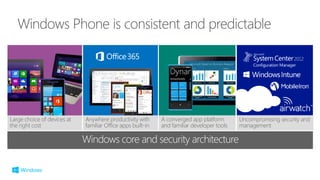
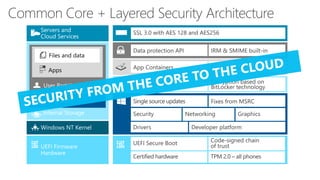
Windows core and security architecture
Large choice of devices at
the right cost
Anywhere productivity with
familiar Office apps built-in
A converged app platform
and familiar developer tools
Uncompromising security and
management
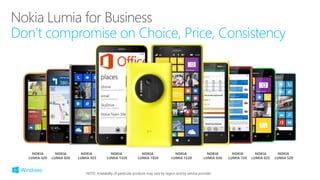
NOKIA
LUMIA 925
NOKIA
LUMIA 920
NOKIA
LUMIA 625
NOKIA
LUMIA 720
NOKIA
LUMIA 620
NOKIA
LUMIA 520
NOKIA
LUMIA 1020
NOKIA
LUMIA 820
NOKIA
LUMIA 1520
NOKIA
LUMIA 1320
NOTE: Availability of particular products may vary by region and by service provider.
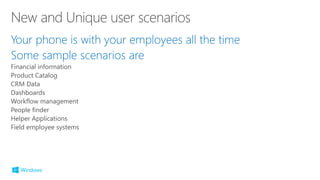
Your phone is with your employees all the time
Some sample scenarios are
Financial information
Product Catalog
CRM Data
Dashboards
Workflow management
People finder
Helper Applications
Field employee systems
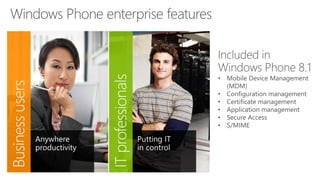
• Mobile Device Management
(MDM)
• Configuration management
• Certificate management
• Application management
• Secure Access
• S/MIME
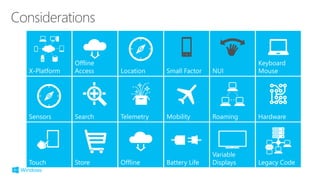
X-Platform
Offline
Access Location
Sensors Search Telemetry
Touch Store Offline
Mobility
Battery Life
Roaming
Variable
Displays
Keyboard
Mouse
Hardware
Legacy Code
NUISmall Factor
7/6/2014 14
7/6/2014 15
7/6/2014 17
7/6/2014 18
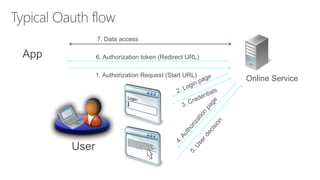
Online Service1. Authorization Request (Start URL)
6. Authorization token (Redirect URL)
7. Data access
User
App
7/6/2014 26
7/6/2014 27
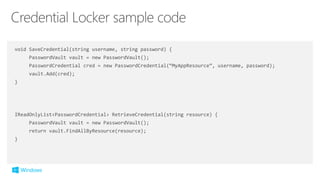
void SaveCredential(string username, string password) {
PasswordVault vault = new PasswordVault();
PasswordCredential cred = new PasswordCredential(“MyAppResource”, username, password);
vault.Add(cred);
}
IReadOnlyList<PasswordCredential> RetrieveCredential(string resource) {
PasswordVault vault = new PasswordVault();
return vault.FindAllByResource(resource);
}
7/6/2014 31
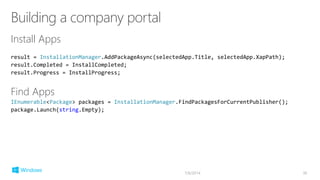
Install Apps
result = InstallationManager.AddPackageAsync(selectedApp.Title, selectedApp.XapPath);
result.Completed = InstallCompleted;
result.Progress = InstallProgress;
Find Apps
IEnumerable<Package> packages = InstallationManager.FindPackagesForCurrentPublisher();
package.Launch(string.Empty);
7/6/2014 36
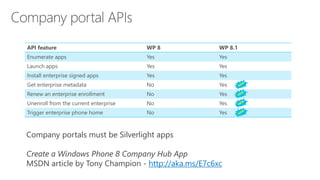
API feature WP 8 WP 8.1
Enumerate apps Yes Yes
Launch apps Yes Yes
Install enterprise signed apps Yes Yes
Get enterprise metadata No Yes
Renew an enterprise enrollment No Yes
Unenroll from the current enterprise No Yes
Trigger enterprise phone home No Yes
Company portals must be Silverlight apps
Create a Windows Phone 8 Company Hub App
MSDN article by Tony Champion - http://aka.ms/E7c6xc
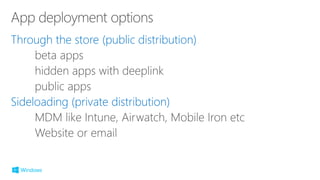
Through the store (public distribution)
Sideloading (private distribution)
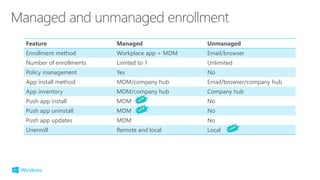
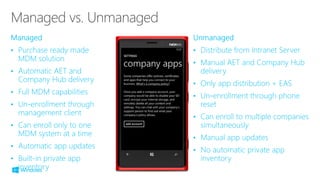
Feature Managed Unmanaged
Enrollment method Workplace app + MDM Email/browser
Number of enrollments Limited to 1 Unlimited
Policy management Yes No
App install method MDM/company hub Email/browser/company hub
App inventory MDM/company hub Company hub
Push app install MDM No
Push app uninstall MDM No
Push app updates MDM No
Unenroll Remote and local Local
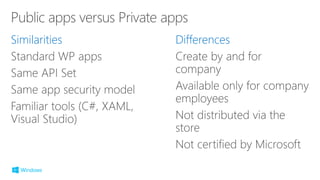
Similarities Differences
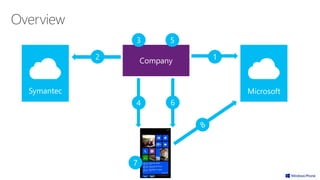
Company 12
3 5
4 6
Symantec
7
Microsoft
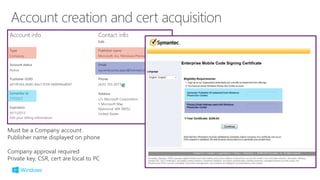
Must be a Company account
Publisher name displayed on phone
Company approval required
Private key, CSR, cert are local to PC
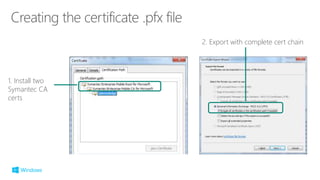
1. Install two
Symantec CA
certs
2. Export with complete cert chain
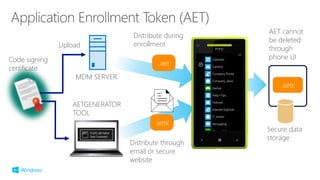
Secure data
storage
.aetx
.aet
MDM SERVER
Code signing
certificate
.aetx
Distribute through
email or secure
website
AET cannot
be deleted
through
phone UI
Distribute during
enrollmentUpload
AETGENERATOR
TOOL
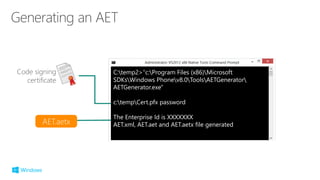
C:temp2>"c:Program Files (x86)Microsoft
SDKsWindows Phonev8.0ToolsAETGenerator
AETGenerator.exe"
c:tempCert.pfx password
The Enterprise Id is XXXXXXX
AET.xml, AET.aet and AET.aetx file generated
Code signing
certificate
AET.aetx
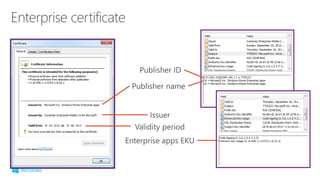
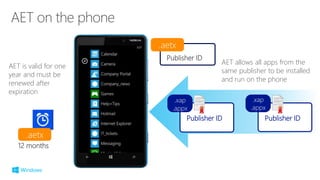
Publisher ID
.aetx
Publisher ID
.xap
.appx
Publisher ID
.xap
.appx
AET allows all apps from the
same publisher to be installed
and run on the phone
.aetx
12 months
AET is valid for one
year and must be
renewed after
expiration
2
1
2
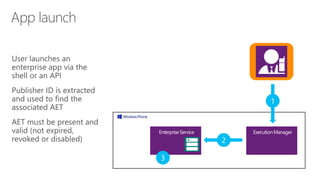
3
2
1
3
•
•
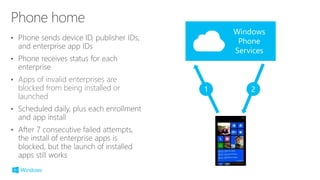
• Apps of invalid enterprises are
blocked from being installed or
launched
•
•
Windows
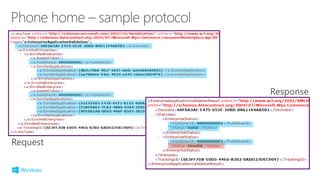
Phone
Services
1 2
Response
Request
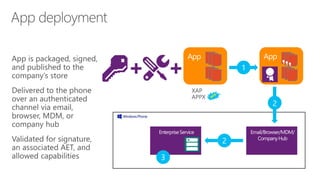
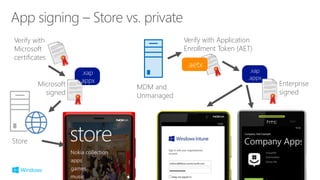
Store
.xap
.appx
Microsoft
signed
.xap
.appx
Enterprise
signed
Verify with
Microsoft
certificates
Verify with Application
Enrollment Token (AET)
.aetx
MDM and
Unmanaged
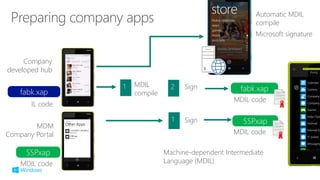
SSP.xap
fabk.xap fabk.xap1 MDIL
compile
Company
developed hub
IL code
Automatic MDIL
compile
Microsoft signature
2 Sign
MDIL code
MDM
Company Portal
SSP.xap1 Sign
MDIL code
MDIL code
Machine-dependent Intermediate
Language (MDIL)
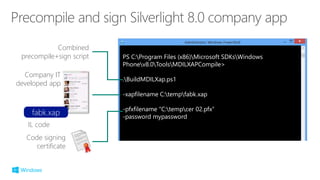
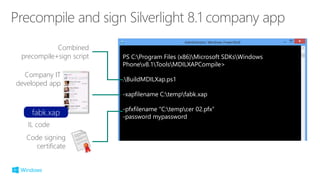
PS C:Program Files (x86)Microsoft SDKsWindows
Phonev8.0ToolsMDILXAPCompile>
.BuildMDILXap.ps1
-xapfilename C:tempfabk.xap
-pfxfilename "C:tempcer 02.pfx“
-password mypassword
fabk.xap
Company IT
developed app
IL code
Code signing
certificate
Combined
precompile+sign script
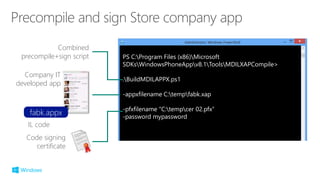
PS C:Program Files (x86)Microsoft SDKsWindows
Phonev8.1ToolsMDILXAPCompile>
.BuildMDILXap.ps1
-xapfilename C:tempfabk.xap
-pfxfilename "C:tempcer 02.pfx“
-password mypassword
fabk.xap
Company IT
developed app
IL code
Code signing
certificate
Combined
precompile+sign script
PS C:Program Files (x86)Microsoft
SDKsWindowsPhoneAppv8.1ToolsMDILXAPCompile>
.BuildMDILAPPX.ps1
-appxfilename C:tempfabk.xap
-pfxfilename "C:tempcer 02.pfx“
-password mypassword
fabk.appx
Company IT
developed app
IL code
Code signing
certificate
Combined
precompile+sign script
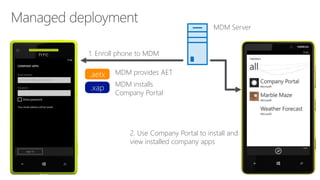
MDM Server
1. Enroll phone to MDM
.aetx MDM provides AET
.xap MDM installs
Company Portal
2. Use Company Portal to install and
view installed company apps
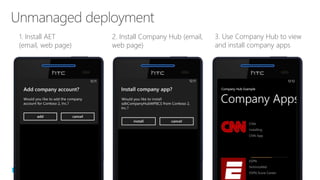
1. Install AET
(email, web page)
2. Install Company Hub (email,
web page)
3. Use Company Hub to view
and install company apps
•
•
•
•
•
•
•
•
•
•
•
•
•
•
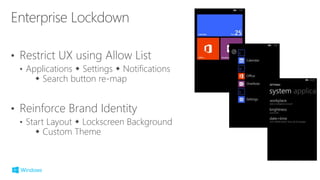
• Restrict UX using Allow List
• Applications  Settings  Notifications
 Search button re-map
• Reinforce Brand Identity
• Start Layout  Lockscreen Background
 Custom Theme
©2014 Microsoft Corporation. All rights reserved. Microsoft, Windows, Office, Azure, System Center, Dynamics and other product names are or may be registered trademarks and/or trademarks in the
U.S. and/or other countries. The information herein is for informational purposes only and represents the current view of Microsoft Corporation as of the date of this presentation. Because Microsoft
must respond to changing market conditions, it should not be interpreted to be a commitment on the part of Microsoft, and Microsoft cannot guarantee the accuracy of any information provided after
the date of this presentation. MICROSOFT MAKES NO WARRANTIES, EXPRESS, IMPLIED OR STATUTORY, AS TO THE INFORMATION IN THIS PRESENTATION.

18 windows phone 8.1 for the enterprise developer

  • 1.
    Windows Phone 8.1 BuildingApps for Windows Phone 8.1 Jump Start
  • 2.
  • 3.
  • 4.
    Windows core andsecurity architecture Large choice of devices at the right cost Anywhere productivity with familiar Office apps built-in A converged app platform and familiar developer tools Uncompromising security and management
  • 5.
    NOKIA LUMIA 925 NOKIA LUMIA 920 NOKIA LUMIA625 NOKIA LUMIA 720 NOKIA LUMIA 620 NOKIA LUMIA 520 NOKIA LUMIA 1020 NOKIA LUMIA 820 NOKIA LUMIA 1520 NOKIA LUMIA 1320 NOTE: Availability of particular products may vary by region and by service provider.
  • 6.
    Your phone iswith your employees all the time Some sample scenarios are Financial information Product Catalog CRM Data Dashboards Workflow management People finder Helper Applications Field employee systems
  • 9.
    • Mobile DeviceManagement (MDM) • Configuration management • Certificate management • Application management • Secure Access • S/MIME
  • 13.
    X-Platform Offline Access Location Sensors SearchTelemetry Touch Store Offline Mobility Battery Life Roaming Variable Displays Keyboard Mouse Hardware Legacy Code NUISmall Factor
  • 14.
  • 15.
  • 17.
  • 18.
  • 20.
    Online Service1. AuthorizationRequest (Start URL) 6. Authorization token (Redirect URL) 7. Data access User App
  • 26.
  • 27.
  • 29.
    void SaveCredential(string username,string password) { PasswordVault vault = new PasswordVault(); PasswordCredential cred = new PasswordCredential(“MyAppResource”, username, password); vault.Add(cred); } IReadOnlyList<PasswordCredential> RetrieveCredential(string resource) { PasswordVault vault = new PasswordVault(); return vault.FindAllByResource(resource); }
  • 31.
  • 36.
    Install Apps result =InstallationManager.AddPackageAsync(selectedApp.Title, selectedApp.XapPath); result.Completed = InstallCompleted; result.Progress = InstallProgress; Find Apps IEnumerable<Package> packages = InstallationManager.FindPackagesForCurrentPublisher(); package.Launch(string.Empty); 7/6/2014 36
  • 37.
    API feature WP8 WP 8.1 Enumerate apps Yes Yes Launch apps Yes Yes Install enterprise signed apps Yes Yes Get enterprise metadata No Yes Renew an enterprise enrollment No Yes Unenroll from the current enterprise No Yes Trigger enterprise phone home No Yes Company portals must be Silverlight apps Create a Windows Phone 8 Company Hub App MSDN article by Tony Champion - http://aka.ms/E7c6xc
  • 39.
    Through the store(public distribution) Sideloading (private distribution)
  • 40.
    Feature Managed Unmanaged Enrollmentmethod Workplace app + MDM Email/browser Number of enrollments Limited to 1 Unlimited Policy management Yes No App install method MDM/company hub Email/browser/company hub App inventory MDM/company hub Company hub Push app install MDM No Push app uninstall MDM No Push app updates MDM No Unenroll Remote and local Local
  • 41.
  • 42.
    Company 12 3 5 46 Symantec 7 Microsoft
  • 44.
    Must be aCompany account Publisher name displayed on phone Company approval required Private key, CSR, cert are local to PC
  • 46.
    1. Install two SymantecCA certs 2. Export with complete cert chain
  • 47.
    Secure data storage .aetx .aet MDM SERVER Codesigning certificate .aetx Distribute through email or secure website AET cannot be deleted through phone UI Distribute during enrollmentUpload AETGENERATOR TOOL
  • 48.
    C:temp2>"c:Program Files (x86)Microsoft SDKsWindowsPhonev8.0ToolsAETGenerator AETGenerator.exe" c:tempCert.pfx password The Enterprise Id is XXXXXXX AET.xml, AET.aet and AET.aetx file generated Code signing certificate AET.aetx
  • 49.
    Publisher ID .aetx Publisher ID .xap .appx PublisherID .xap .appx AET allows all apps from the same publisher to be installed and run on the phone .aetx 12 months AET is valid for one year and must be renewed after expiration
  • 50.
  • 51.
  • 52.
    • • • Apps ofinvalid enterprises are blocked from being installed or launched • • Windows Phone Services 1 2
  • 53.
  • 54.
  • 55.
    SSP.xap fabk.xap fabk.xap1 MDIL compile Company developedhub IL code Automatic MDIL compile Microsoft signature 2 Sign MDIL code MDM Company Portal SSP.xap1 Sign MDIL code MDIL code Machine-dependent Intermediate Language (MDIL)
  • 56.
    PS C:Program Files(x86)Microsoft SDKsWindows Phonev8.0ToolsMDILXAPCompile> .BuildMDILXap.ps1 -xapfilename C:tempfabk.xap -pfxfilename "C:tempcer 02.pfx“ -password mypassword fabk.xap Company IT developed app IL code Code signing certificate Combined precompile+sign script
  • 57.
    PS C:Program Files(x86)Microsoft SDKsWindows Phonev8.1ToolsMDILXAPCompile> .BuildMDILXap.ps1 -xapfilename C:tempfabk.xap -pfxfilename "C:tempcer 02.pfx“ -password mypassword fabk.xap Company IT developed app IL code Code signing certificate Combined precompile+sign script
  • 58.
    PS C:Program Files(x86)Microsoft SDKsWindowsPhoneAppv8.1ToolsMDILXAPCompile> .BuildMDILAPPX.ps1 -appxfilename C:tempfabk.xap -pfxfilename "C:tempcer 02.pfx“ -password mypassword fabk.appx Company IT developed app IL code Code signing certificate Combined precompile+sign script
  • 59.
    MDM Server 1. Enrollphone to MDM .aetx MDM provides AET .xap MDM installs Company Portal 2. Use Company Portal to install and view installed company apps
  • 60.
    1. Install AET (email,web page) 2. Install Company Hub (email, web page) 3. Use Company Hub to view and install company apps
  • 61.
  • 62.
    • Restrict UXusing Allow List • Applications  Settings  Notifications  Search button re-map • Reinforce Brand Identity • Start Layout  Lockscreen Background  Custom Theme
  • 66.
    ©2014 Microsoft Corporation.All rights reserved. Microsoft, Windows, Office, Azure, System Center, Dynamics and other product names are or may be registered trademarks and/or trademarks in the U.S. and/or other countries. The information herein is for informational purposes only and represents the current view of Microsoft Corporation as of the date of this presentation. Because Microsoft must respond to changing market conditions, it should not be interpreted to be a commitment on the part of Microsoft, and Microsoft cannot guarantee the accuracy of any information provided after the date of this presentation. MICROSOFT MAKES NO WARRANTIES, EXPRESS, IMPLIED OR STATUTORY, AS TO THE INFORMATION IN THIS PRESENTATION.