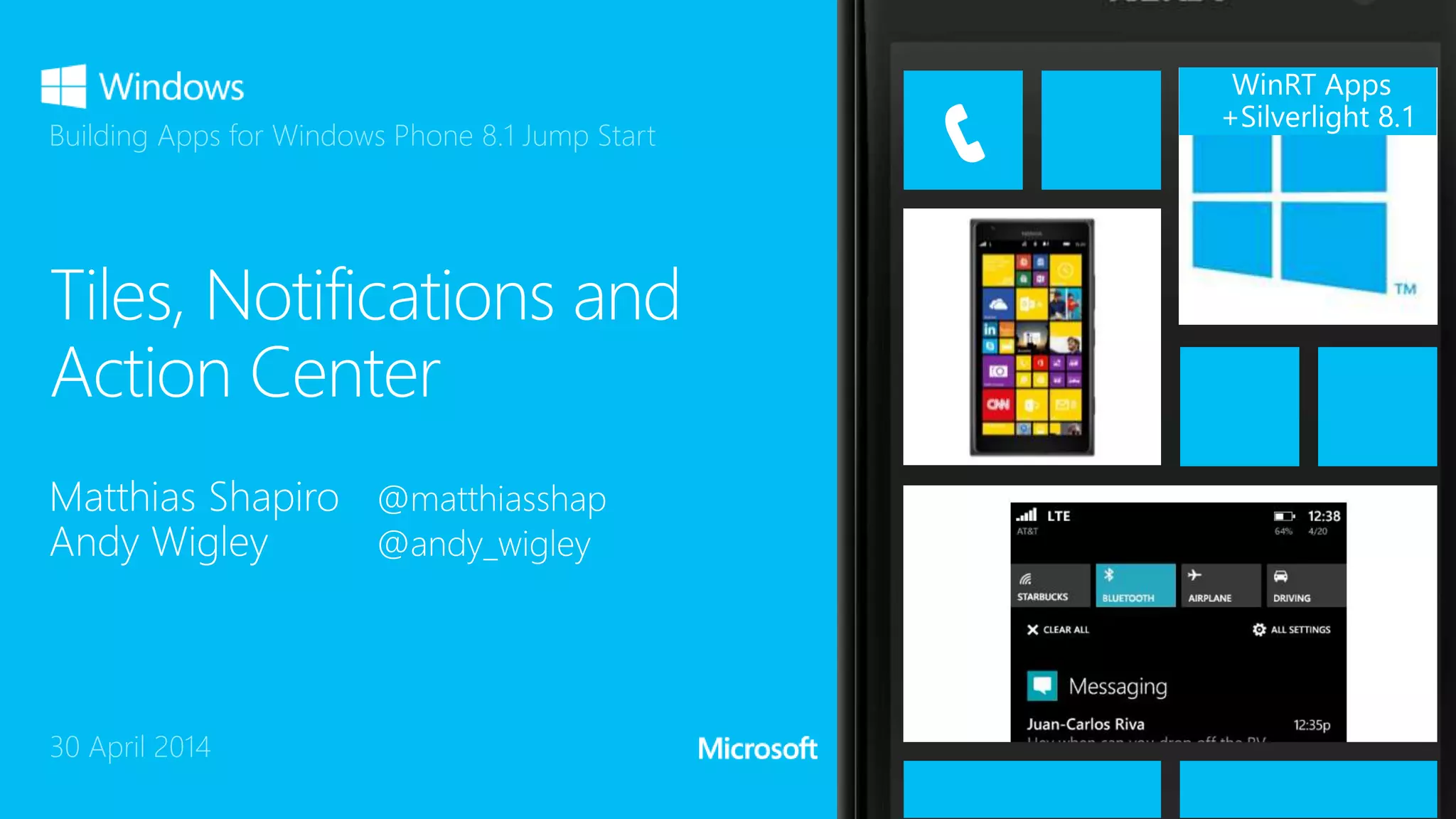
WinRT Apps
+Silverlight 8.1
30 April 2014
Building Apps for Windows Phone 8.1 Jump Start
2
4
5
6
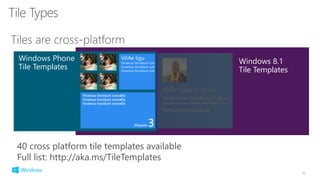
40 cross platform tile templates available
Full list: http://aka.ms/TileTemplates
Windows 8.1
Tile Templates
Windows Phone
Tile Templates
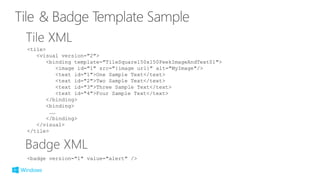
<tile>
<visual version="2">
<binding template="TileSquare150x150PeekImageAndText01">
<image id="1" src="{image url}" alt="MyImage"/>
<text id="1">One Sample Text</text>
<text id="2">Two Sample Text</text>
<text id="3">Three Sample Text</text>
<text id="4">Four Sample Text</text>
</binding>
<binding>
……
</binding>
</visual>
</tile>
<badge version="1" value="alert" />
13
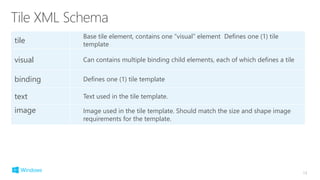
tile
Base tile element, contains one “visual” element Defines one (1) tile
template
visual Can contains multiple binding child elements, each of which defines a tile
binding Defines one (1) tile template
text Text used in the tile template.
image Image used in the tile template. Should match the size and shape image
requirements for the template.
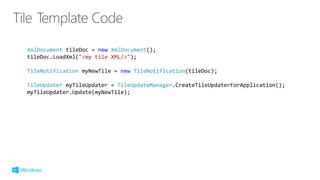
XmlDocument tileDoc = new XmlDocument();
tileDoc.LoadXml("<my tile XML/>");
TileNotification myNewTile = new TileNotification(tileDoc);
TileUpdater myTileUpdater = TileUpdateManager.CreateTileUpdaterForApplication();
myTileUpdater.Update(myNewTile);
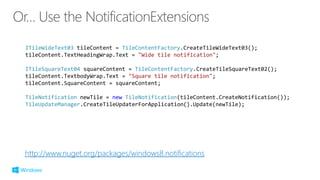
http://www.nuget.org/packages/windows8.notifications
ITileWideText03 tileContent = TileContentFactory.CreateTileWideText03();
tileContent.TextHeadingWrap.Text = "Wide tile notification";
ITileSquareText04 squareContent = TileContentFactory.CreateTileSquareText02();
tileContent.TextbodyWrap.Text = "Square tile notification";
tileContent.SquareContent = squareContent;
TileNotification newTile = new TileNotification(tileContent.CreateNotification());
TileUpdateManager.CreateTileUpdaterForApplication().Update(newTile);
18
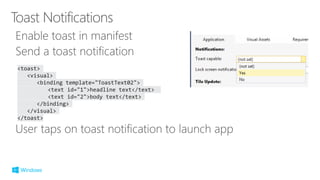
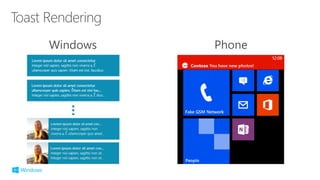
<toast>
<visual>
<binding template="ToastText02">
<text id="1">headline text</text>
<text id="2">body text</text>
</binding>
</visual>
</toast>
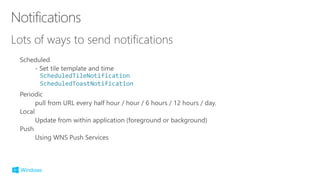
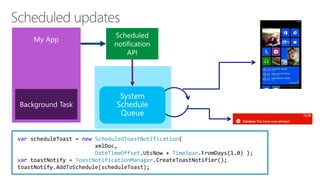
ScheduledTileNotification
ScheduledToastNotification
var scheduleToast = new ScheduledToastNotification(
xmlDoc,
DateTimeOffset.UtcNow + TimeSpan.FromDays(1.0) );
var toastNotify = ToastNotificationManager.CreateToastNotifier();
toastNotify.AddToSchedule(scheduleToast);
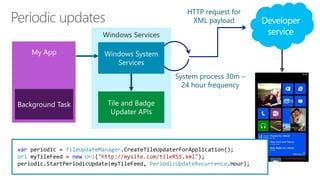
HTTP request for
XML payload
Windows Services
System process 30m –
24 hour frequency
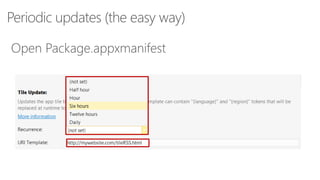
var periodic = TileUpdateManager.CreateTileUpdaterForApplication();
Uri myTileFeed = new Uri("http://mysite.com/tileRSS.xml");
periodic.StartPeriodicUpdate(myTileFeed, PeriodicUpdateRecurrence.Hour);
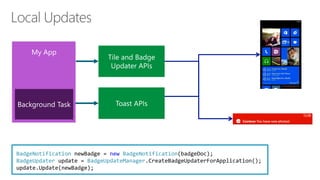
BadgeNotification newBadge = new BadgeNotification(badgeDoc);
BadgeUpdater update = BadgeUpdateManager.CreateBadgeUpdaterForApplication();
update.Update(newBadge);
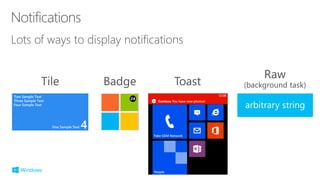
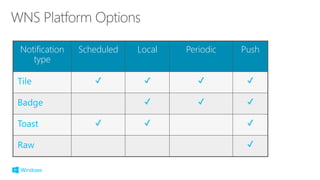
Notification
type
Scheduled Local Periodic Push
29
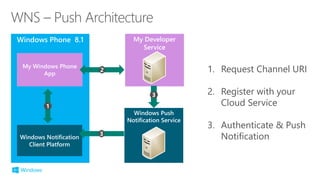
1. Request Channel URI
2. Register with your
Cloud Service
3. Authenticate & Push
Notification
My Developer
Service
Windows Push
Notification Service
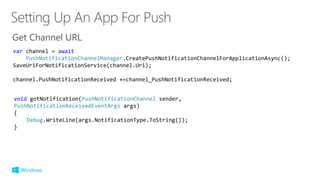
Get Channel URL
void gotNotification(PushNotificationChannel sender,
PushNotificationReceivedEventArgs args)
{
Debug.WriteLine(args.NotificationType.ToString());
}
var channel = await
PushNotificationChannelManager.CreatePushNotificationChannelForApplicationAsync();
SaveUriForNotificationService(channel.Uri);
channel.PushNotificationReceived +=channel_PushNotificationReceived;
Sample Project for Push Notifications
[URL for notification sample service project, visible at
http://pushtestserver.azurewebsites.net/wns/ ]
Use Azure Notification Hub
Cross device notifications
http://aka.ms/notifyhub
40
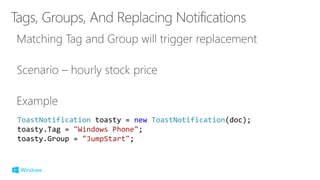
ToastNotification toasty = new ToastNotification(doc);
toasty.Tag = "Windows Phone";
toasty.Group = "JumpStart";
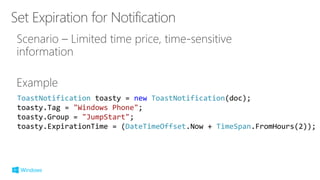
ToastNotification toasty = new ToastNotification(doc);
toasty.Tag = "Windows Phone";
toasty.Group = "JumpStart";
toasty.ExpirationTime = (DateTimeOffset.Now + TimeSpan.FromHours(2));
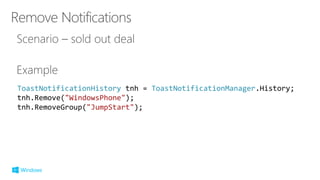
ToastNotificationHistory tnh = ToastNotificationManager.History;
tnh.Remove("WindowsPhone");
tnh.RemoveGroup("JumpStart");
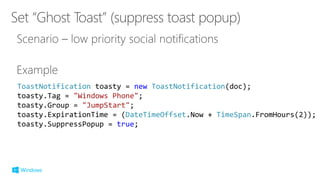
ToastNotification toasty = new ToastNotification(doc);
toasty.Tag = "Windows Phone";
toasty.Group = "JumpStart";
toasty.ExpirationTime = (DateTimeOffset.Now + TimeSpan.FromHours(2));
toasty.SuppressPopup = true;
48
©2014 Microsoft Corporation. All rights reserved. Microsoft, Windows, Office, Azure, System Center, Dynamics and other product names are or may be registered trademarks and/or trademarks in the
U.S. and/or other countries. The information herein is for informational purposes only and represents the current view of Microsoft Corporation as of the date of this presentation. Because Microsoft
must respond to changing market conditions, it should not be interpreted to be a commitment on the part of Microsoft, and Microsoft cannot guarantee the accuracy of any information provided after
the date of this presentation. MICROSOFT MAKES NO WARRANTIES, EXPRESS, IMPLIED OR STATUTORY, AS TO THE INFORMATION IN THIS PRESENTATION.

14 tiles, notifications, and action center

  • 1.
    WinRT Apps +Silverlight 8.1 30April 2014 Building Apps for Windows Phone 8.1 Jump Start
  • 2.
  • 4.
  • 5.
  • 6.
    6 40 cross platformtile templates available Full list: http://aka.ms/TileTemplates Windows 8.1 Tile Templates Windows Phone Tile Templates
  • 12.
    <tile> <visual version="2"> <binding template="TileSquare150x150PeekImageAndText01"> <imageid="1" src="{image url}" alt="MyImage"/> <text id="1">One Sample Text</text> <text id="2">Two Sample Text</text> <text id="3">Three Sample Text</text> <text id="4">Four Sample Text</text> </binding> <binding> …… </binding> </visual> </tile> <badge version="1" value="alert" />
  • 13.
    13 tile Base tile element,contains one “visual” element Defines one (1) tile template visual Can contains multiple binding child elements, each of which defines a tile binding Defines one (1) tile template text Text used in the tile template. image Image used in the tile template. Should match the size and shape image requirements for the template.
  • 14.
    XmlDocument tileDoc =new XmlDocument(); tileDoc.LoadXml("<my tile XML/>"); TileNotification myNewTile = new TileNotification(tileDoc); TileUpdater myTileUpdater = TileUpdateManager.CreateTileUpdaterForApplication(); myTileUpdater.Update(myNewTile);
  • 16.
    http://www.nuget.org/packages/windows8.notifications ITileWideText03 tileContent =TileContentFactory.CreateTileWideText03(); tileContent.TextHeadingWrap.Text = "Wide tile notification"; ITileSquareText04 squareContent = TileContentFactory.CreateTileSquareText02(); tileContent.TextbodyWrap.Text = "Square tile notification"; tileContent.SquareContent = squareContent; TileNotification newTile = new TileNotification(tileContent.CreateNotification()); TileUpdateManager.CreateTileUpdaterForApplication().Update(newTile);
  • 17.
  • 19.
    <toast> <visual> <binding template="ToastText02"> <text id="1">headlinetext</text> <text id="2">body text</text> </binding> </visual> </toast>
  • 21.
  • 22.
    var scheduleToast =new ScheduledToastNotification( xmlDoc, DateTimeOffset.UtcNow + TimeSpan.FromDays(1.0) ); var toastNotify = ToastNotificationManager.CreateToastNotifier(); toastNotify.AddToSchedule(scheduleToast);
  • 23.
    HTTP request for XMLpayload Windows Services System process 30m – 24 hour frequency var periodic = TileUpdateManager.CreateTileUpdaterForApplication(); Uri myTileFeed = new Uri("http://mysite.com/tileRSS.xml"); periodic.StartPeriodicUpdate(myTileFeed, PeriodicUpdateRecurrence.Hour);
  • 25.
    BadgeNotification newBadge =new BadgeNotification(badgeDoc); BadgeUpdater update = BadgeUpdateManager.CreateBadgeUpdaterForApplication(); update.Update(newBadge);
  • 26.
  • 28.
  • 30.
    1. Request ChannelURI 2. Register with your Cloud Service 3. Authenticate & Push Notification My Developer Service Windows Push Notification Service
  • 35.
    Get Channel URL voidgotNotification(PushNotificationChannel sender, PushNotificationReceivedEventArgs args) { Debug.WriteLine(args.NotificationType.ToString()); } var channel = await PushNotificationChannelManager.CreatePushNotificationChannelForApplicationAsync(); SaveUriForNotificationService(channel.Uri); channel.PushNotificationReceived +=channel_PushNotificationReceived;
  • 36.
    Sample Project forPush Notifications [URL for notification sample service project, visible at http://pushtestserver.azurewebsites.net/wns/ ] Use Azure Notification Hub Cross device notifications http://aka.ms/notifyhub
  • 39.
  • 42.
    ToastNotification toasty =new ToastNotification(doc); toasty.Tag = "Windows Phone"; toasty.Group = "JumpStart";
  • 43.
    ToastNotification toasty =new ToastNotification(doc); toasty.Tag = "Windows Phone"; toasty.Group = "JumpStart"; toasty.ExpirationTime = (DateTimeOffset.Now + TimeSpan.FromHours(2));
  • 44.
    ToastNotificationHistory tnh =ToastNotificationManager.History; tnh.Remove("WindowsPhone"); tnh.RemoveGroup("JumpStart");
  • 45.
    ToastNotification toasty =new ToastNotification(doc); toasty.Tag = "Windows Phone"; toasty.Group = "JumpStart"; toasty.ExpirationTime = (DateTimeOffset.Now + TimeSpan.FromHours(2)); toasty.SuppressPopup = true;
  • 47.
  • 48.
    ©2014 Microsoft Corporation.All rights reserved. Microsoft, Windows, Office, Azure, System Center, Dynamics and other product names are or may be registered trademarks and/or trademarks in the U.S. and/or other countries. The information herein is for informational purposes only and represents the current view of Microsoft Corporation as of the date of this presentation. Because Microsoft must respond to changing market conditions, it should not be interpreted to be a commitment on the part of Microsoft, and Microsoft cannot guarantee the accuracy of any information provided after the date of this presentation. MICROSOFT MAKES NO WARRANTIES, EXPRESS, IMPLIED OR STATUTORY, AS TO THE INFORMATION IN THIS PRESENTATION.