Windows 8 App Development
Arefin Ahmed
&
Palash DebnathTeam Nautisk
What is this Windows APP?
• A Windows Runtime app / Windows app is an
app that runs on a Windows device (such as a
PC or tablet) or a Windows Phone and uses
the Windows Runtime.
What is this Windows Runtime
• In-short WinRT. Rings the bell!
• Windows Runtime, or WinRT, is a platform-homogeneous
application architecture on the Windows 8 operating
system. WinRT supports development in C++/CX
(Component Extensions, a language based on C++) and the
managed languages C# and VB.NET, as well as JavaScript
and TypeScript. WinRT applications natively support both
the x86 and ARM architectures
• Windows Phone 8 uses a version of the Windows Runtime
known as the Windows Phone Runtime.[3] It enables app
development in C#, VB.NET and development of Windows
Runtime components in C++/CX.
Types of Windows App?
• 3 types
– Windows Store apps
– Windows Phone Store apps
– Universal Windows app
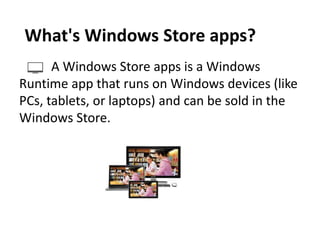
A Windows Store apps is a Windows
Runtime app that runs on Windows devices (like
PCs, tablets, or laptops) and can be sold in the
Windows Store.
What's Windows Store apps?
What's Windows Phone Store apps?
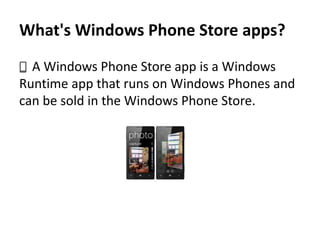
A Windows Phone Store app is a Windows
Runtime app that runs on Windows Phones and
can be sold in the Windows Phone Store.
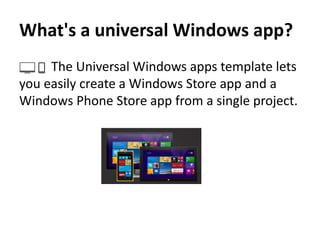
What's a universal Windows app?
The Universal Windows apps template lets
you easily create a Windows Store app and a
Windows Phone Store app from a single project.
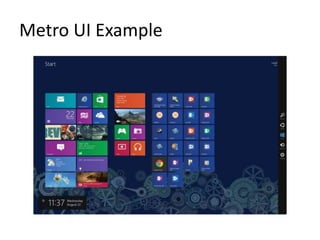
Metro UI
• In Windows Phone 7, Microsoft introduced its
Metro style user interface. The Metro style UI
is the touch-and-tile interface that Microsoft
designed to create an interface focused on
content, information, and movement.
Metro UI Example
What about Language?
• Use a language you already know.
• You can create Windows Runtime apps using
the programming languages you're most
familiar with, like JavaScript, C#, Visual Basic,
or C++. You can even write components in one
language and use them in an app that's
written in another language.
Latest Updates So Far!
• Live tiles and the lock screen show contextually
relevant and timely info at a glance.
• Push notifications bring real-time, breaking alerts to
your user’s attention when they're needed.
• On Windows Phone, the new Action Center is a place
where you can organize and display notifications and
content that users need to take action on.
• Background execution and triggers bring your app to
life just when the user needs it.
• Your app can use voice and Bluetooth LE devices to
help users interact with the world around them.
Monetize your app your way
• On Windows, you can choose how you'll monetize your
app—across phones, tablets, and PCs. We give you a
number of ways to make money with your app and the
services it delivers. All you need to do is choose the one
that works best for you:
• A paid download is the simplest option. Just name your
price.
• Trials give you a unique way to let users try your app before
buying it, providing easier discoverability and conversion
than the more traditional "freemium" options.
• In-app purchase offers you the most flexibility for
monetizing your app.
Other types of apps
• Yes!
Windows desktop app
An executable or browser plug-in that
runs in the Windows desktop
environment. These apps are typically
written in Win32 and COM, .NET, WPF, or
Direct3D APIs. For more info, see the
Desktop dev center.
Windows Phone Silverlight app
Windows Phone Silverlight 8 app
Windows Phone Silverlight 8.1 app
A Windows Phone app that uses the
Windows Phone Silverlight UI Framework
instead of the Windows Runtime and can
be sold in the Windows Phone Store. For
more info,
Environment set up 
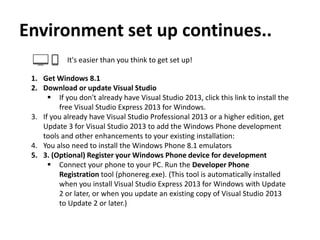
Environment set up continues..
It's easier than you think to get set up!
1. Get Windows 8.1
2. Download or update Visual Studio
 If you don't already have Visual Studio 2013, click this link to install the
free Visual Studio Express 2013 for Windows.
3. If you already have Visual Studio Professional 2013 or a higher edition, get
Update 3 for Visual Studio 2013 to add the Windows Phone development
tools and other enhancements to your existing installation:
4. You also need to install the Windows Phone 8.1 emulators
5. 3. (Optional) Register your Windows Phone device for development
 Connect your phone to your PC. Run the Developer Phone
Registration tool (phonereg.exe). (This tool is automatically installed
when you install Visual Studio Express 2013 for Windows with Update
2 or later, or when you update an existing copy of Visual Studio 2013
to Update 2 or later.)
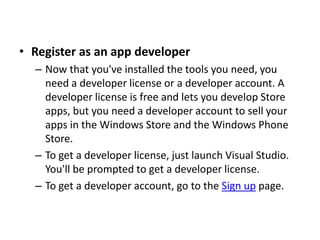
• Register as an app developer
– Now that you've installed the tools you need, you
need a developer license or a developer account. A
developer license is free and lets you develop Store
apps, but you need a developer account to sell your
apps in the Windows Store and the Windows Phone
Store.
– To get a developer license, just launch Visual Studio.
You'll be prompted to get a developer license.
– To get a developer account, go to the Sign up page.
Tired!!
Let’s Create Our first app!
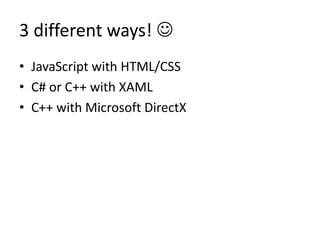
3 different ways! 
• JavaScript with HTML/CSS
• C# or C++ with XAML
• C++ with Microsoft DirectX
Advanced topic
• Side Loading windows app
• MVVM/Prism Framework
• SQLite for Database Operations
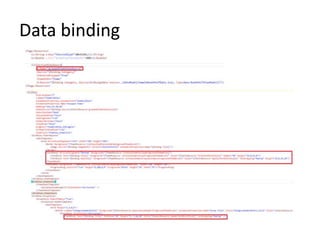
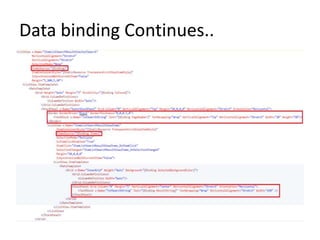
• Strong Data binding capability
• Dependency Property
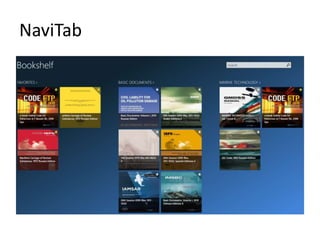
• Make your own Control
• Expression Blend for Custom Design
What is Side Loading?
• A simplest way to generate the installer/ app
package to provide it to users.
• Key Features:
– Don’t need to upload or share our app to
Windows store to provide it to end users.
– Can be remotely maintained/managed to provide
updated versions/bug fix/support.
MVVM/Prism Framework
• Makes developers life easy!
SQLite for Database Operations
Data binding
Data binding Continues..
Make your own Control
NaviTab
Demo
Start Developing apps and make
money!!
Presentation[1]
Presentation[1]

Presentation[1]

  • 1.
    Windows 8 AppDevelopment Arefin Ahmed & Palash DebnathTeam Nautisk
  • 3.
    What is thisWindows APP?
  • 4.
    • A WindowsRuntime app / Windows app is an app that runs on a Windows device (such as a PC or tablet) or a Windows Phone and uses the Windows Runtime.
  • 5.
    What is thisWindows Runtime • In-short WinRT. Rings the bell! • Windows Runtime, or WinRT, is a platform-homogeneous application architecture on the Windows 8 operating system. WinRT supports development in C++/CX (Component Extensions, a language based on C++) and the managed languages C# and VB.NET, as well as JavaScript and TypeScript. WinRT applications natively support both the x86 and ARM architectures • Windows Phone 8 uses a version of the Windows Runtime known as the Windows Phone Runtime.[3] It enables app development in C#, VB.NET and development of Windows Runtime components in C++/CX.
  • 6.
    Types of WindowsApp? • 3 types – Windows Store apps – Windows Phone Store apps – Universal Windows app
  • 7.
    A Windows Storeapps is a Windows Runtime app that runs on Windows devices (like PCs, tablets, or laptops) and can be sold in the Windows Store. What's Windows Store apps?
  • 8.
    What's Windows PhoneStore apps? A Windows Phone Store app is a Windows Runtime app that runs on Windows Phones and can be sold in the Windows Phone Store.
  • 9.
    What's a universalWindows app? The Universal Windows apps template lets you easily create a Windows Store app and a Windows Phone Store app from a single project.
  • 10.
    Metro UI • InWindows Phone 7, Microsoft introduced its Metro style user interface. The Metro style UI is the touch-and-tile interface that Microsoft designed to create an interface focused on content, information, and movement.
  • 11.
  • 12.
    What about Language? •Use a language you already know. • You can create Windows Runtime apps using the programming languages you're most familiar with, like JavaScript, C#, Visual Basic, or C++. You can even write components in one language and use them in an app that's written in another language.
  • 13.
    Latest Updates SoFar! • Live tiles and the lock screen show contextually relevant and timely info at a glance. • Push notifications bring real-time, breaking alerts to your user’s attention when they're needed. • On Windows Phone, the new Action Center is a place where you can organize and display notifications and content that users need to take action on. • Background execution and triggers bring your app to life just when the user needs it. • Your app can use voice and Bluetooth LE devices to help users interact with the world around them.
  • 14.
    Monetize your appyour way • On Windows, you can choose how you'll monetize your app—across phones, tablets, and PCs. We give you a number of ways to make money with your app and the services it delivers. All you need to do is choose the one that works best for you: • A paid download is the simplest option. Just name your price. • Trials give you a unique way to let users try your app before buying it, providing easier discoverability and conversion than the more traditional "freemium" options. • In-app purchase offers you the most flexibility for monetizing your app.
  • 15.
    Other types ofapps • Yes! Windows desktop app An executable or browser plug-in that runs in the Windows desktop environment. These apps are typically written in Win32 and COM, .NET, WPF, or Direct3D APIs. For more info, see the Desktop dev center. Windows Phone Silverlight app Windows Phone Silverlight 8 app Windows Phone Silverlight 8.1 app A Windows Phone app that uses the Windows Phone Silverlight UI Framework instead of the Windows Runtime and can be sold in the Windows Phone Store. For more info,
  • 16.
  • 17.
    Environment set upcontinues.. It's easier than you think to get set up! 1. Get Windows 8.1 2. Download or update Visual Studio  If you don't already have Visual Studio 2013, click this link to install the free Visual Studio Express 2013 for Windows. 3. If you already have Visual Studio Professional 2013 or a higher edition, get Update 3 for Visual Studio 2013 to add the Windows Phone development tools and other enhancements to your existing installation: 4. You also need to install the Windows Phone 8.1 emulators 5. 3. (Optional) Register your Windows Phone device for development  Connect your phone to your PC. Run the Developer Phone Registration tool (phonereg.exe). (This tool is automatically installed when you install Visual Studio Express 2013 for Windows with Update 2 or later, or when you update an existing copy of Visual Studio 2013 to Update 2 or later.)
  • 18.
    • Register asan app developer – Now that you've installed the tools you need, you need a developer license or a developer account. A developer license is free and lets you develop Store apps, but you need a developer account to sell your apps in the Windows Store and the Windows Phone Store. – To get a developer license, just launch Visual Studio. You'll be prompted to get a developer license. – To get a developer account, go to the Sign up page.
  • 19.
  • 20.
  • 21.
    3 different ways! • JavaScript with HTML/CSS • C# or C++ with XAML • C++ with Microsoft DirectX
  • 22.
    Advanced topic • SideLoading windows app • MVVM/Prism Framework • SQLite for Database Operations • Strong Data binding capability • Dependency Property • Make your own Control • Expression Blend for Custom Design
  • 23.
    What is SideLoading? • A simplest way to generate the installer/ app package to provide it to users. • Key Features: – Don’t need to upload or share our app to Windows store to provide it to end users. – Can be remotely maintained/managed to provide updated versions/bug fix/support.
  • 24.
    MVVM/Prism Framework • Makesdevelopers life easy!
  • 25.
  • 26.
  • 27.
  • 28.
  • 29.
  • 30.
  • 31.
    Start Developing appsand make money!!