User Defined Methods in Java
With Animation
Index
1.
2.

Advantages
Simple Programs using Methods
a)
b)
c)
d)
e)
f)
g)
h)
i)
j)
k)
l)
m)
n)
o)
p)
q)
r)

Add two numbers
Average of three numbers
Circle area
Fahrenheit to Celsius
Check number is even or not
Check number is prime or not
Reverse of a number
Check number is palindrome or not
Count number of digits in a number
Sum of digits
LCM of 2, 3 and 4 numbers
HFC of 2 numbers
1 to 100 prime numbers
200 to 500 prime and palindrome
Decimal to binary, octal, hex
Binary to decimal, octal, hex
Octal to binary,decimal, hex
Hexadecimal to binary, octal, decimal

3.

Pass Array to Methods
a)
b)
c)
d)
e)

4.

Print all elements of an array
Sum of an array
Average of an array
Maximum element of an array
Minimum element of an array

Returning Array From Methods
a)
b)

Reverse array
Reverse every element of an array
Function v/s Method
Function v/s Method
Q.)What is the difference between a
function and a method.?
Function v/s Method
Q.)What is the difference between a
function and a method.?
Ans.) A method is a function that is
written in a class.
Function v/s Method
Q.)What is the difference between a
function and a method.?
Ans.) A method is a function that is
written in a class.

We do not have functions in java; instead we have methods. This means whenever a
function is written in java. It should be written inside the class
only. But if we take C++, we can write the functions inside as well as outside the class.
So in C++, they are called member functions and not methods.
Function with no arguments and no
return(no input no output)
void display()
{
System.out.println("this is inside method body");

}
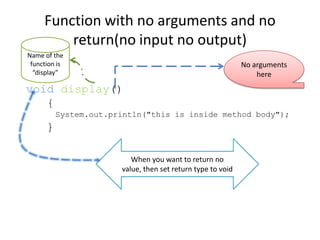
Function with no arguments and no
return(no input no output)
void display()
{
System.out.println("this is inside method body");

}
When you want to return no value,
then set return type to void
Function with no arguments and no
return(no input no output)
Name of the
function is
“display”

void display()
{
System.out.println("this is inside method body");

}
When you want to return no value,
then set return type to void
Function with no arguments and no
return(no input no output)
Name of the
function is
“display”

No arguments
here

void display()
{
System.out.println("this is inside method body");

}
When you want to return no value,
then set return type to void
Complete Program
public class function1
{
static void display()
{
System.out.println("this is inside method body");
}
public static void main(String args[])
{
System.out.println("before function call");
display();
System.out.println("after function call");
}
}
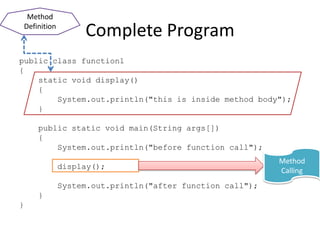
Method
Definition

Complete Program

public class function1
{
static void display()
{
System.out.println("this is inside method body");
}
public static void main(String args[])
{
System.out.println("before function call");
display();
System.out.println("after function call");
}
}
Method
Definition

Complete Program

public class function1
{
static void display()
{
System.out.println("this is inside method body");
}
public static void main(String args[])
{
System.out.println("before function call");
display();
System.out.println("after function call");
}
}

Method
Calling
Add two integer numbers
int add(int a, int b)
{
int c=a+b;
return c;
}
Add two integer numbers
int add(int a, int b)
{
int c=a+b;
return c;
}

Two Integer
Arguments
Add two integer numbers
int add(int a, int b)
{
int c=a+b;
return c;
}
Returning integer value to calling method

Two Integer
Arguments
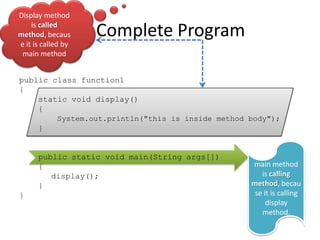
Complete Program
public class function1
{
static int add(int a, int b)
{
int c=a+b;
return c;
}
public static void main(String args[])
{
System.out.println(add(45,67));
}
}
Display method
is called
method,
because it is
called by main
method

Complete Program

public class function1
{
static int add(int a, int b)
{
int c=a+b;
return c;
}
public static void main(String args[])
{
System.out.println(add(45,67));
}
}
Display method
is called
method,
because it is
called by main
method

Complete Program

public class function1
{
static int add(int a, int b)
{
int c=a+b;
return c;
}
public static void main(String args[])
{
System.out.println(add(45,67));
}
}

main method
is calling
method,
because it is
calling display
method.
Average of three integer numbers
double
{
double d;
d=((double)a+b+c)/3;
return d;
}

)
Average of three integer numbers
double
{
double d;
d=((double)a+b+c)/3;
return d;
}

)

This method takes
multiple arguments and
returns single value
Average of three integer numbers
double
{
double d;
d=((double)a+b+c)/3;
return d;
}

)

This method takes
multiple arguments and
returns single value
Calculate circle Area
double
{
double area=Math.PI*radius*radius;
return area;
}
Calculate circle Area
double
{
double area=Math.PI*radius*radius;
return area;
}
Convert Fahrenheit to Celsius
double convertFahToCel(double fah)
{
double cel=(fah-32)*5/9;
return cel;

}
Convert Fahrenheit to Celsius
double convertFahToCel(double fah)
{
double cel=(fah-32)*5/9;
return cel;

}
This method takes one
argument and returns
single value
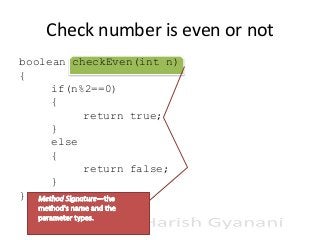
Check number is even or not
boolean checkEven(int n)
{
if(n%2==0)
{
return true;
}
else
{
return false;
}
}
Check number is even or not
boolean checkEven(int n)
{
if(n%2==0)
{
return true;
}
else
{
return false;
}
}
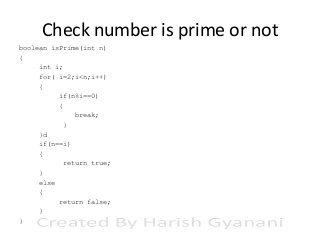
Check number is prime or not
boolean isPrime(int n)
{
int i;
for( i=2;i<n;i++)
{
if(n%i==0)
{
break;
}
}d
if(n==i)
{
return true;
}
else
{
return false;
}
}
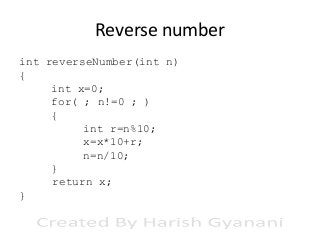
Reverse number
int reverseNumber(int n)
{
int x=0;
for( ; n!=0 ; )
{
int r=n%10;
x=x*10+r;
n=n/10;
}
return x;
}
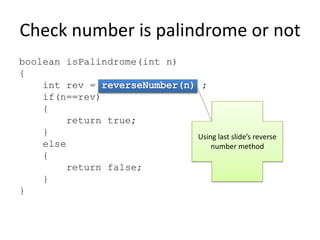
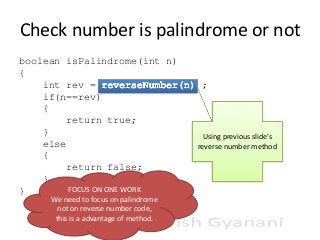
Check number is palindrome or not
boolean isPalindrome(int n)
{
int rev =
if(n==rev)
{
return true;
}
else
{
return false;
}
FOCUS ON ONE WORK
}
We need to focus on palindrome
not on reverse number code,
this is a advantage of method.

;
Check number is palindrome or not
boolean isPalindrome(int n)
{
int rev =
if(n==rev)
{
return true;
}
else
{
return false;
}
FOCUS ON ONE WORK
}
We need to focus on palindrome
not on reverse number code,
this is a advantage of method.

;

Using previous slide’s
reverse number method
Count number of digits in a number
This is Exercise
Sum of digits
This is Exercise
LCM(Lowest Common Multiple) of 2
numbers
long getLCM(int n1, int n2)
{
long answer=1;
for(int i=2;n1!=1 && n2!=1;)
{
if(n1%i==0 && n2%i==0)
{
n1=n1/i;
n2=n2/i;
answer=answer*i;
}
else if(n1%i==0)
{
n1=n1/i;
answer=answer*i;
}

else if(n2%i==0)
{
n2=n2/i;
answer=answer*i;
}
else
{
i++;
}

}//end of for loop
answer=n1*n2*answer;
return answer;
}//end of this method
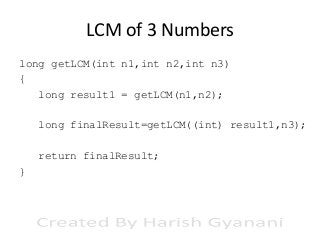
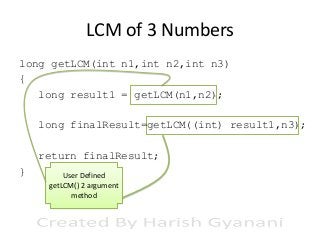
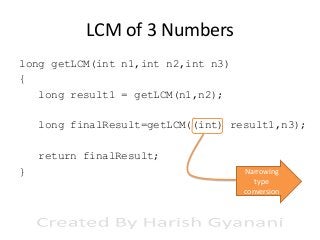
LCM of 3 Numbers
long getLCM(int n1,int n2,int n3)
{
long result1 = getLCM(n1,n2);
long finalResult=getLCM((int) result1,n3);
return finalResult;
}
LCM of 3 Numbers
long getLCM(int n1,int n2,int n3)
{
long result1 = getLCM(n1,n2);
long finalResult=getLCM((int) result1,n3);
return finalResult;
}

Method overloading on getLCM() method
differ by number of arguments
LCM of 3 Numbers
long getLCM(int n1,int n2,int n3)
{
long result1 = getLCM(n1,n2);
long finalResult=getLCM((int) result1,n3);
return finalResult;
}
LCM of 3 Numbers
long getLCM(int n1,int n2,int n3)
{
long result1 = getLCM(n1,n2);
long finalResult=getLCM((int) result1,n3);
return finalResult;
}

User Defined
getLCM() 2 argument
method
LCM of 3 Numbers
long getLCM(int n1,int n2,int n3)
{
long result1 = getLCM(n1,n2);
long finalResult=getLCM((int) result1,n3);
return finalResult;
}
LCM of 3 Numbers
long getLCM(int n1,int n2,int n3)
{
long result1 = getLCM(n1,n2);
long finalResult=getLCM((int) result1,n3);
return finalResult;
}

Narrowing
type
conversion
LCM of 3 Numbers
long getLCM(int n1,int n2,int n3)
{
long result1 = getLCM(n1,n2);
long finalResult=getLCM((int) result1,n3);
return finalResult;
}
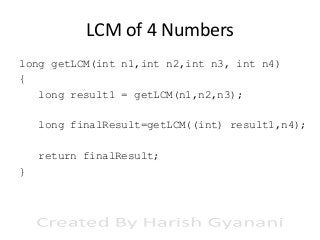
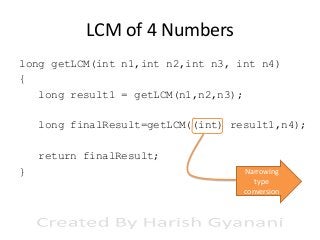
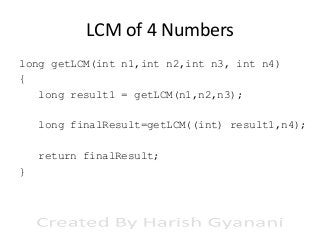
LCM of 4 Numbers
long getLCM(int n1,int n2,int n3, int n4)
{
long result1 = getLCM(n1,n2,n3);
long finalResult=getLCM((int) result1,n4);
return finalResult;
}
LCM of 4 Numbers
long getLCM(int n1,int n2,int n3, int n4)
{
long result1 = getLCM(n1,n2,n3);
long finalResult=getLCM((int) result1,n4);
return finalResult;
}

Method overloading on getLCM() method
differ by number of arguments
LCM of 4 Numbers
long getLCM(int n1,int n2,int n3, int n4)
{
long result1 = getLCM(n1,n2,n3);
long finalResult=getLCM((int) result1,n4);
return finalResult;
}
LCM of 4 Numbers
long getLCM(int n1,int n2,int n3, int n4)
{
long result1 = getLCM(n1,n2,n3);
long finalResult=getLCM((int) result1,n4);
return finalResult;
}

User Defined
getLCM() 3
arguments method
LCM of 4 Numbers
long getLCM(int n1,int n2,int n3, int n4)
{
long result1 = getLCM(n1,n2,n3);
long finalResult=getLCM((int) result1,n4);
return finalResult;
}
LCM of 4 Numbers
long getLCM(int n1,int n2,int n3, int n4)
{
long result1 = getLCM(n1,n2,n3);
long finalResult=getLCM((int) result1,n4);
return finalResult;
}

Narrowing
type
conversion
LCM of 4 Numbers
long getLCM(int n1,int n2,int n3, int n4)
{
long result1 = getLCM(n1,n2,n3);
long finalResult=getLCM((int) result1,n4);
return finalResult;
}
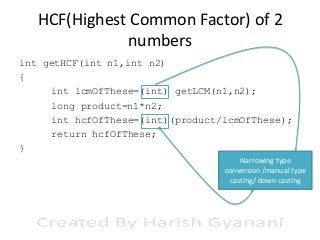
HCF(Highest Common Factor) of 2
numbers
int getHCF(int n1,int n2)
{
int lcmOfThese=(int) getLCM(n1,n2);
long product=n1*n2;
int hcfOfThese=(int)(product/lcmOfThese);
return hcfOfThese;
}
HCF(Highest Common Factor) of 2
numbers
int getHCF(int n1,int n2)
{
int lcmOfThese=(int) getLCM(n1,n2);
long product=n1*n2;
int hcfOfThese=(int)(product/lcmOfThese);
return hcfOfThese;
}
Narrowing type
conversion /manual type
casting/ down casting
HCF(Highest Common Factor) of 2
numbers
int getHCF(int n1,int n2)
{
int lcmOfThese=(int) getLCM(n1,n2);
long product=n1*n2;
int hcfOfThese=(int)(product/lcmOfThese);
return hcfOfThese;
}
HCF(Highest Common Factor) of 2
numbers
int getHCF(int n1,int n2)
{
int lcmOfThese=(int) getLCM(n1,n2);
long product=n1*n2;
int hcfOfThese=(int)(product/lcmOfThese);
return hcfOfThese;
}

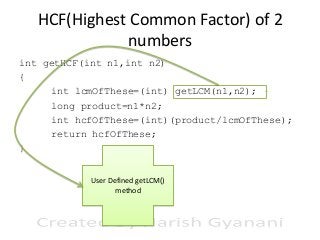
User Defined getLCM()
method
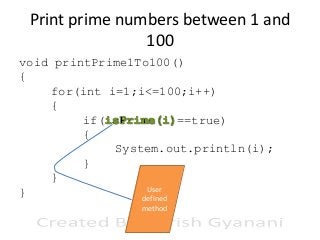
Print prime numbers between 1 and
100
void printPrime1To100()
{
for(int i=1;i<=100;i++)
{
if(
==true)
{
System.out.println(i);
}
}
User
}
defined
method
Print prime numbers between 200 and 500
which are Palindrome numbers too
This is exercise
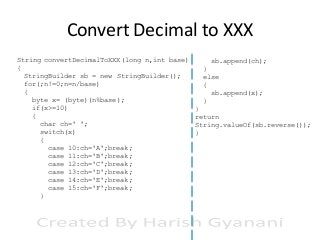
Convert Decimal to XXX
String convertDecimalToXXX(long n,int base)
{
StringBuilder sb = new StringBuilder();
for(;n!=0;n=n/base)
{
byte x= (byte)(n%base);
if(x>=10)
{
char ch=' ';
switch(x)
{
case 10:ch='A';break;
case 11:ch='B';break;
case 12:ch='C';break;
case 13:ch='D';break;
case 14:ch='E';break;
case 15:ch='F';break;
}

sb.append(ch);
}
else
{
sb.append(x);
}
}
return
String.valueOf(sb.reverse());
}
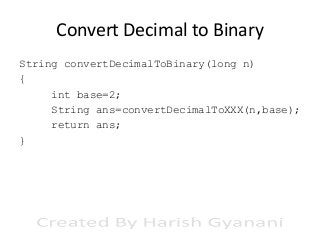
Convert Decimal to Binary
String convertDecimalToBinary(long n)
{
int base=2;
String ans=convertDecimalToXXX(n,base);
return ans;
}
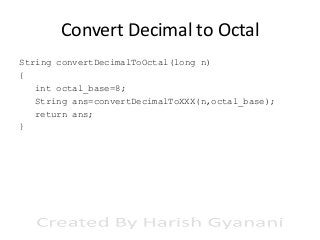
Convert Decimal to Octal
String convertDecimalToOctal(long n)
{
int octal_base=8;
String ans=convertDecimalToXXX(n,octal_base);
return ans;
}
Convert Decimal to Hexadecimal
String convertDecimalToHexadecimal(long n)
{
int hex_base=16;
String ans=convertDecimalToXXX(n,hex_base);
return ans;
}
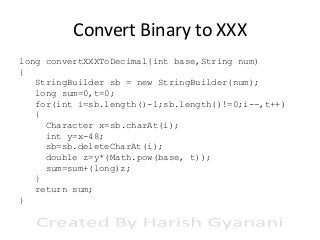
Convert Binary to XXX
long convertXXXToDecimal(int base,String num)
{
StringBuilder sb = new StringBuilder(num);
long sum=0,t=0;
for(int i=sb.length()-1;sb.length()!=0;i--,t++)
{
Character x=sb.charAt(i);
int y=x-48;
sb=sb.deleteCharAt(i);
double z=y*(Math.pow(base, t));
sum=sum+(long)z;
}
return sum;
}
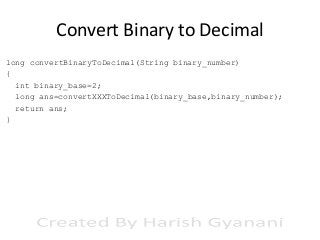
Convert Binary to Decimal
long convertBinaryToDecimal(String binary_number)
{
int binary_base=2;
long ans=convertXXXToDecimal(binary_base,binary_number);
return ans;
}
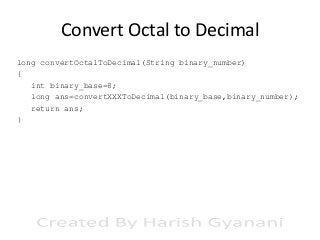
Convert Octal to Decimal
long convertOctalToDecimal(String binary_number)
{
int binary_base=8;
long ans=convertXXXToDecimal(binary_base,binary_number);
return ans;
}
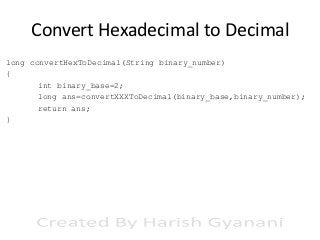
Convert Hexadecimal to Decimal
long convertHexToDecimal(String binary_number)
{
int binary_base=2;
long ans=convertXXXToDecimal(binary_base,binary_number);
return ans;
}
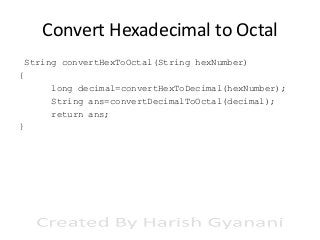
Convert Hexadecimal to Octal
String convertHexToOctal(String hexNumber)
{
long decimal=convertHexToDecimal(hexNumber);
String ans=convertDecimalToOctal(decimal);
return ans;
}
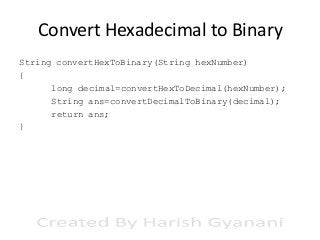
Convert Hexadecimal to Binary
String convertHexToBinary(String hexNumber)
{
long decimal=convertHexToDecimal(hexNumber);
String ans=convertDecimalToBinary(decimal);
return ans;
}
Convert Octal to Hexadecimal
String convertOctalToHex(String octalNumber)
{
long decimal=convertOctalToDecimal(octalNumber);
String ans=convertDecimalToHex(decimal);
return ans;
}
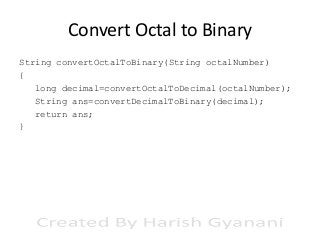
Convert Octal to Binary
String convertOctalToBinary(String octalNumber)
{
long decimal=convertOctalToDecimal(octalNumber);
String ans=convertDecimalToBinary(decimal);
return ans;
}
Print All elements of an Array
void arrayTraversing(int arr[])
{
for(int x:arr)
{
System.out.println(x);
}
}
Print All elements of an Array
void arrayTraversing(int arr[])
{
for(int x:arr)
{
System.out.println(x);
}
}
Print All elements of an Array
Method
Header /
Method
Declaration

void arrayTraversing(int arr[])
{
for(int x:arr)
{
System.out.println(x);
}
}
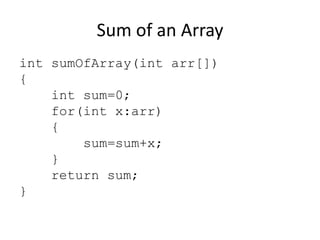
Sum of an Array
int sumOfArray(int arr[])
{
int sum=0;
for(int x:arr)
{
sum=sum+x;
}
return sum;
}
Sum of an Array
int sumOfArray(int arr[])
{
int sum=0;
for(int x:arr)
{
sum=sum+x;
Taking an integer
array and returning
}
single value of int
data type
return sum;
}
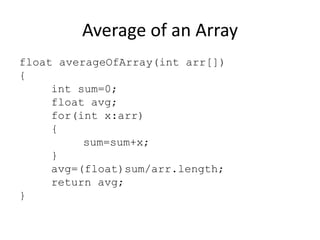
Average of an Array
float averageOfArray(int arr[])
{
int sum=0;
float avg;
for(int x:arr)
{
sum=sum+x;
}
avg=(float)sum/arr.length;
return avg;
}
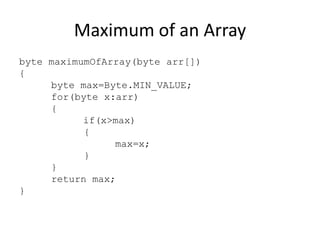
Maximum of an Array
byte maximumOfArray(byte arr[])
{
byte max=Byte.MIN_VALUE;
for(byte x:arr)
{
if(x>max)
{
max=x;
}
}
return max;
}
Maximum of an Array
byte maximumOfArray(byte arr[])
{
byte max=Byte.MIN_VALUE;
for(byte x:arr)
{
if(x>max)
{
max=x;
}
}
return max;
}
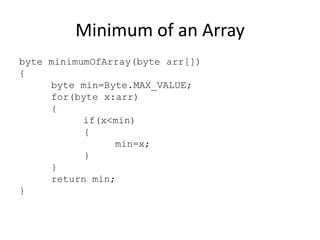
Minimum of an Array
byte minimumOfArray(byte arr[])
{
byte min=Byte.MAX_VALUE;
for(byte x:arr)
{
if(x<min)
{
min=x;
}
}
return min;
}
Minimum of an Array
byte minimumOfArray(byte arr[])
{
byte min=Byte.MAX_VALUE;
for(byte x:arr)
{
if(x<min)
{
min=x;
}
}
return min;
}

Wrapper class for
byte data type
Minimum of an Array
byte minimumOfArray(byte arr[])
{
byte min=Byte.MAX_VALUE;
for(byte x:arr)
{
if(x<min)
{
min=x;
}
}
return min;
Maximum
}
value of
byte is 127.

Wrapper class for
byte data type
Return prime numbers between 1 and
100
A method cannot

int[] getPrime1To100()
return multiple
{
values but it can
int arr[] = new int[100];
return an array.
for(int i=1,j=1;
i<=100;i++)
{
if(
==true)
{
arr[j]=i;
j++;
}
}
Taking no parameters but
return arr;
returning an array.
}
Complete Program
public class function1
{
static int[] getPrime1To100()
{
int arr[] = new int[100];
for(int i=1,j=1;
i<=100;i++)
{
if(isPrime(i)==true)
{
arr[j]=i;
j++;
}
}
return arr;
}

public static void main(String args[])
{
int art[]=getPrime1To100();
for(int x:art)
{
if(x!=0)
{
System.out.println(x);
}
}
}//end of main method
}//end of public class

Array contains
100 values,
some are prime
numbers other
are default
values (0).
Reverse array
byte[] reverseArray(byte arr[])
{
Returning byte array to
calling method
byte xyz[]=new byte[100];
int i=arr.length-1;
for(j=0; i>=0; i-- , j++)
{
This method takes an
xyz[i]=arr[j];
array(multiple byte
}
type values) and
returns an
return xyz;
array(multiple byte
}
type values).
Original Array
5
78

Reverse array
89

1655

byte[] reverseArray(byte arr[])
{
Returning byte array to
calling method
byte xyz[]=new byte[100];
int i=arr.length-1;
for(j=0; i>=0; i-- , j++)
{
This method takes an
xyz[i]=arr[j];
array(multiple byte
}
type values) and
returns an
return xyz;
array(multiple byte
}
type values).
Original Array
5
78

Reverse array
89

1655

1655

Converted Array
89

78

5

byte[] reverseArray(byte arr[])
{
Returning byte array to
calling method
byte xyz[]=new byte[100];
int i=arr.length-1;
for(j=0; i>=0; i-- , j++)
{
This method takes an
xyz[i]=arr[j];
array(multiple byte
}
type values) and
returns an
return xyz;
array(multiple byte
}
type values).
Original Array
5
78

Reverse array
89

1655

1655

Converted Array
89

78

5

byte[] reverseArray(byte arr[])
{
Returning byte array to
calling method
byte xyz[]=new byte[100];
int i=arr.length-1;
for(j=0; i>=0; i-- , j++)
{
This method takes an
xyz[i]=arr[j];
array(multiple byte
}
type values) and
returns an
return xyz;
array(multiple byte
}
type values).
Reverse digits of all array elements 1
Example
Original Array
5

78

89

1655

464

782

346

75623

98

5561

464

287

643

32657

Converted Array
5

87
Reverse digits of all array elements 2
void reverseEveryArrayElement(int a[])
{
for(int i=0;i<a.length;i++)
{
a[i]=reverseNumber(a[i]);
}
}
Reverse digits of all array elements 2
void reverseEveryArrayElement(int a[])
{
for(int i=0;i<a.length;i++)
{
a[i]=reverseNumber(a[i]);
}
}
Replacing
every element
of array with
its reverse
number
Reverse digits of all array elements 2
void reverseEveryArrayElement(int a[])
{
for(int i=0;i<a.length;i++)
{
a[i]=reverseNumber(a[i]);
}
}
Replacing
every element
of array with
its reverse
number

This method is
modifying
original array
elements.
Complete Program
public static void main(String args[])
{
int a[]={5,78,89,1655,464,782,346,75623};
reverseEveryArrayElement(a);
arrayTraversing(a);
}
static void reverseEveryArrayElement(int a[])
{
for(int i=0;i<a.length;i++)
{
a[i]=reverseNumber(a[i]);
}
}
Advantages of Using Methods





48
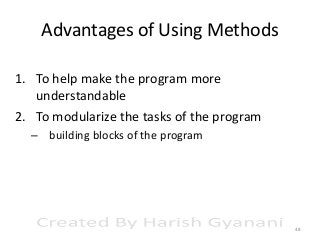
Advantages of Using Methods
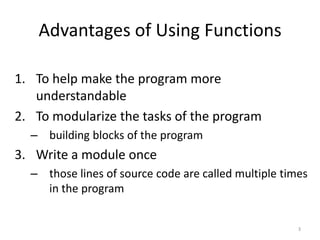
1. To help make the program more
understandable



48
Advantages of Using Methods
1. To help make the program more
understandable
2. To modularize the tasks of the program
– building blocks of the program



48
Advantages of Using Methods
1. To help make the program more
understandable
2. To modularize the tasks of the program
– building blocks of the program

3. Write a module once
– those lines of source code are called multiple times
in the program

48
Advantages of Using Methods





49
Advantages of Using Methods
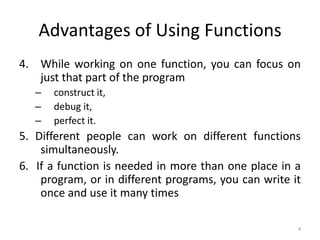
4. While working on one function, you can focus on
just that part of the program
–
–
–

construct it,
debug it,
perfect it.




49
Advantages of Using Methods
4. While working on one function, you can focus on
just that part of the program
–
–
–

construct it,
debug it,
perfect it.

5. Different people can work on different functions
simultaneously.


49
Advantages of Using Methods
4. While working on one function, you can focus on
just that part of the program
–
–
–

construct it,
debug it,
perfect it.

5. Different people can work on different functions
simultaneously.
6. If a function is needed in more than one place in a
program, or in different programs, you can write it
once and use it many times
49
40+ examples of user defined methods in java with explanation

40+ examples of user defined methods in java with explanation

  • 1.
    User Defined Methodsin Java With Animation
  • 2.
    Index 1. 2. Advantages Simple Programs usingMethods a) b) c) d) e) f) g) h) i) j) k) l) m) n) o) p) q) r) Add two numbers Average of three numbers Circle area Fahrenheit to Celsius Check number is even or not Check number is prime or not Reverse of a number Check number is palindrome or not Count number of digits in a number Sum of digits LCM of 2, 3 and 4 numbers HFC of 2 numbers 1 to 100 prime numbers 200 to 500 prime and palindrome Decimal to binary, octal, hex Binary to decimal, octal, hex Octal to binary,decimal, hex Hexadecimal to binary, octal, decimal 3. Pass Array to Methods a) b) c) d) e) 4. Print all elements of an array Sum of an array Average of an array Maximum element of an array Minimum element of an array Returning Array From Methods a) b) Reverse array Reverse every element of an array
  • 3.
  • 4.
    Function v/s Method Q.)Whatis the difference between a function and a method.?
  • 5.
    Function v/s Method Q.)Whatis the difference between a function and a method.? Ans.) A method is a function that is written in a class.
  • 6.
    Function v/s Method Q.)Whatis the difference between a function and a method.? Ans.) A method is a function that is written in a class. We do not have functions in java; instead we have methods. This means whenever a function is written in java. It should be written inside the class only. But if we take C++, we can write the functions inside as well as outside the class. So in C++, they are called member functions and not methods.
  • 7.
    Function with noarguments and no return(no input no output) void display() { System.out.println("this is inside method body"); }
  • 8.
    Function with noarguments and no return(no input no output) void display() { System.out.println("this is inside method body"); } When you want to return no value, then set return type to void
  • 9.
    Function with noarguments and no return(no input no output) Name of the function is “display” void display() { System.out.println("this is inside method body"); } When you want to return no value, then set return type to void
  • 10.
    Function with noarguments and no return(no input no output) Name of the function is “display” No arguments here void display() { System.out.println("this is inside method body"); } When you want to return no value, then set return type to void
  • 11.
    Complete Program public classfunction1 { static void display() { System.out.println("this is inside method body"); } public static void main(String args[]) { System.out.println("before function call"); display(); System.out.println("after function call"); } }
  • 12.
    Method Definition Complete Program public classfunction1 { static void display() { System.out.println("this is inside method body"); } public static void main(String args[]) { System.out.println("before function call"); display(); System.out.println("after function call"); } }
  • 13.
    Method Definition Complete Program public classfunction1 { static void display() { System.out.println("this is inside method body"); } public static void main(String args[]) { System.out.println("before function call"); display(); System.out.println("after function call"); } } Method Calling
  • 14.
    Add two integernumbers int add(int a, int b) { int c=a+b; return c; }
  • 15.
    Add two integernumbers int add(int a, int b) { int c=a+b; return c; } Two Integer Arguments
  • 16.
    Add two integernumbers int add(int a, int b) { int c=a+b; return c; } Returning integer value to calling method Two Integer Arguments
  • 17.
    Complete Program public classfunction1 { static int add(int a, int b) { int c=a+b; return c; } public static void main(String args[]) { System.out.println(add(45,67)); } }
  • 18.
    Display method is called method, becauseit is called by main method Complete Program public class function1 { static int add(int a, int b) { int c=a+b; return c; } public static void main(String args[]) { System.out.println(add(45,67)); } }
  • 19.
    Display method is called method, becauseit is called by main method Complete Program public class function1 { static int add(int a, int b) { int c=a+b; return c; } public static void main(String args[]) { System.out.println(add(45,67)); } } main method is calling method, because it is calling display method.
  • 20.
    Average of threeinteger numbers double { double d; d=((double)a+b+c)/3; return d; } )
  • 21.
    Average of threeinteger numbers double { double d; d=((double)a+b+c)/3; return d; } ) This method takes multiple arguments and returns single value
  • 22.
    Average of threeinteger numbers double { double d; d=((double)a+b+c)/3; return d; } ) This method takes multiple arguments and returns single value
  • 23.
    Calculate circle Area double { doublearea=Math.PI*radius*radius; return area; }
  • 24.
    Calculate circle Area double { doublearea=Math.PI*radius*radius; return area; }
  • 25.
    Convert Fahrenheit toCelsius double convertFahToCel(double fah) { double cel=(fah-32)*5/9; return cel; }
  • 26.
    Convert Fahrenheit toCelsius double convertFahToCel(double fah) { double cel=(fah-32)*5/9; return cel; } This method takes one argument and returns single value
  • 27.
    Check number iseven or not boolean checkEven(int n) { if(n%2==0) { return true; } else { return false; } }
  • 28.
    Check number iseven or not boolean checkEven(int n) { if(n%2==0) { return true; } else { return false; } }
  • 29.
    Check number isprime or not boolean isPrime(int n) { int i; for( i=2;i<n;i++) { if(n%i==0) { break; } }d if(n==i) { return true; } else { return false; } }
  • 30.
    Reverse number int reverseNumber(intn) { int x=0; for( ; n!=0 ; ) { int r=n%10; x=x*10+r; n=n/10; } return x; }
  • 31.
    Check number ispalindrome or not boolean isPalindrome(int n) { int rev = if(n==rev) { return true; } else { return false; } FOCUS ON ONE WORK } We need to focus on palindrome not on reverse number code, this is a advantage of method. ;
  • 32.
    Check number ispalindrome or not boolean isPalindrome(int n) { int rev = if(n==rev) { return true; } else { return false; } FOCUS ON ONE WORK } We need to focus on palindrome not on reverse number code, this is a advantage of method. ; Using previous slide’s reverse number method
  • 33.
    Count number ofdigits in a number This is Exercise
  • 34.
    Sum of digits Thisis Exercise
  • 35.
    LCM(Lowest Common Multiple)of 2 numbers long getLCM(int n1, int n2) { long answer=1; for(int i=2;n1!=1 && n2!=1;) { if(n1%i==0 && n2%i==0) { n1=n1/i; n2=n2/i; answer=answer*i; } else if(n1%i==0) { n1=n1/i; answer=answer*i; } else if(n2%i==0) { n2=n2/i; answer=answer*i; } else { i++; } }//end of for loop answer=n1*n2*answer; return answer; }//end of this method
  • 36.
    LCM of 3Numbers long getLCM(int n1,int n2,int n3) { long result1 = getLCM(n1,n2); long finalResult=getLCM((int) result1,n3); return finalResult; }
  • 37.
    LCM of 3Numbers long getLCM(int n1,int n2,int n3) { long result1 = getLCM(n1,n2); long finalResult=getLCM((int) result1,n3); return finalResult; } Method overloading on getLCM() method differ by number of arguments
  • 38.
    LCM of 3Numbers long getLCM(int n1,int n2,int n3) { long result1 = getLCM(n1,n2); long finalResult=getLCM((int) result1,n3); return finalResult; }
  • 39.
    LCM of 3Numbers long getLCM(int n1,int n2,int n3) { long result1 = getLCM(n1,n2); long finalResult=getLCM((int) result1,n3); return finalResult; } User Defined getLCM() 2 argument method
  • 40.
    LCM of 3Numbers long getLCM(int n1,int n2,int n3) { long result1 = getLCM(n1,n2); long finalResult=getLCM((int) result1,n3); return finalResult; }
  • 41.
    LCM of 3Numbers long getLCM(int n1,int n2,int n3) { long result1 = getLCM(n1,n2); long finalResult=getLCM((int) result1,n3); return finalResult; } Narrowing type conversion
  • 42.
    LCM of 3Numbers long getLCM(int n1,int n2,int n3) { long result1 = getLCM(n1,n2); long finalResult=getLCM((int) result1,n3); return finalResult; }
  • 43.
    LCM of 4Numbers long getLCM(int n1,int n2,int n3, int n4) { long result1 = getLCM(n1,n2,n3); long finalResult=getLCM((int) result1,n4); return finalResult; }
  • 44.
    LCM of 4Numbers long getLCM(int n1,int n2,int n3, int n4) { long result1 = getLCM(n1,n2,n3); long finalResult=getLCM((int) result1,n4); return finalResult; } Method overloading on getLCM() method differ by number of arguments
  • 45.
    LCM of 4Numbers long getLCM(int n1,int n2,int n3, int n4) { long result1 = getLCM(n1,n2,n3); long finalResult=getLCM((int) result1,n4); return finalResult; }
  • 46.
    LCM of 4Numbers long getLCM(int n1,int n2,int n3, int n4) { long result1 = getLCM(n1,n2,n3); long finalResult=getLCM((int) result1,n4); return finalResult; } User Defined getLCM() 3 arguments method
  • 47.
    LCM of 4Numbers long getLCM(int n1,int n2,int n3, int n4) { long result1 = getLCM(n1,n2,n3); long finalResult=getLCM((int) result1,n4); return finalResult; }
  • 48.
    LCM of 4Numbers long getLCM(int n1,int n2,int n3, int n4) { long result1 = getLCM(n1,n2,n3); long finalResult=getLCM((int) result1,n4); return finalResult; } Narrowing type conversion
  • 49.
    LCM of 4Numbers long getLCM(int n1,int n2,int n3, int n4) { long result1 = getLCM(n1,n2,n3); long finalResult=getLCM((int) result1,n4); return finalResult; }
  • 50.
    HCF(Highest Common Factor)of 2 numbers int getHCF(int n1,int n2) { int lcmOfThese=(int) getLCM(n1,n2); long product=n1*n2; int hcfOfThese=(int)(product/lcmOfThese); return hcfOfThese; }
  • 51.
    HCF(Highest Common Factor)of 2 numbers int getHCF(int n1,int n2) { int lcmOfThese=(int) getLCM(n1,n2); long product=n1*n2; int hcfOfThese=(int)(product/lcmOfThese); return hcfOfThese; } Narrowing type conversion /manual type casting/ down casting
  • 52.
    HCF(Highest Common Factor)of 2 numbers int getHCF(int n1,int n2) { int lcmOfThese=(int) getLCM(n1,n2); long product=n1*n2; int hcfOfThese=(int)(product/lcmOfThese); return hcfOfThese; }
  • 53.
    HCF(Highest Common Factor)of 2 numbers int getHCF(int n1,int n2) { int lcmOfThese=(int) getLCM(n1,n2); long product=n1*n2; int hcfOfThese=(int)(product/lcmOfThese); return hcfOfThese; } User Defined getLCM() method
  • 54.
    Print prime numbersbetween 1 and 100 void printPrime1To100() { for(int i=1;i<=100;i++) { if( ==true) { System.out.println(i); } } User } defined method
  • 55.
    Print prime numbersbetween 200 and 500 which are Palindrome numbers too This is exercise
  • 56.
    Convert Decimal toXXX String convertDecimalToXXX(long n,int base) { StringBuilder sb = new StringBuilder(); for(;n!=0;n=n/base) { byte x= (byte)(n%base); if(x>=10) { char ch=' '; switch(x) { case 10:ch='A';break; case 11:ch='B';break; case 12:ch='C';break; case 13:ch='D';break; case 14:ch='E';break; case 15:ch='F';break; } sb.append(ch); } else { sb.append(x); } } return String.valueOf(sb.reverse()); }
  • 57.
    Convert Decimal toBinary String convertDecimalToBinary(long n) { int base=2; String ans=convertDecimalToXXX(n,base); return ans; }
  • 58.
    Convert Decimal toOctal String convertDecimalToOctal(long n) { int octal_base=8; String ans=convertDecimalToXXX(n,octal_base); return ans; }
  • 59.
    Convert Decimal toHexadecimal String convertDecimalToHexadecimal(long n) { int hex_base=16; String ans=convertDecimalToXXX(n,hex_base); return ans; }
  • 60.
    Convert Binary toXXX long convertXXXToDecimal(int base,String num) { StringBuilder sb = new StringBuilder(num); long sum=0,t=0; for(int i=sb.length()-1;sb.length()!=0;i--,t++) { Character x=sb.charAt(i); int y=x-48; sb=sb.deleteCharAt(i); double z=y*(Math.pow(base, t)); sum=sum+(long)z; } return sum; }
  • 61.
    Convert Binary toDecimal long convertBinaryToDecimal(String binary_number) { int binary_base=2; long ans=convertXXXToDecimal(binary_base,binary_number); return ans; }
  • 62.
    Convert Octal toDecimal long convertOctalToDecimal(String binary_number) { int binary_base=8; long ans=convertXXXToDecimal(binary_base,binary_number); return ans; }
  • 63.
    Convert Hexadecimal toDecimal long convertHexToDecimal(String binary_number) { int binary_base=2; long ans=convertXXXToDecimal(binary_base,binary_number); return ans; }
  • 64.
    Convert Hexadecimal toOctal String convertHexToOctal(String hexNumber) { long decimal=convertHexToDecimal(hexNumber); String ans=convertDecimalToOctal(decimal); return ans; }
  • 65.
    Convert Hexadecimal toBinary String convertHexToBinary(String hexNumber) { long decimal=convertHexToDecimal(hexNumber); String ans=convertDecimalToBinary(decimal); return ans; }
  • 66.
    Convert Octal toHexadecimal String convertOctalToHex(String octalNumber) { long decimal=convertOctalToDecimal(octalNumber); String ans=convertDecimalToHex(decimal); return ans; }
  • 67.
    Convert Octal toBinary String convertOctalToBinary(String octalNumber) { long decimal=convertOctalToDecimal(octalNumber); String ans=convertDecimalToBinary(decimal); return ans; }
  • 69.
    Print All elementsof an Array void arrayTraversing(int arr[]) { for(int x:arr) { System.out.println(x); } }
  • 70.
    Print All elementsof an Array void arrayTraversing(int arr[]) { for(int x:arr) { System.out.println(x); } }
  • 71.
    Print All elementsof an Array Method Header / Method Declaration void arrayTraversing(int arr[]) { for(int x:arr) { System.out.println(x); } }
  • 72.
    Sum of anArray int sumOfArray(int arr[]) { int sum=0; for(int x:arr) { sum=sum+x; } return sum; }
  • 73.
    Sum of anArray int sumOfArray(int arr[]) { int sum=0; for(int x:arr) { sum=sum+x; Taking an integer array and returning } single value of int data type return sum; }
  • 74.
    Average of anArray float averageOfArray(int arr[]) { int sum=0; float avg; for(int x:arr) { sum=sum+x; } avg=(float)sum/arr.length; return avg; }
  • 75.
    Maximum of anArray byte maximumOfArray(byte arr[]) { byte max=Byte.MIN_VALUE; for(byte x:arr) { if(x>max) { max=x; } } return max; }
  • 76.
    Maximum of anArray byte maximumOfArray(byte arr[]) { byte max=Byte.MIN_VALUE; for(byte x:arr) { if(x>max) { max=x; } } return max; }
  • 77.
    Minimum of anArray byte minimumOfArray(byte arr[]) { byte min=Byte.MAX_VALUE; for(byte x:arr) { if(x<min) { min=x; } } return min; }
  • 78.
    Minimum of anArray byte minimumOfArray(byte arr[]) { byte min=Byte.MAX_VALUE; for(byte x:arr) { if(x<min) { min=x; } } return min; } Wrapper class for byte data type
  • 79.
    Minimum of anArray byte minimumOfArray(byte arr[]) { byte min=Byte.MAX_VALUE; for(byte x:arr) { if(x<min) { min=x; } } return min; Maximum } value of byte is 127. Wrapper class for byte data type
  • 81.
    Return prime numbersbetween 1 and 100 A method cannot int[] getPrime1To100() return multiple { values but it can int arr[] = new int[100]; return an array. for(int i=1,j=1; i<=100;i++) { if( ==true) { arr[j]=i; j++; } } Taking no parameters but return arr; returning an array. }
  • 82.
    Complete Program public classfunction1 { static int[] getPrime1To100() { int arr[] = new int[100]; for(int i=1,j=1; i<=100;i++) { if(isPrime(i)==true) { arr[j]=i; j++; } } return arr; } public static void main(String args[]) { int art[]=getPrime1To100(); for(int x:art) { if(x!=0) { System.out.println(x); } } }//end of main method }//end of public class Array contains 100 values, some are prime numbers other are default values (0).
  • 83.
    Reverse array byte[] reverseArray(bytearr[]) { Returning byte array to calling method byte xyz[]=new byte[100]; int i=arr.length-1; for(j=0; i>=0; i-- , j++) { This method takes an xyz[i]=arr[j]; array(multiple byte } type values) and returns an return xyz; array(multiple byte } type values).
  • 84.
    Original Array 5 78 Reverse array 89 1655 byte[]reverseArray(byte arr[]) { Returning byte array to calling method byte xyz[]=new byte[100]; int i=arr.length-1; for(j=0; i>=0; i-- , j++) { This method takes an xyz[i]=arr[j]; array(multiple byte } type values) and returns an return xyz; array(multiple byte } type values).
  • 85.
    Original Array 5 78 Reverse array 89 1655 1655 ConvertedArray 89 78 5 byte[] reverseArray(byte arr[]) { Returning byte array to calling method byte xyz[]=new byte[100]; int i=arr.length-1; for(j=0; i>=0; i-- , j++) { This method takes an xyz[i]=arr[j]; array(multiple byte } type values) and returns an return xyz; array(multiple byte } type values).
  • 86.
    Original Array 5 78 Reverse array 89 1655 1655 ConvertedArray 89 78 5 byte[] reverseArray(byte arr[]) { Returning byte array to calling method byte xyz[]=new byte[100]; int i=arr.length-1; for(j=0; i>=0; i-- , j++) { This method takes an xyz[i]=arr[j]; array(multiple byte } type values) and returns an return xyz; array(multiple byte } type values).
  • 87.
    Reverse digits ofall array elements 1 Example Original Array 5 78 89 1655 464 782 346 75623 98 5561 464 287 643 32657 Converted Array 5 87
  • 88.
    Reverse digits ofall array elements 2 void reverseEveryArrayElement(int a[]) { for(int i=0;i<a.length;i++) { a[i]=reverseNumber(a[i]); } }
  • 89.
    Reverse digits ofall array elements 2 void reverseEveryArrayElement(int a[]) { for(int i=0;i<a.length;i++) { a[i]=reverseNumber(a[i]); } } Replacing every element of array with its reverse number
  • 90.
    Reverse digits ofall array elements 2 void reverseEveryArrayElement(int a[]) { for(int i=0;i<a.length;i++) { a[i]=reverseNumber(a[i]); } } Replacing every element of array with its reverse number This method is modifying original array elements.
  • 91.
    Complete Program public staticvoid main(String args[]) { int a[]={5,78,89,1655,464,782,346,75623}; reverseEveryArrayElement(a); arrayTraversing(a); } static void reverseEveryArrayElement(int a[]) { for(int i=0;i<a.length;i++) { a[i]=reverseNumber(a[i]); } }
  • 92.
    Advantages of UsingMethods    48
  • 93.
    Advantages of UsingMethods 1. To help make the program more understandable   48
  • 94.
    Advantages of UsingMethods 1. To help make the program more understandable 2. To modularize the tasks of the program – building blocks of the program  48
  • 95.
    Advantages of UsingMethods 1. To help make the program more understandable 2. To modularize the tasks of the program – building blocks of the program 3. Write a module once – those lines of source code are called multiple times in the program 48
  • 96.
    Advantages of UsingMethods    49
  • 97.
    Advantages of UsingMethods 4. While working on one function, you can focus on just that part of the program – – – construct it, debug it, perfect it.   49
  • 98.
    Advantages of UsingMethods 4. While working on one function, you can focus on just that part of the program – – – construct it, debug it, perfect it. 5. Different people can work on different functions simultaneously.  49
  • 99.
    Advantages of UsingMethods 4. While working on one function, you can focus on just that part of the program – – – construct it, debug it, perfect it. 5. Different people can work on different functions simultaneously. 6. If a function is needed in more than one place in a program, or in different programs, you can write it once and use it many times 49