15 Interesting
                                           Ways* to use
                                         Google Maps in the
                                            Classroom
                                                             *and tips


                                                                         Google Maps Icon
                                                                         Buttons by bluman
This work is licensed under a Creative Commons Attribution
Noncommercial Share Alike 3.0 License.
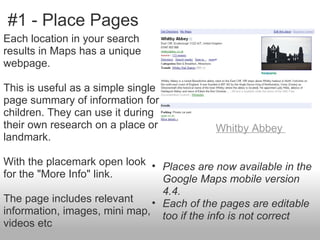
#1 - Place Pages
Each location in your search
results in Maps has a unique
webpage.

This is useful as a simple single
page summary of information for
children. They can use it during
their own research on a place or          Whitby Abbey
landmark.

With the placemark open look • Places are now available in the
for the "More Info" link.       Google Maps mobile version
                                4.4.
The page includes relevant    • Each of the pages are editable
information, images, mini map, too if the info is not correct
videos etc
#2 - MOLE
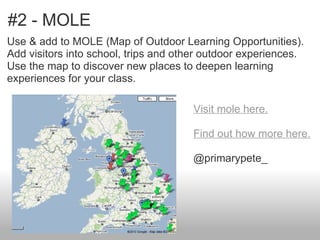
Use & add to MOLE (Map of Outdoor Learning Opportunities).
Add visitors into school, trips and other outdoor experiences.
Use the map to discover new places to deepen learning
experiences for your class.

                                      Visit mole here.

                                      Find out how more here.

                                      @primarypete_
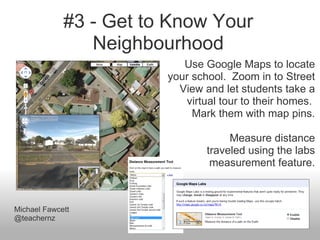
#3 - Get to Know Your
                Neighbourhood
                           Use Google Maps to locate
                        your school. Zoom in to Street
                          View and let students take a
                           virtual tour to their homes.
                             Mark them with map pins.

                                     Measure distance
                                traveled using the labs
                                 measurement feature.


Michael Fawcett
@teachernz
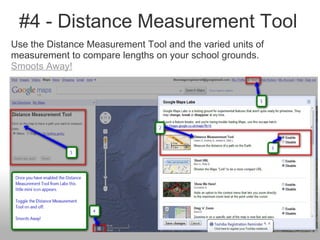
#4 - Distance Measurement Tool
Use the Distance Measurement Tool and the varied units of
measurement to compare lengths on your school grounds.
Smoots Away!
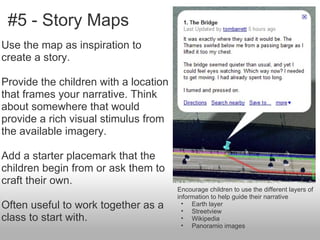
#5 - Story Maps
Use the map as inspiration to
create a story.

Provide the children with a location
that frames your narrative. Think
about somewhere that would
provide a rich visual stimulus from
the available imagery.

Add a starter placemark that the
children begin from or ask them to
craft their own.
                                       Encourage children to use the different layers of
                                       information to help guide their narrative
Often useful to work together as a       • Earth layer
                                         • Streetview
class to start with.                     • Wikipedia
                                         • Panoramio images
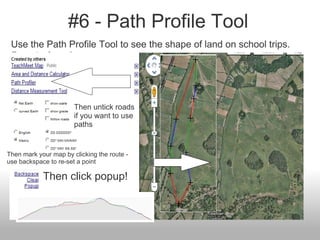
#6 - Path Profile Tool
 Use the Path Profile Tool to see the shape of land on school trips.
 Smoots Away!


                       Then untick roads
                       if you want to use
                       paths


Then mark your map by clicking the route -
use backspace to re-set a point

            Then click popup!
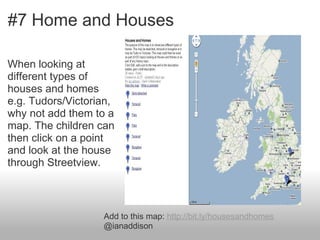
#7 Home and Houses

When looking at
different types of
houses and homes
e.g. Tudors/Victorian,
why not add them to a
map. The children can
then click on a point
and look at the house
through Streetview.


                   Add to this map: http://bit.ly/housesandhomes
                   @ianaddison
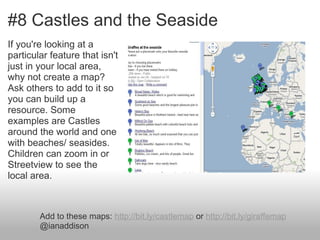
#8 Castles and the Seaside
If you're looking at a
particular feature that isn't
just in your local area,
why not create a map?
Ask others to add to it so
you can build up a
resource. Some
examples are Castles
around the world and one
with beaches/ seasides.
Children can zoom in or
Streetview to see the
local area.


        Add to these maps: http://bit.ly/castlemap or http://bit.ly/giraffemap
        @ianaddison
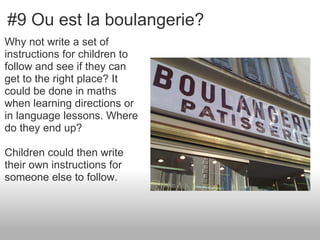
#9 Ou est la boulangerie?
Why not write a set of
instructions for children to
follow and see if they can
get to the right place? It
could be done in maths
when learning directions or
in language lessons. Where
do they end up?

Children could then write
their own instructions for
someone else to follow.
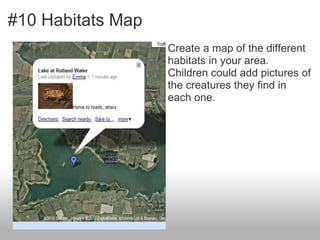
#10 Habitats Map
                   Create a map of the different
                   habitats in your area.
                   Children could add pictures of
                   the creatures they find in
                   each one.
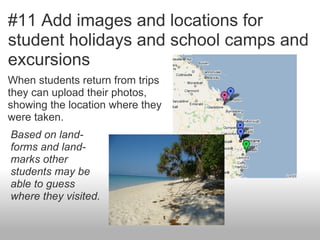
#11 Add images and locations for
student holidays and school camps and
excursions
When students return from trips
they can upload their photos,
showing the location where they
were taken.
Based on land-
forms and land-
marks other
students may be
able to guess
where they visited.
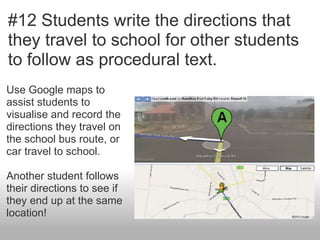
#12 Students write the directions that
they travel to school for other students
to follow as procedural text.
Use Google maps to
assist students to
visualise and record the
directions they travel on
the school bus route, or
car travel to school.

Another student follows
their directions to see if
they end up at the same
location!
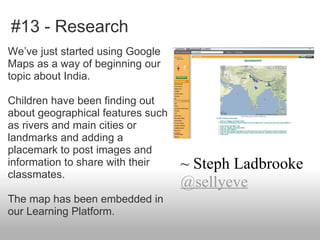
#13 - Research
We’ve just started using Google
Maps as a way of beginning our
topic about India.

Children have been finding out
about geographical features such
as rivers and main cities or
landmarks and adding a
placemark to post images and
information to share with their    ~ Steph Ladbrooke
classmates.
                                   @sellyeve
The map has been embedded in
our Learning Platform.
#14 - As The Crow Flies
You can use the map measurement tool on Google maps to
practice area and perimeter. Select places in your town to
measure and compare. Work in decimals or practice rounding
skills as you work with the measurements.

Compare "how the crow flies" distances between two towns to
actual road travel distance.

If you are using "bar models" in math lessons, drawing direct
lines between towns offers a wonderful visual bar model
example for calculating how many more or less miles.

I haven't tried, but can you measure around the planet?

                                                  @c_arnett
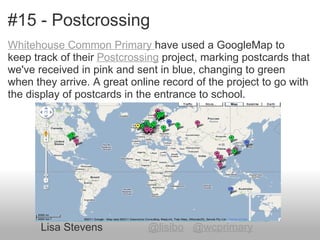
#15 - Postcrossing
Whitehouse Common Primary have used a GoogleMap to
keep track of their Postcrossing project, marking postcards that
we've received in pink and sent in blue, changing to green
when they arrive. A great online record of the project to go with
the display of postcards in the entrance to school.


       Lisa Stevens           @lisibo @wcprimary
If you would like to:
 • Contribute your ideas and tips to the presentation.
 • Let me know how you have used the resource.
 • Get in touch.
    You can email me or I am @tombarrett on Twitter

If you add a tip (or even if
you don't) please tweet about
it and the link so more people
can contribute.


I have created a page for all
of the Interesting Ways                            Image: ‘Sharing‘


presentations on my blog.         Thanks for helping
                                  Tom Barrett
The whole family in one
place :-)                        Have you seen The Curriculum
                                 Catalyst yet?

14 interesting ways_to_use_an_google_maps_in_

  • 1.
    15 Interesting Ways* to use Google Maps in the Classroom *and tips Google Maps Icon Buttons by bluman This work is licensed under a Creative Commons Attribution Noncommercial Share Alike 3.0 License.
  • 2.
    #1 - PlacePages Each location in your search results in Maps has a unique webpage. This is useful as a simple single page summary of information for children. They can use it during their own research on a place or Whitby Abbey landmark. With the placemark open look • Places are now available in the for the "More Info" link. Google Maps mobile version 4.4. The page includes relevant • Each of the pages are editable information, images, mini map, too if the info is not correct videos etc
  • 3.
    #2 - MOLE Use& add to MOLE (Map of Outdoor Learning Opportunities). Add visitors into school, trips and other outdoor experiences. Use the map to discover new places to deepen learning experiences for your class. Visit mole here. Find out how more here. @primarypete_
  • 4.
    #3 - Getto Know Your Neighbourhood Use Google Maps to locate your school. Zoom in to Street View and let students take a virtual tour to their homes. Mark them with map pins. Measure distance traveled using the labs measurement feature. Michael Fawcett @teachernz
  • 5.
    #4 - DistanceMeasurement Tool Use the Distance Measurement Tool and the varied units of measurement to compare lengths on your school grounds. Smoots Away!
  • 6.
    #5 - StoryMaps Use the map as inspiration to create a story. Provide the children with a location that frames your narrative. Think about somewhere that would provide a rich visual stimulus from the available imagery. Add a starter placemark that the children begin from or ask them to craft their own. Encourage children to use the different layers of information to help guide their narrative Often useful to work together as a • Earth layer • Streetview class to start with. • Wikipedia • Panoramio images
  • 7.
    #6 - PathProfile Tool Use the Path Profile Tool to see the shape of land on school trips. Smoots Away! Then untick roads if you want to use paths Then mark your map by clicking the route - use backspace to re-set a point Then click popup!
  • 8.
    #7 Home andHouses When looking at different types of houses and homes e.g. Tudors/Victorian, why not add them to a map. The children can then click on a point and look at the house through Streetview. Add to this map: http://bit.ly/housesandhomes @ianaddison
  • 9.
    #8 Castles andthe Seaside If you're looking at a particular feature that isn't just in your local area, why not create a map? Ask others to add to it so you can build up a resource. Some examples are Castles around the world and one with beaches/ seasides. Children can zoom in or Streetview to see the local area. Add to these maps: http://bit.ly/castlemap or http://bit.ly/giraffemap @ianaddison
  • 10.
    #9 Ou estla boulangerie? Why not write a set of instructions for children to follow and see if they can get to the right place? It could be done in maths when learning directions or in language lessons. Where do they end up? Children could then write their own instructions for someone else to follow.
  • 11.
    #10 Habitats Map Create a map of the different habitats in your area. Children could add pictures of the creatures they find in each one.
  • 12.
    #11 Add imagesand locations for student holidays and school camps and excursions When students return from trips they can upload their photos, showing the location where they were taken. Based on land- forms and land- marks other students may be able to guess where they visited.
  • 13.
    #12 Students writethe directions that they travel to school for other students to follow as procedural text. Use Google maps to assist students to visualise and record the directions they travel on the school bus route, or car travel to school. Another student follows their directions to see if they end up at the same location!
  • 14.
    #13 - Research We’vejust started using Google Maps as a way of beginning our topic about India. Children have been finding out about geographical features such as rivers and main cities or landmarks and adding a placemark to post images and information to share with their ~ Steph Ladbrooke classmates. @sellyeve The map has been embedded in our Learning Platform.
  • 15.
    #14 - AsThe Crow Flies You can use the map measurement tool on Google maps to practice area and perimeter. Select places in your town to measure and compare. Work in decimals or practice rounding skills as you work with the measurements. Compare "how the crow flies" distances between two towns to actual road travel distance. If you are using "bar models" in math lessons, drawing direct lines between towns offers a wonderful visual bar model example for calculating how many more or less miles. I haven't tried, but can you measure around the planet? @c_arnett
  • 16.
    #15 - Postcrossing WhitehouseCommon Primary have used a GoogleMap to keep track of their Postcrossing project, marking postcards that we've received in pink and sent in blue, changing to green when they arrive. A great online record of the project to go with the display of postcards in the entrance to school. Lisa Stevens @lisibo @wcprimary
  • 17.
    If you wouldlike to: • Contribute your ideas and tips to the presentation. • Let me know how you have used the resource. • Get in touch. You can email me or I am @tombarrett on Twitter If you add a tip (or even if you don't) please tweet about it and the link so more people can contribute. I have created a page for all of the Interesting Ways Image: ‘Sharing‘ presentations on my blog. Thanks for helping Tom Barrett The whole family in one place :-) Have you seen The Curriculum Catalyst yet?

Editor's Notes

  • #14 Hi Tom - hope you can use these ideas.