POWERFUL
PRESENTATIONS FOR KIDS
Heather Johnson
What are we going to talk about
today?
•Smore
•Big Huge Labs
•Infographics
•Powtoon
Do your students
look like this
when listening to
other
classmate’s
presentations?
Kratochvil, Peter. (2012). Bored young woman studying. Retrieved from http://www.publicdomainpictures.net/view-
image.php?image=3858. CC-O
Take them from
bored to BAM!
With some fun,
fantastic ways to
present all the
goodness you will
be teaching them
this year!
Voicu, Adina. (2015). Girls kids anniversary party play. Retrieved from https://pixabay.com/en/girls-kids-
anniversary-party-play-1092920/. CC-O
Smore
• Visually appealing
• Easy to use and navigate
• Web based for easy retrieval
• Auto saves (for forgetful folks)
https://www.smore.com/
Ideas for using Smore in the
classroom
Create a
classroom
newspaper, have
the students be
in charge and
update it weekly
on smore!
Have students create a
Smore flyer to advertise
back to school nights,
parent teacher
conferences, or even
school plays! Buy in is
half the battle!
Technology Communication Tools
C/T 3-5.10 Communicate effectively with others (e.g., peers, teachers, experts) in collaborative learning situations.
A. Use technology tools for individual and collaborative writing, communication, and publishing activities.
 Produce documents and presentations that demonstrate the ability to edit, reformat, and integrate various tools and media.
Create book flyers to draw interest to books students
have read!
Create
classroom
introducti
ons for a
high tech
and fun
way to
start the
school
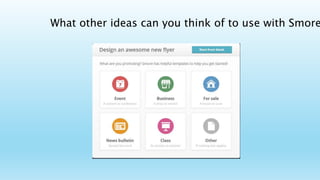
What other ideas can you think of to use with Smore
Big Huge Labs
• Easy to use
• Student friendly
• Oodles of ideas and
opportunities
https://bighugelabs.com/
Biography Magazine
Covers
VA SOL 4.1 The student will use effective oral communication skills in
a variety of settings. 2.11 The student will identify George
Washington, Abraham Lincoln, Susan B. Anthony, Helen Keller, Jackie
Robinson, and Martin Luther King, Jr., as Americans whose
Writing Activity- Guide students in writing
how to or procedural text. Have them make
a puzzle with an image of what they are
explaining about. Create a puzzle and have
a partner try to follow your directions of how
to put it together!
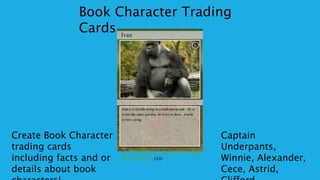
Create Book Character
trading cards
including facts and or
details about book
Book Character Trading
Cards
Captain
Underpants,
Winnie, Alexander,
Cece, Astrid,
ttps://www.flickr.com/photos/66555186@N
02/6312198231. CCO
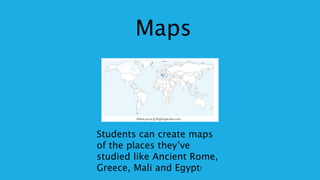
Maps
Students can create maps
of the places they’ve
studied like Ancient Rome,
Greece, Mali and Egypt!
What will you have your
students create? Share your
Ideas!
Shubert, Jorg. (2014). Thinking of a masterplan. Retrieved from https://www.flickr.com/photos/tinto/12239180354.
CCO
Blabberiz
e• Fun and easy to use
• Creative and interesting
presentations
• Enhances everyday
classroom activities
• Integrates technology
into lessons
• FREE
http://blabberize.com/
Poetry
VA SOL Oral Language 3.5 The student will read and
demonstrate comprehension of fictional text and
poetry
Vocabulary
Each student receives a word
and can define it, record it’s
definition and share with
his/her classmates! A fun and
easy way to tackle a long list of
new vocab for a unit or study!
.
Collaborative
LearningA kindergarten or first
grade class could focus
on a writing project,
have an older class work
their magic with the tech
side of blabberize and
allow the littles to
dictate their
masterpiece!
Blabberize in your classrooms?
Questions, Comments,
thoughts? What could
your students do with
Blabberize?
Infographics
• Succinct
• Clear & easy to make
• Visual and fun
• Memorable & powerful
Where do I
start?https://www.canva.com/ http://www.easel.ly/
https://piktochart.com/
Math Concepts
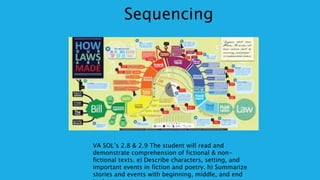
Sequencing
VA SOL’s 2.8 & 2.9 The student will read and
demonstrate comprehension of fictional & non-
fictional texts. e) Describe characters, setting, and
important events in fiction and poetry. h) Summarize
stories and events with beginning, middle, and end
Science
Projects
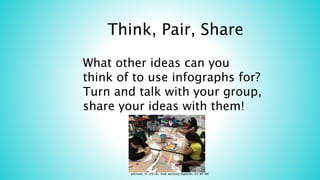
Think, Pair, Share
What other ideas can you
think of to use infographs for?
Turn and talk with your group,
share your ideas with them!
Johnson, H. (2016). Kids working together. CC BY-NC
https://www.powtoon.com
• Free to use (mostly)
• Animated
• Fun
• Current and
exciting
Book Reports
VA SOL Oral Language 3.2 The student will present brief oral reports using visual media.
Class
Introductions
Shy kids in class? Afraid to
give oral presentations?
Powtoons it!
Book Trailers &
Commercials
Have students create book trailers or
commercials to advertise awesome new books
they’ve read. When a kid says “I don’t know
what to read” point them to the powtoons
boards!
https://heatherjohnsonsite.wordpre
To learn more about these
cool tools and others visit
my blog!
Take
Aways
• Technology is a part of education
today!
• There are many opportunities for
students to integrate fun with
learning
• Cooperative learning can be
fostered through technology
• Smore, powtoons, infographics,
Blabberize, and Big Huge labs are
only a few of the amazing sites that
are free and easy to use.
What other amazing sites, or
apps do you know about to
share with me?hjohnson2@Richmond.k12.v

Powerful presentations for kids

  • 1.
  • 2.
    What are wegoing to talk about today? •Smore •Big Huge Labs •Infographics •Powtoon
  • 3.
    Do your students looklike this when listening to other classmate’s presentations? Kratochvil, Peter. (2012). Bored young woman studying. Retrieved from http://www.publicdomainpictures.net/view- image.php?image=3858. CC-O
  • 4.
    Take them from boredto BAM! With some fun, fantastic ways to present all the goodness you will be teaching them this year! Voicu, Adina. (2015). Girls kids anniversary party play. Retrieved from https://pixabay.com/en/girls-kids- anniversary-party-play-1092920/. CC-O
  • 5.
    Smore • Visually appealing •Easy to use and navigate • Web based for easy retrieval • Auto saves (for forgetful folks) https://www.smore.com/
  • 6.
    Ideas for usingSmore in the classroom Create a classroom newspaper, have the students be in charge and update it weekly on smore! Have students create a Smore flyer to advertise back to school nights, parent teacher conferences, or even school plays! Buy in is half the battle! Technology Communication Tools C/T 3-5.10 Communicate effectively with others (e.g., peers, teachers, experts) in collaborative learning situations. A. Use technology tools for individual and collaborative writing, communication, and publishing activities.  Produce documents and presentations that demonstrate the ability to edit, reformat, and integrate various tools and media.
  • 7.
    Create book flyersto draw interest to books students have read!
  • 8.
    Create classroom introducti ons for a hightech and fun way to start the school
  • 9.
    What other ideascan you think of to use with Smore
  • 10.
    Big Huge Labs •Easy to use • Student friendly • Oodles of ideas and opportunities
  • 11.
  • 12.
    Biography Magazine Covers VA SOL4.1 The student will use effective oral communication skills in a variety of settings. 2.11 The student will identify George Washington, Abraham Lincoln, Susan B. Anthony, Helen Keller, Jackie Robinson, and Martin Luther King, Jr., as Americans whose
  • 13.
    Writing Activity- Guidestudents in writing how to or procedural text. Have them make a puzzle with an image of what they are explaining about. Create a puzzle and have a partner try to follow your directions of how to put it together!
  • 14.
    Create Book Character tradingcards including facts and or details about book Book Character Trading Cards Captain Underpants, Winnie, Alexander, Cece, Astrid, ttps://www.flickr.com/photos/66555186@N 02/6312198231. CCO
  • 15.
    Maps Students can createmaps of the places they’ve studied like Ancient Rome, Greece, Mali and Egypt!
  • 16.
    What will youhave your students create? Share your Ideas! Shubert, Jorg. (2014). Thinking of a masterplan. Retrieved from https://www.flickr.com/photos/tinto/12239180354. CCO
  • 17.
    Blabberiz e• Fun andeasy to use • Creative and interesting presentations • Enhances everyday classroom activities • Integrates technology into lessons • FREE
  • 18.
  • 19.
    Poetry VA SOL OralLanguage 3.5 The student will read and demonstrate comprehension of fictional text and poetry
  • 20.
    Vocabulary Each student receivesa word and can define it, record it’s definition and share with his/her classmates! A fun and easy way to tackle a long list of new vocab for a unit or study! .
  • 21.
    Collaborative LearningA kindergarten orfirst grade class could focus on a writing project, have an older class work their magic with the tech side of blabberize and allow the littles to dictate their masterpiece!
  • 22.
    Blabberize in yourclassrooms? Questions, Comments, thoughts? What could your students do with Blabberize?
  • 23.
    Infographics • Succinct • Clear& easy to make • Visual and fun • Memorable & powerful
  • 24.
    Where do I start?https://www.canva.com/http://www.easel.ly/ https://piktochart.com/
  • 25.
  • 26.
    Sequencing VA SOL’s 2.8& 2.9 The student will read and demonstrate comprehension of fictional & non- fictional texts. e) Describe characters, setting, and important events in fiction and poetry. h) Summarize stories and events with beginning, middle, and end
  • 27.
  • 28.
    Think, Pair, Share Whatother ideas can you think of to use infographs for? Turn and talk with your group, share your ideas with them! Johnson, H. (2016). Kids working together. CC BY-NC
  • 29.
    https://www.powtoon.com • Free touse (mostly) • Animated • Fun • Current and exciting
  • 30.
    Book Reports VA SOLOral Language 3.2 The student will present brief oral reports using visual media.
  • 31.
    Class Introductions Shy kids inclass? Afraid to give oral presentations? Powtoons it!
  • 32.
    Book Trailers & Commercials Havestudents create book trailers or commercials to advertise awesome new books they’ve read. When a kid says “I don’t know what to read” point them to the powtoons boards!
  • 33.
    https://heatherjohnsonsite.wordpre To learn moreabout these cool tools and others visit my blog!
  • 34.
    Take Aways • Technology isa part of education today! • There are many opportunities for students to integrate fun with learning • Cooperative learning can be fostered through technology • Smore, powtoons, infographics, Blabberize, and Big Huge labs are only a few of the amazing sites that are free and easy to use. What other amazing sites, or apps do you know about to share with me?hjohnson2@Richmond.k12.v