Practical Participation offer training & consultancy in using                                            Practical Participation
                           social media tools and strategies in participation projects.                                      www.practicalparticipation.co.uk
                             This series of Getting Started guides are designed to offer a                                   tim@practicalparticipation.co.uk
                                             flavour of the tools available.

                           Version 0.1 – December 2007
                                                                           Custom Online Maps
                                                                                   With Google Maps (maps.google.com)
   Interactive online maps allow you to annotate a
   map or Arial photo of your local area.

   You might use this to shared your photos of
   the local area, provide local information or
   find out what people think of facilities and
   activities available in the area.

   You can share your customized map on the
   web or through a 3D mapping program.

                                               Getting Started
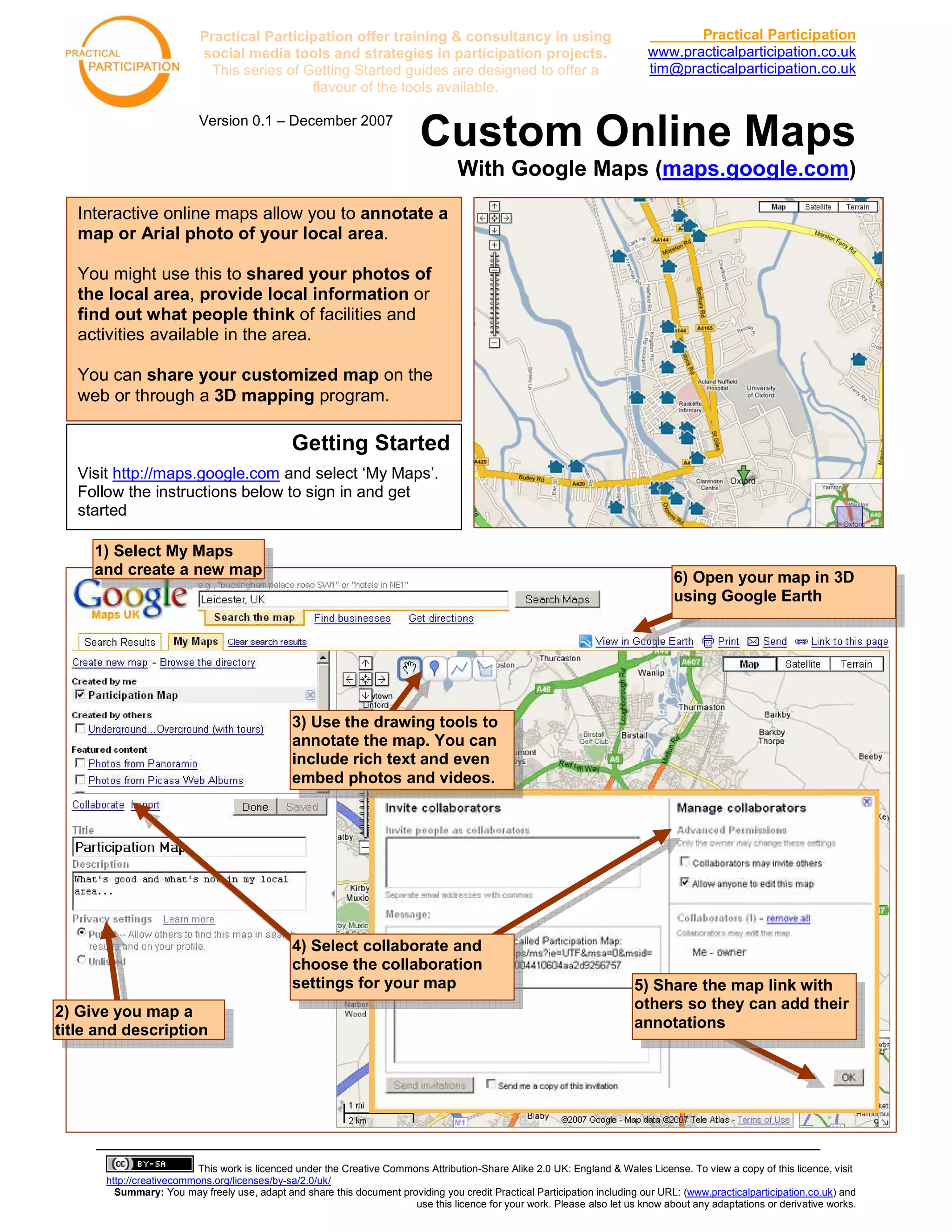
   Visit http://maps.google.com and select ‘My Maps’.
   Follow the instructions below to sign in and get
   started

     1) Select My Maps
     and create a new map                                                                                                          6) Open your map in 3D
                                                                                                                                   using Google Earth


                                               3) Use the drawing tools to
                                               annotate the map. You can
                                               include rich text and even
                                               embed photos and videos.


                                               4) Select collaborate and
                                               choose the collaboration
                                               settings for your map                                                      5) Share the map link with
2) Give you map a                                                                                                         others so they can add their
title and description                                                                                                     annotations


                           This work is licenced under the Creative Commons Attribution-Share Alike 2.0 UK: England & Wales License. To view a copy of this licence, visit
       http://creativecommons.org/licenses/by-sa/2.0/uk/
         Summary: You may freely use, adapt and share this document providing you credit Practical Participation including our URL: (www.practicalparticipation.co.uk) and
                                                                         use this licence for your work. Please also let us know about any adaptations or derivative works.

Googlemaps One Page Guide

  • 1.
    Practical Participation offertraining & consultancy in using Practical Participation social media tools and strategies in participation projects. www.practicalparticipation.co.uk This series of Getting Started guides are designed to offer a tim@practicalparticipation.co.uk flavour of the tools available. Version 0.1 – December 2007 Custom Online Maps With Google Maps (maps.google.com) Interactive online maps allow you to annotate a map or Arial photo of your local area. You might use this to shared your photos of the local area, provide local information or find out what people think of facilities and activities available in the area. You can share your customized map on the web or through a 3D mapping program. Getting Started Visit http://maps.google.com and select ‘My Maps’. Follow the instructions below to sign in and get started 1) Select My Maps and create a new map 6) Open your map in 3D using Google Earth 3) Use the drawing tools to annotate the map. You can include rich text and even embed photos and videos. 4) Select collaborate and choose the collaboration settings for your map 5) Share the map link with 2) Give you map a others so they can add their title and description annotations This work is licenced under the Creative Commons Attribution-Share Alike 2.0 UK: England & Wales License. To view a copy of this licence, visit http://creativecommons.org/licenses/by-sa/2.0/uk/ Summary: You may freely use, adapt and share this document providing you credit Practical Participation including our URL: (www.practicalparticipation.co.uk) and use this licence for your work. Please also let us know about any adaptations or derivative works.