Chapter 3 - 1
Chapter 3
Loops
&
Decisions
Animated Version
Topics
• Relational Operators
• Loops
• Decisions
• Logical Operators
• Precedence Summary
• Other Control Statements
Chapter 3 - 2
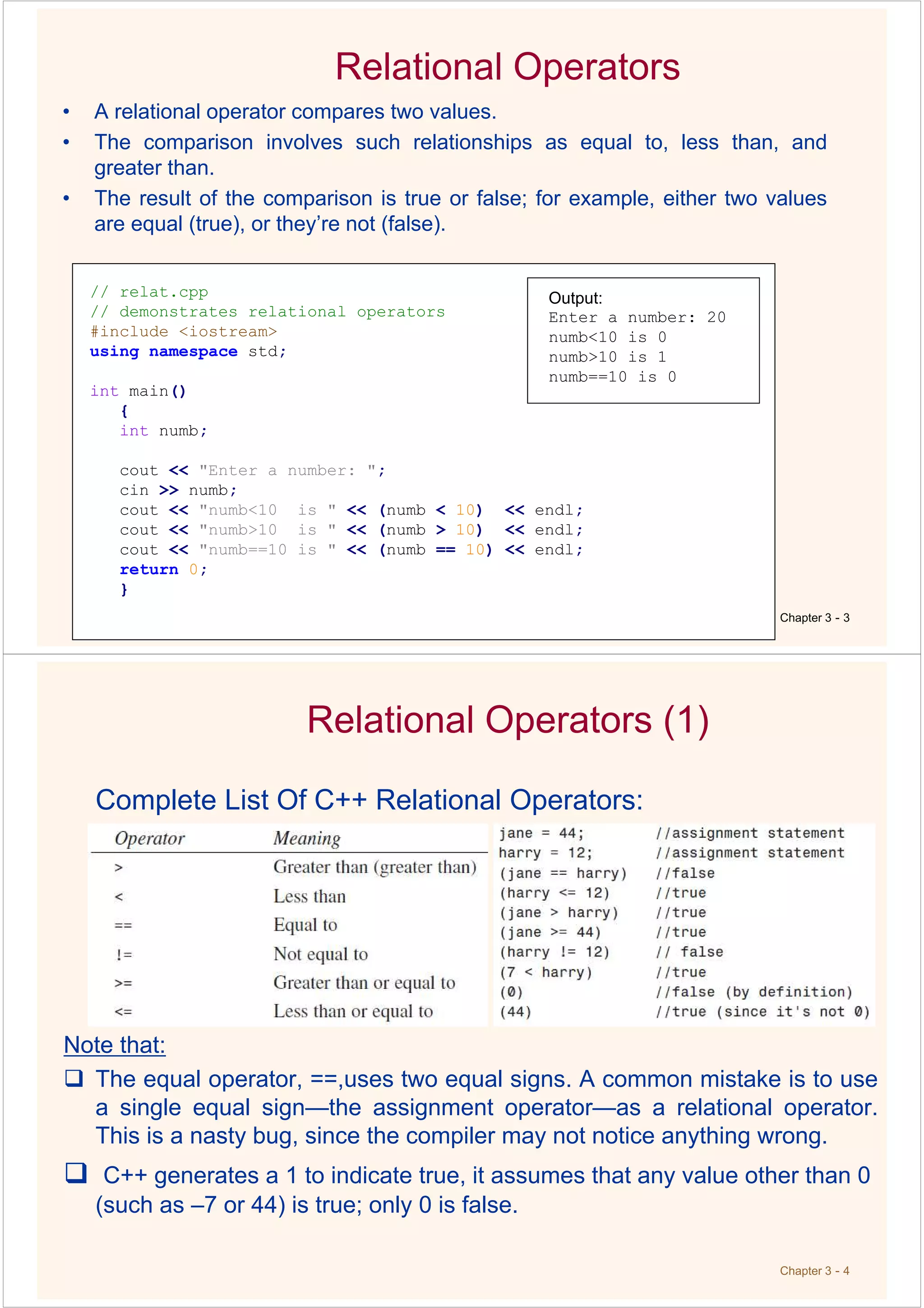
Relational Operators
• A relational operator compares two values.
• The comparison involves such relationships as equal to, less than, and
greater than.
• The result of the comparison is true or false; for example, either two values
are equal (true), or they’re not (false).
Chapter 3 - 3
// relat.cpp
// demonstrates relational operators
#include <iostream>
using namespace std;
int main()
{
int numb;
cout << "Enter a number: ";
cin >> numb;
cout << "numb<10 is " << (numb < 10) << endl;
cout << "numb>10 is " << (numb > 10) << endl;
cout << "numb==10 is " << (numb == 10) << endl;
return 0;
}
Output:
Enter a number: 20
numb<10 is 0
numb>10 is 1
numb==10 is 0
Chapter 3 - 4
Relational Operators (1)
Complete List Of C++ Relational Operators:
Note that:
The equal operator, ==,uses two equal signs. A common mistake is to use
a single equal sign—the assignment operator—as a relational operator.
This is a nasty bug, since the compiler may not notice anything wrong.
C++ generates a 1 to indicate true, it assumes that any value other than 0
(such as –7 or 44) is true; only 0 is false.
Chapter 3 - 5
Loops
Loops cause a section of your program to be repeated a certain number
of times. The repetition continues while a condition is true. When the
condition becomes false, the loop ends and control passes to the
statements following the loop.
three kinds of loops in C++: the for loop, the while loop, and the do
loop.
The For Loop:
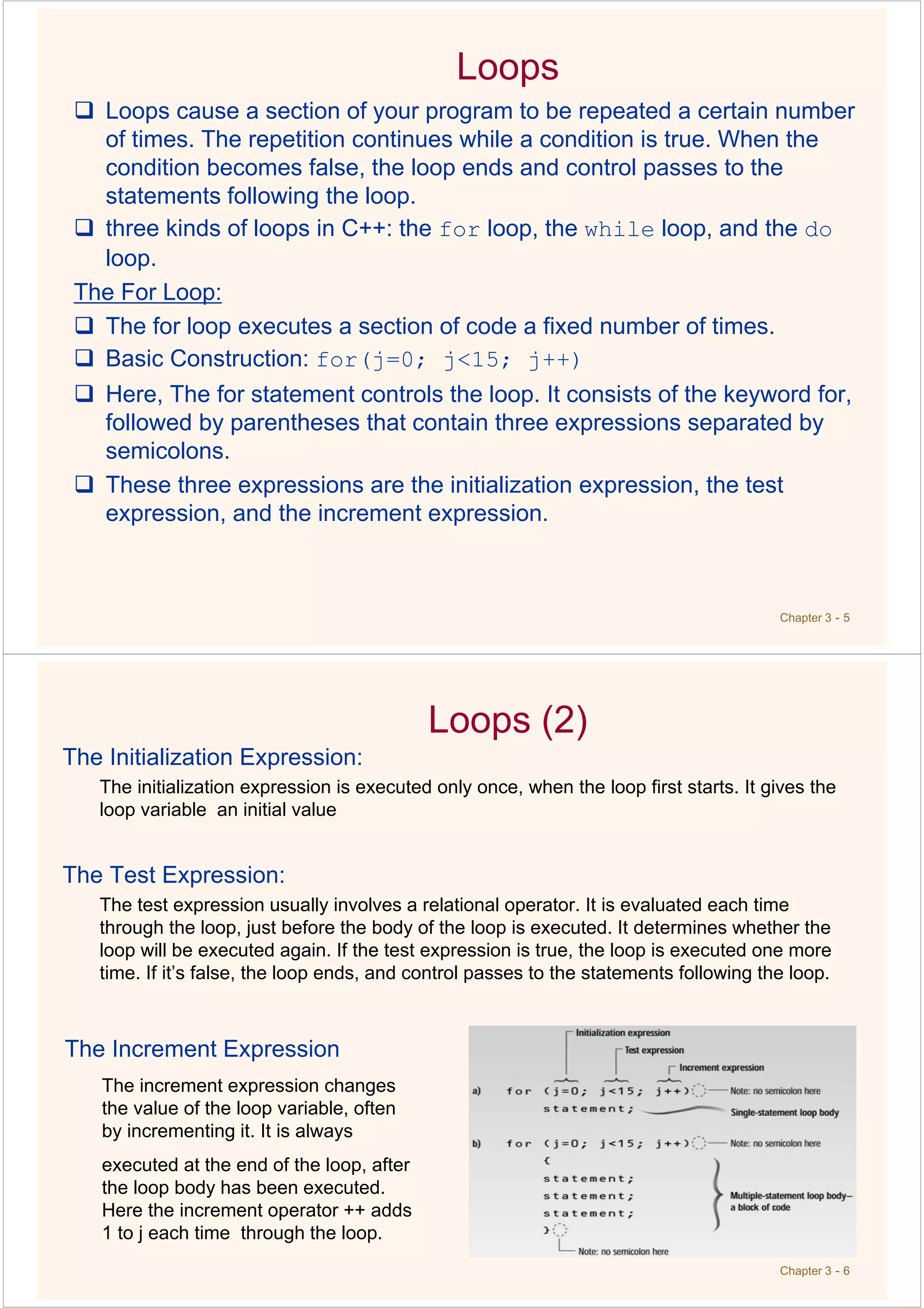
The for loop executes a section of code a fixed number of times.
Basic Construction: for(j=0; j<15; j++)
Here, The for statement controls the loop. It consists of the keyword for,
followed by parentheses that contain three expressions separated by
semicolons.
These three expressions are the initialization expression, the test
expression, and the increment expression.
Chapter 3 - 6
Loops (2)
The Initialization Expression:
The initialization expression is executed only once, when the loop first starts. It gives the
loop variable an initial value
The Test Expression:
The test expression usually involves a relational operator. It is evaluated each time
through the loop, just before the body of the loop is executed. It determines whether the
loop will be executed again. If the test expression is true, the loop is executed one more
time. If it’s false, the loop ends, and control passes to the statements following the loop.
The Increment Expression
The increment expression changes
the value of the loop variable, often
by incrementing it. It is always
executed at the end of the loop, after
the loop body has been executed.
Here the increment operator ++ adds
1 to j each time through the loop.
Loops (2)
Chapter 3 - 7
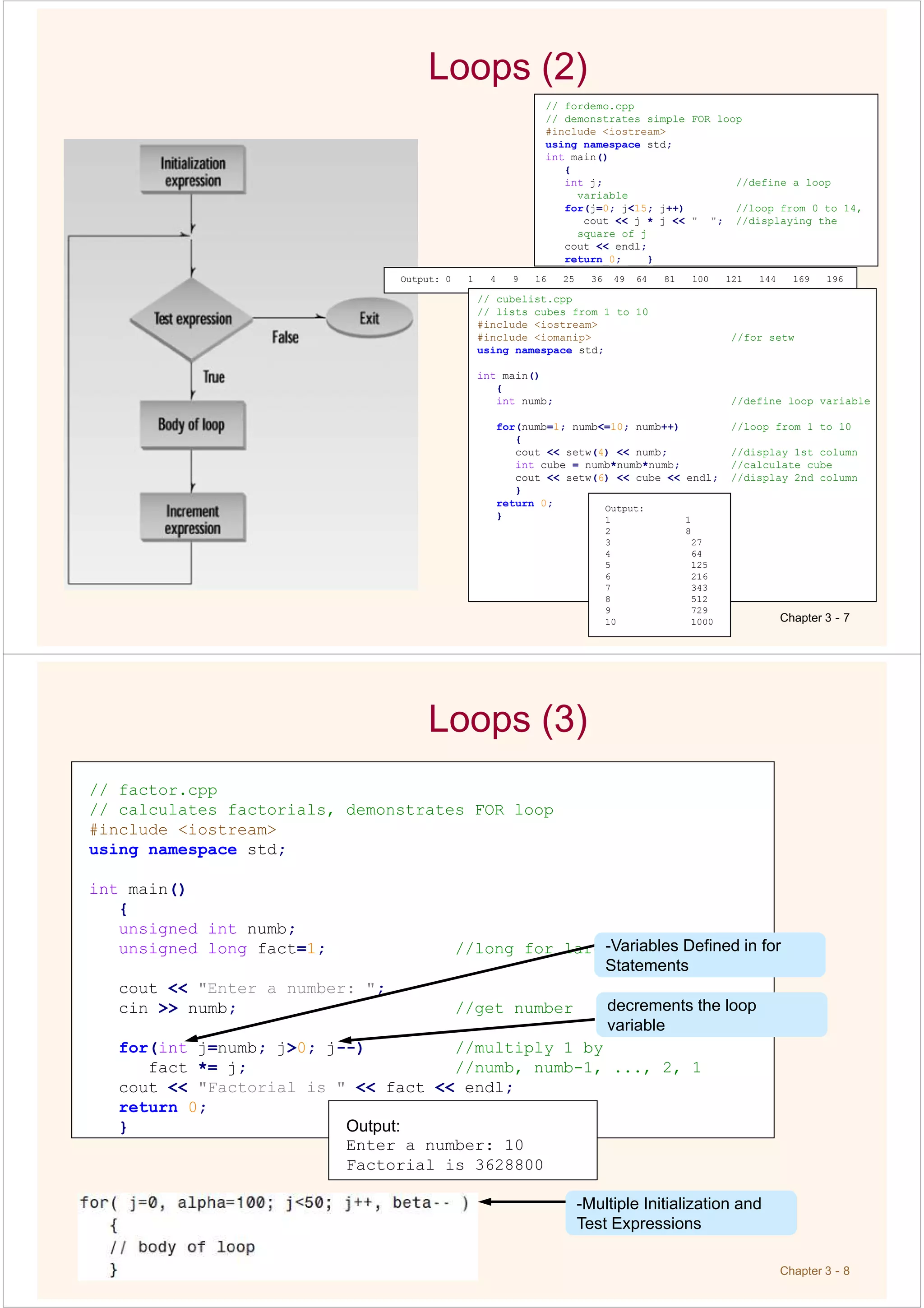
// fordemo.cpp
// demonstrates simple FOR loop
#include <iostream>
using namespace std;
int main()
{
int j; //define a loop
variable
for(j=0; j<15; j++) //loop from 0 to 14,
cout << j * j << " "; //displaying the
square of j
cout << endl;
return 0; }
Output: 0 1 4 9 16 25 36 49 64 81 100 121 144 169 196
// cubelist.cpp
// lists cubes from 1 to 10
#include <iostream>
#include <iomanip> //for setw
using namespace std;
int main()
{
int numb; //define loop variable
for(numb=1; numb<=10; numb++) //loop from 1 to 10
{
cout << setw(4) << numb; //display 1st column
int cube = numb*numb*numb; //calculate cube
cout << setw(6) << cube << endl; //display 2nd column
}
return 0;
}
Output:
1 1
2 8
3 27
4 64
5 125
6 216
7 343
8 512
9 729
10 1000
Chapter 3 - 8
Loops (3)
// factor.cpp
// calculates factorials, demonstrates FOR loop
#include <iostream>
using namespace std;
int main()
{
unsigned int numb;
unsigned long fact=1; //long for larger numbers
cout << "Enter a number: ";
cin >> numb; //get number
for(int j=numb; j>0; j--) //multiply 1 by
fact *= j; //numb, numb-1, ..., 2, 1
cout << "Factorial is " << fact << endl;
return 0;
}
-Variables Defined in for
Statements
decrements the loop
variable
Output:
Enter a number: 10
Factorial is 3628800
-Multiple Initialization and
Test Expressions
Chapter 3 - 9
Loops(4)
The While Loop:
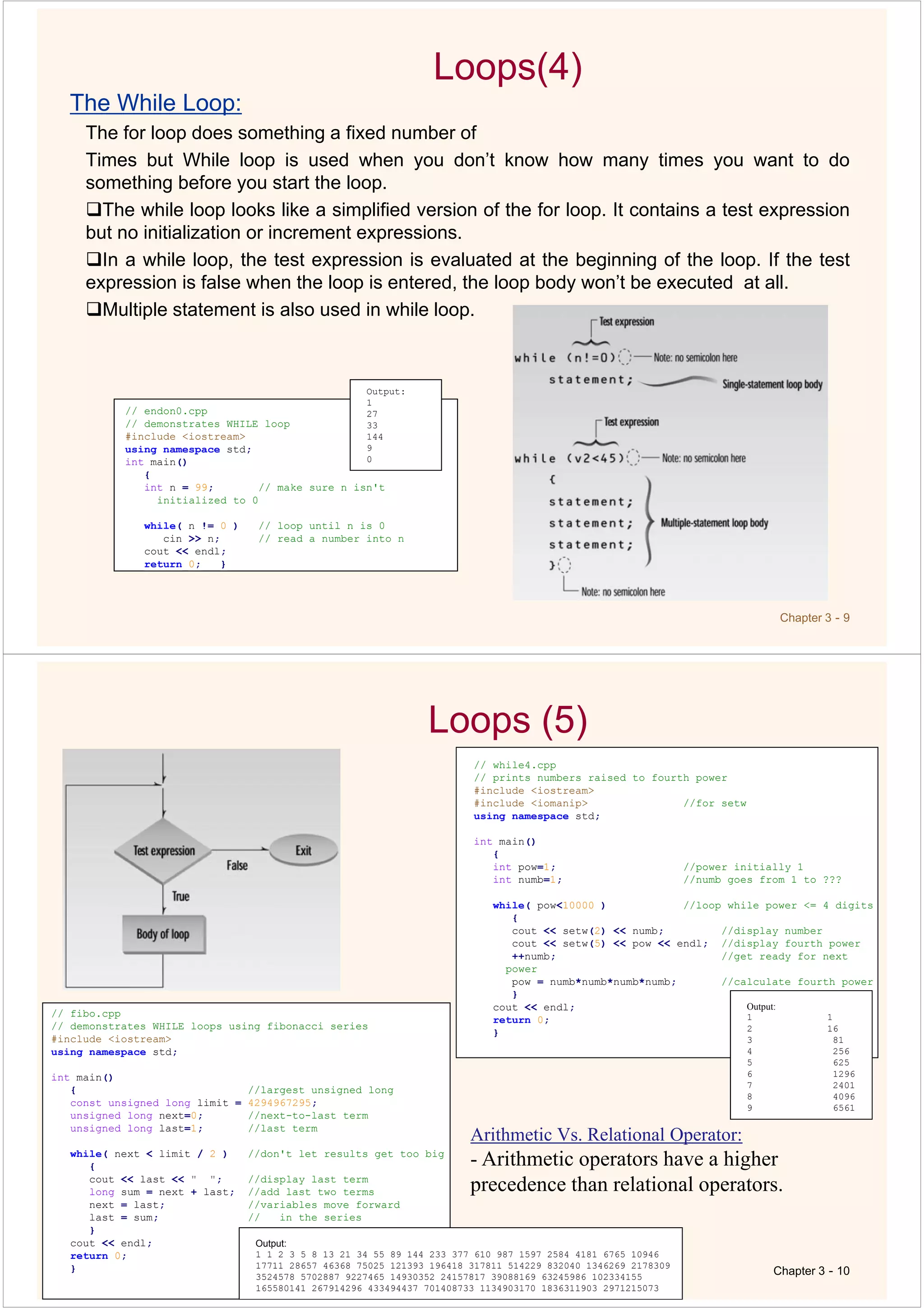
The for loop does something a fixed number of
Times but While loop is used when you don’t know how many times you want to do
something before you start the loop.
The while loop looks like a simplified version of the for loop. It contains a test expression
but no initialization or increment expressions.
In a while loop, the test expression is evaluated at the beginning of the loop. If the test
expression is false when the loop is entered, the loop body won’t be executed at all.
Multiple statement is also used in while loop.
// endon0.cpp
// demonstrates WHILE loop
#include <iostream>
using namespace std;
int main()
{
int n = 99; // make sure n isn't
initialized to 0
while( n != 0 ) // loop until n is 0
cin >> n; // read a number into n
cout << endl;
return 0; }
Output:
1
27
33
144
9
0
Loops (5)
Chapter 3 - 10
// while4.cpp
// prints numbers raised to fourth power
#include <iostream>
#include <iomanip> //for setw
using namespace std;
int main()
{
int pow=1; //power initially 1
int numb=1; //numb goes from 1 to ???
while( pow<10000 ) //loop while power <= 4 digits
{
cout << setw(2) << numb; //display number
cout << setw(5) << pow << endl; //display fourth power
++numb; //get ready for next
power
pow = numb*numb*numb*numb; //calculate fourth power
}
cout << endl;
return 0;
}
// fibo.cpp
// demonstrates WHILE loops using fibonacci series
#include <iostream>
using namespace std;
int main()
{ //largest unsigned long
const unsigned long limit = 4294967295;
unsigned long next=0; //next-to-last term
unsigned long last=1; //last term
while( next < limit / 2 ) //don't let results get too big
{
cout << last << " "; //display last term
long sum = next + last; //add last two terms
next = last; //variables move forward
last = sum; // in the series
}
cout << endl;
return 0;
}
Output:
1 1 2 3 5 8 13 21 34 55 89 144 233 377 610 987 1597 2584 4181 6765 10946
17711 28657 46368 75025 121393 196418 317811 514229 832040 1346269 2178309
3524578 5702887 9227465 14930352 24157817 39088169 63245986 102334155
165580141 267914296 433494437 701408733 1134903170 1836311903 2971215073
Output:
1 1
2 16
3 81
4 256
5 625
6 1296
7 2401
8 4096
9 6561
Arithmetic Vs. Relational Operator:
- Arithmetic operators have a higher
precedence than relational operators.
Chapter 3 - 11
Loops (7)
do Loop: the loop body is executed at least once, no matter what the initial
state of the test expression then do loop is used.
// divdo.cpp
// demonstrates DO loop
#include <iostream>
using namespace std;
int main()
{
long dividend, divisor;
char ch;
do //start of do loop
{ //do some processing
cout << "Enter dividend: "; cin >> dividend;
cout << "Enter divisor: "; cin >> divisor;
cout << "Quotient is " << dividend / divisor;
cout << ", remainder is " << dividend % divisor;
cout << "nDo another? (y/n): "; //do it again?
cin >> ch;
}
while( ch != 'n' ); //loop condition
return 0;
}
Output:
Enter dividend: 11
Enter divisor: 3
Quotient is 3, remainder is 2
Do another? (y/n): y
Enter dividend: 222
Enter divisor: 17
Quotient is 13, remainder is 1
Do another? (y/n): n
When to Use Which Loop
• The for loop is appropriate when you know in
advance how many times the loop will be
executed.
• The while and do loops are used when you don’t
know in advance when the loop will terminate
– the while loop when you may not want to execute the loop
body even once, and
– the do loop when you’re sure you want to execute the loop
body at least once.
Chapter 3 - 12
Chapter 3 - 13
Decisions: The if Statement (1)
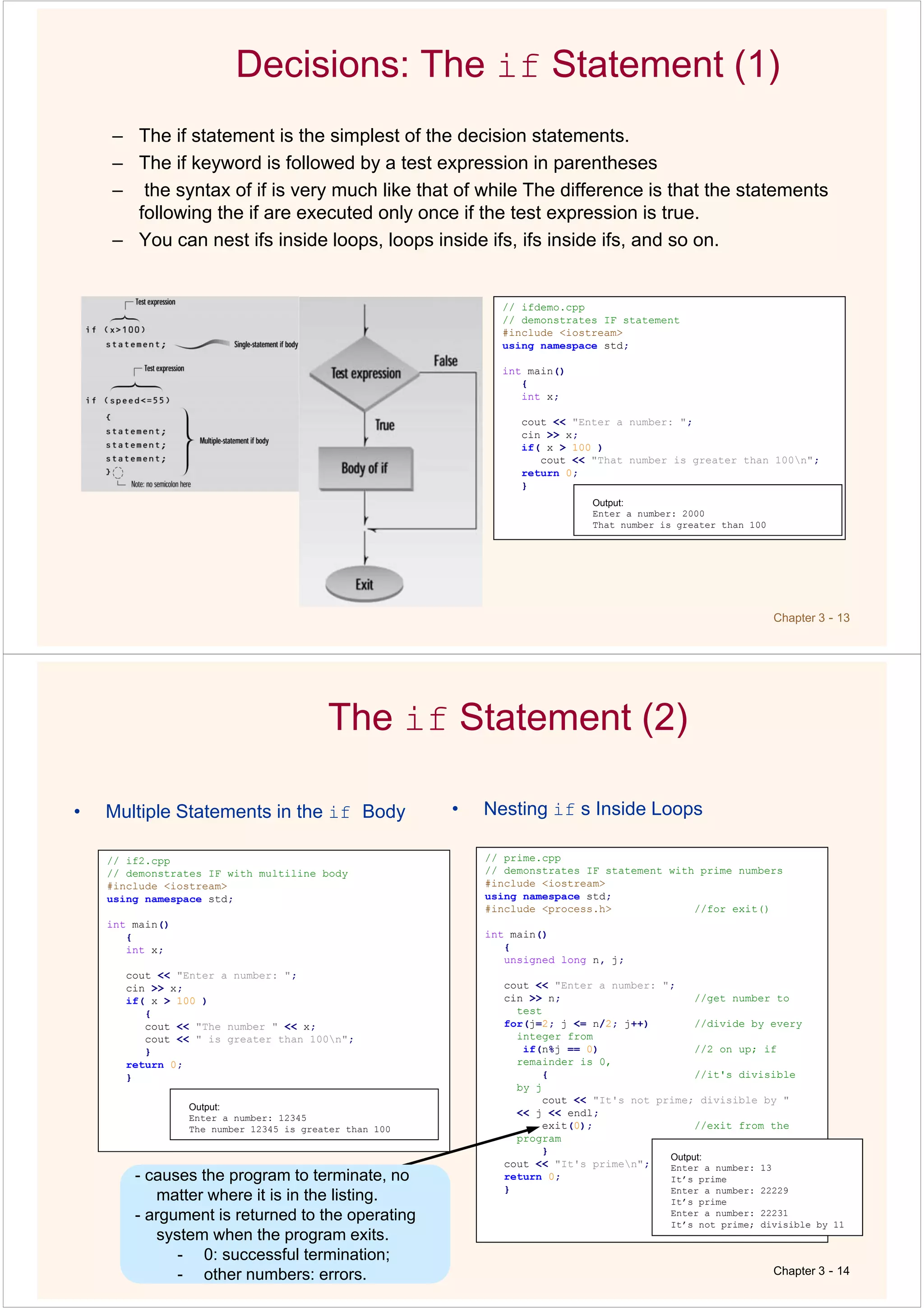
– The if statement is the simplest of the decision statements.
– The if keyword is followed by a test expression in parentheses
– the syntax of if is very much like that of while The difference is that the statements
following the if are executed only once if the test expression is true.
– You can nest ifs inside loops, loops inside ifs, ifs inside ifs, and so on.
// ifdemo.cpp
// demonstrates IF statement
#include <iostream>
using namespace std;
int main()
{
int x;
cout << "Enter a number: ";
cin >> x;
if( x > 100 )
cout << "That number is greater than 100n";
return 0;
}
Output:
Enter a number: 2000
That number is greater than 100
The if Statement (2)
• Multiple Statements in the if Body
Chapter 3 - 14
// if2.cpp
// demonstrates IF with multiline body
#include <iostream>
using namespace std;
int main()
{
int x;
cout << "Enter a number: ";
cin >> x;
if( x > 100 )
{
cout << "The number " << x;
cout << " is greater than 100n";
}
return 0;
}
Output:
Enter a number: 12345
The number 12345 is greater than 100
• Nesting if s Inside Loops
// prime.cpp
// demonstrates IF statement with prime numbers
#include <iostream>
using namespace std;
#include <process.h> //for exit()
int main()
{
unsigned long n, j;
cout << "Enter a number: ";
cin >> n; //get number to
test
for(j=2; j <= n/2; j++) //divide by every
integer from
if(n%j == 0) //2 on up; if
remainder is 0,
{ //it's divisible
by j
cout << "It's not prime; divisible by "
<< j << endl;
exit(0); //exit from the
program
}
cout << "It's primen";
return 0;
}
Output:
Enter a number: 13
It’s prime
Enter a number: 22229
It’s prime
Enter a number: 22231
It’s not prime; divisible by 11
-
- other numbers: errors.
- causes the program to terminate, no
matter where it is in the listing.
- argument is returned to the operating
system when the program exits.
- 0: successful termination;
- other numbers: errors.
Chapter 3 - 15
Decisions: The if...else Statement
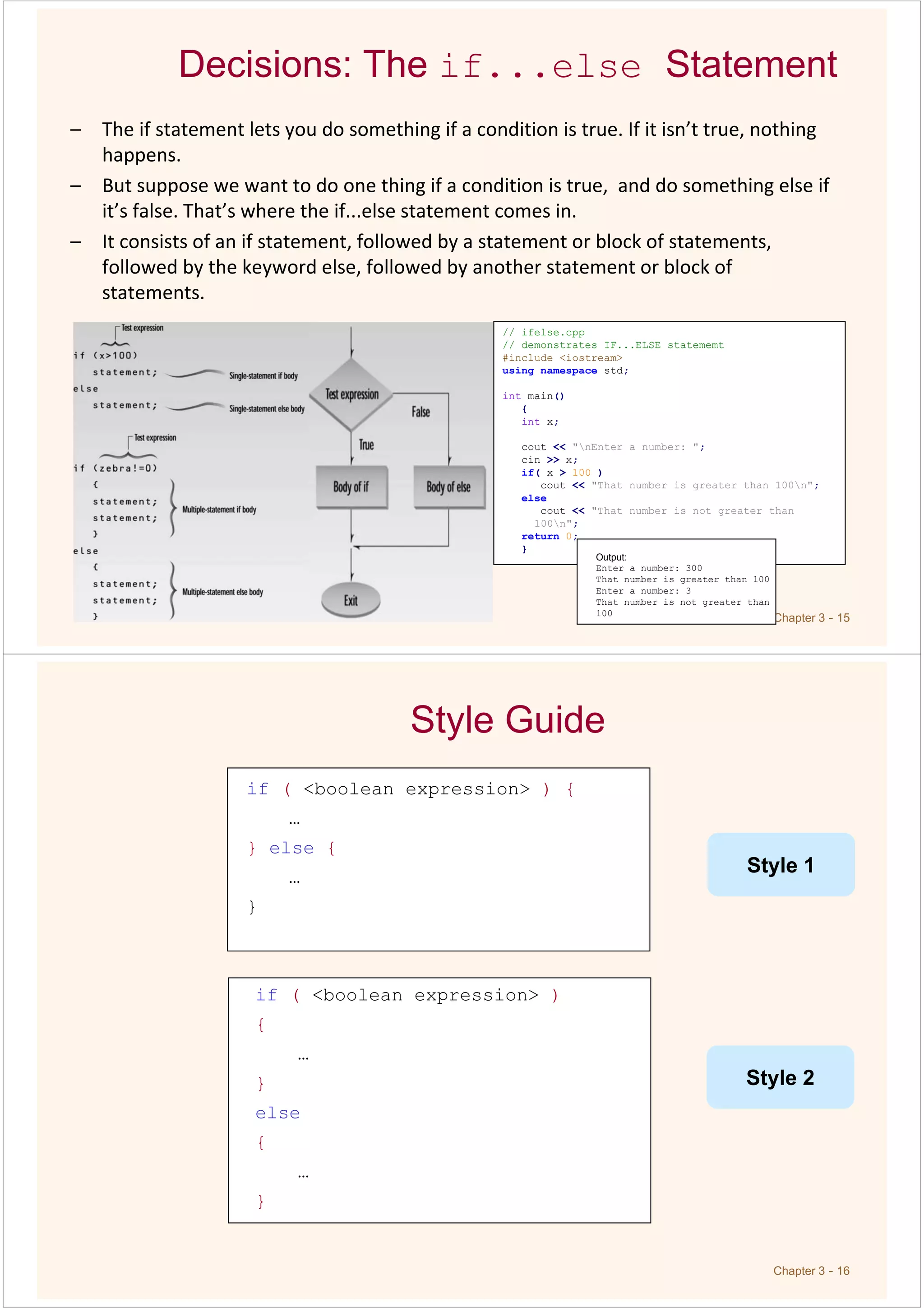
– The if statement lets you do something if a condition is true. If it isn’t true, nothing
happens.
– But suppose we want to do one thing if a condition is true, and do something else if
it’s false. That’s where the if...else statement comes in.
– It consists of an if statement, followed by a statement or block of statements,
followed by the keyword else, followed by another statement or block of
statements.
// ifelse.cpp
// demonstrates IF...ELSE statememt
#include <iostream>
using namespace std;
int main()
{
int x;
cout << "nEnter a number: ";
cin >> x;
if( x > 100 )
cout << "That number is greater than 100n";
else
cout << "That number is not greater than
100n";
return 0;
}
Output:
Enter a number: 300
That number is greater than 100
Enter a number: 3
That number is not greater than
100
Chapter 3 - 16
if ( <boolean expression> ) {
…
} else {
…
}
Style Guide
if ( <boolean expression> )
{
…
}
else
{
…
}
Style 1
Style 2
Decisions: The if...else Statement (2)
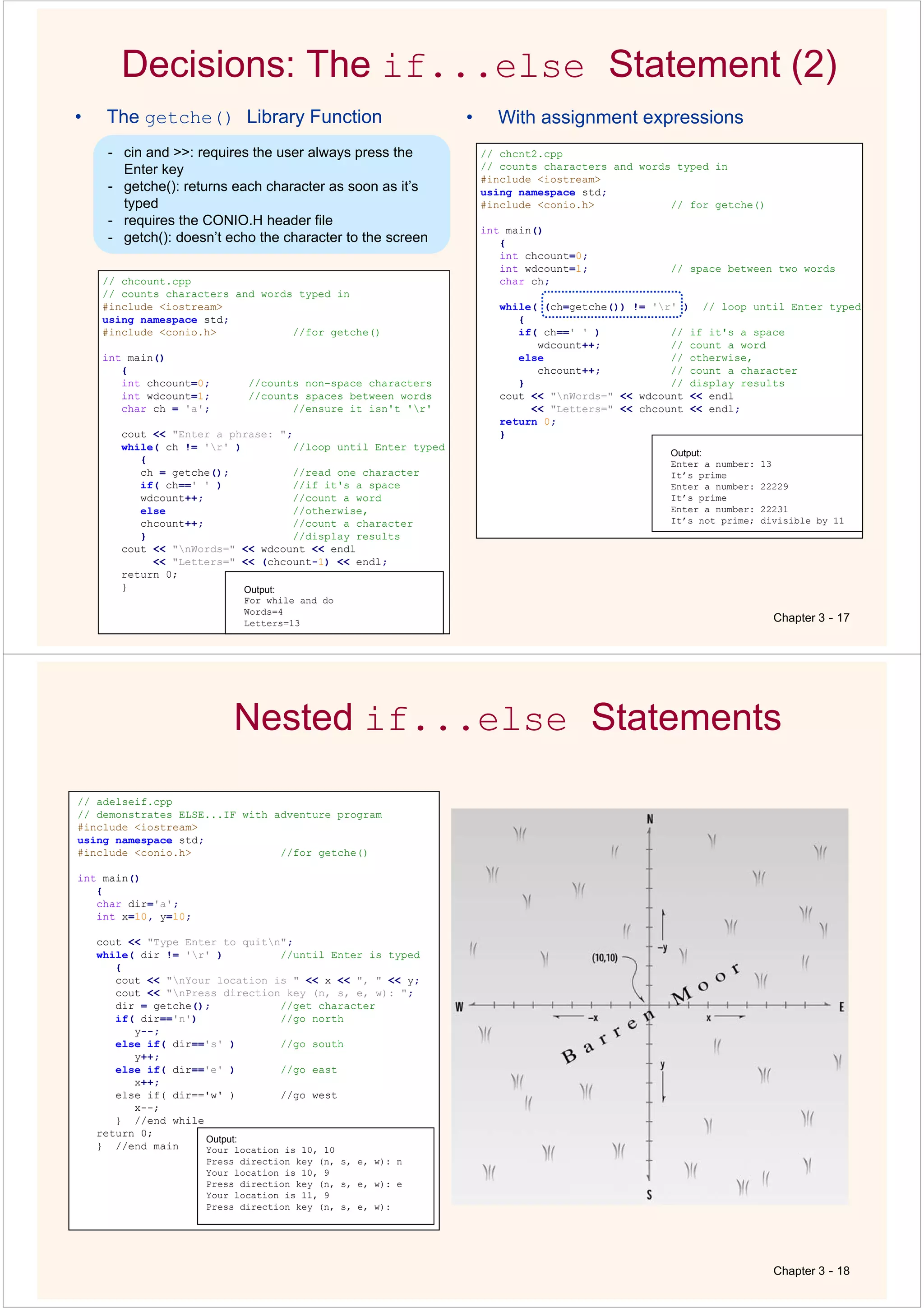
• The getche() Library Function
Chapter 3 - 17
// chcount.cpp
// counts characters and words typed in
#include <iostream>
using namespace std;
#include <conio.h> //for getche()
int main()
{
int chcount=0; //counts non-space characters
int wdcount=1; //counts spaces between words
char ch = 'a'; //ensure it isn't 'r'
cout << "Enter a phrase: ";
while( ch != 'r' ) //loop until Enter typed
{
ch = getche(); //read one character
if( ch==' ' ) //if it's a space
wdcount++; //count a word
else //otherwise,
chcount++; //count a character
} //display results
cout << "nWords=" << wdcount << endl
<< "Letters=" << (chcount-1) << endl;
return 0;
} Output:
For while and do
Words=4
Letters=13
• With assignment expressions
// chcnt2.cpp
// counts characters and words typed in
#include <iostream>
using namespace std;
#include <conio.h> // for getche()
int main()
{
int chcount=0;
int wdcount=1; // space between two words
char ch;
while( (ch=getche()) != 'r' ) // loop until Enter typed
{
if( ch==' ' ) // if it's a space
wdcount++; // count a word
else // otherwise,
chcount++; // count a character
} // display results
cout << "nWords=" << wdcount << endl
<< "Letters=" << chcount << endl;
return 0;
}
Output:
Enter a number: 13
It’s prime
Enter a number: 22229
It’s prime
Enter a number: 22231
It’s not prime; divisible by 11
- cin and >>: requires the user always press the
Enter key
- getche(): returns each character as soon as it’s
typed
- requires the CONIO.H header file
- getch(): doesn’t echo the character to the screen
Nested if...else Statements
Chapter 3 - 18
// adelseif.cpp
// demonstrates ELSE...IF with adventure program
#include <iostream>
using namespace std;
#include <conio.h> //for getche()
int main()
{
char dir='a';
int x=10, y=10;
cout << "Type Enter to quitn";
while( dir != 'r' ) //until Enter is typed
{
cout << "nYour location is " << x << ", " << y;
cout << "nPress direction key (n, s, e, w): ";
dir = getche(); //get character
if( dir=='n') //go north
y--;
else if( dir=='s' ) //go south
y++;
else if( dir=='e' ) //go east
x++;
else if( dir=='w' ) //go west
x--;
} //end while
return 0;
} //end main
Output:
Your location is 10, 10
Press direction key (n, s, e, w): n
Your location is 10, 9
Press direction key (n, s, e, w): e
Your location is 11, 9
Press direction key (n, s, e, w):
Chapter 3 - 19
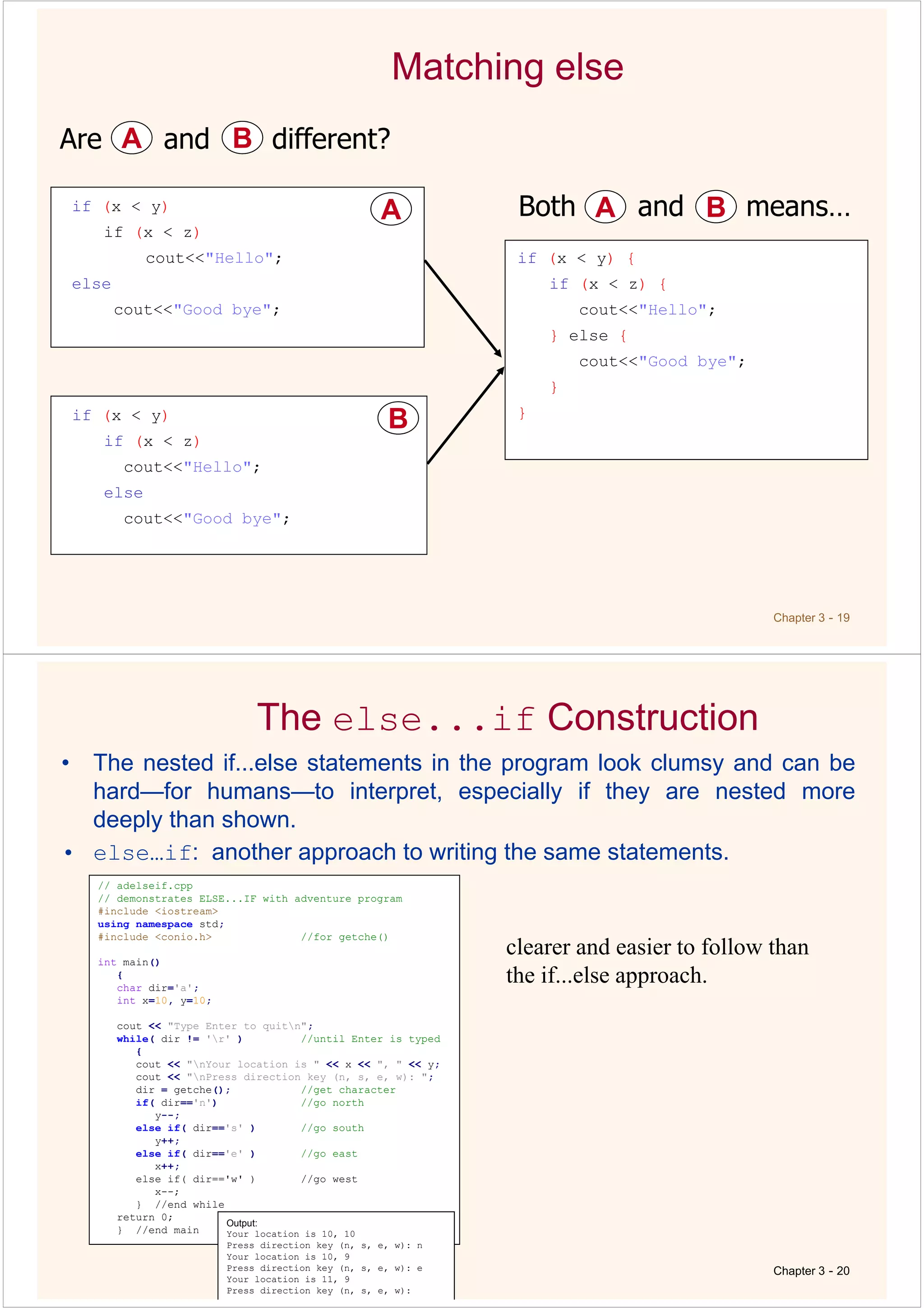
Matching else
if (x < y)
if (x < z)
cout<<"Hello";
else
cout<<"Good bye";
A
A
if (x < y)
if (x < z)
cout<<"Hello";
else
cout<<"Good bye";
B
B
Are and different?
A
A B
B
if (x < y) {
if (x < z) {
cout<<"Hello";
} else {
cout<<"Good bye";
}
}
Both and means…
A
A B
B
The else...if Construction
• The nested if...else statements in the program look clumsy and can be
hard—for humans—to interpret, especially if they are nested more
deeply than shown.
• else…if: another approach to writing the same statements.
Chapter 3 - 20
// adelseif.cpp
// demonstrates ELSE...IF with adventure program
#include <iostream>
using namespace std;
#include <conio.h> //for getche()
int main()
{
char dir='a';
int x=10, y=10;
cout << "Type Enter to quitn";
while( dir != 'r' ) //until Enter is typed
{
cout << "nYour location is " << x << ", " << y;
cout << "nPress direction key (n, s, e, w): ";
dir = getche(); //get character
if( dir=='n') //go north
y--;
else if( dir=='s' ) //go south
y++;
else if( dir=='e' ) //go east
x++;
else if( dir=='w' ) //go west
x--;
} //end while
return 0;
} //end main
Output:
Your location is 10, 10
Press direction key (n, s, e, w): n
Your location is 10, 9
Press direction key (n, s, e, w): e
Your location is 11, 9
Press direction key (n, s, e, w):
clearer and easier to follow than
the if...else approach.
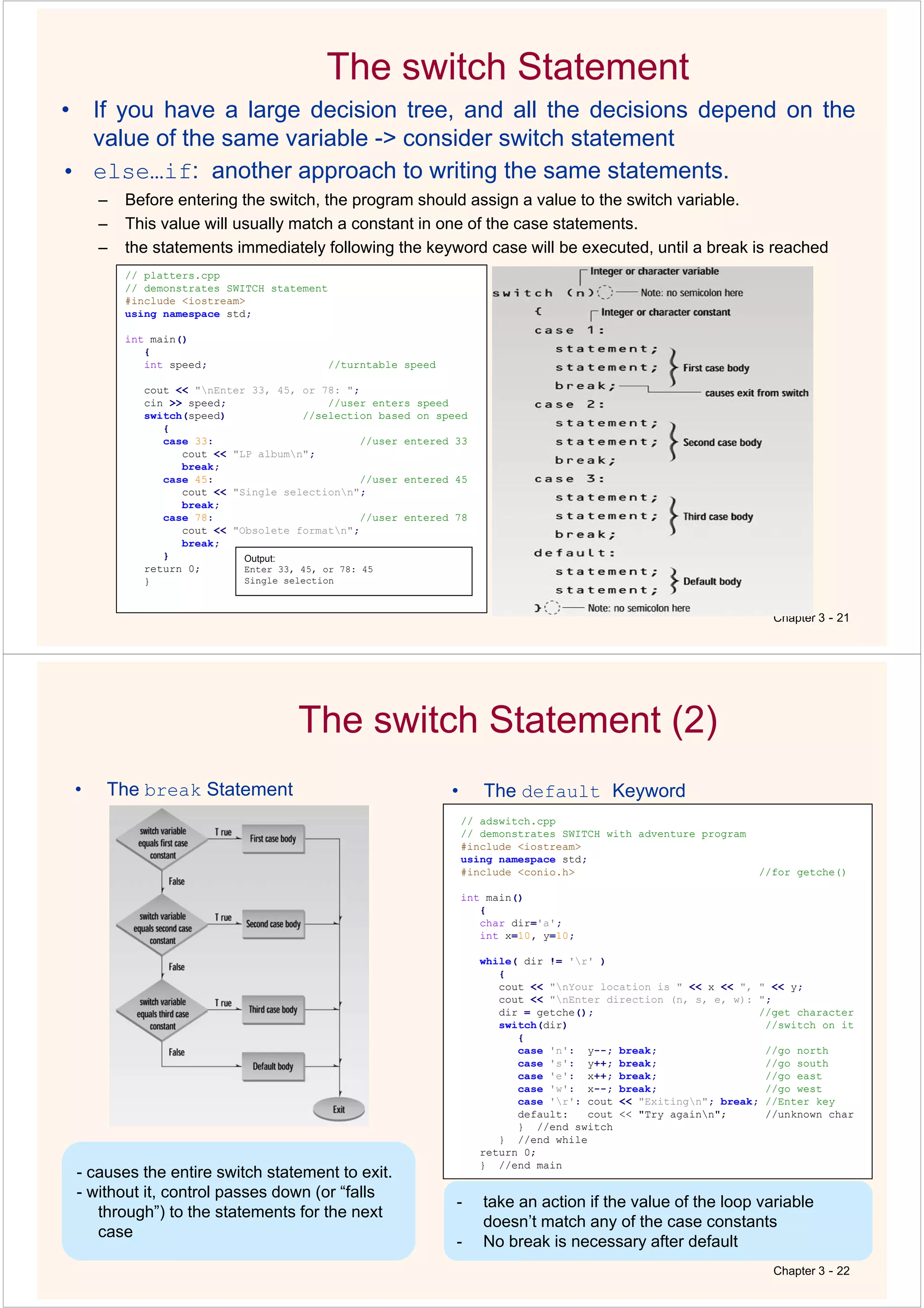
The switch Statement
Chapter 3 - 21
• If you have a large decision tree, and all the decisions depend on the
value of the same variable -> consider switch statement
• else…if: another approach to writing the same statements.
– Before entering the switch, the program should assign a value to the switch variable.
– This value will usually match a constant in one of the case statements.
– the statements immediately following the keyword case will be executed, until a break is reached
// platters.cpp
// demonstrates SWITCH statement
#include <iostream>
using namespace std;
int main()
{
int speed; //turntable speed
cout << "nEnter 33, 45, or 78: ";
cin >> speed; //user enters speed
switch(speed) //selection based on speed
{
case 33: //user entered 33
cout << "LP albumn";
break;
case 45: //user entered 45
cout << "Single selectionn";
break;
case 78: //user entered 78
cout << "Obsolete formatn";
break;
}
return 0;
}
Output:
Enter 33, 45, or 78: 45
Single selection
The switch Statement (2)
• The break Statement
Chapter 3 - 22
• The default Keyword
// adswitch.cpp
// demonstrates SWITCH with adventure program
#include <iostream>
using namespace std;
#include <conio.h> //for getche()
int main()
{
char dir='a';
int x=10, y=10;
while( dir != 'r' )
{
cout << "nYour location is " << x << ", " << y;
cout << "nEnter direction (n, s, e, w): ";
dir = getche(); //get character
switch(dir) //switch on it
{
case 'n': y--; break; //go north
case 's': y++; break; //go south
case 'e': x++; break; //go east
case 'w': x--; break; //go west
case 'r': cout << "Exitingn"; break; //Enter key
default: cout << "Try againn"; //unknown char
} //end switch
} //end while
return 0;
} //end main
- causes the entire switch statement to exit.
- without it, control passes down (or “falls
through”) to the statements for the next
case
- take an action if the value of the loop variable
doesn’t match any of the case constants
- No break is necessary after default
Chapter 3 - 23
switch Versus if...else
– if statement:
» you can use a series of expressions that involve unrelated variables and are as
complex as you like
– switch statement:
» all the branches are selected by the same variable;
» the only thing distinguishing one branch from another is the value of this variable.
» The case constant must be an integer or character constant
» You cannot say:
» very clean—easy to write and to understand
Conditional Operator
• consists of two symbols, which operate on three
operands
Chapter 3 - 24
True False
// condi.cpp
// prints 'x' every 8 columns
// demonstrates conditional operator
#include <iostream>
using namespace std;
int main()
{
for(int j=0; j<80; j++) //for every column,
{ //ch is 'x' if
column is
char ch = (j%8) ? ' ' : 'x'; //multiple of 8,
and
cout << ch; //' ' (space)
otherwise
}
return 0;
}
Output:
x x x x x x x x x
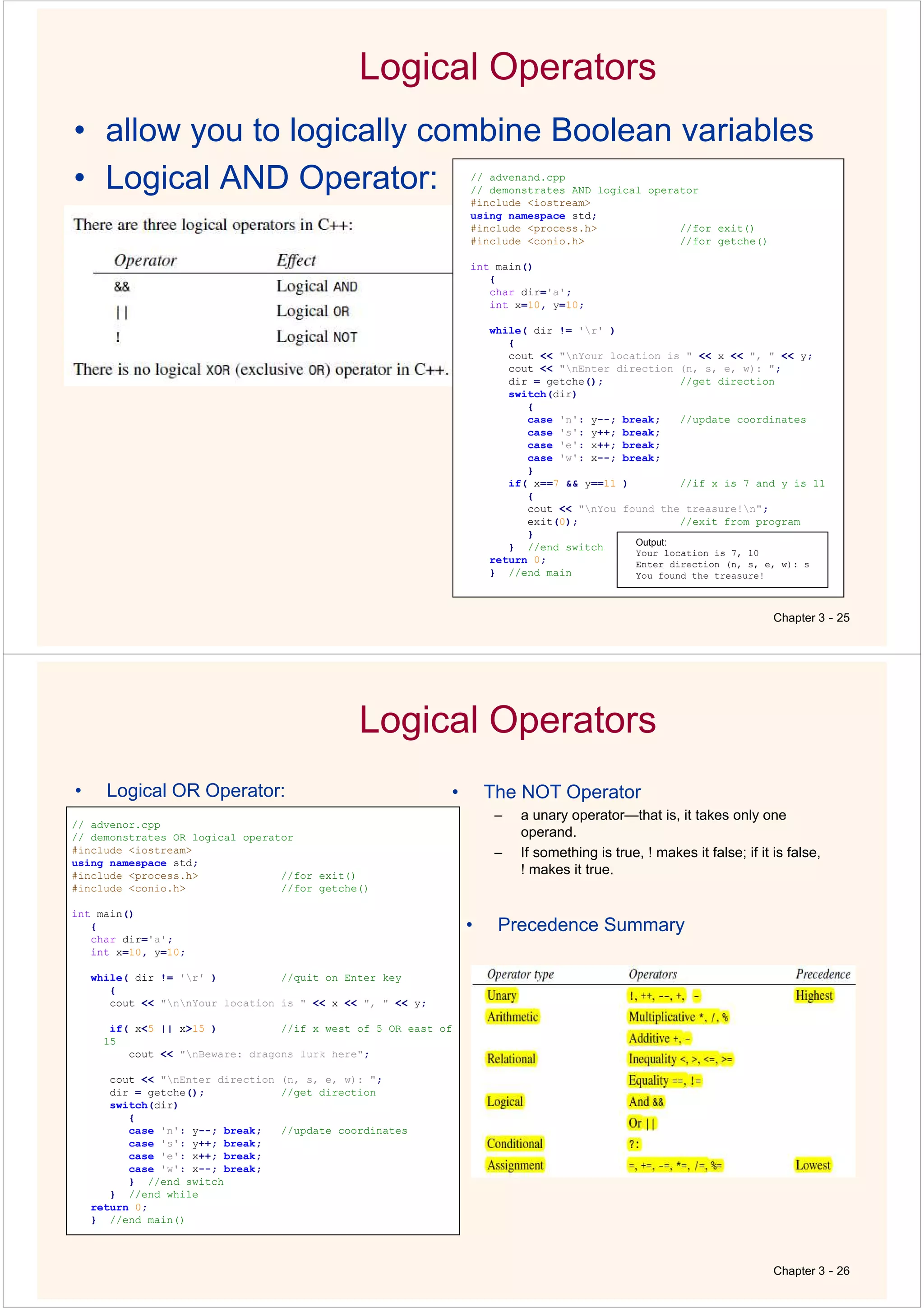
Logical Operators
• allow you to logically combine Boolean variables
• Logical AND Operator:
Chapter 3 - 25
// advenand.cpp
// demonstrates AND logical operator
#include <iostream>
using namespace std;
#include <process.h> //for exit()
#include <conio.h> //for getche()
int main()
{
char dir='a';
int x=10, y=10;
while( dir != 'r' )
{
cout << "nYour location is " << x << ", " << y;
cout << "nEnter direction (n, s, e, w): ";
dir = getche(); //get direction
switch(dir)
{
case 'n': y--; break; //update coordinates
case 's': y++; break;
case 'e': x++; break;
case 'w': x--; break;
}
if( x==7 && y==11 ) //if x is 7 and y is 11
{
cout << "nYou found the treasure!n";
exit(0); //exit from program
}
} //end switch
return 0;
} //end main
Output:
Your location is 7, 10
Enter direction (n, s, e, w): s
You found the treasure!
Logical Operators
Chapter 3 - 26
• Logical OR Operator: • The NOT Operator
– a unary operator—that is, it takes only one
operand.
– If something is true, ! makes it false; if it is false,
! makes it true.
// advenor.cpp
// demonstrates OR logical operator
#include <iostream>
using namespace std;
#include <process.h> //for exit()
#include <conio.h> //for getche()
int main()
{
char dir='a';
int x=10, y=10;
while( dir != 'r' ) //quit on Enter key
{
cout << "nnYour location is " << x << ", " << y;
if( x<5 || x>15 ) //if x west of 5 OR east of
15
cout << "nBeware: dragons lurk here";
cout << "nEnter direction (n, s, e, w): ";
dir = getche(); //get direction
switch(dir)
{
case 'n': y--; break; //update coordinates
case 's': y++; break;
case 'e': x++; break;
case 'w': x--; break;
} //end switch
} //end while
return 0;
} //end main()
• Precedence Summary
Other Control Statements
Chapter 2 - 27
• The break Statement
// showprim.cpp
// displays prime number distribution
#include <iostream>
using namespace std;
#include <conio.h> //for getche()
int main()
{
const unsigned char WHITE = 219; //solid color
(primes)
const unsigned char GRAY = 176; //gray (non primes)
unsigned char ch;
//for each screen position
for(int count=0; count<80*25-1; count++)
{
ch = WHITE; //assume it's prime
for(int j=2; j<count; j++) //divide by every
integer from
if(count%j == 0) //2 on up; if remainder is 0,
{
ch = GRAY; //it's not prime
break; //break out of inner
loop
}
cout << ch; //display the character
}
getche(); //freeze screen until keypress
return 0;
}
• The continue Statement
// divdo2.cpp
// demonstrates CONTINUE statement
#include <iostream>
using namespace std;
int main()
{
long dividend, divisor;
char ch;
do {
cout << "Enter dividend: "; cin >> dividend;
cout << "Enter divisor: "; cin >> divisor;
if( divisor == 0 ) //if attempt to
{ //divide by 0,
cout << "Illegal divisorn"; //display message
continue; //go to top of
loop
}
cout << "Quotient is " << dividend / divisor;
cout << ", remainder is " << dividend % divisor;
cout << "nDo another? (y/n): ";
cin >> ch;
} while( ch != 'n' );
return 0;
}
Output:
Enter dividend: 10
Enter divisor: 0
Illegal divisor
Enter dividend:
Chapter 3 - 28
Summary (1)
• Relational operators compare two values to see whether they’re equal,
whether one is larger than the other, and so on.
– The result is a logical or Boolean (type bool ) value, which is true or false.
– False is indicated by 0, and true by 1 or any other non-zero number.
• There are three kinds of loops in C++.
– The for loop is most often used when you know in advance how many times you
want to execute the loop.
– The while loop and do loops are used when the condition causing the loop to
terminate arises within the loop, with the while loop not necessarily executing at
all, and the do loop always executing at least once.
• A loop body can be a single statement or a block of multiple statements
delimited by braces. A variable defined within a block is visible only
within that block.
Chapter 3 - 29
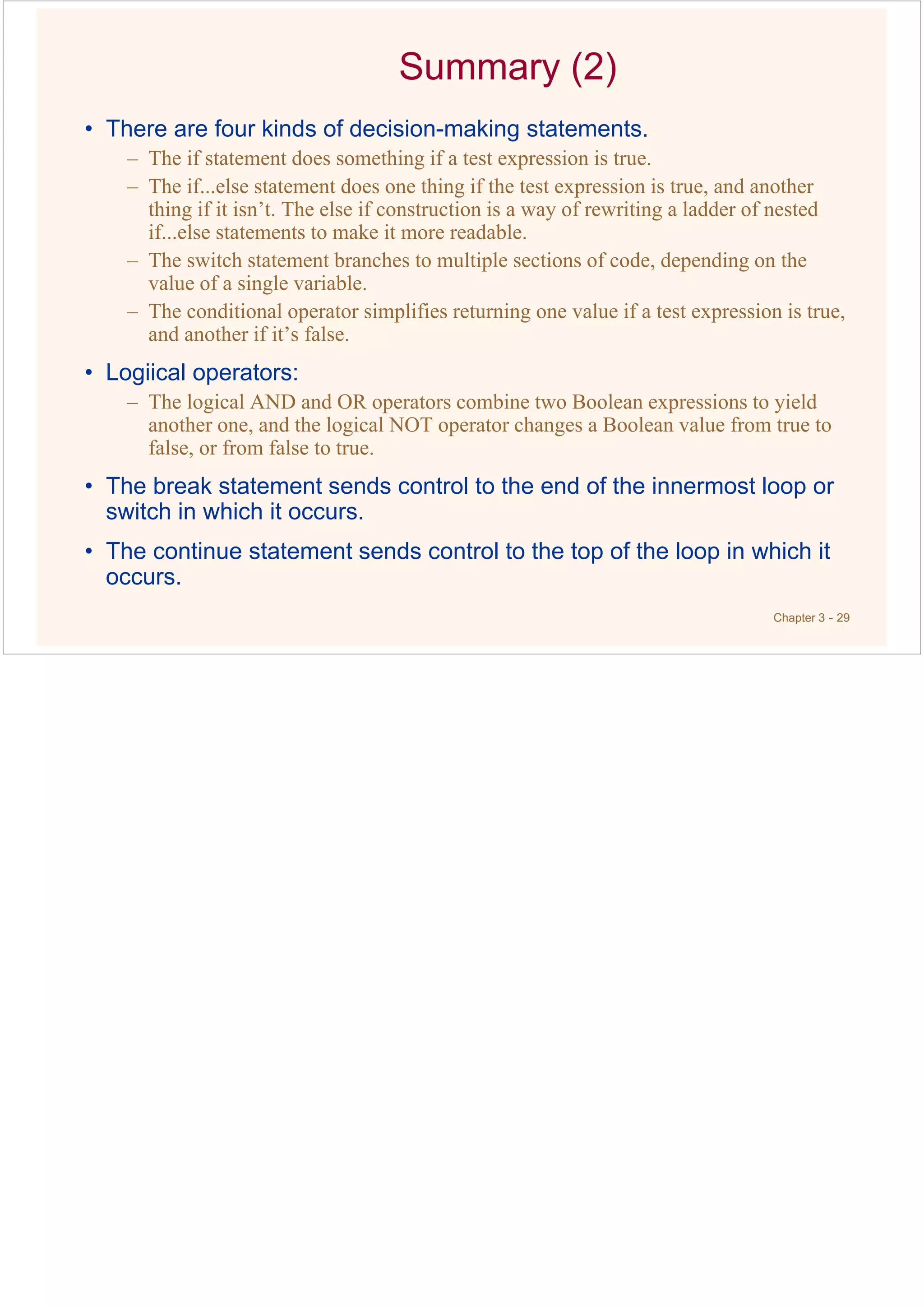
Summary (2)
• There are four kinds of decision-making statements.
– The if statement does something if a test expression is true.
– The if...else statement does one thing if the test expression is true, and another
thing if it isn’t. The else if construction is a way of rewriting a ladder of nested
if...else statements to make it more readable.
– The switch statement branches to multiple sections of code, depending on the
value of a single variable.
– The conditional operator simplifies returning one value if a test expression is true,
and another if it’s false.
• Logiical operators:
– The logical AND and OR operators combine two Boolean expressions to yield
another one, and the logical NOT operator changes a Boolean value from true to
false, or from false to true.
• The break statement sends control to the end of the innermost loop or
switch in which it occurs.
• The continue statement sends control to the top of the loop in which it
occurs.

4th_Ed_Ch03.pdf

  • 1.
    Chapter 3 -1 Chapter 3 Loops & Decisions Animated Version Topics • Relational Operators • Loops • Decisions • Logical Operators • Precedence Summary • Other Control Statements Chapter 3 - 2
  • 2.
    Relational Operators • Arelational operator compares two values. • The comparison involves such relationships as equal to, less than, and greater than. • The result of the comparison is true or false; for example, either two values are equal (true), or they’re not (false). Chapter 3 - 3 // relat.cpp // demonstrates relational operators #include <iostream> using namespace std; int main() { int numb; cout << "Enter a number: "; cin >> numb; cout << "numb<10 is " << (numb < 10) << endl; cout << "numb>10 is " << (numb > 10) << endl; cout << "numb==10 is " << (numb == 10) << endl; return 0; } Output: Enter a number: 20 numb<10 is 0 numb>10 is 1 numb==10 is 0 Chapter 3 - 4 Relational Operators (1) Complete List Of C++ Relational Operators: Note that: The equal operator, ==,uses two equal signs. A common mistake is to use a single equal sign—the assignment operator—as a relational operator. This is a nasty bug, since the compiler may not notice anything wrong. C++ generates a 1 to indicate true, it assumes that any value other than 0 (such as –7 or 44) is true; only 0 is false.
  • 3.
    Chapter 3 -5 Loops Loops cause a section of your program to be repeated a certain number of times. The repetition continues while a condition is true. When the condition becomes false, the loop ends and control passes to the statements following the loop. three kinds of loops in C++: the for loop, the while loop, and the do loop. The For Loop: The for loop executes a section of code a fixed number of times. Basic Construction: for(j=0; j<15; j++) Here, The for statement controls the loop. It consists of the keyword for, followed by parentheses that contain three expressions separated by semicolons. These three expressions are the initialization expression, the test expression, and the increment expression. Chapter 3 - 6 Loops (2) The Initialization Expression: The initialization expression is executed only once, when the loop first starts. It gives the loop variable an initial value The Test Expression: The test expression usually involves a relational operator. It is evaluated each time through the loop, just before the body of the loop is executed. It determines whether the loop will be executed again. If the test expression is true, the loop is executed one more time. If it’s false, the loop ends, and control passes to the statements following the loop. The Increment Expression The increment expression changes the value of the loop variable, often by incrementing it. It is always executed at the end of the loop, after the loop body has been executed. Here the increment operator ++ adds 1 to j each time through the loop.
  • 4.
    Loops (2) Chapter 3- 7 // fordemo.cpp // demonstrates simple FOR loop #include <iostream> using namespace std; int main() { int j; //define a loop variable for(j=0; j<15; j++) //loop from 0 to 14, cout << j * j << " "; //displaying the square of j cout << endl; return 0; } Output: 0 1 4 9 16 25 36 49 64 81 100 121 144 169 196 // cubelist.cpp // lists cubes from 1 to 10 #include <iostream> #include <iomanip> //for setw using namespace std; int main() { int numb; //define loop variable for(numb=1; numb<=10; numb++) //loop from 1 to 10 { cout << setw(4) << numb; //display 1st column int cube = numb*numb*numb; //calculate cube cout << setw(6) << cube << endl; //display 2nd column } return 0; } Output: 1 1 2 8 3 27 4 64 5 125 6 216 7 343 8 512 9 729 10 1000 Chapter 3 - 8 Loops (3) // factor.cpp // calculates factorials, demonstrates FOR loop #include <iostream> using namespace std; int main() { unsigned int numb; unsigned long fact=1; //long for larger numbers cout << "Enter a number: "; cin >> numb; //get number for(int j=numb; j>0; j--) //multiply 1 by fact *= j; //numb, numb-1, ..., 2, 1 cout << "Factorial is " << fact << endl; return 0; } -Variables Defined in for Statements decrements the loop variable Output: Enter a number: 10 Factorial is 3628800 -Multiple Initialization and Test Expressions
  • 5.
    Chapter 3 -9 Loops(4) The While Loop: The for loop does something a fixed number of Times but While loop is used when you don’t know how many times you want to do something before you start the loop. The while loop looks like a simplified version of the for loop. It contains a test expression but no initialization or increment expressions. In a while loop, the test expression is evaluated at the beginning of the loop. If the test expression is false when the loop is entered, the loop body won’t be executed at all. Multiple statement is also used in while loop. // endon0.cpp // demonstrates WHILE loop #include <iostream> using namespace std; int main() { int n = 99; // make sure n isn't initialized to 0 while( n != 0 ) // loop until n is 0 cin >> n; // read a number into n cout << endl; return 0; } Output: 1 27 33 144 9 0 Loops (5) Chapter 3 - 10 // while4.cpp // prints numbers raised to fourth power #include <iostream> #include <iomanip> //for setw using namespace std; int main() { int pow=1; //power initially 1 int numb=1; //numb goes from 1 to ??? while( pow<10000 ) //loop while power <= 4 digits { cout << setw(2) << numb; //display number cout << setw(5) << pow << endl; //display fourth power ++numb; //get ready for next power pow = numb*numb*numb*numb; //calculate fourth power } cout << endl; return 0; } // fibo.cpp // demonstrates WHILE loops using fibonacci series #include <iostream> using namespace std; int main() { //largest unsigned long const unsigned long limit = 4294967295; unsigned long next=0; //next-to-last term unsigned long last=1; //last term while( next < limit / 2 ) //don't let results get too big { cout << last << " "; //display last term long sum = next + last; //add last two terms next = last; //variables move forward last = sum; // in the series } cout << endl; return 0; } Output: 1 1 2 3 5 8 13 21 34 55 89 144 233 377 610 987 1597 2584 4181 6765 10946 17711 28657 46368 75025 121393 196418 317811 514229 832040 1346269 2178309 3524578 5702887 9227465 14930352 24157817 39088169 63245986 102334155 165580141 267914296 433494437 701408733 1134903170 1836311903 2971215073 Output: 1 1 2 16 3 81 4 256 5 625 6 1296 7 2401 8 4096 9 6561 Arithmetic Vs. Relational Operator: - Arithmetic operators have a higher precedence than relational operators.
  • 6.
    Chapter 3 -11 Loops (7) do Loop: the loop body is executed at least once, no matter what the initial state of the test expression then do loop is used. // divdo.cpp // demonstrates DO loop #include <iostream> using namespace std; int main() { long dividend, divisor; char ch; do //start of do loop { //do some processing cout << "Enter dividend: "; cin >> dividend; cout << "Enter divisor: "; cin >> divisor; cout << "Quotient is " << dividend / divisor; cout << ", remainder is " << dividend % divisor; cout << "nDo another? (y/n): "; //do it again? cin >> ch; } while( ch != 'n' ); //loop condition return 0; } Output: Enter dividend: 11 Enter divisor: 3 Quotient is 3, remainder is 2 Do another? (y/n): y Enter dividend: 222 Enter divisor: 17 Quotient is 13, remainder is 1 Do another? (y/n): n When to Use Which Loop • The for loop is appropriate when you know in advance how many times the loop will be executed. • The while and do loops are used when you don’t know in advance when the loop will terminate – the while loop when you may not want to execute the loop body even once, and – the do loop when you’re sure you want to execute the loop body at least once. Chapter 3 - 12
  • 7.
    Chapter 3 -13 Decisions: The if Statement (1) – The if statement is the simplest of the decision statements. – The if keyword is followed by a test expression in parentheses – the syntax of if is very much like that of while The difference is that the statements following the if are executed only once if the test expression is true. – You can nest ifs inside loops, loops inside ifs, ifs inside ifs, and so on. // ifdemo.cpp // demonstrates IF statement #include <iostream> using namespace std; int main() { int x; cout << "Enter a number: "; cin >> x; if( x > 100 ) cout << "That number is greater than 100n"; return 0; } Output: Enter a number: 2000 That number is greater than 100 The if Statement (2) • Multiple Statements in the if Body Chapter 3 - 14 // if2.cpp // demonstrates IF with multiline body #include <iostream> using namespace std; int main() { int x; cout << "Enter a number: "; cin >> x; if( x > 100 ) { cout << "The number " << x; cout << " is greater than 100n"; } return 0; } Output: Enter a number: 12345 The number 12345 is greater than 100 • Nesting if s Inside Loops // prime.cpp // demonstrates IF statement with prime numbers #include <iostream> using namespace std; #include <process.h> //for exit() int main() { unsigned long n, j; cout << "Enter a number: "; cin >> n; //get number to test for(j=2; j <= n/2; j++) //divide by every integer from if(n%j == 0) //2 on up; if remainder is 0, { //it's divisible by j cout << "It's not prime; divisible by " << j << endl; exit(0); //exit from the program } cout << "It's primen"; return 0; } Output: Enter a number: 13 It’s prime Enter a number: 22229 It’s prime Enter a number: 22231 It’s not prime; divisible by 11 - - other numbers: errors. - causes the program to terminate, no matter where it is in the listing. - argument is returned to the operating system when the program exits. - 0: successful termination; - other numbers: errors.
  • 8.
    Chapter 3 -15 Decisions: The if...else Statement – The if statement lets you do something if a condition is true. If it isn’t true, nothing happens. – But suppose we want to do one thing if a condition is true, and do something else if it’s false. That’s where the if...else statement comes in. – It consists of an if statement, followed by a statement or block of statements, followed by the keyword else, followed by another statement or block of statements. // ifelse.cpp // demonstrates IF...ELSE statememt #include <iostream> using namespace std; int main() { int x; cout << "nEnter a number: "; cin >> x; if( x > 100 ) cout << "That number is greater than 100n"; else cout << "That number is not greater than 100n"; return 0; } Output: Enter a number: 300 That number is greater than 100 Enter a number: 3 That number is not greater than 100 Chapter 3 - 16 if ( <boolean expression> ) { … } else { … } Style Guide if ( <boolean expression> ) { … } else { … } Style 1 Style 2
  • 9.
    Decisions: The if...elseStatement (2) • The getche() Library Function Chapter 3 - 17 // chcount.cpp // counts characters and words typed in #include <iostream> using namespace std; #include <conio.h> //for getche() int main() { int chcount=0; //counts non-space characters int wdcount=1; //counts spaces between words char ch = 'a'; //ensure it isn't 'r' cout << "Enter a phrase: "; while( ch != 'r' ) //loop until Enter typed { ch = getche(); //read one character if( ch==' ' ) //if it's a space wdcount++; //count a word else //otherwise, chcount++; //count a character } //display results cout << "nWords=" << wdcount << endl << "Letters=" << (chcount-1) << endl; return 0; } Output: For while and do Words=4 Letters=13 • With assignment expressions // chcnt2.cpp // counts characters and words typed in #include <iostream> using namespace std; #include <conio.h> // for getche() int main() { int chcount=0; int wdcount=1; // space between two words char ch; while( (ch=getche()) != 'r' ) // loop until Enter typed { if( ch==' ' ) // if it's a space wdcount++; // count a word else // otherwise, chcount++; // count a character } // display results cout << "nWords=" << wdcount << endl << "Letters=" << chcount << endl; return 0; } Output: Enter a number: 13 It’s prime Enter a number: 22229 It’s prime Enter a number: 22231 It’s not prime; divisible by 11 - cin and >>: requires the user always press the Enter key - getche(): returns each character as soon as it’s typed - requires the CONIO.H header file - getch(): doesn’t echo the character to the screen Nested if...else Statements Chapter 3 - 18 // adelseif.cpp // demonstrates ELSE...IF with adventure program #include <iostream> using namespace std; #include <conio.h> //for getche() int main() { char dir='a'; int x=10, y=10; cout << "Type Enter to quitn"; while( dir != 'r' ) //until Enter is typed { cout << "nYour location is " << x << ", " << y; cout << "nPress direction key (n, s, e, w): "; dir = getche(); //get character if( dir=='n') //go north y--; else if( dir=='s' ) //go south y++; else if( dir=='e' ) //go east x++; else if( dir=='w' ) //go west x--; } //end while return 0; } //end main Output: Your location is 10, 10 Press direction key (n, s, e, w): n Your location is 10, 9 Press direction key (n, s, e, w): e Your location is 11, 9 Press direction key (n, s, e, w):
  • 10.
    Chapter 3 -19 Matching else if (x < y) if (x < z) cout<<"Hello"; else cout<<"Good bye"; A A if (x < y) if (x < z) cout<<"Hello"; else cout<<"Good bye"; B B Are and different? A A B B if (x < y) { if (x < z) { cout<<"Hello"; } else { cout<<"Good bye"; } } Both and means… A A B B The else...if Construction • The nested if...else statements in the program look clumsy and can be hard—for humans—to interpret, especially if they are nested more deeply than shown. • else…if: another approach to writing the same statements. Chapter 3 - 20 // adelseif.cpp // demonstrates ELSE...IF with adventure program #include <iostream> using namespace std; #include <conio.h> //for getche() int main() { char dir='a'; int x=10, y=10; cout << "Type Enter to quitn"; while( dir != 'r' ) //until Enter is typed { cout << "nYour location is " << x << ", " << y; cout << "nPress direction key (n, s, e, w): "; dir = getche(); //get character if( dir=='n') //go north y--; else if( dir=='s' ) //go south y++; else if( dir=='e' ) //go east x++; else if( dir=='w' ) //go west x--; } //end while return 0; } //end main Output: Your location is 10, 10 Press direction key (n, s, e, w): n Your location is 10, 9 Press direction key (n, s, e, w): e Your location is 11, 9 Press direction key (n, s, e, w): clearer and easier to follow than the if...else approach.
  • 11.
    The switch Statement Chapter3 - 21 • If you have a large decision tree, and all the decisions depend on the value of the same variable -> consider switch statement • else…if: another approach to writing the same statements. – Before entering the switch, the program should assign a value to the switch variable. – This value will usually match a constant in one of the case statements. – the statements immediately following the keyword case will be executed, until a break is reached // platters.cpp // demonstrates SWITCH statement #include <iostream> using namespace std; int main() { int speed; //turntable speed cout << "nEnter 33, 45, or 78: "; cin >> speed; //user enters speed switch(speed) //selection based on speed { case 33: //user entered 33 cout << "LP albumn"; break; case 45: //user entered 45 cout << "Single selectionn"; break; case 78: //user entered 78 cout << "Obsolete formatn"; break; } return 0; } Output: Enter 33, 45, or 78: 45 Single selection The switch Statement (2) • The break Statement Chapter 3 - 22 • The default Keyword // adswitch.cpp // demonstrates SWITCH with adventure program #include <iostream> using namespace std; #include <conio.h> //for getche() int main() { char dir='a'; int x=10, y=10; while( dir != 'r' ) { cout << "nYour location is " << x << ", " << y; cout << "nEnter direction (n, s, e, w): "; dir = getche(); //get character switch(dir) //switch on it { case 'n': y--; break; //go north case 's': y++; break; //go south case 'e': x++; break; //go east case 'w': x--; break; //go west case 'r': cout << "Exitingn"; break; //Enter key default: cout << "Try againn"; //unknown char } //end switch } //end while return 0; } //end main - causes the entire switch statement to exit. - without it, control passes down (or “falls through”) to the statements for the next case - take an action if the value of the loop variable doesn’t match any of the case constants - No break is necessary after default
  • 12.
    Chapter 3 -23 switch Versus if...else – if statement: » you can use a series of expressions that involve unrelated variables and are as complex as you like – switch statement: » all the branches are selected by the same variable; » the only thing distinguishing one branch from another is the value of this variable. » The case constant must be an integer or character constant » You cannot say: » very clean—easy to write and to understand Conditional Operator • consists of two symbols, which operate on three operands Chapter 3 - 24 True False // condi.cpp // prints 'x' every 8 columns // demonstrates conditional operator #include <iostream> using namespace std; int main() { for(int j=0; j<80; j++) //for every column, { //ch is 'x' if column is char ch = (j%8) ? ' ' : 'x'; //multiple of 8, and cout << ch; //' ' (space) otherwise } return 0; } Output: x x x x x x x x x
  • 13.
    Logical Operators • allowyou to logically combine Boolean variables • Logical AND Operator: Chapter 3 - 25 // advenand.cpp // demonstrates AND logical operator #include <iostream> using namespace std; #include <process.h> //for exit() #include <conio.h> //for getche() int main() { char dir='a'; int x=10, y=10; while( dir != 'r' ) { cout << "nYour location is " << x << ", " << y; cout << "nEnter direction (n, s, e, w): "; dir = getche(); //get direction switch(dir) { case 'n': y--; break; //update coordinates case 's': y++; break; case 'e': x++; break; case 'w': x--; break; } if( x==7 && y==11 ) //if x is 7 and y is 11 { cout << "nYou found the treasure!n"; exit(0); //exit from program } } //end switch return 0; } //end main Output: Your location is 7, 10 Enter direction (n, s, e, w): s You found the treasure! Logical Operators Chapter 3 - 26 • Logical OR Operator: • The NOT Operator – a unary operator—that is, it takes only one operand. – If something is true, ! makes it false; if it is false, ! makes it true. // advenor.cpp // demonstrates OR logical operator #include <iostream> using namespace std; #include <process.h> //for exit() #include <conio.h> //for getche() int main() { char dir='a'; int x=10, y=10; while( dir != 'r' ) //quit on Enter key { cout << "nnYour location is " << x << ", " << y; if( x<5 || x>15 ) //if x west of 5 OR east of 15 cout << "nBeware: dragons lurk here"; cout << "nEnter direction (n, s, e, w): "; dir = getche(); //get direction switch(dir) { case 'n': y--; break; //update coordinates case 's': y++; break; case 'e': x++; break; case 'w': x--; break; } //end switch } //end while return 0; } //end main() • Precedence Summary
  • 14.
    Other Control Statements Chapter2 - 27 • The break Statement // showprim.cpp // displays prime number distribution #include <iostream> using namespace std; #include <conio.h> //for getche() int main() { const unsigned char WHITE = 219; //solid color (primes) const unsigned char GRAY = 176; //gray (non primes) unsigned char ch; //for each screen position for(int count=0; count<80*25-1; count++) { ch = WHITE; //assume it's prime for(int j=2; j<count; j++) //divide by every integer from if(count%j == 0) //2 on up; if remainder is 0, { ch = GRAY; //it's not prime break; //break out of inner loop } cout << ch; //display the character } getche(); //freeze screen until keypress return 0; } • The continue Statement // divdo2.cpp // demonstrates CONTINUE statement #include <iostream> using namespace std; int main() { long dividend, divisor; char ch; do { cout << "Enter dividend: "; cin >> dividend; cout << "Enter divisor: "; cin >> divisor; if( divisor == 0 ) //if attempt to { //divide by 0, cout << "Illegal divisorn"; //display message continue; //go to top of loop } cout << "Quotient is " << dividend / divisor; cout << ", remainder is " << dividend % divisor; cout << "nDo another? (y/n): "; cin >> ch; } while( ch != 'n' ); return 0; } Output: Enter dividend: 10 Enter divisor: 0 Illegal divisor Enter dividend: Chapter 3 - 28 Summary (1) • Relational operators compare two values to see whether they’re equal, whether one is larger than the other, and so on. – The result is a logical or Boolean (type bool ) value, which is true or false. – False is indicated by 0, and true by 1 or any other non-zero number. • There are three kinds of loops in C++. – The for loop is most often used when you know in advance how many times you want to execute the loop. – The while loop and do loops are used when the condition causing the loop to terminate arises within the loop, with the while loop not necessarily executing at all, and the do loop always executing at least once. • A loop body can be a single statement or a block of multiple statements delimited by braces. A variable defined within a block is visible only within that block.
  • 15.
    Chapter 3 -29 Summary (2) • There are four kinds of decision-making statements. – The if statement does something if a test expression is true. – The if...else statement does one thing if the test expression is true, and another thing if it isn’t. The else if construction is a way of rewriting a ladder of nested if...else statements to make it more readable. – The switch statement branches to multiple sections of code, depending on the value of a single variable. – The conditional operator simplifies returning one value if a test expression is true, and another if it’s false. • Logiical operators: – The logical AND and OR operators combine two Boolean expressions to yield another one, and the logical NOT operator changes a Boolean value from true to false, or from false to true. • The break statement sends control to the end of the innermost loop or switch in which it occurs. • The continue statement sends control to the top of the loop in which it occurs.