FOR Statement Presentation:
Group Members:
Muhammad

Saleem Nagri 10-EE-38
Mazhar Ali balti
10-EE-49
Ehtisham ul Haq Chilasi
10-EE-48
Khalid Amin Qazi
10-EE-160
Asad Ali Jaffari
10-EE-164
Mirpur university of Science and technology
AJ&K ,Pakistan
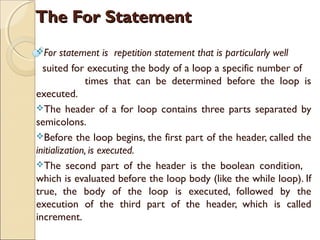
The For Statement
For

statement is repetition statement that is particularly well
suited for executing the body of a loop a specific number of
times that can be determined before the loop is
executed.
The header of a for loop contains three parts separated by
semicolons.
Before the loop begins, the first part of the header, called the
initialization, is executed.
The second part of the header is the boolean condition,
which is evaluated before the loop body (like the while loop). If
true, the body of the loop is executed, followed by the
execution of the third part of the header, which is called
increment.
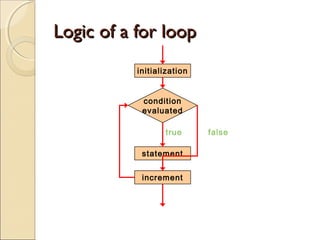
Logic of a for loop
initialization
condition
evaluated
true
statement
increment

false
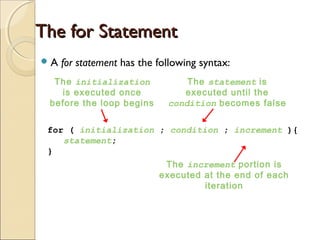
The for Statement
A

for statement has the following syntax:

The initialization
is executed once
before the loop begins

The statement is
executed until the
condition becomes false

for ( initialization ; condition ; increment ){
statement;
}
The increment portion is
executed at the end of each
iteration
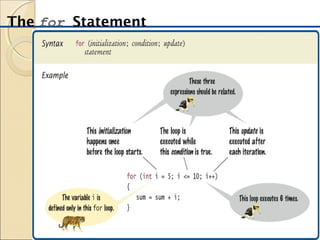
The for Statement
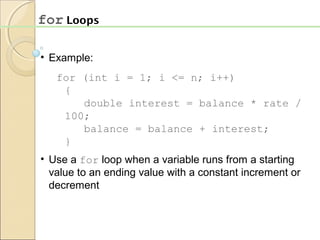
for Loops
• Example:
for (int i = 1; i <= n; i++)
{
double interest = balance * rate /
100;
balance = balance + interest;
}
• Use a for loop when a variable runs from a starting
value to an ending value with a constant increment or
decrement
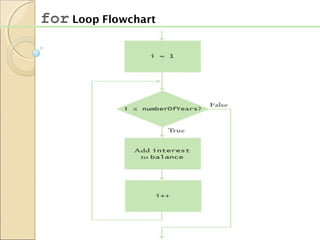
for Loop Flowchart
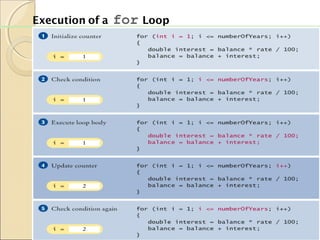
Execution of a

for Loop
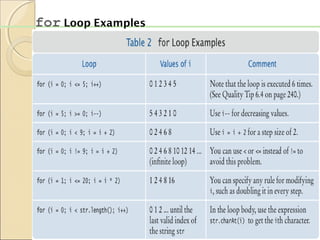
for Loop Examples
import cs1.Keyboard;
public class Multiples
{
public static void main (String[] args)
{
final int PER_LINE = 5;
int value, limit, mult, count = 0;
System.out.print ("Enter a positive value: ");
value = Keyboard.readInt();
System.out.print ("Enter an upper limit: ");
limit = Keyboard.readInt();
System.out.println ();
System.out.println ("The multiples of " + value + " between " +
value + " and " + limit + " (inclusive) are:");
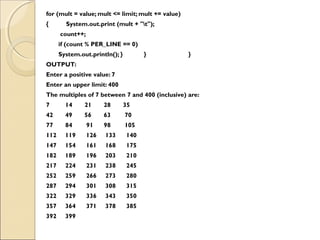
for (mult = value; mult <= limit; mult += value)
{
System.out.print (mult + "t");
count++;
if (count % PER_LINE == 0)
System.out.println();
for (mult = value; mult <= limit; mult += value)
{

System.out.print (mult + "t");
count++;
if (count % PER_LINE == 0)
System.out.println(); }

}

}

OUTPUT:
Enter a positive value: 7
Enter an upper limit: 400
The multiples of 7 between 7 and 400 (inclusive) are:
7

14

21

28

35

42

49

56

63

70

77

84

91

98

105

112

119

126

133

140

147

154

161

168

175

182

189

196

203

210

217

224

231

238

245

252

259

266

273

280

287

294

301

308

315

322

329

336

343

350

357

364

371

378

385

392

399
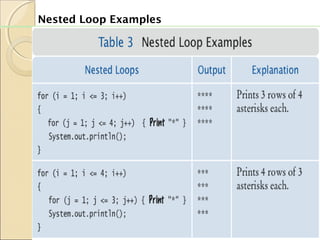
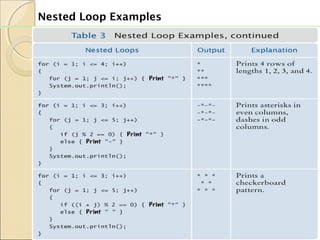
Nested Loop Examples
THE END……..
THANK YOU……

Java presentation

  • 1.
    FOR Statement Presentation: GroupMembers: Muhammad Saleem Nagri 10-EE-38 Mazhar Ali balti 10-EE-49 Ehtisham ul Haq Chilasi 10-EE-48 Khalid Amin Qazi 10-EE-160 Asad Ali Jaffari 10-EE-164 Mirpur university of Science and technology AJ&K ,Pakistan
  • 2.
    The For Statement For statementis repetition statement that is particularly well suited for executing the body of a loop a specific number of times that can be determined before the loop is executed. The header of a for loop contains three parts separated by semicolons. Before the loop begins, the first part of the header, called the initialization, is executed. The second part of the header is the boolean condition, which is evaluated before the loop body (like the while loop). If true, the body of the loop is executed, followed by the execution of the third part of the header, which is called increment.
  • 3.
    Logic of afor loop initialization condition evaluated true statement increment false
  • 4.
    The for Statement A forstatement has the following syntax: The initialization is executed once before the loop begins The statement is executed until the condition becomes false for ( initialization ; condition ; increment ){ statement; } The increment portion is executed at the end of each iteration
  • 5.
  • 6.
    for Loops • Example: for(int i = 1; i <= n; i++) { double interest = balance * rate / 100; balance = balance + interest; } • Use a for loop when a variable runs from a starting value to an ending value with a constant increment or decrement
  • 7.
  • 8.
  • 9.
  • 10.
    import cs1.Keyboard; public classMultiples { public static void main (String[] args) { final int PER_LINE = 5; int value, limit, mult, count = 0; System.out.print ("Enter a positive value: "); value = Keyboard.readInt(); System.out.print ("Enter an upper limit: "); limit = Keyboard.readInt(); System.out.println (); System.out.println ("The multiples of " + value + " between " + value + " and " + limit + " (inclusive) are:"); for (mult = value; mult <= limit; mult += value) { System.out.print (mult + "t"); count++; if (count % PER_LINE == 0) System.out.println();
  • 11.
    for (mult =value; mult <= limit; mult += value) { System.out.print (mult + "t"); count++; if (count % PER_LINE == 0) System.out.println(); } } } OUTPUT: Enter a positive value: 7 Enter an upper limit: 400 The multiples of 7 between 7 and 400 (inclusive) are: 7 14 21 28 35 42 49 56 63 70 77 84 91 98 105 112 119 126 133 140 147 154 161 168 175 182 189 196 203 210 217 224 231 238 245 252 259 266 273 280 287 294 301 308 315 322 329 336 343 350 357 364 371 378 385 392 399
  • 12.
  • 13.
  • 14.