http://www.skillbrew.com
/SkillbrewTalent brewed by the industry itself
Control flow statements
Pavan Verma
@YinYangPavan
Founder, P3 InfoTech Solutions Pvt. Ltd.
Python Programming Essentials
1
© SkillBrew http://skillbrew.com
Truth value testing
Any object can be tested for truth value, for use in
an if or while condition or as operand of the Boolean operations
below. The following values are considered False:
1. None
2. False
3. zero of any numeric type, for example 0, 0L, 0.0, 0j
4. any empty sequence, for example: '', ( ), [ ]
5. any empty mapping, for example: { }
2
© SkillBrew http://skillbrew.com
Truth value testing (2)
3
mylist = []
if mylist:
print mylist
else:
print "list is empty“
Output:
list is empty
var1 = 0
if var1:
print “inside if"
else:
print "inside else“
Output:
inside else
© SkillBrew http://skillbrew.com
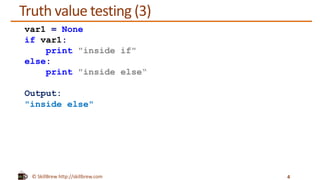
Truth value testing (3)
4
var1 = None
if var1:
print "inside if"
else:
print "inside else“
Output:
"inside else"
© SkillBrew http://skillbrew.com
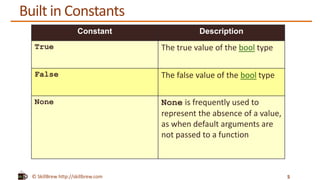
Built in Constants
5
Constant Description
True The true value of the bool type
False The false value of the bool type
None None is frequently used to
represent the absence of a value,
as when default arguments are
not passed to a function
© SkillBrew http://skillbrew.com
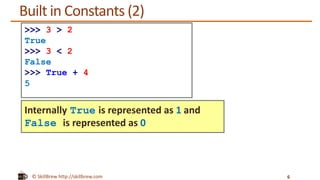
Built in Constants (2)
6
>>> 3 > 2
True
>>> 3 < 2
False
>>> True + 4
5
Internally True is represented as 1 and
False is represented as 0
© SkillBrew http://skillbrew.com
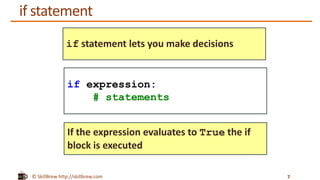
if statement
7
if statement lets you make decisions
If the expression evaluates to True the if
block is executed
if expression:
# statements
© SkillBrew http://skillbrew.com
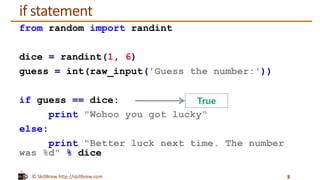
if statement
from random import randint
dice = randint(1, 6)
guess = int(raw_input('Guess the number:'))
if guess == dice:
print "Wohoo you got lucky“
else:
print "Better luck next time. The number
was %d" % dice
8
True
© SkillBrew http://skillbrew.com
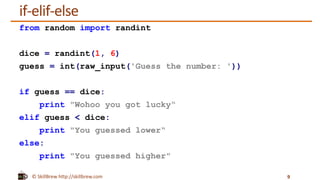
if-elif-else
from random import randint
dice = randint(1, 6)
guess = int(raw_input('Guess the number: '))
if guess == dice:
print "Wohoo you got lucky“
elif guess < dice:
print "You guessed lower“
else:
print "You guessed higher"
9
© SkillBrew http://skillbrew.com
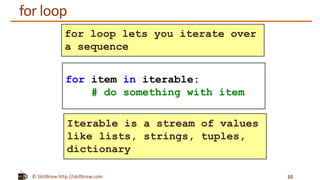
for loop
10
for loop lets you iterate over
a sequence
Iterable is a stream of values
like lists, strings, tuples,
dictionary
for item in iterable:
# do something with item
© SkillBrew http://skillbrew.com
for loop (2)
11
>>> colors = ['red', 'green', 'yellow', 'brown']
>>> for color in colors:
print color
Output:
red
green
yellow
brown
© SkillBrew http://skillbrew.com
range function
12
>>> range(5)
[0, 1, 2, 3, 4]
>>> for i in range(5):
print i
Output:
0
1
2
3
4
range creates lists containing arithmetic
progressions
© SkillBrew http://skillbrew.com
range function (2)
13
>>> range(4, 10)
[4, 5, 6, 7, 8, 9]
>>> range(4, 10, 2)
[4, 6, 8]
range(start, end) can take
start and end as inputs. It will
generate list from start to end
(excluding)
range(start, end, step)
can also take an optional third
parameter step
© SkillBrew http://skillbrew.com
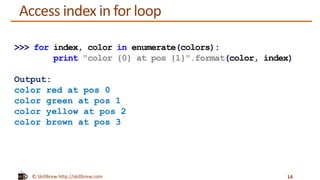
Access index in for loop
14
>>> for index, color in enumerate(colors):
print "color {0} at pos {1}".format(color, index)
Output:
color red at pos 0
color green at pos 1
color yellow at pos 2
color brown at pos 3
© SkillBrew http://skillbrew.com
zip function
15
>>> countries = ['India', 'America', 'Australia']
>>> capitals = ['Delhi', 'Washington DC', 'Canberra']
>>> zip(countries, capitals)
Output:
[('India', 'Delhi'), ('America', 'Washington DC'),
('Australia', ‘Canberra')]
zip: Takes in a pair of streams and gives
you a stream of pairs
© SkillBrew http://skillbrew.com
zip function (2)
16
>>> countries = ['India', 'America', 'Australia']
>>> capitals = ['Delhi', 'Washington DC', ‘Canberra']
>>> for country, capital in zip(countries, capitals):
print “{0} is capital of {1}“.format(capital,
country)
Output:
Delhi is capital of India
Washington DC is capital of America
Canberra is capital of Australia
© SkillBrew http://skillbrew.com
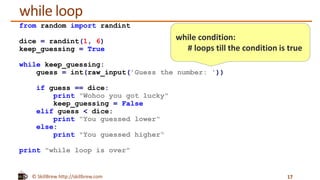
while loop
from random import randint
dice = randint(1, 6)
keep_guessing = True
while keep_guessing:
guess = int(raw_input('Guess the number: '))
if guess == dice:
print "Wohoo you got lucky"
keep_guessing = False
elif guess < dice:
print "You guessed lower“
else:
print "You guessed higher“
print "while loop is over"
17
while condition:
# loops till the condition is true
© SkillBrew http://skillbrew.com
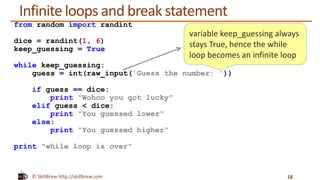
Infinite loops and break statement
from random import randint
dice = randint(1, 6)
keep_guessing = True
while keep_guessing:
guess = int(raw_input('Guess the number: '))
if guess == dice:
print "Wohoo you got lucky"
elif guess < dice:
print "You guessed lower“
else:
print "You guessed higher“
print "while loop is over"
18
variable keep_guessing always
stays True, hence the while
loop becomes an infinite loop
© SkillBrew http://skillbrew.com
Infinite loops and break statement (2)
from random import randint
dice = randint(1, 6)
keep_guessing = True
while keep_guessing:
guess = int(raw_input('Guess the number: '))
if guess == dice:
print "Wohoo you got lucky"
break
elif guess < dice:
print "You guessed lower“
else:
print "You guessed higher“
print "while loop is over"
19
The break statement is used to
break out of a loop statement
© SkillBrew http://skillbrew.com
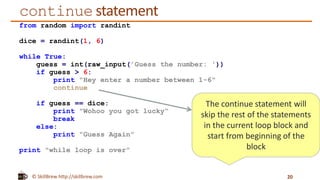
continue statement
from random import randint
dice = randint(1, 6)
while True:
guess = int(raw_input('Guess the number: '))
if guess > 6:
print "Hey enter a number between 1-6"
continue
if guess == dice:
print "Wohoo you got lucky“
break
else:
print "Guess Again"
print "while loop is over"
20
The continue statement will
skip the rest of the statements
in the current loop block and
start from beginning of the
block
© SkillBrew http://skillbrew.com
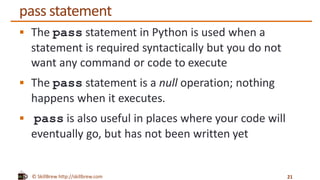
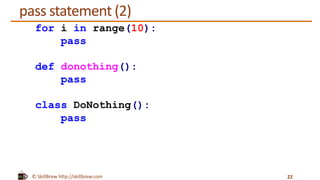
pass statement
 The pass statement in Python is used when a
statement is required syntactically but you do not
want any command or code to execute
 The pass statement is a null operation; nothing
happens when it executes.
 pass is also useful in places where your code will
eventually go, but has not been written yet
21
© SkillBrew http://skillbrew.com
pass statement (2)
22
for i in range(10):
pass
def donothing():
pass
class DoNothing():
pass
© SkillBrew http://skillbrew.com
Summary
 Truth value testing
 Built in constants
 If statement
 for loop
 while loop
 break, continue, pass
23
© SkillBrew http://skillbrew.com
Resources
 Constants True, False, None
http://docs.python.org/2/library/constants.html
 break statement
http://www.tutorialspoint.com/python/python_break_statement.htm
 range function http://docs.python.org/2/library/functions.html#range
 continue statement
http://www.tutorialspoint.com/python/python_continue_statement.htm
 pass statement
http://www.tutorialspoint.com/python/python_pass_statement.htm
 Loops tutorials http://www.pythonforbeginners.com/loops/
24
25

Python Programming Essentials - M16 - Control Flow Statements and Loops

  • 1.
    http://www.skillbrew.com /SkillbrewTalent brewed bythe industry itself Control flow statements Pavan Verma @YinYangPavan Founder, P3 InfoTech Solutions Pvt. Ltd. Python Programming Essentials 1
  • 2.
    © SkillBrew http://skillbrew.com Truthvalue testing Any object can be tested for truth value, for use in an if or while condition or as operand of the Boolean operations below. The following values are considered False: 1. None 2. False 3. zero of any numeric type, for example 0, 0L, 0.0, 0j 4. any empty sequence, for example: '', ( ), [ ] 5. any empty mapping, for example: { } 2
  • 3.
    © SkillBrew http://skillbrew.com Truthvalue testing (2) 3 mylist = [] if mylist: print mylist else: print "list is empty“ Output: list is empty var1 = 0 if var1: print “inside if" else: print "inside else“ Output: inside else
  • 4.
    © SkillBrew http://skillbrew.com Truthvalue testing (3) 4 var1 = None if var1: print "inside if" else: print "inside else“ Output: "inside else"
  • 5.
    © SkillBrew http://skillbrew.com Builtin Constants 5 Constant Description True The true value of the bool type False The false value of the bool type None None is frequently used to represent the absence of a value, as when default arguments are not passed to a function
  • 6.
    © SkillBrew http://skillbrew.com Builtin Constants (2) 6 >>> 3 > 2 True >>> 3 < 2 False >>> True + 4 5 Internally True is represented as 1 and False is represented as 0
  • 7.
    © SkillBrew http://skillbrew.com ifstatement 7 if statement lets you make decisions If the expression evaluates to True the if block is executed if expression: # statements
  • 8.
    © SkillBrew http://skillbrew.com ifstatement from random import randint dice = randint(1, 6) guess = int(raw_input('Guess the number:')) if guess == dice: print "Wohoo you got lucky“ else: print "Better luck next time. The number was %d" % dice 8 True
  • 9.
    © SkillBrew http://skillbrew.com if-elif-else fromrandom import randint dice = randint(1, 6) guess = int(raw_input('Guess the number: ')) if guess == dice: print "Wohoo you got lucky“ elif guess < dice: print "You guessed lower“ else: print "You guessed higher" 9
  • 10.
    © SkillBrew http://skillbrew.com forloop 10 for loop lets you iterate over a sequence Iterable is a stream of values like lists, strings, tuples, dictionary for item in iterable: # do something with item
  • 11.
    © SkillBrew http://skillbrew.com forloop (2) 11 >>> colors = ['red', 'green', 'yellow', 'brown'] >>> for color in colors: print color Output: red green yellow brown
  • 12.
    © SkillBrew http://skillbrew.com rangefunction 12 >>> range(5) [0, 1, 2, 3, 4] >>> for i in range(5): print i Output: 0 1 2 3 4 range creates lists containing arithmetic progressions
  • 13.
    © SkillBrew http://skillbrew.com rangefunction (2) 13 >>> range(4, 10) [4, 5, 6, 7, 8, 9] >>> range(4, 10, 2) [4, 6, 8] range(start, end) can take start and end as inputs. It will generate list from start to end (excluding) range(start, end, step) can also take an optional third parameter step
  • 14.
    © SkillBrew http://skillbrew.com Accessindex in for loop 14 >>> for index, color in enumerate(colors): print "color {0} at pos {1}".format(color, index) Output: color red at pos 0 color green at pos 1 color yellow at pos 2 color brown at pos 3
  • 15.
    © SkillBrew http://skillbrew.com zipfunction 15 >>> countries = ['India', 'America', 'Australia'] >>> capitals = ['Delhi', 'Washington DC', 'Canberra'] >>> zip(countries, capitals) Output: [('India', 'Delhi'), ('America', 'Washington DC'), ('Australia', ‘Canberra')] zip: Takes in a pair of streams and gives you a stream of pairs
  • 16.
    © SkillBrew http://skillbrew.com zipfunction (2) 16 >>> countries = ['India', 'America', 'Australia'] >>> capitals = ['Delhi', 'Washington DC', ‘Canberra'] >>> for country, capital in zip(countries, capitals): print “{0} is capital of {1}“.format(capital, country) Output: Delhi is capital of India Washington DC is capital of America Canberra is capital of Australia
  • 17.
    © SkillBrew http://skillbrew.com whileloop from random import randint dice = randint(1, 6) keep_guessing = True while keep_guessing: guess = int(raw_input('Guess the number: ')) if guess == dice: print "Wohoo you got lucky" keep_guessing = False elif guess < dice: print "You guessed lower“ else: print "You guessed higher“ print "while loop is over" 17 while condition: # loops till the condition is true
  • 18.
    © SkillBrew http://skillbrew.com Infiniteloops and break statement from random import randint dice = randint(1, 6) keep_guessing = True while keep_guessing: guess = int(raw_input('Guess the number: ')) if guess == dice: print "Wohoo you got lucky" elif guess < dice: print "You guessed lower“ else: print "You guessed higher“ print "while loop is over" 18 variable keep_guessing always stays True, hence the while loop becomes an infinite loop
  • 19.
    © SkillBrew http://skillbrew.com Infiniteloops and break statement (2) from random import randint dice = randint(1, 6) keep_guessing = True while keep_guessing: guess = int(raw_input('Guess the number: ')) if guess == dice: print "Wohoo you got lucky" break elif guess < dice: print "You guessed lower“ else: print "You guessed higher“ print "while loop is over" 19 The break statement is used to break out of a loop statement
  • 20.
    © SkillBrew http://skillbrew.com continuestatement from random import randint dice = randint(1, 6) while True: guess = int(raw_input('Guess the number: ')) if guess > 6: print "Hey enter a number between 1-6" continue if guess == dice: print "Wohoo you got lucky“ break else: print "Guess Again" print "while loop is over" 20 The continue statement will skip the rest of the statements in the current loop block and start from beginning of the block
  • 21.
    © SkillBrew http://skillbrew.com passstatement  The pass statement in Python is used when a statement is required syntactically but you do not want any command or code to execute  The pass statement is a null operation; nothing happens when it executes.  pass is also useful in places where your code will eventually go, but has not been written yet 21
  • 22.
    © SkillBrew http://skillbrew.com passstatement (2) 22 for i in range(10): pass def donothing(): pass class DoNothing(): pass
  • 23.
    © SkillBrew http://skillbrew.com Summary Truth value testing  Built in constants  If statement  for loop  while loop  break, continue, pass 23
  • 24.
    © SkillBrew http://skillbrew.com Resources Constants True, False, None http://docs.python.org/2/library/constants.html  break statement http://www.tutorialspoint.com/python/python_break_statement.htm  range function http://docs.python.org/2/library/functions.html#range  continue statement http://www.tutorialspoint.com/python/python_continue_statement.htm  pass statement http://www.tutorialspoint.com/python/python_pass_statement.htm  Loops tutorials http://www.pythonforbeginners.com/loops/ 24
  • 25.

Editor's Notes

  • #9 Talk about randint. Randint is a function which will generate a random number between the given start and end raw_input is a method used to take input from uses directory int(raw_input()) will convert the input to a int. raw_input is a string so we have to convert it to integer