The “How To” Social Media Overview
Tips | Tricks | Platforms | Tactics
Digital Space Consulting
June 2013
“Nobody ever got a client sitting at home waiting for the phone to ring.” - Me
The lines aren’t airplanes - they represent the real time,
constant flow of data across the world
Digital Space Consulting
Create. Connect. Engage.
Social Media 201.5 v2
Creating Your Digital Footprint…
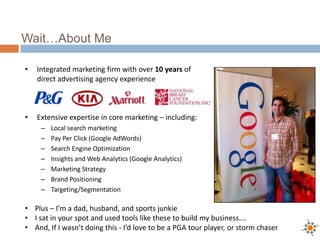
Wait…About Me
• Integrated marketing firm with over 10 years of
direct advertising agency experience
• Extensive expertise in core marketing – including:
– Local search marketing
– Pay Per Click (Google AdWords)
– Search Engine Optimization
– Insights and Web Analytics (Google Analytics)
– Marketing Strategy
– Brand Positioning
– Targeting/Segmentation
• Plus – I’m a dad, husband, and sports junkie
• I sat in your spot and used tools like these to build my business….
• And, If I wasn’t doing this - I’d love to be a PGA tour player, or storm chaser
Agenda
• A little background
• What’s this social media thing and why should I care – I’m not 22
• What tools, platforms, and services should I care about
• What is my short and long term strategy
• How do I create the “social media me” and build my brand authority
• What are the five things I can do today to impact my digital footprint,
engage with my customers, and manage my time
• Industrial economy vs. connected economy
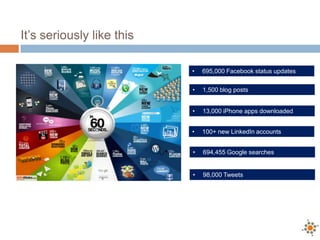
It’s seriously like this
• 695,000 Facebook status updates
• 1,500 blog posts
• 100+ new LinkedIn accounts
• 694,455 Google searches
• 98,000 Tweets
• 13,000 iPhone apps downloaded
How to create the “Social Media” me
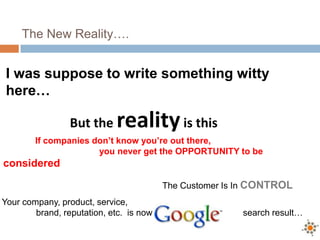
The New Reality….
I was suppose to write something witty
here…
But the realityis this
Your company, product, service,
brand, reputation, etc. is now a search result…
If companies don’t know you’re out there,
you never get the OPPORTUNITY to be
considered
The Customer Is In CONTROL
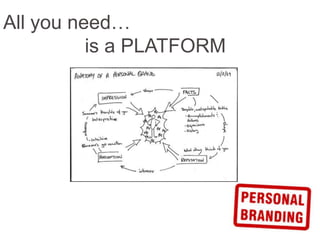
All you need…
is a PLATFORM
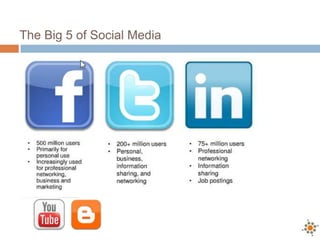
The Big 5 of Social Media
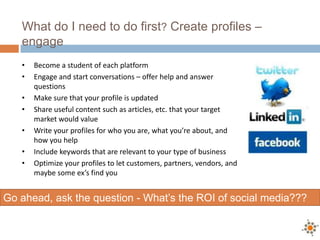
What do I need to do first? Create profiles –
engage
• Become a student of each platform
• Engage and start conversations – offer help and answer
questions
• Make sure that your profile is updated
• Share useful content such as articles, etc. that your target
market would value
• Write your profiles for who you are, what you’re about, and
how you help
• Include keywords that are relevant to your type of business
• Optimize your profiles to let customers, partners, vendors, and
maybe some ex’s find you
Go ahead, ask the question - What’s the ROI of social media???
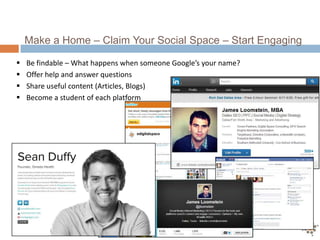
Make a Home – Claim Your Social Space – Start Engaging
 Be findable – What happens when someone Google’s your name?
 Offer help and answer questions
 Share useful content (Articles, Blogs)
 Become a student of each platform
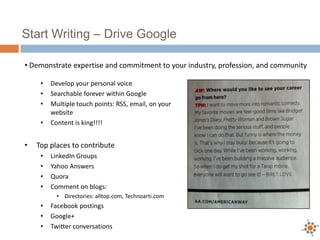
Start Writing – Drive Google
• Develop your personal voice
• Searchable forever within Google
• Multiple touch points: RSS, email, on your
website
• Content is king!!!!
• Top places to contribute
• LinkedIn Groups
• Yahoo Answers
• Quora
• Comment on blogs:
• Directories: alltop.com, Technoarti.com
• Facebook postings
• Google+
• Twitter conversations
• Demonstrate expertise and commitment to your industry, profession, and community
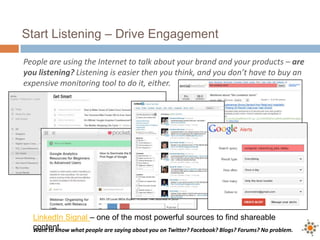
Start Listening – Drive Engagement
People are using the Internet to talk about your brand and your products – are
you listening? Listening is easier then you think, and you don’t have to buy an
expensive monitoring tool to do it, either.
Want to know what people are saying about you on Twitter? Facebook? Blogs? Forums? No problem.
LinkedIn Signal – one of the most powerful sources to find shareable
content.
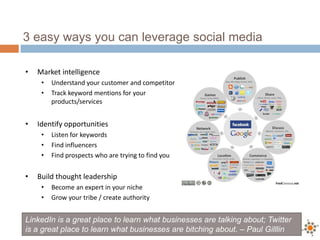
3 easy ways you can leverage social media
• Market intelligence
• Understand your customer and competitor
• Track keyword mentions for your
products/services
• Identify opportunities
• Listen for keywords
• Find influencers
• Find prospects who are trying to find you
• Build thought leadership
• Become an expert in your niche
• Grow your tribe / create authority
LinkedIn is a great place to learn what businesses are talking about; Twitter
is a great place to learn what businesses are bitching about. – Paul Gilllin
But, Where Do I Get Started
People are using the Internet to talk about your brand, products, competitors,
customers, and clients – are you listening? Listening is easier then you think, and
you don’t have to buy an expensive monitoring tool to do it, either.
Want to know what people are saying about you on Twitter? Facebook? Blogs? Forums? No problem.
Where to listen
• Google Alerts
• LinkedIn
• Alltops.com
• Search.Twitter.com
• FollowerWonk.com
• HelpAReporter.com (HARO)
• MuckRack.com
• Google Consumer Surveys
• Marketingcharts.com
Where to share
• Blogs
• Forums
• Twitter – hashtags / twitter talks
• Facebook – status comments / groups
• Linkedin – Groups
• Quora
• Review sites – Amazon / YouTube / Yelp
• Yahoo Answers
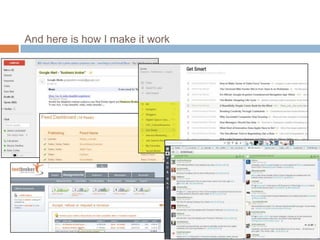
And here is how I make it work
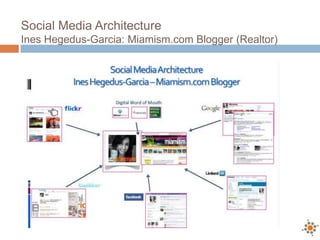
Social Media Architecture
Ines Hegedus-Garcia: Miamism.com Blogger (Realtor)
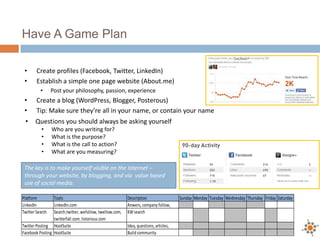
Have A Game Plan
• Create profiles (Facebook, Twitter, LinkedIn)
• Establish a simple one page website (About.me)
• Post your philosophy, passion, experience
• Create a blog (WordPress, Blogger, Posterous)
• Tip: Make sure they’re all in your name, or contain your name
The key is to make yourself visible on the Internet –
through your website, by blogging, and via value based
use of social media.
Platform Tools Description Sunday Monday Tuesday Wednesday Thursday Friday Saturday
LinkedIn LinkedIn.com Anwers, company follow,
TwitterSearch Search.twitter, wefollow, twellow.com,
twitterfall.com. listorious.com
KWsearch
TwitterPosting HootSuite Idea, questions, articles,
Facebook Posting HootSuite Build community
• Questions you should always be asking yourself
• Who are you writing for?
• What is the purpose?
• What is the call to action?
• What are you measuring?
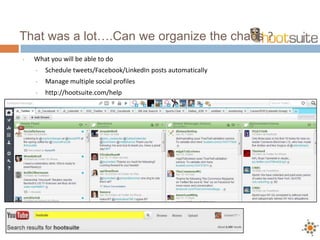
• What you will be able to do
• Schedule tweets/Facebook/LinkedIn posts automatically
• Manage multiple social profiles
• http://hootsuite.com/help
That was a lot….Can we organize the chaos ?
Tools, platforms, and services to care
about
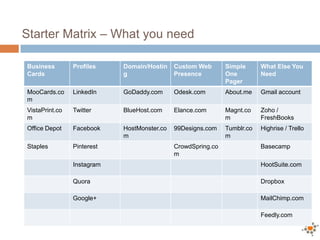
Starter Matrix – What you need
Business
Cards
Profiles Domain/Hostin
g
Custom Web
Presence
Simple
One
Pager
What Else You
Need
MooCards.co
m
LinkedIn GoDaddy.com Odesk.com About.me Gmail account
VistaPrint.co
m
Twitter BlueHost.com Elance.com Magnt.co
m
Zoho /
FreshBooks
Office Depot Facebook HostMonster.co
m
99Designs.com Tumblr.co
m
Highrise / Trello
Staples Pinterest CrowdSpring.co
m
Basecamp
Instagram HootSuite.com
Quora Dropbox
Google+ MailChimp.com
Feedly.com
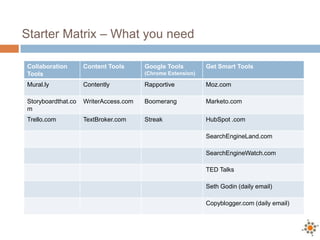
Starter Matrix – What you need
Collaboration
Tools
Content Tools Google Tools
(Chrome Extension)
Get Smart Tools
Mural.ly Contently Rapportive Moz.com
Storyboardthat.co
m
WriterAccess.com Boomerang Marketo.com
Trello.com TextBroker.com Streak HubSpot .com
SearchEngineLand.com
SearchEngineWatch.com
TED Talks
Seth Godin (daily email)
Copyblogger.com (daily email)
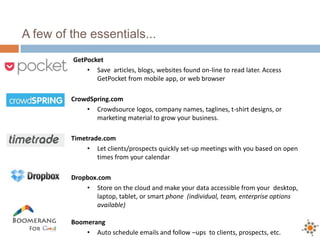
A few of the essentials...
GetPocket
• Save articles, blogs, websites found on-line to read later. Access
GetPocket from mobile app, or web browser
CrowdSpring.com
• Crowdsource logos, company names, taglines, t-shirt designs, or
marketing material to grow your business.
Timetrade.com
• Let clients/prospects quickly set-up meetings with you based on open
times from your calendar
Dropbox.com
• Store on the cloud and make your data accessible from your desktop,
laptop, tablet, or smart phone (individual, team, enterprise options
available)
Boomerang
• Auto schedule emails and follow –ups to clients, prospects, etc.
Two Last Things + My
Warning
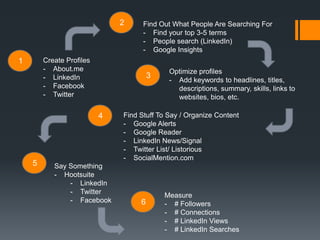
Create Profiles
- About.me
- LinkedIn
- Facebook
- Twitter
1
2 Find Out What People Are Searching For
- Find your top 3-5 terms
- People search (LinkedIn)
- Google Insights
3
Optimize profiles
- Add keywords to headlines, titles,
descriptions, summary, skills, links to
websites, bios, etc.
4 Find Stuff To Say / Organize Content
- Google Alerts
- Google Reader
- LinkedIn News/Signal
- Twitter List/ Listorious
- SocialMention.com
5 Say Something
- Hootsuite
- LinkedIn
- Twitter
- Facebook 6
Measure
- # Followers
- # Connections
- # LinkedIn Views
- # LinkedIn Searches
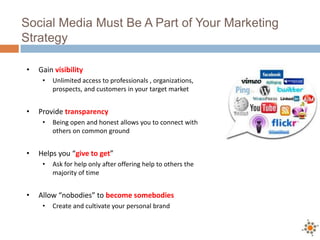
Social Media Must Be A Part of Your Marketing
Strategy
• Gain visibility
• Unlimited access to professionals , organizations,
prospects, and customers in your target market
• Provide transparency
• Being open and honest allows you to connect with
others on common ground
• Helps you “give to get”
• Ask for help only after offering help to others the
majority of time
• Allow “nobodies” to become somebodies
• Create and cultivate your personal brand
My Warning
• It’s your brand - Own it
• Once you engage – you have to stay engaged
• Build community and fans will expect you to be
available
• Expect raving fans who will want to get involved
• You don’t have to do everything – do something
• Perfection is the enemy of good
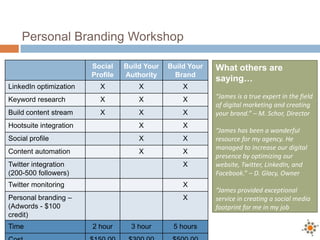
Personal Branding Workshop
Social
Profile
Build Your
Authority
Build Your
Brand
LinkedIn optimization X X X
Keyword research X X X
Build content stream X X X
Hootsuite integration X X
Social profile X X
Content automation X X
Twitter integration
(200-500 followers)
X
Twitter monitoring X
Personal branding –
(Adwords - $100
credit)
X
Time 2 hour 3 hour 5 hours
What others are
saying…
“James is a true expert in the field
of digital marketing and creating
your brand.” – M. Schor, Director
“James has been a wonderful
resource for my agency. He
managed to increase our digital
presence by optimizing our
website, Twitter, LinkedIn, and
Facebook.” – D. Glacy, Owner
“James provided exceptional
service in creating a social media
footprint for me in my job
search.” – C. Newsome, Engineer
Questions – Let’s Connect
Digitalspaceconsulting.com
James@digitalspaceconsulting.com
Facebook.com/DigitalSpace
Twitter.com/eDigitalSpace
214.263.8522
Slideshare.net/Jloomstein/presentations
James Loomstein, MBA
Digital Space Consulting
@eDigitalSpace
Thank You

JFS Social Media Presentation

  • 1.
    The “How To”Social Media Overview Tips | Tricks | Platforms | Tactics Digital Space Consulting June 2013 “Nobody ever got a client sitting at home waiting for the phone to ring.” - Me
  • 2.
    The lines aren’tairplanes - they represent the real time, constant flow of data across the world
  • 3.
    Digital Space Consulting Create.Connect. Engage. Social Media 201.5 v2 Creating Your Digital Footprint…
  • 4.
    Wait…About Me • Integratedmarketing firm with over 10 years of direct advertising agency experience • Extensive expertise in core marketing – including: – Local search marketing – Pay Per Click (Google AdWords) – Search Engine Optimization – Insights and Web Analytics (Google Analytics) – Marketing Strategy – Brand Positioning – Targeting/Segmentation • Plus – I’m a dad, husband, and sports junkie • I sat in your spot and used tools like these to build my business…. • And, If I wasn’t doing this - I’d love to be a PGA tour player, or storm chaser
  • 5.
    Agenda • A littlebackground • What’s this social media thing and why should I care – I’m not 22 • What tools, platforms, and services should I care about • What is my short and long term strategy • How do I create the “social media me” and build my brand authority • What are the five things I can do today to impact my digital footprint, engage with my customers, and manage my time • Industrial economy vs. connected economy
  • 6.
    It’s seriously likethis • 695,000 Facebook status updates • 1,500 blog posts • 100+ new LinkedIn accounts • 694,455 Google searches • 98,000 Tweets • 13,000 iPhone apps downloaded
  • 7.
    How to createthe “Social Media” me
  • 8.
    The New Reality…. Iwas suppose to write something witty here… But the realityis this Your company, product, service, brand, reputation, etc. is now a search result… If companies don’t know you’re out there, you never get the OPPORTUNITY to be considered The Customer Is In CONTROL
  • 9.
  • 10.
    The Big 5of Social Media
  • 11.
    What do Ineed to do first? Create profiles – engage • Become a student of each platform • Engage and start conversations – offer help and answer questions • Make sure that your profile is updated • Share useful content such as articles, etc. that your target market would value • Write your profiles for who you are, what you’re about, and how you help • Include keywords that are relevant to your type of business • Optimize your profiles to let customers, partners, vendors, and maybe some ex’s find you Go ahead, ask the question - What’s the ROI of social media???
  • 12.
    Make a Home– Claim Your Social Space – Start Engaging  Be findable – What happens when someone Google’s your name?  Offer help and answer questions  Share useful content (Articles, Blogs)  Become a student of each platform
  • 13.
    Start Writing –Drive Google • Develop your personal voice • Searchable forever within Google • Multiple touch points: RSS, email, on your website • Content is king!!!! • Top places to contribute • LinkedIn Groups • Yahoo Answers • Quora • Comment on blogs: • Directories: alltop.com, Technoarti.com • Facebook postings • Google+ • Twitter conversations • Demonstrate expertise and commitment to your industry, profession, and community
  • 14.
    Start Listening –Drive Engagement People are using the Internet to talk about your brand and your products – are you listening? Listening is easier then you think, and you don’t have to buy an expensive monitoring tool to do it, either. Want to know what people are saying about you on Twitter? Facebook? Blogs? Forums? No problem. LinkedIn Signal – one of the most powerful sources to find shareable content.
  • 15.
    3 easy waysyou can leverage social media • Market intelligence • Understand your customer and competitor • Track keyword mentions for your products/services • Identify opportunities • Listen for keywords • Find influencers • Find prospects who are trying to find you • Build thought leadership • Become an expert in your niche • Grow your tribe / create authority LinkedIn is a great place to learn what businesses are talking about; Twitter is a great place to learn what businesses are bitching about. – Paul Gilllin
  • 16.
    But, Where DoI Get Started People are using the Internet to talk about your brand, products, competitors, customers, and clients – are you listening? Listening is easier then you think, and you don’t have to buy an expensive monitoring tool to do it, either. Want to know what people are saying about you on Twitter? Facebook? Blogs? Forums? No problem. Where to listen • Google Alerts • LinkedIn • Alltops.com • Search.Twitter.com • FollowerWonk.com • HelpAReporter.com (HARO) • MuckRack.com • Google Consumer Surveys • Marketingcharts.com Where to share • Blogs • Forums • Twitter – hashtags / twitter talks • Facebook – status comments / groups • Linkedin – Groups • Quora • Review sites – Amazon / YouTube / Yelp • Yahoo Answers
  • 17.
    And here ishow I make it work
  • 18.
    Social Media Architecture InesHegedus-Garcia: Miamism.com Blogger (Realtor)
  • 19.
    Have A GamePlan • Create profiles (Facebook, Twitter, LinkedIn) • Establish a simple one page website (About.me) • Post your philosophy, passion, experience • Create a blog (WordPress, Blogger, Posterous) • Tip: Make sure they’re all in your name, or contain your name The key is to make yourself visible on the Internet – through your website, by blogging, and via value based use of social media. Platform Tools Description Sunday Monday Tuesday Wednesday Thursday Friday Saturday LinkedIn LinkedIn.com Anwers, company follow, TwitterSearch Search.twitter, wefollow, twellow.com, twitterfall.com. listorious.com KWsearch TwitterPosting HootSuite Idea, questions, articles, Facebook Posting HootSuite Build community • Questions you should always be asking yourself • Who are you writing for? • What is the purpose? • What is the call to action? • What are you measuring?
  • 20.
    • What youwill be able to do • Schedule tweets/Facebook/LinkedIn posts automatically • Manage multiple social profiles • http://hootsuite.com/help That was a lot….Can we organize the chaos ?
  • 21.
    Tools, platforms, andservices to care about
  • 22.
    Starter Matrix –What you need Business Cards Profiles Domain/Hostin g Custom Web Presence Simple One Pager What Else You Need MooCards.co m LinkedIn GoDaddy.com Odesk.com About.me Gmail account VistaPrint.co m Twitter BlueHost.com Elance.com Magnt.co m Zoho / FreshBooks Office Depot Facebook HostMonster.co m 99Designs.com Tumblr.co m Highrise / Trello Staples Pinterest CrowdSpring.co m Basecamp Instagram HootSuite.com Quora Dropbox Google+ MailChimp.com Feedly.com
  • 23.
    Starter Matrix –What you need Collaboration Tools Content Tools Google Tools (Chrome Extension) Get Smart Tools Mural.ly Contently Rapportive Moz.com Storyboardthat.co m WriterAccess.com Boomerang Marketo.com Trello.com TextBroker.com Streak HubSpot .com SearchEngineLand.com SearchEngineWatch.com TED Talks Seth Godin (daily email) Copyblogger.com (daily email)
  • 24.
    A few ofthe essentials... GetPocket • Save articles, blogs, websites found on-line to read later. Access GetPocket from mobile app, or web browser CrowdSpring.com • Crowdsource logos, company names, taglines, t-shirt designs, or marketing material to grow your business. Timetrade.com • Let clients/prospects quickly set-up meetings with you based on open times from your calendar Dropbox.com • Store on the cloud and make your data accessible from your desktop, laptop, tablet, or smart phone (individual, team, enterprise options available) Boomerang • Auto schedule emails and follow –ups to clients, prospects, etc.
  • 25.
    Two Last Things+ My Warning
  • 26.
    Create Profiles - About.me -LinkedIn - Facebook - Twitter 1 2 Find Out What People Are Searching For - Find your top 3-5 terms - People search (LinkedIn) - Google Insights 3 Optimize profiles - Add keywords to headlines, titles, descriptions, summary, skills, links to websites, bios, etc. 4 Find Stuff To Say / Organize Content - Google Alerts - Google Reader - LinkedIn News/Signal - Twitter List/ Listorious - SocialMention.com 5 Say Something - Hootsuite - LinkedIn - Twitter - Facebook 6 Measure - # Followers - # Connections - # LinkedIn Views - # LinkedIn Searches
  • 27.
    Social Media MustBe A Part of Your Marketing Strategy • Gain visibility • Unlimited access to professionals , organizations, prospects, and customers in your target market • Provide transparency • Being open and honest allows you to connect with others on common ground • Helps you “give to get” • Ask for help only after offering help to others the majority of time • Allow “nobodies” to become somebodies • Create and cultivate your personal brand
  • 28.
    My Warning • It’syour brand - Own it • Once you engage – you have to stay engaged • Build community and fans will expect you to be available • Expect raving fans who will want to get involved • You don’t have to do everything – do something • Perfection is the enemy of good
  • 29.
    Personal Branding Workshop Social Profile BuildYour Authority Build Your Brand LinkedIn optimization X X X Keyword research X X X Build content stream X X X Hootsuite integration X X Social profile X X Content automation X X Twitter integration (200-500 followers) X Twitter monitoring X Personal branding – (Adwords - $100 credit) X Time 2 hour 3 hour 5 hours What others are saying… “James is a true expert in the field of digital marketing and creating your brand.” – M. Schor, Director “James has been a wonderful resource for my agency. He managed to increase our digital presence by optimizing our website, Twitter, LinkedIn, and Facebook.” – D. Glacy, Owner “James provided exceptional service in creating a social media footprint for me in my job search.” – C. Newsome, Engineer
  • 30.
    Questions – Let’sConnect Digitalspaceconsulting.com James@digitalspaceconsulting.com Facebook.com/DigitalSpace Twitter.com/eDigitalSpace 214.263.8522 Slideshare.net/Jloomstein/presentations James Loomstein, MBA
  • 31.