Technology In Action Chapter 8: Mobile Computing www.offthemark.com  c Mark Parisi
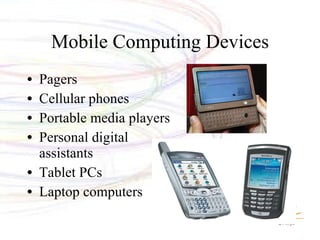
Mobile Computing Devices Pagers Cellular phones Portable media players Personal digital assistants Tablet PCs Laptop computers
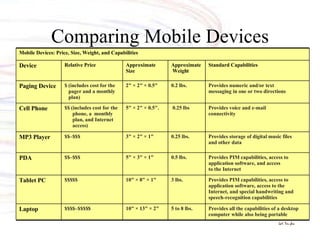
Comparing Mobile Devices Provides all the capabilities of a desktop computer while also being portable 5 to 8 lbs. 10" × 13" × 2" $$$$–$$$$$ Laptop Provides PIM capabilities, access to application software, access to the Internet, and special handwriting and speech-recognition capabilities 3 lbs. 10" × 8" × 1" $$$$$ Tablet PC Provides PIM capabilities, access to application software, and access to the Internet 0.5 lbs. 5" × 3" × 1" $$–$$$ PDA Provides storage of digital music files and other data 0.25 lbs. 3" × 2" × 1" $$–$$$ MP3 Player Provides voice and e-mail  connectivity   0.25 lbs 5" × 2" × 0.5". $$ (includes cost for the phone, a  monthly plan, and Internet access) Cell Phone Provides numeric and/or text messaging in one or two directions 0.2 lbs. 2" × 2" × 0.5" $ (includes cost for the pager and a monthly plan) Paging Device Standard Capabilities Approximate Weight  Approximate Size Relative Price Device Mobile Devices: Price, Size, Weight, and Capabilities
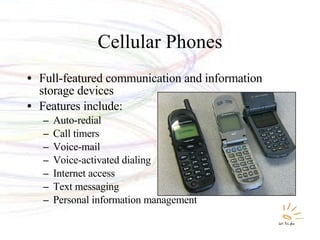
Cellular Phones Full-featured communication and information storage devices Features include: Auto-redial Call timers Voice-mail Voice-activated dialing Internet access Text messaging Personal information management
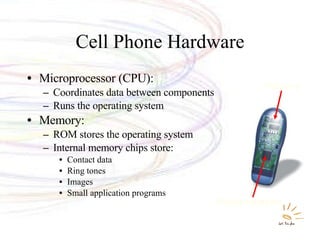
Cell Phone Hardware Microprocessor (CPU): Coordinates data between components Runs the operating system Memory: ROM stores the operating system Internal memory chips store: Contact data  Ring tones Images Small application programs  Microprocessor  Memory
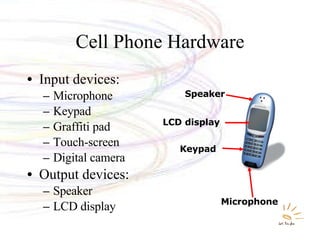
Cell Phone Hardware Input devices: Microphone Keypad Graffiti pad Touch-screen Digital camera Output devices: Speaker LCD display Microphone   Keypad   LCD   display   Speaker
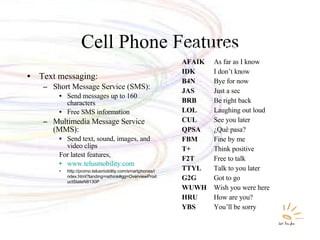
Cell Phone Features Text messaging: Short Message Service (SMS): Send messages up to 160 characters Free SMS information Multimedia Message Service (MMS): Send text, sound, images, and video clips For latest features, www.telusmobility.com http://promo.telusmobility.com/smartphones/index.html?landing=rethink#gg=OverviewProductStateN8130P AFAIK As far as I know IDK I don’t know B4N Bye for now JAS Just a sec BRB Be right back LOL Laughing out loud CUL See you later QPSA ¿Qué pasa? FBM Fine by me T+ Think positive F2T Free to talk TTYL Talk to you later G2G Got to go WUWH Wish you were here HRU How are you? YBS You’ll be sorry Popular Text Messaging Abbreviations
Cell Phone Internet Connectivity Wireless Internet service provider Maximum speeds of 200 to 300 Kbps Micro-browser software EDGE  and  EVDO  standards Difficult to display Web pages on small screen Checking e-mail is a popular feature  Special “push” technology delivers e-mail to a cell phone
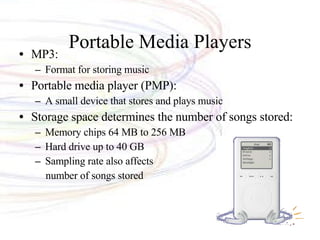
Portable Media Players MP3:  Format for storing music Portable media player (PMP): A small device that stores and plays music Storage space determines the number of songs stored: Memory chips 64 MB to 256 MB Hard drive up to 40 GB Sampling rate also affects number of songs stored
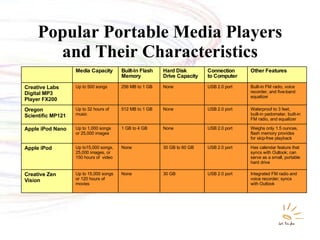
Popular Portable Media Players and Their Characteristics Integrated FM radio and  voice recorder; syncs with Outlook USB 2.0 port 30 GB None Up to 15,000 songs  or 120 hours of  movies Creative Zen Vision Has calendar feature that syncs with Outlook; can serve as a small, portable hard drive USB 2.0 port 30 GB to 60 GB None Up to15,000 songs,  25,000 images, or  150 hours of  video Apple iPod Weighs only 1.5 ounces, flash memory provides for skip-free playback USB 2.0 port None 1 GB to 4 GB Up to 1,000 songs  or 25,000 images Apple iPod Nano Waterproof to 3 feet,  built-in pedometer, built-in  FM radio, and equalizer  USB 2.0 port None 512 MB to 1 GB Up to 32 hours of  music Oregon  Scientific MP121 Built-in FM radio, voice recorder, and five-band equalizer USB 2.0 port None 256 MB to 1 GB Up to 500 songs Creative Labs  Digital MP3  Player FX200 Other Features Connection to Computer Hard Disk  Drive Capacity Built-In Flash Memory Media Capacity
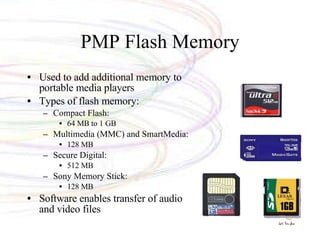
PMP Flash Memory Used to add additional memory to portable media players Types of flash memory: Compact Flash: 64 MB to 1 GB Multimedia (MMC) and SmartMedia: 128 MB Secure Digital: 512 MB Sony Memory Stick: 128 MB Software enables transfer of audio and video files
PMP Ethical Issues Is it illegal to download MP3 files? MP3.com: Song files are on a public server Permission is given by the artist or recording company to place the files on the server A fee is paid to download a file, eg iTunes Napster: A file exchange site Song files were borrowed from users’ computers (peer-to-peer [P2P] sharing) Sued for copyright infringement (wikipedia for details)
Podcasting Distributing nonmusic MP3 files over the Internet Podcasts can be information, books on tape audio plays, etc. People can listen when they wish iPod  synchronization  transfers new content.
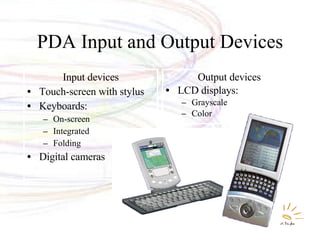
PDA Input and Output Devices Input devices Touch-screen with stylus Keyboards: On-screen Integrated Folding Digital cameras Output devices LCD displays: Grayscale Color
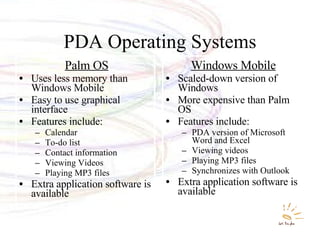
PDA Operating Systems Palm OS Uses less memory than Windows Mobile Easy to use graphical interface Features include: Calendar To-do list Contact information Viewing Videos Playing MP3 files Extra application software is available Windows Mobile Scaled-down version of Windows More expensive than Palm OS Features include: PDA version of Microsoft Word and Excel Viewing videos Playing MP3 files Synchronizes with Outlook Extra application software is available
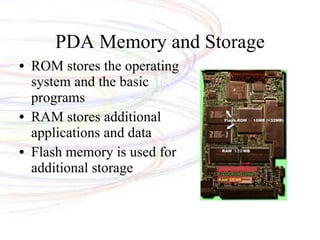
PDA Memory and Storage ROM stores the operating system and the basic programs RAM stores additional applications and data Flash memory is used for additional storage
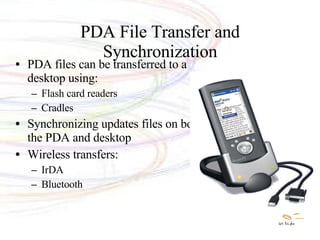
PDA File Transfer and Synchronization PDA files can be transferred to a desktop using: Flash card readers Cradles  Synchronizing updates files on both the PDA and desktop Wireless transfers: IrDA Bluetooth
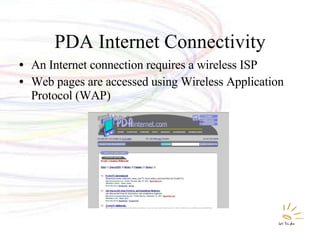
PDA Internet Connectivity An Internet connection requires a wireless ISP Web pages are accessed using Wireless Application Protocol (WAP)
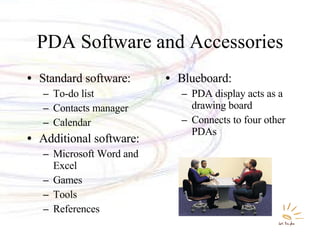
PDA Software and Accessories Standard software: To-do list Contacts manager Calendar Additional software: Microsoft Word and Excel Games Tools References  Blueboard: PDA display acts as a drawing board Connects to four other PDAs
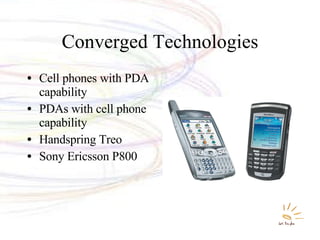
Converged Technologies Cell phones with PDA capability PDAs with cell phone capability Handspring Treo Sony Ericsson P800
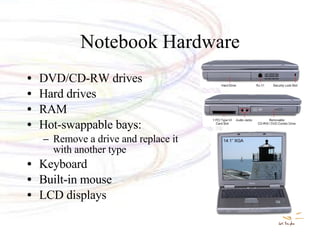
Notebook Hardware DVD/CD-RW drives Hard drives RAM Hot-swappable bays: Remove a drive and replace it with another type Keyboard Built-in mouse LCD displays
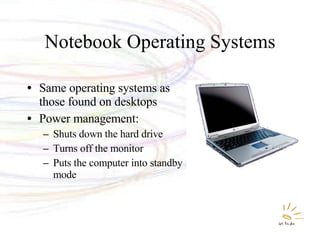
Notebook Operating Systems Same operating systems as those found on desktops Power management: Shuts down the hard drive Turns off the monitor Puts the computer into standby mode
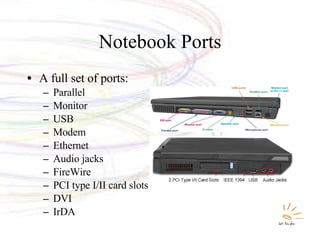
Notebook Ports A full set of ports: Parallel Monitor USB Modem Ethernet Audio jacks FireWire PCI type I/II card slots DVI IrDA
Critical Thinking What are some ethical issues around mobile cellular technology? Thoughts about cellphone as fashion? How about protecting IP? GPS services and personal information?

08 Tait

  • 1.
    Technology In ActionChapter 8: Mobile Computing www.offthemark.com c Mark Parisi
  • 2.
    Mobile Computing DevicesPagers Cellular phones Portable media players Personal digital assistants Tablet PCs Laptop computers
  • 3.
    Comparing Mobile DevicesProvides all the capabilities of a desktop computer while also being portable 5 to 8 lbs. 10" × 13" × 2" $$$$–$$$$$ Laptop Provides PIM capabilities, access to application software, access to the Internet, and special handwriting and speech-recognition capabilities 3 lbs. 10" × 8" × 1" $$$$$ Tablet PC Provides PIM capabilities, access to application software, and access to the Internet 0.5 lbs. 5" × 3" × 1" $$–$$$ PDA Provides storage of digital music files and other data 0.25 lbs. 3" × 2" × 1" $$–$$$ MP3 Player Provides voice and e-mail connectivity   0.25 lbs 5" × 2" × 0.5". $$ (includes cost for the phone, a monthly plan, and Internet access) Cell Phone Provides numeric and/or text messaging in one or two directions 0.2 lbs. 2" × 2" × 0.5" $ (includes cost for the pager and a monthly plan) Paging Device Standard Capabilities Approximate Weight Approximate Size Relative Price Device Mobile Devices: Price, Size, Weight, and Capabilities
  • 4.
    Cellular Phones Full-featuredcommunication and information storage devices Features include: Auto-redial Call timers Voice-mail Voice-activated dialing Internet access Text messaging Personal information management
  • 5.
    Cell Phone HardwareMicroprocessor (CPU): Coordinates data between components Runs the operating system Memory: ROM stores the operating system Internal memory chips store: Contact data Ring tones Images Small application programs Microprocessor Memory
  • 6.
    Cell Phone HardwareInput devices: Microphone Keypad Graffiti pad Touch-screen Digital camera Output devices: Speaker LCD display Microphone Keypad LCD display Speaker
  • 7.
    Cell Phone FeaturesText messaging: Short Message Service (SMS): Send messages up to 160 characters Free SMS information Multimedia Message Service (MMS): Send text, sound, images, and video clips For latest features, www.telusmobility.com http://promo.telusmobility.com/smartphones/index.html?landing=rethink#gg=OverviewProductStateN8130P AFAIK As far as I know IDK I don’t know B4N Bye for now JAS Just a sec BRB Be right back LOL Laughing out loud CUL See you later QPSA ¿Qué pasa? FBM Fine by me T+ Think positive F2T Free to talk TTYL Talk to you later G2G Got to go WUWH Wish you were here HRU How are you? YBS You’ll be sorry Popular Text Messaging Abbreviations
  • 8.
    Cell Phone InternetConnectivity Wireless Internet service provider Maximum speeds of 200 to 300 Kbps Micro-browser software EDGE and EVDO standards Difficult to display Web pages on small screen Checking e-mail is a popular feature Special “push” technology delivers e-mail to a cell phone
  • 9.
    Portable Media PlayersMP3: Format for storing music Portable media player (PMP): A small device that stores and plays music Storage space determines the number of songs stored: Memory chips 64 MB to 256 MB Hard drive up to 40 GB Sampling rate also affects number of songs stored
  • 10.
    Popular Portable MediaPlayers and Their Characteristics Integrated FM radio and voice recorder; syncs with Outlook USB 2.0 port 30 GB None Up to 15,000 songs or 120 hours of movies Creative Zen Vision Has calendar feature that syncs with Outlook; can serve as a small, portable hard drive USB 2.0 port 30 GB to 60 GB None Up to15,000 songs, 25,000 images, or 150 hours of video Apple iPod Weighs only 1.5 ounces, flash memory provides for skip-free playback USB 2.0 port None 1 GB to 4 GB Up to 1,000 songs or 25,000 images Apple iPod Nano Waterproof to 3 feet, built-in pedometer, built-in FM radio, and equalizer USB 2.0 port None 512 MB to 1 GB Up to 32 hours of music Oregon Scientific MP121 Built-in FM radio, voice recorder, and five-band equalizer USB 2.0 port None 256 MB to 1 GB Up to 500 songs Creative Labs Digital MP3 Player FX200 Other Features Connection to Computer Hard Disk Drive Capacity Built-In Flash Memory Media Capacity
  • 11.
    PMP Flash MemoryUsed to add additional memory to portable media players Types of flash memory: Compact Flash: 64 MB to 1 GB Multimedia (MMC) and SmartMedia: 128 MB Secure Digital: 512 MB Sony Memory Stick: 128 MB Software enables transfer of audio and video files
  • 12.
    PMP Ethical IssuesIs it illegal to download MP3 files? MP3.com: Song files are on a public server Permission is given by the artist or recording company to place the files on the server A fee is paid to download a file, eg iTunes Napster: A file exchange site Song files were borrowed from users’ computers (peer-to-peer [P2P] sharing) Sued for copyright infringement (wikipedia for details)
  • 13.
    Podcasting Distributing nonmusicMP3 files over the Internet Podcasts can be information, books on tape audio plays, etc. People can listen when they wish iPod synchronization transfers new content.
  • 14.
    PDA Input andOutput Devices Input devices Touch-screen with stylus Keyboards: On-screen Integrated Folding Digital cameras Output devices LCD displays: Grayscale Color
  • 15.
    PDA Operating SystemsPalm OS Uses less memory than Windows Mobile Easy to use graphical interface Features include: Calendar To-do list Contact information Viewing Videos Playing MP3 files Extra application software is available Windows Mobile Scaled-down version of Windows More expensive than Palm OS Features include: PDA version of Microsoft Word and Excel Viewing videos Playing MP3 files Synchronizes with Outlook Extra application software is available
  • 16.
    PDA Memory andStorage ROM stores the operating system and the basic programs RAM stores additional applications and data Flash memory is used for additional storage
  • 17.
    PDA File Transferand Synchronization PDA files can be transferred to a desktop using: Flash card readers Cradles Synchronizing updates files on both the PDA and desktop Wireless transfers: IrDA Bluetooth
  • 18.
    PDA Internet ConnectivityAn Internet connection requires a wireless ISP Web pages are accessed using Wireless Application Protocol (WAP)
  • 19.
    PDA Software andAccessories Standard software: To-do list Contacts manager Calendar Additional software: Microsoft Word and Excel Games Tools References Blueboard: PDA display acts as a drawing board Connects to four other PDAs
  • 20.
    Converged Technologies Cellphones with PDA capability PDAs with cell phone capability Handspring Treo Sony Ericsson P800
  • 21.
    Notebook Hardware DVD/CD-RWdrives Hard drives RAM Hot-swappable bays: Remove a drive and replace it with another type Keyboard Built-in mouse LCD displays
  • 22.
    Notebook Operating SystemsSame operating systems as those found on desktops Power management: Shuts down the hard drive Turns off the monitor Puts the computer into standby mode
  • 23.
    Notebook Ports Afull set of ports: Parallel Monitor USB Modem Ethernet Audio jacks FireWire PCI type I/II card slots DVI IrDA
  • 24.
    Critical Thinking Whatare some ethical issues around mobile cellular technology? Thoughts about cellphone as fashion? How about protecting IP? GPS services and personal information?

Editor's Notes

  • #2 This chapter discusses the advantages and disadvantages of going mobile and looks at the range of mobile computing devices you can choose from, discussing their components, features, and capabilities. Along the way, you’ll learn how you can synchronize your mobile devices to make even better use of them and become a savvy consumer, taking full advantage of mobile computing.