Sixth Floor
Metadata
Tools
Supporting metadata creation
6
Structure
• Metadata Tools
• Templates
• Editors
• Generators
• Framework for Metadata Creation Tools
Metadata Tools
• Metadata generation is supported by the following
types of tools:
– Human beings: intellectual tools with the capacity to
exercise discretion and perform data input
– Standards & documentation: metadata specifications,
content guidelines, thesauri, classification lists and
other types of standards and documentation
– Devices: technical compilations that "capture" and
"store" metadata for either a database or resource
header. Devices include templates, editors & generators
Templates
• Templates are basic cribsheets that sketch a
framework or provide an outline of schema elements
without linking to supporting documentation.
Templates, in both print and electronic format, have
been predominant in metadata generation, probably
because they are simple to produce and maintain.
These tools guide metadata creation through the
provision of a form without the bells and whistles
Templates
• Persons using this template generally work in a
text editor, seek standards documentation on
their own and submit their LSM records to a
Linux repository via the File Transfer Protocol
(FTP)
• The MARC bibliographic form supporting
cataloging in many second-generation online
catalogs has functioned in much the same way,
without any sort of automatic linking to authority
files and content guidelines
Editors
• Editors are similar to templates in that they require human
input. They are more sophisticated in that they provide direct
access to standards and documentation underlying metadata
creation. These tools often assist with syntactical aspects of
metadata creation via automatic means. One of most popular
Dublin Core editors is the Nordic Dublin Core Metadata
Template (http://www.lub.lu.se/cgi-bin/nmdc.pl). This editor
supports the generation of metadata records with HTML
META tags for embedding in the header of a Web resource
Editors
• People work with a wide variety of Web forms when
joining an organization, posting information on an
online community bulletin board or purchasing a
product over the Internet. All of these forms function
as metadata editors documenting
transactions, activities, events and other types of
objects beyond the traditional information resource
Generators
• Generators support automatic metadata
production. Generators first require the
submission of a uniform resource locator
(URL), a persistent uniform resource identifier
(PURL) or another Web address in order
to locate the object. An algorithm is then used
to comb an object's content, including its
source code, and automatically assign
metadata
Generators
• Full "schema-specific" generators are fairly
experimental because they can produce moderately
accurate metadata for some elements such as the date
a resource was last updated or MIME type, but results
vary greatly for more intellectually demanding
metadata such as subject descriptors.
• One approach to dealing with the experimental and
unpredictable nature of generators has been the
creation of hybrid metadata tools that combine
aspects of both editors and generators. DC.dot
functions this way in that an editor permits a person to
edit the metadata that is automatically generated
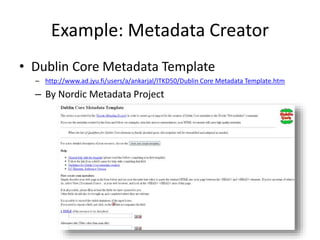
Example: Metadata Creator
• Dublin Core Metadata Template
– http://www.ad.jyu.fi/users/a/ankarjal/ITKD50/Dublin Core Metadata Template.htm
– By Nordic Metadata Project
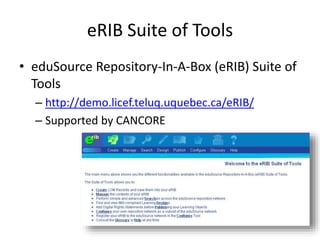
eRIB Suite of Tools
• eduSource Repository-In-A-Box (eRIB) Suite of
Tools
– http://demo.licef.teluq.uquebec.ca/eRIB/
– Supported by CANCORE
Example: Metadata Generator
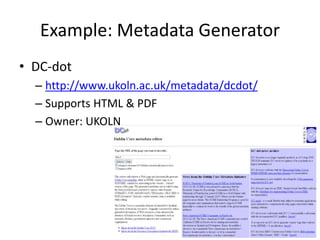
• DC-dot
– http://www.ukoln.ac.uk/metadata/dcdot/
– Supports HTML & PDF
– Owner: UKOLN
Framework for Metadata
Creation Tools
Required Features
• Flexible Metadata Schema
– A flexible metadata schema incorporated into a
metadata authoring tool would help those tools
become “future-proof,” and adaptable to evolving
standards and higher user expectations
Required Features
• Metadata Schema Views
– multiple views of the same metadata schema
would allow metadata creators to select and
display only those metadata elements necessary
for the description of the learning objects for their
particular context or project
Required Features
• Metadata Templates
– Potential solution for the challenge of creating
metadata for significantly higher numbers of
learning objects. Metadata creators can use
templates to store personal profile information or
specific information related to the learning objects
Required Features
• Collaborative Metadata Editing
– An editor which allows editing content online
from anywhere in the world without additional
client software, plug-ins, or configuration
represents a possibility for reducing the workload
for metadata creators
Required Features
• Contextual Help
– Contextual help provides immediate assistance to
users without their having to leave the context in
which they are working. Contextual help allows
the process and the concepts to be explained
while the user executes a relevant task
Required Features
• Effective Interface
– Visual representations of metadata schemas,
drop-down lists, controlled vocabularies, and fill-
inthe-blank fields must be part of an effective
interface that will allow the management of all
kinds of metadata elements (e.g. simple,
composed, range, multi-entry) in an organized
way
Sixth Floor
Metadata
Tools
Next stop:
7th Floor – Copyrights in Metadata
6

MetadataTheory: Metadata Tools (7th of 10)

  • 1.
  • 2.
    Structure • Metadata Tools •Templates • Editors • Generators • Framework for Metadata Creation Tools
  • 3.
    Metadata Tools • Metadatageneration is supported by the following types of tools: – Human beings: intellectual tools with the capacity to exercise discretion and perform data input – Standards & documentation: metadata specifications, content guidelines, thesauri, classification lists and other types of standards and documentation – Devices: technical compilations that "capture" and "store" metadata for either a database or resource header. Devices include templates, editors & generators
  • 4.
    Templates • Templates arebasic cribsheets that sketch a framework or provide an outline of schema elements without linking to supporting documentation. Templates, in both print and electronic format, have been predominant in metadata generation, probably because they are simple to produce and maintain. These tools guide metadata creation through the provision of a form without the bells and whistles
  • 5.
    Templates • Persons usingthis template generally work in a text editor, seek standards documentation on their own and submit their LSM records to a Linux repository via the File Transfer Protocol (FTP) • The MARC bibliographic form supporting cataloging in many second-generation online catalogs has functioned in much the same way, without any sort of automatic linking to authority files and content guidelines
  • 6.
    Editors • Editors aresimilar to templates in that they require human input. They are more sophisticated in that they provide direct access to standards and documentation underlying metadata creation. These tools often assist with syntactical aspects of metadata creation via automatic means. One of most popular Dublin Core editors is the Nordic Dublin Core Metadata Template (http://www.lub.lu.se/cgi-bin/nmdc.pl). This editor supports the generation of metadata records with HTML META tags for embedding in the header of a Web resource
  • 7.
    Editors • People workwith a wide variety of Web forms when joining an organization, posting information on an online community bulletin board or purchasing a product over the Internet. All of these forms function as metadata editors documenting transactions, activities, events and other types of objects beyond the traditional information resource
  • 8.
    Generators • Generators supportautomatic metadata production. Generators first require the submission of a uniform resource locator (URL), a persistent uniform resource identifier (PURL) or another Web address in order to locate the object. An algorithm is then used to comb an object's content, including its source code, and automatically assign metadata
  • 9.
    Generators • Full "schema-specific"generators are fairly experimental because they can produce moderately accurate metadata for some elements such as the date a resource was last updated or MIME type, but results vary greatly for more intellectually demanding metadata such as subject descriptors. • One approach to dealing with the experimental and unpredictable nature of generators has been the creation of hybrid metadata tools that combine aspects of both editors and generators. DC.dot functions this way in that an editor permits a person to edit the metadata that is automatically generated
  • 10.
    Example: Metadata Creator •Dublin Core Metadata Template – http://www.ad.jyu.fi/users/a/ankarjal/ITKD50/Dublin Core Metadata Template.htm – By Nordic Metadata Project
  • 11.
    eRIB Suite ofTools • eduSource Repository-In-A-Box (eRIB) Suite of Tools – http://demo.licef.teluq.uquebec.ca/eRIB/ – Supported by CANCORE
  • 12.
    Example: Metadata Generator •DC-dot – http://www.ukoln.ac.uk/metadata/dcdot/ – Supports HTML & PDF – Owner: UKOLN
  • 13.
  • 14.
    Required Features • FlexibleMetadata Schema – A flexible metadata schema incorporated into a metadata authoring tool would help those tools become “future-proof,” and adaptable to evolving standards and higher user expectations
  • 15.
    Required Features • MetadataSchema Views – multiple views of the same metadata schema would allow metadata creators to select and display only those metadata elements necessary for the description of the learning objects for their particular context or project
  • 16.
    Required Features • MetadataTemplates – Potential solution for the challenge of creating metadata for significantly higher numbers of learning objects. Metadata creators can use templates to store personal profile information or specific information related to the learning objects
  • 17.
    Required Features • CollaborativeMetadata Editing – An editor which allows editing content online from anywhere in the world without additional client software, plug-ins, or configuration represents a possibility for reducing the workload for metadata creators
  • 18.
    Required Features • ContextualHelp – Contextual help provides immediate assistance to users without their having to leave the context in which they are working. Contextual help allows the process and the concepts to be explained while the user executes a relevant task
  • 19.
    Required Features • EffectiveInterface – Visual representations of metadata schemas, drop-down lists, controlled vocabularies, and fill- inthe-blank fields must be part of an effective interface that will allow the management of all kinds of metadata elements (e.g. simple, composed, range, multi-entry) in an organized way
  • 20.
    Sixth Floor Metadata Tools Next stop: 7thFloor – Copyrights in Metadata 6