University Institute of Information Technology, PMAS-AAUR
Lecture 10: Programming Fundamentals:2012
1
Lecture 01: Programming Fundamentals:2012
Lecture 10
Array
University Institute of Information Technology, PMAS-AAUR
Lecture 10: Programming Fundamentals:2012
2
Array Concept
• An array can be defined as number of
consecutive memory locations, each of which
can store the same data type and which can
be references through the same variable
name.
• Two types:
» One Dimensional Array (1-D Array).
» Two Dimensional Array (2-D Array).
University Institute of Information Technology, PMAS-AAUR
Lecture 10: Programming Fundamentals:2012
3
Array Concept
• One-Dimension Array(Single-Dimension Array or Vector): a list
of related values
– All items in list have same data type
– All list members stored using single group name
• Example: a list of grades
98, 87, 92, 79, 85
– All grades are integers and must be declared
• Can be declared as single unit under a common name
(the array name)
University Institute of Information Technology, PMAS-AAUR
Lecture 10: Programming Fundamentals:2012
4
Declaration of an Array
• Arrays must be declared before they can be
used in the program. Standard array
declaration is as:
type variable_name[length of array];
University Institute of Information Technology, PMAS-AAUR
Lecture 10: Programming Fundamentals:2012
5
Initializing Array
• The initializing values are enclosed within the
curly braces in the declaration and placed
following an equal sign after the array name.
• Two way to initialize:
int myArray[5] = {1, 2, 3, 4, 5}; //declare and initialize the array in one statement
int studentAge[4];
studentAge[0]=14;
studentAge[1]=13;
studentAge[2]=15;
studentAge[3]=16;
University Institute of Information Technology, PMAS-AAUR
Lecture 10: Programming Fundamentals:2012
6
Array Concept
• Array index starts at zero (0)
int array[10];
// reserves space for 10 int types in memory from 0 to 9
• Accessing elements from an array
int y = array[0]; // Here, first element is retrieved
• Storing values in an array
array[4] = 5; // Here the 5th element is given value 5
• Arrays are extremely fast since they are indexed
• An Array size cannot be changed at runtime
University Institute of Information Technology, PMAS-AAUR
Lecture 10: Programming Fundamentals:2012
7
• Array
– Group of consecutive memory locations
– Same name and type
• To refer to an element, specify
– Array name
– Position number
• Format:
arrayname[ position number ]
– First element at position 0
– n element array named c:
• c[ 0 ], c[ 1 ]...c[ n – 1 ]
Name of array (Note that
all elements of this
array have the same
name, c)
Position number of the
element within array c
c[6]
-45
6
0
72
1543
-89
0
62
-3
1
6453
78
c[0]
c[1]
c[2]
c[3]
c[11]
c[10]
c[9]
c[8]
c[7]
c[5]
c[4]
University Institute of Information Technology, PMAS-AAUR
Lecture 10: Programming Fundamentals:2012
8
• Index (subscript value): position of individual
element in an array
• Accessing of array elements: done by giving
array name and element’s index
– grade[0] refers to first grade stored in grade
array
University Institute of Information Technology, PMAS-AAUR
Lecture 10: Programming Fundamentals:2012
9
Array Delaration
• When declaring arrays, specify
– Name
– Type of array
– Number of elements
Array Type array Name[ number Of Elements ];
– Examples:
• int c[ 10 ];
• float myArray[ 32.84 ];
• Declaring multiple arrays of same type
– Format similar to regular variables
– Example:
int b[ 100 ], x[ 27 ];
University Institute of Information Technology, PMAS-AAUR
Lecture 10: Programming Fundamentals:2012
10
Array Initializer
• Initializers
int n[ 5 ] = { 1, 2, 3, 4, 5 };
– If not enough initializers, rightmost elements become 0
int n[ 5 ] = { 0 }
• All elements 0
– If too many a syntax error is produced syntax error
– C arrays have no bounds checking
• If size omitted, initializers determine it
int n[ ] = { 1, 2, 3, 4, 5 };
– 5 initializers, therefore 5 element array
University Institute of Information Technology, PMAS-AAUR
Lecture 10: Programming Fundamentals:2012
11
Simple Example
// This program stores numbers from 0 to 9 in an array
#include <iostream.h>
void main()
{
int array[10];
for (int j=0; j<=9; j++)
{
cout<< array[j];
}
}
University Institute of Information Technology, PMAS-AAUR
Lecture 10: Programming Fundamentals:2012
12
Example
Program to compute distance of 5 points
University Institute of Information Technology, PMAS-AAUR
Lecture 10: Programming Fundamentals:2012
13
#include <iostream.h>
int main()
{
double distance[] = {44.14, 720.52, 96.08, 468.78, 6.28};
cout << "Distance 1: " << distance[0] << endl;
cout << "Distance 2: " << distance[1] << endl;
cout << "Distance 3: " << distance[2] << endl;
cout << "Distance 4: " << distance[3] << endl;
cout << "Distance 5: " << distance[4] << endl;
Getch();
}
This would produce:
Distance 1: 44.14
Distance 2: 720.52
Distance 3: 96.08
Distance 4: 468.78
Distance 5: 6.28
University Institute of Information Technology, PMAS-AAUR
Lecture 10: Programming Fundamentals:2012
14
Example 2
Array program that input 5 integers and store
them in array. It then display all the values in
array.
University Institute of Information Technology, PMAS-AAUR
Lecture 10: Programming Fundamentals:2012
15
#include <iostream.h>
#include <conio.h>
main()
{
int array[5];
cout<< "Enter five integers" << endl;
cin>>array[0];
cin>>array[1];
cin>>array[2];
cin>>array[3];
cin>>array[4];
cout<< "the values in array are" << endl;
cout<<array[0]<<endl;
cout<<array[1]<<endl;
cout<<array[2]<<endl;
getch();
}
University Institute of Information Technology, PMAS-AAUR
Lecture 10: Programming Fundamentals:2012
16
Program that inputs five values from user,
store them in array and displays the sum and
average of these values.
University Institute of Information Technology, PMAS-AAUR
Lecture 10: Programming Fundamentals:2012
17
#include <iostream.h>
#include <conio.h>
main()
{
int array[5], i, sum = 0;
cout<< "Enter five integers" << endl;
for(i=0; i<5; i++)
{
cin>>array[i];
sum = sum + array[i];
}
float avg = sum/5.0;
cout<< "The sum is" << sum<<endl;
cout<< "The average is" << avg<<endl;
getch();
}
University Institute of Information Technology, PMAS-AAUR
Lecture 10: Programming Fundamentals:2012
18
Program to find the Maximum number in array
University Institute of Information Technology, PMAS-AAUR
Lecture 10: Programming Fundamentals:2012
19
#include <iostream.h>
#include <conio.h>
main()
{
int array[5], i, max;
cout<< "Enter five integers" << endl;
for(i=0; i<5; i++)
{
cin>>array[i];
}
max = array[0];
for(i=0; i<5; i++)
{
if(max < array[i])
max = array[i];
}
cout<< "The maximum Number is " << max<<endl;
getch();
}
University Institute of Information Technology, PMAS-AAUR
Lecture 10: Programming Fundamentals:2012
20
Write a program that input 5 integers and
display them in actual and in reverse order.
University Institute of Information Technology, PMAS-AAUR
Lecture 10: Programming Fundamentals:2012
21
#include <iostream.h>
#include <conio.h>
main()
{
int array[5], i;
cout<< "Enter five integers" << endl;
for(i=0; i<5; i++)
{
cin>>array[i];
}
cout<<"The array in Actual Order n"<<endl;
for(i=0; i<5; i++)
{
cout<<array[i]<<" ";
}
cout<<"The array in Reverse Ordern ";
for(i=4; i>=0; i--)
{
cout<<array[i]<<" ";
}
getch();
}
University Institute of Information Technology, PMAS-AAUR
Lecture 10: Programming Fundamentals:2012
22
Array Operations
University Institute of Information Technology, PMAS-AAUR
Lecture 10: Programming Fundamentals:2012
23
Searching in Array
• Searching is a process of finding the required
data in the array.
• Searching become important when the length
of array is large.
University Institute of Information Technology, PMAS-AAUR
Lecture 10: Programming Fundamentals:2012
24
Types of Searching
• Sequential Search
• Binary Search
University Institute of Information Technology, PMAS-AAUR
Lecture 10: Programming Fundamentals:2012
25
Sequential Search
• The simplest type of searching process is the sequential search.
• In the sequential search:
• Each element of the array is compared to the key, in the order it appears in the array,
until the element matching the key is found.
• If you are looking for an element that is near the front of the
array, the sequential search will find it quickly.
• The more data that must be searched, the longer it will take to
find the data that matches the key using this process.
University Institute of Information Technology, PMAS-AAUR
Lecture 10: Programming Fundamentals:2012
26
#include <iostream.h>
#include<conio.h>
main()
{
int array[5]={10,20,30,40,50};
int i, n, loc = -1;
cout<< "Enter value to find" << endl;
cin>>n;
for(i=0; i<5; i++)
{
if(array[i] == n)
{
loc = i;
}
}
if(loc==-1)
cout<<"Number is not found in array"<<endl;
else
cout<<"the numbe is found at position "<<loc<< " and is "<<n;
getch();
}
University Institute of Information Technology, PMAS-AAUR
Lecture 10: Programming Fundamentals:2012
27
Binary Search
• When searching an array, the binary search process
apply the concept of splitting intervals in half as a
means of finding the "key" value as quickly as
possible.
• If your array is in order (ascending or descending),
you can search for the desired "key" item quickly by
using a binary search algorithm (referred to as the
"divide and conquer" approach
University Institute of Information Technology, PMAS-AAUR
Lecture 10: Programming Fundamentals:2012
28
• Consider the following array of integers:
• Array of integers, named num, arranged in "ascending order
We will be searching for the key number 64. Here is how the binary search will work:
• First, the middle of the array is located by adding the array subscript of the first value to the subscript of the last value
and dividing by two: (0 + 9) / 2 = 4 Integer division is being used to arrive at the 4th subscript as the middle. (The
actual mathematical middle would be between the subscripts 4 and 5, but we must work with integer subscripts.)
• Subscript 4 holds the number 45, which comes before 64. We now know that 64 would exist in the portion of the array
to the right of 45. We now find the middle of the right portion of the array by using the same approach: (5 + 9) / 2 =
7
• Subscript 7 holds the number 73, which comes after 64, so we now need to find the middle of the portion of the array
to the right of 45, but to the left of 73: (5 + 6) / 2 = 5
• Subscript 5 holds the number 55, which comes before 64, so we now subdivide again
(6 + 6) / 2 = 6 and element 6 holds the number 64.
10 15 24 36 45 55 64 73 90 98
num[0] num[1] num[2] num[3] num[4] num[5] num[6] num[7] num[8] num[9]
University Institute of Information Technology, PMAS-AAUR
Lecture 10: Programming Fundamentals:2012
29
Program to search a particular number in
array using Binary search
University Institute of Information Technology, PMAS-AAUR
Lecture 10: Programming Fundamentals:2012
30
int array[5]={10,20,30,40,50};
int i, n, mid, loc = -1;
int start = 0;
int end = 4;
cout<< "Enter value to find" << endl;
cin>>n;
while(start<=end)
{
mid = (start + end)/2;
if(array[mid] == n)
{
loc = mid;
break;
}
else if(n<array[mid])
end = mid - 1;
else
start = mid + 1;
}
if(loc==-1)
cout<<"Number is not found in array"<<endl;
else
cout<<"the numbe is found at position "<<loc<< " and is "<<n;
getch();
}
University Institute of Information Technology, PMAS-AAUR
Lecture 10: Programming Fundamentals:2012
31
Sorting Arrays
• The process of arranging the values of an array in
particular order is called sorting.
• Two Types of sorting:
• Ascending Order: The smallest value is stored in the first
location of an array. The largest value is stored at the last
position of an array.
15 25 33 47 51
• Descending Order: The largest value is stored in the first
location of an array. The smallest value is stored at the last
position of an array.
51 47 33 25 15
University Institute of Information Technology, PMAS-AAUR
Lecture 10: Programming Fundamentals:2012
32
Given an array of length n,
– Search elements 0 through n-1 and select the smallest
• Swap it with the element in location 0
– Search elements 1 through n-1 and select the smallest
• Swap it with the element in location 1
– Search elements 2 through n-1 and select the smallest
• Swap it with the element in location 2
– Search elements 3 through n-1 and select the smallest
• Swap it with the element in location 3
– Continue in this fashion until there’s nothing left to search
University Institute of Information Technology, PMAS-AAUR
Lecture 10: Programming Fundamentals:2012
33
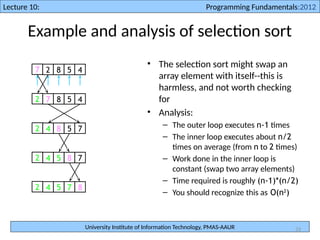
Example and analysis of selection sort
• The selection sort might swap an
array element with itself--this is
harmless, and not worth checking
for
• Analysis:
– The outer loop executes n-1 times
– The inner loop executes about n/2
times on average (from n to 2 times)
– Work done in the inner loop is
constant (swap two array elements)
– Time required is roughly (n-1)*(n/2)
– You should recognize this as O(n2
)
7 2 8 5 4
2 7 8 5 4
2 4 8 5 7
2 4 5 8 7
2 4 5 7 8
University Institute of Information Technology, PMAS-AAUR
Lecture 10: Programming Fundamentals:2012
34
Selection Sort
Program that take 5 random values from user
in an array and sort it in ascending order.
University Institute of Information Technology, PMAS-AAUR
Lecture 10: Programming Fundamentals:2012
35
int array[5], i, j, temp;
cout<< "Enter five integers" << endl;
for(i=0; i<5; i++)
{
cin>>array[i];
}
cout<<"The array in Actual Order n"<<endl;
for(i=0; i<5; i++)
{
cout<<array[i]<<" ";
}
for(i=0; i<5; i++)
for(j=i+1; j<5; j++)
if(array[i]>array[j])
{
temp = array[i];
array[i] = array[j];
array[j] = temp;
}
cout<<endl;
cout<<"The array in Sorted Ordern ";
for(i=0; i<5; i++)
{
cout<<array[i]<<" ";
}
getch();
}
University Institute of Information Technology, PMAS-AAUR
Lecture 10: Programming Fundamentals:2012
36
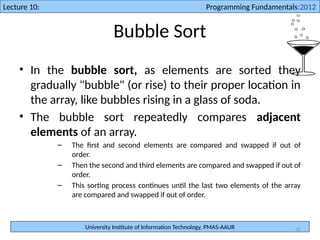
Bubble Sort
• In the bubble sort, as elements are sorted they
gradually "bubble" (or rise) to their proper location in
the array, like bubbles rising in a glass of soda.
• The bubble sort repeatedly compares adjacent
elements of an array.
– The first and second elements are compared and swapped if out of
order.
– Then the second and third elements are compared and swapped if out of
order.
– This sorting process continues until the last two elements of the array
are compared and swapped if out of order.
University Institute of Information Technology, PMAS-AAUR
Lecture 10: Programming Fundamentals:2012
37
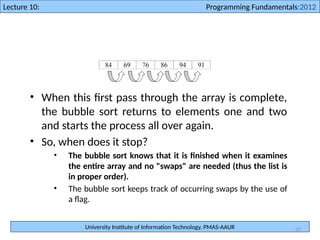
• When this first pass through the array is complete,
the bubble sort returns to elements one and two
and starts the process all over again.
• So, when does it stop?
• The bubble sort knows that it is finished when it examines
the entire array and no "swaps" are needed (thus the list is
in proper order).
• The bubble sort keeps track of occurring swaps by the use of
a flag.
University Institute of Information Technology, PMAS-AAUR
Lecture 10: Programming Fundamentals:2012
38
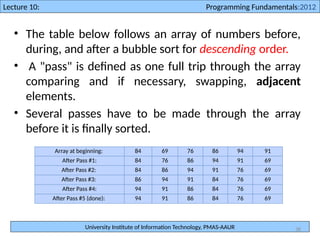
• The table below follows an array of numbers before,
during, and after a bubble sort for descending order.
• A "pass" is defined as one full trip through the array
comparing and if necessary, swapping, adjacent
elements.
• Several passes have to be made through the array
before it is finally sorted.
Array at beginning: 84 69 76 86 94 91
After Pass #1: 84 76 86 94 91 69
After Pass #2: 84 86 94 91 76 69
After Pass #3: 86 94 91 84 76 69
After Pass #4: 94 91 86 84 76 69
After Pass #5 (done): 94 91 86 84 76 69
University Institute of Information Technology, PMAS-AAUR
Lecture 10: Programming Fundamentals:2012
39
Program that take 5 random values from user
in an array and sort it in ascending order, using
bubble sort.
University Institute of Information Technology, PMAS-AAUR
Lecture 10: Programming Fundamentals:2012
40
main()
{
int array[5], i, j, temp;
cout<< "Enter five integers" << endl;
for(i=0; i<5; i++)
{
cin>>array[i];
}
cout<<"The array in Actual Order n"<<endl;
for(i=0; i<5; i++)
{
cout<<array[i]<<" ";
}
for(i=0; i<5; i++)
for(j=0; j<4; j++)
if(array[j]>array[j+1])
{
temp = array[j];
array[j] = array[j+1];
array[j+1] = temp;
}
cout<<endl;
cout<<"The array in Sorted Ordern ";
for(i=0; i<5; i++)
{
cout<<array[i]<<" ";
}
getch();
}

Array 1D.................................pptx

  • 1.
    University Institute ofInformation Technology, PMAS-AAUR Lecture 10: Programming Fundamentals:2012 1 Lecture 01: Programming Fundamentals:2012 Lecture 10 Array
  • 2.
    University Institute ofInformation Technology, PMAS-AAUR Lecture 10: Programming Fundamentals:2012 2 Array Concept • An array can be defined as number of consecutive memory locations, each of which can store the same data type and which can be references through the same variable name. • Two types: » One Dimensional Array (1-D Array). » Two Dimensional Array (2-D Array).
  • 3.
    University Institute ofInformation Technology, PMAS-AAUR Lecture 10: Programming Fundamentals:2012 3 Array Concept • One-Dimension Array(Single-Dimension Array or Vector): a list of related values – All items in list have same data type – All list members stored using single group name • Example: a list of grades 98, 87, 92, 79, 85 – All grades are integers and must be declared • Can be declared as single unit under a common name (the array name)
  • 4.
    University Institute ofInformation Technology, PMAS-AAUR Lecture 10: Programming Fundamentals:2012 4 Declaration of an Array • Arrays must be declared before they can be used in the program. Standard array declaration is as: type variable_name[length of array];
  • 5.
    University Institute ofInformation Technology, PMAS-AAUR Lecture 10: Programming Fundamentals:2012 5 Initializing Array • The initializing values are enclosed within the curly braces in the declaration and placed following an equal sign after the array name. • Two way to initialize: int myArray[5] = {1, 2, 3, 4, 5}; //declare and initialize the array in one statement int studentAge[4]; studentAge[0]=14; studentAge[1]=13; studentAge[2]=15; studentAge[3]=16;
  • 6.
    University Institute ofInformation Technology, PMAS-AAUR Lecture 10: Programming Fundamentals:2012 6 Array Concept • Array index starts at zero (0) int array[10]; // reserves space for 10 int types in memory from 0 to 9 • Accessing elements from an array int y = array[0]; // Here, first element is retrieved • Storing values in an array array[4] = 5; // Here the 5th element is given value 5 • Arrays are extremely fast since they are indexed • An Array size cannot be changed at runtime
  • 7.
    University Institute ofInformation Technology, PMAS-AAUR Lecture 10: Programming Fundamentals:2012 7 • Array – Group of consecutive memory locations – Same name and type • To refer to an element, specify – Array name – Position number • Format: arrayname[ position number ] – First element at position 0 – n element array named c: • c[ 0 ], c[ 1 ]...c[ n – 1 ] Name of array (Note that all elements of this array have the same name, c) Position number of the element within array c c[6] -45 6 0 72 1543 -89 0 62 -3 1 6453 78 c[0] c[1] c[2] c[3] c[11] c[10] c[9] c[8] c[7] c[5] c[4]
  • 8.
    University Institute ofInformation Technology, PMAS-AAUR Lecture 10: Programming Fundamentals:2012 8 • Index (subscript value): position of individual element in an array • Accessing of array elements: done by giving array name and element’s index – grade[0] refers to first grade stored in grade array
  • 9.
    University Institute ofInformation Technology, PMAS-AAUR Lecture 10: Programming Fundamentals:2012 9 Array Delaration • When declaring arrays, specify – Name – Type of array – Number of elements Array Type array Name[ number Of Elements ]; – Examples: • int c[ 10 ]; • float myArray[ 32.84 ]; • Declaring multiple arrays of same type – Format similar to regular variables – Example: int b[ 100 ], x[ 27 ];
  • 10.
    University Institute ofInformation Technology, PMAS-AAUR Lecture 10: Programming Fundamentals:2012 10 Array Initializer • Initializers int n[ 5 ] = { 1, 2, 3, 4, 5 }; – If not enough initializers, rightmost elements become 0 int n[ 5 ] = { 0 } • All elements 0 – If too many a syntax error is produced syntax error – C arrays have no bounds checking • If size omitted, initializers determine it int n[ ] = { 1, 2, 3, 4, 5 }; – 5 initializers, therefore 5 element array
  • 11.
    University Institute ofInformation Technology, PMAS-AAUR Lecture 10: Programming Fundamentals:2012 11 Simple Example // This program stores numbers from 0 to 9 in an array #include <iostream.h> void main() { int array[10]; for (int j=0; j<=9; j++) { cout<< array[j]; } }
  • 12.
    University Institute ofInformation Technology, PMAS-AAUR Lecture 10: Programming Fundamentals:2012 12 Example Program to compute distance of 5 points
  • 13.
    University Institute ofInformation Technology, PMAS-AAUR Lecture 10: Programming Fundamentals:2012 13 #include <iostream.h> int main() { double distance[] = {44.14, 720.52, 96.08, 468.78, 6.28}; cout << "Distance 1: " << distance[0] << endl; cout << "Distance 2: " << distance[1] << endl; cout << "Distance 3: " << distance[2] << endl; cout << "Distance 4: " << distance[3] << endl; cout << "Distance 5: " << distance[4] << endl; Getch(); } This would produce: Distance 1: 44.14 Distance 2: 720.52 Distance 3: 96.08 Distance 4: 468.78 Distance 5: 6.28
  • 14.
    University Institute ofInformation Technology, PMAS-AAUR Lecture 10: Programming Fundamentals:2012 14 Example 2 Array program that input 5 integers and store them in array. It then display all the values in array.
  • 15.
    University Institute ofInformation Technology, PMAS-AAUR Lecture 10: Programming Fundamentals:2012 15 #include <iostream.h> #include <conio.h> main() { int array[5]; cout<< "Enter five integers" << endl; cin>>array[0]; cin>>array[1]; cin>>array[2]; cin>>array[3]; cin>>array[4]; cout<< "the values in array are" << endl; cout<<array[0]<<endl; cout<<array[1]<<endl; cout<<array[2]<<endl; getch(); }
  • 16.
    University Institute ofInformation Technology, PMAS-AAUR Lecture 10: Programming Fundamentals:2012 16 Program that inputs five values from user, store them in array and displays the sum and average of these values.
  • 17.
    University Institute ofInformation Technology, PMAS-AAUR Lecture 10: Programming Fundamentals:2012 17 #include <iostream.h> #include <conio.h> main() { int array[5], i, sum = 0; cout<< "Enter five integers" << endl; for(i=0; i<5; i++) { cin>>array[i]; sum = sum + array[i]; } float avg = sum/5.0; cout<< "The sum is" << sum<<endl; cout<< "The average is" << avg<<endl; getch(); }
  • 18.
    University Institute ofInformation Technology, PMAS-AAUR Lecture 10: Programming Fundamentals:2012 18 Program to find the Maximum number in array
  • 19.
    University Institute ofInformation Technology, PMAS-AAUR Lecture 10: Programming Fundamentals:2012 19 #include <iostream.h> #include <conio.h> main() { int array[5], i, max; cout<< "Enter five integers" << endl; for(i=0; i<5; i++) { cin>>array[i]; } max = array[0]; for(i=0; i<5; i++) { if(max < array[i]) max = array[i]; } cout<< "The maximum Number is " << max<<endl; getch(); }
  • 20.
    University Institute ofInformation Technology, PMAS-AAUR Lecture 10: Programming Fundamentals:2012 20 Write a program that input 5 integers and display them in actual and in reverse order.
  • 21.
    University Institute ofInformation Technology, PMAS-AAUR Lecture 10: Programming Fundamentals:2012 21 #include <iostream.h> #include <conio.h> main() { int array[5], i; cout<< "Enter five integers" << endl; for(i=0; i<5; i++) { cin>>array[i]; } cout<<"The array in Actual Order n"<<endl; for(i=0; i<5; i++) { cout<<array[i]<<" "; } cout<<"The array in Reverse Ordern "; for(i=4; i>=0; i--) { cout<<array[i]<<" "; } getch(); }
  • 22.
    University Institute ofInformation Technology, PMAS-AAUR Lecture 10: Programming Fundamentals:2012 22 Array Operations
  • 23.
    University Institute ofInformation Technology, PMAS-AAUR Lecture 10: Programming Fundamentals:2012 23 Searching in Array • Searching is a process of finding the required data in the array. • Searching become important when the length of array is large.
  • 24.
    University Institute ofInformation Technology, PMAS-AAUR Lecture 10: Programming Fundamentals:2012 24 Types of Searching • Sequential Search • Binary Search
  • 25.
    University Institute ofInformation Technology, PMAS-AAUR Lecture 10: Programming Fundamentals:2012 25 Sequential Search • The simplest type of searching process is the sequential search. • In the sequential search: • Each element of the array is compared to the key, in the order it appears in the array, until the element matching the key is found. • If you are looking for an element that is near the front of the array, the sequential search will find it quickly. • The more data that must be searched, the longer it will take to find the data that matches the key using this process.
  • 26.
    University Institute ofInformation Technology, PMAS-AAUR Lecture 10: Programming Fundamentals:2012 26 #include <iostream.h> #include<conio.h> main() { int array[5]={10,20,30,40,50}; int i, n, loc = -1; cout<< "Enter value to find" << endl; cin>>n; for(i=0; i<5; i++) { if(array[i] == n) { loc = i; } } if(loc==-1) cout<<"Number is not found in array"<<endl; else cout<<"the numbe is found at position "<<loc<< " and is "<<n; getch(); }
  • 27.
    University Institute ofInformation Technology, PMAS-AAUR Lecture 10: Programming Fundamentals:2012 27 Binary Search • When searching an array, the binary search process apply the concept of splitting intervals in half as a means of finding the "key" value as quickly as possible. • If your array is in order (ascending or descending), you can search for the desired "key" item quickly by using a binary search algorithm (referred to as the "divide and conquer" approach
  • 28.
    University Institute ofInformation Technology, PMAS-AAUR Lecture 10: Programming Fundamentals:2012 28 • Consider the following array of integers: • Array of integers, named num, arranged in "ascending order We will be searching for the key number 64. Here is how the binary search will work: • First, the middle of the array is located by adding the array subscript of the first value to the subscript of the last value and dividing by two: (0 + 9) / 2 = 4 Integer division is being used to arrive at the 4th subscript as the middle. (The actual mathematical middle would be between the subscripts 4 and 5, but we must work with integer subscripts.) • Subscript 4 holds the number 45, which comes before 64. We now know that 64 would exist in the portion of the array to the right of 45. We now find the middle of the right portion of the array by using the same approach: (5 + 9) / 2 = 7 • Subscript 7 holds the number 73, which comes after 64, so we now need to find the middle of the portion of the array to the right of 45, but to the left of 73: (5 + 6) / 2 = 5 • Subscript 5 holds the number 55, which comes before 64, so we now subdivide again (6 + 6) / 2 = 6 and element 6 holds the number 64. 10 15 24 36 45 55 64 73 90 98 num[0] num[1] num[2] num[3] num[4] num[5] num[6] num[7] num[8] num[9]
  • 29.
    University Institute ofInformation Technology, PMAS-AAUR Lecture 10: Programming Fundamentals:2012 29 Program to search a particular number in array using Binary search
  • 30.
    University Institute ofInformation Technology, PMAS-AAUR Lecture 10: Programming Fundamentals:2012 30 int array[5]={10,20,30,40,50}; int i, n, mid, loc = -1; int start = 0; int end = 4; cout<< "Enter value to find" << endl; cin>>n; while(start<=end) { mid = (start + end)/2; if(array[mid] == n) { loc = mid; break; } else if(n<array[mid]) end = mid - 1; else start = mid + 1; } if(loc==-1) cout<<"Number is not found in array"<<endl; else cout<<"the numbe is found at position "<<loc<< " and is "<<n; getch(); }
  • 31.
    University Institute ofInformation Technology, PMAS-AAUR Lecture 10: Programming Fundamentals:2012 31 Sorting Arrays • The process of arranging the values of an array in particular order is called sorting. • Two Types of sorting: • Ascending Order: The smallest value is stored in the first location of an array. The largest value is stored at the last position of an array. 15 25 33 47 51 • Descending Order: The largest value is stored in the first location of an array. The smallest value is stored at the last position of an array. 51 47 33 25 15
  • 32.
    University Institute ofInformation Technology, PMAS-AAUR Lecture 10: Programming Fundamentals:2012 32 Given an array of length n, – Search elements 0 through n-1 and select the smallest • Swap it with the element in location 0 – Search elements 1 through n-1 and select the smallest • Swap it with the element in location 1 – Search elements 2 through n-1 and select the smallest • Swap it with the element in location 2 – Search elements 3 through n-1 and select the smallest • Swap it with the element in location 3 – Continue in this fashion until there’s nothing left to search
  • 33.
    University Institute ofInformation Technology, PMAS-AAUR Lecture 10: Programming Fundamentals:2012 33 Example and analysis of selection sort • The selection sort might swap an array element with itself--this is harmless, and not worth checking for • Analysis: – The outer loop executes n-1 times – The inner loop executes about n/2 times on average (from n to 2 times) – Work done in the inner loop is constant (swap two array elements) – Time required is roughly (n-1)*(n/2) – You should recognize this as O(n2 ) 7 2 8 5 4 2 7 8 5 4 2 4 8 5 7 2 4 5 8 7 2 4 5 7 8
  • 34.
    University Institute ofInformation Technology, PMAS-AAUR Lecture 10: Programming Fundamentals:2012 34 Selection Sort Program that take 5 random values from user in an array and sort it in ascending order.
  • 35.
    University Institute ofInformation Technology, PMAS-AAUR Lecture 10: Programming Fundamentals:2012 35 int array[5], i, j, temp; cout<< "Enter five integers" << endl; for(i=0; i<5; i++) { cin>>array[i]; } cout<<"The array in Actual Order n"<<endl; for(i=0; i<5; i++) { cout<<array[i]<<" "; } for(i=0; i<5; i++) for(j=i+1; j<5; j++) if(array[i]>array[j]) { temp = array[i]; array[i] = array[j]; array[j] = temp; } cout<<endl; cout<<"The array in Sorted Ordern "; for(i=0; i<5; i++) { cout<<array[i]<<" "; } getch(); }
  • 36.
    University Institute ofInformation Technology, PMAS-AAUR Lecture 10: Programming Fundamentals:2012 36 Bubble Sort • In the bubble sort, as elements are sorted they gradually "bubble" (or rise) to their proper location in the array, like bubbles rising in a glass of soda. • The bubble sort repeatedly compares adjacent elements of an array. – The first and second elements are compared and swapped if out of order. – Then the second and third elements are compared and swapped if out of order. – This sorting process continues until the last two elements of the array are compared and swapped if out of order.
  • 37.
    University Institute ofInformation Technology, PMAS-AAUR Lecture 10: Programming Fundamentals:2012 37 • When this first pass through the array is complete, the bubble sort returns to elements one and two and starts the process all over again. • So, when does it stop? • The bubble sort knows that it is finished when it examines the entire array and no "swaps" are needed (thus the list is in proper order). • The bubble sort keeps track of occurring swaps by the use of a flag.
  • 38.
    University Institute ofInformation Technology, PMAS-AAUR Lecture 10: Programming Fundamentals:2012 38 • The table below follows an array of numbers before, during, and after a bubble sort for descending order. • A "pass" is defined as one full trip through the array comparing and if necessary, swapping, adjacent elements. • Several passes have to be made through the array before it is finally sorted. Array at beginning: 84 69 76 86 94 91 After Pass #1: 84 76 86 94 91 69 After Pass #2: 84 86 94 91 76 69 After Pass #3: 86 94 91 84 76 69 After Pass #4: 94 91 86 84 76 69 After Pass #5 (done): 94 91 86 84 76 69
  • 39.
    University Institute ofInformation Technology, PMAS-AAUR Lecture 10: Programming Fundamentals:2012 39 Program that take 5 random values from user in an array and sort it in ascending order, using bubble sort.
  • 40.
    University Institute ofInformation Technology, PMAS-AAUR Lecture 10: Programming Fundamentals:2012 40 main() { int array[5], i, j, temp; cout<< "Enter five integers" << endl; for(i=0; i<5; i++) { cin>>array[i]; } cout<<"The array in Actual Order n"<<endl; for(i=0; i<5; i++) { cout<<array[i]<<" "; } for(i=0; i<5; i++) for(j=0; j<4; j++) if(array[j]>array[j+1]) { temp = array[j]; array[j] = array[j+1]; array[j+1] = temp; } cout<<endl; cout<<"The array in Sorted Ordern "; for(i=0; i<5; i++) { cout<<array[i]<<" "; } getch(); }