Modeling, estimating, and
predicting Ceph
Lars Marowsky-Brée
Distinguished Engineer, Architect Storage & HA
lmb@suse.com
What is Ceph?
3
From 10,000 Meters
[1] http://www.openstack.org/blog/2013/11/openstack-user-survey-statistics-november-2013/
• Open Source Distributed Storage solution
• Most popular choice of distributed storage for
OpenStack
[1]
• Lots of goodies
‒ Distributed Object Storage
‒ Redundancy
‒ Efficient Scale-Out
‒ Can be built on commodity hardware
‒ Lower operational cost
4
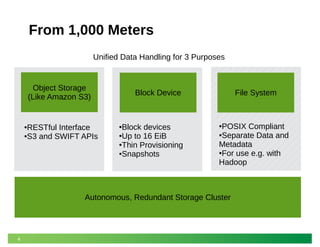
From 1,000 Meters
Object Storage
(Like Amazon S3)
Block Device File System
Unified Data Handling for 3 Purposes
●RESTful Interface
●S3 and SWIFT APIs
●Block devices
●Up to 16 EiB
●Thin Provisioning
●Snapshots
●POSIX Compliant
●Separate Data and
Metadata
●For use e.g. with
Hadoop
Autonomous, Redundant Storage Cluster
5
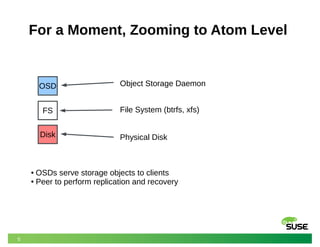
For a Moment, Zooming to Atom Level
FS
Disk
OSD Object Storage Daemon
File System (btrfs, xfs)
Physical Disk
● OSDs serve storage objects to clients
● Peer to perform replication and recovery
6
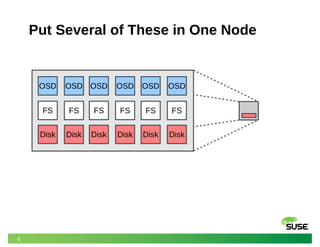
Put Several of These in One Node
FS
Disk
OSD
FS
Disk
OSD
FS
Disk
OSD
FS
Disk
OSD
FS
Disk
OSD
FS
Disk
OSD
7
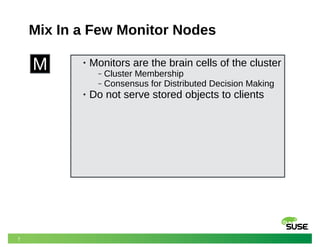
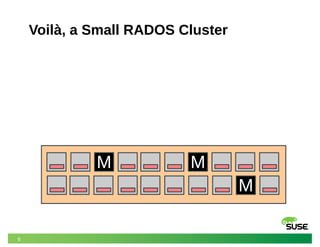
Mix In a Few Monitor Nodes
M • Monitors are the brain cells of the cluster
‒ Cluster Membership
‒ Consensus for Distributed Decision Making
• Do not serve stored objects to clients
8
Voilà, a Small RADOS Cluster
M M
M
9
Several Ingredients
• Basic Idea
‒ Coarse grained partitioning of storage supports policy based
mapping (don't put all copies of my data in one rack)
‒ Topology map and Rules allow clients to “compute” the exact
location of any storage object
• Three conceptual components
‒ Pools
‒ Placement groups
‒ CRUSH: deterministic decentralized placement algorithm
10
Pools
• A pool is a logical container for storage objects
• A pool has a set of parameters
‒ a name
‒ a numerical ID (internal to RADOS)
‒ number of replicas OR erasure encoding settings
‒ number of placement groups
‒ placement rule set
‒ owner
• Pools support certain operations
‒ create/remove/read/write entire objects
‒ snapshot of the entire pool
11
Placement Groups
• Placement groups help balance data across OSDs
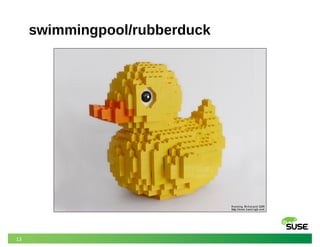
• Consider a pool named “swimmingpool”
‒ with a pool ID of 38 and 8192 placement groups (PGs)
• Consider object “rubberduck” in “swimmingpool”
‒ hash(“rubberduck”) % 8192 = 0xb0b
‒ The resulting PG is 38.b0b
• One PG typically exists on several OSDs
‒ for replication
• One OSD typically serves many PGs
12
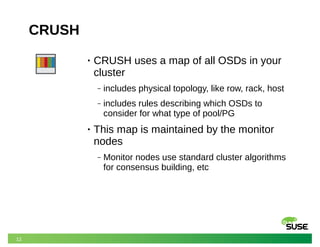
CRUSH
• CRUSH uses a map of all OSDs in your
cluster
‒ includes physical topology, like row, rack, host
‒ includes rules describing which OSDs to
consider for what type of pool/PG
• This map is maintained by the monitor
nodes
‒ Monitor nodes use standard cluster algorithms
for consensus building, etc
13
swimmingpool/rubberduck
14
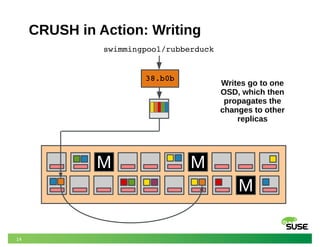
CRUSH in Action: Writing
M M
M
M
38.b0b
swimmingpool/rubberduck
Writes go to one
OSD, which then
propagates the
changes to other
replicas
Unreasonable expectations
16
Unreasonable questions customers
want answers to
• How to build a storage system that meets my
requirements?
• If I build a system like this, what will its characteristics
be?
• If I change XY in my existing system, how will its
characteristics change?
17
How to design a Ceph cluster today
• Understand your workload (?)
• Make a best guess, based on the desirable properties and
factors
• Build a 1-10% pilot / proof of concept
‒ Preferably using loaner hardware from a vendor to avoid early
commitment. (The outlook of selling a few PB of storage and
compute nodes makes vendors very cooperative.)
• Refine and tune this until desired performance is achieved
• Scale up
‒ Ceph retains most characteristics at scale or even improves (until it
doesn’t), so re-tune
Software Defined Storage
19
Legacy Storage Arrays
• Limits:
‒ Tightly controlled
environment
‒ Limited scalability
‒ Few options
‒ Only certain approved drives
‒ Constrained number of disk
slots
‒ Few memory variations
‒ Only very few networking
choices
‒ Typically fixed controller and
CPU
• Benefits:
‒ Reasonably easy to
understand
‒ Long-term experience and
“gut instincts”
‒ Somewhat deterministic
behavior and pricing
20
Software Defined Storage (SDS)
• Limits:
‒ ?
• Benefits:
‒ Infinite scalability
‒ Infinite adaptability
‒ Infinite choices
‒ Infinite flexibility
‒ ... right.
21
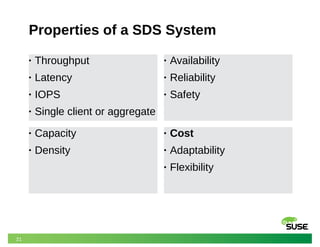
Properties of a SDS System
• Throughput
• Latency
• IOPS
• Single client or aggregate
• Availability
• Reliability
• Safety
• Cost
• Adaptability
• Flexibility
• Capacity
• Density
22
Architecting a SDS system
• These goals often conflict:
‒ Availability versus Density
‒ IOPS versus Density
‒ Latency versus Throughput
‒ Everything versus Cost
• Many hardware options
• Software topology offers many configuration choices
• There is no one size fits all
A multitude of choices
24
Network
• Choose the fastest network you can afford
• Switches should be low latency with fully meshed
backplane
• Separate public and cluster network
• Cluster network should typically be twice the public
bandwidth
‒ Incoming writes are replicated over the cluster network
‒ Re-balancing and re-mirroring utilize the cluster network
25
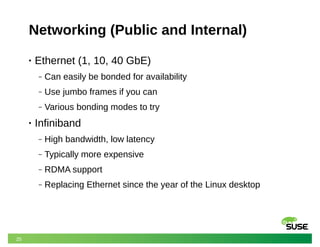
Networking (Public and Internal)
• Ethernet (1, 10, 40 GbE)
‒ Can easily be bonded for availability
‒ Use jumbo frames if you can
‒ Various bonding modes to try
• Infiniband
‒ High bandwidth, low latency
‒ Typically more expensive
‒ RDMA support
‒ Replacing Ethernet since the year of the Linux desktop
26
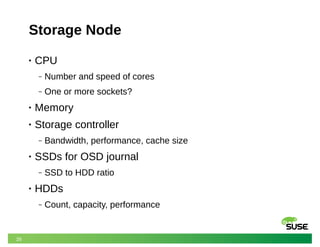
Storage Node
• CPU
‒ Number and speed of cores
‒ One or more sockets?
• Memory
• Storage controller
‒ Bandwidth, performance, cache size
• SSDs for OSD journal
‒ SSD to HDD ratio
• HDDs
‒ Count, capacity, performance
27
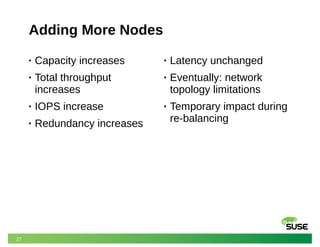
Adding More Nodes
• Capacity increases
• Total throughput
increases
• IOPS increase
• Redundancy increases
• Latency unchanged
• Eventually: network
topology limitations
• Temporary impact during
re-balancing
28
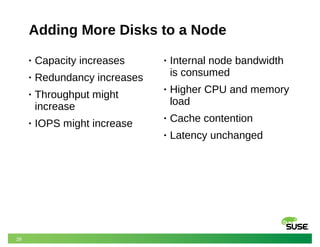
Adding More Disks to a Node
• Capacity increases
• Redundancy increases
• Throughput might
increase
• IOPS might increase
• Internal node bandwidth
is consumed
• Higher CPU and memory
load
• Cache contention
• Latency unchanged
29
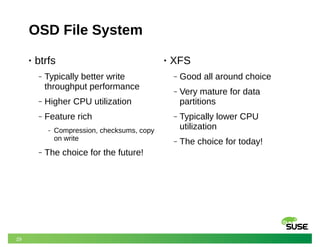
OSD File System
• btrfs
‒ Typically better write
throughput performance
‒ Higher CPU utilization
‒ Feature rich
‒ Compression, checksums, copy
on write
‒ The choice for the future!
• XFS
‒ Good all around choice
‒ Very mature for data
partitions
‒ Typically lower CPU
utilization
‒ The choice for today!
30
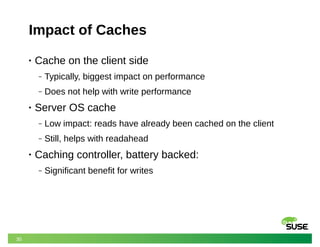
Impact of Caches
• Cache on the client side
‒ Typically, biggest impact on performance
‒ Does not help with write performance
• Server OS cache
‒ Low impact: reads have already been cached on the client
‒ Still, helps with readahead
• Caching controller, battery backed:
‒ Significant benefit for writes
31
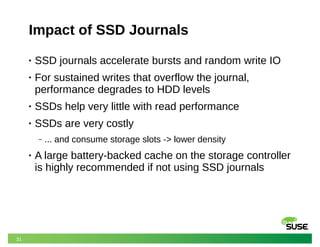
Impact of SSD Journals
• SSD journals accelerate bursts and random write IO
• For sustained writes that overflow the journal,
performance degrades to HDD levels
• SSDs help very little with read performance
• SSDs are very costly
‒ ... and consume storage slots -> lower density
• A large battery-backed cache on the storage controller
is highly recommended if not using SSD journals
32
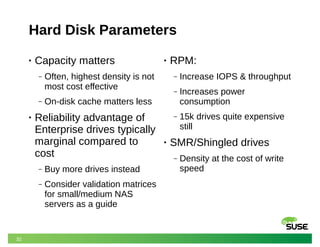
Hard Disk Parameters
• Capacity matters
‒ Often, highest density is not
most cost effective
‒ On-disk cache matters less
• Reliability advantage of
Enterprise drives typically
marginal compared to
cost
‒ Buy more drives instead
‒ Consider validation matrices
for small/medium NAS
servers as a guide
• RPM:
‒ Increase IOPS & throughput
‒ Increases power
consumption
‒ 15k drives quite expensive
still
• SMR/Shingled drives
‒ Density at the cost of write
speed
33
Other parameters
• IO Schedulers
‒ Deadline, CFQ, noop
• Let’s not even talk about
the various mkfs options
• Encryption
34
Impact of Redundancy Choices
• Replication:
‒ n number of exact, full-size
copies
‒ Potentially increased read
performance due to striping
‒ More copies lower
throughput, increase latency
‒ Increased cluster network
utilization for writes
‒ Rebuilds can leverage
multiple sources
‒ Significant capacity impact
• Erasure coding:
‒ Data split into k parts plus m
redundancy codes
‒ Better space efficiency
‒ Higher CPU overhead
‒ Significant CPU and cluster
network impact, especially
during rebuild
‒ Cannot directly be used with
block devices (see next
slide)
35
Cache Tiering
• Multi-tier storage architecture:
‒ Pool acts as a transparent write-back overlay for another
‒ e.g., SSD 3-way replication over HDDs with erasure coding
‒ Can flush either on relative or absolute dirty levels, or age
‒ Additional configuration complexity and requires workload-
specific tuning
‒ Also available: read-only mode (no write acceleration)
‒ Some downsides (no snapshots), memory consumption for
HitSet
• A good way to combine the advantages of replication
and erasure coding
36
Number of placement groups
● Number of hash buckets
per pool
● Data is chunked &
distributed across nodes
● Typically approx. 100 per
OSD/TB
• Too many:
‒ More peering
‒ More resources used
• Too few:
‒ Large amounts of data per
group
‒ More hotspots, less striping
‒ Slower recovery from failure
‒ Slower re-balancing
From components to system
38
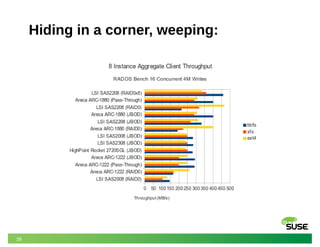
More than the sum of its parts
• If this seems straightforward enough, it is because it
isn’t.
• The interactions are not trivial or humanly predictable.
• http://ceph.com/community/ceph-performance-part-2-
write-throughput-without-ssd-journals/
39
Hiding in a corner, weeping:
When anecdotes are not enough
41
The data drought of big data
• Isolated benchmarks
• No standardized work loads
• Huge variety of reporting formats (not parsable)
• Published benchmarks usually skewed to highlight
superior performance of product X
• Not enough data points to make sense of the “why”
• Not enough data about the environment
• Rarely from production systems
42
Existing efforts
• ceph-brag
‒ Last update: ~1 year ago
• cephperf
‒ Talk proposal for Vancover OpenStack Summit, presented at
Ceph Infernalis Developer Summit
‒ Mostly focused on object storage
43
Measuring Ceph performance
(you were in the previous session by Adolfo, right?)
• rados bench
‒ Measures backend performance of the RADOS store
• rados load-gen
‒ Generate configurable load on the cluster
• ceph tell osd.XX
• fio rbd backend
‒ Swiss army knife of IO benchmarking on Linux
‒ Can also compare in-kernel rbd with user-space librados
• rest-bench
‒ Measures S3/radosgw performance
44
Standard benchmark suite
• Gather all relevant and anonymized data in JSON
format
• Evaluate all components individually, as well as
combined
• Core and optional tests
‒ Must be fast enough to run on a (quiescent) production cluster
‒ Also means: non-destructive tests in core only
• Share data to build up a corpus on big data
performance
45
Block benchmarks – how?
• fio
‒ JSON output, bandwidth, latency
• Standard profiles
‒ Sequential and random IO
‒ 4k, 16k, 64k, 256k block sizes
‒ Read versus write
‒ Mixed profiles
‒ Don’t write zeros!
46
Block benchmarks – where?
• Individual OSDs
• All OSDs in a node
‒ On top of OSD fs, and/or raw disk?
‒ Cache baseline/destructive tests?
• Journal disks
‒ Read first, write back, for non-destructive tests
• RBD performance: rbd.ko, user-space
• One client, multiple clients
• Identify similar machines and run a random selection
47
Network benchmarks
• Latency (various packet sizes): ping
• Bandwidth: iperf3
• Relevant links:
‒ OSD – OSD, OSD – Monitor
‒ OSD – Rados Gateway, OSD - iSCSI
‒ OSD – Client, Monitor – Client, Client – RADOS Gateway
48
Other benchmark data
• CPU loads:
‒ Encryption
‒ Compression
• Memory access speeds
• Benchmark during re-balancing an OSD?
• CephFS (FUSE/cephfs.ko)
49
Environment description
• Hardware setup for all nodes
‒ Not always trivial to discover
• kernel, glibc, ceph versions
• Network layout metadata
50
Different Ceph configurations?
• Different node counts,
• replication sizes,
• erasure coding options,
• PG sizes,
• differently filled pools, ...
• Not necessarily non-destructive, but potentially highly
valuable.
51
Performance monitoring during runs
• Performance Co-Pilot?
• Gather network, CPU, IO, ... metrics
• While not fine grained enough to debug everything,
helpful to spot anomalies and trends
‒ e.g., how did network utilization of the whole run change over
time? Is CPU maxed out on a MON for long?
• Also, pretty pictures (such as those missing in this
presentation)
• LTTng instrumentation?
52
Summary of goals
• Holistic exploration of Ceph cluster performance
• Answer those pesky customer questions
• Identify regressions and brag about improvements
• Use machine learning to spot correlations that human
brains can’t grasp
‒ Recurrent neural networks?
• Provide students with a data corpus to answer
questions we didn’t even think of yet
Thank you.
53
Questions and Answers?
Corporate Headquarters
Maxfeldstrasse 5
90409 Nuremberg
Germany
+49 911 740 53 0 (Worldwide)
www.suse.com
Join us on:
www.opensuse.org
54
Unpublished Work of SUSE LLC. All Rights Reserved.
This work is an unpublished work and contains confidential, proprietary and trade secret information of SUSE LLC.
Access to this work is restricted to SUSE employees who have a need to know to perform tasks within the scope of
their assignments. No part of this work may be practiced, performed, copied, distributed, revised, modified, translated,
abridged, condensed, expanded, collected, or adapted without the prior written consent of SUSE.
Any use or exploitation of this work without authorization could subject the perpetrator to criminal and civil liability.
General Disclaimer
This document is not to be construed as a promise by any participating company to develop, deliver, or market a
product. It is not a commitment to deliver any material, code, or functionality, and should not be relied upon in making
purchasing decisions. SUSE makes no representations or warranties with respect to the contents of this document,
and specifically disclaims any express or implied warranties of merchantability or fitness for any particular purpose. The
development, release, and timing of features or functionality described for SUSE products remains at the sole
discretion of SUSE. Further, SUSE reserves the right to revise this document and to make changes to its content, at
any time, without obligation to notify any person or entity of such revisions or changes. All SUSE marks referenced in
this presentation are trademarks or registered trademarks of Novell, Inc. in the United States and other countries. All
third-party trademarks are the property of their respective owners.

Ceph Day Amsterdam 2015: Measuring and predicting performance of Ceph clusters

  • 1.
    Modeling, estimating, and predictingCeph Lars Marowsky-Brée Distinguished Engineer, Architect Storage & HA lmb@suse.com
  • 2.
  • 3.
    3 From 10,000 Meters [1]http://www.openstack.org/blog/2013/11/openstack-user-survey-statistics-november-2013/ • Open Source Distributed Storage solution • Most popular choice of distributed storage for OpenStack [1] • Lots of goodies ‒ Distributed Object Storage ‒ Redundancy ‒ Efficient Scale-Out ‒ Can be built on commodity hardware ‒ Lower operational cost
  • 4.
    4 From 1,000 Meters ObjectStorage (Like Amazon S3) Block Device File System Unified Data Handling for 3 Purposes ●RESTful Interface ●S3 and SWIFT APIs ●Block devices ●Up to 16 EiB ●Thin Provisioning ●Snapshots ●POSIX Compliant ●Separate Data and Metadata ●For use e.g. with Hadoop Autonomous, Redundant Storage Cluster
  • 5.
    5 For a Moment,Zooming to Atom Level FS Disk OSD Object Storage Daemon File System (btrfs, xfs) Physical Disk ● OSDs serve storage objects to clients ● Peer to perform replication and recovery
  • 6.
    6 Put Several ofThese in One Node FS Disk OSD FS Disk OSD FS Disk OSD FS Disk OSD FS Disk OSD FS Disk OSD
  • 7.
    7 Mix In aFew Monitor Nodes M • Monitors are the brain cells of the cluster ‒ Cluster Membership ‒ Consensus for Distributed Decision Making • Do not serve stored objects to clients
  • 8.
    8 Voilà, a SmallRADOS Cluster M M M
  • 9.
    9 Several Ingredients • BasicIdea ‒ Coarse grained partitioning of storage supports policy based mapping (don't put all copies of my data in one rack) ‒ Topology map and Rules allow clients to “compute” the exact location of any storage object • Three conceptual components ‒ Pools ‒ Placement groups ‒ CRUSH: deterministic decentralized placement algorithm
  • 10.
    10 Pools • A poolis a logical container for storage objects • A pool has a set of parameters ‒ a name ‒ a numerical ID (internal to RADOS) ‒ number of replicas OR erasure encoding settings ‒ number of placement groups ‒ placement rule set ‒ owner • Pools support certain operations ‒ create/remove/read/write entire objects ‒ snapshot of the entire pool
  • 11.
    11 Placement Groups • Placementgroups help balance data across OSDs • Consider a pool named “swimmingpool” ‒ with a pool ID of 38 and 8192 placement groups (PGs) • Consider object “rubberduck” in “swimmingpool” ‒ hash(“rubberduck”) % 8192 = 0xb0b ‒ The resulting PG is 38.b0b • One PG typically exists on several OSDs ‒ for replication • One OSD typically serves many PGs
  • 12.
    12 CRUSH • CRUSH usesa map of all OSDs in your cluster ‒ includes physical topology, like row, rack, host ‒ includes rules describing which OSDs to consider for what type of pool/PG • This map is maintained by the monitor nodes ‒ Monitor nodes use standard cluster algorithms for consensus building, etc
  • 13.
  • 14.
    14 CRUSH in Action:Writing M M M M 38.b0b swimmingpool/rubberduck Writes go to one OSD, which then propagates the changes to other replicas
  • 15.
  • 16.
    16 Unreasonable questions customers wantanswers to • How to build a storage system that meets my requirements? • If I build a system like this, what will its characteristics be? • If I change XY in my existing system, how will its characteristics change?
  • 17.
    17 How to designa Ceph cluster today • Understand your workload (?) • Make a best guess, based on the desirable properties and factors • Build a 1-10% pilot / proof of concept ‒ Preferably using loaner hardware from a vendor to avoid early commitment. (The outlook of selling a few PB of storage and compute nodes makes vendors very cooperative.) • Refine and tune this until desired performance is achieved • Scale up ‒ Ceph retains most characteristics at scale or even improves (until it doesn’t), so re-tune
  • 18.
  • 19.
    19 Legacy Storage Arrays •Limits: ‒ Tightly controlled environment ‒ Limited scalability ‒ Few options ‒ Only certain approved drives ‒ Constrained number of disk slots ‒ Few memory variations ‒ Only very few networking choices ‒ Typically fixed controller and CPU • Benefits: ‒ Reasonably easy to understand ‒ Long-term experience and “gut instincts” ‒ Somewhat deterministic behavior and pricing
  • 20.
    20 Software Defined Storage(SDS) • Limits: ‒ ? • Benefits: ‒ Infinite scalability ‒ Infinite adaptability ‒ Infinite choices ‒ Infinite flexibility ‒ ... right.
  • 21.
    21 Properties of aSDS System • Throughput • Latency • IOPS • Single client or aggregate • Availability • Reliability • Safety • Cost • Adaptability • Flexibility • Capacity • Density
  • 22.
    22 Architecting a SDSsystem • These goals often conflict: ‒ Availability versus Density ‒ IOPS versus Density ‒ Latency versus Throughput ‒ Everything versus Cost • Many hardware options • Software topology offers many configuration choices • There is no one size fits all
  • 23.
  • 24.
    24 Network • Choose thefastest network you can afford • Switches should be low latency with fully meshed backplane • Separate public and cluster network • Cluster network should typically be twice the public bandwidth ‒ Incoming writes are replicated over the cluster network ‒ Re-balancing and re-mirroring utilize the cluster network
  • 25.
    25 Networking (Public andInternal) • Ethernet (1, 10, 40 GbE) ‒ Can easily be bonded for availability ‒ Use jumbo frames if you can ‒ Various bonding modes to try • Infiniband ‒ High bandwidth, low latency ‒ Typically more expensive ‒ RDMA support ‒ Replacing Ethernet since the year of the Linux desktop
  • 26.
    26 Storage Node • CPU ‒Number and speed of cores ‒ One or more sockets? • Memory • Storage controller ‒ Bandwidth, performance, cache size • SSDs for OSD journal ‒ SSD to HDD ratio • HDDs ‒ Count, capacity, performance
  • 27.
    27 Adding More Nodes •Capacity increases • Total throughput increases • IOPS increase • Redundancy increases • Latency unchanged • Eventually: network topology limitations • Temporary impact during re-balancing
  • 28.
    28 Adding More Disksto a Node • Capacity increases • Redundancy increases • Throughput might increase • IOPS might increase • Internal node bandwidth is consumed • Higher CPU and memory load • Cache contention • Latency unchanged
  • 29.
    29 OSD File System •btrfs ‒ Typically better write throughput performance ‒ Higher CPU utilization ‒ Feature rich ‒ Compression, checksums, copy on write ‒ The choice for the future! • XFS ‒ Good all around choice ‒ Very mature for data partitions ‒ Typically lower CPU utilization ‒ The choice for today!
  • 30.
    30 Impact of Caches •Cache on the client side ‒ Typically, biggest impact on performance ‒ Does not help with write performance • Server OS cache ‒ Low impact: reads have already been cached on the client ‒ Still, helps with readahead • Caching controller, battery backed: ‒ Significant benefit for writes
  • 31.
    31 Impact of SSDJournals • SSD journals accelerate bursts and random write IO • For sustained writes that overflow the journal, performance degrades to HDD levels • SSDs help very little with read performance • SSDs are very costly ‒ ... and consume storage slots -> lower density • A large battery-backed cache on the storage controller is highly recommended if not using SSD journals
  • 32.
    32 Hard Disk Parameters •Capacity matters ‒ Often, highest density is not most cost effective ‒ On-disk cache matters less • Reliability advantage of Enterprise drives typically marginal compared to cost ‒ Buy more drives instead ‒ Consider validation matrices for small/medium NAS servers as a guide • RPM: ‒ Increase IOPS & throughput ‒ Increases power consumption ‒ 15k drives quite expensive still • SMR/Shingled drives ‒ Density at the cost of write speed
  • 33.
    33 Other parameters • IOSchedulers ‒ Deadline, CFQ, noop • Let’s not even talk about the various mkfs options • Encryption
  • 34.
    34 Impact of RedundancyChoices • Replication: ‒ n number of exact, full-size copies ‒ Potentially increased read performance due to striping ‒ More copies lower throughput, increase latency ‒ Increased cluster network utilization for writes ‒ Rebuilds can leverage multiple sources ‒ Significant capacity impact • Erasure coding: ‒ Data split into k parts plus m redundancy codes ‒ Better space efficiency ‒ Higher CPU overhead ‒ Significant CPU and cluster network impact, especially during rebuild ‒ Cannot directly be used with block devices (see next slide)
  • 35.
    35 Cache Tiering • Multi-tierstorage architecture: ‒ Pool acts as a transparent write-back overlay for another ‒ e.g., SSD 3-way replication over HDDs with erasure coding ‒ Can flush either on relative or absolute dirty levels, or age ‒ Additional configuration complexity and requires workload- specific tuning ‒ Also available: read-only mode (no write acceleration) ‒ Some downsides (no snapshots), memory consumption for HitSet • A good way to combine the advantages of replication and erasure coding
  • 36.
    36 Number of placementgroups ● Number of hash buckets per pool ● Data is chunked & distributed across nodes ● Typically approx. 100 per OSD/TB • Too many: ‒ More peering ‒ More resources used • Too few: ‒ Large amounts of data per group ‒ More hotspots, less striping ‒ Slower recovery from failure ‒ Slower re-balancing
  • 37.
  • 38.
    38 More than thesum of its parts • If this seems straightforward enough, it is because it isn’t. • The interactions are not trivial or humanly predictable. • http://ceph.com/community/ceph-performance-part-2- write-throughput-without-ssd-journals/
  • 39.
    39 Hiding in acorner, weeping:
  • 40.
  • 41.
    41 The data droughtof big data • Isolated benchmarks • No standardized work loads • Huge variety of reporting formats (not parsable) • Published benchmarks usually skewed to highlight superior performance of product X • Not enough data points to make sense of the “why” • Not enough data about the environment • Rarely from production systems
  • 42.
    42 Existing efforts • ceph-brag ‒Last update: ~1 year ago • cephperf ‒ Talk proposal for Vancover OpenStack Summit, presented at Ceph Infernalis Developer Summit ‒ Mostly focused on object storage
  • 43.
    43 Measuring Ceph performance (youwere in the previous session by Adolfo, right?) • rados bench ‒ Measures backend performance of the RADOS store • rados load-gen ‒ Generate configurable load on the cluster • ceph tell osd.XX • fio rbd backend ‒ Swiss army knife of IO benchmarking on Linux ‒ Can also compare in-kernel rbd with user-space librados • rest-bench ‒ Measures S3/radosgw performance
  • 44.
    44 Standard benchmark suite •Gather all relevant and anonymized data in JSON format • Evaluate all components individually, as well as combined • Core and optional tests ‒ Must be fast enough to run on a (quiescent) production cluster ‒ Also means: non-destructive tests in core only • Share data to build up a corpus on big data performance
  • 45.
    45 Block benchmarks –how? • fio ‒ JSON output, bandwidth, latency • Standard profiles ‒ Sequential and random IO ‒ 4k, 16k, 64k, 256k block sizes ‒ Read versus write ‒ Mixed profiles ‒ Don’t write zeros!
  • 46.
    46 Block benchmarks –where? • Individual OSDs • All OSDs in a node ‒ On top of OSD fs, and/or raw disk? ‒ Cache baseline/destructive tests? • Journal disks ‒ Read first, write back, for non-destructive tests • RBD performance: rbd.ko, user-space • One client, multiple clients • Identify similar machines and run a random selection
  • 47.
    47 Network benchmarks • Latency(various packet sizes): ping • Bandwidth: iperf3 • Relevant links: ‒ OSD – OSD, OSD – Monitor ‒ OSD – Rados Gateway, OSD - iSCSI ‒ OSD – Client, Monitor – Client, Client – RADOS Gateway
  • 48.
    48 Other benchmark data •CPU loads: ‒ Encryption ‒ Compression • Memory access speeds • Benchmark during re-balancing an OSD? • CephFS (FUSE/cephfs.ko)
  • 49.
    49 Environment description • Hardwaresetup for all nodes ‒ Not always trivial to discover • kernel, glibc, ceph versions • Network layout metadata
  • 50.
    50 Different Ceph configurations? •Different node counts, • replication sizes, • erasure coding options, • PG sizes, • differently filled pools, ... • Not necessarily non-destructive, but potentially highly valuable.
  • 51.
    51 Performance monitoring duringruns • Performance Co-Pilot? • Gather network, CPU, IO, ... metrics • While not fine grained enough to debug everything, helpful to spot anomalies and trends ‒ e.g., how did network utilization of the whole run change over time? Is CPU maxed out on a MON for long? • Also, pretty pictures (such as those missing in this presentation) • LTTng instrumentation?
  • 52.
    52 Summary of goals •Holistic exploration of Ceph cluster performance • Answer those pesky customer questions • Identify regressions and brag about improvements • Use machine learning to spot correlations that human brains can’t grasp ‒ Recurrent neural networks? • Provide students with a data corpus to answer questions we didn’t even think of yet
  • 53.
  • 54.
    Corporate Headquarters Maxfeldstrasse 5 90409Nuremberg Germany +49 911 740 53 0 (Worldwide) www.suse.com Join us on: www.opensuse.org 54
  • 55.
    Unpublished Work ofSUSE LLC. All Rights Reserved. This work is an unpublished work and contains confidential, proprietary and trade secret information of SUSE LLC. Access to this work is restricted to SUSE employees who have a need to know to perform tasks within the scope of their assignments. No part of this work may be practiced, performed, copied, distributed, revised, modified, translated, abridged, condensed, expanded, collected, or adapted without the prior written consent of SUSE. Any use or exploitation of this work without authorization could subject the perpetrator to criminal and civil liability. General Disclaimer This document is not to be construed as a promise by any participating company to develop, deliver, or market a product. It is not a commitment to deliver any material, code, or functionality, and should not be relied upon in making purchasing decisions. SUSE makes no representations or warranties with respect to the contents of this document, and specifically disclaims any express or implied warranties of merchantability or fitness for any particular purpose. The development, release, and timing of features or functionality described for SUSE products remains at the sole discretion of SUSE. Further, SUSE reserves the right to revise this document and to make changes to its content, at any time, without obligation to notify any person or entity of such revisions or changes. All SUSE marks referenced in this presentation are trademarks or registered trademarks of Novell, Inc. in the United States and other countries. All third-party trademarks are the property of their respective owners.