
System Analysis and
Design
Saroj Dhakal
Lecturer
Trinity International College,
Kathmandu, Nepal
Objectives
 Define the terms system, system analysis, and system design.
 Types of systems.
 Describe the principal functions of the systems analyst.
 List and describe the phases of the systems development life cycle.
 Describe the various data gathering and analysis tools.
 Describe a selection of systems design tools.
 Alternative approaches to Structured analysis & Design to the SLDC
 Explain the role of the maintenance task in the systems development
life cycle.
Chapter 1
Overview of Systems
Analysis and Design
System Analysis and
Design: what is it?
Firstly we will define the system, than system analysis and system design as
well.
System:
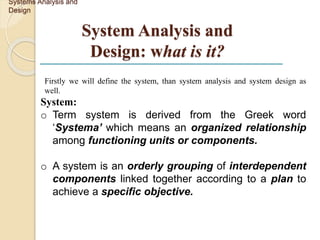
o Term system is derived from the Greek word
‘Systema’ which means an organized relationship
among functioning units or components.
o A system is an orderly grouping of interdependent
components linked together according to a plan to
achieve a specific objective.
Systems Analysis and
Design
Characteristics of a System
•Organization
•Interaction
•Interdependence
•Integration
•Central Objective
Elements of a System
•Outputs and Inputs
•Processor
•Control
•Feedback
•Environment
•Boundaries and Interface
 System Analysis
 The dissection of a system into its component pieces to study how
those component pieces interact and work.
(1) The survey and planning
(2) The study and analysis
(3) The definition
 System Design
The process of defining the architecture, components, modules,
interfaces and data for a system to satisfy specified requirements.
Systems Analysis and
Design
Need for System Analysis and Design
 Installing a system without proper planning leads to great user
dissatisfaction and frequently causes the system to fall into
disuse
 Lends structure to the analysis and design of information
systems
 A series of processes systematically undertaken to improve a
business through the use of computerized information systems
Systems Analysis and
Design
Roles of the System Analyst
 The analyst plays a key role in information systems development
projects.
 Must understand how to apply technology to solve business
problems.
 Analyst may serve as change agents who identify the
organizational improvement.
Systems Analysis and
Design
Qualities of the System Analyst
 Working knowledge of information technology
 Computer programming experience and expertise
 General problem solving skill
 General knowledge of business process and terminology
 Good interpersonal communication skills
 Good interpersonal relations skills
 Strong personal and professional ethics
 Self-disciplined and self-motivated
 Flexibility and adaptability
Systems Analysis and
Design
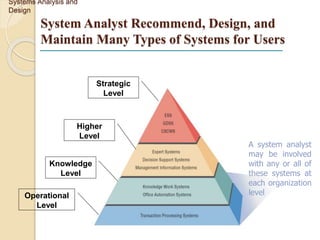
System Analyst Recommend, Design, and
Maintain Many Types of Systems for Users
Systems Analysis and
Design
Strategic
Level
Operational
Level
Knowledge
Level
Higher
Level
A system analyst
may be involved
with any or all of
these systems at
each organization
level
OPERATIONAL LEVEL
o It is a process of large amounts of data for routine
business transactions.
o Automate handling of data about business
activities (transactions)
o Process orientation
o Support the day-to-day operations of the company
Example: Payroll Processing, Inventory Management
Cash deposit and withdrawal system at bank used by the teller
Computerized attendance system at school and college.
Systems Analysis and
Design
Transaction Processing System (TPS)
KNOWLEDGE LEVEL
 Office Automation System (OAS)
 Supports data workers who share information, but do not usually
create new knowledge
Examples: Word processing, Spreadsheets etc.
 Knowledge Work System (KWS)
 Supports professional workers such as scientists, engineers, and
doctors
Examples: computer-aided design systems, virtual reality systems.
Systems Analysis and
Design
Higher Level
o Management Information System (MIS)
• To supports data worker who share information but do not usually create
new knowledge.
• Converts raw data from transaction processing system into
meaningful form
• Data orientation
• Example: Word processing, Spreadsheets, Desktop publishing, Email
Electronic scheduling, Communication through voice mail, Email,
Video
o Expert System (ES)
• Captures and uses the knowledge of an expert for solving a particular
problem which leads to a conclusion or recommendation.
• Examples: MYCIN ( is an early expert system, or artificial intelligence (AI)
program, for treating blood infections. In 1972 work began on MYCIN at
Stanford University in California.
Systems Analysis and
Design
Decision Support Systems (DSS)
◦ Designed to help decision makers
◦ Provides interactive environment for decision
making
◦ Involves data warehouses, executive
information systems (EIS)
◦ Database, model base, user dialogue
◦ Examples: financial planning with what-if
analysis, budgeting with modeling
Note:
A data warehouse is a subject-oriented, integrated, time-variant and
non-volatile collection of data in support of management's decision
making process. For example, "sales" can be a particular subject.
 Executive Support System (ESS)
 Helps executives to make unstructured strategic decisions in an informed
way
Examples: drill-down analysis, status access
 Group Decision Support System (GDSS)
 Permit group members to interact with electronic support
Examples: email
 Computer-Supported Collaborative Work System
(CSCWS)
 CSCWS is a more general term of GDSS. It may include software support called
“groupware” for team collaboration via network computers.
Example: video conferencing, Web survey system
Strategic Level
Systems Analysis and
Design
Information System (IS)
An arrangement of people, data,
processes, and information technology
that interact to collect, process, store
and provide as output the information
needed to support an organization.
Integrating New Technologies into
Traditional Systems
 Ecommerce and Web Systems.
 Enterprise Resource Planning Systems.
 Wireless Systems.
 Open Source Software.
Systems Analysis and
Design
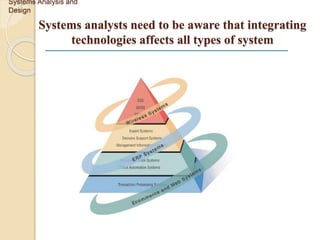
Systems analysts need to be aware that integrating
technologies affects all types of system
Systems Analysis and
Design
Ecommerce and Web Systems
 Benefits
 Increasing user awareness of the availability of a service,
product, industry, person, or group.
 The possibility of 24-hour access for users.
 Improving the usefulness and usability of interface design.
 Creating a system that can extend globally rather than remain
local, thus reaching people in remote locations without worry
of the time zone in which they are located.
Systems Analysis and
Design
Enterprise Resource Planning Systems
(ERPS)
 Performs integration of many information systems existing
on different management levels and within different
functions
Example: Oracle
Systems Analysis and
Design
Oracle Database (commonly referred to as Oracle RDBMS or
simply as Oracle) is an object-relational database management
system produced and marketed by Oracle Corporation
Wireless Systems
 System analyst may be asked to design standard or wireless
communication networks that integrate voice, video and email
into organizational intranets or industry extranets
 System analyst may also be asked to develop intelligent agents
 Example: Telecommunication services
 Wireless communication is referred as m-commerce (mobile
commerce)
Systems Analysis and
Design
An extranet is a private network that uses Internet
technology and the public telecommunication system to
securely share part of a business's information or
operations with suppliers, vendors, partners,
customers, or other businesses
An intranet is a private network, accessible
only to an organization's staff. Generally a wide
range of information and services from the
organization's internal IT systems are available
that would not be available to the public from
the Internet
Open Source Software (OSS)
 An alternative of traditional software development where
proprietary code is hidden from the users
 Open source software is free to distribute, share and modify
 Characterized as a philosophy rather than simply the process
of creating new software
 Example: Linux Operating System, Apache Web Server,
Mozilla Firefox Web browser,, and Joomla.
Systems Analysis and
Design
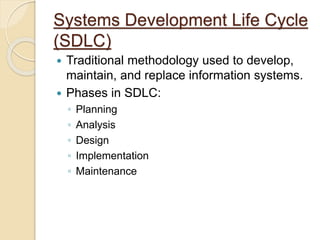
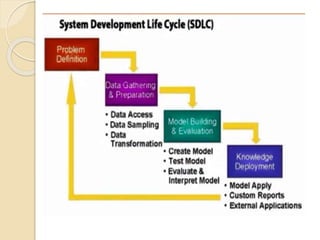
Systems Development Life Cycle
(SDLC)
 Traditional methodology used to develop,
maintain, and replace information systems.
 Phases in SDLC:
◦ Planning
◦ Analysis
◦ Design
◦ Implementation
◦ Maintenance
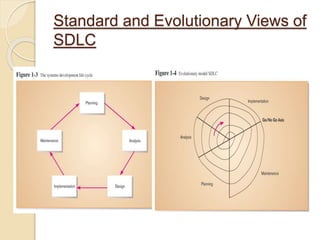
Standard and Evolutionary Views of
SDLC
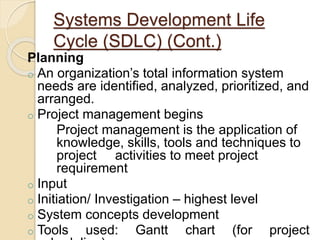
Systems Development Life
Cycle (SDLC) (Cont.)
Planning
o An organization’s total information system
needs are identified, analyzed, prioritized, and
arranged.
o Project management begins
Project management is the application of
knowledge, skills, tools and techniques to
project activities to meet project
requirement
o Input
o Initiation/ Investigation – highest level
o System concepts development
o Tools used: Gantt chart (for project
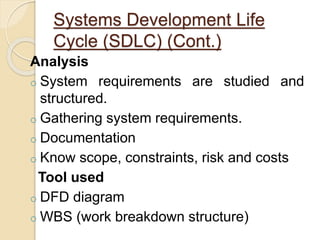
Systems Development Life
Cycle (SDLC) (Cont.)
Analysis
o System requirements are studied and
structured.
o Gathering system requirements.
o Documentation
o Know scope, constraints, risk and costs
Tool used
o DFD diagram
o WBS (work breakdown structure)
Systems Development Life Cycle
(SDLC) (Cont.)
 Design – a description of the
recommended solution is converted into
logical and then physical system
specifications.
 Logical design – all functional features
of the system chosen for development in
analysis are described independently of
any computer platform.
Process view
Tools : UML diagram
Activities diagrams
Systems Development Life Cycle
(SDLC) (Cont.)
 Physical design – the logical
specifications of the system from
logical design are transformed into the
technology-specific details from which
all programming and system
construction can be accomplished.
 Data view
 Tools : ERD diagram
 Communication sequence
 Dimensional model
Tools
 Logical
UML diagrams (unified modeling
language) standardized general purpose
modeling language in the field of object
oriented software engineering.
Activity diagram – graphical
representation of workflow.
 Physical
ERD (Entity relationship diagram) is
notational way to describe relationships
in a diagram.
Systems Development Life Cycle
(SDLC) (Cont.)
 Implementation – the information
system is coded, tested, installed and
supported in the organization.
 Execute
 Coding/ Construct system
 Testing
 Installing
Systems Development Life
Cycle (SDLC) (Cont.)
Maintenance – an information system
is systematically repaired and improved
 Maintaining the system
 Supporting
 Training
 Updating/ Improving
 Repairing
FEASIBILITY ANALYSES
 Technical Feasibility: can we build it?
 Economic Feasibility: should we build it?
Systems Analysis and
Design
TECHNICAL FEASIBILITY:
CAN WE BUILD IT?
 Familiarity with application: less familiarity more risk.
 Familiarity with technology: less familiarity generates more
risk.
 Project size: large projects have more risk.
 Compatibility: the hard it is so integrate the systems with the
company’s existing technology, the higher the risk will be.
Systems Analysis and
Design
ECONOMIC FEASIBILITY: SHOULD WE BUILD IT?
 Development Costs.
 Annual operating costs.
 Annual benefits (cost saving and revenues).
 Intangible costs and benefits.
Systems Analysis and
Design
Methodologies:
-is used to execute a process
Examples(System analysis and design tools)
oWaterfall approach
oPrototyping
oComputer-Aided Software
Engineering (CASE) Tools
oJoint Application Design (JAD)
oRapid Application Development
(RAD)
oAgile Methodologies
oeXtreme Programming
Waterfall approach
oIs one phase begins when another
competes with back tack or looping
Pros
o High control for the developer
Cons:
o Increased time for development
o System requirement are locked in
and cannot be changed
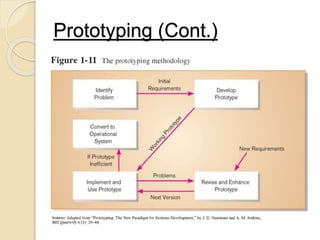
Prototyping
oIterative development process:
oRequirements quickly converted to
a working system.
oSystem is continually revised.
oClose collaboration between users
and analysts.
Prototyping (Cont.)
Computer-Aided Software
Engineering (CASE) Tools
oDiagramming tools enable graphical
representation.
oComputer displays and report
generators help prototype how
systems “look and feel”.
oAnalysis tools automatically check for
consistency in diagrams, forms, and
reports.
oCentral repository for integrated
storage of diagrams, reports, and
project management specifications
Computer-Aided Software
Engineering (CASE) Tools
(Cont.)
o Documentation generators standardize
technical and user documentation.
o Code generators enable automatic
generation of programs and database
code directly from design documents,
diagrams, forms, and reports
Computer-Aided Software
Engineering (CASE) Tools (Cont.)
Pros
o Display a good look and feel
o Creates graphical representation
o Keep it in a central repository
Cons:
o Difficult to use with existing system
Joint Application Design
(JAD)
oStructured process involving users,
analysts, and managers.
oSeveral-day intensive workgroup
sessions.
oPurpose: to specify or review
system requirements.
Rapid Application Development
(RAD)
o Methodology to radically decrease
design and implementation time.
o Involves: extensive user
involvement, prototyping, JAD
sessions, integrated CASE tools,
and code generators.
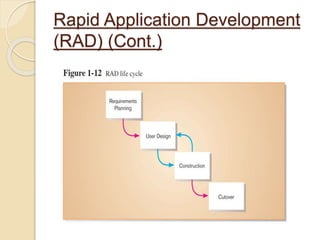
Rapid Application Development
(RAD) (Cont.)
Rapid Application Development
(RAD) (Cont.)
Pros:
o Decrease design and implementation
time
Cons:
o High cost
o Meant for large project
Agile Methodologies
oMotivated by recognition of software
development as fluid, unpredictable,
and dynamic.
oThree key principles
Adaptive rather than predictive.
Emphasize people rather than roles.
Self-adaptive process.
Pros: Flexible, Adaptive
Cons: Heavy customer interaction
eXtreme Programming
o Short, incremental development
cycles.
o Automated tests.
o Two-person programming teams.
eXtreme Programming (Cont.)
Pros:
o Communication between developers
o High level of productivity.
o High-quality code.
Cons:
o Requires lots of communication with
developer who are not necessarily good
at communicating with individual who
are not technical
Over view of system analysis and design

Over view of system analysis and design

  • 1.
    System Analysis and Design SarojDhakal Lecturer Trinity International College, Kathmandu, Nepal
  • 2.
    Objectives  Define theterms system, system analysis, and system design.  Types of systems.  Describe the principal functions of the systems analyst.  List and describe the phases of the systems development life cycle.  Describe the various data gathering and analysis tools.  Describe a selection of systems design tools.  Alternative approaches to Structured analysis & Design to the SLDC  Explain the role of the maintenance task in the systems development life cycle.
  • 3.
    Chapter 1 Overview ofSystems Analysis and Design
  • 4.
    System Analysis and Design:what is it? Firstly we will define the system, than system analysis and system design as well. System: o Term system is derived from the Greek word ‘Systema’ which means an organized relationship among functioning units or components. o A system is an orderly grouping of interdependent components linked together according to a plan to achieve a specific objective. Systems Analysis and Design
  • 5.
    Characteristics of aSystem •Organization •Interaction •Interdependence •Integration •Central Objective
  • 6.
    Elements of aSystem •Outputs and Inputs •Processor •Control •Feedback •Environment •Boundaries and Interface
  • 7.
     System Analysis The dissection of a system into its component pieces to study how those component pieces interact and work. (1) The survey and planning (2) The study and analysis (3) The definition  System Design The process of defining the architecture, components, modules, interfaces and data for a system to satisfy specified requirements. Systems Analysis and Design
  • 8.
    Need for SystemAnalysis and Design  Installing a system without proper planning leads to great user dissatisfaction and frequently causes the system to fall into disuse  Lends structure to the analysis and design of information systems  A series of processes systematically undertaken to improve a business through the use of computerized information systems Systems Analysis and Design
  • 9.
    Roles of theSystem Analyst  The analyst plays a key role in information systems development projects.  Must understand how to apply technology to solve business problems.  Analyst may serve as change agents who identify the organizational improvement. Systems Analysis and Design
  • 10.
    Qualities of theSystem Analyst  Working knowledge of information technology  Computer programming experience and expertise  General problem solving skill  General knowledge of business process and terminology  Good interpersonal communication skills  Good interpersonal relations skills  Strong personal and professional ethics  Self-disciplined and self-motivated  Flexibility and adaptability Systems Analysis and Design
  • 11.
    System Analyst Recommend,Design, and Maintain Many Types of Systems for Users Systems Analysis and Design Strategic Level Operational Level Knowledge Level Higher Level A system analyst may be involved with any or all of these systems at each organization level
  • 12.
    OPERATIONAL LEVEL o Itis a process of large amounts of data for routine business transactions. o Automate handling of data about business activities (transactions) o Process orientation o Support the day-to-day operations of the company Example: Payroll Processing, Inventory Management Cash deposit and withdrawal system at bank used by the teller Computerized attendance system at school and college. Systems Analysis and Design Transaction Processing System (TPS)
  • 13.
    KNOWLEDGE LEVEL  OfficeAutomation System (OAS)  Supports data workers who share information, but do not usually create new knowledge Examples: Word processing, Spreadsheets etc.  Knowledge Work System (KWS)  Supports professional workers such as scientists, engineers, and doctors Examples: computer-aided design systems, virtual reality systems. Systems Analysis and Design
  • 14.
    Higher Level o ManagementInformation System (MIS) • To supports data worker who share information but do not usually create new knowledge. • Converts raw data from transaction processing system into meaningful form • Data orientation • Example: Word processing, Spreadsheets, Desktop publishing, Email Electronic scheduling, Communication through voice mail, Email, Video o Expert System (ES) • Captures and uses the knowledge of an expert for solving a particular problem which leads to a conclusion or recommendation. • Examples: MYCIN ( is an early expert system, or artificial intelligence (AI) program, for treating blood infections. In 1972 work began on MYCIN at Stanford University in California. Systems Analysis and Design
  • 15.
    Decision Support Systems(DSS) ◦ Designed to help decision makers ◦ Provides interactive environment for decision making ◦ Involves data warehouses, executive information systems (EIS) ◦ Database, model base, user dialogue ◦ Examples: financial planning with what-if analysis, budgeting with modeling Note: A data warehouse is a subject-oriented, integrated, time-variant and non-volatile collection of data in support of management's decision making process. For example, "sales" can be a particular subject.
  • 16.
     Executive SupportSystem (ESS)  Helps executives to make unstructured strategic decisions in an informed way Examples: drill-down analysis, status access  Group Decision Support System (GDSS)  Permit group members to interact with electronic support Examples: email  Computer-Supported Collaborative Work System (CSCWS)  CSCWS is a more general term of GDSS. It may include software support called “groupware” for team collaboration via network computers. Example: video conferencing, Web survey system Strategic Level Systems Analysis and Design
  • 17.
    Information System (IS) Anarrangement of people, data, processes, and information technology that interact to collect, process, store and provide as output the information needed to support an organization.
  • 18.
    Integrating New Technologiesinto Traditional Systems  Ecommerce and Web Systems.  Enterprise Resource Planning Systems.  Wireless Systems.  Open Source Software. Systems Analysis and Design
  • 19.
    Systems analysts needto be aware that integrating technologies affects all types of system Systems Analysis and Design
  • 20.
    Ecommerce and WebSystems  Benefits  Increasing user awareness of the availability of a service, product, industry, person, or group.  The possibility of 24-hour access for users.  Improving the usefulness and usability of interface design.  Creating a system that can extend globally rather than remain local, thus reaching people in remote locations without worry of the time zone in which they are located. Systems Analysis and Design
  • 21.
    Enterprise Resource PlanningSystems (ERPS)  Performs integration of many information systems existing on different management levels and within different functions Example: Oracle Systems Analysis and Design Oracle Database (commonly referred to as Oracle RDBMS or simply as Oracle) is an object-relational database management system produced and marketed by Oracle Corporation
  • 22.
    Wireless Systems  Systemanalyst may be asked to design standard or wireless communication networks that integrate voice, video and email into organizational intranets or industry extranets  System analyst may also be asked to develop intelligent agents  Example: Telecommunication services  Wireless communication is referred as m-commerce (mobile commerce) Systems Analysis and Design An extranet is a private network that uses Internet technology and the public telecommunication system to securely share part of a business's information or operations with suppliers, vendors, partners, customers, or other businesses An intranet is a private network, accessible only to an organization's staff. Generally a wide range of information and services from the organization's internal IT systems are available that would not be available to the public from the Internet
  • 23.
    Open Source Software(OSS)  An alternative of traditional software development where proprietary code is hidden from the users  Open source software is free to distribute, share and modify  Characterized as a philosophy rather than simply the process of creating new software  Example: Linux Operating System, Apache Web Server, Mozilla Firefox Web browser,, and Joomla. Systems Analysis and Design
  • 24.
    Systems Development LifeCycle (SDLC)  Traditional methodology used to develop, maintain, and replace information systems.  Phases in SDLC: ◦ Planning ◦ Analysis ◦ Design ◦ Implementation ◦ Maintenance
  • 25.
  • 26.
    Systems Development Life Cycle(SDLC) (Cont.) Planning o An organization’s total information system needs are identified, analyzed, prioritized, and arranged. o Project management begins Project management is the application of knowledge, skills, tools and techniques to project activities to meet project requirement o Input o Initiation/ Investigation – highest level o System concepts development o Tools used: Gantt chart (for project
  • 27.
    Systems Development Life Cycle(SDLC) (Cont.) Analysis o System requirements are studied and structured. o Gathering system requirements. o Documentation o Know scope, constraints, risk and costs Tool used o DFD diagram o WBS (work breakdown structure)
  • 28.
    Systems Development LifeCycle (SDLC) (Cont.)  Design – a description of the recommended solution is converted into logical and then physical system specifications.  Logical design – all functional features of the system chosen for development in analysis are described independently of any computer platform. Process view Tools : UML diagram Activities diagrams
  • 29.
    Systems Development LifeCycle (SDLC) (Cont.)  Physical design – the logical specifications of the system from logical design are transformed into the technology-specific details from which all programming and system construction can be accomplished.  Data view  Tools : ERD diagram  Communication sequence  Dimensional model
  • 30.
    Tools  Logical UML diagrams(unified modeling language) standardized general purpose modeling language in the field of object oriented software engineering. Activity diagram – graphical representation of workflow.  Physical ERD (Entity relationship diagram) is notational way to describe relationships in a diagram.
  • 31.
    Systems Development LifeCycle (SDLC) (Cont.)  Implementation – the information system is coded, tested, installed and supported in the organization.  Execute  Coding/ Construct system  Testing  Installing
  • 32.
    Systems Development Life Cycle(SDLC) (Cont.) Maintenance – an information system is systematically repaired and improved  Maintaining the system  Supporting  Training  Updating/ Improving  Repairing
  • 34.
    FEASIBILITY ANALYSES  TechnicalFeasibility: can we build it?  Economic Feasibility: should we build it? Systems Analysis and Design
  • 35.
    TECHNICAL FEASIBILITY: CAN WEBUILD IT?  Familiarity with application: less familiarity more risk.  Familiarity with technology: less familiarity generates more risk.  Project size: large projects have more risk.  Compatibility: the hard it is so integrate the systems with the company’s existing technology, the higher the risk will be. Systems Analysis and Design
  • 36.
    ECONOMIC FEASIBILITY: SHOULDWE BUILD IT?  Development Costs.  Annual operating costs.  Annual benefits (cost saving and revenues).  Intangible costs and benefits. Systems Analysis and Design
  • 37.
    Methodologies: -is used toexecute a process Examples(System analysis and design tools) oWaterfall approach oPrototyping oComputer-Aided Software Engineering (CASE) Tools oJoint Application Design (JAD) oRapid Application Development (RAD) oAgile Methodologies oeXtreme Programming
  • 38.
    Waterfall approach oIs onephase begins when another competes with back tack or looping Pros o High control for the developer Cons: o Increased time for development o System requirement are locked in and cannot be changed
  • 39.
    Prototyping oIterative development process: oRequirementsquickly converted to a working system. oSystem is continually revised. oClose collaboration between users and analysts.
  • 40.
  • 41.
    Computer-Aided Software Engineering (CASE)Tools oDiagramming tools enable graphical representation. oComputer displays and report generators help prototype how systems “look and feel”. oAnalysis tools automatically check for consistency in diagrams, forms, and reports. oCentral repository for integrated storage of diagrams, reports, and project management specifications
  • 42.
    Computer-Aided Software Engineering (CASE)Tools (Cont.) o Documentation generators standardize technical and user documentation. o Code generators enable automatic generation of programs and database code directly from design documents, diagrams, forms, and reports
  • 43.
    Computer-Aided Software Engineering (CASE)Tools (Cont.) Pros o Display a good look and feel o Creates graphical representation o Keep it in a central repository Cons: o Difficult to use with existing system
  • 44.
    Joint Application Design (JAD) oStructuredprocess involving users, analysts, and managers. oSeveral-day intensive workgroup sessions. oPurpose: to specify or review system requirements.
  • 45.
    Rapid Application Development (RAD) oMethodology to radically decrease design and implementation time. o Involves: extensive user involvement, prototyping, JAD sessions, integrated CASE tools, and code generators.
  • 46.
  • 47.
    Rapid Application Development (RAD)(Cont.) Pros: o Decrease design and implementation time Cons: o High cost o Meant for large project
  • 48.
    Agile Methodologies oMotivated byrecognition of software development as fluid, unpredictable, and dynamic. oThree key principles Adaptive rather than predictive. Emphasize people rather than roles. Self-adaptive process. Pros: Flexible, Adaptive Cons: Heavy customer interaction
  • 49.
    eXtreme Programming o Short,incremental development cycles. o Automated tests. o Two-person programming teams.
  • 50.
    eXtreme Programming (Cont.) Pros: oCommunication between developers o High level of productivity. o High-quality code. Cons: o Requires lots of communication with developer who are not necessarily good at communicating with individual who are not technical