Kanban
                        in 4 easy steps


http://kanbantool.com                      This work is licensed under a Creative Commons
                                              Attribution-ShareAlike 3.0 Unported License.
                                          Please mention kanbantool.com in derivative works.
© 2011 Shore Labs                         Third-party photos from flickr.com under CC license.
Zbigniew Zemła
step 1

Visualise your work
                      .


     www.flickr.com/photos/3oheme/5141328136
Get a whiteboard, break down the flow of work
  from the moment you start it to when it's finished
into distinctive steps and draw a column for each
Next, get some stickies
in as many colors as you can


    www.flickr.com/photos/rameshng/5723481678
Write down each task on a separate sticky note


             www.flickr.com/photos/philliecasablanca/3007652539
Use different colors for
different types of work
And put them on the whiteboard. Each task will move
from left to right until it's done and leaves the workflow.
Creating good workflow takes time and practice,
but there are few basic examples you can begin with.
Simple layout like this one is a good starting point,
especially for Personal Kanban and small teams.
A more complex example of time driven workflow for
        Personal Kanban and small teams.
Workflow for software development company
Kanban Sales Pipeline
step 2

Limit work in progress
                                 .


    With two hands you can juggle only few balls
           before you start dropping them


         www.flickr.com/photos/philliecasablanca/2584411389
At 100% capacity you have minimal throughput
             http://www.flickr.com/photos/lingaraj/2415084235
And Kanban is all about maintaining flow
        and eliminating waste.
                         waste.
           www.flickr.com/photos/cefeida/4109239083
Start by putting limits on columns
in which work is being performed
WIP Limits aim to enforce a high, smooth flow of work
       and eliminate different kinds of waste
On the personal level this gets much simpler
After you introduce the WIP limits you can try to
  propagate them back through the workflow,
           observe results and adapt.


               Getting limits right takes time,
   so start with your best guess and fine-tune over time.

               The ultimate goal is to achieve
constant, high throughput and personal / team performance.
step 3

Don't push too hard


                        Pull instead


   photo adapted from www.flickr.com/photos/stevendepolo/3212039475
It's easy to get friction between different teams,
    especially when one is more performant...
… and pushes more work than
another one can actually handle.
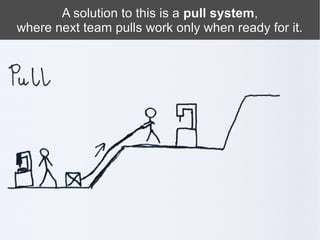
A solution to this is a pull system,
                                    system,
where next team pulls work only when ready for it.
You can implement pull system by adding
 a limited capacity buffer between teams.
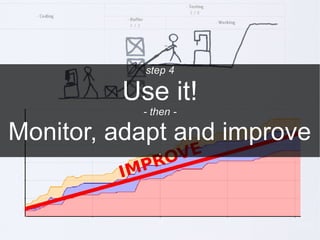
step 4

         Use it!
           - then -

Monitor, adapt and improve
              .
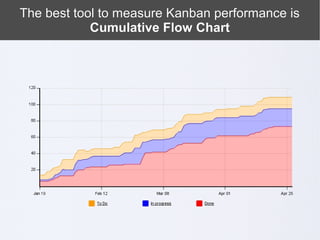
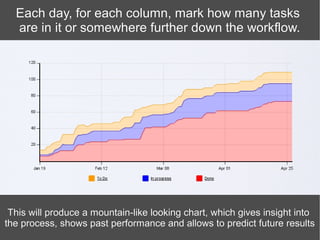
The best tool to measure Kanban performance is
            Cumulative Flow Chart
Each day, for each column, mark how many tasks
  are in it or somewhere further down the workflow.


 This will produce a mountain-like looking chart, which gives insight into
the process, shows past performance and allows to predict future results
One of the many things you can read from it is the
  mean time for task to get through the workflow


             www.slideshare.net/yyeret/explaining-cumulative-flow-diagrams-cfd


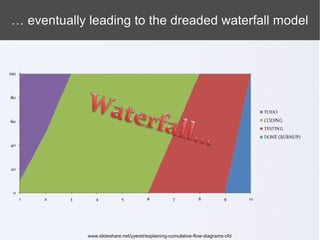
    Note that without limit on Work In Progress,
the Mean Cycle Time tends to increase drastically ...
… eventually leading to the dreaded waterfall model


             www.slideshare.net/yyeret/explaining-cumulative-flow-diagrams-cfd
power tip 1

  Use online tool to
manage your activities
             .
●   online tool to manage your activities using Kanban method
●   perfect for distributed teams
●   real time collaboration
●   accessible from everywhere
●   provides in-depth analytics, including Cumulative Flow
●   retains data about your past performance


                  http://kanbantool.com
power tip 2

 Mix Kanban with
something you like
                          .


    www.flickr.com/photos/theogeo/2477475620
ScrumBan
http://leansoftwareengineering.com/ksse/scrum-ban/


http://www.flickr.com/photos/zoonabar/4377007642
PomodoroBan


  www.flickr.com/photos/callion/5525638094
power tip 3

But most of all ...
enjoy Kanban!

  www.flickr.com/photos/bearpark/2741212476
Thanks for watching!

This presentation has been brought to you by:


                   join kanbantool.com to
         empower your productivity with Kanban method

Kanban in 4 easy steps

  • 1.
    Kanban in 4 easy steps http://kanbantool.com This work is licensed under a Creative Commons Attribution-ShareAlike 3.0 Unported License. Please mention kanbantool.com in derivative works. © 2011 Shore Labs Third-party photos from flickr.com under CC license. Zbigniew Zemła
  • 2.
    step 1 Visualise yourwork . www.flickr.com/photos/3oheme/5141328136
  • 3.
    Get a whiteboard,break down the flow of work from the moment you start it to when it's finished into distinctive steps and draw a column for each
  • 4.
    Next, get somestickies in as many colors as you can www.flickr.com/photos/rameshng/5723481678
  • 5.
    Write down eachtask on a separate sticky note www.flickr.com/photos/philliecasablanca/3007652539
  • 6.
    Use different colorsfor different types of work
  • 7.
    And put themon the whiteboard. Each task will move from left to right until it's done and leaves the workflow.
  • 8.
    Creating good workflowtakes time and practice, but there are few basic examples you can begin with.
  • 9.
    Simple layout likethis one is a good starting point, especially for Personal Kanban and small teams.
  • 10.
    A more complexexample of time driven workflow for Personal Kanban and small teams.
  • 11.
    Workflow for softwaredevelopment company
  • 12.
  • 13.
    step 2 Limit workin progress . With two hands you can juggle only few balls before you start dropping them www.flickr.com/photos/philliecasablanca/2584411389
  • 14.
    At 100% capacityyou have minimal throughput http://www.flickr.com/photos/lingaraj/2415084235
  • 15.
    And Kanban isall about maintaining flow and eliminating waste. waste. www.flickr.com/photos/cefeida/4109239083
  • 16.
    Start by puttinglimits on columns in which work is being performed
  • 17.
    WIP Limits aimto enforce a high, smooth flow of work and eliminate different kinds of waste
  • 18.
    On the personallevel this gets much simpler
  • 19.
    After you introducethe WIP limits you can try to propagate them back through the workflow, observe results and adapt. Getting limits right takes time, so start with your best guess and fine-tune over time. The ultimate goal is to achieve constant, high throughput and personal / team performance.
  • 20.
    step 3 Don't pushtoo hard Pull instead photo adapted from www.flickr.com/photos/stevendepolo/3212039475
  • 21.
    It's easy toget friction between different teams, especially when one is more performant...
  • 22.
    … and pushesmore work than another one can actually handle.
  • 23.
    A solution tothis is a pull system, system, where next team pulls work only when ready for it.
  • 24.
    You can implementpull system by adding a limited capacity buffer between teams.
  • 25.
    step 4 Use it! - then - Monitor, adapt and improve .
  • 26.
    The best toolto measure Kanban performance is Cumulative Flow Chart
  • 27.
    Each day, foreach column, mark how many tasks are in it or somewhere further down the workflow. This will produce a mountain-like looking chart, which gives insight into the process, shows past performance and allows to predict future results
  • 28.
    One of themany things you can read from it is the mean time for task to get through the workflow www.slideshare.net/yyeret/explaining-cumulative-flow-diagrams-cfd Note that without limit on Work In Progress, the Mean Cycle Time tends to increase drastically ...
  • 29.
    … eventually leadingto the dreaded waterfall model www.slideshare.net/yyeret/explaining-cumulative-flow-diagrams-cfd
  • 30.
    power tip 1 Use online tool to manage your activities .
  • 31.
    online tool to manage your activities using Kanban method ● perfect for distributed teams ● real time collaboration ● accessible from everywhere ● provides in-depth analytics, including Cumulative Flow ● retains data about your past performance http://kanbantool.com
  • 32.
    power tip 2 Mix Kanban with something you like . www.flickr.com/photos/theogeo/2477475620
  • 33.
  • 34.
  • 35.
    power tip 3 Butmost of all ...
  • 36.
    enjoy Kanban! www.flickr.com/photos/bearpark/2741212476
  • 37.
    Thanks for watching! Thispresentation has been brought to you by: join kanbantool.com to empower your productivity with Kanban method