24-09-2013©Kalyan Acharjya 1
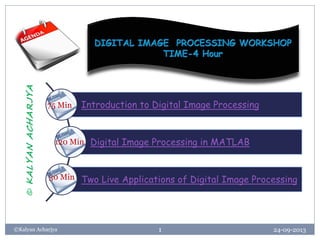
Introduction to Digital Image Processing
Digital Image Processing in MATLAB
Two Live Applications of Digital Image Processing
75 Min
120 Min
30 Min
©KALYANACHARJYA
A Lecture on
Introduction to
DIGITAL IMAGE PROCESSING
24-09-2013©Kalyan Acharjya
2
Presented By
Kalyan Acharjya
Assistant Professor, Dept. of ECE
Jaipur National University
25-09-2013©Kalyan Acharjya 3
Sorry, shamelessly I opened the lock without prior permission taken
from the original owner. Some images used in this presentation contents
are copied from internet without permission.
Only Original Owner has full rights reserved for copied images.
This PPT is only for fair academic use.
Kalyan Acharjya
24-09-2013©Kalyan Acharjya 4
Objective of Two Hour Presentation
“To introduce the basic concept
of Digital Image Processing”
Contents
24-09-2013©Kalyan Acharjya
5
 What is image and Image
Processing?
 Image Understanding.
 Why Digital image Processing ?
 Digitization of Image.
 Histogram and Thresholding of
Image.
 Noise and its Extraction from
Image.
 Edge Detection.
 Image Enhancement.
 Image Compression.
 Data Hiding in Image.
 Color Image Processing.
 Applications
24-09-2013©Kalyan Acharjya 6
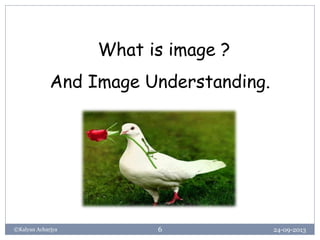
What is image ?
And Image Understanding.
What is image?
24-09-2013©Kalyan Acharjya
7
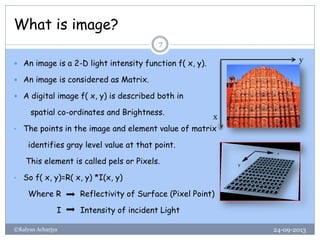
 An image is a 2-D light intensity function f( x, y).
 An image is considered as Matrix.
 A digital image f( x, y) is described both in
spatial co-ordinates and Brightness.
• The points in the image and element value of matrix
identifies gray level value at that point.
This element is called pels or Pixels.
• So f( x, y)=R( x, y) *I(x, y)
Where R Reflectivity of Surface (Pixel Point)
I Intensity of incident Light
y
x
Matrix or Digital Representation of Image
24-09-2013©Kalyan Acharjya
8
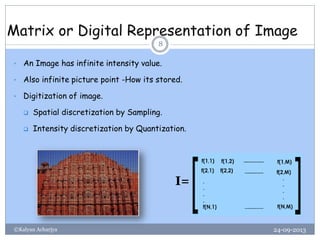
• An Image has infinite intensity value.
• Also infinite picture point -How its stored.
• Digitization of image.
 Spatial discretization by Sampling.
 Intensity discretization by Quantization.
I=
Matrix as an Image
24-09-2013©Kalyan Acharjya
9
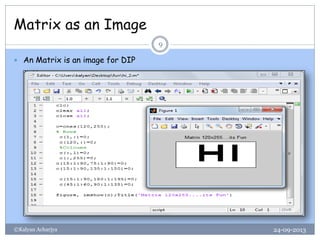
 An Matrix is an image for DIP
Types of Digital Images
24-09-2013©Kalyan Acharjya
10
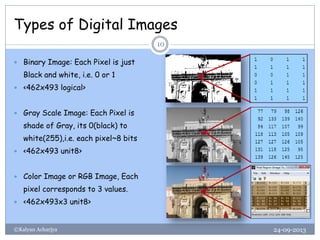
 Binary Image: Each Pixel is just
Black and white, i.e. 0 or 1
 <462x493 logical>
 Gray Scale Image: Each Pixel is
shade of Gray, its 0(black) to
white(255),i.e. each pixel~8 bits
 <462x493 unit8>
 Color Image or RGB Image, Each
pixel corresponds to 3 values.
 <462x493x3 unit8>
Image Data Type
24-09-2013©Kalyan Acharjya
11
 int8-8 bit integer, Range -128 to 127
 unit8-8 bit unsigned integer, Range 0 to 225
 int16-16 bit integer, Range -32768 to 32767
 uint16-16 bit unsigned integer, Range 0 to 65535
 double-Double precision real number, Machine Specific
Levels of Image Understanding
24-09-2013©Kalyan Acharjya
12
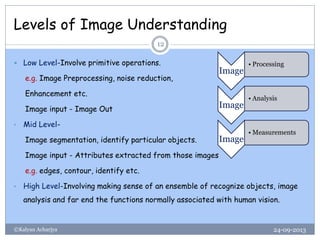
 Low Level-Involve primitive operations.
e.g. Image Preprocessing, noise reduction,
Enhancement etc.
Image input - Image Out
• Mid Level-
Image segmentation, identify particular objects.
Image input - Attributes extracted from those images
e.g. edges, contour, identify etc.
• High Level-Involving making sense of an ensemble of recognize objects, image
analysis and far end the functions normally associated with human vision.
Image
• Processing
Image
• Analysis
Image
• Measurements
24-09-2013©Kalyan Acharjya 13
Lets look back !
When the Digital Image Processing Started ?
History of Image Processing
24-09-2013©Kalyan Acharjya
14
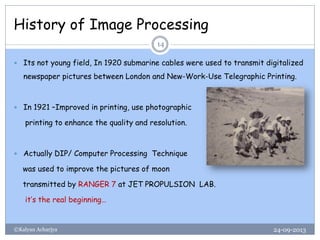
 Its not young field, In 1920 submarine cables were used to transmit digitalized
newspaper pictures between London and New-Work-Use Telegraphic Printing.
 In 1921 –Improved in printing, use photographic
printing to enhance the quality and resolution.
 Actually DIP/ Computer Processing Technique
was used to improve the pictures of moon
transmitted by RANGER 7 at JET PROPULSION LAB.
it’s the real beginning…
24-09-2013©Kalyan Acharjya 15
Why Digital Image Processing ?
Why Digital Image Processing
24-09-2013©Kalyan Acharjya
16
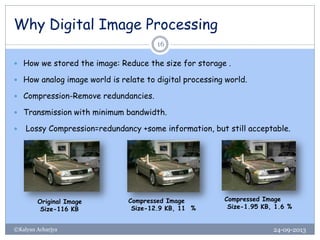
 How we stored the image: Reduce the size for storage .
 How analog image world is relate to digital processing world.
 Compression-Remove redundancies.
 Transmission with minimum bandwidth.
 Lossy Compression=redundancy +some information, but still acceptable.
Original Image
Size-116 KB
Compressed Image
Size-12.9 KB, 11 %
Compressed Image
Size-1.95 KB, 1.6 %
Why Digital Image Processing
24-09-2013©Kalyan Acharjya
17
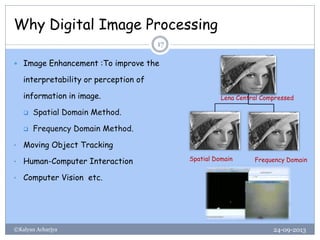
 Image Enhancement :To improve the
interpretability or perception of
information in image.
 Spatial Domain Method.
 Frequency Domain Method.
• Moving Object Tracking
• Human-Computer Interaction
• Computer Vision etc.
Lena Central Compressed
Spatial Domain Frequency Domain
24-09-2013©Kalyan Acharjya 18
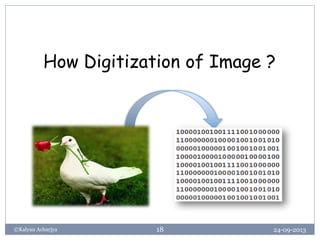
How Digitization of Image ?
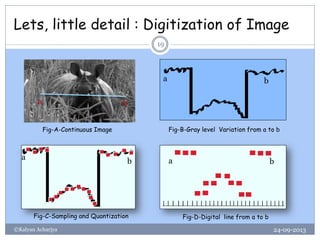
Lets, little detail : Digitization of Image
24-09-2013©Kalyan Acharjya
19
a b
a b
a b a b
Fig-A-Continuous Image Fig-B-Gray level Variation from a to b
Fig-C-Sampling and Quantization Fig-D-Digital line from a to b
Bit Planes of Grey Scale image
24-09-2013©Kalyan Acharjya
20
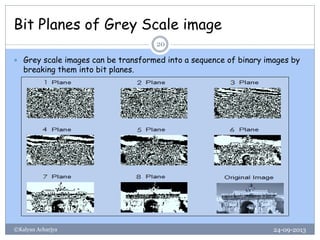
 Grey scale images can be transformed into a sequence of binary images by
breaking them into bit planes.
Spatial and Gray Level Resolution
24-09-2013©Kalyan Acharjya
21
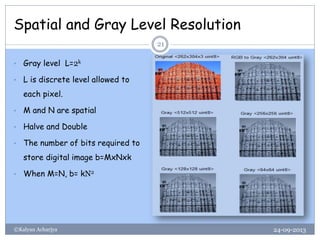
• Gray level L=2k
• L is discrete level allowed to
each pixel.
• M and N are spatial
• Halve and Double
• The number of bits required to
store digital image b=MxNxk
• When M=N, b= kN2
24-09-2013©Kalyan Acharjya 22
Basics operations with image.
Arithmetic and Logical Operations in images
24-09-2013©Kalyan Acharjya
23
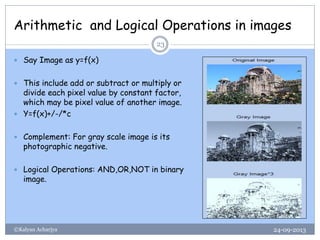
 Say Image as y=f(x)
 This include add or subtract or multiply or
divide each pixel value by constant factor,
which may be pixel value of another image.
 Y=f(x)+/-/*c
 Complement: For gray scale image is its
photographic negative.
 Logical Operations: AND,OR,NOT in binary
image.
Resize an Image
24-09-2013©Kalyan Acharjya
24
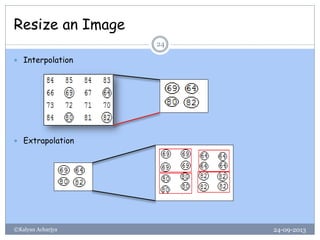
 Interpolation
 Extrapolation
24-09-2013©Kalyan Acharjya 25
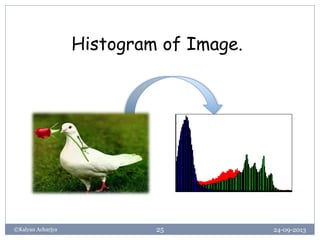
Histogram of Image.
Histograms of Images
24-09-2013©Kalyan Acharjya
26
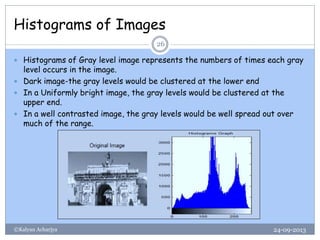
 Histograms of Gray level image represents the numbers of times each gray
level occurs in the image.
 Dark image-the gray levels would be clustered at the lower end
 In a Uniformly bright image, the gray levels would be clustered at the
upper end.
 In a well contrasted image, the gray levels would be well spread out over
much of the range.
Importance of Histograms Graph
24-09-2013©Kalyan Acharjya
27
 In Poorly Contrast image, enhance by spreading out of its histograms.
There are two ways-
 Histograms stretching (contrast Stretching).
 Histogram Equalization.
 Histograms stretching:
• Poorly contrasted image in the range [a, b]
• Stretch the gray levels in the center of the range out by applying a
piecewise linear function.
• This function has the effect of stretching the gray levels [a, b] to
[c, d], where a<c and d>b
Histograms stretching (Cont.)
24-09-2013©Kalyan Acharjya
28
 The linear function imadjust(I, [a, b],[c, d])
 if Pixel value is less than c are all converted to c and pixel values greater
than d are all converted to d.
a b 1
c
d
1
Gamma<1 Gamma>1
Y= (
𝑥−𝑎
𝑏−𝑎
)^Gamma (d-c)+c
Gamma Scaling
24-09-2013©Kalyan Acharjya
29
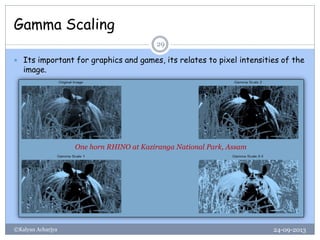
 Its important for graphics and games, its relates to pixel intensities of the
image.
One horn RHINO at Kaziranga National Park, Assam
Histograms Equalization
24-09-2013©Kalyan Acharjya
30
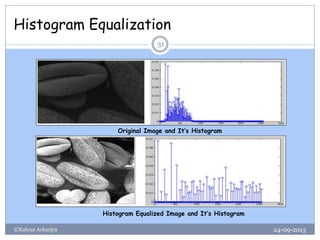
 Histogram equalization is a technique for adjusting image intensities to
enhance contrast
• Histogram equalisation algorithm: Let be the
intensities of the image, and let be its normalised histogram
function. The intensity transformation function for histogram equalisation is
 That is, we add the values of the normalised histogram function from 1
to k to find where the intensity will be mapped. Notice that the range
of the equalised image is the interval [0,1].
mkrk ,...,2,1, 
)( krp


k
j
kk rprT
1
)()(
kr
Histogram Equalization
24-09-2013©Kalyan Acharjya
31
Original Image and It’s Histogram
Histogram Equalized Image and It’s Histogram
Thresholding of an image
24-09-2013©Kalyan Acharjya
32
 Single Threshold:
A gray scale image is turned into a binary image by first choosing a
gray level T in the original image.
Pixel Value>T tends to white (1)
Pixel Value<=T tends to black (0)
• Double Threshold:
A pixel becomes white if T1<pixel value<T2.
A pixel becomes black if gray level is others.
24-09-2013©Kalyan Acharjya 33
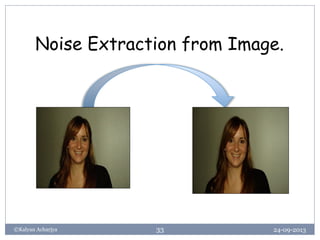
Noise Extraction from Image.
Noise and Its Extraction
24-09-2013©Kalyan Acharjya
34
 Noise is any degradation in the image signal caused by external
disturbance.
 Salt and pepper noise: It is caused by sharp and sudden disturbances in
the image.
 Gaussian noise: It is caused by random fluctuations in the signal. It can be
idealized form of white noise.
 Speckle noise: it is modeled by random values multiplied by pixel values. In
radar applications.
 Shot noise: The dominant noise in the lighter parts of an image from
an image sensor.
Removal of noise by Filtering
24-09-2013©Kalyan Acharjya
35
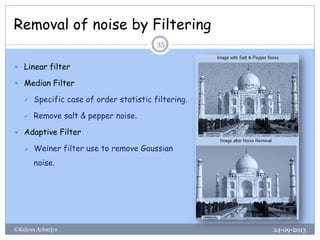
 Linear filter
 Median Filter
 Specific case of order statistic filtering.
 Remove salt & pepper noise.
 Adaptive Filter
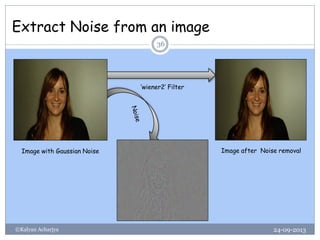
 Weiner filter use to remove Gaussian
noise.
Extract Noise from an image
24-09-2013©Kalyan Acharjya
36
Image with Gaussian Noise Image after Noise removal
‘wiener2’ Filter
Spectral Filtering
24-09-2013©Kalyan Acharjya
37
 Spectral filtering is most commonly used to either select or eliminate
information from an image based on the wavelength of the information.
 Spectral selectivity is a technique for creating images which uses
intentionally limited ranges of radiation in the ultraviolet, visible or
infrared portions of the spectrum
Example High Pass Filtering
24-09-2013©Kalyan Acharjya
38
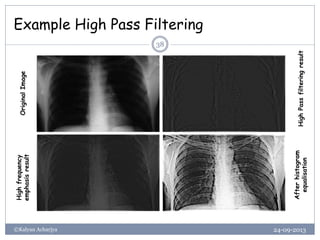
OriginalImage
HighPassfilteringresult
Highfrequency
emphasisresult
Afterhistogram
equalisation
24-09-2013©Kalyan Acharjya 39
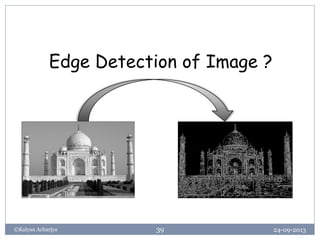
Edge Detection of Image ?
What is Image Edge
24-09-2013©Kalyan Acharjya
40
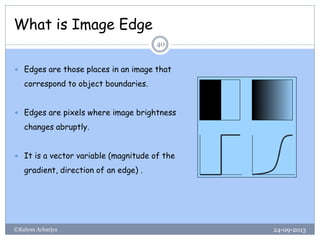
 Edges are those places in an image that
correspond to object boundaries.
 Edges are pixels where image brightness
changes abruptly.
 It is a vector variable (magnitude of the
gradient, direction of an edge) .
Steps of Edge Detection
24-09-2013©Kalyan Acharjya
41
 Filtering – Filter image to improve performance of the Edge Detector with
respect to noise
 Enhancement – Emphasize pixels having significant change in local intensity
 Detection – Identify edges - Thresholding
 Localization – Locate the edge accurately, estimate edge orientation
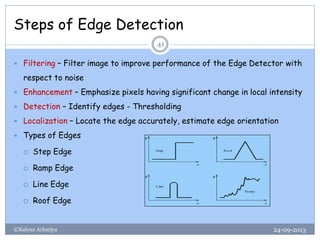
 Types of Edges
 Step Edge
 Ramp Edge
 Line Edge
 Roof Edge
Edge Detection
24-09-2013©Kalyan Acharjya
42
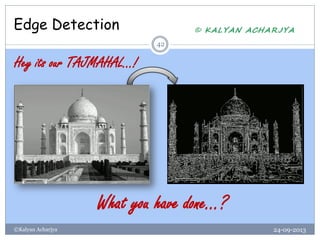
Hey its our TAJMAHAL…!
What you have done…?
Edge Detection
24-09-2013©Kalyan Acharjya
43
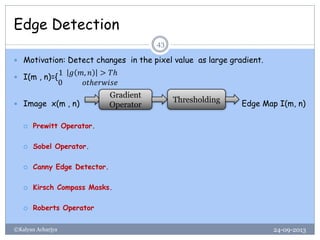
 Motivation: Detect changes in the pixel value as large gradient.
 I(m , n)={
1 𝑔 𝑚, 𝑛 > 𝑇ℎ
0 𝑜𝑡ℎ𝑒𝑟𝑤𝑖𝑠𝑒
 Image x(m , n) Edge Map I(m, n)
 Prewitt Operator.
 Sobel Operator.
 Canny Edge Detector.
 Kirsch Compass Masks.
 Roberts Operator
Gradient
Operator
Thresholding
Basics Relationship Between Pixels
24-09-2013©Kalyan Acharjya
44
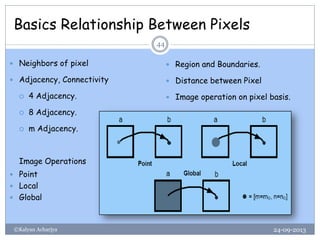
 Neighbors of pixel
 Adjacency, Connectivity
 4 Adjacency.
 8 Adjacency.
 m Adjacency.
Image Operations
 Point
 Local
 Global
 Region and Boundaries.
 Distance between Pixel
 Image operation on pixel basis.
24-09-2013©Kalyan Acharjya 45
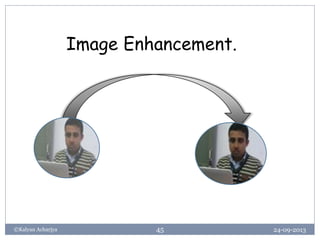
Image Enhancement.
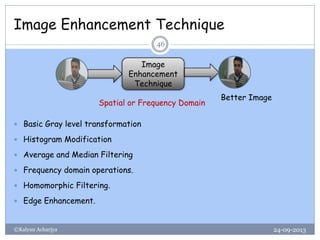
Image Enhancement Technique
24-09-2013©Kalyan Acharjya
46
 Basic Gray level transformation
 Histogram Modification
 Average and Median Filtering
 Frequency domain operations.
 Homomorphic Filtering.
 Edge Enhancement.
Image
Enhancement
Technique
Better Image
Spatial or Frequency Domain
Spatial Domain
24-09-2013©Kalyan Acharjya
47
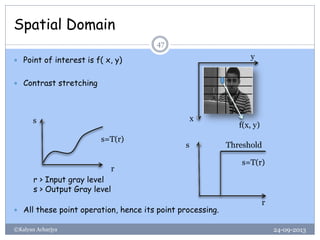
 Point of interest is f( x, y)
 Contrast stretching
 All these point operation, hence its point processing.
f(x, y)
y
x
r
s
r > Input gray level
s > Output Gray level
s=T(r)
s=T(r)
s
r
Threshold
Image Enhancement in Frequency Domain
24-09-2013©Kalyan Acharjya
48
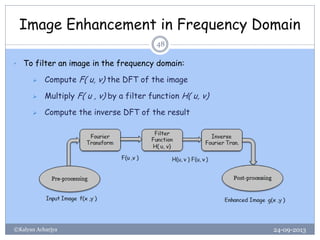
• To filter an image in the frequency domain:
 Compute F( u, v) the DFT of the image
 Multiply F( u , v) by a filter function H( u, v)
 Compute the inverse DFT of the result
DFT of Image
24-09-2013©Kalyan Acharjya
49
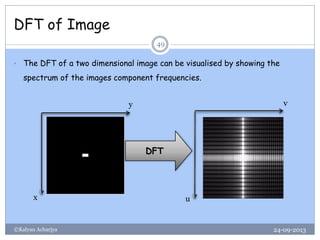
• The DFT of a two dimensional image can be visualised by showing the
spectrum of the images component frequencies.
DFT
y
x
v
u
Basic Frequency Domain Filters
24-09-2013©Kalyan Acharjya
50
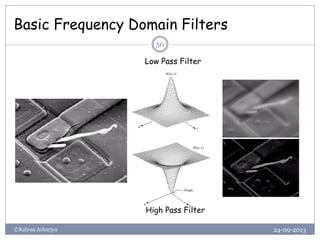
Low Pass Filter
High Pass Filter
Ex. of Image Enhancement in FD
24-09-2013©Kalyan Acharjya
51
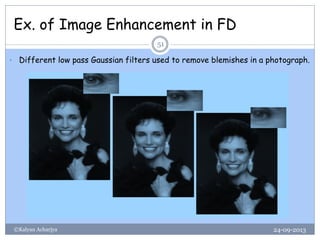
• Different low pass Gaussian filters used to remove blemishes in a photograph.
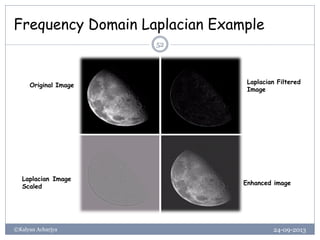
Frequency Domain Laplacian Example
24-09-2013©Kalyan Acharjya
52
Original Image
Laplacian Filtered
Image
Laplacian Image
Scaled
Enhanced image
Conclusion of Filtering
24-09-2013©Kalyan Acharjya
53
 Fourier transform in Image Processing in the frequency domain
 Image smoothing
 Image sharpening
 Fast Fourier Transform
 Image restoration using the spatial and frequency based techniques.
24-09-2013©Kalyan Acharjya 54
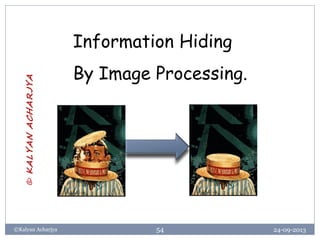
Information Hiding
By Image Processing.
©KALYANACHARJYA
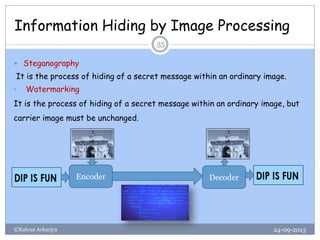
Information Hiding by Image Processing
24-09-2013©Kalyan Acharjya
55
 Steganography
It is the process of hiding of a secret message within an ordinary image.
• Watermarking
It is the process of hiding of a secret message within an ordinary image, but
carrier image must be unchanged.
Encoder Decoder
JPEG
24-09-2013©Kalyan Acharjya 56
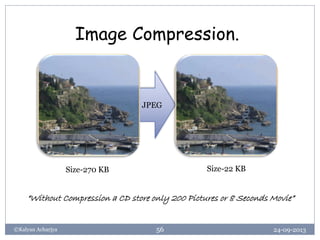
Image Compression.
Size-270 KB Size-22 KB
“Without Compression a CD store only 200 Pictures or 8 Seconds Movie”
Image Compression-Lossy or Lossless
24-09-2013©Kalyan Acharjya
57
 Image compression is the process of reducing the amount of data required
to represent an image.
 But its resolution or features should be unchanged for human perception.
 Relative Data Redundancy Rd of the first data set is Rd=1-1/CR
where CR-Compression Ratio=n1/n2 ,n1 and n2 denote the nos. of information
carrying units in two data sets that represent the same information.
• In Digital Image Compression , the basics data redundancies are
 Coding Redundancy
 Inter pixel Redundancy
 Psycho-visual Redundancy
Image Compression General Models
24-09-2013©Kalyan Acharjya
58
 Some image Compression Standard
 JPEG-Based on DCT
 JPEG 2000-Based on DWT
 GIF-Graphics Interchange Format etc.
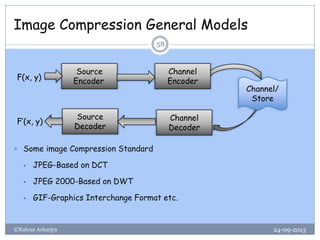
Source
Encoder
Channel
Encoder
Channel
Decoder
Source
Decoder
Channel/
Store
F(x, y)
F’(x, y)
Data ≠ Information
24-09-2013©Kalyan Acharjya
59
 Data and information are not synonymous terms!
 Data is the means by which information is conveyed.
 Data compression aims to reduce the amount of data required to represent
a given quantity of information while preserving as much information as
possible.
 Image compression is an irreversible process.
 Some Transform used for Image Compression
 DCT-Discrete Cosine Transform
 DWT-Discrete wavelet Transform etc
24-09-2013©Kalyan Acharjya 60
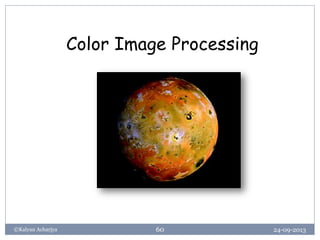
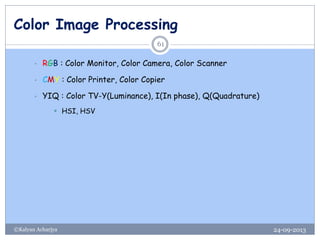
Color Image Processing
24-09-2013©Kalyan Acharjya
61
• RGB : Color Monitor, Color Camera, Color Scanner
• CMY : Color Printer, Color Copier
• YIQ : Color TV-Y(Luminance), I(In phase), Q(Quadrature)
 HSI, HSV
Color Issue of an Image
24-09-2013©Kalyan Acharjya
62
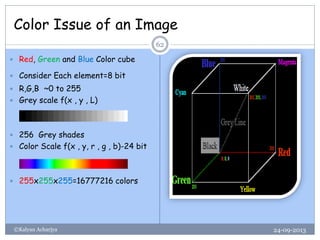
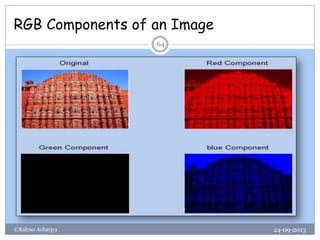
 Red, Green and Blue Color cube
 Consider Each element=8 bit
 R,G,B ~0 to 255
 Grey scale f(x , y , L)
 256 Grey shades
 Color Scale f(x , y, r , g , b)-24 bit
 255x255x255=16777216 colors
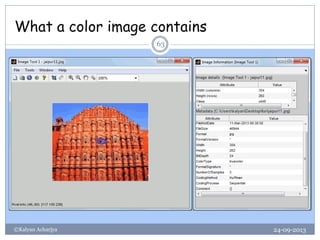
What a color image contains
24-09-2013©Kalyan Acharjya
63
RGB Components of an Image
24-09-2013©Kalyan Acharjya
64
CMY and CMYK Color Model
24-09-2013©Kalyan Acharjya
65
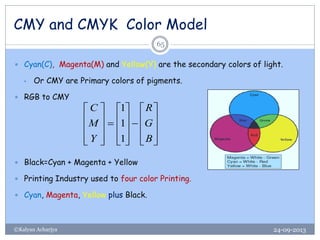
 Cyan(C), Magenta(M) and Yellow(Y) are the secondary colors of light.
• Or CMY are Primary colors of pigments.
 RGB to CMY
 Black=Cyan + Magenta + Yellow
 Printing Industry used to four color Printing.
 Cyan, Magenta, Yellow plus Black.
































B
G
R
Y
M
C
1
1
1
24-09-2013©Kalyan Acharjya 66
Where you start ?
Digital Image Processing !
Popular Image Processing Software Tools
24-09-2013©Kalyan Acharjya
67
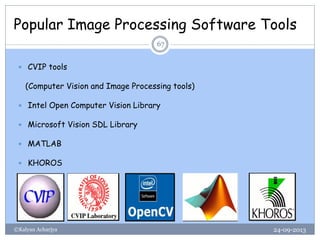
 CVIP tools
(Computer Vision and Image Processing tools)
 Intel Open Computer Vision Library
 Microsoft Vision SDL Library
 MATLAB
 KHOROS
24-09-2013©Kalyan Acharjya 68
Applications of
Digital Image Processing?
©KALYANACHARJYA
Applications of Digital Image Processing
24-09-2013©Kalyan Acharjya
69
 Identification.
 Robot vision.
 Steganography.
 Image Enhancement.
 Image Analysis in Medical.
 Morphological Image Analysis.
 Space Image Analysis.
 IC Industry……….etc.
24-09-2013©Kalyan Acharjya 70
24-09-2013©Kalyan Acharjya 71
24-09-2013©Kalyan Acharjya 72
https://twitter.com/Kalyan_online
Email-kalyan.acharjya@gmail.com

digital image processing, image processing

  • 1.
    24-09-2013©Kalyan Acharjya 1 Introductionto Digital Image Processing Digital Image Processing in MATLAB Two Live Applications of Digital Image Processing 75 Min 120 Min 30 Min ©KALYANACHARJYA
  • 2.
    A Lecture on Introductionto DIGITAL IMAGE PROCESSING 24-09-2013©Kalyan Acharjya 2 Presented By Kalyan Acharjya Assistant Professor, Dept. of ECE Jaipur National University
  • 3.
    25-09-2013©Kalyan Acharjya 3 Sorry,shamelessly I opened the lock without prior permission taken from the original owner. Some images used in this presentation contents are copied from internet without permission. Only Original Owner has full rights reserved for copied images. This PPT is only for fair academic use. Kalyan Acharjya
  • 4.
    24-09-2013©Kalyan Acharjya 4 Objectiveof Two Hour Presentation “To introduce the basic concept of Digital Image Processing”
  • 5.
    Contents 24-09-2013©Kalyan Acharjya 5  Whatis image and Image Processing?  Image Understanding.  Why Digital image Processing ?  Digitization of Image.  Histogram and Thresholding of Image.  Noise and its Extraction from Image.  Edge Detection.  Image Enhancement.  Image Compression.  Data Hiding in Image.  Color Image Processing.  Applications
  • 6.
    24-09-2013©Kalyan Acharjya 6 Whatis image ? And Image Understanding.
  • 7.
    What is image? 24-09-2013©KalyanAcharjya 7  An image is a 2-D light intensity function f( x, y).  An image is considered as Matrix.  A digital image f( x, y) is described both in spatial co-ordinates and Brightness. • The points in the image and element value of matrix identifies gray level value at that point. This element is called pels or Pixels. • So f( x, y)=R( x, y) *I(x, y) Where R Reflectivity of Surface (Pixel Point) I Intensity of incident Light y x
  • 8.
    Matrix or DigitalRepresentation of Image 24-09-2013©Kalyan Acharjya 8 • An Image has infinite intensity value. • Also infinite picture point -How its stored. • Digitization of image.  Spatial discretization by Sampling.  Intensity discretization by Quantization. I=
  • 9.
    Matrix as anImage 24-09-2013©Kalyan Acharjya 9  An Matrix is an image for DIP
  • 10.
    Types of DigitalImages 24-09-2013©Kalyan Acharjya 10  Binary Image: Each Pixel is just Black and white, i.e. 0 or 1  <462x493 logical>  Gray Scale Image: Each Pixel is shade of Gray, its 0(black) to white(255),i.e. each pixel~8 bits  <462x493 unit8>  Color Image or RGB Image, Each pixel corresponds to 3 values.  <462x493x3 unit8>
  • 11.
    Image Data Type 24-09-2013©KalyanAcharjya 11  int8-8 bit integer, Range -128 to 127  unit8-8 bit unsigned integer, Range 0 to 225  int16-16 bit integer, Range -32768 to 32767  uint16-16 bit unsigned integer, Range 0 to 65535  double-Double precision real number, Machine Specific
  • 12.
    Levels of ImageUnderstanding 24-09-2013©Kalyan Acharjya 12  Low Level-Involve primitive operations. e.g. Image Preprocessing, noise reduction, Enhancement etc. Image input - Image Out • Mid Level- Image segmentation, identify particular objects. Image input - Attributes extracted from those images e.g. edges, contour, identify etc. • High Level-Involving making sense of an ensemble of recognize objects, image analysis and far end the functions normally associated with human vision. Image • Processing Image • Analysis Image • Measurements
  • 13.
    24-09-2013©Kalyan Acharjya 13 Letslook back ! When the Digital Image Processing Started ?
  • 14.
    History of ImageProcessing 24-09-2013©Kalyan Acharjya 14  Its not young field, In 1920 submarine cables were used to transmit digitalized newspaper pictures between London and New-Work-Use Telegraphic Printing.  In 1921 –Improved in printing, use photographic printing to enhance the quality and resolution.  Actually DIP/ Computer Processing Technique was used to improve the pictures of moon transmitted by RANGER 7 at JET PROPULSION LAB. it’s the real beginning…
  • 15.
    24-09-2013©Kalyan Acharjya 15 WhyDigital Image Processing ?
  • 16.
    Why Digital ImageProcessing 24-09-2013©Kalyan Acharjya 16  How we stored the image: Reduce the size for storage .  How analog image world is relate to digital processing world.  Compression-Remove redundancies.  Transmission with minimum bandwidth.  Lossy Compression=redundancy +some information, but still acceptable. Original Image Size-116 KB Compressed Image Size-12.9 KB, 11 % Compressed Image Size-1.95 KB, 1.6 %
  • 17.
    Why Digital ImageProcessing 24-09-2013©Kalyan Acharjya 17  Image Enhancement :To improve the interpretability or perception of information in image.  Spatial Domain Method.  Frequency Domain Method. • Moving Object Tracking • Human-Computer Interaction • Computer Vision etc. Lena Central Compressed Spatial Domain Frequency Domain
  • 18.
    24-09-2013©Kalyan Acharjya 18 HowDigitization of Image ?
  • 19.
    Lets, little detail: Digitization of Image 24-09-2013©Kalyan Acharjya 19 a b a b a b a b Fig-A-Continuous Image Fig-B-Gray level Variation from a to b Fig-C-Sampling and Quantization Fig-D-Digital line from a to b
  • 20.
    Bit Planes ofGrey Scale image 24-09-2013©Kalyan Acharjya 20  Grey scale images can be transformed into a sequence of binary images by breaking them into bit planes.
  • 21.
    Spatial and GrayLevel Resolution 24-09-2013©Kalyan Acharjya 21 • Gray level L=2k • L is discrete level allowed to each pixel. • M and N are spatial • Halve and Double • The number of bits required to store digital image b=MxNxk • When M=N, b= kN2
  • 22.
  • 23.
    Arithmetic and LogicalOperations in images 24-09-2013©Kalyan Acharjya 23  Say Image as y=f(x)  This include add or subtract or multiply or divide each pixel value by constant factor, which may be pixel value of another image.  Y=f(x)+/-/*c  Complement: For gray scale image is its photographic negative.  Logical Operations: AND,OR,NOT in binary image.
  • 24.
    Resize an Image 24-09-2013©KalyanAcharjya 24  Interpolation  Extrapolation
  • 25.
  • 26.
    Histograms of Images 24-09-2013©KalyanAcharjya 26  Histograms of Gray level image represents the numbers of times each gray level occurs in the image.  Dark image-the gray levels would be clustered at the lower end  In a Uniformly bright image, the gray levels would be clustered at the upper end.  In a well contrasted image, the gray levels would be well spread out over much of the range.
  • 27.
    Importance of HistogramsGraph 24-09-2013©Kalyan Acharjya 27  In Poorly Contrast image, enhance by spreading out of its histograms. There are two ways-  Histograms stretching (contrast Stretching).  Histogram Equalization.  Histograms stretching: • Poorly contrasted image in the range [a, b] • Stretch the gray levels in the center of the range out by applying a piecewise linear function. • This function has the effect of stretching the gray levels [a, b] to [c, d], where a<c and d>b
  • 28.
    Histograms stretching (Cont.) 24-09-2013©KalyanAcharjya 28  The linear function imadjust(I, [a, b],[c, d])  if Pixel value is less than c are all converted to c and pixel values greater than d are all converted to d. a b 1 c d 1 Gamma<1 Gamma>1 Y= ( 𝑥−𝑎 𝑏−𝑎 )^Gamma (d-c)+c
  • 29.
    Gamma Scaling 24-09-2013©Kalyan Acharjya 29 Its important for graphics and games, its relates to pixel intensities of the image. One horn RHINO at Kaziranga National Park, Assam
  • 30.
    Histograms Equalization 24-09-2013©Kalyan Acharjya 30 Histogram equalization is a technique for adjusting image intensities to enhance contrast • Histogram equalisation algorithm: Let be the intensities of the image, and let be its normalised histogram function. The intensity transformation function for histogram equalisation is  That is, we add the values of the normalised histogram function from 1 to k to find where the intensity will be mapped. Notice that the range of the equalised image is the interval [0,1]. mkrk ,...,2,1,  )( krp   k j kk rprT 1 )()( kr
  • 31.
    Histogram Equalization 24-09-2013©Kalyan Acharjya 31 OriginalImage and It’s Histogram Histogram Equalized Image and It’s Histogram
  • 32.
    Thresholding of animage 24-09-2013©Kalyan Acharjya 32  Single Threshold: A gray scale image is turned into a binary image by first choosing a gray level T in the original image. Pixel Value>T tends to white (1) Pixel Value<=T tends to black (0) • Double Threshold: A pixel becomes white if T1<pixel value<T2. A pixel becomes black if gray level is others.
  • 33.
  • 34.
    Noise and ItsExtraction 24-09-2013©Kalyan Acharjya 34  Noise is any degradation in the image signal caused by external disturbance.  Salt and pepper noise: It is caused by sharp and sudden disturbances in the image.  Gaussian noise: It is caused by random fluctuations in the signal. It can be idealized form of white noise.  Speckle noise: it is modeled by random values multiplied by pixel values. In radar applications.  Shot noise: The dominant noise in the lighter parts of an image from an image sensor.
  • 35.
    Removal of noiseby Filtering 24-09-2013©Kalyan Acharjya 35  Linear filter  Median Filter  Specific case of order statistic filtering.  Remove salt & pepper noise.  Adaptive Filter  Weiner filter use to remove Gaussian noise.
  • 36.
    Extract Noise froman image 24-09-2013©Kalyan Acharjya 36 Image with Gaussian Noise Image after Noise removal ‘wiener2’ Filter
  • 37.
    Spectral Filtering 24-09-2013©Kalyan Acharjya 37 Spectral filtering is most commonly used to either select or eliminate information from an image based on the wavelength of the information.  Spectral selectivity is a technique for creating images which uses intentionally limited ranges of radiation in the ultraviolet, visible or infrared portions of the spectrum
  • 38.
    Example High PassFiltering 24-09-2013©Kalyan Acharjya 38 OriginalImage HighPassfilteringresult Highfrequency emphasisresult Afterhistogram equalisation
  • 39.
  • 40.
    What is ImageEdge 24-09-2013©Kalyan Acharjya 40  Edges are those places in an image that correspond to object boundaries.  Edges are pixels where image brightness changes abruptly.  It is a vector variable (magnitude of the gradient, direction of an edge) .
  • 41.
    Steps of EdgeDetection 24-09-2013©Kalyan Acharjya 41  Filtering – Filter image to improve performance of the Edge Detector with respect to noise  Enhancement – Emphasize pixels having significant change in local intensity  Detection – Identify edges - Thresholding  Localization – Locate the edge accurately, estimate edge orientation  Types of Edges  Step Edge  Ramp Edge  Line Edge  Roof Edge
  • 42.
    Edge Detection 24-09-2013©Kalyan Acharjya 42 Heyits our TAJMAHAL…! What you have done…?
  • 43.
    Edge Detection 24-09-2013©Kalyan Acharjya 43 Motivation: Detect changes in the pixel value as large gradient.  I(m , n)={ 1 𝑔 𝑚, 𝑛 > 𝑇ℎ 0 𝑜𝑡ℎ𝑒𝑟𝑤𝑖𝑠𝑒  Image x(m , n) Edge Map I(m, n)  Prewitt Operator.  Sobel Operator.  Canny Edge Detector.  Kirsch Compass Masks.  Roberts Operator Gradient Operator Thresholding
  • 44.
    Basics Relationship BetweenPixels 24-09-2013©Kalyan Acharjya 44  Neighbors of pixel  Adjacency, Connectivity  4 Adjacency.  8 Adjacency.  m Adjacency. Image Operations  Point  Local  Global  Region and Boundaries.  Distance between Pixel  Image operation on pixel basis.
  • 45.
  • 46.
    Image Enhancement Technique 24-09-2013©KalyanAcharjya 46  Basic Gray level transformation  Histogram Modification  Average and Median Filtering  Frequency domain operations.  Homomorphic Filtering.  Edge Enhancement. Image Enhancement Technique Better Image Spatial or Frequency Domain
  • 47.
    Spatial Domain 24-09-2013©Kalyan Acharjya 47 Point of interest is f( x, y)  Contrast stretching  All these point operation, hence its point processing. f(x, y) y x r s r > Input gray level s > Output Gray level s=T(r) s=T(r) s r Threshold
  • 48.
    Image Enhancement inFrequency Domain 24-09-2013©Kalyan Acharjya 48 • To filter an image in the frequency domain:  Compute F( u, v) the DFT of the image  Multiply F( u , v) by a filter function H( u, v)  Compute the inverse DFT of the result
  • 49.
    DFT of Image 24-09-2013©KalyanAcharjya 49 • The DFT of a two dimensional image can be visualised by showing the spectrum of the images component frequencies. DFT y x v u
  • 50.
    Basic Frequency DomainFilters 24-09-2013©Kalyan Acharjya 50 Low Pass Filter High Pass Filter
  • 51.
    Ex. of ImageEnhancement in FD 24-09-2013©Kalyan Acharjya 51 • Different low pass Gaussian filters used to remove blemishes in a photograph.
  • 52.
    Frequency Domain LaplacianExample 24-09-2013©Kalyan Acharjya 52 Original Image Laplacian Filtered Image Laplacian Image Scaled Enhanced image
  • 53.
    Conclusion of Filtering 24-09-2013©KalyanAcharjya 53  Fourier transform in Image Processing in the frequency domain  Image smoothing  Image sharpening  Fast Fourier Transform  Image restoration using the spatial and frequency based techniques.
  • 54.
    24-09-2013©Kalyan Acharjya 54 InformationHiding By Image Processing. ©KALYANACHARJYA
  • 55.
    Information Hiding byImage Processing 24-09-2013©Kalyan Acharjya 55  Steganography It is the process of hiding of a secret message within an ordinary image. • Watermarking It is the process of hiding of a secret message within an ordinary image, but carrier image must be unchanged. Encoder Decoder
  • 56.
    JPEG 24-09-2013©Kalyan Acharjya 56 ImageCompression. Size-270 KB Size-22 KB “Without Compression a CD store only 200 Pictures or 8 Seconds Movie”
  • 57.
    Image Compression-Lossy orLossless 24-09-2013©Kalyan Acharjya 57  Image compression is the process of reducing the amount of data required to represent an image.  But its resolution or features should be unchanged for human perception.  Relative Data Redundancy Rd of the first data set is Rd=1-1/CR where CR-Compression Ratio=n1/n2 ,n1 and n2 denote the nos. of information carrying units in two data sets that represent the same information. • In Digital Image Compression , the basics data redundancies are  Coding Redundancy  Inter pixel Redundancy  Psycho-visual Redundancy
  • 58.
    Image Compression GeneralModels 24-09-2013©Kalyan Acharjya 58  Some image Compression Standard  JPEG-Based on DCT  JPEG 2000-Based on DWT  GIF-Graphics Interchange Format etc. Source Encoder Channel Encoder Channel Decoder Source Decoder Channel/ Store F(x, y) F’(x, y)
  • 59.
    Data ≠ Information 24-09-2013©KalyanAcharjya 59  Data and information are not synonymous terms!  Data is the means by which information is conveyed.  Data compression aims to reduce the amount of data required to represent a given quantity of information while preserving as much information as possible.  Image compression is an irreversible process.  Some Transform used for Image Compression  DCT-Discrete Cosine Transform  DWT-Discrete wavelet Transform etc
  • 60.
  • 61.
    Color Image Processing 24-09-2013©KalyanAcharjya 61 • RGB : Color Monitor, Color Camera, Color Scanner • CMY : Color Printer, Color Copier • YIQ : Color TV-Y(Luminance), I(In phase), Q(Quadrature)  HSI, HSV
  • 62.
    Color Issue ofan Image 24-09-2013©Kalyan Acharjya 62  Red, Green and Blue Color cube  Consider Each element=8 bit  R,G,B ~0 to 255  Grey scale f(x , y , L)  256 Grey shades  Color Scale f(x , y, r , g , b)-24 bit  255x255x255=16777216 colors
  • 63.
    What a colorimage contains 24-09-2013©Kalyan Acharjya 63
  • 64.
    RGB Components ofan Image 24-09-2013©Kalyan Acharjya 64
  • 65.
    CMY and CMYKColor Model 24-09-2013©Kalyan Acharjya 65  Cyan(C), Magenta(M) and Yellow(Y) are the secondary colors of light. • Or CMY are Primary colors of pigments.  RGB to CMY  Black=Cyan + Magenta + Yellow  Printing Industry used to four color Printing.  Cyan, Magenta, Yellow plus Black.                                 B G R Y M C 1 1 1
  • 66.
    24-09-2013©Kalyan Acharjya 66 Whereyou start ? Digital Image Processing !
  • 67.
    Popular Image ProcessingSoftware Tools 24-09-2013©Kalyan Acharjya 67  CVIP tools (Computer Vision and Image Processing tools)  Intel Open Computer Vision Library  Microsoft Vision SDL Library  MATLAB  KHOROS
  • 68.
    24-09-2013©Kalyan Acharjya 68 Applicationsof Digital Image Processing? ©KALYANACHARJYA
  • 69.
    Applications of DigitalImage Processing 24-09-2013©Kalyan Acharjya 69  Identification.  Robot vision.  Steganography.  Image Enhancement.  Image Analysis in Medical.  Morphological Image Analysis.  Space Image Analysis.  IC Industry……….etc.
  • 70.
  • 71.
  • 72.