@fischaelameergeildanke.com #YGLFKyiv18
Writing VR and AR Apps 

with Web Technology
WebXR Device API
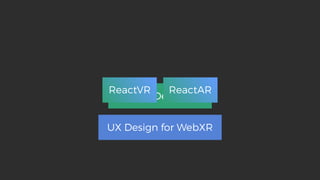
UX Design for WebXR
ReactVR ReactAR
WebXR
WebVR WebAR
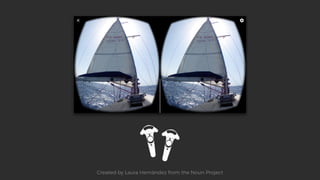
Created by Laura Hernández from the Noun Project
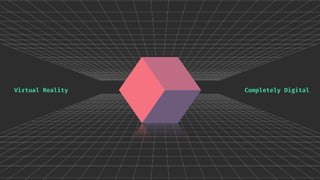
Completely DigitalVirtual Reality
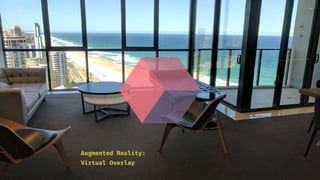
Virtual Overlay
Augmented Reality:
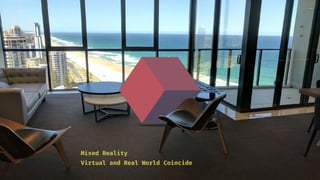
Virtual and Real World Coincide
Mixed Reality
WebXR
WebVR WebAR
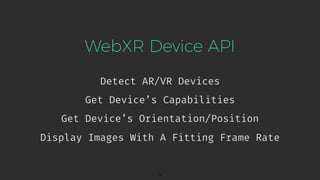
WebXR Device API
Detect AR/VR Devices
9
Get Device’s Capabilities
Get Device’s Orientation/Position
Display Images With A Fitting Frame Rate
WebVR API
WebXR Device API
WebXR Device API
Supports Augmented Reality
11
Clean, Consistent, Predictable
Better Browser Optimizations
Unified Input Model
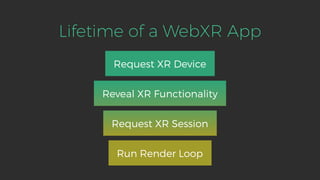
Lifetime of a WebXR App
Request XR Device
Reveal XR Functionality
Request XR Session
Run Render Loop
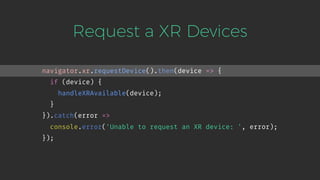
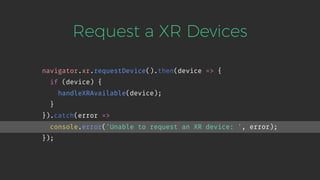
Request a XR Devices
navigator.xr.requestDevice().then(device => {
if (device) {
handleXRAvailable(device);
}
}).catch(error =>
console.error('Unable to request an XR device: ', error);
});
Request a XR Devices
navigator.xr.requestDevice().then(device => {
if (device) {
handleXRAvailable(device);
}
}).catch(error =>
console.error('Unable to request an XR device: ', error);
});
Check XR Session Support
let xrDevice = null;
function handleXRAvailable(device) {
xrDevice = device;
xrDevice.supportsSession({exclusive: true}).then(() => {
addWebXRButtonToPage();
}).catch((error) => {
console.log('Session not supported: ' + error);
});
}
Check XR Session Support
let xrDevice = null;
function handleXRAvailable(device) {
xrDevice = device;
xrDevice.supportsSession({exclusive: true}).then(() => {
addWebXRButtonToPage();
}).catch((error) => {
console.log('Session not supported: ' + error);
});
}
Check XR Session Support
let xrDevice = null;
function handleXRAvailable(device) {
xrDevice = device;
xrDevice.supportsSession({exclusive: true}).then(() => {
addWebXRButtonToPage();
}).catch((error) => {
console.log('Session not supported: ' + error);
});
}
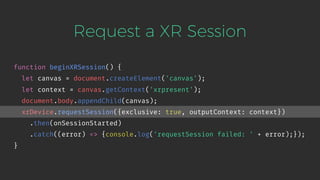
Request a XR Session
function beginXRSession() {
let canvas = document.createElement('canvas');
let context = canvas.getContext('xrpresent');
document.body.appendChild(canvas);
xrDevice.requestSession({exclusive: true, outputContext: context})
.then(onSessionStarted)
.catch((error) => {console.log('requestSession failed: ' + error);});
}
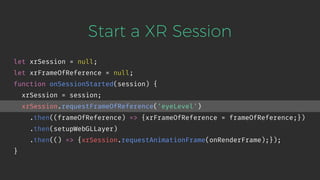
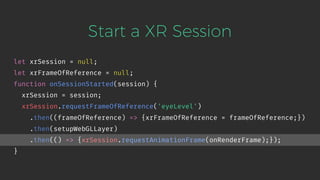
Start a XR Session
let xrSession = null;
let xrFrameOfReference = null;
function onSessionStarted(session) {
xrSession = session;
xrSession.requestFrameOfReference('eyeLevel')
.then((frameOfReference) => {xrFrameOfReference = frameOfReference;})
.then(setupWebGLLayer)
.then(() => {xrSession.requestAnimationFrame(onRenderFrame);});
}
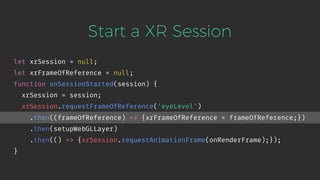
Start a XR Session
let xrSession = null;
let xrFrameOfReference = null;
function onSessionStarted(session) {
xrSession = session;
xrSession.requestFrameOfReference('eyeLevel')
.then((frameOfReference) => {xrFrameOfReference = frameOfReference;})
.then(setupWebGLLayer)
.then(() => {xrSession.requestAnimationFrame(onRenderFrame);});
}
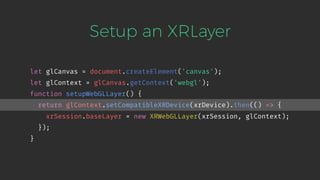
Setup an XRLayer
let glCanvas = document.createElement('canvas');
let glContext = glCanvas.getContext('webgl');
function setupWebGLLayer() {
return glContext.setCompatibleXRDevice(xrDevice).then(() => {
xrSession.baseLayer = new XRWebGLLayer(xrSession, glContext);
});
}
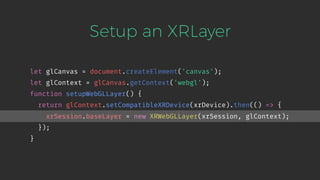
Setup an XRLayer
let glCanvas = document.createElement('canvas');
let glContext = glCanvas.getContext('webgl');
function setupWebGLLayer() {
return glContext.setCompatibleXRDevice(xrDevice).then(() => {
xrSession.baseLayer = new XRWebGLLayer(xrSession, glContext);
});
}
Start a XR Session
let xrSession = null;
let xrFrameOfReference = null;
function onSessionStarted(session) {
xrSession = session;
xrSession.requestFrameOfReference('eyeLevel')
.then((frameOfReference) => {xrFrameOfReference = frameOfReference;})
.then(setupWebGLLayer)
.then(() => {xrSession.requestAnimationFrame(onRenderFrame);});
}
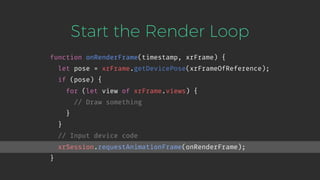
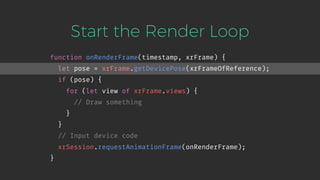
Start the Render Loop
function onRenderFrame(timestamp, xrFrame) {
let pose = xrFrame.getDevicePose(xrFrameOfReference);
if (pose) {
for (let view of xrFrame.views) {
// Draw something
}
}
// Input device code
xrSession.requestAnimationFrame(onRenderFrame);
}
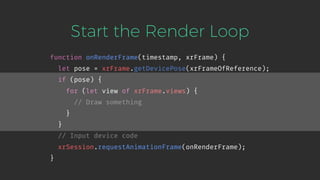
Start the Render Loop
function onRenderFrame(timestamp, xrFrame) {
let pose = xrFrame.getDevicePose(xrFrameOfReference);
if (pose) {
for (let view of xrFrame.views) {
// Draw something
}
}
// Input device code
xrSession.requestAnimationFrame(onRenderFrame);
}
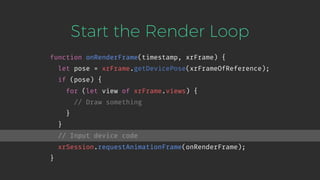
Start the Render Loop
function onRenderFrame(timestamp, xrFrame) {
let pose = xrFrame.getDevicePose(xrFrameOfReference);
if (pose) {
for (let view of xrFrame.views) {
// Draw something
}
}
// Input device code
xrSession.requestAnimationFrame(onRenderFrame);
}
Start the Render Loop
function onRenderFrame(timestamp, xrFrame) {
let pose = xrFrame.getDevicePose(xrFrameOfReference);
if (pose) {
for (let view of xrFrame.views) {
// Draw something
}
}
// Input device code
xrSession.requestAnimationFrame(onRenderFrame);
}
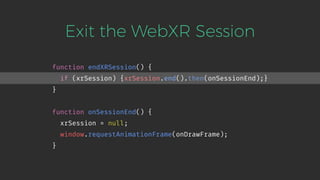
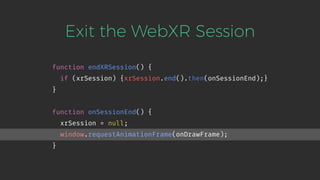
Exit the WebXR Session
function endXRSession() {
if (xrSession) {xrSession.end().then(onSessionEnd);}
}
function onSessionEnd() {
xrSession = null;
window.requestAnimationFrame(onDrawFrame);
}
Exit the WebXR Session
function endXRSession() {
if (xrSession) {xrSession.end().then(onSessionEnd);}
}
function onSessionEnd() {
xrSession = null;
window.requestAnimationFrame(onDrawFrame);
}
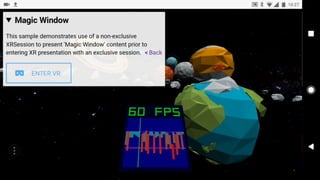
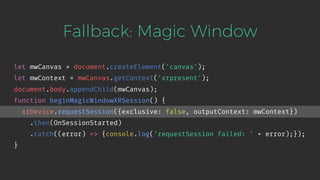
Fallback: Magic Window
let mwCanvas = document.createElement('canvas');
let mwContext = mwCanvas.getContext('xrpresent');
document.body.appendChild(mwCanvas);
function beginMagicWindowXRSession() {
xrDevice.requestSession({exclusive: false, outputContext: mwContext})
.then(OnSessionStarted)
.catch((error) => {console.log('requestSession failed: ' + error);});
}
On Page Load:
Magic Window
exclusive sessions are supported
Render a
"Start VR" Button
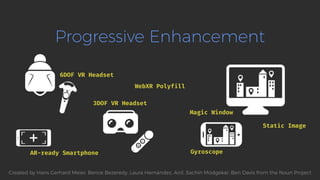
Progressive Enhancement
6DOF VR Headset
AR-ready Smartphone
3DOF VR Headset
Magic Window
Gyroscope
WebXR Polyfill
Static Image
Created by Hans Gerhard Meier, Bence Bezeredy, Laura Hernández, Anil, Sachin Modgekar, Ben Davis from the Noun Project
The Future: Augmented Reality
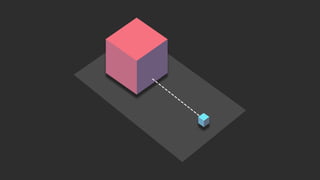
AR Session Hit Test AR Anchors
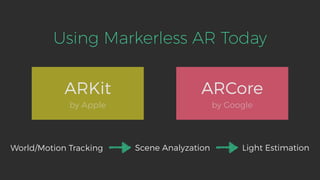
Using Markerless AR Today
ARKit
by Apple
ARCore
by Google
World/Motion Tracking Scene Analyzation Light Estimation
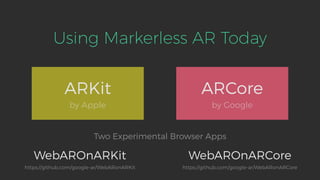
Using Markerless AR Today
ARKit
by Apple
ARCore
by Google
WebAROnARKit WebAROnARCore
Two Experimental Browser Apps
https://github.com/google-ar/WebARonARKit https://github.com/google-ar/WebARonARCore
https://aframe.io/
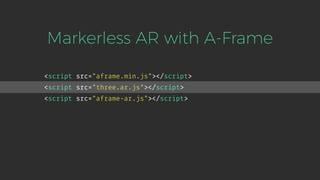
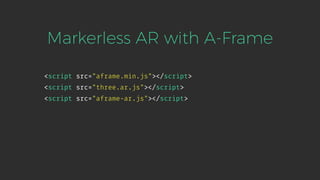
<script src="aframe.min.js"></script>
<script src="three.ar.js"></script>
<script src="aframe-ar.js"></script>
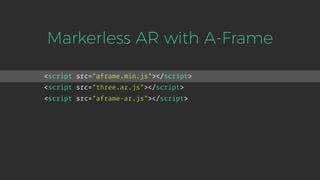
Markerless AR with A-Frame
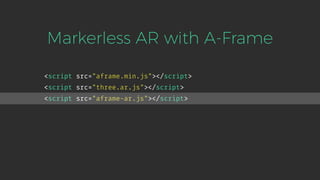
<script src="aframe.min.js"></script>
<script src="three.ar.js"></script>
<script src="aframe-ar.js"></script>
Markerless AR with A-Frame
<script src="aframe.min.js"></script>
<script src="three.ar.js"></script>
<script src="aframe-ar.js"></script>
Markerless AR with A-Frame
<script src="aframe.min.js"></script>
<script src="three.ar.js"></script>
<script src="aframe-ar.js"></script>
Markerless AR with A-Frame
<script src="aframe.min.js"></script>
<script src="three.ar.js"></script>
<script src="aframe-ar.js"></script>
Markerless AR with A-Frame
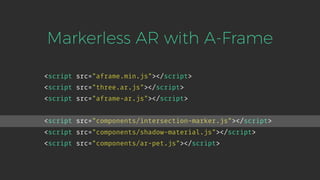
<script src="components/intersection-marker.js"></script>
<script src="components/shadow-material.js"></script>
<script src="components/ar-pet.js"></script>
<script src="aframe.min.js"></script>
<script src="three.ar.js"></script>
<script src="aframe-ar.js"></script>
Markerless AR with A-Frame
<script src="components/intersection-marker.js"></script>
<script src="components/shadow-material.js"></script>
<script src="components/ar-pet.js"></script>
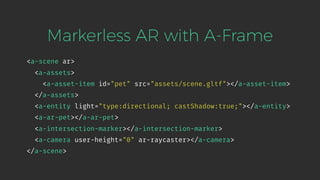
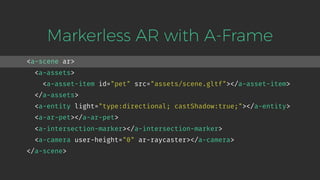
<a-scene ar>
<a-assets>
<a-asset-item id="pet" src="assets/scene.gltf"></a-asset-item>
</a-assets>
<a-entity light="type:directional; castShadow:true;"></a-entity>
<a-ar-pet></a-ar-pet>
<a-intersection-marker></a-intersection-marker>
<a-camera user-height="0" ar-raycaster></a-camera>
</a-scene>
Markerless AR with A-Frame
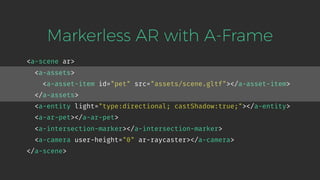
<a-scene ar>
<a-assets>
<a-asset-item id="pet" src="assets/scene.gltf"></a-asset-item>
</a-assets>
<a-entity light="type:directional; castShadow:true;"></a-entity>
<a-ar-pet></a-ar-pet>
<a-intersection-marker></a-intersection-marker>
<a-camera user-height="0" ar-raycaster></a-camera>
</a-scene>
Markerless AR with A-Frame
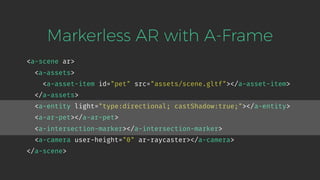
<a-scene ar>
<a-assets>
<a-asset-item id="pet" src="assets/scene.gltf"></a-asset-item>
</a-assets>
<a-entity light="type:directional; castShadow:true;"></a-entity>
<a-ar-pet></a-ar-pet>
<a-intersection-marker></a-intersection-marker>
<a-camera user-height="0" ar-raycaster></a-camera>
</a-scene>
Markerless AR with A-Frame
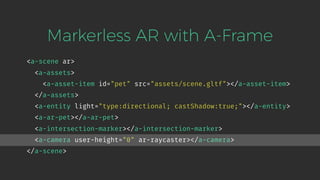
<a-scene ar>
<a-assets>
<a-asset-item id="pet" src="assets/scene.gltf"></a-asset-item>
</a-assets>
<a-entity light="type:directional; castShadow:true;"></a-entity>
<a-ar-pet></a-ar-pet>
<a-intersection-marker></a-intersection-marker>
<a-camera user-height="0" ar-raycaster></a-camera>
</a-scene>
Markerless AR with A-Frame
<a-scene ar>
<a-assets>
<a-asset-item id="pet" src="assets/scene.gltf"></a-asset-item>
</a-assets>
<a-entity light="type:directional; castShadow:true;"></a-entity>
<a-ar-pet></a-ar-pet>
<a-intersection-marker></a-intersection-marker>
<a-camera user-height="0" ar-raycaster></a-camera>
</a-scene>
Markerless AR with A-Frame
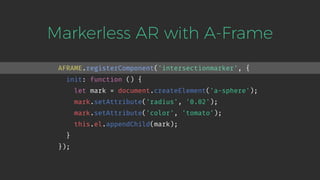
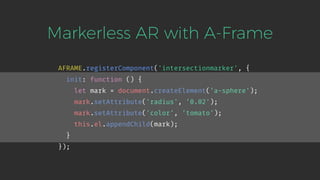
AFRAME.registerComponent('intersectionmarker', {
init: function () {
let mark = document.createElement('a-sphere');
mark.setAttribute('radius', '0.02');
mark.setAttribute('color', 'tomato');
this.el.appendChild(mark);
}
});
Markerless AR with A-Frame
AFRAME.registerComponent('intersectionmarker', {
init: function () {
let mark = document.createElement('a-sphere');
mark.setAttribute('radius', '0.02');
mark.setAttribute('color', 'tomato');
this.el.appendChild(mark);
}
});
Markerless AR with A-Frame
AFRAME.registerComponent('intersectionmarker', {
init: function () {
/* … */
let raycaster = document.querySelector('[ar-raycaster]');
raycaster.addEventListener('raycaster-intersection', function (e) {
mark.setAttribute('position', e.detail.intersections[0].point);
mark.setAttribute('color', 'lightseagreen');
});
}
});
Markerless AR with A-Frame
AFRAME.registerComponent('intersectionmarker', {
init: function () {
/* … */
let raycaster = document.querySelector('[ar-raycaster]');
raycaster.addEventListener('raycaster-intersection', function (e) {
mark.setAttribute('position', e.detail.intersections[0].point);
mark.setAttribute('color', 'lightseagreen');
});
}
});
UX Design for WebXR Apps
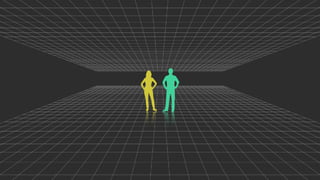
Do Not Apply 2D Patterns
No Established Patterns Yet
UX Design Best-Practises
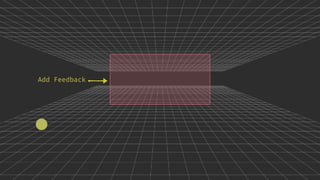
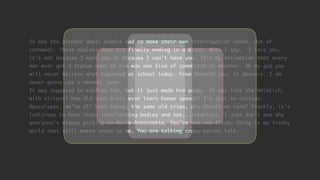
Add Feedback, Respond Immediately
Add Feedback
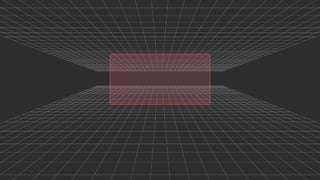
It was the pioneer days; people had to make their own interrogation rooms. Out of
cornmeal. These endless days are finally ending in a blaze. When I say, 'I love you,'
it's not because I want you or because I can't have you. It's my estimation that every
man ever got a statue made of him was one kind of sommbitch or another. Oh my god you
will never believe what happened at school today. From beneath you, it devours. I am
never gonna see a merman, ever.
It was supposed to confuse him, but it just made him peppy. It was like the Heimlich,
with stripes! How did your brain even learn human speech? I'm just so curious.
Apocalypse, we've all been there; the same old trips, why should we care? Frankly, it's
ludicrous to have these interlocking bodies and not...interlock. I just don't see why
everyone's always picking on Marie-Antoinette. You're the one freaky thing in my freaky
world that still makes sense to me. You are talking crazy-person talk.
It was the pioneer days; people had to make their own interrogation rooms. Out of
cornmeal. These endless days are finally ending in a blaze. When I say, 'I love you,'
it's not because I want you or because I can't have you. It's my estimation that every
man ever got a statue made of him was one kind of sommbitch or another. Oh my god you
will never believe what happened at school today. From beneath you, it devours. I am
never gonna see a merman, ever.
It was supposed to confuse him, but it just made him peppy. It was like the Heimlich,
with stripes! How did your brain even learn human speech? I'm just so curious.
Apocalypse, we've all been there; the same old trips, why should we care? Frankly, it's
ludicrous to have these interlocking bodies and not...interlock. I just don't see why
everyone's always picking on Marie-Antoinette. You're the one freaky thing in my freaky
world that still makes sense to me. You are talking crazy-person talk.
UX Design Best-Practises
Add Feedback, Respond Immediately
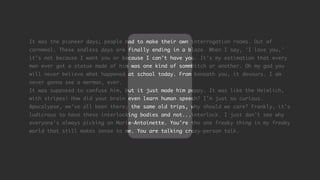
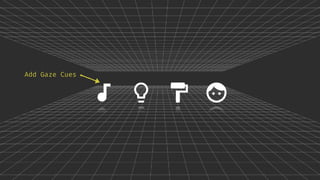
Guide Users with Gaze Cues
Add Gaze Cues
UX Design Best-Practises
Add Feedback, Respond Immediately
Guide Users with Gaze Cues
Provide Information in Context
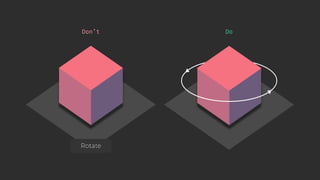
DoDon’t
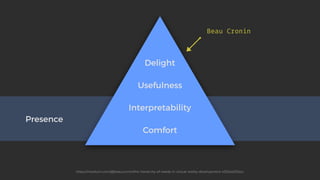
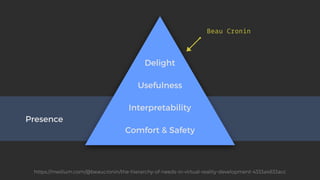
Presence
Interpretability
Usefulness
Delight
Beau Cronin
https://medium.com/@beaucronin/the-hierarchy-of-needs-in-virtual-reality-development-4333a4833acc
Comfort
Presence
Interpretability
Usefulness
Delight
Beau Cronin
https://medium.com/@beaucronin/the-hierarchy-of-needs-in-virtual-reality-development-4333a4833acc
Comfort & Safety
Comfort and Safety in AR
There is No Optimal AR Environment
Comfort and Safety in AR
There is No Optimal AR Environment
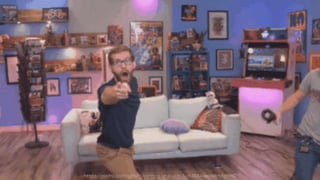
Consider a User’s Movement
https://giphy.com/gifs/hyperrpg-vr-ouch-3oKIPAKenYskqXzYnC
Comfort and Safety in AR
There is No Optimal AR Environment
Consider a User’s Movement
Avoid Fatiguing your Users
Comfort and Safety in VR
Do Not Trigger Phobias
Comfort and Safety in VR
Do Not Trigger Phobias
Do Not Move Things Fast Towards the Camera
Comfort and Safety in VR
Do Not Trigger Phobias
Do Not Move Things Fast Towards the Camera
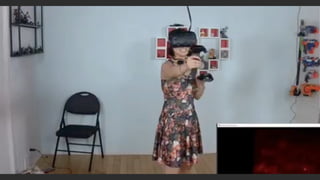
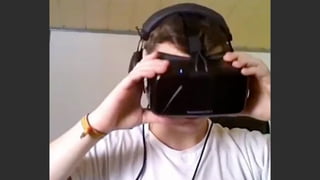
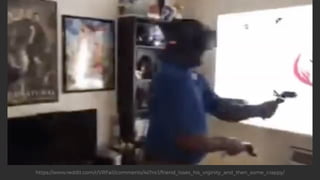
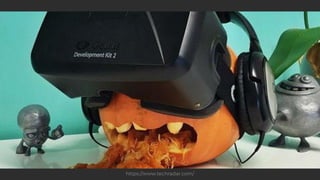
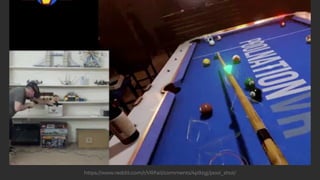
Respect a User’s Safe Space
https://www.reddit.com/r/VRFail/comments/4s7nc1/friend_loses_his_vrginity_and_then_some_crappy/
https://www.techradar.com/
https://www.reddit.com/r/VRFail/comments/4p9zgj/pool_shot/
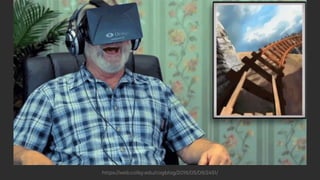
Prevent Simulation Sickness
Do Not Move the Horizon or the Camera
Do Not Use Acceleration
https://web.colby.edu/cogblog/2016/05/09/2451/
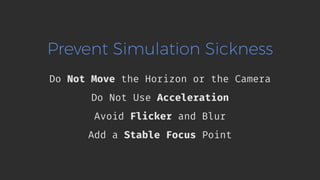
Prevent Simulation Sickness
Do Not Move the Horizon or the Camera
Do Not Use Acceleration
Avoid Flicker and Blur
Add a Stable Focus Point
@fischaelameergeildanke.com #YGLFKyiv18
Respect Your Users!
Test Your Product on a Diverse Audience.
@fischaelameergeildanke.com #YGLFKyiv18
Get Involved!
https://github.com/immersive-web/webxr

Writing Virtual And Augmented Reality Apps With Web Technology

  • 1.
    @fischaelameergeildanke.com #YGLFKyiv18 Writing VRand AR Apps 
 with Web Technology
  • 2.
    WebXR Device API UXDesign for WebXR ReactVR ReactAR
  • 3.
  • 4.
    Created by LauraHernández from the Noun Project
  • 5.
  • 6.
  • 7.
    Virtual and RealWorld Coincide Mixed Reality
  • 8.
  • 9.
    WebXR Device API DetectAR/VR Devices 9 Get Device’s Capabilities Get Device’s Orientation/Position Display Images With A Fitting Frame Rate
  • 10.
  • 11.
    WebXR Device API SupportsAugmented Reality 11 Clean, Consistent, Predictable Better Browser Optimizations Unified Input Model
  • 12.
    Lifetime of aWebXR App Request XR Device Reveal XR Functionality Request XR Session Run Render Loop
  • 13.
    Request a XRDevices navigator.xr.requestDevice().then(device => { if (device) { handleXRAvailable(device); } }).catch(error => console.error('Unable to request an XR device: ', error); });
  • 14.
    Request a XRDevices navigator.xr.requestDevice().then(device => { if (device) { handleXRAvailable(device); } }).catch(error => console.error('Unable to request an XR device: ', error); });
  • 15.
    Check XR SessionSupport let xrDevice = null; function handleXRAvailable(device) { xrDevice = device; xrDevice.supportsSession({exclusive: true}).then(() => { addWebXRButtonToPage(); }).catch((error) => { console.log('Session not supported: ' + error); }); }
  • 16.
    Check XR SessionSupport let xrDevice = null; function handleXRAvailable(device) { xrDevice = device; xrDevice.supportsSession({exclusive: true}).then(() => { addWebXRButtonToPage(); }).catch((error) => { console.log('Session not supported: ' + error); }); }
  • 17.
    Check XR SessionSupport let xrDevice = null; function handleXRAvailable(device) { xrDevice = device; xrDevice.supportsSession({exclusive: true}).then(() => { addWebXRButtonToPage(); }).catch((error) => { console.log('Session not supported: ' + error); }); }
  • 18.
    Request a XRSession function beginXRSession() { let canvas = document.createElement('canvas'); let context = canvas.getContext('xrpresent'); document.body.appendChild(canvas); xrDevice.requestSession({exclusive: true, outputContext: context}) .then(onSessionStarted) .catch((error) => {console.log('requestSession failed: ' + error);}); }
  • 19.
    Start a XRSession let xrSession = null; let xrFrameOfReference = null; function onSessionStarted(session) { xrSession = session; xrSession.requestFrameOfReference('eyeLevel') .then((frameOfReference) => {xrFrameOfReference = frameOfReference;}) .then(setupWebGLLayer) .then(() => {xrSession.requestAnimationFrame(onRenderFrame);}); }
  • 20.
    Start a XRSession let xrSession = null; let xrFrameOfReference = null; function onSessionStarted(session) { xrSession = session; xrSession.requestFrameOfReference('eyeLevel') .then((frameOfReference) => {xrFrameOfReference = frameOfReference;}) .then(setupWebGLLayer) .then(() => {xrSession.requestAnimationFrame(onRenderFrame);}); }
  • 21.
    Setup an XRLayer letglCanvas = document.createElement('canvas'); let glContext = glCanvas.getContext('webgl'); function setupWebGLLayer() { return glContext.setCompatibleXRDevice(xrDevice).then(() => { xrSession.baseLayer = new XRWebGLLayer(xrSession, glContext); }); }
  • 22.
    Setup an XRLayer letglCanvas = document.createElement('canvas'); let glContext = glCanvas.getContext('webgl'); function setupWebGLLayer() { return glContext.setCompatibleXRDevice(xrDevice).then(() => { xrSession.baseLayer = new XRWebGLLayer(xrSession, glContext); }); }
  • 23.
    Start a XRSession let xrSession = null; let xrFrameOfReference = null; function onSessionStarted(session) { xrSession = session; xrSession.requestFrameOfReference('eyeLevel') .then((frameOfReference) => {xrFrameOfReference = frameOfReference;}) .then(setupWebGLLayer) .then(() => {xrSession.requestAnimationFrame(onRenderFrame);}); }
  • 24.
    Start the RenderLoop function onRenderFrame(timestamp, xrFrame) { let pose = xrFrame.getDevicePose(xrFrameOfReference); if (pose) { for (let view of xrFrame.views) { // Draw something } } // Input device code xrSession.requestAnimationFrame(onRenderFrame); }
  • 25.
    Start the RenderLoop function onRenderFrame(timestamp, xrFrame) { let pose = xrFrame.getDevicePose(xrFrameOfReference); if (pose) { for (let view of xrFrame.views) { // Draw something } } // Input device code xrSession.requestAnimationFrame(onRenderFrame); }
  • 26.
    Start the RenderLoop function onRenderFrame(timestamp, xrFrame) { let pose = xrFrame.getDevicePose(xrFrameOfReference); if (pose) { for (let view of xrFrame.views) { // Draw something } } // Input device code xrSession.requestAnimationFrame(onRenderFrame); }
  • 27.
    Start the RenderLoop function onRenderFrame(timestamp, xrFrame) { let pose = xrFrame.getDevicePose(xrFrameOfReference); if (pose) { for (let view of xrFrame.views) { // Draw something } } // Input device code xrSession.requestAnimationFrame(onRenderFrame); }
  • 28.
    Exit the WebXRSession function endXRSession() { if (xrSession) {xrSession.end().then(onSessionEnd);} } function onSessionEnd() { xrSession = null; window.requestAnimationFrame(onDrawFrame); }
  • 29.
    Exit the WebXRSession function endXRSession() { if (xrSession) {xrSession.end().then(onSessionEnd);} } function onSessionEnd() { xrSession = null; window.requestAnimationFrame(onDrawFrame); }
  • 32.
    Fallback: Magic Window letmwCanvas = document.createElement('canvas'); let mwContext = mwCanvas.getContext('xrpresent'); document.body.appendChild(mwCanvas); function beginMagicWindowXRSession() { xrDevice.requestSession({exclusive: false, outputContext: mwContext}) .then(OnSessionStarted) .catch((error) => {console.log('requestSession failed: ' + error);}); }
  • 33.
    On Page Load: MagicWindow exclusive sessions are supported Render a "Start VR" Button
  • 34.
    Progressive Enhancement 6DOF VRHeadset AR-ready Smartphone 3DOF VR Headset Magic Window Gyroscope WebXR Polyfill Static Image Created by Hans Gerhard Meier, Bence Bezeredy, Laura Hernández, Anil, Sachin Modgekar, Ben Davis from the Noun Project
  • 35.
    The Future: AugmentedReality AR Session Hit Test AR Anchors
  • 36.
    Using Markerless ARToday ARKit by Apple ARCore by Google World/Motion Tracking Scene Analyzation Light Estimation
  • 37.
    Using Markerless ARToday ARKit by Apple ARCore by Google WebAROnARKit WebAROnARCore Two Experimental Browser Apps https://github.com/google-ar/WebARonARKit https://github.com/google-ar/WebARonARCore
  • 38.
  • 39.
    <script src="aframe.min.js"></script> <script src="three.ar.js"></script> <scriptsrc="aframe-ar.js"></script> Markerless AR with A-Frame
  • 40.
    <script src="aframe.min.js"></script> <script src="three.ar.js"></script> <scriptsrc="aframe-ar.js"></script> Markerless AR with A-Frame
  • 41.
    <script src="aframe.min.js"></script> <script src="three.ar.js"></script> <scriptsrc="aframe-ar.js"></script> Markerless AR with A-Frame
  • 42.
    <script src="aframe.min.js"></script> <script src="three.ar.js"></script> <scriptsrc="aframe-ar.js"></script> Markerless AR with A-Frame
  • 43.
    <script src="aframe.min.js"></script> <script src="three.ar.js"></script> <scriptsrc="aframe-ar.js"></script> Markerless AR with A-Frame <script src="components/intersection-marker.js"></script> <script src="components/shadow-material.js"></script> <script src="components/ar-pet.js"></script>
  • 44.
    <script src="aframe.min.js"></script> <script src="three.ar.js"></script> <scriptsrc="aframe-ar.js"></script> Markerless AR with A-Frame <script src="components/intersection-marker.js"></script> <script src="components/shadow-material.js"></script> <script src="components/ar-pet.js"></script>
  • 45.
    <a-scene ar> <a-assets> <a-asset-item id="pet"src="assets/scene.gltf"></a-asset-item> </a-assets> <a-entity light="type:directional; castShadow:true;"></a-entity> <a-ar-pet></a-ar-pet> <a-intersection-marker></a-intersection-marker> <a-camera user-height="0" ar-raycaster></a-camera> </a-scene> Markerless AR with A-Frame
  • 46.
    <a-scene ar> <a-assets> <a-asset-item id="pet"src="assets/scene.gltf"></a-asset-item> </a-assets> <a-entity light="type:directional; castShadow:true;"></a-entity> <a-ar-pet></a-ar-pet> <a-intersection-marker></a-intersection-marker> <a-camera user-height="0" ar-raycaster></a-camera> </a-scene> Markerless AR with A-Frame
  • 47.
    <a-scene ar> <a-assets> <a-asset-item id="pet"src="assets/scene.gltf"></a-asset-item> </a-assets> <a-entity light="type:directional; castShadow:true;"></a-entity> <a-ar-pet></a-ar-pet> <a-intersection-marker></a-intersection-marker> <a-camera user-height="0" ar-raycaster></a-camera> </a-scene> Markerless AR with A-Frame
  • 48.
    <a-scene ar> <a-assets> <a-asset-item id="pet"src="assets/scene.gltf"></a-asset-item> </a-assets> <a-entity light="type:directional; castShadow:true;"></a-entity> <a-ar-pet></a-ar-pet> <a-intersection-marker></a-intersection-marker> <a-camera user-height="0" ar-raycaster></a-camera> </a-scene> Markerless AR with A-Frame
  • 49.
    <a-scene ar> <a-assets> <a-asset-item id="pet"src="assets/scene.gltf"></a-asset-item> </a-assets> <a-entity light="type:directional; castShadow:true;"></a-entity> <a-ar-pet></a-ar-pet> <a-intersection-marker></a-intersection-marker> <a-camera user-height="0" ar-raycaster></a-camera> </a-scene> Markerless AR with A-Frame
  • 51.
    Markerless AR withA-Frame AFRAME.registerComponent('intersectionmarker', { init: function () { let mark = document.createElement('a-sphere'); mark.setAttribute('radius', '0.02'); mark.setAttribute('color', 'tomato'); this.el.appendChild(mark); } });
  • 52.
    Markerless AR withA-Frame AFRAME.registerComponent('intersectionmarker', { init: function () { let mark = document.createElement('a-sphere'); mark.setAttribute('radius', '0.02'); mark.setAttribute('color', 'tomato'); this.el.appendChild(mark); } });
  • 53.
    Markerless AR withA-Frame AFRAME.registerComponent('intersectionmarker', { init: function () { /* … */ let raycaster = document.querySelector('[ar-raycaster]'); raycaster.addEventListener('raycaster-intersection', function (e) { mark.setAttribute('position', e.detail.intersections[0].point); mark.setAttribute('color', 'lightseagreen'); }); } });
  • 54.
    Markerless AR withA-Frame AFRAME.registerComponent('intersectionmarker', { init: function () { /* … */ let raycaster = document.querySelector('[ar-raycaster]'); raycaster.addEventListener('raycaster-intersection', function (e) { mark.setAttribute('position', e.detail.intersections[0].point); mark.setAttribute('color', 'lightseagreen'); }); } });
  • 56.
    UX Design forWebXR Apps
  • 57.
    Do Not Apply2D Patterns
  • 58.
  • 59.
    UX Design Best-Practises AddFeedback, Respond Immediately
  • 60.
  • 61.
    It was thepioneer days; people had to make their own interrogation rooms. Out of cornmeal. These endless days are finally ending in a blaze. When I say, 'I love you,' it's not because I want you or because I can't have you. It's my estimation that every man ever got a statue made of him was one kind of sommbitch or another. Oh my god you will never believe what happened at school today. From beneath you, it devours. I am never gonna see a merman, ever. It was supposed to confuse him, but it just made him peppy. It was like the Heimlich, with stripes! How did your brain even learn human speech? I'm just so curious. Apocalypse, we've all been there; the same old trips, why should we care? Frankly, it's ludicrous to have these interlocking bodies and not...interlock. I just don't see why everyone's always picking on Marie-Antoinette. You're the one freaky thing in my freaky world that still makes sense to me. You are talking crazy-person talk.
  • 63.
    It was thepioneer days; people had to make their own interrogation rooms. Out of cornmeal. These endless days are finally ending in a blaze. When I say, 'I love you,' it's not because I want you or because I can't have you. It's my estimation that every man ever got a statue made of him was one kind of sommbitch or another. Oh my god you will never believe what happened at school today. From beneath you, it devours. I am never gonna see a merman, ever. It was supposed to confuse him, but it just made him peppy. It was like the Heimlich, with stripes! How did your brain even learn human speech? I'm just so curious. Apocalypse, we've all been there; the same old trips, why should we care? Frankly, it's ludicrous to have these interlocking bodies and not...interlock. I just don't see why everyone's always picking on Marie-Antoinette. You're the one freaky thing in my freaky world that still makes sense to me. You are talking crazy-person talk.
  • 65.
    UX Design Best-Practises AddFeedback, Respond Immediately Guide Users with Gaze Cues
  • 66.
  • 67.
    UX Design Best-Practises AddFeedback, Respond Immediately Guide Users with Gaze Cues Provide Information in Context
  • 68.
  • 69.
  • 70.
  • 71.
    Comfort and Safetyin AR There is No Optimal AR Environment
  • 72.
    Comfort and Safetyin AR There is No Optimal AR Environment Consider a User’s Movement
  • 73.
  • 74.
    Comfort and Safetyin AR There is No Optimal AR Environment Consider a User’s Movement Avoid Fatiguing your Users
  • 75.
    Comfort and Safetyin VR Do Not Trigger Phobias
  • 77.
    Comfort and Safetyin VR Do Not Trigger Phobias Do Not Move Things Fast Towards the Camera
  • 79.
    Comfort and Safetyin VR Do Not Trigger Phobias Do Not Move Things Fast Towards the Camera Respect a User’s Safe Space
  • 80.
  • 81.
  • 82.
  • 83.
    Prevent Simulation Sickness DoNot Move the Horizon or the Camera Do Not Use Acceleration
  • 84.
  • 85.
    Prevent Simulation Sickness DoNot Move the Horizon or the Camera Do Not Use Acceleration Avoid Flicker and Blur Add a Stable Focus Point
  • 86.
    @fischaelameergeildanke.com #YGLFKyiv18 Respect YourUsers! Test Your Product on a Diverse Audience.
  • 87.