Browsers
    with
  Wings:
  HTML5
  & APIs
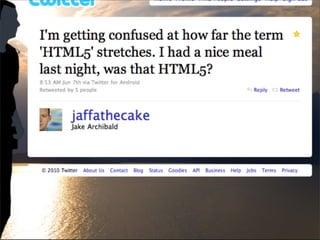
HTML5 brand
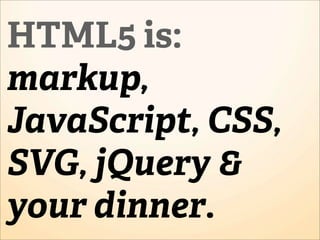
HTML5 is:
markup,
JavaScript, CSS,
SVG, jQuery &
your dinner.
HTML5 is:
markup, Lie.
        Don'CSS,
JavaScript, t be
       stoop
             id
SVG, jQuery & ,
        but...
your dinner.
HTML5 is
anything & everything
to mere mortal beings.
Today
Media
<video src=bruce.mp4>
 <a href="bruce.mp4">Download</a>
</video>
Codec Wars
<video>
 <source src=bruce.mp4>
 <source src=bruce.ogv>
</video>
<video>
 <source src=bruce.webm>
 <source src=bruce.mp4>
 <source src=bruce.ogv>
</video>
<video controls>
 <source src=bruce.mp4>
 <source src=bruce.ogv>
</video>
<video>
works i n IE6
<video>
wo L    n .IE6
   rks iie
http://camendesign.com/code/video_for_everybody

<video width="640" height="360" controls preload="none">
  <!-- MP4 must be first for iPad! -->
  <source src="__VIDEO__.MP4" type="video/mp4" /><!-- WebKit video     -->
  <source src="__VIDEO__.OGV" type="video/ogg" /><!-- Firefox / Opera -->
  <!-- fallback to Flash: -->
  <object width="640" height="384" type="application/x-shockwave-flash"
data="__FLASH__.SWF">
     <!-- Firefox uses the `data` attribute above, IE/Safari uses the param below -->
     <param name="movie" value="__FLASH__.SWF" />
     <param name="flashvars" value="image=__POSTER__.JPG&amp;file=__VIDEO__.MP4" />
     <!-- fallback image. note the title field below, put the title of the video there -->
     <img src="__VIDEO__.JPG" width="640" height="360" alt="__TITLE__"
          title="No video playback capabilities, please download the video below" />
  </object>
</video>
<!-- you *must* offer a download link as they may be able to play the file locally.
customise this bit all you want -->
<p> <strong>Download Video:</strong>
  Closed Format: <a href="__VIDEO__.MP4">"MP4"</a>
  Open Format: <a href="__VIDEO__.OGV">"OGG"</a>
</p>
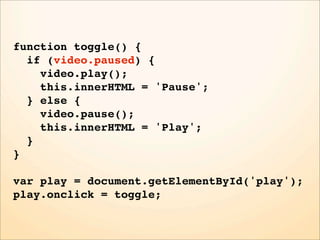
Custom player style
function toggle() {
  if (video.paused) {
    video.play();
    this.innerHTML = 'Pause';
  } else {
    video.pause();
    this.innerHTML = 'Play';
  }
}

var play = document.getElementById('play');
play.onclick = toggle;
function toggle() {
  if (video.paused) {
    video.play();
    this.innerHTML = 'Pause';
  } else {
    video.pause();
    this.innerHTML = 'Play';
  }
}

var play = document.getElementById('play');
play.onclick = toggle;
function toggle() {
  if (video.paused) {
    video.play();
    this.innerHTML = 'Pause';
  } else {
    video.pause();
    this.innerHTML = 'Play';
  }
}

var play = document.getElementById('play');
play.onclick = toggle;
function toggle() {
  if (video.paused) {
    video.play();
    this.innerHTML = 'Pause';
  } else {
    video.pause();
    this.innerHTML = 'Play';
  }
}

var play = document.getElementById('play');
play.onclick = toggle;
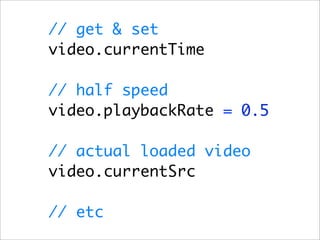
// get & set
video.currentTime

// half speed
video.playbackRate = 0.5

// actual loaded video
video.currentSrc

// etc
video.ontimeupdate = function () {
   updatePlayhead(this.currentTime);
};
Fullscreen?
Warning! User agents should not provide a public API to cause
videos to be shown full-screen. A script, combined with a carefully
crafted video file, could trick the user into thinking a system-modal
dialog had been shown, and prompt the user for a password. There is
also the danger of "mere" annoyance, with pages launching full-
screen videos when links are clicked or pages navigated. Instead,
user-agent specific interface features may be provided to easily allow
the user to obtain a full-screen playback mode.
Canvas
Cooler than a fake Han Solo.
First consider SVG:
Standard
Vertical
Graphing
First consider SVG:
Standard
Vertical
  Lie.
Graphing
First consider SVG:
Standard a lie.
       Not
Vertical
  Lie.
Graphing
SVG: Vector based, good for simple
and interactive

Canvas: Pixel based, good for pixel
manipulation & high animation


Check out raphaeljs.com
Mix & match
to the
technology's
strength
pixel
pushing
http://mugtug.com/darkroom
var ctx = canvas.getContext('2d');
ctx.getImageData(0,0,w,h)
ctx.getImageData(0, 0, w, h);


         0   1   2    3


 i = 0   r   g   b    a


 i = 1   r   g   b    a


 i...    r   g   b    a
pixels.data[i * 4 + 0];


        0   1   2    3


i = 0   r   g   b    a


i = 1   r   g   b    a


i...    r   g   b    a
pixels.data[i * 4 + 1];


        0   1   2    3


i = 0   r   g   b    a


i = 1   r   g   b    a


i...    r   g   b    a
pixels.data[i * 4 + 2];


        0   1   2    3


i = 0   r   g   b    a


i = 1   r   g   b    a


i...    r   g   b    a
pixels.data[i * 4 + 3];


        0   1   2    3


i = 0   r   g   b    a


i = 1   r   g   b    a


i...    r   g   b    a
var px = ctx.getImageData(0, 0, w, h),
    l = px.data.length,
    i;

for (i = 0; i < l; i += 4) {


}
var px = ctx.getImageData(0, 0, w, h),
    l = px.data.length,
    i;

for (i = 0; i < l; i += 4) {


                     This says loop
                     over each pixel
}
var px = ctx.getImageData(0, 0, w, h),
    l = px.data.length,
    i;

for (i = 0; i < l; i += 4) {
  px.data[i+0] = 255 - px.data[i+0];


}
var px = ctx.getImageData(0, 0, w, h),
    l = px.data.length,
    i;

for (i = 0; i < l; i += 4) {
  px.data[i+0] = 255 - px.data[i+0];
  px.data[i+1] = 255 - px.data[i+1];


}
var px = ctx.getImageData(0, 0, w, h),
    l = px.data.length,
    i;

for (i = 0; i < l; i   += 4) {
  px.data[i+0] = 255   - px.data[i+0];
  px.data[i+1] = 255   - px.data[i+1];
  px.data[i+2] = 255   - px.data[i+2];

}
var px = ctx.getImageData(0, 0, w, h),
    l = px.data.length,
    i;

for (i = 0; i < l; i += 4) {
  px.data[i+0] = 255 - px.data[i+0];
  px.data[i+1] = 255 - px.data[i+1];
  px.data[i+2] = 255 - px.data[i+2];
  // don't need to do the alphachannel
}
var px = ctx.getImageData(0, 0, w, h),
    l = px.data.length,
    i;

for (i = 0; i < l; i += 4) {
  px.data[i+0] = 255 - px.data[i+0];
  px.data[i+1] = 255 - px.data[i+1];
  px.data[i+2] = 255 - px.data[i+2];
  // don't need to do the alphachannel
}

ctx.putImageData(px, 0, 0);
You can do
that in SVG,
but you can't
do this:
http://mrdoob.com
canvas.toDataURL()
canvas.toDataURL()
data:image/
png;base64,iVBORw0KGgoAA
AGQCAYAAACAvzbMAAAgAElEQ
f2e692YghpAYQuYQQaP9U8Ur
Q4gSwXNbREIaqVKlpVFPq6G0
VIhMZJDc3OEM/
99v7b3P2efcfc49e5+9z9nDd
+67PWWd
+95liOD8IBAiAAAiAAAjYJxG
GAgCAjgAAIgAAIOCIAAXGEDY
ACIAACjghAQBxhgyMQAAEQAA
IQEEfY4AgEQAAEQAACgjwAAi
IBEAABEICAIA
+AAAiAAAg4IgABcYQNjkAABE
KOCEBAHGGDIxAAARAAAQgI8g
Shims


1. Silverlight
Bridge
2. excanvas.js
Storage
Cookies
suck.
    (for most situations)
The code for
cookies is
painful: so
we google it.
"Session"
     cookies
leak across
 "sessions".
Non-session
cookies require
"special"
date format
Deleting
       cookies,
doesn't delete,
    but sets it
   in the past.
Fuck cookies.
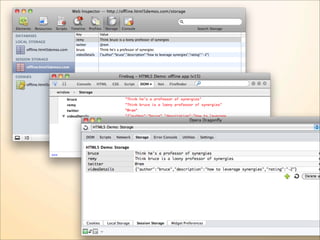
Sexy Web Storage FTW
Key/value pair
One API
setItem(key, value)
One API
setItem(key, value)
string* getItem(key)
One API
setItem(key, value)
string* getItem(key)
removeItem(key)
One API
setItem(key, value)
string* getItem(key)
removeItem(key)
string key(index)
One API
setItem(key, value)
string* getItem(key)
removeItem(key)
string key(index)
clear()
One API
setItem(key, value)
string* getItem(key)
removeItem(key)
string key(index)
clear()
.length
Two instances


localStorage
sessionStorage
localStorage

• Persists
• Applied to document origin, i.e.
  scheme/host/port tuple

• No expiry
sessionStorage

• Lasts whilst on the document origin
• Doesn't leak
• Exactly the same API as localStorage
var ss = sessionStorage;


ss.setItem('version', 12);
ss.getItem('version');
rnin g!
Wa


     Values are strings
rnin g!
Wa


     Values are strings

            Work around: JSON
      (and http://www.json.org/json2.js)
var ss = sessionStorage,
    user = { screen_name : ‘rem’,
             rating : 11 };


ss.setItem(‘user’, JSON.stringify(user));
var obj = JSON.parse(ss.getItem(‘user’));
alert(obj.screen_name);
window.name shim


    http://gist.github.com/350433
Alternatives
Web SQL Database
IndexedDB
Geolocation
navigator.geolocation
getCurrentPosition
watchPosition
clearPosition
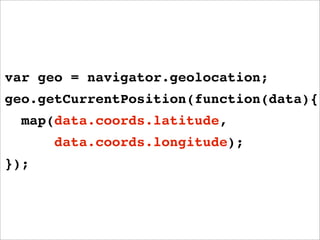
var geo = navigator.geolocation;
geo.getCurrentPosition(function(data){
  map(data.coords.latitude,
      data.coords.longitude);
});
var geo = navigator.geolocation;
geo.getCurrentPosition(function(data){
  map(data.coords.latitude,
      data.coords.longitude);
});
var geo = navigator.geolocation;
geo.getCurrentPosition(function(data){
  map(data.coords.latitude,
      data.coords.longitude);
});
var geo = navigator.geolocation;
geo.getCurrentPosition(function(data){
  map(data.coords.latitude,
      data.coords.longitude);
});
var geo = navigator.geolocation;
geo.getCurrentPosition(function(data){
  map(data.coords.latitude,
      data.coords.longitude);
});
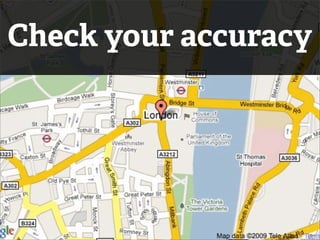
Check your accuracy
http://j.mp/geoshim
if (!navigator.geolocation) {

navigator.geolocation = (function (window) {
  function getCurrentPosition(callback) {
    // source: http://www.maxmind.com/app/javascript_city
    var geourl = 'http://j.maxmind.com/app/geoip.js_' + Math.random(),
        iframe = document.createElement('iframe'),
        doc, win;

    iframe.style.display = 'none';
    window.document.body.appendChild(iframe);

    doc = iframe.contentDocument || iframe.contentWindow.document;
    win = iframe.contentWindow;

    // once the script has loaded, it triggers an onload event
    iframe.onload = function () {
      // assign all the captured values across to our geo object
      var geo = {
        coords: {
           latitude: win.geoip_latitude(),
           longitude: win.geoip_longitude()
           // other values are supported, i.e. accuracy, speed, heading, etc
        },
        timestamp: (new Date()).getTime()
Sockets
Move
 over
comet.
Low latency.
Direct connection.
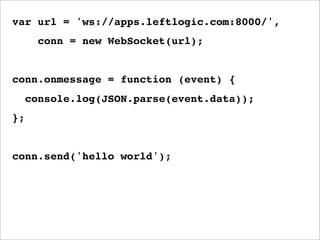
Simple API.
var url = 'ws://apps.leftlogic.com:8000/',
       conn = new WebSocket(url);


conn.onmessage = function (event) {
     console.log(JSON.parse(event.data));
};


conn.send('hello world');
var url = 'ws://apps.leftlogic.com:8000/',
       conn = new WebSocket(url);


conn.onmessage = function (event) {
     console.log(JSON.parse(event.data));
};


conn.send('hello world');
var url = 'ws://apps.leftlogic.com:8000/',
      conn = new WebSocket(url);


conn.onmessage = function (event) {
     console.log(JSON.parse(event.data));
};


conn.send('hello world');
var url = 'ws://apps.leftlogic.com:8000/',
       conn = new WebSocket(url);


conn.onmessage = function (event) {
     console.log(JSON.parse(event.data));
};


conn.send('hello world');
var url = 'ws://apps.leftlogic.com:8000/',
       conn = new WebSocket(url);


conn.onmessage = function (event) {
     console.log(JSON.parse(event.data));
};


conn.send('hello world');
var url = 'ws://apps.leftlogic.com:8000/',
       conn = new WebSocket(url);


conn.onmessage = function (event) {
     console.log(JSON.parse(event.data));
};


conn.send('hello world');
http://rem.im/collab-drawing
http://github.com/gimite/web-socket-js/
Partial
Offline
Using a Manifest
<!DOCTYPE html>
<html manifest="my.manifest">
<body>
<!-- my page -->
</body>
</html>
my.manifest
CACHE MANIFEST
app.html
css/style.css
js/app.js
#version 13
The Manifest

1. Serve as text/manifest, by
   adding to mime.types:

text/cache-manifest manifest
t ip    Firefox caching

 <IfModule mod_expires.c>
  ExpiresActive on
  ExpiresByType text/cache-manifest
  ↪ “access plus 0 seconds”
 </IfModule>
The Manifest

2. First line must be:

    CACHE MANIFEST
The Manifest

3. Including page is implicitly
   included in the cache.
The Manifest

4. Include some versioning to
   cache bust your manifest

     # version 16
The Manifest

5. Two futher namespaces:
   NETWORK & FALLBACK

    FALLBACK:
    / offline.html
CACHE MANIFEST

CACHE:
app.js
app.css
index.html

NETWORK:
/live/*

FALLBACK:
* offline.html
CACHE MANIFEST

                    CACHE:
                    app.js
Served from cache   app.css
                    index.html

                    NETWORK:
                    /live/*

                    FALLBACK:
                    * offline.html
CACHE MANIFEST

                           CACHE:
                           app.js
                           app.css
                           index.html
      Requests to
http://mysite.com/live/x   NETWORK:
                           /live/*
  must go via the web
                           FALLBACK:
                           * offline.html
CACHE MANIFEST

                        CACHE:
                        app.js
                        app.css
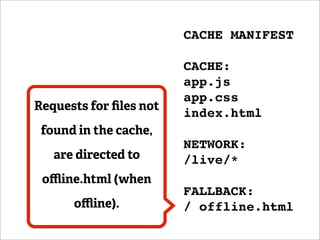
Requests for files not
                        index.html
 found in the cache,
                        NETWORK:
   are directed to      /live/*
 offline.html (when
                        FALLBACK:
      offline).           / offline.html
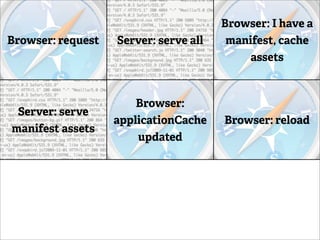
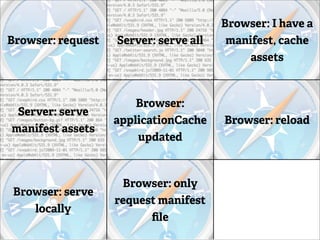
Browser: I have a
Browser: request   Server: serve all    manifest, cache
                                           assets


                       Browser:
 Server: serve
                   applicationCache    Browser: reload
manifest assets
                       updated


                    Browser: only
 Browser: serve                        Server: 304 Not
                   request manifest
    locally                               Modified
                         file
Browser: I have a
Browser: request   Server: serve all    manifest, cache
                                           assets


                       Browser:
 Server: serve
                   applicationCache    Browser: reload
manifest assets
                       updated


                    Browser: only
 Browser: serve                        Server: 304 Not
                   request manifest
    locally                               Modified
                         file
Browser: I have a
Browser: request   Server: serve all    manifest, cache
                                           assets


                       Browser:
 Server: serve
                   applicationCache    Browser: reload
manifest assets
                       updated


                    Browser: only
 Browser: serve                        Server: 304 Not
                   request manifest
    locally                               Modified
                         file
Browser: I have a
Browser: request   Server: serve all    manifest, cache
                                           assets


                       Browser:
 Server: serve
                   applicationCache    Browser: reload
manifest assets
                       updated


                    Browser: only
 Browser: serve                        Server: 304 Not
                   request manifest
    locally                               Modified
                         file
Browser: I have a
Browser: request   Server: serve all    manifest, cache
                                           assets


                       Browser:
 Server: serve
                   applicationCache    Browser: reload
manifest assets
                       updated


                    Browser: only
 Browser: serve                        Server: 304 Not
                   request manifest
    locally                               Modified
                         file
Browser: I have a
Browser: request   Server: serve all    manifest, cache
                                           assets


                       Browser:
 Server: serve
                   applicationCache    Browser: reload
manifest assets
                       updated


                    Browser: only
 Browser: serve                        Server: 304 Not
                   request manifest
    locally                               Modified
                         file
Browser: I have a
Browser: request   Server: serve all    manifest, cache
                                           assets


                       Browser:
 Server: serve
                   applicationCache    Browser: reload
manifest assets
                       updated


                    Browser: only
 Browser: serve                        Server: 304 Not
                   request manifest
    locally                               Modified
                         file
Browser: I have a
Browser: request   Server: serve all    manifest, cache
                                           assets


                       Browser:
 Server: serve
                   applicationCache    Browser: reload
manifest assets
                       updated


                    Browser: only
 Browser: serve                        Server: 304 Not
                   request manifest
    locally                               Modified
                         file
Browser: I have a
Browser: request   Server: serve all    manifest, cache
                                           assets


                       Browser:
 Server: serve
                   applicationCache    Browser: reload
manifest assets
                       updated


                    Browser: only
 Browser: serve                        Server: 304 Not
                   request manifest
    locally                               Modified
                         file
File API
files[0].getAsDataURL()
Link prefetching
Web Workers
Web Forms
Hash change event, history state management
Contenteditable
Native drag and drop - embedding of data
Microdata
Cross server messaging
embedded attribute data
mime-type registration

DXHTML6
Link prefetching
Web Workers
Web Forms
Hash change event, history state management
Contenteditable
Native drag and drop - embedding of data
Microdata
Cross server messaging
embedded attribute data
mime-type registration           Lie.
DXHTML6
"Should I be
using HTML5
today?"
1. doctype, script & styles only

2. New HTML5 elements
1. doctype, script & styles only

2. New HTML5 elements

3. Existing APIs
1. doctype, script & styles only

2. New HTML5 elements

3. Existing APIs

4. Shims
Yes.
introducinghtml5.com


              Yes.

@rem
remy@leftlogic.com

Browsers with Wings