




















Copyright @Hirokazu Egashira a.k.a eegozilla. All right reserved.
Google XR ARCore/Daydream
EOL
ARCore
Copyright @Hirokazu Egashira a.k.a eegozilla. All right reserved.
What is ARCore ?
Copyright @Hirokazu Egashira a.k.a eegozilla. All right reserved.
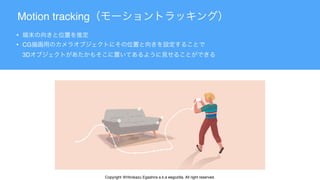
Motion tracking
•
• CG 

3D
Copyright @Hirokazu Egashira a.k.a eegozilla. All right reserved.
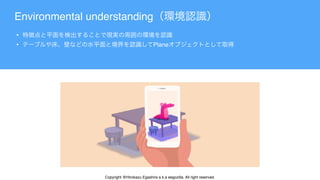
Environmental understanding
•
• Plane
Copyright @Hirokazu Egashira a.k.a eegozilla. All right reserved.
Oriented Point


Copyright @Hirokazu Egashira a.k.a eegozilla. All right reserved.
•
• 3D
Light estimation
Copyright @Hirokazu Egashira a.k.a eegozilla. All right reserved.
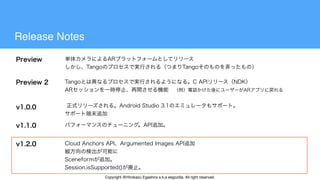
Release Notes
Copyright @Hirokazu Egashira a.k.a eegozilla. All right reserved.
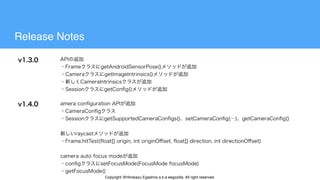
Release Notes
Copyright @Hirokazu Egashira a.k.a eegozilla. All right reserved.
ARCore Augmented Images 2D AR
ARCore
AR
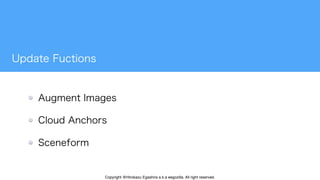
Augment Images
Copyright @Hirokazu Egashira a.k.a eegozilla. All right reserved.
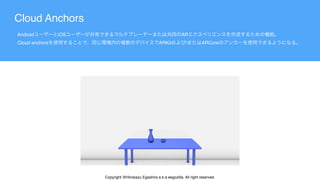
Android iOS AR 

Cloud anchors ARKit / ARCore
Cloud Anchors
Copyright @Hirokazu Egashira a.k.a eegozilla. All right reserved.
Just a Line
Copyright @Hirokazu Egashira a.k.a eegozilla. All right reserved.
Just a Line
Copyright @Hirokazu Egashira a.k.a eegozilla. All right reserved.
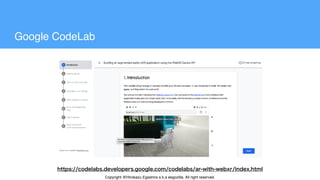
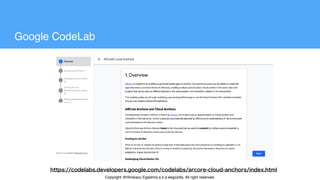
Google CodeLab
Copyright @Hirokazu Egashira a.k.a eegozilla. All right reserved.
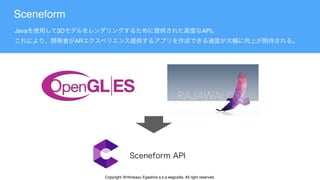
Java 3D API 

AR
Sceneform
Copyright @Hirokazu Egashira a.k.a eegozilla. All right reserved.
How to use
compileOptions {
sourceCompatibility JavaVersion.VERSION_1_8
targetCompatibility JavaVersion.VERSION_1_8
}
app/build.gradle  android {}
Java 8
ARCore Sceneform
implementation "com.google.ar.sceneform.ux:sceneform-ux:1.0.0"
app/build.gradle dependencies {} 
Copyright @Hirokazu Egashira a.k.a eegozilla. All right reserved.
How to use
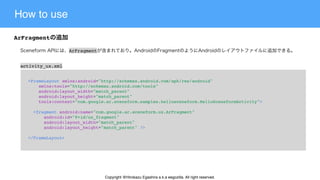
ArFragment
<FrameLayout xmlns:android="http://schemas.android.com/apk/res/android"
    xmlns:tools="http://schemas.android.com/tools"
    android:layout_width="match_parent"
    android:layout_height="match_parent"
    tools:context="com.google.ar.sceneform.samples.hellosceneform.HelloSceneformActivity">
  <fragment android:name="com.google.ar.sceneform.ux.ArFragment"
      android:id="@+id/ux_fragment"
      android:layout_width="match_parent"
      android:layout_height="match_parent" />
</FrameLayout>
ArFragment
activity_ux.xml
Copyright @Hirokazu Egashira a.k.a eegozilla. All right reserved.
How to use
Renderable
buildscript {
  …
  dependencies {
    …
    classpath 'com.google.ar.sceneform:plugin:1.4.0'
  }
}
build.gradle
Renderable
Copyright @Hirokazu Egashira a.k.a eegozilla. All right reserved.
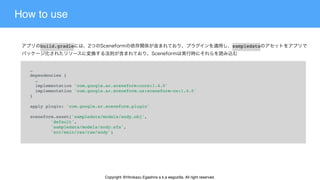
How to use
…
dependencies {
  …
  implementation 'com.google.ar.sceneform:core:1.4.0'
  implementation 'com.google.ar.sceneform.ux:sceneform-ux:1.4.0'
}
apply plugin: 'com.google.ar.sceneform.plugin'
sceneform.asset('sampledata/models/andy.obj',
        'default',
        'sampledata/models/andy.sfa',
        'src/main/res/raw/andy')
build.gradle sampledata
Copyright @Hirokazu Egashira a.k.a eegozilla. All right reserved.
How to use
ModelRenderable.builder()
    .setSource(this, R.raw.andy)
    .build()
    .thenAccept(renderable -> andyRenderable = renderable)
    .exceptionally(
        throwable -> {
        Log.e(TAG, "Unable to load Renderable.", throwable);
        return null;
    });
Copyright @Hirokazu Egashira a.k.a eegozilla. All right reserved.
How to use
Node node = new Node();
node.setParent(arFragment.getArSceneView().getScene());
node.setRenderable(andyRenderable);
ARSceneView Scene
node
Copyright @Hirokazu Egashira a.k.a eegozilla. All right reserved.
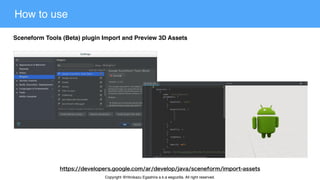
How to use
Sceneform Tools (Beta) plugin Import and Preview 3D Assets
Copyright @Hirokazu Egashira a.k.a eegozilla. All right reserved.
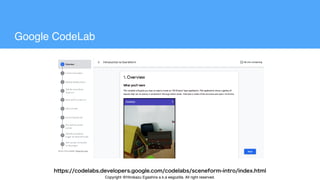
Google CodeLab
Copyright @Hirokazu Egashira a.k.a eegozilla. All right reserved.
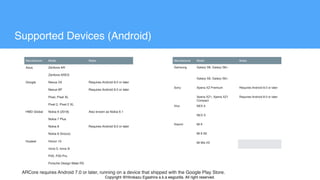
Manufacturer Model Notes
Asus Zenfone AR
Zenfone ARES
Google Nexus 5X Requires Android 8.0 or later
Nexus 6P Requires Android 8.0 or later
Pixel, Pixel XL
Pixel 2, Pixel 2 XL
HMD Global Nokia 6 (2018) Also known as Nokia 6.1
Nokia 7 Plus
Nokia 8 Requires Android 8.0 or later
Nokia 8 Sirocco
Huawei Honor 10
nova 3, nova 3i
P20, P20 Pro
Porsche Design Mate RS
Supported Devices (Android)
Manufacturer Model Notes
Samsung Galaxy S8, Galaxy S8+
Galaxy S9, Galaxy S9+
Sony Xperia XZ Premium Requires Android 8.0 or later
Xperia XZ1, Xperia XZ1
Compact
Requires Android 8.0 or later
Vivo NEX A
NEX S
Xiaomi Mi 8
Mi 8 SE
Mi Mix 2S
ARCore requires Android 7.0 or later, running on a device that shipped with the Google Play Store.
Copyright @Hirokazu Egashira a.k.a eegozilla. All right reserved.
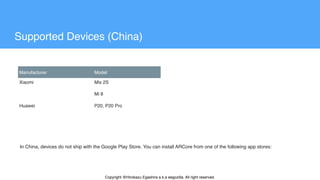
Manufacturer Model
Xiaomi Mix 2S
Mi 8
Huawei P20, P20 Pro
Supported Devices (China)
In China, devices do not ship with the Google Play Store. You can install ARCore from one of the following app stores:
Copyright @Hirokazu Egashira a.k.a eegozilla. All right reserved.
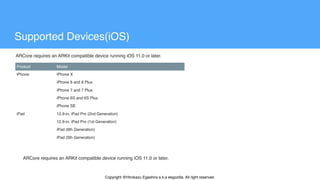
Product Model
iPhone iPhone X
iPhone 8 and 8 Plus
iPhone 7 and 7 Plus
iPhone 6S and 6S Plus
iPhone SE
iPad 12.9-in. iPad Pro (2nd Generation)
12.9-in. iPad Pro (1st Generation)
iPad (6th Generation)
iPad (5th Generation)
Supported Devices(iOS)
ARCore requires an ARKit compatible device running iOS 11.0 or later.
Copyright @Hirokazu Egashira a.k.a eegozilla. All right reserved.
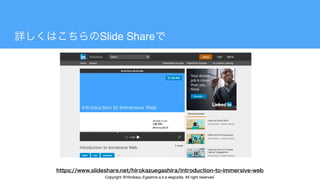
Slide Share
Copyright @Hirokazu Egashira a.k.a eegozilla. All right reserved.
Google Chrome Canary
• 2018 6 Chrome Canary WebXR device API WebXR Hit Test API WebAR
• ARCore (ARCore Installed) + Android 8.0 + Chrome Canary(version 70 higher)
Copyright @Hirokazu Egashira a.k.a eegozilla. All right reserved.
WebXR application development stack
ARCore Service

arcore.apk
Native API
Native App
IBinderInterdace
Core

Process
Web App

[ Web XR device API + WebGL.etc ]
User App

Process Chromium

[Native]
Web
Camera View
Copyright @Hirokazu Egashira a.k.a eegozilla. All right reserved.
How to implement
xrSession.requestHitTest(origin, direction, frameOfReference)
.then(xrHitResult => {
  //
});
XRSession.requestHitTest()
origin direction
frameOfReference
Copyright @Hirokazu Egashira a.k.a eegozilla. All right reserved.
How to implement
function onXRFrame(t, frame) {
  let xrSession = frame.session;
  // Level
  // onSessionStarted() API
  let xrPose = frame.getDevicePose(xrFrameOfRef);
  if (xrPose && xrPose.poseModelMatrix) {
    // Hit Test
  }
}


requestAnimationFrame()
Copyright @Hirokazu Egashira a.k.a eegozilla. All right reserved.
How to implement
function onXRFrame(t, frame) {
  let xrSession = frame.session;
  // Eye Level
  // onSessionStarted()
  let xrPose = frame.getDevicePose(xrFrameOfRef);
  if (xrPose && xrPose.poseModelMatrix) {
    // (※)
    xrSession.requestHitTest(rayOrigin, rayDirection, xrFrameOfRef)
    .then((results) => {
      if (results.length) {
        //
      }
    });
  }
  session.requestAnimationFrame(onXRFrame);
}


Copyright @Hirokazu Egashira a.k.a eegozilla. All right reserved.
How to implement
Copyright @Hirokazu Egashira a.k.a eegozilla. All right reserved.
Web
Copyright @Hirokazu Egashira a.k.a eegozilla. All right reserved.
Google CodeLab
Copyright @Hirokazu Egashira a.k.a eegozilla. All right reserved.
ABC 2018 Autumn in Kawasaki
XR ARCore[Unity or Sceneform or Cloud Anchor] WebXR
Copyright @Hirokazu Egashira a.k.a eegozilla. All right reserved.

ARCore Update

  • 2.
    Copyright @Hirokazu Egashiraa.k.a eegozilla. All right reserved.
  • 3.
    Copyright @Hirokazu Egashiraa.k.a eegozilla. All right reserved.
  • 4.
    Google XR ARCore/Daydream EOL ARCore Copyright@Hirokazu Egashira a.k.a eegozilla. All right reserved.
  • 5.
    Copyright @Hirokazu Egashiraa.k.a eegozilla. All right reserved.
  • 7.
    What is ARCore? Copyright @Hirokazu Egashira a.k.a eegozilla. All right reserved.
  • 8.
    Motion tracking • • CG
 3D Copyright @Hirokazu Egashira a.k.a eegozilla. All right reserved.
  • 9.
    Copyright @Hirokazu Egashiraa.k.a eegozilla. All right reserved.
  • 10.
    Environmental understanding • • Plane Copyright@Hirokazu Egashira a.k.a eegozilla. All right reserved.
  • 11.
    Oriented Point 
 
 Copyright @HirokazuEgashira a.k.a eegozilla. All right reserved.
  • 12.
    • • 3D Light estimation Copyright@Hirokazu Egashira a.k.a eegozilla. All right reserved.
  • 13.
    Copyright @Hirokazu Egashiraa.k.a eegozilla. All right reserved.
  • 15.
    Release Notes Copyright @HirokazuEgashira a.k.a eegozilla. All right reserved.
  • 16.
    Release Notes Copyright @HirokazuEgashira a.k.a eegozilla. All right reserved.
  • 17.
    Copyright @Hirokazu Egashiraa.k.a eegozilla. All right reserved.
  • 18.
    ARCore Augmented Images2D AR ARCore AR Augment Images Copyright @Hirokazu Egashira a.k.a eegozilla. All right reserved.
  • 19.
    Android iOS AR
 Cloud anchors ARKit / ARCore Cloud Anchors Copyright @Hirokazu Egashira a.k.a eegozilla. All right reserved.
  • 20.
    Just a Line Copyright@Hirokazu Egashira a.k.a eegozilla. All right reserved.
  • 21.
    Just a Line Copyright@Hirokazu Egashira a.k.a eegozilla. All right reserved.
  • 22.
    Google CodeLab Copyright @HirokazuEgashira a.k.a eegozilla. All right reserved.
  • 23.
    Java 3D API
 AR Sceneform Copyright @Hirokazu Egashira a.k.a eegozilla. All right reserved.
  • 24.
    How to use compileOptions{ sourceCompatibility JavaVersion.VERSION_1_8 targetCompatibility JavaVersion.VERSION_1_8 } app/build.gradle  android {} Java 8 ARCore Sceneform implementation "com.google.ar.sceneform.ux:sceneform-ux:1.0.0" app/build.gradle dependencies {}  Copyright @Hirokazu Egashira a.k.a eegozilla. All right reserved.
  • 25.
    How to use ArFragment <FrameLayoutxmlns:android="http://schemas.android.com/apk/res/android"     xmlns:tools="http://schemas.android.com/tools"     android:layout_width="match_parent"     android:layout_height="match_parent"     tools:context="com.google.ar.sceneform.samples.hellosceneform.HelloSceneformActivity">   <fragment android:name="com.google.ar.sceneform.ux.ArFragment"       android:id="@+id/ux_fragment"       android:layout_width="match_parent"       android:layout_height="match_parent" /> </FrameLayout> ArFragment activity_ux.xml Copyright @Hirokazu Egashira a.k.a eegozilla. All right reserved.
  • 26.
    How to use Renderable buildscript{   …   dependencies {     …     classpath 'com.google.ar.sceneform:plugin:1.4.0'   } } build.gradle Renderable Copyright @Hirokazu Egashira a.k.a eegozilla. All right reserved.
  • 27.
    How to use … dependencies{   …   implementation 'com.google.ar.sceneform:core:1.4.0'   implementation 'com.google.ar.sceneform.ux:sceneform-ux:1.4.0' } apply plugin: 'com.google.ar.sceneform.plugin' sceneform.asset('sampledata/models/andy.obj',         'default',         'sampledata/models/andy.sfa',         'src/main/res/raw/andy') build.gradle sampledata Copyright @Hirokazu Egashira a.k.a eegozilla. All right reserved.
  • 28.
    How to use ModelRenderable.builder()    .setSource(this, R.raw.andy)     .build()     .thenAccept(renderable -> andyRenderable = renderable)     .exceptionally(         throwable -> {         Log.e(TAG, "Unable to load Renderable.", throwable);         return null;     }); Copyright @Hirokazu Egashira a.k.a eegozilla. All right reserved.
  • 29.
    How to use Nodenode = new Node(); node.setParent(arFragment.getArSceneView().getScene()); node.setRenderable(andyRenderable); ARSceneView Scene node Copyright @Hirokazu Egashira a.k.a eegozilla. All right reserved.
  • 30.
    How to use SceneformTools (Beta) plugin Import and Preview 3D Assets Copyright @Hirokazu Egashira a.k.a eegozilla. All right reserved.
  • 31.
    Google CodeLab Copyright @HirokazuEgashira a.k.a eegozilla. All right reserved.
  • 32.
    Manufacturer Model Notes AsusZenfone AR Zenfone ARES Google Nexus 5X Requires Android 8.0 or later Nexus 6P Requires Android 8.0 or later Pixel, Pixel XL Pixel 2, Pixel 2 XL HMD Global Nokia 6 (2018) Also known as Nokia 6.1 Nokia 7 Plus Nokia 8 Requires Android 8.0 or later Nokia 8 Sirocco Huawei Honor 10 nova 3, nova 3i P20, P20 Pro Porsche Design Mate RS Supported Devices (Android) Manufacturer Model Notes Samsung Galaxy S8, Galaxy S8+ Galaxy S9, Galaxy S9+ Sony Xperia XZ Premium Requires Android 8.0 or later Xperia XZ1, Xperia XZ1 Compact Requires Android 8.0 or later Vivo NEX A NEX S Xiaomi Mi 8 Mi 8 SE Mi Mix 2S ARCore requires Android 7.0 or later, running on a device that shipped with the Google Play Store. Copyright @Hirokazu Egashira a.k.a eegozilla. All right reserved.
  • 33.
    Manufacturer Model Xiaomi Mix2S Mi 8 Huawei P20, P20 Pro Supported Devices (China) In China, devices do not ship with the Google Play Store. You can install ARCore from one of the following app stores: Copyright @Hirokazu Egashira a.k.a eegozilla. All right reserved.
  • 34.
    Product Model iPhone iPhoneX iPhone 8 and 8 Plus iPhone 7 and 7 Plus iPhone 6S and 6S Plus iPhone SE iPad 12.9-in. iPad Pro (2nd Generation) 12.9-in. iPad Pro (1st Generation) iPad (6th Generation) iPad (5th Generation) Supported Devices(iOS) ARCore requires an ARKit compatible device running iOS 11.0 or later. ARCore requires an ARKit compatible device running iOS 11.0 or later. Copyright @Hirokazu Egashira a.k.a eegozilla. All right reserved.
  • 35.
    Copyright @Hirokazu Egashiraa.k.a eegozilla. All right reserved.
  • 37.
    Copyright @Hirokazu Egashiraa.k.a eegozilla. All right reserved.
  • 38.
    Slide Share Copyright @HirokazuEgashira a.k.a eegozilla. All right reserved.
  • 39.
    Google Chrome Canary •2018 6 Chrome Canary WebXR device API WebXR Hit Test API WebAR • ARCore (ARCore Installed) + Android 8.0 + Chrome Canary(version 70 higher) Copyright @Hirokazu Egashira a.k.a eegozilla. All right reserved.
  • 40.
    WebXR application developmentstack ARCore Service
 arcore.apk Native API Native App IBinderInterdace Core
 Process Web App
 [ Web XR device API + WebGL.etc ] User App
 Process Chromium
 [Native] Web Camera View Copyright @Hirokazu Egashira a.k.a eegozilla. All right reserved.
  • 41.
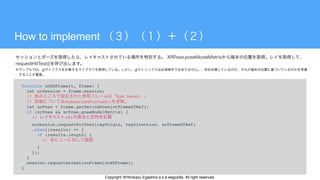
    How to implement xrSession.requestHitTest(origin,direction, frameOfReference) .then(xrHitResult => {   // }); XRSession.requestHitTest() origin direction frameOfReference Copyright @Hirokazu Egashira a.k.a eegozilla. All right reserved.
  • 42.
    How to implement functiononXRFrame(t, frame) {   let xrSession = frame.session;   // Level   // onSessionStarted() API   let xrPose = frame.getDevicePose(xrFrameOfRef);   if (xrPose && xrPose.poseModelMatrix) {     // Hit Test   } } 
 requestAnimationFrame() Copyright @Hirokazu Egashira a.k.a eegozilla. All right reserved.
  • 43.
    How to implement functiononXRFrame(t, frame) {   let xrSession = frame.session;   // Eye Level   // onSessionStarted()   let xrPose = frame.getDevicePose(xrFrameOfRef);   if (xrPose && xrPose.poseModelMatrix) {     // (※)     xrSession.requestHitTest(rayOrigin, rayDirection, xrFrameOfRef)     .then((results) => {       if (results.length) {         //       }     });   }   session.requestAnimationFrame(onXRFrame); } 
 Copyright @Hirokazu Egashira a.k.a eegozilla. All right reserved.
  • 44.
    How to implement Copyright@Hirokazu Egashira a.k.a eegozilla. All right reserved.
  • 45.
    Web Copyright @Hirokazu Egashiraa.k.a eegozilla. All right reserved.
  • 46.
    Google CodeLab Copyright @HirokazuEgashira a.k.a eegozilla. All right reserved.
  • 47.
    ABC 2018 Autumnin Kawasaki XR ARCore[Unity or Sceneform or Cloud Anchor] WebXR Copyright @Hirokazu Egashira a.k.a eegozilla. All right reserved.