



Google Play Services 
with Xamarin 
Building Apps that rock
+Peter Friese 
@peterfriese
What is Google Play 
Services?
Google Play Services 
• Set of APIs by Google
Google Play Services 
• Set of APIs by Google 
• Available for Devices running 
Gingerbread and higher
Google Play Services 
• Set of APIs by Google 
• Available for Devices running 
Gingerbread and higher 
• Access the latest in Google 
technology
Google Play Services 
• Set of APIs by Google 
• Available for Devices running 
Gingerbread and higher 
• Access the latest in Google 
technology 
• Frequent updates
Google Play Services 
• Set of APIs by Google 
• Available for Devices running 
Gingerbread and higher 
• Access the latest in Google 
technology 
• Frequent updates 
• One standard way to connect 
and authorise
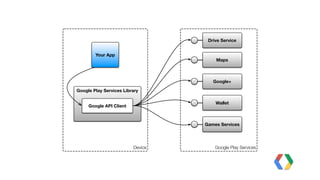
Google Play Services Library 
Device 
Drive Service 
Google Play Services 
Your App 
Google API Client 
Maps 
Google+ 
Wallet 
Games Services
How to Integrate Google 
Play Services
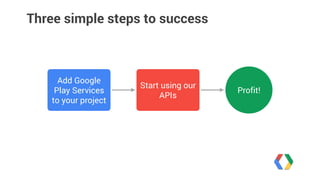
Three simple steps to success 
Add Google 
Play Services 
to your project 
Start using our 
APIs Profit!
it's a little 
bit more 
complicated. 
Actually, 
Image: http://en.wikipedia.org/wiki/Turf_maze
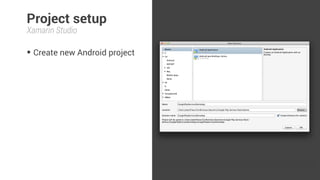
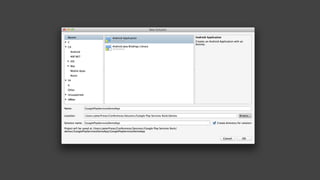
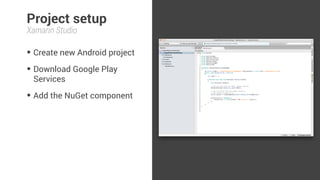
Project setup 
Xamarin Studio 
• Create new Android project
Project setup 
Xamarin Studio 
• Create new Android project
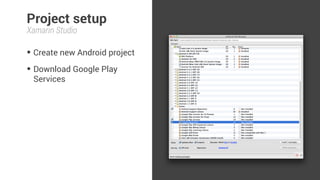
Project setup 
Xamarin Studio 
• Create new Android project 
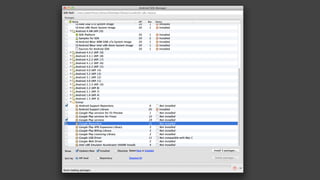
• Download Google Play 
Services
Project setup 
Xamarin Studio 
• Create new Android project 
• Download Google Play 
Services
Project setup 
Xamarin Studio 
• Create new Android project 
• Download Google Play 
Services 
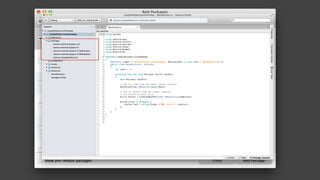
• Add the NuGet component
Project setup 
Xamarin Studio 
• Create new Android project 
• Download Google Play 
Services 
• Add the NuGet component
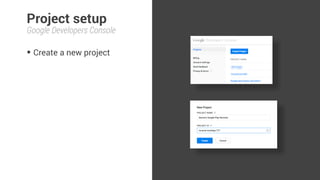
Project setup 
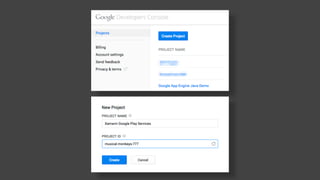
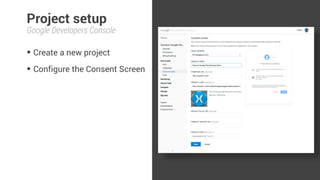
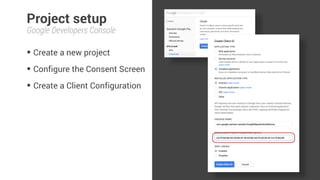
Google Developers Console 
• Create a new project
Project setup 
Google Developers Console 
• Create a new project
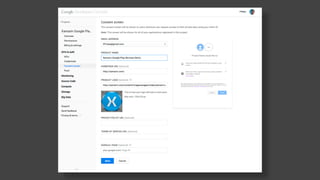
Project setup 
Google Developers Console 
• Create a new project 
• Configure the Consent Screen
Project setup 
Google Developers Console 
• Create a new project 
• Configure the Consent Screen
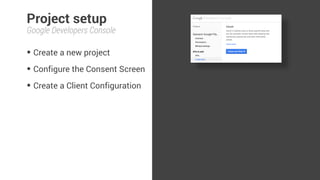
Project setup 
Google Developers Console 
• Create a new project 
• Configure the Consent Screen 
• Create a Client Configuration
Project setup 
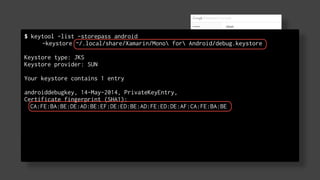
$ keytool -list -storepass android 
Google Developers Console 
• Create a new project 
• Configure the Consent Screen 
• Create a Client Configuration 
-keystore ~/.local/share/Xamarin/Mono for Android/debug.keystore 
! 
Keystore type: JKS 
Keystore provider: SUN 
Your keystore contains 1 entry 
androiddebugkey, 14-May-2014, PrivateKeyEntry, 
Certificate fingerprint (SHA1): 
CA:FE:BA:BE:DE:AD:BE:EF:DE:ED:BE:AD:FE:ED:DE:AF:CA:FE:BA:BE
Project setup 
Google Developers Console 
• Create a new project 
• Configure the Consent Screen 
• Create a Client Configuration
Project setup 
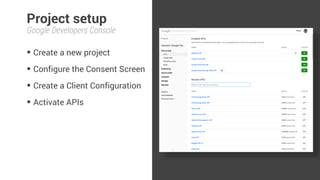
Google Developers Console 
• Create a new project 
• Configure the Consent Screen 
• Create a Client Configuration 
• Activate APIs
Connecting Your App 
with Google
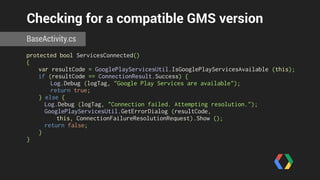
Checking for a compatible GMS version 
BaseActivity.cs 
protected bool ServicesConnected() 
{ 
var resultCode = GooglePlayServicesUtil.IsGooglePlayServicesAvailable (this); 
if (resultCode == ConnectionResult.Success) { 
Log.Debug (logTag, "Google Play Services are available"); 
return true; 
} else { 
Log.Debug (logTag, "Connection failed. Attempting resolution."); 
GooglePlayServicesUtil.GetErrorDialog (resultCode, 
this, ConnectionFailureResolutionRequest).Show (); 
return false; 
} 
}
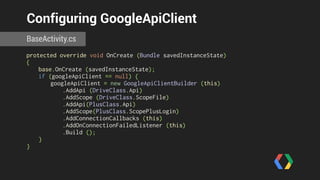
Configuring GoogleApiClient 
BaseActivity.cs 
protected override void OnCreate (Bundle savedInstanceState) 
{ 
base.OnCreate (savedInstanceState); 
if (googleApiClient == null) { 
googleApiClient = new GoogleApiClientBuilder (this) 
.AddApi (DriveClass.Api) 
.AddScope (DriveClass.ScopeFile) 
.AddApi(PlusClass.Api) 
.AddScope(PlusClass.ScopePlusLogin) 
.AddConnectionCallbacks (this) 
.AddOnConnectionFailedListener (this) 
.Build (); 
} 
}
Configuring GoogleApiClient 
BaseActivity.cs 
protected override void OnCreate (Bundle savedInstanceState) 
{ 
base.OnCreate (savedInstanceState); 
if (googleApiClient == null) { 
googleApiClient = new GoogleApiClientBuilder (this) 
.AddApi (DriveClass.Api) 
.AddScope (DriveClass.ScopeFile) 
.AddApi(PlusClass.Api) 
.AddScope(PlusClass.ScopePlusLogin) 
.AddConnectionCallbacks (this) 
.AddOnConnectionFailedListener (this) 
.Build (); 
} 
} 
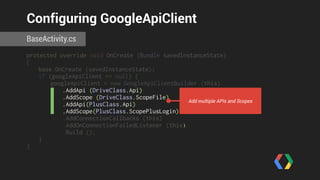
Add multiple APIs and Scopes
Configuring GoogleApiClient 
BaseActivity.cs 
protected override void OnCreate (Bundle savedInstanceState) 
{ 
base.OnCreate (savedInstanceState); 
if (googleApiClient == null) { 
googleApiClient = new GoogleApiClientBuilder (this) 
.AddApi (DriveClass.Api) 
.AddScope (DriveClass.ScopeFile) 
.AddApi(PlusClass.Api) 
.AddScope(PlusClass.ScopePlusLogin) 
.AddConnectionCallbacks (this) 
.AddOnConnectionFailedListener (this) 
.Build (); 
} 
} 
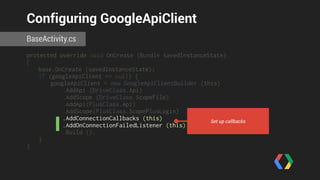
Set up callbacks
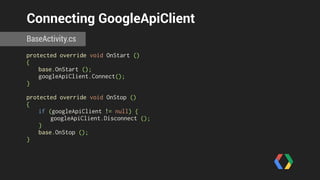
Connecting GoogleApiClient 
BaseActivity.cs 
protected override void OnStart () 
{ 
base.OnStart (); 
googleApiClient.Connect(); 
} 
! 
protected override void OnStop () 
{ 
if (googleApiClient != null) { 
googleApiClient.Disconnect (); 
} 
base.OnStop (); 
}
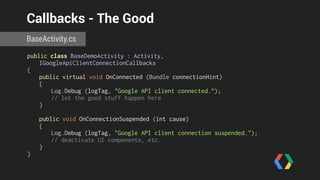
Callbacks - The Good 
BaseActivity.cs 
public class BaseDemoActivity : Activity, 
IGoogleApiClientConnectionCallbacks 
{ 
public virtual void OnConnected (Bundle connectionHint) 
{ 
Log.Debug (logTag, "Google API client connected.”); 
// let the good stuff happen here 
} 
public void OnConnectionSuspended (int cause) 
{ 
Log.Debug (logTag, "Google API client connection suspended."); 
// deactivate UI components, etc. 
} 
}
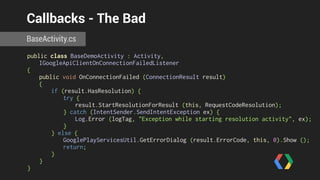
Callbacks - The Bad 
BaseActivity.cs 
public class BaseDemoActivity : Activity, 
IGoogleApiClientOnConnectionFailedListener 
{ 
public void OnConnectionFailed (ConnectionResult result) 
{ 
if (result.HasResolution) { 
try { 
result.StartResolutionForResult (this, RequestCodeResolution); 
} catch (IntentSender.SendIntentException ex) { 
Log.Error (logTag, "Exception while starting resolution activity", ex); 
} 
} else { 
GooglePlayServicesUtil.GetErrorDialog (result.ErrorCode, this, 0).Show (); 
return; 
} 
} 
}
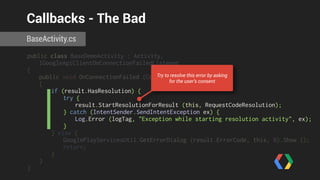
Callbacks - The Bad 
BaseActivity.cs 
public class BaseDemoActivity : Activity, 
IGoogleApiClientOnConnectionFailedListener 
{ 
public void OnConnectionFailed (ConnectionResult result) 
{ 
if (result.HasResolution) { 
try { 
result.StartResolutionForResult (this, RequestCodeResolution); 
} catch (IntentSender.SendIntentException ex) { 
Log.Error (logTag, "Exception while starting resolution activity", ex); 
} 
} else { 
GooglePlayServicesUtil.GetErrorDialog (result.ErrorCode, this, 0).Show (); 
return; 
} 
} 
} 
Try to resolve this error by asking 
for the user’s consent
A Closer Look at Some 
of the Services
?
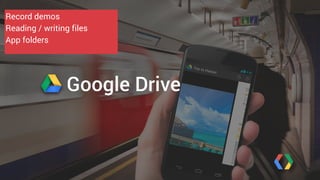
Record demos 
Reading / writing files 
App folders 
Google Drive
Google Drive 
• Cloud storage powered by 
Google’s infrastructure
Google Drive 
• Cloud storage powered by 
Google’s infrastructure 
• 15 GB for free, upgrades at 
competitive prices
Google Drive 
• Cloud storage powered by 
Google’s infrastructure 
• 15 GB for free, upgrades at 
competitive prices 
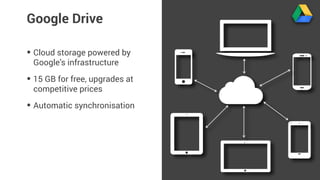
• Automatic synchronisation
Google Drive 
• Cloud storage powered by 
Google’s infrastructure 
• 15 GB for free, upgrades at 
competitive prices 
• Automatic synchronisation 
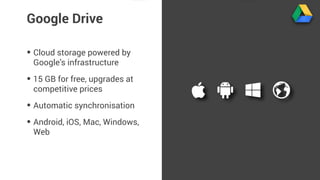
• Android, iOS, Mac, Windows, 
Web
Google Drive 
• Cloud storage powered by 
Google’s infrastructure 
• 15 GB for free, upgrades at 
competitive prices 
• Automatic synchronisation 
• Android, iOS, Mac, Windows, 
Web 
• UI controls (create / pick files)
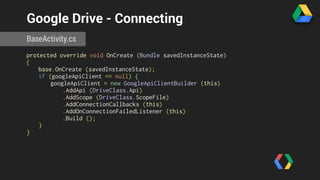
Google Drive - Connecting 
BaseActivity.cs 
protected override void OnCreate (Bundle savedInstanceState) 
{ 
base.OnCreate (savedInstanceState); 
if (googleApiClient == null) { 
googleApiClient = new GoogleApiClientBuilder (this) 
.AddApi (DriveClass.Api) 
.AddScope (DriveClass.ScopeFile) 
.AddConnectionCallbacks (this) 
.AddOnConnectionFailedListener (this) 
.Build (); 
} 
}
Configuring GoogleApiClient 
BaseActivity.cs 
protected override void OnCreate (Bundle savedInstanceState) 
{ 
base.OnCreate (savedInstanceState); 
if (googleApiClient == null) { 
googleApiClient = new GoogleApiClientBuilder (this) 
.AddApi (DriveClass.Api) 
.AddScope (DriveClass.ScopeFile) 
.AddConnectionCallbacks (this) 
.AddOnConnectionFailedListener (this) 
.Build (); 
} 
} 
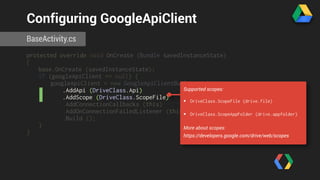
Supported scopes: 
• DriveClass.ScopeFile (drive.file) 
• DriveClass.ScopeAppFolder (drive.appfolder) 
More about scopes: 
https://developers.google.com/drive/web/scopes
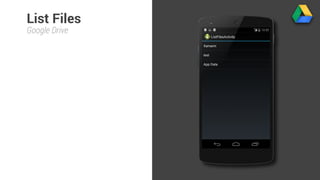
List Files 
Google Drive
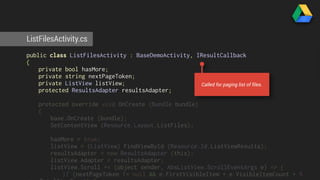
ListFilesActivity.cs 
public class ListFilesActivity : BaseDemoActivity, IResultCallback 
{ 
private bool hasMore; 
private string nextPageToken; 
private ListView listView; 
protected ResultsAdapter resultsAdapter; 
protected override void OnCreate (Bundle bundle) 
{ 
base.OnCreate (bundle); 
SetContentView (Resource.Layout.ListFiles); 
hasMore = true; 
listView = (ListView) FindViewById (Resource.Id.ListViewResults); 
resultsAdapter = new ResultsAdapter (this); 
listView.Adapter = resultsAdapter; 
listView.Scroll += (object sender, AbsListView.ScrollEventArgs e) => { 
if (nextPageToken != null && e.FirstVisibleItem + e.VisibleItemCount + 5 
< e.TotalItemCount) { 
Called for paging list of files.
public class ListFilesActivity : BaseDemoActivity, IResultCallback 
{ 
private bool hasMore; 
private string nextPageToken; 
private ListView listView; 
protected ResultsAdapter resultsAdapter; 
ListFilesActivity.cs 
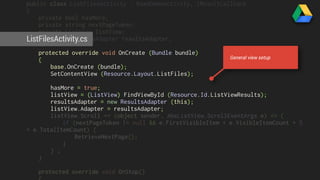
protected override void OnCreate (Bundle bundle) 
{ 
base.OnCreate (bundle); 
SetContentView (Resource.Layout.ListFiles); 
hasMore = true; 
listView = (ListView) FindViewById (Resource.Id.ListViewResults); 
resultsAdapter = new ResultsAdapter (this); 
listView.Adapter = resultsAdapter; 
listView.Scroll += (object sender, AbsListView.ScrollEventArgs e) => { 
if (nextPageToken != null && e.FirstVisibleItem + e.VisibleItemCount + 5 
< e.TotalItemCount) { 
RetrieveNextPage(); 
} 
} ; 
} 
protected override void OnStop() 
{ 
General view setup
base.OnCreate (bundle); 
SetContentView (Resource.Layout.ListFiles); 
hasMore = true; 
listView = (ListView) FindViewById (Resource.Id.ListViewResults); 
resultsAdapter = new ResultsAdapter (this); 
listView.Adapter = resultsAdapter; 
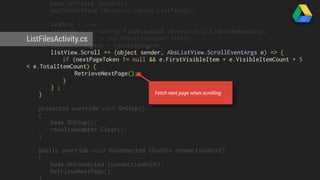
listView.Scroll += (object sender, AbsListView.ScrollEventArgs e) => { 
ListFilesActivity.cs 
if (nextPageToken != null && e.FirstVisibleItem + e.VisibleItemCount + 5 
< e.TotalItemCount) { 
RetrieveNextPage(); 
} 
} ; 
} 
protected override void OnStop() 
{ 
base.OnStop(); 
resultsAdapter.Clear(); 
} 
public override void OnConnected (Bundle connectionHint) 
{ 
base.OnConnected (connectionHint); 
RetrieveNextPage(); 
} 
Fetch next page when scrolling
listView.Scroll += (object sender, AbsListView.ScrollEventArgs e) => { 
if (nextPageToken != null && e.FirstVisibleItem + e.VisibleItemCount + 5 
< e.TotalItemCount) { 
RetrieveNextPage(); 
} 
} ; 
ListFilesActivity.cs 
} 
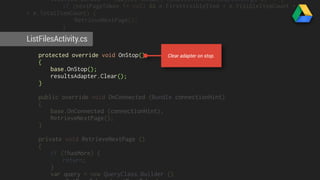
protected override void OnStop() 
{ 
base.OnStop(); 
resultsAdapter.Clear(); 
} 
public override void OnConnected (Bundle connectionHint) 
{ 
base.OnConnected (connectionHint); 
RetrieveNextPage(); 
} 
private void RetrieveNextPage () 
{ 
if (!hasMore) { 
return; 
} 
var query = new QueryClass.Builder () 
.SetPageToken (nextPageToken) 
Clear adapter on stop.
} 
protected override void OnStop() 
{ 
base.OnStop(); 
resultsAdapter.Clear(); 
ListFilesActivity.cs 
} 
public override void OnConnected (Bundle connectionHint) 
{ 
base.OnConnected (connectionHint); 
RetrieveNextPage(); 
} 
private void RetrieveNextPage () 
{ 
if (!hasMore) { 
return; 
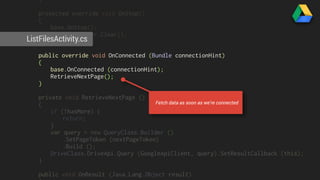
Fetch data as soon as we’re connected 
} 
var query = new QueryClass.Builder () 
.SetPageToken (nextPageToken) 
.Build (); 
DriveClass.DriveApi.Query (GoogleApiClient, query).SetResultCallback (this); 
} 
public void OnResult (Java.Lang.Object result) 
{
} 
public override void OnConnected (Bundle connectionHint) 
{ 
base.OnConnected (connectionHint); 
RetrieveNextPage(); 
ListFilesActivity.cs 
} 
private void RetrieveNextPage () 
{ 
if (!hasMore) { 
return; 
} 
var query = new QueryClass.Builder () 
.SetPageToken (nextPageToken) 
.Build (); 
DriveClass.DriveApi.Query (GoogleApiClient, query).SetResultCallback (this); 
} 
public void OnResult (Java.Lang.Object result) 
{ 
var metadataBufferResult = result.JavaCast<IDriveApiMetadataBufferResult> 
(); 
if (metadataBufferResult != null) { 
if (!metadataBufferResult.Status.IsSuccess) { 
ShowMessage ("Problems while retrieving files."); 
} 
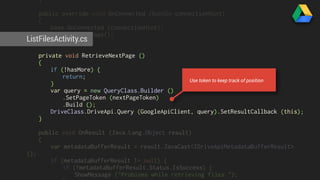
Use token to keep track of position
return; 
} 
var query = new QueryClass.Builder () 
.SetPageToken (nextPageToken) 
.Build (); 
ListFilesActivity.cs 
DriveClass.DriveApi.Query (GoogleApiClient, query).SetResultCallback (this); 
} 
public void OnResult (Java.Lang.Object result) 
{ 
var metadataBufferResult = result.JavaCast<IDriveApiMetadataBufferResult> 
(); 
if (metadataBufferResult != null) { 
if (!metadataBufferResult.Status.IsSuccess) { 
ShowMessage ("Problems while retrieving files."); 
} 
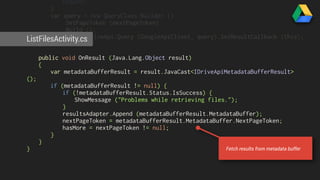
resultsAdapter.Append (metadataBufferResult.MetadataBuffer); 
nextPageToken = metadataBufferResult.MetadataBuffer.NextPageToken; 
hasMore = nextPageToken != null; 
} 
} 
} 
Fetch results from metadata buffer
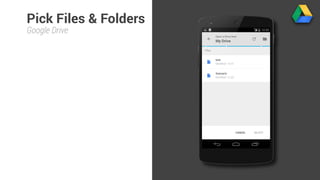
Pick Files & Folders 
Google Drive
PickFileWithOpenerActivity.cs 
public override void OnConnected (Bundle connectionHint) 
{ 
base.OnConnected (connectionHint); 
var intentSender = DriveClass.DriveApi 
.NewOpenFileActivityBuilder () 
.SetMimeType (new string[]{ "text/plain", "text/html" } ) 
.Build (GoogleApiClient); 
try { 
StartIntentSenderForResult (intentSender, RequestCodeOpener, null, 0, 0, 0); 
} catch (IntentSender.SendIntentException ex) { 
Log.Warn (logTag, "Unable to send intent", ex); 
} 
} 
protected override void OnActivityResult (int requestCode, Result resultCode, Intent 
data) 
{ 
base.OnActivityResult (requestCode, resultCode, data);
PickFileWithOpenerActivity.cs 
public override void OnConnected (Bundle connectionHint) 
{ 
base.OnConnected (connectionHint); 
var intentSender = DriveClass.DriveApi 
Create new file picker 
.NewOpenFileActivityBuilder () 
.SetMimeType (new string[]{ "text/plain", "text/html" } ) 
.Build (GoogleApiClient); 
try { 
StartIntentSenderForResult (intentSender, RequestCodeOpener, null, 0, 0, 0); 
} catch (IntentSender.SendIntentException ex) { 
Log.Warn (logTag, "Unable to send intent", ex); 
} 
} 
protected override void OnActivityResult (int requestCode, Result resultCode, Intent 
data) 
{ 
base.OnActivityResult (requestCode, resultCode, data);
PickFileWithOpenerActivity.cs 
public override void OnConnected (Bundle connectionHint) 
{ 
base.OnConnected (connectionHint); 
var intentSender = DriveClass.DriveApi 
Mime types to show in picker 
.NewOpenFileActivityBuilder () 
.SetMimeType (new string[]{ "text/plain", "text/html" } ) 
.Build (GoogleApiClient); 
try { 
StartIntentSenderForResult (intentSender, RequestCodeOpener, null, 0, 0, 0); 
} catch (IntentSender.SendIntentException ex) { 
Log.Warn (logTag, "Unable to send intent", ex); 
} 
} 
protected override void OnActivityResult (int requestCode, Result resultCode, Intent 
data) 
{ 
base.OnActivityResult (requestCode, resultCode, data);
PickFileWithOpenerActivity.cs 
public override void OnConnected (Bundle connectionHint) 
{ 
base.OnConnected (connectionHint); 
var intentSender = DriveClass.DriveApi 
.NewOpenFileActivityBuilder () 
.SetMimeType (new string[]{ "text/plain", "text/html" } ) 
.Build (GoogleApiClient); 
try { 
StartIntentSenderForResult (intentSender, RequestCodeOpener, null, 0, 0, 0); 
} catch (IntentSender.SendIntentException ex) { 
Log.Warn (logTag, "Unable to send intent", ex); 
} 
} 
Start picker intent 
protected override void OnActivityResult (int requestCode, Result resultCode, Intent 
data) 
{ 
base.OnActivityResult (requestCode, resultCode, data);
.Build (GoogleApiClient); 
try { 
StartIntentSenderForResult (intentSender, RequestCodeOpener, null, 0, 0, 0); 
} catch (IntentSender.SendIntentException ex) { 
Log.Warn (logTag, "Unable to send intent", ex); 
PickFileWithOpenerActivity.} 
cs 
} 
protected override void OnActivityResult (int requestCode, Result resultCode, Intent 
data) 
{ 
base.OnActivityResult (requestCode, resultCode, data); 
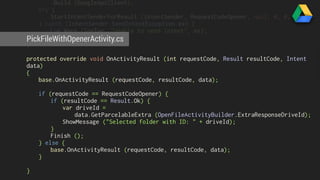
if (requestCode == RequestCodeOpener) { 
if (resultCode == Result.Ok) { 
var driveId = 
data.GetParcelableExtra (OpenFileActivityBuilder.ExtraResponseDriveId); 
ShowMessage ("Selected folder with ID: " + driveId); 
} 
Finish (); 
} else { 
base.OnActivityResult (requestCode, resultCode, data); 
} 
}
.Build (GoogleApiClient); 
try { 
StartIntentSenderForResult (intentSender, RequestCodeOpener, null, 0, 0, 0); 
} catch (IntentSender.SendIntentException ex) { 
Log.Warn (logTag, "Unable to send intent", ex); 
PickFileWithOpenerActivity.} 
cs 
} 
protected override void OnActivityResult (int requestCode, Result resultCode, Intent 
data) 
{ 
base.OnActivityResult (requestCode, resultCode, data); 
if (requestCode == RequestCodeOpener) { 
if (resultCode == Result.Ok) { 
var driveId = 
data.GetParcelableExtra (OpenFileActivityBuilder.ExtraResponseDriveId); 
ShowMessage ("Selected folder with ID: " + driveId); 
} 
Finish (); 
} else { 
base.OnActivityResult (requestCode, resultCode, data); 
} 
} 
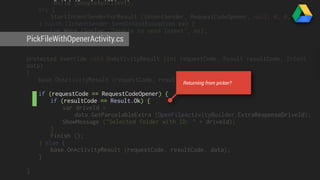
Returning from picker?
.Build (GoogleApiClient); 
try { 
StartIntentSenderForResult (intentSender, RequestCodeOpener, null, 0, 0, 0); 
} catch (IntentSender.SendIntentException ex) { 
Log.Warn (logTag, "Unable to send intent", ex); 
PickFileWithOpenerActivity.} 
cs 
} 
protected override void OnActivityResult (int requestCode, Result resultCode, Intent 
data) 
{ 
base.OnActivityResult (requestCode, resultCode, data); 
if (requestCode == RequestCodeOpener) { 
if (resultCode == Result.Ok) { 
var driveId = 
data.GetParcelableExtra (OpenFileActivityBuilder.ExtraResponseDriveId); 
ShowMessage ("Selected folder with ID: " + driveId); 
} 
Finish (); 
} else { 
base.OnActivityResult (requestCode, resultCode, data); 
} 
} 
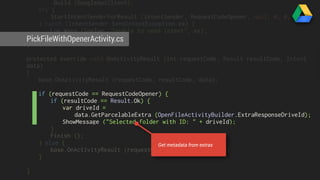
Get metadata from extras
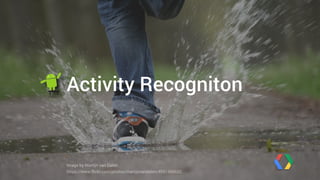
Activity Recogniton 
Image by Martijn van Dalen 
https://www.flickr.com/photos/martijnvandalen/4591360652
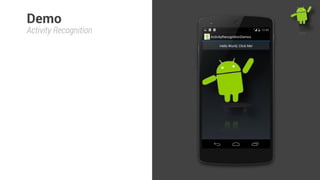
Demo 
Activity Recognition
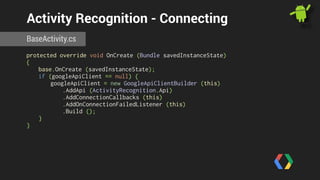
Activity Recognition - Connecting 
BaseActivity.cs 
protected override void OnCreate (Bundle savedInstanceState) 
{ 
base.OnCreate (savedInstanceState); 
if (googleApiClient == null) { 
googleApiClient = new GoogleApiClientBuilder (this) 
.AddApi (ActivityRecognition.Api) 
.AddConnectionCallbacks (this) 
.AddOnConnectionFailedListener (this) 
.Build (); 
} 
}
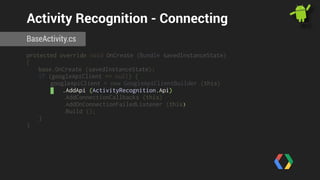
Activity Recognition - Connecting 
BaseActivity.cs 
protected override void OnCreate (Bundle savedInstanceState) 
{ 
base.OnCreate (savedInstanceState); 
if (googleApiClient == null) { 
googleApiClient = new GoogleApiClientBuilder (this) 
.AddApi (ActivityRecognition.Api) 
.AddConnectionCallbacks (this) 
.AddOnConnectionFailedListener (this) 
.Build (); 
} 
}
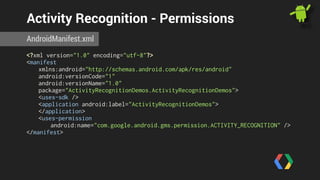
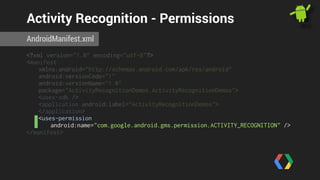
Activity Recognition - Permissions 
AndroidManifest.xml 
<?xml version="1.0" encoding="utf-8"?> 
<manifest 
xmlns:android="http://schemas.android.com/apk/res/android" 
android:versionCode="1" 
android:versionName="1.0" 
package="ActivityRecognitionDemos.ActivityRecognitionDemos"> 
<uses-sdk /> 
<application android:label="ActivityRecognitionDemos"> 
</application> 
<uses-permission 
android:name="com.google.android.gms.permission.ACTIVITY_RECOGNITION" /> 
</manifest>
Activity Recognition - Permissions 
AndroidManifest.xml 
<?xml version="1.0" encoding="utf-8"?> 
<manifest 
xmlns:android="http://schemas.android.com/apk/res/android" 
android:versionCode="1" 
android:versionName="1.0" 
package="ActivityRecognitionDemos.ActivityRecognitionDemos"> 
<uses-sdk /> 
<application android:label="ActivityRecognitionDemos"> 
</application> 
<uses-permission 
android:name="com.google.android.gms.permission.ACTIVITY_RECOGNITION" /> 
</manifest>
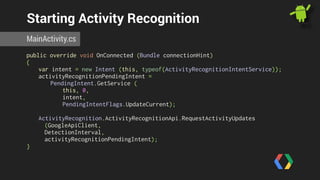
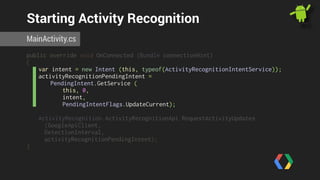
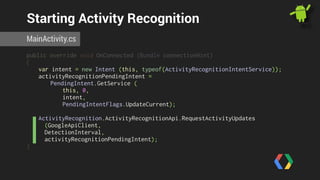
Starting Activity Recognition 
MainActivity.cs 
public override void OnConnected (Bundle connectionHint) 
{ 
var intent = new Intent (this, typeof(ActivityRecognitionIntentService)); 
activityRecognitionPendingIntent = 
PendingIntent.GetService ( 
this, 0, 
intent, 
PendingIntentFlags.UpdateCurrent); 
ActivityRecognition.ActivityRecognitionApi.RequestActivityUpdates 
(GoogleApiClient, 
DetectionInterval, 
activityRecognitionPendingIntent); 
}
Starting Activity Recognition 
MainActivity.cs 
public override void OnConnected (Bundle connectionHint) 
{ 
var intent = new Intent (this, typeof(ActivityRecognitionIntentService)); 
activityRecognitionPendingIntent = 
PendingIntent.GetService ( 
this, 0, 
intent, 
PendingIntentFlags.UpdateCurrent); 
ActivityRecognition.ActivityRecognitionApi.RequestActivityUpdates 
(GoogleApiClient, 
DetectionInterval, 
activityRecognitionPendingIntent); 
}
Starting Activity Recognition 
MainActivity.cs 
public override void OnConnected (Bundle connectionHint) 
{ 
var intent = new Intent (this, typeof(ActivityRecognitionIntentService)); 
activityRecognitionPendingIntent = 
PendingIntent.GetService ( 
this, 0, 
intent, 
PendingIntentFlags.UpdateCurrent); 
ActivityRecognition.ActivityRecognitionApi.RequestActivityUpdates 
(GoogleApiClient, 
DetectionInterval, 
activityRecognitionPendingIntent); 
}
Receiving Activity Updates 
ActivityRecognitionIntentService.cs 
[Service] 
[IntentFilter(new String[]{"ActivityRecognitionIntentService"})] 
public class ActivityRecognitionIntentService : IntentService 
{ 
protected override void OnHandleIntent (Android.Content.Intent intent) 
{ 
if (ActivityRecognitionResult.HasResult (intent)) { 
var result = ActivityRecognitionResult.ExtractResult (intent); 
var mostProbableActivity = result.MostProbableActivity; 
var confidence = mostProbableActivity.Confidence; 
var activityType = mostProbableActivity.Type; 
var name = GetActivityName (activityType); 
} 
} 
! 
protected string GetActivityName(int activityType) { 
switch (activityType) { 
} 
} 
}
Receiving Activity Updates 
ActivityRecognitionIntentService.cs 
[Service] 
[IntentFilter(new String[]{"ActivityRecognitionIntentService"})] 
public class ActivityRecognitionIntentService : IntentService 
{ 
protected override void OnHandleIntent (Android.Content.Intent intent) 
{ 
if (ActivityRecognitionResult.HasResult (intent)) { 
var result = ActivityRecognitionResult.ExtractResult (intent); 
var mostProbableActivity = result.MostProbableActivity; 
var confidence = mostProbableActivity.Confidence; 
var activityType = mostProbableActivity.Type; 
var name = GetActivityName (activityType); 
} 
} 
! 
protected string GetActivityName(int activityType) { 
switch (activityType) { 
} 
} 
}
Receiving Activity Updates 
ActivityRecognitionIntentService.cs 
[Service] 
[IntentFilter(new String[]{"ActivityRecognitionIntentService"})] 
public class ActivityRecognitionIntentService : IntentService 
{ 
protected override void OnHandleIntent (Android.Content.Intent intent) 
{ 
if (ActivityRecognitionResult.HasResult (intent)) { 
var result = ActivityRecognitionResult.ExtractResult (intent); 
var mostProbableActivity = result.MostProbableActivity; 
var confidence = mostProbableActivity.Confidence; 
var activityType = mostProbableActivity.Type; 
var name = GetActivityName (activityType); 
} 
} 
! 
protected string GetActivityName(int activityType) { 
switch (activityType) { 
} 
} 
}
Receiving Activity Updates 
ActivityRecognitionIntentService.cs 
[Service] 
[IntentFilter(new String[]{"ActivityRecognitionIntentService"})] 
public class ActivityRecognitionIntentService : IntentService 
{ 
protected override void OnHandleIntent (Android.Content.Intent intent) 
{ 
if (ActivityRecognitionResult.HasResult (intent)) { 
var result = ActivityRecognitionResult.ExtractResult (intent); 
var mostProbableActivity = result.MostProbableActivity; 
var confidence = mostProbableActivity.Confidence; 
var activityType = mostProbableActivity.Type; 
var name = GetActivityName (activityType); 
} 
} 
! 
protected string GetActivityName(int activityType) { 
switch (activityType) { 
} 
} 
}
Receiving Activity Updates 
ActivityRecognitionIntentService.cs 
[Service] 
[IntentFilter(new String[]{"ActivityRecognitionIntentService"})] 
public class ActivityRecognitionIntentService : IntentService 
{ 
protected override void OnHandleIntent (Android.Content.Intent intent) 
{ 
if (ActivityRecognitionResult.HasResult (intent)) { 
var result = ActivityRecognitionResult.ExtractResult (intent); 
var mostProbableActivity = result.MostProbableActivity; 
var confidence = mostProbableActivity.Confidence; 
var activityType = mostProbableActivity.Type; 
var name = GetActivityName (activityType); 
} 
} 
! 
protected string GetActivityName(int activityType) { 
switch (activityType) { 
} 
} 
}
Maps 
Image: Wikipedia 
http://bit.ly/10L5SC1
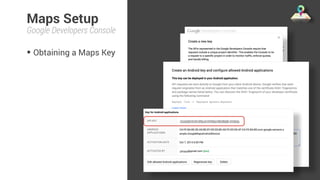
Maps Setup 
Google Developers Console 
• Obtaining a Maps Key
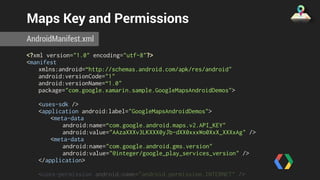
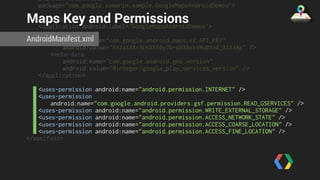
Maps Key and Permissions 
AndroidManifest.xml 
<?xml version="1.0" encoding="utf-8"?> 
<manifest 
xmlns:android=“http://schemas.android.com/apk/res/android" 
android:versionCode="1" 
android:versionName=“1.0" 
package="com.google.xamarin.sample.GoogleMapsAndroidDemos"> 
<uses-sdk /> 
<application android:label="GoogleMapsAndroidDemos"> 
<meta-data 
android:name=“com.google.android.maps.v2.API_KEY" 
android:value="AAzaXXXv3LKXXX0yJb-dXX0xxxWo0XxX_XXXxAg" /> 
<meta-data 
android:name="com.google.android.gms.version" 
android:value="@integer/google_play_services_version" /> 
</application> 
<uses-permission android:name="android.permission.INTERNET" /> 
<uses-permission
Maps Key and Permissions 
AndroidManifest.xml 
<?xml version="1.0" encoding="utf-8"?> 
<manifest 
xmlns:android=“http://schemas.android.com/apk/res/android" 
android:versionCode="1" 
android:versionName=“1.0" 
package="com.google.xamarin.sample.GoogleMapsAndroidDemos"> 
<uses-sdk /> 
<application android:label="GoogleMapsAndroidDemos"> 
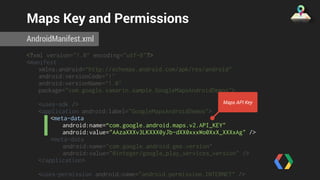
<meta-data 
Maps API Key 
android:name=“com.google.android.maps.v2.API_KEY" 
android:value="AAzaXXXv3LKXXX0yJb-dXX0xxxWo0XxX_XXXxAg" /> 
<meta-data 
android:name="com.google.android.gms.version" 
android:value="@integer/google_play_services_version" /> 
</application> 
<uses-permission android:name="android.permission.INTERNET" /> 
<uses-permission
Maps Key and Permissions 
AndroidManifest.xml 
<?xml version="1.0" encoding="utf-8"?> 
<manifest 
xmlns:android=“http://schemas.android.com/apk/res/android" 
android:versionCode="1" 
android:versionName=“1.0" 
package="com.google.xamarin.sample.GoogleMapsAndroidDemos"> 
<uses-sdk /> 
<application android:label="GoogleMapsAndroidDemos"> 
<meta-data 
android:name=“com.google.android.maps.v2.API_KEY" 
android:value="AAzaXXXv3LKXXX0yJb-dXX0xxxWo0XxX_XXXxAg" /> 
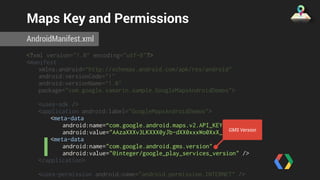
<meta-data 
GMS Version 
android:name="com.google.android.gms.version" 
android:value="@integer/google_play_services_version" /> 
</application> 
<uses-permission android:name="android.permission.INTERNET" /> 
<uses-permission
android:versionName=“1.0" 
package="com.google.xamarin.sample.GoogleMapsAndroidDemos"> 
Maps Key and Permissions 
AndroidManifest.xml 
<uses-sdk /> 
<application android:label="GoogleMapsAndroidDemos"> 
<meta-data 
android:name=“com.google.android.maps.v2.API_KEY" 
android:value="AAzaXXXv3LKXXX0yJb-dXX0xxxWo0XxX_XXXxAg" /> 
<meta-data 
android:name="com.google.android.gms.version" 
android:value="@integer/google_play_services_version" /> 
</application> 
<uses-permission android:name="android.permission.INTERNET" /> 
<uses-permission 
android:name="com.google.android.providers.gsf.permission.READ_GSERVICES" /> 
<uses-permission android:name="android.permission.WRITE_EXTERNAL_STORAGE" /> 
<uses-permission android:name="android.permission.ACCESS_NETWORK_STATE" /> 
<uses-permission android:name="android.permission.ACCESS_COARSE_LOCATION" /> 
<uses-permission android:name="android.permission.ACCESS_FINE_LOCATION" /> 
</manifest>
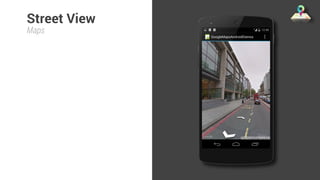
Street View 
Maps
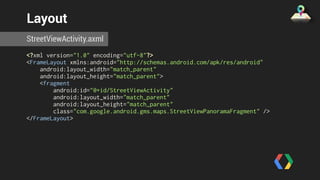
Layout 
StreetViewActivity.axml 
<?xml version="1.0" encoding="utf-8"?> 
<FrameLayout xmlns:android="http://schemas.android.com/apk/res/android" 
android:layout_width="match_parent" 
android:layout_height="match_parent"> 
<fragment 
android:id="@+id/StreetViewActivity" 
android:layout_width="match_parent" 
android:layout_height="match_parent" 
class="com.google.android.gms.maps.StreetViewPanoramaFragment" /> 
</FrameLayout>
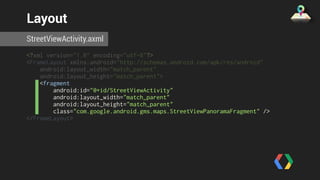
Layout 
StreetViewActivity.axml 
<?xml version="1.0" encoding="utf-8"?> 
<FrameLayout xmlns:android="http://schemas.android.com/apk/res/android" 
android:layout_width="match_parent" 
android:layout_height="match_parent"> 
<fragment 
android:id="@+id/StreetViewActivity" 
android:layout_width="match_parent" 
android:layout_height="match_parent" 
class="com.google.android.gms.maps.StreetViewPanoramaFragment" /> 
</FrameLayout>
StreetView - Set Position 
StreetViewActivity.cs 
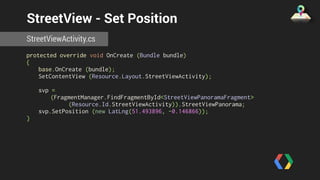
protected override void OnCreate (Bundle bundle) 
{ 
base.OnCreate (bundle); 
SetContentView (Resource.Layout.StreetViewActivity); 
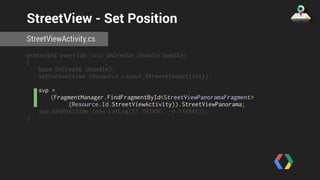
svp = 
(FragmentManager.FindFragmentById<StreetViewPanoramaFragment> 
(Resource.Id.StreetViewActivity)).StreetViewPanorama; 
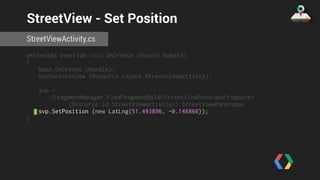
svp.SetPosition (new LatLng(51.493896, -0.146866)); 
}
StreetView - Set Position 
StreetViewActivity.cs 
protected override void OnCreate (Bundle bundle) 
{ 
base.OnCreate (bundle); 
SetContentView (Resource.Layout.StreetViewActivity); 
svp = 
(FragmentManager.FindFragmentById<StreetViewPanoramaFragment> 
(Resource.Id.StreetViewActivity)).StreetViewPanorama; 
svp.SetPosition (new LatLng(51.493896, -0.146866)); 
}
StreetView - Set Position 
StreetViewActivity.cs 
protected override void OnCreate (Bundle bundle) 
{ 
base.OnCreate (bundle); 
SetContentView (Resource.Layout.StreetViewActivity); 
svp = 
(FragmentManager.FindFragmentById<StreetViewPanoramaFragment> 
(Resource.Id.StreetViewActivity)).StreetViewPanorama; 
svp.SetPosition (new LatLng(51.493896, -0.146866)); 
}
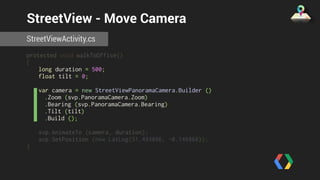
StreetView - Move Camera 
StreetViewActivity.cs 
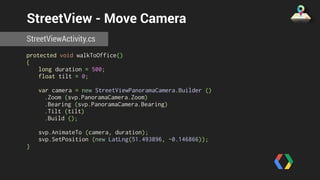
protected void walkToOffice() 
{ 
long duration = 500; 
float tilt = 0; 
var camera = new StreetViewPanoramaCamera.Builder () 
.Zoom (svp.PanoramaCamera.Zoom) 
.Bearing (svp.PanoramaCamera.Bearing) 
.Tilt (tilt) 
.Build (); 
svp.AnimateTo (camera, duration); 
svp.SetPosition (new LatLng(51.493896, -0.146866)); 
}
StreetView - Move Camera 
StreetViewActivity.cs 
protected void walkToOffice() 
{ 
long duration = 500; 
float tilt = 0; 
var camera = new StreetViewPanoramaCamera.Builder () 
.Zoom (svp.PanoramaCamera.Zoom) 
.Bearing (svp.PanoramaCamera.Bearing) 
.Tilt (tilt) 
.Build (); 
svp.AnimateTo (camera, duration); 
svp.SetPosition (new LatLng(51.493896, -0.146866)); 
}
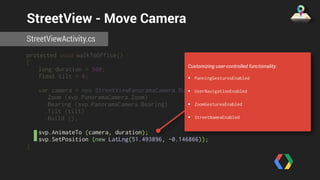
StreetView - Move Camera 
StreetViewActivity.cs 
protected void walkToOffice() 
{ 
long duration = 500; 
float tilt = 0; 
var camera = new StreetViewPanoramaCamera.Builder () 
.Zoom (svp.PanoramaCamera.Zoom) 
.Bearing (svp.PanoramaCamera.Bearing) 
.Tilt (tilt) 
.Build (); 
svp.AnimateTo (camera, duration); 
svp.SetPosition (new LatLng(51.493896, -0.146866)); 
} 
Customizing user-controlled functionality: 
• PanningGesturesEnabled 
• UserNavigationEnabled 
• ZoomGesturesEnabled 
• StreetNamesEnabled
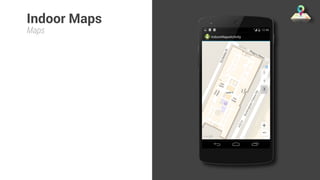
Indoor Maps 
Maps
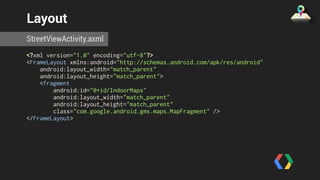
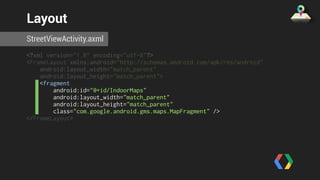
Layout 
StreetViewActivity.axml 
<?xml version="1.0" encoding="utf-8"?> 
<FrameLayout xmlns:android="http://schemas.android.com/apk/res/android" 
android:layout_width="match_parent" 
android:layout_height="match_parent"> 
<fragment 
android:id="@+id/IndoorMaps" 
android:layout_width="match_parent" 
android:layout_height="match_parent" 
class="com.google.android.gms.maps.MapFragment" /> 
</FrameLayout>
Layout 
StreetViewActivity.axml 
<?xml version="1.0" encoding="utf-8"?> 
<FrameLayout xmlns:android="http://schemas.android.com/apk/res/android" 
android:layout_width="match_parent" 
android:layout_height="match_parent"> 
<fragment 
android:id="@+id/IndoorMaps" 
android:layout_width="match_parent" 
android:layout_height="match_parent" 
class="com.google.android.gms.maps.MapFragment" /> 
</FrameLayout>
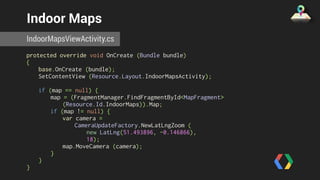
Indoor Maps 
IndoorMapsViewActivity.cs 
protected override void OnCreate (Bundle bundle) 
{ 
base.OnCreate (bundle); 
SetContentView (Resource.Layout.IndoorMapsActivity); 
if (map == null) { 
map = (FragmentManager.FindFragmentById<MapFragment> 
(Resource.Id.IndoorMaps)).Map; 
if (map != null) { 
var camera = 
CameraUpdateFactory.NewLatLngZoom ( 
new LatLng(51.493896, -0.146866), 
18); 
map.MoveCamera (camera); 
} 
} 
}
Indoor Maps 
IndoorMapsViewActivity.cs 
protected override void OnCreate (Bundle bundle) 
{ 
base.OnCreate (bundle); 
SetContentView (Resource.Layout.IndoorMapsActivity); 
if (map == null) { 
map = (FragmentManager.FindFragmentById<MapFragment> 
(Resource.Id.IndoorMaps)).Map; 
if (map != null) { 
var camera = 
CameraUpdateFactory.NewLatLngZoom ( 
new LatLng(51.493896, -0.146866), 
18); 
map.MoveCamera (camera); 
} 
} 
}
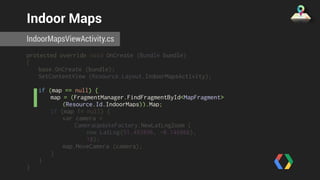
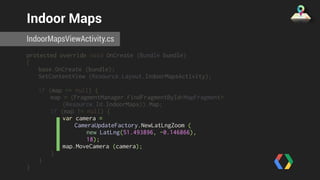
Indoor Maps 
IndoorMapsViewActivity.cs 
protected override void OnCreate (Bundle bundle) 
{ 
base.OnCreate (bundle); 
SetContentView (Resource.Layout.IndoorMapsActivity); 
if (map == null) { 
map = (FragmentManager.FindFragmentById<MapFragment> 
(Resource.Id.IndoorMaps)).Map; 
if (map != null) { 
var camera = 
CameraUpdateFactory.NewLatLngZoom ( 
new LatLng(51.493896, -0.146866), 
18); 
map.MoveCamera (camera); 
} 
} 
}
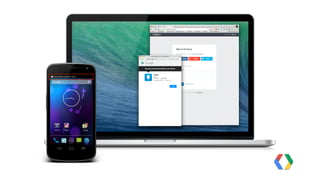
Google+
Google+ 
• Powerful identity provider
Google+ 
• Powerful identity provider 
• Over the Air Installs (OTA)
Google+ 
• Powerful identity provider 
• Over the Air Installs (OTA) 
• Drive engagement via 
interactive posts
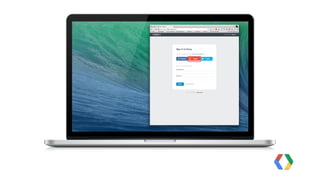
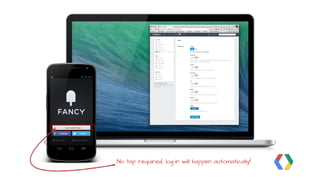
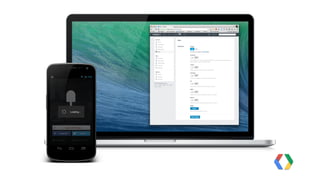
No tap required, log-in will happen automatically!
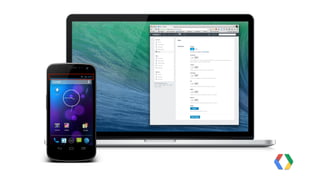
Google+ OTA 
• Use Google+ Sign-in button
Google+ OTA 
• Use Google+ Sign-in button 
• Set App package name on the 
button
Google+ OTA 
• Use Google+ Sign-in button 
• Set App package name on the 
button 
• Use the same scopes on web 
and in the app
Google+ OTA 
• Use Google+ Sign-in button 
• Set App package name on the 
button 
• Use the same scopes on web 
and in the app 
• Configure consent screen
Google+ OTA 
• Use Google+ Sign-in button 
• Set App package name on the 
button 
• Use the same scopes on web 
and in the app 
• Configure consent screen 
• Meet quality thresholds
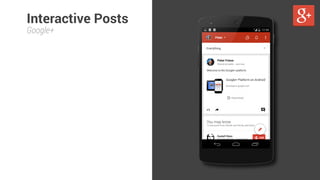
Interactive Posts 
Google+
Interactive Posts 
Google+
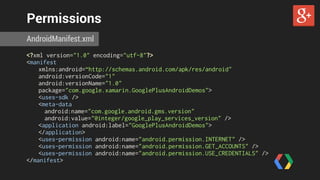
Permissions 
AndroidManifest.xml 
<?xml version="1.0" encoding="utf-8"?> 
<manifest 
xmlns:android=“http://schemas.android.com/apk/res/android" 
android:versionCode="1" 
android:versionName="1.0" 
package="com.google.xamarin.GooglePlusAndroidDemos"> 
<uses-sdk /> 
<meta-data 
android:name="com.google.android.gms.version" 
android:value="@integer/google_play_services_version" /> 
<application android:label="GooglePlusAndroidDemos"> 
</application> 
<uses-permission android:name="android.permission.INTERNET" /> 
<uses-permission android:name="android.permission.GET_ACCOUNTS" /> 
<uses-permission android:name="android.permission.USE_CREDENTIALS" /> 
</manifest>
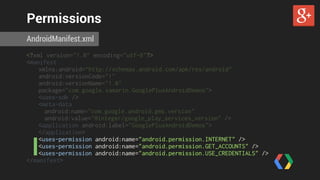
Permissions 
AndroidManifest.xml 
<?xml version="1.0" encoding="utf-8"?> 
<manifest 
xmlns:android=“http://schemas.android.com/apk/res/android" 
android:versionCode="1" 
android:versionName="1.0" 
package="com.google.xamarin.GooglePlusAndroidDemos"> 
<uses-sdk /> 
<meta-data 
android:name="com.google.android.gms.version" 
android:value="@integer/google_play_services_version" /> 
<application android:label="GooglePlusAndroidDemos"> 
</application> 
<uses-permission android:name="android.permission.INTERNET" /> 
<uses-permission android:name="android.permission.GET_ACCOUNTS" /> 
<uses-permission android:name="android.permission.USE_CREDENTIALS" /> 
</manifest>
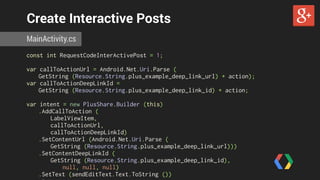
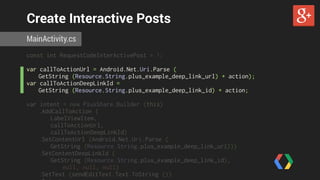
Create Interactive Posts 
MainActivity.cs 
const int RequestCodeInterActivePost = 1; 
var callToActionUrl = Android.Net.Uri.Parse ( 
GetString (Resource.String.plus_example_deep_link_url) + action); 
var callToActionDeepLinkId = 
GetString (Resource.String.plus_example_deep_link_id) + action; 
var intent = new PlusShare.Builder (this) 
.AddCallToAction ( 
LabelViewItem, 
callToActionUrl, 
callToActionDeepLinkId) 
.SetContentUrl (Android.Net.Uri.Parse ( 
GetString (Resource.String.plus_example_deep_link_url))) 
.SetContentDeepLinkId ( 
GetString (Resource.String.plus_example_deep_link_id), 
null, null, null) 
.SetText (sendEditText.Text.ToString ()) 
.Intent;
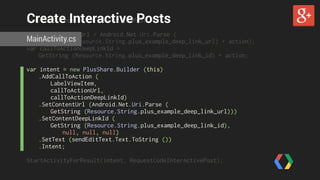
Create Interactive Posts 
MainActivity.cs 
const int RequestCodeInterActivePost = 1; 
var callToActionUrl = Android.Net.Uri.Parse ( 
GetString (Resource.String.plus_example_deep_link_url) + action); 
var callToActionDeepLinkId = 
GetString (Resource.String.plus_example_deep_link_id) + action; 
var intent = new PlusShare.Builder (this) 
.AddCallToAction ( 
LabelViewItem, 
callToActionUrl, 
callToActionDeepLinkId) 
.SetContentUrl (Android.Net.Uri.Parse ( 
GetString (Resource.String.plus_example_deep_link_url))) 
.SetContentDeepLinkId ( 
GetString (Resource.String.plus_example_deep_link_id), 
null, null, null) 
.SetText (sendEditText.Text.ToString ()) 
.Intent;
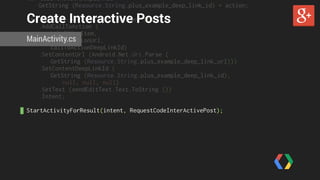
Create Interactive Posts 
const int RequestCodeInterActivePost = 1; 
var callToActionUrl = Android.Net.Uri.Parse ( 
MainActivity.cs 
GetString (Resource.String.plus_example_deep_link_url) + action); 
var callToActionDeepLinkId = 
GetString (Resource.String.plus_example_deep_link_id) + action; 
var intent = new PlusShare.Builder (this) 
.AddCallToAction ( 
LabelViewItem, 
callToActionUrl, 
callToActionDeepLinkId) 
.SetContentUrl (Android.Net.Uri.Parse ( 
GetString (Resource.String.plus_example_deep_link_url))) 
.SetContentDeepLinkId ( 
GetString (Resource.String.plus_example_deep_link_id), 
null, null, null) 
.SetText (sendEditText.Text.ToString ()) 
.Intent; 
! 
StartActivityForResult(intent, RequestCodeInterActivePost);
var callToActionDeepLinkId = 
GetString (Resource.String.plus_example_deep_link_id) + action; 
Create Interactive Posts 
var intent = new PlusShare.Builder (this) 
.AddCallToAction ( 
LabelViewItem, 
callToActionUrl, 
callToActionDeepLinkId) 
MainActivity.cs 
.SetContentUrl (Android.Net.Uri.Parse ( 
GetString (Resource.String.plus_example_deep_link_url))) 
.SetContentDeepLinkId ( 
GetString (Resource.String.plus_example_deep_link_id), 
null, null, null) 
.SetText (sendEditText.Text.ToString ()) 
.Intent; 
! 
StartActivityForResult(intent, RequestCodeInterActivePost);
Parse Deep Links 
ParseDeepLinkActivity.cs 
[Activity (Label = "ParseDeepLinkActivity")] 
[IntentFilter (new[]{"com.google.android.apps.plus.VIEW_DEEP_LINK"}, 
DataScheme="vnd.google.deeplink", 
Categories=new[]{Intent.CategoryDefault, Intent.CategoryBrowsable} )] 
public class ParseDeepLinkActivity : BaseActivity 
{ 
const string logTag = "ParseDeepLinkActivity"; 
protected override void OnCreate (Bundle bundle) 
{ 
base.OnCreate (bundle); 
var deepLinkId = PlusShare.GetDeepLinkId (Intent); 
var target = ProcessDeepLinkId (deepLinkId); 
if (target != null) { 
StartActivity (target); 
} 
}
Parse Deep Links 
ParseDeepLinkActivity.cs 
[Activity (Label = "ParseDeepLinkActivity")] 
[IntentFilter (new[]{"com.google.android.apps.plus.VIEW_DEEP_LINK"}, 
DataScheme="vnd.google.deeplink", 
Categories=new[]{Intent.CategoryDefault, Intent.CategoryBrowsable} )] 
public class ParseDeepLinkActivity : BaseActivity 
{ 
const string logTag = "ParseDeepLinkActivity"; 
protected override void OnCreate (Bundle bundle) 
{ 
base.OnCreate (bundle); 
var deepLinkId = PlusShare.GetDeepLinkId (Intent); 
var target = ProcessDeepLinkId (deepLinkId); 
if (target != null) { 
StartActivity (target); 
} 
}
Parse Deep Links 
ParseDeepLinkActivity.cs 
[Activity (Label = "ParseDeepLinkActivity")] 
[IntentFilter (new[]{"com.google.android.apps.plus.VIEW_DEEP_LINK"}, 
DataScheme="vnd.google.deeplink", 
Categories=new[]{Intent.CategoryDefault, Intent.CategoryBrowsable} )] 
public class ParseDeepLinkActivity : BaseActivity 
{ 
const string logTag = "ParseDeepLinkActivity"; 
protected override void OnCreate (Bundle bundle) 
{ 
base.OnCreate (bundle); 
var deepLinkId = PlusShare.GetDeepLinkId (Intent); 
var target = ProcessDeepLinkId (deepLinkId); 
if (target != null) { 
StartActivity (target); 
} 
} 
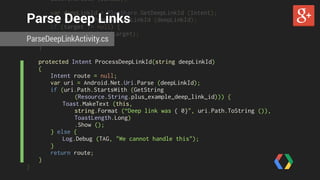
protected Intent ProcessDeepLinkId(string deepLinkId) 
{ 
Intent route = null; 
var uri = Android.Net.Uri.Parse (deepLinkId);
base.OnCreate (bundle); 
Parse Deep Links 
var deepLinkId = PlusShare.GetDeepLinkId (Intent); 
var target = ProcessDeepLinkId (deepLinkId); 
if (target != null) { 
StartActivity (target); 
ParseDeepLinkActivity.cs 
} 
} 
protected Intent ProcessDeepLinkId(string deepLinkId) 
{ 
Intent route = null; 
var uri = Android.Net.Uri.Parse (deepLinkId); 
if (uri.Path.StartsWith (GetString 
(Resource.String.plus_example_deep_link_id))) { 
Toast.MakeText (this, 
string.Format (“Deep link was { 0}", uri.Path.ToString ()), 
ToastLength.Long) 
.Show (); 
} else { 
Log.Debug (TAG, "We cannot handle this"); 
} 
return route; 
} 
}
Recap
?
Google Play Services 
https://developer.android.com/google/play-services/
Q & A
What’s next? 
Material Android Design from Concept to Implementation (I + II) 
Thursday, 1 pm (Franklin Salon) 
C# is in My Ears and in My Eyes 
Thursday, 4:15 pm (Linnaeus Salon) 
youtube.com/GoogleDevelopers
Thank you! 
+PeterFriese 
@ 
#Xamarin+Google
Google Play Services Rock

Google Play Services Rock

  • 1.
    Google Play Services with Xamarin Building Apps that rock
  • 2.
  • 3.
    What is GooglePlay Services?
  • 4.
    Google Play Services • Set of APIs by Google
  • 5.
    Google Play Services • Set of APIs by Google • Available for Devices running Gingerbread and higher
  • 6.
    Google Play Services • Set of APIs by Google • Available for Devices running Gingerbread and higher • Access the latest in Google technology
  • 7.
    Google Play Services • Set of APIs by Google • Available for Devices running Gingerbread and higher • Access the latest in Google technology • Frequent updates
  • 8.
    Google Play Services • Set of APIs by Google • Available for Devices running Gingerbread and higher • Access the latest in Google technology • Frequent updates • One standard way to connect and authorise
  • 9.
    Google Play ServicesLibrary Device Drive Service Google Play Services Your App Google API Client Maps Google+ Wallet Games Services
  • 10.
    How to IntegrateGoogle Play Services
  • 11.
    Three simple stepsto success Add Google Play Services to your project Start using our APIs Profit!
  • 12.
    it's a little bit more complicated. Actually, Image: http://en.wikipedia.org/wiki/Turf_maze
  • 13.
    Project setup XamarinStudio • Create new Android project
  • 14.
    Project setup XamarinStudio • Create new Android project
  • 15.
    Project setup XamarinStudio • Create new Android project • Download Google Play Services
  • 16.
    Project setup XamarinStudio • Create new Android project • Download Google Play Services
  • 17.
    Project setup XamarinStudio • Create new Android project • Download Google Play Services • Add the NuGet component
  • 18.
    Project setup XamarinStudio • Create new Android project • Download Google Play Services • Add the NuGet component
  • 19.
    Project setup GoogleDevelopers Console • Create a new project
  • 20.
    Project setup GoogleDevelopers Console • Create a new project
  • 21.
    Project setup GoogleDevelopers Console • Create a new project • Configure the Consent Screen
  • 22.
    Project setup GoogleDevelopers Console • Create a new project • Configure the Consent Screen
  • 23.
    Project setup GoogleDevelopers Console • Create a new project • Configure the Consent Screen • Create a Client Configuration
  • 24.
    Project setup $keytool -list -storepass android Google Developers Console • Create a new project • Configure the Consent Screen • Create a Client Configuration -keystore ~/.local/share/Xamarin/Mono for Android/debug.keystore ! Keystore type: JKS Keystore provider: SUN Your keystore contains 1 entry androiddebugkey, 14-May-2014, PrivateKeyEntry, Certificate fingerprint (SHA1): CA:FE:BA:BE:DE:AD:BE:EF:DE:ED:BE:AD:FE:ED:DE:AF:CA:FE:BA:BE
  • 25.
    Project setup GoogleDevelopers Console • Create a new project • Configure the Consent Screen • Create a Client Configuration
  • 26.
    Project setup GoogleDevelopers Console • Create a new project • Configure the Consent Screen • Create a Client Configuration • Activate APIs
  • 27.
    Connecting Your App with Google
  • 28.
    Checking for acompatible GMS version BaseActivity.cs protected bool ServicesConnected() { var resultCode = GooglePlayServicesUtil.IsGooglePlayServicesAvailable (this); if (resultCode == ConnectionResult.Success) { Log.Debug (logTag, "Google Play Services are available"); return true; } else { Log.Debug (logTag, "Connection failed. Attempting resolution."); GooglePlayServicesUtil.GetErrorDialog (resultCode, this, ConnectionFailureResolutionRequest).Show (); return false; } }
  • 29.
    Configuring GoogleApiClient BaseActivity.cs protected override void OnCreate (Bundle savedInstanceState) { base.OnCreate (savedInstanceState); if (googleApiClient == null) { googleApiClient = new GoogleApiClientBuilder (this) .AddApi (DriveClass.Api) .AddScope (DriveClass.ScopeFile) .AddApi(PlusClass.Api) .AddScope(PlusClass.ScopePlusLogin) .AddConnectionCallbacks (this) .AddOnConnectionFailedListener (this) .Build (); } }
  • 30.
    Configuring GoogleApiClient BaseActivity.cs protected override void OnCreate (Bundle savedInstanceState) { base.OnCreate (savedInstanceState); if (googleApiClient == null) { googleApiClient = new GoogleApiClientBuilder (this) .AddApi (DriveClass.Api) .AddScope (DriveClass.ScopeFile) .AddApi(PlusClass.Api) .AddScope(PlusClass.ScopePlusLogin) .AddConnectionCallbacks (this) .AddOnConnectionFailedListener (this) .Build (); } } Add multiple APIs and Scopes
  • 31.
    Configuring GoogleApiClient BaseActivity.cs protected override void OnCreate (Bundle savedInstanceState) { base.OnCreate (savedInstanceState); if (googleApiClient == null) { googleApiClient = new GoogleApiClientBuilder (this) .AddApi (DriveClass.Api) .AddScope (DriveClass.ScopeFile) .AddApi(PlusClass.Api) .AddScope(PlusClass.ScopePlusLogin) .AddConnectionCallbacks (this) .AddOnConnectionFailedListener (this) .Build (); } } Set up callbacks
  • 32.
    Connecting GoogleApiClient BaseActivity.cs protected override void OnStart () { base.OnStart (); googleApiClient.Connect(); } ! protected override void OnStop () { if (googleApiClient != null) { googleApiClient.Disconnect (); } base.OnStop (); }
  • 33.
    Callbacks - TheGood BaseActivity.cs public class BaseDemoActivity : Activity, IGoogleApiClientConnectionCallbacks { public virtual void OnConnected (Bundle connectionHint) { Log.Debug (logTag, "Google API client connected.”); // let the good stuff happen here } public void OnConnectionSuspended (int cause) { Log.Debug (logTag, "Google API client connection suspended."); // deactivate UI components, etc. } }
  • 34.
    Callbacks - TheBad BaseActivity.cs public class BaseDemoActivity : Activity, IGoogleApiClientOnConnectionFailedListener { public void OnConnectionFailed (ConnectionResult result) { if (result.HasResolution) { try { result.StartResolutionForResult (this, RequestCodeResolution); } catch (IntentSender.SendIntentException ex) { Log.Error (logTag, "Exception while starting resolution activity", ex); } } else { GooglePlayServicesUtil.GetErrorDialog (result.ErrorCode, this, 0).Show (); return; } } }
  • 35.
    Callbacks - TheBad BaseActivity.cs public class BaseDemoActivity : Activity, IGoogleApiClientOnConnectionFailedListener { public void OnConnectionFailed (ConnectionResult result) { if (result.HasResolution) { try { result.StartResolutionForResult (this, RequestCodeResolution); } catch (IntentSender.SendIntentException ex) { Log.Error (logTag, "Exception while starting resolution activity", ex); } } else { GooglePlayServicesUtil.GetErrorDialog (result.ErrorCode, this, 0).Show (); return; } } } Try to resolve this error by asking for the user’s consent
  • 36.
    A Closer Lookat Some of the Services
  • 37.
  • 38.
    Record demos Reading/ writing files App folders Google Drive
  • 39.
    Google Drive •Cloud storage powered by Google’s infrastructure
  • 40.
    Google Drive •Cloud storage powered by Google’s infrastructure • 15 GB for free, upgrades at competitive prices
  • 41.
    Google Drive •Cloud storage powered by Google’s infrastructure • 15 GB for free, upgrades at competitive prices • Automatic synchronisation
  • 42.
    Google Drive •Cloud storage powered by Google’s infrastructure • 15 GB for free, upgrades at competitive prices • Automatic synchronisation • Android, iOS, Mac, Windows, Web
  • 43.
    Google Drive •Cloud storage powered by Google’s infrastructure • 15 GB for free, upgrades at competitive prices • Automatic synchronisation • Android, iOS, Mac, Windows, Web • UI controls (create / pick files)
  • 44.
    Google Drive -Connecting BaseActivity.cs protected override void OnCreate (Bundle savedInstanceState) { base.OnCreate (savedInstanceState); if (googleApiClient == null) { googleApiClient = new GoogleApiClientBuilder (this) .AddApi (DriveClass.Api) .AddScope (DriveClass.ScopeFile) .AddConnectionCallbacks (this) .AddOnConnectionFailedListener (this) .Build (); } }
  • 45.
    Configuring GoogleApiClient BaseActivity.cs protected override void OnCreate (Bundle savedInstanceState) { base.OnCreate (savedInstanceState); if (googleApiClient == null) { googleApiClient = new GoogleApiClientBuilder (this) .AddApi (DriveClass.Api) .AddScope (DriveClass.ScopeFile) .AddConnectionCallbacks (this) .AddOnConnectionFailedListener (this) .Build (); } } Supported scopes: • DriveClass.ScopeFile (drive.file) • DriveClass.ScopeAppFolder (drive.appfolder) More about scopes: https://developers.google.com/drive/web/scopes
  • 46.
  • 47.
    ListFilesActivity.cs public classListFilesActivity : BaseDemoActivity, IResultCallback { private bool hasMore; private string nextPageToken; private ListView listView; protected ResultsAdapter resultsAdapter; protected override void OnCreate (Bundle bundle) { base.OnCreate (bundle); SetContentView (Resource.Layout.ListFiles); hasMore = true; listView = (ListView) FindViewById (Resource.Id.ListViewResults); resultsAdapter = new ResultsAdapter (this); listView.Adapter = resultsAdapter; listView.Scroll += (object sender, AbsListView.ScrollEventArgs e) => { if (nextPageToken != null && e.FirstVisibleItem + e.VisibleItemCount + 5 < e.TotalItemCount) { Called for paging list of files.
  • 48.
    public class ListFilesActivity: BaseDemoActivity, IResultCallback { private bool hasMore; private string nextPageToken; private ListView listView; protected ResultsAdapter resultsAdapter; ListFilesActivity.cs protected override void OnCreate (Bundle bundle) { base.OnCreate (bundle); SetContentView (Resource.Layout.ListFiles); hasMore = true; listView = (ListView) FindViewById (Resource.Id.ListViewResults); resultsAdapter = new ResultsAdapter (this); listView.Adapter = resultsAdapter; listView.Scroll += (object sender, AbsListView.ScrollEventArgs e) => { if (nextPageToken != null && e.FirstVisibleItem + e.VisibleItemCount + 5 < e.TotalItemCount) { RetrieveNextPage(); } } ; } protected override void OnStop() { General view setup
  • 49.
    base.OnCreate (bundle); SetContentView(Resource.Layout.ListFiles); hasMore = true; listView = (ListView) FindViewById (Resource.Id.ListViewResults); resultsAdapter = new ResultsAdapter (this); listView.Adapter = resultsAdapter; listView.Scroll += (object sender, AbsListView.ScrollEventArgs e) => { ListFilesActivity.cs if (nextPageToken != null && e.FirstVisibleItem + e.VisibleItemCount + 5 < e.TotalItemCount) { RetrieveNextPage(); } } ; } protected override void OnStop() { base.OnStop(); resultsAdapter.Clear(); } public override void OnConnected (Bundle connectionHint) { base.OnConnected (connectionHint); RetrieveNextPage(); } Fetch next page when scrolling
  • 50.
    listView.Scroll += (objectsender, AbsListView.ScrollEventArgs e) => { if (nextPageToken != null && e.FirstVisibleItem + e.VisibleItemCount + 5 < e.TotalItemCount) { RetrieveNextPage(); } } ; ListFilesActivity.cs } protected override void OnStop() { base.OnStop(); resultsAdapter.Clear(); } public override void OnConnected (Bundle connectionHint) { base.OnConnected (connectionHint); RetrieveNextPage(); } private void RetrieveNextPage () { if (!hasMore) { return; } var query = new QueryClass.Builder () .SetPageToken (nextPageToken) Clear adapter on stop.
  • 51.
    } protected overridevoid OnStop() { base.OnStop(); resultsAdapter.Clear(); ListFilesActivity.cs } public override void OnConnected (Bundle connectionHint) { base.OnConnected (connectionHint); RetrieveNextPage(); } private void RetrieveNextPage () { if (!hasMore) { return; Fetch data as soon as we’re connected } var query = new QueryClass.Builder () .SetPageToken (nextPageToken) .Build (); DriveClass.DriveApi.Query (GoogleApiClient, query).SetResultCallback (this); } public void OnResult (Java.Lang.Object result) {
  • 52.
    } public overridevoid OnConnected (Bundle connectionHint) { base.OnConnected (connectionHint); RetrieveNextPage(); ListFilesActivity.cs } private void RetrieveNextPage () { if (!hasMore) { return; } var query = new QueryClass.Builder () .SetPageToken (nextPageToken) .Build (); DriveClass.DriveApi.Query (GoogleApiClient, query).SetResultCallback (this); } public void OnResult (Java.Lang.Object result) { var metadataBufferResult = result.JavaCast<IDriveApiMetadataBufferResult> (); if (metadataBufferResult != null) { if (!metadataBufferResult.Status.IsSuccess) { ShowMessage ("Problems while retrieving files."); } Use token to keep track of position
  • 53.
    return; } varquery = new QueryClass.Builder () .SetPageToken (nextPageToken) .Build (); ListFilesActivity.cs DriveClass.DriveApi.Query (GoogleApiClient, query).SetResultCallback (this); } public void OnResult (Java.Lang.Object result) { var metadataBufferResult = result.JavaCast<IDriveApiMetadataBufferResult> (); if (metadataBufferResult != null) { if (!metadataBufferResult.Status.IsSuccess) { ShowMessage ("Problems while retrieving files."); } resultsAdapter.Append (metadataBufferResult.MetadataBuffer); nextPageToken = metadataBufferResult.MetadataBuffer.NextPageToken; hasMore = nextPageToken != null; } } } Fetch results from metadata buffer
  • 54.
    Pick Files &Folders Google Drive
  • 55.
    PickFileWithOpenerActivity.cs public overridevoid OnConnected (Bundle connectionHint) { base.OnConnected (connectionHint); var intentSender = DriveClass.DriveApi .NewOpenFileActivityBuilder () .SetMimeType (new string[]{ "text/plain", "text/html" } ) .Build (GoogleApiClient); try { StartIntentSenderForResult (intentSender, RequestCodeOpener, null, 0, 0, 0); } catch (IntentSender.SendIntentException ex) { Log.Warn (logTag, "Unable to send intent", ex); } } protected override void OnActivityResult (int requestCode, Result resultCode, Intent data) { base.OnActivityResult (requestCode, resultCode, data);
  • 56.
    PickFileWithOpenerActivity.cs public overridevoid OnConnected (Bundle connectionHint) { base.OnConnected (connectionHint); var intentSender = DriveClass.DriveApi Create new file picker .NewOpenFileActivityBuilder () .SetMimeType (new string[]{ "text/plain", "text/html" } ) .Build (GoogleApiClient); try { StartIntentSenderForResult (intentSender, RequestCodeOpener, null, 0, 0, 0); } catch (IntentSender.SendIntentException ex) { Log.Warn (logTag, "Unable to send intent", ex); } } protected override void OnActivityResult (int requestCode, Result resultCode, Intent data) { base.OnActivityResult (requestCode, resultCode, data);
  • 57.
    PickFileWithOpenerActivity.cs public overridevoid OnConnected (Bundle connectionHint) { base.OnConnected (connectionHint); var intentSender = DriveClass.DriveApi Mime types to show in picker .NewOpenFileActivityBuilder () .SetMimeType (new string[]{ "text/plain", "text/html" } ) .Build (GoogleApiClient); try { StartIntentSenderForResult (intentSender, RequestCodeOpener, null, 0, 0, 0); } catch (IntentSender.SendIntentException ex) { Log.Warn (logTag, "Unable to send intent", ex); } } protected override void OnActivityResult (int requestCode, Result resultCode, Intent data) { base.OnActivityResult (requestCode, resultCode, data);
  • 58.
    PickFileWithOpenerActivity.cs public overridevoid OnConnected (Bundle connectionHint) { base.OnConnected (connectionHint); var intentSender = DriveClass.DriveApi .NewOpenFileActivityBuilder () .SetMimeType (new string[]{ "text/plain", "text/html" } ) .Build (GoogleApiClient); try { StartIntentSenderForResult (intentSender, RequestCodeOpener, null, 0, 0, 0); } catch (IntentSender.SendIntentException ex) { Log.Warn (logTag, "Unable to send intent", ex); } } Start picker intent protected override void OnActivityResult (int requestCode, Result resultCode, Intent data) { base.OnActivityResult (requestCode, resultCode, data);
  • 59.
    .Build (GoogleApiClient); try{ StartIntentSenderForResult (intentSender, RequestCodeOpener, null, 0, 0, 0); } catch (IntentSender.SendIntentException ex) { Log.Warn (logTag, "Unable to send intent", ex); PickFileWithOpenerActivity.} cs } protected override void OnActivityResult (int requestCode, Result resultCode, Intent data) { base.OnActivityResult (requestCode, resultCode, data); if (requestCode == RequestCodeOpener) { if (resultCode == Result.Ok) { var driveId = data.GetParcelableExtra (OpenFileActivityBuilder.ExtraResponseDriveId); ShowMessage ("Selected folder with ID: " + driveId); } Finish (); } else { base.OnActivityResult (requestCode, resultCode, data); } }
  • 60.
    .Build (GoogleApiClient); try{ StartIntentSenderForResult (intentSender, RequestCodeOpener, null, 0, 0, 0); } catch (IntentSender.SendIntentException ex) { Log.Warn (logTag, "Unable to send intent", ex); PickFileWithOpenerActivity.} cs } protected override void OnActivityResult (int requestCode, Result resultCode, Intent data) { base.OnActivityResult (requestCode, resultCode, data); if (requestCode == RequestCodeOpener) { if (resultCode == Result.Ok) { var driveId = data.GetParcelableExtra (OpenFileActivityBuilder.ExtraResponseDriveId); ShowMessage ("Selected folder with ID: " + driveId); } Finish (); } else { base.OnActivityResult (requestCode, resultCode, data); } } Returning from picker?
  • 61.
    .Build (GoogleApiClient); try{ StartIntentSenderForResult (intentSender, RequestCodeOpener, null, 0, 0, 0); } catch (IntentSender.SendIntentException ex) { Log.Warn (logTag, "Unable to send intent", ex); PickFileWithOpenerActivity.} cs } protected override void OnActivityResult (int requestCode, Result resultCode, Intent data) { base.OnActivityResult (requestCode, resultCode, data); if (requestCode == RequestCodeOpener) { if (resultCode == Result.Ok) { var driveId = data.GetParcelableExtra (OpenFileActivityBuilder.ExtraResponseDriveId); ShowMessage ("Selected folder with ID: " + driveId); } Finish (); } else { base.OnActivityResult (requestCode, resultCode, data); } } Get metadata from extras
  • 62.
    Activity Recogniton Imageby Martijn van Dalen https://www.flickr.com/photos/martijnvandalen/4591360652
  • 63.
  • 64.
    Activity Recognition -Connecting BaseActivity.cs protected override void OnCreate (Bundle savedInstanceState) { base.OnCreate (savedInstanceState); if (googleApiClient == null) { googleApiClient = new GoogleApiClientBuilder (this) .AddApi (ActivityRecognition.Api) .AddConnectionCallbacks (this) .AddOnConnectionFailedListener (this) .Build (); } }
  • 65.
    Activity Recognition -Connecting BaseActivity.cs protected override void OnCreate (Bundle savedInstanceState) { base.OnCreate (savedInstanceState); if (googleApiClient == null) { googleApiClient = new GoogleApiClientBuilder (this) .AddApi (ActivityRecognition.Api) .AddConnectionCallbacks (this) .AddOnConnectionFailedListener (this) .Build (); } }
  • 66.
    Activity Recognition -Permissions AndroidManifest.xml <?xml version="1.0" encoding="utf-8"?> <manifest xmlns:android="http://schemas.android.com/apk/res/android" android:versionCode="1" android:versionName="1.0" package="ActivityRecognitionDemos.ActivityRecognitionDemos"> <uses-sdk /> <application android:label="ActivityRecognitionDemos"> </application> <uses-permission android:name="com.google.android.gms.permission.ACTIVITY_RECOGNITION" /> </manifest>
  • 67.
    Activity Recognition -Permissions AndroidManifest.xml <?xml version="1.0" encoding="utf-8"?> <manifest xmlns:android="http://schemas.android.com/apk/res/android" android:versionCode="1" android:versionName="1.0" package="ActivityRecognitionDemos.ActivityRecognitionDemos"> <uses-sdk /> <application android:label="ActivityRecognitionDemos"> </application> <uses-permission android:name="com.google.android.gms.permission.ACTIVITY_RECOGNITION" /> </manifest>
  • 68.
    Starting Activity Recognition MainActivity.cs public override void OnConnected (Bundle connectionHint) { var intent = new Intent (this, typeof(ActivityRecognitionIntentService)); activityRecognitionPendingIntent = PendingIntent.GetService ( this, 0, intent, PendingIntentFlags.UpdateCurrent); ActivityRecognition.ActivityRecognitionApi.RequestActivityUpdates (GoogleApiClient, DetectionInterval, activityRecognitionPendingIntent); }
  • 69.
    Starting Activity Recognition MainActivity.cs public override void OnConnected (Bundle connectionHint) { var intent = new Intent (this, typeof(ActivityRecognitionIntentService)); activityRecognitionPendingIntent = PendingIntent.GetService ( this, 0, intent, PendingIntentFlags.UpdateCurrent); ActivityRecognition.ActivityRecognitionApi.RequestActivityUpdates (GoogleApiClient, DetectionInterval, activityRecognitionPendingIntent); }
  • 70.
    Starting Activity Recognition MainActivity.cs public override void OnConnected (Bundle connectionHint) { var intent = new Intent (this, typeof(ActivityRecognitionIntentService)); activityRecognitionPendingIntent = PendingIntent.GetService ( this, 0, intent, PendingIntentFlags.UpdateCurrent); ActivityRecognition.ActivityRecognitionApi.RequestActivityUpdates (GoogleApiClient, DetectionInterval, activityRecognitionPendingIntent); }
  • 71.
    Receiving Activity Updates ActivityRecognitionIntentService.cs [Service] [IntentFilter(new String[]{"ActivityRecognitionIntentService"})] public class ActivityRecognitionIntentService : IntentService { protected override void OnHandleIntent (Android.Content.Intent intent) { if (ActivityRecognitionResult.HasResult (intent)) { var result = ActivityRecognitionResult.ExtractResult (intent); var mostProbableActivity = result.MostProbableActivity; var confidence = mostProbableActivity.Confidence; var activityType = mostProbableActivity.Type; var name = GetActivityName (activityType); } } ! protected string GetActivityName(int activityType) { switch (activityType) { } } }
  • 72.
    Receiving Activity Updates ActivityRecognitionIntentService.cs [Service] [IntentFilter(new String[]{"ActivityRecognitionIntentService"})] public class ActivityRecognitionIntentService : IntentService { protected override void OnHandleIntent (Android.Content.Intent intent) { if (ActivityRecognitionResult.HasResult (intent)) { var result = ActivityRecognitionResult.ExtractResult (intent); var mostProbableActivity = result.MostProbableActivity; var confidence = mostProbableActivity.Confidence; var activityType = mostProbableActivity.Type; var name = GetActivityName (activityType); } } ! protected string GetActivityName(int activityType) { switch (activityType) { } } }
  • 73.
    Receiving Activity Updates ActivityRecognitionIntentService.cs [Service] [IntentFilter(new String[]{"ActivityRecognitionIntentService"})] public class ActivityRecognitionIntentService : IntentService { protected override void OnHandleIntent (Android.Content.Intent intent) { if (ActivityRecognitionResult.HasResult (intent)) { var result = ActivityRecognitionResult.ExtractResult (intent); var mostProbableActivity = result.MostProbableActivity; var confidence = mostProbableActivity.Confidence; var activityType = mostProbableActivity.Type; var name = GetActivityName (activityType); } } ! protected string GetActivityName(int activityType) { switch (activityType) { } } }
  • 74.
    Receiving Activity Updates ActivityRecognitionIntentService.cs [Service] [IntentFilter(new String[]{"ActivityRecognitionIntentService"})] public class ActivityRecognitionIntentService : IntentService { protected override void OnHandleIntent (Android.Content.Intent intent) { if (ActivityRecognitionResult.HasResult (intent)) { var result = ActivityRecognitionResult.ExtractResult (intent); var mostProbableActivity = result.MostProbableActivity; var confidence = mostProbableActivity.Confidence; var activityType = mostProbableActivity.Type; var name = GetActivityName (activityType); } } ! protected string GetActivityName(int activityType) { switch (activityType) { } } }
  • 75.
    Receiving Activity Updates ActivityRecognitionIntentService.cs [Service] [IntentFilter(new String[]{"ActivityRecognitionIntentService"})] public class ActivityRecognitionIntentService : IntentService { protected override void OnHandleIntent (Android.Content.Intent intent) { if (ActivityRecognitionResult.HasResult (intent)) { var result = ActivityRecognitionResult.ExtractResult (intent); var mostProbableActivity = result.MostProbableActivity; var confidence = mostProbableActivity.Confidence; var activityType = mostProbableActivity.Type; var name = GetActivityName (activityType); } } ! protected string GetActivityName(int activityType) { switch (activityType) { } } }
  • 76.
    Maps Image: Wikipedia http://bit.ly/10L5SC1
  • 77.
    Maps Setup GoogleDevelopers Console • Obtaining a Maps Key
  • 78.
    Maps Key andPermissions AndroidManifest.xml <?xml version="1.0" encoding="utf-8"?> <manifest xmlns:android=“http://schemas.android.com/apk/res/android" android:versionCode="1" android:versionName=“1.0" package="com.google.xamarin.sample.GoogleMapsAndroidDemos"> <uses-sdk /> <application android:label="GoogleMapsAndroidDemos"> <meta-data android:name=“com.google.android.maps.v2.API_KEY" android:value="AAzaXXXv3LKXXX0yJb-dXX0xxxWo0XxX_XXXxAg" /> <meta-data android:name="com.google.android.gms.version" android:value="@integer/google_play_services_version" /> </application> <uses-permission android:name="android.permission.INTERNET" /> <uses-permission
  • 79.
    Maps Key andPermissions AndroidManifest.xml <?xml version="1.0" encoding="utf-8"?> <manifest xmlns:android=“http://schemas.android.com/apk/res/android" android:versionCode="1" android:versionName=“1.0" package="com.google.xamarin.sample.GoogleMapsAndroidDemos"> <uses-sdk /> <application android:label="GoogleMapsAndroidDemos"> <meta-data Maps API Key android:name=“com.google.android.maps.v2.API_KEY" android:value="AAzaXXXv3LKXXX0yJb-dXX0xxxWo0XxX_XXXxAg" /> <meta-data android:name="com.google.android.gms.version" android:value="@integer/google_play_services_version" /> </application> <uses-permission android:name="android.permission.INTERNET" /> <uses-permission
  • 80.
    Maps Key andPermissions AndroidManifest.xml <?xml version="1.0" encoding="utf-8"?> <manifest xmlns:android=“http://schemas.android.com/apk/res/android" android:versionCode="1" android:versionName=“1.0" package="com.google.xamarin.sample.GoogleMapsAndroidDemos"> <uses-sdk /> <application android:label="GoogleMapsAndroidDemos"> <meta-data android:name=“com.google.android.maps.v2.API_KEY" android:value="AAzaXXXv3LKXXX0yJb-dXX0xxxWo0XxX_XXXxAg" /> <meta-data GMS Version android:name="com.google.android.gms.version" android:value="@integer/google_play_services_version" /> </application> <uses-permission android:name="android.permission.INTERNET" /> <uses-permission
  • 81.
    android:versionName=“1.0" package="com.google.xamarin.sample.GoogleMapsAndroidDemos"> MapsKey and Permissions AndroidManifest.xml <uses-sdk /> <application android:label="GoogleMapsAndroidDemos"> <meta-data android:name=“com.google.android.maps.v2.API_KEY" android:value="AAzaXXXv3LKXXX0yJb-dXX0xxxWo0XxX_XXXxAg" /> <meta-data android:name="com.google.android.gms.version" android:value="@integer/google_play_services_version" /> </application> <uses-permission android:name="android.permission.INTERNET" /> <uses-permission android:name="com.google.android.providers.gsf.permission.READ_GSERVICES" /> <uses-permission android:name="android.permission.WRITE_EXTERNAL_STORAGE" /> <uses-permission android:name="android.permission.ACCESS_NETWORK_STATE" /> <uses-permission android:name="android.permission.ACCESS_COARSE_LOCATION" /> <uses-permission android:name="android.permission.ACCESS_FINE_LOCATION" /> </manifest>
  • 82.
  • 83.
    Layout StreetViewActivity.axml <?xmlversion="1.0" encoding="utf-8"?> <FrameLayout xmlns:android="http://schemas.android.com/apk/res/android" android:layout_width="match_parent" android:layout_height="match_parent"> <fragment android:id="@+id/StreetViewActivity" android:layout_width="match_parent" android:layout_height="match_parent" class="com.google.android.gms.maps.StreetViewPanoramaFragment" /> </FrameLayout>
  • 84.
    Layout StreetViewActivity.axml <?xmlversion="1.0" encoding="utf-8"?> <FrameLayout xmlns:android="http://schemas.android.com/apk/res/android" android:layout_width="match_parent" android:layout_height="match_parent"> <fragment android:id="@+id/StreetViewActivity" android:layout_width="match_parent" android:layout_height="match_parent" class="com.google.android.gms.maps.StreetViewPanoramaFragment" /> </FrameLayout>
  • 85.
    StreetView - SetPosition StreetViewActivity.cs protected override void OnCreate (Bundle bundle) { base.OnCreate (bundle); SetContentView (Resource.Layout.StreetViewActivity); svp = (FragmentManager.FindFragmentById<StreetViewPanoramaFragment> (Resource.Id.StreetViewActivity)).StreetViewPanorama; svp.SetPosition (new LatLng(51.493896, -0.146866)); }
  • 86.
    StreetView - SetPosition StreetViewActivity.cs protected override void OnCreate (Bundle bundle) { base.OnCreate (bundle); SetContentView (Resource.Layout.StreetViewActivity); svp = (FragmentManager.FindFragmentById<StreetViewPanoramaFragment> (Resource.Id.StreetViewActivity)).StreetViewPanorama; svp.SetPosition (new LatLng(51.493896, -0.146866)); }
  • 87.
    StreetView - SetPosition StreetViewActivity.cs protected override void OnCreate (Bundle bundle) { base.OnCreate (bundle); SetContentView (Resource.Layout.StreetViewActivity); svp = (FragmentManager.FindFragmentById<StreetViewPanoramaFragment> (Resource.Id.StreetViewActivity)).StreetViewPanorama; svp.SetPosition (new LatLng(51.493896, -0.146866)); }
  • 88.
    StreetView - MoveCamera StreetViewActivity.cs protected void walkToOffice() { long duration = 500; float tilt = 0; var camera = new StreetViewPanoramaCamera.Builder () .Zoom (svp.PanoramaCamera.Zoom) .Bearing (svp.PanoramaCamera.Bearing) .Tilt (tilt) .Build (); svp.AnimateTo (camera, duration); svp.SetPosition (new LatLng(51.493896, -0.146866)); }
  • 89.
    StreetView - MoveCamera StreetViewActivity.cs protected void walkToOffice() { long duration = 500; float tilt = 0; var camera = new StreetViewPanoramaCamera.Builder () .Zoom (svp.PanoramaCamera.Zoom) .Bearing (svp.PanoramaCamera.Bearing) .Tilt (tilt) .Build (); svp.AnimateTo (camera, duration); svp.SetPosition (new LatLng(51.493896, -0.146866)); }
  • 90.
    StreetView - MoveCamera StreetViewActivity.cs protected void walkToOffice() { long duration = 500; float tilt = 0; var camera = new StreetViewPanoramaCamera.Builder () .Zoom (svp.PanoramaCamera.Zoom) .Bearing (svp.PanoramaCamera.Bearing) .Tilt (tilt) .Build (); svp.AnimateTo (camera, duration); svp.SetPosition (new LatLng(51.493896, -0.146866)); } Customizing user-controlled functionality: • PanningGesturesEnabled • UserNavigationEnabled • ZoomGesturesEnabled • StreetNamesEnabled
  • 91.
  • 92.
    Layout StreetViewActivity.axml <?xmlversion="1.0" encoding="utf-8"?> <FrameLayout xmlns:android="http://schemas.android.com/apk/res/android" android:layout_width="match_parent" android:layout_height="match_parent"> <fragment android:id="@+id/IndoorMaps" android:layout_width="match_parent" android:layout_height="match_parent" class="com.google.android.gms.maps.MapFragment" /> </FrameLayout>
  • 93.
    Layout StreetViewActivity.axml <?xmlversion="1.0" encoding="utf-8"?> <FrameLayout xmlns:android="http://schemas.android.com/apk/res/android" android:layout_width="match_parent" android:layout_height="match_parent"> <fragment android:id="@+id/IndoorMaps" android:layout_width="match_parent" android:layout_height="match_parent" class="com.google.android.gms.maps.MapFragment" /> </FrameLayout>
  • 94.
    Indoor Maps IndoorMapsViewActivity.cs protected override void OnCreate (Bundle bundle) { base.OnCreate (bundle); SetContentView (Resource.Layout.IndoorMapsActivity); if (map == null) { map = (FragmentManager.FindFragmentById<MapFragment> (Resource.Id.IndoorMaps)).Map; if (map != null) { var camera = CameraUpdateFactory.NewLatLngZoom ( new LatLng(51.493896, -0.146866), 18); map.MoveCamera (camera); } } }
  • 95.
    Indoor Maps IndoorMapsViewActivity.cs protected override void OnCreate (Bundle bundle) { base.OnCreate (bundle); SetContentView (Resource.Layout.IndoorMapsActivity); if (map == null) { map = (FragmentManager.FindFragmentById<MapFragment> (Resource.Id.IndoorMaps)).Map; if (map != null) { var camera = CameraUpdateFactory.NewLatLngZoom ( new LatLng(51.493896, -0.146866), 18); map.MoveCamera (camera); } } }
  • 96.
    Indoor Maps IndoorMapsViewActivity.cs protected override void OnCreate (Bundle bundle) { base.OnCreate (bundle); SetContentView (Resource.Layout.IndoorMapsActivity); if (map == null) { map = (FragmentManager.FindFragmentById<MapFragment> (Resource.Id.IndoorMaps)).Map; if (map != null) { var camera = CameraUpdateFactory.NewLatLngZoom ( new LatLng(51.493896, -0.146866), 18); map.MoveCamera (camera); } } }
  • 97.
  • 98.
    Google+ • Powerfulidentity provider
  • 99.
    Google+ • Powerfulidentity provider • Over the Air Installs (OTA)
  • 100.
    Google+ • Powerfulidentity provider • Over the Air Installs (OTA) • Drive engagement via interactive posts
  • 107.
    No tap required,log-in will happen automatically!
  • 110.
    Google+ OTA •Use Google+ Sign-in button
  • 111.
    Google+ OTA •Use Google+ Sign-in button • Set App package name on the button
  • 112.
    Google+ OTA •Use Google+ Sign-in button • Set App package name on the button • Use the same scopes on web and in the app
  • 113.
    Google+ OTA •Use Google+ Sign-in button • Set App package name on the button • Use the same scopes on web and in the app • Configure consent screen
  • 114.
    Google+ OTA •Use Google+ Sign-in button • Set App package name on the button • Use the same scopes on web and in the app • Configure consent screen • Meet quality thresholds
  • 115.
  • 116.
  • 117.
    Permissions AndroidManifest.xml <?xmlversion="1.0" encoding="utf-8"?> <manifest xmlns:android=“http://schemas.android.com/apk/res/android" android:versionCode="1" android:versionName="1.0" package="com.google.xamarin.GooglePlusAndroidDemos"> <uses-sdk /> <meta-data android:name="com.google.android.gms.version" android:value="@integer/google_play_services_version" /> <application android:label="GooglePlusAndroidDemos"> </application> <uses-permission android:name="android.permission.INTERNET" /> <uses-permission android:name="android.permission.GET_ACCOUNTS" /> <uses-permission android:name="android.permission.USE_CREDENTIALS" /> </manifest>
  • 118.
    Permissions AndroidManifest.xml <?xmlversion="1.0" encoding="utf-8"?> <manifest xmlns:android=“http://schemas.android.com/apk/res/android" android:versionCode="1" android:versionName="1.0" package="com.google.xamarin.GooglePlusAndroidDemos"> <uses-sdk /> <meta-data android:name="com.google.android.gms.version" android:value="@integer/google_play_services_version" /> <application android:label="GooglePlusAndroidDemos"> </application> <uses-permission android:name="android.permission.INTERNET" /> <uses-permission android:name="android.permission.GET_ACCOUNTS" /> <uses-permission android:name="android.permission.USE_CREDENTIALS" /> </manifest>
  • 119.
    Create Interactive Posts MainActivity.cs const int RequestCodeInterActivePost = 1; var callToActionUrl = Android.Net.Uri.Parse ( GetString (Resource.String.plus_example_deep_link_url) + action); var callToActionDeepLinkId = GetString (Resource.String.plus_example_deep_link_id) + action; var intent = new PlusShare.Builder (this) .AddCallToAction ( LabelViewItem, callToActionUrl, callToActionDeepLinkId) .SetContentUrl (Android.Net.Uri.Parse ( GetString (Resource.String.plus_example_deep_link_url))) .SetContentDeepLinkId ( GetString (Resource.String.plus_example_deep_link_id), null, null, null) .SetText (sendEditText.Text.ToString ()) .Intent;
  • 120.
    Create Interactive Posts MainActivity.cs const int RequestCodeInterActivePost = 1; var callToActionUrl = Android.Net.Uri.Parse ( GetString (Resource.String.plus_example_deep_link_url) + action); var callToActionDeepLinkId = GetString (Resource.String.plus_example_deep_link_id) + action; var intent = new PlusShare.Builder (this) .AddCallToAction ( LabelViewItem, callToActionUrl, callToActionDeepLinkId) .SetContentUrl (Android.Net.Uri.Parse ( GetString (Resource.String.plus_example_deep_link_url))) .SetContentDeepLinkId ( GetString (Resource.String.plus_example_deep_link_id), null, null, null) .SetText (sendEditText.Text.ToString ()) .Intent;
  • 121.
    Create Interactive Posts const int RequestCodeInterActivePost = 1; var callToActionUrl = Android.Net.Uri.Parse ( MainActivity.cs GetString (Resource.String.plus_example_deep_link_url) + action); var callToActionDeepLinkId = GetString (Resource.String.plus_example_deep_link_id) + action; var intent = new PlusShare.Builder (this) .AddCallToAction ( LabelViewItem, callToActionUrl, callToActionDeepLinkId) .SetContentUrl (Android.Net.Uri.Parse ( GetString (Resource.String.plus_example_deep_link_url))) .SetContentDeepLinkId ( GetString (Resource.String.plus_example_deep_link_id), null, null, null) .SetText (sendEditText.Text.ToString ()) .Intent; ! StartActivityForResult(intent, RequestCodeInterActivePost);
  • 122.
    var callToActionDeepLinkId = GetString (Resource.String.plus_example_deep_link_id) + action; Create Interactive Posts var intent = new PlusShare.Builder (this) .AddCallToAction ( LabelViewItem, callToActionUrl, callToActionDeepLinkId) MainActivity.cs .SetContentUrl (Android.Net.Uri.Parse ( GetString (Resource.String.plus_example_deep_link_url))) .SetContentDeepLinkId ( GetString (Resource.String.plus_example_deep_link_id), null, null, null) .SetText (sendEditText.Text.ToString ()) .Intent; ! StartActivityForResult(intent, RequestCodeInterActivePost);
  • 123.
    Parse Deep Links ParseDeepLinkActivity.cs [Activity (Label = "ParseDeepLinkActivity")] [IntentFilter (new[]{"com.google.android.apps.plus.VIEW_DEEP_LINK"}, DataScheme="vnd.google.deeplink", Categories=new[]{Intent.CategoryDefault, Intent.CategoryBrowsable} )] public class ParseDeepLinkActivity : BaseActivity { const string logTag = "ParseDeepLinkActivity"; protected override void OnCreate (Bundle bundle) { base.OnCreate (bundle); var deepLinkId = PlusShare.GetDeepLinkId (Intent); var target = ProcessDeepLinkId (deepLinkId); if (target != null) { StartActivity (target); } }
  • 124.
    Parse Deep Links ParseDeepLinkActivity.cs [Activity (Label = "ParseDeepLinkActivity")] [IntentFilter (new[]{"com.google.android.apps.plus.VIEW_DEEP_LINK"}, DataScheme="vnd.google.deeplink", Categories=new[]{Intent.CategoryDefault, Intent.CategoryBrowsable} )] public class ParseDeepLinkActivity : BaseActivity { const string logTag = "ParseDeepLinkActivity"; protected override void OnCreate (Bundle bundle) { base.OnCreate (bundle); var deepLinkId = PlusShare.GetDeepLinkId (Intent); var target = ProcessDeepLinkId (deepLinkId); if (target != null) { StartActivity (target); } }
  • 125.
    Parse Deep Links ParseDeepLinkActivity.cs [Activity (Label = "ParseDeepLinkActivity")] [IntentFilter (new[]{"com.google.android.apps.plus.VIEW_DEEP_LINK"}, DataScheme="vnd.google.deeplink", Categories=new[]{Intent.CategoryDefault, Intent.CategoryBrowsable} )] public class ParseDeepLinkActivity : BaseActivity { const string logTag = "ParseDeepLinkActivity"; protected override void OnCreate (Bundle bundle) { base.OnCreate (bundle); var deepLinkId = PlusShare.GetDeepLinkId (Intent); var target = ProcessDeepLinkId (deepLinkId); if (target != null) { StartActivity (target); } } protected Intent ProcessDeepLinkId(string deepLinkId) { Intent route = null; var uri = Android.Net.Uri.Parse (deepLinkId);
  • 126.
    base.OnCreate (bundle); ParseDeep Links var deepLinkId = PlusShare.GetDeepLinkId (Intent); var target = ProcessDeepLinkId (deepLinkId); if (target != null) { StartActivity (target); ParseDeepLinkActivity.cs } } protected Intent ProcessDeepLinkId(string deepLinkId) { Intent route = null; var uri = Android.Net.Uri.Parse (deepLinkId); if (uri.Path.StartsWith (GetString (Resource.String.plus_example_deep_link_id))) { Toast.MakeText (this, string.Format (“Deep link was { 0}", uri.Path.ToString ()), ToastLength.Long) .Show (); } else { Log.Debug (TAG, "We cannot handle this"); } return route; } }
  • 127.
  • 128.
  • 129.
    Google Play Services https://developer.android.com/google/play-services/
  • 130.
  • 131.
    What’s next? MaterialAndroid Design from Concept to Implementation (I + II) Thursday, 1 pm (Franklin Salon) C# is in My Ears and in My Eyes Thursday, 4:15 pm (Linnaeus Salon) youtube.com/GoogleDevelopers
  • 132.
    Thank you! +PeterFriese @ #Xamarin+Google