
Pierre-Yves Gicquel
Teo Eterovic
Introduction
Why are we here?
 AngularJS behave very well on light application
 Problems appears when DOM become complex
 Our use case : Ability
• Document management system
• <200 documents in DOM : no problem
• >350 documents in DOM : barely unusable
Part I
Performance pitfalls
The $digestive track
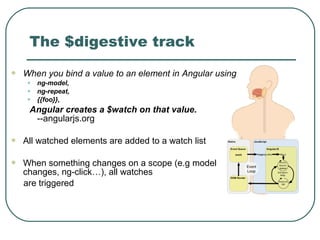
 When you bind a value to an element in Angular using
• ng-model,
• ng-repeat,
• {{foo}},
Angular creates a $watch on that value.
--angularjs.org
 All watched elements are added to a watch list
 When something changes on a scope (e.g model
changes, ng-click…), all watches
are triggered
When you watch too much
8-)
It is generally accepted that once the number of watchers reaches 2000+, an
application will start to suffer. AngularJS.org
“You can't really show more than about 2000 pieces of information to a human on a
single page. Anything more than that is really bad UI, and humans can't process
this anyway.”
-- Misko @ StackOverflow
Even more watches: ngClass, ngHide, ngIf, ngShow, ngStyle
Even more watches - ng-
repeat
ngRepeat directive instantiates a
template once per item [...] each
template instance gets its own
scope, where the given loop
variable is set to the current
collection item, and `$index` is set
to the item index or key. --
docs.angularjs.org
Even more watch - Filters
A convenient way to reduce the number of watchers is to limit their number by
filtering
An AngularJS filter in your HTML will execute (multiple times!) for every digest
cycle[4]
This means that the filtering function, or the filter will execute multiple times, even if
the underlying data or conditions have not changed.
Optimize
• by triggering your filter in your controller instead of having it directly in your
HTML.
• by injecting the filter service in application and if XXX is the service
XXXFilter
• showcase Ability filter by chapter
Show Case
 Showcase how the number of watches affect
performance
• http://plnkr.co/edit/jwrHVb?p=preview
 Showcase how the filters affects performance
• http://jsfiddle.net/m2jak8c8/
 Showcase how to write a manually triggered filter
Part II
Best practices
Part II
Best practices
 General principle
• Limit the cost of digest cycle
• E.g : if a scroll triggers a digest at each frame
• Objective 60 FPS => $digest time < 16ms
 Strategies
• Digest only when you need
• Limit number of watchers
• One way binding
• Remove watchers dynamically
• Watch only what is needed
• Make sure what is watched is cheap
• Don’t use ng-mousenter, mouseleave…
• Avoid watch invisible elements
• …
Digest only on the scopes
you need
 Third party plugins make model changes
“outside” AngularJS
 Its’s where $scope.$apply become
handy
 However $scope.$apply=~$rootScope.
$digest
 Instead we can use $scope.$digest,
which run digest only in the current
scope (and child)
Show case:
http://jsfiddle.net/fqbsdqub/
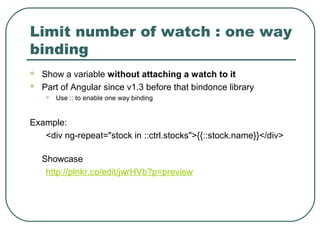
Limit number of watch : one way
binding
 Show a variable without attaching a watch to it
 Part of Angular since v1.3 before that bindonce library
• Use :: to enable one way binding
Example:
<div ng-repeat="stock in ::ctrl.stocks">{{::stock.name}}</div>
Showcase
http://plnkr.co/edit/jwrHVb?p=preview
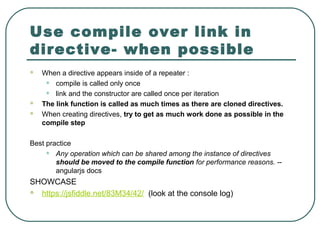
Use compile over link in
directive- when possible
 When a directive appears inside of a repeater :
• compile is called only once
• link and the constructor are called once per iteration
 The link function is called as much times as there are cloned directives.
 When creating directives, try to get as much work done as possible in the
compile step
Best practice
• Any operation which can be shared among the instance of directives
should be moved to the compile function for performance reasons. --
angularjs docs
SHOWCASE
 https://jsfiddle.net/83M34/42/ (look at the console log)
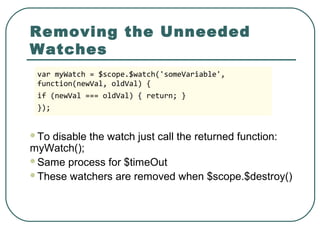
Removing the Unneeded
Watches
To disable the watch just call the returned function:
myWatch();
Same process for $timeOut
These watchers are removed when $scope.$destroy()
var myWatch = $scope.$watch('someVariable',
function(newVal, oldVal) {
if (newVal === oldVal) { return; }
});
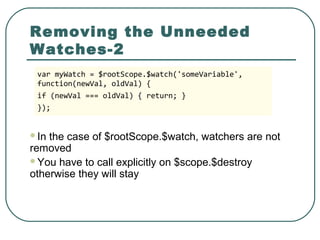
Removing the Unneeded
Watches-2
In the case of $rootScope.$watch, watchers are not
removed
You have to call explicitly on $scope.$destroy
otherwise they will stay
var myWatch = $rootScope.$watch('someVariable',
function(newVal, oldVal) {
if (newVal === oldVal) { return; }
});
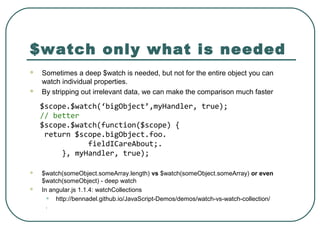
$watch only what is needed
 Sometimes a deep $watch is needed, but not for the entire object you can
watch individual properties.
 By stripping out irrelevant data, we can make the comparison much faster
 $watch(someObject.someArray.length) vs $watch(someObject.someArray) or even
$watch(someObject) - deep watch
 In angular.js 1.1.4: watchCollections
• http://bennadel.github.io/JavaScript-Demos/demos/watch-vs-watch-collection/
.
$scope.$watch(‘bigObject’,myHandler, true);
// better
$scope.$watch(function($scope) {
return $scope.bigObject.foo.
fieldICareAbout;.
}, myHandler, true);
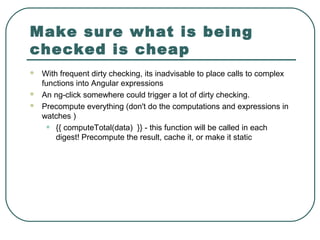
Make sure what is being
checked is cheap
 With frequent dirty checking, its inadvisable to place calls to complex
functions into Angular expressions
 An ng-click somewhere could trigger a lot of dirty checking.
 Precompute everything (don't do the computations and expressions in
watches )
• {{ computeTotal(data) }} - this function will be called in each
digest! Precompute the result, cache it, or make it static
Don't use ng-mouseenter,
ng-mouseleave, etc.
 Using ng-mouseenter/ng-mouseleave triggers the digest cycle
• In general avoid directive that are triggered very often
 Use CSS/ vanillaJS wherever you can to avoid this trigger
 “Using the built-in directives like ng-mouseenter AngularJS caused our view to
flicker. The browser frame rate was mostly below 30 frames per second. Using
pure jQuery to create animations and hover-effects solved this problem”
Showcase: http://plnkr.co/edit/sFsuqvPajnw1x2LahX7T?p=preview
Avoid watching invisible
elements - Use ng-if, not ng-
show
 ngShow/ngHide
• “The element is shown or hidden by removing or adding the `.ng-hide` CSS class
onto the element. The `.ng-hide` CSS class is predefined in AngularJS and sets the
display style to none (using an !important flag).” - ngShowHide.js Source Code
 ngIf
• one of the best features to come out of Angular 1.2
• If the expression evaluates to a false value then the element is removed from the
DOM,
• otherwise a clone of the element is reinserted into the DOM.
• when an element is removed using `ngIf` its scope is destroyed and a new scope is
created when the element is restored. pros: watches are destroyed too :)
• The scope created within `ngIf` inherits from its parent scope using [prototypal
inheritance]
 cons: performance hit as it fully recompiles the angularjs template when hidden/shown
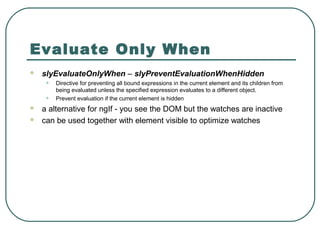
Evaluate Only When
 slyEvaluateOnlyWhen – slyPreventEvaluationWhenHidden
• Directive for preventing all bound expressions in the current element and its children from
being evaluated unless the specified expression evaluates to a different object.
• Prevent evaluation if the current element is hidden
 a alternative for ngIf - you see the DOM but the watches are inactive
 can be used together with element visible to optimize watches
Prevent deep filtering
 Same as for watches
 filter on specific fields (prevent deep filtering)
 use cheap statements inside filters functions that execute fast or break the
function on the beginning if the condition is not valid
angular.module('MyFilters', [])
.filter('customfiler', function() {
return function(input) {
if (input.age < 18) return
input;
if (intensiveChecking(input))
transformInput(input);
else
return input;
};
});
angular.module('MyFilters', [])
.filter('customfiler', function() {
return function(input) {
if (intensiveChecking(input) &&
input.age > 18)
{
transformInput(input);
} else return input;
};
});
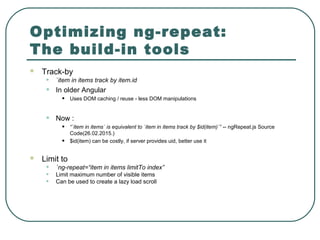
Optimizing ng-repeat:
The build-in tools
 Track-by
• `item in items track by item.id
• In older Angular
• Uses DOM caching / reuse - less DOM manipulations
• Now :
• “`item in items` is equivalent to `item in items track by $id(item)`” -- ngRepeat.js Source
Code(26.02.2015.)
• $id(item) can be costly, if server provides uid, better use it
 Limit to
• `ng-repeat=“item in items limitTo index”
• Limit maximum number of visible items
• Can be used to create a lazy load scroll
Direct DOM manipulation
with vanillaJS/JQuery
 Don’t do it if there is another way
 Pros:
• Fast
• No watches
• Needs a lot of engineering :)
 Cons:
• Can’t use the power of angular anymore
• ugly code
Optimizing ng-repeat :
Remove non-visible
elements
 Pagination
• Simple method to reduce the number of watches for large item sets -
together with DOM caching / reuse its a powerful tool
 Virtual Scroll - Angular-vs-Repeat
• PROS:
• VERY easy to use just add <div vs-repeat> above your ng-repeat and enjoy the performance boost
• CONS:
• Sometimes it works perfectly with simple item lists but as soon as the case is more complex a lot of
customization is needed and there is a great possibility that it will flicker (container scrolls and co)
• Problems with nested repeats - can be buggy
• Not easy to combine it it with lazy loading/infinitive scroll
 ShowCase
• http://kamilkp.github.io/angular-vs-repeat/#?tab=8
Infinitive scroll - Lazy
Loading
 ngInfiniteScroll - angular library
 Manually - track by and limitTo
 Demo :D
Open question : Use ng-bind
instead of {{}}
 Some debate but no clear answer on SO
• http://stackoverflow.com/questions/16125872/why-ng-bind-is-better-than-in-angular
 Jsperf seems to say {{}} is better
• https://jsperf.com/angular-bind-vs-brackets
 What is your opinion?
Measures
 To measure the time a list rendering takes an directive could be
used which logs the time by using the ng-repeat property
“$last”Manually - track by and limitTo
// Post repeat directive for logging the rendering time
angular.module('siApp.services').directive('postRepeatDirective',
['$timeout', '$log', 'TimeTracker',
function($timeout, $log, TimeTracker) {
return function(scope, element, attrs) {
if (scope.$last){
$timeout(function(){
var timeFinishedLoadingList = TimeTracker.reviewListLoaded();
var ref = new Date(timeFinishedLoadingList);
var end = new Date();
$log.debug("## DOM rendering list took: " + (end - ref) + " ms");
});
}
};
}
]);
<tr ng-repeat="item in items" post-repeat-directive>…</tr>
Measures
 Number of watches
 Digest delay
 Monitoring the digest circle lag/delay time of the rootScope or
the selected scope
var vScope = $0 || document.querySelector('[ng-app]');
angular.element(vScope).injector().invoke(function($rootScope
) {
var a = performance.now();
$rootScope.$apply();
console.log(performance.now()-a);
})
Measures - Tools
 Batarang
 Developer Tools profiler
 Ng-stats
FUTURE
 “Dirty checking can have performance issues, but the core
team can/will start using Object.observe as ES6/harmony
matures. As JS grows, a lot of Angular downsides will stop
being relevant” -- Some guy on Reddit a year ago(2014)
 Angular.js 2.0
• WatchTower.js
• Object.observe
Questions
 What is the blend between Performance optimization and
breaking Angular.js ?
 Overuse of optimizations - using Javascript/JQuery to handle
the view directly ?
 Is Angular.js really good for every application ?
 ....
REFERENCES
 [1] Counting the number of watchers on a page in angular.js
 [2] Databinding in AngularJS
 [3] Optimizing AngularJS: 1200ms to 35ms, Steven Czerwinksi
 [4] Optimizing ng-repeat in AngularJS
 [5,7] Optimizing a Large AngularJS Application,Karl Seamon, ng-conf
 [6] Improving Angular Dirty Checking Performance Doug Turnbull — April 24,
2014
 [8] The Digest Loop and $apply, ngBook
 [9] Supercharge AngularJS Performance Measurement and Tuning Sebastian
Fröstl && Damien Klinnert
 [10] Speeding up AngularJS apps with simple optimizations, Todd Motto, Aug 6,
2014
 [11] AngularJS Performance Tuning for Long Lists, 2013 Sebastian Fröstl,
September 10

Angular js meetup

  • 1.
  • 2.
    Introduction Why are wehere?  AngularJS behave very well on light application  Problems appears when DOM become complex  Our use case : Ability • Document management system • <200 documents in DOM : no problem • >350 documents in DOM : barely unusable
  • 3.
  • 4.
    The $digestive track When you bind a value to an element in Angular using • ng-model, • ng-repeat, • {{foo}}, Angular creates a $watch on that value. --angularjs.org  All watched elements are added to a watch list  When something changes on a scope (e.g model changes, ng-click…), all watches are triggered
  • 5.
    When you watchtoo much 8-) It is generally accepted that once the number of watchers reaches 2000+, an application will start to suffer. AngularJS.org “You can't really show more than about 2000 pieces of information to a human on a single page. Anything more than that is really bad UI, and humans can't process this anyway.” -- Misko @ StackOverflow Even more watches: ngClass, ngHide, ngIf, ngShow, ngStyle
  • 6.
    Even more watches- ng- repeat ngRepeat directive instantiates a template once per item [...] each template instance gets its own scope, where the given loop variable is set to the current collection item, and `$index` is set to the item index or key. -- docs.angularjs.org
  • 7.
    Even more watch- Filters A convenient way to reduce the number of watchers is to limit their number by filtering An AngularJS filter in your HTML will execute (multiple times!) for every digest cycle[4] This means that the filtering function, or the filter will execute multiple times, even if the underlying data or conditions have not changed. Optimize • by triggering your filter in your controller instead of having it directly in your HTML. • by injecting the filter service in application and if XXX is the service XXXFilter • showcase Ability filter by chapter
  • 8.
    Show Case  Showcasehow the number of watches affect performance • http://plnkr.co/edit/jwrHVb?p=preview  Showcase how the filters affects performance • http://jsfiddle.net/m2jak8c8/  Showcase how to write a manually triggered filter
  • 9.
  • 10.
    Part II Best practices General principle • Limit the cost of digest cycle • E.g : if a scroll triggers a digest at each frame • Objective 60 FPS => $digest time < 16ms  Strategies • Digest only when you need • Limit number of watchers • One way binding • Remove watchers dynamically • Watch only what is needed • Make sure what is watched is cheap • Don’t use ng-mousenter, mouseleave… • Avoid watch invisible elements • …
  • 11.
    Digest only onthe scopes you need  Third party plugins make model changes “outside” AngularJS  Its’s where $scope.$apply become handy  However $scope.$apply=~$rootScope. $digest  Instead we can use $scope.$digest, which run digest only in the current scope (and child) Show case: http://jsfiddle.net/fqbsdqub/
  • 12.
    Limit number ofwatch : one way binding  Show a variable without attaching a watch to it  Part of Angular since v1.3 before that bindonce library • Use :: to enable one way binding Example: <div ng-repeat="stock in ::ctrl.stocks">{{::stock.name}}</div> Showcase http://plnkr.co/edit/jwrHVb?p=preview
  • 13.
    Use compile overlink in directive- when possible  When a directive appears inside of a repeater : • compile is called only once • link and the constructor are called once per iteration  The link function is called as much times as there are cloned directives.  When creating directives, try to get as much work done as possible in the compile step Best practice • Any operation which can be shared among the instance of directives should be moved to the compile function for performance reasons. -- angularjs docs SHOWCASE  https://jsfiddle.net/83M34/42/ (look at the console log)
  • 14.
    Removing the Unneeded Watches Todisable the watch just call the returned function: myWatch(); Same process for $timeOut These watchers are removed when $scope.$destroy() var myWatch = $scope.$watch('someVariable', function(newVal, oldVal) { if (newVal === oldVal) { return; } });
  • 15.
    Removing the Unneeded Watches-2 Inthe case of $rootScope.$watch, watchers are not removed You have to call explicitly on $scope.$destroy otherwise they will stay var myWatch = $rootScope.$watch('someVariable', function(newVal, oldVal) { if (newVal === oldVal) { return; } });
  • 16.
    $watch only whatis needed  Sometimes a deep $watch is needed, but not for the entire object you can watch individual properties.  By stripping out irrelevant data, we can make the comparison much faster  $watch(someObject.someArray.length) vs $watch(someObject.someArray) or even $watch(someObject) - deep watch  In angular.js 1.1.4: watchCollections • http://bennadel.github.io/JavaScript-Demos/demos/watch-vs-watch-collection/ . $scope.$watch(‘bigObject’,myHandler, true); // better $scope.$watch(function($scope) { return $scope.bigObject.foo. fieldICareAbout;. }, myHandler, true);
  • 17.
    Make sure whatis being checked is cheap  With frequent dirty checking, its inadvisable to place calls to complex functions into Angular expressions  An ng-click somewhere could trigger a lot of dirty checking.  Precompute everything (don't do the computations and expressions in watches ) • {{ computeTotal(data) }} - this function will be called in each digest! Precompute the result, cache it, or make it static
  • 18.
    Don't use ng-mouseenter, ng-mouseleave,etc.  Using ng-mouseenter/ng-mouseleave triggers the digest cycle • In general avoid directive that are triggered very often  Use CSS/ vanillaJS wherever you can to avoid this trigger  “Using the built-in directives like ng-mouseenter AngularJS caused our view to flicker. The browser frame rate was mostly below 30 frames per second. Using pure jQuery to create animations and hover-effects solved this problem” Showcase: http://plnkr.co/edit/sFsuqvPajnw1x2LahX7T?p=preview
  • 19.
    Avoid watching invisible elements- Use ng-if, not ng- show  ngShow/ngHide • “The element is shown or hidden by removing or adding the `.ng-hide` CSS class onto the element. The `.ng-hide` CSS class is predefined in AngularJS and sets the display style to none (using an !important flag).” - ngShowHide.js Source Code  ngIf • one of the best features to come out of Angular 1.2 • If the expression evaluates to a false value then the element is removed from the DOM, • otherwise a clone of the element is reinserted into the DOM. • when an element is removed using `ngIf` its scope is destroyed and a new scope is created when the element is restored. pros: watches are destroyed too :) • The scope created within `ngIf` inherits from its parent scope using [prototypal inheritance]  cons: performance hit as it fully recompiles the angularjs template when hidden/shown
  • 20.
    Evaluate Only When slyEvaluateOnlyWhen – slyPreventEvaluationWhenHidden • Directive for preventing all bound expressions in the current element and its children from being evaluated unless the specified expression evaluates to a different object. • Prevent evaluation if the current element is hidden  a alternative for ngIf - you see the DOM but the watches are inactive  can be used together with element visible to optimize watches
  • 21.
    Prevent deep filtering Same as for watches  filter on specific fields (prevent deep filtering)  use cheap statements inside filters functions that execute fast or break the function on the beginning if the condition is not valid angular.module('MyFilters', []) .filter('customfiler', function() { return function(input) { if (input.age < 18) return input; if (intensiveChecking(input)) transformInput(input); else return input; }; }); angular.module('MyFilters', []) .filter('customfiler', function() { return function(input) { if (intensiveChecking(input) && input.age > 18) { transformInput(input); } else return input; }; });
  • 22.
    Optimizing ng-repeat: The build-intools  Track-by • `item in items track by item.id • In older Angular • Uses DOM caching / reuse - less DOM manipulations • Now : • “`item in items` is equivalent to `item in items track by $id(item)`” -- ngRepeat.js Source Code(26.02.2015.) • $id(item) can be costly, if server provides uid, better use it  Limit to • `ng-repeat=“item in items limitTo index” • Limit maximum number of visible items • Can be used to create a lazy load scroll
  • 23.
    Direct DOM manipulation withvanillaJS/JQuery  Don’t do it if there is another way  Pros: • Fast • No watches • Needs a lot of engineering :)  Cons: • Can’t use the power of angular anymore • ugly code
  • 24.
    Optimizing ng-repeat : Removenon-visible elements  Pagination • Simple method to reduce the number of watches for large item sets - together with DOM caching / reuse its a powerful tool  Virtual Scroll - Angular-vs-Repeat • PROS: • VERY easy to use just add <div vs-repeat> above your ng-repeat and enjoy the performance boost • CONS: • Sometimes it works perfectly with simple item lists but as soon as the case is more complex a lot of customization is needed and there is a great possibility that it will flicker (container scrolls and co) • Problems with nested repeats - can be buggy • Not easy to combine it it with lazy loading/infinitive scroll  ShowCase • http://kamilkp.github.io/angular-vs-repeat/#?tab=8
  • 25.
    Infinitive scroll -Lazy Loading  ngInfiniteScroll - angular library  Manually - track by and limitTo  Demo :D
  • 26.
    Open question :Use ng-bind instead of {{}}  Some debate but no clear answer on SO • http://stackoverflow.com/questions/16125872/why-ng-bind-is-better-than-in-angular  Jsperf seems to say {{}} is better • https://jsperf.com/angular-bind-vs-brackets  What is your opinion?
  • 27.
    Measures  To measurethe time a list rendering takes an directive could be used which logs the time by using the ng-repeat property “$last”Manually - track by and limitTo // Post repeat directive for logging the rendering time angular.module('siApp.services').directive('postRepeatDirective', ['$timeout', '$log', 'TimeTracker', function($timeout, $log, TimeTracker) { return function(scope, element, attrs) { if (scope.$last){ $timeout(function(){ var timeFinishedLoadingList = TimeTracker.reviewListLoaded(); var ref = new Date(timeFinishedLoadingList); var end = new Date(); $log.debug("## DOM rendering list took: " + (end - ref) + " ms"); }); } }; } ]); <tr ng-repeat="item in items" post-repeat-directive>…</tr>
  • 28.
    Measures  Number ofwatches  Digest delay  Monitoring the digest circle lag/delay time of the rootScope or the selected scope var vScope = $0 || document.querySelector('[ng-app]'); angular.element(vScope).injector().invoke(function($rootScope ) { var a = performance.now(); $rootScope.$apply(); console.log(performance.now()-a); })
  • 29.
    Measures - Tools Batarang  Developer Tools profiler  Ng-stats
  • 30.
    FUTURE  “Dirty checkingcan have performance issues, but the core team can/will start using Object.observe as ES6/harmony matures. As JS grows, a lot of Angular downsides will stop being relevant” -- Some guy on Reddit a year ago(2014)  Angular.js 2.0 • WatchTower.js • Object.observe
  • 31.
    Questions  What isthe blend between Performance optimization and breaking Angular.js ?  Overuse of optimizations - using Javascript/JQuery to handle the view directly ?  Is Angular.js really good for every application ?  ....
  • 32.
    REFERENCES  [1] Countingthe number of watchers on a page in angular.js  [2] Databinding in AngularJS  [3] Optimizing AngularJS: 1200ms to 35ms, Steven Czerwinksi  [4] Optimizing ng-repeat in AngularJS  [5,7] Optimizing a Large AngularJS Application,Karl Seamon, ng-conf  [6] Improving Angular Dirty Checking Performance Doug Turnbull — April 24, 2014  [8] The Digest Loop and $apply, ngBook  [9] Supercharge AngularJS Performance Measurement and Tuning Sebastian Fröstl && Damien Klinnert  [10] Speeding up AngularJS apps with simple optimizations, Todd Motto, Aug 6, 2014  [11] AngularJS Performance Tuning for Long Lists, 2013 Sebastian Fröstl, September 10

Editor's Notes

  • #5 When you apply, the digest loop will be trigered with all elements of the watch list being processed Then when everything is done a new digest is performed to check that the performance are stable
  • #6 The problem is that it is quite easy to create lot of watches, lot of directive actually creating watch If you mix this with ng-repeat you can easily end up with more than 2000 watches
  • #7 If an element have 5 watch and is repeated 10 times, then you will end with 50 watches Filter will reduce the number of watches since elements are not created