StringBuffer and its functions, StringTokenizer, its functions and its working
A string buffer is like a String, but can be modified. At any point in time it contains some
particular sequence of characters, but the length and content of the sequence can be
changed through certain method calls.
Creating object:
StringBuffer sb=new StringBuffer(“Hello”);
or
String s=“Hello”;
StringBuffer sb=new StringBuffer(s);
StringBuffer append(Any Data Type)- Appends the specified CharSequence to this sequence
StringBuffer s=new StringBuffer(“Hello”);
s.append(“ Java”); //s will be updated
System.out.print(s);
will print Hello Java
System.out.print(s.append(123));
will print Hello123
s=s.append(5.69); //s will be updated
System.out.print(s);
will print Hello5.69
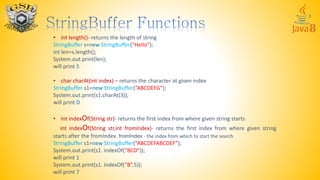
• int length()- returns the length of string
StringBuffer s=new StringBuffer(“Hello”);
int len=s.length();
System.out.print(len);
will print 5
• char charAt(int index) – returns the character at given index
StringBuffer s1=new StringBuffer(“ABCDEFG”);
System.out.print(s1.charAt(3));
will print D
• int indexOf(String str)- returns the first index from where given string starts
int indexOf(String str,int fromIndex)- returns the first index from where given string
starts after the fromIndex. fromIndex - the index from which to start the search
StringBuffer s1=new StringBuffer(“ABCDEFABCDEF”);
System.out.print(s1. indexOf(“BCD”));
will print 1
System.out.print(s1. indexOf(“B”,5));
will print 7
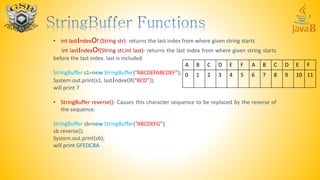
• int lastIndexOf (String str)- returns the last index from where given string starts
int lastIndexOf(String str,int last)- returns the last index from where given string starts
before the last index. last is included
StringBuffer s1=new StringBuffer(“ABCDEFABCDEF”);
System.out.print(s1. lastIndexOf(“BCD”));
will print 7
• StringBuffer reverse()- Causes this character sequence to be replaced by the reverse of
the sequence.
StringBuffer sb=new StringBuffer(“ABCDEFG”);
sb.reverse();
System.out.print(sb);
will print GFEDCBA
A B C D E F A B C D E F
0 1 2 3 4 5 6 7 8 9 10 11
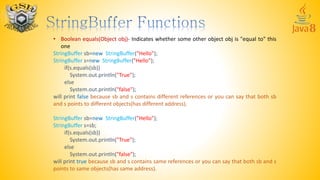
• Boolean equals(Object obj)- Indicates whether some other object obj is "equal to" this
one
StringBuffer sb=new StringBuffer("Hello");
StringBuffer s=new StringBuffer("Hello");
if(s.equals(sb))
System.out.println("True");
else
System.out.println("false");
will print false because sb and s contains different references or you can say that both sb
and s points to different objects(has different address).
StringBuffer sb=new StringBuffer("Hello");
StringBuffer s=sb;
if(s.equals(sb))
System.out.println("True");
else
System.out.println("false");
will print true because sb and s contains same references or you can say that both sb and s
points to same objects(has same address).
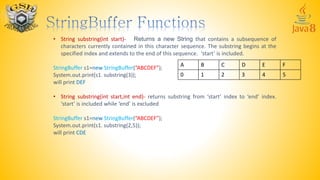
• String substring(int start)- Returns a new String that contains a subsequence of
characters currently contained in this character sequence. The substring begins at the
specified index and extends to the end of this sequence. ‘start’ is included.
StringBuffer s1=new StringBuffer(“ABCDEF”);
System.out.print(s1. substring(3));
will print DEF
• String substring(int start,int end)- returns substring from ‘start’ index to ‘end’ index.
‘start’ is included while ‘end’ is excluded
StringBuffer s1=new StringBuffer(“ABCDEF”);
System.out.print(s1. substring(2,5));
will print CDE
A B C D E F
0 1 2 3 4 5
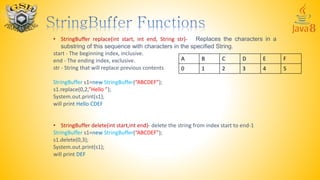
• StringBuffer replace(int start, int end, String str)- Replaces the characters in a
substring of this sequence with characters in the specified String.
start - The beginning index, inclusive.
end - The ending index, exclusive.
str - String that will replace previous contents
StringBuffer s1=new StringBuffer(“ABCDEF”);
s1.replace(0,2,”Hello ”);
System.out.print(s1);
will print Hello CDEF
• StringBuffer delete(int start,int end)- delete the string from index start to end-1
StringBuffer s1=new StringBuffer(“ABCDEF”);
s1.delete(0,3);
System.out.print(s1);
will print DEF
A B C D E F
0 1 2 3 4 5
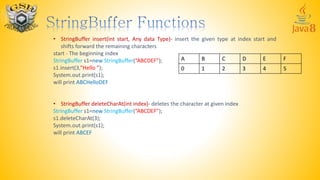
• StringBuffer insert(int start, Any data Type)- insert the given type at index start and
shifts forward the remaining characters
start - The beginning index
StringBuffer s1=new StringBuffer(“ABCDEF”);
s1.insert(3,”Hello ”);
System.out.print(s1);
will print ABCHelloDEF
• StringBuffer deleteCharAt(int index)- deletes the character at given index
StringBuffer s1=new StringBuffer(“ABCDEF”);
s1.deleteCharAt(3);
System.out.print(s1);
will print ABCEF
A B C D E F
0 1 2 3 4 5
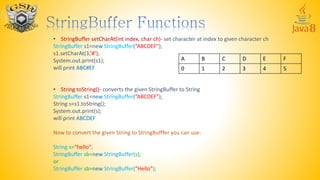
• StringBuffer setCharAt(int index, char ch)- set character at index to given character ch
StringBuffer s1=new StringBuffer(“ABCDEF”);
s1.setCharAt(3,’#’);
System.out.print(s1);
will print ABC#EF
• String toString()- converts the given StringBuffer to String
StringBuffer s1=new StringBuffer(“ABCDEF”);
String s=s1.toString();
System.out.print(s);
will print ABCDEF
Now to convert the given String to StringBufffer you can use:
String s=“hello”;
StringBuffer sb=new StringBuffer(s);
or
StringBuffer sb=new StringBuffer(“Hello”);
A B C D E F
0 1 2 3 4 5
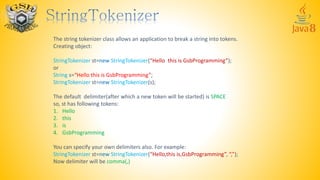
The string tokenizer class allows an application to break a string into tokens.
Creating object:
StringTokenizer st=new StringTokenizer(“Hello this is GsbProgramming”);
or
String s=“Hello this is GsbProgramming”;
StringTokenizer st=new StringTokenizer(s);
The default delimiter(after which a new token will be started) is SPACE
so, st has following tokens:
1. Hello
2. this
3. is
4. GsbProgramming
You can specify your own delimiters also. For example:
StringTokenizer st=new StringTokenizer(“Hello,this is,GsbProgramming”, “,”);
Now delimiter will be comma(,)
Now st has following tokens:
1. Hello
2. this is
3. GsbProgramming
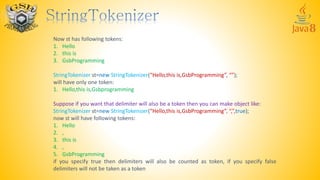
StringTokenizer st=new StringTokenizer(“Hello,this is,GsbProgramming”, “”);
will have only one token:
1. Hello,this is,Gsbprogramming
Suppose if you want that delimiter will also be a token then you can make object like:
StringTokenizer st=new StringTokenizer(“Hello,this is,GsbProgramming”, “,”,true);
now st will have following tokens:
1. Hello
2. ,
3. this is
4. ,
5. GsbProgramming
if you specify true then delimiters will also be counted as token, if you specify false
delimiters will not be taken as a token
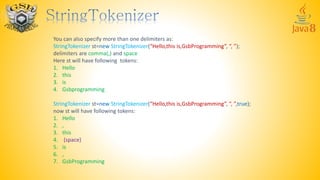
You can also specify more than one delimiters as:
StringTokenizer st=new StringTokenizer(“Hello,this is,GsbProgramming”, “, ”);
delimiters are comma(,) and space
Here st will have following tokens:
1. Hello
2. this
3. is
4. Gsbprogramming
StringTokenizer st=new StringTokenizer(“Hello,this is,GsbProgramming”, “, ”,true);
now st will have following tokens:
1. Hello
2. ,
3. this
4. (space)
5. is
6. ,
7. GsbProgramming
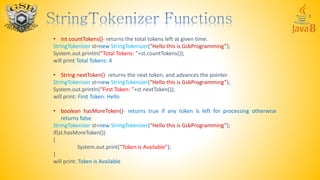
• int countTokens()- returns the total tokens left at given time.
StringTokenizer st=new StringTokenizer(“Hello this is GsbProgramming”);
System.out.println(“Total Tokens: ”+st.countTokens());
will print Total Tokens: 4
• String nextToken()- returns the next token, and advances the pointer
StringTokenizer st=new StringTokenizer(“Hello this is GsbProgramming”);
System.out.println(“First Token: ”+st.nextToken());
will print: First Token: Hello
• boolean hasMoreToken()- returns true if any token is left for processing otherwise
returns false
StringTokenizer st=new StringTokenizer(“Hello this is GsbProgramming”);
if(st.hasMoreToken())
{
System.out.print(“Token is Available”);
}
will print: Token is Available
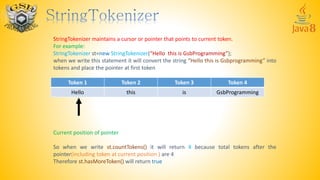
StringTokenizer maintains a cursor or pointer that points to current token.
For example:
StringTokenizer st=new StringTokenizer(“Hello this is GsbProgramming”);
when we write this statement it will convert the string “Hello this is Gsbprogramming” into
tokens and place the pointer at first token
Tokens:
Current position of pointer
So when we write st.countTokens() it will return 4 because total tokens after the
pointer(including token at current position ) are 4
Therefore st.hasMoreToken() will return true
Token 1 Token 2 Token 3 Token 4
Hello this is GsbProgramming
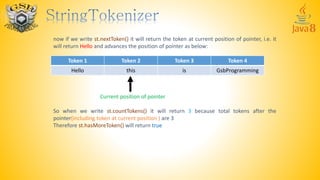
now if we write st.nextToken() it will return the token at current position of pointer, i.e. it
will return Hello and advances the position of pointer as below:
Current position of pointer
So when we write st.countTokens() it will return 3 because total tokens after the
pointer(including token at current position ) are 3
Therefore st.hasMoreToken() will return true
Token 1 Token 2 Token 3 Token 4
Hello this is GsbProgramming
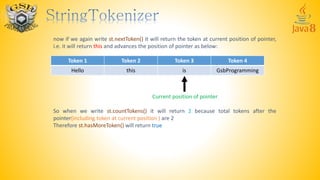
now if we again write st.nextToken() it will return the token at current position of pointer,
i.e. it will return this and advances the position of pointer as below:
Current position of pointer
So when we write st.countTokens() it will return 2 because total tokens after the
pointer(including token at current position ) are 2
Therefore st.hasMoreToken() will return true
Token 1 Token 2 Token 3 Token 4
Hello this is GsbProgramming
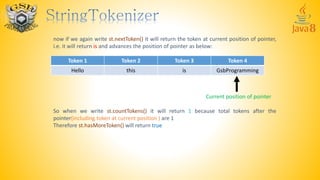
now if we again write st.nextToken() it will return the token at current position of pointer,
i.e. it will return is and advances the position of pointer as below:
Current position of pointer
So when we write st.countTokens() it will return 1 because total tokens after the
pointer(including token at current position ) are 1
Therefore st.hasMoreToken() will return true
Token 1 Token 2 Token 3 Token 4
Hello this is GsbProgramming
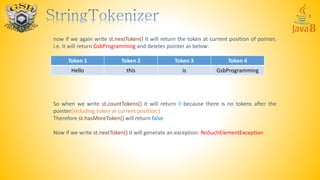
now if we again write st.nextToken() it will return the token at current position of pointer,
i.e. it will return GsbProgramming and deletes pointer as below:
So when we write st.countTokens() it will return 0 because there is no tokens after the
pointer(including token at current position )
Therefore st.hasMoreToken() will return false
Now if we write st.nextToken() it will generate an exception: NoSuchElementException
Token 1 Token 2 Token 3 Token 4
Hello this is GsbProgramming
For more Visit:
http://gsb-programming.blogspot.in/search/label/Java

Learn Java Part 7

  • 1.
    StringBuffer and itsfunctions, StringTokenizer, its functions and its working
  • 2.
    A string bufferis like a String, but can be modified. At any point in time it contains some particular sequence of characters, but the length and content of the sequence can be changed through certain method calls. Creating object: StringBuffer sb=new StringBuffer(“Hello”); or String s=“Hello”; StringBuffer sb=new StringBuffer(s);
  • 3.
    StringBuffer append(Any DataType)- Appends the specified CharSequence to this sequence StringBuffer s=new StringBuffer(“Hello”); s.append(“ Java”); //s will be updated System.out.print(s); will print Hello Java System.out.print(s.append(123)); will print Hello123 s=s.append(5.69); //s will be updated System.out.print(s); will print Hello5.69
  • 4.
    • int length()-returns the length of string StringBuffer s=new StringBuffer(“Hello”); int len=s.length(); System.out.print(len); will print 5 • char charAt(int index) – returns the character at given index StringBuffer s1=new StringBuffer(“ABCDEFG”); System.out.print(s1.charAt(3)); will print D • int indexOf(String str)- returns the first index from where given string starts int indexOf(String str,int fromIndex)- returns the first index from where given string starts after the fromIndex. fromIndex - the index from which to start the search StringBuffer s1=new StringBuffer(“ABCDEFABCDEF”); System.out.print(s1. indexOf(“BCD”)); will print 1 System.out.print(s1. indexOf(“B”,5)); will print 7
  • 5.
    • int lastIndexOf(String str)- returns the last index from where given string starts int lastIndexOf(String str,int last)- returns the last index from where given string starts before the last index. last is included StringBuffer s1=new StringBuffer(“ABCDEFABCDEF”); System.out.print(s1. lastIndexOf(“BCD”)); will print 7 • StringBuffer reverse()- Causes this character sequence to be replaced by the reverse of the sequence. StringBuffer sb=new StringBuffer(“ABCDEFG”); sb.reverse(); System.out.print(sb); will print GFEDCBA A B C D E F A B C D E F 0 1 2 3 4 5 6 7 8 9 10 11
  • 6.
    • Boolean equals(Objectobj)- Indicates whether some other object obj is "equal to" this one StringBuffer sb=new StringBuffer("Hello"); StringBuffer s=new StringBuffer("Hello"); if(s.equals(sb)) System.out.println("True"); else System.out.println("false"); will print false because sb and s contains different references or you can say that both sb and s points to different objects(has different address). StringBuffer sb=new StringBuffer("Hello"); StringBuffer s=sb; if(s.equals(sb)) System.out.println("True"); else System.out.println("false"); will print true because sb and s contains same references or you can say that both sb and s points to same objects(has same address).
  • 7.
    • String substring(intstart)- Returns a new String that contains a subsequence of characters currently contained in this character sequence. The substring begins at the specified index and extends to the end of this sequence. ‘start’ is included. StringBuffer s1=new StringBuffer(“ABCDEF”); System.out.print(s1. substring(3)); will print DEF • String substring(int start,int end)- returns substring from ‘start’ index to ‘end’ index. ‘start’ is included while ‘end’ is excluded StringBuffer s1=new StringBuffer(“ABCDEF”); System.out.print(s1. substring(2,5)); will print CDE A B C D E F 0 1 2 3 4 5
  • 8.
    • StringBuffer replace(intstart, int end, String str)- Replaces the characters in a substring of this sequence with characters in the specified String. start - The beginning index, inclusive. end - The ending index, exclusive. str - String that will replace previous contents StringBuffer s1=new StringBuffer(“ABCDEF”); s1.replace(0,2,”Hello ”); System.out.print(s1); will print Hello CDEF • StringBuffer delete(int start,int end)- delete the string from index start to end-1 StringBuffer s1=new StringBuffer(“ABCDEF”); s1.delete(0,3); System.out.print(s1); will print DEF A B C D E F 0 1 2 3 4 5
  • 9.
    • StringBuffer insert(intstart, Any data Type)- insert the given type at index start and shifts forward the remaining characters start - The beginning index StringBuffer s1=new StringBuffer(“ABCDEF”); s1.insert(3,”Hello ”); System.out.print(s1); will print ABCHelloDEF • StringBuffer deleteCharAt(int index)- deletes the character at given index StringBuffer s1=new StringBuffer(“ABCDEF”); s1.deleteCharAt(3); System.out.print(s1); will print ABCEF A B C D E F 0 1 2 3 4 5
  • 10.
    • StringBuffer setCharAt(intindex, char ch)- set character at index to given character ch StringBuffer s1=new StringBuffer(“ABCDEF”); s1.setCharAt(3,’#’); System.out.print(s1); will print ABC#EF • String toString()- converts the given StringBuffer to String StringBuffer s1=new StringBuffer(“ABCDEF”); String s=s1.toString(); System.out.print(s); will print ABCDEF Now to convert the given String to StringBufffer you can use: String s=“hello”; StringBuffer sb=new StringBuffer(s); or StringBuffer sb=new StringBuffer(“Hello”); A B C D E F 0 1 2 3 4 5
  • 11.
    The string tokenizerclass allows an application to break a string into tokens. Creating object: StringTokenizer st=new StringTokenizer(“Hello this is GsbProgramming”); or String s=“Hello this is GsbProgramming”; StringTokenizer st=new StringTokenizer(s); The default delimiter(after which a new token will be started) is SPACE so, st has following tokens: 1. Hello 2. this 3. is 4. GsbProgramming You can specify your own delimiters also. For example: StringTokenizer st=new StringTokenizer(“Hello,this is,GsbProgramming”, “,”); Now delimiter will be comma(,)
  • 12.
    Now st hasfollowing tokens: 1. Hello 2. this is 3. GsbProgramming StringTokenizer st=new StringTokenizer(“Hello,this is,GsbProgramming”, “”); will have only one token: 1. Hello,this is,Gsbprogramming Suppose if you want that delimiter will also be a token then you can make object like: StringTokenizer st=new StringTokenizer(“Hello,this is,GsbProgramming”, “,”,true); now st will have following tokens: 1. Hello 2. , 3. this is 4. , 5. GsbProgramming if you specify true then delimiters will also be counted as token, if you specify false delimiters will not be taken as a token
  • 13.
    You can alsospecify more than one delimiters as: StringTokenizer st=new StringTokenizer(“Hello,this is,GsbProgramming”, “, ”); delimiters are comma(,) and space Here st will have following tokens: 1. Hello 2. this 3. is 4. Gsbprogramming StringTokenizer st=new StringTokenizer(“Hello,this is,GsbProgramming”, “, ”,true); now st will have following tokens: 1. Hello 2. , 3. this 4. (space) 5. is 6. , 7. GsbProgramming
  • 14.
    • int countTokens()-returns the total tokens left at given time. StringTokenizer st=new StringTokenizer(“Hello this is GsbProgramming”); System.out.println(“Total Tokens: ”+st.countTokens()); will print Total Tokens: 4 • String nextToken()- returns the next token, and advances the pointer StringTokenizer st=new StringTokenizer(“Hello this is GsbProgramming”); System.out.println(“First Token: ”+st.nextToken()); will print: First Token: Hello • boolean hasMoreToken()- returns true if any token is left for processing otherwise returns false StringTokenizer st=new StringTokenizer(“Hello this is GsbProgramming”); if(st.hasMoreToken()) { System.out.print(“Token is Available”); } will print: Token is Available
  • 15.
    StringTokenizer maintains acursor or pointer that points to current token. For example: StringTokenizer st=new StringTokenizer(“Hello this is GsbProgramming”); when we write this statement it will convert the string “Hello this is Gsbprogramming” into tokens and place the pointer at first token Tokens: Current position of pointer So when we write st.countTokens() it will return 4 because total tokens after the pointer(including token at current position ) are 4 Therefore st.hasMoreToken() will return true Token 1 Token 2 Token 3 Token 4 Hello this is GsbProgramming
  • 16.
    now if wewrite st.nextToken() it will return the token at current position of pointer, i.e. it will return Hello and advances the position of pointer as below: Current position of pointer So when we write st.countTokens() it will return 3 because total tokens after the pointer(including token at current position ) are 3 Therefore st.hasMoreToken() will return true Token 1 Token 2 Token 3 Token 4 Hello this is GsbProgramming
  • 17.
    now if weagain write st.nextToken() it will return the token at current position of pointer, i.e. it will return this and advances the position of pointer as below: Current position of pointer So when we write st.countTokens() it will return 2 because total tokens after the pointer(including token at current position ) are 2 Therefore st.hasMoreToken() will return true Token 1 Token 2 Token 3 Token 4 Hello this is GsbProgramming
  • 18.
    now if weagain write st.nextToken() it will return the token at current position of pointer, i.e. it will return is and advances the position of pointer as below: Current position of pointer So when we write st.countTokens() it will return 1 because total tokens after the pointer(including token at current position ) are 1 Therefore st.hasMoreToken() will return true Token 1 Token 2 Token 3 Token 4 Hello this is GsbProgramming
  • 19.
    now if weagain write st.nextToken() it will return the token at current position of pointer, i.e. it will return GsbProgramming and deletes pointer as below: So when we write st.countTokens() it will return 0 because there is no tokens after the pointer(including token at current position ) Therefore st.hasMoreToken() will return false Now if we write st.nextToken() it will generate an exception: NoSuchElementException Token 1 Token 2 Token 3 Token 4 Hello this is GsbProgramming
  • 20.