Security Architecture and
Threat Modelling
Nilanjan De
Devesh Bhatt
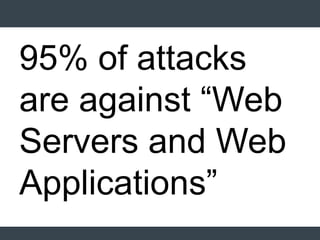
95% of attacks
are against “Web
Servers and Web
Applications”
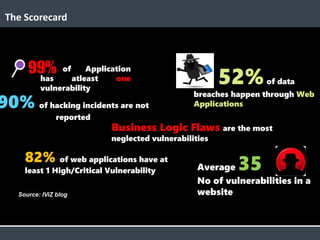
Average 35
No of vulnerabilities in a
website
52%of data
breaches happen through Web
Applications
of Application
has atleast one
vulnerability
41
High
3
3
5
9
Mediu
m
Low
The Scorecard
90% of hacking incidents are not
reported
99%
82% of web applications have at
least 1 High/Critical Vulnerability
Business Logic Flaws are the most
neglected vulnerabilities
Source: IViZ blog
Security Architecture and
SDLC
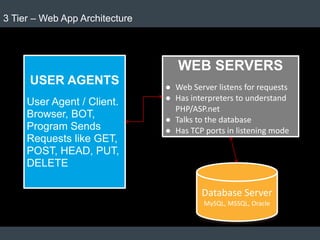
USER AGENTS
User Agent / Client.
Browser, BOT,
Program Sends
Requests like GET,
POST, HEAD, PUT,
DELETE
WEB SERVERS
● Web Server listens for requests
● Has interpreters to understand
PHP/ASP.net
● Talks to the database
● Has TCP ports in listening mode
Database Server
MySQL, MSSQL, Oracle
3 Tier – Web App Architecture
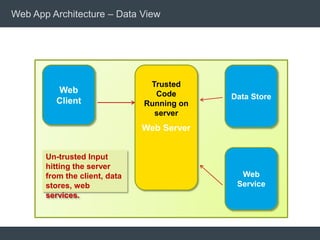
Web App Architecture – Data View
Web
Client Data Store
Web Server
Trusted
Code
Running on
server
Web
Service
Un-trusted Input
hitting the server
from the client, data
stores, web
services.
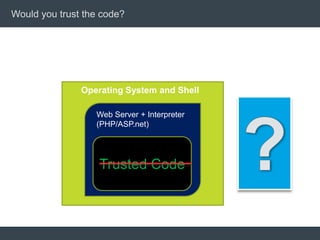
Would you trust the code?
Operating System and Shell
Web Server + Interpreter
(PHP/ASP.net)
Trusted Code
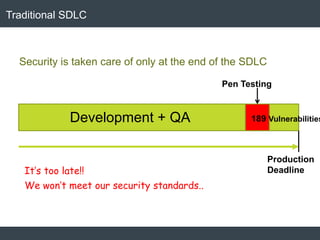
Traditional SDLC
It’s too late!!
We won’t meet our security standards..
Production
Deadline
Development + QA
Pen Testing
189 Vulnerabilities
Security is taken care of only at the end of the SDLC
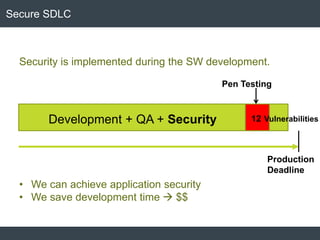
Secure SDLC
Production
Deadline
Development + QA + Security
Pen Testing
12 Vulnerabilities
Security is implemented during the SW development.
• We can achieve application security
• We save development time  $$
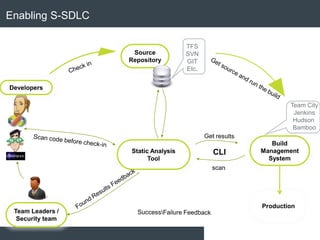
Enabling S-SDLC
Source
Repository
Build
Management
System
Static Analysis
Tool
Team City
Jenkins
Hudson
Bamboo
TFS
SVN
GIT
Etc.
Developers
Team Leaders /
Security team
Production
Cost to find/fix a
defect during
integration/system
test is 15-90 times
higher than at
design/coding
Time &
Cost
Code Inspection
Integration Testing
System TestingStatic analysis tools find
defects and design flaws
“in phase”
Unit Testing
Design Coding QA Production
Scan sources with checkmarx
Scan
binaries
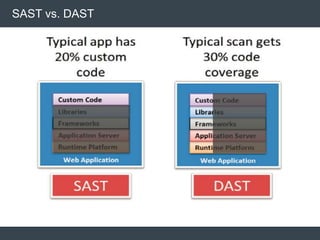
SAST vs. DAST
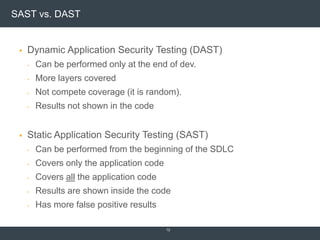
SAST vs. DAST
 Dynamic Application Security Testing (DAST)
- Can be performed only at the end of dev.
- More layers covered
- Not compete coverage (it is random).
- Results not shown in the code
 Static Application Security Testing (SAST)
- Can be performed from the beginning of the SDLC
- Covers only the application code
- Covers all the application code
- Results are shown inside the code
- Has more false positive results
12
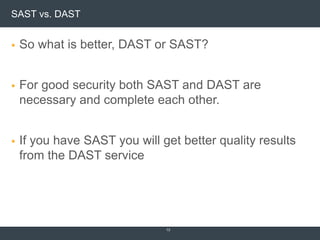
SAST vs. DAST
 So what is better, DAST or SAST?
 For good security both SAST and DAST are
necessary and complete each other.
 If you have SAST you will get better quality results
from the DAST service
13
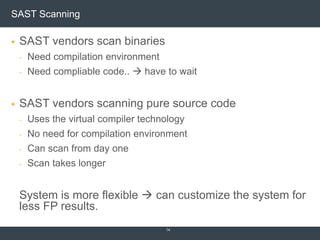
SAST Scanning
 SAST vendors scan binaries
- Need compilation environment
- Need compliable code..  have to wait
 SAST vendors scanning pure source code
- Uses the virtual compiler technology
- No need for compilation environment
- Can scan from day one
- Scan takes longer
System is more flexible  can customize the system for
less FP results.
14
Threat Modelling
Threat Modelling
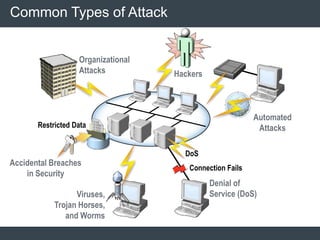
Common Types of Attack
Connection Fails
Organizational
Attacks
Restricted Data
Accidental Breaches
in Security
Automated
Attacks
Hackers
Viruses,
Trojan Horses,
and Worms
Denial of
Service (DoS)
DoS
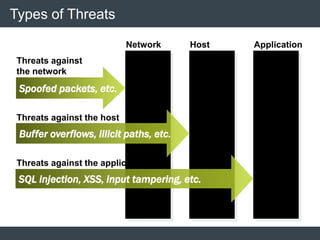
Types of Threats
Spoofed packets, etc.
Buffer overflows, illicit paths, etc.
SQL injection, XSS, input tampering, etc.
Network Host Application
Threats against
the network
Threats against the host
Threats against the application
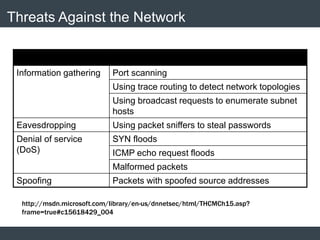
Threats Against the Network
Threat Examples
Information gathering Port scanning
Using trace routing to detect network topologies
Using broadcast requests to enumerate subnet
hosts
Eavesdropping Using packet sniffers to steal passwords
Denial of service
(DoS)
SYN floods
ICMP echo request floods
Malformed packets
Spoofing Packets with spoofed source addresses
http://msdn.microsoft.com/library/en-us/dnnetsec/html/THCMCh15.asp?
frame=true#c15618429_004
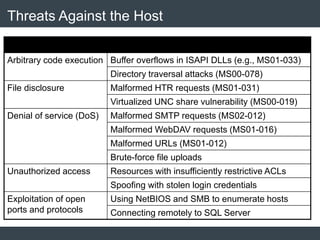
Threats Against the Host
Threat Examples
Arbitrary code execution Buffer overflows in ISAPI DLLs (e.g., MS01-033)
Directory traversal attacks (MS00-078)
File disclosure Malformed HTR requests (MS01-031)
Virtualized UNC share vulnerability (MS00-019)
Denial of service (DoS) Malformed SMTP requests (MS02-012)
Malformed WebDAV requests (MS01-016)
Malformed URLs (MS01-012)
Brute-force file uploads
Unauthorized access Resources with insufficiently restrictive ACLs
Spoofing with stolen login credentials
Exploitation of open
ports and protocols
Using NetBIOS and SMB to enumerate hosts
Connecting remotely to SQL Server
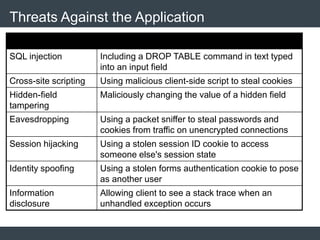
Threats Against the Application
Threat Examples
SQL injection Including a DROP TABLE command in text typed
into an input field
Cross-site scripting Using malicious client-side script to steal cookies
Hidden-field
tampering
Maliciously changing the value of a hidden field
Eavesdropping Using a packet sniffer to steal passwords and
cookies from traffic on unencrypted connections
Session hijacking Using a stolen session ID cookie to access
someone else's session state
Identity spoofing Using a stolen forms authentication cookie to pose
as another user
Information
disclosure
Allowing client to see a stack trace when an
unhandled exception occurs
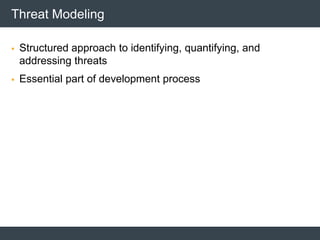
Threat Modeling
 Structured approach to identifying, quantifying, and
addressing threats
 Essential part of development process
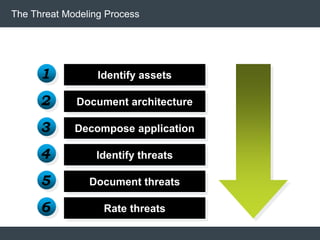
The Threat Modeling Process
Identify assets
Document architecture
Decompose application
Identify threats
Document threats
Rate threats
1
2
3
4
5
6
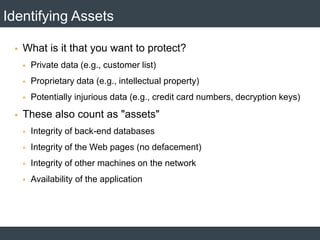
Identifying Assets
 What is it that you want to protect?
 Private data (e.g., customer list)
 Proprietary data (e.g., intellectual property)
 Potentially injurious data (e.g., credit card numbers, decryption keys)
 These also count as "assets"
 Integrity of back-end databases
 Integrity of the Web pages (no defacement)
 Integrity of other machines on the network
 Availability of the application
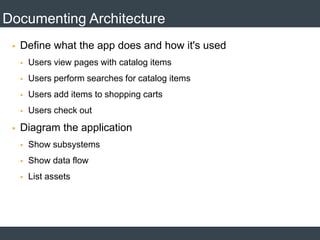
Documenting Architecture
 Define what the app does and how it's used
 Users view pages with catalog items
 Users perform searches for catalog items
 Users add items to shopping carts
 Users check out
 Diagram the application
 Show subsystems
 Show data flow
 List assets
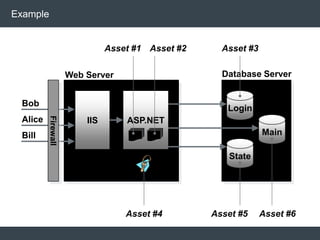
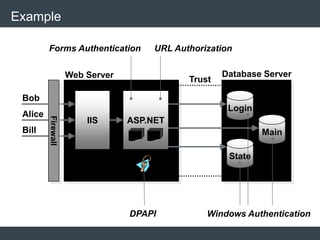
Example
Bob
Alice
Bill
Asset #4
Asset #1 Asset #2 Asset #3
Asset #5 Asset #6
IIS ASP.NET
Web Server
Login
State
Main
Database Server
Firewall
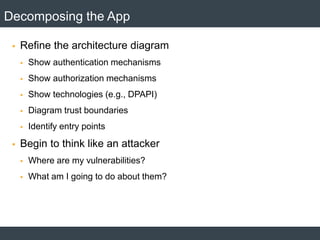
Decomposing the App
 Refine the architecture diagram
 Show authentication mechanisms
 Show authorization mechanisms
 Show technologies (e.g., DPAPI)
 Diagram trust boundaries
 Identify entry points
 Begin to think like an attacker
 Where are my vulnerabilities?
 What am I going to do about them?
Example
Bob
Alice
Bill
IIS ASP.NET
Web Server Database Server
Trust
Forms Authentication URL Authorization
DPAPI Windows Authentication
Firewall
Login
State
Main
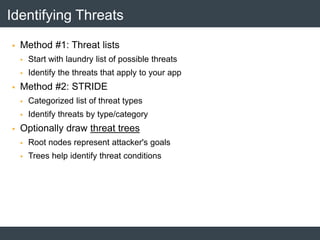
Identifying Threats
 Method #1: Threat lists
 Start with laundry list of possible threats
 Identify the threats that apply to your app
 Method #2: STRIDE
 Categorized list of threat types
 Identify threats by type/category
 Optionally draw threat trees
 Root nodes represent attacker's goals
 Trees help identify threat conditions
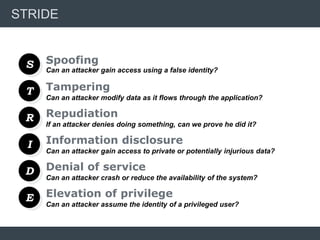
STRIDE
S
T
R
I
D
Tampering
Repudiation
Information disclosure
Denial of service
Can an attacker gain access using a false identity?
Can an attacker modify data as it flows through the application?
If an attacker denies doing something, can we prove he did it?
Can an attacker gain access to private or potentially injurious data?
Can an attacker crash or reduce the availability of the system?
E Elevation of privilege
Can an attacker assume the identity of a privileged user?
Spoofing
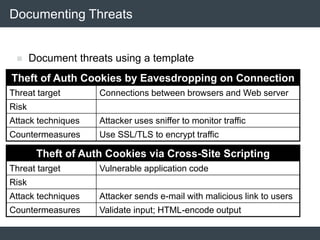
Documenting Threats
Theft of Auth Cookies by Eavesdropping on Connection
Threat target Connections between browsers and Web server
Risk
Attack techniques Attacker uses sniffer to monitor traffic
Countermeasures Use SSL/TLS to encrypt traffic
 Document threats using a template
Theft of Auth Cookies via Cross-Site Scripting
Threat target Vulnerable application code
Risk
Attack techniques Attacker sends e-mail with malicious link to users
Countermeasures Validate input; HTML-encode output
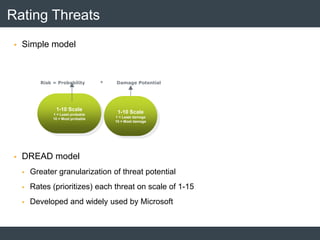
Rating Threats
 Simple model
 DREAD model
 Greater granularization of threat potential
 Rates (prioritizes) each threat on scale of 1-15
 Developed and widely used by Microsoft
Risk = Probability * Damage Potential
1-10 Scale
1 = Least probable
10 = Most probable
1-10 Scale
1 = Least damage
10 = Most damage
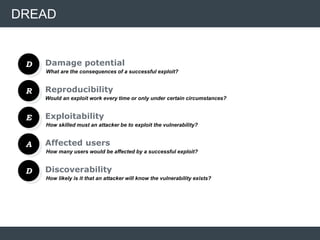
DREAD
D
R
E
A
D
Reproducibility
Exploitability
Affected users
Discoverability
What are the consequences of a successful exploit?
Would an exploit work every time or only under certain circumstances?
How skilled must an attacker be to exploit the vulnerability?
How many users would be affected by a successful exploit?
How likely is it that an attacker will know the vulnerability exists?
Damage potential
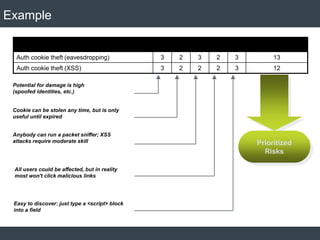
Example
Threat D R E A D Sum
Auth cookie theft (eavesdropping) 3 2 3 2 3 13
Auth cookie theft (XSS) 3 2 2 2 3 12
Potential for damage is high
(spoofed identities, etc.)
Cookie can be stolen any time, but is only
useful until expired
Anybody can run a packet sniffer; XSS
attacks require moderate skill
All users could be affected, but in reality
most won't click malicious links
Easy to discover: just type a <script> block
into a field
Prioritized
Risks
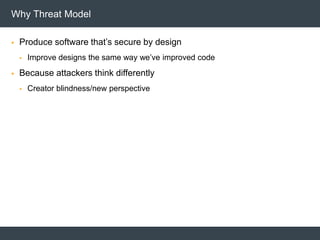
 Produce software that’s secure by design
 Improve designs the same way we’ve improved code
 Because attackers think differently
 Creator blindness/new perspective
Why Threat Model
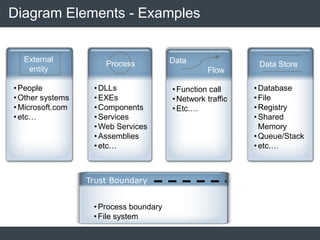
Diagram Elements - Examples
•People
•Other systems
•Microsoft.com
•etc…
•Function call
•Network traffic
•Etc.…
•DLLs
•EXEs
•Components
•Services
•Web Services
•Assemblies
•etc…
•Database
•File
•Registry
•Shared
Memory
•Queue/Stack
•etc.…
External
entity
Process Data
Flow
Data Store
Trust Boundary
•Process boundary
•File system
 Add trust boundaries that intersect data flows
 Points/surfaces where an attacker can interject
 Machine boundaries, privilege boundaries, integrity
boundaries are examples of trust boundaries
 Threads in a native process are often inside a trust
boundary, because they share the same rights and access
 Processes talking across a network always have a trust
boundary
Diagrams: Trust Boundaries
 Context Diagram
 Very high-level; entire component / product / system
 Level 1 Diagram
 High level; single feature / scenario
 Level 2 Diagram
 Low level; detailed sub-components of features
 Level 3 Diagram
 More detailed
 Rare to need more layers, except in huge projects or when you’re drawing
more trust boundaries
Diagram layers
Castle
Service
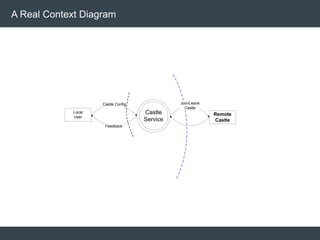
Local
User
Castle Config
Feedback
Join/Leave
Castle
Remote
Castle
A Real Context Diagram
Castle
Service
Explorer
(or rundll32)
SSDP SSDP
Remote
Castle
Service
Registry
LSA
SAM
Local User
Shacct
Get acct info
Feedback
Manage
Castle Join, leave,
Set users props
Set acct info
Read
Castle info
Set psswd
Set acct
info
Feedback
Get machine
password
Cache Castle
info
Query users props
Query other
Castle info
Publish this
Castle info
Manage
Castle
Get acct
info
Get version
info
Set version
info
1 2
3
4
5
6
7
8
9
10
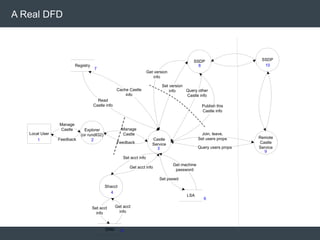
A Real DFD
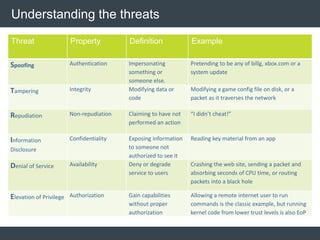
Understanding the threats
Threat Property Definition Example
Spoofing Authentication Impersonating
something or
someone else.
Pretending to be any of billg, xbox.com or a
system update
Tampering Integrity Modifying data or
code
Modifying a game config file on disk, or a
packet as it traverses the network
Repudiation Non-repudiation Claiming to have not
performed an action
“I didn’t cheat!”
Information
Disclosure
Confidentiality Exposing information
to someone not
authorized to see it
Reading key material from an app
Denial of Service Availability Deny or degrade
service to users
Crashing the web site, sending a packet and
absorbing seconds of CPU time, or routing
packets into a black hole
Elevation of Privilege Authorization Gain capabilities
without proper
authorization
Allowing a remote internet user to run
commands is the classic example, but running
kernel code from lower trust levels is also EoP
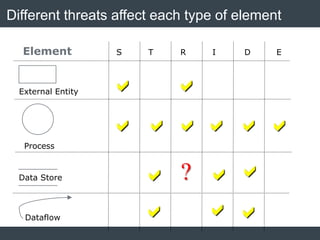
Different threats affect each type of element
Process
Data Store
S T R I D E
 
     
  
  
Element
?
Dataflow
External Entity
Castle
Service
Explorer
(or rundll32)
SSDP SSDP
Remote
Castle
Service
Registry
LSA
SAM
Local User
Shacct
Get acct info
Feedback
Manage
Castle Join, leave,
Set users props
Set acct info
Read
Castle info
Set psswd
Set acct
info
Feedback
Get machine
password
Cache Castle
info
Query users props
Query other
Castle info
Publish this
Castle info
Manage
Castle
Get acct
info
Get version
info
Set version
info
1 2
3
4
5
6
7
8
9
10
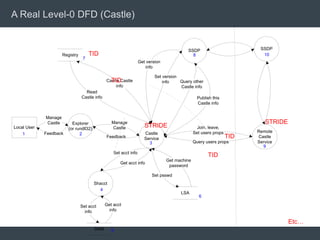
A Real Level-0 DFD (Castle)
TID
TID
TID
TID
STRIDE
STRIDE
Etc…
 Address each threat
 Four ways to address threats:
 Redesign to eliminate
 Apply standard mitigations
 Invent new mitigations
 Riskier
 Accept vulnerability in design
 Address each threat!
Mitigate
 Validate the whole TM
 Does diagram match final code?
 Are threats enumerated?
 Minimum: STRIDE per element that touches a trust boundary
 Has Test reviewed the model?
 Created appropriate test plans
 Tester approach often finds issues with TM, or details
 Is each threat mitigated?
 Are mitigations done right
Validating Threat Models
End exercise
 Uncover Security Design Flaws Using the STRIDE Approach
http://msdn.microsoft.com/msdnmag/issues/06/11/ThreatModeling/default.asp
x
 http://msdn.microsoft.com/en-us/magazine/cc700352.aspx
 http://msdn.microsoft.com/en-us/magazine/2009.01.securitybriefs.aspx
 http://msdn.microsoft.com/en-us/security/cc448120.aspx
References
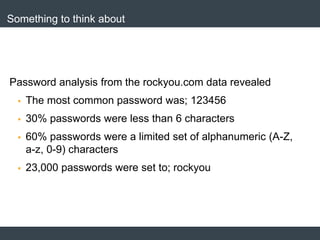
Something to think about
Password analysis from the rockyou.com data revealed
 The most common password was; 123456
 30% passwords were less than 6 characters
 60% passwords were a limited set of alphanumeric (A-Z,
a-z, 0-9) characters
 23,000 passwords were set to; rockyou
Thank You!!

Application Security Architecture and Threat Modelling

  • 1.
    Security Architecture and ThreatModelling Nilanjan De Devesh Bhatt
  • 2.
    95% of attacks areagainst “Web Servers and Web Applications”
  • 3.
    Average 35 No ofvulnerabilities in a website 52%of data breaches happen through Web Applications of Application has atleast one vulnerability 41 High 3 3 5 9 Mediu m Low The Scorecard 90% of hacking incidents are not reported 99% 82% of web applications have at least 1 High/Critical Vulnerability Business Logic Flaws are the most neglected vulnerabilities Source: IViZ blog
  • 4.
  • 5.
    USER AGENTS User Agent/ Client. Browser, BOT, Program Sends Requests like GET, POST, HEAD, PUT, DELETE WEB SERVERS ● Web Server listens for requests ● Has interpreters to understand PHP/ASP.net ● Talks to the database ● Has TCP ports in listening mode Database Server MySQL, MSSQL, Oracle 3 Tier – Web App Architecture
  • 6.
    Web App Architecture– Data View Web Client Data Store Web Server Trusted Code Running on server Web Service Un-trusted Input hitting the server from the client, data stores, web services.
  • 7.
    Would you trustthe code? Operating System and Shell Web Server + Interpreter (PHP/ASP.net) Trusted Code
  • 8.
    Traditional SDLC It’s toolate!! We won’t meet our security standards.. Production Deadline Development + QA Pen Testing 189 Vulnerabilities Security is taken care of only at the end of the SDLC
  • 9.
    Secure SDLC Production Deadline Development +QA + Security Pen Testing 12 Vulnerabilities Security is implemented during the SW development. • We can achieve application security • We save development time  $$
  • 10.
    Enabling S-SDLC Source Repository Build Management System Static Analysis Tool TeamCity Jenkins Hudson Bamboo TFS SVN GIT Etc. Developers Team Leaders / Security team Production
  • 11.
    Cost to find/fixa defect during integration/system test is 15-90 times higher than at design/coding Time & Cost Code Inspection Integration Testing System TestingStatic analysis tools find defects and design flaws “in phase” Unit Testing Design Coding QA Production Scan sources with checkmarx Scan binaries SAST vs. DAST
  • 12.
    SAST vs. DAST Dynamic Application Security Testing (DAST) - Can be performed only at the end of dev. - More layers covered - Not compete coverage (it is random). - Results not shown in the code  Static Application Security Testing (SAST) - Can be performed from the beginning of the SDLC - Covers only the application code - Covers all the application code - Results are shown inside the code - Has more false positive results 12
  • 13.
    SAST vs. DAST So what is better, DAST or SAST?  For good security both SAST and DAST are necessary and complete each other.  If you have SAST you will get better quality results from the DAST service 13
  • 14.
    SAST Scanning  SASTvendors scan binaries - Need compilation environment - Need compliable code..  have to wait  SAST vendors scanning pure source code - Uses the virtual compiler technology - No need for compilation environment - Can scan from day one - Scan takes longer System is more flexible  can customize the system for less FP results. 14
  • 15.
  • 17.
  • 18.
    Common Types ofAttack Connection Fails Organizational Attacks Restricted Data Accidental Breaches in Security Automated Attacks Hackers Viruses, Trojan Horses, and Worms Denial of Service (DoS) DoS
  • 19.
    Types of Threats Spoofedpackets, etc. Buffer overflows, illicit paths, etc. SQL injection, XSS, input tampering, etc. Network Host Application Threats against the network Threats against the host Threats against the application
  • 20.
    Threats Against theNetwork Threat Examples Information gathering Port scanning Using trace routing to detect network topologies Using broadcast requests to enumerate subnet hosts Eavesdropping Using packet sniffers to steal passwords Denial of service (DoS) SYN floods ICMP echo request floods Malformed packets Spoofing Packets with spoofed source addresses http://msdn.microsoft.com/library/en-us/dnnetsec/html/THCMCh15.asp? frame=true#c15618429_004
  • 21.
    Threats Against theHost Threat Examples Arbitrary code execution Buffer overflows in ISAPI DLLs (e.g., MS01-033) Directory traversal attacks (MS00-078) File disclosure Malformed HTR requests (MS01-031) Virtualized UNC share vulnerability (MS00-019) Denial of service (DoS) Malformed SMTP requests (MS02-012) Malformed WebDAV requests (MS01-016) Malformed URLs (MS01-012) Brute-force file uploads Unauthorized access Resources with insufficiently restrictive ACLs Spoofing with stolen login credentials Exploitation of open ports and protocols Using NetBIOS and SMB to enumerate hosts Connecting remotely to SQL Server
  • 22.
    Threats Against theApplication Threat Examples SQL injection Including a DROP TABLE command in text typed into an input field Cross-site scripting Using malicious client-side script to steal cookies Hidden-field tampering Maliciously changing the value of a hidden field Eavesdropping Using a packet sniffer to steal passwords and cookies from traffic on unencrypted connections Session hijacking Using a stolen session ID cookie to access someone else's session state Identity spoofing Using a stolen forms authentication cookie to pose as another user Information disclosure Allowing client to see a stack trace when an unhandled exception occurs
  • 23.
    Threat Modeling  Structuredapproach to identifying, quantifying, and addressing threats  Essential part of development process
  • 24.
    The Threat ModelingProcess Identify assets Document architecture Decompose application Identify threats Document threats Rate threats 1 2 3 4 5 6
  • 25.
    Identifying Assets  Whatis it that you want to protect?  Private data (e.g., customer list)  Proprietary data (e.g., intellectual property)  Potentially injurious data (e.g., credit card numbers, decryption keys)  These also count as "assets"  Integrity of back-end databases  Integrity of the Web pages (no defacement)  Integrity of other machines on the network  Availability of the application
  • 26.
    Documenting Architecture  Definewhat the app does and how it's used  Users view pages with catalog items  Users perform searches for catalog items  Users add items to shopping carts  Users check out  Diagram the application  Show subsystems  Show data flow  List assets
  • 27.
    Example Bob Alice Bill Asset #4 Asset #1Asset #2 Asset #3 Asset #5 Asset #6 IIS ASP.NET Web Server Login State Main Database Server Firewall
  • 28.
    Decomposing the App Refine the architecture diagram  Show authentication mechanisms  Show authorization mechanisms  Show technologies (e.g., DPAPI)  Diagram trust boundaries  Identify entry points  Begin to think like an attacker  Where are my vulnerabilities?  What am I going to do about them?
  • 29.
    Example Bob Alice Bill IIS ASP.NET Web ServerDatabase Server Trust Forms Authentication URL Authorization DPAPI Windows Authentication Firewall Login State Main
  • 30.
    Identifying Threats  Method#1: Threat lists  Start with laundry list of possible threats  Identify the threats that apply to your app  Method #2: STRIDE  Categorized list of threat types  Identify threats by type/category  Optionally draw threat trees  Root nodes represent attacker's goals  Trees help identify threat conditions
  • 31.
    STRIDE S T R I D Tampering Repudiation Information disclosure Denial ofservice Can an attacker gain access using a false identity? Can an attacker modify data as it flows through the application? If an attacker denies doing something, can we prove he did it? Can an attacker gain access to private or potentially injurious data? Can an attacker crash or reduce the availability of the system? E Elevation of privilege Can an attacker assume the identity of a privileged user? Spoofing
  • 32.
    Documenting Threats Theft ofAuth Cookies by Eavesdropping on Connection Threat target Connections between browsers and Web server Risk Attack techniques Attacker uses sniffer to monitor traffic Countermeasures Use SSL/TLS to encrypt traffic  Document threats using a template Theft of Auth Cookies via Cross-Site Scripting Threat target Vulnerable application code Risk Attack techniques Attacker sends e-mail with malicious link to users Countermeasures Validate input; HTML-encode output
  • 33.
    Rating Threats  Simplemodel  DREAD model  Greater granularization of threat potential  Rates (prioritizes) each threat on scale of 1-15  Developed and widely used by Microsoft Risk = Probability * Damage Potential 1-10 Scale 1 = Least probable 10 = Most probable 1-10 Scale 1 = Least damage 10 = Most damage
  • 34.
    DREAD D R E A D Reproducibility Exploitability Affected users Discoverability What arethe consequences of a successful exploit? Would an exploit work every time or only under certain circumstances? How skilled must an attacker be to exploit the vulnerability? How many users would be affected by a successful exploit? How likely is it that an attacker will know the vulnerability exists? Damage potential
  • 35.
    Example Threat D RE A D Sum Auth cookie theft (eavesdropping) 3 2 3 2 3 13 Auth cookie theft (XSS) 3 2 2 2 3 12 Potential for damage is high (spoofed identities, etc.) Cookie can be stolen any time, but is only useful until expired Anybody can run a packet sniffer; XSS attacks require moderate skill All users could be affected, but in reality most won't click malicious links Easy to discover: just type a <script> block into a field Prioritized Risks
  • 36.
     Produce softwarethat’s secure by design  Improve designs the same way we’ve improved code  Because attackers think differently  Creator blindness/new perspective Why Threat Model
  • 37.
    Diagram Elements -Examples •People •Other systems •Microsoft.com •etc… •Function call •Network traffic •Etc.… •DLLs •EXEs •Components •Services •Web Services •Assemblies •etc… •Database •File •Registry •Shared Memory •Queue/Stack •etc.… External entity Process Data Flow Data Store Trust Boundary •Process boundary •File system
  • 38.
     Add trustboundaries that intersect data flows  Points/surfaces where an attacker can interject  Machine boundaries, privilege boundaries, integrity boundaries are examples of trust boundaries  Threads in a native process are often inside a trust boundary, because they share the same rights and access  Processes talking across a network always have a trust boundary Diagrams: Trust Boundaries
  • 39.
     Context Diagram Very high-level; entire component / product / system  Level 1 Diagram  High level; single feature / scenario  Level 2 Diagram  Low level; detailed sub-components of features  Level 3 Diagram  More detailed  Rare to need more layers, except in huge projects or when you’re drawing more trust boundaries Diagram layers
  • 40.
  • 41.
    Castle Service Explorer (or rundll32) SSDP SSDP Remote Castle Service Registry LSA SAM LocalUser Shacct Get acct info Feedback Manage Castle Join, leave, Set users props Set acct info Read Castle info Set psswd Set acct info Feedback Get machine password Cache Castle info Query users props Query other Castle info Publish this Castle info Manage Castle Get acct info Get version info Set version info 1 2 3 4 5 6 7 8 9 10 A Real DFD
  • 42.
    Understanding the threats ThreatProperty Definition Example Spoofing Authentication Impersonating something or someone else. Pretending to be any of billg, xbox.com or a system update Tampering Integrity Modifying data or code Modifying a game config file on disk, or a packet as it traverses the network Repudiation Non-repudiation Claiming to have not performed an action “I didn’t cheat!” Information Disclosure Confidentiality Exposing information to someone not authorized to see it Reading key material from an app Denial of Service Availability Deny or degrade service to users Crashing the web site, sending a packet and absorbing seconds of CPU time, or routing packets into a black hole Elevation of Privilege Authorization Gain capabilities without proper authorization Allowing a remote internet user to run commands is the classic example, but running kernel code from lower trust levels is also EoP
  • 43.
    Different threats affecteach type of element Process Data Store S T R I D E               Element ? Dataflow External Entity
  • 44.
    Castle Service Explorer (or rundll32) SSDP SSDP Remote Castle Service Registry LSA SAM LocalUser Shacct Get acct info Feedback Manage Castle Join, leave, Set users props Set acct info Read Castle info Set psswd Set acct info Feedback Get machine password Cache Castle info Query users props Query other Castle info Publish this Castle info Manage Castle Get acct info Get version info Set version info 1 2 3 4 5 6 7 8 9 10 A Real Level-0 DFD (Castle) TID TID TID TID STRIDE STRIDE Etc…
  • 45.
     Address eachthreat  Four ways to address threats:  Redesign to eliminate  Apply standard mitigations  Invent new mitigations  Riskier  Accept vulnerability in design  Address each threat! Mitigate
  • 46.
     Validate thewhole TM  Does diagram match final code?  Are threats enumerated?  Minimum: STRIDE per element that touches a trust boundary  Has Test reviewed the model?  Created appropriate test plans  Tester approach often finds issues with TM, or details  Is each threat mitigated?  Are mitigations done right Validating Threat Models
  • 47.
  • 48.
     Uncover SecurityDesign Flaws Using the STRIDE Approach http://msdn.microsoft.com/msdnmag/issues/06/11/ThreatModeling/default.asp x  http://msdn.microsoft.com/en-us/magazine/cc700352.aspx  http://msdn.microsoft.com/en-us/magazine/2009.01.securitybriefs.aspx  http://msdn.microsoft.com/en-us/security/cc448120.aspx References
  • 49.
    Something to thinkabout Password analysis from the rockyou.com data revealed  The most common password was; 123456  30% passwords were less than 6 characters  60% passwords were a limited set of alphanumeric (A-Z, a-z, 0-9) characters  23,000 passwords were set to; rockyou
  • 50.