3d image visualization

Presented By: Alok Samantaray
Branch: Electronics &
telecommunication
Roll no: 042
CONTENTS
1.
2.
3.
4.
5.
6.
7.
8.
9.
10.
11.
12.
13.

Introduction
Why Visualize?
Methods for 3d Output
Rendering Techniques
MATLAB Viewing of 3d graphs and scenes
Volume Rendering
Isocontouring
Hole Detection in 3d models
Visualization of 3d microscopic images
Whitepaper Stereoscopic visualization
Applications of Stereoscopic Visualization
Advantages and Disadvantages of 3d visualization
Conclusion
Introduction
 Data visualization is the mapping of data into a Cartesian space.
 The greatest challenge for visualizing data is to find a good spatial

representation.

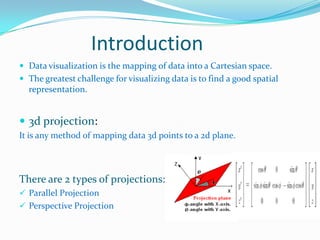
 3d projection:
It is any method of mapping data 3d points to a 2d plane.

There are 2 types of projections:
 Parallel Projection
 Perspective Projection
Why Visualise?
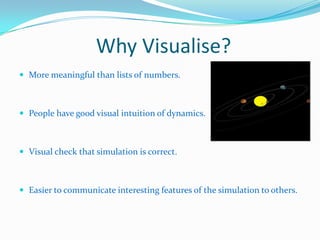
 More meaningful than lists of numbers.

 People have good visual intuition of dynamics.

 Visual check that simulation is correct.

 Easier to communicate interesting features of the simulation to others.
Methods for 3D Output
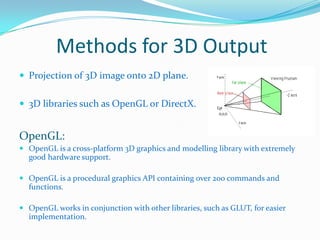
 Projection of 3D image onto 2D plane.
 3D libraries such as OpenGL or DirectX.

OpenGL:
 OpenGL is a cross-platform 3D graphics and modelling library with extremely
good hardware support.
 OpenGL is a procedural graphics API containing over 200 commands and

functions.
 OpenGL works in conjunction with other libraries, such as GLUT, for easier
implementation.
Rendering Techniques
There are mainly 3 steps of rendering:
 Volume Formation
 Classification
 Image Formation

There are 2 methods of rendering:
Surface Rendering:
 This is a binary, not a continuous classification technique.
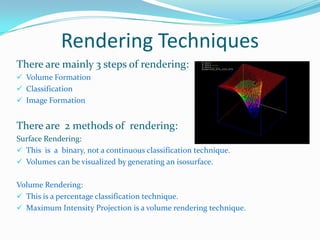
 Volumes can be visualized by generating an isosurface.
Volume Rendering:
 This is a percentage classification technique.
 Maximum Intensity Projection is a volume rendering technique.
MATLAB Viewing of 3d graphs and scenes
MATLAB viewing is composed of two basic areas:
 Positioning the viewpoint
 Setting the aspect ratio and relative axis scaling

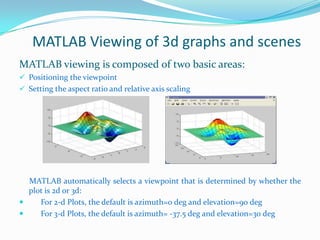
MATLAB automatically selects a viewpoint that is determined by whether the
plot is 2d or 3d:

For 2-d Plots, the default is azimuth=0 deg and elevation=90 deg

For 3-d Plots, the default is azimuth= -37.5 deg and elevation=30 deg
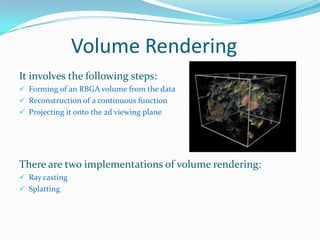
Volume Rendering
It involves the following steps:
 Forming of an RBGA volume from the data
 Reconstruction of a continuous function
 Projecting it onto the 2d viewing plane

There are two implementations of volume rendering:
 Ray casting

 Splatting
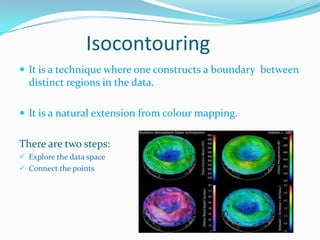
Isocontouring
 It is a technique where one constructs a boundary between

distinct regions in the data.
 It is a natural extension from colour mapping.

There are two steps:
 Explore the data space
 Connect the points
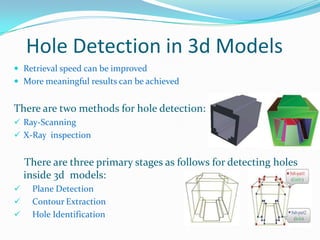
Hole Detection in 3d Models
 Retrieval speed can be improved

 More meaningful results can be achieved

There are two methods for hole detection:
 Ray-Scanning
 X-Ray inspection

There are three primary stages as follows for detecting holes
inside 3d models:




Plane Detection
Contour Extraction
Hole Identification
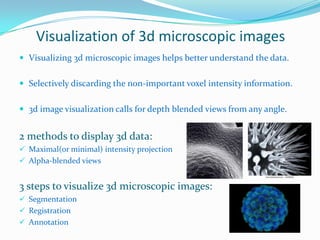
Visualization of 3d microscopic images
 Visualizing 3d microscopic images helps better understand the data.

 Selectively discarding the non-important voxel intensity information.
 3d image visualization calls for depth blended views from any angle.

2 methods to display 3d data:
 Maximal(or minimal) intensity projection
 Alpha-blended views

3 steps to visualize 3d microscopic images:
 Segmentation
 Registration
 Annotation
Whitepaper Stereoscopic visualization of 3d images
 Most challenging advancement of within the area of 3d

visualization.

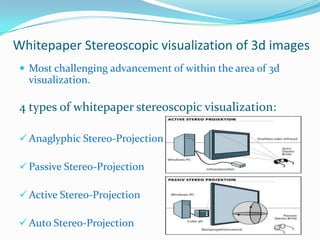
4 types of whitepaper stereoscopic visualization:
 Anaglyphic Stereo-Projection
 Passive Stereo-Projection

 Active Stereo-Projection
 Auto Stereo-Projection
Applications of stereoscopic Visualization
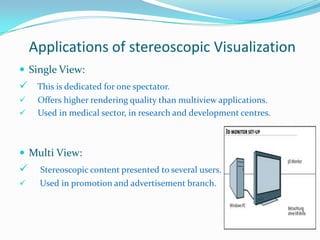
 Single View:

 This is dedicated for one spectator.



Offers higher rendering quality than multiview applications.
Used in medical sector, in research and development centres.

 Multi View:



Stereoscopic content presented to several users.



Used in promotion and advertisement branch.
Advantages and Disadvantages of 3d visualization
 +Easy to implement on any platform with raster graphics.
 -Objects drawn as 2D.
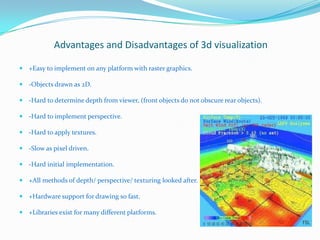
 -Hard to determine depth from viewer, (front objects do not obscure rear objects).
 -Hard to implement perspective.
 -Hard to apply textures.
 -Slow as pixel driven.
 -Hard initial implementation.
 +All methods of depth/ perspective/ texturing looked after.
 +Hardware support for drawing so fast.
 +Libraries exist for many different platforms.
Conclusion
 The existing techniques are very distinct approaches to the problems.

 Each offers a selection opportunity since different data types need diverse

graphical representation.

 There is a lot of research still to be done but the requirement has been

identified.

 Thus we look forward to a large amount of new and innovative techniques

for 3d visualization of data and information in the future.
Thank you!!!

3D Image visualization

  • 1.
    3d image visualization PresentedBy: Alok Samantaray Branch: Electronics & telecommunication Roll no: 042
  • 2.
    CONTENTS 1. 2. 3. 4. 5. 6. 7. 8. 9. 10. 11. 12. 13. Introduction Why Visualize? Methods for3d Output Rendering Techniques MATLAB Viewing of 3d graphs and scenes Volume Rendering Isocontouring Hole Detection in 3d models Visualization of 3d microscopic images Whitepaper Stereoscopic visualization Applications of Stereoscopic Visualization Advantages and Disadvantages of 3d visualization Conclusion
  • 3.
    Introduction  Data visualizationis the mapping of data into a Cartesian space.  The greatest challenge for visualizing data is to find a good spatial representation.  3d projection: It is any method of mapping data 3d points to a 2d plane. There are 2 types of projections:  Parallel Projection  Perspective Projection
  • 4.
    Why Visualise?  Moremeaningful than lists of numbers.  People have good visual intuition of dynamics.  Visual check that simulation is correct.  Easier to communicate interesting features of the simulation to others.
  • 5.
    Methods for 3DOutput  Projection of 3D image onto 2D plane.  3D libraries such as OpenGL or DirectX. OpenGL:  OpenGL is a cross-platform 3D graphics and modelling library with extremely good hardware support.  OpenGL is a procedural graphics API containing over 200 commands and functions.  OpenGL works in conjunction with other libraries, such as GLUT, for easier implementation.
  • 6.
    Rendering Techniques There aremainly 3 steps of rendering:  Volume Formation  Classification  Image Formation There are 2 methods of rendering: Surface Rendering:  This is a binary, not a continuous classification technique.  Volumes can be visualized by generating an isosurface. Volume Rendering:  This is a percentage classification technique.  Maximum Intensity Projection is a volume rendering technique.
  • 7.
    MATLAB Viewing of3d graphs and scenes MATLAB viewing is composed of two basic areas:  Positioning the viewpoint  Setting the aspect ratio and relative axis scaling MATLAB automatically selects a viewpoint that is determined by whether the plot is 2d or 3d:  For 2-d Plots, the default is azimuth=0 deg and elevation=90 deg  For 3-d Plots, the default is azimuth= -37.5 deg and elevation=30 deg
  • 8.
    Volume Rendering It involvesthe following steps:  Forming of an RBGA volume from the data  Reconstruction of a continuous function  Projecting it onto the 2d viewing plane There are two implementations of volume rendering:  Ray casting  Splatting
  • 9.
    Isocontouring  It isa technique where one constructs a boundary between distinct regions in the data.  It is a natural extension from colour mapping. There are two steps:  Explore the data space  Connect the points
  • 10.
    Hole Detection in3d Models  Retrieval speed can be improved  More meaningful results can be achieved There are two methods for hole detection:  Ray-Scanning  X-Ray inspection There are three primary stages as follows for detecting holes inside 3d models:    Plane Detection Contour Extraction Hole Identification
  • 11.
    Visualization of 3dmicroscopic images  Visualizing 3d microscopic images helps better understand the data.  Selectively discarding the non-important voxel intensity information.  3d image visualization calls for depth blended views from any angle. 2 methods to display 3d data:  Maximal(or minimal) intensity projection  Alpha-blended views 3 steps to visualize 3d microscopic images:  Segmentation  Registration  Annotation
  • 12.
    Whitepaper Stereoscopic visualizationof 3d images  Most challenging advancement of within the area of 3d visualization. 4 types of whitepaper stereoscopic visualization:  Anaglyphic Stereo-Projection  Passive Stereo-Projection  Active Stereo-Projection  Auto Stereo-Projection
  • 13.
    Applications of stereoscopicVisualization  Single View:  This is dedicated for one spectator.   Offers higher rendering quality than multiview applications. Used in medical sector, in research and development centres.  Multi View:  Stereoscopic content presented to several users.  Used in promotion and advertisement branch.
  • 14.
    Advantages and Disadvantagesof 3d visualization  +Easy to implement on any platform with raster graphics.  -Objects drawn as 2D.  -Hard to determine depth from viewer, (front objects do not obscure rear objects).  -Hard to implement perspective.  -Hard to apply textures.  -Slow as pixel driven.  -Hard initial implementation.  +All methods of depth/ perspective/ texturing looked after.  +Hardware support for drawing so fast.  +Libraries exist for many different platforms.
  • 15.
    Conclusion  The existingtechniques are very distinct approaches to the problems.  Each offers a selection opportunity since different data types need diverse graphical representation.  There is a lot of research still to be done but the requirement has been identified.  Thus we look forward to a large amount of new and innovative techniques for 3d visualization of data and information in the future.
  • 16.