






C# Jobs System
Francis Duranceau
Lead Field Engineer, Unity
Warning
• This design and feature implementation is not final and will change by the
time it is out.
• It still gives you a very good overview of what Unity wants to offer.
Plan
• Jobs 101
• Changes in Unity
• What is coming in 2017.x
• Best practices to “jobify” some tasks
• AI example
Jobs 101
Why?
• It is a way for games to use the other cores in a simple manner when they
are available
What is a job?
• A job is a function that performs a set of actions on a set of data
• Data driven / Data centric approach (think SIMD, but spread out)
• Most efficient when it can be done independently and in parallel
Jobs 101 - Continued
When to use jobs?
• Not all your systems can be turned into jobs
• Dependencies
• Some algorithms lend themselves better than others.
• Repetitive, independent data generally a good target
• Example: Path Finding, Transformations, Flocks, etc.
Jobs 101 - Continued
Synchronization
• When executing multiple jobs over multiple processors, need a means to
synchronize data.
• Solution: Fencing
• A Fence is a primitive that allows you to coordinate jobs and wait for
data to be available
• A main thread kicks off a number of jobs and waits for fence to be
cleared
• Once cleared, results can either be passed on to other jobs / collated.
Jobs 101 - Continued
Internally, Unity already has a job system in C++ that drives a lot of systems.
• With 2017, modularization and the process of exposing underlying
systems means we’ve opened up our internal job system… but made it
available in C#
• Using C# it’s less difficult to make mistakes
• Power and flexibility combined with easy of use!
Targetted in 2017.2, or 2017.3, or 2018.x 
Jobs 101 - Continued
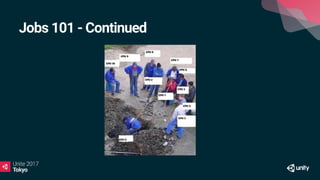
Jobs, or multi-threading an algorithm is a trade off between Effort (how
much CPU usage to complete some amount of work) and Latency (how fast
you want the result back)
If you build a table, by yourself, it's simpler than coordinating a team... but
the team can do it faster
You are making a choice
• To coordinate your jobs, it will cost you memory and time to
organize/distribute your jobs
Jobs 101 - Continued
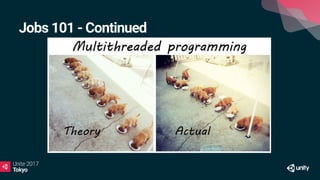
Not all algorithm works well
You might have to redesign a naive design to organize the data so it works
iPhone 5S : has two threads, one for main, one for rendering ... if you add 6
more threads, then you may impact the performance and reduce it
Changes in Unity
Changes in Unity
Internal changes
- TransformHierarchy
- TransformChangeDispatch
What is coming in 2017.x
What is coming
• Jobs
• New C# attributes
• New types
• Intrinsic (float3 for instance)
• NativeArray are new VALUE type. It's a struct.
• The data is actually in native and the handle enforces threading
restriction and allows access from native of C# without marshaling
• Accessible on both sides (C++ and C#)
• And you will need to dispose of them
• New compiler
• Only used on jobs
public class JobifiedBehaviour : MonoBehaviour
{
public struct JobifiedData
{
[ReadOnly]
public NativeArray<float> inData;
public NativeArray<float> outData;
public void Execute(int index)
{
outData[index] = inData[index] + 1.0;
}
}
void Update()
{
JobifiedData jobData = new JobifiedData();
jobData.inData = new NativeArray<float>(100, Allocator.Persistent);
jobData.outData = new NativeArray<float>(100, Allocator.Persistent);
jobData.Schedule(100, 2).Complete();
jobData.inData.Dispose();
jobData.outData.Dispose();
}
}
Why is the new compiler so much faster?
• Works with intrinsic types
• Knows about vectorization
• SIMD
• Using math asm calls
• C# is just a VM…
Trade off between performance and precision
SIN -> lookup table, other math optimizations
Mono compiler to IL -> IL to internal domain model -> optimize -> send to
LLVM -> write executable code in memory
What it is NOT for
• Jobs over multiple frames
• Algorithms that may not converge
• Call the Unity API or .NET API on other threads
Best practices to jobify
Best practices
• Data Oriented Design (DOD)
• Mainly used to optimize data layout for a physical architecture
Be careful, it might not be true for all hardware...
You may even want different data org for different tiers of hardware
-> Use our Device Intelligence!
• Design for cache coherency
• Group data physically in memory
In C# that means struct in arrays
• Forget MonoBehaviour based designs
Best practices
TLDR; You want to put things in arrays and process them in order
Note : This also works with single threaded architecture
Best practices – Steps
1 – Old school MonoBehaviour design
2 – Move Functionality to Component System
3 – Change simple data to IComponentData
Manager containing NativeList of that data is automatically created for you
4 - Switch to Multithreaded updating using C# job system
Best practices – Step 1
public class RotatorOnUpdate : ScriptBehaviour {
[SerializeField]
float m_Speed;
public float speed
{
get { return m_Speed; }
set { m_Speed = value; }
}
protected override void OnUpdate ()
{
base.OnUpdate ();
transform.rotation = transform.rotation *
Quaternion.AngleAxis (m_Speed * Time.deltaTime, Vector3.up);
}
}
Best practices – Step 2
namespace ECS
{
public class RotationSpeedComponent : ScriptBehaviour
{
public float speed;
}
public class RotatingSystem : ComponentSystem
{
// NOTE: InjectTuples scans all [InjectTuples] in the class
// and returns the union of objects that have both Transform and LightRotator
[InjectTuples]
public ComponentArray<Transform> m_Transforms;
[InjectTuples]
public ComponentArray<RotationSpeedComponent> m_Rotators;
[...]
Best practices – Step 2
[...]
override protected void OnUpdate()
{
base.OnUpdate ();
float dt = Time.deltaTime;
for (int i = 0; i != m_Transforms.Length;i++)
{
m_Transforms[i].rotation = m_Transforms[i].rotation *
Quaternion.AngleAxis(dt * m_Rotators[i].speed, Vector3.up);
}
}
}
}
Best practices – Step 3
// New light weight component is a struct.
// The data is stored in a NativeArray owned by a LightWeightComponentManager<>
//
// * Data is stored in tightly packed array (Good for performance and also allows for
// safe jobification)
// * Allows for light weight components to live without their game object,
// enabling massive scale lightweight simulation (Think 2M instances in certain games)
[Serializable]
public struct RotationSpeed : IComponentData
{
public float speed;
public RotationSpeed (float speed) { this.speed = speed; }
}
Best practices – Step 3
public class RotatingSystem : ComponentSystem
{
// NOTE: InjectTuples scans all [InjectTuples] in the class
// and returns the union of objects that have both Transform and LightRotator
[InjectTuples]
public ComponentArray<Transform> m_Transforms;
[InjectTuples]
public ComponentDataArray<RotationSpeed> m_Rotators;
[...]
Best practices – Step 3
[...]
override protected void OnUpdate()
{
base.OnUpdate ();
float dt = Time.deltaTime;
for (int i = 0; i != m_Transforms.Length;i++)
{
m_Transforms[i].rotation = m_Transforms[i].rotation *
Quaternion.AngleAxis(dt * m_Rotators[i].speed, Vector3.up);
}
}
}
Best practices – Step 4
public class SystemRotator : ComponentSystem
{
// NOTE: InjectTuples scans all [InjectTuples] in the class
// and returns the union of objects that have both Transform and LightRotator
[InjectTuples]
public TransformAccessArray m_Transforms;
[InjectTuples]
public ComponentDataArray<RotationSpeed> m_Rotators;
[...]
Best practices – Step 4
[...]
protected override void OnUpdate()
{
base.OnUpdate ();
var job = new RotatorJob();
job.dt = Time.deltaTime;
job.rotators = m_Rotators;
job.Schedule(m_Transforms);
}
[...]
Best practices – Step 4
[...]
struct RotatorJob : IJobParallelForTransform
{
public float dt;
[ReadOnly]
public ComponentDataArray<RotationSpeed> rotators;
public void Execute(int i, TransformAccess transform)
{
transform.rotation = transform.rotation *
Quaternion.AngleAxis(dt * rotators[i].speed, Vector3.up);
}
}
}
Boids - bird-oid object simulation
• Lets’s look at the code…
Example of AI for an RTS
RTS
• Rethink your normal A* algorithm
• Tiling system
• Influence map
• Hierarchical Graph were you calculate nodes in jobs and then do a
simpler traversal of the graph
• If you use a BlackBoard as a knowledge database
• It is easy to create small jobs on a per unit/squad basis
• You can precalculate multiple jobs in parallel that are then going to be
used as knowledge sources for the BlackBoard
Automated planning
Thank you!

【Unite 2017 Tokyo】C#ジョブシステムによるモバイルゲームのパフォーマンス向上テクニック

  • 1.
  • 2.
  • 3.
    Warning • This designand feature implementation is not final and will change by the time it is out. • It still gives you a very good overview of what Unity wants to offer.
  • 4.
    Plan • Jobs 101 •Changes in Unity • What is coming in 2017.x • Best practices to “jobify” some tasks • AI example
  • 5.
    Jobs 101 Why? • Itis a way for games to use the other cores in a simple manner when they are available What is a job? • A job is a function that performs a set of actions on a set of data • Data driven / Data centric approach (think SIMD, but spread out) • Most efficient when it can be done independently and in parallel
  • 6.
    Jobs 101 -Continued When to use jobs? • Not all your systems can be turned into jobs • Dependencies • Some algorithms lend themselves better than others. • Repetitive, independent data generally a good target • Example: Path Finding, Transformations, Flocks, etc.
  • 7.
    Jobs 101 -Continued Synchronization • When executing multiple jobs over multiple processors, need a means to synchronize data. • Solution: Fencing • A Fence is a primitive that allows you to coordinate jobs and wait for data to be available • A main thread kicks off a number of jobs and waits for fence to be cleared • Once cleared, results can either be passed on to other jobs / collated.
  • 8.
    Jobs 101 -Continued Internally, Unity already has a job system in C++ that drives a lot of systems. • With 2017, modularization and the process of exposing underlying systems means we’ve opened up our internal job system… but made it available in C# • Using C# it’s less difficult to make mistakes • Power and flexibility combined with easy of use! Targetted in 2017.2, or 2017.3, or 2018.x 
  • 9.
    Jobs 101 -Continued
  • 10.
    Jobs 101 -Continued
  • 11.
    Jobs 101 -Continued
  • 12.
    Jobs 101 -Continued Jobs, or multi-threading an algorithm is a trade off between Effort (how much CPU usage to complete some amount of work) and Latency (how fast you want the result back) If you build a table, by yourself, it's simpler than coordinating a team... but the team can do it faster You are making a choice • To coordinate your jobs, it will cost you memory and time to organize/distribute your jobs
  • 13.
    Jobs 101 -Continued Not all algorithm works well You might have to redesign a naive design to organize the data so it works iPhone 5S : has two threads, one for main, one for rendering ... if you add 6 more threads, then you may impact the performance and reduce it
  • 14.
  • 15.
    Changes in Unity Internalchanges - TransformHierarchy - TransformChangeDispatch
  • 16.
    What is comingin 2017.x
  • 17.
    What is coming •Jobs • New C# attributes • New types • Intrinsic (float3 for instance) • NativeArray are new VALUE type. It's a struct. • The data is actually in native and the handle enforces threading restriction and allows access from native of C# without marshaling • Accessible on both sides (C++ and C#) • And you will need to dispose of them • New compiler • Only used on jobs
  • 18.
    public class JobifiedBehaviour: MonoBehaviour { public struct JobifiedData { [ReadOnly] public NativeArray<float> inData; public NativeArray<float> outData; public void Execute(int index) { outData[index] = inData[index] + 1.0; } } void Update() { JobifiedData jobData = new JobifiedData(); jobData.inData = new NativeArray<float>(100, Allocator.Persistent); jobData.outData = new NativeArray<float>(100, Allocator.Persistent); jobData.Schedule(100, 2).Complete(); jobData.inData.Dispose(); jobData.outData.Dispose(); } }
  • 19.
    Why is thenew compiler so much faster? • Works with intrinsic types • Knows about vectorization • SIMD • Using math asm calls • C# is just a VM… Trade off between performance and precision SIN -> lookup table, other math optimizations Mono compiler to IL -> IL to internal domain model -> optimize -> send to LLVM -> write executable code in memory
  • 20.
    What it isNOT for • Jobs over multiple frames • Algorithms that may not converge • Call the Unity API or .NET API on other threads
  • 21.
  • 22.
    Best practices • DataOriented Design (DOD) • Mainly used to optimize data layout for a physical architecture Be careful, it might not be true for all hardware... You may even want different data org for different tiers of hardware -> Use our Device Intelligence! • Design for cache coherency • Group data physically in memory In C# that means struct in arrays • Forget MonoBehaviour based designs
  • 23.
    Best practices TLDR; Youwant to put things in arrays and process them in order Note : This also works with single threaded architecture
  • 24.
    Best practices –Steps 1 – Old school MonoBehaviour design 2 – Move Functionality to Component System 3 – Change simple data to IComponentData Manager containing NativeList of that data is automatically created for you 4 - Switch to Multithreaded updating using C# job system
  • 25.
    Best practices –Step 1 public class RotatorOnUpdate : ScriptBehaviour { [SerializeField] float m_Speed; public float speed { get { return m_Speed; } set { m_Speed = value; } } protected override void OnUpdate () { base.OnUpdate (); transform.rotation = transform.rotation * Quaternion.AngleAxis (m_Speed * Time.deltaTime, Vector3.up); } }
  • 26.
    Best practices –Step 2 namespace ECS { public class RotationSpeedComponent : ScriptBehaviour { public float speed; } public class RotatingSystem : ComponentSystem { // NOTE: InjectTuples scans all [InjectTuples] in the class // and returns the union of objects that have both Transform and LightRotator [InjectTuples] public ComponentArray<Transform> m_Transforms; [InjectTuples] public ComponentArray<RotationSpeedComponent> m_Rotators; [...]
  • 27.
    Best practices –Step 2 [...] override protected void OnUpdate() { base.OnUpdate (); float dt = Time.deltaTime; for (int i = 0; i != m_Transforms.Length;i++) { m_Transforms[i].rotation = m_Transforms[i].rotation * Quaternion.AngleAxis(dt * m_Rotators[i].speed, Vector3.up); } } } }
  • 28.
    Best practices –Step 3 // New light weight component is a struct. // The data is stored in a NativeArray owned by a LightWeightComponentManager<> // // * Data is stored in tightly packed array (Good for performance and also allows for // safe jobification) // * Allows for light weight components to live without their game object, // enabling massive scale lightweight simulation (Think 2M instances in certain games) [Serializable] public struct RotationSpeed : IComponentData { public float speed; public RotationSpeed (float speed) { this.speed = speed; } }
  • 29.
    Best practices –Step 3 public class RotatingSystem : ComponentSystem { // NOTE: InjectTuples scans all [InjectTuples] in the class // and returns the union of objects that have both Transform and LightRotator [InjectTuples] public ComponentArray<Transform> m_Transforms; [InjectTuples] public ComponentDataArray<RotationSpeed> m_Rotators; [...]
  • 30.
    Best practices –Step 3 [...] override protected void OnUpdate() { base.OnUpdate (); float dt = Time.deltaTime; for (int i = 0; i != m_Transforms.Length;i++) { m_Transforms[i].rotation = m_Transforms[i].rotation * Quaternion.AngleAxis(dt * m_Rotators[i].speed, Vector3.up); } } }
  • 31.
    Best practices –Step 4 public class SystemRotator : ComponentSystem { // NOTE: InjectTuples scans all [InjectTuples] in the class // and returns the union of objects that have both Transform and LightRotator [InjectTuples] public TransformAccessArray m_Transforms; [InjectTuples] public ComponentDataArray<RotationSpeed> m_Rotators; [...]
  • 32.
    Best practices –Step 4 [...] protected override void OnUpdate() { base.OnUpdate (); var job = new RotatorJob(); job.dt = Time.deltaTime; job.rotators = m_Rotators; job.Schedule(m_Transforms); } [...]
  • 33.
    Best practices –Step 4 [...] struct RotatorJob : IJobParallelForTransform { public float dt; [ReadOnly] public ComponentDataArray<RotationSpeed> rotators; public void Execute(int i, TransformAccess transform) { transform.rotation = transform.rotation * Quaternion.AngleAxis(dt * rotators[i].speed, Vector3.up); } } }
  • 34.
    Boids - bird-oidobject simulation • Lets’s look at the code…
  • 35.
    Example of AIfor an RTS
  • 36.
    RTS • Rethink yournormal A* algorithm • Tiling system • Influence map • Hierarchical Graph were you calculate nodes in jobs and then do a simpler traversal of the graph • If you use a BlackBoard as a knowledge database • It is easy to create small jobs on a per unit/squad basis • You can precalculate multiple jobs in parallel that are then going to be used as knowledge sources for the BlackBoard Automated planning
  • 37.