


Core .NET Framework 4 Enhancements
Your presenter for today?Robert MacLeansadev.co.za@rmaclean
What to expect
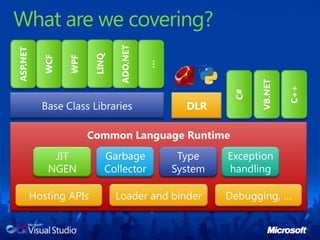
What are we covering?LINQASP.NETWCFWPFADO.NET…C#VB.NETC++DLRBase Class LibrariesCommon Language RuntimeJITNGENGarbage CollectorType SystemException handlingHosting APIsLoader and binderDebugging, …
PREP VS – with base projectOpen program.csVS – With  SxS DemoVS – With Movies (MEF) demo, do a build and remove some of the adapters from the output (put somewhere you can get them easily). Keep folder openVS – With location demo.Clean reflector
BIG INTTour base[Ctrl+1] – talk about the big number and what happens when you try to go over it (overflow and exceptions). Point out decimal is a type value.decimal bigNumber = decimal.MaxValue;Console.WriteLine(bigNumber);bigNumber++;Console.WriteLine(bigNumber);Add reference to system.numerics (nice to point out performance of add reference dialog)[Ctrl+2] – change to big int. point out it is a class. Talk about static methods needed. Talk about no logical upperlimitBigIntegerbigInteger1 = new BigInteger(decimal.MaxValue);Console.WriteLine(bigInteger1);BigInteger bigInteger2 = new BigInteger(decimal.MaxValue);Console.WriteLine(bigInteger1 * bigInteger2);Console.WriteLine(BigInteger.Multiply(bigInteger1, bigInteger2));LAZY<T>[Ctrl+3] Add the slow class[Ctrl+4] Add code to the main method to show the constructor is slowConsole.WriteLine("Before slow create");Slow slow = new Slow();Console.WriteLine("After slow create");slow.Message();[Ctrl+5] Now change to implement Lazy<T> and show how it is not created until we actually use it.Console.WriteLine("Before slow create");Lazy<Slow> slow = new Lazy<Slow>();Console.WriteLine("After slow create");Console.WriteLine(slow.IsValueCreated);            slow.Value.Message();Console.WriteLine(slow.IsValueCreated);            Remove the main method and type sorted – nice to show intellisense filtering. Should have sortedlist, sorteddictionary and sortedsetTalk about difference between sorting in a list which needs to check during actions and unbalanced binary tree which takes no perf hit on insert etc… and still gives great sorting perf. Also point out difference in requirements of keys for list/dictionary and objects in set.
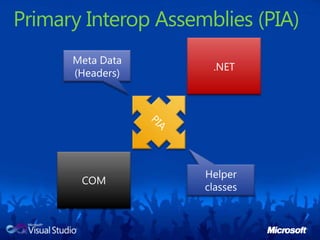
IObserableSLIDE (1) – explain the pattern[Ctrl+6] Add data class [Ctrl+7] Add the provider class[Ctrl+8] Add the subscriber class[Ctrl+9] Add the code to the main methodGPSSensor sensor = new GPSSensor();Map map = new Map();sensor.Subscribe(map, ConsoleColor.Red);//Map map2 = new Map();//sensor.Subscribe(map2, ConsoleColor.Yellow);do{sensor.GetPosition();Thread.Sleep(1000);} while (map.StillTracking);Uncomment to show second subscriberSxSSlide (1) – Explain the issueSwitch to VS with loader demo.Tour the codestart with the two assemblies, point out versions they are compiled to and what they do.Now show the Loader app and show the version (3.5).Show the code and point out that with reflection we are loading it – remind the audience to remember this stuff for laterRun the app and note it points out v2 NOT 3.5 – cause the CLR hasn’t changed since 2.Click the run 3.5 assembly – works. Click run 4 assembly and note the exception.Now change the assembly version of loader to 4. and do stesp 4 and 5 again and it works!PIASlide(1) – Explain what PIA is. Problems – rediretibution and size of distributableGo to VS[ALT +1 ] Add the count down methodprivate static void CountDown()        {Console.WriteLine("3...");Thread.Sleep(1000);Console.WriteLine("2...");Thread.Sleep(1000);Console.WriteLine("1...");Thread.Sleep(1000);}
Add reference to Microsoft.Office.Interop.Excel – add version 14. Properties of the assembly and make sure embed is off.[ALT + 3] Add code to main method and talk through. Since it is automation explain the count down. Run and move back.Go to binary and drag into reflector – point out that it is listed under references which means shipping it.Go back to VS and change the assembly to embed. Build and demo to show it still works. Refresh reflector and show it has moved from references to actually embedding it into the project.Code Contracts[ALT + 4] Show the code and explain how the zune works out dates. [ALT + 5] Add code to call it in the mainintdayInYear;intyear = ZuneDate.YearSince1980(300, out dayInYear);Console.WriteLine("It's the {0} day of {1}", dayInYear, year);Now change day to: 10593 and explain the bugon Dec 31 2008[ALT + 6] – fully updated loopAdd to start of loop: intdaysAtStart = daysLeft;Add to end of loop: Contract.Assert(daysLeft < daysAtStart);Now project and enable static code contract checking and buildPoint out the unproven issue – saying it thinks that there is a scenario that could fail[ALT + 7] Add the else to verify and buildelse{Contract.Assert(false);}It is the problem – so lets deal with it[ALT +8]  Change the else contents to then build and show no errors. Now show dayInYear= 366;    return year;Change day to -1 and show it doesn’t make sense.[ALT+9] Add to start of check: Contract.Requires(daysSince1980 > 0);Build and show how it identifies it – that is preconditions. Leave for now.[Ctrl+Alt+1] Add post conditions:Contract.Ensures(Contract.ValueAtReturn<int>(out dayInYear) > 0);Contract.Ensures(Contract.ValueAtReturn<int>(out dayInYear) < 367);Run and show that the code doesn’t fail even though our condition is not enforces the check. Pop into reflector and show that those conditions aren’t there.Turn on runtime checking and build and run – not the failure. Pop into reflector and show the code now and show the new code which has been added to the start and end! Mention sandcastle documentation tool support too
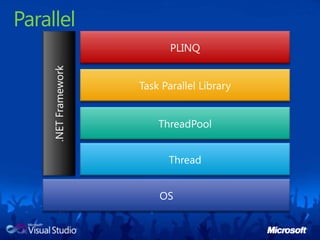
MEFShow folder with Movies project in it and run it. Add in the files we removed during the setup and run again. Remind people of reflection we saw before.Switch to VS with Movies Project and tour the code/Explain we have an interface Show a provider implements it and is attributed with export.Show code of form and show the ImportMany attribute and talk about the initialisation (Catalog, container, and then we can loop over it).ParallelOpen Task ManagerSlides (1) – explain enhancements in parallel and why it is importantShow hunt button code and explain that change it [Ctrl+Alt+2]Parallel.ForEach(movieProviders, movieProvider =>            {HighlightProvider(movieProvider, HighlightState.Searching);IEnumerable<MovieInfo> movies = movieProvider.Search(MovieNameTextBox.Text);HighlightProvider(movieProvider, HighlightState.Loading);AddRange(results, movies);HighlightProvider(movieProvider, HighlightState.None);});Run and show in parallelGo to IMDB provider and show the LINQ query and explain that could also be parallele.[CTRL+ALT+3]: varmatchedLines = from l in File.ReadLines("movies.list").AsParallel()Build and show improvement (if any)LocationSwitch to location demo and tour that code and demo. PRAY
All the small things<demo/>
IObservableUpdatePublisherDataDataDataSubscriberSubscriberSubscriber
IObservable<demo/>
In-process side-by-side (SxS)2.0 addin3.0 addin3.5 addin4.0 addin.NET 4.0.NET 3.5.NET 3.0.NET 2.0Host Process (eg: Outlook)
In Process SxS<demo/>
Primary Interop Assemblies (PIA).NETMeta Data(Headers)PIACOMHelper classes
PIA<demo/>
Tour of .NET 4Part 2<demo/>
ParallelPLINQTask Parallel Library.NET FrameworkThreadPoolThreadOS
Parallel Enhancements<demo/>
System.Device.Location<demo/>
LocationWindows 7 onlyStatus will be Disabled for other platformsGeosense for Windowshttp://geosenseforwindows.com/
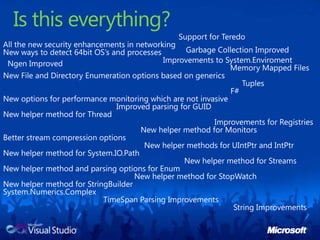
Is this everything?Support for TeredoAll the new security enhancements in networkingGarbage Collection ImprovedNew ways to detect 64bit OS’s and processesImprovements to System.EnviromentNgen ImprovedMemory Mapped FilesNew File and Directory Enumeration options based on genericsTuplesF#New options for performance monitoring which are not invasiveImproved parsing for GUIDNew helper method for ThreadImprovements for RegistriesNew helper method for MonitorsBetter stream compression optionsNew helper methods for UIntPtr and IntPtrNew helper method for System.IO.PathNew helper method for StreamsNew helper method and parsing options for EnumNew helper method for StopWatchNew helper method for StringBuilderSystem.Numerics.ComplexTimeSpanParsing ImprovementsString Improvements
Future?http://bcl.codeplex.comBigRationalLongPathPerfMonitorTraceEvent

Core .NET Framework 4.0 Enhancements

  • 1.
    Core .NET Framework4 Enhancements
  • 2.
    Your presenter fortoday?Robert MacLeansadev.co.za@rmaclean
  • 3.
  • 4.
    What are wecovering?LINQASP.NETWCFWPFADO.NET…C#VB.NETC++DLRBase Class LibrariesCommon Language RuntimeJITNGENGarbage CollectorType SystemException handlingHosting APIsLoader and binderDebugging, …
  • 5.
    PREP VS –with base projectOpen program.csVS – With SxS DemoVS – With Movies (MEF) demo, do a build and remove some of the adapters from the output (put somewhere you can get them easily). Keep folder openVS – With location demo.Clean reflector
  • 6.
    BIG INTTour base[Ctrl+1]– talk about the big number and what happens when you try to go over it (overflow and exceptions). Point out decimal is a type value.decimal bigNumber = decimal.MaxValue;Console.WriteLine(bigNumber);bigNumber++;Console.WriteLine(bigNumber);Add reference to system.numerics (nice to point out performance of add reference dialog)[Ctrl+2] – change to big int. point out it is a class. Talk about static methods needed. Talk about no logical upperlimitBigIntegerbigInteger1 = new BigInteger(decimal.MaxValue);Console.WriteLine(bigInteger1);BigInteger bigInteger2 = new BigInteger(decimal.MaxValue);Console.WriteLine(bigInteger1 * bigInteger2);Console.WriteLine(BigInteger.Multiply(bigInteger1, bigInteger2));LAZY<T>[Ctrl+3] Add the slow class[Ctrl+4] Add code to the main method to show the constructor is slowConsole.WriteLine("Before slow create");Slow slow = new Slow();Console.WriteLine("After slow create");slow.Message();[Ctrl+5] Now change to implement Lazy<T> and show how it is not created until we actually use it.Console.WriteLine("Before slow create");Lazy<Slow> slow = new Lazy<Slow>();Console.WriteLine("After slow create");Console.WriteLine(slow.IsValueCreated); slow.Value.Message();Console.WriteLine(slow.IsValueCreated); Remove the main method and type sorted – nice to show intellisense filtering. Should have sortedlist, sorteddictionary and sortedsetTalk about difference between sorting in a list which needs to check during actions and unbalanced binary tree which takes no perf hit on insert etc… and still gives great sorting perf. Also point out difference in requirements of keys for list/dictionary and objects in set.
  • 7.
    IObserableSLIDE (1) –explain the pattern[Ctrl+6] Add data class [Ctrl+7] Add the provider class[Ctrl+8] Add the subscriber class[Ctrl+9] Add the code to the main methodGPSSensor sensor = new GPSSensor();Map map = new Map();sensor.Subscribe(map, ConsoleColor.Red);//Map map2 = new Map();//sensor.Subscribe(map2, ConsoleColor.Yellow);do{sensor.GetPosition();Thread.Sleep(1000);} while (map.StillTracking);Uncomment to show second subscriberSxSSlide (1) – Explain the issueSwitch to VS with loader demo.Tour the codestart with the two assemblies, point out versions they are compiled to and what they do.Now show the Loader app and show the version (3.5).Show the code and point out that with reflection we are loading it – remind the audience to remember this stuff for laterRun the app and note it points out v2 NOT 3.5 – cause the CLR hasn’t changed since 2.Click the run 3.5 assembly – works. Click run 4 assembly and note the exception.Now change the assembly version of loader to 4. and do stesp 4 and 5 again and it works!PIASlide(1) – Explain what PIA is. Problems – rediretibution and size of distributableGo to VS[ALT +1 ] Add the count down methodprivate static void CountDown() {Console.WriteLine("3...");Thread.Sleep(1000);Console.WriteLine("2...");Thread.Sleep(1000);Console.WriteLine("1...");Thread.Sleep(1000);}
  • 8.
    Add reference toMicrosoft.Office.Interop.Excel – add version 14. Properties of the assembly and make sure embed is off.[ALT + 3] Add code to main method and talk through. Since it is automation explain the count down. Run and move back.Go to binary and drag into reflector – point out that it is listed under references which means shipping it.Go back to VS and change the assembly to embed. Build and demo to show it still works. Refresh reflector and show it has moved from references to actually embedding it into the project.Code Contracts[ALT + 4] Show the code and explain how the zune works out dates. [ALT + 5] Add code to call it in the mainintdayInYear;intyear = ZuneDate.YearSince1980(300, out dayInYear);Console.WriteLine("It's the {0} day of {1}", dayInYear, year);Now change day to: 10593 and explain the bugon Dec 31 2008[ALT + 6] – fully updated loopAdd to start of loop: intdaysAtStart = daysLeft;Add to end of loop: Contract.Assert(daysLeft < daysAtStart);Now project and enable static code contract checking and buildPoint out the unproven issue – saying it thinks that there is a scenario that could fail[ALT + 7] Add the else to verify and buildelse{Contract.Assert(false);}It is the problem – so lets deal with it[ALT +8] Change the else contents to then build and show no errors. Now show dayInYear= 366; return year;Change day to -1 and show it doesn’t make sense.[ALT+9] Add to start of check: Contract.Requires(daysSince1980 > 0);Build and show how it identifies it – that is preconditions. Leave for now.[Ctrl+Alt+1] Add post conditions:Contract.Ensures(Contract.ValueAtReturn<int>(out dayInYear) > 0);Contract.Ensures(Contract.ValueAtReturn<int>(out dayInYear) < 367);Run and show that the code doesn’t fail even though our condition is not enforces the check. Pop into reflector and show that those conditions aren’t there.Turn on runtime checking and build and run – not the failure. Pop into reflector and show the code now and show the new code which has been added to the start and end! Mention sandcastle documentation tool support too
  • 9.
    MEFShow folder withMovies project in it and run it. Add in the files we removed during the setup and run again. Remind people of reflection we saw before.Switch to VS with Movies Project and tour the code/Explain we have an interface Show a provider implements it and is attributed with export.Show code of form and show the ImportMany attribute and talk about the initialisation (Catalog, container, and then we can loop over it).ParallelOpen Task ManagerSlides (1) – explain enhancements in parallel and why it is importantShow hunt button code and explain that change it [Ctrl+Alt+2]Parallel.ForEach(movieProviders, movieProvider => {HighlightProvider(movieProvider, HighlightState.Searching);IEnumerable<MovieInfo> movies = movieProvider.Search(MovieNameTextBox.Text);HighlightProvider(movieProvider, HighlightState.Loading);AddRange(results, movies);HighlightProvider(movieProvider, HighlightState.None);});Run and show in parallelGo to IMDB provider and show the LINQ query and explain that could also be parallele.[CTRL+ALT+3]: varmatchedLines = from l in File.ReadLines("movies.list").AsParallel()Build and show improvement (if any)LocationSwitch to location demo and tour that code and demo. PRAY
  • 10.
    All the smallthings<demo/>
  • 11.
  • 12.
  • 13.
    In-process side-by-side (SxS)2.0addin3.0 addin3.5 addin4.0 addin.NET 4.0.NET 3.5.NET 3.0.NET 2.0Host Process (eg: Outlook)
  • 14.
  • 15.
    Primary Interop Assemblies(PIA).NETMeta Data(Headers)PIACOMHelper classes
  • 16.
  • 17.
    Tour of .NET4Part 2<demo/>
  • 18.
    ParallelPLINQTask Parallel Library.NETFrameworkThreadPoolThreadOS
  • 19.
  • 20.
  • 21.
    LocationWindows 7 onlyStatuswill be Disabled for other platformsGeosense for Windowshttp://geosenseforwindows.com/
  • 22.
    Is this everything?Supportfor TeredoAll the new security enhancements in networkingGarbage Collection ImprovedNew ways to detect 64bit OS’s and processesImprovements to System.EnviromentNgen ImprovedMemory Mapped FilesNew File and Directory Enumeration options based on genericsTuplesF#New options for performance monitoring which are not invasiveImproved parsing for GUIDNew helper method for ThreadImprovements for RegistriesNew helper method for MonitorsBetter stream compression optionsNew helper methods for UIntPtr and IntPtrNew helper method for System.IO.PathNew helper method for StreamsNew helper method and parsing options for EnumNew helper method for StopWatchNew helper method for StringBuilderSystem.Numerics.ComplexTimeSpanParsing ImprovementsString Improvements
  • 23.

Editor's Notes

  • #16 Size of app 15kbSize of excel interop 1.5Mb
  • #24 BigRationalBigRational builds on the BigInteger introduced in .NET Framework 4 to create an arbitrary-precision rational number class.Long PathThis library provides functionality to make it easier to work with paths that are longer than the current 259 character limit.PerfMonitorPerfMonitor is a command-line tool for profiling the system using Event Tracing for Windows (ETW). PerfMonitor is built on top of the TraceEvent library.TraceEventAn library that greatly simplifies reading Event Tracing for Windows (ETW) events.