Bootstrap (Responsive Web Design)
By Sarvesh Kushwaha
What we are going to cover ?
• Overview of Bootstrap
• Media Queries
• Getting Started
• Grid System
• Layouts
• Workshop
• Advantage and disadvantages
• Resources
Overview of Bootstrap
• Framework for Front-End development
• Open source project by twitter
• Responsive
• Mobile First approach
How they Achieved Responsiveness ?
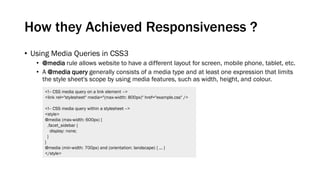
• Using Media Queries in CSS3
• @media rule allows website to have a different layout for screen, mobile phone, tablet, etc.
• A @media query generally consists of a media type and at least one expression that limits
the style sheet's scope by using media features, such as width, height, and colour.
<!-- CSS media query on a link element -->
<link rel="stylesheet" media="(max-width: 800px)" href="example.css" />
<!-- CSS media query within a stylesheet -->
<style>
@media (max-width: 600px) {
.facet_sidebar {
display: none;
}
}
@media (min-width: 700px) and (orientation: landscape) { ... }
</style>
Getting Started
<!DOCTYPE html>
<html lang="en">
<head>
<meta charset="utf-8">
<meta http-equiv="X-UA-Compatible" content="IE=edge">
<meta name="viewport" content="width=device-width, initial-scale=1">
<!-- The above 3 meta tags *must* come first in the head; any other head content must come *after* these tags -->
<!-- Bootstrap -->
<link href="css/bootstrap.min.css" rel="stylesheet">
<!-- HTML5 shim and Respond.js for IE8 support of HTML5 elements and media queries -->
<!-- WARNING: Respond.js doesn't work if you view the page via file:// -->
<!--[if lt IE 9]> <script src="https://oss.maxcdn.com/html5shiv/3.7.2/html5shiv.min.js"></script>
<script src="https://oss.maxcdn.com/respond/1.4.2/respond.min.js"></script> <![endif]-->
</head>
<body>
<h1>Hello, world!</h1> <!-- jQuery (necessary for Bootstrap's JavaScript plugins) -->
<script src="https://ajax.googleapis.com/ajax/libs/jquery/1.11.3/jquery.min.js"></script>
<!-- Include all compiled plugins (below), or include individual files as needed --> <script
src="js/bootstrap.min.js"></script>
</body>
</html>
Take the latest version of IE, and don’t make us cry.
Render the content acc. to physical width of device.
At first load no zoom. Enable zooming using “user-
scalable” , “maximum-scale”.
Grid System
1. Extra small devices - Phones (<768px) - .col-xs-[num]
2. Small devices - Tablets (≥768px) - .col-sm-[num]
3. Medium devices - Desktops (≥992px) - .col-md-[num]
4. Large devices - Desktops (≥1200px)- .col-lg-[num]
Layout
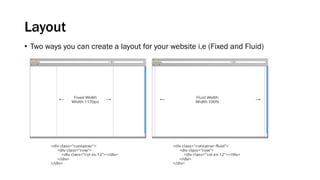
• Two ways you can create a layout for your website i.e (Fixed and Fluid)
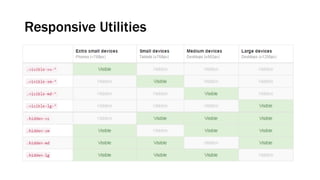
Responsive Utilities
Bootstrap workshop
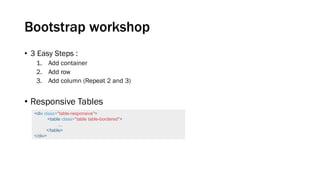
• 3 Easy Steps :
1. Add container
2. Add row
3. Add column (Repeat 2 and 3)
• Responsive Tables
<div class="table-responsive">
<table class="table table-bordered">
...
</table>
</div>
Bootstrap workshop (Contd.)
• Forms
• Vertical Form (default form layout)
• Inline Form
• Horizontal Form
• Custom Form
Bootstrap workshop (Contd.)
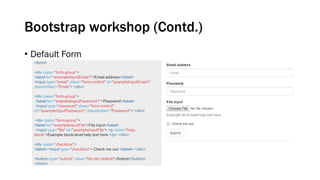
• Default Form
<form>
<div class="form-group">
<label for="exampleInputEmail1">Email address</label>
<input type="email" class="form-control" id="exampleInputEmail1"
placeholder="Email"> </div>
<div class="form-group">
<label for="exampleInputPassword1">Password</label>
<input type="password" class="form-control"
id="exampleInputPassword1" placeholder="Password"> </div>
<div class="form-group">
<label for="exampleInputFile">File input</label>
<input type="file" id="exampleInputFile"> <p class="help-
block">Example block-level help text here.</p> </div>
<div class="checkbox">
<label> <input type="checkbox"> Check me out </label> </div>
<button type="submit" class="btn btn-default">Submit</button>
</form>
Bootstrap workshop (Contd.)
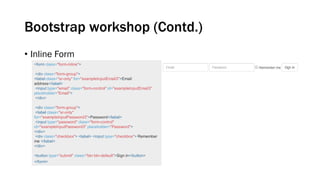
• Inline Form
<form class="form-inline">
<div class="form-group">
<label class="sr-only" for="exampleInputEmail3">Email
address</label>
<input type="email" class="form-control" id="exampleInputEmail3"
placeholder="Email">
</div>
<div class="form-group">
<label class="sr-only"
for="exampleInputPassword3">Password</label>
<input type="password" class="form-control"
id="exampleInputPassword3" placeholder="Password">
</div>
<div class="checkbox"> <label> <input type="checkbox"> Remember
me </label>
</div>
<button type="submit" class="btn btn-default">Sign in</button>
</form>
Bootstrap workshop (Contd.)
• Horizontal Form
<form class="form-horizontal">
<div class="form-group">
<label for="inputEmail3" class="col-sm-2 control-label">Email</label>
<div class="col-sm-10">
<input type="email" class="form-control" id="inputEmail3"
placeholder="Email"> </div> </div>
<div class="form-group">
<label for="inputPassword3" class="col-sm-2 control-
label">Password</label>
<div class="col-sm-10">
<input type="password" class="form-control" id="inputPassword3"
placeholder="Password"> </div> </div>
<div class="form-group">
<div class="col-sm-offset-2 col-sm-10">
<div class="checkbox"> <label> <input type="checkbox"> Remember
me </label> </div> </div> </div>
<div class="form-group"> <div class="col-sm-offset-2 col-sm-10">
<button type="submit" class="btn btn-default">Sign in</button> </div>
</div>
</form>
Bootstrap workshop (Contd.)
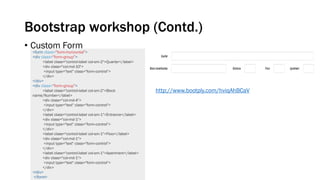
• Custom Form
<form class="form-horizontal">
<div class="form-group">
<label class="control-label col-sm-2">Quarter</label>
<div class="col-md-10">
<input type="text" class="form-control">
</div>
</div>
<div class="form-group">
<label class="control-label col-sm-2">Block
name/Number</label>
<div class="col-md-4">
<input type="text" class="form-control">
</div>
<label class="control-label col-sm-1">Entrance</label>
<div class="col-md-1">
<input type="text" class="form-control">
</div>
<label class="control-label col-sm-1">Floor</label>
<div class="col-md-1">
<input type="text" class="form-control">
</div>
<label class="control-label col-sm-1">Apartment</label>
<div class="col-md-1">
<input type="text" class="form-control">
</div>
</div>
</form>
http://www.bootply.com/hviqAhBCaV
Advantage and Disadvantage
• Advantages
• works in all modern browsers (IE9+ , Chrome , Safari , Mozilla ..)
• Rapid Development
• Fully and easily customizable
• Comes with jquery plugins
• Disadvantages
• My new website looks just like everyone else’s !
• No backward compatibility in between versions
• Using Bootstrap for existing websites is a tedious task
Resources
• Bootstrap Online Editor
• Codeply
• Bootply
• JsFiddle
• Pure Responsive table
• Foo Table
• Bootstrap Snippets
• Bootsnipp
• Bootbundle
• Snipplicious
• Bootstrap calendar
• Bootstrap Resources
• http://startbootstrap.com/bootstrap-resources/
Sarvesh Kushwaha | | | | | |

Bootstrap

  • 1.
    Bootstrap (Responsive WebDesign) By Sarvesh Kushwaha
  • 2.
    What we aregoing to cover ? • Overview of Bootstrap • Media Queries • Getting Started • Grid System • Layouts • Workshop • Advantage and disadvantages • Resources
  • 3.
    Overview of Bootstrap •Framework for Front-End development • Open source project by twitter • Responsive • Mobile First approach
  • 4.
    How they AchievedResponsiveness ? • Using Media Queries in CSS3 • @media rule allows website to have a different layout for screen, mobile phone, tablet, etc. • A @media query generally consists of a media type and at least one expression that limits the style sheet's scope by using media features, such as width, height, and colour. <!-- CSS media query on a link element --> <link rel="stylesheet" media="(max-width: 800px)" href="example.css" /> <!-- CSS media query within a stylesheet --> <style> @media (max-width: 600px) { .facet_sidebar { display: none; } } @media (min-width: 700px) and (orientation: landscape) { ... } </style>
  • 5.
    Getting Started <!DOCTYPE html> <htmllang="en"> <head> <meta charset="utf-8"> <meta http-equiv="X-UA-Compatible" content="IE=edge"> <meta name="viewport" content="width=device-width, initial-scale=1"> <!-- The above 3 meta tags *must* come first in the head; any other head content must come *after* these tags --> <!-- Bootstrap --> <link href="css/bootstrap.min.css" rel="stylesheet"> <!-- HTML5 shim and Respond.js for IE8 support of HTML5 elements and media queries --> <!-- WARNING: Respond.js doesn't work if you view the page via file:// --> <!--[if lt IE 9]> <script src="https://oss.maxcdn.com/html5shiv/3.7.2/html5shiv.min.js"></script> <script src="https://oss.maxcdn.com/respond/1.4.2/respond.min.js"></script> <![endif]--> </head> <body> <h1>Hello, world!</h1> <!-- jQuery (necessary for Bootstrap's JavaScript plugins) --> <script src="https://ajax.googleapis.com/ajax/libs/jquery/1.11.3/jquery.min.js"></script> <!-- Include all compiled plugins (below), or include individual files as needed --> <script src="js/bootstrap.min.js"></script> </body> </html> Take the latest version of IE, and don’t make us cry. Render the content acc. to physical width of device. At first load no zoom. Enable zooming using “user- scalable” , “maximum-scale”.
  • 6.
    Grid System 1. Extrasmall devices - Phones (<768px) - .col-xs-[num] 2. Small devices - Tablets (≥768px) - .col-sm-[num] 3. Medium devices - Desktops (≥992px) - .col-md-[num] 4. Large devices - Desktops (≥1200px)- .col-lg-[num]
  • 7.
    Layout • Two waysyou can create a layout for your website i.e (Fixed and Fluid)
  • 8.
  • 9.
    Bootstrap workshop • 3Easy Steps : 1. Add container 2. Add row 3. Add column (Repeat 2 and 3) • Responsive Tables <div class="table-responsive"> <table class="table table-bordered"> ... </table> </div>
  • 10.
    Bootstrap workshop (Contd.) •Forms • Vertical Form (default form layout) • Inline Form • Horizontal Form • Custom Form
  • 11.
    Bootstrap workshop (Contd.) •Default Form <form> <div class="form-group"> <label for="exampleInputEmail1">Email address</label> <input type="email" class="form-control" id="exampleInputEmail1" placeholder="Email"> </div> <div class="form-group"> <label for="exampleInputPassword1">Password</label> <input type="password" class="form-control" id="exampleInputPassword1" placeholder="Password"> </div> <div class="form-group"> <label for="exampleInputFile">File input</label> <input type="file" id="exampleInputFile"> <p class="help- block">Example block-level help text here.</p> </div> <div class="checkbox"> <label> <input type="checkbox"> Check me out </label> </div> <button type="submit" class="btn btn-default">Submit</button> </form>
  • 12.
    Bootstrap workshop (Contd.) •Inline Form <form class="form-inline"> <div class="form-group"> <label class="sr-only" for="exampleInputEmail3">Email address</label> <input type="email" class="form-control" id="exampleInputEmail3" placeholder="Email"> </div> <div class="form-group"> <label class="sr-only" for="exampleInputPassword3">Password</label> <input type="password" class="form-control" id="exampleInputPassword3" placeholder="Password"> </div> <div class="checkbox"> <label> <input type="checkbox"> Remember me </label> </div> <button type="submit" class="btn btn-default">Sign in</button> </form>
  • 13.
    Bootstrap workshop (Contd.) •Horizontal Form <form class="form-horizontal"> <div class="form-group"> <label for="inputEmail3" class="col-sm-2 control-label">Email</label> <div class="col-sm-10"> <input type="email" class="form-control" id="inputEmail3" placeholder="Email"> </div> </div> <div class="form-group"> <label for="inputPassword3" class="col-sm-2 control- label">Password</label> <div class="col-sm-10"> <input type="password" class="form-control" id="inputPassword3" placeholder="Password"> </div> </div> <div class="form-group"> <div class="col-sm-offset-2 col-sm-10"> <div class="checkbox"> <label> <input type="checkbox"> Remember me </label> </div> </div> </div> <div class="form-group"> <div class="col-sm-offset-2 col-sm-10"> <button type="submit" class="btn btn-default">Sign in</button> </div> </div> </form>
  • 14.
    Bootstrap workshop (Contd.) •Custom Form <form class="form-horizontal"> <div class="form-group"> <label class="control-label col-sm-2">Quarter</label> <div class="col-md-10"> <input type="text" class="form-control"> </div> </div> <div class="form-group"> <label class="control-label col-sm-2">Block name/Number</label> <div class="col-md-4"> <input type="text" class="form-control"> </div> <label class="control-label col-sm-1">Entrance</label> <div class="col-md-1"> <input type="text" class="form-control"> </div> <label class="control-label col-sm-1">Floor</label> <div class="col-md-1"> <input type="text" class="form-control"> </div> <label class="control-label col-sm-1">Apartment</label> <div class="col-md-1"> <input type="text" class="form-control"> </div> </div> </form> http://www.bootply.com/hviqAhBCaV
  • 15.
    Advantage and Disadvantage •Advantages • works in all modern browsers (IE9+ , Chrome , Safari , Mozilla ..) • Rapid Development • Fully and easily customizable • Comes with jquery plugins • Disadvantages • My new website looks just like everyone else’s ! • No backward compatibility in between versions • Using Bootstrap for existing websites is a tedious task
  • 16.
    Resources • Bootstrap OnlineEditor • Codeply • Bootply • JsFiddle • Pure Responsive table • Foo Table • Bootstrap Snippets • Bootsnipp • Bootbundle • Snipplicious • Bootstrap calendar • Bootstrap Resources • http://startbootstrap.com/bootstrap-resources/
  • 17.